1
FC3000S Microprocessor Control System for Elevator
Section 5 : System function
5.1 Major functions of FC3000S elevator control system
1. Inspection operation mode
When the inspection switch in the car or machine room is at inspection position, press UP/DOWN
button and the elevator will run at inspection speed. It runs only when the button is pressed. Press button
incessantly and the elevator will run. It will stop when the button is released.
Similarly, when inspecting, door opening and closing button function is in the same way.
2. Floor memory learning automatically
Attention: adjustment operator should not leave machine room during elevator auto-learning process.
Attention: Before the auto-learning, make sure the data in the basic parameters are correct and outer circuits
are functioning normally.
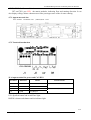
The process of auto-learning should be performed and ended manually. Operation is carried out by menu and
it can be stopped anytime in the course of Auto-learning
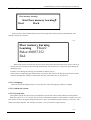
If the car is not at the base floor when the auto learningstarts through menu, it will go down to the base floor
automatically. Then the elevator run upwards. When it arrives the door zone of top floor, it will stop automatically.
Press ENTER again, the auto-learning process ends. The system will save the learning data. after about 10
seconds ,Take off the power switch, after about another 10 seconds ,the elevator can be powered up again.
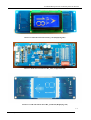
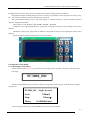
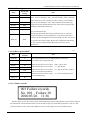
During auto-learning, floor and number of input pulses can be read form the LCD display. If the
auto-learning fails, it will quit the process and shows “auto-learning failed”. It will also show auto-learning
succeeds” if the process is successfully completed.
3.Collective control mode
In automation or attendant control mode, the elevator will automatically collect the car instruction and hall
instruction , control the car running, cancel the instructions that have been served. Passengers at every floor can
call the elevator by pressing up or down button.
4.Attendant operation mode
Through switch in the operation box, attendant control operation can be selected. Under this mode, the
elevator has functions as follows:
A. Attendant can change the running direction
B. Do not automatically close the door ( the door will close when attendant presses close button.)
C. When hall call is registered, the internal call signal corresponding the elevator will be shined.
D.cancel wrong selection. If a floor has been chosen, press the internal call button of this floor again then
selection of this floor will be canceled.
5.Firemen
operation
This function can be categorized to two different situations:
1. Return back to fire main floor function
Description: as soon as the fire switch is on, the elevator will cancel all call signals, slow down and stop at a
nearest floor without opening the door. Then it will go back to fire main floor immediately and open the door.
This is the most basic fire function, which is supported by all version of software.
2. Fire service function
Description: after the fireman switch has been on and the elevator comes back to fire mainfloor, it will
run in firemen operation mode. in this mode, the elevator will not answer hall call and only answer one
internal instruction at a time.
The operation of elevator door is as below: when the elevator is not at fire main floor, the door will not 5-1
Zhuhai Alpha E&M
Co., Ltd.
TEL: (+86)-0756-3326175