1
CHAPTER 2. INTRODUCTION
12
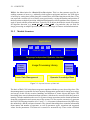
description for each operator which handles the effects of the operator and which indicates the
complexity, the operator class, as well as cross references and alternatives.
On top of these two modules the operators are implemented. Most of them are contained in the
HALCON image processing library, which is decribed in the Operator Reference Manual. This
library can dynamically be extended using so-called packages. The operators of these packages
behave like normal HALCON operators, but they contain extensions to the standard library
either generated by MVTec (for easy update) or by the user. This concept permits the user to
extend the system in a very flexible way. For more information see the C-Interface Manual.
Using a similar mechanism, framegrabbers are integrated using dynamic libraries. This allows
the user to integrate his/her own framegrabber or to download new releases of framegrabber
interfaces via the internet for fast and easy update without further changes of the rest of the
system.
The next module is the language-independent operator interface. It contains modules for calling
operators, handling the input/output and passing data objects to the host language. An operator
call is performed by the language interface which is generated automatically by a compiler
using the information in the operator data base. It allows to access HALCON operators within
the programming languages C, C++, and COM (Windows NT only). The interface to C++
allows the development of object oriented tools.
HDevelop is implemented on top of the language interface using HALCONC and the GUI
toolkit wxWindows developed by the Artificial Intelligence Applications Institute at The University of Edinburgh to get a portable user interface for Windows and UNIX.
2.2 Configuration
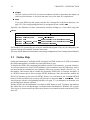
The following section describes the environment variables that are used by the HALCON library and HDevelop. A detailed description can be found the the Getting Started Manual. The
description here is given for the UNIX environment.
HALCONROOT
This is the most important environment variable. It designates the directory in
which HALCON is installed. Typical paths might be, e.g., /usr/local/halcon or
/usr/halcon on Unix systems, or C:\Program Files\MVTec\Halcon on Windows NT
systems. According to this variable the system can access subdirectories that are important for running HALCON. Some of them are:
– $HALCONROOT/help
Here the operator data base is situated. It is accessible by all HALCON programs to
obtain information about HALCON operators.
– $HALCONROOT/doc/html/reference/hdevelop
HDevelop uses this directory for online help, which can be displayed by a suitable
HTML browser like Netscape Navigator.
– $HALCONROOT/lut
User defined look-up tables are situated in this directory.
– $HALCONROOT/ocr
This directory includes trained fonts.