1
July 2003
Pipe Parameters
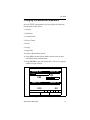
This section describes how to enter parameters for most standard
pipe materials and diameters. To step through each parameter
within the option, press the [T] key. Use the following steps to
enter the pipe parameters.
1. From the Transducer tab, press the [X] arrow key to reach
the Pipe tab, and press [ENTER].
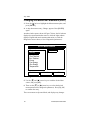
2. The first prompt asks you to select the pipe material.
a. Press [ENTER] to enter the material prompt.
b. A drop-down list of materials opens. Press the [T] or [S]
keys to scroll to the appropriate material, or scroll to
“Other” for a material not on the list. You can press the
[X] key to scroll down by a page, or the [W] key to scroll
up by a page.
c. Press [ENTER] to confirm the choice.
d. (This prompt only appears if you have selected “Other” in
step b.) The meter prompts you to enter the sound speed.
Use the numeric keys to type the desired sound speed in
the text box, and press [ENTER] to confirm the choice.
3. At the Diameter prompt, the meter asks for the pipe outside
diameter and thickness.
a. You must select from two choices, outside diameter or
circumference.
• The prompt moves to the OD (outside diameter) text box.
Type the thickness (in mm or in.) into the text box, and
press [ENTER] to confirm the choice, or
•
12
Move the prompt to the OD X PI (circumference) text box.
Type the OD (in mm or in.) into the box, and press
[ENTER] to confirm your choice.
PT878 Quick Start Guide