1
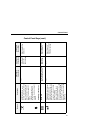
Description
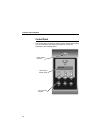
Indicates when the
printer is online,
offline, or when
there is a fault
condition.
A backlighted
liquid crystal
display with two
rows of 16
characters each.
Indicates when the
printer is receiving
or processing
data.
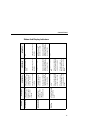
Indicator
Online Status
Liquid Crystal
Display (LCD)
Job In
Process
During a fault condition,
displays the specific
fault message and the
corrective action.
None
During a fault condition,
displays the specific
fault message and the
corrective action.
Flashes when receiving
data.
Stays lit when data has
been processed and is
waiting to be printed.
Off when no data is
being received or when
no data remains in the
buffer.
During a fault condition,
displays the specific
fault message and the
corrective action.
Flashes when receiving
data.
Stays lit when data has
been processed and is
waiting to be printed.
Off when no data is
being received or when
no data remains in the
buffer.
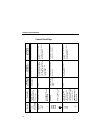
Displays “OFFLINE”
and a main menu,
submenu, or option.
Flashes during a fault
condition.
Displays “OFFLINE.”
Flashes during a fault
condition.
Flashes during a fault
condition.
Off.
Function in
Menu Mode
Displays “ONLINE,” the
interface type, and
emulation in use.
Off when the printer is
offline.
Function in
Offline Mode
Stays lit when the
printer is online, ready
to print, and accept
data from the host.
Function in
Online Mode
Control Panel
Status And Display Indicators
11