1
Unpacking And Installing The Printer
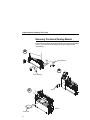
Unpacking The Printer
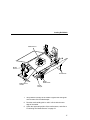
The printer is shipped in a carton and protective bag. Keep all
packing material in case shipping is required.
CAUTION
Avoid touching the electrical connectors to prevent
electrostatic discharge damage while setting up the printer.
The discharge of accumulated electrostatic energy can
damage or destroy the printhead or electronic components
used in this device.
CAUTION
Do not place the printer on its backside during unpacking or
handling, because damage to the printer interface connector
may occur.
7