1
V. Program PixiePlus cont’d
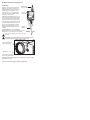
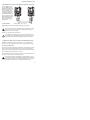
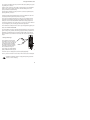
3. Test Remote and Identify Sweet Spot: Position the remote control a few inches
from the IR learning eye (upper right of PixiePlus front).
When you press a key on the remote, the PixiePlus status LED should flicker. As
you move the remote closer or farther from the receiver window, or move off axis
the red flashes will dim and become intermittent. Find a position that consistently
yields clear, regular blinking. This is the "sweet spot".
If you do not see the Status LED flicker rapidly, your remote may need new
batteries.
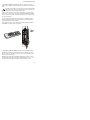
Some remotes have several emitting LEDs, which may not be located in the
center of the remote.
4. Round Robin Codes and Macros
Each PixiePlus button may be programmed with either a single command or multiple commands (as many as four). Multiple commands may be sent round robin or
as macros. Round robin buttons send one command per button press. Each time
the button is pressed, it sends the next code in the series. Macro buttons send all
programmed codes each time the button is pressed.
Example - Round Robin: The SOURCE toggle button may be programmed with
four round robin commands to switch between four inputs on the display device.
The single SOURCE button is programmed with all four input commands, and configured to Round Robin mode. Each time the SOURCE button is pressed, it sends
one of the four commands, in the order learned.
Example - Macro: The COMP input button may be programmed with two commands and configured to macro mode. The COMP button is programmed so that
each time it is pressed it sends the RGB1 input command, followed by the autosync
command.
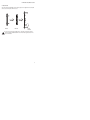
RGB1
RGB
Video
Video
Remote Control
Source Module
10