1
SUPER EXTENDED BASIC UNRAVELLED II
SUPER HIGH RESOLUTION
GRAPHICS
ORIGIN: SPECTRAL ASSOC
REVISED:12/26/99 WALTER K ZYDHEK
SUPER HIGH RESOLUTION GRAPHICS
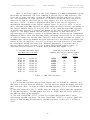
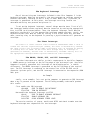
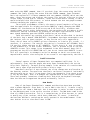
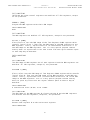
The CoCo 3 will support several, new-high resolution graphics and
alphanumeric text modes in addition to most of the older low-resolution graphics
and alphanumeric modes of the CoCo 2. The only CoCo 2 alphanumeric mode supported
by the CoCo 3 is the semi-graphics 4 mode.
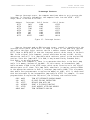
The characteristics of the graphics modes are controlled by the graphics
control registers ($FF98-$FF9F). These registers are write-only registers
(attempting to read these registers will not return accurate data). The graphics
control registers can have their function modified by the CoCo compatible bit (bit
7, $FF90) and the BP bit (bit 7, $FF98). It is important to realize that certain
graphics control registers will be valid only if the COCO and BP bits are set up in
a certain way. You may be able to produce interesting effects if you violate these
restrictions, but you will have no guarantee that the effect will be supported by
future versions of the Color Computer (if there are to be any future versions).
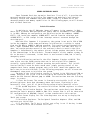
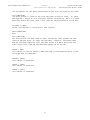
The GIME chip treats the system RAM as one contiguous 512K block for the
purposes of video display. In a 128K system the true RAM is at the top of the
physical address space and there are three 128K images below it. The graphics
control registers are used to define the size of the screen and place it anywhere
within the 512K that you wish. If you wish to modify the contents of a high
resolution graphics or text screen, you must use the MMU registers to place that
portion of the screen into the logical address space of the CPU in order to change
the data - remember that the MMU registers will NOT affect the manner in which the
screen is DISPLAYED but you must use them in order to change the data.
One last warning: be careful how you use the COCO and BP bits. You may get
some interesting effects if you set both of these bits, but it may bite you in the
end. We cannot say what the results will be if you use a mode which is not
specifically defined. All of the video control registers are designed to be used
when the COCO bit is cleared with the notable exception of the vertical offset
registers. A condensed summary of the control registers is contained in Appendix D.
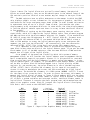
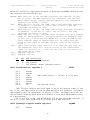
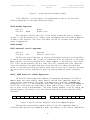
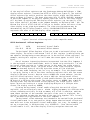
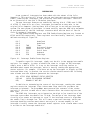
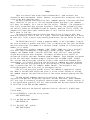
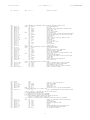
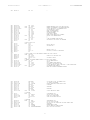
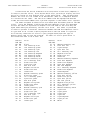
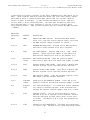
The registers from FF90 - FF97 are general-purpose control registers for the GIME
chip
FF90 Initialization register 0
Bit
Bit
Bit
Bit
Bit
Bit
Bit
Bit
7
6
5
4
3
2
1
0
COCO
MMUEN
IEN
FEN
MC3
MC2
MC1
MC0
INIT0
1=CoCo compatible mode
1=MMU enabled
1 = GIME chip IRQ enabled
1 = GIME chip FIRQ enabled
1 = RAM at FEXX is constant
1 = standard SCS (Spare Chip Select)
ROM map control
ROM map control
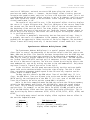
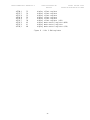
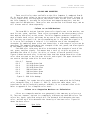
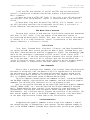
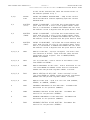
COCO: This bit is used to toggle the CoCo compatible mode on and off. The
term CoCo compatible mode is somewhat of a misnomer as there are some CoCo 2
graphics modes, which are not supported by the CoCo 3, and some of the video
control registers are active even when the COCO bit is in the CoCo compatible mode.
The programmer is best advised to use this bit for exactly what it was intended for
- to be set when you are using CoCo 2 graphics modes and to be clear when you are
using the new CoCo 3 graphics modes. The descriptions of the CoCo 3 registers given
13