1
SUPER EXTENDED BASIC UNRAVELLED II
SUPER EXTENDED BASIC
ORIGIN: SPECTRAL ASSOC
REVISED:12/26/99 WALTER K ZYDHEK
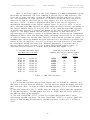
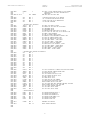
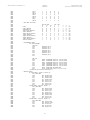
7) ALT and CTRL Keys Checked. If the ALT and CTRL keys are both pressed,
control is transferred to another routine that displays a digitized picture of
Basic’s authors.
8) Check the flag at $FFED (INT.FLAG). If this flag is not $55 (which would
indicate that it was set up before), control is transferred and a cold start is
forced.
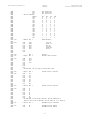
9) Check Reset Flag. Next the Reset Flag (RSTFLG, $71) is checked. If it is
not $55 (indicating that Basic has already been initialized), a cold start is
forced. Otherwise, the warm start routine is executed.
The Warm Start Routine
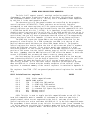
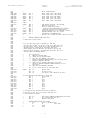
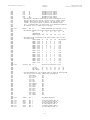
The warm start routine is used when the initialization routine has determined
that Basic is still intact. First, the address of the warm start routine is
retrieved from the Reset Vector (RSTVEC, $72). Next, the first byte at this address
is checked. If it is a NOP instruction, control is transferred to this warm start
address. Otherwise, a cold start is forced.
Cold Start
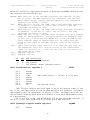
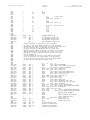
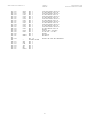
First, Basic, Extended Basic, Disk Basic (if there), and Super Extended Basic
are copied into RAM. Next, several patches are made in Basic, Extended Basic, and
Disk Basic (these patches are detailed in Appendix B, $C256). The intermediate jump
table for the interrupts is then moved to $FFEE (as well as the flag at $FFED
discussed earlier). If the flag indicating the alternate color set was chosen (i.e.
the F1 key was down), the color set is selected. Next the low-resolution text
screen is cleared to spaces. Lastly the palette registers are set to their default
values and control is transferred to the reset address in Basic (at $A027).
New Commands
Shortly after a prototype Color Computer 3 was created, Tandy contracted with
Microware in Des Moines, Iowa (the makers of OS-9) to upgrade Basic to work with
the new features of the computer. Microware decided that the best system to use
would be to patch Basic during the initialization of the computer. The result of
this is a somewhat complicated system of ROM and RAM switching.
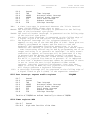
The Color Computer 3 added several new commands to Basic, including ON ERROR
and ON BREAK trapping, high-resolution text commands, and high-resolution graphics
commands. You can even print characters on a hi-res graphics screen!
Most of the routines that make up the super high-resolution graphics commands
(HPAINT, HDRAW, HLINE, etc…) were derived from the related commands in Extended
Basic. Though mimicking these routines is not necessarily a bad philosophy, the
Extended Basic routines were never designed to handle 640 pixel wide screens.
Unfortunately, very little was done to increase the resolution of the routines. The
most obvious example of this is the HCIRCLE command, which has little more detail
on the super high-resolution screens than on the low-resolution screens.
Inconsistencies
In upgrading the graphics commands to work on the Color Computer 3 some of
the conventions used in Extended Basic were ignored. The most apparent example of
this is the HSCREEN command. Extended Basic requires that you set up the graphics
31