1
GraFit User’s Guide
Forcing Text Entry
GraFit displays text items as they are entered, but formats numbers dependent
upon the current column formatting (Table | Column Format command). To force
numbers to be treated as a text item, enter them with a preceding ' symbol, for
example:
'2.34
Forcing text entry can be useful if a number is used as one of the entries in the
category axis of a chart.
Note
Numbers forced to act as text are not available as data items, and will be
treated as missing items during data fitting.
Moving the Data Entry Position
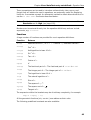
When you have entered your data value you will need to move to the next data
entry position by pressing TAB, RETURN or DOWN after entering the value. The
following keys control movement of the data entry position within the data table.
To
Press
Move the entry point to the right
TAB
Move the entry point to the left
SHIFT TAB
Move the entry point up
UP
Move the entry point down
DOWN
Move to the first column of a row
CTRL LEFT
Move to the last column that contains data entries
CTRL RIGHT
Move to the first row of a column
CTRL UP
Move to the last row that contains data entries
CTRL DOWN
It is often convenient to press
RETURN
or
DOWN
or
RIGHT
or
or
LEFT
RETURN
between entering data points.
Moving the data entry position using the mouse
To move the data entry position using the mouse, move the mouse pointer to the
position you require, and click the left mouse button.
26