1
Configuration Files
The dmake utility consults two files to determine to which build servers jobs are
distributed and how many jobs can be distributed to each.
Runtime Configuration File
The dmake utility searches for a runtime configuration file on the dmake host to
know where to distribute jobs. Generally, this file is in your home directory on the
dmake host and is named .dmakerc. It consists of a list of build servers and the
number of jobs to be distributed to each build server. See “The dmake Host” on page
152” for more information.
Build Server Configuration File
The /etc/opt/SPROdmake/dmake.conf file is in the file system of build servers.
It specifies the maximum total number of dmake jobs that can be distributed to each
build server by all dmake users. In addition, it may specify the “nice” priority under
which all dmake jobs should run.
See “The Build Server” on page 154 for more information.
The dmake Host
The dmake utility searches for a runtime configuration file to determine where to
distribute jobs. Generally, this file must be in your home directory on the dmake host
and is named .dmakerc. The dmake utility searches for the runtime configuration
file in these locations and in the following order:
1. The path name you specify on the command line using the -c option
2. The path name you specify using the DMAKE_RCFILE makefile macro
3. The path name you specify using the DMAKE_RCFILE environment variable
4. $(HOME)/.dmakerc
If a runtime configuration file is not found, the dmake utility distributes two jobs to
the dmake host.
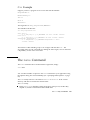
You edit the runtime configuration file so that it consists of a list of build servers and
the number of jobs you want distributed to each build server. The following is an
example of a .dmakerc file:
# My machine. This entry causes dmake to distribute to it.
falcon
{ jobs = 1 }
hawk
eagle
{ jobs = 3 }
# Manager’s machine. She’s usually at meetings
heron
{ jobs = 4 }
152
Using Sun WorkShop ♦ Revision A, February 1999