1
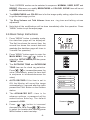
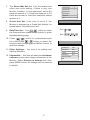
7. The Slave Addr Set item is for the master and
slave user code setting, if there is only one
Monitor installed in one apartment, set to 0,if
there are two,set to 1,if there are three,set to 2,if
there are four,set to 3,and the maximum extend
monitor is 4.
Slave Addr Set
--
0
Guard Unit Set
--
0
Date/Time Set...
Other Settings...
Information...
Exit
8. Guard Unit Set: if the item is set to 1, the
Monitor is assigned as a Guard Unit Monitor, for
normal users, it should be set to 0.
9. Date/Time Set...: Use
/
button to select
the item.and then press MENU button to enter
time/date setting page.
10. Press
/
button to increase/decrease
the value,Press
/
button to select the
location,after finishing,press MENU button to
save the settings.
11. Other Settings...: this item is for adding and
deleting Remotes.
12. Information...: this item will show the hardware/
software version and voltage information of the
Monitor. Select Restore to default item ,then
press MENU button. All settings will be restored
to default.
-7-
Time 1 1 : 3 5
Date 2 0 0 9 0 2 1 4
Hardware ver
0302
Software ver
0168
Voltage
22.4V
Manufacture
00.0T
Restore to default
Exit