1
SESAM
USER MANUAL
Framework
Steel Frame Design
DET NORSKE VERITAS
SESAM
User Manual
Framework
Steel Frame Design
December 20th, 2007
Valid from program version 3.5
Developed and marketed by
DET NORSKE VERITAS
DNV Software Report No.: 92-7050 / Revision 14, December 20th, 2007
Copyright © 2007 Det Norske Veritas
All rights reserved. No part of this book may be reproduced, in any form or by any means, without permission in
writing from the publisher.
Published by:
Det Norske Veritas
Veritasveien 1
N-1322 Høvik
Norway
Telephone:
Facsimile:
E-mail, sales:
E-mail, support:
Website:
+47 67 57 99 00
+47 67 57 72 72
[email protected]
[email protected]
www.dnv.com
If any person suffers loss or damage which is proved to have been caused by any negligent act or omission of Det Norske Veritas, then Det Norske Veritas shall pay compensation to such person for his proved
direct loss or damage. However, the compensation shall not exceed an amount equal to ten times the fee charged for the service in question, provided that the maximum compensation shall never exceed USD
2 millions. In this provision “Det Norske Veritas” shall mean the Foundation Det Norske Veritas as well as all its subsidiaries, directors, officers, employees, agents and any other acting on behalf of Det Norske
Veritas.
Table of Contents
1
INTRODUCTION ............................................................................................................1-1
1.1
Framework — Postprocessor for Frame Structures......................................................................... 1-1
1.2
Framework in the SESAM System.................................................................................................. 1-1
1.3
How to read this Manual.................................................................................................................. 1-3
1.4
Framework Extensions .................................................................................................................... 1-3
1.5
Status List ........................................................................................................................................ 1-4
2
FEATURES OF FRAMEWORK....................................................................................2-1
2.1
Postprocessing capabilities .............................................................................................................. 2-1
2.1.1
Code checks....................................................................................................................... 2-1
2.1.2
Fatigue analysis ................................................................................................................. 2-5
2.1.3
Earthquake analysis......................................................................................................... 2-11
2.1.4
Wind fatigue analysis ...................................................................................................... 2-13
2.2
Loading and load combinations..................................................................................................... 2-26
2.2.1
Calculation of joint results .............................................................................................. 2-27
2.2.2
Calculation of members forces and moments ................................................................. 2-27
2.2.3
Calculation of stresses ..................................................................................................... 2-28
2.3
Input data ....................................................................................................................................... 2-33
2.3.1
Young’s modulus ............................................................................................................ 2-33
2.3.2
Yield strength .................................................................................................................. 2-34
2.3.3
Material constant ............................................................................................................. 2-34
2.3.4
CHORD and ALIGNED members.................................................................................. 2-34
2.3.5
CANS .............................................................................................................................. 2-36
2.3.6
STUBS............................................................................................................................. 2-37
2.3.7
Joint Gap and Joint overlap ............................................................................................. 2-38
2.3.8
Joint Type ........................................................................................................................ 2-39
2.3.9
Positions for code check.................................................................................................. 2-40
2.3.10 Local coordinate system.................................................................................................. 2-41
2.3.11 Member buckling lengths................................................................................................ 2-42
2.3.12 Effective length factors ................................................................................................... 2-42
2.3.13 Unsupported flange length .............................................................................................. 2-44
2.3.14 Fabrication Method ......................................................................................................... 2-45
2.3.15
2.3.16
2.3.17
2.3.18
2.3.19
2.3.20
2.3.21
2.3.22
2.3.23
2.3.24
2.3.25
2.3.26
2.3.27
2.3.28
2.3.29
2.3.30
2.3.31
2.3.32
2.3.33
2.3.34
2.3.35
Buckling curve................................................................................................................. 2-45
Lateral buckling factor .................................................................................................... 2-46
Moment reduction factors................................................................................................ 2-46
Stiffener spacing.............................................................................................................. 2-47
Sea water density and acceleration due to gravity........................................................... 2-47
Water depth ..................................................................................................................... 2-48
Wave height..................................................................................................................... 2-48
Wave length..................................................................................................................... 2-48
Water plane...................................................................................................................... 2-48
Individual wave data........................................................................................................ 2-48
Wave load factor.............................................................................................................. 2-49
Wave spreading function ................................................................................................. 2-49
Wave spectrum shape ...................................................................................................... 2-50
Wave direction probability .............................................................................................. 2-51
Wave statistics ................................................................................................................. 2-51
SN curve .......................................................................................................................... 2-52
Minimum stress concentration factors (SCF).................................................................. 2-53
Global stress concentration factors (SCF)....................................................................... 2-53
Local stress concentration factors (SCF)......................................................................... 2-54
Parametric stress concentration factors ........................................................................... 2-56
Mandatory and optional input data.................................................................................. 2-57
3
USER’S GUIDE TO FRAMEWORK ............................................................................ 3-1
3.1
Getting Started — Graphical User Interface and Reading a Model ................................................ 3-1
3.1.1
Present a display of the model........................................................................................... 3-7
3.2
How to assign CHORDS ............................................................................................................... 3-11
3.2.1
Automatic assignment of CHORD and BRACES........................................................... 3-11
3.2.2
Global CHORD assignments........................................................................................... 3-14
3.2.3
Local CHORD assignments ............................................................................................ 3-14
3.3
How to assign CAN and STUB sections ....................................................................................... 3-17
3.3.1
CAN assignments ............................................................................................................ 3-17
3.3.2
STUB assignments .......................................................................................................... 3-19
3.3.3
How to assign joint-type and gap .................................................................................... 3-21
3.4
How to specify parametric stress concentration factors ................................................................ 3-22
3.5
The model and loads for code checks, fatigue and earthquake analyses ....................................... 3-24
3.5.1
The steel properties.......................................................................................................... 3-24
3.5.2
The loads for code checks ............................................................................................... 3-24
3.5.3
The loads for deterministic fatigue analysis.................................................................... 3-24
3.5.4
The loads for stochastic fatigue analysis ......................................................................... 3-25
3.5.5
The loads for earthquake analysis ................................................................................... 3-26
3.6
How to perform a yield check........................................................................................................ 3-27
3.7
How to perform a stability check................................................................................................... 3-28
3.8
How to perform a member check................................................................................................... 3-29
3.9
How to perform a cone check ........................................................................................................ 3-31
3.10 How to perform a punching shear check ....................................................................................... 3-32
3.11 How to perform a deterministic fatigue analysis ........................................................................... 3-34
3.12 How to perform a stochastic fatigue analysis ................................................................................ 3-36
3.13 How to perform an earthquake analysis ........................................................................................ 3-38
3.14 How to perform a joint redesign .................................................................................................... 3-40
3.15 How to perform member redesign ................................................................................................. 3-41
3.16 How to compute material take-off ................................................................................................. 3-42
3.17 How to close the design loop......................................................................................................... 3-42
3.18 How to create a hidden surface display ......................................................................................... 3-43
3.19 How to create a deformed shape display ....................................................................................... 3-45
3.20 How to create a force/moment diagram display ............................................................................ 3-46
3.21 How to perform a wind fatigue analysis........................................................................................ 3-47
3.21.1 File and file names .......................................................................................................... 3-47
3.21.2 Modelling of the structure ............................................................................................... 3-48
3.21.3 Generation of wind loads ................................................................................................ 3-48
3.21.4 Calculation of element forces from wind loading ........................................................... 3-51
3.21.5 Calculation of eigenvalues, eigenvectors and element mode shape forces ..................... 3-52
3.21.6 Merge of static and dynamic Results Interface Files ...................................................... 3-53
3.21.7 Execution of wind fatigue analysis ................................................................................. 3-53
3.21.8 Program limitations and example of use ......................................................................... 3-59
4
EXECUTION OF FRAMEWORK.................................................................................4-1
4.1
Program Environment...................................................................................................................... 4-1
4.1.1
Starting Framework in graphics mode .............................................................................. 4-2
4.1.2
Starting Framework in line mode on Unix........................................................................ 4-3
4.1.3
Starting Framework in batch run....................................................................................... 4-5
4.1.4
Files and data safety .......................................................................................................... 4-6
4.2
Program requirements...................................................................................................................... 4-7
4.2.1
Execution time................................................................................................................... 4-7
4.2.2
Storage space..................................................................................................................... 4-7
4.3
Program limitations.......................................................................................................................... 4-7
4.4
Details on line mode syntax............................................................................................................. 4-8
4.4.1
How to get help ................................................................................................................. 4-9
4.4.2
Command input files ......................................................................................................... 4-9
4.4.3
Accessing default values ................................................................................................. 4-10
4.4.4
Abbreviation and wildcards............................................................................................. 4-11
4.4.5
Input of a text or name or numerical value ..................................................................... 4-11
4.4.6
Selecting a single alternative from a list ......................................................................... 4-11
4.4.7
4.4.8
4.4.9
4.4.10
4.4.11
4.4.12
4.4.13
4.4.14
4.4.15
Selecting several alternatives from a list ......................................................................... 4-12
Entering a vector or matrix of values .............................................................................. 4-13
Setting and clearing loops in a command........................................................................ 4-14
Inserting a command into another command .................................................................. 4-14
Aborting all or parts of a command................................................................................. 4-15
Access to the operating system........................................................................................ 4-15
Appending input lines...................................................................................................... 4-15
Viewing the current status of a command ....................................................................... 4-15
Comments........................................................................................................................ 4-16
4.5
Details on graphic mode ................................................................................................................ 4-16
5
COMMAND DESCRIPTION ......................................................................................... 5-1
ASSIGN ........................................................................................................................................... 5-3
ASSIGN CAN.................................................................................................................................. 5-6
ASSIGN CAN JOINT...................................................................................................................... 5-7
ASSIGN CAN CHORD................................................................................................................... 5-8
ASSIGN CAN NONE...................................................................................................................... 5-9
ASSIGN CHORD .......................................................................................................................... 5-10
ASSIGN EARTHQUAKE-DAMPING-FUNCTION ................................................................... 5-11
ASSIGN EARTHQUAKE SPECTRUM....................................................................................... 5-12
ASSIGN FATIGUE-PART-DAMAGE......................................................................................... 5-13
ASSIGN FATIGUE-SAFETY-FACTOR ..................................................................................... 5-15
ASSIGN INDIVIDUAL-WAVE ................................................................................................... 5-16
ASSIGN JOINT-CHORD-LENGTH ............................................................................................ 5-18
ASSIGN JOINT-GAP.................................................................................................................... 5-19
ASSIGN JOINT-OVERLAP ......................................................................................................... 5-20
ASSIGN JOINT-RING-STIFFENER............................................................................................ 5-21
ASSIGN JOINT-TYPE.................................................................................................................. 5-24
ASSIGN LOAD-CASE ................................................................................................................. 5-26
ASSIGN LOCAL-COORDINATE-SYSTEM .............................................................................. 5-27
ASSIGN MATERIAL ................................................................................................................... 5-29
ASSIGN POSITIONS.................................................................................................................... 5-30
ASSIGN POSITIONS sel-mem CODE-CHECK .......................................................................... 5-31
ASSIGN POSITIONS sel-mem FATIGUE-CHECK.................................................................... 5-33
ASSIGN SCF ................................................................................................................................. 5-35
ASSIGN SCF JOINT..................................................................................................................... 5-36
ASSIGN SCF MEMBER............................................................................................................... 5-39
ASSIGN SECTION ....................................................................................................................... 5-43
ASSIGN SN-CURVE .................................................................................................................... 5-44
ASSIGN STABILITY ................................................................................................................... 5-46
ASSIGN STABILITY sel-mem BUCKLING-CURVE-Y............................................................ 5-48
ASSIGN STABILITY sel-mem BUCKLING-CURVE-Z ............................................................ 5-50
ASSIGN STABILITY sel-mem BUCKLING-LENGTH.............................................................. 5-52
ASSIGN STABILITY sel-mem FABRICATION......................................................................... 5-54
ASSIGN STABILITY sel-mem FLOODING-STATUS............................................................... 5-55
ASSIGN STABILITY sel-mem KY.............................................................................................. 5-56
ASSIGN STABILITY sel-mem KZ .............................................................................................. 5-57
ASSIGN STABILITY sel-mem LATERAL-BUCKLING-FACTOR .......................................... 5-58
ASSIGN STABILITY sel-mem MOMENT-REDUCTION-FACTOR ........................................ 5-59
ASSIGN STABILITY sel-mem NORSOK-AXIAL-COMPRESSION ........................................ 5-61
ASSIGN STABILITY sel-mem STIFFENER-SPACING ............................................................ 5-62
ASSIGN STABILITY sel-mem UNSUPPORTED-FLANGE-LENGTH .................................... 5-63
ASSIGN STUB.............................................................................................................................. 5-64
ASSIGN STUB BRACE ............................................................................................................... 5-65
ASSIGN STUB JOINT.................................................................................................................. 5-66
ASSIGN STUB NONE.................................................................................................................. 5-67
ASSIGN THICKNESS-CORRECTION ....................................................................................... 5-68
ASSIGN WAVE-DIRECTION-PROBABILITY ......................................................................... 5-70
ASSIGN WAVE-LOAD-FACTOR .............................................................................................. 5-71
ASSIGN WAVE-SPECTRUM-SHAPE........................................................................................ 5-72
ASSIGN WAVE-SPREADING-FUNCTION............................................................................... 5-74
ASSIGN WAVE-STATISTICS .................................................................................................... 5-75
ASSIGN WIND-FATIGUE........................................................................................................... 5-76
ASSIGN WIND-FATIGUE WIND-TYPE ................................................................................... 5-78
ASSIGN WIND-FATIGUE WIND-SPECTRUM ........................................................................ 5-80
ASSIGN WIND-FATIGUE COHERENCE-MODEL .................................................................. 5-81
ASSIGN WIND-FATIGUE SN-CURVE...................................................................................... 5-83
ASSIGN WIND-FATIGUE JOINT-SCF ...................................................................................... 5-84
ASSIGN WIND-FATIGUE JOINT-SCF READ .......................................................................... 5-87
ASSIGN WIND-FATIGUE BENT-CAN-SCF ............................................................................. 5-89
ASSIGN WIND-FATIGUE VORTEX-DIMENSION.................................................................. 5-90
ASSIGN WIND-FATIGUE VORTEX-FIXITY ........................................................................... 5-91
ASSIGN WIND-FATIGUE RUN-SCENARIO............................................................................ 5-94
ASSIGN WIND-FATIGUE STRESS-PRINT-OPTIONS ............................................................ 5-97
CHANGE....................................................................................................................................... 5-99
CHANGE MATERIAL ............................................................................................................... 5-100
CHANGE SECTION................................................................................................................... 5-102
CHANGE SECTION-PROPERTY ............................................................................................. 5-103
CHANGE HOTSPOTS................................................................................................................ 5-105
CHANGE SN-CURVE................................................................................................................ 5-107
CHANGE WAVE-SPREADING-FUNCTION .......................................................................... 5-108
CHANGE WAVE-STATISTICS ................................................................................................ 5-109
CHANGE WIND-FATIGUE ...................................................................................................... 5-111
CHANGE WIND-FATIGUE SECTION-DIMENSIONS........................................................... 5-112
CREATE...................................................................................................................................... 5-113
CREATE EARTHQUAKE-DAMPING-FUNCTION ................................................................ 5-114
CREATE EARTHQUAKE-SPECTRUM ................................................................................... 5-115
CREATE JOINT.......................................................................................................................... 5-116
CREATE LOAD-COMBINATION ............................................................................................ 5-118
CREATE MEMBER.................................................................................................................... 5-119
CREATE MATERIAL ................................................................................................................ 5-120
CREATE SECTION .................................................................................................................... 5-121
CREATE SECTION name text PIPE .......................................................................................... 5-122
CREATE SECTION name text SYMMETRIC-I ........................................................................ 5-123
CREATE SECTION name text UNSYMMETRIC-I .................................................................. 5-124
CREATE SECTION name text ANGLE..................................................................................... 5-125
CREATE SECTION name text CHANNEL ............................................................................... 5-126
CREATE SECTION name text BOX .......................................................................................... 5-127
CREATE SECTION name text BAR .......................................................................................... 5-128
CREATE SECTION name text GENERAL................................................................................ 5-129
CREATE SECTION name text RING-STIFFENER-T............................................................... 5-131
CREATE SECTION name text RING-STIFFENER-FLAT ....................................................... 5-132
CREATE SN-CURVE ................................................................................................................. 5-133
CREATE WAVE-SPREADING-FUNCTION............................................................................ 5-135
CREATE WAVE-STATISTICS ................................................................................................. 5-136
CREATE WIND-FATIGUE........................................................................................................ 5-138
CREATE WIND-FATIGUE ANALYSIS-PLANES .................................................................. 5-139
CREATE WIND-FATIGUE STATIC-WIND-LOADS.............................................................. 5-140
DEFINE ....................................................................................................................................... 5-141
DEFINE BEAM-SPLIT............................................................................................................... 5-144
DEFINE BUCKLING-LENGTH-DUMP ................................................................................... 5-145
DEFINE CONE-PARAMETERS................................................................................................ 5-147
DEFINE CONSTANTS............................................................................................................... 5-148
DEFINE ECCENTRICITY ......................................................................................................... 5-149
DEFINE FATIGUE-CONSTANTS ............................................................................................ 5-150
DEFINE FATIGUE-DUMP ........................................................................................................ 5-153
DEFINE FATIGUE-PARAMETERS ......................................................................................... 5-155
DEFINE FATIGUE-RAINFLOW-COUNTING......................................................................... 5-156
DEFINE GEOMETRY-VALIDITY-RANGE............................................................................. 5-157
DEFINE HOTSPOTS .................................................................................................................. 5-158
DEFINE HYDROSTATIC-DATA.............................................................................................. 5-159
DEFINE HYDROSTATIC-DATA GRAVITY........................................................................... 5-160
DEFINE HYDROSTATIC-DATA WATER-DEPTH ................................................................ 5-161
DEFINE HYDROSTATIC-DATA WATER-DENSITY ............................................................ 5-162
DEFINE HYDROSTATIC-DATA WAVE-HEIGHT ................................................................ 5-163
DEFINE HYDROSTATIC-DATA WAVE-LENGTH ............................................................... 5-164
DEFINE HYDROSTATIC-DATA WATER-PLANE ................................................................ 5-165
DEFINE JOINT-PARAMETER.................................................................................................. 5-166
DEFINE JOINT-PARAMETER CAN-DIAMETER-FRACTION............................................. 5-167
DEFINE JOINT-PARAMETER MERGE-DIAMETER-FRACTION ....................................... 5-168
DEFINE JOINT-PARAMETER MINIMUM-FREE-CAN-LENGTH ....................................... 5-169
DEFINE JOINT-PARAMETER MINIMUM-FREE-STUB-LENGTH...................................... 5-170
DEFINE JOINT-PARAMETER MINIMUM-GAP-LENGTH................................................... 5-171
DEFINE JOINT-PARAMETER MINIMUM-GAP-RESET....................................................... 5-172
DEFINE JOINT-PARAMETER STUB-DIAMETER-FRACTION ........................................... 5-173
DEFINE LOAD .......................................................................................................................... 5-174
DEFINE LRFD-CODE-CHECK ................................................................................................ 5-175
DEFINE LRFD-RESISTANCE-FACTORS .............................................................................. 5-176
DEFINE MEMBER-CHECK-PARAMETERS .......................................................................... 5-179
DEFINE MEMBER-CHECK-PARAMETERS CALCULATION-METHOD .......................... 5-180
DEFINE MEMBER-CHECK-PARAMETERS ELASTIC-CAPACITY-ONLY ....................... 5-181
DEFINE MEMBER-CHECK-PARAMETERS REFERENCE-YOUNGS-MODULUS-KSI ... 5-182
DEFINE MEMBER-CHECK-PARAMETERS REFERENCE-YOUNGS-MODULUS-MPA . 5-183
DEFINE MEMBER-CHECK-PARAMETERS SECTION-CAPACITY-CHECK .................... 5-184
DEFINE MEMBER-CHECK-PARAMETERS STABILITY-CAPACITY-CHECK ................ 5-185
DEFINE MEMBER-CHECK-PARAMETERS UNIT-LENGTH-FACTOR ............................. 5-186
DEFINE MEMBER-CHECK-PARAMETERS VON-MISES-CHECK..................................... 5-187
DEFINE MEMBER-CODE-CHECK-DUMP............................................................................. 5-188
DEFINE MEMBER-REDESIGN................................................................................................ 5-189
DEFINE PARAMETRIC-SCF .................................................................................................... 5-191
DEFINE POSITION-BOTH-SIDES ........................................................................................... 5-195
DEFINE PREFRAME-INPUT .................................................................................................... 5-196
DEFINE PRESENTATION ........................................................................................................ 5-197
DEFINE PRESENTATION DISPLAY....................................................................................... 5-198
DEFINE PRESENTATION FORCE........................................................................................... 5-201
DEFINE PRESENTATION PRINT............................................................................................ 5-204
DEFINE PRESENTATION RESULT ........................................................................................ 5-205
DEFINE PRESENTATION STRESS ......................................................................................... 5-207
DEFINE PRESENTATION SUPPORT-REACTION ................................................................ 5-209
DEFINE READ-CONCEPTS...................................................................................................... 5-211
DEFINE READ-NAMED-SETS ................................................................................................ 5-212
DEFINE SECTION-OVERRULE............................................................................................... 5-213
DEFINE WIND-FATIGUE......................................................................................................... 5-214
DEFINE WIND-FATIGUE WIND-PARAMETERS ................................................................. 5-215
DEFINE WIND-FATIGUE COHERENCE-COEFFICIENTS................................................... 5-217
DEFINE WIND-FATIGUE WIND-DIRECTIONS.................................................................... 5-218
DEFINE WIND-FATIGUE WIND-SPEEDS ............................................................................. 5-219
DEFINE WIND-FATIGUE WIND-PROBABILITIES .............................................................. 5-220
DEFINE WIND-FATIGUE DRAG-CORRECTION-FACTORS .............................................. 5-222
DEFINE WIND-FATIGUE BENT-CAN-DAMAGE................................................................. 5-224
DEFINE WIND-FATIGUE VORTEX-PARAMETERS............................................................ 5-225
DEFINE WIND-FATIGUE DEFAULT-MEMBER-FIXITIES ................................................. 5-227
DELETE ...................................................................................................................................... 5-228
DELETE WIND-FATIGUE ........................................................................................................ 5-230
DISPLAY..................................................................................................................................... 5-231
DISPLAY CODE-CHECK-RESULTS ....................................................................................... 5-233
DISPLAY DIAGRAM ................................................................................................................ 5-235
DISPLAY EARTHQUAKE-SPECTRUM.................................................................................. 5-237
DISPLAY FATIGUE-CHECK-RESULTS................................................................................. 5-238
DISPLAY LABEL....................................................................................................................... 5-240
DISPLAY MEMBER .................................................................................................................. 5-242
DISPLAY PRESENTATION...................................................................................................... 5-243
DISPLAY SHAPE....................................................................................................................... 5-244
DISPLAY SN-CURVE................................................................................................................ 5-245
DISPLAY STABILITY............................................................................................................... 5-246
DISPLAY SUPERELEMENT .................................................................................................... 5-247
FILE ............................................................................................................................................. 5-248
FILE OPEN.................................................................................................................................. 5-249
FILE TRANSFER........................................................................................................................ 5-250
FILE INTERROGATE ................................................................................................................ 5-251
FILE EXIT ................................................................................................................................... 5-252
PLOT............................................................................................................................................ 5-253
PRINT .......................................................................................................................................... 5-254
PRINT ACCELERATION .......................................................................................................... 5-258
PRINT ACTIVE-SETTINGS ...................................................................................................... 5-259
PRINT CHORD-AND-BRACE .................................................................................................. 5-260
PRINT CODE-CHECK-RESULTS............................................................................................. 5-261
PRINT CODE-OF-PRACTICE ................................................................................................... 5-264
PRINT DEFLECTION ................................................................................................................ 5-265
PRINT DISPLACEMENT........................................................................................................... 5-267
PRINT EARTHQUAKE-CHECK-TYPE ................................................................................... 5-268
PRINT EARTHQUAKE-DAMPING-FUNCTION .................................................................... 5-269
PRINT EARTHQUAKE-SPECTRUM ....................................................................................... 5-270
PRINT FATIGUE-CHECK-RESULTS ...................................................................................... 5-271
PRINT FATIGUE-CHECK-TYPE.............................................................................................. 5-273
PRINT FORCE ............................................................................................................................ 5-274
PRINT HYDROSTATIC-DATA ................................................................................................ 5-275
PRINT JOINT.............................................................................................................................. 5-276
PRINT JOINT MEMBER-FORCES ........................................................................................... 5-278
PRINT JOINT REACTION-FORCES ........................................................................................ 5-279
PRINT LOAD-CASE .................................................................................................................. 5-281
PRINT LOAD-SET ..................................................................................................................... 5-282
PRINT LRDF-RESISTANCE-FACTORS.................................................................................. 5-283
PRINT MATERIAL .................................................................................................................... 5-284
PRINT MEMBER........................................................................................................................ 5-285
PRINT MODE-SHAPE ............................................................................................................... 5-286
PRINT MODAL-MASS .............................................................................................................. 5-287
PRINT RUN................................................................................................................................. 5-288
PRINT SECTION ........................................................................................................................ 5-289
PRINT SN-CURVE ..................................................................................................................... 5-290
PRINT STRESS........................................................................................................................... 5-291
PRINT SUPERELEMENT.......................................................................................................... 5-292
PRINT SUPPORT-REACTIONS................................................................................................ 5-293
PRINT VELOCITY ..................................................................................................................... 5-294
PRINT WAVE-DIRECTIONS.................................................................................................... 5-295
PRINT WAVE-LOAD-FACTORS ............................................................................................. 5-296
PRINT WAVE-SPREADING-FUNCTION................................................................................ 5-297
PRINT WAVE-STATISTICS ..................................................................................................... 5-298
PRINT WIND-FATIGUE............................................................................................................ 5-299
RUN ............................................................................................................................................. 5-302
RUN CONE-CHECK .................................................................................................................. 5-303
RUN EARTHQUAKE-CHECK.................................................................................................. 5-304
RUN FATIGUE-CHECK ............................................................................................................ 5-306
RUN HYDROSTATIC-CHECK................................................................................................. 5-307
RUN MEMBER-CHECK............................................................................................................ 5-308
RUN PUNCH-CHECK................................................................................................................ 5-309
RUN REDESIGN ........................................................................................................................ 5-310
RUN STABILITY-CHECK ........................................................................................................ 5-311
RUN YIELD-CHECK ................................................................................................................. 5-312
RUN WIND-FATIGUE-CHECK................................................................................................ 5-313
SELECT....................................................................................................................................... 5-314
SELECT CODE-OF-PRACTICE................................................................................................ 5-315
SELECT EARTHQUAKE-CHECK-TYPE ................................................................................ 5-317
SELECT FATIGUE-CHECK-TYPE .......................................................................................... 5-318
SELECT JOINTS ........................................................................................................................ 5-319
SELECT LOAD-CASE ............................................................................................................... 5-322
SELECT LOAD-SET .................................................................................................................. 5-323
SELECT MEMBERS .................................................................................................................. 5-324
SELECT MODE-SHAPE ............................................................................................................ 5-327
SELECT SET............................................................................................................................... 5-328
SET .............................................................................................................................................. 5-329
SET COMPANY-NAME ............................................................................................................ 5-330
SET DISPLAY ............................................................................................................................ 5-331
SET DISPLAY COLOUR ........................................................................................................... 5-332
SET DISPLAY DESTINATION................................................................................................. 5-333
SET DISPLAY DEVICE............................................................................................................. 5-334
SET DISPLAY WORKSTATION-WINDOW ........................................................................... 5-335
SET DRAWING ......................................................................................................................... 5-336
SET DRAWING CHARACTER-TYPE ..................................................................................... 5-337
SET DRAWING FONT-SIZE..................................................................................................... 5-338
SET DRAWING FONT-TYPE ................................................................................................... 5-339
SET DRAWING FRAME ........................................................................................................... 5-340
SET DRAWING GRID ............................................................................................................... 5-341
SET GRAPH................................................................................................................................ 5-342
SET GRAPH LINE-OPTIONS ................................................................................................... 5-343
SET GRAPH XAXIS-ATTRIBUTES......................................................................................... 5-344
SET GRAPH YAXIS-ATTRIBUTES......................................................................................... 5-345
SET PLOT ................................................................................................................................... 5-346
SET PLOT COLOUR.................................................................................................................. 5-347
SET PLOT FORMAT.................................................................................................................. 5-348
SET PLOT FILE.......................................................................................................................... 5-349
SET PLOT PAGE-SIZE .............................................................................................................. 5-350
SET PRINT.................................................................................................................................. 5-351
SET PRINT DESTINATION ...................................................................................................... 5-352
SET PRINT FILE ........................................................................................................................ 5-353
SET PRINT PAGE-HEIGHT ...................................................................................................... 5-354
SET PRINT PAGE-ORIENTATION.......................................................................................... 5-355
SET PRINT SCREEN-HEIGHT ................................................................................................. 5-356
SET TITLE .................................................................................................................................. 5-357
TASK ........................................................................................................................................... 5-358
VIEW ........................................................................................................................................... 5-359
VIEW FRAME ............................................................................................................................ 5-360
VIEW PAN .................................................................................................................................. 5-361
VIEW POSITION........................................................................................................................ 5-362
VIEW ROTATE .......................................................................................................................... 5-363
VIEW ZOOM .............................................................................................................................. 5-365
VIEW XYPAN ............................................................................................................................ 5-366
VIEW XYZOOM......................................................................................................................... 5-367
APPENDIX A TUTORIAL EXAMPLES............................................................................ A-1
A1
Preframe Journal file and model description, example 1................................................................ A-9
A2
Wajac data files for deterministic and stochastic wave loads....................................................... A-19
A3
Sestra data file............................................................................................................................... A-21
A4
Framework journal file for code checks ....................................................................................... A-22
A5
Framework journal file for deterministic fatigue.......................................................................... A-28
A6
Framework journal file for stochastic fatigue............................................................................... A-34
A7
Results from API/AISC code checks............................................................................................ A-39
A8
Results from NPD / NS code checks ............................................................................................ A-50
A9
Results from deterministic fatigue analysis .................................................................................. A-60
A 10 Results from stochastic fatigue analysis ....................................................................................... A-65
A 11 Preframe model, example 2 .......................................................................................................... A-70
A 12 Wajac data file for wind load........................................................................................................ A-71
A 13 Sestra data files, static and eigenvalue.......................................................................................... A-73
A 14 Framework journal file for wind fatigue....................................................................................... A-74
A 15 Results from wind fatigue............................................................................................................. A-78
A 16 Information of joint connections from wind fatigue..................................................................... A-89
APPENDIX B
THEORETICAL INFORMATION............................................................ B-1
B1
Use of NORSOK code of practice .................................................................................................. B-1
B2
Use of EUROCODE / NS3472 code of practice .......................................................................... B-12
B3
Automatic buckling factor calculations ........................................................................................ B-21
REFERENCES.................................................................................................. REFERENCES-1
SESAM
Program version 3.5
Framework
20-DEC-2007
1
INTRODUCTION
1.1
Framework — Postprocessor for Frame Structures
1-1
Framework is SESAM’s program for postprocessing of results from linear structural analysis of frame structures. The features include checks against allowable stress levels, member stability, punching shear, fatigue,
and earthquake analysis.
Framework is characterised by:
• Interactive menu-based input
• Analysis results checked against rules defined by internationally recognised codes
• Flexible graphical and tabular presentation of results
You should be familiar with the rules and procedure of the type of postprocessing you want to do as this user
manual is not intended to cover such. For example, if you want to do a code checking according to the API
rules you should know this code of practice and if you want to do a fatigue analysis you should be familiar
with the procedure of such analysis.
1.2
Framework in the SESAM System
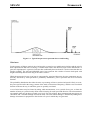
SESAM is comprised of preprocessors, environmental analysis programs, structural analysis programs and
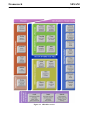
postprocessors. An overview of SESAM is shown in Figure 1.1.
Frame type structures are typically modelled by the SESAM preprocessors Preframe (and Presel if including
the superelement technique). Hydrodynamic loads, if relevant, are computed by the hydrodynamic analysis
program Wajac. The linear structural analysis is performed by Sestra. Finally, the structural analysis results
are read into Framework for postprocessing.
Framework
1-2
SESAM
20-DEC-2007
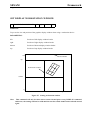
1.1
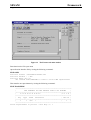
Figure 1.1 SESAM overview
Program version 3.5
SESAM
Program version 3.5
1.3
Framework
20-DEC-2007
1-3
How to read this Manual
Section 2 FEATURES OF FRAMEWORK describes the postprocessing capabilities together with postmodelling features (adding data irrelevant for the structural analysis). Information on the types of loading
and load combinations that can be handled by the different types of postprocessing is also provided. The
section is organised as follows:
• Section 2.1 summarises the postprocessing capabilities provided for code checks, fatigue analysis and
earthquake analysis.
• Section 2.2 provides information on the loads, load combinations and on the calculation of displacements, velocities, accelerations, forces and stresses.
• Section 2.3 explains in general terms the use of all input data that is defined through the commands.
• Table 2.2 contains important information that can be used to determine the data required for a particular
analysis.
Section 3 USER’S GUIDE TO FRAMEWORK contains examples of various post-modelling features and
analysis capabilities which are illustrated through the use of a small two-dimensional jacket structure.
Section 4 EXECUTION OF FRAMEWORK contains more special information not intended for the new
user using Manager to control his SESAM analysis. The chapter explains how to start Framework outside
Manager and operate it in line-mode (not using the graphical user interface). The files used by Framework
are also explained. Practical information is provided on how to operate Framework and manipulate its files
in various ways. Built-in and hardware dependent requirements and limitations are also described.
Section 5 COMMAND DESCRIPTION provides an alphabetically sorted description of all commands and
associated input data.
APPENDIX A TUTORIAL EXAMPLES contains a tutorial example.
APPENDIX B THEORETICAL INFORMATION contains references.
Note that many of the commands used in Framework are particularly designed for use with jacket structures
(i.e. structures with members having tubular cross sections) and hence will be irrelevant to use when working with other kind of structures.
1.4
Framework Extensions
Framework is available in a basic version with extensions. The extensions contain the various codes of practice plus the fatigue and earthquake analysis features. The extensions are (see Section 2.1 for more details):
• Extension API containing the code API-AISC-WSD
• Extension LRFD containing the code API-AISC-LRFD
• Extension NPD containing the code NPD-NS3472(rel. 2) / NORSOK
• Extension FATG containing the fatigue analysis features
Framework
1-4
SESAM
20-DEC-2007
Program version 3.5
• Extension EURO containing the code EUROCODE-NS3472(rel. 3)
• Extension ERQK containing the earthquake analysis features
• Extension WIND containing the gust wind fatigue analysis features
• Extension GRPH containing model display features (the commands DISPLAY, PLOT and VIEW)
1.5
Status List
There exists for Framework (as for all other SESAM programs) a Status List providing additional information. This may be:
• Reasons for update (new version)
• New features
• Errors found and corrected
• Etc.
Use the program Status for looking up information in the Status List. See the command HELP for how to
run Status.
SESAM
Program version 3.5
Framework
20-DEC-2007
2
FEATURES OF FRAMEWORK
2.1
Postprocessing capabilities
2.1.1
Code checks
2-1
The code checks available are as follows:
• Yield
• Stability
• Member (combined yield and stability)
• Hydrostatic collapse
• Punching shear
• Conical transition
A yield check of a frame structural member is performed to assess whether the member is subjected to
acceptable stress levels. This check is performed through the use of a ‘yield interaction equation’. This
equation is stipulated by the code of practice and delivers as result a usage factor. If this usage factor is less
than 1.0 then the member is classed as ‘safe’. If the usage factor is greater than 1.0 then the member is
classed as ‘unsafe’ and this is highlighted by the program. A yield check on a member is by default performed at three positions: at the two ends of the member and at the midpoint. However, the user may assign
additional positions along the member to be checked.
A stability check is performed on a frame structural member to assess potential failure due to buckling phenomena. As for the yield check this assessment is made through the use of a ‘stability interaction equation’
which delivers the usage factor.
A hydrostatic collapse check is performed to assess the member induced stresses due to the action of hydrostatic pressure and other externally applied loads. This check is for NPD-NS3472 and NORSOK integrated
with the stability check.
Framework
SESAM
2-2
20-DEC-2007
Program version 3.5
A punching shear check is performed on the brace member at a joint to assess the shear through the chord.
As for the other checks this assessment is made through the use of a ‘punching shear interaction equation’
which delivers a usage factor. The punching shear check is performed for all braces at selected joints.
A cone check is performed to assess the stresses in the transition between cone and cylinder. As for the other
checks this assessment is made through the use of a ‘conical transition interaction equation’ which delivers
a usage factor. The cone check is performed for cylinder and cone at both ends of the conical transition.
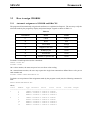
Table 2.1 Codes of practice
American Institute of Steel Construction
9th ed.
1989
Ref. /2/
American Petroleum Institute
RP2A 21th ed.
2000
Ref. /1/
American Institute of Steel Construction
LRFD
1999
Ref. /6/
American Petroleum Institute
RP2A 1st ed.
1993
Ref. /5/
NPDNS3472
Norwegian Petroleum Directorate
Volume 2
1994
Ref. /3/
Norwegian Standard Association
NS3472, 2nd ed.
1984
Ref. /4/
NORSOK
Norwegian Technology Standards Inst.
N-004, Rev 2.
2004
Ref. /7/
EUROCODENS3472
European Committee for Standardization
ENV 1993-1-1
1992
Ref. /8/
Norwegian Standard Association
NS3472, 3rd ed.
2001
Ref. /9/
API-AISC-WSD
API-AISC-LRFD
Note that API supersedes the AISC rules for tubular members. As codes of practice are updated consult the
Framework Status List to obtain the code edition valid for your version of the program.
For the API-AISC-WSD code of practice, the allowable stress are automatically increased as follows:
• Operating conditions: 0%
• Storm conditions: 33.3%
• Earthquake conditions: 70%
Section types that may be code checked are:
• Tubular sections (PIPE).
• Symmetrical/un-symmetrical I or H sections (I).
• Channel sections (CHAN).
• Box sections (BOX).
• Massive bar sections (BAR).
• General sections (GENE).
SESAM
Framework
Program version 3.5
20-DEC-2007
2-3
Stresses in a cross section are calculated at a set of pre-defined stress point. The code checks are performed
at some of these points in order to assess the maximum (i.e. worst) interaction ratio, and therefore to determine the point on the section that is prone to failure. A full description of where stresses are calculated for
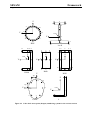
various section types in the case of code checks may be found in Section 2.2.3.
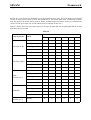
Table 2.2 below shows for each code of practice the type of check that may be performed and the section
type that may be processed.
Table 2.2
Code of practice
API-AISC-WSD
API-AISC-LRFD
NPDNS3472 (rel. 2)
NORSOK
EUROCODENS3472 (rel. 3)
Check
Member section
PIPE
I
CHA
BOX
BAR
Yield
X
X
X
X
X
Stability
X
X
X
X
X
Punching shear
X
Hydrostatic collapse
X
Conical transition
X
Yield
X
X
X
X
X
Stability
X
X
X
X
X
Punching shear
X
Hydrostatic collapse
X
Conical transition
X
Yield
X
X
X
X
X
Stability
X
X
X
X
X
Punching shear
X
Hydrostatic collapse
X
Conical transition
X
Member
X
Punching shear
X
Hydrostatic collapse
X
Conical transition
X
Member
X
X
X
X
X
GEN
X
Framework
2-4
SESAM
20-DEC-2007
Program version 3.5
For NPD-NS3742 (rel. 2) and NORSOK hydrostatic collapse is implemented as a part of the stability /
member check.
For NORSOK and EUROCODE-NS3472 (rel. 3) the yield and stability checks have been merged into one
member check. It is also an option to run a combined yield, stability and hydrostatic check for the APIAISC codes of practice.
It is also possible to perform member redesign / resize in connection with yield, stability, member and
hydrostatic checks, and joint strengthening in connection with punching shear check.
The available way of combining loads for use in code checks are shown below:
Static:
One or a combination of static load cases.
Freq:
One load case from a frequency domain analysis.
Time:
One or a combination of load cases from a time domain analysis.
Earth:
One load case from an earthquake analysis.
Static+Freq:
Combination of above alternatives.
Static+Time:
Combination of above alternatives.
Static+Earth:
Combination of above alternatives.
Prior to performing a code check analysis, it is usual first to model local details on a structure. Local details
do not in general affect the global behaviour of the structure, but may significantly affect the behaviour of
individual members.
This post-modelling can be performed in Framework through the definition of the appropriate input data.
The modelling tools available in Framework include:
• Automatic and explicit definition of CHORD and BRACE members.
• Assignment of a CAN section at a joint. The CHORD member (and the possibly ALIGNED CHORD
member) at the joint automatically inherits the CAN section geometry at that joint.
• Definition of a STUB section, typically assigned to a BRACE member.
• Use of effective length factors for modelling in-plane and out-of-plane buckling effects.
• Definition or automatic calculation of moment amplification reduction factors, to account for secondary
moments due to axial loads in buckling calculations.
• Definition of different yield strength at different parts of the structure to account for differences in the
grade of steel. Yield strength is defined through a material property.
• Modelling joints, gaps, and overlapping joints.
• Section re-definition.
For each of the codes of practice and code check type, all input data used, mandatory and optional, is shown
in Table 2.5 through Table 2.7 and described in Section 2.3.35.
SESAM
Program version 3.5
Framework
20-DEC-2007
2-5
Usually, the procedure adopted for a code check analysis is as follows:
• Modelling of local details.
• Creation of load combinations with the appropriate factors.
• Execution of code check.
• Evaluation of results using print and display features.
The format and explanation of the results from code checks can be found in Appendix A.
2.1.2
Fatigue analysis
A fatigue analysis in Framework is performed on a frame structural member in order to assess whether that
member is likely to suffer failure due to the action of repeated loading. This assessment is made using Miners rule of cumulative damage, which delivers a usage factor representing the amount of fatigue damage that
a member has suffered during the specified period.
A fatigue analysis in Framework can be performed using either:
• a deterministic approach, or
• a stochastic approach
More information on both approaches is given later in this section.
A factor influencing the development of fatigue failure is the overall geometry of the joint and the detailed
geometry of its welds. For any particular type of loading, the joint geometry governs the value of the stress
concentration in the region where fatigue cracking is likely to initiate. This region is termed as the hotspot.
In Framework, hotspot stress concentration factors (SCFs) may be specified by the user. For tubular members only, the user may alternatively have the SCFs automatically calculated by the program using a set of
parametric equations based on the joint type (K, YT, X, etc.).
Each hotspot is associated with 3 stress concentration factors (referred to herein as a set). These are:
• SCF for axial stresses,
• SCF for in-plane bending stresses,
• SCF for out-of-plane bending stresses.
For tubular members, SCFs are normally assigned at 8 hotspots per weld side. The hotspots are equally
spaced around the pipe circumference.
For non-tubular members, 4 hotspots are normally used as shown in Section 2.2.3.
A SCF is defined as the factor by which the nominal stress due to pure axial force or pure in-plane/out-ofplane bending (at the stress point in question) must be multiplied in order to give the hotspot stress used in
the damage calculation.
Framework
2-6
SESAM
20-DEC-2007
Program version 3.5
The parametric SCFs may be calculated based on formulas by:
• Kuang for YT, K and KT joints / Wordsworth and Smedley for X joints.
• Efthymiou for X, YT, K and KT joints.
• Lloyd’s Register for gap K and KT joints.
• Smedley and Fisher for SCF ratios for ring stiffened tubular joints (modify parametric SCFs).
• NORSOK standard for SCFs at butt welds and conical transitions (moved to DNV-RP-C203).
The user defined SCFs are referred to as GLOBAL and LOCAL.
GLOBAL SCFs define a set of stress concentration factors which, unless other assignments are made, will
be applied:
• to all members.
• at all hotspots.
• at both ends.
LOCAL SCFs define a set of stress concentration factors assuming a variety of SCF distributions:
• to a specific member.
• to one or both ends.
• to a selected (chord/brace) or both weld sides.
If the user wants to delete a local SCF assignment, the option GLOBAL SCFs may be reassigned to selected
joints.
When parametric SCFs are assigned to members at selected joints and joint type is set to LOADPATH, the
SCFs will then be calculated based on the classification of brace type given by the load path (similar to the
type classification done in the punching shear check). The resulting SCFs in the different hotspots will then
be the percentage accumulated SCF according to the behaviour of the brace. E.g. for a brace which is classified as 40% YT and 60% KTK the SCFs will be: SCF(as YT)*0.4 + SCF(as KTK)*0.6. When selecting SCF
calculations according to Efthymiou the influence function formulation may also be used.
For a deterministic analysis with joint type set to LOADPATH the brace type (and hence the SCFs) will be
calculated for each step in each wave (waves of various heights and direction) used to obtain the stress history for the selected members at the investigated positions and hotspots.
For a stochastic analysis with joint type set to LOADPATH the brace type (and hence the SCFs) will be calculated for each harmonic wave (waves of unit amplitude with different frequencies and directions) used to
obtain the stress transfer functions for the selected members at the investigated positions and hotspots.
For more information on parametric SCFs, see Section 2.3.34 and Framework Theory Manual /10/ section
7.2.4.
SESAM
Program version 3.5
Framework
20-DEC-2007
2-7
Forces and moments for a fatigue analysis are required to be transformed into an in-plane and out-of-plane
coordinate system. This transformation is derived from the definition of CHORD and BRACE members and
the local axis system for each member.
Another factor influencing the development of fatigue failure, is the type, amplitude, mean level and distribution of the applied loads. The applied nominal stress history, as increased locally at the hotspot, generates
the stressing sequence which controls fatigue crack initiation and subsequent failure. In calculating the
fatigue life of a joint, the sequence of stressing is not taken into account as fatigue life is calculated using the
number of cycles computed for discrete hotspot stress ranges, together with an appropriate SN fatigue
design curve, utilising the Miners rule.
The SN curves in Framework may be user defined or predefined in the program. In the latter case, selected
API, DNV, NS3472, NORSOK, HSE, ABS and DOE curves are available. It is also possible to incorporate
thickness effects in the SN curve by factoring the hotspot stresses. For members with non-pipe cross sections, the actual thickness used when calculating the thickness correction factor is the maximum plate thickness (flange or web) from the section.
The loads for a fatigue analysis must be computed from a hydrodynamic analysis using a deterministic or a
stochastic approach. Deterministic in this context, implies that the computed loads are ‘real’ while stochastic implies that the computed loads are ‘complex’, comprising of real and imaginary components.
The Wajac /11/ computer program may be used to compute hydrodynamic loads for subsequent fatigue analysis in Framework. For stochastic fatigue Wadam may also be used to compute the hydrodynamic loads.
Deterministic fatigue analysis
A deterministic fatigue analysis requires a deterministic hydrodynamic analysis (Wajac) followed by a static
structural analysis (Sestra). Deterministic loads are obtained by ‘stepping’ waves of various heights and
directions through the structure in order to obtain (through a structural analysis) a ‘stress history’ for each
member at each of its hotspots.
It is important to note that NO OTHER LOADS (e.g. gravity, etc.) should be present in the Input Interface
File during the execution of the structural analysis.
The limitations in Framework on the wave conditions to be specified in the hydrodynamic analysis are as
follows:
Maximum number of wave directions:
36
Maximum number of wave heights per wave direction:
10
Minimum number of wave steps:
2
Maximum number of wave steps:
36
For each of the wave directions specified in the hydrodynamic analysis, it is necessary, in Framework, to
specify the total number of waves passing through the structure. A long term distribution of wave heights is
then produced for each of the wave directions in order to obtain, for each wave height, the associated
number of waves. The long term distribution of wave heights may be obtained using either a long term
Weibull distribution or a piece-wise linear distribution in H-logN space.
The analysis steps carried out in Framework are as follows:
Framework
2-8
SESAM
20-DEC-2007
Program version 3.5
• The long term stress range distribution is derived at each hotspot (BRACE and CHORD side) for each of
the wave directions. The long term stress range distribution may be created on the basis of up to 10 wave
heights. Each of the discrete stress range values is derived by calculating the largest hotspot stress difference from the different wave positions. Thus a maximum of 10 stresses may be calculated for each
hotspot and each wave direction.
• The long term stress range distribution is discretized into 100 blocks, with each block having the same
length.
• The average stress range for each of the 100 blocks is then calculated in order to determine the number of
cycles to failure (from the SN curve) for each of the wave directions.
• Miners rule of cumulative damage is then used to sum the damage at each hotspot from each of the wave
directions.
All data, mandatory and optional, used in the deterministic fatigue analysis are shown in Table 2.8 and are
described in Section 2.3.35.
Usually, the procedure adopted for a deterministic fatigue analysis is as follows:
• Definition of fatigue constants (target fatigue life, global SCFs, etc.)
• Assignment of CHORD members
• Modelling of local details (assignment of CAN and STUB sections, etc.).
• Assignment of joint type and joint gap/overlap data.
• Assignment of SCFs.
• Assignment of SN curve.
• Assignment of individual wave data.
• Execution of fatigue analysis.
• Printing of results.
With joint type set to LOADPATH, the brace type (and hence the SCFs) will be calculated for each step in
each wave (waves of various heights and direction) used to obtain the stress history for the selected members at the investigated positions and hotspots.
For joint type LOADPATH used in combination with parametric SCFs, the print of the results will report
SCFs partly according to joint geometry and partly according to the actual worst hotspot. The SCFaxC and
SCFaxS are the hotspots for the Crown and Saddle positions independent of worst hotspot regarding fatigue.
The SCFipb and SCFopb are the SCFs for crown position from in-plane bending and saddle position from
out-of-plane bending (also independent of worst hotspot regarding fatigue). The SCFax is the actual SCF for
axial force used for the hotspot reported to be governing. Hence, if the worst hotspot is a saddle point (1 or
13) the SCFaxS is reported, if a crown point (7 or 19) the SCFaxC is reported, and if any points in between
(4, 10, 16 or 22) the average value SCF of crown and saddle is used.
For the explanation and format of results see Appendix A.
SESAM
Program version 3.5
Framework
20-DEC-2007
2-9
It is also possible to perform deterministic fatigue analysis of general cyclic loads. An auxiliary program
named DetSfile (available on NT only) may be used to generate the Sx.FEM file necessary for Sestra and
Framework to treat the loads as wave loads. Each stress range caused by cyclic loading must be represented
by 2 load cases defined in Preframe and e.g. combined in Presel. Please contact Software Support for example input and the auxiliary program DetSfile.
Stochastic fatigue analysis
A stochastic fatigue analysis requires a linearised frequency domain hydrodynamic analysis (Wajac) followed by a quasi-static or dynamic structural analysis (Sestra). Load transfer functions are obtained by passing a harmonic waves of unit amplitude at different frequencies and directions through the structure in order
to obtain (through a structural analysis) a set of stress transfer functions for each direction for each member
at each of its hotspots.
It is important to note that NO OTHER LOADS (e.g. gravity, etc.) should be present in the Input Interface
File during the execution of the structural analysis.
The limitations in Framework on the wave conditions to be specified in the input to the hydrodynamic analysis are as follows:
Maximum number of wave directions:
36
Maximum number of wave frequencies per wave direction:
Maximum number of combination of Tz and spectrum shapes:
60
500
Maximum number of combination of main wave directions and spreading functions:
Maximum number of seastates in a scatter diagram:
Maximum number of seastates summed over all wave directions:
72
625
7500
(that is 625 seastates if 12 wave directions or 208 seastates if 36 directions)
Other wave related data are required to be defined in Framework and these are as follows:
• Short term sea-states and corresponding probabilities in order to describe the long term distribution of
the short term sea-states. A short term sea-state is characterised by a significant wave height, denoted as
Hs, and a zero up-crossing period, denoted as Tz. The sum of the probabilities for all sea-states must be
1.00.
• Probability of occurrence for each of the wave directions defined during the hydrodynamic analysis. The
sum of the probabilities for all wave directions must be 1.00.
• The wave spectrum shape used may be either a JONSWAP, Pierson-Moskowitz, Gamma or ISSC spectrum. The same wave spectrum shape may be used for all the sea-states, or assigned individually for
parts of the scatter diagram. If the wave statistics has been defined through an ‘all parameter scatter diagram’, all necessary parameters are given through the CREATE WAVE-STATISTICS command, and
hence a wave spectrum shape shall not be assigned to the wave statistics.
• Sea spreading data in order to define the number of elementary wave directions and the associated
energy content. The number of elementary wave directions may be arbitrary. The sum of the energy content for all elementary wave directions must be 1.00. Note that the spacing of the elementary wave direc-
Framework
2-10
SESAM
20-DEC-2007
Program version 3.5
tions should be the same as that of the main wave-directions. The spreading data is assigned to the scatter
diagram.
The analysis steps carried out in Framework are as follows:
• The square modulus of elementary wave direction transfer functions, are multiplied with the spreading
function weights, in order to generate the modulus of the stress transfer function for each of the wave
directions.
• The wave spectrum corresponding to Hs and Tz is multiplied by the modulus of the hotspot stress transfer function for each of the wave directions in order to provide the hotspot stress response spectrum.
• Partial damage is calculated for each sea-state and wave direction using the SN curve.
• Partial damages are weighted over the sea-states and wave directions in order to assess the total damage.
All data, mandatory and optional, used in the stochastic fatigue analysis are shown in Table 2.8 and are
described in Section 2.3.35.
Usually, the procedure adopted for a stochastic fatigue analysis is as follows:
• Definition of fatigue constants (target fatigue life, global SCFs, etc.)
• Assignment of CHORD members
• Modelling of local details (assignment of CAN and STUB sections, etc.).
• Assignment of joint type and joint gap/overlap data.
• Assignment of SCFs.
• Assignment of SN curve.
• Assignment of seastate data.
• Execution of fatigue analysis.
• Printing of results.
With joint type set to LOADPATH, the brace type (and hence the SCFs) will be calculated for each harmonic wave (waves of unit amplitude with different frequencies and directions) used to obtain the stress
transfer functions for the selected members at the investigated positions and hotspots.
For joint type LOADPATH used in combination with parametric SCFs, the print of the results will report
SCFs partly according to joint geometry and partly according to the actual worst hotspot. The SCFaxC and
SCFaxS are the hotspots for the Crown and Saddle positions independent of worst hotspot regarding fatigue.
The SCFipb and SCFopb are the SCFs for crown position from in-plane bending and saddle position from
out-of-plane bending (also independent of worst hotspot regarding fatigue). The SCFax is the actual SCF for
axial force used for the hotspot reported to be governing. Hence, if the worst hotspot is a saddle point (1 or
13) the SCFaxS is reported, if a crown point (7 or 19) the SCFaxC is reported, and if any points in between
(4, 10, 16 or 22) the average value SCF of crown and saddle is used.
For the explanation and format of results see Appendix A.
SESAM
Program version 3.5
2.1.3
Framework
20-DEC-2007
2-11
Earthquake analysis
An earthquake analysis in Framework may be performed on frame type structures in order to check that, in
the event of an earthquake, structural members have adequate capacity to prevent structural collapse.
Results from an earthquake analysis may be used to perform code checks. More information on this is given
later in this section.
The earthquake analysis is based on linear earthquake response techniques using modal combination rules.
The following modal combination rules are available in Framework:
• Complete Quadratic Combination method; CQC
• Square Root Sum of Squares method; SRSS
• Naval Research Laboratory method; NRL
• ABSolute sum of each modal response; ABS
• The method recommended in API RP-2A; APIC
For more information on the theory, see Framework Theory Manual /10/ section 2.
The basic data required prior to executing an earthquake analysis are as follows:
a The solution to the eigenvalue problem
b Calculation of modal load factors
c Definition of ground motion.
Eigenfrequencies and modal load factors are computed from a linear eigenvalue analysis (e.g. Sestra) while
the ground motion data are specified in Framework.
Ground motion data may be given in terms of motion response spectra with linear interpolation between
spectral ordinates, specified for arbitrary frequencies. Motion response spectra may be defined for:
• Displacement
• Velocity
• Acceleration
Response spectra may be defined for each of the global X-, Y- and Z-directions.
Results from an earthquake analysis may be calculated for:
• Joint displacements
• Joint velocities
• Joint accelerations
Framework
2-12
SESAM
20-DEC-2007
Program version 3.5
• Member forces
An earthquake analysis is performed taking into account a finite number of modes. The number of modes is
selected by the user.
The following limitations apply to an earthquake analysis:
• Only beam members may be analysed for earthquake response.
• Maximum number of modes that may be accounted for is 1000.
• In the CQC modal combination rule a cut-off is used for the correlation coefficient. When the correlation
coefficient is less than 0.1 the cross-modal terms are ignored in the analysis.
• Response spectra may be scaled for each motion component. The factors will scale the spectral ordinates
for all modes (i.e. frequencies) for which the spectral ordinates were originally defined.
• Modal damping may be constant or frequency dependent.
Results from an earthquake analysis may be code checked, and the following restrictions must be noted.
• Only members with double symmetric sections can be code checked. See also Table 2.2 for available
sections.
• Only earthquake checks producing member FORCES can be code checked.
• Earthquake checks producing joint displacements, velocities and accelerations or member stresses CANNOT be code checked.
• Earthquake mode shapes CANNOT be code checked.
• An earthquake result can be combined with a single static load case or as part of a combination of several
static load cases. For more comments on load combinations see Section 2.2.
If an earthquake load case is to be combined with a static load case then Prepost must first be used to
MERGE the Results Interface Files produced by the static and eigenvalue analyses. The order of merging is
not important.
The load case combinations in Framework are performed as follows:
• For yield and punching shear code checks:
The sign of each normal and shear force component (for each member) produced for the earthquake load
case is adjusted so that it has the same sign as produced by the static load case. For example, a member
under tension (or compression) from the static load case will be under greater tension (or compression)
after the earthquake load case is added.
• For a stability code check:
The normal moment components (My and Mz) are combined using the same procedure as for the yield
and punching shear code checks. Shear components are not relevant.
SESAM
Program version 3.5
Framework
20-DEC-2007
2-13
The axial normal force component (for each member) produced for the earthquake load case, is always
considered compressive. This is to ensure that after the earthquake and static load cases are combined,
each member is under greater compressive load than from each individual load case.
If only an earthquake load case (including member FORCEs) is required to be code checked, then a single
load combination must be created comprising of the earthquake load case and a load factor of 1.0 (i.e. positive). This load combination will then automatically cause all members to be under axial compressive
loads.
• For a member (combined yield and stability) code check:
The normal moment components (My and Mz) are combined using the same procedure as for the yield
and punching shear code checks. Shear components are not relevant.
The axial normal force component (for each member) produced for the earthquake load case, is checked
for two cases, i.e. investigating for maximum tension force and maximum compression force.
If only an earthquake load case (including member FORCEs) is required to be code checked, then a single
load combination must be created comprising of the earthquake load case and a load factor of 1.0 (i.e. positive). This load combination will then automatically cause all members to be under axial compressive
loads.
2.1.4
Wind fatigue analysis
General
This section gives a description of major features related to wind fatigue analysis in Framework. Wind
fatigue analysis is performed according to the theoretical basis described in Framework Theory Manual Wind Fatigue Design /15/. Wind fatigue is implemented as a separate analysis module in Framework and
runs by its own when the run command is executed. Input specification is an integrated part of Framework.
Input commands of wind fatigue are described in Chapter 5.
The wind fatigue module has its own internal data storage, separate from the data base of Framework. Many
features of Framework are thus not available to wind fatigue calculations. Post processing facilities are limited to tabulated prints of fatigue damages of brace/joint intersections. The TASK WIND-FATIGUECHECK command in the graphic user interface mode makes only commands relevant for wind fatigue visible.
Overview of theoretical basis and assumptions
The wind fatigue module evaluates fatigue damage of frame structures subjected to wind loading. Buffeting
loads due to wind gusts and the vortex shedding effects due to steady state wind are considered. Wind
fatigue due to buffeting loads are treated by the power spectral density method and the damage is a function
of the overall structural response. The effects of vortex shedding induced fatigue are treated by evaluation of
individual member responses. The two effects are calculated on the assumption that they are uncoupled and
are summed to give the overall fatigue damages of joints and members in the structure.
The fatigue analysis is based on annual wind data. The annual wind data are characterized by a set of wind
states, considered to represent the climate for the year. For each wind state, the response stress power spectra at local hotspots within a particular joint are evaluated.
For buffeting fatigue calculations the hotspot power spectrum response is divided into a quasi-static
response part and a dynamic response part, see Figure 2.1. The quasi-static part of the power spectrum cov-
Framework
2-14
SESAM
20-DEC-2007
Program version 3.5
ers the low frequency non-resonant response. This spectrum has a broad peak at low frequencies but is
treated as a narrow band at its peak frequency with one third of the stress variance of the low frequency
broad band stress spectrum. The resulting damage is then multiplied by 10. This approach assumes that the
quasi-static contribution to damage is small, so that a rigorous evaluation is not required.
The dynamic response consists of the excited resonant modes. It is partitioned into separate resonant modal
responses; for each of these an independent damage assessment is made. This assumes that each response is
narrow band and independent of the others, but sometimes several modes, very close in frequency, are taken
as one.
For each of these dynamic and static partitions a Rayleigh distribution of the hotspot stress range versus the
number of cycles is assumed. The variance is given by the integral under the power spectrum. Fatigue damage may then be evaluated by application of the Palmgren-Miner relationship and use of a recognised SN
curve.
Vortex shedding from brace members may induce oscillations in individual braces. These are local modes
rather than overall structural modes. It is assumed that the vortex shedding effects are only of any significance for fatigue if they induce oscillations in the first mode of the brace.
The major assumptions of wind fatigue calculation are:
• Buffeting damage is dominant by low frequency resonant modes
• The greatest hotspot stresses within a modal response cycle occur at maximum modal amplitude
• The structure is made of welded tubular members
• Parametric SCF equations or user specified SCFs are used to evaluate joint stress concentrations
• Wind forces are parameterized as linear fluctuating components superimposed upon mean wind profiles
• Wind gust velocities in the mean wind direction and normal to the mean wind both horizontally and vertically are statistically independent
• Member drag coefficients are invariant under the fluctuating wind component and are appropriate to the
mean wind speed
• Vortex shedding induced member oscillations and fatigue are uncoupled from any buffeting induced
vibrations and damage
SESAM
Program version 3.5
Framework
20-DEC-2007
2-15
2.1
Figure 2.1 Typical hotspot stress spectrum due to wind loading
Wind state
For the purpose of fatigue analysis, the wind speed is averaged over a suitable period of time and the wind is
then represented in that time as having a constant mean value and direction, upon which fluctuations or
gusts are superimposed. A period of one hour has traditionally been used and it is for this time that data are
usually available. The API and NORSOK power laws represent the variation of mean wind speed with
height relationship based on the drag at the earth’s surface.
While the mean wind in any given hour is represented by speed and direction, the gust components are statistically described by three parameters: probability distribution, power spectrum and cross-correlation
function.
The probability distribution describes the ratio or percentage of time a certain wind speed is likely to occur,
the power spectra reflect the energy content of the wind as a function of frequency, and the cross-correlation
function indicates the way in which the gusts are spatially correlated.
A set of wind states may be formed by taking wind measurements, over a period of one year, to show the
number of hours per year the hourly mean wind is blowing for each speed and direction. The measurements
are normally taken at 10m above ground or sea level. For each of these, three parameterized gust spectra are
calculated, and a resultant damage assessment made. The total annual damage is obtained by adding these
damage assessments in proportion to the fraction of a year in which they are generated.
Framework
SESAM
2-16
20-DEC-2007
Program version 3.5
Wind spectra and coherence models
The cross-power spectrum S(r,f) of the wind may be approximated by a frequency dependent part S(f),
termed spectral density or wind spectrum, and a spacial dependent part, coh(r,s,f), termed wind coherence:
S ( r, s, f ) = S ( f ) • coh ( r, s, f )
The wind coherence describes the cross-correlation coefficients between the spectral densities of two points
(r,s) in space and is a function of the separation of the points.
Five wind spectra and three coherence models are available in Framework:
• HARRIS, DAVENPORT and NPD (Frøya in Ref. /24/) spectra representing gust components in the
mean wind direction
• PANOFSKY LATERAL spectrum representing gust components lateral across to the mean wind
• PANOSFY VERTICAL spectrum representing gust components vertical across to the mean wind
• GENERAL, GUSTO and NPD (Frøya in Ref. /24/) coherence models
Possible combinations of wind spectrum and coherence model implemented are given in the table below.
Possible combinations of wind spectrum and coherence model
Coherence options
Wind spectrum
Wind
component
1
2
3
4
General
Gusto
Gusto
NPD
Yes
Harris
u
Yes
Davenport
u
Yes
NPD1
u
Panofsky lateral
v
Yes
Yes
Yes
Panofsky vertical
w
Yes
Yes
Yes
Wind spectra:
HARRIS wind spectrum:
2 Lu • f
4 • k • U 10 ⎛ --------------⎞
⎝ U 10 ⎠
S ( f ) = ------------------------------------------------Lu • f⎞ 2 5/6
⎛
------------•f
2+
⎝ U 10 ⎠
Yes
Yes
Yes
Yes
SESAM
Framework
Program version 3.5
20-DEC-2007
2-17
DAVENPORT wind spectrum:
2 Lu • f 2
4 • k • U 10 ⎛ --------------⎞
⎝ U 10 ⎠
S ( f ) = ------------------------------------------------Lu • f 2 4/3
•f
1 + ⎛ --------------⎞
⎝ U 10 ⎠
PANOFSKY LATERAL wind spectrum
2 z•f
15 • k • U 10 ⎛ -----------⎞
⎝ U ( z )⎠
S ( f ) = ----------------------------------------------------z • f 5/3
1 + 9.5 ⎛ -----------⎞
•f
⎝ U ( z )⎠
PANOFSKY VERTICAL wind spectrum:
2 z•f
3.36 • k • U 10 ⎛ -----------⎞
⎝ U ( z )⎠
S ( f ) = --------------------------------------------------5/3
z
•
f
⎛
⎞
•f
1 + 10 ----------⎝ U ( z )⎠
NPD wind spectrum:
U 10 2 z 0.45
320 • ⎛ --------⎞ ⎛ ------⎞
⎝ 10 ⎠ ⎝ 10⎠
S ( f ) = -------------------------------------------------n 5/3n
( 1 + f∗ )
z
f∗ = 172 • f • ⎛ ------⎞
⎝ 10⎠
2/3
U 10 -0.75
• ⎛ --------⎞
⎝ 10 ⎠
n = 0.468
where k is the surface drag coefficient, U10 is the 1 hour mean wind speed at 10m above ground or mean sea
level, z is the height in meter above ground or sea level, U(z) is the wind speed at vertical coordinate z, Lu
is the turbulent length scale and f is the frequency in Hz.
The HARRIS and DAVENPORT spectra are independent of height (z) and is linear dependent on the drag at
the ground surface. The PANOFSKY and NPD spectra depend on the height.
Framework
SESAM
2-18
20-DEC-2007
Program version 3.5
Coherence models:
GENERAL coherence (model 1) associated with the Harris, Davenport and Panofsky wind spectra:
2
2
2
2
2
2
–f ( Cx { x ( r ) – x ( s ) } + Cy { y ( r ) – y ( s ) } + Cz { z ( r ) – z ( s ) } )
coh ( r, s, f ) = exp --------------------------------------------------------------------------------------------------------------------------------------------------------0.5 ( U ( r ) ) + U ( s ) )
where f is the frequency, x(r), y(r), z(r), x(s), y(s), z(s) are coordinates of point r and s, Cx, Cy, Cz are coefficients for the x, y and z separations relative to mean wind direction, U(r), U(s) are the velocities at points r
and s. Coherence in mean wind directions, lateral to mean wind direction and vertical to mean wind direction may differ. Accordingly, the coefficients Cx, Cy, Cz may differ in each direction which gives at total of
9 coefficients to be specified for the model.
GUSTO coherence (model 2) associated with the Harris wind spectrum:
–c z ( r ) – z ( s ) f
coh ( r, s, f ) = exp -----------------------------------U 10
GUSTO coherence (model 3) associated to the Davenport and Panofsky wind spectra:
⎧
z(r) – z(s) ⎫
– c ⎨ 2 – ---------------------------- ⎬R • f
R
⎩
⎭
coh ( r, s, f ) = exp -------------------------------------------------------------0.5 ( U ( r ) + U ( s ) )
R =
2
2
( x(r) – x(s)) + (y(r) – y(s)) + (z(r) – z(s))
2
where c is the coherence constant and U10 is the velocity at 10m above ground or mean sea level.
NPD coherence (model 4):
1
coh ( r, s, f ) = exp – -------U 10
ri
qi
3
2
∑ Ai
i=1
pi
Ai = αi • f • ∆i • zg
z1 z2
z g = -------------10
The coefficients α, p, q, r and the separation ∆ for the 3-D coherence function (i=1,2,3) are given in the table
below. Note that separations are given by absolute values.
SESAM
Framework
Program version 3.5
20-DEC-2007
2-19
Coefficients of NPD coherence model
Component
i
Separation
Coefficients
∆i
qi
pi
ri
αi
1
[x2-x1]
1,0
0,4
0,92
2,9
2
[y2-y1]
1,0
0,4
0,92
45,0
3
[z2-z1]
1,25
0,5
0,85
13,0
Hotspot stress spectrum
The most appropriate technique for determining wind induced cyclic stresses is referred to as the frequency
domain or power spectral density approach.
A power spectrum describes a time dependent variable relating the energy distribution over a range of frequencies. Analysis methods whereby output spectra are obtained from input spectra via transfer functions
are required for a random process such as wind, where only a statistical description of the environmental
forces can be given. In the spectral analysis method of fatigue due to wind, the stress spectrum is obtained
from the input wind spectrum via the structure stress transfer function. Because of the nature of the fluctuating wind force, there is, to good accuracy, a direct linear relationship between the wind speed and force
spectra allowing structure stress spectra to be linearly related to wind speed spectra.
An approximation to the cross-power spectral density function of the buffeting wind loads is represented in
terms of the power spectra for the fluctuating wind. This is then used in the derivation of hotspot stress
power spectra. For further details, see Framework Theory Manual - Wind Fatigue Design /15/.
A typical hotspot stress spectrum consisting of a quasi-static response peak and modal joint peaks from the
dynamic response of the excited resonant modes is shown in Figure 2.1.
Wind force on a member
The general form of the wind force on a member is given by
1
F = --- ρC d DL U n U n
2
where r, Cd, L, D and Un are the air density, member drag coefficient, member diameter, member length and
vector normal velocity, respectively.
The above form is expanded by splitting the wind velocity vector into a mean velocity (Umean) and three
fluctuating gust components longitudinal to (Ug), lateral to (Vg) and vertical to (Wg) the mean wind direction. After some algebraic manipulations, see Appendix 9 in /15/, the wind force vector may be written as
Framework
SESAM
2-20
20-DEC-2007
F = F
U meanU
g
+F
U meanV
g
+F
U meanW
Program version 3.5
g
where the resulting force vector has been divided into three separated vectors representing forces due to the
three wind gust components Ug, Vg, Wg, respectively.
Features have been developed in Wajac to generate the three force vector components to be used in wind
fatigue calculations. Parameters used in Wajac to generate of the wind forces, which are also required in the
wind fatigue calculation, are transferred to the wind fatigue module through the Results Interface File.
Wind forces may be generated for a series of wind directions and water depths in Wajac. For each water
depth the same wind directions are applied. Three load cases are established for each wind direction. A
maximum of six wind directions for the same water depth may be handled by the wind fatigue module. The
number of wind directions in Wajac may, however, be larger than six. In the wind fatigue module the user
selects wind directions and water depth that shall be transferred and used in the fatigue analysis.
Wind fatigue may be evaluated for a series of wind speeds different from the basic wind speed applied in
Wajac. The wind forces calculated in Wajac are scaled to match the wind speeds for which the wind fatigue
is evaluated. The wind speed of the first wind direction in Wajac is taken as the reference speed in this scaling process. It is thus of importance that the same speed is applied to all wind directions in Wajac, otherwise
the wind forces will be scaled with respect to a wrong speed in the wind fatigue analysis module.
In Wajac the wind forces are calculated for one wind speed using a drag coefficient relevant for this speed.
However, when fatigue are evaluated for other wind speeds, the drag coefficient may change, since the Reynolds number changes with the speed value. A change in drag coefficient affects the resultant wind forces in
the structure. Drag correction factors are applied in the wind fatigue analysis so that the user may correct for
changing drag coefficients when scaling the wind forces to the appropriate wind speeds.
Wajac produces a load file containing element pressures of the wind loads. Wind loads as well as element
stresses are used in wind fatigue calculation. A static finite element analysis (performed by Sestra) must be
carried out to establish the element stresses of the structure caused by the wind loading.
Further details on wind load generation are given in Section 3.21 and in the Wajac User Manual.
Eigenvalue calculation
The wind fatigue analysis uses eigenvalues, eigenvectors and the resultant stresses from eigendeformations
of the structure. These may be calculated by Sestra. The eigenvectors must be mass normalised. A maximum of 15 eigenvalues may be applied in the wind fatigue calculation.
Vortex shedding induced vibrations
Vortex shedding in steady winds may induce oscillations of individual members. It is assumed that the vortex shedding effects are only of any significance for fatigue if they induce oscillations in the first mode of
the brace. Higher modes are ignored. This is a reasonable assumption for tubular structural steel members
that are used in typical flare towers. For long slender members this may be inaccurate as fatigue from a
higher mode may dominate the member’s life. Unsuitable applications would be the consideration of a long
SESAM
Program version 3.5
Framework
20-DEC-2007
2-21
solid tie member used to support a tower or the cables of guyed masts. The combination of long length,
small bending stiffness and relatively high mass per unit length could mean that the fundamental mode lies
below the vortex shedding frequency, but that a higher mode could be excited. Non linear geometric effects
may also become important. The user should check that higher modes and non linear geometric effects are
unlikely to occur.
Only cross-flow oscillations are considered. In-line vibrations are ignored. The fundamental equation for the
dynamic bending behaviour of a beam is used to derive at the first mode of vibration for a brace. The support conditions at the joints are of fundamental importance for the vibration response of the brace and may
affect the fatigue life significantly. The dynamic equation is solved for a beam supported by rotational
springs at the ends. Various support conditions may thus be simulated and the effect of various member end
fixities on the fatigue life may be evaluated. A detailed outline of the derivation is described in /15/. A maximum of five fixity conditions, ranging from simply supported to fully fixed beam ends may be investigated.
Vortex shedding induced fatigue damages are calculated at the member ends and at the point of highest curvature along the member span. The last is reported as ‘member centre damage’ in the out-print. The SCF
applied at the member centre span should be that associated with the closure weld. One SCF value must be
supplied. This value is used in the evaluation of all member centre span damages.
The structural model
Structures modelled by two nodes 3D beam elements with uniform tubular sections may be analysed for
wind fatigue damage. The model may, however, include non-tubular beams. These beams are skipped in the
fatigue analysis but wind load effect generated by these beams are accounted for. The fatigue module is primarily intended for fatigue calculations of frame structures such as flare towers. There are limitations on the
size of the model to be investigated, see Section 4.3.
Joint geometry
The wind fatigue module determines the chords of the joints and classifies the joints by its own during the
analysis process. A joint is defined as a planar structure where two or more elements meet. Joints are classified on basis of the number of elements meeting at the joint. User specified analysis planes serve as the planar structures within which joints are classified. Fatigue damage is calculated only for node/element
intersections forming planes parallel to an analysis plane. When a node has no or only one element parallel
to an analysis plane no joint is established for that node/analysis plane and no fatigue damage is calculated.
Elements meeting at a joint may either be chord or braces. The chord is taken as the pair of co-linear elements of greatest diameter, all other elements are taken as braces. If there is more than one pair of co-linear
elements of same maximum diameter, the chord is assumed to be the pair with the greatest thickness.
If a joint has no pair of co-linear elements (e.g. corner joints of a frame) joint classification of Framework is
tried. If chord and braces are determined by Framework chord and brace definition of Framework applies. If
chord and no braces are determined no damage calculation is performed. If only braces are determined the
joint is classified as a bent can.
When chord and braces are determined, the joints may be classified as T, K, KT, X, non-standard or impossible according to the following rule:
• T joint: there is a chord and one brace
• K joint: there is a chord and two braces
Framework
2-22
SESAM
20-DEC-2007
Program version 3.5
• KT joint: there is a chord and three braces
• X joint: there is a chord, two braces where the chord and braces are pairs of co-linear members
• Non-standard joint: there is a chord and more than three braces. Non-standard joints are treated as T joint
• Impossible joint: there is a chord and more than six braces. No damage calculation is performed
The classification does not distinguish between braces on the same and opposite side of the chord.
A joint is classified as a bent can when only two aligned members meet at the joint.
Note that the classification of a joint is related to a given analysis plane and its orientation in space. Joints
are classified within each analysis plane for each node included in the wind fatigue analysis. The classification is reported in the Diagnostics file (<run name>Diagnostics.txt).
Analysis planes
An analysis plane is a planar surface define by the user. Analysis planes are used to select joints to be
included in the fatigue calculation. Only joint-brace connections parallel to the selected analysis planes are
analysed.’Parallel’ is linked to an angular tolerance limit specified by the user (see command DEFINE
WIND-FATIGUE WIND-PARAMETERS). Out-of-plane elements meeting at the same node are not considered in the joint classification and in the fatigue analysis.
Crown-, saddle-, heel- and toe positions of the chord/brace intersections, see Figure 5.6, are determined by
the analysis planes and the joint geometry.
SCF schemes
Stress concentrations occur in the welded tubular joints. To evaluate the stress concentrations or ‘hotspot
stresses’ (HSSs), empirically derived stress concentration factors (SCFs) based on joint geometry are used.
Three parametric SCF schemes are available;
• Efthymiou scheme for T, K, KT and X joints. Efthymiou equations are applied.
• Lloyd’s Register scheme for T, K and KT joints. T joint uses Wordsworth and Smedely equations. K and
KT joints use Wordsworth and Smedely unbalanced out-of-plane equations for out-of-plane bending and
Kuang balanced axial and in-plane equations for axial load and in-plane bending.
• Original scheme for T, K and KT joints. Only in-plane and axial SCFs are considered. Wordsworth and
Smedely equations are used. KT joint is considered as K for the outer braces plus T for the middle brace.
The SCF schemes are described in details in /15/.
SCFs may alternatively be assigned by Framework or supplied by the user. SCF assignment by Framework
is according to joint classifications and parametric SCF equations of Framework (Efthymiou, Kuang,
Wordsworth), which in some cases may differ from joint classifications and SCF values generated by the
wind fatigue module. If the parametric SCFs are less than the minimum parametric SCF values (see command DEFINE FATIGUE-CONSTANTS), the minimum values are applied.
By the Read/Local and Read/Global options (command ASSIGN WIND-FATIGUE JOINT-SCF) the user
may override selected SCF values assigned by Framework, or enter all SCFs values. No minimum SCF val-
SESAM
Program version 3.5
Framework
20-DEC-2007
2-23
ues are applied to these options. However, a message is printed to the DIagnostics file if SCFs are zero.
Default global SCFs are entered by the command DEFINE FATIGUE-CONSTANTS.
The default parametric SCF scheme (see command DEFINE WIND-FATIGUE WIND-PARAMETERS) are
applied to all joint-brace connections which have no assigned SCFs. Default SCF schemes are Efthymiou
and Lloyd’s Register.
Bent can SCFs are assigned by the command ASSIGN WIND-FATIGUE BENT-CAN-SCF. No parametric
SCF schemes are applied for bent cans. Bent cans which have no user assigned SCFs take the default global
SCF values. No minimum SCF values are applied to bent cans.
Distribution of the HSSs around the weld is found on basis of the SCFs, under loading produced by a mean
wind state (static loading). When a tower is subject to wind buffeting, i.e., dynamic eddy loading, the maximum HSS at a joint, for each mode of response, is assumed to occur in the same place as for the static loading. This is a reasonable assumption, in that buffeting fatigue effects on flare towers are normally dominated
by the cantilever modes of response. These strongly resemble the static response of the tower.
HSSs are found for each brace/chord intersection separately, for both the chord and brace side of the weld.
SN curves
SN curves may be selected from the SN curve library of Framework or the user may create his own SN
curves to be used in the wind fatigue analysis. The DOE-T, DOE-F, DOE-F2 and DOE-E SN curves for
structures in air, see Ref. /16/, have been included in the SN curve library of Framework.
SN curves may be assigned to individual joint-brace connections and bent can joints. If no assignment is
made for a joint, the default SN curve is applied.
Thickness corrections to the SN curves are also possible.
Calculation of buffeting fatigue damage
The following assumptions are made:
• The hotspot stress power spectrum is characterized by a quasi-static response and several separated sharp
peaks at the structural resonances. The stress spectrum is discretized into a finite number of frequency
bands covering the submodal and modal peaks.
• The integral under the peaks (or frequency bands) is the variance of the stress amplitude at the frequency
associated with the peaks.
• The stress amplitude within each frequency band has a Rayleigh distribution. This is true for narrow
band processes. The sub-modal section is split into three portions, each of which is treated as having a
Rayleigh distribution.
• Each frequency band fatigue is directly related to the number of cycles experienced in each stress range
through the Palmgren-Miner relationship.
• The number of cycles to fatigue at any stress range (amplitude) may be found from standard SN curves.
The damage evaluated over all stress ranges is obtained by integrating over all possible stress amplitudes.
The design fatigue life is assumed to be one year. The total annual damage is the sum of the damages over
Framework
2-24
SESAM
20-DEC-2007
Program version 3.5
all the frequency bands and all the wind states. The estimated fatigue life is the reciprocal of the total fatigue
damage.
Calculation of vortex shedding induced fatigue damage
It is assumed that vortex shedding effects are only of any significance if they induce oscillations in the first
mode of a brace. The first natural frequency and its associated mode shape are determined by solving the
fundamental equation for the dynamic bending behaviour of a thin beam.
The frequency at which vortices are shed from the opposite side of a brace member is dependent on the Reynolds’ number of the fluid flow. The mean wind speed component normal to the brace is used to calculate
the Reynolds’ number in conjunction with the outer diameter of the brace. From the Reynolds’ number the
vortex shedding frequency may be estimated and a critical velocity is defined as that which will cause resonant vortex shedding. If the vortex shedding frequency is sufficiently removed from the natural frequency of
transverse oscillations of the brace there will not be any resonance and the amplitude will be neglected. If
the ratio of the two frequencies is close to unity, the amplitude of oscillations will be significant, that is high
stress levels and hence structural fatigue will be caused. Wind velocities in the range of 60 to 140 per cent of
the critical vortex shedding velocity will excite oscillations that cause damage. Velocities outside this range
is ignored.
For each brace member the wind velocities that occur throughout the year are resolved into normal components. This is done by decomposing the statistical data on wind speeds, directions and the portion of the year
that such winds occur, into discrete ranges at constant speeds. The effect of each wind range and its associated velocity is then considered in isolation. The total damage induced by each wind speed range from each
direction is then summed to give the total structural damage.
The amplitudes of response at the resonant vortex shedding frequency is calculated, see Section 9 in /15/.
The amplitude of the vibrations is determined as a factor of the resonant amplitude. From the displacement
amplitude and the mode shape, the brace section properties are used to calculate the member stresses at the
two ends. The raw member stresses are then factored by the stress concentration factors (SCFs) to give the
local hot spot stresses. Note that the stress range, which is twice the stress amplitude, is needed for fatigue
damage calculations. The damage is evaluated using the Miner’s law approach in an analogous manner to
the buffeting damage.
The mode and frequency are highly dependent on the conditions of member end fixity. In general these are
not known to any degree of accuracy, therefore the used is allowed to investigate ranges of fixity. Low end
fixity reduces the natural frequency and the member end damage that occurs, high end fixity produces a
higher natural frequency and associated with it the possibility of higher end moments and damages.
The member centre damage is calculated in a similar manner to the member end damage. The SCF for the
member centre is applied as a blanket value to the entire structure. This value is supplied from the input data
and there are no calculations involved to derive the value. This user specified SCF should represent the typical value that would be associated with a single-sided girth closure weld. It will depend on the quality control of the welding process, the out of roundness and the mismatch that are permissible in the fabricated
tubular structure.
The approach used is conservative. The damage is evaluated at the section on the brace’s length that has the
maximum curvature, and hence bending moment. The member’s displaced shape is examined at 100 equally
spaced positions along its length to determine the greatest curvature. It is unlikely, although possible, that
the position of maximum moment would coincide with a closure weld.
SESAM
Program version 3.5
Framework
20-DEC-2007
2-25
Run scenarios
Fatigue damage calculations may be performed for a single brace or for multi braces.
The single brace case allows fatigue analysis to be carried out for one joint, one wind direction, one analysis
plane, one joint and several eigenmodes. Compressed or comprehensive print of results may be requested.
The comprehensive output is solely for fatigue analysis of a single inspection point around the weld.
The multi brace case allows fatigue analysis to be carried out for several joints, wind directions, analysis
planes and eigenmodes. A compressed output is produced.
Several fatigue runs may be executed in sequence. Between each run input values may be changed, however, the Rn.SIN file can not be changed.
Input
The solution technique used in the wind fatigue analysis requires a significant amount of input information
such as geometry and modelling data of the structure, eigenvalues, eigenvectors, stresses from eigendeformations, stresses from gust wind loading, wind loads and direct input parameters. The input information
except for the direct input data must be contained in a Rn.SIN (and a Ln.FEM file if the static wind loads are
not contained in the Rn.SIN file) which is read by the wind fatigue module. The files must be generated in
advance of the wind fatigue analysis, see Section 3.21. The Ln.FEM file contains the static wind loads.
Wind parameters and other direct input are entered by the commands of Framework, see Chapter 5.
When the RUN WIND-FATIGUE-CHECK command is executed a control of input is performed before the
fatigue analysis is started. If input errors exist, the execution is stopped and messages printed to the screen.
Output
The wind fatigue module produces tabulated prints of the fatigue damage results. The results are printed to
the <Run>Framework.lis file, where the prefix Run is the run name entered by the user to the RUN command. For a series of fatigue runs executed in sequence, the output is printed to the same file if the run name
is the same for all runs. For different run names, the results are printed to different files.
The compressed output contains one line of print for each chord/brace intersection and bent can brace
included in the fatigue analysis. The fatigue damage is printed for all eight inspection points around the
weld for the chord side and the brace side.
Fatigue damages are reported for each wind direction and in sum for all wind directions. Buffeting damages
and vortex shedding induced damages are reported separately and in sum. Vortex shedding damages are
reported for the member ends as well as the point of highest curvature along the member span. The twenty
largest damages are printed in ranked order.
If more detailed fatigue information is required for a specific chord/brace intersection, a single brace case
run must be executed using the comprehensive output option.
Dump print of hotspot stresses and stress spectrum data is possible during the fatigue calculation process by
setting print options by the command ASSIGN WIND-FATIGUE STRESS-PRINT-OPTIONS. The print
options must be set prior to execution of the RUN command. The stress data are printed to the file runnameFramework.dmp, where runname is the name of the run.
Framework
2-26
SESAM
20-DEC-2007
Program version 3.5
Diagnostics and messages are printed to the RunDiagnostics.txt file during the fatigue analysis. Classification of the joints as well as SN curves, SCF schemes and SCF factors for the joint connections are printed.
The fatigue lives, which are the inverse of the annual damages, are printed to the unformatted file RunLive.frs.
2.2
Loading and load combinations
Load combinations in Framework may be created by adding load cases together. Once a load combination is
created, it is then referred to just like another load case.
Load cases may be required to be combined in order to:
• Calculate displacements
• Calculate velocities
• Calculate accelerations
• Calculate forces
• Calculate stresses
• Perform code checks.
In Framework the following type of load cases may be combined:
• Static load cases.
Any number of static load cases may be combined by use of the STATIC alternative in the CREATE
LOAD-COMBINATION command. The resulting load combination (referred to herein as a static load
combination) may be used for:
— calculation of displacements
— calculation of forces
— calculation of stresses
— code check analysis.
• Static load case(s) plus dynamic load case(s).
Dynamic load cases can be added to static load cases. The load combination is created by adding one dynamic result case by use of the SCAN alternative in the CREATE LOAD-COMBINATION command, or
several dynamic result cases by use of the QUASI-STATIC alternative in the CREATE LOAD-COMBINATION. When using the SCAN alternative the program will scan through the dynamic result case to find
the maximum response in combination with the static loads. When using the QUASI-STATIC alternative
the user must specify the phase angle(s) to be used. The resulting load combination may be used for:
— calculation of displacements
— calculation of velocities
— calculation of accelerations
— calculation of forces
SESAM
Program version 3.5
Framework
20-DEC-2007
2-27
— calculation of stresses
— codecheck analysis.
For more information on code checks for earthquake load cases, see Section 2.1.3.
• Dynamic load cases.
Any number of dynamic load cases may be added together by use of the QUASI-STATIC alternative in
the CREATE LOAD-COMBINATION command. Dynamic load cases are combined at user defined
phase angles.
Earthquake mode shapes CANNOT be combined (other than of course during the earthquake analysis).
Earthquake load cases CANNOT be combined.
2.2.1
Calculation of joint results
Joint results (displacements, velocities and accelerations) for all external loadcases are calculated during the
structural analysis. Joint results for load combinations created in Framework are calculated by Framework.
Joint results are calculated with respect to a global axis system. Results are dependent on the type of loadcase:
• For a static loadcase or a static load combination, translations and rotations are presented.
• For a dynamic loadcase, the maximum amplitude of each component (displacement, velocity, acceleration) is presented together with the corresponding phase angle.
• For a combination of a dynamic and one or more static loadcases the following is presented:
— static translations and rotations,
— the maximum amplitude of each component (displacement, velocity, acceleration) due to the dynamic
loadcase with the corresponding phase angle, and
— the combined maximum translations and rotations.
Note that joint components for a specific phase angle CANNOT be presented.
Graphical presentation of joint displacements.
The deformed shape may be displayed on top of the undeformed shape or alone, for quick evaluation of displacement results.
2.2.2
Calculation of members forces and moments
Member forces for all external loadcases are calculated during the structural analysis.
Member forces for load combinations created in Framework are calculated by Framework.
Member forces are presented with respect to the member local axis system and are by default calculated at
three positions along the member length; at the end joints and at the midpoint. For more information on the
sign convention see Framework Theory Manual /10/ section 3.3.
Framework
2-28
SESAM
20-DEC-2007
Program version 3.5
The presentation of results is dependent on the type of loadcase:
• For a static loadcase or load combination, forces and moments are presented (computed at the centroid of
the cross section).
• For a dynamic loadcase, the maximum amplitude of each component (force, moment) is presented
together with the corresponding phase angle.
• For loadcase a combination of a dynamic and one or more static loadcases the following is presented:
— static forces and moments at the cross section centroid,
— maximum amplitude of each component (force, moment) due to the dynamic loadcase with the corresponding phase angle, and
— the combined maximum components (force, moment).
Note that components (force, moment) for a specific phase angle CANNOT be presented.
When calculating section forces in an arbitrary position along a member the forces will be calculated based
on the element forces at the start node of the element and the loads (distributed and point loads) applied to
the element. Note that the analysis program Sestra saves beam element forces onto the Results Interface File only when the ISEL1 parameter on the RSEL command is set to 1. This is the default option
when running from Manager, i.e. the option ‘Store for postprocessing, Beam distributed loads’ is selected.
Graphical presentation of member forces and moments
The member forces and moments may be displayed on the model. The following conventions apply:
• Axial force (FX) is drawn in the direction of member local y-axis when positive (tensile).
• Shear force (QY) is drawn in the direction of member local y-axis when positive.
• Shear force (QZ) is drawn in the opposite direction of member local z-axis when positive.
• Torsional moment (MX) is drawn in the direction of member local y-axis when positive.
• Bending moment (MY) about member local y-axis is drawn in the opposite direction of member local zaxis when positive, i.e. the diagram is drawn on the tensile side of the member.
• Bending moment (MZ) about member local z-axis is drawn in the opposite direction of member local yaxis when positive, i.e. the diagram is drawn on the tensile side of the member.
On a colour display, the diagram is drawn in red for positive values of the force/moment components and in
blue for negative values.
2.2.3
Calculation of stresses
Stresses are normally calculated at three positions along the member’s length, that is at the two ends and at
the midpoint. The user is, however, free to add more positions along the member using absolute or relative
coordinates. When using relative coordinates, a value of 0.0 corresponds to end 1 (first joint), 0.5 to the midpoint and 1.0 to end 2 (second joint) of the member. The relative coordinates (or joint names) are presented
in tables of stresses or code check results.
SESAM
Framework
Program version 3.5
20-DEC-2007
2-29
The stresses at a position along the member are calculated at pre-defined points on the member’s cross section. These points are normally referred to herein as stress points (or hotspots in conjunction with fatigue
analysis). Stresses are computed from resulting member forces relative to a local coordinate system.
Detailed information on stress calculations can be found in the Framework Theory Manual /10/, chapter 3.
Stresses may be computed for the following section types:
• Tubular sections (PIPE).
• Symmetrical/un-symmetrical I or H sections (I)
• Channel sections (CHAN).
• Box sections (BOX).
• Massive bar sections (BAR).
• General sections (GENE).
• Angle sections (L). (Angles defined with web on negative Y-axis only).
Note that for other section types, stresses cannot be calculated unless the section is redefined as a GENERAL section.
For box sections the stress points may be defined in centre of flange / web thickness (default option, as
shown in Figure 2.1) or at extreme fibre, see command:
DEFINE HOTSPOTS EXTREME-LOCATION
Figure 2.1 illustrates the stress point (hotspot) numbering system employed in Framework for the various
sections and flags the points that as default are applied for code checks and printout of member stresses.
The stress components calculated at each stress point are as follows:
SIG ( PX )
Normal stress due to axial force alone.
TAU ( PY )
Shear stress due to shear force in y direction.
TAU ( PZ )
Shear stress due to shear force in z direction.
TAU ( MX )
Shear stress due to torsional moment.
SIG ( MY )
Normal stress due to bending moment about y-axis.
SIG ( MZ )
Normal stress due to bending moment about z-axis.
The maximum stress component for a section is found by calculating the equivalent stress at each of the
stress points (hotspots) on the section and then storing the maximum value. Equivalent stresses are calculated according to the Von Mises criteria. For more information see the Framework Theory Manual /10/ section 3.4.
The presentation of the results is dependent on the type of loadcase:
• For a static loadcase, the following results are presented:
Framework
2-30
SESAM
20-DEC-2007
Program version 3.5
— maximum equivalent stress and the corresponding stress point identification number.
— maximum normal stress and the corresponding stress point identification number.
Note that the individual stress components will add up to the maximum equivalent stress.
SESAM
Framework
Program version 3.5
20-DEC-2007
2-31
2.2
10
Z
1
7
3
4
4
10
1
Y
11
2
Z
13
CoG
Y
16
22
6
19
7
PIPE
11
5
12
3 4
3
13
I or H
10 9 8
2
9
8
5
6 7
4
7
8
2
Z
Z
Z
CoG
Y
6
1
Y
9
5
5
1
2
1
Y
16
8
3 4
7
10
6
15 14
BAR
CHAN
9
Z
13
12 11
BOX
Yp
9
Z
5
1
8
2
Zp
Y
CoG
6
8
Y
7
6
4
7
GENE
3
1 2
3
4 5
L
Figure 2.2 Code check stress point (hotspot) numbering system for the various sections
Framework
SESAM
2-32
20-DEC-2007
Program version 3.5
2.3
10
Z
1
7
3
4
4
10
1
Y
11
2
Z
13
CoG
Y
16
22
6
19
7
PIPE
11
5
12
3 4
3
13
I or H
10 9 8
2
9
8
5
6 7
4
7
8
2
Z
Z
Z
CoG
Y
6
1
Y
9
5
5
1
2
1
Y
16
8
3 4
7
10
6
15 14
BAR
CHAN
9
Z
13
12 11
BOX
Yp
9
Z
5
1
8
2
Zp
Y
CoG
6
8
Y
7
6
4
7
GENE
3
1 2
3
4 5
L
Figure 2.3 Fatigue stress point (hotspot) numbering system for various sections
SESAM
Framework
Program version 3.5
20-DEC-2007
2-33
• For a dynamic loadcase, the following results are presented:
— maximum equivalent stress with the corresponding phase angle (in degrees) and corresponding stress
point identification number.
— maximum normal stress with the corresponding phase angle (in degrees) and corresponding stress
point identification number.
• For a combination of a dynamic and one or more static loadcases the following results are presented:
— maximum equivalent stress with the corresponding phase angle (in degrees) and corresponding stress
point identification number.
— maximum normal stress with the corresponding phase angle (in degrees) and corresponding stress
point identification number.
Note that the individual stress components add up to the maximum equivalent (or normal) stress, since they
all belong to the stress point having the largest equivalent (or normal) stress.
Individual stress components may be presented for a specific phase angle. In addition the corresponding
equivalent and normal stress with the stress point identification number is presented.
For general beam normal (but not equivalent) stress is presented.
2.3
Input data
There is no specific units requirement in Framework. However, units must be consistent with the units used
in the preceding structural analysis. Default values of physical constants in Framework are based on the
assumption of SI base units (metres, kilograms, Newtons).
2.3.1
Young’s modulus
Some code check equations, for example AISC width to thickness ratio criteria, require that the yield
strength is expressed in units of Ksi (Kips per square inch). Since units in Framework may be arbitrary (but
consistent), the yield strength in Ksi is evaluated using the following expression,
Fy ksi
E ksi
------------ = --------Fy inp
E inp
hence
E ksi
Fy ksi = ---------- × Fy inp
E inp
where
Fy
is yield strength
E
is Young’s modulus
ksi
implies units in ksi
inp
implies units used in model
Framework
2-34
SESAM
20-DEC-2007
Program version 3.5
Hence, Framework requires a value for E in units of ksi and this value is explicitly defined within Framework as 30,458 ksi, which is equivalent to 210 x 109 N/m².
Note that from version 3.2-01 the source code in Framework for the AISC LRFD code check has been
updated to reflect the formulas written on the form of
1999 edition of the AISC Specification.
2.3.2
E ⁄ ( Fy ) which was introduced in the December
Yield strength
The yield strength of each member is associated with its material. By default, the yield strength of each
material is computed from Young’s modulus as E / 1050.0, which is equivalent to 200 x 106 N/m² when E is
210 x 109 N/m². The yield strength of each material may be changed. Some preprocessors (e.g. Genie)
writes the material yield stress to the material definition card (MISOSEL) on the SESAM Interface File.
When the material yield stress is available Framework will use this information.
2.3.3
Material constant
The material constant accounts for material deficiencies. The yield stresses is reduced by dividing by this
constant. By default this is set to 1.15.
The material constant applies to the NPD-NS3472, NORSOK and EUROCODE-NS3472 code checks.
2.3.4
CHORD and ALIGNED members
CHORD members in Framework are assigned at joints with several tubular members. Once a CHORD
member is assigned at a joint, then all other tubular members (except the ALIGNED member) connected to
that joint will be considered as BRACE members (the exception to this is when a LOCAL CHORD assignment is used; see later). Note that no command exists in Framework to explicitly define BRACE members.
A BRACE member is always identified by its corresponding CHORD. It is possible that a member is a
CHORD at one end while a BRACE at the other, or a CHORD at both ends or a BRACE at both ends.
CHORD and ALIGNED members at a joint are automatically determined by the program and may also be
explicitly defined by the user. The use of CHORD and ALIGNED members is only applicable for tubular
members. If both tubular and non-tubular members are connected at a joint, then all non-tubular members
will be disregarded during the automatic or manual CHORD assignments.
When the automatic feature is used, all joints are scanned, and at each joint the program determines the
member with the LARGEST diameter. If several potential chords with the same diameter are detected, the
one with the largest thickness will be preferred. If at that joint another member exists and is also at a straight
line (i.e. is aligned) with the CHORD member then that member qualifies as the ALIGNED chord for that
CHORD at that joint. The concept of the ALIGNED chord may be used in calculations where the CHORD
length is required, e.g. in the calculation of parametric stress concentration factors (see Framework Theory
Manual /10/, section 7.2.4). The ‘effective’ CHORD length is then taken as the sum of the actual CHORD
length and the length of the ALIGNED chord. The CHORD length may also be given by the user, see command ASSIGN JOINT-CHORD-LENGTH.
The identification of aligned members is based on the BRACE TOLERANCE, which may be modified by
the user. Initially, this has a value of 15 degrees. If the angle between a member and its aligned element is
less than this angle, it will become a CHORD, otherwise it will become a BRACE.
SESAM
Framework
Program version 3.5
20-DEC-2007
2-35
For jacket legs, the lower of the two members that qualify as chord will become CHORD and the upper will
become ALIGNED chord if they have the same diameter and thickness.
For cross braces (where 4 members with same diameter and thickness meet) the member having the smallest
(or most negative) values of coordinates x and y, x and z or y and z will be selected as CHORD.
2.4
B
B
B A
C
A
C
C
B
B
B
B
Y
Z
B
B
B
A
C
B
C
X
X
Figure 2.4 Default chord and brace assignments
In Figure 2.4 C denotes a CHORD, A denotes an ALIGNED chord and B denotes a BRACE member end.
The default assignments for two K joints, a KT joint and a vertical X joint is shown in the view of a vertical
panel. In the horizontal plane view, default assignments for an X joint is shown.
If a member is manually assigned at a joint as a CHORD, then it is NOT necessary for that member to have
the largest diameter at that joint.
Two types of manual CHORD assignments are available; GLOBAL and LOCAL.
When the GLOBAL assignment is used and a CHORD is assigned at a joint, then ALL other (tubular) members at that joint are the BRACE members of the assigned CHORD.
When the LOCAL assignment is used and a CHORD is assigned at a joint then only a user defined member
at that joint is the BRACE of the assigned CHORD.
It should also be noted that chords which in the modelling tool are modelled as continuous members spanning across structural joints must be split at structural joints if incoming braces are going to be checked for
punching shear capacity or fatigue damage (when using parametric SCFs), see command DEFINE BEAMSPLIT.
Figure 2.5 below shows a typical joint and illustrates the concept of a CHORD and ALIGNED chord.
See Section 3.2 for an illustrated example.
Framework
SESAM
2-36
20-DEC-2007
Program version 3.5
2.5
Node of Finite Element model.
ALIGNED chord
BRACE members
CHORD
Solid lines outline the "real" structure
Dashed lines outline the FiniteElement model.
Figure 2.5 CHORD, ALIGNED and BRACE members
2.3.5
CANS
A CAN section (which is tubular) is identified by a section name. This CAN section may be assigned either
to a joint of the structural model, or it may be assigned directly to the chord or the aligned chord member.
If a CAN section is assigned at a joint then the CHORD and the ALIGNED chord (if any) at that joint automatically inherit the CAN section geometry.
In order for a CAN section to be assigned (directly or indirectly) to a member (CHORD or ALIGNED
chord) it is required that the diameter of the CAN section is not less than the nominal diameter of the member.
Figure 2.6 below shows a typical joint and illustrates the concept of CANS.
CAN sections defined as conceptual information on the Results File will be read by Framework.
SESAM
Framework
Program version 3.5
20-DEC-2007
2-37
See Section 3.3 for an illustrated example.
2.6
Node of Finite Element model.
ALIGNED chord
BRACE members
ALIGNED CHORD
CAN length
STUB sections
CAN section
CHORD
CAN length
STUB length
CHORD
Solid lines outline the "real" structure
Dashed lines outline the Finite Element model.
Figure 2.6 Illustration of CAN and STUB sections
2.3.6
STUBS
STUB sections are normally assigned to BRACE members. A STUB section (which is tubular) is identified
by a section name. This STUB section may be assigned to a joint of the structural model or directly to a
brace at a joint.
In order for a STUB section to be assigned to a brace, it is necessary that the diameter of the STUB section
is not less than the nominal diameter of the brace.
Figure 2.6 shows a typical joint and illustrates the concept of STUBS.
STUB sections defined as conceptual information on the Results File will be read by Framework.
See Section 3.3 for an illustrated example.
Framework
2-38
2.3.7
SESAM
20-DEC-2007
Program version 3.5
Joint Gap and Joint overlap
The gap length is defined as the distance, on the chord wall, between the weld toes of the two brace members. Such a joint is illustrated in Figure 2.7.
2.7
BRACE members
Node of Finite Element model.
gap
length
Solid lines outline the "real" structure
Dashed lines outline the Finite Element model.
Figure 2.7 Non overlapped joint
An overlapped joint is illustrated in Figure 2.8.
SESAM
Framework
Program version 3.5
20-DEC-2007
2-39
2.8
BRACE wall thickness
A
CHORD wall thickness
over
lap
length
projected
CHORD
length
Section A - A
A
Solid lines outline the "real" structure
Dashed lines outline the Finite Element model.
Figure 2.8 Overlapped joint
The gap length is only used in conjunction with K, KTT or KTK joints.
When calculating Efthymiou SCFs, the overlap shall be specified as a negative gap value on the overlapping
brace. It is only required to specify one gap value for a K-joint, the program will select the largest value of
the ones assigned to the two braces. For a KT joint, the gap or overlap values shall be specified for the two
KTK braces.
2.3.8
Joint Type
This defines the joint type at the end of a BRACE member. Five different joint types are available, namely:
YT
(T or Y joint)
X
K
KTT
(T part of a KT joint)
KTK
(K part of a KT joint)
By default, all joints are assumed to be YT.
The punching shear code checks only use YT, X or K joints, that is the formulas for K joints are used for
KTK and KTT classified braces. In general, an X joint is the most conservative choice.
The choice of joint classification may be based on the actual geometry only or also on the force distribution
at the joint (API /1/ section 4.3). For a punching shear check it is recommended to use the classification
based on load path.
Framework
SESAM
2-40
20-DEC-2007
Program version 3.5
All five joint types may be accounted for in the calculation of parametric SCFs for a fatigue analysis. In general, YT and X joints produce the more conservative results. For application of Efthymiou SCFs, specification of joint type based on joint geometry is recommended.
When the user specifies that the joint type shall be based on joint geometry or load path, the joint type will
be determined as follows:
The program will count the number of braces in the same plane as the current brace and the chord element,
and based on the number of near and far side braces determine the joint type. The user specified BRACE
TOLERANCE angle (default 15 degrees), is used in order to determine if neighbouring braces are in the
same plane as the current brace.
The classification is made as follows:
Table 2.3 Joint type classification
2.3.9
Number of braces:
Joint type based on:
Same
side
Opposite
side
GEOMETRY
(only)
1
0
YT
2
0
K
YT
3
0
KTK
YT
(upper/lower brace)
3
0
KTT
YT
(middle brace)
4
0
Impossible
1
>0
X
YT
2
>0
K
YT,X
3
>0
KTK
YT,X
(upper/lower brace)
3
>0
KTT
YT,X
(middle brace)
4
>0
Impossible
YT,X
LOADPATH
(possibly in addition)
Positions for code check
By default, a member modelled from a single finite element has 3 code check positions, namely both ends
and the midpoint of the member.
If a member is modelled from several finite elements, code check positions are created at all finite element
nodes and at the mid point of all finite elements with a length exceeding a certain fraction of the total member length.
The user may assign code check positions along the member, using absolute or relative coordinates. Relative coordinates should be used when updating several members of different lengths.
SESAM
Framework
Program version 3.5
20-DEC-2007
2-41
The relative coordinate system along the member has a coordinate 0.0 at first joint (end 1), 0.5 at midpoint
and 1.0 at the second joint (end 2).
2.9
Finite Elements
Relative positions
0.0
0.2
0.4
0.6
1.0
Joint
Node of Finite Element Model
Figure 2.9 Member relative coordinate system
When calculating section forces in an arbitrary position along a member the forces will be calculated based
on the element forces at the start node of the element and the loads (distributed and point loads) applied to
the element. However, the code check positions are static positions along the member, i.e. not dynamically
moving positions trying to catch up any maximum or minimum forces / bending moments along the member. Hence, more frequent positions should be assigned when this is of great importance.
2.3.10 Local coordinate system
By default the member local coordinate system is based on the finite element local coordinate system (as
established in e.g. Preframe).
Member forces are always presented in the member local coordinate system. For modelling of stability
check properties and presentation (display and print) of member forces it is possible to re-assign a new
member local coordinate system.
For tubular cross-sections which have equal stiffness properties independent of the local axes, the stability
axes should normally be oriented according to the frame of which the member is a part.
For non-tubular cross-sections having different moments of inertia about local axes it may be dangerous to
change the local axes. Changes to the orientation of the cross-section axes involve changes to the overall
stiffness properties of the finite element model, and should eventually involve a new finite element analysis.
But if axial force is the major load and bending moments are small, or the section has similar cross-section
properties about different axes, then the orientation of stability axes may perhaps be changed without introducing too large errors.
When joining several finite elements into one member, it is required that all finite elements have the same
local coordinate system.
Framework
SESAM
2-42
20-DEC-2007
Program version 3.5
2.3.11 Member buckling lengths
The user can specify the member buckling lengths Ly and Lz, which overrides the default buckling lengths
(length between joints). The specified lengths will then be used in any calculation involving the buckling
lengths, e.g. stability code checks for calculation of the effective lengths and the Euler buckling stress.
Instead of (or in addition to) specifying buckling lengths in order to modify the effective column length, the
user can specify effective length factors Ky and Kz.
Automatic calculation of buckling length / effective length factors for members with pipe sections are
described at end of Section 2.3.12.
2.3.12 Effective length factors
The effective length factors are used for estimating the interaction effects of the total frame on a compression member which is under investigation for stability failure. This method uses effective length factors K to
equate the strength of a compression member of length l to an equivalent pin ended member of length Kl
subject to axial load only.
If enough axial load is applied to the single column shown in Figure 2.10, the column depends entirely on its
own bending stiffness for resistance to lateral deflection. The effective length of this member (Kl) will
exceed its actual length. If however, this column is part of a frame, the effective length of the same column
is less than its actual length due to the restraint (because of resistance to joint rotation) provided by the lateral member. In general the effective length factor may be less, equal or greater than unity.
2.10
Kl
l
l
Kl
Figure 2.10 Axis load applied to a column
GREAT CARE MUST BE EXERCISED when assigning effective length factors to members in Framework
as it is easy to assign incorrect values unless the concept deployed is fully realised.
In Framework, two effective length factors may be assigned for each member, Kz associated with a moment
about a members local z-axis (i.e. buckling in the local x-y plane) and Ky associated with a moment about a
members local y-axis (i.e. buckling in the x-z plane).
The default orientation of the local axis system assigned in Preframe /12/ must also be realised. This default
axis system is oriented such that for members NOT parallel to the global Z-axis the member local x-z plane
SESAM
Framework
Program version 3.5
20-DEC-2007
2-43
is parallel to the global Z-axis, while members parallel with the global Z-axis will have its member local zaxis parallel with the global Y-axis. Depending on the brace configuration Ky and Kz will require different
values. An example of this is shown in Figure 2.11 and Figure 2.12.
For a member which is not parallel to any of the global planes, the end moments will be calculated about the
Preframe default member axis system which WILL NOT coincide with the members buckling planes.
When necessary it is important to define, in Preframe, an appropriate local axis system for the members that
will be checked for stability in Framework.
For the brace configuration denoted A, member 1 is restrained from buckling in the global Z-X plane (also
in the member’s local z-x plane) due to the brace configuration in the vertical plane (Z-X). In this case, the
effective length factors may be assigned, say, as:
2.11
Ky = 0.8
Kz = 1.6
z
local
axis
system
global Z
axis
system
X
member 1
x
Brace configuration A
Figure 2.11 Assignment of Ky and Kz for brace configuration A
For the brace configuration denoted B, member 1 is restrained from buckling in the global X-Y plane (also
in the member’s local x-y plane) due to the brace configuration in the horizontal plane (X-Y). In this case,
the effective length factors may be assigned, say, as:
Framework
SESAM
2-44
20-DEC-2007
Program version 3.5
2.12
Ky = 1.6
Kz = 0.8
z
local
axis
system
x
member 1
global Z
axis
system
X
Brace configuration B
Figure 2.12 Assignment of Ky and Kz for brace configuration B
The effective length factors may also be calculated automatically by the program. This feature is available
for tubular frames only, i.e. typically a jacket structure. The automatic buckling length calculation feature is
activated in a similar way as other stability parameters.
The automatic buckling factor option calculates buckling factors for each element which is part of the member. In the code check, the critical axial capacity is calculated at each code check position based on where
the position is located, i.e. at which element the check position is located.
The buckling parameter is calculated using an eigenvalue analysis. The critical axial compressive force will
be equal in every beam element which is a part of the member. This is due to the fact that the member is
regarded as one system, hence if one single member (beam element) in the member reaches the critical axial
force, the member itself has reached the critical axial force also. The effective length factors for the different
beam elements are dependant of the axial load in the beam.
Framework calculates the ‘supporting’ spring stiffnesses automatically. The planes in which the springs acts
are given by the in-plane and out-of-plane definition for the member.
See Appendix B for details regarding calculations of effective length factors and the ‘supporting’ spring
stiffnesses.
2.3.13 Unsupported flange length
The user can specify the length between lateral supports on the compression flange for a member, which is
required to be checked for lateral buckling or flexural torsional buckling.
The default value assumed is the length between the joints.
The unsupported length of the compression flange is used for the checking of I and channel sections for
API-AISC and NPD-NS3472 stability checks and EUROCODE-NS3472 member check.
SESAM
Program version 3.5
Framework
20-DEC-2007
2-45
2.3.14 Fabrication Method
The fabrication method may be specified as welded or rolled.
The information will be used in the calculation of the lateral buckling resistance factor during the NPDNS3472 and EUROCODE-NS3472 stability calculations for non-tubular member. It will also be used for
determining the limiting width thickness ratio for non-tubular members during the API-AISC stability calculations.
2.3.15 Buckling curve
The characteristic axial compressive buckling strength of a member is assessed from a set of curves provided by the NS3472 and EUROCODE codes of practice. Example from NS3472 is shown in Figure 2.13.
These curves are labelled A, B, C, etc. Each member may be assigned two different buckling curves; one for
buckling caused by a moment about the member’s local y-axis and the other for buckling caused by a
moment about the member’s local z-axis. Conservatively, non-tubular members may be assigned curve C
(default) while for tubular members it is usual to assign curve A (default).
The EUROCODE-NS3472 code of practice may also automatically select buckling curves based on profile
shape for I(H) and BOX profiles.
This option is used in stability check for both tubular and non-tubular members.
Framework
SESAM
2-46
20-DEC-2007
Program version 3.5
2.13
1
0.9
Reduction factor, χ
0.8
0.7
E
0.6
E
0.5
F
0.4
G
H
0.3
0.2
0.1
0
0
0.5
1
1.5
2
2.5
3
Non-dimensional slenderness, λ
Figure 2.13 EC3 / NS 3472 buckling curves
2.3.16 Lateral buckling factor
The lateral buckling factor (usually denoted Cb for AISC and Ψ for NS3472 and EUROCODE) is used for
calculation of the bending capacity of non-tubular members in the stability checks. Lateral buckling may be
the mode of buckling failure for a member under axial compressive load and a ‘large’ moment about its
strong axis. It can simply be described as Euler buckling of the compression flange about its strong axis.
The lateral buckling factor may be user defined, or automatically calculated. A default value of 1.0 is
assumed.
2.3.17 Moment reduction factors
The moment (amplification) reduction factors are used in stability calculations. The application of a
moment along the un-braced length of members under compressive load, generates a secondary moment
SESAM
Program version 3.5
Framework
20-DEC-2007
2-47
equal to the product of the resulting eccentricity and the applied axial compressive load. The secondary
moment is not reflected in the computed bending stress fb. To provide for this added moment, the computed
bending stress is multiplied (and therefore amplified) by the factor:
1
--------------fa
1 – ----Fe
where fa is the acting axial stress and Fe is the Euler buckling stress with a factor of safety. However,
depending on the applied moment diagram the amplification factor for the computed bending stress may
overestimate the extent of the secondary moment. To take care of this, the amplification factor may be modified, as required, by the moment amplification reduction factor, usually denoted Cm. The computed bending
stress is then factored by:
⎛
⎞
⎜ 1 ⎟
⎜ ---------------⎟ C m
fa ⎟
⎜ 1 – ----⎝
F e⎠
Two values of Cm or each member are required for stability calculations; Cmy and Cmz. Cm values for members may be user defined or calculated by the program.
A default value of 1.0 is assumed for Cmy and Cmz. In order to comply with the code of practice used, the
correct code of practice must be selected.
For EUROCODE and NS3472 (release 3) it is the equivalent uniform moment factors β (i.e. not the moment
amplification factor k) which are calculated or given by the user.
2.3.18 Stiffener spacing
The spacing between ring stiffeners for tubular members may be specified.
A default value corresponding to the member length is assumed.
This value is used for hydrostatic collapse and hydrostatic stability calculations (for tubular members only)
according to API-AISC-WSD, API-AISC-LRFD and NORSOK code checks.
This value is also used to give the spacing between web stiffeners according to API-AISC-WSD, APIAISC-LRFD and EUROCODE-NS3472 code checks.
2.3.19 Sea water density and acceleration due to gravity
This data is used for hydrostatic collapse and hydrostatic stability calculations (for tubular members only) as
indicated in Table 2.5 through Table 2.7.
Default sea water density = 1025 kg/m³.
Framework
2-48
SESAM
20-DEC-2007
Program version 3.5
Default gravity = 9.81 m/s².
2.3.20 Water depth
This defines the average water depth. The definition of water depth is MANDATORY only for hydrostatic
collapse and hydrostatic stability calculations (for tubular members only) as indicated in Table 2.5 through
Table 2.7.
2.3.21 Wave height
This is used in order to account for the wave induced hydrostatic pressure. If the wave height is not defined
then calm sea condition is assumed and hydrostatic calculations are performed up to the mean water level.
The definition of wave height is OPTIONAL for hydrostatic collapse and hydrostatic stability calculations
(for tubular members only) as indicated in Table 2.5 through Table 2.7.
2.3.22 Wave length
This is used in order to account for the wave induced hydrostatic pressure. If the wave length is not defined
then calm sea condition is assumed and hydrostatic calculations are performed up to the mean water level.
The definition of the wave length is only required when a wave height has been defined.
2.3.23 Water plane
This defines the orientation of the water plane with respect to the global axis system (defined at the preprocessing stage) of the structural model.
If one of the global axes is normal to the water plane, then the intersection of this axis with the water plane
together with the direction of the axis and the water depth, define all members that are below the mean water
level.
Alternatively, the water plane orientation may be established by defining the global coordinates of any three
points that lie in the water plane. This, together with the water depth, define all members that are below the
mean water level.
The definition of water plane is MANDATORY only for hydrostatic collapse and hydrostatic stability calculations (for tubular members only) as indicated in the Table 2.5 through Table 2.7.
2.3.24 Individual wave data
The total number of waves passing through the structure, for each of the wave directions analysed, is
required to be specified when performing a deterministic fatigue analysis.
A long term distribution of wave heights is produced for each of the wave directions, and for each of the
wave heights a certain associated number of waves is derived from the long term distribution curve. This
curve may be specified as linear, which corresponds to a long term Weibull distribution, or it may be specified as piece-wise linear.
SESAM
Framework
Program version 3.5
20-DEC-2007
2-49
Both of the long term distribution curves available are shown in Figure 2.14. Also see Figure 5.2.
2.14
h
h
User gives:
Ntot
h1
User gives:
h1 : Ntot
h2 : Ntot - N2
h3 : Ntot - N3
h4 : Ntot - N4
h1
h2
h2
h3
h3
h4
h4
N1
N2
N3
N4
Linear
Ntot logN N1
N2
N3
N4
Ntot logN
Piecewise linear
Figure 2.14 Long term distributions of wave heights
The definition of wave data is MANDATORY for a deterministic fatigue analysis as shown in Table 2.8.
2.3.25 Wave load factor
This defines the load factor (DAF) that may be applied to each of the wave directions and heights analysed
in a deterministic fatigue analysis. The stress ranges (inclusive SCF) at each hotspot calculated for each
individual wave is then multiplied with the given load factor.
2.3.26 Wave spreading function
Wave spreading accounts for the energy spreading of waves in a short crested sea-state.
Positive angles are measured counter-clockwise with respect to the current main wave direction.
The spreading function may be defined as a continuous cosine power function or as a discretised function.
If a discretised spreading function is given, then the wave direction spacing must correspond to the wave
direction spacing used in the hydrodynamic analysis. For each of the elementary wave directions the associated energy content is required to be defined. The sum of all energies must be equal to 1.00.
If an analytical function is used, the spreading function is integrated over the interval adjacent to the current
direction.
The angles relative to the main wave directions, assuming 5 elementary wave directions are shown in Figure
2.15.
Framework
2-50
SESAM
20-DEC-2007
Program version 3.5
2.15
a = 0°
a = 45°
a = −45°
a = 90°
a = −90°
Figure 2.15 Angles relative to main direction assuming spreading of five elementary wave directions
The definition of wave spreading is OPTIONAL for a stochastic fatigue analysis as indicated in Table 2.8.
In the default condition the sea is assumed to be long crested.
2.3.27 Wave spectrum shape
The definition of a wave spectrum shape is required in order to calculate stress response during a stochastic
fatigue analysis. The types of wave spectra available are Pierson-Moskowitz, JONSWAP, Gamma and
ISSC. If the wave statistics has been defined through an ‘all parameter scatter diagram’, e.g. the OchiHubble spectrum, all necessary parameters are given through the CREATE WAVE-STATISTICS command,
and hence a wave spectrum shape shall not be assigned to the wave statistics. For more information on the
wave spectra see Stofat User Manual /19/ Appendix B 1.4.
A JONSWAP wave spectrum is normally used to simulate a seastate which is not fully developed, often
caused by a high wind speed, while the Pierson-Moskowitz spectrum is appropriate for fully developed seastates.
The ISSC spectrum /23/ is the recommended sea spectrum from the International Ship and Offshore Structure Congress. The spectrum is recommended for open sea conditions and fully developed sea by the 15th
International Towing Tank Conference (ITTC).
For more information on the wave spectra see Framework Theory Manual /10/ section 8.2.4.
A wave spectrum is associated with a significant wave height and a zero up-crossing period. For more information on this see Section 2.3.29. Note that ISSC uses the mean wave period.
The definition of wave spectrum is OPTIONAL for a stochastic fatigue analysis as shown in Table 2.8. A
Pierson-Moskowitz wave spectrum is assumed by default.
SESAM
Framework
Program version 3.5
20-DEC-2007
2-51
2.3.28 Wave direction probability
This defines the probability of occurrence for each main wave direction specified in the hydrodynamic analysis. This data is required in order to calculate the contribution of each main wave direction to the gross
fatigue damage.
The definition of the wave direction probability is MANDATORY for a stochastic fatigue analysis as indicated in Table 2.8.
2.3.29 Wave statistics
For a stochastic fatigue analysis the probable history of loading throughout the life of the structure is
required. The waves that induce this loading are usually presented in the form of a scatter diagram. A scatter
diagram gives the probability of occurrence of significant wave height (Hs) and zero up-crossing period
(Tz). A typical scatter diagram is shown below.
2.16
+ IW
"
7 V
#
Figure 2.16 Scatter diagram
A seastate is identified by a set of Hs and Tz values. For each seastate, Hs and Tz are required to be defined.
In addition, the probability of occurrence of each seastate must be specified in order to calculate the contribution of each individual seastate to the gross fatigue damage. When using wave statistics according to
ISSC /23/ it is T1 (mean wave period) that is used.
A seastate is associated with a wave spectrum shape unless defined through an ‘all parameter scatter diagram’. In Framework all seastates may be associated with the same wave spectrum shape, or different
Framework
SESAM
2-52
20-DEC-2007
Program version 3.5
shapes may be assigned to different parts of the scatter diagram. This may be a Pierson-Moskowitz, JONSWAP, Gamma or ISSC wave spectrum. If the wave statistics has been defined through an ‘all parameter
scatter diagram’, all necessary parameters are given through the CREATE WAVE-STATISTICS command,
and hence a wave spectrum shape shall not be assigned to the wave statistics. For more details on the wave
spectrum, see Section 2.3.27.
A seastate is associated with a wave spreading function. In Framework all seastates may be associated with
the same wave spreading function, or different functions may be assigned to different parts of the scatter
diagram. For more details on the wave spreading, see Section 2.3.26.
The definition of seastates is MANDATORY for a stochastic fatigue analysis as indicated in Table 2.8.
2.3.30 SN curve
This is used to define the fatigue characteristics of a material subjected to a repeated cycle of stress of constant magnitude. The SN curve delivers the number of cycles required to produce failure for a given magnitude of stress. The SN curve may be selected from the library curves (using SI base units Newton and meter)
or it may be user defined.
The program default SN curve, the DNV-X curve, is similar to the X-curve stipulated by the American
Welding Society, AWS D1.1 1972 section 10. The library contains a subset of DNV, API, NS3472, NORSOK, HSE /14/, ABS /20/ and DOE /16/ curves.
Table 2.4 Library of predefined SN Curves
API:
API-X and API-X’
DNV:
DNV-X
NS3472:
Curves for sea water, cathodic protection; named
NS-n-SEA, n = curve name
NORSOK:
(DNV-RP-C203)
Curves for sea water, cathodic protection; named
NO-n-S, n = curve name
HSE:
Curves for sea water, cathodic protection named
HSE-n-CP, free corrosion named HSE-n-FC and in
air named HSE-n-AI, n = curve name
ABS:
Curves for sea water, cathodic protection named
ABS-n-CP, free corrosion named ABS-n-FC and in
air named ABS-n-A, n = curve name
DOE (in air)
Curves in air named DOE-n, n = curve name
The library SN curves are in the fatigue calculations converted from SI base units to current model units
based on the assumption that the Young’s modulus of the material corresponds to steel (with E = 2.1 x 10¹¹
N/m2).
The user defined SN curve requires the definition of slopes and intersection points. A maximum of three
slopes (and two intersection points) may be specified. A consistent set of units (model units) must be used.
SESAM
Program version 3.5
Framework
20-DEC-2007
2-53
The Marshall reduction factor is used to modify the BRACE side SCFs of T, Y, K, KTK, KTT joints. This
factor will only be used (if specified) by tubular members. For more information on this please consult the
Framework Theory Manual /10/ section 7.2.4.
It is possible to incorporate thickness effects in the SN curve by factoring the hotspot stresses. Note that the
predefined NORSOK, DOE, ABS and HSE curves have thickness correction as part of their definition. For
more information on this please consult the Framework Theory Manual /10/ section 7.2.6.
The definition of SN curve is OPTIONAL for deterministic and stochastic fatigue calculations.
2.3.31 Minimum stress concentration factors (SCF)
The MINIMUM SCFs are used for a fatigue analysis if, and only if, stress concentration factors are calculated by the program using parametric equations. The definition of the minimum SCFs ensures that if the
program calculated SCFs are less than the defined minimum values, these minimum values will be used for
the calculation of stresses. If parametric SCFs are used and the minimum SCFs have not been redefined by
the user, then the minimum SCFs default to a value of 2.5.
Minimum SCFs, as well as parametric SCFs, can only be used in conjunction with tubular members.
Minimum SCFs are defined for axial, in-plane and out-of-plane bending stresses at ALL hotspots (8 in
total), or separate for chord side and brace side with specific minimum values for both axial saddle and axial
crown positions. For more information on this consult the Framework Theory Manual section 7.2.4.
Overriding of minimum SCFs is done by redefining their values.
The definition of minimum SCFs is OPTIONAL as shown in Table 2.8. However, it is MANDATORY that
either parametric, or GLOBAL and/or LOCAL SCFs are defined for a fatigue analysis.
2.3.32 Global stress concentration factors (SCF)
The GLOBAL SCFs are only used for a fatigue analysis. It defines the axial, in-plane and out-of-plane
stress concentration factors to be used for all hotspots at BOTH ends of all members.
The GLOBAL SCFs will be applied to all joints/members where no other assignments have been made.
Overriding GLOBAL SCFs values is done by redefining their values.
If GLOBAL SCFs have been specified as well as LOCAL or parametric SCFs then LOCAL or parametric
SCFs take the highest priority and will be used for the fatigue analysis.
It is possible to have different ‘classes’ of SCFs assigned at the end of a member, e.g. GLOBAL at one end
and LOCAL at the other.
The definition of GLOBAL SCFs is OPTIONAL as shown in Table 2.8. However, it is MANDATORY that
either parametric, or GLOBAL or LOCAL SCFs are defined for a fatigue analysis.
Framework
SESAM
2-54
20-DEC-2007
Program version 3.5
2.3.33 Local stress concentration factors (SCF)
The LOCAL SCFs are only used for a fatigue analysis. It defines the stress concentration factors associated
with axial stress and in-plane and out-of-plane bending stresses for a specific member.
If, say, both LOCAL and GLOBAL SCFs have been defined, then the LOCAL SCFs take the highest priority and will be used for the fatigue analysis.
LOCAL SCFs may be assigned to a member with a tubular, general, I, box, channel or angle section.
SCFs for a tubular section are defined at pre-defined points on the cross section, termed hotspots. Each
hotspot is identified by a number. The hotspot numbering system is relative to an in-plane/out-of-plane
coordinate system as illustrated in Figure 2.17. For more information see Framework Theory Manual sections 3.7 and 7.2.4.
2.17
A
7
4
1
10
13
MI
22
A
MO
16
MO : Out−of−plane
moment
MI : In−plane moment
19
Section A - A
Figure 2.17 Hotspot numbering system for a tubular cross section
For a GENERAL and other non-pipe sections 4 hotspots (corresponding to section corners) are default.
LOCAL SCFs may be assigned either to a specific end or at both ends of an member. In addition they may
be assigned for the following weld sides:
• BRACE side only
• CHORD side only
• BRACE and CHORD side
A choice of SCF distributions is also available and these are as follows:
• UNIFORM
• BI-SYMMETRIC
• SYMMETRIC
SESAM
Program version 3.5
Framework
20-DEC-2007
2-55
• NON-SYMMETRIC
• CROWN-SADDLE
The UNIFORM SCF distribution is appropriate when each stress concentration factor (i.e. axial or in-plane
or out-of-plane) has the same value at ALL hotspots. Each hotspot (on the chosen weld side) is then
assigned the same set of SCFs (i.e. axial, in-plane and out-of-plane).
The BI-SYMMETRIC SCF distribution is appropriate when the stress concentration factors at the hotspots
can be completely defined by a quarter-plane of symmetry thus only requiring the definition of SCFs at
three hotspots. SCFs at hotspots 1, 4 and 7 must be specified. The BI-SYMMETRIC SCF distribution may
only be used in conjunction with tubular members.
The SYMMETRIC SCF distribution is appropriate when the stress concentration factors are symmetric
about an axis or a plane thus only requiring the definition of SCFs at five hotspots. The plane of symmetry is
the joint plane (through hotspots 7 and 19). SCFs at hotspots 1, 4, 7, 19 and 22 must be specified. The SYMMETRIC SCF distribution may only be used in conjunction with tubular members.
The NON-SYMMETRIC SCF distribution is appropriate when the stress concentration factors are completely unsymmetric. SCFs at all hotspots are then required to be defined.
The CROWN-SADDLE SCF distribution is appropriate when the axial SCFs are different at the crown and
saddle points, but the bending SCFs are uniform.
• SCF associated with axial stresses at crown point.
• SCF associated with axial stresses at saddle point.
• SCF associated with in-plane bending stresses at crown point.
• SCF associated with out-of-plane bending stresses at saddle point.
The program then automatically assigns:
• the axial SCF at crown point to hotspots 7 and 19
• the axial SCF at saddle point to hotspots 1 and 13
• the in-plane bending SCF at crown point to hotspots 4, 7, 10, 16, 19 and 22
• the out-of-plane bending SCF at saddle point to hotspots 22, 1, 4, 10, 13 and 16
In addition:
• the axial SCF at hotspots 4, 10, 16 and 22 is calculated as the mean value of the axial SCFs at crown and
saddle.
• the in-plane bending SCF is set to zero at hotspots 1 and 13
• the out-of-plane bending SCF is set to zero at hotspots 7 and 19
Framework
2-56
SESAM
20-DEC-2007
Program version 3.5
With the CROWN-SADDLE SCF distribution the in-plane and out-of-plane bending SCFs may be factored
(by user defined bending SCF factors) at evenly numbered hotspots. The CROWN-SADDLE SCF distribution may only be used in conjunction with tubular members.
The definition of LOCAL SCFs is OPTIONAL as shown in Table 2.8. However it is MANDATORY that
either parametric or LOCAL SCFs are defined for a fatigue analysis, unless the GLOBAL SCFs may be
used for all members.
2.3.34 Parametric stress concentration factors
Parametric SCFs associated with axial stresses, in-plane and out-of-plane bending stresses will be calculated
at a member end for both the CHORD and BRACE side of the weld provided:
• the members (chord and brace) have tubular cross sections
• a parametric formula has been assigned for BOTH weld sides at member ends
Parametric SCFs are dependent on:
• joint type (K,YT, etc.)
• joint geometry (CHORD and BRACE data) and loadpath
• joint gap/overlap data
and are calculated based on equations by:
• Kuang for YT, K, and KT joints / Wordsworth and Smedley for X joints
• Efthymiou for X, YT, K and KT joints
• Lloyd’s Register for gap K and KT joints /21/
• Smedley and Fisher /17/ for SCF ratios for ring stiffened tubular joints (modify SCFs calculated according to Efthymiou and Lloyd’s)
• NORSOK (DNV-RP-C203) standard for SCFs at butt welds and conical transitions
The Kuang and Lloyd’s formulas are only applicable to non-overlapping joints
The Efthymiou SCFs /13/ may be calculated according to model C, B or A. Models B and A take loadpath
into consideration and is called influence function formulations. Model A includes multiplanar effects,
while model B excludes braces in other planes than the brace under consideration. Model C is a conventional approach with the following simplifications:
• axial load in K, KT & X joints assumed to be balanced
• out-of-plane bending in K & KT joints is assumed to be unbalanced
• out-of-plane bending in X-joints is assumed to be balanced
• in-plane bending in K-joints is assumed to be unbalanced
SESAM
Framework
Program version 3.5
20-DEC-2007
2-57
2.3.35 Mandatory and optional input data
For each of the codes of practice and code check type all input data used, mandatory and optional, are
shown in Table 2.5 through Table 2.7.
All data, mandatory and optional, used in deterministic and stochastic fatigue analysis are shown in Table
2.8.
Table 2.5
Young’s modulus
Yield strength
Material constant
Chord
CAN
STUB
Joint gap
Joint type
Fabrication method
Buckling lengths
Unsupported flange length
Effective length factor
Buckling curve
Lateral buckling factor
Moment reduction factor
Stiffener spacing
Flooding status
Sea water density and gravity
Water depth
Wave height
Wave length
Water plane
Yield
Opt
Opt
API-AISC-WSD & API-AISC-LRFD
Pipe
Non-pipe
Stab.
Hydr.
Punch
Cone
Yield
Stab.
Opt
Opt
Opt
Opt
Opt
Opt
Opt
Opt
Opt
Opt
Opt
Opt
Opt
Opt
Opt
Opt
Opt
Opt
Opt
Opt
Opt
Opt
Opt
Opt
Opt
Opt
Opt
Man
Man
Opt
Opt
Man
Opt
Opt
Opt
Opt
Opt
Opt
Opt
Opt
Opt
where
Opt =
Man =
Opt2=
Opt
Opt
Opt
Opt
Optional
Mandatory
Optional, but see relevant notes in chapter 2
Framework
SESAM
2-58
20-DEC-2007
Program version 3.5
Table 2.6
Yield
Young’s modulus
Yield strength
Material constant
Chord
CAN
STUB
Joint gap
Joint type
Fabrication method
Buckling lengths
Unsupported flange length
Effective length factor
Buckling curve
Lateral buckling factor
Moment reduction factor
Stiffener spacing
Flooding status
Sea water density and gravity
Water depth
Wave height
Wave length
Water plane
Opt
Opt
Opt
Opt
Opt2
Opt2
Opt
Opt
Opt2
NPD-NS3472(rel.2)
Pipe
Non-pipe
Stab.
Punch
Cone
Yield
Stab.
Opt
Opt
Opt
Opt
Opt
Opt
Opt
Opt
Opt
Opt
Opt
Opt
Opt
Opt
Opt
Opt
Opt
Opt
Opt
Opt
Opt
Opt
Opt
Opt
Opt
Opt
Opt
Opt
Opt
Opt
Opt
Opt
Opt
Opt
Opt
Opt
Opt
Opt
Opt
Opt
Opt
Opt
where
Opt =
Man =
Opt2=
Optional
Mandatory
Optional, but see relevant notes in chapter 2
SESAM
Framework
Program version 3.5
20-DEC-2007
2-59
Table 2.7
NORSOK
Young’s modulus
Yield strength
Material constant
Chord
CAN
STUB
Joint gap
Joint type
Fabrication method
Buckling lengths
Unsupported flange length
Effective length factor
Buckling curve
Lateral buckling factor
Moment reduction factor
Stiffener spacing
Flooding status
Sea water density and gravity
Water depth
Wave height
Wave length
Water plane
Member
Opt
Opt
Opt
Opt
Opt
Pipe
Punch
Opt
Opt
Opt
Opt
Opt
Opt
Opt
Cone
Opt
Opt
Opt
Opt
Opt
Opt
Opt
Opt
Opt
Opt2
Opt2
Opt
Opt
Opt2
Opt
Opt
Opt
Opt
Opt
Opt
Opt
EUROCODE NS3472(rel3)
All profiles
Member
Opt
Opt
Opt
Opt
Opt
Opt
Opt
Opt
Opt
Opt
Opt
where
Opt =
Man =
Opt2=
Optional
Mandatory
Optional, but see relevant notes in chapter 2
Framework
SESAM
2-60
20-DEC-2007
Program version 3.5
Table 2.8
Deterministic Fatigue
Pipe
Other
Young’s modulus
Yield strength
Material constant
Chord
CAN
STUB
Joint gap
Joint type
Sea water density and gravity
Water depth
Wave height
Wave length
Water plane
Individual Waves
Wave spreading
Wave spectrum shape
Wave direction probability
Wave Statistics
Fatigue Constants
SN-curve
Parametric SCF
Local SCF
Opt2
Opt
Opt
Opt
Opt
Man
Opt2
Opt2
Opt2
Opt2
Stochastic Fatigue
Pipe
Other
Opt2
Opt
Opt
Opt
Opt
Man
Opt2
Opt2
Opt2
Opt
Opt
Man
Man
Opt2
Opt2
Opt2
Opt2
Opt
Opt
Man
Man
Opt2
Opt2
where
Opt =
Man =
Opt2=
Optional
Mandatory
Optional, but see relevant notes in chapter 2
SESAM
Program version 3.5
3
Framework
20-DEC-2007
3-1
USER’S GUIDE TO FRAMEWORK
This chapter is aimed to enhance the user’s understanding in using Framework through the use of small
illustrative examples.
Section 3.1 through Section 3.5 provide examples on the use of various modelling features available while
Section 3.6 through Section 3.13 provide examples on how to perform code checks, fatigue and earthquake
analyses. The subsequent sections provide examples of special features.
3.1
Getting Started — Graphical User Interface and Reading a Model
In all examples, the required Framework commands are shown.
The two dimensional jacket structure shown in Figure 3.1 is used throughout the examples that follow. Table
3.1 summarises the member properties and connectivity data.
Framework
SESAM
3-2
20-DEC-2007
Program version 3.5
3.1
17
9
16
3
10
18
4
3
11
15
2
4
8
10
14
7
2
9
13
1
5
7
12
8
1
5
6
6
Figure 3.1 Finite element model of two dimensional frame
SESAM
Framework
Program version 3.5
EXT.
EL.
------1
2
3
4
5
6
7
8
9
10
11
12
13
14
15
16
17
18
INT.
EL.
-----1
12
13
2
14
15
7
8
9
10
11
6
5
3
4
16
17
18
20-DEC-2007
EL.
TYPE
-----BEAS
BEAS
BEAS
BEAS
BEAS
BEAS
BEAS
BEAS
BEAS
BEAS
BEAS
BEAS
BEAS
BEAS
BEAS
BEAS
BEAS
BEAS
MAT.
NO.
-----1
1
1
1
1
1
1
1
1
1
1
1
1
1
1
1
1
1
SECT.
NO.
-----1
1
1
1
1
2
2
2
2
2
2
2
2
2
2
3
3
3
SECT.
TYPE
-----PIPE
PIPE
PIPE
PIPE
PIPE
PIPE
PIPE
PIPE
PIPE
PIPE
PIPE
PIPE
PIPE
PIPE
PIPE
I
I
I
3-3
SECT.
ELEMENT LENGTH
D H TH FLEXIBLE PART NODE 1 NODE 2
------- -------------- ------ -----3.00
15.051993
1
2
3.00
15.051993
2
3
3.00
15.000000
3
4
3.00
15.051993
4
5
3.00
15.051993
5
6
1.50
20.000000
6
1
1.50
17.500000
2
5
1.50
12.806249
1
7
1.50
11.205467
7
5
1.50
11.907948
2
8
1.50
10.206811
8
4
1.50
12.806249
6
7
1.50
11.205467
7
2
1.50
11.907947
5
8
1.50
10.206812
8
3
2.00
5.0000000
3
9
2.00
15.000000
9
10
2.00
5.0000000
10
4
Before activating the Framework program you should provide or locate a SESAM Results Interface file in
direct access Norsam format (SIN). If you have a Results files in Formatted (SIF) or Unformatted format
(SIU), then use Prepost to establish a SIN file.
Framework is started from the SESAM Manager by clicking Result | Frame FRAMEWORK.
See also Chapter 4 regarding different ways to start Framework (Unix only).
Establish a new database without using any predefined command input file:
Framework
3-4
SESAM
20-DEC-2007
Program version 3.5
3.2
Figure 3.2 The Frame Postprocessing start-up menu
When Framework has started, do as explained in step 1 (Figure 3.3), i.e. OPEN the results file and TRANSFER the model (superelement) data into the Framework model. By pushing the # button on top of the main
window the window will expand to also show available menu alternatives on the right hand side and open a
command line input field at the bottom, see below. Menu selections can then be activated by picking from
the right hand side menu or typing directly into the command line input field. This way of giving user input
may be combined by use of the put-down/pop-up menus.
SESAM
Framework
Program version 3.5
20-DEC-2007
3.3
Figure 3.3 The Framework main window
Enter data into the File open menu
Open a Results Interface file by issuing the following command:
FILE OPEN
Give File Format? /SIN-DIRECT-ACCESS/SIN
Give File Prefix? / / STA
Give File Name? /R1/ R1
Use command FILE TRANSFER in order to select ONE superelement
Then transfer one superelement by issuing the following command:
FILE TRANSFERE
--------------------------------------------------------------|
THE CONTENTS OF YOUR RESULTS FILE IS AS FOLLOWS
|
--------------------------------------------------------------|
|
S U P E R E L E M E N T
| F I L E |
|-------------------------------------------------------------|
| Key
Type Index Text/Route
| Ref-Id |
|-------------------------------------------------------------|
|
1
1
N/A
+
|
1
|
--------------------------------------------------------------Select Superelement to process - Give Key? /1/ 1
3-5
Framework
3-6
SESAM
20-DEC-2007
Program version 3.5
Give Name to Superelement? /JACKET/ DEMO
Give Name to Load Set? /LOADS/ STATIC_LOADS
Give Load Set description? /None/ 'Static loads'
Transferring Geometry of Superelement DEMO
Transferring Materials............... Please wait
Number of Materials Transferred...... :
1
Transferring Sections................ Please wait
Number of Sections Transferred....... :
3
Transferring Joints.................. Please wait
Number of Joints Transferred......... :
10
Transferring Members................. Please Wait
Number of Members Transferred........ :
18
Assigning
Number of
Number of
Number of
Number of
Number of
CHORD and BRACE members....
joints searched ...........
joint chord assignments....
joint brace assignments....
joints with aligned members
joints with no assignments.
Please wait
:
10
:
10
:
10
:
0
:
2
Transferring Structural Concepts..... Please Wait
No Member Concepts Transferred
No Cones Transferred
No Stubs Transferred
No Cans Transferred
No Pile Concepts Transferred
Transferring Named Sets.............. Please Wait
No Sets Transferred
Transfer of Superelement Geometry Completed
Your current superelement is......... : DEMO
Transferring Loadcases............... Please wait
Number of Loadcases Transferred...... :
3
* You may NOT perform a fatigue analysis
Fatigue check type is set to ........ : NONE
Your current loadset is.............. : STATIC_LOADS
---------------------------------------I M P O R T A N T I N F O R M A T I O N
---------------------------------------Each material transferred, has been assigned a default yield
Therefore you may find the following two commands very useful
PRINT MATERIAL PROPERTY * \(The * means all materials\)
CHANGE MATERIAL PROPERTY <mat-name> YIELD-STRENGTH
For other defaults use: PRINT MEMBER & PRINT JOINT commands
SESAM
Program version 3.5
Framework
20-DEC-2007
3-7
Framework reads any member concept information defined on the Results Interface File and creates the
member definitions when establishing the Framework model file. Definitions of can, stub and conical member segments are also read from the Results Interface File.
The member concept definition on the Results Interface File is also used to hold non-geometric information,
i.e. hydrodynamic properties and stability parameters. Framework also reads the stability parameters (buckling length and effective length factor) and the flooding coefficient assigned to the members. The flooding
coefficient (i.e. flooding status; either non-flooded (value = 0.0), or flooded (value = 1.0)) is used when calculating yield and stability utilisation of a member with pipe cross section exposed to hydrostatic water
pressure.
When conceptual information is read from the Results Interface File instructing Framework to create a conical member segment between two pipe segments, then two new cross sections will be created. The outer
diameter and wall thickness for the new sections (for each cylinder-cone transition) will be:
Diameter = Diameter of cylinder (pipe) in transition
Wall thk = Wall thickness of pipe element used in stiffness analysis
The new cross sections will be named as Cx_yyyyy, where:
x
= 1 or 2 for start and end of cone respectively
yyyyy
= unique concept number given on the Results Interface File
Optionally, the SESAM Interface File elastic material definition card MISOSEL can contain data regarding
yield strength. Framework will use this data when available.
Note that prior to opening and transferring the model from the results file, it is possible to switch off reading
the conceptual information (member definitions and names (members, nodes, materials, sections)) when
establishing the Framework model. It is also possible to skip reading the named sets (element sets and / or
joint (node) sets).
How to establish load case names based on available information on the results file must be set prior to
opening the results file, and selection alternatives are;
• INTERNAL-RESULT-ID, i.e. create name from internal (sequential) load number. Default.
• EXTERNAL-RESULT-ID, i.e.create name from external load number, e.g. result combination defined in
Prepost.
• LOAD-CASE-NAME, i.e. use load case name when available. Defined on result file by use of the
TDLOAD card.
• RESULT-CASE-NAME, i.e. use result case name when available. Defined on result file by use of the
TDRESREF card.
It should be noted that Framework process 2 node structural beam elements only.
3.1.1
Present a display of the model
If you are running on a terminal capable of producing a graphic display then set the kind of device you are
using (e.g. an X-terminal).
SET DISPLAY DEVICE X
Framework
3-8
SESAM
20-DEC-2007
Let the program display the finite element model:
DISPLAY SUPERELEMENT
Let the program display members and joints:
SELECT MEMBER ALLDISPLAY MEMBER
Change the view to a more convenient angle:
VIEW ROTATE TO 90. 0. 0.Annotate the display:
DISPLAY LABEL MEMBER-NAME ON
DISPLAY LABEL JOINT-NAME ON
To create a hardcopy plot of current display, simply type:.
PLOT
Program version 3.5
SESAM
Program version 3.5
Framework
20-DEC-2007
3-9
Framework
3-10
SESAM
20-DEC-2007
Program version 3.5
SESAM
Framework
Program version 3.5
20-DEC-2007
3-11
3.2
How to assign CHORDS
3.2.1
Automatic assignment of CHORD and BRACES
The program will automatically assign chords and braces as explained in Chapter 2. The user may verify the
selections made by the program by display and printed output. Legend as shown in Table 3.1.
Table 3.1
Annotation
Status
Colour
C
Chord
Yellow
B
Brace
Red
L
Local chord
Orange
S
Support or free end
Green
P
Probably a pile
Green
N
Non-tubular
Green
E
Tubular, no specific role
Green
To obtain a visual inspection use the commands:
SELECT JOINT ALL
DISPLAY JOINT
On a colour monitor, the status may now bee seen from colour coding.
On a monochrome monitor, the user may request the single letter annotations defined above to be put on
each member end.
DISPLAY LABEL CHORD-AND-BRACE ON
To obtain a screen printout of the assignments made by the program at each joint, the following command is
used:
PRINT CHORD-AND-BRACE ALL
where;
Joint
Member
Type Diameter
Thick
Yield
Chord
Can/Stub Length
----------------------------------------------------------------------------1
1
CHORD 3.000E+00 3.00E-02 2.00E+08
8
BRACE 1.500E+00 1.50E-02 2.00E+08 1
6
BRACE 1.500E+00 1.50E-02 2.00E+08 1
2
1
2
13
7
10
CHORD
ALIGN
BRACE
BRACE
BRACE
3.000E+00
3.000E+00
1.500E+00
1.500E+00
1.500E+00
3.00E-02
3.00E-02
1.50E-02
1.50E-02
1.50E-02
2.00E+08
2.00E+08
2.00E+08 1
2.00E+08 1
2.00E+08 1
Framework
SESAM
3-12
20-DEC-2007
Program version 3.5
3
2
15
3
16
CHORD 3.000E+00 3.00E-02 2.00E+08
BRACE 1.500E+00 1.50E-02 2.00E+08 2
BRACE 3.000E+00 3.00E-02 2.00E+08 2
Non-tubular member
4
4
11
3
18
CHORD 3.000E+00 3.00E-02 2.00E+08
BRACE 1.500E+00 1.50E-02 2.00E+08 4
BRACE 3.000E+00 3.00E-02 2.00E+08 4
Non-tubular member
5
5
4
14
7
9
CHORD
ALIGN
BRACE
BRACE
BRACE
6
5
12
6
CHORD 3.000E+00 3.00E-02 2.00E+08
BRACE 1.500E+00 1.50E-02 2.00E+08 5
BRACE 1.500E+00 1.50E-02 2.00E+08 5
7
8
9
13
12
CHORD
ALIGN
BRACE
BRACE
1.500E+00
1.500E+00
1.500E+00
1.500E+00
1.50E-02
1.50E-02
1.50E-02
1.50E-02
2.00E+08
2.00E+08
2.00E+08 8
2.00E+08 8
8
10
11
14
15
CHORD
ALIGN
BRACE
BRACE
1.500E+00
1.500E+00
1.500E+00
1.500E+00
1.50E-02
1.50E-02
1.50E-02
1.50E-02
2.00E+08
2.00E+08
2.00E+08 10
2.00E+08 10
9
16
17
Non-tubular member
Non-tubular member
10
17
18
Non-tubular member
Non-tubular member
3.000E+00
3.000E+00
1.500E+00
1.500E+00
1.500E+00
3.00E-02
3.00E-02
1.50E-02
1.50E-02
1.50E-02
2.00E+08
2.00E+08
2.00E+08 5
2.00E+08 5
2.00E+08 5
The basis for which a member qualifies as a CHORD or an ALIGNED chord when the automatic feature is
used, is fully described in Section 2.3.4.
To obtain more detail information about joint 1, the following command is used:
PRINT JOINT PUNCH-CHECK-DATA 2
which shows;
Joint ..: 2
Member ..: 1
Status ..: CHORD
Diameter ......:
Thickness .....:
Yield .........:
No. of braces .:
3.000E+00
3.000E-02
2.000E+08
3
SESAM
Framework
Program version 3.5
20-DEC-2007
Member ..: 13
Status ..: BRACE
Diameter ......:
Thickness .....:
Yield .........:
Joint type ....:
Gap ...........:
Chord angle ...:
Brace/Chord dia:
I/O angle .....:
Chord member ..:
Diameter ......:
Thickness .....:
Yield .........:
1.500E+00
1.500E-02
2.000E+08
YT /MANU
0.000E+00
56.10
0.50
0.00
1
3.000E+00
3.000E-02
2.000E+08
Member ..: 7
Status ..: BRACE
Diameter ......:
Thickness .....:
Yield .........:
Joint type ....:
Gap ...........:
Chord angle ...:
Brace/Chord dia:
I/O angle .....:
Chord member ..:
Diameter ......:
Thickness .....:
Yield .........:
1.500E+00
1.500E-02
2.000E+08
YT /MANU
0.000E+00
85.24
0.50
0.00
1
3.000E+00
3.000E-02
2.000E+08
Member ..: 10
Status ..: BRACE
Diameter ......:
Thickness .....:
Yield .........:
Joint type ....:
Gap ...........:
Chord angle ...:
Brace/Chord dia:
I/O angle .....:
Chord member ..:
Diameter ......:
Thickness .....:
Yield .........:
1.500E+00
1.500E-02
2.000E+08
YT /MANU
0.000E+00
42.53
0.50
0.00
1
3.000E+00
3.000E-02
2.000E+08
Member ..: 2
Status ..: ALIGN
Diameter ......:
Thickness .....:
Yield .........:
No. of braces .:
3.000E+00
3.000E-02
2.000E+08
0
3-13
Framework
3-14
SESAM
20-DEC-2007
Program version 3.5
See Figure 3.1 and corresponding element print table.
3.2.2
Global CHORD assignments
A global CHORD assignment at a joint (in contrast with the local CHORD assignment, described in the next
section), ‘influences’ the ‘status’ of all members connected to that joint. This command will override, at that
joint, any previous CHORD assignment made.
With reference to Figure 3.1, if at joint 2, member 2 (instead of member 1) is required to be assigned as the
CHORD, and ALSO that members 7, 10 and 13 become the BRACES of CHORD 2, then the following
command must be used:
ASSIGN CHORD GLOBAL 2 2
which shows;
At Joint...........................................
2
Member
2 is the............................. CHORD
Member
1 is the..............................ALIGNED-CHORD
Member
13 assigned as a...................... BRACE
Member
7 assigned as a...................... BRACE
Member
10 assigned as a...................... BRACE
With reference to Figure 3.1, if at joint 8, member 14 (instead of member 10) is required to be assigned as
the CHORD, and ALSO that member 10 and 11 become the BRACES, then the following command must
be used:
ASSIGN CHORD GLOBAL 14 8
To confirm the effect of the above command the following PRINT may be used:
PRINT CHORD-AND-BRACE ( ONLY 2 10 )
which shows;
Joint
Member
Type Diameter
Thick
Yield
Chord
Can/Stub Length
----------------------------------------------------------------------------2
2
CHORD 3.000E+00 3.00E-02 2.00E+08
1
ALIGN 3.000E+00 3.00E-02 2.00E+08
13
BRACE 1.500E+00 1.50E-02 2.00E+08 2
7
BRACE 1.500E+00 1.50E-02 2.00E+08 2
10
BRACE 1.500E+00 1.50E-02 2.00E+08 2
See Figure 3.1 and corresponding element print table.
3.2.3
Local CHORD assignments
A local CHORD assignment at a joint (in contrast with the global CHORD assignment, described in the previous section), ‘influences’ the ‘status’ of a user specified member connected to that joint. This command
will override, at that joint, any previous CHORD assignment made.
Local chord assignments must NOT be made at joints where classification based on geometry or loadpath is
used.
SESAM
Program version 3.5
Framework
20-DEC-2007
3-15
With reference to Figure 3.1, if at joint 2 it is required that member 10 is assigned member 7 as its CHORD,
then the following command must be used;
ASSIGN CHORD LOCAL 2 7 10
shows;
At joint...........................................
Member
7 is assigned as a local............. CHORD
Member
10 is assigned as its local........... BRACE
2
which overrides the previous ‘status’ of member 10.
To confirm the effect of the above command the following PRINT may be used:
PRINT CHORD-AND-BRACE 2
which shows;
Joint
Member
Type Diameter
Thick
Yield
Chord
Can/Stub Length
-----------------------------------------------------------------------------2
2
CHORD 3.000E+00 3.00E-02 2.00E+08
1
ALIGN 3.000E+00 3.00E-02 2.00E+08
13
BRACE 1.500E+00 1.50E-02 2.00E+08 2
7
CH/BR 1.500E+00 1.50E-02 2.00E+08 2
10
BRACE 1.500E+00 1.50E-02 2.00E+08 7
Framework
SESAM
3-16
20-DEC-2007
Program version 3.5
3.4
17
9
16
3
10
18
4
3
11
15
2
4
8
10
14
7
2
9
13
1
5
7
12
8
1
5
6
6
Figure 3.4 Position of CAN and STUB section
SESAM
Framework
Program version 3.5
EXT.
EL.
------1
2
3
4
5
6
7
8
9
10
11
12
13
14
15
16
17
18
INT.
EL.
-----1
12
13
2
14
15
7
8
9
10
11
6
5
3
4
16
17
18
20-DEC-2007
EL.
TYPE
-----BEAS
BEAS
BEAS
BEAS
BEAS
BEAS
BEAS
BEAS
BEAS
BEAS
BEAS
BEAS
BEAS
BEAS
BEAS
BEAS
BEAS
BEAS
MAT.
NO.
-----1
1
1
1
1
1
1
1
1
1
1
1
1
1
1
1
1
1
SECT.
NO.
-----1
1
1
1
1
2
2
2
2
2
2
2
2
2
2
3
3
3
SECT.
TYPE
-----PIPE
PIPE
PIPE
PIPE
PIPE
PIPE
PIPE
PIPE
PIPE
PIPE
PIPE
PIPE
PIPE
PIPE
PIPE
I
I
I
3-17
SECT.
ELEMENT LENGTH
D H TH FLEXIBLE PART NODE 1 NODE 2
------- -------------- ------ -----3.00
15.051993
1
2
3.00
15.051993
2
3
3.00
15.000000
3
4
3.00
15.051993
4
5
3.00
15.051993
5
6
1.50
20.000000
6
1
1.50
17.500000
2
5
1.50
12.806249
1
7
1.50
11.205467
7
5
1.50
11.907948
2
8
1.50
10.206811
8
4
1.50
12.806249
6
7
1.50
11.205467
7
2
1.50
11.907947
5
8
1.50
10.206812
8
3
2.00
5.0000000
3
9
2.00
15.000000
9
10
2.00
5.0000000
10
4
3.3
How to assign CAN and STUB sections
3.3.1
CAN assignments
Figure 3.4 shows the finite element model (as in Figure 3.1) but in addition it highlights, in heavy lines, the
CAN and STUB sections at the end of various members. Figure 3.5 below shows, as an example, the detail
joint configuration at joint 2.
Framework
SESAM
3-18
20-DEC-2007
Program version 3.5
3.5
3
8
Dca = 4.0
Dsb = 2.0
Dch = 3.0
Dbr = 1.5
5
2
Tca = 0.040
Tsb = 0.020
Tch = 0.030
Tbr = 0.015
where
1
Dch, Tca
7 Dbr, Tbr
Dca, Tca
Dsb, Tsb
: nominal diameter and wall thickness of the jacket leg.
: nominal diameter and wall thickness of the brace members
: diameter and wall thickness of the CAN section.
: diameter and wall thickness of the STUB section.
Figure 3.5 Detail joint configuration at joint
Before this CAN section is assigned it must be created using the command:
CREATE SECTION CAN4000 'Can section' PIPE 4.0 0.04
A material with yield strength of 400 x 106 N/m² is also created in order that is assigned to the CAN section.
This is alone using the following command:
CREATE MATERIAL MAT400 'Can material' 2.1E+11 400.E+6 7850. 0.3 0.0 0.0
To assign the CAN section at joint 2 use the following command:
ASSIGN CAN JOINT 2 CAN4000 MAT400 0.0 0.0
where,
CAN4000 is the CAN section name.
MAT400 is the CAN section material.
The effect of the CAN assignment is that the CHORD and ALIGNED chord at joint 2 inherit the CAN section properties at that joint. To confirm this, the following command is used:
PRINT CHORD-AND-BRACE ONLY 2
which shows;
SESAM
Program version 3.5
Framework
20-DEC-2007
3-19
Joint
Member
Type Diameter
Thick
Yield
Chord
Can/Stub Length
-----------------------------------------------------------------------------2
2
CHORD 4.000E+00 4.00E-02 4.00E+08
CAN4000 0.000E+00
1
ALIGN 4.000E+00 4.00E-02 4.00E+08
CAN4000 0.000E+00
13
BRACE 1.500E+00 1.50E-02 2.00E+08 2
7
BRACE 1.500E+00 1.50E-02 2.00E+08 2
10
BRACE 1.500E+00 1.50E-02 2.00E+08 2
3.3.2
STUB assignments
To assign the STUB section to all braces at joint 2 (see Figure 3.5) use the following command:
CREATE SECTION STB2000 'Stub section' PIPE 2.0 0.02
CREATE MATERIAL MAT380 'Stub material' 2.1E+11 380.E+6 7850. 0.3 0.0 0.0
ASSIGN STUB JOINT 2 STB2000 MAT380 0.0
where;
STB2000 is the STUB section name.
MAT380 is the STUB section material.
The PRINT command:
PRINT CHORD-AND-BRACE 2
shows;
Joint
Member
Type Diameter
Thick
Yield
Chord
Can/Stub Length
-----------------------------------------------------------------------------2
2
CHORD 4.000E+00 4.00E-02 4.00E+08
CAN4000 0.000E+00
1
ALIGN 4.000E+00 4.00E-02 4.00E+08
CAN4000 0.000E+00
13
BRACE 2.000E+00 2.00E-02 3.80E+08 2
STB2000 0.000E+00
7
BRACE 2.000E+00 2.00E-02 3.80E+08 2
STB2000 0.000E+00
10
BRACE 2.000E+00 2.00E-02 3.80E+08 2
STB2000 0.000E+00
See Figure 3.4 and corresponding element print table.
Framework
3-20
SESAM
20-DEC-2007
Program version 3.5
SESAM
Framework
Program version 3.5
3.3.3
20-DEC-2007
3-21
How to assign joint-type and gap
All members as default get default joint type values (YT).
It is simple to have the program decide joint type based on geometry using the command:
ASSIGN JOINT-TYPE ALL ALL GEOMETRY
For punch checks, the joint type may also be specified to be load path type dependent using the command:
ASSIGN JOINT-TYPE ALL ALL LOADPATH
The result of the assignments above may be reviewed using display features:
SELECT JOINT ALL
DISPLAY JOINT
DISPLAY LABEL JOINT-TYPE ON
DISPLAY LABEL CHORD-AND-BRACE OFF
With reference to Figure 3.4, say that it is required to specify that member 10 at joint 2 is the K part of a KT
joint. This may be obtained by using the classification based on joint geometry, or alternatively by manual
assignment using the command:
ASSIGN JOINT-TYPE 10 2 KTK
To assign a gap of 20 mm at joint 2 for brace 10, use:
ASSIGN JOINT-GAP 10 2 0.02
The PRINT command:
PRINT JOINT PUNCH-CHECK-DATA 2
shows;
Joint ..: 2
Member ..: 1
Status ..: ALIGN
Diameter ......:
Thickness .....:
Yield .........:
No. of braces .:
4.000E+00
4.000E-02
4.000E+08
0
Member ..: 13
Status ..: BRACE
Diameter ......:
Thickness .....:
Yield .........:
Joint type ....:
Gap ...........:
Chord angle ...:
Brace/Chord dia:
I/O angle .....:
Chord member ..:
Diameter ......:
Thickness .....:
2.000E+00
2.000E-02
3.800E+08
KTK/LOAD
0.000E+00
56.10
0.50
180.00
2
4.000E+00
4.000E-02
Framework
SESAM
3-22
20-DEC-2007
Yield .........:
Program version 3.5
4.000E+08
Member ..: 7
Status ..: BRACE
Diameter ......:
Thickness .....:
Yield .........:
Joint type ....:
Gap ...........:
Chord angle ...:
Brace/Chord dia:
I/O angle .....:
Chord member ..:
Diameter ......:
Thickness .....:
Yield .........:
2.000E+00
2.000E-02
3.800E+08
KTT/LOAD
0.000E+00
85.24
0.50
180.00
2
4.000E+00
4.000E-02
4.000E+08
Member ..: 10
Status ..: BRACE
Diameter ......:
Thickness .....:
Yield .........:
Joint type ....:
Gap ...........:
Chord angle ...:
Brace/Chord dia:
I/O angle .....:
Chord member ..:
Diameter ......:
Thickness .....:
Yield .........:
2.000E+00
2.000E-02
3.800E+08
KTK/MANU
2.000E-02
42.53
0.50
180.00
2
4.000E+00
4.000E-02
4.000E+08
Member ..: 2
Status ..: CHORD
Diameter ......:
Thickness .....:
Yield .........:
No. of braces .:
4.000E+00
4.000E-02
4.000E+08
3
confirming the intended joint assignments
3.4
How to specify parametric stress concentration factors
With reference to Figure 3.4 it is required that parametric SCFs are calculated at either end of member 10. In
order that parametric SCFs are calculated at each end of the member, it is necessary that for each end;
• The corresponding CHORD member has been assigned.
• The desired joint type (e.g. K, X, YT, etc.) has been assigned.
• The actual gap/overlap data has been assigned for K type joints.
SESAM
Program version 3.5
Framework
20-DEC-2007
3-23
CAN and STUB section data will also be accounted for if assigned.
It is assumed that the following commands have been issued:
ASSIGN
ASSIGN
SELECT
ASSIGN
SELECT
ASSIGN
CAN JOINT 2 CAN4000 MAT400 0.0 0.0
CAN JOINT 5 CAN4000 MAT400 0.0 0.0
JOINT ( ONLY 2 5 7 8 )
STUB JOINT CURRENT STB2000 MAT380 0.0
JOINT ( ONLY 7 8 )
CAN JOINT CURRENT STB2000 MAT380 0.0 0.0
Joint type may be automatically assigned by:
ASSIGN JOINT-TYPE ALL ALL GEOM
or alternatively manually:
ASSIGN JOINT-TYPE 10 8 X
ASSIGN JOINT-TYPE 10 2 KTK
Gap value for the KTK brace:
ASSIGN JOINT-GAP 10 2 0.02
To specify computation of parametric SCFs for joints at each end of brace member 10:
ASSIGN SCF JOINT 10 8 None PARAMETRIC WORDSWORTH
ASSIGN SCF JOINT 10 2 None PARAMETRIC KUANG
To set a minimum acceptable threshold value of 2.5, although this is the default, for each of the SCFs (axial,
in-plane and out-of-plane) the following command is issued:
DEFINE FATIGUE-CONSTANTS AXIAL-MINIMUM-SCF 2.5
DEFINE FATIGUE-CONSTANTS IN-PLANE-MINIMUM-SCF 2.5
DEFINE FATIGUE-CONSTANTS OUT-OF-PLANE-MINIMUM 2.5
The SCFs for member 10 are automatically calculated by the program whenever their use is wanted.
To print the SCFs (parametric or otherwise) for member 10, the following PRINT command must be issued:
PRINT MEMBER FATIGUE-CHECK-DATA 10
which gives:
Member Joint/Po SecTy WeldSide SNcurve SCFrule Symmet Hot SCFax
SCFipb
SCFopb
----------------------------------------------------------------10
2
PIPE BOTH-SID DNV-X
KUANG
8
PIPE BOTH-SID DNV-X
WORDSWOR
Framework
3-24
SESAM
20-DEC-2007
Program version 3.5
3.5
The model and loads for code checks, fatigue and earthquake analyses
3.5.1
The steel properties
The model used to perform code checks, fatigue and earthquake analyses is identical to that deployed for
illustrating the use of the various modelling features provided within Framework and is shown in Figure 3.4.
The steel properties assumed are as follows;
Young’s modulus of elasticity:
210 x 109 N/m2
Material yield strength:
356 x 106 N/m2
To change the default yield strength the following command must be used:
CHANGE MATERIAL 1 YIELD-STRENGTH 356.E+6
3.5.2
The loads for code checks
The loads applied to the jacket model shown in Figure 3.4 are as follows;
• Load case 1: Uniformly distributed load on member 17 which represents the weight of deck equipment.
• Load case 2: Point load on joint 3 to simulate, say, wind forces.
• Load case 3: Jacket self weight.
It is required to consider the action of all three loadcases simultaneously and in order to do this, a load combination is created through the following command:
CREATE LOAD-COMBINATION STATIC 'static combination' STATIC (1 1.0 2 1.0 3 1.0)
where STATIC is the load combination name.
To assign this load combination as a storm loadcase (required for the API-AISC-WSD check), use:
ASSIGN LOAD-CASE STATIC CONDITION STORM
3.5.3
The loads for deterministic fatigue analysis
The loads applied to the jacket model shown in Figure 3.4 are deterministic wave loads calculated by the
hydrodynamic SESAM program Wajac /11/. In Wajac the following data were specified:
Water depth:
25.0 m
sea-water density:
1025 Kg/m3
Normal drag coefficient:
1.0
Inertia coefficient:
2.0
SESAM
Framework
Program version 3.5
20-DEC-2007
3-25
The waves considered are shown in Table 3.2.
Table 3.2
3.5.4
Height (m)
Period (s)
Direction (deg)
4.0
8.0
0.0
3.0
5.0
0.0
6.0
8.0
45.0
5.0
7.0
45.0
6.0
9.0
90.0
5.0
8.0
90.0
4.0
7.0
90.0
3.0
6.0
90.0
2.0
5.0
90.0
The loads for stochastic fatigue analysis
The loads applied to the jacket model shown in Figure 3.4 are stochastic wave loads calculated by the
hydrodynamic SESAM program Wajac /11/. A statistical linearisation for the drag forces was deployed
using a JONSWAP wave spectrum. In Wajac the following data were specified:
Water depth:
25.0 m
Sea-water density:
1025 Kg/m3
Normal drag coefficient:
1.0
Inertia coefficient:
2.0
Wave spectrum:
JONSWAP with Hs =7.0 and Tz = 8.0 sec
Wave directions:
0, 45 and 90 degrees with respect to the global X-axis.
The wave periods considered are shown in Table 3.3.
Table 3.3
Period (s)
Frequency (rad/sec)
6.28
1.000
13.34
0.471
20.40
0.308
Framework
SESAM
3-26
20-DEC-2007
Program version 3.5
Table 3.3
3.5.5
24.43
0.229
34.53
0.182
41.61
0.151
48.70
0.129
55.60
0.113
62.83
0.100
The loads for earthquake analysis
An eigenvalue analysis was performed for the model shown in Figure 3.4, solving for the lowest 15 frequencies and modal load factors. The results for the eigenfrequencies are shown in Table 3.4.
Table 3.4
Mode
Frequency
Hertz
Rad/sec
1
0.1937E+01
0.1217E+02
2
0.5646E+01
0.3547E+02
3
0.8994E+01
0.5651E+02
4
0.9644E+01
0.6060E+02
5
0.1305E+01
0.8199+02
6
0.1668+01
0.1048+02
7
0.1726E+01
0.1085E+02
8
0.1914E+01
0.1203E+02
9
0.2217E+01
0.1993E+02
10
0.2663E+01
0.1673e+02
11
0.2687E+01
0.1688E+02
12
0.2822E+01
0.1773E+02
13
0.2942E+01
0.1848E+02
14
0.3589E+01
0.2255+02
15
0.3648E+01
0.2292E+02
See Figure 3.4 and corresponding element print table.
SESAM
Framework
Program version 3.5
3.6
20-DEC-2007
3-27
How to perform a yield check
With reference to Figure 3.4, a yield check is performed for all members in the jacket model according to
the API-AISC-WSD codes of practice.
For information on the loadcases analysed see Section 3.5.2.
All members in the jacket model will be checked, and results may be printed or displayed for members that
exceed a ‘usage factor’ (i.e. interaction ratio) of 0.0.
The following command selects the API-AISC-WSD codes of practice:
SELECT CODE-OF-PRACTICE API-AISC-WSD
To perform a yield check for all members, the following command is used:
RUN YIELD-CHECK RUN1 'Yield check' ALL STATIC
Usage factors computed by the check may be displayed:
DISPLAY CODE-CHECK-RESULTS RUN1 WORST-LOADCASE MAX-USAGE-FACTOR 1.0
Results may be printed either on the screen or on a file. To direct all output to a file, and print in landscape,
use the following commands:
SET PRINT DESTINATION FILE
SET PRINT PAGE-ORIENTATION LANDSCAPE
To print (for each member) the highest usage factor (even though only one loadcase has been checked) use
the following command:
PRINT CODE-CHECK-RESULTS RUN1 WORST-LOADCASE FULL ABOVE 0.0
Example results obtained from a yield check are shown in Appendix A. The notation used in the heading
from an AISC-API-WSD check is shown below:
NOMENCLATURE:
Member
LoadCase
CND
Type
Joint/Po
Outcome
UsfNorm
UsfSher
UsfComb
fa
fby
fbz
fv
MaxCom
Phase
Hot-Norm
Hot-Sher
Hot-Comb
Name of member
Name of loadcase
Operational, storm or earthquake condition
Section type
Joint name or position within the member
Outcome message from the code check
Usage factor due to acting normal stress
Usage factor due to acting shear stress
Usage factor due to combined stress (general sections only)
Acting axial stress
Acting bending stress about y-axis
Acting bending stress about z-axis
Acting shear stress
Maximum acting combined stress (general sections only)
Phase angle in degrees
Hotspot name corresponding to UsfNorm
Hotspot name corresponding to UsfSher
Hotspot name corresponding to UsfComb
Framework
SESAM
3-28
20-DEC-2007
Fa
Fby
Fbz
Fv
FalCom
Allowable
Allowable
Allowable
Allowable
Allowable
Program version 3.5
axial stress
bending stress about y-axis
bending stress about z-axis
shear stress
combined stress (general sections only)
See Figure 3.4 and corresponding element print table.
3.7
How to perform a stability check
With reference to Figure 3.4 a stability check is performed for all members in the jacket model according to
the API-AISC-WSD codes of practice.
For information on the loadcases analysed see Section 3.5.2.
All members in the jacket model will be checked, and results may be printed or displayed for members that
exceed a ‘usage factor’ (i.e. interaction ratio) of 0.0.
The following command selects the API-AISC-WSD codes of practice:
SELECT CODE-OF-PRACTICE API-AISC-WSD
To assign a value of 0.8 and 1.6 for Ky and Kz effective length factors to all members in the structural
model, the following commands must be used:
ASSIGN STABILITY ALL KY 0.8
ASSIGN STABILITY ALL KZ 1.6
To check member stability data the following command is used:
PRINT MEMBER STABILITY-CHECK-DATA ALL
To perform a stability check for all members, the following command is used:
RUN STABILITY-CHECK RUN2 'Stability check' ALL STATIC
Usage factors computed by the check may be displayed:
DISPLAY CODE-CHECK-RESULTS RUN2 WORST-LOADCASE MAX-USAGE-FACTOR 1.0
Results may be printed either on the screen or on a file. To direct all output to a file, and print in landscape,
use the following commands:
SET PRINT DESTINATION FILE
SET PRINT PAGE-ORIENTATION LANDSCAPE
To print (for each member) the highest usage factor (even though only one loadcase has been checked) use
the following command:
PRINT CODE-CHECK-RESULTS RUN2 WORST-LOADCASE FULL ABOVE 0.0
Example results obtained from a stability check are shown in Appendix A. The notation used in the heading
from an AISC-API-WSD check is shown below:
NOMENCLATURE:
Member
Name of member
SESAM
Framework
Program version 3.5
LoadCase
CND
Type
Joint/Po
Outcome
UsfTot
UsfAx
fa
fby
fbz
Fey
Ky
Ly
Phase
UsfMy
Fa
Fby
Fbz
Fez
Kz
Lz
UsfMz
Cmy
Cmz
Cb
Lb
20-DEC-2007
3-29
Name of loadcase
Operational, storm or earthquake condition
Section type
Joint name or position within the member
Outcome message from the code check
Total usage factor: UsfTot = UsfAx + UsfMy + UsfMz
Usage factor due to axial compressive stress
Acting axial stress
Acting bending stress about y-axis
Acting bending stress about z-axis
Euler buckling stress for bending about y-axis
Effective length factor for bending about y-axis
Buckling length for bending about y-axis
Phase angle in degrees
Usage factor due to bending about y-axis
Allowable axial stress
Allowable bending stress about y-axis
Allowable bending stress about z-axis
Euler buckling stress for bending about z-axis
Effective length factor for bending about z-axis
Buckling length for bending about z-axis
Usage factor due to bending about z-axis
Moment reduction factor for bending about y-axis
Moment reduction factor for bending about z-axis
Lateral buckling factor (for I, H or channel sections only)
Unsupported flange length (for I, H or channel sections only)
See Figure 3.4 and corresponding element print table.
3.8
How to perform a member check
With reference to Figure 3.4 a member (combined yield and stability) check is performed for all members in
the jacket model according to the NORSOK codes of practice.
For information on the loadcases analysed see Section 3.5.2.
All members in the jacket model will be checked, and results may be printed or displayed for members that
exceed a ‘usage factor’ (i.e. interaction ratio) of 0.0.
The following command selects the NORSOK codes of practice:
SELECT CODE-OF-PRACTICE NORSOK
To assign a value of 0.8 and 1.6 for Ky and Kz effective length factors to all members in the structural
model, the following commands must be used:
ASSIGN STABILITY ALL KY 0.8
ASSIGN STABILITY ALL KZ 1.6
To check member stability data the following command is used:
PRINT MEMBER STABILITY-CHECK-DATA ALL
Framework
3-30
SESAM
20-DEC-2007
Program version 3.5
To perform a member check for all members, the following command is used:
RUN MEMBER-CHECK MCHK 'Member check' ALL STATIC
Usage factors computed by the check may be displayed:
DISPLAY CODE-CHECK-RESULTS MCHK WORST-LOADCASE MAX-USAGE-FACTOR 1.0
Results may be printed either on the screen or on a file. To direct all output to a file, and print in landscape,
use the following commands:
SET PRINT DESTINATION FILE
SET PRINT PAGE-ORIENTATION LANDSCAPE
To print (for each member) the highest usage factor (even though only one loadcase has been checked) use
the following command:
PRINT CODE-CHECK-RESULTS MCHK WORST-LOADCASE FULL ABOVE 0.0
Example results obtained from a stability check are shown in Appendix A. The notation used in the heading
from a NORSOK check is shown below:
NOMENCLATURE:
Member
LoadCase
CND
Type
Joint/Po
Outcome
Usfac
fy
Gamma-m
Kly
Klz
fcle
fhe
spSd
Phase
SctNam
EleNum
UsfaN
Nsd
fc
fcl
Ney
Nez
Nrd
fh
UsfaM
MySd
MzSd
Cmy
Cmz
fm
Mrd
Name of member
Name of loadcase
Operational, storm or earthquake condition
Section type
Joint name or position within the member
Outcome message from the code check
Total usage factor
Material yield strength
Material factor
Effective length factor * buckling length in y direction
Effective length factor * buckling length in z direction
Characteristic elastic local buckling strength
Elastic hoop buckling strength
Design hoop stress due to hydrostatic pressure
Phase angle in degrees
Section name
Element number
Usage factor due to axial force
Design axial force (stress when hydrostatic pressure)
Characteristic axial compressive strength
Characteristic local buckling strength
Euler buckl. strength y direction (stress when hydr. pressure)
Euler buckl. strength z direction (stress when hydr. pressure)
Design axial resitance (stress when hydrostatic pressure)
Characteristic hoop buckling stress
Usage factor due to bending moment
Design bending moment about y-axis (stress when hydr. pressure)
Design bending moment about z-axis (stress when hydr. pressure)
Moment reduction factor about y-axis
Moment reduction factor about z-axis
Characteristic bending strength
Design bending resitance (stress when hydrostatic pressure)
SESAM
Framework
Program version 3.5
sqSd
20-DEC-2007
3-31
Capped-end design axial compression stress
See Figure 3.4 and corresponding element print table.
3.9
How to perform a cone check
With reference to Figure 3.4 a cone check may be performed for all members in the jacket model with conical transition defined according to the NORSOK codes of practice.
For information on the loadcases analysed see Section 3.5.2.
All members in the jacket model will be checked, and results may be printed or displayed for members that
exceed a ‘usage factor’ (i.e. interaction ratio) of 0.0.
The following command selects the NORSOK codes of practice:
SELECT CODE-OF-PRACTICE NORSOK
Note that code check positions must be defined at start and end of conical transitions. By default code check
positions will be assigned to these locations when the Framework model is established.
To perform a cone check for all members with conical transition, the following command is used:
RUN CONE-CHECK CCHK 'Cone check' ( WITH-CONE ALL ) STATIC
Usage factors computed by the check may be displayed:
DISPLAY CODE-CHECK-RESULTS CCHK WORST-LOADCASE MAX-USAGE-FACTOR 1.0
Results may be printed either on the screen or on a file. To direct all output to a file, and print in landscape,
use the following commands:
SET PRINT DESTINATION FILE
SET PRINT PAGE-ORIENTATION LANDSCAPE
To print (for each member) the highest usage factor (even though only one loadcase has been checked) use
the following command:
PRINT CODE-CHECK-RESULTS CCHK WORST-LOADCASE FULL ABOVE 0.0
Example results obtained from a stability check are shown in Appendix A. The notation used in the heading
from a NORSOK check is shown below:
NOMENCLATURE:
Member
LoadCase
CND
Type
Joint/Po
Outcome
Usfact
fy
Gamma-m
sequSd
Name of member
Name of loadcase
Operational, storm or earthquake condition
Section type
Joint name or position within the member
Outcome message from the code check
Max usage factor of cone and cylinder side
Material yield strength
Material factor
Equivalent design axial stress within the conical transition
Framework
SESAM
3-32
sacSd
smcSd
fclc
shSd
Phase
SctNam
Usfcon
Dj
tc
satSd
smlcSd
shcSd
fcj
shjSd
Usfcyl
alpha
t
smtSd
smltSd
stotSd
fh
20-DEC-2007
Program version 3.5
Design axial stress at the section within the cone
Design bending stress at the section within the cone
Local buckling strength of conical transition
Design hoop stress due to external hydrostatic pressure
Phase angle in degrees
Section name
Usage factor cone side
Cylinder diameter at junction
Cone wall thickness
Design axial stress in tubular section at junction
Local design bending stress at the tubular side of junction
Design hoop stress due to unbalanced radial line force
Characteristic axial (local) compressive strength
Net design hoop stress
Usage factor cylinder side
Angle (deg.) between cylinder and cone
Tubular wall thickness
Design bending stress in tubular section at junction
Local design bending stress at the cone side of junction
Resulting total design stress in axial direction
Characteristic hoop buckling strength
Note that conical transitions cannot be defined in Framework, but must be defined in Preframe (or defined
as conceptual information on the Input Interface File (prior to running Sestra) or on the Results File).
3.10
How to perform a punching shear check
With reference to Figure 3.4 a punching shear check is performed at joints 2, 5, 7 and 8 according to the
API-AISC-WSD codes of practice. Note that all braces at the joints shall be checked.
For information on the loadcases analysed see Section 3.5.2.
Results shall be printed for the worst brace at each of the joints checked.
The following command selects the API-AISC-WSD codes of practice:
SELECT CODE-OF-PRACTICE API-AISC-WSD
Prior to the check the following commands are issued in order to model Can and Stub sections.
Create Can/Stub section and material:
CREATE
CREATE
CREATE
CREATE
SECTION CAN4000
SECTION STB2000
MATERIAL MAT400
MATERIAL MAT380
'Can section' PIPE 4.0 0.04
'Stub section' PIPE 2.0 0.02
'Can material' 2.1E+11 400.E+6 7850. 0.3 0.0 0.0
'Stub material' 2.1E+11 380.E+6 7850. 0.3 0.0 0.0
Make assignments:
ASSIGN
ASSIGN
SELECT
ASSIGN
CAN JOINT 2 CAN4000 MAT400 0.0 0.0
CAN JOINT 5 CAN4000 MAT400 0.0 0.0
JOINT ( ONLY 2 5 7 8 )
STUB JOINT CURRENT STB2000 MAT380 0.0
SESAM
Framework
Program version 3.5
20-DEC-2007
3-33
SELECT JOINT ( ONLY 7 8 )
ASSIGN CAN JOINT CURRENT STB2000 MAT380 0.0 0.0
Assign joint type to be determined from loadpath:
ASSIGN JOINT-TYPE ALL ALL LOADPATH
Assign a gap of 50 mm (approx. 2 inches) for all braces at all joints (in lieu of more accurate computation):
ASSIGN JOINT-GAP ALL ALL 0.05
To check joint punch data the following command is used:
PRINT JOINT PUNCH-CHECK-DATA ( ONLY 2 5 7 8 )
To perform the punch check the following command is used:
RUN PUNCH-CHECK RUN3 'Punch check' ( ONLY 2 5 7 8 ) STATIC
Results may be presented as annotations on a display of the model.
DISPLAY CODE-CHECK-RESULTS RUN3 WORST-LOADCASE MAX-USAGE-FACTOR 1.0
Results may be printed either on the screen or on a file. To direct all output to a file, and print in landscape,
use the following commands:
SET PRINT DESTINATION FILE
SET PRINT PAGE-ORIENTATION LANDSCAPE
To print (for each joint) the brace with the highest usage factor (even though only one has been checked) use
the following command:
PRINT CODE-CHECK-RESULTS RUN3 WORST-LOADCASE ABOVE 0.0
Example results obtained from a punch check are shown in Appendix A. The notation used in the heading
from an AISC-API-WSD check is shown below:
NOMENCLATURE:
Joint
Brace
LoadCase
CND
Jnt/Per
Outcome
Usfac1
P
Moipb
Moopb
Alpha
Qup
Qfp
Dbrace
Chord
Phase
Usfac2
Pa
Maipb
Name of joint
Member name of the brace
Name of loadcase
Operational, storm or earthquake condition
Joint type
Outcome message from the code check
Usage factor according to API 4.1-1
Acting axial force
Acting in-plane moment
Acting out-of-plane moment
Moment transformation angle from local to in-plane/out-of-plane
Ultimate strength factor due to axial force
Factor accounting chord stress due to axial force
Brace diameter
Member name of the corresponding chord
Phase angle in degrees
Usage factor according to API 4.3.1-5a or API 4.3.2-2
Allowable axial force
Allowable in-plane moment
Framework
3-34
SESAM
20-DEC-2007
Maopb
Theta
Quipb
Qfipb
Dchord
Usfac3
Method
Gap
Quopb
Qfopb
Beta
Program version 3.5
Allowable out-of-plane moment
Angle between brace and chord in degrees
Ultimate strength factor due to in-plane moment
Factor accounting chord stress due to in-plane moment
Chord diameter
Usage factor according to API 4.3.1-5b
Method used for joint type assignment (1=MAN,2=GEO,3=LOA)
Gap value used for K/KTT/KTK joint (negative if overlap)
Ultimate strength factor due to out-of-plane moment
Factor accounting chord stress due to out-of-plane moment
Diameter Brace / Diameter Chord
See Figure 3.4 and corresponding element print table.
3.11
How to perform a deterministic fatigue analysis
With reference to Figure 3.4, a deterministic fatigue analysis is performed for selected BRACE members in
the jacket model, at selected joints, as well as for member 16.
It is assumed that the desired ‘local’ modelling (CHORDS, CANS etc.) of members and joints has been performed through the commands shown in Section 3.2 and Section 3.3 and that NO other commands have
been issued.
For information on the hydrodynamic loading see Section 3.5.3.
Results may be printed or displayed for all the members that are checked.
Table 2.8 may be used for guidance in order to ensure that data mandatory for the execution of the analysis
are in-fact defined.
As indicated by Table 2.8 the following data must be assigned:
• Wave data
• An SN curve
• Stress concentration factors.
The wave data assignment corresponds to the definition of the total numbers of waves passing through the
structure for each of the wave directions analysed.
In this example, 3 wave directions were analysed, 0, 45 and 90 deg.
The commands necessary to be issued in order to assign the number of waves passing through the structure
for each of the wave directions are as follows:
For the 0 deg wave;
ASSIGN INDIVIDUAL-WAVE 0 LINEAR 1.03E+8
For the 45 deg wave;
ASSIGN INDIVIDUAL-WAVE 45 LINEAR 1.88E+7
SESAM
Framework
Program version 3.5
20-DEC-2007
3-35
For the 90 deg wave;
ASSIGN INDIVIDUAL-WAVE 90 LINEAR 2.53E+8
Note that for all three assignments a linear H-LogN curve was requested.
If the user wants to apply the DNV-X curve (identical to the AWS D1.1 1972 X curve) no additional input is
required. All members get as default the DNV-X curve assigned.
In this example GLOBAL stress concentration factor are used. The commands necessary to be used is:
where a value of 5.0 is assigned for the SCFs associated with axial stresses and in-plane and out-of-plane
bending stresses.
DEFINE FATIGUE-CONSTANTS AXIAL-GLOBAL-SCF 5.0
DEFINE FATIGUE-CONSTANTS IN-PLANE-GLOBAL-SCF 5.0
DEFINE FATIGUE-CONSTANTS OUT-OF-PLANE-GLOBAL 5.0
It is required to perform the deterministic fatigue analysis for the following members: 8 11 12 15 16To perform the deterministic fatigue analysis the following command is used;
DEFINE FATIGUE-CONSTANTS TARGET-FATIGUE-LIFE 1.0
RUN FATIGUE-CHECK DETFAT 'DETERMINISTIC FATIGUE ANALYSIS' ALL
( ONLY 8 11 12 15 16 )
To print the results the following command is used:
PRINT FATIGUE-CHECK-RESULTS DETFAT SELECTED-MEMBERS CURRENT FULL ABOVE 0.0
The results obtained from a deterministic fatigue analysis are shown in Appendix A. The notation used for
the output is explained below.
NOMENCLATURE:
Member
Type
Joint/Po
Outcome
Damage
Life
WeldSide
Hot
SCFrule
SCFax
SCFipb
SCFopb
SNcurve
Alpha
Symmet
DiaBra
ThiBra
Gap
ThiFac
Theta
Jtype
Name of member
Section type
Joint name or position within the member
Outcome message from the code check
Accumulated damage
Fatigue life
Side of weld
Hotspot (stress point) with maximum damage
Method used for SCF calculation
SCF for axial force
SCF for in-plane bending
SCF for out-of-plane bending
SN curve name
Moment transf. angle from local in-plane/out-of-plane coord. system
Symmetry in SCF specification
Brace diameter
Brace thickness
Gap between braces
Thickness correction factor on SN-curve
Angle between brace and chord in degrees
Joint type
Framework
3-36
DiaCho
ThiCho
LenCho
QR
SESAM
20-DEC-2007
Program version 3.5
Chord diameter
Chord thickness
Chord length
Marshall reduction factor applied on SCFs
See Figure 3.4 and corresponding element print table.
It is also possible to perform deterministic fatigue analysis of general cyclic loads, i.e. without running
Wajac to define deterministic wave loads. An auxiliary program named DetSfile (available on Windows
only) may be used to generate the ‘Sx.FEM’ file necessary for Sestra and Framework to treat the loads as
wave loads. Each stress range caused by cyclic loading must be represented by 2 load cases defined in Preframe and e.g. combined in Presel. Please contact Software Support for example input and the auxiliary program DetSfile. In such cases it is very important that the user sets the FATIGUE-EXPOSURE-TIME equal
to -2 years to skip long term distribution of the stress ranges. The fatigue exposure time parameter is used to
instruct Framework to not divide stress ranges into blocks.
3.12
How to perform a stochastic fatigue analysis
A stochastic fatigue analysis is required to be performed for members 8 and 12 and 16 in the jacket model
shown in Figure 3.4.
It is assumed that the desired ‘local’ modelling (CHORDS, CANS etc.) of members and joints has been performed through the commands shown in Section 3.2 and Section 3.3 and that NO other commands have
been issued.
For information on the hydrodynamic loading see Section 3.5.4.
Results may be printed or displayed for all members checked with a usage factor greater than 0.03.
Table 2.8 may be used for guidance in order to ensure that data mandatory for the execution of the analysis
are in-fact defined.
As indicated by Table 2.8 the following data must be assigned:
• Seastate data
• An SN curve
• Stress concentration factors.
The sea data assignments correspond to the definition of the following;
• Probability of occurrence for each of the wave directions defined during the hydrodynamic analysis. In
this example, 3 wave directions were analysed with directions 0, 45 and 90 deg.
To assign the wave direction probabilities the following command is used:
ASSIGN WAVE-DIRECTION-PROBABILITY
LOOP
%%% Dir Prob
0 0.0
45 1.0
90 0.0
SESAM
Program version 3.5
Framework
20-DEC-2007
3-37
END
• Short term sea-states and corresponding probabilities. In this example,6 short term sea-states were used:
Create the scatter diagram:
CREATE WAVE-STATISTICS SCATTER 'ARBITRARY DATA
SCATTER-DIAGRAM PROBABILITY
(
%%%
Hs
Tz
Prob
1.75 4.75 0.249
1.25 6.25 0.236
3.25 6.25 0.206
1.75 7.75 0.086
3.25 7.75 0.117
4.75 7.75 0.106
)
Assign scatter diagrams for each of the main wave directions.
ASSIGN WAVE-STATISTICS
LOOP
0 SCATTER
45 SCATTER
90 SCATTER
END
• The prevailing wave spectrum. In this example a JONSWAP wave spectrum was used with parameters
gamma = 3.3
sigma A = 0.07
sigma B = 0.09
To assign the JONSWAP wave spectrum to the scatter diagram the following command is used:
ASSIGN WAVE-SPECTRUM-SHAPE SCATTER JONSWAP 3.3 0.07 0.09 ALL
Sea spreading data in order to define the number of elementary wave directions and the associated energy
content. In this example 3 elementary wave directions were considered;
To create the sea spreading data, the following command is used:
CREATE WAVE-SPREADING-FUNCTION DIS2 'USER SPECIFIED'
USER-DEFINED
(
%%% Dir Weight
-45 0.25
45 0.25
)
• The spreading function must be assigned to scatter diagram to be checked.
ASSIGN WAVE-SPREADING-FUNCTION SCATTER DIS2 ALL
In this example GLOBAL stress concentration factors are used. The command necessary to be given is:
DEFINE FATIGUE-CONSTANTS AXIAL-GLOBAL-SCF 5.0
DEFINE FATIGUE-CONSTANTS IN-PLANE-GLOBAL-SCF 5.0
Framework
3-38
SESAM
20-DEC-2007
Program version 3.5
DEFINE FATIGUE-CONSTANTS OUT-OF-PLANE-GLOBAL 5.0
where a value of 5.0 is assigned for the SCFs associated with axial stresses and in-plane and out-of-plane
bending stresses.
To perform a stochastic fatigue analysis, calculating the fatigue damage for one year, the following command is used:
DEFINE FATIGUE-CONSTANTS TARGET-FATIGUE-LIFE 1.0
RUN FATIGUE-CHECK STOFAT 'STOCHASTIC FATIGUE ANALYSIS' ALL
( ONLY 8 11 12 15 16 )
To print the results for the members checked with a usage factor of 0.03 or greater, the following command
is used:
PRINT FATIGUE-CHECK-RESULTS STOFAT
SELECTED-MEMBERS CURRENT FULL ABOVE 0.03
The results obtained from the stochastic fatigue analysis are shown in Appendix A. The notation used for
the output is explained below.
NOMENCLATURE:
Member
Type
Joint/Po
Outcome
Damage
Life
WeldSide
Hot
SCFrule
SCFax
SCFipb
SCFopb
SNcurve
Alpha
Symmet
DiaBra
ThiBra
Gap
ThiFac
Theta
Jtype
DiaCho
ThiCho
LenCho
QR
3.13
Name of member
Section type
Joint name or position within the member
Outcome message from the code check
Accumulated damage
Fatigue life
Side of weld
Hotspot (stress point) with maximum damage
Method used for SCF calculation
SCF for axial force
SCF for in-plane bending
SCF for out-of-plane bending
SN curve name
Moment transf. angle from local in-plane/out-of-plane coord. system
Symmetry in SCF specification
Brace diameter
Brace thickness
Gap between braces
Thickness correction factor on SN-curve
Angle between brace and chord in degrees
Joint type
Chord diameter
Chord thickness
Chord length
Marshall reduction factor applied on SCFs
How to perform an earthquake analysis
An earthquake analysis is to be performed for selected members of the jacket model shown in Figure 3.4.
SESAM
Framework
Program version 3.5
20-DEC-2007
3-39
An eigenvalue analysis has been performed using Sestra and results for the lowest 15 mode shapes and
modal load factors have been obtained. For more information on the eigenfrequencies solved see Section
3.5.5.
The excitation load on the jacket model is stochastic and is described in terms of a displacement spectrum
applied in the global X-direction only.
Prior to performing the earthquake analysis it is MANDATORY that the excitation response spectrum is
defined first.
In this example the following are assumed:
• Only the lowest 9 mode shapes will be considered during the earthquake analysis.
• The modal damping coefficient for all modes is 0.05.
• The excitation spectrum is defined in terms of a displacement spectrum applied in the global X-direction
with the following spectral ordinates:
Table 3.5
Mode
Freq. (rad/sec)
Spectral ordinate (SI units)
1
12.2
100
2
35.5
200
3
56.5
300
4
60.6
400
5
82.0
500
6
104.8
600
7
108.5
500
8
120.3
400
9
139.3
200
To perform the earthquake analysis the following commands are used:
1 Create an earthquake damping function:
CREATE EARTHQUAKE-DAMPING-FUNCTION DAMPING 'Modal damping coefficient'
CONSATANT 0.05
2
Assign the earthquake damping function DAMPING to the global X-direction:
ASSIGN EARTHQUAKE-DAMPING-FUNCTION X DAMPING
3 Create a displacement earthquake spectrum:
CREATE EARTHQUAKE-SPECTRUM DIS_SPEC 'Displacement spectrum' DISPLACEMENT
Framework
3-40
SESAM
20-DEC-2007
Program version 3.5
(
12.2
35.5
56.5
60.6
82.0
104.8
108.5
120.3
139.3
100
200
300
400
500
600
500
400
200
)
4 Assign the earthquake spectrum DIS_SPEC to the global X-direction and signify a scaling factor:
ASSIGN EARTHQUAKE-SPECTRUM X DIS_SPEC 1.0
5 Select the type of modal combination rule to be used for the earthquake analysis and the type of desired
output:
SELECT EARTHQUAKE-CHECK-TYPE CQC FORCE
6 Select mode shapes to be considered and put them in the CURRENT set:
SELECT MODE-SHAPE ( ONLY GROUP 1 9 1 )
7 Perform an earthquake check for the global X-direction on all members according to the pre-selected
mode combination rule and output:
RUN EARTHQUAKE-CHECK CQC_DIS 'CQC with displacement spectrum in X direction'
X ALL CURRENT
8 The results from the analysis are stored as loadcase CQC_DIS. To print the resulting member stresses for
all members the following command must be issued:
SET PRINT DESTINATION FILE
SET PRINT FILE MY FILES
SET PRINT PAGE LANDSCAPE
PRINT STRESS FULL NORMAL-STRESS ALL CQC_DIS
3.14
How to perform a joint redesign
Framework has an option for a simple joint redesign computation based on a punch check run.
The cross section assignments of the CHORD CAN section assignment in the database will be modified.
A summary of the redesign process is printed on the screen during the redesign run.
Example:
RUN REDESIGN PUNCH1 1.0
% sect mat
( 30 1
33 1
36 1 )
RESIZE
SESAM
Program version 3.5
Framework
20-DEC-2007
3-41
In this case the run name is PUNCH1, the target usage factor is 1.0 and cross sections 30,33 and 36 will be
tried in conjunction with material 1.
Note the following:
The cross section and material assignments to be tested must be given in order of increasing strength.
Only the RESIZE option is available, at a later stage an OPTIMISE option will be considered for implementation.
The lengths of the cans that are assigned to the chord members is an initial guess, and must be verified by
the user.
3.15
How to perform member redesign
Framework has an option to perform a redesign / resize of members not satisfying the usage factor target
level. A redesign may be investigated in connection with yield, stability, member or hydrostatic code
checks.
The commands used to control the redesign feature are as follows:
1 Global switch used to select the redesign mode ON or OFF. Default = OFF, hence perform an ordinary
code check. When switched to ON, the code check runs will enter a redesign mode. The code check run
will then try to find the cross section that will satisfy the target usage factor.
DEFINE MEMBER-REDESIGN OPTIONS REDESIGN-MODE ON / OFF
2
Switch used to select if the redesign process only shall use sections of equal type as originally assigned
the member. Default = ON, i.e. do not try sections of other types.
DEFINE MEMBER-REDESIGN OPTIONS LOCK-SECTION-TYPE ON / OFF
3 Switch used to select if the proposed section automatically shall be assigned to the member. Default =
OFF, i.e. do not assign.
DEFINE MEMBER-REDESIGN OPTIONS ASSIGN-SECTION ON / OFF
4 Switch used to select if the redesign process shall continue when the already assigned section satisfies
the target usage factor. Default = OFF, i.e. do not try to optimise (select a smaller section) if the current
section is acceptable.
DEFINE MEMBER-REDESIGN OPTIONS ALLOW-OPTIMIZE ON / OFF
5 Defines the target usage factor when running redesign. Default value = 1.0.
DEFINE MEMBER-REDESIGN OPTIONS TARGET-USAGE-FACTOR value
A list of sections to be used in the redesign process must be defined. This list must contain the sections in a
prioritised order with respect to preferred sections to use. The section on top of the list will be checked first,
hence order from ‘weak’ to ‘strong’ sections. Use the command:
DEFINE MEMBER-REDESIGN SECTION-LIST ( ONLY sec1 sec2 ... )
Framework
3-42
SESAM
20-DEC-2007
Program version 3.5
During the redesign process the various results are reported in the message field (and written to the MLG
file). The results from the ‘final selection’ may be printed by use of the ordinary code check print command
PRINT CODE-CHECK-RESULTS.
3.16
How to compute material take-off
Framework has an option for simplified material takeoff computations.
Three different commands are available:
PRINT MATERIAL TAKE-OFF prints an overview of the total lengths, weights and surface areas identified by material and cross section names for a selection of members.
PRINT MEMBER TAKE-OFF prints an overview of can/stub and mid-section cross section and material,
segment lengths and mass for a selection of members.
PRINT JOINT TAKE-OFF prints an overview of sections and materials for a selection of joints. Only the
lengths and masses of adjoining cans and stubs will be included.
Note the following:
Assignment of can and stub lengths (measured from the centre node of the joint) is required.
A simplified cutoff calculation of the brace members due to the chord diameter is performed.
Point masses are NOT included.
Eccentricities are NOT taken into account.
3.17
How to close the design loop
Geometric modifications performed in FRAMEWORK during the design process may be transferred back
into the Preframe model by a command input file created by Framework.
The following type of changes are transferred to Preframe:
• New sections created (currently only PIPE, I/H and BOX)
• Modified sections (currently only PIPE, I/H and BOX)
• Section assignments
• New materials (currently no yield and tensile stress)
• Modified materials (currently no yield and tensile stress)
• Material assignments
• Create members (merging of existing members)
• Assign can and stub sections
SESAM
Program version 3.5
Framework
20-DEC-2007
3-43
• Modified can and stub sections
• Assign stability parameters (currently buckling length and effective length factor)
• Modified stability parameters (currently buckling length and effective length factor)
This feature is activated by the command:
DEFINE PREFRAME-INPUT ON
The input file will contain Preframe input commands corresponding to the changes done in the Framework
model from point of establishment to current status.
The file name for the Preframe journal file is prefixFW2PF.JNL, where prefix is the user defined print file
prefix (Use command SET PRINT FILE prefix name).
3.18
How to create a hidden surface display
Display the model with a hidden surface plot (requires X-windows screen or PostScript hardcopy device).
DISPLAY MEMBER
DISPLAY PRESENTATION HIDDEN 1.0
Framework
3-44
SESAM
20-DEC-2007
The output from this command looks as shown below:
Program version 3.5
SESAM
Program version 3.5
3.19
Framework
20-DEC-2007
How to create a deformed shape display
Display the deformed shape for load combination STATIC:
DISPLAY SHAPE OVERLAY STATIC 1.0 0.0 LINEAR
The output from this command looks as shown below:
3-45
Framework
3-46
3.20
SESAM
20-DEC-2007
Program version 3.5
How to create a force/moment diagram display
Diagrams of member forces/moments may be displayed for load cases or load combinations created in
Framework.
Display the bending moment MY for load combination STATIC:
DISPLAY DIAGRAM STATIC MY 1.0
The output from this command looks as shown below:
SESAM
Framework
Program version 3.5
3.21
20-DEC-2007
3-47
How to perform a wind fatigue analysis
Before a wind fatigue analysis can be executed a SIN file containing modelling data, eigenvalues, normalised eigenvectors, resultant stresses from eigendeformations and resultant stresses from the wind loading
must be created. Also, a FEM file containing the wind loads is required if the static wind loads are not contained in the SIN file. Necessary steps to generate input data and the required files are shown below.
Step Description
Program
In files
Out files
1
Modelling of the structure
Preframe
direct input (graphic mode
Tn.FEM
or model.jnl)
2
Generation of wind loads
Wajac
Tn.FEM
direct input (wajac.inp)
Ln.FEM
Sn.FEM
wajac.lis
3
Calculation of element stresses
from the wind loading
Sestra
Tn.FEM
Ln.FEM
Sn.FEM
direct input (static.inp)
Rn.SIN
or Rn.SIF
sestra.lis
4
Calculation of eigenvalues, normalised eigenvectors and element
stresses from eigendeformations
Sestra
DTn.FEM
direct input (dynamic.inp)
DRn.SIF
or DRn.SIN
sestra.lis
5
Merging of Rn.SIN and DRn.SIF
files into Rn.SIN file
Prepost
Rn.SIN
DRn.SIF
Rn.SIN
6
Rn.SIN
RunFramework.lis
a
Execution of wind fatigue analysis Framework (Ln.FEM)
RunDiagnostics.txt
direct input (graphic mode RunLives.frs
or windfatigue.jnl)
a. The static wind element loads will be read from the Ln.FEM file if they are not contained in the
Rn.SIN file. Element loads are printed to the Rn.SIN file if the RSEL command with parameter
ISEL1=1 is included in the Sestra input of the static wind load analysis.
For the Sestra runs the prefix D is applied for files related to the eigenvalue calculation, to distinguish them
from files related to the static analysis. The model file DTn.FEM is a copy of Tn.FEM.
3.21.1 File and file names
The full names of the files are:
prefixTn.FEM
Input Interface File (formatted)
prefixRn.SIN
Results Interface File (Norsam format)
prefixRn.SIF
Results Interface File (formatted)
Framework
SESAM
3-48
20-DEC-2007
prefixLn.FEM
Loads Interface File (formatted)
prefixSn.FEM
Analysis Control Data File used by Sestra (formatted)
Program version 3.5
The prefix may contain device, disk and a user-defined name, and n is the superelement number.
Note: In Wajac the prefix for the S-file will be the same as the one for the L-files (controlled by
FWAVE command in Wajac) whereas in Sestra the prefix for the S-file must be the same as the
one used for the T-files. This means that if the prefix given by the FMOD and FWAVE commands in Wajac differ then the S-file must be renamed after running Wajac prior to running
Sestra.
prefixFramework.lis
Results file of the wind fatigue module
prefixDiagnostic.txt
Diagnostics and message file of the wind fatigue module
prefixLives.frs
Fatigue lives file (unformatted) of the wind fatigue module
The prefix is the run name entered to the RUN command by the user.
name.inp
Files Containing commands and input data for Wajac and Sestra.
name.jnl
Journal files for Preframe and Framework containing commands and
data for the programs. These files may be established by the user or they
may be generated by the programs by entering data in the graphic user
interface mode.
name.lis
Files containing summary of results from Wajac and Sestra
The name may be a user-defined name.
3.21.2 Modelling of the structure
The model must consist of 2 nodes 3D beam elements. Wind fatigue is performed only for beam elements
with uniform tubular pipe sections, however, static wind load effect is accounted for for all 2 nodes 3D
beam elements in the model which includes beams with non-pipe sections and non-structural beams. The
static wind loads are established by Wajac.
Node and element numbers may be in arbitrary order. The structure may be fixed to the ground or supported
by spring-to-ground elements. The model may be established by using Preframe, Prefem or a program that
generate a Tn.FEM file.
3.21.3 Generation of wind loads
The wind loads may be generated by Wajac. Wajac read the Tn.FEM model file and prints results to the
Ln.FEM and Sn.FEM files. The Ln.FEM file contains the wind loads (distributed element pressures).
SESAM
Framework
Program version 3.5
20-DEC-2007
3-49
The analysis data controlling the Wajac analysis is given in the Wajac input file which must have the extension inp (e.g. wajac.inp). The input file must be prepared before the Wajac run is started. A detailed description of the Wajac input is given in the Wajac User Manual. Relevant input for wind load generation is,
however, explained below.
Data for wind load calculations are specified by the commands WIND, SEA and SEAOPT which are mandatory, and optionally by the commands CDWN, CDWR and CONS
.
WIND
1
2
3
4
5
6
7
8
WID
VEL
ANGLE
GUSTF
H0
HEXP
PRAT
IFORM
4
5
1
SEA
2
3
ISEA
THEO
1
2
SEAOPT
ISEA
HEIGHT PERIOD
3
4
5
1
CDWR
2
3
CONS
NN
SETNAM
1
2
RN1
CDX1
1
7
8
9
T0
STEP
NSTEP
7
8
9
10
11
BETA WKFAC CTNO CBFAC CSTR LOAD DLOAD WID WIMET
CDWN
N1
6
6
PHI0
4
5
6
STYPE
INDEX
CDX
4
5
6
CDZ1
RN2
CDX2
7
8
CDZ
STEP
3
7
8
CDZ2
2
3
4
5
6
7
OPT
GRAVITY
RO
VISC
ROAIR
VISCAIR
8
Information about the wind-field is given by the WIND command which contains the wind direction/wind
profile index (WID), the mean wind velocity (VEL), the wind angle (ANGLE), the gust factor (GUSTF),
the velocity level (H0), the height exponent (HEXP), the mean wind period ratio (PRAT) and the option
parameter (IFORM) to select wind velocity profile equation. The user may choose between three different
wind profile formulae by the IFORM = 0,1,2 (Eqs. 2.27, 2.28 and 2.29 in WAJAC User Manual, respectively). The last two parameters of the WIND command may be omitted if the default wind profile (IFORM
= 0) is applied.
An arbitrary number of WIND commands may be given. A minimum of one WIND command must be
given if wind loads are to be evaluated. By default, the air drag coefficients are assumed to be a known function of the Reynolds number. Optionally, the drag coefficients may be specified as a function of the Reynolds number by the CDWR command or for specified members by CDWN. Information given on CDWN
will supersede specifications by CDWR.
Wind loads are calculated when the deterministic load calculation command SEA is used. This is done by
connecting each SEA command with one of the WIND commands specified (similarly to CRNT). To do this
one has to use var.2 of SEA given above. Only the first two parameters (ISEA) and (THEO) are required for
wind load calculations. The index (ISEA) refer to additional data specified on the SEAOPT command and
(THEO) identify the wave theory to be used, which has the value 9.0 for wind load calculations.
Framework
3-50
SESAM
20-DEC-2007
Program version 3.5
Reference to the WIND command is given on SEAOPT command by the WID parameter. Relevant parameters for wind load calculations are; seastate index (ISEA), stretching of the wind profile index (CSTR),
load calculation index (LOAD), wind profile index (WID), wind load calculation method index (WIMET).
For wind load calculations CST=-1, LOAD=1 and WIMET=1. By specifying WIMIET=1, the wind loads
calculated are prepared for gust induced wind fatigue calculations in Framework which means that three
wind load cases are produced for each wind direction. In the load calculation and evaluation of the Reynolds
number the equivalent diameter D may be redefined by SPEC/SPEX command. If only wind loads are
required calm sea condition must be specified on the SEA command and buoyancy loads must be excluded
by SEAOPT.
Wind loads may be calculated for several water depths by repeating the DETPH command. The same wind
directions apply for all water depths and the number of wind load cases generated for the first water depth
are increased repeatedly for each additional water depth. In combination with the mudline level (command
MUD), the z-distance of the global coordinate reference system to the still water level is calculated. (positive z-distance means that coordinate reference system is below the still water level). This z-distance is
added to the global coordinates of structure to get the height above the sea level. It of importance to enter
correct combinations of mudline level and water depths to get correct calculated wind loads. All relevant
parameters entered to Wajac are transferred to and used in the wind fatigue module.
Default values are used for the air density (ROAIR) and viscosity coefficients (VISCAIR), unless they are
specified by the CONS command. Default values are ROAIR=1.226 kg/m3 and VISCAIR=1.462⋅10-5 µ2/σ.
The MPRT command is used to print the calculated wind loads to file (wajac.lis) so that the user may control the results.
An input file to Wajac for wind load calculation may be as follows:
WAJAC
TITL STATIC WIND LOADS FOR INPUT TO WIND FATIGUE ANALYSIS
C
Prefix for Input Interface
C
PREFIX
C
FMODE
C
Prefix for Wind Load Interface Generation
C
PREFIX
FORM
FWAVE
FORMATTED
C
Identify the model for which loads will be calculated
C
ILFSAV
ISETOP
MODE
1.
1.
C
Units and constant definitions
C
OPT
GRAVITY
RO
VISC
ROAIR
VISCAIR
CONS
1.225
1.5E-12
C
Dataset GEOM
C
GEOM
C
C
Mudline elevation
C
Z
MUDP
-10.0
C
Dataset HYDR
HYDR
C
Air drag coefficients for specific members
C
N1
NN
STEP
STYP INDX CDX
CDZ
SESAM
Program version 3.5
Framework
20-DEC-2007
C
CDWN
1.
24.
1.
1.
1.
1.2
1.2
C
Air drag coefficients as a function of Reynolds numbers
C
Rn1
CDX1
CDZ1 RN2 CDX2
CDZ1
C
CDWR
C
Dataset LOAD
LOAD
C
Member force printout specification
C
N1
NN
STEP
STYPE
INDEX
ISEA
MPRT
1.
24.
1.
1.
1.
1.
MPRT
1.
24.
1.
1.
1.
2.
MPRT
1.
24.
1.
1.
1.
3.
C
C
Water depth
DPTH
10.0
DPTH
12.0
DPTH
15.0
C
Wind profile
C
WID VEL
ANGLE
GUSTF
H0
HEXP
WIND 1.
30.
0.
1.0
10.
0.125
WIND 2.
30.
30.
1.0
10.
0.125
WIND 3.
30.
60.
1.0
10.
0.125
WIND 4.
30.
90.
1.0
10.
0.125
WIND 5.
30.
120.
1.0
10.
0.125
WIND 6.
30.
150.
1.0
10.
0.125
WIND 7.
30.
180.
1.0
10.
0.125
C
Deterministic load calculation
C
OPT ISEA THEO HEIGHT
PERIOD
PH10
T0
STEP
SEA
1.
9.
SEA
2.
9.
SEA
3.
9.
SEA
4.
9.
SEA
5.
9.
SEA
6.
9.
SEA
7.
9.
C
Additional data for deterministic load calculation
C
ISEA BETA WKFC CTNO CBFC CSTR LOAD DLOA WID WIMET
SEAOPT
1.
-1. 1.
1.
1.
SEAOPT
2.
-1. 1.
2.
1.
SEAOPT
3.
-1. 1.
3.
1.
SEAOPT
4.
-1. 1.
4.
1.
SEAOPT
5.
-1. 1.
5.
1.
SEAOPT
6.
-1. 1.
6.
1.
SEAOPT
7.
-1. 1.
6.
1.
END
3-51
ISTEP
1.
1.
1.
NSTEP
3.21.4 Calculation of element forces from wind loading
A static analysis by Sestra, using the wind loads calculated by Wajac, is carried out to calculate the element
forces generated by the gust wind loading. Sestra reads the Ln.FEM and Sn.FEM output files from Wajac
and the model file Tn.FEM. Analysis control data for the static Sestra analysis may be as follows:
COMM Static analysis with superelement 1
Framework
3-52
COMM
CMAS
RNAM
LNAM
COMM
ITOP
COMM
RETR
COMM
RSEL
Z
SESAM
20-DEC-2007
CHECK ANTP
MOLO STIF RTOP LBCK
PILE
0.
1.
0.
0.
0.
0.
0.
NORSAM
FORMATTED
INAM
1.
RTRAC PRNT STOR EQUI SEL1 SEL2 SEL3 ...
3.
0.
0.
0.
0.
0.
0.
0.
ISEL1 ISEL2 ISEL3 ...
1.
0.
0.
0.
0.
0.
0.
0.
Program version 3.5
CSING
0.
SIGM
0.
By the RNAM, LNAM and INAM commands prefixes of the Results Interface File (Rn.SIN), the Loads
Interface Files (Ln.FEM and Sn.FEM) and Input Interface File (Tn.FEM) may be specified, respectively.
The results of the static analysis are stored on a SIN or SIF file. Sestra prints a lis file (sestra.lis) containing
summary of the analysis results. ISEL1 = 1 of the RSEL command initiates print of the
static wind element loads to the SIN or SIF file.
3.21.5 Calculation of eigenvalues, eigenvectors and element mode shape forces
An eigenvalue analysis is performed by Sestra to calculate eigenvalues, mass normalised eigenvectors and
element mode shape forces of the beam elements. Analysis control data for an eigenvalue calculation by
Sestra may be as follows
COMM
COMM
CMAS
RNAM
ITOP
INAM
COMM
RETR
COMM
EIGH
IDTY
DYMA
Householder eigenvalue analysis requesting 10 modes for superelement 1
CHECK ANTP
MOLO STIF RTOP LBCK
PILE
CSING
SIGM
0.
2.
1.
0.
0.
0.
0.
0.
0.
D
FORMATTED
1.
D
RTRAC PRNT STOR EQUI SEL1 SEL2 SEL3 ...
3.
0.
0.
0.
0.
0.
0.
0.
EIGL
10.
4.
1.
10.
1.
2.
Ten eigenvalues are calculated according to the Householder’s method (EIGH 10) with diagonal mass
matrix (DYMA 2). The analysis results may be stored on a SIN or SIF file. Sestra prints a lis file (sestra.lis)
containing summary of the results.
Note! MOLO = 1 of the CMAS command initiates calculation and storage of element mode shape forces on
the Results Interface File, otherwise no element mode shape forces are stored. If no element mode shape
forces are stored, the damage contribution from the dynamic response in the wind fatigue calculation
will be zero.
SESAM
Program version 3.5
Framework
20-DEC-2007
3-53
3.21.6 Merge of static and dynamic Results Interface Files
The Results Interface Files of the static analysis and the eigenvalue analysis of Sestra must be merged into
one common file. The merge is performed by accessing Prepost. The procedure for merging two files is
described in section 3.1.2 in the Prepost User Manual.
The merge procedure requires one of the files to be a SIN file and the other to be a SIF or SIU file. In the
present case the static results are contained in the Rn.SIN file and the eigenvalue results in the DRn.SIF file.
The output merge file is the Rn.SIN file. Note that the input SIN file is overwritten in the merge process.
The SIF file results are appended the SIN results in the merge.
It does not matter for the wind fatigue calculation whether the static wind load results and eigenvalue results
are contained in the SIN and SIF files, respectively, or vice versa when being merged.
3.21.7 Execution of wind fatigue analysis
The wind fatigue module reads the merged results interface file (Rn.SIN) containing modelling data, results
of the static analysis and results of the eigenvalue analysis Only first level superlements can be read and
only one superelement can be handled at the time. If the element wind loads are not contained in the SIN the
wind fatigue module also reads the Ln.FEM file, otherwise not.
Analysis control data must be prepared before the wind fatigue analysis can be executed. Framework must
be started and the input entered either by reading a journal file where data have been prepared in advance or
using the menus and dialog boxes of the graphic user interface. A combination where input read file is modified and extended in the graphic mode is also possible.
Note that the wind fatigue module cannot utilise member (concept) names, only element numbers can be
used. To avoid this limitation the command DEFINE READ-CONCEPTS OFF may be applied. When set to
OFF member information and member attribute data defined on the concept data cards (in the result file)
will not be transferred when the model is established. The command must be set prior to opening and transferring model and results from the result file, i.e prior to the FILE OPEN command.
FILE command
Prefix and name of the database file must be specified when starting Framework. The data base file is
opened by the FILE OPEN command and transferred to Framework by the FILE TRANSFER command.
FILE OPEN SIN-DIRECT-ACCESS ' ' R1
FILE TRANSFER 1 JACKET LOADS None
Framework contains a wide range of features that are not relevant for wind fatigue calculations. The TASK
WIND-FATIGUE-CHECK command, available in the graphic mode, makes only commands relevant for
wind fatigue calculations visible and hides non relevant commands.
ASSIGN WIND-FATIGUE command
Eight data groups are assigned by the ASSIGN WIND-FATIGUE command; wind type, wind profile, SN
curve, joint SCF, bent can SCF, vortex dimension, vortex fixity and run scenario parameters.
Framework
3-54
SESAM
20-DEC-2007
Program version 3.5
The wind type to be used is assigned by ASSIGN WIND-FATIGUE WIND-TYPE. Three choices are possible; buffeting wind, vortex shedding wind or a combination of the two. Specification of the wind band is
required for the vortex wind. The user may select between narrow, broad or broad and narrow bands.
ASSIGN WIND-FATIGUE WIND-TYPE WIND-BUFFETING
ASSIGN WIND-FATIGUE WIND-TYPE VORTEX-SHEDDING
ASSIGN WIND-FATIGUE WIND-TYPE WIND-BUFFETING-AND-VORTEX-SHEDDING
BROAD-AND-NARROW
The wind profile applied in the Wajac run are applied automatically in the wind fatigue module. Three
choices are possible in Wajac; API, NORSOK normal wind and NORSOK extreme wind profile, represented by Eqs. (2.27), (2.28) and (2.29) in the WAjac User Manual, respectively. Default is API wind profile.
Wind spectrum is selected by the command ASSIGN WIND-FATIGUE WIND-SPECTRUM. In mean wind
direction three choices are possible; Harris-, Davenport- and NPD spectrum. In lateral across and vertical
across directions to the mean wind the Panofsky wind spectra are applied. The lateral across and vertical
across gust wind components may switched on/off
ASSIGN WIND-FATIGUE WIND-SPECTRUM DAVENPORT ON ON
SN curves for joints are assigned by ASSIGN WIND-FATIGUE SN-CURVE JOINT and for bent cans by
ASSIGN WIND-FATIGUE SN-CURVE BENT-CAN. Any SN curve of the SN curve library of Framework
may be selected as well as SN curves created by the user. Thickness corrections to the SN curves may be
assigned or switch off by ASSIGN THICKNESS-CORRECTION.
ASSIGN WIND-FATIGUE SN-CURVE JOINT DEFAULT ( ) DOE-T
ASSIGN WIND-FATIGUE SN-CURVE BENT-CAN ( ) NO-F3-S
ASSIGN THICKNESS-CORRECTION DOE-T ARBITRARY 0.032 0.022 0.25
SCFs are assigned to joints by ASSIGN WIND-FATIGUE JOINT-SCF. SCFs are assigned by the wind
fatigue module itself when one of the options EFTHYMIOU, LLOYDS or ORIGINAL are selected. By
selecting the READ option three possibilities appear. SCFs are assigned by Framework when a parametric
SCF scheme is chosen. Global SCFs are applied when GLOBAL is chosen, and the user may specify SFCs
when LOCAL is chosen. Global SCFs are specified by DEFINE FATIGUE-CONSTANTS.
Bent can SCFs are assigned by ASSIGN WIND-FATIGUE BENT-CAN-SCF. A bent can occurs when no
chord but two or more braces meet a joint. Global SCFs are applied to bent cans which have no user
assigned SCFs.
SCFs assigned by the READ option requires that joints and members are selected before SCFs are assigned.
Joints and members are selected by SELECT JOINTS and SELECT MEMBERS commands, see below. In
graphic mode click the ‘Select joint’ and ‘Select brace’ buttons of the dialog boxes. If READ option is
applied those joint-brace connections that are not assigned SCFs by the READ option will have SCFs
according to the default parametric SCF scheme. The default SCF scheme (EFTHYMIOU or LLOYDS) are
specified by the command DEFINE WIND-FATIGUE WIND-PARAMETERS.
Note that the ‘Minimum Parametric SCF’ specified by DEFINE FATIGUE-CONSTANTS supersede parametric SCFs less than these values. This does not apply to SCF generated by the READ/LOCAL and
READ/GLOBAL options.
ASSIGN WIND-FATIGUE JOINT-SCF EFTHYMIOU
ASSIGN WIND-FATIGUE JOINT-SCF READ ALL ( ) PARAMETRIC EFTHYMIOU
SELECT JOINTS EXCLUDE CURRENT
SESAM
Program version 3.5
Framework
20-DEC-2007
3-55
SELECT JOINTS INCLUDE 201
SELECT MEMBERS EXCLUDE ALL
SELECT MEMBERS INCLUDE 10
ASSIGN WIND-FATIGUE JOINT-SCF READ CURRENT ( ) LOCAL CHORD-SIDE
CROWN-SADDLE 8.09 11.55 3.31 8.32
ASSIGN WIND-FATIGUE JOINT-SCF READ CURRENT ( ) LOCAL BRACE-SIDE
CROWN-SADDLE 4.18 9.05 2.85 6.27
SELECT JOINTS EXCLUDE CURRENT
SELECT JOINTS INCLUDE 205
ASSIGN WIND-FATIGUE BENT-CAN-SCF ( ) LOCAL 5.0 5.0 5.0 5.0 ALL
It may be necessary to modify element dimensions (length, diameter, thickness) in the vortex fatigue calculations if a brace has been divided into several elements in order to access correct vibration mode of the
brace. Element dimensions may be modified by ASSIGN WIND-FATIGUE VORTEX-DIMENSION. If
only the length of an element is to be modified the original diameter and thickness are retained when 0.0 is
specifying for the two parameters. This command does not affect the original dimensions applied in buffeting fatigue calculations.
ASSIGN WIND-FATIGUE VORTEX-DIMENSION CURRENT 10.0 0.0 0.0
Member ends fixity applied in vortex induced fatigue calculations are assigned by ASSIGN WINDFATIGUE VORTEX-FIXITY. Lower and upper bound values of the member ends fixity, the number of fixity steps and joint numbers of the member ends are specified. The fixity values must be in the range from
0.0 (pin-jointed end) to 1.0 (fully fixed end), or -1.0. Maximum of 5 fixity steps may be investigated. Linear
interpolations between the lower and upper bound values are used to find the fixity values of the various
steps. Member ends that are not assigned fixity will take default fixity specified by DEFINE WINDFATIGUE DEFAULT-MEMBER-FIXITIES.
ASSIGN WIND-FATIGUE VORTEX-FIXITY MEMBER-ENDS ( ONLY
203
202
5
0.1
0.95 0.1
0.95
205
302
2
0.4
0.6
0.4
0.6 )
Run execution parameters are assigned by ASSIGN WIND-FATIGUE RUN-SCENARIO. Two run cases
are possible; single brace case and multi brace case. The single brace case allows one joint/brace connection, one wind direction and several dynamic modes to be considered. A compressed or a comprehensive
print of results may be requested. If the comprehensive print option is chosen, an inspection point around
the weld at the chord side or at the brace side must be specified. The multi brace case allows several joints,
analysis planes, wind directions and dynamic modes to be considered. Start and end values are specified.
The MULTI-BRACE-CASE-SELECT-JOINTS option allows to select joints from the structure randomly
by the SELECT JOINT command. All joints, analysis planes and wind directions from the start value to end
value is included in the analysis. Among the specified joints only joint/brace intersections parallel to the
specified analysis planes are considered. If n dynamic modes are specified, the first n modes are considered.
Show of progress of the run may be switched on/off for the multibrace case. A compressed print of results is
produced for the multi brace case.
ASSIGN WIND-FATIGUE RUN-SCENARIO SINGLE-BRACE-CASE 3 406 210 1 2 COMPRESSED
ASSIGN WIND-FATIGUE RUN-SCENARIO SINGLE-BRACE-CASE 3 406 210 1 2 COMPREHENSIVE
4 BRACESIDE
ASSIGN WIND-FATIGUE RUN-SCENARIO MULTI-BRACE-CASE 3 6 102 303 1 1 2 ON
SELECT JOINTS ( ONLY SET JTPRITUB SET JTSECTUB )
ASSIGN WIND-FATIGUE RUN-SCENARIO MULTI-BRACE-CASE-SELECT-JOINTS 1 6 1 6 3 ON
Options for dump print of hotspot stresses and stress spectrum data are assigned by ASSIGN STRESSPRINT-OPTIONS. Prints may be performed for selected wave directions, joints, analysis planes and
Framework
SESAM
3-56
20-DEC-2007
Program version 3.5
hotspots of the joints. Stress data are printed to the file runnameFramework.dmp, where runname is the
name of the run. The print is performed during the fatigue calculation run and the print options must therefore be assigned prior to the run execution.
ASSIGN WIND-FATIGUE STRESS-PRINT-OPTIONS ON ON 1 3 201 203 1 1 1 8
CREATE WIND-FATIGUE command
The user may create its own SN curves by the command CREATE SN-CURVE. The parameters of the SN
Curve must be compatible with the input units applied. No correction of the SN curve parameters to the current unit of the analysis is performed for user defined SN curves.
CREATE SN-CURVE NEW_T USER NONE 3.0 5.263E4 7.0 ALIGNED-WITH-FIRST
Analysis planes are created by the command CREATE WIND-FATIGUE ANALYSIS-PLANES. An analysis plane is created on basis of specifying three nodes in the structure. The three nodes can not be co-linear.
A maximum of 10 analysis planes may be created.
CREATE WIND-FATIGUE ANALYSIS-PLANES ( ONLY
101
203
301
102
205
302
103
201
303 )
Nodal point wind loads are established by reading the Rn.SIN file if the static element wind loads have been
printed to this file. If not, the Ln.FEM file is read the command CREATE WIND-FATIGUE STATICWIND-LOADS must be applied if wind loads from others than the first six wind directions are to be considered in the fatigue analysis, otherwise this command should not be accessed. When applied, the command
should always follow the DEFINE WIND-FATIGUE WIND-DIRECTIONS command by which new wind
directions are specified. Note that this command is shown shaded and made invalid in the graphic user interface when the static element wind loads are contained in the SIN file.
CREATE WIND-FATIGUE STATIC-WIND-LOADS FEM-SEQUENTIAL ' ' L1
DEFINE WIND-FATIGUE command
Minimum parametric and default global SCFs are defined by the command DEFINE FATIGUE-CONSTANTS. The minimum parametric SCFs apply only to SCFs generated by parametric SCF schemes.
DEFINE
DEFINE
DEFINE
DEFINE
DEFINE
DEFINE
FATIGUE-CONSTANTS
FATIGUE-CONSTANTS
FATIGUE-CONSTANTS
FATIGUE-CONSTANTS
FATIGUE-CONSTANTS
FATIGUE-CONSTANTS
AXIAL-MINIMUM-SCF 2.5
IN-PLANE-MINIMUM-SCF 2.5
OUT-OF-PLANE-MINIMUM 2.5
AXIAL-GLOBAL-SCF 1.0
IN-PLANE-GLOBAL-SCF 1.0
OUT-OF-PLANE-GLOBAL 1.0
The DEFINE WIND-FATIGUE command contains seven data groups; buffeting wind parameters, wind
directions, wind speeds, wind probabilities, drag correction factors, vortex wind parameters and default
member fixations.
Buffeting wind parameters are specified by DEFINE WIND-FATIGUE WIND-PARAMETERS. The
parameters are: constant of coherence function, ground roughness coefficient, turbulence length scales for
Davenport and Harris wind spectra, default SN curve, default SCF scheme, damping ratio, chord length/
diameter ratio, angular tolerance for analysis planes, lower limit of printed damage values in table print of
results, mimimum wind force accouted for relative to maximum force component and limit value on coher-
SESAM
Program version 3.5
Framework
20-DEC-2007
3-57
ence terms accounted for. The angular tolerance parameter is used to decide on which joint/brace intersections shall be associated with which analysis plane.
DEFINE WIND-FATIGUE WIND-PARAMETERS
8.0 0.015 1200.0 1800.0 DOE-T EFTHYMIOU 0.01 30.0 1.0 1.E-12 1.E-5 1.E-3
By the DEFINE WIND-FATIGUE WIND-DIRECTIONS command wind directions and water depth are
defined. In graphic mode they are selected from list boxes of those used in the Wajac analysis. Up to six
wind directions may be selected. Only wind directions of one water depth may be considered in the same
run. By accessing the wind fatigue module the first six directions (if six directions exits) of the first water
depth are transferred to the wind fatigue module. If other directions are to be considered the command must
be executed, otherwise not. In line mode input the wind directions and water depth specified must comply
with those used in the Wajac.
DEFINE WIND-FATIGUE WIND-DIRECTIONS ( ONLY 0.0 30.0 60.0 90.0 120.0 150.0 ) 10.0
Wind speeds, wind probabilities and drag correction factors are specified by DEFINE WIND-FATIGUE
WIND-SPEEDS, DEFINE WIND-FATIGUE WIND-PROBABILITIES and DEFINE WIND-FATIGUE
DRAG-CORECTION-FACTORS, respectively. A maximum of 12 wind speed may be given. The wind
speeds should correspond to speed values at a height of 10 m above ground or sea level. The speeds must
have the same unit as the wind speed used in Wajac and should be in m/s. The same wind speeds are applied
to all wind directions. Wind probabilities and drag correction factors are specified for each wind speed and
each wind direction, which means that n times m values must be entered if n wind directions and m wind
speeds have been specified. The wind probabilities are the annual probabilities associated with the corresponding wind speeds and wind directions. The probabilities should sum to 1.0 or to the total probability
associated with each direction. Note that damages are reported for each wind direction and in sum over all
directions.
The wind loads and element forces, calculated by Wajac/Sestra are scaled to sizes that correspond to the
wind speeds applied in the fatigue calculations. The wind speeds as well as the drag correction factors are
included in this scaling. The drag correction factors correct for the effect that the drag coefficient may
change, and hereby the wind loading, when the Reynolds number changes. The Reynolds number is a function of the wind speed and thus wind speeds others than the speed applied in Wajac, may give rise to change
in drag coefficient. Accurate calculation of the drag correction factors requires the user to run a number of
load cases by Wajac, at varying wind speeds, to obtain the associated base shears.
DEFINE WIND-FATIGUE WIND-SPEEDS ( ONLY
10.0 15.0 20.0 25.0 30.0 )
DEFINE WIND-FATIGUE WIND-PROBABILITIES VARIABLE-PROBABILITIES ( ONLY
0.30 0.25 0.20 0.15 0.10
0.35 0.20 0.20 0.15 0.10
0.40 0.20 0.15 0.15 0.10
0.36 0.22 0.21 0.11 0.10 )
DEFINE WIND-FATIGUE DRAG-CORRECTION-FACTORS VARIABLE-FACTORS ( ONLY
1.00 0.90 0.80 0.75 0.70
1.01 0.91 0.81 0.76 0.71
1.02 0.92 0.82 0.77 0.72
1.05 0.95 0.85 0.80 0.75 )
Parameters applied in vortex fatigue calculations are specified by DEFINE WIND-FATIGUE VORTEXPARAMETERS. Eleven parameters are included. Default values are available in the graphic user interface
mode. Default vortex member ends fixity are specified by DEFINE WIND-FATIGUE DEFAULT-VORTEX-FIXITIES. Lower and upper bound values of the fixity and the number of fixity steps are specified.
Framework
SESAM
3-58
20-DEC-2007
Program version 3.5
DEFINE WIND-FATIGUE VORTEX-PARAMETERS
1.225 0.000015 1.0 0.2 4.0 0.1 2.1E11 7380. 1.0E-04 1245. 1.6
DEFINE WIND-FATIGUE DEFAULT-MEMBER-FIXITIES 0.2 0.8 5
DELETE WIND-FATIGUE command
User defined SN curves may be deleted by the command DELETE SN-CURVE
DELETE SN-CURVE NEW-T
Assigned bent can SN curves, bent can SCFs and vortex dimensions for joint connections and members may
be deleted by the command DELETE WIND-FATIGUE BENT-CAN-SN-CURVE, DELETE WINDFATIGUE BENT-CAN-SCF and DELETE WIND-FATIGUE VORTEX-DIMENSION, respectively. Values
of all or selected joints/members may be deleted.
DELETE WIND-FATIGUE BENT-CAN-SN-CURVE SELECT CURRENT
DELETE WIND-FATIGUE BENT-CAN-SCF ALL
DELETE WIND-FATIGUE VORTEX-DIMENSION SELECT CURRENT
PRINT WIND-FATIGUE command
Control print of the wind fatigue input data is possible by PRINT WIND-FATIGUE INPUT. Various data
groups may be selected for print, see below. The number of members, joints, wind directions, eigenmodes
and static load cases for which input data shall be printed, may be chosen as ALL or a specified number. The
print may be guided to screen or file by SET PRINT DESTINATION. Default is print to the screen.
The print of stress concentration factors includes also print of SCF factors and SN curves applied in the last
fatigue calculation run carried out.
PRINT
PRINT
PRINT
PRINT
PRINT
PRINT
PRINT
PRINT
PRINT
PRINT
PRINT
PRINT
PRINT
PRINT
PRINT
PRINT
PRINT
PRINT
WIND-FATIGUE
WIND-FATIGUE
WIND-FATIGUE
WIND-FATIGUE
WIND-FATIGUE
WIND-FATIGUE
WIND-FATIGUE
WIND-FATIGUE
WIND-FATIGUE
WIND-FATIGUE
WIND-FATIGUE
WIND-FATIGUE
WIND-FATIGUE
WIND-FATIGUE
WIND-FATIGUE
WIND-FATIGUE
WIND-FATIGUE
WIND-FATIGUE
INPUT
INPUT
INPUT
INPUT
INPUT
INPUT
INPUT
INPUT
INPUT
INPUT
INPUT
INPUT
INPUT
INPUT
INPUT
INPUT
INPUT
INPUT
SELECT-MEMBERS NO. 201
SELECT-JOINTS ALL
SELECT-WIND-DIRECTIONS NO. 1
SELECT-EIGENMODES ALL
SELECT-STATIC-LOAD-CASES ALL
JOINT-COORDINATES ON
MEMBER-DATA OFF
WIND-PARAMETERS OFF
VORTEX-WIND-PARAMETERS OFF
SN-CURVES ON
STRESS-CONCENTRATION-FACTORS OFF
EIGENVALUES-AND-EIGENMODES ON
EIGENMODE-ELEMENT-FORCES OFF
STATIC-WIND-LOAD-CASES ON
STATIC-ELEMENT-FORCES OFF
STATIC-NODAL-POINT-WIND-LOADS OFF
SUM-OF-STATIC-WIND-LOADS OFF
RUN-SCENARIO ON
RUN WIND-FATIGUE command
Execution of the wind fatigue analysis is initiated by RUN WIND-FATIGUE-CHECK. A check of the input
is performed before the analysis is started. All relevant input data groups related to wind fatigue (items of
the ASSIGN WIND-FATIGUE, CREATE WIND-FATIGUE and DEFINE WIND-FATIGUE commands)
SESAM
Program version 3.5
Framework
20-DEC-2007
3-59
must have been entered (i.e. click on OK or APPLY buttons of the dialog boxes) before the analysis can
start. If the check of input is successful the fatigue analysis starts. If not, a message is printed to the screen
and the run is stopped. Note that the run name is used as prefix for the fatigue results and diagnostics files.
RUN WIND-FATIGUE-CHECK TOWER 'Example case'
3.21.8 Program limitations and example of use
A limited number wind directions, analysis planes, etc. can be handled by the wind fatigue module. The limitations are given in Section 4.3.
An example of wind fatigue analysis of a frame structure subjected to gust wind loading and vortex shedding induced vibrations is given in Appendix A. A multi brace fatigue analysis is performed. The example
includes table print of the analysis results.
Framework
3-60
SESAM
20-DEC-2007
Program version 3.5
SESAM
Program version 3.5
4
Framework
20-DEC-2007
4-1
EXECUTION OF FRAMEWORK
Framework is available in the following hardware environments:
• Unix computers of various vendors
• Windows 95/98 and NT, often referred to as PC.
Framework may be run in three different modes:
• In interactive graphics mode with menus and dialog boxes, where input may be given using a mouse as
well as the keyboard. The interactive graphics mode facilities are described in Section 4.5, but in addition this mode also gives access to the line mode facilities. It requires a workstation or an X-terminal running the OSF/MOTIF window system
• In interactive line mode (Unix only), using only character based input. The line mode facilities are
described in Section 4.4.
• In batch mode, which uses the line mode syntax and facilities.
The start up of Framework in the three different modes is described in Section 4.1. This section also
describes the files that Framework uses.
The program requirements and limitations are described in Section 4.2 and Section 4.3.
4.1
Program Environment
Framework accesses the SESAM Results Interface File on direct access (SIN) format.
In the SESAM analysis program Sestra, it is possible to request the results to be stored directly on direct
access NORSAM (SIN) format.
Otherwise, the SESAM program Prepost must be executed in order to create a SIN file, see the Prepost User
Manual for advise.
Framework
4-2
SESAM
20-DEC-2007
Program version 3.5
How to start the program in the different modes is described below.
4.1.1
Starting Framework in graphics mode
Start Framework in graphics mode from the SESAM Manager by the command Result | Frame FRAMEWORK.
If running from the operating system command prompt window, simply type the program name to start the
program:
prompt> framework
Framework responds by opening the main window, and overlaying it with a dialog box requesting the database file prefix, name and status.
Note that the default status is Old, even when Framework suggests a new database file. Type in the file prefix and name, and select the proper status, then press the OK button (or hit <Return>). Pressing the Cancel
button will abort the session.
If the file specification is somehow in error, Framework will give an error message and keep the start-up
dialog box open for a new file specification.
4.1
Figure 4.1 The program start-up dialog box
If the file specification is correct, Framework will open the database file (with extension ‘.MOD’) and a
journal file with the same prefix and name (but with extension ‘.JNL’). It will then show some preliminary
SESAM
Framework
Program version 3.5
20-DEC-2007
4-3
messages giving the status of some default settings and of the database. These messages are shown in the
next session. Finally, the start-up dialog box will disappear
Framework can now be operated as described in Section 4.5.
To exit the program, choose the Exit option under the File menu. Framework will then close all open files
and exit.
4.1.2
Starting Framework in line mode on Unix
A line mode session will not give access to the interactive graphics mode capabilities. The program runs in
the terminal (window), and commands are typed on the input line.
There are two ways to start Framework in line mode. The Motif version can be run in line mode by adding l or -line or -L or -LINE after the program name.
prompt> framework -l
The other executables of Framework can only be run in line mode, so the -l option is not necessary (it can be
used, but will be ignored).
After a short while, a heading, similar to the one shown below, is echoed on the screen.
******
********
**
**
**
*******
*******
**
**
**
********
******
******
********
**
**
**
**
**********
*********
**
**
**
********
******
******
********
**
**
**
*******
*******
**
**
**
********
******
******
********
**
**
**
*********
**********
**
**
**
**
*********
****** **
** *** ****
*************
**
**
**
**
**
**
**
**
**
**
**
**
**
**
**
**
**
**
**
**
**
**
**
**
*********************************************
*
*
*
F R A M E W O R K
*
*
*
*
Postprocessing of Frame Structures
*
*
*
*********************************************
Marketing and Support by DNV Sesam
Program id
Release date
Access time
User id
Account
:
:
:
:
:
V.N-XY
DD-MMM-YYY
DD_MMM-YYY HH:MM:SS
xxxxx
xxxxx
Computer
Impl. update
Operating system
CPU id
Installation
:
:
:
:
:
xxxxxx
None
xxxxxx
xxxxxx
xxxxxx
Framework
SESAM
4-4
20-DEC-2007
Program version 3.5
Special notes for this program version :
Graphics for VAXSTATION-UIS and X-WINDOW included
Copyright DET NORSKE VERITAS SESAM AS, P.O.Box 300, N-1322 Hovik, Norway
where,
V.N-XY
is the program version identification number.
DD-MMM-YY
is the release /access date.
HH:MM:SS
is the time of access.
XXXXXX
is installation and computer dependent
Framework then invites the user to enter the model file name (more information in Section 4.1.2) through
the following prompt;
Database file prefix ? / /
Database file name? /FRAMEWORK/
No extension should be given since this file has a pre-determined extension. The file name Framework (i.e.
FRAMEWORK.MOD) is offered as a default.
Database File Status? /OLD/ NEW
If the Framework database file already exists, the default OLD should be given,. If this is the first session for
a specific analysis, the answer is YES
=========================================
|
|
|............ Please wait...............|
| Initialising the FRAMEWORK model file |
|
|
=========================================
Initialisation completed correctly
NEW journal file created
Please proceed as follows:
-------------------------Step 1 :........ Read a Results Interface File
First use : FILE OPEN
and then : FILE TRANSFER
Step 2 :........ Proceed with your task
Note that the TASK command allows you to select
a specific task. Upon selection, you will then
only see the commands which are relevant to the
task that you have selected.
SESAM
Program version 3.5
Framework
20-DEC-2007
4-5
Please note the following important defaults
-------------------------------------------Graphics Device :........ WINDOWS
Code of practice :........ API-AISC-WSD
Fatigue check
:........ AUTO
If opening an existing database file (OLD), the start-up messages will in addition give some information
about the contents of the database.
This start-up has opened a new database file, called FRAMEWORK.MOD and a new journal file, called
FRAMEWORK.JNL.
If the file specification is somehow incorrect, Framework will reissue the prompt for the database file prefix.
Typing a double dot (..) during the start-up phase will abort the program.
The facilities that are available in line mode are described in Section 4.4.
To exit the program, type the EXIT command. This will close all files and exit the program.
4.1.3
Starting Framework in batch run
Framework must be run in line mode during a batch run.
The batch command file can look like this:
prompt> framework /status=new /interface=line /command=’filname’ /forced-exit
This command will start Framework and establish a new database (/status=new), run the program in line
mode (/interface=line), use command input defined on file ‘filename’ (/command=‘filename’) and exit the
program after executing the input commands (/forced-exit). The referred input file must be a text (ASCII)
file with file extension JNL containing the Framework input commands.
On a UNIX system the user may also create a similar command input file e.g. FRAMEWORK_IN.JNL, and
then issue the command below in order to execute Framework as a background process
framework /sta=new /interface=line < FRAMEWORK_IN.JNL > FRAMEWORK.LOG &
The header and messages given by Framework will appear on the LOG file.
Framework
SESAM
4-6
4.1.4
20-DEC-2007
Program version 3.5
Files and data safety
Framework makes use of the files shown in Table 4.1.
Table 4.1
File type
Extension
Reads from
Writes to
Format
DATABASE
.MOD
YES
YES
Binary
Result Interface
.SIN
YES
NO
Binary
JOURNAL
.JNL
NO
YES
ASCII
COM. INPUT
.JNL
YES
NO
ASCII
PRINT
.LIS
NO
YES
ASCII
PLOT
.PLO
NO
YES
Binary
The DATABASE (also named MODEL file) is a direct access file that is used to keep the model and code/
fatigue check results. It has the extension: ‘.MOD’.
The RESULTS INTERFACE FILE (often named SIN-file) file is a direct access file that keeps the results
from the finite element analysis. This file is only read from, but must always be kept available in the same
location after first accessed using the FILE READ command. It has the extension: ‘.SIN’.
The JOURNAL (also named COMMAND LOG) file is used to keep a log of most of the commands that
are accepted during a Framework session. If an existing (OLD) database is opened, the journal will be
appended to the corresponding old journal file if this exists. The journal file has the extension ‘.JNL’.
The COMMAND INPUT file is used to read commands and data into Framework. The usage of command
input files is described in Section 4.4. The default extension of a command input file is ‘.JNL’, but this
default is not used if another extension is specified.
The PRINT file is used to keep output from the PRINT command when the print destination is set to file.
The extension of the print file is ‘.LIS’. The print file name and settings is specified using the command:
SET PRINT. It is possible to use more than one print file during the same Framework session, but only one
can be open at a time.
The PLOT file is used to keep output from the PLOT command and from the DISPLAY command when the
display destination is set to file. The plot file name and settings is specified using the command: SET PLOT.
The extension of the plot file depends on the plot format used. If the SESAM neutral format is used, the
extension is ‘.PLO’. Several other formats are available, including Postscript with extension ‘.PS’. It is possible to use more than one plot file during the same Framework session, but only one can be open at a time.
Framework has been designed to protect the user against loss of valuable data. Thus, for some of the errors
that may occur, Framework will close the database file before exiting the program. It is however not always
possible to catch a program crash and close the database file properly when it happens.
If the database file has been corrupted, the information may be reconstructed by use of the journal file. It is
therefore recommended to take good care of the journal files. It can also be a good idea to take backup copies of the journal and database file regular intervals.
SESAM
Framework
Program version 3.5
20-DEC-2007
4.2
Program requirements
4.2.1
Execution time
4-7
The execution time depends heavily on the type of analysis and on the model functions that are used.
The most time consuming command is RUN. When checking all members and all loadcases for a model,
use of the batch mode is recommended
4.2.2
Storage space
The initial size of the database is about 150 KB. The FILE READ command will usually not expand the
database very much, since the actual results are not transferred from the SIN file. The most significant contributor is the storage of analysis results after RUN commands.
Framework has been designed such that results from previous code check and fatigue check runs are
retained. If the database becomes too large, it may be recommended to start again with a clean database,
read the model and results again, and redo all assignments and model changes by running an edited command log file
As an example, for the jacket model shown in Appendix A, the size of the SIN files produced by Sestra/Prepost were as given in Table 4.2. After the model had been read into Framework, the model size was as given
in the last column, before the slash. Finally, after additional data had been assigned, code check/fatigue analysis performed and results stored, the model files reached the size given after the slash, in the last column.
Table 4.2
Analysis type
Number of loadcases
Size of SIN file
(K bytes)
Size of model file (K bytes)
Before check / After check
Code Checks
24
225
416 / 6.240
Deterministic fatigue
72
626
432 / 480
Stochastic fatigue
20
306
416 / 448
4.3
Program limitations
Model size
The maximum model size is dependent on the number of:
• Joints
• Members
• Loadcases
Framework
4-8
SESAM
20-DEC-2007
Maximum number of load cases
Maximum number of members connected to a joint
Maximum number of cross sections
Maximum number of materials
Program version 3.5
2000
80
1500
1500
Please check the Framework status list for updated information
Code checks/print
Maximum number of selected phase angles for complex loads
50
Deterministic fatigue
Maximum number of wave directions
Maximum number of wave heights per wave direction
Minimum number of phase angles per wave height
Maximum number of phase angles per wave height
36
10
2
36
Stochastic fatigue
Maximum number of main wave directions
Maximum number of wave frequencies/main wave direction
Maximum number of spectrum shape/Tz value pairs
Maximum number of spreading function/main wave direction pairs
Maximum number of seastates in a scatter diagram
Maximum number if seastates summed over all wave directions
36
60
150
72
625
7500
Earthquake analysis
Maximum number of mode shapes
200
Wind fatigue analysis
Maximum number of wind directions in a fatigue analysis
Maximum number of static wind load cases
Maximum number of eigenmodes
Maximum number of wind speed
Maximum number of analysis planes
Maximum number of wind probabilities and drag correction factors per
wind direction
Maximum number of fixity steps in vortex shedding fatigue calculation
4.4
6
30
15
12
10
12
5
Details on line mode syntax
The line mode environment in Framework is very powerful. It has many features and provides a great flexibility to the user. This section describes the facilities one by one. Even when running graphics mode, the line
mode environment is available through the command input line.
SESAM
Framework
Program version 3.5
20-DEC-2007
4-9
There are two modes of operation inside the line mode environment, called ‘command mode’ and ‘programming mode’.
Command mode is the commonly used mode, it is used to give commands to Framework. A new input line
always starts in command mode. To switch to/from programming mode inside an input line, type the dollar
sign: $.
Programming mode is used basically to calculate numerical values. These values can then be used in a command if desired, or they can be viewed as results. Programming mode will have limited value for Framework use.
When moving through the commands, Framework will present a prompt, possibly followed by a default in /
/. The main command level is signified by the prompt: No default is presented here. The main commands
are ASSIGN, CREATE etc. These are described in chapter 5. When moving inside a command the prompt
will change and a default may be presented.
Different items on the command line are separated by blank spaces, except if it is text that is protected inside
quotes. In special cases, the blank space may be left out. Such cases are documented in the sections below.
Framework does not require line breaks anywhere, except for a few cases in programming mode (these are
not included in this manual). Thus several commands can be typed into the same command input line. This
is however not recommended as it easy to lose oversight in such a case.
In the following, input typed by the user is shown in bold face while prompts given by Framework are
shown as ordinary text.
4.4.1
How to get help
Context sensitive help is available in command mode at any time using any of these methods:
Type: ?
to get a brief description of what Framework is expecting right now.
Type: <text>?
during a selection between alternatives to see all the alternatives that match <text>.
<text> may contain wildcards or be an abbreviation.
Type: ??
to get a more descriptive help text, showing how to proceed.
There is also a HELP menu under the main menu, giving on-line access to the items that are described here.
4.4.2
Command input files
Line mode commands may be read from a file as well as typed directly into Framework. Such a file may
contain any syntax that is allowed in line mode, including reading another command input file.
To read in a command input file, type an @ followed by the file name. To read parts of the file, specify the
number of lines to read after the file name. If the file name does not have a suffix (i.e. a dot and the following part), Framework adds ‘.JNL’ to the name.
Framework may have more than one command input file open at one time. It will always read the files
sequentially, finishing the last opened file first. To get a list of the currently open files, type: @?
Framework
SESAM
4-10
20-DEC-2007
Program version 3.5
The last opened command input file may be closed explicitly by typing the @ followed by two dots: @..
When a command input file is being read, the lines read are echoed on the screen and logged on the journal
file. Programming expressions are logged as comments and the resulting values are logged as part of the
command. The @ command itself is not logged on the journal file.
If an error is found inside a command input file, Framework stops reading the file and skips the remaining
part of the line where the error was found.
Framework will also stop reading of a command input file if it finds a line containing only an @
The commands used to manipulate command input files are summarised below.
@filename
Read the named file from the top. Reading will stop is an error if found, or at the
end of the file, or if a line with only an @ is found. There may be one or more blank
spaces between @ and the file name.
@filename <n>
Read <n> lines of the named file from the top. Reading will stop if an error is
found, or if a line with only an @ is found. There may be one or more blank spaces
between @ and the file name.
@
Continue reading the presently open file. Reading will stop if an error is found, or
at the end of the file, or if a line with only an @ is found.
@ <n>
Continue reading the presently open file. Reading will stop if an error is found, or
if a line with only an @ is found.
@..
Close the last opened command input file. There cannot be any blank space between @ and the dots.
@?
Show the name and status of the currently open command input file(s).
4.4.3
Accessing default values
Framework will in many cases supply a default value when input is requested. The default will be presented
in / /. An example:
DEFINE FATIGUE-CONSTANTS TARGET-FATIGUE-LIFE
Target fatigue life ? /1.0/
The default may be accepted using one of the following methods:
<Return>
(i.e. an empty input line) to accept the current default.
: (colon)
to accept the current default. The colon must be preceded by a blank if it is not the
first item on the command line. However, several colons may follow each other
without intervening spaces.
; (semicolon)
to keep accepting defaults as long as they are presented, or until the command is
complete. The semicolon must be preceded by a blank space if it is not the first item
on the command line. However, several semicolons may follow each other without
intervening spaces.
SESAM
Program version 3.5
Framework
20-DEC-2007
4-11
Please note that an empty line in a command input file will not be interpreted as a default. The colon and
semicolon may be written into a command input file.
A colon or semicolon is never logged on the journal file. Instead, the substituted default value(s) is logged.
4.4.4
Abbreviation and wildcards
Framework offers two methods to shortcut selection of elements in a list: Abbreviation and the use of wildcards.
Abbreviation allows abbreviation of alternatives up to hyphens, as long as the abbreviation is unique. Thus,
CODE-CHECK may be abbreviated to any of: CODE, C-C, CODE-C as long as the abbreviation is unique
between the alternatives presented.
Wildcards consist of the following two characters:
*
substitutes for any number of characters. It also matches nothing.
&
substitutes for any one character. It must match exactly one character.
As an example, *y&&& matches xabycc1 and xy111 but not xaby11.
Abbreviation and wildcards may not be mixed in the same matching expression.
4.4.5
Input of a text or name or numerical value
Numerical values can be input in a very free format in Framework. Floating point numbers as: 1000 1. .54
1e-44 .1e5 are all accepted.
Whole numbers can be specified as floating point numbers, as long as the decimal part vanishes. Examples
of whole numbers: 1000 1. .1e4
Names can be up to 8 characters long and may contain any alphanumeric character as well as the underscore
( _ ) and the hyphen ( − ). A name may be a pure number, or may begin with an alphanumeric character. The
input case of a name is NOT preserved, but is converted to upper case.
Text must be protected in single quotes (' ') if it contains blank space(s) and/or special characters and maximum 72 characters.
4.4.6
Selecting a single alternative from a list
In many cases, Framework will require a selection of a single alternative from a list. An example is right at
the start, at the main prompt: # , where the main commands are presented for selection. The selection need
not be a selection between commands, it could also be a selection between named objects or between
numerical values.
In selection of a single value abbreviation is allowed (see Section 4.4.4), but wildcards cannot be used. An
exact match is always preferred. Thus it is possible to select an item that is an abbreviation of another item
in the list by typing the item exactly.
Framework
SESAM
4-12
20-DEC-2007
Program version 3.5
A single question mark: ? will show all items in the list. Prefixing the question mark with a a text: <text>?
will show all items in the list matching <text>.
The input text may be typed in upper or lower case as desired, Framework disregards the case of the text
when it does the comparison.
The input text used to make the selection is not logged on the journal file. Instead, the selected value is
logged as it is presented in the list.
4.4.7
Selecting several alternatives from a list
In some cases, a list of items is presented, from which one or more items can be selected. An example is the
PRINT SN-CURVE command, where a number of variables may be selected for print. The graphical user
interface will look like Figure 4.7 when a list is available.
In this selection, both wildcards and abbreviation may be used (but not inside the same text).
The syntax for the selection allows for more flexibility than in the single selection case, because it may be of
interest to keep modifying the selection for some time before accepting it. The selection process consists of
one or more selection operations, each of which follow the syntax described below. If more than one operation is required to complete the selection, the selection must be enclosed in parentheses: ( )
The syntax for a single selection operation is:
INCLUDE <text>
Include the item(s) matching <text> in the selection. Set the default status to INCLUDE. Any items specified after this will be included in the selection until the
status is changed.
ONLY <text>
Set the current selection to the item(s) matching <text> Set the default status to INCLUDE. Any items specified after this will be included in the selection until the
status is changed.
EXCLUDE <text>
Exclude the item(s) matching <text> from the selection. Set the default status to
EXCLUDE. Any items specified after this will be excluded from the selection until
the status is changed.
<text>
Include or exclude the items matching <text>, depending on the default status. The
initial default status is INCLUDE.
In the case of a selection of numerical values, or of a selection between names (which can be integer values), the <text> can be substituted with the interval expression:
GROUP <from> <to> <step>
which expands to the values: <from>, <from> + <step>, <from> + 2 * <step>, ...
up to but not exceeding <to>.
When a default selection is being presented, or if the left parentheses has been typed as input, Framework
presents the right parenthesis as default: /)/.
SESAM
Program version 3.5
Framework
20-DEC-2007
4-13
A single question mark: ? will show all items in the list, listing the selected items in parenthesis. Prefixing
the question mark with a text: <text>? will show all items in the list matching <text>.
Examples:
PRINT SN-CURVE *
will print all SN-CURVES.
PRINT SECTION ( * EXCLUDE 1* )
will print all sections except those with name starting with 1
4.4.8
Entering a vector or matrix of values
The syntax for entering a vector or matrix of values is an extension of the syntax for selecting values from a
list. In this case there is no fixed list to select from. Instead the items are inserted and manipulated as the
vector/matrix is entered.
The term vector is used for the case where the input is one dimensional. An example of this is entering
parameter values in the DEFINE CONSTANT PHASE-ANGLE command.
The term matrix is used for the case where the input is multidimensional. An example of this is the input of
local stress concentration factors. Like a vector is built up from single items, a matrix is built from rows.
There cannot be an unequal number of items in two different columns of a matrix.
The input of a vector/matrix is consists of one or more operations. If more than one operation is required (as
it most likely will be), they must be enclosed in parentheses.
The syntax of one operation is (<row> refers to a single value in a vector or to a row in a matrix):
INCLUDE <row>
Include the specified <row> as the last row. Set the default status to INCLUDE. Until the status is changed, rows that are entered will be added at the end.
EXCLUDE <row>
Exclude the specified <row>. Set the default status to EXCLUDE. The next row(s) that are entered will also be excluded
until the default status is changed. Wildcards may be used to
specify <row>. All matching rows will be excluded.
ONLY <row>
Include only <row> in the matrix, clearing any previous contents first. Set the default status to INCLUDE. Until the status
is changed, rows that are entered will be added at the end.
INSERT-BEFORE <row1> <row2>
Insert <row2> before <row1>. Set the default status to INSERT-BEFORE. Until the status is changed, rows will be keep
being inserted before <row1> (immediately after the last row
entered). Wildcards may be used to specify <row1>, provided
that one row is matched uniquely.
OVERWRITE <row1> <row2>
Overwrite <row1> with <row2>. Set the default status to
OVERWRITE. The next row(s) that are entered will continue
overwriting until the default status is changed, scrolling down
Framework
4-14
SESAM
20-DEC-2007
Program version 3.5
as they do so. When the last row has been overwritten, the default status is changed to INCLUDE. Wildcards may be used to
specify <row1>, provided that one row is matched uniquely.
LIST
List the contents of the matrix.
<row>
Insert, Exclude or overwrite, using <row>, depending on the
default status. The initial default status is INCLUDE.
When a default vector/matrix is being presented, or if the left parenthesis has been typed as input, Framework presents the right parenthesis as default: /)/.
A single question mark will show the possible alternatives in the matrix.
Use LIST to see the rows in the matrix.
4.4.9
Setting and clearing loops in a command
When a command is completed, Framework will by default go back to the main prompt: #. If a command is
to be repeated many time in slightly different versions, it can be desirable to not go back to the main prompt,
but rather to some intermediate level. This is accomplished by typing in the text: LOOP at the point where
the command is to be repeated. The loop is removed by typing END at the loop point, or by aborting the
command using the double dot (..).
Example:
ASSIGN WAVE-DIRECTION-PROBABILITY
LOOP
0 0.25
45 0.65
90 0.10
END
4.4.10 Inserting a command into another command
It is possible to insert a command at any point while in command mode (not in programming mode). This is
done by simply typing the main prompt: # followed by the inserted command.
Framework will finish the new command, and then return to the point in the previous command, where the
new command was inserted.
This is useful e.g. for catching up on settings or definitions that was forgotten while inside a PRINT or DISPLAY command, or for printing out objects to see what they contain. The following examples illustrate this:
DISPLAY MEMBER # SELECT MEMBERS ONLY
The same command cannot be entered recursively, e.g. it is not allowed to insert a PRINT MEMBER command inside another PRINT MEMBER command.
Commands can be nested this way to as many levels as desired. However, to nest with more than one level
may be confusing and is not recommended. The current status may be seen by typing: -?. This facility is
described in Section 4.4.14.
SESAM
Program version 3.5
Framework
20-DEC-2007
4-15
4.4.11 Aborting all or parts of a command
To abort a command, type two dots after each other (..). Please note that all entries on the command line up
to the double dot will be processed before the command is aborted.
The double dot clears all loops and previous input in the command and then presents the main prompt: #.
A double dot is not logged, except for one case: If it is used after an inserted command has been completed.
The reason is, that the completion of the inserted command causes the first part of the command to be
logged before the inserted command. It is therefore necessary to log the double dot in this case, so that the
log file will have a correct syntax.
To abort parts of a command, going back to the last LOOP or to the point of a left parenthesis in a multiple
selection or a vector or a matrix, type: <<<.
CtrlC may also be used to abort a command (hold the Control key while typing C). Usage of CtrlC will
throw away all of the input of the command line as well as abort the command. Unlike the double dot, the
input before the CtrlC is not processed. CtrlC may also be used to abort a running analysis.
4.4.12 Access to the operating system
It is possible to issue a command to the operating system at any point in a Framework command (not from
programming mode). This is done by typing an exclamation mark: ! followed by the operating system command. Everything on the input line after the exclamation mark is sent to the operating system.
Giving only ! on the command line will open a new sub-process. It must be terminated using the command
LOGOUT.
This facility is very useful for obtaining directory listings, editing files (e.g. input files), spawning into the
operating system to do more complicated tasks, etc.
This facility is also available from the command input line in graphics mode, but, when used here the output
from the operating system will appear in the terminal window from which Framework was started.
4.4.13 Appending input lines
After receiving an input line, Framework will process the input, unless told otherwise. The way to suspend
processing of an input line is to type a backslash: \ as the last character in the line. Framework will then
issue the append prompt: >>.
4.4.14 Viewing the current status of a command
Some commands are long, and it may be difficult to keep track of what has actually been given as input. In
other cases where commands have been inserted, it is good to be able to see what the current command(s)
actually look like to Framework. For this reason, the command: -? has been introduced.
Framework
4-16
SESAM
20-DEC-2007
Program version 3.5
4.4.15 Comments
A comment may be typed anywhere in a command while in command mode (not in programming mode).
Comments are prefixed by the percent sign: %. Everything from the percent sign to the end of the line is
treated as a comment. A comment need not be the first item on a line.
Examples:
DEFINE CONSTANT GRAVITY 9.81 % Assume units Newton and Metres
% This is a comment.
4.5
Details on graphic mode
The Framework graphics environment offers a main window with the following parts (from top to bottom):
• Title bar. This is the name of the program that is being run.
• Main menu. This menu gives access to all the commands of Framework.
• Message area. This is used to show messages to the user, plus commands that have been typed into the
command input line, as well as those that have been read form command input files.
• Command input line This line contains the prompt for line mode input (showing the default when this is
available), followed by a field which is used to type line mode commands. All facilities that are
described in Section 4.4 are available through this line.
If the main window is iconised, all the open dialog boxes disappear into the icon. They pop up again when
the main window is popped up. In addition to this, the graphics environment consists of:
SESAM
Program version 3.5
Framework
20-DEC-2007
4-17
4.2
Figure 4.2 The main window
• Pulldown menus. These are pulled down from the items in the main menu. They are activated by clicking
on an item in the main menu with the left mouse button, or by holding the left mouse button down on an
item in the main menu. Similarly, some of the items in a pulldown menu may have a submenu sliding
sideways from the parent menu. To select an item in a pulldown menu, click on it or drag the mouse
pointer to the item and release the button.
• Dialog boxes. Much of the user interaction will happen through dialog boxes. Those items in the pulldown menus that have three dots following the item label, all open a dialog box when selected. The dialog box is described more fully in Section 4.5.
• Print window. After the first Print command has been issued, a print window will pop up. This is a scrollable window, that contains all the output from the Print command, that is directed to the screen. The
window has a limited buffer, so if a single print command generates excessive amounts of print, some of
it may disappear out of the top of the window. The print window may be iconised separately from the
main window. It is possible to print inside an iconised print window. It does however not pop up automatically from an iconised state when something is printed.
How to get help
There is a Help menu under the main menu, which contains much useful on-line information.
Dialog boxes and their contents
A dialog box is used to pass information from the user to Framework. Most dialog boxes also present the
current defaults, and thus may be used to pass information from Framework to the user.
Framework
4-18
SESAM
20-DEC-2007
Program version 3.5
The typical entries in a dialog box are: Input fields, Menus and Pushbuttons.
4.3
Figure 4.3 The Set Plot dialog box
An Input field can contain a text, a name, a whole number or a numerical value. The Set Plot dialog box
contains two input fields: the file prefix and the file name description. To type into the field, click in it first
using the left mouse button. In some input fields, the text can be longer than the width of the field as shown
in the dialog box. The text will then scroll if typed beyond the width of the input field.
Menus come in four different types: Togglebuttons, Radio boxes, Option menus and Scrollable lists.
Selecting in a menu may cause considerable changes in the layout of the dialog box. This will depend on the
dialog box in use.
A Togglebutton is a button that has two states: On and Off. One examples is given in the Set Plot box,
where the Colour button is Off. Click on the button or on the corresponding label to switch the status of the
button.
A Radio box is a collection of togglebuttons, where only one of the buttons can be active at any one time.
All buttons are visible on the screen simultaneously. An example is the Members buttons the Select Member
box. Click on a button or on the corresponding label to select that button.
An Option menu is similar to a radio box, in that it presents a number of alternatives, of which only one is
active at any one time. It is however operated differently. Click on the menu (not the corresponding label) to
bring up the list of alternatives. Then click on an alternative to select it. Alternatively, click on the menu and
hold the button down, then move the mouse pointer through the menu to the selected value, and then release
the mouse button. Page size menu in the Set Plot box is an example of an option menu.
SESAM
Program version 3.5
Framework
20-DEC-2007
4-19
A Scrollable list is a list of alternatives, that is presented in a scrollable box. Such a menu is used in order to
preserve space, or because the items in the list cannot be predicted before the menu is used. Use the scrollbar to manoeuvre through the list, and select a value by clicking on it. Only one value can be selected at any
one time. The Format list in the Set Plot box is an example of a scrollable list.
A Pushbutton is a button, that causes an action to happen when it is clicked on.
OK, Apply and Cancel buttons are represented in the Set Plot box shown above. All dialog boxes have a
standard set of buttons at the bottom of the box. These buttons are described later in this section.
If the label of a pushbutton is followed by three dots, the button will open a new dialog box. The Assign dialog boxes often contain pushbuttons that provide a shortcut to boxes placed under the Select main command.
In addition to these items, there are a few more complex input items, that are described in the following sections.
The standard buttons in a dialog box
A dialog box will contain one or more of these standard buttons, placed at the bottom of the box:
OK Accept the contents of the box and close the box. The box will not be closed if there is an error in the
information inside the box.
Apply Accept the contents of the box. The box is not closed.
Cancel Close the box without accepting the contents.
Framework
SESAM
4-20
20-DEC-2007
Program version 3.5
4.4
Figure 4.4 The Select Member dialog box
All dialog boxes have a default pushbutton, that is activated by typing <Return> when the dialog box is
active. This pushbutton is the OK or the Apply button. The default button will be highlighted or framed.
Selecting several alternatives from a list
In e.g. the PRINT SN-CURVE command, a scrollable list of all curves is presented. Any number of variables can be selected from this list for print. Selected values are marked by highlighting.
SESAM
Program version 3.5
Framework
20-DEC-2007
4-21
4.5
Figure 4.5 The Print SN-Curve dialog box
The basic way to select values is to click on a value, and then drag the mouse through the list. All values that
the mouse pointer is dragged through are selected, and any previously selected value becomes unselected.
To modify an existing selection, hold the Control key down while clicking in the list or dragging the mouse
pointer through the list. All items that are clicked on while the Control key is held will reverse their selection status.
Entering a prefixed list
The prefixed list is used to enter a number of values, that is unknown until the time the box is used, where
each value has a prefix (or prompt). It is used to input distribution parameters, function arguments and starting point values.
Framework
SESAM
4-22
20-DEC-2007
Program version 3.5
4.6
Figure 4.6 The Assign Individual waves dialog box
In line mode, the list is simply traversed sequentially from top to bottom. In graphics mode, the accompanying input field (located just below the box) is used to input and change values. The procedure used to change
or input a value is:
• Select the corresponding row in the box. Doubleclick on the row if desired to transfer the current value to
the input field. If no row is selected, the first row is implicitly used.
• Type the correct value in the input field.
• Hit <Return> in the input field to transfer the value to the box. The next row in the box will then be
selected and the input field will be cleared.
Thus it is possible to input values sequentially into the box by clicking on the input field and then typing the
values one by one, with each value followed by a <Return>.
Entering a vector or matrix of values
In many cases a vector or matrix of values must be input. An Example is entering a scatter diagram by the
Create Wave-statistics command.
SESAM
Program version 3.5
Framework
20-DEC-2007
4-23
4.7
Figure 4.7 The Create Wave-Statistics dialog box
The graphics mode input of this is quite flexible. The values are presented in columns in a scrollable box.
Under the box is one input field for each column in the matrix (one field if it is a vector). Under the input
field(s) are two rows of buttons, that are used to manipulate the contents of the box.
Type values into the input fields, and hit <Return> in the last (bottom) field. The values are then inserted at
the bottom, or before the selected row, or will overwrite the selected row, depending on the default status.
The initial status is Include, which inserts values at the bottom. The input fields are cleared after the insertion is complete. Instead of pressing <Return>, a button may be pressed. The effect of this is:
Include Include the values in the input field(s) at the bottom, then clear the input fields. Sets the default status to Include.
Exclude Exclude all selected rows from the matrix/vector. Sets the default status to Exclude.
Framework
4-24
SESAM
20-DEC-2007
Program version 3.5
Overwrite Overwrite the selected row with the contents of the input fields. Only one row can be selected in
the scrollable box. The next row (if any) will then be selected, and the default status will be set to Overwrite.
The input fields will be cleared.
Insert before Insert the contents of the input fields before the selected row. Only one row can be selected in
the scrollable box. The default status will be set to ‘Insert before’. The input fields will be cleared.
Clear Clear the contents of the matrix. NOTE: There is no way to get the cleared contents back, other than
perhaps cancelling the dialog box and opening it again.
Help Pressing this is equivalent to pressing the help button while the scrollable box has the input focus. It
provide on-line access to a description of how to use the matrix/vector.
Journalling from graphics mode
All commands that are accepted from graphics mode are logged on the journal file. The commands are
logged in a format that can be read into the corresponding line mode command.
There is one case, that deserves attention:
Some dialog boxes contain many line mode commands. An example is the Set Plot dialog box. Since all the
visible contents of a dialog box are selected when the OK or Apply button is pressed, even if only parts of
the box has been changed, all possible commands in the box will be logged.
Pressing the OK or Apply button in this box will generate the following log:
SET PLOT
LOOP
COLOUR OFF
FILE ' ' FRAMEWORK
FORMAT SESAM-NEUTRAL
PAGE-SIZE A4
END
SESAM
Program version 3.5
5
Framework
20-DEC-2007
5-1
COMMAND DESCRIPTION
The hierarchical structure of the commands and numerical data is documented in this chapter by use of
tables. How to interpret these tables is explained below. Examples are used to illustrate how the command
structure may diverge into multiple choices and converge to a single choice.
Entering data in graphics mode is described in Chapter 4.
In the example below command A is followed by either of the commands B and C. Thereafter command D
is given. Legal alternatives are, therefore, A B D and A C D.
B
A
D
C
In the example below command A is followed by three selections of either of commands B and C as indicated by *3. For example: A B B B, or: A B B C, or A C B C, etc.
B
A
*3
C
In the example below the three dots in the left-most column indicate that the command sequence is a continuation of a preceding command sequence. The single asterisk indicate that B and C may be given any
number of times. Conclude this sequence by the command END. The three dots in the right-most column
indicate that the command sequence is to be continued by another command sequence.
B
*
... A C
...
END
In the example below command A is followed by any number of repetitions of either of the sequences B D
and C D. Note that a pair of braces ({ }) is used here merely to define a sequence that may be repeated. The
braces are not commands themselves.
B
A {
D }*
C
Framework
5-2
SESAM
20-DEC-2007
Program version 3.5
The characters A, B, C and D in the examples above represent parameters being COMMANDS (written in
upper case) and numbers (written in lower case). All numbers may be entered as real or integer values.
Brackets ([ ]) are used to enclose optional parameters.
Note: A parameter followed by a ‘+’ means that a selection of one or more numerical values, names
or text strings shall be done from a list of items.
Note: The command END is generally used to end repetitive entering of data. Using double dot (..)
rather than END to terminate a command will, depending on at which level in the command it
is given, save or discard the data entered. Generally, if the data entered up to the double dot is
complete and self-contained the double dot will save the data. If in doubt, it is always safest to
leave a command by entering the required number of END commands.
SESAM
Program version 3.5
Framework
20-DEC-2007
5-3
ASSIGN
CAN
CHORD
EARTHQUAKE-DAMPING-FUNCTION
EARTHQUAKE-SPECTRUM
FATIGUE-PART-DAMAGE
FATIGUE-SAFETY-FACTOR
INDIVIDUAL-WAVE
JOINT-CHORD-LENGTH
JOINT-GAP
JOINT-OVERLAP
JOINT-RING-STIFFENER
JOINT-TYPE
LOAD-CASE
ASSIGN
LOCAL-COORDINATE-SYSTEM
MATERIAL
POSITIONS
SCF
SECTION
SN-CURVE
STABILITY
STUB
THICKNESS-CORRECTION
WAVE-DIRECTION-PROBABILITY
WAVE-LOAD-FACTOR
WAVE-SPECTRUM-SHAPE
WAVE-SPREADING-FUNCTION
WAVE-STATISTICS
WIND-FATIGUE
subcommands
data
Framework
5-4
SESAM
20-DEC-2007
Program version 3.5
PURPOSE:
To assign data that are related to the modelling of the structure in preparation for a postprocessing analysis.
PARAMETERS:
CAN
To assign/deassign a CAN section to one or more chord members.
CHORD
To assign CHORD & BRACE members at tubular connections.
EARTHQUAKE-DAMPING-FUNCTION To assign earthquake damping functions.
EARTHQUAKE-SPECTRUM
To assign earthquake response spectra.
FATIGUE-PART-DAMAGE
To assign fatigue initial part damage.
FATIGUE-SAFETY-FACTOR
To assign fatigue damage safety factor.
INDIVIDUAL-WAVE
To assign deterministic wave data.
JOINT-CHORD-LENGTH
To assign joint chord length to be used in parametric SCF calculations.
JOINT-GAP
To assign gap at the end of a brace member.
JOINT-OVERLAP
To assign an overlap at the end of a brace member.
JOINT-RING-STIFFENER
To assign ring stiffener to the end of a brace.
JOINT-TYPE
To assign joint type at the end of a brace member.
LOAD-CASE
To assign data related to a loadcase.
LOCAL-COORDINATE-SYSTEM
To assign a local coordinate system to selected members.
MATERIAL
To assign a material to selected members.
POSITIONS
To assign code check positions to selected members.
SCF
To assign stress concentration factors to selected members.
SECTION
To assign a section to selected members.
SN-CURVE
To assign SN-curves to selected members.
STABILITY
To assign stability data to selected members.
STUB
To assign/deassign a stub section to one or more braces.
THICKNESS-CORRECTION
To assign thickness correction to a SN curve.
WAVE-DIRECTION-PROBABILITY
To assign the probability of a wave direction.
SESAM
Program version 3.5
Framework
20-DEC-2007
WAVE-LOAD-FACTOR
To assign wave load factor (DAF) to wave direction.
WAVE-SPECTRUM-SHAPE
To assign wave spectrum shape to wave statistics.
WAVE-SPREADING-FUNCTION
To assign wave spreading function to wave statistics.
WAVE-STATISTICS
To assign wave statistics to a wave direction.
WIND-FATIGUE
To assign data for wind fatigue calculation.
All subcommands and data are fully explained subsequently as each command is described in detail.
5-5
Framework
SESAM
5-6
20-DEC-2007
Program version 3.5
ASSIGN CAN
JOINT
...
CAN CHORD
data
NONE
PURPOSE:
To assign a CAN section either to a joint or directly to a CHORD member or to remove a CAN section from
a joint or a CHORD member.
PARAMETERS:
JOINT
Instructs the program to assign a CAN section at a joint. The CHORD and the
member ALIGNED to the CHORD (if any) at that joint shall then be assigned the
CAN properties specified subsequently.
CHORD
Instructs the program to assign a CAN section at a specific end of a CHORD member.
NONE
Instructs the program to remove a CAN section assigned at one or more joints or at
a specific end of a CHORD member.
All data are fully explained subsequently as each command is described in detail.
SESAM
Framework
Program version 3.5
20-DEC-2007
5-7
ASSIGN CAN JOINT
...
JOINT
joint sec-name mat-name
cho-len
alg-len
AUTOMATIC
AUTOMATIC
PURPOSE:
To assign a CAN section a a given joint. The CHORD and the member ALIGNED to the CHORD (if any) at
that joint shall then be assigned the CAN properties specified subsequently.
PARAMETERS:
joint
Name of joint that will be assigned the CAN section.
sec-name
Name of CAN section. Note that this must be a tubular section.
mat-name
Material name to be assigned to the CAN section.
cho-len
Length of CAN section on the CHORD member.
alg-len
Length of CAN section on the ALIGNED CHORD member (give 0.0 if none).
AUTOMATIC
Calculate automatically in accordance with the guidelines for joint design as given
in API / NPD / NORSOK.
NOTES:
The CHORD and ALIGNED member CAN lengths are used for material take-off and for code checks if
checking more than 3 positions along the member (default is only both ends and mid point).
The given length must be less or equal to half the element length.
See also:
ASSIGN CAN NONE...
ASSIGN CAN CHORD...
DEFINE JOINT-PARAMETER...
CHORD-AND-BRACE...
EXAMPLES:
ASSIGN CAN JOINT 100 CAN100 MAT1 AUTOMATIC 1.2
Framework
SESAM
5-8
20-DEC-2007
Program version 3.5
ASSIGN CAN CHORD
...
CHORD
joint
chord sec-name mat-name
can-len
AUTOMATIC
PURPOSE:
To assign a CAN section at a specific end of a CHORD member.
PARAMETERS:
joint
Name of joint identifying the CHORD end where the CAN section shall be assigned.
chord
CHORD (or ALIGNED-CHORD) member name to be assigned the CAN section.
sec-name
Name of CAN section. Note that this must be a tubular section.
mat-name
Material name to be assigned to the CAN section.
can-len
Length of CAN section on the CHORD member.
AUTOMATIC
Calculate automatically in accordance with the guidelines for joint design as given
in API / NPD / NORSOK.
NOTES:
The CHORD and ALIGNED member CAN lengths are used for material take-off and for code checks if
checking more than 3 positions along the member (default is only both ends and mid point).
The given length must be less or equal to half the element length.
See also:
ASSIGN CAN NONE...
ASSIGN CAN JOINT...
DEFINE JOINT-PARAMETER...
PRINT CHORD-AND-BRACE...
EXAMPLES:
ASSIGN CAN CHORD 100 1011 CAN100 MAT1 2.0
SESAM
Framework
Program version 3.5
20-DEC-2007
5-9
ASSIGN CAN NONE
...
NONE
joint chord
PURPOSE:
To remove a CAN section from a specific joint.
PARAMETERS:
joint
Name of joint where a CAN section is to be removed.
chord
Name of CHORD for which to remove the CAN section. The alternative ALL shall
remove the CAN section from both the CHORD & the ALIGNED CHORD (if
any).
NOTES:
See also:
ASSIGN CAN JOINT...
ASSIGN CAN CHORD...
ASSIGN CHORD...
PRINT CHORD-AND-BRACE...
EXAMPLES:
ASSIGN CAN NONE 100 ALL
Framework
SESAM
5-10
20-DEC-2007
Program version 3.5
ASSIGN CHORD
...
CHORD
GLOBAL
joint
chord
LOCAL
joint
loc-chord loc-brace
PURPOSE:
To manually assign CHORD & BRACE members at a tubular connection.
PARAMETERS:
GLOBAL
To explicitly, at a joint, assign the chord member. All other tubular members connected to that joint will implicitly be classified brace members. Non tubular members are ignored.
LOCAL
To explicitly, at a joint, assign the chord member and in addition to explicitly assign
the corresponding brace member.
joint
Joint name for which the chord assignment shall be made.
chord
Name of member to be assigned as the global chord.
loc-chord
Name of member to be assigned as the local chord.
loc-brace
Name of member to be assigned as the brace of the local chord.
NOTES:
See also:
PRINT CHORD-AND-BRACE...
DEFINE CONSTANTS MINIMUM-BRACE-ANGLE...
EXAMPLES:
ASSIGN CHORD GLOBAL 100 1011
SESAM
Program version 3.5
Framework
20-DEC-2007
5-11
ASSIGN EARTHQUAKE-DAMPING-FUNCTION
X
...
EARTHQUAKE-DAMPING-FUNCTION Y damp-name
Z
PURPOSE:
To assign a damping function in a particular global direction.
PARAMETERS:
X
The earthquake damping shall be applied in global direction X.
Y
The earthquake damping shall be applied in global direction Y.
Z
The earthquake damping shall be applied in global direction Z.
damp-name
Name of damping function to be associated with the specified global direction.
NOTES:
See also:
CREATE EARTHQUAKE-DAMPING-FUNCTION...
PRINT EARTHQUAKE-DAMPING FUNCTION
EXAMPLES:
ASSIGN EARTHQUAKE-DAMPING-FUNCTION X D005
Framework
SESAM
5-12
20-DEC-2007
Program version 3.5
ASSIGN EARTHQUAKE SPECTRUM
X
... EARTHQUAKE-SPECTRUM
Y
spec-name
scale-factor
Z
PURPOSE:
To assign an earthquake spectrum in a particular global direction.
PARAMETERS:
X
The earthquake spectrum shall be applied in global direction X.
Y
The earthquake spectrum shall be applied in global direction Y.
Z
The earthquake spectrum shall be applied in global direction Z.
spec-name
Spectrum name to be assigned in the specified direction.
scale-factor
Scaling factor to be applied to the earthquake spectrum in the specified direction.
NOTES:
See also:
CREATE EARTHQUAKE-SPECTRUM...
PRINT EARTHQUAKE-SPECTRUM
EXAMPLES:
ASSIGN EARTHQUAKE-SPECTRUM X API 0.5
SESAM
Framework
Program version 3.5
20-DEC-2007
5-13
ASSIGN FATIGUE-PART-DAMAGE
GLOBAL
JOINT
...
brace
sel-jnt
text
FATIGUE-PART-DAMAGE
LOCAL CHORD-SIDE ...
BRACE-SIDE
MEMBER sel-mem positions text
...
BOTH-SIDES
UNIFORM
damage
BI-SYMMETRIC
{hot, damage}*3
SYMMETRIC
{hot, damage}*5
NON-SYMMETRIC
{hot, damage}*8
GLOBAL
LOCAL
...
PURPOSE:
To assign fatigue initial part damage to members at selected joints or positions.
PARAMETERS:
JOINT
Signifies that part damage shall be defined at a joint.
MEMBER
Signifies that part damage shall be defined at a member.
brace
Name of brace to be assigned to the part damage. Valid alternatives are: ALL (for
selecting all braces) or brace name (for selecting a single brace) or CURRENT (see
command SELECT MEMBERS). Only if the name of a single chord or a single
non-pipe member is given in the position of the brace member name, the assignment of LOCAL or GLOBAL will be allowed for non-brace members.
sel-jnt
Joints where part damage definition shall be assigned. For valid alternatives see
command SELECT JOINTS.
sel-mem
Members where part damage definition shall be assigned. For valid alternatives see
command SELECT MEMBERS.
positions
Select fatigue check positions to which the part damage shall be applied. See command ASSIGN POSITION sel-mem FATIGUE-CHECK regarding defining positions.
text
A descriptive text.
GLOBAL
The user specifies that the global (default) part damage values shall be applied.
LOCAL
The user specifies all part damage values.
Framework
5-14
SESAM
20-DEC-2007
Program version 3.5
BOTH-SIDES
The same part damage is applied to both chord-side and brace-side of the weld.
This option should also be applied for CHORD member or a non-pipe member.
CHORD-SIDE
The part damage is applied for the chord side of the weld.
BRACE-SIDE
The part damage is applied for the brace side of the weld.
UNIFORM
The same values applies to all hotspots.
BI-SYMMETRIC
The distribution is double symmetric about the in-plane bending axis and about the
out-of-plane bending axis. 3 hotspots with part damage values each must be specified
SYMMETRIC
The distribution is symmetric about the out-of-plane bending axis. The 5 required
hotspots for a pipe are numbered 1, 4, 7, 19, 22. This option may only be used for
members with pipe section.
NON-SYMMETRIC
The distribution has no symmetry. The user must specify part damage values for all
active hotspots. For a pipe section, the 8 required hotspots are numbered 1, 4, 7, 10,
13, 16, 19, 22
damage
The initial part damage to assign.
hot
Hot spot identification.
NOTES:
When giving position names defining where to apply the SCF rule use the input syntax as shown in the
example at the end of this command description. Hence, enclose the positions in parentheses and start with
ONLY inside the parentheses to avoid any misunderstandings regarding where to apply the damage data.
The available positions (i.e. the program generated position names) can be listed by use of the command
PRINT MEMBER FATIGUE-CHECK-POSITIONS.
When assigning part damage with specification LOCAL and distribution BI-SYMMETRIC, SYMMETRIC
or NON-SYMMETRIC warning messages with respect to if values for all necessary hotspots are given is
limited. The hotspots which must be assigned values are specified in parameter list above. An exception
from above is when the active hotspots for the members cross section have been changed (see command
CHANGE HOTSPOTS section-name descr FATIGUE {hot}*).
See also:
DEFINE FATIGUE-CONSTANTS...
PRINT MEMBER FATIGUE-CHECK-DATA...
PRINT MEMBER FATIGUE-CHECK-POSITIONS...
EXAMPLES:
ASSIGN F-P-D JOINT ALL 315 'Wave Slam' LOCAL BOTH-SIDES UNIFORM 0.0167
ASSIGN F-P-D MEMBER CURRENT ( ONLY END1-0.0000 MID-0.5000 END2-1.0000 )
'Wave Slam' LOCAL UNIFORM 0.02
SESAM
Framework
Program version 3.5
20-DEC-2007
5-15
ASSIGN FATIGUE-SAFETY-FACTOR
JOINT
...
brace
sel-jnt
FATIGUE-SAFETY-FACTOR MEMBER
member
safac
MEMBER
member
INDIVIDUAL
safac
{safac}*
PURPOSE
To assign fatigue damage safety factor to members at selected joints or positions.
PARAMETERS:
JOINT
Signifies that the safety factor shall be defined at a joint.
MEMBER
Signifies that the safety factor shall be defined at member fatigue check positions.
INDIVIDUAL
Signifies that the safety factor shall be defined individually at each member fatigue
check position.
brace
Brace name to be assigned the safety factor. Valid alternatives are: ALL (for selecting all braces) or brace name (for selecting a single brace) or CURRENT (see command SELECT MEMBERS). Only if the name of a single chord or a single nonpipe member is given in the position of the brace member name, the safety factor
assignment will be allowed for a non-brace member.
sel-jnt
Joints where the safety factor shall be assigned. For valid alternatives see command
SELECT JOINTS.
member
Member where the safety factor shall be assigned.
safac
Value of safety factor.
NOTES:
See also:
DEFINE FATIGUE-CONSTANTS...
PRINT MEMBER FATIGUE-CHECK-DATA
EXAMPLES:
ASSIGN FATIGUE-SAFETY-FACTOR MEMBER ALL 1.1
Framework
SESAM
5-16
20-DEC-2007
Program version 3.5
ASSIGN INDIVIDUAL-WAVE
...
INDIVIDUAL-WAVE
wave-dir
LINEAR
waves
PIECEWISE
{occurr}*
PURPOSE:
Assign a wave height distribution to a wave direction for deterministic fatigue analysis.
PARAMETERS:
wave-dir
Wave direction to be assigned the wave height distribution.
LINEAR
Distribution is linear in H-logN scale.
PIECEWISE
Distribution is piecewise linear in H-logN scale.
waves
Total number of waves for this wave direction.
occurr
Number of waves that are ≤ hi for each of the wave heights for this direction with
wave heights hi sorted in descending order.The specified value for h1 corresponds
to the total number (Ntot) of waves for this wave direction.
5.1
h
h
User gives:
Ntot
h1
User gives:
h1 : Ntot
h2 : Ntot - N2
h3 : Ntot - N3
h4 : Ntot - N4
h1
h2
h2
h3
h3
h4
h4
N1
N2
Linear
N3
N4
Ntot logN N1
N2
N3
N4
Ntot logN
Piecewise linear
Figure 5.1 Long term wave height distribution
NOTES:
The N values shown in Figure 5.1 correspond to the number of waves greater than the referred wave.
SESAM
Framework
Program version 3.5
20-DEC-2007
5-17
The total number of waves for all wave directions shall correspond to the total number of waves during the
period in years specified in the command DEFINE FATIGUE-CONSTANTS TARGET-FATIGUE-LIFE.
While a long term wave height distribution is commonly sketched as shown in Figure 5.1 the input to give is
as shown to the right in Figure 5.2.
5.2
Figure 5.2 Long term wave height distribution to be given as input
See also:
DEFINE FATIGUE-CONSTANTS...
ASSIGN WAVE-LOAD-FACTOR
PRINT WAVE-DIRECTIONS
Framework
SESAM
5-18
20-DEC-2007
Program version 3.5
ASSIGN JOINT-CHORD-LENGTH
...
JOINT-CHORD-LENGTH
brace
sel-jnt
length
PURPOSE:
To assign specific chord length used for parametric SCF calculations to each brace in a joint.
PARAMETERS:
brace
Brace name to be assigned the chord length. Valid alternatives are: ALL (for selecting all braces) or brace name (for selecting a single brace) or CURRENT (see command SELECT MEMBERS).
sel-jnt
Joints where the chord length shall be assigned. For valid alternatives see command SELECT JOINTS.
length
Value of chord length.
NOTES:
By default the chord length is then the sum of length of joint chord and length of aligned chord.
To reset the default length, being the sum of chord length and length of aligned chord, use the command:
ASSIGN JOINT-CHORD-LENGTH brace sel-jnt DEFAULT.
EXAMPLES:
ASSIGN JOINT-CHORD-LENGTH ALL 1000 5.0
SESAM
Framework
Program version 3.5
20-DEC-2007
5-19
ASSIGN JOINT-GAP
... JOINT-GAP
brace
sel-jnt
gap
AUTOMATIC
PURPOSE:
To assign a gap to K type joints.
PARAMETERS:
brace
Brace name to be assigned the gap. Valid alternatives are: ALL (for selecting all
braces) or brace name (for selecting a single brace) or CURRENT (see command
SELECT MEMBERS).
sel-jnt
Joints where the gap shall be assigned. For valid alternatives see command SELECT JOINTS.
gap
Value of gap.
AUTOMATIC
Calculate and assign gap value based on geometry (incl. eccentricity).
NOTES:
By default all joints are assigned a zero gap.
For a fatigue analysis, the command JOINT-GAP with a negative gap may be used for the computation of
parametric SCFs using Efthymiou formulas. The negative gap value shall be assigned to the overlapping
brace
The calculation of the gap length is based on the assumption of a plane joint. This is in correspondence with
the assumptions made for geometric joint classifications. The calculated values will thus be appropriate
input values for code checking purpose and SCF calculations.
See also:
ASSIGN JOINT-TYPE ...
PRINT JOINT PUNCH-CHECK-DATA ...
EXAMPLES:
ASSIGN JOINT-GAP ALL 1000 AUTOMATIC
Framework
SESAM
5-20
20-DEC-2007
Program version 3.5
ASSIGN JOINT-OVERLAP
...
JOINT-OVERLAP
brace
sel-jnt
over-lap
tw l1
l
l2
PURPOSE:
To assign/deassign an overlap at the end of a brace member.
PARAMETERS:
brace
Brace name for which overlap data shall be assigned/deassigned. Valid alternatives
are: ALL (for selecting all braces) or brace name (for selecting a single brace) or
CURRENT (see command SELECT MEMBERS).
sel-jnt
Joints where the overlap shall be assigned. For valid alternatives see command SELECT JOINTS.
over-lap
Value of overlap. This must be a positive number.
tw
Minimum thickness of weld throat or brace.
l1
Circumference of chord-brace contact.
l
Circumference of brace.
l2
Projected chord length.
NOTES:
The circumference of the brace (l), must be greater than the circumference of the chord-brace contact (l1).
For a fatigue analysis, the command JOINT-GAP with a negative gap may be used for the computation of
parametric SCFs using Efthymiou formulas.
EXAMPLES:
ASSIGN JOINT-OVERLAP 1100 1000 0.05 0.03 0.04 0.1
SESAM
Framework
Program version 3.5
20-DEC-2007
5-21
ASSIGN JOINT-RING-STIFFENER
...
...
JOINT-RING-STIFFENER
name
INDIVIDUAL
{name}*nof
brace
...
sel-jnt
nof
...
AUTOMATIC
separation
PURPOSE:
To assign (and change) ring stiffeners at the end of a brace member. The ring stiffeners are actually located
inside the chord member, but the stiffeners are assigned to the braces.
PARAMETERS:
brace
Brace name for which stiffener data shall be assigned. Valid alternatives are: ALL
(for selecting all braces) or brace name (for selecting a single brace) or CURRENT
(see command SELECT MEMBERS).
sel-jnt
Joints where the stiffeners shall be assigned. For valid alternatives see command
SELECT JOINTS.
nof
Number of stiffeners (maximum 4 stiffeners).
INDIVIDUAL
The assignment refers to rings with different names.
name
Ring stiffener name (Ref. CREATE SECTION...).
AUTOMATIC
Use automatic calculation of average ring separation.
separation
Manually give the value for average ring separation.
NOTES:
Based on the ring stiffener geometry and location beneath the brace (inside the chord) SCF ratios according
to "Stress Concentration Factors for Ring-Stiffened Tubular Joints, P. Smedley and P. Fisher, Lloyd’s Register of Shipping, London, U.K." /17/ are calculated. These correction factors are used to modify the Efthymiou parametric SCFs and Lloyd’s parametric SCFs.
The AUTOMATIC ring separation is controlled by the command DEFINE PARAMETRIC-SCF ACTIVEBRACE-FOOTPRINT.
To verify stiffener assignments, use the command PRINT JOINT RING-STIFFENERS joint and/or switch
on the DISPLAY LABEL JOINT-RING-STIFFENER when using the command DISPLAY JOINT. The text
RS*n will then appear at the brace end, where n = number of stiffeners assigned. To remove ring stiffeners,
use the command DELETE RING-STIFFENER.
How to handle SCF ratio calculation regarding geometric limitations in ring stiffeners, i.e. the b, g, t, a, ...
ratios is controlled by the command DEFINE PARAMETRIC-SCF RING-STIFFENER-GEOMETRY.
Framework
SESAM
5-22
20-DEC-2007
Program version 3.5
How to handle SCF ratio calculation regarding limitations in the chord and ring parameters, i.e. the Rtau, K2,
K1 and Imod ratios is controlled by the command DEFINE PARAMETRIC-SCF RING-STIFFENERPARAMETER.
Short chord correction factors are excluded when ring stiffeners are assigned.
Lloyd’s Register do not recommend ring-stiffening joints with b > 0.8. However, if a joint with b > 0.8 is to
be analysed, the SCF ratio at the saddle position shall be neglected, i.e. use the unstiffened saddle SCF only.
This recommendation can be overruled by the command DEFINE PARAMETRIC-SCF UNSTIFFENEDSADDLE-SCF OVERRULE.
NORSOK C.2.6.3.4 (DNV-RP-C203 sect 3.3.4) "Stress concentration factors for stiffened tubular joints"
says: "The maximum of the saddle and crown value should be applied around the whole brace/chord intersection". This statement has been interpreted to govern for axial SCFs and based on the resulting SCF, i.e.
SCForiginal * SCFratio. This has been used as default when ring stiffeners are assigned. To switch off, use
the command DEFINE PARAMETRIC-SCF AXIAL-USE-MAXIMUM OFF.
5.3
Brace
1
One ring
1 3 2
Three rings
Chord
1
2
Two rings
1
3
4
2
Four rings
Figure 5.3 Location of ring stiffeners
The eight SCF ratios reported by Framework when printing parametric SCFs and running fatigue analysis
are the following:
1
2
3
4
=>
=>
=>
=>
SCF
SCF
SCF
SCF
ratio
ratio
ratio
ratio
for
for
for
for
axial stress in the brace, saddle position
axial stress in the brace, crown position
in-plane bending in the brace (crown)
out-of-plane bending in the brace (saddle)
SESAM
Framework
Program version 3.5
5
6
7
8
=>
=>
=>
=>
SCF
SCF
SCF
SCF
ratio
ratio
ratio
ratio
20-DEC-2007
for
for
for
for
axial stress in the chord, saddle position
axial stress in the chord, crown position
in-plane bending in the chord (crown)
out-of-plane bending in the chord (saddle)
The minimum SCF value used is the largest value of:
a) Calculated value
b) Minimum parametric SCFs defined through commands:
DEFINE FATIGUE-CONSTANTS AXIAL-MINIMUM-SCF value
DEFINE FATIGUE-CONSTANTS IN-PLANE-MINIMUM-SCF value
DEFINE FATIGUE-CONSTANTS OUT-OF-PLANE-MINIMUM value
c) Minimum SCF
Chord side,
Chord side,
Chord side,
Brace side,
Brace side,
Brace side,
according to Smedley
axial
in-plane bending
out-of-plane bending
axial
in-plane bending
out-of-plane bending
and Fisher document, i.e.:
: 1.5
: 1.5
: 1.5
: 2.5
: 1.5
: 2.5
See also:
CREATE SECTION...
PRINT JOINT RING-STIFFENERS...
DISPLAY LABEL JOINT-RING-STIFFENER...
DELETE RING-STIFFENER...
DEFINE PARAMETRIC-SCF...
EXAMPLE:
ASSIGN JOINT-RING-STIFFENER ALL ( ONLY 5 ) 2 RING1 AUTOMATIC
5-23
Framework
SESAM
5-24
20-DEC-2007
Program version 3.5
ASSIGN JOINT-TYPE
X
YT
KTK
...
JOINT-TYPE
brace
sel-jnt
K
KTT
INTERPOLATE
%YT %X
%K
%KTK
%KTT
GEOMETRY
LOADPATH
PURPOSE:
To assign a joint type at the end of a brace member, which is required for a punch check or a fatigue check
using parametric SCFs.
PARAMETERS:
brace
Brace name to be assigned the joint type. Valid alternatives are: ALL (for selecting
all braces) or brace name (for selecting a single brace) or CURRENT (see command SELECT MEMBERS).
sel-jnt
Joints where the joint type shall be assigned. For valid alternatives see command
SELECT JOINTS.
X
The joint type is 100% X.
YT
The joint type is 100% YT.
K
The joint type is 100% K.
KTK
The joint type is 100% KTK.
KTT
The joint type is 100% KTT.
INTERPOLATE
The joint type is a mixture of two or more joint types.
%x
Percentage for joint type X.
%yt
Percentage for joint type YT.
%k
Percentage for joint type K.
%ktk
Percentage for joint type KTK.
%ktt
Percentage for joint type KTT.
SESAM
Framework
Program version 3.5
20-DEC-2007
GEOMETRY
The joint type will be determined from joint topology
LOADPATH
The joint type will be determined from instantaneous load path
5-25
NOTES:
By default all joints are assigned as 100% YT.
The determination of joint type based on interpolate may not be used for a fatigue analysis.
For joint type LOADPATH used for a fatigue analysis, the print of the results will report SCFs calculated
according to joint geometry.
See also:
PRINT JOINT PUNCH-CHECK-DATA...
EXAMPLES:
ASSIGN JOINT-TYPE ALL ALL YT
ASSIGN JOINT-TYPE 1 100 X
Framework
SESAM
5-26
20-DEC-2007
Program version 3.5
ASSIGN LOAD-CASE
OPERATING
...
LOAD-CASE sel-lcs
CONDITION
STORM
EARTHQUAKE
YIELD-FACTOR
factor
DESCRIPTION lcs-text
PURPOSE:
To assign either the condition or description of selected loadcases.
PARAMETERS:
sel-lcs
Loadcases to be assigned condition or description. For valid alternatives see command SELECT LOAD-CASES.
CONDITION
The loadcase condition shall be defined.
OPERATING
The loadcases specified are due to operating conditions (factor =1.0).
STORM
The loadcases specified are due to storm conditions (factor=1.33).
EARTHQUAKE
The loadcases specified are due to earthquake conditions (factor=1.7).
YIELD-FACTOR
The user assigns an arbitrary factor to the yield strength
factor
The factor to be multiplied with the allowable yield strength
DESCRIPTION
Loadcase description shall be given.
lcs-text
Description associated with selected loadcases.
NOTES:
This command is only effective for the API/AISC-WSD code checks.
OPERATING gives a factor of 1.0, STORM a factor=1.33 and EARTHQUAKE a factor of 1.7.
See also:
PRINT LOAD-CASE...
EXAMPLES:
ASSIGN LOAD-CASE ALL CONDITION STORM
ASSIGN LOAD-CASE 1 DESCRIPTION 'H=5,T=8, direction = 0 Deg'
SESAM
Program version 3.5
Framework
20-DEC-2007
5-27
ASSIGN LOCAL-COORDINATE-SYSTEM
X-AXIS-DIRECTION
Z
Y-AXIS-DIRECTION
Z-AXIS-DIRECTION
LOCAL-Y-AXIS-DIRECTION
...
LOCAL-COORDINATE-SYSTEM
sel-mem
... LOCAL-Z-AXIS-DIRECTION
CHORD-PLANE
Y
DIRECTION
dx
dy
JOINT
name
POINT
x
y
dz
z
PURPOSE:
To assign a local coordinate system (re-define direction of local y- or z-axis) to selected members. The local
coordinate system is used for stability checks and results presentation. This command is only able to rotate
the y- and z-axes about the x-axis. The x-axis is fixed along the member neutral axis.
PARAMETERS:
sel-mem
Members to be assigned a new local coordinate system. For
valid alternatives see command SELECT MEMBERS.
Y
Definition of element local y-axis follows.
Z
Definition of element local z-axis follows.
X-AXIS-DIRECTION
Axis points in the direction of global X-axis (superelement coordinate system)
Y-AXIS-DIRECTION
Axis points in the direction of global Y-axis (superelement coordinate system)
Z-AXIS-DIRECTION
Axis points in the direction of global Z-axis (superelement coordinate system)
LOCAL-Y-AXIS-DIRECTION
Corresponds to local y-axis of member.
LOCAL-Z-AXIS-DIRECTION
Corresponds to local z-axis of member.
CHORD-PLANE
The axis shall lie in the plane of the CHORD element (as at end
1 of the member).
DIRECTION dx dy dz
Defines an axis system normal to the member (superelement
coordinate system).
Framework
5-28
SESAM
20-DEC-2007
Program version 3.5
JOINT name
Axis points in the direction of a joint with identification name
POINT x y z
Axis points in the direction of a point with coordinates x y z
(superelement coordinate system)
NOTES:
A member retains the local coordinate system which was assigned to it during the preprocessing (e.g. Preframe).
For NON-TUBULAR sections only the options LOCAL-Y-AXIS-DIRECTION and LOCAL-Z-AXISDIRECTION may be used.
It is sufficient to specify the direction of either Y-axis or Z-axis, since the other axes of the element will be
determined according to the longitudinal axis of the element and the right-hand rule.
Definition by CHORD-PLANE is not recommended, use a guiding joint instead since this guarantees consistent (and predictable) behaviour.
See also:
PRINT MEMBER
EXAMPLES:
ASSIGN LOCAL-COORDINATE ( ONLY 1 ) Y Z-AXIS-DIRECTION
SESAM
Framework
Program version 3.5
20-DEC-2007
5-29
ASSIGN MATERIAL
...
MATERIAL
mat-name
sel-mem
PURPOSE:
To assign a material to selected members.
PARAMETERS:
mat-name
Material name to be assigned to the selected members.
sel-mem
Members to be assigned the material. For valid alternatives see command SELECT
MEMBERS.
NOTES:
A member retains the material name which was assigned to it during the preprocessing (e.g. Preframe).
See also:
CREATE MATERIAL...
CHANGE MATERIAL...
PRINT MEMBER GEOMETRY-AND-MATERIAL
EXAMPLES:
ASSIGN MATERIAL MAT1 ALL
Framework
SESAM
5-30
20-DEC-2007
Program version 3.5
ASSIGN POSITIONS
...
POSITIONS
sel-mem
CODE-CHECK
FATIGUE-CHECK
subcommands
data
PURPOSE:
To assign check positions to selected members.
PARAMETERS:
sel-mem
Members to be assigned the positions. For valid alternatives see command SELECT MEMBERS.
CODE-CHECK
Assign positions to be used in code check (yield, stability, cone, member) and when
printing member data, stresses and forces.
FATIGUE-CHECK
Assign positions to be used in fatigue check.
All subcommands and data are fully explained subsequently as each command is described in detail.
When assigning positions for use in code check or fatigue by use of the alternatives ABSOLUTE or RELATIVE combined with INCLUDE or EXCLUDE please note that the INCLUDE / EXCLUDE statement just
modifies the overall position definition which will be applied to all members in the selection. This overall
(common) definition is based on the existing position definition for the "first member" in the active member
selection. Hence, modify members one by one for members which do not have identical positions before
any change in position definition and always check actual positions after assignment.
SESAM
Framework
Program version 3.5
20-DEC-2007
5-31
ASSIGN POSITIONS sel-mem CODE-CHECK
DEFAULT
ABSOLUTE
...
POSITIONS sel-mem
CODE-CHECK
RELATIVE
ONLY
...
INCLUDE
...
EXCLUDE
OPTIONS
...
end1
midspan
frac
end2
transition
intermediate
{name, coord}*
...
maximum
maxfrac
PURPOSE:
To assign code check positions to selected members.
PARAMETERS:
sel-mem
Members to be assigned the positions. For valid alternatives see command SELECT MEMBERS.
DEFAULT
Default positions are assigned.
ABSOLUTE
Positions defined as absolute distance.
RELATIVE
Positions defined as relative distance.
ONLY
Modify existing defined positions to contain given positions only.
INCLUDE
Add positions to existing defined positions.
EXCLUDE
Remove positions from existing defined positions.
name
User defined identification of position (is not yet stored in the database).
coord
Absolute (when ABSOLUTE) or relative (when RELATIVE) distance measured
from End 1 (first joint) of the member.
OPTIONS
Optional way of defining location of positions.
end1
Position at start of member, select ON or OFF
midspan
Position at midspan of element / member, select ON or OFF
frac
Defines the minimum fraction (of total member length) a member segment must
have prior to introducing a position at segment midspan
end2
Position at end of member, select ON or OFF
Framework
SESAM
5-32
20-DEC-2007
Program version 3.5
transition
Positions at transitions from one section size to another, e.g. if a can or stub section
has been assigned to a member, select ON or OFF
intermediate
Positions at start/end of each element in member after e.g. use of the command
CREATE MEMBER, select ON or OFF
maximum
Positions evenly spaced, limited by maximum 50, select ON or OFF
maxfrac
Defines the fraction of total member length where new positions are introduced.
The lowest allowable interval value = 0.02, i.e. maximum 50 positions allowed per
member
NOTES:
A member will as default have CODE-CHECK positions where stress analysis results are present. That is
normally at both ends and at the middle of each finite element that makes up the member. If a member consists of several finite elements, additional positions may be created.
The use of ABSOLUTE coordinates must only be applied to members of same length.
When more than one position is given (alternatives RELATIVE and ABSOLUTE), the positions must be
enclosed in parentheses as shown in example below.
If the model contains members spanning across support points or structural joints, is is imortant to define
positions at both sides of an intermediate joint for these members. Use the intermediate parameter explained
above in combination with the command DEFINE POSITION-BOTH-SIDES ON.
See also:
PRINT STRESS
DEFINE POSITION-BOTH-SIDES ON
EXAMPLES:
ASSIGN POSITIONS ALL CODE-CHECK RELATIVE ( ONLY END1 0.0 MID 0.5 END2 1.0 )
ASSIGN POSITIONS ALL CODE-CHECK OPTIONS ON ON 0.4 ON ON ON ON 0.2
If you want to assign similar code check positions to several members which have different definitions of
check positions you need to first define the ‘simplest form’ and then define the wanted check positions. Se
below:
% First define one check position at start of each member. Note that empty
% brackets ( ) means current selection of members.
ASSIGN POSITIONS ( ) CODE-CHECK OPTIONS ON OFF 0.4 OFF OFF OFF OFF 0.2
% Then e.g. define 3 positions, at start (P1), midpoint (P2) and end (P3)
ASSIGN POSITIONS ( ) CODE-CHECK RELATIVE ( ONLY P1 0.0 P2 0.5 P3 1.0 )
SESAM
Framework
Program version 3.5
20-DEC-2007
5-33
ASSIGN POSITIONS sel-mem FATIGUE-CHECK
DEFAULT
ABSOLUTE
... POSITIONS sel-mem FATIGUE-CHECK
ONLY
... INCLUDE
RELATIVE
EXCLUDE
OPTIONS
...
end1-cs
end1-bs
end2-bs
end2-cs
transition
... {segment, coord}*
...
intermediate
PURPOSE:
To assign fatigue check positions to selected members.
PARAMETERS:
sel-mem
Members to be assigned the positions. For valid alternatives see command SELECT MEMBERS.
DEFAULT
Default positions are assigned.
ABSOLUTE
Positions defined as absolute distance.
RELATIVE
Positions defined as relative distance.
ONLY
Modify existing defined positions to contain given positions only.
INCLUDE
Add positions to existing defined positions.
EXCLUDE
Remove positions from existing defined positions.
segment
User defined identification of position.
coord
Absolute (when ABSOLUTE) or relative (when RELATIVE) distance measured
from End 1 (first joint) of the member.
OPTIONS
Optional way of defining location of positions.
end1-cs
Position at start of member, chord side, select ON or OFF
end1-bs
Position at start of member, brace side, select ON or OFF
end2-bs
Position at end of member, brace side, select ON or OFF
end2-cs
Position at end of member, chord side, select ON or OFF
transition
Positions at transitions from one section size to another, e.g. if a can or stub section
has been assigned to a member, select ON or OFF
Framework
SESAM
5-34
intermediate
20-DEC-2007
Program version 3.5
Positions at start/end of each element in member after e.g. use of the command
CREATE MEMBER, select ON or OFF
NOTES:
A member will as default have two FATIGUE-CHECK positions at each member end, denominated
CHORD-SIDE and BRACE-SIDE. They are both required when using parametric SCFs for brace members.The position names will also include the relative position along member axis, i.e the four default positions will be named:
CHORD-SIDE-0.0000
BRACE-SIDE-0.0000
BRACE-SIDE-1.0000
CHORD-SIDE-1.0000
The use of ABSOLUTE coordinates must only be applied to members of same length.
The true position names referred to in the ASSIGN SCF MEMBER and ASSIGN FATIGE-PART-DAMAGE MEMBER commands are merged based on the segment and absolute or relative coordinates given.
Example; segment = P1 and coord = 0.3 gives the position name P1-0.3000. Absolute position coordinates
are translated to relative coordinates when used in the position name. Use the command PRINT MEMBER
FATIGUE-CHECK-POSITIONS to list the actual position names.
When more than one position is given (alternatives RELATIVE and ABSOLUTE), the positions must be
enclosed in parentheses as shown in example below.
See also:
PRINT MEMBER FATIGUE-CHECK-POSITIONS...
EXAMPLES:
ASSIGN POSITIONS ALL FATIGUE-CHECK RELATIVE ( ONLY END1 0.0 MID 0.5 END2 1.0 )
ASSIGN POSITIONS ALL FATIGUE-CHECK OPTIONS ON ON ON ON OFF OFF
SESAM
Program version 3.5
Framework
20-DEC-2007
ASSIGN SCF
...
SCF
JOINT
MEMBER
PURPOSE:
To assign SCFs (Stress Concentration Factors) to members at selected joints or positions.
PARAMETERS:
JOINT
Signifies that SCFs shall be defined at a joint.
MEMBER
Signifies that SCFs shall be defined at a member.
All subcommands and data are fully explained subsequently as each command is described in detail.
5-35
Framework
SESAM
5-36
20-DEC-2007
Program version 3.5
ASSIGN SCF JOINT
GLOBAL
BOTH-SIDES
LOCAL
...
JOINT
brace
sel-jnt
CHORD-SIDE
...
BRACE-SIDE
text
EFTHYMIOU
PARAMETRIC
LLOYDS
KUANG
WORDSWORTH
...
UNIFORM
scf_ax, scf_ipb, scf_opb
CROWN-SADDLE
scf_axc, scf_axs, scf_ipb, scf_opb
BI-SYMMETRIC
{hot, scf_ax, scf_ipb, scf_opb}*3
SYMMETRIC
{hot, scf_ax, scf_ipb, scf_opb}*5
NON-SYMMETRIC
{hot, scf_ax, scf_ipb, scf_opb}*8
PURPOSE:
To assign SCFs (Stress Concentration Factors) at selected joints.
PARAMETERS:
JOINT
Signifies that SCFs shall be defined at a joint.
brace
Name of brace to be assigned to the SCF. Valid alternatives are: ALL (for selecting
all braces) or brace name (for selecting a single brace) or CURRENT (see command SELECT MEMBERS). Only if the name of a single chord or a single nonpipe member is given in the position of the brace member name, the assignment of
LOCAL or GLOBAL SCFs will be allowed for non-brace members.
sel-jnt
Joints where SCF definition shall be assigned. For valid alternatives see command
SELECT JOINTS.
text
A descriptive text.
GLOBAL
The user specifies that the global (default) SCF values shall be applied.
LOCAL
The user specifies all SCF values.
PARAMETRIC
The user specifies the parametric formulas to be used in SCF computations.
SESAM
Program version 3.5
Framework
20-DEC-2007
5-37
BOTH-SIDES
The same SCF specification is applied to both chord-side and brace-side of the
weld. This option should also be applied for CHORD member or a non-pipe member.
CHORD-SIDE
The SCF specification is applied for the chord side of the weld.
BRACE-SIDE
The SCF specification is applied for the brace side of the weld.
EFTHYMIOU
Use the Efthymiou formulas. These parametric SCFs may be applied for all joint
types.
LLOYDS
Use Lloyd’s formulas. These parametric SCFs may be applied for gap K and KT
joints. If applied to other joint types, Efthymiou formulas will be used.
KUANG
Use Kuang formulas. These parametric SCFs may be applied for all joint types except X-joints.
WORDSWORTH
Use the Wordsworth formulas. These parametric SCFs may be applied for X joints
only.
UNIFORM
The same values applies to all hotspots. 3 SCF values shall be given.
CROWN-SADDLE
The SCF values are specified at the crown and saddle points. Values for other
hotspots are derived, see Framework Theory Manual section 7.2.4. 4 SCF values
shall be given. This option may only be used for members with pipe section, and
only at positions at member ends.
BI-SYMMETRIC
The SCF distribution is double symmetric about the in-plane bending axis and
about the out-of-plane bending axis. 3 hotspots with 3 SCF values each must be
specified
SYMMETRIC
The SCF distribution is symmetric about the out-of-plane bending axis. The 5 required hotspots for a pipe are numbered 1, 4, 7, 19, 22. This option may only be
used for members with pipe section.
NON-SYMMETRIC
The SCF distribution has no symmetry. The user must specify SCF values for all
active hotspots. For a pipe section, the 8 required hotspots are numbered 1, 4, 7, 10,
13, 16, 19, 22
scf_ax
SCF for axial force.
scf_ipb
SCF for in-plane bending.
scf_opb
SCF for out-of-plane bending.
scf_axc
SCF for axial force at crown.
scf_axs
SCF for axial force at saddle.
hot
Hot spot identification.
Framework
5-38
SESAM
20-DEC-2007
Program version 3.5
NOTES:
When assigning SCFs with specification LOCAL and distribution BI-SYMMETRIC, SYMMETRIC or
NON-SYMMETRIC warning messages with respect to if SCFs for all necessary hotspots are given is limited. The hotspots which must be assigned SCFs are specified in parameter list above. An exception from
above is when the active hotspots for the members cross section have been changed (see command
CHANGE HOTSPOTS section-name descr FATIGUE {hot}*).
If Lloyd’s formulas are assigned to other joint types than gap K and KT joints Efthymiou formulas will be
used when calculating the SCFs. However, any print reporting SCFs will show that Lloyd’s has been
assigned.
When using Efthymiou SCFs the default behaviour is to calculate SCFs according to the conventional
approach called model C. It is also possible to use the influence function formulation including or excluding
multiplanar effects, models A and B respectively. See the command DEFINE PARAMETRIC-SCF INFLUENCE-FUNCTION-METHOD.
See also:
DEFINE FATIGUE-CONSTANTS...
PRINT MEMBER FATIGUE-CHECK-DAT
DEFINE PARAMETRIC-SCF
EXAMPLES:
ASSIGN SCF JOINT 33115 ONLY 3110 ' ' LOCAL BOTH-SIDES BI-SYMMETRIC
( 1 1.60 2.00 3.00
4 1.50 2.50 3.60
7 1.20 2.00 3.00 )
ASSIGN SCF JOINT 35415 CONNECTED-TO-MEMBER 35415 None GLOBAL
ASSIGN SCF JOINT 35415 CONNECTED-TO-MEMBER 35415 None PARAMETRIC KUANG
SESAM
Framework
Program version 3.5
20-DEC-2007
5-39
ASSIGN SCF MEMBER
BUTT-WELD
WITH-SLOPE
slope
MANUAL
delta
length
area
location
OUTSIDE
...
MEMBER sel-mem positions
text
CONE-TRANSITION INSIDE
MAXIMUM
GLOBAL
LOCAL
...
UNIFORM
scf_ax, scf_ipb, scf_opb
BI-SYMMETRIC
{hot, scf_ax, scf_ipb, scf_opb}*3
SYMMETRIC
{hot, scf_ax, scf_ipb, scf_opb}*5
NON-SYMMETRIC
{hot, scf_ax, scf_ipb, scf_opb}*8
...
PURPOSE:
To assign SCFs (Stress Concentration Factors) to member fatigue check positions.
PARAMETERS:
MEMBER
Signifies that SCFs shall be defined at a member.
sel-mem
Members where SCF definition shall be assigned. For valid alternatives see command SELECT MEMBERS.
positions
Select fatigue check positions to which the SCFs shall be applied. See command
ASSIGN POSITION sel-mem FATIGUE-CHECK regarding defining positions.
text
A descriptive text.
BUTT-WELD
The user specifies that butt weld SCF shall be applied (formulae according to
NORSOK).
WITH-SLOPE
The user specifies butt weld with fabricated slope. See NORSOK figure C.2-11
(DNV-RP-C203 figure 3.8)
slope
Slope to be used (default = 4 (for slope 4:1)).
MANUAL
The user specifies butt weld with manually given length and eccentricity. See
NORSOK figure C.2-12 (DNV-RP-C203 figure 3.9)
delta
Eccentricity (delta) value to be used (default = 0.0).
Framework
5-40
SESAM
20-DEC-2007
Program version 3.5
length
Length (L) over which eccentricity is distributed (default = 0.0).
CONE-TRANSITION
The user specifies that SCF at conical transition shall be applied (formulae according to NORSOK (DNV-RP-C203)).
OUTSIDE
To calculate SCF on the outside.
INSIDE
To calculate SCF on the inside.
MAXIMUM
To use maximum value of inside and outside SCFs.
area
Area (Ar) of ring stiffener without effective shell (default = 0.0).
location
Distance (delta) from intersection line to stiffener (default = 0.0).
GLOBAL
The user specifies that the global (default) SCF values shall be applied.
LOCAL
The user specifies all SCF values.
UNIFORM
The same values applies to all hotspots. 3 SCF values shall be given.
BI-SYMMETRIC
The SCF distribution is double symmetric about the in-plane bending axis and
about the out-of-plane bending axis. 3 hotspots with 3 SCF values each must be
specified
SYMMETRIC
The SCF distribution is symmetric about the out-of-plane bending axis. The 5 required hotspots for a pipe are numbered 1, 4, 7, 19, 22. This option may only be
used for members with pipe section.
NON-SYMMETRIC
The SCF distribution has no symmetry. The user must specify SCF values for all
active hotspots. For a pipe section, the 8 required hotspots are numbered 1, 4, 7, 10,
13, 16, 19, 22
scf_ax
SCF for axial force.
scf_ipb
SCF for in-plane bending.
scf_opb
SCF for out-of-plane bending.
scf_axc
SCF for axial force at crown.
scf_axs
SCF for axial force at saddle.
hot
Hot spot identification.
NOTES:
When giving position names defining where to apply the SCF rule use the input syntax as shown in the
example at the end of this command description. Hence, enclose the positions in parentheses and start with
ONLY inside the parentheses to avoid any misunderstandings regarding where to apply the SCFs. The available positions (i.e. the program generated position names) can be listed by use of the command PRINT
MEMBER FATIGUE-CHECK-POSITIONS.
SESAM
Program version 3.5
Framework
20-DEC-2007
5-41
When assigning SCFs with specification LOCAL and distribution BI-SYMMETRIC, SYMMETRIC or
NON-SYMMETRIC warning messages with respect to if SCFs for all necessary hotspots are given is limited. The hotspots which must be assigned SCFs are specified in parameter list above. An exception from
above is when the active hotspots for the members cross section have been changed (see command
CHANGE HOTSPOTS section-name descr FATIGUE {hot}*).
The formulas used for butt welds and conical transitions are according to NORSOK N-004 section C.2.6.3.7
(DNV-RP-C203 section 3.3.7) "Stress Concentration Factors for Tubular Butt Weld Connections" and section C.2.6.3.9 (DNV-RP-C203 section 3.3.9) "Conical transitions".
For butt welds a global concentricity variable is used to account for tubular out of roundness, centre eccentricity and fabrication tolerance. This value is defined by the command DEFINE FATIGUE-CONSTANTS
DEFAULT-FABRICATION-TOLERANCE. This eccentricity will always be added to calculated or manually given eccentricity (delta).
If zero (default value) is given as input to delta and/or length for butt weld without slope (NORSOK figure
C.2-12), the following values will be used:
delta = global fabrication tolerance + (T/2 - t/2)
length = T/2 + t/2
Tubular cone junction formulae NORSOK C.2.14 (DNV-RP-C203 3.3.7) is used for both unstiffened and
ring stiffened junctions. C.2.14 gives equal maximum SCFs as C.2.12 and C.2.13 when stiffener area (Ar) is
set equal to zero. (The stiffener area is set close to zero inside to program to avoid numerical problems.) At
the tubular-cone junctions the maximum SCF will be at the outside at the smaller diameter junction, and at
the inside at the larger diameter junction. Equations C.2.12 (DNV-RP-C203 3.3.5) and C.2.13 (DNV-RPC203 3.3.6) do only give the maximum SCFs, and hence using the SCFs defined in C.2.14 will give ‘freedom’ to select combination of inside / outside SCF calculation together with SN curve. Equation C.2.14 presumes equal wall thickness for tubular and cone. However, when calculating SCF at cone side of junction, tc
is used. In junctions where tc > t, t is used.
It is not possible to assign more than one SN curve to each fatigue check position. Hence it may be necessary to perform more than one fatigue analysis to cover combinations of SCFs and SN curves.
When printing member fatigue data (command PRINT MEMBER FATIGUE-CHECK-DATA) four of the
print table fields will contain text/data as shown below:
+---------+------------+-----------+------------------------------+
| Field
| Butt Weld | Butt Weld | Cone Transition
|
|
| With Slope | Manual
|
|
+---------+------------+-----------+------------------------------+
| SCFrule | BUTT
| BUTT
| CONICAL
|
| Symmet | SLOPE
| MANUAL
| OUTSIDE or INSIDE or MAXIMUM |
| SCFax
| slope
| delta
| stiffener area
|
| SCFipb |
| length
| stiffener location
|
+---------+------------+-----------+------------------------------+
When printing results from member fatigue check, four of the print table fields will contain text / data as
shown below:
Framework
5-42
SESAM
20-DEC-2007
Program version 3.5
+---------+------------+-----------+------------------------------+
| Field
| Butt Weld | Butt Weld | Cone Transition
|
|
| With Slope | Manual
|
|
+---------+------------+-----------+------------------------------+
| SCFrule | BUTT-WELD | BUTT-WELD | CONE-TRAN
|
| Symmet | WITH-SLOP | MANUAL
| OUTSIDE or INSIDE or MAXIMUM |
| Gap
| delta
| delta
| stiffener area
|
| LenCho | length
| length
| stiffener location
|
+---------+------------+-----------+------------------------------+
Evaluation of a SCF assignment is not performed until the fatigue analysis is run. Hence, if the CONETRANSITION alternative is assigned to a transition with no true cone junction, the SCF calculation will fail
and the global axial SCF will be used. A message similar:
Brace
M1 at Section-4
neutral coordinate 0.205
* Illegal use of SCF assignment. Global axial SCF used
will be given, and on the print of results the text *FAILURE* will appear at the SCFrule location in the print
table.
Assigning BUTT-WELD SCF rule to a cone-tubular junction will calculate butt weld SCF with actual outer
diameter and thickness of sections in the junction, and neglect that it is actually a conical transition.
See also:
DEFINE FATIGUE-CONSTANTS...
PRINT MEMBER FATIGUE-CHECK-DATA...
PRINT MEMBER FATIGUE-CHECK-POSITIONS...
EXAMPLES:
ASSIGN SCF MEMBER CURRENT ( ONLY END1-0.0000 MID-0.5000 END2-1.0000 )
None BUTT-WELD WITH-SLOPE 4.0
ASSIGN SCF MEMBER CURRENT ( ONLY Section-STU32-0.0343 Section-50025-0.0344 )
None BUTT-WELD MANUAL 5. 30.
SESAM
Framework
Program version 3.5
20-DEC-2007
5-43
ASSIGN SECTION
...
SECTION
sec-name
sel-mem
PURPOSE:
To assign a section to selected members.
PARAMETERS:
sec-name
Name of section to be assigned to the selected members.
sel-mem
Members to be assigned the section. For valid alternatives see command SELECT
MEMBERS.
NOTES:
A member retains the section name which was assigned to it during the preprocessing (e.g. Preframe).
See also:
CREATE SECTION...
PRINT MEMBER GEOMETRY-AND-MATERIAL...
EXAMPLES:
ASSIGN SECTION P100012 ALL
Framework
SESAM
5-44
20-DEC-2007
Program version 3.5
ASSIGN SN-CURVE
...
SN-CURVE
JOINT
brace
sel-jnt
MEMBER
member
sn-name
MEMBER
member
INDIVIDUAL
sn-name
{sn-name}*
PURPOSE
To assign an SN-curve to members at selected joints or positions.
PARAMETERS:
JOINT
Signifies that the SN-curve shall be defined at a joint.
MEMBER
Signifies that the SN-curve shall be defined at member fatigue check positions.
INDIVIDUAL
Signifies that the SN-curve shall be defined individually at each member fatigue
check position.
brace
Brace name to be assigned the SN-curve. Valid alternatives are: ALL (for selecting
all braces) or brace name (for selecting a single brace) or CURRENT (see command SELECT MEMBERS). Only if the name of a single chord or a single nonpipe member is given in the position of the brace member name, the SN-curve assignment will be allowed for a non-brace member.
sel-jnt
Joints where the SN-curve shall be assigned. For valid alternatives see command
SELECT JOINTS.
member
Member where the SN-curve shall be assigned.
sn-name
Name of SN-curve to be assigned. For the INDIVIDUAL option an SN-curve
name must be given for each fatigue check position defined.
NOTES:
Use the commands PRINT SN-CURVE and DISPLAY SN-CURVE to see curve data and shape.
Use the name API-XP to represent the library API-X’ curve (P for prime).
Several curves have been defined in the SN curve library, see Section 2.3.30 SN curve.
Default thickness correction factors have been predefined for the SN library NORSOK, DOE, ABS and
HSE curves. The correction reference thickness and cut-off thickness are applied in SI unit meters. The
thickness corrections are converted to current length unit by use of the command: DEFINE MEMBERCHECK-PARAMETERS UNIT-LENGTH-FACTOR value.
For members with non-pipe cross sections, the actual thickness used when calculating the thickness correction factor is the maximum plate thickness (flange or web) from the section.
SESAM
Program version 3.5
Framework
20-DEC-2007
See also:
CHANGE SN-CURVE...
CREATE SN-CURVE...
PRINT SN-CURVE...
DISPLAY SN-CURVE...
ASSIGN THICKNESS-CORRECTION...
EXAMPLES:
ASSIGN SN-CURVE JOINT ALL 1000 API-X
5-45
Framework
SESAM
5-46
20-DEC-2007
Program version 3.5
ASSIGN STABILITY
BUCKLING-CURVE-Y
BUCKLING-CURVE-Z
BUCKLING-LENGTH
FABRICATION
FLOODING-STATUS
...
STABILITY
sel-mem
KY
subcommands
KZ
data
LATERAL-BUCKLING-FACTOR
MOMENT-REDUCTION-FACTOR
NORSOK-AXIAL-COMPRESSION
STIFFENER-SPACING
UNSUPPORTED-FLANGE-LENGTH
PURPOSE:
To assign stability data which are effective primarily for stability check calculations. All subcommands and
data are fully explained subsequently as each command is described in detail.
PARAMETERS:
sel-mem
Select members for which to assign stability data. For valid alternatives see command SELECT MEMBERS.
BUCKLING-CURVE-Y
To assign a Buckling curve for buckling about a member’s local
y-axis (in the local z-x-plane).
BUCKLING-CURVE-Z
To assign a Buckling curve for buckling about a member’s local
z-axis (in the local x-y-plane).
BUCKLING-LENGTH
To assign the buckling length for buckling about a member’s
local y- and z-axes (in the local z-x- and x-y-planes).
FABRICATION
To assign the method used during fabrication of the member.
FLOODING-STATUS
To assign flooding status for tubular members
KY
To assign an effective length factor for buckling in a member’s
local x-z plane (i.e. about local y-axis).
KZ
To assign an effective length factor for buckling in a member’s
local x-y plane (i.e. about local z-axis).
SESAM
Program version 3.5
Framework
20-DEC-2007
5-47
LATERAL-BUCKLING-FACTOR
To assign the lateral buckling factor.
MOMENT-REDUCTION-FACTOR
To assign the moment (amplification) reduction factor.
NORSOK-AXIAL-COMPRESSION
To assign option with respect to axial compression according to
NORSOK commentary.
STIFFENER-SPACING
To assign stiffener spacing for tubular members
UNSUPPORTED-FLANGE-LENGTH
To assign the unsupported length of the compression flange.
All subcommands and data are fully explained subsequently as each command is described in detail.
Framework
SESAM
5-48
20-DEC-2007
Program version 3.5
ASSIGN STABILITY sel-mem BUCKLING-CURVE-Y
NONE
A0
A
...
sel-mem
BUCKLING-CURVE-Y
AUTO
B
C
D
PURPOSE:
To assign buckling curves that will be used to calculate the characteristic axial compressive buckling
strength of selected members. The curve is assigned for buckling about the member’s local y-axis (in the
local z-x-plane). This command is valid for both tubular and non tubular members.
PARAMETERS:
sel-mem
Members to be assigned the buckling curve. For valid alternatives see command
SELECT MEMBERS.
A0
Buckling curve A0 shall be assigned to the selected members. (EUROCODE and
NS3472 release 3 only)
A
Buckling curve A shall be assigned to the selected members.
AUTO
Buckling curve shall automatically be assigned to the selected members. (EUROCODE and NS3472 release 3 only)
B
Buckling curve B shall be assigned to the selected members.
C
Buckling curve C shall be assigned to the selected members.
D
Buckling curve D shall be assigned to the selected members. (EUROCODE and
NS3472 release 3 only)
NOTES:
By default, for tubular members, buckling curve A is assigned.
By default, for non-tubular members, buckling curve C is assigned.
The buckling curves are only used for the NPD/NS3472 and EUROCODE code check.
When assigning the AUTO option available for EUROCODE and NS3472 release 3, the buckling curves to
be used for I (H) sections and welded box sections will automatically be selected. For pipe profiles and
SESAM
Program version 3.5
Framework
20-DEC-2007
5-49
rolled box sections curve A is used as default for both axes. For other profile types than mentioned above
curve C is used as default for both axes.
See also:
ASSIGN STABILITY sel-mem BUCKLING-CURVE-Z...
PRINT MEMBER STABILITY-CHECK-DATA...
EXAMPLES:
ASSIGN STABILITY WITH-SECTION I30400 BUCKLING-CURVE-Y B
Framework
SESAM
5-50
20-DEC-2007
Program version 3.5
ASSIGN STABILITY sel-mem BUCKLING-CURVE-Z
NONE
A0
A
...
sel-mem
BUCKLING-CURVE-Z
AUTO
B
C
D
PURPOSE:
To assign buckling curves that will be used to calculate the characteristic axial compressive buckling
strength of selected members. The curve is assigned for buckling about the member’s local z-axis (in the
local x-y-plane). This command is valid for both tubular and non tubular members.
PARAMETERS:
sel-mem
Members to be assigned the buckling curve. For valid alternatives see command
SELECT MEMBERS.
A0
Buckling curve A0 shall be assigned to the selected members. (EUROCODE and
NS3472 release 3 only)
A
Buckling curve A shall be assigned to the selected members.
AUTO
Buckling curve shall automatically be assigned to the selected members. (EUROCODE and NS3472 release 3 only)
B
Buckling curve B shall be assigned to the selected members.
C
Buckling curve C shall be assigned to the selected members.
D
Buckling curve D shall be assigned to the selected members. (EUROCODE and
NS3472 release 3 only)
NOTES:
By default, for tubular members, buckling curve A is assigned.
By default, for non-tubular members, buckling curve C is assigned.
The buckling curves are only used for the NPD/NS3472 and EUROCODE code check.
When assigning the AUTO option available for EUROCODE and NS3472 release 3, the buckling curves to
be used for I (H) sections and welded box sections will automatically be selected. For pipe profiles and
SESAM
Program version 3.5
Framework
20-DEC-2007
5-51
rolled box sections curve A is used as default for both axes. For other profile types than mentioned above
curve C is used as default for both axes.
See also:
ASSIGN STABILITY sel-mem BUCKLING-CURVE-Y...
PRINT MEMBER STABILITY-CHECK-DATA...
EXAMPLES:
ASSIGN STABILITY WITH-SECTION I30400 BUCKLING-CURVE-Z B
Framework
5-52
SESAM
20-DEC-2007
Program version 3.5
ASSIGN STABILITY sel-mem BUCKLING-LENGTH
AUTOMATIC
...
sel-mem
BUCKLING-LENGTH
LATERAL-SUPPORT-AUTO
LENGTH-BETWEEN-JOINTS
MANUAL
Ly
Lz
PURPOSE:
To assign the buckling length of one or more members for buckling about the local y- and z-axes (in the
local z-x- and x-y-planes).
PARAMETERS:
sel-mem
Members to be assigned buckling lengths. For valid alternatives see command SELECT MEMBERS.
AUTOMATIC
Perform an automatic buckling length calculation of tubular
members in NORSOK and API member and stability code
checks.
LATERAL-SUPPORT-AUTO
Perform an automatic buckling length calculation of tubular
members in NORSOK and API member and stability code
checks with lateral spring stiffness at start and end of member
set to 1.0.
LENGTH-BETWEEN-JOINTS
The length between joints shall be used for the computation of
both buckling lengths.
MANUAL
Buckling lengths shall be user specified.
Ly
Buckling length for buckling in the member’s local x-z plane.
Lz
Buckling length for buckling in the member’s local x-y plane.
NOTES:
By default the buckling length of each member is computed as its length between joints.
The automatic buckling length option calculates buckling factors for each element which is part of the member. In the code check the critical axial capacity is calculated for each code check position using the buckling factors for the element corresponding to the check position.
The effective length factors which by default are set to 1.0 for both y and z-axes are not used for members
with the automatic calculation activated. One exception is if the automatic buckling calculation fails. The
buckling length will then be equal to the member length multiplied with the manually given effective length
factors.
SESAM
Program version 3.5
Framework
20-DEC-2007
5-53
When the alternative LATERAL-SUPPORT-AUTO is used, the rotational and lateral spring stiffnesses are
not calculated by the program. The lateral springs are under these condition set to 1.0 (i.e. supported) for
start and end node of the member, and the effective length factors are calculated based on these support
spring stiffnesses only. Hence, this option may be used to neglect the stiffness of incoming members on
intermediate nodes, e.g. riser supports along a jacket leg.
The largest value of Ly and Lz will be assumed as the value of the ‘chord length’ in the case of using parametric SCFs, when there is no aligned element. If there is an aligned element, the total length of the aligned
element will be added to the largest of Ly and Lz. This default may be overruled by the command ASSIGN
JOINT-CHORD-LENGTH.
See also:
PRINT MEMBER STABILITY-CHECK-DATA...
EXAMPLES:
ASSIGN STABILITY 100 BUCKLING-LENGTH MANUAL 15.5 7.3
Framework
SESAM
5-54
20-DEC-2007
Program version 3.5
ASSIGN STABILITY sel-mem FABRICATION
NONE
...
sel-mem
FABRICATION
ROLLED
WELDED
PURPOSE:
To assign the fabrication method of selected members. This command is effective for non-tubular members
only.
PARAMETERS:
sel-mem
Members to be assigned fabrication method. For valid alternatives see command
SELECT MEMBERS.
ROLLED
Signifies a rolled type of construction.
WELDED
Signifies a welded type of construction.
NOTES:
By default the fabrication method is set to WELDED for all members.
This parameter is not applicable for members with PIPE or GENERAL cross section.
See also:
PRINT MEMBER STABILITY-CHECK-DATA...
EXAMPLES:
ASSIGN STABILITY ONLY WITH-SECTION I30400 FABRICATION WELDED
SESAM
Framework
Program version 3.5
20-DEC-2007
5-55
ASSIGN STABILITY sel-mem FLOODING-STATUS
...
sel-mem
FLOODING-STATUS
FLOODED
NON-FLOODED
PURPOSE:
To assign flooding status to selected members. The flooding status is used to evaluate if a pipe member is
exposed to external water pressure when immersed, and used in yield and stability / hydrostatic checks.
PARAMETERS:
sel-mem
Members to be assigned flooding status. For valid alternatives see command SELECT MEMBERS.
FLOODED
The member is flooded.
NON-FLOODED
The member is not flooded.
NOTES:
By default the flooding status is set to NON-FLOODED for all members.
The flooding status is updated according to flooding information defined on the results file, i.e. conceptual
information defined in e.g. Preframe.
See also:
PRINT MEMBER STABILITY-CHECK-DATA...
EXAMPLES:
ASSIGN STABILITY ( ONLY WITH-SECTION P100040 ) FLOODING-STATUS FLOODED
Framework
SESAM
5-56
20-DEC-2007
Program version 3.5
ASSIGN STABILITY sel-mem KY
...
sel-mem
KY
ky-fact
PURPOSE:
To assign the effective length factor for one or more members for buckling in local x-z plane (i.e. about local
y-axis).
PARAMETERS:
sel-mem
Members to be assigned buckling length factor. For valid alternatives see command
SELECT MEMBERS.
ky-fact
Value of the effective length factor Ky.
NOTES:
By default the effective length factor Ky is set to unity.
For NPD-NS3472 code check, Ky will be calculated by the program according to NPD section 3.2.4.4 if Ky
is assigned a value less than 0.001.
The largest value of Ky and Kz assigned to a chord member will be assumed as the value of the ‘chord end
fixity parameter’ in the case of fatigue analysis using Efthymiou SCFs. Note that in this case Ky and Kz
must be given in the range [0.5,1.0], where 0.5 corresponds to a fixed chord and 1.0 corresponds to a pinned
chord.
See also:
ASSIGN STABILITY sel-mem KZ...
PRINT MEMBER STABILITY-CHECK-DATA...
EXAMPLES:
ASSIGN STABILITY ALL KY 0.8
SESAM
Framework
Program version 3.5
20-DEC-2007
5-57
ASSIGN STABILITY sel-mem KZ
...
sel-mem
KZ kz-fact
PURPOSE:
To assign the effective length factor for one or more members for buckling in local x-y plane (i.e. about
local z-axis).
PARAMETERS:
sel-mem
Members to be assigned buckling length factor. For valid alternatives see command
SELECT MEMBERS.
kz-fact
Value of the effective length factor Kz.
NOTES:
By default the effective length factor Kz is set to unity
For NPD-NS3472 code check, Kz will be calculated by the program according to NPD section 3.2.4.4 if Ky
is assigned a value less than 0.001.
The largest value of Ky and Kz assigned to a chord member will be assumed as the value of the ‘chord end
fixity parameter’ in the case of fatigue analysis using Efthymiou SCFs. Note that in this case Ky and Kz
must be given in the range [0.5,1.0], where 0.5 corresponds to a fixed chord and 1.0 corresponds to a pinned
chord.
See also:
ASSIGN STABILITY sel-mem KY...
PRINT MEMBER STABILITY-CHECK-DATA...
EXAMPLES:
ASSIGN STABILITY ALL KZ 1.2
Framework
5-58
SESAM
20-DEC-2007
Program version 3.5
ASSIGN STABILITY sel-mem LATERAL-BUCKLING-FACTOR
...
sel-mem
LATERAL-BUCKLING-FACTOR
AUTO
Cb
PURPOSE:
To assign the lateral buckling factor to selected members. The lateral buckling factor is usually denoted Cb
according to AISC and Ψ according to NS3472.
PARAMETERS:
sel-mem
Members to be assigned lateral buckling factor. For valid alternatives see command
SELECT MEMBERS.
AUTO
The lateral buckling factor shall be computed automatically, according to the moment distribution along the member length.
Cb
Value of the lateral buckling factor manually specified by the user.
NOTES:
By default, the value of the lateral buckling factor is set to unity.
The lateral buckling factor is not applicable for members with PIPE cross section.
The AUTO option is only applicable for API-AISC-WSD, API-AISC-LRFD and EUROCODE/NS3472.
See also:
PRINT MEMBER STABILITY-CHECK-DATA...
EXAMPLES:
ASSIGN STABILITY ONLY WITH-SECTION I30400 LATERAL-BUCKLING-FACTOR AUTO
SESAM
Framework
Program version 3.5
20-DEC-2007
5-59
ASSIGN STABILITY sel-mem MOMENT-REDUCTION-FACTOR
MANUAL
Cmy
Cmz
API-A
API-B
API-C
EUROCODE
...
sel-mem
MOMENT-REDUCTION-FACTOR
NONE
NORSOK-A
NORSOK-B
NORSOK-C
NORSOK-B-C
NS3472
PURPOSE:
To assign the moment (amplification) reduction factor for selected members. The factor is usually denoted
Cm according to AISC and NORSOK, m according to NS3472 (release 2) and β according to EUROCODE
and NS3472 (release 3).
PARAMETERS:
sel-mem
Members to be assigned moment reduction factor. For valid alternatives see command SELECT MEMBERS.
MANUAL
The Cm factors shall be manually specified by the user.
Cmy
Value of Cm for buckling about the member’s local y-axis (in the local z-x-plane).
Cmz
Value of Cm for buckling about the member’s local z-axis (in the local x-y-plane).
API-A
The Cm values shall be computed according to the API equation a.
API-B
The Cm values shall be computed according to the API equation b.
API-C
The Cm values shall be computed according to the API equation c.
EUROCODE
The β values shall be computed according to EUROCODE
NONE
Use acting moment at code check position (NORSOK only)
NORSOK-A
The Cm values shall be computed according to NORSOK alternative (a)
NORSOK-B
The Cm values shall be computed according to NORSOK alternative (b)
Framework
5-60
SESAM
20-DEC-2007
Program version 3.5
NORSOK-C
The Cm values shall be computed according to NORSOK alternative (c)
NORSOK-B-C
The Cm values shall be computed according to NORSOK alternative (b) or (c) dependant of transverse loading
NS3472
The m (β) values shall be computed according to NS3472
NOTES:
By default, all members have a MANUAL assignment where both values for Cm are set to unity.
Select MANUAL or one of the appropriate alternatives dependant of selected code of practice.
For EUROCODE and NS3472 (release 3) it is the equivalent uniform moment factors β (i.e. not the moment
amplification factor k) which are calculated or manually given through this command.
See also:
PRINT MEMBER STABILITY-CHECK-DATA...
EXAMPLES:
ASSIGN STABILITY ALL MOMENT-REDUCTION-FACTOR API-B
SESAM
Framework
Program version 3.5
20-DEC-2007
5-61
ASSIGN STABILITY sel-mem NORSOK-AXIAL-COMPRESSION
...
sel-mem
NORSOK-AXIAL-COMPRESSION
EXCLUDE-COMMENTARY
INCLUDE-COMMENTARY
PURPOSE:
Option regarding use of the Commentary in NORSOK standard section Comm. 6.3.3 "Axial compression".
PARAMETERS:
sel-mem
Members to be assigned stiffener spacing. For valid alternatives see command SELECT MEMBERS.
EXCLUDE-COMMENTARY
Disregard the commentary part.
INCLUDE-COMMENTARY
Use the commentary part (Default).
NOTES:
According to the NORSOK standard section Comm. 6.3.3 "Axial compression", members with two or more
different cross sections can calculate the design compressive resistance Nc,Rd as given in equations 12.1
and 12.2. This stability parameter has been introduced to make it possible to switch off using this part of
NORSOK, i.e. calculating the characteristic axial compressive strength as given in NORSOK section 6.3.3
using the characteristic local buckling strength corresponding to the cross section defined at each code
check position.
See also:
PRINT MEMBER STABILITY-CHECK-DATA...
EXAMPLES:
ASSIGN STABILITY ALL NORSOK-AXIAL-COMPRESSION EXCLUDE-COMMENTARY
Framework
5-62
SESAM
20-DEC-2007
Program version 3.5
ASSIGN STABILITY sel-mem STIFFENER-SPACING
...
sel-mem
STIFFENER-SPACING
LENGTH-BETWEEN-JOINTS
Lh
PURPOSE:
To assign the stiffener spacing to selected members.
PARAMETERS:
sel-mem
Members to be assigned stiffener spacing. For valid alternatives see command SELECT MEMBERS.
LENGTH-BETWEEN-JOINTS
The length between joints shall be used as stiffener spacing.
Lh
Value of the stiffener spacing manually specified by the user.
NOTES:
By default, the value of the stiffener spacing is set to length between joints
See also:
PRINT MEMBER STABILITY-CHECK-DATA...
EXAMPLES:
ASSIGN STABILITY ONLY WITH-SECTION P30400 STIFFENER-SPACING 0.8
SESAM
Framework
Program version 3.5
20-DEC-2007
5-63
ASSIGN STABILITY sel-mem UNSUPPORTED-FLANGE-LENGTH
...
sel-mem
UNSUPPORTED-FLANGE-LENGTH
LENGTH-BETWEEN-JOINTS
flange-len
PURPOSE:
To assign the unsupported length of the compression flange for one or more members.
PARAMETERS:
sel-mem
Members to be assigned unsupported flange length. For valid
alternatives see command SELECT MEMBERS.
LENGTH-BETWEEN-JOINTS
The length between joints shall be used for computation of the
unsupported flange length.
flange-len
Value of the unsupported flange length.
NOTES:
By default the unsupported flange length is the computed length between joints.
This parameter is not applicable for members with PIPE or GENERAL cross sections.
See also:
PRINT MEMBER STABILITY-CHECK-DATA...
EXAMPLES:
ASSIGN STABILITY 200 UNSUPPORTED-FLANGE-LENGTH 13.5
Framework
SESAM
5-64
20-DEC-2007
Program version 3.5
ASSIGN STUB
BRACE
...
STUB
JOINT
data
NONE
PURPOSE:
To assign a STUB section either to a joint or directly to a brace member or to remove a STUB section from
a joint or a BRACE member.
PARAMETERS:
JOINT
Instructs the program to assign a STUB section at a joint. All brace members at that
joint shall then be assigned the STUB properties specified subsequently.
BRACE
Instructs the program to assign a STUB section at a specific end of a BRACE member.
NONE
Instructs the program to remove a STUB section assigned at one joint or at a specific end of a BRACE member.
All data are fully explained subsequently as each command is described in detail.
SESAM
Framework
Program version 3.5
20-DEC-2007
5-65
ASSIGN STUB BRACE
...
BRACE
joint
brace
sec-name
mat-name
stb-length
AUTOMATIC
PURPOSE:
To assign a STUB section at a specific end of a BRACE member.
PARAMETERS:
joint
Name of joint identifying the brace end where the STUB section shall be assigned.
brace
Name of brace to be assigned the STUB section. Valid alternatives are: ALL (for
selecting all braces) or brace name (for selecting a single brace) or CURRENT (see
command SELECT MEMBERS).
sec-name
Name of STUB section. Note that this must be a tubular section.
mat-name
Material name to be assigned to the STUB section.
stb-length
Length of STUB section.
AUTOMATIC
Calculate automatically in accordance with the guidelines for joint design as given
in API / NPD / NORSOK.
NOTES:
The BRACE member STUB lengths are used for material take-off and for code checks if checking more
than 3 positions along the member (default is only both ends and mid point).
The stub length must be less or equal to half the element length.
See also:
ASSIGN STUB NONE...
ASSIGN STUB JOINT...
DEFINE JOINT-PARAMETERS...
PRINT CHORD-AND-BRACE...
EXAMPLES:
ASSIGN STUB BRACE 100 2000 STUB100 MAT1 AUTOMATIC
Framework
SESAM
5-66
20-DEC-2007
Program version 3.5
ASSIGN STUB JOINT
...
JOINT
joint
sec-name mat-name
stb-len
AUTOMATIC
PURPOSE:
To assign a STUB section at a given joint. All brace members at that joint shall then be assigned the STUB
properties specified subsequently.
PARAMETERS:
joint
Name of joint that will be assigned the STUB section.
sec-name
Name of STUB section. Note that this must be a tubular section.
mat-name
Material name to be assigned to the STUB section.
stb-len
Length of STUB section.
AUTOMATIC
Calculate automatically in accordance with the guidelines for joint design as given
in API / NPD / NORSOK.
NOTES:
The BRACE member STUB lengths are used for material take-off and for code checks if checking more
than 3 positions along the member (default is only both ends and mid point).
The stub length must less or equal to half the element length.
See also:
ASSIGN STUB NONE...
ASSIGN STUB BRACE...
DEFINE JOINT-PARAMETERS...
PRINT CHORD-AND-BRACE...
EXAMPLES:
ASSIGN STUB JOINT 100 STUB100 MAT1 1.0
SESAM
Framework
Program version 3.5
20-DEC-2007
5-67
ASSIGN STUB NONE
...
NONE
joint
brace
PURPOSE:
To remove a STUB section from a specific joint.
PARAMETERS:
joint
Name of joint where a STUB section is to be removed
brace
Name of brace for which to remove the STUB section. Valid alternatives are: ALL
(for selecting all braces) or brace name (for selecting a single brace) or CURRENT
(see command SELECT MEMBERS).
NOTES:
See also:
ASSIGN STUB JOINT...
ASSIGN STUB BRACE
ASSIGN CHORD...
PRINT CHORD-AND-BRACE...
EXAMPLES:
ASSIGN STUB NONE 2000
Framework
5-68
SESAM
20-DEC-2007
Program version 3.5
ASSIGN THICKNESS-CORRECTION
NONE
...
THICKNESS-CORRECTION
name
STANDARD-T-CURVE
tref
ARBITRARY
tcut
tref
texp
PURPOSE:
To assign thickness correction to a SN-curve.
PARAMETERS:
name
SN-curve name.
NONE
No thickness correction applies.
STANDARD-T-CURVE
Standard T-curve (tcut=tref, texp=0.25). The reference thickness may e.g. be 0.032 metres, but must be given in current consistent units.
ARBITRARY
User specifies all the parameters used in the thickness correction formula.
tref
Reference thickness, for which the SN-curve is valid without
correction.
tcut
Cut-off thickness. If the actual thickness is smaller, the cut-off
thickness is applied in the formula below.
texp
Exponent.
SESAM
Framework
Program version 3.5
20-DEC-2007
5-69
5.4
f
1.0
tcut
tref
t
The SN-curve thickness correction factor is calculated as:
f = ( tcut / tref )texp for t ≤ tcut
f = ( t / tref )texp
for t > tcut
Figure 5.4 Thickness correction factor
NOTES:
SN-curves have no thickness correction assigned at creation, except for some predefined curves as
described below.
Default thickness correction factors have been predefined for the built-in NORSOK, DOE and HSE SN
curves. The correction reference thickness and cut-off thickness are applied in SI unit meters. The thickness
corrections are converted to current length unit by use of the command: DEFINE MEMBER-CHECKPARAMETERS UNIT-LENGTH-FACTOR value.
For members with non-pipe cross sections, the actual thickness used is the maximum plate thickness (flange
or web) from the section.
See also:
CREATE SN-CURVE...
EXAMPLES:
ASSIGN THICKNESS-CORRECTION DNV-T STANDARD-T-CURVE 0.032
Framework
SESAM
5-70
20-DEC-2007
Program version 3.5
ASSIGN WAVE-DIRECTION-PROBABILITY
...
WAVE-DIRECTION-PROBABILITY wave-dir
probability
PURPOSE:
To assign a probability associated with a wave direction, for a stochastic fatigue analysis.
PARAMETERS:
wave-dir
Wave direction.
probability
Probability associated with wave direction.
NOTES:
The initial values of all wave direction probabilities are 0.0.
The sum of wave direction probabilities must be 1.0.
See also:
PRINT WAVE-DIRECTION
EXAMPLES:
ASSIGN WAVE-DIRECTION-PROBABILITY 0 1.0
SESAM
Framework
Program version 3.5
20-DEC-2007
5-71
ASSIGN WAVE-LOAD-FACTOR
...
WAVE-LOAD-FACTOR
wave-dir
factor
INDIVIDUAL
{factor}*n
PURPOSE:
Assign a wave load factor (DAF) to a wave direction for deterministic fatigue analysis.
PARAMETERS:
wave-dir
Wave direction to be assigned the wave load factor.
INDIVIDUAL
Assign individual wave load factors to each wave height within wave direction.
factor
Load factor to be applied.
NOTES:
The stress ranges at each hotspot calculated for each individual wave is multiplied with the load factor given
(in addition to the given SCF).
See also:
PRINT WAVE-LOAD-FACTORS
ASSIGN INDIVIDUAL-WAVE
Framework
SESAM
5-72
20-DEC-2007
Program version 3.5
ASSIGN WAVE-SPECTRUM-SHAPE
PIERSON-MOSKOWITZ
...
WAVE-SPECTRUM-SHAPE
stat-name
ISSC
JONSWAP
gamma
GENERAL-GAMMA
...
sigmaA
sigmaB
facL
facN
...
ALL
PART
lowHs
uppHs
lowTz uppTz
PURPOSE:
To assign a wave spectrum shape to a wave statistics (scatter diagram).
PARAMETERS:
stat-name
Name of wave statistics (scatter diagram).
PIERSON-MOSKOWITZ
A Pierson-Moskowitz spectrum shall be assigned to the wave
statistics.
ISSC
A ISSC spectrum shall be assigned to the wave statistics of type
ISSC.
JONSWAP
A JONSWAP spectrum shape shall be assigned to the wave statistics.
gamma
Peak enhancement factor of JONSWAP.
sigmaA
Left width of JONSWAP spectrum.
sigmaB
Right width of JONSWAP spectrum.
GENERAL-GAMMA
A GENERAL-GAMMA spectrum shape shall be assigned to
the wave-statistics.
facL
Parameter L for the GENERAL-GAMMA spectrum.
facN
Parameter N for the GENERAL-GAMMA spectrum.
ALL
The spectrum shape is assigned to all seastates in the wave-statistics.
PART
The spectrum shape is assigned to a subset of the wave-statistics, where [Hs, Tz] is between specified limits.
lowHs
Lowest Hs-value.
SESAM
Program version 3.5
Framework
20-DEC-2007
uppHs
Upper Hs-value.
lowTz
Lowest Tz-value.
uppTz
Upper Tz-value.
5-73
NOTES:
When the wave statistics has been defined through an ‘all parameter scatter diagram’, e.g. the Ochi-Hubble
spectrum, all necessary parameters are given through the CREATE WAVE-STATISTICS command, and
hence a wave spectrum shape shall not be assigned to the wave statistics, see Section 2.3.27 Wave spectrum
shape.
For ISSC it is T1 (mean wave period) that shall be given as input (instead of Tz).
See also:
CREATE WAVE-STATISTICS...
EXAMPLES:
ASSIGN WAVE-SPECTRUM-SHAPE SCATTERA JONSWAP 3.3 0.07 0.09 ALL
Framework
SESAM
5-74
20-DEC-2007
Program version 3.5
ASSIGN WAVE-SPREADING-FUNCTION
...
...
WAVE-SPREADING-FUNCTION
stat-name
spread-name
NONE
...
ALL
PART
lowHs
uppHs
lowTz
uppTz
PURPOSE:
To assign a spreading function to a wave statistics (scatter diagram).
PARAMETERS:
stat-name
Name of wave statistics (scatter diagram) to be assigned the spreading function.
spread-name
Name of spreading function to be assigned to stat-name.
NONE
No spreading is assigned, the sea is assumed to be long crested.
ALL
The spreading function is assigned to all seastates in the wave-statistics.
PART
The spreading function is assigned to a subset of the wave-statistics, where [Hs, Tz]
is between specified limits.
lowHs
Lowest Hs-value.
uppHs
Upper Hs-value.
lowTz
Lowest Tz-value.
uppTz
Upper Tz-value.
NOTES:
For ISSC scatter diagram it is T1 (mean wave period) that shall be given as input (instead of Tz).
See also:
CREATE WAVE-STATISTICS...
CREATE WAVE-SPREADING-FUNCTION...
PRINT WAVE-SPREADING-FUNCTION...
EXAMPLES:
ASSIGN WAVE-SPREADING-FUNCTION SCATTERA SPREDA ALL
SESAM
Framework
Program version 3.5
20-DEC-2007
5-75
ASSIGN WAVE-STATISTICS
...
WAVE-STATISTICS
wave-dir
stat-name
PURPOSE:
To assign a wave statistics (scatter diagram) to a wave direction.
PARAMETERS:
wave-dir
Wave direction.
stat-name
Name of wave statistics (scatter diagram) to be associated with the wave direction
wave-dir.
NOTES:
See also:
CREATE WAVE-STATISTICS
EXAMPLES:
ASSIGN WAVE-STATISTICS 0 SCATTERA
Framework
SESAM
5-76
20-DEC-2007
Program version 3.5
ASSIGN WIND-FATIGUE
WIND-TYPE
WIND-SPECTRUM
COHERENCE-MODEL
SN-CURVE
...
WIND-FATIGUE
JOINT-SCF
...
BENT-CAN-SCF
VORTEX-DIMENSION
VORTEX-FIXITY
RUN-SCENARIO
STRESS-PRINT-OPTIONS
PURPOSE:
To assign data for wind fatigue calculation. All data are fully explained subsequently as each command is
described in detail.
PARAMETERS:
WIND-TYPE
Instruct the program to assign a wind load type.
WIND-SPECTRUM
Instruct the program to assign a wind spectrum.
COHERENCE-MODEL
Instruct the program to assign a wind coherence model.
SN-CURVE
Instruct the program to assign SN curves to joint-brace connections and bent can joints.
JOINT-SCF
Instruct the program to assign stress concentration factors to the
joints.
BENT-CAN-SCF
Instruct the program to assign stress concentration factors to
bent can joints.
VORTEX-DIMENSION
Instruct the program to assign length, diameter and thickness of
members for use in vortex shedding calculations.
VORTEX-FIXITY
Instruct the program to assign member end fixity values to be
used in vortex shedding calculations.
RUN-SCENARIO
Instruct the program to assign run parameters for wind fatigue
calculations.
SESAM
Program version 3.5
STRESS-PRINT-OPTIONS
Framework
20-DEC-2007
5-77
Instruct the program to assign options for print of hotspot
stresses and stress spectrum data.
Framework
SESAM
5-78
20-DEC-2007
Program version 3.5
ASSIGN WIND-FATIGUE WIND-TYPE
WIND-BUFFETING
... WIND-TYPE
VORTEX-SHEDDING
BROAD-AND-NARROW
WIND-BUFFETING-AND-VORTEX-SHEDDING
... NARROW
BROAD
PURPOSE:
To assign wind load type to be used in evaluation of wind fatigue damage.
PARAMETERS:
WIND-BUFFETING
Calculate the fatigue damage for gust induced
wind buffeting (default).
VORTEX-SHEDDING
Calculate the fatigue damage for vortex shedding
induced wind effects.
The wind band effect parameter controls the consideration of the vortex shedding induced amplitudes of vibration.
WIND-BUFFETING-AND-VORTEX-SHEDDING
Calculate the fatigue damage for gust induced
wind buffeting and vortex shedding induced wind
effects.
BROAD-AND-NARROW
Consider vortex shedding induced fatigue damage
to be caused by a combination of broad and narrow wind band effects.
For each wind speed used in the damage evaluation, the vibration amplitude will be calculated for
both broad and narrow wind band effects. The
larger of the two amplitudes will be used in the
damage calculation. Any normal component of
the wind that causes a narrow band response will
cause a flag to be printed showing that this has occurred.
NARROW
Consider the fatigue damage to solely be caused
by a narrow wind band effect.
Narrow wind band excitation is particular destructive as it arises to the natural frequency of the
brace coincides, or almost coincides, with the frequency at which vortices are shed from the brace
in a steady wind. This is the phenomenon of ‘lock-
SESAM
Program version 3.5
Framework
20-DEC-2007
5-79
on’. Avoidance of ‘lock-on’ is a major objective of
flare tower design.
BROAD
Consider the fatigue damage to solely be caused
by a broad wind band effect.
NOTES:
The program considers the effect of wind buffeting and vortex shedding induced vibrations individually.
The combined effect of both sources of fatigue may also be considered.
Wind buffeting damage is caused by fluctuations in gust wind velocities upon a mean wind speed. The fluctuations are described along, laterally across and vertically across the mean wind directions. A maximum of
six wind directions may be considered in a fatigue analysis.
While the mean wind is represented by a speed and direction (see command DEFINE WIND-DIRECTIONS
and DEFINE WIND-SPEEDS), the gust components are statistically described by three parameters: probability distribution (see command DEFINE WIND-PROBABILITIES), power spectra and cross correlation
function.
The probability distribution describes the ratio of percentage of time a certain wind speed is likely to occur,
the power spectra reflect the energy content of the wind as a function of frequency, and the cross-correlation
function indicates the way in which the gusts are spatially correlated.
The following wind spectra are applied:
The HARRIS, DAVENPORT or NPD spectrum for wind gusts in longitudinal direction to the mean wind.
The PANOFSKY LATERAL spectrum for wind gusts lateral (horizontal) across the mean wind direction.
The PANOFSKY VERTICAL spectrum for wind gusts vertical across the mean wind direction.
Vortex shedding induced fatigue is caused by steady state wind which generates wind induced vortex shedding vibrations. Oscillation modes of individual braces are considered. It is assumed that only the first mode
is of any significance for fatigue damage, which is a reasonable assumption for tubular structural steel members that are used in typical flare towers. Only cross-flow oscillations are considered, in-line vibrations are
ignored.
The oscillation mode and frequency are highly dependent on the conditions of member end fixity. In general
these are not known to any degree of accuracy, so the program allows to investigate a range of fixities. Low
end fixity reduces the natural frequency and the member end damage that occur. High end fixity produces
higher natural frequency and associated with it the possibility of higher end moments. Member end fixities
are assigned by the command ASSIGN WIND-FATIGUE VORTEX-FIXITY.
EXAMPLES:
ASSIGN WIND-FATIGUE WIND-TYPE WIND-BUFFETING
ASSIGN WIND-FATIGUE WIND-TYPE WIND-BUFFETING-AND-VORTEX-SHEDDING NARROW
Framework
SESAM
5-80
20-DEC-2007
Program version 3.5
ASSIGN WIND-FATIGUE WIND-SPECTRUM
HARRIS
...
WIND-SPECTRUM
DAVENPORT
...
NPD
ON
ON
OFF
OFF
PURPOSE:
To assign wind spectra for the wind fatigue analysis.
In mean wind direction one of the three spectra must be selected; Harris, Davenport or NPD.
The Panofsky spectra are applied for wind gust components lateral across and vertical across to the mean
wind direction. Wind gust components in the across directions may selected to be included or not in the
fatigue analysis.
PARAMETERS:
HARRIS
Apply the Harris wind spectrum for gust components in mean wind direction.
DAVENPORT
Apply the Davenport wind spectrum for gust components in mean wind direction
(Default).
NPD
Apply the NPD (Norwegian Petroleum Directorate) wind spectrum for gust components in mean wind direction. In Ref. /24/ (Clause 2.3.4) the NPD spectrum is
called the Frøya wind spectrum
ON/OFF
Turn wind gust components lateral across to the mean wind direction ON/OFF.
Panofsky lateral spectrum is applied when turned on.
ON/OFF
Turn wind gust components vertical across to the mean wind direction ON/OFF.
Panofsky vertical spectrum is applied when turned on.
EXAMPLES:
ASSIGN WIND-FATIGUE WIND-SPECTRUM HARRIS ON ON
ASSIGN WIND-FATIGUE WIND-SPECTRUM DAVENPORT ON ON
ASSIGN WIND-FATIGUE WIND-SPECTRUM NPD OFF ON
SESAM
Framework
Program version 3.5
20-DEC-2007
5-81
ASSIGN WIND-FATIGUE COHERENCE-MODEL
GENERAL
...
COHERENCE-MODEL
GUSTO
NPD
PURPOSE:
To assign wind coherence model for the wind fatigue analysis.
PARAMETERS:
GENERAL
Apply the GENERAL coherence model for the wind fatigue analysis.
GUSTO
Apply the GUSTO coherence model for the wind fatigue analysis.
NPD
Apply the NPD coherence model for the wind fatigue analysis.
NOTES:
The equations of the coherence models are outlined i Section 2.1.4.
Posiible combinations of wind spectrum and coherence model are given in the table below. The wind spectrum is assigned by the command ASSIGN WIND-FATIGUE WIND-SPECTRUM.
Possible combinations of wind spectrum and coherence model
Coherence options
Wind spectrum
Wind
component
1
2
3
4
General
Gusto
Gusto
NPD
Yes
Harris
u
Yes
Yes
Davenport
u
Yes
NPD1
u
Panofsky lateral
v
Yes
Yes
Yes
Panofsky vertical
w
Yes
Yes
Yes
Yes
Yes
Yes
One user defined constant is required for the Gusto coherence models. The constant is entered by the command DEFINE WIND-FATIGUE WIND-PARAMETERS.
The General coherence model contains 9 coefficients entered by the command DEFINE WIND-FATIGUE
COHERENCE COEFFICIENTS. Coherence in mean wind direction is affected by coefficients 1-3, coherence lateral to the mean wind direction is affected by coefficients 4-6 and coherence vertical to the mean
wind direction is affected by coefficients 7-9.
Framework
5-82
SESAM
20-DEC-2007
Program version 3.5
The NPD (Norwegian Petroleum Directorate) coherence model has no user specified constants. In Ref. /24/
(Clause 2.3.5) the NPD cohrence model is called the Frøya coherence spectrum.
EXAMPLES:
ASSIGN WIND-FATIGUE COHERENCE-MODEL GENERAL
ASSIGN WIND-FATIGUE COHERENCE-MODEL GUSTO
ASSIGN WIND-FATIGUE COHERENCE-MODEL NPD
SESAM
Framework
Program version 3.5
20-DEC-2007
5-83
ASSIGN WIND-FATIGUE SN-CURVE
...
SN-CURVE
JOINT
brace
sel-jnt
sn-name+
BENT-CAN
sel-jnt
sn-name+
PURPOSE
To assign an SN-curves to be used in the evaluation of wind fatigue damage.
PARAMETERS:
JOINT
Signifies that the SN-curve shall be assigned to joint-brace connections at a joint.
BENT-CAN
Signifies that the SN-curve shall be assigned to a bent can joint.
brace
Brace name to be assigned the SN-curve. Valid alternatives are: ALL (for selecting
all braces) or brace name (for selecting a single brace) or CURRENT (see command SELECT MEMBERS).
sel-jnt
Joints where the SN-curve shall be assigned. For valid alternatives see command
SELECT JOINTS.
sn-name+
Name of SN-curve to be assigned. Library or user defined SN-curve is selected
from the SN-curve list box.
NOTES:
By pressing the Show button in the dialog boxes, assigned SN curves for current joint selection is printed to
the screen and to the mlg file.
Use the commands PRINT SN-CURVE and DISPLAY SN-CURVE to see curve data and shape.
Default thickness correction factors have been predefined for the predefined NORSOK, HSE and DOE SN
curves. The correction reference thickness and cut-off thickness are applied in SI unit meters.
Library SN curve parameters are converted to current units applied by a factor calculated as the Youngs
modulus of elasticity divided by 2.1E11
See also:
CHANGE SN-CURVE...
CREATE SN-CURVE...
PRINT SN-CURVE...
DISPLAY SN-CURVE...
EXAMPLES:
ASSIGN WIND-FATIGUE SN-CURVE JOINT ALL ( ) DOE-T
ASSIGN WIND-FATIGUE SN-CURVE BENT-CAN ( ) NO-F3-S
Framework
SESAM
5-84
20-DEC-2007
Program version 3.5
ASSIGN WIND-FATIGUE JOINT-SCF
READ
...
JOINT-SCF
...
EFTHYMIOU
LLOYDS
ORIGINAL
PURPOSE:
To assign SCFs (stress concentration factors) at joints to be used in the evaluation of wind fatigue damage.
It is recommended to select the READ option and apply SCF assigned by Framework since joint classification and parametric formulas are treated more extensively in Framework than in the wind fatigue module.
PARAMETERS:
READ
SCFs are computed by Framework or specified by the user (default setting) .
EFTHYMIOU
SCFs are computed by the wind fatigue module according to the Efthymiou rule
for K, T, KT or X joints. Non-standard joints are classified as T joint.
LLOYDS
SCFs are computed by the wind fatigue module according to the Lloyd’s Register
rule for K, T or KT joints. Non-standard joints are classified as T joint.
ORIGINAL
SCFs are computed by the wind fatigue module according to the Original rule for
K, T or KT joints. Non-standard joints are classified as T joint.
NOTES:
If one of the EFTHYMIOU, LLOYDS or ORIGINAL options is applied after the READ option, assignments of the READ option are discarded in the analysis If the READ option is applied, all joint-brace connections that are not assigned SCFs by the READ option will have SCFs calculated according to the default
parametric SCF scheme (EFTHYMIOU or LLOYDS). The default SCF scheme is specified by the command DEFINE WIND-FATIGUE WIND-PARAMETERS.
The ‘Minimum Parametric SCF’ (command DEFINE FATIGUE-CONSTANTS) supersede parametric
SCFs less than the minimum values.
The wind fatigue module classifies the joints by its own by means of the geometry of the structure and
defined analysis planes. The analysis planes are defined by the user (command CREATE ANALYSISPLANES). A user specified tolerance angle (command DEFINE WIND-FATIGUE WIND-PARAMETERS) decides if neighbouring elements lies in the same plane or not. A joint is defined when two or more
elements meet at a node in the same analysis plane.
The classification of a joint is related to a given analysis plane and its orientation in space. Joints are classified within each analysis plane for each node included in the wind fatigue analysis. The classification is
reported in the Diagnostics file (run nameDiagnostics.txt).
SESAM
Program version 3.5
Framework
20-DEC-2007
5-85
To determine the joint type, the number of elements meeting at the node in the same plane are counted. Elements may either be chord or braces. The chord is taken as the pair of co-linear elements of greatest diameter, all other elements are taken as braces. If there is more than one pair of co-linear elements of same
maximum diameter, the chord is assumed to be the pair with the greatest thickness.
If a node has no pair of co-linear elements (e.g. corner joints of a frame) joint classification of Framework is
tried for the current node/analysis plane. If chord and braces are determined by Framework chord and brace
definition of Framework applies. If chord and no braces are determined no fatigue damage is calculated. If
only braces are determined the joint is classified as a bent can.
When chord and braces are determined, the joints is classified as T, K, KT, X, non-standard or impossible
according to the following rule:
• T joint: there is a chord and one brace
• K joint: there is a chord and two braces
• KT joint: there is a chord and three braces
• X joint: there is a chord, two braces where the chord and braces are pairs of co-linear elements
• Non-standard joint: there is a chord and more than three braces. Non-standard joints are treated as T joint
• Impossible joint: there is a chord and more than six braces. No fatigue damage is calculated
The classification does not distinguish between braces on the same and opposite side of the chord.
Note that computations of parametric SCFs by the wind fatigue module do not handle overlapping braces of
K- and KT joints or gaps of K joints larger than the chord diameter. The same is the case for KT joints when
the mid brace deviates from normality to the chord with more than 5 degrees. Such joints are treated T
joints. However, parametric SCFs computed by Framework (READ/PARAMETRIC option) handle such
cases for the K and KT joints and may be applied.
The analysis planes determines heel and toe positions of the chord/brace intersections, see Figure 5.5.
Fatigue damage is evaluated at 8 hotspot stress points around a chord/brace intersection, at the chord side
and the brace side of the weld. The numbering system of the hotspots is shown in Figure 5.5.
A joint is classified as a bent can when only two elements within the analysis plane meet at the node.
• The following SCFs are applied:
• Axial SCF at saddle chord side of weld
• Axial SCF at crown chord side of weld
• Axial SCF at saddle brace side of weld
• Axial SCF at crown brace side of weld
• In-plane bending SCF at crown chord side of weld
• In-plane bending SCF at crown brace side of weld
Framework
SESAM
5-86
20-DEC-2007
Program version 3.5
• Out-of-plane bending SCF at saddle chord side of weld
• Out-of-plane bending SCF at saddle brace side of weld
5.5
BRACE
Crown, toe
. .. .. .. .
6
7
8
5
1
4
Crown, heel
3
2
Saddle
CHORD
Figure 5.5 Stress points of chord/brace intersection
The SCF formulas applied by the wind fatigue module are described in Framework Theory Manual - Wind
Fatigue.
EXAMPLES:
ASSIGN WIND-FATIGUE JOINT-SCF EFTHYMIOU
SESAM
Framework
Program version 3.5
20-DEC-2007
5-87
ASSIGN WIND-FATIGUE JOINT-SCF READ
GLOBAL
BOTH-SIDES
LOCAL
...
READ
brace
CHORD-SIDE
...
BRACE-SIDE
sel-jnt
EFTHYMIOU
PARAMETRIC KUANG
WORDSWORTH
...
UNIFORM
scf_ax
scf_ipb
scf_opb
CROWN-SADDLE
scf_axc
scf_axs
scf_ipb
scf_opb
PURPOSE:
To assign SCFs (Stress Concentration Factors) computed by Framework or specified by the user.
PARAMETERS:
brace
Name of brace to be assigned to the SCF. Valid alternatives are: ALL (for selecting
all braces) or brace name (for selecting a single brace) or CURRENT (see command SELECT MEMBERS).
sel-jnt
Joints where SCF definition shall be assigned. For valid alternatives see command
SELECT JOINTS.
GLOBAL
Use global SCF values (default).
LOCAL
Use user specifies SCF values.
PARAMETRIC
The user specifies the formula set to be used in SCF computations by Framework.
CHORD-SIDE
The SCF specification is applied for the chord side of the weld.
BRACE-SIDE
The SCF specification is applied for the brace side of the weld.
BOTH-SIDES
The same SCF specification is applied to the chord and brace sides of the weld.
EFTHYMIOU
Use the Efthymiou formulas. May be applied for all joint types.
KUANG
Use Kuang formulas. May be applied for all joint types except X-joints.
WORDSWORTH
Use the Wordsworth formulas. May be applied for X joints only.
UNIFORM
The same values apply to all hotspots. 3 SCF values shall be given.
Framework
5-88
SESAM
20-DEC-2007
Program version 3.5
CROWN-SADDLE
The SCF values are specified at the crown and saddle points. Values for other
hotspots are derived. 4 SCF values shall be given.
scf_ax
SCF for axial force.
scf_ipb
SCF for in-plane bending.
scf_opb
SCF for out-of-plane bending.
scf_axc
SCF for axial force at crown.
scf_axs
SCF for axial force at saddle.
NOTES:
If one of the EFTHYMIOU, LLOYDS or ORIGINAL options is applied after the READ option, assignments of the READ option are discarded in the analysis If the READ option is applied, all joint-brace connections that are not assigned SCFs by the READ option will have SCFs calculated according to the default
parametric SCF scheme (EFTHYMIOU or LLOYDS). The default SCF scheme is specified by the command DEFINE WIND-FATIGUE WIND-PARAMETERS.
Parametric SCFs (Efthymiou rule) computed by the wind fatigue module may differ somewhat from parametric SCFs computed by Framework. This is due to handling of validity ranges of geometric parameters
included in the SCF equations which are not quite identical. Parametric SCFs computed by Framework are
extensively tested and verified and are recommended used.
The ‘Minimum Parametric SCF’ (command DEFINE FATIGUE-CONSTANTS) supersede parametric
SCFs less than the minimum values. Minimum values are not applied for the READ/GLOBAL and READ/
LOCAL options.
EXAMPLES:
ASSIGN WIND-FATIGUE JOINT-SCF READ 10 ( ) LOCAL BOTH-SIDES CROWN-SADDLE 1.6 1.6
2.0 2.0
ASSIGN WIND-FATIGUE JOINT-SCF READ DEFAULT ( ) PARAMETRIC EFTHYMIOU
ASSIGN WIND-FATIGUE JOINT-SCF READ ALL ( ) GLOBAL
SESAM
Framework
Program version 3.5
20-DEC-2007
5-89
ASSIGN WIND-FATIGUE BENT-CAN-SCF
... BENT-CAN-SCF sel-jnt
GLOBAL
LOCAL scf_axc scf_axs scf_ipb scf_opb
sel-apln
ALL
PLANE plnno
PURPOSE:
To assign SCFs (Stress Concentration Factors) at bent can joints. A bent can is a joint where no chord but
two or more braces meet. A bent can is associated with an analysis plane. The plane formed by the brace
elements must be parallel to the associated analysis plane.
PARAMETERS:
sel-jnt
Select joints for which bent can SCF definition shall apply. For valid alternatives,
see command SELECT JOINTS.
GLOBAL
Use global SCF values (default)
LOCAL
The user specifies all SCF values
scf_axc
SCF for axial force at crown
scf_axs
SCF for axial force at saddle
scf_ipb
SCF for in-plane bending
scf_opb
SCF for out-of-plane bending
sel-apln
Select analysis plane to be associated with the bent can and the SCF values. For
creation of analysis planes see command CREATE WIND-FATIGUE ANALYSISPLANES.
ALL
All analysis plane are selected
PLANE
Analysis plane plnno is selected
plnno
Analysis plane number. Numbering of the analysis planes is in the order they have
been defined. The numbering starts at 1.
NOTES:
Members of joints where the wind fatigue module cannot determine a chord will be treated as bent can type
members and apply bent can SCFs, see command ASSIGN WIND-FATIGUE JOINT-SCF.
The default global SCFs are assigned to bent cans which have no user assigned SCFs
EXAMPLES:
ASSIGN WIND-FATIGUE BENT-CAN-SCF ( ) LOCAL 5.0 5.0 5.0 5.0 PLANE 1
Framework
SESAM
5-90
20-DEC-2007
Program version 3.5
ASSIGN WIND-FATIGUE VORTEX-DIMENSION
...
VORTEX-DIMENSION
sel-mem
length
diameter
thickness
PURPOSE:
To assign length, diameter and thickness to individual members for use in vortex shedding induced fatigue
calculations.
Buffeting damage calculations are unaffected by these data.
PARAMETERS:
sel-mem
Select members where the vortex dimension definition shall be assigned. For valid
alternatives see command SELECT MEMBERS.
length
Member length to be used in the vortex shedding calculations. The value overrides
the true spatial distance between end nodes of the member.
diameter
Member diameter to be used in the vortex shedding calculations. The value overrides the true diameter of the member. Enter 0.0 for using the true diameter.
thickness
Member thickness to be used in the vortex shedding calculations. The value overrides the true thickness of the member. Enter 0.0 for using the true thickness.
NOTES:
Stress concentration factors (SCF) used at member ends are based on unmodified diameters and thicknesses.
Resizing of members is of relevance when a brace has been modelled with more than one structural element
and the whole length of the brace is required in the vortex shedding calculations.
As an example of use, consider a structural brace that has been subdivided into several shorter segments by
intermediate nodes. The brace is of constant diameter and thickness. In the absence of the vortex dimensions
data the individual elements of the brace will be analysed for vortex shedding based on their own lengths.
The natural frequencies of the individual elements will be higher than the fundamental mode of the full
brace and the dynamic response and fatigue damages will be inaccurately calculated. Typically there may be
no excitation of the individual elements, whereas the full brace could show significant response amplitudes.
To avoid this difficulty the vortex shedding calculation should redefine the lengths of the two end elements
of the brace to be equal to the full length of the brace. This will allow the SCFs at the end nodes of the brace
to be used with the whole brace length. In this instance the brace diameter and thickness are not changed.
EXAMPLES:
ASSIGN WIND-FATIGUE VORTEX-DIMENSION 7 5.45 0.0 0.0
ASSIGN WIND-FATIGUE VORTEX-DIMENSION CURRENT 4.70 0.8 0.05
SESAM
Framework
Program version 3.5
20-DEC-2007
5-91
ASSIGN WIND-FATIGUE VORTEX-FIXITY
... VORTEX-FIXITY
... (
ONLY
MEMBER-ENDS ...
nod1 nod2 steps minfix1 maxfix1 minfix2 maxfix2 )
PURPOSE:
To assign non-default member end fixities for individual braces for use in vortex shedding induced fatigue
calculations.
PARAMETERS:
MEMBER-ENDS
Member end fixity data
ONLY
Mandatory attribute
()
Mandatory parentheses
nod1
Node number of fixity end 1 of the brace
nod2
Node number of fixity end 2 of the brace.
steps
The number of fixity values to be investigated, including the two extreme values.
Valid value: range 1 to 5.
minfix1
Lower bound fixity at nod1. Valid value: -1.0 or range 0.0 to 1.0.
maxfix1
Upper bound fixity at nod1. Valid value: -1.0 or range 0.0 to 1.0.
minfix2
Lower bound fixity at nod2. Valid value: -1.0 or range 0.0 to 1.0.
maxfix2
Upper bound fixity at nod2. Valid value: -1.0 or range 0.0 to 1.0.
NOTES:
Repeat the command as many times as is necessary for the members that are studied to override the default
values defined by the command DEFINE WIND-FATIGUE DEFAULT-MEMBER-END FIXITIES.
The user supplied data are checked for each member to be analysed. If both nodes of the member appears as
nod1 and nod2 (in either order) then the default values will be superseded for that member.
With the exception of the special case noted below, the fixity is given in terms of a non-dimensional parameter that lies in the range of 0.0 to 1.0. A value of 0.0 represents zero fixity, i.e. a pin-jointed end. A value of
1.0 represents infinite fixity, i.e. a fully fixed joint. Intermediate values relate to partial fixities. A fixity of
0.2 may be regarded as 20% fixed and 80% pinned.
Physically the member end fixity is given by the ratio (KL/EI). E is the material Young’s modulus, L the
member length between the two nodes nod1 and nod2, K the effective torsional spring stiffness and I the
Framework
SESAM
5-92
20-DEC-2007
Program version 3.5
second moment of area of the member. The ratio (KL/EI) is a non-dimensional parameter related to the fixity. The fixity value is given by the relationship
Fixity = ( 2 ⁄ π ) atan ( KL ⁄ EI )
which gives the required range of values between 0 and 1.
For investigation of a range of fixities a linear interpolation is used between the upper and lower bound values. The requested number of fixities must lie in the range 1 to 5.
The recommended procedure for defining the member end fixity is to consider the members coming into the
joint at the node. The member’s effective fixity is given by the relationship.
( KL ) ⁄ ( EI ) eff = ( Σ ( L ⁄ EI ) Allmembers ) ⁄ ( L ⁄ EL ) Member
There is one special case that cannot be described by the above data input. For a cantilever member the fixity of the free end may be assigned the value -1.0 (assigned both for lower and upper bound fixity). The fixity at the root of the cantilever must be given as 1.0, i.e. fully fixed. Clearly it can not make physical sense to
analyse a range of fixities for a cantilever. Accordingly any fixity of -1.0 must be considered in conjunction
with a fixity of 1.0 at the member’s other end. The number of fixities selected must be set to 1.
The non-dimentional fixity ratio parameter KL/EI is applied in the iteration for the mode shape of the brace.
This fixity ratio is calculated by the program according to the above equation
Fixratio = (KL/EI) = tan (Fixity ⋅ π ⁄ 2 )
where Fixity is the user input value of the brace end fixity ranging from 0 to 1. The table below shows the
Fixratio for some Fixity values
Fixratio
Fixity (user input)
Fixity description
Infinity
1.0
Fixed
100
0.9936
Partly fixed
50
0.9873
Partly fixed
20
0.9682
Partly fixed
SESAM
Framework
Program version 3.5
20-DEC-2007
Fixratio
Fixity (user input)
Fixity description
10
0.9366
Partly fixed
5
0.8743
Partly fixed
2
0.7048
Partly fixed
1
0.5
Partly fixed
0.5
0.2952
Partly fixed
0.2
0.1256
Partly fixed
0.0
0
Pinned
EXAMPLES:
ASSIGN WIND-FATIGUE VORTEX-FIXITY MEMBER-ENDS ( ONLY
201 202 4 0.1 0.9 0.3 0.7
202 203 3 0.0 1.0 0.0 1.0
203 202 5 0.1 0.95 0.1 0.95
205 302 2 0.4 0.6 0.4 0.6 )
5-93
Framework
SESAM
5-94
20-DEC-2007
Program version 3.5
ASSIGN WIND-FATIGUE RUN-SCENARIO
SINGLE-BRACE-CASE
...
... RUN-SCENARIO MULTI-BRACE-CASE
...
MULTI-BRACE-CASE-SELECT-JOINTS ...
COMPRESSED
... wndir
brace
... fwndir
lwndir
... fwndir
lwndir
nod
fnod
anapln ndymod
lnod
COMPREHENSIVE inspnt
BRACESIDE
CHORDSIDE
fanpln
lanpln
ndymod
ON
fanpln
lanpln
ndymod
OFF
PURPOSE:
To assign run case parameters for the fatigue damage analysis to be executed.
PARAMETERS:
SINGLE-BRACE-CASE
Single brace analysis.
wndir
Wind direction to be considered. Must comply with the wind
directions analysed in Wajac. The wind directions are numbered in the sequence they are specified by the command DEFINE WIND-FATIGUE WIND-DIRECTIONS. Valid range of
value: 1 to 6.
brace
Brace of the joint to be considered.
nod
Joint where damage is required.
anapln
Analysis plane of the joint. For creation of analysis planes, see
command CREATE WIND-FATIGUE ANALYSIS-PLANES.
Valid range of value: 1 to 10.
ndymod
Number of dynamic modes. The ndymod first modes will be
considered. Valid range of value: 2 to 15.
COMPRESSED
Produce compressed print of the fatigue damage results. Condensed output will be generated for all inspection points around
the chord/brace intersection.
COMPREHENSIVE
Produce comprehensive print of the fatigue damage results for
the inspection point inspnt.
inspnt
Inspection point around the chord/brace intersection for which
comprehensive print of results is produced, see Figure 5.5.
SESAM
Program version 3.5
Framework
20-DEC-2007
BRACESIDE
Output damage for brace side.
CHORDSIDE
Output damage for chord side.
MULTI-BRACE-CASE
Multi brace analysis
5-95
MULTI-BRACE-CASE-SELECT-JOINTS Multi brace analysis selecting nodes and node sets for the run
case by the SELECT JOINTS command.
fwndir
First wind direction to be considered in the multi brace fatigue
calculation. Must comply with the wind directions analysed in
Wajac. The wind directions are numbered in the sequence they
are specified by the command DEFINE WIND-FATIGUE
WIND-DIRECTIONS. Valid range of value: 1 to 6.
lwndir
Last wind direction to be considered in the multi brace calculation. Must comply with the wind directions analysed in Wajac.
Valid range of value: 1 to 6.
The wind directions considered will go from fwndir to lwndir
in steps of 1. lwndir must be equal or larger than fwndir.
fnod
First node to be considered in the multi brace fatigue calculation.
lnod
Last node to be considered in the multi brace fatigue calculation. The nodes considered are fnod, lnod and all nodes in between the two nodes. lnod must be equal or larger than fnod.
fanpln
First analysis plane to be considered in the multi brace fatigue
calculation. Valid range of value: 1 to 10.
lanpln
Last analysis plane to be considered in the multi brace fatigue
calculation. Valid range of value: 1 to 10.
The analysis planes considered will go from fanpln to lanpln in
steps of 1. lanpln must be equal or larger than fanpl.
ndymod
Number of dynamic modes. The ndymod first modes will be
considered. Valid range of value: 2 to 15.
ON/OFF
Turn show progress of run execution ON/OFF
NOTES:
The single brace case allows only one joint, one brace, one analysis plane and one wind direction to be considered, while the multi brace case allows consideration of several joints, braces, analysis planes and wind
directions. The multi brace case produces a compressed print of the fatigue results. If a comprehensive print
is requested for a joint, the single brace case must be applied.
Framework
5-96
SESAM
20-DEC-2007
Program version 3.5
The overall eigenmodes of the structure are used in the buffeting damage calculations. The first 15 modes
may be taken into account. Vortex shedding induced fatigue calculation considers cross-flow oscillation of
individual braces, in-line vibrations are ignored. Only the first oscillation mode is used.
Wind buffeting damage is caused by fluctuations in gust wind velocities upon a mean wind speed. The fluctuations are described along (u’), laterally across (v’) and vertically across (w’) the mean wind direction.
The Davenport u’, Panofsky v’ and Panofsky w’ wind spectra are used for the three directions, respectively.
A maximum of six wind directions may be considered in a fatigue analysis.
Fatigue damage results are reported for each individual wind direction and for the added sum of damage for
all wind directions. One line of print is produced for each brace end of the joints considered in the analysis.
Damages are reported for the eight inspection points around the chord/brace intersection, see Figure 5.5, at
the chord and brace sides of the intersection. If vortex shedding induced fatigue is investigated, damage is
also calculated for the point of maximum curvature along a member and reported as member centre damage.
Buffeting and vortex shedding induced damages are reported separately and by sum.
The wind buffeting fatigue calculation is very time consuming. The calculation process includes integrations of the wind spectra which contain loops over the square of the number of translational degrees of freedom in the structure. These loops are again inner loops of loops over the number of wind directions, wind
speeds, joints, analysis planes, braces, hotspots, wind spectra, wind states, static load cases and eigenmodes.
The execution time increases rapidly with the size of the model and the number of joints, wind directions,
eigenmodes and analysis planes included in the fatigue run. Care should therefore be taken in specifying too
many joints, wind directions, analysis planes and eigenmodes in a same fatigue run. The analysis may rather
be split into several smaller runs for the most fatigue sensitive joints.
EXAMPLES:
ASSIGN WIND-FATIGUE RUN-SCENARIO
ASSIGN WIND-FATIGUE RUN-SCENARIO
BRACESIDE
ASSIGN WIND-FATIGUE RUN-SCENARIO
SELECT JOINTS ONLY 2780
SELECT JOINTS INCLUDE 2610
SELECT JOINTS INCLUDE 260
SELECT JOINTS INCLUDE 277
ASSIGN WIND-FATIGUE RUN-SCENARIO
SINGLE-BRACE-CASE 1 10 2 1 2 COMPRESSED
SINGLE-BRACE-CASE 1 10 2 1 2 COMPREHENSIVE 4
MULTI-BRACE-CASE 1 6 2 9 1 3 2 ON
MULTI-BRACE-CASE-SELECT-JOINTS 1 4 3 5 2 ON
SESAM
Framework
Program version 3.5
20-DEC-2007
5-97
ASSIGN WIND-FATIGUE STRESS-PRINT-OPTIONS
... STRESS-PRINT-OPTIONS
... fwndir
lwndir
fjnt
ON
ON
OFF
OFF
ljnt
fanpln
lanpln
fhotspot
lhotspot
PURPOSE:
To assign options for print of hotspot stresses and stress spectrum data.
PARAMETERS:
ON/OFF
Turn print of hotspot stresses ON/OFF
ON/OFF
Turn print of stress spectrum data ON/OFF
fwndir
First wind direction to be considered. Must comply with the wind directions analysed in Wajac. The wind directions are numbered in the sequence they are specified by the command
DEFINE WIND-FATIGUE WIND-DIRECTIONS. Valid range of values: 1 to 6.
lwndir
Last wind direction to be considered. Must comply with the wind directions analysed in Wajac. Valid range of values: 1 to 6.
The wind directions considered will go from fwndir to lwndir in steps of 1. lwndir must be
equal or larger than fwndir.
fjnt
First joint to be considered.
ljnt
Last jnt to be considered.
The joints considered are fjnt, ljnt and all joints in between the two joints. ljnt must be equal
or larger than fjnt.
fanpln
First analysis plane to be considered. Valid range of values: 1 to 10.
lanpln
Last analysis plane to be considered. Valid range of values: 1 to 10.
The analysis planes considered will go from fanpln to lanpln in steps of 1. lanplnr must be
equal or larger than fanpln.
fhotspot
First hotspot to be considered. Valid range of values: 1 to 16.
lhotspot
Last hotspot to be considered. Valid range of values: 1 to 16.
Framework
5-98
SESAM
20-DEC-2007
Program version 3.5
NOTES:
Hotspots 1 to 8 are the braceside points and hotspots 9 to 16 are the chordside points, The hotspots are
equally spaced around the pipe section countered in anticlockwise direction from local z-axis of the element.
The print takes place during the fatigue calculation process and the print options must therefore be assigned
prior to the run execution command.
The hotspot stresses and stress spectrum data are printed to the file runnameFramework.dmp, where runname is the name of the current run.
EXAMPLES:
ASSIGN WIND-FATIGUE STRESS-PRINT-OPTIONS ON ON 1 3 2 9 1 2 1 8
SESAM
Program version 3.5
Framework
20-DEC-2007
5-99
CHANGE
MATERIAL
SECTION
SECTION-PROPRTY
CHANGE
HOTSPOTS
subcommands
SN-CURVE
data
WAVE-SPREADING-FUNCTION
WAVE-STATISTICS
WIND-FATIGUE
PURPOSE:
To change data associated with a material or data associated with an SN-curve.
PARAMETERS:
MATERIAL
Material property data shall be changed.
SECTION
Section geometry data shall be changed.
SECTION-PROPERTY
Section property data shall be changed.
HOTSPOTS
Section hotspot assignments shall be changed.
SN-CURVE
SN-curve data shall be changed.
WAVE-SPREADING-FUNCTION
A wave spreading function shall be changed.
WAVE-STATISTICS
Wave statistics data shall be changed.
WIND-FATIGUE
Wind fatigue data shall be changed.
All subcommands and data are fully explained subsequently as each command is described in detail.
Framework
SESAM
5-100
20-DEC-2007
Program version 3.5
CHANGE MATERIAL
...
MATERIAL
mat-name
DESCRIPTION
text
YOUNGS-MODULUS
young
YIELD-STRENGTH
yield
TENSILE-STRENGTH
tensile
DENSITY
dens
POISSONS-RATIO
pois
SPECIFIC-DAMPING
damp
THERMAL-EXPANSION
alpha
PURPOSE:
To change the properties of a material.
PARAMETERS:
mat-name
Name of the material to be changed.
DESCRIPTION
The material description shall be changed.
text
New Descriptive text.
YOUNGS-MODULUS
Young’s modulus of elasticity shall be changed.
young
New value for Young’s modulus.
YIELD-STRENGTH
The yield strength shall be changed.
yield
New value for yield strength.
TENSILE-STRENGTH
The tensile strength shall be changed.
tensile
New value for tensile strength.
DENSITY
The material density shall be changed.
dens
New value for density.
POISSONS-RATIO
Poisons ratio shall be changed.
pois
New value for Poisons ratio.
SPECIFIC-DAMPING
Material damping shall be changed.
damp
New value of specific damping.
SESAM
Program version 3.5
Framework
20-DEC-2007
THERMAL-EXPANSION
The material thermal expansion shall be changed.
alpha
New value of thermal expansion coefficient.
5-101
NOTES:
The tensile strength is as default given the value 1.11 times the yield strength assigned when the Framework
model is established. The tensile strength is used in the punching shear and cone capacity checks according
to API.
Note that in older versions than 3.2-01 the default tensile strength was set to 1.5 times the yield strength.
See also:
ASSIGN MATERIAL...
CREATE MATERIAL...
PRINT MATERIAL...
EXAMPLES:
CHANGE MATERIAL 1 YIELD-STRENGTH 356E5
Framework
SESAM
5-102
20-DEC-2007
Program version 3.5
CHANGE SECTION
...
SECTION
sct-name
data
PURPOSE:
To change the geometric properties of a section
PARAMETERS:
sct-name
Name of section to be changed.
data
See CREATE SECTION
NOTES:
It is possible to tag / automatically modify the box shaped cross sections that shall use design wall thickness
= 0.93 times the nominal wall thickness. This is required in AISC LRFD for profiles manufactured according to ASTM A500. See command CREATE SECTION sct-name text BOX.
See also:
ASSIGN SECTION
CREATE SECTION
PRINT SECTION
SESAM
Framework
Program version 3.5
20-DEC-2007
5-103
CHANGE SECTION-PROPERTY
DESCR
AREA
IT
IY
IZ
IYZ
...
SECTION-PROPERTY
sct-name
WXMIN
WYMIN
value
SHARY
SHARZ
SHCENY
SHCENZ
SY
SZ
PURPOSE:
To change the stiffness properties of a section.
PARAMETERS:
sct-name
Name of section to be changed.
DESCR
Text associated with section.
AREA
Effective cross-sectional area.
IT
Torsional moment of inertia about shear centre.
IY
Moment of inertia for bending about the local y-axis.
IZ
Moment of inertia for bending about the local z-axis.
IYZ
Product of inertia about y and z-axes.
WXMIN
Minimum section modulus for torsional stress about shear centre.
WYMIN
Minimum section modulus for bending about local y-axis.
WZMIN
Minimum section modulus for bending about local z-axis.
Framework
5-104
SESAM
20-DEC-2007
SHARY
Shear area in the local y-direction.
SHARZ
Shear area in the local z-direction.
SHCENY
Local y-coordinate of shear centre (location from centroid).
SHCENZ
Local z-coordinate of shear centre (location from centroid).
SY
Static area moment about local y-axis.
SZ
Static area moment about local z-axis.
value
New value of property.
Program version 3.5
NOTES:
It is possible to tag / automatically modify the box shaped cross sections that shall use design wall thickness
= 0.93 times the nominal wall thickness. This is required in AISC LRFD for profiles manufactured according to ASTM A500. To set this tag the section DESCR text must start with "ASTM HSS". When this option
is used, the cross section geometry and stiffness properties are automatically updated. Hence the new values
will always be used, e.g. when printing section geometry, printing section stiffness properties, printing
stresses and calculating usage factors (also for other codes of practice than AISC LRFD). If the section wall
thickness has been modified in the preprocessor (modelling tool) or manually modified in Framework, do
not use this feature.
See also:
CREATE SECTION...
ASSIGN SECTION...
PRINT SECTION...
EXAMPLES:
CREATE SECTION-PROPERTY MYSEC_1 AREA 1.123E-3
CHANGE SECTION-PROPERTY SCT1 DESCRIPTION 'ASTM HSS example'
SESAM
Framework
Program version 3.5
20-DEC-2007
5-105
CHANGE HOTSPOTS
...
HOTSPOTS
section-name
descr
CODE-CHECK
hot+
COORDINATES
{hot, x-coo, y-coo}*
FATIGUE-CHECK
hot+
SHEAR-COMBINATION
hot+
...
COMBINATION-RULE-1
...
COMBINATION-RULE-2
COMBINATION-RULE-3
COMBINATION-RULE-4
PURPOSE:
To change the stress point or hotspot assignments to a cross section. ‘Hotspot’ is normally associated with
fatigue analysis while ‘stress point’ is associated with code checking.
PARAMETERS:
section-name
Name of section to be changed.
descr
Descriptive text
CODE-CHECK
Stress points for code check are to be changed.
COORDINATES
Redefine coordinate of hotspot (GENERAL profile only).
FATIGUE-CHECK
Hotspots for fatigue check are to be changed.
SHEAR-COMBINATION
Define shear stress combination rule to be used (GENERAL
profile only).
hot
Selection of stress point or hotspot name(s). See Figure 2.2 and
Figure 2.3 for naming convention.
x-coo
X coordinate of hotspot (GENERAL profile only).
y-coo
Y coordinate of hotspot (GENERAL profile only).
COMINATION-RULE-1
Use combination rule 1.
COMINATION-RULE-2
Use combination rule 2.
COMINATION-RULE-3
Use combination rule 3.
COMINATION-RULE-4
Use combination rule 4.
Framework
5-106
SESAM
20-DEC-2007
Program version 3.5
NOTES:
The shear combination rules are described in detail in the Theoretical Manual section 3.6.5. The default
combination rule is 1.
See also:
CREATE SECTION ...
PRINT SECTION ...
SESAM
Framework
Program version 3.5
20-DEC-2007
CHANGE SN-CURVE
...
SN-CURVE
sn-name data
PURPOSE:
To change the properties of an SN curve.
PARAMETERS:
sn-name
Name of SN-curve to be changed.
data
See CREATE SN-CURVE
NOTES:
See also:
ASSIGN SN-CURVE...
CREATE SN-CURVE...
PRINT SN-CURVE...
5-107
Framework
SESAM
5-108
20-DEC-2007
Program version 3.5
CHANGE WAVE-SPREADING-FUNCTION
...
WAVE-SPREADING-FUNCTION
name
text
COSINE-POWER power
USER-DEFINED
{wave-dir,weight}*
PURPOSE:
To modify a wave spreading function.
PARAMETERS:
name
Name of wave spreading function.
text
Text associated with the spreading function.
COSINE-POWER
The spreading function is represented by a cosine function.
power
Power of the cosine function.
USER-DEFINED
The spreading function shall be user defined.
wave-dir
Wave direction, relative to the main wave direction.
weight
Weight associated with wave direction.
NOTES:
The sum of weights must be 1.0.
See also:
ASSIGN WAVE-SPREADING-FUNCTION...
CREATE WAVE-SPREADING-FUNCTION...
EXAMPLES:
CHANGE WAVE-SPREADING-FUNCTION COS2 'Analytical cos**2' COSINE 2
SESAM
Framework
Program version 3.5
20-DEC-2007
5-109
CHANGE WAVE-STATISTICS
...
WAVE-STATISTICS
name
text
ALL-PARAM-SCATTER
...
SCATTER-DIAGRAM
...
ISSC-SCATTER-DIAGRAM
NORDENSTROM
parameters
with the subsequent input data for ALL-PARAM-SCATTER:
... OCHI-HUBBLE {Hss,Tps,Ls,Hsw,Tpw,Lw,probocc}*
with the subsequent input data for SCATTER-DIAGRAM:
... {Hs,Tz,probocc}*
PURPOSE:
To change a wave scatter diagram.
PARAMETERS:
name
Name of wave statistics to change.
text
Text associated with the wave statistics.
ALL-PARAM-SCATTER
The wave statistics and spectrum shape are defined through a
all parameter scatter diagram.
SCATTER-DIAGRAM
The wave statistics is a scatter diagram.
ISSC-SCATTER-DIAGRAM
The wave statistics is an ISSC scatter diagram.
NORDENSTROM
The wave statistics is the Nordenstrom model.
OCHI-HUBBLE
The wave statistics (incl. the spectrum) is a 6 parameter OchiHubble spectrum.
Hss
Significant wave height, swell part.
Tps
Peak spectral period, swell part.
Ls
Shape factor (Lamda), swell part.
Hsw
Significant wave height, wind (sea) part.
Tpw
Peak spectral period, wind (sea) part.
Lw
Shape factor (Lamda), wind (sea) part.
Framework
5-110
SESAM
20-DEC-2007
Program version 3.5
probocc
Probability or number of occurrence for one seastate.
Hs
Significant wave height of one seastate.
Tz
Zero up-crossing period for one seastate. T1 for ISSC.
NOTES:
If the seastates of the scatter diagram are defined in terms of probability then the sum of all probabilities
must be 1.0.
The scatter diagram type cannot be changed when using this command.
It is not possible to switch from "probability" to "occurence" or vice versa when using this command.
For an ISSC scatter diagram it is T1 (mean wave period) that shall be given (instead of Tz).
See also:
CREATE WAVE-STATISTICS...
PRINT WAVE-STATISTICS...
DELETE WAVE-STATISTICS...
EXAMPLES:
CREATE WAVE-STATISTICS WS1 'Scatter diagram for SESAM field'
( ONLY 5.0
7.0
6.0
6.0
6.0
8.0
5.0
SCATTER-DIAGRAM
7.0 0.1
0.3
0.5
0.1 )
SESAM
Program version 3.5
Framework
20-DEC-2007
5-111
CHANGE WIND-FATIGUE
...
WIND-FATIGUE SECTION-DIMENSIONS
...
PURPOSE:
To change data for wind fatigue calculation. All data are fully explained subsequently as each command is
described in detail.
PARAMETERS:
SECTION-DIMENSIONS
Instruct the program to change section dimensions of members.
Framework
SESAM
5-112
20-DEC-2007
Program version 3.5
CHANGE WIND-FATIGUE SECTION-DIMENSIONS
...
SECTION-DIMENSIONS sel-mem
diameter1 diameter2
thickness1
thickness2
PURPOSE:
To change diameter and thickness of individual members for use in wind fatigue calculations.
Changes made by this command affect only the wind fatigue calculations. Section data saved in the data
base of Framework are unaffected by these changes.
PARAMETERS:
sel-mem
Select members where the section dimensions shall be assigned. For valid alternatives see command SELECT MEMBERS.
diameter1
Diameter at end 1 to be used in the fatigue calculation. The value overrides the true
diameter of the member. Enter 0.0 for using the true diameter.
diameter2
Diameter at end 2 to be used in the fatigue calculation. The value overrides the true
diameter of the member. Enter 0.0 for using the true diameter.
thickness1
Thickness at end 1 to be used in the fatigue calculation. The value overrides the true
thickness of the member. Enter 0.0 for using the true thickness.
thickness2
Thickness at end 2 to be used in the fatigue calculation. The value overrides the true
thickness of the member. Enter 0.0 for using the true thickness.
NOTES:
Changes in the section dimensions of a member will change the stresses of the section and affect the calculated fatigue damage of the member.
Such changes may also affect the member which is selected as the chord of a joint. However, it also offers
the possibility for the user, in a simple way, to force a member to be the chord of a joint in the case when all
members meeting at the joint have a same diameter and thickness by given an infinitesimal increase to the
section dimensions for the preferred chord member.
EXAMPLES:
CHANGE WIND-FATIGUE SECTION-DIMENSIONS CURRENT 0.2 0.2 0.0125 0.0125
SESAM
Program version 3.5
Framework
20-DEC-2007
5-113
CREATE
EARTHQUAKE-DAMPING-FUNCTION
EARTHQUAKE-SPECTRUM
JOINT
LOAD-COMBINATION
MATERIAL
CREATE MEMBER
subcommands data
SECTION
SN-CURVE
WAVE-SPREADING-FUNCTION
WAVE-STATISTICS
WIND-FATIGUE
PURPOSE:
To create various entities.
PARAMETERS:
EARTHQUAKE-DAMPING-FUNCTION
To create an earthquake damping function.
EARTHQUAKE-SPECTRUM
To create an earthquake spectrum.
JOINT
To create a joint, i.e reconnect braces connected to
different joints onto a new joint.
LOAD-COMBINATION
To create a load combination.
MATERIAL
To create a material.
MEMBER
To create a member (joining existing members).
SECTION
To create a section.
SN-CURVE
To create an SN curve.
WAVE-SPREADING-FUNCTION
To create a wave spreading function.
WAVE-STATISTICS
To create a scatter diagram.
WIND-FATIGUE
To create data for wind fatigue calculation.
All subcommands and data are fully explained subsequently as each command is described in detail.
Framework
SESAM
5-114
20-DEC-2007
Program version 3.5
CREATE EARTHQUAKE-DAMPING-FUNCTION
...
...
EARTHQUAKE-DAMPING-FUNCTION name
CONSTANT
text
...
damp
FREQUENCY-DEPENDENT
{freq, damp}*
PURPOSE:
To create an earthquake damping function.
PARAMETERS:
name
Name of damping function.
text
Text associated with the damping function.
CONSTANT
Damping is constant (frequency independent).
FREQUENCY-DEPENDENT
Damping is frequency dependent.
freq
Angular frequency where damping is specified.
damp
Fraction of critical modal damping.
NOTES:
The values represents the fraction of critical damping. For example, a 5% of critical damping must be given
as 0.05.
See also:
ASSIGN EARTHQUAKE-DAMPING-FUNCTION...
PRINT EARTHQUAKE-DAMPING-FUNCTION
EXAMPLES:
CREATE EARTHQUAKE-DAMPING-FUNCTION DAMP005 'Damping of 5%' CONSTANT 0.05
SESAM
Framework
Program version 3.5
20-DEC-2007
5-115
CREATE EARTHQUAKE-SPECTRUM
ACCELERATION
...
EARTHQUAKE-SPECTRUM name
text DISPLACEMENT {angfrq, spec-val}*
VELOCITY
PURPOSE:
To create an earthquake spectrum.
PARAMETERS:
name
Name of earthquake spectrum.
text
Text associated with the earthquake spectrum.
ACCELERATION
An acceleration spectrum shall be specified.
DISPLACEMENT
A displacement spectrum shall be specified.
VELOCITY
A velocity spectrum shall be specified.
angfrq
Angular frequency where the spectral value shall be specified.
spec-val
Spectral value corresponding to this frequency.
NOTES:
The user may specify an arbitrary number of frequencies, but should cover the range of frequencies for
which mode shapes have been computed. The spectrum ordinate for an arbitrary frequency is found using
linear interpolation in log-log space.
The frequencies must be specified in increasing order. Spectrum ordinates of 0.0 should not be specified.
See also:
ASSIGN EARTHQUAKE-SPECTRUM...
PRINT EARTHQUAKE-SPECTRUM...
EXAMPLES:
CREATE EARTHQUAKE-SPECTRUM DISP 'Displacement spectrum' DISPLACEMENT
( ONLY 0.1 1E4
0.5 2E4
1.0 1E3
)
Framework
SESAM
5-116
20-DEC-2007
Program version 3.5
CREATE JOINT
name
...
JOINT
descr
master
joint1
joint2
MULTIPLE-SELECT name
descr
master
sel-jnt
BY-DISTANCE
descr
master
dist
name
PURPOSE:
To merge braces connected to different joints into one common joint. The braces will then be attached to
another joint than originally modelled. Hence, when a structural joint has been modelled with more than one
node in the static model (instead of using element eccentricities) it is possible to reconnect the braces in
order to classify the braces according to real joint geometry.
PARAMETERS:
name
Joint name.
descr
Text associated with joint.
master
Joint name for existing joint, selected as master.
joint1
Start joint for merge (located on chord / aligned chord).
joint2
End joint for merge (located on aligned chord / chord).
MULTIPLE-SELECT
Selection of joints to merge into master by use of ordinary joint select alternatives.
sel-jnt
Selection of joints, see SELECT JOINT.
BY-DISTANCE
Search in both directions along chord / aligned chord to search for joints to merge.
dist
Search distance (in both directions).
NOTES:
It is only joints along the chord / aligned chord in tubular joints that can be merged. After merging joints
Framework will treat the new joint as if it had been modelled with one node and element eccentricities. The
distance between the master joint and the joints to merge will be put on as member (brace) eccentricities.
The program will automatically detect if given joints are candidates for this merging operation. A check
with respect to maximum allowed distance between master joint and the joints to be merged is also performed. The maximum allowed distance is controlled by the command: DEFINE JOINT-PARAMETERS
MERGE-DIAMETER-FRACTION. Default = 2.0 * Diameter.
This maximum distance will overrule the distance given when using input alternative BY-DISTANCE
above.
A good practice after merging joints will be to create members (chord and aligned chord) having the new
joint as start or end joint.
SESAM
Program version 3.5
Framework
20-DEC-2007
See also:
PRINT CHORD-AND-BRACE ...
DEFINE JOINT-PARAMETERS MERGE-DIAMETER-FRACTION ...
EXAMPLES:
CREATE JOINT J4 'Merge from 3 to 5' 4 3 5
5-117
Framework
SESAM
5-118
20-DEC-2007
Program version 3.5
CREATE LOAD-COMBINATION
STATIC
...
LOAD-COMBINATION
name
text
{load-case, factor}*
QUASI-STATIC {load-case, factor, phase}*
SCAN
{load-case, factor}*
PURPOSE:
To create a load combination.
PARAMETERS:
name
Name of load combination.
text
Text associated with the load combination.
STATIC
This option must be used in order to combine loadcases that are static.
QUASI-STATIC
This option must be used in order to combine one or more static loadcases with one
or more dynamic loadcases, or to combine dynamic loadcases. Note that loadcases
are combined for specific phase angles. For static loadcases, a phase angle is meaningless so any value may be specified as it will not be used.
SCAN
This option must be used to combine static loadcases with one dynamic loadcase.
load-case
Load case name to be included in the combination. This must be a basic loadcase
(i.e. NOT a load combination).
factor
Loadcase factor.
phase
Phase angle (in degrees) for which a dynamic loadcase shall be combined.
NOTES:
The SCAN load combination will be checked (scanned) for the set of phase angles given in the command
DEFINE CONSTANTS PHASE. Default is in the range of 0 to 345 degrees in step of 15 degrees.
See also:
ASSIGN LOAD-CASE...
PRINT LOAD-CASE...
DEFINE CONSTANTS PHASE
EXAMPLES:
CREATE LOAD-COMBINATION LC1 'None' STATIC ( 1 1.0 2 3.5 3 2.2 )
CREATE LOAD-COMBINATION LC2 'None' QUASI-STATIC ( 5 1.0 0.0 9 1.0 90.0 )
SESAM
Framework
Program version 3.5
20-DEC-2007
5-119
CREATE MEMBER
...
MEMBER
COMBINE-AUTOMATIC
name text
joint1 joint2
PURPOSE:
To create a member (by joining existing members).
PARAMETERS:
COMBINE-AUTOMATIC
Automatic combination of elements.
name
Member name.
text
Text associated with member.
joint1
Joint name for end 1 of new member.
joint2
Joint name for end 2 of new member.
NOTES:
The existing members and intermediate joints not supporting any incoming braces on the line between the
two joints will be marked as deleted.
Do not create members spanning across structural joints with incoming braces which later on are going to be
checked for punching shear capacity or fatigue damage.
Stability assignments done may need to be repeated
See also:
PRINT MEMBER ...
EXAMPLES:
CREATE MEMBER LEG1 'Leg 1 between joint 1001 and 1003' 1001 1003
Framework
SESAM
5-120
20-DEC-2007
Program version 3.5
CREATE MATERIAL
...
MATERIAL
name
text
young
yield
dens
pois
damp exp
PURPOSE:
To create a material.
PARAMETERS:
name
Material name.
text
Text associated with material.
young
Young’s modulus of elasticity.
yield
Material yield strength.
dens
Material density.
pois
Poisson’s ratio.
damp
Material specific damping.
exp
Thermal expansion coefficient.
NOTES:
See also:
ASSIGN MATERIAL...
CHANGE MATERIAL...
PRINT MATERIAL...
EXAMPLES:
CREATE MATERIAL M1 'Linear elastic' 207E9 250E6 7850 0.3 0.0 1.2E-5
SESAM
Framework
Program version 3.5
20-DEC-2007
5-121
CREATE SECTION
PIPE
SYMMETRIC-I
UNSYMMETRIC-I
ANGLE
...
SECTION
name
text
CHANNEL
BOX
data
BAR
GENERAL
RING-STIFFENER-T
RING-STIFFENER-FLAT
PURPOSE:
To create a section with a particular profile.
PARAMETERS:
name
Section name.
text
Text associated with section.
PIPE
Indicates that a pipe profile shall be created.
SYMMETRIC-I
Indicates that a symmetric-I section shall be created.
UNSYMMETRIC-I
Indicates that an unsymmetric-I section shall be created.
ANGLE
Indicates that an L section shall be created.
CHANNEL
Indicates that a channel section shall be created.
BOX
Indicates that a box section shall be created.
BAR
Indicates that a massive bar section shall be created.
GENERAL
Indicates that a general section shall be created.
RING-STIFFENER-T
Indicates that a ring stiffener shaped as T shall be created.
RING-STIFFENER-FLAT
Indicates that a flatbar ring stiffener shall be created.
All data are fully explained subsequently as each command is explained in detail.
Framework
SESAM
5-122
20-DEC-2007
CREATE SECTION name text PIPE
...
name
text
PIPE
diam thk
PURPOSE:
To create a tubular section.
PARAMETERS:
name
Section name.
text
Text associated with section.
PIPE
Section is of tubular profile.
diam
Pipe outside diameter.
thk
Pipe wall thickness.
NOTES:
See also:
ASSIGN SECTION...
PRINT SECTION...
EXAMPLES:
CREATE SECTION P70025 'd=700,t=25' PIPE 0.7 0.025
Program version 3.5
SESAM
Framework
Program version 3.5
20-DEC-2007
5-123
CREATE SECTION name text SYMMETRIC-I
...
name
text
SYMMETRIC-I
hz
bt
tf tw
r
PURPOSE:
To create a symmetric I section.
PARAMETERS:
name
Section name.
text
Text associated with section.
SYMMETRIC-I
Section is of I symmetric profile.
hz
Height of section.
bt
Width of section.
tf
Flange thickness.
tw
Web thickness.
r
Fillet radius.
NOTES:
See also:
ASSIGN SECTION...
PRINT SECTION...
EXAMPLES:
CREATE SECTION I400100 'hz=400,bt=100' SYMMETRIC-I 0.4 0.1 0.025 0.025 0
Framework
SESAM
5-124
20-DEC-2007
Program version 3.5
CREATE SECTION name text UNSYMMETRIC-I
...
name
text
UNSYMMETRIC-I hz tw bft tft
tfh bfb
PURPOSE:
To create an unsymmetric I section.
PARAMETERS:
name
Section name.
text
Text associated with section.
UNSYMMETRIC-I
Section is of I unsymmetric profile.
hz
Height of section.
tw
Web thickness.
bft
Top flange width.
tft
Top flange thickness.
tfh
Width of top flange along positive y-axis.
bfb
Bottom flange width.
tfb
Bottom flange thickness.
bfh
Width of bottom flange along positive y-axis.
NOTES:
See also:
ASSIGN SECTION...
PRINT SECTION...
EXAMPLES:
CREATE SECTION I400100 'NONE' UNSYMMETRIC-I
0.4 0.09 0.1 0.01 0.05 0.1 0.01 0.05
tfb
bfh
SESAM
Framework
Program version 3.5
20-DEC-2007
CREATE SECTION name text ANGLE
...
name
text
ANGLE
hz
bt
tf
tw r
PURPOSE:
To create a section with an angle profile.
PARAMETERS:
name
Section name.
text
Text associated with section.
ANGLE
Section is of an angle profile.
hz
Height of section.
bt
Width of section.
tf
Flange thickness.
tw
Web thickness.
r
Fillet radius.
NOTES:
See also:
ASSIGN SECTION...
PRINT SECTION...
EXAMPLES:
CREATE SECTION AN400100 'hz=400,bt=100' ANGLE 0.4 0.1 0.025 0.025 0
5-125
Framework
SESAM
5-126
20-DEC-2007
Program version 3.5
CREATE SECTION name text CHANNEL
...
name
text
CHANNEL
hz bt
tf
tw r
PURPOSE:
To create a section with a channel profile.
PARAMETERS:
name
Section name.
text
Text associated with section.
CHANNEL
Section is of a channel profile.
hz
Height of section.
bt
Width of section.
tf
Flange thickness.
tw
Web thickness.
r
Fillet radius.
NOTES:
See also:
ASSIGN SECTION...
PRINT SECTION...
EXAMPLES:
CREATE SECTION CH400100 'hz=400,bt=100' CHANNEL 0.4 0.1 0.025 0.025 0
SESAM
Framework
Program version 3.5
20-DEC-2007
5-127
CREATE SECTION name text BOX
...
name
text
BOX
hz bt
tf
tw
PURPOSE:
To create a section with a box profile.
PARAMETERS:
name
Section name.
text
Text associated with section.
BOX
Section is of a box profile.
hz
Height of section.
bt
Width of section.
tf
Flange thickness.
tw
Web thickness.
NOTES:
It is possible to tag / automatically modify the box shaped cross sections that shall use design wall thickness
= 0.93 times the nominal wall thickness. This is required in AISC LRFD for profiles manufactured according to ASTM A500. To set this tag the section description text must start with "ASTM HSS". The nominal
thicknesses shall be given as input. When this option is used, the cross section geometry and stiffness properties are automatically updated. Hence the new values will always be used, e.g. when printing section
geometry, printing section stiffness properties, printing stresses and calculating usage factors (also for other
codes of practice than AISC LRFD). If the section wall thickness has been modified in the preprocessor
(modelling tool) or manually modified in Framework, do not use this feature.
See also:
ASSIGN SECTION...
PRINT SECTION...
EXAMPLES:
CREATE SECTION BX400100 'hz=400,bt=100' BOX 0.4 0.1 0.025 0.025
CREATE SECTION HSSBOX 'ASTM HSS example' BOX 300 200 10 10
Framework
SESAM
5-128
20-DEC-2007
CREATE SECTION name text BAR
...
name
text
BAR
hz bt
bb
PURPOSE:
To create a section with a massive bar profile.
PARAMETERS:
name
Section name.
text
Text associated with section.
BAR
Section is of a massive bar profile.
hz
Height of section.
bt
Width of section at top.
bb
Width of section at bottom.
NOTES:
See also:
ASSIGN SECTION...
PRINT SECTION...
EXAMPLES:
CREATE SECTION BAR_1 'hz=400,bt=bb=100' BAR 0.4 0.1 0.1
Program version 3.5
SESAM
Framework
Program version 3.5
20-DEC-2007
5-129
CREATE SECTION name text GENERAL
...
name
...
ShAry
text
GENERAL
ShArz
area
Ix Iy
Iz Iyz
Wxmin
Wymin
Wzmin
ShCeny ShCenz Sy Sz
PURPOSE:
To create a section with a general (undefined) profile.
PARAMETERS:
name
Section name.
text
Text associated with section.
GENERAL
Section is of a general (undefined) profile.
area
Effective cross-sectional area.
Ix
Torsional moment of inertia about shear centre.
Iy
Moment of inertia for bending about the local y-axis.
Iz
Moment of inertia for bending about the local z-axis.
Iyz
Product of inertia about y and z-axes.
Wxmin
Minimum section modulus for torsional stress about shear centre.
Wymin
Minimum section modulus for bending about local y-axis.
Wzmin
Minimum section modulus for bending about local z-axis.
ShAry
Shear area in the local y-direction.
ShArz
Shear area in the local z-direction.
ShCeny
Local y-coordinate of shear centre (location from centroid).
ShCenz
Local z-coordinate of shear centre (location from centroid).
Sy
Static area moment about local y-axis.
Sz
Static area moment about local z-axis.
NOTES:
See also:
ASSIGN SECTION...
...
Framework
5-130
SESAM
20-DEC-2007
Program version 3.5
PRINT SECTION...
EXAMPLES:
CREATE SECTION G1 'Main topside beam' GENERAL
1E-2 0.2 0.3 0.4 0.0 1E-2 1E-3 1E-2 5E-3 5E-3 0.0 0.0 0.0 0.0
SESAM
Framework
Program version 3.5
20-DEC-2007
5-131
CREATE SECTION name text RING-STIFFENER-T
...
name
text
RING-STIFFENER-T
hz
bt
tf
tw
PURPOSE:
To create a T shaped ring stiffener.
PARAMETERS:
name
Section name.
text
Text associated with section.
RING-STIFFENER-T
Section is of a T shaped ring stiffener.
hz
Stiffener height.
bt
Width of flange.
tf
Flange thickness.
tw
Web thickness.
NOTES:
See also:
ASSIGN JOINT-RING-STIFFENER...
PRINT SECTION GEOMETRY...
EXAMPLES:
CREATE SECTION RING1 '0.3x0.25x0.025*0.02' RING-STIFFENER-T
0.3 0.25 0.025 0.02
Framework
SESAM
5-132
20-DEC-2007
Program version 3.5
CREATE SECTION name text RING-STIFFENER-FLAT
...
name
text
RING-STIFFENER-FLAT
hz
tw
PURPOSE:
To create a flatbar shaped ring stiffener.
PARAMETERS:
name
Section name.
text
Text associated with section.
RING-STIFFENER-T
Section is of a flatbar shaped ring stiffener.
hz
Stiffener height.
tw
Web thickness.
NOTES:
See also:
ASSIGN JOINT-RING-STIFFENER...
PRINT SECTION GEOMETRY...
EXAMPLES:
CREATE SECTION RING2 '0.3x0.02' RING-STIFFENER-FLAT 0.3 0.02
SESAM
Framework
Program version 3.5
20-DEC-2007
5-133
CREATE SN-CURVE
...
SN-CURVE
name
USER
text
m0
S0
logN0
...
DEFAULT-TAIL
ALIGNED-WITH-FIRST
...
HORISONTAL-TAIL
ALIGNED-WITH-SECOND
ARBITRARY-TAIL
m1
HORISONTAL-TAIL
logN1
ARBITRARY-TAIL
logN1
m2
PURPOSE:
Create a SN-curve with up to 3 segments.
PARAMETERS:
name
SN-curve name.
USER
Only user defined option available.
text
Text associated with SN-curve.
m0
Inverse slope of first segment.
S0
Stress level at end first segment.
logN0
Log cycles to failure at end first segment.
DEFAULT-TAIL
Second segment continues with m1 = 2*m0 - 1.
ALIGNED-WITH-FIRST
Second segment continues with m1 = m0.
HORISONTAL-TAIL
Second segment is horizontal.
ARBITRARY-TAIL
Second segment is arbitrary.
m1
Inverse slope of second segment.
ALIGNED-WITH-SECOND
Third segment continues with m2 = m1.
HORISONTAL-TAIL
Third segment is horizontal.
logN1
Log cycles to failure at end second segment.
m2
Inverse slope of third segment.
Framework
SESAM
5-134
20-DEC-2007
Program version 3.5
5.6
logS
m0
1
S0
m1
1
m2
S1
N0
a0
N1
1
a1
logN
The number of cycles to failure (N) for a given stress range (S) is computed
according to the following formula:
N · Sm = a
⎧loga0 - m0 · logS for S > S0
logN = ⎨loga1 - m1 · logS for S1 < S < S0
⎩loga2 - m2 · logS for S2 < S1
Figure 5.6 Create SN-curve
NOTES:
Use the commands PRINT SN-CURVE and DISPLAY SN-CURVE to see curve data and shape.
The user defined SN curves must be defined using model units. (Note that the library curves use Newton
and meter and should only be displayed together with user defined curves having the same units.)
See also:
ASSIGN SN-CURVE...
CHANGE SN-CURVE...
PRINT SN-CURVE...
DISPLAY SN-CURVE...
EXAMPLES:
CREATE SN-CURVE DNVX USER 'Veritas X-curve' 4.1 34 8.29 HORISONTAL TAIL
SESAM
Framework
Program version 3.5
20-DEC-2007
5-135
CREATE WAVE-SPREADING-FUNCTION
...
WAVE-SPREADING-FUNCTION
name
text
COSINE-POWER power
USER-DEFINED
{wave-dir, weight}*
PURPOSE:
To create a wave spreading function.
PARAMETERS:
name
Name of wave spreading function.
text
Text associated with the spreading function.
COSINE-POWER
The spreading function is represented by a cosine function.
power
Power of the cosine function.
USER-DEFINED
The spreading function shall be user defined.
wave-dir
Wave direction, relative to the main wave direction.
weight
Weight associated with wave direction.
NOTES:
The sum of weights must be 1.0.
See also:
ASSIGN WAVE-SPREADING-FUNCTION...
EXAMPLES:
CREATE WAVE-SPREADING-FUNCTION COS2 'Analytical cos**2' COSINE 2
CREATE WAVE-SPREADING-FUNCTION DIS2 'Discretised cos**2' USER-DEF
( -45
0.25
0
0.50
45
0.25
)
Framework
SESAM
5-136
20-DEC-2007
Program version 3.5
CREATE WAVE-STATISTICS
...
WAVE-STATISTICS
name
text
ALL-PARAM-SCATTER
...
SCATTER-DIAGRAM
...
ISSC-SCATTER-DIAGRAM
NORDENSTROM
parameters
with the subsequent input data for ALL-PARAM-SCATTER:
PROBABILITY {Hss,Tps,Ls,Hsw,Tpw,Lw,prob}*
... OCHI-HUBBLE
OCCURRENCE {Hss,Tps,Ls,Hsw,Tpw,Lw,occr}*
with the subsequent input data for SCATTER-DIAGRAM:
PROBABILITY {Hs,Tz,prob}*
...
OCCURRENCE {Hs,Tz,occr}*
PURPOSE:
To create a wave scatter diagram.
PARAMETERS:
name
Name of wave statistics.
text
Text associated with the wave statistics.
ALL-PARAM-SCATTER
The wave statistics and spectrum shape are defined through a
all parameter scatter diagram.
SCATTER-DIAGRAM
The wave statistics is a scatter diagram.
ISSC-SCATTER-DIAGRAM
The wave statistics is an ISSC scatter diagram.
NORDENSTROM
The wave statistics is the Nordenstrom model.
OCHI-HUBBLE
The wave statistics (incl. the spectrum) is a 6 parameter OchiHubble spectrum.
PROBABILITY
The scatter diagram shall be defined in terms of probability for
each set of Hs Tz values.
OCCURRENCE
The scatter diagram shall be defined in terms of occurrence for
each set of hs tz values.
Hss
Significant wave height, swell part.
Tps
Peak spectral period, swell part.
SESAM
Program version 3.5
Framework
20-DEC-2007
Ls
Shape factor (Lamda), swell part.
Hsw
Significant wave height, wind (sea) part.
Tpw
Peak spectral period, wind (sea) part.
Lw
Shape factor (Lamda), wind (sea) part.
prob
Probability of occurrence for one seastate.
occr
Number of occurrences for one seastate.
Hs
Significant wave height of one seastate.
Tz
Zero up-crossing period for one seastate. T1 for ISSC.
5-137
NOTES:
If the seastates of the scatter diagram are defined in terms of probability then the sum of all probabilities
must be 1.0.
When the wave statistics has been defined through the ALL-PARAM-SCATTER option, e.g. the OchiHubble spectrum, all necessary parameters are given through the CREATE WAVE-STATISTICS command,
and hence a wave spectrum shape shall not be assigned to the wave statistics, see Section 2.3.27 Wave spectrum shape.
The Nordenstrom model may NOT be used for fatigue analysis.
For ISSC scatter diagram it is T1 (mean wave period) that shall be given (instead of Tz).
See also:
ASSIGN WAVE-STATISTICS...
PRINT WAVE-STATISTICS...
EXAMPLES:
CREATE WAVE-STATISTICS WS1 'Scatter diagram for SESAM field'
SCATTER PROBABILITY
( 5.0
7.0 0.1
7.0
6.0 0.3
6.0
6.0 0.5
8.0
5.0 0.1 )
Framework
SESAM
5-138
20-DEC-2007
Program version 3.5
CREATE WIND-FATIGUE
...
WIND-FATIGUE
ANALYSIS-PLANES
STATIC-WIND-LOADS
...
PURPOSE:
To create data for wind fatigue calculation.
PARAMETERS:
ANALYSIS-PLANES
Creates analysis planes.
STATIC-WIND-LOADS
Reads static wind loads from load result file (L#.FEM). This
command is shaded in the graphic input mode and not applicable when the static wind element load are contained in the results interface file (R#.SIN).
All data are fully explained subsequently as each command is described in detail.
SESAM
Framework
Program version 3.5
20-DEC-2007
5-139
CREATE WIND-FATIGUE ANALYSIS-PLANES
...
ANALYSIS-PLANES
(
ONLY
nod1
nod2
nod2
)
PURPOSE:
Defines analysis planes which are used in assessing the fatigue damage. Triplets of three nodes define the
analysis planes. The three nodes chosen for each plane must not all be co-linear.
A joint is defined as a planar set of members meeting at a node. Out-of-plane members meeting at the same
node are not considered. Only joints lying parallel to the selected analysis plane are analysed (within the
specified angular tolerance, see command DEFINE WIND-FATIGUE WIND-PARAMETERS).
PARAMETERS:
ONLY
Mandatory attribute
()
Mandatory parentheses
nod1
First node used to form the analysis plane.
nod2
Second node used to form the analysis plane.
nod3
Third node used to form the analysis plane.
NOTES:
Triplets of three nodes are repeated for each analysis plane to be formed. A maximum of 10 analysis planes
may be generated.
EXAMPLES:
CREATE WIND-FATIGUE ANALYSIS-PLANES ( ONLY
101 203 301
102 205 302
103 201 303 )
Framework
SESAM
5-140
20-DEC-2007
Program version 3.5
CREATE WIND-FATIGUE STATIC-WIND-LOADS
...
STATIC-WIND-LOADS
FEM-SEQUENTIAL
prefix
name
PURPOSE:
This command reads the Wajac results file (L#.FEM file) containing distributed pressures or load intensity
of the static wind loading. Resulting wind loads at the nodal points of the structure are calculated on basis of
the distributed wind pressure loads.
Note: This command is shown shaded in the graphic input mode and not applicable when the static
wind element loads are contained in the results interface file (R#.SIN). By including the RSEL
command with parameter ISEL1=1 in the Sestra input of the static wind load analysis, element loads will be contained in the SIN file.
PARAMETERS:
FEM-SEQUENTIAL
Load results file on FEM sequential format
prefix
Prefix of the FEM file
name
Name of the FEM file.
NOTES:
When the Results Interface File (R#.SIN) is opened and read by the command FILE OPEN/TRANSFER,
the load results file is also opened and read by the program. Static wind loads of the first six wind directions
(if at least six wind directions are defined in Wajac) are read into the fatigue analysis program. If these wind
directions are those that shall be included in the fatigue calculation, the present command needs not to be
accessed.
If other wind directions are to be included (must have been defined in Wajac) they are assigned by the command DEFINE WIND-FATIGUE WIND-DIRECTIONS. When the wind directions change, the present
command must be executed in order to transfer the wind loads of the requested wind directions. The dialog
window of the present command will immediately appear on the screen when the command DEFINE
WIND-FATIGUE WIND-DIRECTIONS is executed.
Up to six wind directions may be included in a fatigue damage analysis. However, more than six wind directions may be generated by Wajac. Those directions assigned by the command DEFINE WIND-FATIGUE
WIND-DIRECTIONS, which may be others than the first six, will be included in the wind fatigue analysis.
Only wind directions of same angles as those generated by Wajac can be assigned for the fatigue analysis.
Note that if load cases for more than one water depth are generated in Wajac, only load cases of the same
water depth may transferred and applied in a wind fatigue calculation run
EXAMPLES:
CREATE WIND-FATIGUE FEM-SEQUENTIAL ww L1
SESAM
Program version 3.5
Framework
20-DEC-2007
5-141
DEFINE
BEAM-SPLIT
BUCKLING-LENGTH-DUMP
CONE-PARAMETERS
CONSTANTS
ECCENTRICITY
FATIGUE-CONSTANTS
FATIGUE-DUMP
FATIGUE-RAINFLOW-COUNTING
GEOMETRY-VALIDITY-RANGE
HOTSPOTS
HYDROSTATIC-DATA
JOINT-PARAMETERS
DEFINE
LOAD
LRFD-CODE-CHECK
sub-commands
data
LRFD-RESISTANCE-FACTORS
MEMBER-CHECK-PARAMETERS
MEMBER-CODE-CHECK-DUMP
MEMBER-REDESIGN
PARAMETRIC-SCF
POSITION-BOTH-SIDES
PREFRAME-INPUT
PRESENTATION
READ-CONCEPTS
READ-NAMED-SETS
SECTION-OVERRULE
WIND-FATIGUE
PURPOSE:
To define general constants, fatigue data, hydrostatic data and various other design options.
PARAMETERS:
Framework
5-142
SESAM
20-DEC-2007
Program version 3.5
BEAM-SPLIT
To define if / how to split long beams defined on the results file.
BUCKLING-LENGTH-DUMP
To define if results from automatic buckling factor calculations
shall be written to separate file.
CONE-PARAMETERS
To define data used in check of conical transition.
CONSTANTS
To define global constant data.
ECCENTRICITY
To define if member end eccentricities shall be taken into account.
FATIGUE-CONSTANTS
To define global fatigue data.
FATIGUE-DUMP
To define if intermediate results from fatigue damage calculations shall be written to separate file.
FATIGUE--RAINFLOW-COUNTING
To switch between damage calculations based on closed form
solution from spectral moments assuming Rayleigh distribution, and damage calculations based on generation of stress
time series by FFT from stress autospectrum, i.e. rainflow cycle
counting in time domain.
GEOMETRY-VALIDITY-RANGE
To define how to handle usage factors due to exceedance of geometric validity range.
HOTSPOTS
To define position of hotspots, centre of flange / web thickness
or in extreme fibre.
HYDROSTATIC-DATA
To define hydrostatic data
JOINT-PARAMETERS
To define joint design parameters.
LOAD
To define naming convention to be used when establishing load
case names (when reading results file).
LRFD-CODE-CHECK
To define options in connection with the AISC-LRFD yield and
stability code check.
LRFD-RESISTANCE-FACTORS
To specify / change API-AISC-LRFD resistance factors.
MEMBER-CHECK-PARAMETERS
To define parameters used in member checks.
MEMBER-CODE-CHECK-DUMP
To define if results from member code check calculations shall
be written to separate file.
MEMBER-REDESIGN
To define parameters used in connection with member code
check redesign / resize.
PARAMETRIC-SCF
To define how to calculate parametric SCFs.
POSITION-BOTH-SIDES
To define how to assign code check positions at member intermediate joints.
SESAM
Program version 3.5
Framework
20-DEC-2007
5-143
PREFRAME-INPUT
To define if a journal input file to Preframe shall be generated
when exiting Framework.
PRESENTATION
To define alternatives with respect to presentation of stress and
results.
READ-CONCEPTS
To switch off (on) reading the concept information from the result file.
READ-NAMED-SETS
To alternatively switch off reading the named element and joint
sets from the result file.
SECTION-OVERRULE
To define how to handle the CREATE SECTION command
when the given section name already exist.
WIND-FATIGUE
To define data for wind fatigue calculations.
All subcommands and data are fully explained subsequently as each command is described in detail.
Framework
SESAM
5-144
20-DEC-2007
Program version 3.5
DEFINE BEAM-SPLIT
NONE
STRUCTURE
...
BEAM-SPLIT
CAN-REINFORCED
ALL-JOINTS
SECTION
ALL
PIPE-ONLY
PURPOSE:
To define if / how to split long beams defined on the results file. In this context ‘long beams’ means beams
(member concepts) spanning across structural joints. A structural joint is a joint were more than two beam
elements are joined together, i.e. typically a brace to chord connection.
PARAMETERS:
STRUCTURE
Structure option.
NONE
Do not split, i.e. use as defined on the result file. (Default.)
CAN-REINFORCED
Split only at joints with can reinforcement.
ALL-JOINTS
Split at all structural joints.
SECTION
Section option.
ALL
Split independent of section type.
PIPE-ONLY
Split only for members with pipe section.
NOTES:
These switches must be set prior to the FILE OPEN and FILE TRANSFER commands are executed.
When a beam is split, each part will be given name suffix _1, _2 and so on, example: BM121 slit into two
beams --> BM121_1 and BM121_2. Note that the name is limited to 8 characters. If the created name has
more than 8 characters, the member will be given the name Mxxxx, where xxxx is the element number to
the first element being part of the member. Chords must be split at structural joints if incoming braces are
going to be checked for punching shear capacity or fatigue damage (when using parametric SCF’s).
When a beam is split no buckling parameters will be read from the results file and hence not assigned to
these members.
EXAMPLES:
DEFINE BEAM-SPLIT STRUCTURE ALL-JOINTS
DEFINE BEAM-SPLIT SECTION PIPE-ONLY
SESAM
Framework
Program version 3.5
20-DEC-2007
5-145
DEFINE BUCKLING-LENGTH-DUMP
...
BUCKLING-LENGTH-DUMP
ON
OFF
PURPOSE:
To define if intermediate results from the automatic buckling factor calculations shall be written to separate
file. This switch is also used in connection with information about web and flange classification when performing code check according to API-AISC-LRDF.
PARAMETERS:
ON
Activate this feature.
OFF
Turn off this feature. (Default behaviour.)
NOTES:
Automatic buckling factor calculations: For each member code check run, spring stiffnesses and buckling
factors for each element being part of a member will be written to a separate file. The files will be named to
identify the different runs according to the naming convention run-nameBUCK.TMP, where ‘run-name’ is
the name specified when performing the code check.
Web and flange classification: In connection with code check according to API-AISC-LRFD (member
yield, stability, combined yield and stability) it is possible to get dump of data giving information about
flange and web classification used for cross sections of type I/H, Box and Channel. For each member, each
load case and each check position the following data is presented:
FLclass = Classification of flange
FLwtr
= Actual width thickness ratio for flange
FLlam_r
= Lambda_p (compact) for flange
FLlam_p
= Lambda_r (non compact) for flange
Webclass = Classification of web
Webwtr
= Actual height thickness ratio for web
Weblam_r = Lambda_p (compact) for web
Weblam_p = Lambda_r (non compact) for web
The dump files will be named to identify the different runs according to the following naming convention:
run-nameBUCK.TMP.
Framework
5-146
SESAM
20-DEC-2007
Program version 3.5
For box sections these data will be given twice for each position. This because bending moment capacity
with respect to the weak axis are calculated separately using ‘webs as flanges’ and ‘flanges as webs’.
When running the combined yield and stability check this data will be presented twice, both for the yield
and the stability part of the check.
See also:
ASSIGN STABILITY sel-mem BUCKLING-LENGTH AUTOMATIC
EXAMPLES:
DEFINE BUCKLING-LENGTH-DUMP ON
SESAM
Framework
Program version 3.5
20-DEC-2007
5-147
DEFINE CONE-PARAMETERS
...
CONE-PARAMETERS
FABRICATION-TOLERANCE
value
PURPOSE:
To define the fabrication tolerance value to be used in check of conical transition (NPD code of practice
only).
PARAMETERS:
value
Fabrication tolerance to be used.
NOTES:
The allowable fabrication tolerance default is set to 0.005 times radius of cylinder (R).
See also:
RUN CONE-CHECK ...
EXAMPLES:
DEFINE CONE-PARAMETER FABRICATION-TOLERANCE 0.003
Framework
SESAM
5-148
20-DEC-2007
Program version 3.5
DEFINE CONSTANTS
...
CONSTANTS
GRAVITY
g
MATERIAL-FACTOR
mat-fact
MINIMUM-BRACE-ANGLE min-angle
PHASE-ANGLE
phase-angle*
PURPOSE:
To define global constants.
PARAMETERS:
GRAVITY
The acceleration due to gravity shall be defined.
g
Acceleration due to gravity.
MATERIAL-FACTOR
The material factor shall be defined.
mat-fact
Value of material factor (used in NPD/NS3472 check only).
MINIMUM-BRACE-ANGLE
The minimum angle of a brace with its chord shall be defined.
min-angle
Minimum angle that a member may form with a chord such that
the member is considered as the chord’s brace (in degrees).
PHASE-ANGLE
Phase angles shall be defined in order to compute dynamic
loadcases at these phase angles during code checking or printing forces and stresses (in degrees).
phas-angle
Give one or more phase angles.
NOTES:
Default value of acceleration due to gravity is 9.81 m/s2.
Default value of NPD/NS3472 material factor is 1.15.
Default minimum brace angle is 15 degrees.
Default phase angle is 0 degrees.
EXAMPLES:
DEFINE CONSTANTS PHASE-ANGLE ( ONLY 0 30 60 90 )
SESAM
Framework
Program version 3.5
20-DEC-2007
5-149
DEFINE ECCENTRICITY
...
ECCENTRICITY
ON
OFF
PURPOSE:
To define if member end eccentricities shall be taken into account.
PARAMETERS:
ON
Eccentricities are shown. (Default behaviour.)
OFF
Turn off this feature.
NOTES:
Eccentricities are accounted for in all calculations with respect to member lengths and angles. The automatic gap/overlap calculation takes eccentricities defined in the preprocessor into account.
When switched off, it will affect the calculations as well as the display.
See also:
PRINT MEMBER ECCENTRICITY-DATA sel-mem
EXAMPLES:
DEFINE BUCKLING-LENGTH-DUMP ON
Framework
SESAM
5-150
20-DEC-2007
Program version 3.5
DEFINE FATIGUE-CONSTANTS
...
FATIGUE-CONSTANTS
TARGET-FATIGUE-LIFE
year
FATIGUE-EXPOSURE-TIME
duration
DEFAULT SN-CURVE
sn-curve
DEFAULT-FATIGUE-SAFETY-FACTOR
safac
DEFAULT-FABRICATION-TOLERANCE
fabtol
AXIAL-MINIMUM-SCF
SCFax-min
IN-PLANE-MINIMUM-SCF
SCFipb-min
OUT-OF-PLANE-MINIMUM
SCFopb-min
AXIAL-GLOBAL-SCF
SCFax-glo
IN-PLANE-GLOBAL-SCF
SCFipb-glo
OUT-OF-PLANE-GLOBAL
SCFopb-glo
IN-PLANE-FACTOR
FACinp
OUT-OF-PLANE-FACTOR
FACopb
MARSHALL-REDUCTION
qrmin
GLOBAL-FATIGUE-PART-DAMAGE
damage
ACCUMULATE-FATIGUE-RUN
run-name
PURPOSE:
Define global constants used when doing a fatigue analysis.
PARAMETERS:
TARGET-FATIGUE-LIFE
Target fatigue life in years (see note below).
year
Number of years (default value = 20.0).
FATIGUE-EXPOSURE-TIME
Fatigue exposure time (see note below).
duration
Give duration (default = -1.).
DEFAULT-SN-CURVE
Default SN-curve assigned to all members. (Must be issued prior to the FILE TRANSFER command).
sn-curve
Curve name (default: DNV-X)
DEFAULT-FATIGUE-SAFETY-FACTOR
Fatigue safety (design) factor. (Must be issued prior to the FILE
TRANSFER command).
SESAM
Program version 3.5
safac
Framework
20-DEC-2007
5-151
Give the fatigue safety (design) factor (Default = 1.0).
DEFAULT-FABRICATION-TOLERANCE Global concentricity variable used to account for tubular outof-roundness, centre eccentricity and fabrication tolerance for
butt weld SCF calculation.
fabtol
User defined default global eccentricity (Default 0.0).
AXIAL-MINIMUM-SCF
Minimum (parametric) SCF for axial force.
SCFax-min
Default value: 2.5.
IN-PLANE-MINIMUM-SCF
Minimum (parametric) SCF for in-plane bending.
SCFipb-min
Default value: 2.5.
OUT-OF-PLANE-MINIMUM
Minimum (parametric) SCF for out-of-plane bending.
SCFopb-min
Default value: 2.5.
AXIAL-GLOBAL-SCF
Global (default) SCF for axial force.
SCFax-glo
Default value: 1.0.
IN-PLANE-GLOBAL-SCF
Global (default) SCF for in-plane bending.
SCFipb-glo
Default value: 1.0.
OUT-OF-PLANE-GLOBAL
Global (default) SCF for out-of-plane bending.
SCFopb-glo
Default value: 1.0.
IN-PLANE-FACTOR
Correction factor applied for the in-plane bending SCF at
hotspots 4, 10, 16 and 22, only for PIPE elements if the SCF
distribution is CROWN-SADDLE or parametric. See Framework Theory Manual section 7.2.4.
FACinp
Default value: 0.7071.
OUT-OF-PLANE-FACTOR
Correction factor applied for the out-of-plane bending SCF, as
above.
FACopb
Default value: 0.7071.
MARSHALL-REDUCTION
Minimum value of the Marshall reduction factor used for parametric SCFs.
qrmin
Default value: 0.8.
GLOBAL-FATIGUE-PART-DAMAGE
Manually assign initial fatigue damages to selected members.
damage
Specify initial global damage.
Framework
5-152
SESAM
20-DEC-2007
Program version 3.5
ACCUMULATE-FATIGUE-RUN
Define the fatigue damage of one fatigue run to be initial damage for a succeeding fatigue run.
run-name
Specify the name of the existing run.
NOTES:
The command DEFINE FATIGUE-CONSTANTS TARGET-FATIGUE-LIFE must be issued prior to the
RUN command. It will have no effect on existing fatigue check results.
The command DEFINE FATIGUE-CONSTANTS DEFAULT-SN-CURVE and DEFAULT-FATIGUESAFETY-FACTOR must be issued prior to the FILE TRANSFER command. It will have no effect on existing members.
When setting the FATIGUE-EXPOSURE-TIME to a value greater than zero, this will be the duration that
the wave occurrence data (deterministic fatigue) must correspond to. The user is then free to re-specify
another TARGET-FATIGUE-LIFE without having to re-specify the number of wave cycles. None of these
settings will affect the calculated fatigue life, but it will alter the calculated fatigue damage (Miners Sum).
The general expressions for the calculated fatigue damage (Miners Sum) versus calculated fatigue life:
Deterministic:
MSD = FPD + FSF x (TFL/FET)/ Fatlife
Stochastic:
MSD = FPD + FSF x TFL / Fatlife
where:
MSD = Miner Sum Damage
FPD = Fatigue Part Damage
FSF = Fatigue Safety Factor
TFL = Target Fatigue Life
FET = Fatigue Exposure Time
Fatlife = Calculated Fatigue Life
See also last part of Section 3.11 for another specific value which may be used for TARGET-FATIGUELIFE.
Use of minimum SCFs in connection with parametric SCFs can also be defined through the commands
given under DEFINE PARAMETRIC-SCF CHORD-BRACE-SEPARATE ON.
EXAMPLES:
DEFINE FATIGUE-CONSTANTS MARSHALL-REDUCTION 0.9
SESAM
Framework
Program version 3.5
20-DEC-2007
5-153
DEFINE FATIGUE-DUMP
FILE-NAME
name
available when deterministic:
...
FATIGUE-DUMP
HOTSPOT-STRESS-RANGE
status
DAMAGE-PER-DIRECTION
status
DAMAGE-PER-HOTSPOT
status
STRESS-RANGE-DISTRIBUTION
status
available when stochastic:
HOTSPOT-STRESS-TRANSFER-FUNCTION status
MOMENTS-OF-RESPONSE-SPECTRUM
status
DAMAGE-PER-SEASTATE
status
DAMAGE-PER-DIRECTION
status
DAMAGE-PER-HOTSPOT
status
EXCEEDENCE-PROBABILITY
status
nlev
STRESS-RANGE-DISTRIBUTION
status
nlev
PURPOSE:
To define if and which intermediate results from fatigue damage calculations that shall be written to separate
file.
PARAMETERS:
FILE-NAME
Define dump file name.
name
The file name to be used. Default file name is
FRAMEWORK.
HOTSPOT-STRESS-RANGE
Print of hot spot stress range.
DAMAGE-PER-DIRECTION
Print of damage per wave direction.
DAMAGE-PER-HOTSPOT
Print of damage per hotspot checked.
STRESS-RANGE-DISTRIBUTION
Print of stress range distributions.
HOTSPOT-STRESS-TRANSFER-FUNCTION
Print the hot spot stress transfer functions.
MOMENTS-OF-RESPONSE-SPECTRUM
Print the moments of response spectrum.
DAMAGE-PER-SEASTATE
Print damage per seastate.
Framework
5-154
SESAM
20-DEC-2007
Program version 3.5
EXCEEDENCE-PROBABILITY
Print the probability of exceedance of hot spot
stress levels.
status
Print status, ON / OFF.
nlev
Number of levels for which the probability of exceedance / stress ranges is calculated.
NOTES:
For intermediate fatigue results the dump file extension is DMP. For exceedance probabilities the extension
is PEX. However, when dump alternative STRESS-RANGE-DISTRIBUTION is active, both DMP and
PEX are used. The PEX contain dump data for all active hotspots, while the DMP file contain dump data for
worst hotspot only.
‘nlev’ is the user-defined number of levels for which the probability of exceedance / stress ranges is calculated. Maximum number of levels is 200. Default is 11. ‘nlev’ shall only be given if status is ON.
When dumping STRESS-RANGE-DISTRIBUTION, the distribution representing waves from all directions
(omnidirectional) has wave direction 999.000. Due to large amount of dump data, it is strongly recommended not to activate EXCEEDENCE-PROBABILITY and STRESS-RANGE-DISTRIBUTION in one
run.
The probability of exceedance is printed for user-defined number of stress levels for selected members during spectral fatigue analysis. The probability of exceedance is calculated for each sea state and for each
wave direction.
The probability of exceedance is weighed with the number of cycles in each sea state for each direction
divided with the total number of cycles. The stress levels for which probability of exceedance is printed, are
calculated for ‘nlev’ equal stress level intervals between Sx and zero. Sx is the stress range expected to be
exceeded once in n-years.
See also:
RUN FATIGUE-CHECK ...
EXAMPLES:
DEFINE FATIGUE-DUMP FILE-NAME RUN_ONE
SESAM
Framework
Program version 3.5
20-DEC-2007
5-155
DEFINE FATIGUE-PARAMETERS
...
FATIGUE-PARAMETERS
SN-CURVE-THICKNESS-EFFECT
DEFAULT
OPTIONAL
PURPOSE:
Define global paramters in connection with fatigue analysis.
PARAMETERS:
SN-CURVE-THICKNESS-EFFECT
Define how to calculate the SN curve thickness effect for the
chord side of a weld in a tubular joint connection. This global
switch allow the fatigue calculations to use the brace thickness
as the reference thickness when calculating the thickness effect
correction at the chord side of the weld.
DEFAULT
Use the brace wall thickness for brace side of weld and chord
wall thickness for chord side of weld. (Default program setting.).
OPTIONAL
Use brace wall thickness at both sides of the weld.
NOTES:
The option SN-CURVE-THICKNESS-EFFECT is relevant for API-RP2A only.
EXAMPLES:
DEFINE FATIGUE-PARAMETERS SN-CURVE-THICKNESS-EFFECT OPTIONAL
Framework
SESAM
5-156
20-DEC-2007
Program version 3.5
DEFINE FATIGUE-RAINFLOW-COUNTING
...
FATIGUE-RAINFLOW-COUNTING
OFF
ON
timstp stpexp
seed
PURPOSE:
To switch between:
a) Damage calculations based on closed form solution from spectral moments assuming Rayleigh distribution. This is the default option.
b) Damage calculations based on generation of stress time series by FFT (Fast Fourier Transform) from
stress autospectrum, i.e. rainflow cycle counting in time domain.
PARAMETERS:
OFF
Switch off Rainflow counting (default).
ON
switch on Rainflow counting method.
timstp
Time step (default = 0.2 sec).
stpexp
Time steps exponent in generating stress time series (default = 14, i.e. 214 steps).
seed
Seed for generation of random phase angles (default = 123456).
NOTES:
This option is relevant for stochastic fatigue damage analysis only.
EXAMPLES:
DEFINE FATIGUE-RAINFLOW-COUNTING ON 0.2 14 123456
SESAM
Framework
Program version 3.5
20-DEC-2007
5-157
DEFINE GEOMETRY-VALIDITY-RANGE
...
GEOMETRY-VALIDITY-RANGE
ON
OFF
PURPOSE:
To define how to handle usage factors due to exceedance of geometric validity ranges.
The default way is to present the usage factor based on actual geometry, but indicate in the outcome column
on the print that geometric values are outside the validity range given in the standard.
When switched ON, a unity check normally larger than 990.0 (the value is defined dependant of which geometric limitation that has been exceeded) is stored as the governing unity check.
This switch is also used to set the ‘G-fail’ usage factor as governing utilization when running punching
shear check according to API code of practice. The ‘G-fail’ usage factor is the geometry check according to
to API-WSD equation 4.1-1 / API-LRFD equation E.3-1.
PARAMETERS:
ON
Turn this feature on.
OFF
Turn off this feature. (Default behaviour.)
NOTES:
When switched ON, print maximum unity check does not give a proper sorting of the results.
EXAMPLES:
DEFINE GEOMETRY-VALIDITY-RANGE ON
Framework
SESAM
5-158
20-DEC-2007
Program version 3.5
DEFINE HOTSPOTS
...
HOTSPOTS
EXTREME-LOCATION
ON
OFF
PURPOSE:
To select how to define positions of hotspots. This option switch is used to select if hotspots shall be defined
in the extreme fibre of the section or in centre of flange / web thickness.
PARAMETERS:
ON
Hotspots in extreme fibre.
OFF
Hotspots in centre of flange / web thickness. (Default behaviour.)
NOTES:
The effect of this option is implemented for BOX sections only.
This switch must be set prior to establishing the Framework database (i.e. prior to FILE OPEN + TRANSFER) with respect to how to define hotspots for cross sections read from the results interface file.
It may be switched on and off when creating new cross sections inside Framework.
The X and Y hotspot coordinates are printed by use of the command:
PRINT SECTION HOTSPOTS
EXAMPLES:
DEFINE HOTSPOTS EXTREME-LOCATION ON
SESAM
Framework
Program version 3.5
20-DEC-2007
5-159
DEFINE HYDROSTATIC-DATA
GRAVITY
WATER-DEPTH
...
HYDROSTATIC-DATA
WATER-DENSITY
WAVE-HEIGHT
subcommands
data
WAVE-LENGTH
WATER-PLANE
PURPOSE:
To define data necessary for a hydrostatic collapse check.
PARAMETERS:
GRAVITY
Define acceleration due to gravity.
WATER-DEPTH
Define water depth.
WATER-DENSITY
Define sea-water density.
WAVE-HEIGHT
Define wave height.
WAVE-LENGTH
Define wave length.
WATER-PLANE
Define orientation of water plane.
All data are fully explained subsequently as each command is described in detail.
Framework
SESAM
5-160
20-DEC-2007
Program version 3.5
DEFINE HYDROSTATIC-DATA GRAVITY
...
GRAVITY
g
PURPOSE:
To define the acceleration due to gravity.
PARAMETERS:
g
Acceleration due to gravity.
NOTES:
Default value is 9.81 m/s2.
To be upward compatible with future versions of the program it is recommended to use the DEFINE CONSTANTS GRAVITY... command.
See also:
PRINT HYDROSTATIC-DATA
EXAMPLES:
DEFINE HYDROSTATIC-DATA GRAVITY 32.0
SESAM
Framework
Program version 3.5
20-DEC-2007
DEFINE HYDROSTATIC-DATA WATER-DEPTH
...
WATER-DEPTH
depth
PURPOSE:
To define the water depth.
PARAMETERS:
depth
Water depth.
NOTES:
Default value is 0.
See also:
PRINT HYDROSTATIC-DATA
EXAMPLES:
DEFINE HYDROSTATIC-DATA WATER-DEPTH 100.0
5-161
Framework
SESAM
5-162
20-DEC-2007
DEFINE HYDROSTATIC-DATA WATER-DENSITY
...
WATER-DENSITY
rho
PURPOSE:
To define the water density.
PARAMETERS:
rho
Water density.
NOTES:
Default value is 1025 Kg/m3.
See also:
PRINT HYDROSTATIC-DATA
EXAMPLES:
DEFINE HYDROSTATIC-DATA WATER-DENSITY 1025E-9
Program version 3.5
SESAM
Framework
Program version 3.5
20-DEC-2007
5-163
DEFINE HYDROSTATIC-DATA WAVE-HEIGHT
...
WAVE-HEIGHT
wave-height
PURPOSE:
To define the wave height. If this is defined, the hydrostatic pressure shall include corrections due to the
wave elevation.
PARAMETERS:
wave-height
Wave height.
NOTES:
Default value is 0.
See also:
PRINT HYDROSTATIC-DATA
EXAMPLES:
DEFINE HYDROSTATIC-DATA WAVE-HEIGHT 15.5
Framework
SESAM
5-164
20-DEC-2007
Program version 3.5
DEFINE HYDROSTATIC-DATA WAVE-LENGTH
...
WAVE-LENGTH
wave-length
PURPOSE:
To define the wave length. If this is defined, the hydrostatic pressure shall include corrections due to the
wave elevation.
PARAMETERS:
wave-length
Wave length.
NOTES:
Default value is 0.
See also:
PRINT HYDROSTATIC-DATA
EXAMPLES:
DEFINE HYDROSTATIC-DATA WAVE-LENGTH 400
SESAM
Framework
Program version 3.5
20-DEC-2007
5-165
DEFINE HYDROSTATIC-DATA WATER-PLANE
X-AXIS
Y-AXIS
...
WATER-PLANE
UP
coord
DOWN
Z-AXIS
ARBIDTRARY
x1
y1
z1
x2 y2 z2 x3 y3 z3
NONE
PURPOSE:
To define the orientation of the water plane.
PARAMETERS:
X-AXIS
The superelement X-axis is normal to the water plane.
Y-AXIS
The superelement Y-axis is normal to the water plane.
Z-AXIS
The superelement Z-axis is normal to the water plane.
ARBITRARY
the water plane is arbitrarily oriented.
NONE
The water plane shall not be defined.
coord
Coordinate of the superelement axis (normal to the water plane) intersecting with
the
water plane.
UP
The axis normal to the water plane is pointing upwards (towards the blue sky).
DOWN
The axis normal to the water plane is pointing downwards (towards the rocky seabed).
x1 through z3
Coordinates (with respect to global axis system) of 3 points defining the water
plane. The normal to the water plane (pointing up) is computed as the cross product
between vectors 1_3 and 2_3.
NOTES:
Default water plane orientation is NONE.
See also:
PRINT HYDROSTATIC-DATA
EXAMPLES:
DEFINE HYDROSTATIC-DATA WATER-PLANE Z-AXIS 100 UP
Framework
SESAM
5-166
20-DEC-2007
Program version 3.5
DEFINE JOINT-PARAMETER
CAN-DIAMETER-FRACTION
MERGE-DIAMETER-FRACTION
MINIMUM-FREE-CAN-LENGTH
...
JOINT-PARAMETER
MINIMUM-FREE-STUB-LENGTH data
MINIMUM-GAP-LENGTH
MINIMUM-GAP-RESET
STUB-DIAMETER-FRACTION
PURPOSE:
To define data necessary for a hydrostatic collapse check.
PARAMETERS:
CAN-DIAMETER-FRACTION
Define fraction of can diameter to be used as minimum free can
length.
MERGE-DIAMETER-FRACTION
Define fraction of chord / can diameter to be used as maximum
search distance when merging joints.
MINIMUM-FREE-CAN-LENGTH
Define length to be used as minimum free can length.
MINIMUM-FREE-STUB-LENGTH
Define length to be used as minimum free stub length.
MINIMUM-GAP-LENGTH
Define a minimum gap length.
MINIMUM-GAP-RESET
Define for which joints this minimum value shall apply.
STUB-DIAMETER-FRACTION
Define fraction of stub diameter to be used as minimum free
can length.
All data are fully explained subsequently as each command is described in detail.
SESAM
Framework
Program version 3.5
20-DEC-2007
5-167
DEFINE JOINT-PARAMETER CAN-DIAMETER-FRACTION
...
CAN-DIAMETER-FRACTION
frac
PURPOSE:
Define the fraction of can diameter to be used as minimum free can length when assigning can section in a
tubular joint.
PARAMETERS:
frac
Fraction of diameter to be used.
NOTES:
Default value is 0.25.
The can diameter fraction specifies the minimum free length of the can from the (outermost) brace weld toe
as a fraction of the can diameter. The default values correspond to the recommended values in API and
NORSOK (and NPD).
See also:
ASSIGN CAN ...
EXAMPLES:
DEFINE JOINT-PARAMETER CAN-DIAMETER-FRACTION 0.3
Framework
SESAM
5-168
20-DEC-2007
Program version 3.5
DEFINE JOINT-PARAMETER MERGE-DIAMETER-FRACTION
...
MERGE-DIAMETER-FRACTION
frac
PURPOSE:
Define the fraction of chord / can diameter to be used as maximum search distance along chord and aligned
chord when merging joints.
PARAMETERS:
frac
Fraction of section diameter to be used.
NOTES:
Default value is 2.0.
See also:
CREATE JOINT ...
EXAMPLES:
DEFINE JOINT-PARAMETER MERGE-DIAMETER-FRACTION 1.5
SESAM
Framework
Program version 3.5
20-DEC-2007
5-169
DEFINE JOINT-PARAMETER MINIMUM-FREE-CAN-LENGTH
...
MINIMUM-FREE-CAN-LENGTH
length
PURPOSE:
Define the length to be used as minimum free can length when assigning can section in a tubular joint.
PARAMETERS:
length
Free can length to be used.
NOTES:
Default value is 0.0.
The can length specifies the minimum free length of the can from the (outermost) brace weld toe.
These values must be defined by the user in units consistent with the model length unit.
See also:
ASSIGN CAN ...
EXAMPLES:
DEFINE JOINT-PARAMETER MINIMUM-FREE-CAN-LENGTH 0.3
Framework
5-170
SESAM
20-DEC-2007
Program version 3.5
DEFINE JOINT-PARAMETER MINIMUM-FREE-STUB-LENGTH
...
MINIMUM-FREE-STUB-LENGTH length
PURPOSE:
Define the length to be used as minimum free stub length when assigning stub section to braces in a tubular
joint.
PARAMETERS:
length
Free stub length to be used.
NOTES:
Default value is 0.0.
The stub length specifies the minimum free length of the stub from the brace weld toe.
These values must be defined by the user in units consistent with the model length unit.
See also:
ASSIGN STUB ...
EXAMPLES:
DEFINE JOINT-PARAMETER MINIMUM-FREE-STUB-LENGTH 0.6
SESAM
Framework
Program version 3.5
20-DEC-2007
DEFINE JOINT-PARAMETER MINIMUM-GAP-LENGTH
... MINIMUM-GAP-LENGTH
gap
PURPOSE:
Define the minimum gap to be used when assigning gap between braces in tubular joints.
PARAMETERS:
gap
Gap value to be used.
NOTES:
Default value is 0.0.
See also:
ASSIGN JOINT-GAP ...
DEFINE JOINT-PARAMETER MINIMUM-GAP-RESET
EXAMPLES:
DEFINE JOINT-PARAMETER MINIMUM-GAP-LENGTH 0.051
5-171
Framework
SESAM
5-172
20-DEC-2007
Program version 3.5
DEFINE JOINT-PARAMETER MINIMUM-GAP-RESET
ALL
... MINIMUM-GAP-RESET
GAP
NONE
PURPOSE:
Define for which joints the minimum gap value shall apply when using the command ASSIGN JOINT-GAP
brace sel-jnt AUTOMATIC.
PARAMETERS:
ALL
Use for all braces, also when actual geometry gives overlap.
GAP
If the calculated gap value is greater than minimum, the calculated value will be
used. If the calculated gap is smaller than minimum, but still positive (gap), the gap
will be set to the minimum gap. If there is a joint overlap, the overlap data will be
used.
NONE
Neglect minimum value.
NOTES:
Default value is NONE.
See also:
ASSIGN JOINT-GAP ...
DEFINE JOINT-PARAMETER MINIMUM-GAP-LENGTH
PRINT JOINT PUNCH-CHECK-DATA
EXAMPLES:
DEFINE JOINT-PARAMETER MINIMUM-GAP-RESET GAP
SESAM
Program version 3.5
Framework
20-DEC-2007
5-173
DEFINE JOINT-PARAMETER STUB-DIAMETER-FRACTION
...
STUB-DIAMETER-FRACTION frac
PURPOSE:
Define the fraction of stub diameter to be used as minimum free stub length when assigning stub section to
braces in a tubular joint.
PARAMETERS:
frac
Fraction of diameter to be used.
NOTES:
Default value is 1.0.
The stub diameter fraction specifies the minimum free length of the stub from the brace weld toe as a fraction of the stub diameter. The default values correspond to the recommended values in API and NORSOK
(and NPD).
See also:
ASSIGN STUB ...
EXAMPLES:
DEFINE JOINT-PARAMETER STUB-DIAMETER-FRACTION 1.2
Framework
5-174
SESAM
20-DEC-2007
Program version 3.5
DEFINE LOAD
INTERNAL-RESULT-ID
...
LOAD
NAMING-CONVENTION
EXTERNAL-RESULT-ID
LOAD-CASE-NAME
RESULT-CASE-NAME
PURPOSE:
To define naming convention to be used when establishing load case names (when reading results file).
PARAMETERS:
INTERNAL-RESULT-ID
Create name from internal (sequential) load number. Default
behaviour.
EXTERNAL-RESULT-ID
Create name from external load number, e.g. result combination defined in Prepost.
LOAD-CASE-NAME
Use load case name when available. Defined on result file by
use of the TDLOAD card.
RESULT-CASE-NAME
Use result case name when available. Defined on result file by
use of the TDRESREF card.
NOTES:
This command option must be set prior to opening and transferring model and results from the result interface file.
See also:
FILE OPEN ...
FILE TRANSFER ...
EXAMPLES:
DEFINE LOAD NAMING-CONVENTION EXTERNAL-RESULT-ID
SESAM
Program version 3.5
Framework
20-DEC-2007
5-175
DEFINE LRFD-CODE-CHECK
YIELD-CHECK-COMPRESSIVE-STRENGTH
...
LRFD-CODE-CHECK
CRITICAL
YIELD
EXCLUDE
SECTION-H2
INCLUDE
PURPOSE:
To define options in connection with the AISC-LRFD yield and stability code check.
PARAMETERS:
YIELD-CHECK-COMPRESSIVE-STRENGTH
Select nominal compressive strength to be used in
the yield check.
CRITICAL
Use critical stress (according to Section E2).
YIELD
Use yield stress (default option).
SECTION-H2
Select how to handle Section H2. Will have effect
for members with box and general profiles only.
EXCLUDE
Exclude Section H2 (default option).
INCLUDE
Include check according to Section H2.
NOTES:
None.
See also:
PRINT ACTIVE-SETTINGS
EXAMPLES:
DEFINE LRFD-CODE-CHECK YIELD-CHECK-COMPRESSIVE-STRENGTH CRITICAL
Framework
5-176
SESAM
20-DEC-2007
Program version 3.5
DEFINE LRFD-RESISTANCE-FACTORS
PIPE-TENSION
PIPE-COMPRESSION
PIPE-BENDING
PIPE-SHEAR
PIPE-HYDROSTATIC
NON-PIPE-TENSION
NON-PIPE-COMPRESSION
NON-PIPE-BENDING
NON-PIPE-SHEAR
PUNCH-YIELD-STRESS
PUNCH-WELD
...
LRFD-RESISTANCE-FACTORS
PUNCH-K-TENSION
value
PUNCH-K-COMPRESSION
PUNCH-K-IPB
PUNCH-K-OPB
PUNCH-TY-TENSION
PUNCH-TY-COMPRESSION
PUNCH-TY-IPB
PUNCH-TY-OPB
PUNCH-X-TENSION
PUNCH-X-COMPRESSION
PUNCH-X-IPB
PUNCH-X-OPB
PURPOSE:
To specify / change API / AISC LRFD resistance factors.
PARAMETERS:
PIPE-TENSION
Define the resistance factor for pipe section, axial tension
stress. Default value = 0.95.
SESAM
Program version 3.5
Framework
20-DEC-2007
5-177
PIPE-COMPRESSION
Define the resistance factor for pipe section, axial compression
stress. Default value = 0.85.
PIPE-BENDING
Define the resistance factor for pipe section, bending stress.
Default value = 0.95.
PIPE-SHEAR
Define the resistance factor for pipe section, shear stress. Default value = 0.95.
PIPE-HYDROSTATIC
Define the resistance factor for pipe section, hydrostatic pressure stress. Default value = 0.8.
NON-PIPE-TENSION
Define the resistance factor for non-pipe section, axial tension
stress. Default value = 0.9.
NON-PIPE-COMPRESSION
Define the resistance factor for non-pipe section, axial compression stress. Default value = 0.85.
NON-PIPE-BENDING
Define the resistance factor for non-pipe section, bending
stress. Default value = 0.9.
NON-PIPE-SHEAR
Define the resistance factor for non-pipe section, shear stress.
Default value = 0.9.
PUNCH-YIELD-STRESS
Define the resistance factor for punching check yield stress.
Default value = 0.95.
PUNCH-WELD
Define the resistance factor for punching check overlapping
joint welds. Default value = 0.54.
PUNCH-K-TENSION
Define the resistance factor for punching check connection factor, K brace, axial tension. Default value = 0.95.
PUNCH-K-COMPRESSION
Define the resistance factor for punching check connection factor, K brace, axial compression. Default value = 0.95.
PUNCH-K-IPB
Define the resistance factor for punching check connection factor, K brace, in-plane bending. Default value = 0.95.
PUNCH-K-OPB
Define the resistance factor for punching check connection factor, K brace, out-of-plane bending. Default value = 0.95.
PUNCH-TY-TENSION
Define the resistance factor for punching check connection factor, T and Y brace, axial tension. Default value = 0.9.
PUNCH-TY-COMPRESSION
Define the resistance factor for punching check connection factor, T and Y brace, axial compression. Default value = 0.95.
PUNCH-TY-IPB
Define the resistance factor for punching check connection factor, T and Y brace, in-plane bending. Default value = 0.95.
PUNCH-TY-OPB
Define the resistance factor for punching check connection factor, T and Y brace, out-of-plane bending. Default value = 0.95.
Framework
5-178
SESAM
20-DEC-2007
Program version 3.5
PUNCH-X-TENSION
Define the resistance factor for punching check connection factor, cross (X) brace, axial tension. Default value = 0.9.
PUNCH-X-COMPRESSION
Define the resistance factor for punching check connection factor, cross (X) brace, axial compression. Default value = 0.95.
PUNCH-X-IPB
Define the resistance factor for punching check connection factor, cross (X) brace, in-plane bending. Default value = 0.95.
PUNCH-X-OPB
Define the resistance factor for punching check connection factor, cross (X) brace, out-of-plane bending. Default value = 0.95.
NOTES:
None.
See also:
PRINT LRFD-RESISTANCE-FACTORS
EXAMPLES:
DEFINE LRFD-RESISTANCE-FACTORS NON-PIPE-TENSION 0.95
SESAM
Program version 3.5
Framework
20-DEC-2007
5-179
DEFINE MEMBER-CHECK-PARAMETERS
CALCULATION-METHOD
ELASTIC-CAPACITY-ONLY
REFERENCE-YOUNGS-MODULUS-KSI
...
MEMBER-CHECK-PARAMETERS
REFERENCE-YOUNGS-MODULUS-MPA
SECTION-CAPACITY-CHECK
data
STABILITY-CAPACITY-CHECK
UNIT-LENGTH-FACTOR
VON-MISES-CHECK
PURPOSE:
To define parameters used in connection with member code check.
PARAMETERS:
CALCULATION-METHOD
Define how to handle hydrostatic pressure in connection with
the NORSOK code of practice.
ELASTIC-CAPACITY-ONLY
Define how to handled plastic / elastic section capacity in connection with the EUROCODE / NS3472 code of practice.
REFERENCE-YOUNGS-MODULUS-KSI Define the reference value of Young’s modulus in ksi for use in
code check according to AISC and Eurocode/NS3472.
REFERENCE-YOUNGS-MODULUS-MPA Define the reference value of Young’s modulus in MPa for use
in code check according to AISC and Eurocode/NS3472.
SECTION-CAPACITY-CHECK
Define how to handle the resistance of cross section check in
connection with the EUROCODE / NS3472 code of practice.
STABILITY-CAPACITY-CHECK
Define how to handle the buckling check in connection with the
EUROCODE / NS3472 code of practice.
UNIT-LENGTH-FACTOR
Define the factor which multiplied with the unit length used in
the analysis gives 1.0 meter.
VON-MISES-CHECK
Define how the von Mises stress check criteria is handled in
connection with the EUROCODE / NS3472 code of practice.
All data are fully explained subsequently as each command is described in detail.
Framework
SESAM
5-180
20-DEC-2007
Program version 3.5
DEFINE MEMBER-CHECK-PARAMETERS CALCULATION-METHOD
...
CALCULATION-METHOD
A
B
PURPOSE:
To define how to the handle hydrostatic pressure in connection with the NORSOK code of practice.
PARAMETERS:
A
Capped-end compressive forces due to the external hydrostatic pressure are not included in the structural analysis.
B
Capped-end compressive forces are included in the analysis as external nodal forces.
NOTES:
For members exposed to external hydrostatic pressure, the design provisions is divided into two categories,
i.e. method A and method B. In method A it is assumed that the capped-end compressive forces due to the
external hydrostatic pressure are not included in the structural analysis. Alternatively, the design provisions
in method B assume that such forces are included in the analysis as external nodal forces.
If Wajac has been used to calculate the seastate loads, method B should be used. The default method
selected by Framework is method B.
See also:
RUN MEMBER-CHECK ...
EXAMPLES:
DEFINE MEMBER-CHECK-PARAMETER CALCULATION-METHOD B
SESAM
Framework
Program version 3.5
20-DEC-2007
5-181
DEFINE MEMBER-CHECK-PARAMETERS ELASTIC-CAPACITYONLY
...
ELASTIC-CAPACITY-ONLY
ON
OFF
PURPOSE:
To define how to handled plastic / elastic section capacity in connection with the EUROCODE / NS3472
code of practice.
PARAMETERS:
ON
Lock to elastic section capacity. Hence, the section will always be classified in
class 3 or 4.
OFF
Use plastic capacity if geometry allows (default option).
NOTES:
See also:
RUN MEMBER-CHECK ...
EXAMPLES:
DEFINE MEMBER-CHECK-PARAMETER VON-MISES-CHECK ONLY
Framework
5-182
SESAM
20-DEC-2007
Program version 3.5
DEFINE MEMBER-CHECK-PARAMETERS REFERENCE-YOUNGSMODULUS-KSI
...
REFERENCE-YOUNGS-MODULUS-KSI
value
PURPOSE:
To define the value to used as reference Young’s modulus for use in AISC and EUROCODE/NS3472 code
checks.
PARAMETERS:
value
The Youngs modulus in ksi unit.
NOTES:
Both AISC and Eurocode refere to modulus of elasticity defined in ksi and MPa respectively. In previous
versions these built in reference values have been set to 30458 ksi and 2.1E5 MPa. For models using
Young's modulus equal to 29000 ksi (corresponding to 2.0E5 MPa) some deviations in results could occur
in code checks according to Eurocode and AISC. The user should define these two values consistent with
actual modulus of elasticity used in the model. E.g. if using E = 2.0E11 Pa (N/m2) in the model; set this
value to 29000.
Default value is 30458 ksi for compatibility reasons. (this command is new in v3.5-01)
SESAM
Program version 3.5
Framework
20-DEC-2007
5-183
DEFINE MEMBER-CHECK-PARAMETERS REFERENCE-YOUNGSMODULUS-MPA
...
REFERENCE-YOUNGS-MODULUS-MPa
value
PURPOSE:
To define the value to used as reference Young’s modulus for use in AISC and EUROCODE/NS3472 code
checks.
PARAMETERS:
value
The Youngs modulus in MPa (N/mm2) unit.
NOTES:
Both AISC and Eurocode refere to modulus of elasticity defined in ksi and MPa respectively. In previous
versions these built in reference values have been set to 30458 ksi and 2.1E5 MPa. For models using
Young's modulus equal to 29000 ksi (corresponding to 2.0E5 MPa) some deviations in results could occur
in code checks according to Eurocode and AISC. The user should define these two values consistent with
actual modulus of elasticity used in the model. E.g. if using E = 2.0E11 Pa (N/m2) in the model; set this
value to 2.0E5.
Default value is 2.1E5 MPa for compatibility reasons. (this command is new in v3.5-01)
Framework
SESAM
5-184
20-DEC-2007
Program version 3.5
DEFINE MEMBER-CHECK-PARAMETERS SECTION-CAPACITYCHECK
ON
...
SECTION-CAPACITY-CHECK
OFF
SHEAR
COMBINED
PURPOSE:
To define how the resistance of cross section check criteria is handled in connection with the EUROCODE /
NS3472 code of practice.
PARAMETERS:
ON
Include the shear check and the combined axial + bending moment check.
OFF
Skip the resistance of cross section check.
SHEAR
Do a shear check only.
COMBINED
Do the combined axial + bending moment check only.
NOTES:
When the DEFINE MEMBER-CHECK-PARAMETERS VON-MISES-CHECK is set to ONLY the settings
for the above switch is neglected.
The default is ON.
See also:
RUN MEMBER-CHECK ...
DEFINE MEMBER-CHECK-PARAMETERS VON-MISES-CHECK ...
DEFINE MEMBER-CHECK-PARAMETERS STABILITY-CAPACITY-CHECK ...
EXAMPLES:
DEFINE MEMBER-CHECK-PARAMETER SECTION-CAPACITY-CHECK COMBINED
SESAM
Framework
Program version 3.5
20-DEC-2007
5-185
DEFINE MEMBER-CHECK-PARAMETERS STABILITY-CAPACITYCHECK
ON
...
STABILITY-CAPACITY-CHECK
OFF
AUTO
PURPOSE:
To define how the buckling check criteria is handled in connection with the EUROCODE / NS3472 code of
practice.
PARAMETERS:
ON
Include the buckling check. (Default setting.)
OFF
Skip the buckling check.
AUTO
When set to AUTOmatic the code check will automatically skip the lateral buckling capacity check and axial buckling capacity check for beams having small slenderness values. See notes.
NOTES:
When the DEFINE MEMBER-CHECK-PARAMETERS VON-MISES-CHECK is set to ONLY the settings
for the above switch is neglected.
When set to AUTOmatic the code check will automatically skip the lateral buckling capacity check and
axial buckling capacity check for beams having small slenderness values. The axial compression buckling
check is omitted when the non-dimensional slenderness (for both local y- and z-axes) are less than 0.2. The
lateral buckling check is omitted when the non-dimensional slenderness for lateral buckling is less than 0.4.
See also:
RUN MEMBER-CHECK ...
DEFINE MEMBER-CHECK-PARAMETERS VON-MISES-CHECK ...
DEFINE MEMBER-CHECK-PARAMETERS SECTION-CAPACITY-CHECK ...
EXAMPLES:
DEFINE MEMBER-CHECK-PARAMETER STABILITY-CAPACITY-CHECK OFF
Framework
SESAM
5-186
20-DEC-2007
Program version 3.5
DEFINE MEMBER-CHECK-PARAMETERS UNIT-LENGTH-FACTOR
...
UNIT-LENGTH-FACTOR
value
PURPOSE:
To define the factor which multiplied with the unit length used in the analysis gives 1.0 meter.
PARAMETERS:
value
The unit length multiplier to be used.
NOTES:
The unit length factor is used in connection with geometric requirements, e.g. to verify that the tubular to be
checked has a wall thickness greater or equal to 6 mm when using NORSOK code of practice. The value to
be used is the factor which multiplied with the unit length used in the analysis gives 1.0 meter. (E.g. if the
unit length used is millimetres => value = 1000.0).
See also:
RUN MEMBER-CHECK ...
EXAMPLES:
DEFINE MEMBER-CHECK-PARAMETER UNIT-LENGTH-FACTOR 1000.
SESAM
Framework
Program version 3.5
20-DEC-2007
5-187
DEFINE MEMBER-CHECK-PARAMETERS VON-MISES-CHECK
ON
...
VON-MISES-CHECK
OFF
ONLY
PURPOSE:
To define how the von Mises stress check criteria is handled in connection with the EUROCODE / NS3472
code of practice.
PARAMETERS:
ON
Include a von Mises stress check at each check position.
OFF
Skip the von Mises check.
ONLY
Do the check based on von Mises check only (skip other checks).
NOTES:
The von Mises stress check is based on a linear elastic analysis and use of elastic section modulus.
The default is ON.
See also:
RUN MEMBER-CHECK ...
DEFINE MEMBER-CHECK-PARAMETERS SECTION-CAPACITY-CHECK ...
DEFINE MEMBER-CHECK-PARAMETERS STABILITY-CAPACITY-CHECK ...
EXAMPLES:
DEFINE MEMBER-CHECK-PARAMETER VON-MISES-CHECK ONLY
Framework
SESAM
5-188
20-DEC-2007
Program version 3.5
DEFINE MEMBER-CODE-CHECK-DUMP
...
MEMBER-CODE-CHECK-DUMP
ON
OFF
PURPOSE:
To define if intermediate results from the member code check calculations shall be written to separate file.
PARAMETERS:
ON
Activate this feature.
OFF
Turn off this feature. (Default behaviour.)
NOTES:
This feature is available for EUROCODE / NS3472 code of practice only.
For each member code check run, important check parameters will be written to a separate file. The files
will be named run-nameMCC.TMP.
See also:
RUN MEMBER-CHECK ...
EXAMPLES:
DEFINE MEMBER-CODE-CHECK-DUMP ON
SESAM
Framework
Program version 3.5
20-DEC-2007
5-189
DEFINE MEMBER-REDESIGN
REDESIGN-MODE
LOCK-SECTION-TYPE
... MEMBER-REDESIGN
OPTIONS
ASSIGN-SECTION
ALLOW-OPTIMIZE
TARGET-USAGE-FACTOR
SECTION-LIST
ON
...
OFF
value
list
PURPOSE:
To define parameters used in connection with member code check redesign / resize.
PARAMETERS:
OPTIONS
Set the option switches ON or OFF.
REDESIGN-MODE
Global switch used to select the redesign mode. Default = OFF.
LOCK-SECTION-TYPE
Switch used to select that the redesign process shall only use
sections of equal type as originally assigned the member. Default = ON, i.e. do not try sections of other types.
ASSIGN-SECTION
Switch used to select if the proposed section automatically shall
be assigned to the member. Default = OFF, i.e. do not assign.
ALLOW-OPTIMIZE
Switch used to select if the redesign process shall continue
when the already assigned section satisfies the target usage factor. Default = OFF, i.e. do not try to optimise (select a smaller
section) if the current section is acceptable.
TARGET-USAGE-FACTOR
Defines the target usage factor when running redesign. Default
value = 1.0.
value
Give target value.
SECTION-LIST
Define the list of sections to be used in the redesign process.
list
The section list: ( ONLY secnam1 secnam2 ... ), see notes.
NOTES:
The global REDESIGN-MODE switch is the main switch used to select the redesign mode ON or OFF.
When switched to ON, the code check runs will enter a redesign mode. The code check run will then try to
find the cross section (based on the list of sections) that will satisfy the target usage factor.
Framework
SESAM
5-190
20-DEC-2007
Program version 3.5
A list of sections to be used in the redesign process must be defined. This list must contain the sections in a
prioritised order with respect to preferred sections to use. The section on top of the list will be checked first,
hence order from ‘weak’ to ‘strong’ sections.
During the redesign process the various results are reported in the message field (and written to the MLG
file). The results from the ‘final selection’ may be printed by use of the ordinary code check print command.
See also:
PRINT CODE-CHECK-RESULTS ...
EXAMPLES:
DEFINE
DEFINE
DEFINE
DEFINE
DEFINE
DEFINE
MEMBER-REDESIGN
MEMBER-REDESIGN
MEMBER-REDESIGN
MEMBER-REDESIGN
MEMBER-REDESIGN
MEMBER-REDESIGN
OPTIONS REDESIGN-MODE ON
OPTIONS LOCK-SECTION-TYPE ON
OPTIONS ASSIGN-SECTION OFF
OPTIONS ALLOW-OPTIMIZE OFF
OPTIONS TARGET-USAGE-FACTOR 0.95
SECTION-LIST ( ONLY HEA120 HEA140 HEA160 HEA180 )
SESAM
Program version 3.5
Framework
20-DEC-2007
5-191
DEFINE PARAMETRIC-SCF
ACTUAL
LIMITATION-METHOD-SCF
LIMITS
MAXIMUM
ACTUAL
RING-STIFFENER-GEOMETRY
LIMITS
NEGLECT
RING-STIFFENER-PARAMETER
ACTIVE-BRACE-FOOTPRINT
UNSTIFFENED-SADDLE-SCF
AXIAL-USE-MAXIMUM
...
PARAMETRIC-SCF
CHORD-BRACE-SEPARATE
ACTUAL
LIMITS
value
ON
OVERRULE
ON
OFF
ON
OFF
CHORD-AXIAL-CROWN
value (default 2.5)
CHORD-AXIAL-SADDLE
value (default 2.5)
CHORD-IPB-CROWN
value (default 2.5)
CHORD-OPB-SADDLE
value (default 2.5)
BRACE-AXIAL-CROWN
value (default 2.5)
BRACE-AXIAL-SADDLE
value (default 2.5)
BRACE-IPB-CROWN
value (default 2.5)
BRACE-OPB-SADDLE
value (default 2.5)
A
INFLUENCE-FUNCTION-METHOD
B
C (default)
PURPOSE:
To define how to calculate parametric SCFs and SCF ratios for ring stiffeners regarding limitation given in
the formulas.
Framework
5-192
SESAM
20-DEC-2007
Program version 3.5
PARAMETERS:
LIMITATION-METHOD-SCF
How to handle SCF calculation regarding geometric limitations.
ACTUAL
Calculate based on actual geometry and neglect limits.
LIMITS
Calculate based on limits when outside limits.
MAXIMUM
Calculate both alternatives and use maximum values (default).
RING-STIFFENER-GEOMETRY
How to handle SCF ratio calculation regarding geometric limitations in ring stiffeners.
NEGLECT
Ring stiffeners neglected (will give SCFs as if no ring stiffeners
had been assigned).
RING-STIFFENER-PARAMETER
How to handle SCF ratio calculation regarding limitations in
the chord and ring parameters, i.e. the Rtau, K2, K1 and Imod ratios.
ACTIVE-BRACE-FOOTPRINT
Brace footprint length (percentage) to be used when calculating
ring separation.
value
Value in percentage to be used (default value is 80).
UNSTIFFENED-SADDLE-SCF
How to handle the Lloyd’s Register recommendation regarding
ring-stiffening joints with b > 0.8.
ON
Use recommendations given by LR / NORSOK (default).
OVERRULE
Overrule LR’s recommendation.
AXIAL-USE-MAXIMUM
How to handle NORSOK C.2.6.3.4 (DNV-RP-C203 3.3.4).
OFF
Do not use the recommendation in NORSOK C.2.6.3.4.
CHORD-BRACE-SEPARATE
Switch if separate minimum SCFs shall be used on chord side
and brace side. When set to ON the values specified below will
be used. When set to OFF the values defined from DEFINE FATIGUE-CONSTANTS will be used.
CHORD-AXIAL-CROWN
Specify minimum SCF to be used on chord side, crown posision and axial load.
value
Minimum SCF to be used (default 2.5).
CHORD-AXIAL-SADDLE
Specify minimum SCF to be used on chord side, saddle posision and axial load.
CHORD-IPB-CROWN
Specify minimum SCF to be used on chord side, crown posision (in-plane bending moment).
SESAM
Program version 3.5
Framework
20-DEC-2007
5-193
CHORD-OPB-SADDLE
Specify minimum SCF to be used on chord side, saddle posision (out-of-plane bending moment).
BRACE-AXIAL-CROWN
Specify minimum SCF to be used on brace side, crown posision
and axial load.
BRACE-AXIAL-SADDLE
Specify minimum SCF to be used on brace side, saddle posision and axial load.
BRACE-IPB-CROWN
Specify minimum SCF to be used on brace side, crown posision
(in-plane bending moment).
BRACE-OPB-SADDLE
Specify minimum SCF to be used on brace side, saddle posision (out-of-plane bending moment).
INFLUENCE-FUNCTION-METHOD
Specify the Efthymiou model to be used when calculating the
SCFs, see note below and Section 2.3.34.
A
Use Efthymiou model A, i.e. use the influence function formulation including multiplanar effect, see also note below.
B
Use Efthymiou model B, i.e. use the influence function formulation excluding multiplanar effect, see also note below.
C
Use Efthymiou model C, i.e. use the conventional SCF approach. This is the default behaviour.
NOTES:
Parametric SCFs according to Kuang and Wordsworth/Smedley can only be calculated according to method
ACTUAL or LIMITS. (When MAXIMUM (Framework default) is selected, similar calculation as for
ACTUAL is used.).
When using alternative MAXIMUM in LIMITATION-METHOD-SCF parameters described in RINGSTIFFENER-GEOMETRY and RING-STIFFENER-PARAMETER will be set to ACTUAL in first calculation pass and LIMIT in second pass.
When using alternative NEGLECT in RING-STIFFENER-GEOMETRY, option selected in RING-STIFFENER-PARAMETER is of no relevance.
The option with CHORD-BRACE-SEPARATE ON is implemented for SCFs according to Efthymiou and
Lloyd’s.
For the INFLUENCE-FUNCTION-METHOD option to be used for models A or B, the joint SCF assignment must be defined to be PARAMETRIC EFTHYMIOU and the joint type must be assigned to type
LOADPATH, i.e. calculate the SCFs based on load path for each stress calculation step. Use the commands
ASSIGN SCF JOINT brace-name jnt-name text PARAMETRIC EFTHYMIOU and ASSIGN JOINT-TYPE
brace-name jnt-name LOADPATH.
For joint type LOADPATH used in combination with parametric SCFs, the print of the results will report
SCFs partly according to joint geometry and partly according to the actual worst hotspot. The SCFaxC and
SCFaxS are the hotspots for the Crown and Saddle positions independent of worst hotspot regarding fatigue.
Framework
5-194
SESAM
20-DEC-2007
Program version 3.5
The SCFipb and SCFopb are the SCFs for crown position from in-plane bending and saddle position from
out-of-plane bending (also independent of worst hotspot regarding fatigue). The SCFax is the actual SCF for
axial force used for the hotspot reported to be governing. Hence, if the worst hotspot is a saddel point (1 or
13) the SCFaxS is reported, if a crown point (7 or 19) the SCFaxC is reported, and if any points inbetween
(4, 10, 16 or 22) the average value SCF of crown and saddle is used.
Correction of hotspot stresses are done internally in the calculation routines taking the effect from commands DEFINE FATIGUE-CONSTANTS IN-PLANE-FACTOR and DEFINE FATIGUE-CONSTANTS
OUT-OF-PLANE-FACTOR into account. These are not reflected in the reports/print, but are global settings
of how to perform the calculations. The settings/values of the parameters (together with other fatigue global
parameters) can be printed by the command PRINT FATIGUE-CHECK-TYPE.
See also:
ASSIGN JOINT-RING-STIFFENER ...
PRINT JOINT PARAMETRIC-SCF ...
EXAMPLES:
DEFINE PARAMETRIC-SCF LIMITATION-METHOD-SCF ACTUAL
SESAM
Framework
Program version 3.5
20-DEC-2007
5-195
DEFINE POSITION-BOTH-SIDES
...
POSITION-BOTH-SIDES
ON
OFF
PURPOSE:
To define how to assign code check positions at member intermediate joints.
PARAMETERS:
ON
Define position at both sides of intermediate joint in member even when equal
cross section is assigned elements at both sides of the joint (node).
OFF
Turn off this feature. (Default behaviour.)
NOTES:
When switched ON the command has effect for all subsequent given ASSIGN POSITION commands.
If ON is wanted as default behaviour it should be set prior to executing the FILE OPEN and FILE TRANSFER commands.
See also:
ASSIGN POSITION CODE-CHECK ...
FILE OPEN ...
FILE TRANSFER ...
EXAMPLES:
DEFINE POSITION-BOTH-SIDES ON
Framework
SESAM
5-196
20-DEC-2007
Program version 3.5
DEFINE PREFRAME-INPUT
...
PREFRAME-INPUT
ON
OFF
PURPOSE:
To define if a command input file to Preframe shall be generated when exiting Framework.
PARAMETERS:
ON
Activate this feature.
OFF
Turn off this feature. (Default behaviour.)
NOTES:
When set to ON, create a command input file to Preframe when exiting Framework. The input file will contain Preframe commands corresponding to geometric changes / modifications done in the Framework model
from point of establishment to current status.
The file name for the Preframe input command file is prefixFW2PF.JNL, where prefix is the user defined
print file prefix.
See also:
SET PRINT FILE ...
EXAMPLES:
DEFINE PREFRAME-INPUT ON
SESAM
Framework
Program version 3.5
20-DEC-2007
5-197
DEFINE PRESENTATION
DISPLAY
FORCE
...
PRESENTATION
PRINT
RESULT
data
STRESS
SUPPORT-REACTION
PURPOSE:
To define alternatives with respect to presentation of section stresses and analyses results.
PARAMETERS:
DISPLAY
Define settings used in connection with the display command.
FORCE
Define global parameters to be used in connection with print of forces, joint member end forces and display of force / moment diagrams.
PRINT
Define parameter to be used in connection with print.
RESULT
Define global parameters to be used in connection with analyses / check results
presentation.
STRESS
Define global parameters to be used in connection with stress presentation.
SUPPORT-REACTION Define global parameters to be used in connection with print of support reactions.
All data are fully explained subsequently as each command is described in detail.
Framework
5-198
SESAM
20-DEC-2007
Program version 3.5
DEFINE PRESENTATION DISPLAY
ON
LOADCASE-NAME
OFF
SPLIT
TENSION-LABEL
LABEL-ALIGNMENT
SHOW-VALUES
ON
...
OFF
COLOR-CODING
...
DISPLAY
COLOR-ONE
color
limit
COLOR-TWO
color
limit
COLOR-THREE
color
limit
COLOR-FOUR
color
limit
COLOR-FIVE
color
limit
COLOR-SIX
color
limit
COLOR-SEVEN
color
limit
COLOR-EIGHT
color
limit
COLOR-NINE
color
COLOR-LEVELS-ACTIVE numlev
COLOR-LINE-WIDTH
LEGEND-IN-CORNER
linwidth
UPPER-LEFT
LOWER-RIGHT
PURPOSE:
Define settings used in connection with the display command.
PARAMETERS:
LOADCASE-NAME
How to handle the loadcase name in parentheses behind the usage factor when displaying code check results for worst loadcase. Default ON.
ON
Switch option ON.
OFF
Switch option OFF.
SESAM
Program version 3.5
Framework
20-DEC-2007
5-199
SPLIT
The usage factor and governing loadcase are split and presented
with usage factor above member line and governing loadcase
below member line.
TENSION-LABEL
How to handle the ‘Tens’ label on stability code check result
display. Default ON.
LABEL-ALIGNMENT
Labels are drawn alongside the members. Default OFF.
SHOW-VALUES
Define if result values shall be shown when colour coding is
switched on. Default ON.
COLOR-CODING
Controls use of extended color coding when displaying results
from code checking and fatigue calculations, i.e. when using
the commands DISPLAY CODE-CHECK-RESULTS and
DISPLAY FATIGUE-CHECK-RESULTS. Default OFF.
COLOR-ONE
Define the colour and limit value for 1st colour level. Se notes
for defaults.
color
Colour to be used. Available colours are RED, REDDISHBROWN, ORANGE, YELLOW, ABSINTHE, DARKGREEN, GREEN, CYAN, MAGENTA, VIOLET, BLUE,
ANTI-BACKGROUND.
limit
Define the limit values regarding which colour to use when
drawing the member (or part of member). The different levels
(colours) are used when the result to report is greater than the
limit value.
COLOR-TWO
Define the colour and limit value for 2nd colour level. Se notes
for defaults.
COLOR-THREE
Define the colour and limit value for 3rd colour level. Se notes
for defaults.
COLOR-FOUR
Define the colour and limit value for 4th colour level. Se notes
for defaults.
COLOR-FIVE
Define the colour and limit value for 5th colour level. Se notes
for defaults.
COLOR-SIX
Define the colour and limit value for 6th colour level. Se notes
for defaults.
COLOR-SEVEN
Define the colour and limit value for 7th colour level. Se notes
for defaults.
COLOR-EIGHT
Define the colour and limit value for 8th colour level. Se notes
for defaults.
Framework
SESAM
5-200
20-DEC-2007
Program version 3.5
COLOR-NINE
Define the colour for 9th colour level. All results less than limit
for level eight is drawn in colour defined for level nine (hence
no limit value for level nine). Se notes for defaults.
COLOR-LEVELS-ACTIVE
Choose the actual number of colour levels to be used.
numlev
Number of levels in the range of 3 to 9 (default 9). When e.g.
using 5 levels, all results less than limit for COLOR-FOUR will
be drawn with colour selection for COLOR-FIVE.
COLOR-LINE-WIDTH
Choose line with to be used on plots.
linwidth
Line width is in the range of 1.0 to 10.0 (default 3.0). Line
width 1.0 corresponds to the standard line width used when
drawing members and borders.
LEGEND-IN-CORNER
Choose where to draw the colour coding legend.
UPPER-LEFT
Draw the colour coding legend in upper left corner of the display window. This is the default location.
LOWER-RIGHT
Draw the colour coding legend in lower right corner of the display window.
NOTES:
When TENSION-LABEL is switched ON all members which are in tension for all loadcases investigated in
the stability run will be given the label ‘Tens’ on the code check results display.
Default colours and limit values for colour coding are as follows
DEFINE
DEFINE
DEFINE
DEFINE
DEFINE
DEFINE
DEFINE
DEFINE
DEFINE
PRESENTATION
PRESENTATION
PRESENTATION
PRESENTATION
PRESENTATION
PRESENTATION
PRESENTATION
PRESENTATION
PRESENTATION
DISPLAY
DISPLAY
DISPLAY
DISPLAY
DISPLAY
DISPLAY
DISPLAY
DISPLAY
DISPLAY
COLOR-ONE RED 1.0
COLOR-TWO ORANGE 0.9
COLOR-THREE YELLOW 0.8
COLOR-FOUR GREEN 0.7
COLOR-FIVE CYAN 0.6
COLOR-SIX MAGENTA 0.5
COLOR-SEVEN VIOLET 0.4
COLOR-EIGHT BLUE 0.3
COLOR-NINE ANTI-BACKGROUND
When displaying fatigue life, turn color palette ‘upside down’ to get ‘critical colors’ for lower life.
EXAMPLES:
DEFINE
DEFINE
DEFINE
DEFINE
PRESENTATION
PRESENTATION
PRESENTATION
PRESENTATION
DISPLAY
DISPLAY
DISPLAY
DISPLAY
TENSION-LABEL OFF
COLOR-CODING ON
COLOR-LEVELS-ACTIVE 5
COLOR-LINE-WIDTH 5.0
SESAM
Framework
Program version 3.5
20-DEC-2007
5-201
DEFINE PRESENTATION FORCE
OFF
SUMMARY
EACH-LOAD-CASE
ALL-LOAD-CASES
PX
QY
COMPONENT
QZ
MX
MY
...
MZ
FORCE
ABSOLUTE-MAXIMUM
MAXIMUM
SEARCH
MINIMUM
MAX-AND-MIN
ENVELOP
PHASE-ANGLE
DIAGRAM-SPLIT
MAX
ALL
nsplit
PURPOSE:
To define global parameters to be used in connection with print of forces, joint member end forces and display of force / moment diagrams.
PARAMETERS:
SUMMARY
Alternatives regarding summary option.
OFF
Do not use any summary option.
EACH-LOAD-CASE
Print max / min value for each selected load case.
ALL-LOAD-CASES
Print max / min value among all selected load cases.
COMPONENT
Select force / bending moment component to scan.
PX
Axial force
QY
Shear force in the direction of member local y-axis.
Framework
5-202
SESAM
20-DEC-2007
Program version 3.5
QZ
Shear force in the direction of member local z-axis.
MX
Torsional moment.
MY
Moment about member local y-axis.
MZ
Moment about member local z-axis.
SEARCH
Define search alternative.
ABSOLUTE-MAXIMUM
Search for absolute maximum value of selected component.
MAXIMUM
Search for maximum value of selected component.
MINIMUM
Search for minimum value of selected component.
MAX-AND-MIN
Search for maximum and minimum value of each component.
ENVELOP
Search for maximum and minimum value of each component
for each check position.
PHASE-ANGLE
How to handle print of member forces for complex load cases.
MAX
Print for max response only. The default option.
ALL
Print for all predefined report phase angles. The phase angles
are defined through DEFINE CONSTANTS PHASE-ANGLE.
DIAGRAM-SPLIT
Used to modify default number (50) of parts each beam is split
into when drawing a force / moment diagram.
nsplit
Number of divisions (10 ≤ nsplit ≤ 100).
NOTES:
When used in connection with PRINT FORCES it is possible to print forces at the position (among the predefined check positions) along the member giving absolute maximum, maximum or minimum value of a
selected force / bending moment component. This max / min print can be printed for each of the selected
load cases, or as a max / min print among all selected load cases. These options are controlled by switches
set prior to using the ordinary PRINT FORCE command.
When used in connection with PRINT JOINT MEMBER-FORCES it is possible to print the member end
forces for a selection of joints and load cases. The forces / bending moments at the member end entering the
joint will be printed.
For complex loads the phase angle giving the max / min value for selected component with corresponding
values (using the same phase) for the other components will be printed. (Note that the ordinary print force
command prints the magnitude (amplitude) of each load component, hence may report forces / bending
moments for different phase angles.)
The print heading shows the search alternatives made. E.g. if component MY is selected together with
search alternative absolute maximum, the heading will look like this:
SESAM
Program version 3.5
Framework
20-DEC-2007
5-203
Joint/Po D
PX
PY
PZ
MX
|MY|max
MZ
------------------------------------------------------------------------
The envelop print (SEARCH ENVELOP) for summary option EACH-LOAD-CASE is nothing else but an
ordinary force print, hence the ENVELOP alternative is defined to give the same result for both EACHLOAD-CASE and ALL-LOAD-CASES with one exception; the EACH-LOAD-CASE option prints a
‘dividing line’ for each new member.
The PHASE-ANGLE option will be neglected if the SUMMARY is active.
The display diagram functionality is independent of assigned positions. Each member is as default split into
50 parts when drawing the diagram. The default number of parts may be adjusted by the above defined command.
See also:
PRINT FORCE ...
PRINT JOINT MEMBER-FORCES ...
EXAMPLES:
DEFINE PRESENTATION FORCE COMPONENT MY
Framework
5-204
SESAM
20-DEC-2007
Program version 3.5
DEFINE PRESENTATION PRINT
ON
SIMPLIFIED
OFF
... PRINT
BRIEF
PUNCH-CHECK-DATA
FULL
PURPOSE:
Define settings used in connection with print.
PARAMETERS:
SIMPLIFIED
How to format the print regarding blank lines and lines containing hyphens only.
ON
Switch on simplified format, i.e. skip “unnecessary” lines.
OFF
Normal print. (Default behaviour.)
PUNCH-CHECK-DATA
Define wanted print format for punch check data.
BRIEF
Use the brief format printing one line for each member entering
the joint.
FULL
Use the full print format. (Default behaviour.)
NOTES:
When the SIMPLIFIED print option is activated each line printed will contain member name and load case
name. Hence, this will give a print format more suitable for e.g. spreadsheet import.
The SIMPLIFIED option is currently implemented for PRINT FORCES, PRINT JOINT MEMBERFORCES and PRINT STRESS FULL only. The PRINT STRESS FULL command must be used in combination with DEFINE PRESENTATION STRESS FORMAT OPTIONAL.
Regarding PUNCH-CHECK-DATA. For braces with negative gap (overlap) the detailed information about
the overlap is not given for the BRIEF option. Hence, use the default (FULL) print option for selected joints
when such information is of importance.
See also:
SET PRINT PAGE-HEIGHT
EXAMPLES:
DEFINE PRESENTATION PRINT SIMPLIFIED ON
SESAM
Framework
Program version 3.5
20-DEC-2007
5-205
DEFINE PRESENTATION RESULT
JOINT-REACTION-PHASE-ANGLE
value
MAXCOMP
PRINT-MAXIMUM-DISPLACEMENT
OFF
TOTAL
PRINT-MEMBER-RESULT
...
ALL
SELECTED
ALL-POSITIONS
RESULT
PRINT-MEMBER-SUMMARY
MAX-PER-ELEMENT
OFF
PRINT-ELEMENT-NUMBER
SUPPORT-REACTIONS
ON
OFF
JOINTWISE
LOADCASEWISE
PURPOSE:
To define global parameters to be used in connection with analyses / check results presentation.
PARAMETERS:
JOINT-REACTION-PHASE-ANGLE
Specify the phase to be used when printing joint reactions for
complex results.
value
Phase angle in degrees.
PRINT-MAXIMUM-DISPLACEMENT
Print alternatives when printing joint displacements.
MAXCOMP
The maximum displacement / rotation in each direction will be
printed independent of loadcase. The text MAXCOMP will be
printed instead of the loadcase name.
TOTAL
Print the displacements for the loadcase giving maximum displacement.
OFF
Use the default presentation.
PRINT-MEMBER-RESULT
Print options in connection with print of results from member
code check.
ALL
To print results for all members checked when using the print
alternative MEMBERS AND WORST LOADCASE.
Framework
5-206
SESAM
20-DEC-2007
Program version 3.5
SELECTED
To limit the print to current selected members when using the
print alternative MEMBERS AND WORST LOADCASE.
PRINT-MEMBER-SUMMARY
Print options in connection with print of results from member
code check (currently through member check only).
ALL-POSITIONS
To print the maximum utilisation at each code check position
for selected members and load-cases/combinations. (I.e. utilisation from different load cases will be printed for the different
positions).
MAX-PER-ELEMENT
To print the maximum utilisation among the code check positions within each elements being part of a member. The position (element) with the highest utilisation factor is printed first.
PRINT-ELEMENT-NUMBER
Add element numbers to the print from code check according
to API-AISC (and “old” NPD-NS3472) and fatigue check.
ON / OFF
Switch ON or OFF (default is OFF).
SUPPORT-REACTIONS
Switch used in connection with print of support reactions.
JOINTWISE
The support reactions shall be sorted by joint.
LOADCASEWISE
The support reactions shall be sorted by loadcase (incl. print of
loadsum for each loadcase). This is the default setting.
NOTES:
The PRINT-MEMBER-RESULT definition will effect the outcome of the PRINT-CODE-CHECKRESULTS command when using the print alternative MEMBERS AND WORST LOADCASE.
The PRINT-MEMBER-SUMMARY definition will effect the outcome of the PRINT-CODE-CHECKRESULTS command when using the print alternative SELECTED-MEMBERS-AND-LOADCASES.
The PRINT-ELEMENT-NUMBER adds element numbers to the print from code check according to APIAISC (and “old” NPD-NS3472) and fatigue check. The element number is printed right below the ‘Joint/
Po’ location for each result presented. This indicates on which element being part of the member the check
position is located. Note that for code check according to NORSOK and EUROCODE-NS3472 the element
number will always be printed.
See also:
PRINT
PRINT
PRINT
PRINT
JOINT REACTION-FORCES ...
DISLACEMENT ...
SUPPORT-REACTIONS ...
CODE-CHECK-RESULTS ...
EXAMPLES:
DEFINE PRESENTATION JOINT-REACTION-PHASE-ANGLE 90.
SESAM
Framework
Program version 3.5
20-DEC-2007
5-207
DEFINE PRESENTATION STRESS
ACTIVE
HOTSPOT
COMPONENTS
SECTION
MAXTENSION
...
MAXCOMPRESSION
STRESS
PHASE-ANGLE
FORMAT
ALL
MAX
DEFAULT
OPTIONAL
PURPOSE:
To define global parameters to be used in connection with print of member stresses.
PARAMETERS:
COMPONENTS
Alternatives regarding stresses and hotspot.
ACTIVE
Print stresses for all active cross section hotspots.
HOTSPOT
The default stress presentation is to print stresses at the stress point with the highest
stress.
SECTION
The maximum stress components for a static load case in the section is printed, i.e.
the stresses are not related to the printed hotspot.
MAXTENSION
Print a stress summary only (worst hotspot, worst position, worst loadcase) searching maximum tensile stress.
MAXCOMPRESSION Print a stress summary only (worst hotspot, worst position, worst loadcase) searching maximum compressive stress.
PHASE-ANGLE
Alternatives regarding complex load cases.
ALL
All phase angles and the corresponding stresses will be printed for defined phase
angles as described under command DEFINE CONSTANTS PHASE-ANGLE.
MAX
Find the phase angle which gives maximum stress when the command PRINT
STRESS is given. The maximum stress and its corresponding phase angle is then
printed. This option is default.
FORMAT
Select which format to use when printing member stress.
Framework
SESAM
5-208
20-DEC-2007
DEFAULT
Default format, using two lines for each position.
OPTIONAL
Optional format, using one line for each position.
Program version 3.5
NOTES:
The command DEFINE PRESENTATION STRESS PHASE-ANGLE is relevant for dynamic load cases
only.
When using PRINT STRESS ... EQUIVALENT-STRESS any of the MAXTENSION / MAXCOMPRESSION options will work. If the option DEFINE PRESENTATION STRESS PHASE-ANGLE is set to ALL,
the MAXTENSION / MAXCOMPRESSION alternatives will be neglected.
Switching to the FORMAT OPTIONAL print format has no effect if using the PRINT STRESS BRIEF
command. This option should also be used in combination with the command DEFINE PRESENTATION
PRINT SIMPLIFIED ON to skip dividing lines, i.e. skip blank lines and lines with hyphens only.
See also:
PRINT STRESS ...
CHANGE HOTSPOTS ...
DEFINE CONSTANTS PHASE-ANGLE ...
EXAMPLES:
DEFINE PRESENTATION STRESS COMPONENTS ACTIVE
SESAM
Framework
Program version 3.5
20-DEC-2007
DEFINE PRESENTATION SUPPORT-REACTION
SUMMARY
ON
OFF
FX
FY
COMPONENT
...
FZ
MX
MY
SUPPORT-REACTION
MZ
ABSOLUTE-MAXIMUM
SEARCH
MAXIMUM
MINIMUM
PHASE-ANGLE
MAX
ALL
PURPOSE:
To define global parameters to be used in connection with print of support reactions.
PARAMETERS:
SUMMARY
Alternatives regarding summary option.
ON
Switch on the summary option.
OFF
Switch off the summary option. Default option.
COMPONENT
Select force / bending moment component to scan.
FX
Force in X direction. Default option.
FY
Force in Y direction.
FZ
Force in Z direction.
MX
Moment about X-axis.
MY
Moment about Y-axis.
MZ
Moment about Z-axis.
SEARCH
Define search alternative.
5-209
Framework
5-210
SESAM
20-DEC-2007
Program version 3.5
ABSOLUTE-MAXIMUM
Search for absolute maximum value of selected component.
Default option.
MAXIMUM
Search for maximum value of selected component.
MINIMUM
Search for minimum value of selected component.
PHASE-ANGLE
How to handle print of forces for complex load cases.
MAX
Print for max response only. Default option.
ALL
Print for all predefined report phase angles. The phase angles
are defined through DEFINE CONSTANTS PHASE-ANGLE.
NOTES:
When used in connection with PRINT SUPPORT-REACTIONS it is possible to print support reaction
forces and moments giving absolute maximum, maximum or minimum value of a selected force / bending
moment component. This max / min print can only be used when printing the support reactions joint wise,
i.e. switch to DEFINE PRESENTATION SUPPORT-REACTIONS JOINTWISE. These options are controlled by switches set prior to using the ordinary PRINT SUPPORT-REACTIONS command.
For complex loads the phase angle giving the max / min value for selected component with corresponding
values (using the same phase) for the other components will be printed. The print heading shows the search
alternatives made.
If the option DEFINE PRESENTATION SUPPORT-REACTION SUMMARY is ON, the PHASE-ANGLE
ALL option will be neglected. The predefined phase angles for reporting are defined through the command
DEFINE CONSTANTS PHASE-ANGLE.
Combined with the setting DEFINE PRESENTATION PRINT SIMPLIFIED ON the line giving the phase
angles will be skipped. This is governing also when summary or ALL phase angles are switched off.
See also:
PRINT SUPPORT-REACTIONS
DEFINE PRESENTATION SUPPORT-REACTIONS JOINTWISE
DEFINE CONSTANTS PHSE-ANGLE ...
DEFINE PRESENTATION PRINT SIMPLIFIED ON
EXAMPLES:
DEFINE PRESENTATION SUPPORT-REACTION SUMMARY ON
DEFINE PRESENTATION SUPPORT-REACTION COMPONENT FZ
SESAM
Framework
Program version 3.5
20-DEC-2007
5-211
DEFINE READ-CONCEPTS
...
READ-CONCEPTS
ON
OFF
PURPOSE:
To switch OFF reading the concept information from the result file.
PARAMETERS:
ON
Read conceptual information. (Default behaviour.)
OFF
Skip conceptual information.
NOTES:
When set to OFF, member information and member attribute data defined on the concept data cards will not
be transferred when the model is established. In this mode, the program will also skip reading node, material
and cross section names.
This switch must be set prior to opening and transferring model and results from the result interface file.
See also:
FILE OPEN ...
FILE TRANSFER ...
EXAMPLES:
DEFINE READ-CONCEPTS OFF
Framework
SESAM
5-212
20-DEC-2007
Program version 3.5
DEFINE READ-NAMED-SETS
ALL
...
READ-NAMED-SETS
OPTION
ELEMENTS-ONLY
JOINTS-ONLY
NONE
PURPOSE:
To define how to handle named sets when reading results file.
PARAMETERS:
ALL
Read all defined named sets. (Default behaviour.)
ELEMENTS-ONLY
Read sets containing elements only.
JOINTS-ONLY
Read sets containing joints (nodes) only.
NONE
Do not read named sets.
NOTES:
This command option must be set prior to opening and transferring model and results from the result interface file.
See also:
FILE OPEN ...
FILE TRANSFER ...
EXAMPLES:
DEFINE READ-NAMED-SETS OPTION ELEMENTS-ONLY
SESAM
Framework
Program version 3.5
20-DEC-2007
5-213
DEFINE SECTION-OVERRULE
...
SECTION-OVERRULE
ON
OFF
PURPOSE:
To define the possibility to overrule the CREATE SECTION command when the given section name
already exist.
PARAMETERS:
ON
Activate this feature.
OFF
Turn off this feature. (Default behaviour.)
NOTES:
When switched to ON the following message will be given: * Section ‘sec-nam’ exist. Command neglected
due to activation of section overrule. The execution of a command input file will continue.
When switched to OFF, the execution of a command input file will stop.
See also:
CREATE SECTION ...
EXAMPLES:
DEFINE SECTION-OVERRULE ON
Framework
SESAM
5-214
20-DEC-2007
Program version 3.5
DEFINE WIND-FATIGUE
WIND-PARAMETERS
COHERENCE-COEFFICIENTS
WIND-DIRECTIONS
WIND-SPEEDS
...
WIND-FATIGUE WIND-PROBABILITIES
...
DRAG-CORRECTION-FACTORS
BENT-CAN-DAMAGE
VORTEX-PARAMETERS
DEFAULT-MEMBER-FIXITIES
PURPOSE:
To define data for wind fatigue calculation.
PARAMETERS:
WIND-PARAMETERS
Define wind- and structural related parameters
COHERENCE-COEFFICIENTS
Define coefficients of the GENERAL coherence model.
WIND-DIRECTIONS
Define wind directions to be considered.
WIND-SPEEDS
Define hourly wind speeds to be considered.
WIND-PROBABILITIES
Define annual probabilities associated with the wind speeds.
DRAG-CORRECTION-FACTORS
Define factors applied to the member drag coefficient for each
of the associated wind speeds.
BENT-CAN-DAMAGE
On/Off switch for damage calculation of Bent Cans.
VORTEX-PARAMETERS
Define additional wind parameters required for studying vortex
shedding effects.
DEFAULT-MEMBER-FIXITIES
Define default member end fixities for studying vortex shedding effects.
All data are fully explained subsequently as each command is described in detail.
SESAM
Framework
Program version 3.5
20-DEC-2007
5-215
DEFINE WIND-FATIGUE WIND-PARAMETERS
...
WIND-PARAMETERS cc
...
damp
l/d
angtol
kappa xludav xluhar
damlim
epsfrc
sncrv
scfrule ...
epscoh
PURPOSE:
To define wind parameters for wind fatigue calculation.
PARAMETERS:
cc
Constant of the coherence function. Default = 8.0
kappa
Ground surface roughness coefficient. Default = 0.015
xludav
Along wind turbulence length Davenport spectrum Default = 1200.0
xluhar
Along wind turbulence length Harris spectrum Default = 1800.0
sncrv
Default SN-curve. Default = DOE-T
scfrule
Default SCF scheme. The options are EFTHYMIOU (default) and LLOYDS.
damp
Ratio of estimated total damping to the critical damping. It is used to represent the
combined effects of both the aerodynamic and structural damping. Default = 0.01
l/d
Ratio of chord length to chord diameter. Used as parameter in the LLOOYD and
ORIGINAL SCF calculation schemes. The value is not used if SCF data are assigned by the user/Framework. (READ option in command ASSIGN WIND-FATIGUE JOINT-SCF). Default = 30.0
angtol
Angular tolerance in degrees used to determine whether a given tubular element is
within an analysis plane or not. Default = 15.0
damlim
Lower limit of printed damage values in the damage result table. All damage above
the limit are printed (default 1.0E-10).
epsfrc
Lmit value of mimimum wind force relative to maximum wind force to account for.
in the wind buffeting fatigue calculation (default 1.0E--5). Valid range: 0.0< epsfrc <1.0.
epscoh
Lmit value on coherence terms to account for. in the wind buffeting fatigue calculation (default 1.0E--3). Valid range: 0.0< epcoh <1.0.
NOTES:
The relative value of the wind force components relative to the maximum component is calculated and compared to the limit parameter epsfrc. All components with relative values equal to or larger than epsfrc are
accounted for in the fatigue calculation.
Framework
5-216
SESAM
20-DEC-2007
Program version 3.5
The coherence terms that are accounted for is given by:
coh ≥ epscoh
where coh is value from the coherence model applied. Available coherence models are describe in Sec.
2.1.4.
The coherence is a function of distance from the current point, wind velocity and frequency. At the current
point the coherence is coh = 1.0. The coherence changes exponentially and increases with increasing velocity and decreases with increasing frequency and distance from the point. At far distance from point the
coherence approch zero in limit.
For given values of velocities and frequencies the parameter epscoh limits the extension of coherence to the
distance from the point.
Calculation of the coherence matrix, which is a square by square matrix of the number of degrees of
freedoms of the system, is performed in the innermost loop of about ten levels of loops and is extremely
costly and time consuming to establish. All diagonal terms of the matrix have the value of 1.0 and the offdiagonal terms have values between 1.0 and 0.0 depending on the distance between the joints. Most of the
offdiagonal terms are zero or close to zero and will contribute insignificatly to the damage value.
High values of the parameters epsfrc and epscoh will limit the size of matrices operating on and may
improve the computation effeciency considerable for large systems, but at same time reduce the accuracy of
results. The purpose of these parameters is to apply values which improves the computation time without
reducing the accuracy in results significantly. The most important parameter to reduce computation time is
epscoh.
To see how the various parameters affect the accuracy of results and the CPU time consumption of the calculatation, a few joints should be analysed with various values of epsfrc, epscoh, velocity and various
number of dynamic modes and velocities. All these parameters affects the calculated results and the CPU
time of the analyis. When proper values of the parameters have been decided a more comprehensive fatigue
calculation may be executed.
EXAMPLES:
DEFINE WIND-FATIGUE WIND-PARAMETERS
8.0 0.015 1200.0 1800.0 DOE-T EFTHYMIOU 0.01 30.0 1.0 1.E-12
SESAM
Framework
Program version 3.5
20-DEC-2007
5-217
DEFINE WIND-FATIGUE COHERENCE-COEFFICIENTS
...
COHERENCECOEFFICIENTS
Cux
Cuy
Cuz
Cvx
Cvy
Cvz
Cwx
Cvy
Cwz
PURPOSE:
To define coefficients of the GENERAL coherence model.
PARAMETERS:
Cux
Coefficient of x separation for coherence in mean wind direction. Default = 0.0
Cuy
Coefficient of y separation for coherence in mean wind direction. Default = 8.0
Cuz
Coefficient of z separation for coherence in mean wind direction. Default = 8.0
Cvx
Coefficient of x separation for coherence lateral to mean wind direction. Default = 0.0
Cvy
Coefficient of y separation for coherence lateral to mean wind direction. Default = 6.0
Cvz
Coefficient of z separation for coherence lateral to mean wind direction. Default = 6.0
Cwx
Coefficient of x separation for coherence vertical to mean wind direction. Default = 0.0
Cwy
Coefficient of y separation for coherence vertical to mean wind direction. Default = 6.0
Cwz
Coefficient of z separation for coherence vertical to mean wind direction. Default = 6.0
NOTES:
Coherence in mean wind direction by the GENERAL coherence model is applied to the HARRIS and DAVENPORT wind spectra. Coherence lateral and vertical to the mean wind direction is applied to the PANOFSKY LATERAL and PANOFSKY VERTICAL wind spectra
The GENERAL coherence model is given in Section 2.1.4
EXAMPLES:
DEFINE WIND-FATIGUE COHERENCE-COEFFICIENTS 16.0 16.0 8.0 16.0 16.0 8.0 16.0
16.0 8.0
Framework
SESAM
5-218
20-DEC-2007
Program version 3.5
DEFINE WIND-FATIGUE WIND-DIRECTIONS
...
WIND-DIRECTIONS
(
ONLY
dir
)
depth
PURPOSE:
To define mean wind directions to be included in the wind fatigue calculation.
PARAMETERS:
ONLY
Mandatory attribute
()
Mandatory parentheses
dir
Mean wind direction in degrees transferred from the SIN file. Maximum 6 directions may be selected from the list.
depth
Water depth transferred from the SIN file. Only one depth can be selected.
NOTES:
Wind directions and water depths are defined in Wajac where the static wind loads are calculated.The same
wind directions apply to all water depths. Wind directions of one water depth can be processed in a same
run. Up to six wind directions can handled in a wind fatigue analysis.
The wind directions of the first water depth specified in Wajac are read automatically from the Results Interface File (R#.SIN file). If another the water depth or wind directions are requested, the present command
must be executed. In graphic mode wind directions and water depths are selected from given lists in the dialog box.
EXAMPLES:
DEFINE WIND-FATIGUE WIND-DIRECTIONS ( ONLY 0.0 30.0 60.0 90.0 120.0 150.0 ) 0.0
SESAM
Framework
Program version 3.5
20-DEC-2007
5-219
DEFINE WIND-FATIGUE WIND-SPEEDS
...
WIND-SPEEDS
(
ONLY
speed
)
PURPOSE:
To define the hourly mean wind speeds to be included in the wind fatigue calculation. They correspond to
wind speed values at a height of 10 m above the ground or sea level.
The wind speeds apply for all mean wind directions included in the wind fatigue calculation.
PARAMETERS:
ONLY
Mandatory attribute
()
Mandatory parentheses
speed
Mean wind speed. Enter maximum 12 speeds.
EXAMPLES:
DEFINE WIND-FATIGUE WIND-SPEEDS ( ONLY 10.0 15.0 20.0 25.0 30.0 )
Framework
SESAM
5-220
20-DEC-2007
Program version 3.5
DEFINE WIND-FATIGUE WIND-PROBABILITIES
...
WIND-PROBABILITIES
...
prob
...
(
ONLY
prob(1,1)
EQUAL-PROBABILITIES
...
VARIABEL-PROBABILITIES
...
...
prob(i,j)
...
prob(ndir,nspd) )
PURPOSE:
To define annual probability distribution associated with specified wind speeds and wind directions.
The probability distribution describes the ratio or percentage of time a certain wind speed is likely to occur.
PARAMETERS:
EQUAL-PROBABILITIES
The annual probabilities are equal for all wind speeds and all
wind directions
prob
Annual probability
VARIABEL-PROBABILITIES
The annual probabilities vary with wind speed and wind direction.
ONLY
Mandatory attribute
()
Mandatory parentheses
prob(i,j)
Annual probability associated with wind speed j in wind direction i. nspd probabilities must be repeated ndir times, where
nspd is the number of wind speeds and ndir is the number of
wind directions that are requested.
The probabilities for direction j should sum to either 1.0 or to
the total probability that is associated with that direction.
NOTES:
For any given wind direction at any site, the time averaged (hourly average) wind speed at height 10 m, has
a finite probability of lying within a selected band of speeds. This probability may be expressed as an annual
probability, where the probability of occurrence is;
Number of hours within selected band
Wind Probability = ------------------------------------------------------------------------------------------Number of hours in a year
SESAM
Program version 3.5
Framework
20-DEC-2007
EXAMPLES:
DEFINE WIND-FATIGUE WIND-PROBABILITIES EQUAL-PROBABILITIES 0.2
DEFINE WIND-FATIGUE WIND-PROBABILITIES VARIABLE-PROBABILITIES ( ONLY
0.3 0.25 0.2 0.15 0.1
0.35 0.2 0.2 0.15 0.1
0.4 0.2 0.15 0.15 0.1
0.2 0.2 0.2 0.2 0.2
0.3 0.25 0.2 0.15 0.1
0.36 0.25 0.2 0.15 0.1 )
5-221
Framework
SESAM
5-222
20-DEC-2007
Program version 3.5
DEFINE WIND-FATIGUE DRAG-CORRECTION-FACTORS
...
DRAG-CORRECTION-FACTORS
...
fact
...
(
ONLY
fact(1,1)
...
EQUAL-FACTORS
...
VARIABEL-FACTORS
...
fact(i,j)
...
fact(ndir,nspd)
)
PURPOSE:
To defines drag coefficient correction factors associated with specified wind speeds and wind directions.
These are factors applied to the member drag coefficients for each associated wind speed.
PARAMETERS:
EQUAL-FACTORS
The drag coefficient correction factors are equal for all wind speeds and all wind
directions.
fact
Drag coefficient correction factor.
VARIABEL-FACTORS The drag coefficient correction factors vary with wind speed and for wind direction
ONLY
Mandatory attribute.
()
Mandatory parentheses.
fact(i,j)
Drag coefficient correction factor associated with wind speed j in wind direction i.
nspd factors must be repeated ndir times, where nspd is the number of wind speeds
and ndir is the number of wind directions that is requested.
NOTES:
The load attracted by any member at any wind speed is based on the reference loads for the reference wind
profiles defined in Wajac. Essentially
2
Member load due to current wind speed
( Current wind speed at member )
----------------------------------------------------------------------------------------------- = --------------------------------------------------------------------------------2
Member load in Wajac
( Wajac wind speed at member )
However, to take account of variations in drag coefficients with changing Reynolds’ number, a drag coefficient correction factor for the whole structure at the wind speed is introduced. This does not accurately portray the drag coefficient of an individual member but does provide a means to ensure that the total tower
loading is reasonable, The accurate calculation of the drag coefficient correction factor requires the user to
run a number of static load cases in Wajac, at varying wind speeds, to obtain the associated base shears.
SESAM
Program version 3.5
Framework
20-DEC-2007
EXAMPLES:
DEFINE WIND-FATIGUE DRAG-CORRECTION-FACTORS EQUAL-FACTORS 1.0
DEFINE WIND-FATIGUE DRAG-CORRECTION-FACTORS VARIABEL-FACTORS ( ONLY
1.00 0.90 0.80 0.75 0.70
1.01 0.91 0.81 0.76 0.71
1.02 0.92 0.82 0.77 0.72
1.03 0.93 0.83 0.78 0.73
1.04 0.94 0.84 0.79 0.74
1.05 0.95 0.85 0.80 0.75 )
5-223
Framework
SESAM
5-224
20-DEC-2007
DEFINE WIND-FATIGUE BENT-CAN-DAMAGE
...
BENT-CAN-DAMAGE
ON
OFF
PURPOSE:
To switch OFF/ON damage calculation of bent cans.
PARAMETERS:
ON
Switch on (default).
OFF
Switch off.
NOTES:
None.
EXAMPLES:
DEFINE WIND-FATIGUE BENT-CAN-DAMAGE OFF
Program version 3.5
SESAM
Framework
Program version 3.5
20-DEC-2007
5-225
DEFINE WIND-FATIGUE VORTEX-PARAMETERS
...
VORTEX-PARAMETERS
denair
...
turbin
thcoat
youngs
denstl
kinvis
addmas
dencoat
strhal
transra
...
scfmdl
PURPOSE:
To define additional parameters for vortex shedding induced fatigue damage calculation. The parameters
relate to physical properties of the air, the structure’s material and the coating on the members.
The data are of relevance only when vortex shedding induced fatigue damage calculation is to be executed.
PARAMETERS:
denair
Density of air. Default = 1.225 (Kg/m3)
kinvis
Kinematic viscosity of air. Default = 1.5*10-5 (m2/sec)
addmas
Added mass coefficient for all members. Default = 1.0
strhal
Strouhal number for all members. Default = 0.2
transra
Transition between sub-critical and post-critical Reynolds’ number ranges. Recommended values are as follows:
Material type
tranra
Reynolds’ number transition
As new steel
4.0
1.18 x 10⁵
Concrete
5.0
9.42 x 10⁴
Old steel or chartek
7.0
6.73 x 10⁴
Default = 4.0
turbin
Turbulence intensity ratio. Default = 0.1
youngs
Young’s modulus of the structure’s material. Default = 2.1*1011 (N/m2)
denstl
Density of the structure’s material. Default = 7380.0 (Kg/m3)
thcoat
Thickness of the coating material on all members. Default = 0.0001 (m)
dencoat
Density of the coating material on all members. Default = 1245.0 (Kg/m3)
scfmdl
SCF (stress concentration factor) to be applied at mid span of all members analysed
by vortex shedding. Default = 1.6
Framework
5-226
SESAM
20-DEC-2007
Program version 3.5
EXAMPLES:
DEFINE WIND-FATIGUE VORTEX-PARAMETERS 1.225 0.000015 1.0 0.2 4.0 0.1 2.1E11 7380.
1.0E-04 1245. 1.6
SESAM
Framework
Program version 3.5
20-DEC-2007
5-227
DEFINE WIND-FATIGUE DEFAULT-MEMBER-FIXITIES
...
DEFAULT-MEMBER-FIXITIES
lowdeff
updeff
nstep
PURPOSE:
To define default lower and upper bound end fixities of all members and the number of fixity steps. The data
are of relevance only when vortex shedding induced fatigue damage calculation is to be executed.
PARAMETERS:
lowdeff
Lower bound fixity. Range of valid value: 0.0 to 1.0. Default = 0.3
updeff
Upper bound fixity. Range of valid value: 0.0 to 1.0. Default = 0.3
nsteps
Number of fixity values to be investigated including the lower and upper bound
values. Range of valid value: 1 to 5. Default = 1
EXAMPLES:
DEFINE WIND-FATIGUE DEFAULT-MEMBER-FIXITIES 0.2 0.8 5
Framework
5-228
SESAM
20-DEC-2007
Program version 3.5
DELETE
MATERIAL
SECTION
CODE-CHECK-RESULTS
FATIGUE-CHECK-RESULTS
EARTHQUAKE-DAMPING-FUNCTION name
DELETE EARTHQUAKE-SPECTRUM
WAVE-SPREADING-FUNCTION
WAVE-STATISTICS
SN-CURVE
RING-STIFFENER
select
WIND-FATIGUE
...
PURPOSE:
To delete data from database.
PARAMETERS:
MATERIAL
The command will delete a material from the database.
SECTION
The command will delete a section from the database.
CODE-CHECK-RESULTS
The command will delete a code check run from the database.
FATIGUE-CHECK-RESULTS
The command will delete a fatigue check run from the database.
EARTHQUAKE-DAMPING-FUNCTION The command will delete an earthquake damping function
from the database.
EARTHQUAKE-SPECTRUM
The command will delete an earthquake spectrum from the database.
WAVE-SPREADING-FUNCTION
The command will delete a wave spreading function from the
database.
WAVE-STATISTICS
The command will delete wave statistics from the database.
SN-CURVE
The command will delete a SN-curve from the database.
RING-STIFFENER
The command will delete assigned ring stiffeners from selected
joints and braces.
SESAM
Program version 3.5
Framework
20-DEC-2007
5-229
WIND-FATIGUE
The command will delete wind fatigue data.
name
Name of the material, section or run name etc.
select
Selection of joints and braces for removal of assigned ring stiffeners.
EXAMPLES:
DELETE CODE-CHECK-RESULTS RUN-1
Framework
SESAM
5-230
20-DEC-2007
Program version 3.5
DELETE WIND-FATIGUE
BENT-CAN-SN-CURVE
...
WIND-FATIGUE
BENT-CAN-SCF
VORTEX-DIMENSION
...
ALL
SELECT
joint
sel-jnt
member
sel-mem
ALL
SELECT
PURPOSE:
To delete data related to the wind fatigue calculation.
PARAMETERS:
BENT-CAN-SN-CURVE
Delete bent can SN curves.
BENT-CAN-SCF
Delete bent can SCFs. All SCFs of specified joints are deleted.
VORTEX-DIMENSION
Delete vortex dimensions. All vortex dimensions of specified
members are deleted.
ALL
Deletion performed for all relevant joints or members.
SELECT
Deletion performed for a selection of joints or members
joint
Name of joint that deletion shall be performed for. Valid alternatives are: ALL (for selecting all joints) or joint name (for selecting a single joint) or CURRENT (see command SELECT
JOINTS).
sel-jnt
Select joints that deletion shall be performed for. For valid alternatives see command SELECT JOINTS.
member
Name of member that deletion shall be performed for. Valid alternatives are: ALL (for selecting all joints) or joint name (for
selecting a single joint) or CURRENT (see command SELECT
MEMBERS).
sel-mem
Select members that deletion shall be performed for. For valid
alternatives see command SELECT MEMBERS.
EXAMPLES:
DELETE WIND-FATIGUE BENT-CAN-SN-CURVE SELECT CURRENT
DELETE WIND-FATIGUE BENT-CAN-SCF ALL
DELETE WIND-FATIGUE VORTEX-DIMENSION SELECT 4
SESAM
Framework
Program version 3.5
20-DEC-2007
5-231
DISPLAY
CODE-CHECK-RESULTS
DIAGRAM
EARTHQUAKE-SPECTRUM
FATIGUE-CHECK-RESULTS
JOINT
LABEL
DISPLAY
MEMBER
subcommands
data
PRESENTATION
SHAPE
SN-CURVE
STABILITY
SUPERELEMENT
WAVE-SPREADING-FUNCTION
PURPOSE:
To present models and associated data graphically.
PARAMETERS:
CODE-CHECK-RESULTS
Displays the usage factors for a code check (punch, yield, stability or hydrostatic check) on the members for a given run
name.
DIAGRAM
Display diagram of member forces.
EARTHQUAKE-SPECTRUM
Display an earthquake spectrum.
FATIGUE-CHECK-RESULTS
Displays the usage factors for a stochastic or deterministic fatigue check on the members for a given run name.
JOINT
Displays joints in the current selected set.
LABEL
Turns display of labels on members or joints on/off.
MEMBER
Displays members in the current selected set.
PRESENTATION
Switch between wireframe and hidden surface display.
SHAPE
Displays deformed shape diagram.
Framework
5-232
SESAM
20-DEC-2007
Program version 3.5
SN-CURVE
Display one or more SN-curves.
STABILITY
Turns labels showing stability parameters on/off.
SUPERELEMENT
Displays the finite element model for the current superelement.
WAVE-SPREADING-FUNCTION
Displays a wave spreading function.
All subcommands and data are fully explained subsequently as each command is described in detail.
SESAM
Framework
Program version 3.5
20-DEC-2007
5-233
DISPLAY CODE-CHECK-RESULTS
...
...
CODE-CHECK-RESULTS run
ABOVE
limit
BELOW
limit
BETWEEN
limit1 limit2
loadcase
WORST-LOADCASE
...
MAX-USAGE-FACTOR
EACH-POSITION
...
PURPOSE:
Displays the usage factors for a code check (punch, yield, stability, member, cone or hydrostatic check) on
the members for a given run name.
PARAMETERS:
run
Run name.
loadcase
Selected load case.
WORST-LOADCASE
Worst load case within run for each member.
MAX-USAGE-FACTOR
Present only the maximum UF along the member.
EACH-POSITION
Present the UF calculated at each check position.
ABOVE
Present usage factors above the given limit.
BELOW
Present usage factors below the given limit.
BETWEEN
Present usage factors between the given limits.
limit / limit1 / limit2
Limit usage factor for display of numerical values on members.
NOTES:
For alternative ABOVE and BELOW: If the value of usage factor is greater than 1.0, the member will be
shown in red colour. If it is in between limit, and 1.0 it will be yellow, otherwise it will be green. Default
limit is 0.8 for ABOVE and 0.5 for BELOW.
For alternative BETWEEN: If the value of usage factor is greater than limit2, the member will be shown in
red colour. If it is in between limit1 and limit2 it will be yellow, otherwise it will be green. Default limits are
0.5 and 0.8.
It is also possible to use more than just three colours when displaying the results. See the command DEFINE
PRESENTATION DISPLAY.
Framework
5-234
SESAM
20-DEC-2007
Program version 3.5
When EACH-POSITION is used in combination with WORST-LOADCASE the maximum usage factor at
each position searching the investigated loadcases are given. For couples of check positions defined closer
to each other than 0.05 times the member length, only the highest usage factor of the two is reported
The EACH-POSITION option is not valid when displaying results from a pure STABILITY code check.
See also:
PRINT CODE-CHECK-RESULTS...
DEFINE PRESENTATION DISPLAY ...
EXAMPLES:
DISPLAY CODE-CHECK-RESULTS RUN01 WORST MAX-USAGE-FACTOR
SESAM
Framework
Program version 3.5
20-DEC-2007
5-235
DISPLAY DIAGRAM
PX
QY
...
DIAGRAM
loadcase
QZ
MX
rel-fac
...
MY
ABSOLUTE
abs-fac
MZ
PURPOSE:
Present diagram of member forces.
PARAMETERS:
load-case
Load case selected.
PX
Axial force
QY
Shear force in the direction of member local y-axis.
QZ
Shear force in the direction of member local z-axis.
MX
Torsional moment.
MY
Moment about member local y-axis.
MZ
Moment about member local z-axis.
rel-fac
Relative scale factor (multiplied with computed default).
abs-fac
Absolute scale factor (multiplied with absolute force/moment values).
NOTES:
In order to ease interpretation, intervals with a positive force or moment is shown red, and negative is blue
on a colour display.
The use of an ABSOLUTE scale factor should be done after the default value is known (is printed as A-factor at the top of a display).
It is also possible to display (and plot) force diagrams showing force envelopes. The envelopes are drawn
for selected members based on active selection of load cases. Use ENVELOPE as load case name. Prior to
executing this command a selection of members and active load cases must be defined through the existing
selection alternatives. The name ENVELOPE is hence used as a command input in DISPLAY DIAGRAM
and should not be used as a load case name in a preprocessor or as a load combination name.
Framework
5-236
See also:
DEFINE PRESENTATION FORCE...
EXAMPLES:
DISPLAY DIAGRAM 1 PX 1.0
SESAM
20-DEC-2007
Program version 3.5
SESAM
Framework
Program version 3.5
20-DEC-2007
DISPLAY EARTHQUAKE-SPECTRUM
...
EARTHQUAKE-SPECTRUM name
PURPOSE:
Present an earthquake spectrum
PARAMETERS:
name
Earthquake spectrum selected.
NOTES:
The spectrum will always be shown in log-log scale.
EXAMPLES:
DISPLAY EARTHQUAKE-SPECTRUM API1
5-237
Framework
SESAM
5-238
20-DEC-2007
Program version 3.5
DISPLAY FATIGUE-CHECK-RESULTS
MAX-USAGE-FACTOR
...
FATIGUE-CHECK-RESULTS
run
ACCUMULATED-DAMAGE
FATIGUE-LIFE
...
LIFE-EACH-POSITION
...
ABOVE
limit
BELOW
limit
BETWEEN
limit1 limit2
PURPOSE:
Displays the usage factors for a stochastic or deterministic fatigue check on the members for a given run
name.
PARAMETERS:
run
Run name
MAX-USAGE-FACTOR
Max usage factor along the member is presented. This corresponds to the accumulated fatigue damage at the worst joint of
the member
ACCUMULATED-DAMAGE
Accumulated damage values are presented.
FATIGUE-LIFE
Fatigue lives are presented.
LIFE-EACH-POSITION
Fatigue lives are presented at each check position.
limit / limit1 / limit2
Limit usage factor for display of numerical values on members.
NOTES:
For alternative ABOVE and BELOW: If the value of usage factor is greater than 1.0, the member will be
shown in red color. If it is in between limit, and 1.0 it will be yellow, otherwise it will be green. Default limit
is 0.8 for ABOVE and 0.5 for BELOW.
For alternative BETWEEN: If the value of usage factor is greater than limit2, the member will be shown in
red color. If it is in between limit1 and limit2 it will be yellow, otherwise it will be green. Default limits are
0.5 and 0.8.
The specification of limit will only affect colour display/plotting. No changes are observed when using in
monochrome graphics devices.
SESAM
Program version 3.5
Framework
20-DEC-2007
5-239
The command will display only the elements that have results and that are within the current MEMBER
selection. Use the command SELECT MEMBER ALL in advance to ensure that all results from the run is
presented.
The LIFE-EACH-POSITION is only active when the color coding is switched on (see DEFINE PRESENTATION DISPLAY COLOR-CODING ON). For couples of check positions defined closer to each other
than 0.05 times the member length, only the lowest fatigue life of the two is reported
See also:
PRINT FATIGUE-CHECK-RESULTS...
DEFINE PRESENTATION DISPLAY COLOR-CODING ON
EXAMPLES:
DISPLAY FATIGUE-CHECK-RESULTS RUN02 MAX-USAGE-FACTOR 0.8
Framework
5-240
SESAM
20-DEC-2007
Program version 3.5
DISPLAY LABEL
...
LABEL
MEMBER-NAMES
status
SECTION-NAMES
status
MATERIAL-NAMES
status
JOINT-NAMES
status
CHORD-AND-BRACE
status
JOINT-TYPE
status
JOINT-RING-STIFFENER
status
JOINT-SYMBOL
status
MEMBER-Z-AXIS
status
DIAGRAM-VALUES
status
limit
PURPOSE:
Turns display of labels on members or joints on/off.
PARAMETERS:
MEMBER-NAMES
Label the member names when members are displayed and element numbers when the superelement is displayed.
SECTION-NAMES
Label the section names (member display only).
MATERIAL-NAMES
Label the material names (member display only).
JOINT-NAMES
Label the joint names.
CHORD-AND-BRACE
Label the chord and brace status of each end of members (joint
display only).
JOINT-TYPE
Label the joint type at each end of members (joint display only).
JOINT-RING-STIFFENER
Label assignment of ring stiffeners at each end of members
(joint display only).
JOINT-SYMBOL
Draw a symbol indicating location of joints.
MEMBER-Z-AXIS
Draw a symbol indicating member local z-axis.
DIAGRAM-VALUES
Add to display the diagram values when displaying diagram of
member forces and moments.
status
Turn label ON or OFF.
SESAM
Program version 3.5
limit
Framework
20-DEC-2007
5-241
The threshold (absolute value, i.e. sign independent) for values
to be printed.
NOTES:
In CHORD-AND-BRACE display:
C= chord, B= brace, L= local chord, N=non-pipe,
P= probably a pile, S= support or free end.
The z-axis indicator is positioned at one quarter of the member length measured from the member start
node. Hence the label will then also indicate the positive x-direction of the members.
EXAMPLES:
DISPLAY LABEL MEMBER-NAMES ON
Framework
5-242
SESAM
20-DEC-2007
DISPLAY MEMBER
...
MEMBER
PURPOSE:
Displays members in the current selected set.
PARAMETERS:
None
NOTES:
See also:
PRINT MEMBER...
SELECT MEMBERS...
EXAMPLES:
DISPLAY MEMBER
Program version 3.5
SESAM
Framework
Program version 3.5
20-DEC-2007
5-243
DISPLAY PRESENTATION
...
PRESENTATION
WIREFRAME
HIDDEN-SURFACE
resolution
PURPOSE:
Switch between wireframe and hidden surface display.
PARAMETERS:
WIREFRAME
Line display.
HIDDEN-SURFACE
Hidden surface display.
resolution
Numerical factor defining resolution for the hidden-surface display (default value
is 1.0, a value of 0.1 will give a coarse resolution).
NOTES:
The HIDDEN-SURFACE display is only available in the DISPLAY MEMBER option.
The HIDDEN-SURFACE display requires a high performance (grayscale or colour) workstation or terminal
running the X windows system.
EXAMPLES:
DISPLAY PRESENTATION HIDDEN-SURFACE 0.1
Framework
SESAM
5-244
20-DEC-2007
Program version 3.5
DISPLAY SHAPE
...
SHAPE
DEFORMED
OVERLAY
loadcase
rel-fac
ABSOLUTE
abs-fac
phase-angle
CUBIC
LINEAR
PURPOSE:
Present deformed shape plot.
PARAMETERS:
DEFORMED
Only the deformed shape is shown
OVERLAY
Both the original shape and the deformed shape is shown.
load-case
Load case selected.
rel-fac
Relative scale factor (multiplied with computed default).
ABSOLUTE
Absolute scale factor follows.
abs-fac
Absolute scale factor (multiplied with absolute force/moment values).
phase-angle
Phase angle for the selected load case. The value used has no effect on static / quasi-static load cases.
CUBIC
with cubic shape functions.
LINEAR
Display shape with linear shape functions.
NOTES:
The use of an ABSOLUTE scale factor should be done after the default value is known (is printed as A-factor at the top of a display).
EXAMPLES:
DISPLAY SHAPE DEFORMED 1 0.0 1.0
SESAM
Framework
Program version 3.5
20-DEC-2007
5-245
DISPLAY SN-CURVE
...
SN-CURVE
name*
PURPOSE:
Present one or more SN-curves.
PARAMETERS:
name
Name of SN-curves selected.
NOTES:
The SN-curves will always be shown in log-log scale.
The library curves use the units Newton and meter and should only be displayed together with user defined
curves having the same units.
EXAMPLES:
DISPLAY SN-CURVE DNV-X
Framework
SESAM
5-246
20-DEC-2007
Program version 3.5
DISPLAY STABILITY
BUCKLING-LENGTH-Y
BUCKLING-LENGTH-Z
...
STABILITY
BUCKLING-FACTOR-Y
BUCKLING-FACTOR-Z
status
BUCKLING-CURVE-Y
BUCKLING-CURVE-Z
PURPOSE:
Turns display of labels showing buckling parameters on/off.
PARAMETERS:
BUCKLING-LENGTH-Y
Label the assigned buckling length about local y-axis.
BUCKLING-LENGTH-Z
Label the assigned buckling length about local z-axis.
BUCKLING-FACTOR-Y
Label the assigned buckling factor about local y-axis.
BUCKLING-FACTOR-Z
Label the assigned buckling factor about local z-axis.
BUCKLING-CURVE-Y
Label the assigned buckling curve about local y-axis.
BUCKLING-CURVE-Z
Label the assigned buckling curve about local z-axis.
status
Turn label ON or OFF.
NOTES:
Not more than two parameters can be switched on simultaneously.
EXAMPLES:
DISPLAY STABILITY BUCKLING-LENGTH-Y ON
SESAM
Program version 3.5
Framework
20-DEC-2007
DISPLAY SUPERELEMENT
...
SUPERELEMENT
PURPOSE:
Displays the finite element model for the current superelement.
PARAMETERS:
None
NOTES:
See also:
PRINT SUPERELEMENT
EXAMPLES:
DISPLAY SUPERELEMENT
5-247
Framework
SESAM
5-248
20-DEC-2007
Program version 3.5
FILE
OPEN
FILE
TRANSFER
INTERROGATE
EXIT
PURPOSE:
To open a Results Interface File, transfer the geometry of a superelement to the Framework database or to
exit the program.
PARAMETERS:
OPEN
To open a Results Interface File.
TRANSFER
To transfer the geometry and loads of a superelement to the Framework database.
INTERROGATE
Allow the user to read the superelement data from a Results Interface File without
opening the file.
EXIT
Ends the Framework session.
SESAM
Framework
Program version 3.5
20-DEC-2007
5-249
FILE OPEN
...
OPEN
format
prefix name
PURPOSE:
To open a Results Interface File
PARAMETERS:
format
Results Interface File format. At present the only valid alternative is SIN.
prefix
Results Interface File prefix.
name
Results Interface File name.
NOTES:
It is important to note that ONLY a direct access file with an extension.SIN may be read by Framework. If
your Results Interface File is of any other format, use Prepost in order to convert it to a direct access file
(.SIN).
This command does not transfer any information about the model, this is done using the FILE TRANSFER
command.
EXAMPLES:
FILE OPEN SIN X108A R1
Framework
SESAM
5-250
20-DEC-2007
Program version 3.5
FILE TRANSFER
...
TRANSFER
sup-key
sup-name
loadset-name
loadset-text
PURPOSE:
To transfer the geometry and loads of a superelement to the Framework database.
PARAMETERS:
sup-key
Superelement (identified through a key) to be transferred into the Framework
database file.
sup-name
User given name of the superelement transferred.
loadset-name
User given name to the loadcases present in the Results Interface File.
loadset-text
Text associated with the loadset name.
NOTES:
This command should only be issued after a FILE OPEN command.
At present ONLY one superelement may be transferred in to the Framework database file.
See also:
PRINT SUPERELEMENT
PRINT LOAD-SET
EXAMPLES:
FILE TRANSFER 1 JACKET WAVE_LOADS 'Design wave load 100 year return'
SESAM
Framework
Program version 3.5
20-DEC-2007
FILE INTERROGATE
...
INTERROGATE
prefix name
format
PURPOSE:
To read the superelement name without opening the file.
PARAMETERS:
prefix
Results Interface File prefix.
name
Results Interface File name.
format
Results Interface File format. At present the only valid alternative is SIN.
EXAMPLES:
FILE INTERROGATE X108A FRAMEWORK SIN
5-251
Framework
5-252
20-DEC-2007
FILE EXIT
...
SESAM
EXIT
PURPOSE:
To exit the program.
PARAMETERS
None
EXAMPLES:
FILE EXIT
Program version 3.5
SESAM
Program version 3.5
Framework
20-DEC-2007
PLOT
PLOT
PURPOSE:
To send last display to plot file. This requires that a DISPLAY command has been used previously.
PARAMETERS:
None
NOTES:
See also:
DISPLAY...
SET PLOT FORMAT...
SET PLOT FILE...
5-253
Framework
5-254
PRINT
SESAM
20-DEC-2007
Program version 3.5
SESAM
Program version 3.5
Framework
20-DEC-2007
5-255
ACCELERATION
ACTIVE-SETTINGS
CHORD-AND-BRACE
CODE-CHECK-RESULTS
CODE-OF-PRACTICE
DATABASE-HISTORY
DEFLECTION
DISPLACEMENT
EARTHQUAKE-CHECK-TYPE
EARTHQUAKE-DAMPING-FUNCTION
EARTHQUAKE-SPECTRUM
FATIGUE-CHECK-RESULTS
FATIGUE-CHECK-TYPE
FORCE
HYDROSTATIC-DATA
JOINT
LOAD-CASE
PRINT
LOAD-SET
LRFD-RESISTANCE-FACTORS
MATERIAL
MEMBER
MODE-SHAPE
MODAL-MASS
RUN
SECTION
SN-CURVE
STRESS
SUPERELEMENT
SUPPORT-REACTIONS
VELOCITY
WAVE-DIRECTIONS
WAVE-LOAD-FACTOR
WAVE-SPREADING-FUNCTION
WAVE-STATISTICS
WIND-FATIGUE
subcommands
data
Framework
5-256
SESAM
20-DEC-2007
Program version 3.5
PURPOSE:
To print data and results.
PARAMETERS:
ACCELERATION
To print joint accelerations.
ACTIVE-SETTINGS
To print active settings for various option switches.
CHORD-AND-BRACE
To print chord and brace data for selected joints.
CODE-CHECK-RESULTS
To print results from a code check run.
CODE-OF-PRACTICE
To print the current code of practice.
DATABASE-HISTORY
To print the database history.
DEFLECTION
To print the member deflections.
DISPLACEMENT
To print joint displacements.
EARTHQUAKE-CHECK-TYPE
To print constant settings for the earthquake check.
EARTHQUAKE-DAMPING-FUNCTION To print earthquake damping function.
EARTHQUAKE-SPECTRUM
To print earthquake spectra.
FATIGUE-CHECK-RESULTS
To print results from a fatigue check.
FATIGUE-CHECK-TYPE
To print constant settings for fatigue analysis.
FORCE
To print members forces.
HYDROSTATIC-DATA
To print constant settings for hydrostatic collapse check.
JOINT
To print joint data.
LOAD-CASE
To print loadcase data.
LOAD-SET
To print the current loadset.
LRFD-RESISTANCE-FACTORS
To print the current setting for LRFD load resistance factors.
MATERIAL
To print material data.
MEMBER
To print members data.
MODE-SHAPE
To print modeshapes.
MODAL-MASS
To print effective modal mass.
RUN
To print information about all runs.
SESAM
Program version 3.5
Framework
20-DEC-2007
5-257
SECTION
To print section data.
SN-CURVE
To print data related to an SN curve.
STRESS
To print members stresses.
SUPERELEMENT
To print main superelement data.
VELOCITY
To print joint velocities.
WAVE-DIRECTIONS
To print fatigue wave directions and environmental data assigned.
WAVE-LOAD-FACTORS
To print fatigue wave load factors assigned to wave directions.
WAVE-SPREADING-FUNCTION
To print data for a wave spreading function.
WAVE-STATISTICS
To print data related to a wave scatter diagram.
WIND-FATIGUE
To print data related to a wind fatigue calculations.
All subcommands and data are fully explained subsequently as each command sequence is described in
detail.
Framework
SESAM
5-258
20-DEC-2007
Program version 3.5
PRINT ACCELERATION
...
ACCELERATION sel-jnt
sel-lcs
PURPOSE:
To print joint accelerations for selected joints and loadcases.
PARAMETERS:
sel-jnt
Joints for which accelerations shall be printed. For valid alternatives see command
SELECT JOINT.
sel-lcs
Loadcases for which acceleration shall be printed. For valid alternatives see command SELECT LOAD-CASE.
NOTES:
See also:
PRINT DISPLACEMENT...
PRINT VELOCITY...
EXAMPLES:
PRINT ACCELERATION ( ONLY 200 400 ) ALL
SESAM
Program version 3.5
Framework
20-DEC-2007
5-259
PRINT ACTIVE-SETTINGS
...
ACTIVE-SETTINGS
PURPOSE:
To print the current setting for various option switches.
PARAMETERS:
None
NOTES:
Status for the following switches will be reported:
• DEFINE HOTSPOTS EXTREME-LOCATION, ON or OFF
• DEFINE LRFD-CODE-CHECK YIELD-CHECK-COMPRESSIVE-STRENGTH, YIELD or CRITICAL 1)
• DEFINE LRFD-CODE-CHECK SECTION-H2, EXCLUDE or INCLUDE 1)
1)
Only when API-AISC-LRFD is the active code of practice.
EXAMPLES:
PRINT ACTIVE-SETTINGS
Framework
SESAM
5-260
20-DEC-2007
Program version 3.5
PRINT CHORD-AND-BRACE
...
CHORD-AND-BRACE sel-jnt
PURPOSE:
To print chord and brace data for selected joints.
PARAMETERS:
sel-jnt
Joints for which chord and brace data to be printed. For valid alternatives see command SELECT JOINTS.
NOTES:
See also:
ASSIGN CHORD...
EXAMPLES:
PRINT CHORD-AND-BRACE ONLY 2
SESAM
Framework
Program version 3.5
20-DEC-2007
5-261
PRINT CODE-CHECK-RESULTS
...
CODE-CHECK-RESULTS
name
...
WORST-LOADCASE
MEMBER-AND-WORST-LOADCASE
SELECTED-MEMBERS-AND-LOADCASES
...
sel-mem
sel-lcs
JOINT-AND-WORST-LOADCASE
...
WORST-LOADCASE-ALL-BRACES
BRACE-AND-WORST-LOADCASE
SELECTED-JOINTS-AND-LOADCASES
FULL
...
SUMMARY
...
ABOVE
limit
BELOW
limit
BETWEEN
limit1
sel-jnt
sel-lcs
limit2
PURPOSE:
To print results from a code check run. This command must be used in order to print results from a yield,
stability, punch or hydrostatic-check.
PARAMETERS:
name
Name of run for which results are to be printed.
WORST-LOADCASE
The print should contain only the worst loadcase
for each member or joint. The print is sorted with
decreasing usage-factors and results are printed
for only the worst position.
MEMBER-AND-WORST-LOADCASE
The print should contain only the worst loadcase
for each member. The print is sorted on member
names and results are printed for only the worst
position.
SELECTED-MEMBERS-AND-LOADCASES
The print should contain selected members and
loadcases. The print is sorted on member names
and results are printed for all positions checked.
JOINT-AND-WORST-LOADCASE
The print should contain only the worst loadcase
for each joint. The print is sorted on joint names
and results are printed for the worst brace at the
joint.
Framework
5-262
SESAM
20-DEC-2007
Program version 3.5
WORST-LOADCASE-ALL-BRACES
Print maximum utilisation for all braces entering
the joint. The results is sorted with decreasing utilisations.
BRACE-AND-WORST-LOADCASE
Print maximum utilisation for all braces entering
the joint. Order the results according to joints and
incoming braces.
SELECTED-JOINTS-AND-LOADCASES
The print should contain selected joints and loadcases. The print is sorted on joint names and results are printed for all braces at the joint.
sel-mem
Members to include in the print. For valid alternatives see command SELECT MEMBERS.
sel-lcs
Loadcases to include in the print. For valid alternatives see command SELECT LOAD-CASE.
sel-jnt
Joints to include in the print. For valid alternatives
see command SELECT JOINT.
FULL
A full print of results is required.
SUMMARY
A summary print of results is required.
ABOVE
Results shall only be printed provided that the usage factor is above a user specified threshold value.
BELOW
Results shall only be printed provided that the usage factor is below a user specified threshold value.
BETWEEN
Results shall only be printed provided that the usage factor is between a user specified threshold
values.
limit / limit1 / limit2
Threshold values for which results will be printed.
NOTES:
For a yield, stability or hydrostatic check run the valid alternatives are as follows: WORST-LOADCASE,
MEMBER-AND-WORST-LOADCASE and SELECTED-MEMBERS-AND-LOADCASES.
For a punch check run the valid alternatives are as follows: WORST-LOADCASE, JOINTS-AND-WORSTLOADCASE and SELECTED-JOINTS-AND-LOADCASES
For a yield, stability or hydrostatic check, the WORST-LOADCASE option reports for a member, the worst
usage factor obtained and the corresponding loadcase that produced it. In this print, code check results for a
member are only printed once. Members are printed in an order of decreasing usage factors.
SESAM
Program version 3.5
Framework
20-DEC-2007
5-263
For a punch check, the WORST-LOADCASE option reports for a joint, the brace at that joint with the worst
usage factor and the corresponding loadcase that produced it. In this print, code check results for a brace are
only printed once. Braces are printed in order of decreasing usage factors.
The commands MEMBER/JOINT-AND-WORST-LOADCASE will print only the members/joints that
have results and that are within the current MEMBER/JOINT selection. Use the command SELECT MEMBER/JOINT ALL in advance to ensure that all results from the run are presented.
See also:
DISPLAY CODE-CHECK-RESULTS
DISPLAY FATIGUE-CHECK-RESULTS
DEFINE PRESENTATION RESULTS PRINT-MEMBER-RESULT
DEFINE PRESENTATION RESULTS PRINT-MEMBER-SUMMARY
PRINT FATIGUE-CHECK-RESULTS...
PRINT RUN
RUN...
EXAMPLES:
SELECT MEMBER ONLY 33115
PRINT CODE-CHECK-RESULTS RUN01 MEMBER-AND-WORST-LOADCASE SUMMARY ABOVE 0.5
Framework
5-264
SESAM
20-DEC-2007
Program version 3.5
PRINT CODE-OF-PRACTICE
...
CODE-OF-PRACTICE
PURPOSE
To print the current code of practice which will be used when a yield, stability, punch or hydrostatic check
run is performed.
PARAMETERS:
None
NOTES:
See also:
SELECT CODE-OF-PRACTICE
EXAMPLES:
PRINT CODE-OF-PRACTICE
SESAM
Framework
Program version 3.5
20-DEC-2007
5-265
PRINT DEFLECTION
CODE-CHECK-POSITIONS
...
...
DEFLECTION
sel-mem
EVEN-DISTRIBUTED
number
TOTAL
...
RIGID
RELATIVE
GLOBAL
...
LOCAL
...
sel-lcs
PURPOSE:
To calculate and print member deflections for selected members and loadcases. The deflections are basically
the same as the nodal displacements but seen from the perspective of the members rather than the nodes:
• TOTAL deflection is found by quadratic interpolation between the end joint displacements.
• RIGID deflection constitute a straight line between the displaced end joints, i.e. no bending stresses.
• RELATIVE deflection is the deformation yielding the bending stresses.
PARAMETERS:
CODE-CHECK-POSITIONS
The deflections in the code-check-positions are printed.
EVEN-DISTRIBUTED
The deflections in a number of even distributed points along the
member are printed.
number
Number of points along member.
TOTAL
The total deflections are printed.
RIGID
The deflections for a member considered as a rigid body are
printed.
RELATIVE
The difference between the total deflections and the rigid body
deflections are printed.
GLOBAL
The deflections are with respect to the global coordinate system.
LOCAL
The deflections are with respect to the local coordinate system
sel-mem
Members for which deformation shall be printed. For valid alternatives see command SELECT MEMBER.
sel-lcs
Loadcases for which deformation shall be printed. For valid alternatives see command SELECT LOAD-CASE.
Framework
5-266
SESAM
20-DEC-2007
EXAMPLES:
PRINT DEFLECTION CODE-CHECK-POSITIONS TOTAL GLOBAL 33317 1
Program version 3.5
SESAM
Framework
Program version 3.5
20-DEC-2007
5-267
PRINT DISPLACEMENT
...
DISPLACEMENT sel-jnt
sel-lcs
PURPOSE:
To print joint displacements for selected joints and loadcases.
PARAMETERS:
sel-jnt
Joints for which displacements shall be printed. For valid alternatives see command SELECT JOINT.
sel-lcs
Loadcases for which displacements shall be printed. For valid alternatives see command SELECT LOAD-CASE.
NOTES:
See also:
PRINT ACCELERATION...
PRINT VELOCITY...
EXAMPLES:
PRINT DISPLACEMENT GROUP 10 90 10 ALL
Framework
5-268
SESAM
20-DEC-2007
PRINT EARTHQUAKE-CHECK-TYPE
...
EARTHQUAKE-CHECK-TYPE
PURPOSE:
To print constant settings for the earthquake check.
PARAMETERS:
None
NOTES:
See also:
SELECT EARTHQUAKE-CHECK-TYPE ...
EXAMPLES:
PRINT EARTHQUAKE-CHECK-TYPE
Program version 3.5
SESAM
Framework
Program version 3.5
20-DEC-2007
PRINT EARTHQUAKE-DAMPING-FUNCTION
...
EARTHQUAKE-DAMPING-FUNCTION damp*
PURPOSE:
To print earthquake damping function
PARAMETERS:
damp
A selection of damping functions.
NOTES:
See also:
ASSIGN EARTHQUAKE-DAMPING-FUNCTION...
CREATE EARTHQUAKE-DAMPING-FUNCTION...
EXAMPLES:
PRINT EARTHQUAKE-DAMPING-FUNCTION *
5-269
Framework
SESAM
5-270
20-DEC-2007
PRINT EARTHQUAKE-SPECTRUM
...
EARTHQUAKE-SPECTRUM spectr*
PURPOSE:
To print earthquake spectra.
PARAMETERS:
spectr
A selection of earthquake spectra.
NOTES:
See also:
ASSIGN EARTHQUAKE-SPECTRUM ...
CREATE EARTHQUAKE-SPECTRUM ...
EXAMPLES:
PRINT EARTHQUAKE-SPECTRUM *
Program version 3.5
SESAM
Framework
Program version 3.5
20-DEC-2007
5-271
PRINT FATIGUE-CHECK-RESULTS
...
FATIGUE-CHECK-RESULTS
run-name ...
WORST-USAGE-FACTOR
...
SELECTED-MEMBERS sel-mem
JOINT
...
FULL
...
SELECTED-JOINTS
ABOVE
limit
BELOW
limit
BETWEEN
limit1
sel-jnt
SUMMARY
...
limit2
PURPOSE:
To print results from a fatigue check. This command must be used in order to print results from a deterministic or stochastic fatigue run.
PARAMETERS:
run-name
Name of run for which results are to be printed.
WORST-USAGE-FACTOR
Prints the position with the worst usage factor for each member,
sorted in order of descending usage factors.
SELECTED-MEMBERS
Prints the usage factor for all positions checked for selected
members.
sel-mem
Members to include in the print. For valid alternatives see command SELECT MEMBERS.
JOINT
Print for brace ends connected to joints.
SELECTED-JOINTS
Print for selected joints.
sel-jnt
Joints to include in the print. For valid alternatives see command SELECT JOINTS.
FULL
A full print of results is required.
SUMMARY
A summary print of results is required.
ABOVE
Results shall only be printed provided that the usage factor is
above a user specified threshold value.
BELOW
Results shall only be printed provided that the usage factor is
below a user specified threshold value.
Framework
5-272
SESAM
20-DEC-2007
Program version 3.5
BETWEEN
Results shall only be printed provided that the usage factor is
between the user specified threshold values.
limit / limit1 / limit2
Threshold values for which results will be printed.
NOTES:
The JOINT alternative is available for tubular joints only.
The print table for JOINT alternative will give erroneous results if any assignments are altered after the
fatigue run.
See also:
DISPLAY FATIGUE-CHECK-RESULTS
PRINT RUN
EXAMPLES:
PRINT FATIGUE-CHECK-RESULTS RUN01 WORST-USAGE-FACTOR SUMMARY ABOVE 0.5
SESAM
Program version 3.5
Framework
20-DEC-2007
PRINT FATIGUE-CHECK-TYPE
...
FATIGUE-CHECK-TYPE
PURPOSE:
To print constant settings for the fatigue analysis.
PARAMETERS:
None
NOTES:
See also:
DEFINE FATIGUE-CONSTANTS ...
EXAMPLES:
PRINT FATIGUE-CHECK-TYPE
5-273
Framework
SESAM
5-274
20-DEC-2007
Program version 3.5
PRINT FORCE
...
FORCE sel-mem
sel-lcs
PURPOSE:
To print member reactive forces for selected members and loadcases.
PARAMETERS:
sel-mem
Members for which forces shall be printed. For valid alternatives see command SELECT MEMBERS.
sel-lcs
Loadcases for which forces shall be printed. For valid alternatives see command
SELECT LOAD-CASE.
NOTES:
Forces and moments are printed for positions along the members corresponding to the predefined code
check positions.
See also:
DEFINE PRESENTATION FORCE ...
ASSIGN POSITIONS ...
PRINT STRESS ...
EXAMPLES:
PRINT FORCE ONLY WITH-SECTION 1 ALL
SESAM
Program version 3.5
Framework
20-DEC-2007
PRINT HYDROSTATIC-DATA
...
HYDROSTATIC-DATA
PURPOSE:
To print constant settings for the hydrostatic collapse check.
PARAMETERS:
None
NOTES:
See also:
DEFINE HYDROSTATIC-DATA ...
EXAMPLES:
PRINT HYDROSTATIC-DATA
5-275
Framework
SESAM
5-276
20-DEC-2007
Program version 3.5
PRINT JOINT
COORDINATES
PARAMETRIC-SCF
PUNCH-CHECK-DATA
...
JOINT
sel-jnt
RING-STIFFENERS
TAKE-OFF
MEMBER-FORCES
...
REACTION-FORCES
...
PURPOSE:
To print joint coordinates or data related to punch and fatigue check.
PARAMETERS:
COORDINATES
That joint coordinates shall be printed.
PARAMETRIC-SCF
Assigned SCF’s shall be printed. Parametric SCFs are calculated based on given rule and actual geometry and joint type.
PUNCH-CHECK-DATA
Data related to a punch check shall be printed.
RING-STIFFENERS
Data related to assigned ring stiffeners shall be printed.
TAKE-OFF
Material and section take-off data will be printed.
MEMBER-FORCES
To print the member end forces for a selection of joints and load
cases. See separate description.
REACTION-FORCES
To print a table of joint reaction forces. See separate description.
sel-jnt
Joints for which data shall be printed. For valid alternatives see
command SELECT JOINTS.
NOTES:
The eight SCF ratios reported when printing parametric SCFs at joints with assigned ring stiffeners are the
following:
1
2
3
4
5
6
=>
=>
=>
=>
=>
=>
SCF
SCF
SCF
SCF
SCF
SCF
ratio
ratio
ratio
ratio
ratio
ratio
for
for
for
for
for
for
axial stress in the brace, saddle position
axial stress in the brace, crown position
in-plane bending in the brace (crown)
out-of-plane bending in the brace (saddle)
axial stress in the chord, saddle position
axial stress in the chord, crown position
SESAM
Program version 3.5
Framework
20-DEC-2007
7 => SCF ratio for in-plane bending in the chord (crown)
8 => SCF ratio for out-of-plane bending in the chord (saddle)
See also:
PRINT MEMBER...
EXAMPLES:
PRINT JOINT PUNCH-DATA ONLY 2
5-277
Framework
SESAM
5-278
20-DEC-2007
Program version 3.5
PRINT JOINT MEMBER-FORCES
...
MEMBER-FORCES
sel-jnt
sel-lcs
PURPOSE:
To print the member end forces for a selection of joints and load cases. The forces / bending moments at the
member end entering the joint will be printed.
PARAMETERS:
sel-jnt
Joints for which data shall be printed. For valid alternatives see command SELECT
JOINTS.
sel-lcs
Load cases for which data shall be printed. For valid alternatives see command SELECT LOAD-CASE.
NOTES:
It is also possible to print absolute maximum, maximum or minimum value of a selected force / bending
moment component among all selected load cases. These options are controlled by the same switches used
to control the ‘member force max/min print’, and must be set prior to using the PRINT JOINT MEMBERFORCES command.
See also:
DEFINE PRESENTATION FORCE...
EXAMPLES:
PRINT JOINT MEMBER-FORCES ( ONLY 2 ) ALL
SESAM
Framework
Program version 3.5
20-DEC-2007
5-279
PRINT JOINT REACTION-FORCES
BRIEF
...
REACTION-FORCES
sel-jnt
sel-lcs
FULL
...
TOTAL
...
XO
YO
ZO
Xx
Yx
Zx
Xz
Yz
GLOBAL
LOCAL ...
Zz
PURPOSE:
To print a table of joint reaction forces. Forces and moments for two node beam elements and two node
spring elements connected to selected joints are included.
PARAMETERS:
sel-jnt
Joints for which data shall be printed. For valid alternatives see command SELECT
JOINTS.
sel-lcs
Load cases for which data shall be printed. For valid alternatives see command SELECT LOAD-CASE.
BRIEF
The BRIEF table contain sum of forces for each joint and loadcase, in addition to
the Total sum.
FULL
The FULL table contain the forces from each member in the common coordinate
system, in addition to the contents of the BRIEF table.
TOTAL
In the TOTAL sum table, moments around the axes of the common coordinate system is accumulated from each contributing joint.
GLOBAL
Use the GLOBAL coordinate system as reference system when printing reaction
forces.
LOCAL
Use a user defined LOCAL coordinate systems reference system when printing reaction forces.
XO, YO, ZO
Coordinate for origin in local coordinate system.
Xx, Yx, Zx
A vector in the local coordinate system pointing in global X-direction.
Xz, Yz, Zz
A vector in the local coordinate system pointing in global Z-direction.
NOTES:
To print support reaction forces, use the command PRINT SUPPORT-REACTIONS.
Reaction forces is calculated as the force resultant when contributions from all connected 2 node beam and
spring elements are added.
Framework
5-280
SESAM
20-DEC-2007
Program version 3.5
Shell, solid and membrane elements are ignored. Node loads including BNWALO loads from Wajac (e.g.
use of Soil Permeability Factor for Leg) on fixed nodes, and spring to ground elements are also ignored.
Forces in the end of each member connected to the Joint is transformed to a common coordinate system, and
summed. Note that the effect of any eccentricities is not accounted for.
If all joints being fixed, or connected by Spring to ground is selected, then base shear forces, and overturning moments may be printed.
If supernodes is selected, forces transferred to other superelements is printed.
In other joints, node loads and resultant from 2 node springs will appear as unbalanced forces.
See also:
DEFINE PRESENTATION RESULT JOINT-REACTION-PHASE-ANGLE...
EXAMPLES:
PRINT JOINT REACTION-FORCES ( ONLY 2 ) ALL FULL GLOBAL
SESAM
Framework
Program version 3.5
20-DEC-2007
5-281
PRINT LOAD-CASE
...
LOAD-CASE
FULL
BRIEF
sel-lcs
PURPOSE:
To print data related to loadcases.
PARAMETERS:
FULL
A full print is required.
BRIEF
a brief print is required.
sel-lcs
Loadcases for which data shall be printed. For valid alternatives see command SELECT LOAD-CASE.
NOTES:
See also:
ASSIGN LOAD-CASE...
CREATE LOAD-COMBINATION...
PRINT LOAD-SET
EXAMPLES:
PRINT LOAD-CASE FULL ALL
Framework
5-282
SESAM
20-DEC-2007
PRINT LOAD-SET
...
LOAD-SET
PURPOSE:
To print the current loadset from which loadcases are selected from.
PARAMETERS:
None
NOTES:
See also:
PRINT LOAD-CASE
EXAMPLES:
PRINT LOAD-SET
Program version 3.5
SESAM
Program version 3.5
Framework
20-DEC-2007
PRINT LRDF-RESISTANCE-FACTORS
...
LRFD-RESISTANCE-FACTORS
PURPOSE:
To print the current set of resistance factors used in API-AISC-LRFD code check.
PARAMETERS:
None
NOTES:
See also:
DEFINE LRFD-RESISTANCE-FACTORS ...
EXAMPLES:
PRINT LRFD-RESISTANCE-FACTORS
5-283
Framework
SESAM
5-284
20-DEC-2007
PRINT MATERIAL
...
MATERIAL
PROPERTY
TAKE-OFF
mat-name
PURPOSE:
To print material data.
PARAMETERS:
PROPERTY
Material property data shall be printed.
TAKE-OFF
Material take-off data shall be printed.
mat-name
Material name of which data shall be printed, or * for all.
NOTES:
See also:
ASSIGN MATERIAL...
CHANGE MATERIAL...
CREATE MATERIAL...
EXAMPLES:
PRINT MATERIAL PROPERTY 1
Program version 3.5
SESAM
Framework
Program version 3.5
20-DEC-2007
5-285
PRINT MEMBER
GEOMETRY-AND-MATERIAL
ECCENTRICITY-DATA
YIELD-CHECK-DATA
...
MEMBER
STABILITY-CHECK-DATA
sel-mem
FATIGUE-CHECK-DATA
FATIGUE-CHECK-POSITIONS
TAKE-OFF
PURPOSE:
To print various member data.
PARAMETERS:
GEOMETRY-AND-MATERIAL
That member data related to geometry and material will be
printed.
ECCENTRICITY-DATA
Member eccentricities will be printed.
YIELD-CHECK-DATA
Member data related to a yield check will be printed.
STABILITY-CHECK-DATA
Member data related to a stability check will be printed.
FATIGUE-CHECK-DATA
Member data related to a fatigue check will be printed.
FATIGUE-CHECK-POSITIONS
Member fatigue check position names will be printed.
TAKE-OFF
Material and section take-off data will be printed.
sel-mem
Members for which data shall be printed. For valid alternatives
see command SELECT MEMBERS.
NOTES:
The command parameter FATIGUE-CHECK-POSITIONS will print the member fatigue check position
names which must be referred to in the ASSIGN SCF MEMBER and ASSIGN FATIGUE-PART-DAMAGE
MEMBER commands.
See also:
PRINT JOINT...
EXAMPLES:
PRINT MEMBER STABILITY-CHECK-DATA ALL
Framework
SESAM
5-286
20-DEC-2007
Program version 3.5
PRINT MODE-SHAPE
...
MODE-SHAPE
sel-mod
PURPOSE:
To print results for selected mode shapes resulting from an eigenfrequency analysis. The frequencies and the
modal load factors are included in the print table.
PARAMETERS:
sel-mod
Modeshapes for which to print results. For valid alternatives see command SELECT MODE-SHAPE.
EXAMPLES:
PRINT MODE-SHAPE ALL
SESAM
Framework
Program version 3.5
20-DEC-2007
5-287
PRINT MODAL-MASS
...
MODAL-MASS
sel-mod
PURPOSE:
To print the effective modal mass from an eigenfrequency analysis. The printed values equals the modal
load factors for X, Y and Z-directions squared. The sum off the effective modal masses for the selected
mode shapes is also printed.
PARAMETERS:
sel-mod
Modeshapes for which to print results. For valid alternatives see command SELECT MODE-SHAPE.
EXAMPLES:
PRINT MODAL.MASS ALL
Framework
5-288
20-DEC-2007
PRINT RUN
...
SESAM
RUN
PURPOSE:
To print a summary of all runs performed.
PARAMETERS:
None
NOTES:
See also:
RUN...
EXAMPLES:
PRINT RUN
Program version 3.5
SESAM
Framework
Program version 3.5
20-DEC-2007
PRINT SECTION
GEOMETRY
...
SECTION PROPERTY
sec-name
HOTSPOTS
PURPOSE:
To print section data.
PARAMETERS:
GEOMETRY
Section geometric data shall be printed.
PROPERTY
Section property data shall be printed.
HOTSPOTS
Section hotspot data shall be printed.
sec-name
Section name for which data are to be printed, or * for all.
NOTES:
See also:
ASSIGN SECTION...
CREATE SECTION...
EXAMPLES:
PRINT SECTION GEOMETRY *
5-289
Framework
SESAM
5-290
20-DEC-2007
Program version 3.5
PRINT SN-CURVE
...
SN-CURVE
sn-name
PURPOSE:
To print data related to an SN curve.
PARAMETERS:
sn-name
NOTES:
See also:
ASSIGN SN-CURVE...
CREATE SN-CURVE...
EXAMPLES:
PRINT SN-CURVE *
Name of SN curves for which data shall be printed, or * for all.
SESAM
Framework
Program version 3.5
20-DEC-2007
5-291
PRINT STRESS
FULL
...
STRESS
BRIEF
NORMAL-STRESS
... EQUIVALENT-STRESS
sel-mem
sel-lcs
BOTH
PURPOSE:
To print member stresses for selected members and loadcases.
PARAMETERS:
FULL
A full print is required.
BRIEF
A brief print is required.
NORMAL-STRESS
Normal stresses shall be printed.
EQUIVALENT-STRESS
Equivalent stresses shall be printed.
BOTH
Normal & equivalent stresses shall be printed.
sel-mem
Members for which stresses shall be printed. For valid alternatives see command SELECT MEMBERS.
sel-lcs
Loadcases for which stresses shall be printed. For valid alternatives see command SELECT LOAD-CASE.
NOTES:
Stresses are printed for positions along the members corresponding to the predefined code check positions.
When searching maximum stress components in a cross section at a specific hotspot it is advisable to use the
EQUIVALENT-STRESS alternative.
Stresses are printed for the hotspot with the highest NORMAL-STRESS/EQUIVALENT-STRESS. Use
DEFINE PRESENTATION STRESS COMPONENTS ACTIVE to print for all active hotspots.
See also:
PRINT FORCE...
ASSIGN POSITIONS...
DEFINE PRESENTATION STRESS COMPONENTS ACTIVE
EXAMPLES:
PRINT STRESS FULL BOTH ALL ALL
Framework
5-292
SESAM
20-DEC-2007
PRINT SUPERELEMENT
...
SUPERELEMENT
PURPOSE
To print the current superelement from which members are selected.
PARAMETERS:
None
NOTES:
See also:
DISPLAY SUPERELEMENT
EXAMPLES:
PRINT SUPERELEMENT
Program version 3.5
SESAM
Framework
Program version 3.5
20-DEC-2007
5-293
PRINT SUPPORT-REACTIONS
...
SUPPORT-REACTIONS
sel-jnt
sel-lcs
PURPOSE:
To print support reactions for result cases defined on the results file and load combinations created in
Framework for selected joints and loadcases.
PARAMETERS:
sel-jnt
Joints for which support reactions shall be printed. For valid alternatives see command SELECT JOINT.
sel-lcs
Loadcases for which support reactions shall be printed. For valid alternatives see
command SELECT LOAD-CASE.
NOTES:
This feature require use of Sestra version 7.5-02 or later.
The support reactions may be sorted by joint or sorted by loadcase (incl. a loadsum for each loadcase).
For complex load cases the print option ‘jointwise’ will give the load amplitudes and corresponding phase
angles, while for the ‘loadcasewise’ option the user must specify which phase angle to report.
There is no default created named set of joints with boundary conditions which can be referred when selecting joints, but you may refer to ‘ALL’ joints. Framework will then just skip joints without any support reaction forces when printing. You may also select only some of the support joints, but the loadsum will then
only contain sum based on the selected joints.
For options to use in connection with this command, see DEFINE PRESENTATION RESULT.
See also:
DEFINE PRESENTATION RESULT...
EXAMPLES:
PRINT SUPPORT-REACTIONS GROUP 10 90 10 ALL
Framework
SESAM
5-294
20-DEC-2007
Program version 3.5
PRINT VELOCITY
...
VELOCITY sel-jnt
sel-lcs
PURPOSE:
To print joint velocities for selected joints and loadcases.
PARAMETERS:
sel-jnt
Joints for which velocities shall be printed. For valid alternatives see command SELECT JOINT.
sel-lcs
Loadcases for which velocities shall be printed. For valid alternatives see command SELECT LOAD-CASE.
NOTES:
See also:
PRINT ACCELERATION...
PRINT DISPLACEMENT...
EXAMPLES:
PRINT VELOCITY 200 ( ONLY GROUP 10 80 10 )
SESAM
Program version 3.5
Framework
20-DEC-2007
PRINT WAVE-DIRECTIONS
...
WAVE-DIRECTIONS
PURPOSE:
To print wave directions for fatigue analysis and environmental data assigned.
PARAMETERS:
None
NOTES:
See also:
ASSIGN WAVE-DIRECTION-PROBABILITY...
ASSIGN WAVE-STATISTICS...
EXAMPLES:
PRINT WAVE-DIRECTIONS
5-295
Framework
5-296
SESAM
20-DEC-2007
PRINT WAVE-LOAD-FACTORS
...
WAVE-LOAD-FACTORS
PURPOSE:
To print wave load factors assigned to wave directions.
PARAMETERS:
None
NOTES:
See also:
ASSIGN WAVE-LOAD-FACTOR...
EXAMPLES:
PRINT WAVE-LOAD-FACTORS
Program version 3.5
SESAM
Framework
Program version 3.5
20-DEC-2007
5-297
PRINT WAVE-SPREADING-FUNCTION
...
WAVE-SPREADING-FUNCTION
name
space
PURPOSE:
To print data related to a wave spreading function.
PARAMETERS:
name
Wave spreading function name for which to print data.
space
Spacing between elementary wave directions in degrees (used for discretisation).
NOTES:
See also:
ASSIGN WAVE-SPREADING-FUNCTION...
CREATE WAVE-SPREADING-FUNCTION...
EXAMPLES:
PRINT WAVE-SPREADING-FUNCTION *
Framework
SESAM
5-298
20-DEC-2007
PRINT WAVE-STATISTICS
...
WAVE-STATISTICS
name+
PURPOSE:
To print data related to a wave scatter diagram.
PARAMETERS:
name
Name of wave statistics (Scatter diagram).
NOTES:
See also:
ASSIGN WAVE-STATISTICS...
CREATE WAVE-STATISTICS...
EXAMPLES:
PRINT WAVE-STATISTICS *
Program version 3.5
SESAM
Framework
Program version 3.5
20-DEC-2007
5-299
PRINT WIND-FATIGUE
SELECT-MEMBERS
SELECT-JOINTS
SELECT-WIND-DIRECTIONS
ALL
...
SELECT-EIGENMODES
NO.
SELECT-STATIC-LOAD-CASES
value
JOINT-COORDINATES
MEMBER-DATA
WIND-PARAMETERS
...
WIND-FATIGUE INPUT
VORTEX-WIND-PARAMETERS
OFF
SN-CURVES
STRESS-CONCENTRATION-FACTORS
EIGENVALUES-AND-EIGENMODES
...
EIGENMODE-ELEMENT-FORCES
STATIC-WIND-LOAD-CASES
STATIC-ELEMENT-FORCES
STATIC-NODAL-POINT-WIND-LOADS
ON
SUM-OF-STATIC-LOADS
RUN-SCENARIO
PURPOSE:
To print input data for wind fatigue calculation.
PARAMETERS:
SELECT-MEMBERS
Select members for print.
SELECT-JOINTS
Select joints for print.
SELECT-WIND-DIRECTIONS
Select wind directions for print.
SELECT-EIGENMODES
Select eigenmodes for print.
SELECT-STATIC-LOAD-CASES
Select static load cases for print.
ALL
All members, joints, wind directions, eigenmodes and static
load cases are printed.
Framework
SESAM
5-300
20-DEC-2007
Program version 3.5
NO.
Select individual member, joint, wind direction, eigenmode and
static load case for print.
value
Member, joint, wind direction, eigenmode or static load case to
be printed.
JOINT-COORDINATES
Turn print of joint coordinates ON/OFF.
MEMBER-DATA
Turn print of member data ON/OFF.
WIND-PARAMETERS
Turn print of wind parameters ON/OFF.
VORTEX-WIND-PARAMETERS
Turn print of vortex wind parameters ON/OFF.
SN-CURVES
Turn print of SN curves ON/OFF. SN curves for joint-brace
connections of current joint selection is printed.
STRESS-CONCENTRATION-FACTORS
Turn print of stress concentration factors (SCFs) ON/OFF. Input SCFs are printed as well as SCFs and SN curves applied in
the fatigue calculations of last executed run.
EIGENVALUES-AND-EIGENMODES
Turn print of eigenvalues and eigenmodes ON/OFF.
EIGENMODE-ELEMENT-FORCES
Turn print of eigenmode element forces ON/OFF.
STATIC-WIND-LOAD-CASES
Turn print of static wind load cases ON/OFF.
STATIC-ELEMENT-FORCES
Turn print of static element forces ON/OFF.
STATIC-NODAL-POINT-WIND-LOADS
Turn print of static nodal point wind loads ON/OFF.
SUM-OF-STATIC-LOADS
Turn print of sum of static loads ON/OFF.
RUN-SCENARIO
Turn print of run scenario ON/OFF.
EXAMPLES:
PRINT
PRINT
PRINT
PRINT
PRINT
PRINT
PRINT
PRINT
PRINT
PRINT
PRINT
PRINT
PRINT
PRINT
PRINT
PRINT
WIND-FATIGUE
WIND-FATIGUE
WIND-FATIGUE
WIND-FATIGUE
WIND-FATIGUE
WIND-FATIGUE
WIND-FATIGUE
WIND-FATIGUE
WIND-FATIGUE
WIND-FATIGUE
WIND-FATIGUE
WIND-FATIGUE
WIND-FATIGUE
WIND-FATIGUE
WIND-FATIGUE
WIND-FATIGUE
INPUT
INPUT
INPUT
INPUT
INPUT
INPUT
INPUT
INPUT
INPUT
INPUT
INPUT
INPUT
INPUT
INPUT
INPUT
INPUT
SELECT-MEMBERS ALL
SELECT-JOINTS ALL
SELECT-WIND-DIRECTIONS ALL
SELECT-EIGENMODES NO. 1
SELECT-STATIC-LOAD-CASES NO. 10
JOINT-COORDINATES ON
MEMBER-DATA OFF
WIND-PARAMETERS OFF
VORTEX-WIND-PARAMETERS OFF
SN-CURVES ON
STRESS-CONCENTRATION-FACTORS OFF
EIGENVALUES-AND-EIGENMODES ON
EIGENMODE-ELEMENT-FORCES OFF
STATIC-WIND-LOAD-CASES OFF
STATIC-ELEMENT-FORCES OFF
STATIC-NODAL-POINT-WIND-LOADS OFF
SESAM
Program version 3.5
Framework
20-DEC-2007
PRINT WIND-FATIGUE INPUT SUM-OF-STATIC-WIND-LOADS OFF
PRINT WIND-FATIGUE INPUT RUN-SCENARIO OFF
5-301
Framework
5-302
SESAM
20-DEC-2007
Program version 3.5
RUN
CONE-CHECK
EARTHQUAKE-CHECK
FATIGUE-CHECK
HYDROSTATIC-CHECK
RUN
MEMBER-CHECK
PUNCH-CHECK
subcommands data
REDESIGN
STABILITY-CHECK
YIELD-CHECK
WIND-FATIGUE-CHECK
PURPOSE:
To perform a check.
PARAMETERS:
CONE-CHECK
To perform a check of conical transitions.
EARTHQUAKE-CHECK
To perform a member earthquake check.
FATIGUE-CHECK
To perform a member fatigue check.
HYDROSTATIC-CHECK
To perform a member hydrostatic check.
MEMBER-CHECK
To perform a member check (both yield and stability).
PUNCH-CHECK
To perform a joint punch check.
REDESIGN
To perform a joint can redesign.
STABILITY-CHECK
To perform a member stability check.
YIELD-CHECK
To perform a member yield check.
WIND-FATIGUE-CHECK
To perform a wind fatigue check.
All subcommands and data are fully explained subsequently as each command sequence is described in
detail.
SESAM
Framework
Program version 3.5
20-DEC-2007
5-303
RUN CONE-CHECK
...
CONE-CHECK
run-name run-text
sel-mem
sel-lcs
PURPOSE:
To perform a check of conical transitions according to the pre-selected code of practice.
PARAMETERS:
run-name
Name given to the run.
run-text
Text associated with run.
sel-mem
Members to be checked. For valid alternatives see command SELECT MEMBER.
sel-lcs
Loadcases to be checked. For valid alternatives see command SELECT LOADCASE.
NOTES:
The stress criteria checks are performed for cylinder and cone at both ends of the conical transition. Effect
of external hydrostatic pressure is accounted for in calculation of the hoop stress (if a water plane is defined
prior to the run).
The cones are checked without any ring stiffeners at the junction of cylinder and cone. Hence, if the criteria
in the code of practice is not satisfied, the user must manually design ring stiffeners, or alternatively change
the wall thickness of the cone and/or cylinder.
When NPD is selected as code of practice, the allowable fabrication tolerance default is set to 0.005 times R.
See also:
PRINT CODE-CHECK-RESULTS...
PRINT RUN
SELECT CODE-OF-PRACTICE...
DEFINE CONE-PARAMETERS...
EXAMPLES:
RUN CONE-CHECK CONECHK 'Check cones' ( ONLY WITH-CONE ALL ) ALL
Framework
SESAM
5-304
20-DEC-2007
Program version 3.5
RUN EARTHQUAKE-CHECK
X
...
EARTHQUAKE-CHECK
run-name run-text
Y
Z
ALL
sel-mem
...
sel-mod
sel-jnt
PURPOSE:
To perform a member or joint earthquake check according to the pre-selected mode combination rule and
output request.
PARAMETERS:
run-name
Name given to the run.
run-text
Text associated with run.
X
Earthquake excitation shall be applied in the global X-direction.
Y
Earthquake excitation shall be applied in the global Y-direction.
Z
Earthquake excitation shall be applied in the global Z-direction.
ALL
Earthquake excitation shall be applied in all three global directions.
sel-mem
Members to be checked (only when the requested output is FORCES). For valid
alternatives see command SELECT MEMBERS.
sel-jnt
Joints to be checked (only when the requested output is DISPLACEMENT, VELOCITY or ACCELERATION). For valid alternatives see command SELECT
JOINTS.
sel-mod
Modeshapes to be checked. For valid alternatives see command SELECT MODESHAPE.
NOTES:
Results from an earthquake check are printed through either print of forces, stresses, displacements, velocities or accelerations.
See also:
SELECT EARTHQUAKE-CHECK-TYPE...
PRINT FORCE...
PRINT STRESS...
PRINT DISPLACEMENT...
PRINT VELOCITY...
PRINT ACCELERATION...
SESAM
Program version 3.5
Framework
20-DEC-2007
PRINT RUN
EXAMPLES:
RUN EARTHQUAKE-CHECK RUNEQUX 'Check X direction' X ALL ALL
5-305
Framework
SESAM
5-306
20-DEC-2007
Program version 3.5
RUN FATIGUE-CHECK
...
FATIGUE-CHECK
run-name
run-text
ALL
sel-mem
PURPOSE:
To perform a member fatigue check according to the pre-selected type (i.e. deterministic or stochastic).
PARAMETERS:
run-name
Name given to the run.
run-text
Text associated with run.
ALL
Wave directions to be checked.
sel-mem
Member to be checked. For valid alternatives see command SELECT MEMBERS.
NOTES:
See also:
PRINT FATIGUE-CHECK-RESULTS...
PRINT RUN
SELECT FATIGUE-CHECK-TYPE...
DEFINE FATIGUE-CONSTANTS...
EXAMPLES:
RUN FATIGUE-CHECK RUNFAT1 'Check member 1009' ALL 1009
SESAM
Framework
Program version 3.5
20-DEC-2007
5-307
RUN HYDROSTATIC-CHECK
...
HYDROSTATIC-CHECK
run-name run-text
sel-mem
sel-lcs
PURPOSE:
To perform a member hydrostatic check according to the pre-selected code of practice.
PARAMETERS:
run-name
Name given to the run.
run-text
Text associated with run.
sel-mem
Members to be checked. For valid alternatives see command SELECT MEMBER.
sel-lcs
Loadcases to be checked. For valid alternatives see command SELECT LOADCASE.
NOTES:
The hydrostatic check is only relevant for tubular members checked according to API-AISC-WSD and APIAISC-LRFD.
See also:
PRINT CODE-CHECK-RESULTS...
PRINT RUN
SELECT CODE-OF-PRACTICE...
EXAMPLES:
RUN HYDROSTATIC-CHECK HYDROCHK 'Check all members' ALL ALL
Framework
SESAM
5-308
20-DEC-2007
Program version 3.5
RUN MEMBER-CHECK
...
MEMBER-CHECK
run-name
run-text
sel-mem
sel-lcs
PURPOSE:
To perform a member combined yield and stability check according to the pre-selected code of practice. The
member check is available for codes of practice NORSOK, API-AISC (WSD and LRFD) and EUROCODE
/ NS3472 (release 3).
PARAMETERS:
run-name
Name given to the run.
run-text
Text associated with run.
sel-mem
Members to be checked. For valid alternatives see command SELECT MEMBERS.
sel-lcs
Loadcases to be checked. For valid alternatives see command SELECT LOADCASE.
NOTES:
For API-AISC WSD and LRFD this MEMBER-CHECK will run the three check types yield, stability and
hydrostatic in sequence and report the governing usage factor (UF). The outcome column on the print will
indicate which case that is governing by showing: Yld, Stab or Hydr. For utilisations above 1.0, the three
first characters in the outcome column shows ‘*Fa’ to indicate failure.
With this combined check used on API-AISC the heading on the print of results must show different type of
data dependent of governing check and member cross section type. Hence note that numbers set to zero normally means that data is not calculated or not in use for governing check type and section. The NOMENCLATURE indicates Y: for specific yield related data, S: for stability and H: for hydrostatic data. Governing
hot-spot names for yield check results are not reported for this combined check
See also:
PRINT CODE-CHECK-RESULTS...
PRINT RUN
SELECT CODE-OF-PRACTICE...
DEFINE MEMBER-CHECK-PARAMETERS...
EXAMPLES:
RUN MEMBER-CHECK MEMCHK 'Check all members' ( ONLY BRACE-MEMBERS ) ALL
SESAM
Framework
Program version 3.5
20-DEC-2007
5-309
RUN PUNCH-CHECK
...
PUNCH-CHECK run-name run-text
sel-jnt
sel-lcs
PURPOSE:
To perform a joint punch check according to the pre-selected code of practice.
PARAMETERS:
run-name
Name given to the run.
run-text
Text associated with run.
sel-jnt
Joints to be checked. For valid alternatives see command SELECT JOINTS.
sel-lcs
Loadcases to be checked. For valid alternatives see command SELECT LOADCASE.
NOTES:
When running punching check according to the NORSOK standard, the L parameter (the least distance
between crown and edge of chord can) used in equation 6.56 specified in section 6.4.3.5 "Design axial
resistance for X and Y joints with joint can" will be calculated even if a can section is not defined at the end
of the chord / aligned chord. The can length is detected if the chord member is modelled with more than one
element and a transition in diameter / thickness occur.
Use the command PRINT CHORD-AND-BRACE to check if Framework detects any can (or stub) joint
reinforcements.
See also:
PRINT CODE-CHECK-RESULTS...
PRINT RUN
SELECT CODE-OF-PRACTICE...
PRINT CHORD-AND-BRACE...
EXAMPLES:
RUN PUNCH-CHECK RJ200 'Check joint 200' ONLY 2 ALL
Framework
SESAM
5-310
20-DEC-2007
Program version 3.5
RUN REDESIGN
...
REDESIGN
run-name
target
{sec-nam, mat-nam}* RESIZE
PURPOSE:
To perform a joint can redesign (after a joint punch check according to a pre-selected code of practice).
The user inputs a list of proposed pairs of section and material combinations.
PARAMETERS:
run-name
Name of an existing punching check run.
target
Target value for usage factor after redesign.
sec-nam
Name of section.
mat-nam
Name of a material.
NOTES:
The redesign feature is only available in conjunction with a joint punch check.
It is required that the user has performed a joint punch check run in advance.
See also:
PRINT CODE-CHECK-RESULTS...
PRINT RUN
SELECT CODE-OF-PRACTICE...
EXAMPLES:
RUN REDESIGN P1 1. (11 1
12 1
13 1) RESIZE
SESAM
Framework
Program version 3.5
20-DEC-2007
5-311
RUN STABILITY-CHECK
...
STABILITY-CHECK
run-name
run-text
sel-mem
sel-lcs
PURPOSE:
To perform a member stability check according to the pre-selected code of practice.
PARAMETERS:
run-name
Name given to the run.
run-text
Text associated with run.
sel-mem
Members to be checked. For valid alternatives see command SELECT MEMBERS.
sel-lcs
Loadcases to be checked. For valid alternatives see command SELECT LOADCASE.
NOTES:
Non-pipe members having slenderness greater then 250 are skipped when running stability check according
to NPD/NS3472 code of practice. Always check the MLG file to check for message with following text:
Member xxxxxx has **failed** because Kl/r > 250.
See also:
PRINT CODE-CHECK-RESULTS...
PRINT RUN
SELECT CODE-OF-PRACTICE...
EXAMPLES:
RUN STABILITY-CHECK RUNS 'Check all members' ALL ALL
Framework
SESAM
5-312
20-DEC-2007
Program version 3.5
RUN YIELD-CHECK
...
YIELD-CHECK
run-name run-text sel-mem
sel-lcs
PURPOSE:
To perform a member yield check according to the pre-selected code of practice.
PARAMETERS:
run-name
Name given to the run.
run-text
Text associated with run.
sel-mem
Members to be checked. For valid alternatives see command SELECT MEMBERS.
sel-lcs
Loadcases to be checked. For valid alternatives see command SELECT LOADCASE.
NOTES:
See also:
PRINT CODE-CHECK-RESULTS...
PRINT RUN
SELECT CODE-OF-PRACTICE...
EXAMPLES:
RUN YIELD-CHECK RUNIBMS 'Check all I beams' ONLY WITH-SECTION 2 ALL
SESAM
Framework
Program version 3.5
20-DEC-2007
5-313
RUN WIND-FATIGUE-CHECK
...
WIND-FATIGUE-CHECK
run-name run-text
PURPOSE:
To perform a wind fatigue calculation run.
PARAMETERS:
run-name
Name given to the run.
run-text
Text associated with the run.
NOTES:
When the run command is executed a test of the input is performed. All relevant commands related to wind
fatigue calculation must have been accessed before the run is being started. Otherwise, or if input errors
have been detected, the run is stopped and a message is printed to the screen.
EXAMPLES:
RUN WIND-FATIGUE-CHECK FTOW1 'Fatigue check of flare tower'
Framework
5-314
SESAM
20-DEC-2007
Program version 3.5
SELECT
CODE-OF-PRACTICE
EARTHQUAKE-CHECK-TYPE
FATIGUE-CHECK-TYPE
JOINTS
SELECT
LOAD-CASE
subcommands
data
LOAD-SET
MEMBERS
MODE-SHAPE
SET
PURPOSE:
To perform a selection.
PARAMETERS:
CODE-OF-PRACTICE
To select a code of practice.
EARTHQUAKE-CHECK
To select the modal combination rule and type of output from
an earthquake analysis.
FATIGUE-CHECK-TYPE
To select the type of fatigue check.
JOINTS
To select joints.
LOAD-CASE
To select load cases.
LOAD-SET
To select a load set.
MEMBERS
To select members.
MODE-SHAPE
To select modeshapes.
SET
To select named sets of joints or members.
NOTES:
The command SELECT SET will differ between motif mode and line mode execution of Framework. The
description given above is valid for line mode. For motif mode the command SELECT SET is replaced by
the commands SELECT MEMBER-SET and SELECT JOINT-SET.
All subcommands and data are fully explained subsequently as each command sequence is described in
detail.
SESAM
Framework
Program version 3.5
20-DEC-2007
5-315
SELECT CODE-OF-PRACTICE
API-AISC-LRFD
API-AISC-WSD
...
CODE-OF-PRACTICE
EUROCODE-NS3472
NORSOK
NPD-NS3472
PURPOSE:
To select the current code of practice to be used for member and joint checks.
PARAMETERS:
API-AISC-LRFD
The API draft recommended practice & AISC code of practice shall be used, based
on Load and Resistance Factor Design (LRFD).
API-AISC-WSD
The API & AISC codes of practice shall be used, based on Working Strength Design (i.e. allowable stresses).
EUROCODE-NS3472
The EUROCODE / NS3472 (release 3) codes of practice shall be used.
NORSOK
The NORSOK codes of practice shall be used.
NPD-NS3472
The NPD & NS3472 (release 2) codes of practice shall be used.
NOTES:
The default code of practice is API-AISC-WSD.
When performing code check according to API-AISC-LRFD and API-AISC-WSD the limiting width thickness ratios for compression elements defined in Table I-8-1 from "Seismic Provisions for Structural Steel
Buildings" Ref. /18/ are accounted for. The limiting width thickness ratio for ‘lambda_p (compact)’ is modified for cross sections of type I/H, Box and Channel when checked for load cases defined as ‘earthquake’.
In connection with code check according to API-AISC-LRFD (member yield, stability, combined yield and
stability) it is possible to get dump of data giving information about flange and web classification used for
cross sections of type I/H, Box and Channel. See description under DEFINE BUCKLING-LENGTHDUMP.
See also:
PRINT CODE-OF-PRACTICE
RUN YIELD-CHECK...
RUN STABILITY-CHECK...
RUN MEMBER-CHECK...
RUN PUNCH-CHECK...
RUN CONE-CHECK...
Framework
5-316
SESAM
20-DEC-2007
RUN HYDROSTATIC-CHECK...
EXAMPLES:
SELECT CODE-OF-PRACTICE NPD-NS3742.
Program version 3.5
SESAM
Framework
Program version 3.5
20-DEC-2007
5-317
SELECT EARTHQUAKE-CHECK-TYPE
...
EARTHQUAKE-CHECK-TYPE
CQC
FORCE
SRSS
DISPLACEMENT
ABS
NRL
APIC
...
VELOCITY
ACCELERATION
PURPOSE:
To select the type of modal combination rule to be used for an earthquake analysis and the type of desired
output.
PARAMETERS:
CQC
The CQC method shall be used.
SRSS
The SRSS method shall be used.
ABS
The ABS method shall be used.
NRL
The NRL method shall be used.
APIC
The method recommended in API RP-2A shall be used.
FORCE
Member forces shall be the output from an earthquake analysis.
DISPLACEMENT
Joint displacements shall be the output from an earthquake analysis.
VELOCITY
Joint velocities shall be the output from an earthquake analysis.
ACCELERATION
Joint accelerations shall be the output from an earthquake analysis.
NOTES:
The APIC combination method, recommended in API RP-2A LRFD and - WSD, is available for earthquake
response spectrum combination. The CQC, Complete Quadratic Combination, is used for combining modal
responses, followed by SRSS, Square root of the sum of the squares, for the directions
See also:
PRINT EARTHQUAKE-CHECK...
RUN EARTHQUAKE-CHECK...
EXAMPLES:
SELECT EARTHQUAKE-CHECK-TYPE CQC FORCE
Framework
SESAM
5-318
20-DEC-2007
SELECT FATIGUE-CHECK-TYPE
...
FATIGUE-CHECK-TYPE
DETERMINISTIC
STOCHASTIC
PURPOSE:
To select the type of fatigue check to be performed.
PARAMETERS:
DETERMINISTIC
Deterministic fatigue check shall be performed.
STOCHASTIC
Stochastic fatigue check shall be performed.
NOTES:
See also:
PRINT FATIGUE-CHECK-TYPE
PRINT FATIGUE-CHECK-RESULTS...
RUN FATIGUE-CHECK...
EXAMPLES:
SELECT FATIGUE-CHECK-TYPE STOCHASTIC
Program version 3.5
SESAM
Framework
Program version 3.5
20-DEC-2007
5-319
SELECT JOINTS
joint
ONLY
ALL
CURRENT
INCLUDE
...
JOINTS
...
EXCLUDE
GROUP
first-jnt
last-jnt
jnt-step
LINE
start-jnt
end-jnt
tol
SET
name
PLANE
jnt1 jnt2 jnt3
tol
VOLUME
xl
yh
xh
yl
zl
zh
CONNECTED-TOmem-name
MEMBER
WITH-CAN
can-name
WITH-STUB
stub-name
PURPOSE:
To select joints an put them in a set called CURRENT.
PARAMETERS:
ONLY
Only the subsequently selected joints shall be placed in the
CURRENT set. The last CURRENT set of joints is disregarded.
INCLUDE
The subsequently selected joints shall be included (appended)
in the CURRENT set.
EXCLUDE
The subsequently selected joints shall be excluded (removed)
from the CURRENT set.
joint
Joint name to be selected.
ALL
All joints in the superelement are selected.
CURRENT
The last CURRENT selection shall be selected.
GROUP
Joints shall be selected as a group.
first-jnt
Joint name to start the group selection.
last-jnt
Joint name to end the group selection.
jnt-step
Step in the group selection.
Framework
5-320
SESAM
20-DEC-2007
Program version 3.5
LINE
All joints lying in a straight line shall be selected.
start-jnt
Starting joint identifying the start of the line.
end-jnt
Ending joint identifying the end of the line.
tol
Tolerance (distance from line).
SET
All joints defined in named SET.
name
Name of SET.
PLANE
All joints lying on a plane shall be selected.
jnt1
First joint lying on the plane.
jnt2
Second joint lying on the plane.
jnt3
Third joint lying on the plane.
tol
Tolerance (distance from plane).
VOLUME
Joints within a volume shall be selected.
xl
Low value of x coordinate of point defining the volume.
xh
High value of x coordinate of point defining the volume.
yl
Low value of y coordinate of point defining the volume.
yh
High value of y coordinate of point defining the volume.
zl
Low value of z coordinate of point defining the volume.
zh
High value of z coordinate of point defining the volume.
CONNECTED-TO-MEMBER
The joints connected to a member shall be selected.
mem-name
Member name.
WITH-CAN
All joints with a can name shall be selected.
can-name
Name of can section.
WITH-STUB
All joints with a stub name shall be selected.
stub-name
Name of stub section.
NOTES:
Framework cannot access named SETs read from the Results File when the name includes the control character . (dot) or +.
SESAM
Program version 3.5
Framework
20-DEC-2007
See also:
PRINT JOINT...
EXAMPLES:
SELECT JOINTS INCLUDE ALL
SELECT JOINTS EXCLUDE WITH-CAN C70025
5-321
Framework
SESAM
5-322
20-DEC-2007
Program version 3.5
SELECT LOAD-CASE
ONLY
...
LOAD-CASE
INCLUDE
EXCLUDE
loadcase
...
ALL
CURRENT
GROUP first-lcs
last-lcs
lcs-step
PURPOSE:
To select loadcases an put them in a set called CURRENT.
PARAMETERS:
ONLY
Only the subsequently selected loadcases shall be placed in the CURRENT set.
The last CURRENT set of loadcases is disregarded.
INCLUDE
The subsequently selected loadcases shall be included (appended) in the CURRENT set.
EXCLUDE
The subsequently selected loadcases shall be excluded (removed) from the CURRENT set.
loadcase
Loadcase name to be selected.
ALL
All loadcases are selected.
CURRENT
The last CURRENT selection shall be selected.
GROUP
Loadcases shall be selected as a group.
first-lcs
Loadcase name to start the group selection.
last-lcs
Loadcase name to end the group selection.
lcs-step
Step in the group selection.
NOTES:
See also:
PRINT LOAD-CASE...
EXAMPLES:
SELECT LOAD-CASE ONLY GROUP 1 14 1
SELECT LOAD-CASE INCLUDE LCOM1
SESAM
Framework
Program version 3.5
20-DEC-2007
SELECT LOAD-SET
...
LOAD-SET
name
PURPOSE:
To select loadset.
PARAMETERS:
name
NOTES:
See also:
PRINT LOAD-SET...
Name of loadset to be the current loadset.
5-323
Framework
SESAM
5-324
20-DEC-2007
Program version 3.5
SELECT MEMBERS
member
ALL
ALL-BUT-PILES
ONLY
...
MEMBERS INCLUDE
EXCLUDE
CURRENT
...
SET
name
GROUP
first-mem last-mem
mem-step
LINE
start-jnt
tol
PLANE
jnt1 jnt2 jnt3
tol
VOLUME
xl
yh
xh
end-jnt
yl
zl
zh
CONNECTED-TO-JOINT joint-name
WITH-MATERIAL
mat-name
WITH-SECTION
sec-name
WITH-CAN
can-name
WITH-CONE
cone-name
WITH-STUB
stub-name
PILE-CONCEPTS
sec-nam
CHORD-MEMBERS
BRACE-MEMBERS
PURPOSE:
To select members an put them in a set called CURRENT.
PARAMETERS:
ONLY
Only the subsequently selected members shall be placed in the
CURRENT set. The last CURRENT set of members is disregarded.
INCLUDE
The subsequently selected members shall be included (appended) in the CURRENT set.
EXCLUDE
The subsequently selected members shall be excluded (removed) from the CURRENT set.
member
Member name to be selected.
SESAM
Program version 3.5
Framework
20-DEC-2007
ALL
All members in the superelement are selected.
ALL-BUT-PILES
All members except the piles shall be selected.
CURRENT
The last CURRENT selection shall be selected.
SET
Member included in named SET shall be selected.
name
Name of the SET.
GROUP
Members shall be selected as a group.
first-mem
Member name to start the group selection.
last-mem
Member name to end the group selection.
mem-step
Step in the group selection.
LINE
All members lying in a straight line shall be selected.
start-jnt
Starting joint identifying the start of the line.
end-jnt
Ending joint identifying the end of the line.
tol
Tolerance (distance from line).
PLANE
That all members lying on a plane shall be selected.
jnt1
First joint lying on the plane.
jnt2
Second joint lying on the plane.
jnt3
Third joint lying on the plane.
tol
Tolerance (distance from plane).
VOLUME
Members within a volume shall be selected.
xl
Low value of x coordinate of point defining the volume.
xh
High value of x coordinate of point defining the volume.
yl
Low value of y coordinate of point defining the volume.
yh
High value of y coordinate of point defining the volume.
zl
Low value of z coordinate of point defining the volume.
zh
High value of z coordinate of point defining the volume.
CONNECTED-TO-JOINT
All members connected to a joint shall be selected.
joint-name
Name of joint.
5-325
Framework
5-326
SESAM
20-DEC-2007
Program version 3.5
WITH-MATERIAL
All members with a material name shall be selected.
mat-name
Material name.
WITH-SECTION
All members with a section name shall be selected.
sec-name
Section name.
WITH-CAN
All members with a can name shall be selected.
can-name
Name of can section.
WITH-CONE
All members with a cone name shall be selected.
can-name
Name of cone section.
WITH-STUB
All members with a stub name shall be selected.
stub-name
Name of stub section.
PILE-CONCEPT
All piles with specified section name shall be selected.
sec-name
Section name.
CHORD-MEMBERS
All chord members shall be selected.
BRACE-MEMBERS
All brace members shall be selected.
NOTES:
Framework cannot access named SETs read from the Results File when the name includes the control character . (dot) or +.
See also:
DISPLAY MEMBER
PRINT MEMBER...
EXAMPLES:
SELECT MEMBERS INCLUDE ALL
SELECT MEMBERS EXCLUDE WITH-SECTION 1
SESAM
Framework
Program version 3.5
20-DEC-2007
5-327
SELECT MODE-SHAPE
ONLY
...
MODE-SHAPE
INCLUDE
EXCLUDE
modeshape
...
ALL
CURRENT
GROUP
first-mod
last-mod
mod-step
PURPOSE:
To select modeshapes and put them in a set called CURRENT.
PARAMETERS:
ONLY
Only the subsequently selected modeshapes shall be placed in the CURRENT set.
The last CURRENT set of modeshapes is disregarded.
INCLUDE
The subsequently selected modeshapes shall be included (appended) in the CURRENT set.
EXCLUDE
The subsequently selected modeshapes shall be excluded (removed) from the
CURRENT set.
modeshape
modeshape name to be selected.
ALL
All modeshapes are selected.
CURRENT
The last CURRENT selection shall be selected.
GROUP
Modeshapes shall be selected as a group.
first-mod
Modeshape name to start the group selection.
last-mod
Modeshape name to end the group selection.
mod-step
Step in the group selection.
NOTES:
See also:
PRINT MODE-SHAPE...
EXAMPLES:
SELECT MODE-SHAPE ONLY GROUP 1 14 1
SELECT MODE-SHAPE EXCLUDE 14
Framework
SESAM
5-328
20-DEC-2007
Program version 3.5
SELECT SET
...
SET
MEMBERS
name
sel-mem
JOINTS
name
sel-jnt
PURPOSE:
To create named sets.
PARAMETERS:
MEMBERS
To create a member set.
JOINTS
To create a joint set.
name
Name of set.
sel-mem
Members to be included in the set.
sel-jnt
Joints to be included in the set.
NOTES:
If a new set name is given, a new set is created.
If an existing set name is given, an existing set is updated.
The currently active set is the one last referred, but the user is recommended to explicitly give a set name
and NOT use the reply CURRENT.
The joint and member sets named DEFAULT are also modified by the commands SELECT MEMBERS,
SELECT JOINTS and also most on the fly selections.
A member set and a joint set may have the same name, but their definition is not interconnected.
EXAMPLES:
SELECT SET MEMBERS leg ONLY 33317
SESAM
Framework
Program version 3.5
20-DEC-2007
SET
COMPANY-NAME
DISPLAY
DRAWING
SET
GRAPH
subcommands data
PLOT
PRINT
TITLE
PURPOSE:
Set or re-set global file/device environment characteristics.
PARAMETERS:
COMPANY-NAME
Set company name on display/plot
DISPLAY
Set display characteristics.
DRAWING
Set drawing characteristics.
GRAPH
Set graph characteristics.
PLOT
Set plot file characteristics.
PRINT
Set print characteristics.
TITLE
Set plot title.
All subcommands and data are fully explained subsequently as each command is described in detail.
5-329
Framework
SESAM
5-330
20-DEC-2007
SET COMPANY-NAME
...
COMPANY-NAME name
PURPOSE:
To set the company name for use with result presentation
PARAMETERS:
name
The name of the company.
NOTES:
The name is used at the top of a framed display/plot. It is not used with printed results.
See also:
DISPLAY
PLOT
EXAMPLES:
SET COMPANY-NAME 'Det Norske Veritas'
Program version 3.5
SESAM
Framework
Program version 3.5
20-DEC-2007
5-331
SET DISPLAY
COLOUR
...
DISPLAY
DESTINATION
subcommands
DEVICE
data
WORKSTATION-WINDOW
PURPOSE:
To set display characteristics.
PARAMETERS:
COLOUR
Sets the output to the display device to be in colours or monochrome.
DESTINATION
Set the destination of the graphics produced in the DISPLAY
command.
DEVICE
Set the current screen display device type.
WORKSTATION-WINDOW
Set the size and position of the display window when using a
workstation device.
All subcommands and data are fully explained subsequently as each command is described in detail.
Framework
SESAM
5-332
20-DEC-2007
SET DISPLAY COLOUR
...
COLOUR
ON
OFF
PURPOSE:
Turn colour on/off in the display.
PARAMETERS:
ON
Screen output is in colours.
OFF
Screen output is in monochrome.
NOTES:
Note that display and plot colour options may be different.
See also:
DISPLAY...
SET PLOT COLOUR...
Program version 3.5
SESAM
Framework
Program version 3.5
20-DEC-2007
5-333
SET DISPLAY DESTINATION
...
DESTINATION
FILE
SCREEN
PURPOSE:
To set the destination of the graphics produced in the DISPLAY command.
PARAMETERS:
FILE
Direct the graphics in the DISPLAY command to a plot file.
SCREEN
Direct the graphics in the DISPLAY command to the screen. This is the default.
Framework
SESAM
5-334
20-DEC-2007
Program version 3.5
SET DISPLAY DEVICE
...
DEVICE device-name
PURPOSE:
To set the current screen display device type.
PARAMETERS:
device-name
SESAM device name, one of:
TX4014-15-16-54
TX4105
TX4107-09-13-15
VT125
VT240
VT340
WESTWARD-3219
WESTWARD-3220
VAXSTATION-UIS
X-WINDOW
DUMMY
(Tektronix b/w devices)
(Tektronix 4105)
(Tektronix colour devices)
(Digital VT 125 screen)
(Digital VT 240 screen)
(Digital VT 340 screen)
(VAXStation UIS window system)
(X-Windows window system)
The Dummy device is used to do a Display command
without generating a display.
NOTES:
The actual list of available devices depend on the installation. Some, but not necessarily all, may be available.
SESAM
Framework
Program version 3.5
20-DEC-2007
5-335
SET DISPLAY WORKSTATION-WINDOW
...
WORKSTATION-WINDOW
left right
bottom
top
PURPOSE:
To pre-set the size and position of the graphics display window when using a workstation device.
PARAMETERS:
left
Position of left display window border.
right
Position of right display window border.
bottom
Position of bottom display window border.
top
Position of top display window border.
5.7
100
screen border
top
Workstation-window
bottom
0
0
left
right
120
Figure 5.7 Setting workstation window
Note:
This command will only be taken into account if issued prior to any DISPLAY command.
Otherwise, the settings will not be valid until the user has exited from Framework and entered
again.
Framework
SESAM
5-336
20-DEC-2007
Program version 3.5
SET DRAWING
CHARACTER-TYPE
FONT-SIZE
...
DRAWING
FONT-TYPE
subcommands
data
FRAME
GRID
PURPOSE:
To set drawing characteristics.
PARAMETERS:
CHARACTER-TYPE
Set the character type.
FONT-SIZE
Set the font size.
FONT-TYPE
Set the font type.
FRAME
Set frame on drawing on or off.
GRID
Set grid on drawing on or off.
All subcommands and data are fully explained subsequently as each command is described in detail.
SESAM
Framework
Program version 3.5
20-DEC-2007
SET DRAWING CHARACTER-TYPE
...
CHARACTER-TYPE
SOFTWARE
HARDWARE
PURPOSE:
Set the drawing character type.
PARAMETERS:
SOFTWARE
Select software character set (default).
HARDWARE
Select hardware character set.
5-337
Framework
SESAM
5-338
20-DEC-2007
Program version 3.5
SET DRAWING FONT-SIZE
...
FONT-SIZE
ABSOLUTE
width
RELATIVE
factor
PURPOSE:
To set the drawing font size.
PARAMETERS:
ABSOLUTE
Set to absolute value.
width
Set font width.
RELATIVE
Set to relative value.
factor
Set scaling factor.
NOTES:
The font size can be set to an absolute value (the width of a character in mm, with the height being twice as
large), or to a relative value scalable by a factor, where 40*80 characters are fitted into the window when the
factor is 1. The default (which was used previously) is SET DRAWING FONT-SIZE RELATIVE 1.0. On a
typical screen display, SET DRAWING ABSOLUTE 1.8 produces approximately the same font size.
The absolute size setting may be useful when changing the size of the display window. It will ensure that the
characters remain readable.
The relative size may be useful for controlling the character size on a plot, as the size of the screen display
and the plot window typically differ, and the relative setting ensures that the proportions of the layout are
kept.
SESAM
Framework
Program version 3.5
20-DEC-2007
SET DRAWING FONT-TYPE
SIMPLE
GROTESQUE
...
FONT-TYPE
ROMAN-NORMAL
ROMAN-ITALIC
ROMAN-BOLD
PURPOSE:
To set the drawing font type.
PARAMETERS:
SIMPLE
Simple font type (default).
GROTESQUE
Grotesque font type.
ROMAN-NORMAL
Roman-normal font type.
ROMAN-ITALIC
Roman-italic font type.
ROMAN-BOLD
Roman-bold font type.
5-339
Framework
SESAM
5-340
20-DEC-2007
SET DRAWING FRAME
...
FRAME
ON
OFF
PURPOSE:
To set frame around drawing.
PARAMETERS:
ON
Set frame on.
OFF
Set frame off.
Program version 3.5
SESAM
Framework
Program version 3.5
20-DEC-2007
SET DRAWING GRID
...
GRID
ON
OFF
PURPOSE:
To set grid on or off.
PARAMETERS:
ON
Set grid on.
OFF
Set grid off.
5-341
Framework
5-342
SESAM
20-DEC-2007
Program version 3.5
SET GRAPH
LINE-OPTIONS
...
GRAPH XAXIS-ATTRIBUTES subcommands
data
YAXIS-ATTRIBUTES
PURPOSE:
To set plot file characteristics.
PARAMETERS:
LINE-OPTIONS
Set the options controlling how lines are drawn and marked.
XAXIS-ATTRIBUTES
Set the options controlling the drawing and scale of the x-axis.
YAXIS-ATTRIBUTES
Set the options controlling the drawing and scale of the y-axis.
All subcommands and data are fully explained subsequently as each command is described in detail.
SESAM
Framework
Program version 3.5
20-DEC-2007
5-343
SET GRAPH LINE-OPTIONS
...
LINE-OPTIONS
LINE-TYPE
line
line-type
MARKER
ON/OFF
MARKER-TYPE
line
MARKER-SIZE
size
marker-type
PURPOSE:
To set options controlling how lines are drawn and marked
PARAMETERS:
LINE-TYPE
Controls how lines are drawn. Only six lines can be controlled.
line
A line number, from 1 to 6.
line-type
BLANK,END-POINT,DASHED,DASH-DOT,DEFAULT,DOTTED or SOLID.
MARKER ON / OFF
Turn usage of markers on/off.
MARKER-TYPE
Control the marker type
marker-type
CROSS,DEFAULT,DELTA,DIAMOND,NABLA,PLUS,SQUARE or STAR
MARKER-SIZE
Set the size of the markers.
Framework
SESAM
5-344
20-DEC-2007
Program version 3.5
SET GRAPH XAXIS-ATTRIBUTES
DECIMAL-FORMAT format
...
XAXIS-ATTRIBUTES
LIMITS
FREE/FIXED xmin
ymin
SPACING
LINEAR/LOGARITHMIC
TITLE
DEFAULT/SPECIFIED
xtitle
PURPOSE:
To set options controlling how lines are drawn and marked
PARAMETERS:
DECIMAL-FORMAT
Controls the presentation of numbers labelling the x-axis. The numbers can be presented in EXPONENTIAL format, in FIXED format, as INTEGERs or in GENERAL (free) format.
LIMITS
Controls the limits of the x-axis. These can either be FREE (i.e. determined by the
data that are being presented or FIXED to the min value xmin and the max value
xmax.
SPACING
Controls the spacing of numbers along the axis. The axis can have a LINEAR spacing or be LOGARITHMIC with base 10.
TITLE
The title at the x-axis can be specified by Framework or overridden with a SPECIFIED text: xtitle.
SESAM
Framework
Program version 3.5
20-DEC-2007
5-345
SET GRAPH YAXIS-ATTRIBUTES
DECIMAL-FORMAT format
...
YAXIS-ATTRIBUTES
LIMITS
FREE/FIXED ymin
ymax
SPACING
LINEAR/LOGARITHMIC
TITLE
DEFAULT/SPECIFIED ytitle
PURPOSE:
To set options controlling how lines are drawn and marked
PARAMETERS:
DECIMAL-FORMAT
Controls the presentation of numbers labelling the axis. The numbers can be presented in EXPONENTIAL format, in FIXED format, as INTEGERs or in GENERAL (free) format.
LIMITS
Controls the limits of the y-axis. These can either be FREE (i.e. determined by the
data that are being presented or FIXED to the min value ymin and the max value
ymax.
SPACING
Controls the spacing of numbers along the axis. The axis can have a LINEAR spacing or be LOGARITHMIC with base 10.
TITLE
The title at the y-axis can be specified by Framework or overridden with a SPECIFIED text: ytitle.
Framework
SESAM
5-346
20-DEC-2007
Program version 3.5
SET PLOT
COLOUR
...
PLOT
FORMAT
subcommands data
FILE
PAGE-SIZE
PURPOSE:
To set plot file characteristics.
PARAMETERS:
COLOUR
Sets the output to the plot file to be in colours or monochrome.
FORMAT
Set the type of plot file to be used.
FILE
Set the prefix and name of the plot file.
PAGE-SIZE
Sets the size of the plot.
All subcommands and data are fully explained subsequently as each command is described in detail.
SESAM
Framework
Program version 3.5
20-DEC-2007
SET PLOT COLOUR
...
COLOUR
ON
OFF
PURPOSE:
Turn colour on/off in the plot file.
PARAMETERS:
ON
Plot file output is in colours.
OFF
Plot file output is monochrome.
NOTES:
Note that display and plot colour options may be different.
See also:
PLOT
SET DISPLAY COLOUR...
5-347
Framework
SESAM
5-348
20-DEC-2007
Program version 3.5
SET PLOT FORMAT
SESAM-NEUTRAL
POSTSCRIPT
...
FORMAT
HPGL-7550
HPGL-7470
WINDOWS-PRINTER
CGM-BINARY
PURPOSE:
To set the type of plot file format to be used in subsequent PLOT commands.
PARAMETERS:
SESAM-NEUTRAL
SESAM Neutral format. This is the default format.
POSTSCRIPT
PostScript format (PostScript is a trademark of Adobe Systems Incorporated). Note
that this requires access to a printer that accepts PostScript files.
HPGL-7550
HP 7550 plotter file format.
HPGL-2
HP GL 2 plotter file format.
WINDOWS-PRINTER Send plot directly to the default printer (defined in Windows).
CGM-BINARY
CGM binary plot file format.
NOTES:
The actual list of available devices depend on the installation. Some, but not necessarily all may be available.
SESAM
Framework
Program version 3.5
20-DEC-2007
5-349
SET PLOT FILE
...
FILE
prefix
name
PURPOSE:
To set the prefix and name of the plot file to be used in subsequent PLOT commands. Previous plot file (if
any) will be closed.
PARAMETERS:
prefix
Prefix of the plot file.
name
Name of the plot file.
Framework
SESAM
5-350
20-DEC-2007
SET PLOT PAGE-SIZE
A1
A2
...
PAGE-SIZE
A3
A4
A5
PURPOSE:
Set the size of the plot written to the plot file.
PARAMETERS:
A1 A2 A3 A4 A5
NOTES:
Default size is A4.
Paper size.
Program version 3.5
SESAM
Framework
Program version 3.5
20-DEC-2007
5-351
SET PRINT
DESTINATION
FILE
...
PRINT
PAGE-HEIGHT
subcommands data
PAGE-ORIENTATION
SCREEN-HEIGHT
PURPOSE:
To set print characteristics.
PARAMETERS:
DESTINATION
Set the print destination to screen or print file.
FILE
Set the prefix and name of the print file.
PAGE-HEIGHT
Set the number of lines between page breaks for the print file.
PAGE-ORIENTATION
Set the page orientation for the print file.
SCREEN-HEIGHT
Set number of lines in one screen page.
All subcommands and data are fully explained subsequently as each command is described in detail.
Framework
SESAM
5-352
20-DEC-2007
Program version 3.5
SET PRINT DESTINATION
SCREEN
...
DESTINATION
FILE
CSV-FILE
PURPOSE:
To set the print destination to screen or print file, ordinary text file or ‘comma separated values’ file.
PARAMETERS:
SCREEN
Direct print to the screen.
FILE
Direct print to the print file.
CSV-FILE
Direct print to the ‘comma separated values’ print file.
NOTES:
The CSV-FILE option gives the same print as the FILE destination option, but a semicolon is inserted as
delimiter between each column in the print table. The print will contain the print introduction page and page
break inclusive table nomenclature at top of each print table. It is therefore recommended to print each
wanted data table to separate files and remove additional information above the table prior to e.g. importing
the table data into Microsoft Excel. The file name will get the extension ‘.csv’. This print option sets the
(maximum) number of lines for each print table to 100000. Use this option only in connection with PAGEORIENTATION LANDSCAPE.
See also:
SET PRINT FILE...
SESAM
Framework
Program version 3.5
20-DEC-2007
SET PRINT FILE
...
FILE
prefix
name
PURPOSE:
To set the prefix and name of the print file.
PARAMETERS:
prefix
Prefix of the print file.
name
Name of the print file.
NOTES:
See also:
SET PRINT DESTINATION...
EXAMPLES:
SET PRINT FILE JACKET_ JOINTS
5-353
Framework
SESAM
5-354
20-DEC-2007
Program version 3.5
SET PRINT PAGE-HEIGHT
...
PAGE-HEIGHT
n-line
PURPOSE:
To set the number of lines used between each page break when printing to file.
PARAMETERS:
n-line
Number of lines.
NOTES:
E.g. by giving n-line = 100000 very long tables (e.g. member forces) are printed without page breaks. This
command has the same effect as the program start-up command line argument:
/PRINT-PAGESIZE= n-line.
SESAM
Framework
Program version 3.5
20-DEC-2007
5-355
SET PRINT PAGE-ORIENTATION
...
PAGE-ORIENTATION
LANDSCAPE
PORTRAIT
PURPOSE:
To set the page orientation for the print file.
PARAMETERS:
LANDSCAPE
The print page is 132 characters wide.
PORTRAIT
The print page is 80 characters wide.
5.8
A4 paper
PORTRAIT
LANDSCAPE
Figure 5.8 Setting print page orientation
Framework
SESAM
5-356
20-DEC-2007
SET PRINT SCREEN-HEIGHT
...
SCREEN-HEIGHT
n-line
PURPOSE:
To set the number of lines used in one screen page.
PARAMETERS:
n-line
Number of lines.
NOTES:
See also:
SET DISPLAY WORKSTATION-WINDOW...
Program version 3.5
SESAM
Framework
Program version 3.5
20-DEC-2007
SET TITLE
...
TITLE
{text}*4
PURPOSE:
To set the title to be used on X-Y plots.
PARAMETERS:
text
Give four lines defining the plot title.
5-357
Framework
5-358
SESAM
20-DEC-2007
Program version 3.5
TASK
CODE-CHECK
FATIGUE-CHECK
TASK
EARTHQUAKE-CHECK
SHIP-ANALYSIS
WIND-FATIGUE-CHECK
ALL
PURPOSE:
To select a specific task. Upon selection, ONLY the commands relevant to that task shall be visible (and
possible to select).
PARAMETERS:
CODE-CHECK
Only commands relevant to code checks shall be visible.
FATIGUE-CHECK
Only commands relevant to fatigue check shall be visible.
EARTHQUAKE-CHECK
Only commands relevant to an earthquake check shall be visible.
SHIP-ANALYSIS
Only commands relevant to a ship analysis shall be visible.
WIND-FATIGUE-CHECK
Only commands relevant to wind fatigue check shall be visible.
ALL
All commands shall be visible independent of the task.
EXAMPLES:
TASK CODE-CHECK
SESAM
Framework
Program version 3.5
20-DEC-2007
5-359
VIEW
FRAME
PAN
POSITION
VIEW
ROTATE
subcommands data
ZOOM
XYPAN
XYZOOM
PURPOSE:
To control the appearance of the view, by specification of view angles, zoom and pan.
PARAMETERS:
FRAME
Perform an automatic zoom to fit the current view within the frame of the display.
PAN
Pan (shift) the current view in the plane of the screen.
POSITION
Define the view angles by specifying a point in space which, together with the centre of the model’s coordinate system, defines the direction of the user’s observation.
ROTATE
Rotate view by specifying rotation angles.
ZOOM
Zoom in or out.
XYPAN
Pan (shift) the current view in the plane of the screen defined by relative display
coordinates.
XYZOOM
Zoom in or out defined by relative display coordinates.
All subcommands and data are fully explained subsequently as each command is described in detail.
Framework
5-360
SESAM
20-DEC-2007
VIEW FRAME
...
FRAME
PURPOSE:
Perform an automatic zoom to fit the current view within the frame of the display.
PARAMETERS:
None
NOTES:
See also:
DISPLAY...
VIEW ZOOM
VIEW PAN
Program version 3.5
SESAM
Framework
Program version 3.5
20-DEC-2007
5-361
VIEW PAN
...
PAN
pick_from
pick_to
PURPOSE:
Pan (shift) the current view in the plane of the screen. The view is shifted by defining a vector in the plane of
the screen. The vector is defined by picking the ‘from’ and the ‘to’ positions, see below.
PARAMETERS:
pick_from
Pick (using mouse or cross-hair) a point on the screen to define the ‘from’ position.
pick_to
Pick (using mouse or cross-hair) a point on the screen to define the ‘to’ position.
NOTES:
See also:
DISPLAY...
VIEW ZOOM
VIEW FRAME
Framework
SESAM
5-362
20-DEC-2007
Program version 3.5
VIEW POSITION
...
POSITION x-model y-model z-model
PURPOSE:
Define the view angles by specifying a point in space. The imaginary line from this point towards the origin
of the model’s coordinate system defines the direction of the user’s observation.
Note that this command is independent of any previously entered rotations, and can therefore be used to
‘reset’ the viewing direction.
PARAMETERS:
x-model
x-coordinate in the model’s coordinate system.
y-model
y-coordinate in the model’s coordinate system.
z-model
y-coordinate in the model’s coordinate system.
NOTES:
See also:
DISPLAY...
VIEW ROTATE
VIEW FRAME
SESAM
Framework
Program version 3.5
20-DEC-2007
5-363
VIEW ROTATE
...
ROTATE
TO
angle-x
angle-y
UP
angle-x-screen
DOWN
angle-x-screen
LEFT
angle-y-screen
RIGHT
angle-y-screen
CLOCKWISE
angle-z-screen
X-AXIS
angle-x-model
Y-AXIS
angle-y-model
Z-AXIS
angle-z-model
angle-z
PURPOSE:
Rotate view by specifying rotation angles. Note that this command operates in two basic modes, screen
mode and space mode.
Screen mode (TO, UP, DOWN, LEFT, RIGHT & CLOCKWISE alternatives): Here, all angles are relative
to the screen axes, which remains fixed, no matter how many rotations are entered. The angles should be
interpreted such that it is the observer (the user) that revolves around a stationary model.
The origin of the screen axis system lies in the centre of the screen. The x-axis is horizontal and points from
the origin towards the right hand side of the screen. The y-axis is vertical and points from the origin towards
the top of the screen. The z-axis is horizontal and points from the origin and out of the screen (towards the
user).
Space mode (X-AXIS, Y-AXIS & Z-AXIS alternatives). Here, all angles are relative to the model axes,
which follow the rotations. The angles should be interpreted such that it is the model coordinate system that
rotates relative to the observer.
PARAMETERS:
TO
angle-x angle-y angle-z - This alternative is independent of all previously entered
rotations. At the execution of this command, the program first re-initialises the rotations, such that the model and screen axes overlap. Then, the x, y and z rotations
specified by the user are applied, in the same order.
UP
angle-x-screen − Rotate the view position angle-x-screen degrees UP, relative to
the screen x-axis, from the current position.
DOWN
angle-x-screen - Rotate the view position angle-x-screen degrees DOWN, relative
to the screen x-axis, from the current position.
LEFT
angle-y-screen - Rotate the view position angle-y-screen degrees LEFT, relative to
the screen y-axis, from the current position.
Framework
5-364
SESAM
20-DEC-2007
Program version 3.5
RIGHT
angle-y-screen - Rotate the view position angle-y-screen degrees RIGHT, relative
to the screen y-axis, from the current position.
CLOCKWISE
angle-z-screen - Rotate the view position angle-z-screen degrees CLOCKWISE,
relative to the screen z-axis, from the current position.
X-AXIS
angle-x-model - Rotate the model coordinate system angle-x-model around the
model x-axis.
Y-AXIS
angle-y-model - Rotate the model coordinate system angle-x-model around the
model y-axis.
Z-AXIS
angle-z-model - Rotate the model coordinate system angle-x-model around the
model z-axis.
NOTES:
See also:
DISPLAY...
VIEW POSITION
VIEW FRAME
SESAM
Framework
Program version 3.5
20-DEC-2007
5-365
VIEW ZOOM
...
ZOOM
IN
OUT
pick
pick
PURPOSE:
To zoom the current view in or out.
PARAMETERS:
IN
Zoom out by pointing to two diagonal corners in a square on the screen. The part
of the view within the square will then be enlarged and fitted within the whole
screen, causing an illusion of movement towards the model.
OUT
Zoom out by pointing to two diagonal corners in a square on the screen. The current
view will then be compressed and fitted within the smaller square, causing an illusion of movement away from the model.
NOTES:
See also:
DISPLAY...
VIEW FRAME
Framework
SESAM
5-366
20-DEC-2007
Program version 3.5
VIEW XYPAN
...
XYPAN x1
y1
x2
y2
PURPOSE:
Pan (shift) the current view in the plane of the screen. The view is shifted by defining a vector in the plane of
the screen. The vector is defined by relative display coordinates.
PARAMETERS:
x1
X coordinate for first point.
y1
Y coordinate for first point.
x2
X coordinate for second point.
y2
Y coordinate for second point.
NOTES:
The VIEW PAN command is logged as VIEW XYPAN both from line mode and graphical mode.
See also:
DISPLAY...
VIEW ZOOM
VIEW FRAME
SESAM
Framework
Program version 3.5
20-DEC-2007
5-367
VIEW XYZOOM
...
XYZOOM
IN
OUT
x1
y1
x2
y2
PURPOSE:
To zoom the current view in or out.
PARAMETERS:
IN
Zoom out by pointing to two diagonal corners in a square on the screen. The part
of the view within the square will then be enlarged and fitted within the whole
screen, causing an illusion of movement towards the model.
OUT
Zoom out by pointing to two diagonal corners in a square on the screen. The current
view will then be compressed and fitted within the smaller square, causing an illusion of movement away from the model.
x1
X coordinate for first point.
y1
Y coordinate for first point.
x2
X coordinate for second point.
y2
Y coordinate for second point.
NOTES:
The VIEW ZOOM command is logged as VIEW XYZOOM both from line mode and graphical mode.
See also:
DISPLAY...
VIEW FRAME
Framework
5-368
SESAM
20-DEC-2007
Program version 3.5
SESAM
Framework
Program version 3.5
APPENDIX A
20-DEC-2007
A-1
TUTORIAL EXAMPLES
In tutorial example 1 a 3 dimensional jacket structure is used to show analyses of code check, deterministic
and stochastic fatigue (sections A.1 - A.10).
Three sets of wave loads are computed by Wajac:
• Deterministic accounting for the design wave.
• Deterministic accounting for fatigue waves.
• Stochastic accounting for fatigue waves.
Consequently three Framework database files are created. The first to be used for code checks, the second to
be used for the deterministic fatigue analysis, and the third to be used for the stochastic fatigue analysis.
Tutorial example 2 shows the process of performing a wind fatigue analyses (sections A.11 - A.15).
Contents:
Example 1; Code check, Deterministic fatigue, Stochastic Fatigue:
A.1
Preframe journal file and model description, example 1
A.2
Wajac data files for deterministic and stochastic wave loads.
A.3
Sestra data file
A.4
Framework journal file for code checks
A.5
Framework journal file for deterministic fatigue
A.6
Framework journal file for stochastic fatigue
A.7
Results from API-AISC code checks
A.8
Results from NPD-NS3472 code checks
Framework
SESAM
A-2
20-DEC-2007
A.9
Results from deterministic fatigue analysis
A.10
Results from stochastic fatigue analysis
Example 2; Wind induced Fatigue:
A.11
Preframe journal file, example 2
A.12
Wajac data file for wind loads.
A.13
Sestra data file
A.14
Framework journal file for wind fatigue
A.15
Results from wind fatigue
A.16
Information of joint connections from wind fatigue
Program version 3.5
SESAM
Program version 3.5
Model example 1, joint numbers.
Framework
20-DEC-2007
A-3
Framework
A-4
Model example 1, member numbers.
SESAM
20-DEC-2007
Program version 3.5
SESAM
Program version 3.5
Model example 1, shaded view.
Framework
20-DEC-2007
A-5
Framework
A-6
Model example 2, joint numbers.
SESAM
20-DEC-2007
Program version 3.5
SESAM
Program version 3.5
Model example 2, member numbers.
Framework
20-DEC-2007
A-7
Framework
A-8
Model example 2, hidden view.
SESAM
20-DEC-2007
Program version 3.5
SESAM
Framework
Program version 3.5
A1
%
20-DEC-2007
Preframe Journal file and model description, example 1
Preframe journal file for a 4-leg jacket structure
%
%
Note :
%
Units of length are in mm
Units of force are Newtons
%
%
Define nodal coordinates
%
%LEG A1
NODE 1110 -18000. -24000. -6000.
2110 -18000.0 -23250. 0.
3110 -18000.0 -22875. 3000.
5110 -18000.0 -18750.0 36000.
6110 -18000.0 -18000.0 42000.0
7110 -18000.0 -18000.0 51000.0
8110 -18000.0 -18000.0 60000.0
%LINE 1
5115 0.0 -18750.0 36000.0
8115 0.0 -18000.0 60000.0
%LEG B1
1120 18000.0 -24000.0 -6000.0
2120 18000.0 -23250.0 0.0
3120 18000.0 -22875.0 3000.0
5120 18000.0 -18750.0 36000.0
6120 18000.0 -18000.0 42000.0
7120 18000.0 -18000.0 51000.0
8120 18000.0 -18000.0 60000.0
%LEG A2
1210 -18000.0 24000.0 -6000.0
2210 -18000.0 23250.0 0.0
3210 -18000.0 22875.0 3000.0
5210 -18000.0 18750.0 36000.0
6210 -18000.0 18000.0 42000.0
7210 -18000.0 18000.0 51000.0
8210 -18000.0 18000.0 60000.0
%LINE 2
A-9
Framework
A-10
SESAM
20-DEC-2007
4215 0.0 20811.0 19500.0
5215 0.0 18750.0 36000.0
8215 0.0 18000.0 60000.0
%LEG B2
1220 18000.0 24000.0 -6000.0
2220 18000.0 23250.0 0.0
3220 18000.0 22875.0 3000.0
5220 18000.0 18750.0 36000.0
6220 18000.0 18000.0 42000.0
7220 18000.0 18000.0 51000.0
8220 18000.0 18000.0 60000.0
%LINE A
3315 -18000.0 0.0 3000.0
4315 -18000.0 0.0 21135.0
5315 -18000.0 0.0 36000.0
%LINE B
5415 18000.0 0.0 36000.0
%LEVEL 36M
5510 0.0 0.0 36000.0
..
%
% Define element connectivity
%
ELEMENT BEAM-(BEAS) 12110 1110 2110
23110 2110 3110
35110 3110 5110
56110 5110 6110
67110 6110 7110
78110 7110 8110
%LEG B1
12120 1120 2120
23120 2120 3120
35120 3120 5120
56120 5120 6120
67120 6120 7120
78120 7120 8120
%LINE 1
Program version 3.5
SESAM
Program version 3.5
33115 3110 3120
35115 3120 5110
55112 5110 5115
55117 5115 5120
56115 5110 6120
77115 7110 7120
78112 7110 8115
78117 7120 8115
88112 8110 8115
88117 8115 8120
%LEG A2
12210 1210 2210
23210 2210 3210
35210 3210 5210
56210 5210 6210
67210 6210 7210
78210 7210 8210
%LEG B2
12220 1220 2220
23220 2220 3220
35220 3220 5220
56220 5220 6220
67220 6220 7220
78220 7220 8220
%LINE 2
33215 3210 3220
34212 3210 4215
34217 3220 4215
45212 4215 5210
45217 4215 5220
55212 5210 5215
55217 5215 5220
77215 7210 7220
78212 7210 8215
78217 7220 8215
88212 8210 8215
88217 8215 8220
Framework
20-DEC-2007
A-11
Framework
A-12
SESAM
20-DEC-2007
Program version 3.5
%LINE A
33312 3210 3315
33317 3315 3110
34315 3315 4315
45315 4315 5315
34317 3110 4315
45312 4315 5210
55312 5210 5315
55317 5315 5110
77315 7210 7110
78315 7210 8110
88315 8210 8110
%LINE B
33415 3220 3120
35415 3220 5120
55412 5220 5415
55417 5415 5120
77415 7220 7120
78415 7120 8220
88415 8220 8120
%LEVEL 36M
55511 5115 5415
55513 5115 5510
55512 5315 5510
55517 5510 5415
55518 5510 5215
..
%
% Specify boundary conditions
%
BOUNDARY FIXED FIXED FIXED FREE FREE FREE GLOBAL 1110 1120 1210 1220 NO
%
% Specify material properties
%
PROPERTY MATERIAL 1 LINEAR-ELASTIC 2.E05 0.25 7.7E-9 0.0 0.12E-04
..
SESAM
Program version 3.5
Framework
20-DEC-2007
%
% Specify section types
%
PROPERTY SECTION 135050 PIPE 1350.0 50.0 1.0 1.0
160060 PIPE 1600.0 60.0 1.0 1.0
50025 PIPE 500.0 25.0 1.0 1.0
70020 PIPE 700.0 20.0 1.0 1.0
70025 PIPE 700.0 25.0 1.0 1.0
60025 PIPE 600.0 25.0 1.0 1.0
1414103 I 300.0 300.0 20.0 24.0 300.0 20.0 1.0 1.0
16750 I 413.0 180.0 16.0 10.0 180.0 16.0 1.0 1.0
1212 I 305.0 305.0 20.0 24.0 305.0 20.0 1.0 1.0
..
%
% Connect materials to elements
%
PROPERTY CONNECT MATERIAL 1 ALL
END
END
%
% Connect section numbers to elements
%
PROPERTY CONNECT SECTION 135050 12110 67110 12120 67120 12210 67210
12220 67220 NO
160060 23110 35110 56110 23120 35120 56120 23210 35210 56210 23220
35220 56220 NO
1414103 78110 78120 78210 78220 NO
50025 33115 33215 33312 33317 33415 NO
70020 35115 34315 45315 34317 45312 55312 55317 77315 35415 55412 55417
55511 55512 55513 55517 55518 NO
70025 55112 55117 56115 55212 55217 NO
16750 77115 77215 88112 88117 88212 88217 88315 77415 88415 NO
1212 78112 78117 78212 78217 78315 78415 NO
60025 34212 34217 45212 45217 NO
END
END
A-13
Framework
SESAM
A-14
20-DEC-2007
Program version 3.5
%
%
Write interface file
%
WRITE 1
%
%
End of journal file
%
NODE COORDINATES
EXT.
INT.
NO.
NO.
C O O R D I N A T E S
X
Y
BOU
Z
CON ND
------ ------ -------------- -------------- -------------- --- -1110
1
-18000.000000
-24000.000000
-6000.000000
X
6
1120
10
18000.000000
-24000.000000
-6000.000000
X
6
1210
17
-18000.000000
24000.000000
-6000.000000
X
6
1220
27
18000.000000
24000.000000
-6000.000000
X
6
2110
2
-18000.000000
-23250.000000
0.000000
6
2120
11
18000.000000
-23250.000000
0.000000
6
2210
18
-18000.000000
23250.000000
0.000000
6
2220
28
18000.000000
23250.000000
0.000000
6
3110
3
-18000.000000
-22875.000000
3000.000000
6
3120
12
18000.000000
-22875.000000
3000.000000
6
3210
19
-18000.000000
22875.000000
3000.000000
6
3220
29
18000.000000
22875.000000
3000.000000
6
3315
34
-18000.000000
0.000000
3000.000000
6
4215
24
0.000000
20811.000000
19500.000000
6
4315
35
-18000.000000
0.000000
21135.000000
6
5110
4
-18000.000000
-18750.000000
36000.000000
6
5115
8
0.000000
-18750.000000
36000.000000
6
5120
13
18000.000000
-18750.000000
36000.000000
6
5210
20
-18000.000000
18750.000000
36000.000000
6
5215
25
0.000000
18750.000000
36000.000000
6
5220
30
18000.000000
18750.000000
36000.000000
6
5315
36
-18000.000000
0.000000
36000.000000
6
5415
37
18000.000000
0.000000
36000.000000
6
5510
38
0.000000
0.000000
36000.000000
6
SESAM
Framework
Program version 3.5
20-DEC-2007
A-15
6110
5
-18000.000000
-18000.000000
42000.000000
6
6120
14
18000.000000
-18000.000000
42000.000000
6
6210
21
-18000.000000
18000.000000
42000.000000
6
6220
31
18000.000000
18000.000000
42000.000000
6
7110
6
-18000.000000
-18000.000000
51000.000000
6
7120
15
18000.000000
-18000.000000
51000.000000
6
7210
22
-18000.000000
18000.000000
51000.000000
6
7220
32
18000.000000
18000.000000
51000.000000
6
8110
7
-18000.000000
-18000.000000
60000.000000
6
8115
9
0.000000
-18000.000000
60000.000000
6
8120
16
18000.000000
-18000.000000
60000.000000
6
8210
23
-18000.000000
18000.000000
60000.000000
6
8215
26
0.000000
18000.000000
60000.000000
6
8220
33
18000.000000
18000.000000
60000.000000
6
BASIC ELEMENTS
EXT.
INT.
EL.
MAT.
SECT.
SECT.
SECT.
ELEMENT LENGTH
EL.
EL.
TYPE
NO.
NO.
TYPE
D H TH
FLEXIBLE PART
NODE 1 NODE 2
------- ------ ------ ------ ------ ------ ------- -------------- ------ -----12110
1 BEAS
1 135050 PIPE
1350.00
6046.693359
1110
2110
12120
7 BEAS
1 135050 PIPE
1350.00
6046.693359
1120
2120
12210
23 BEAS
1 135050 PIPE
1350.00
6046.693359
1210
2210
12220
29 BEAS
1 135050 PIPE
1350.00
6046.693359
1220
2220
23110
2 BEAS
1 160060 PIPE
1600.00
3023.346680
2110
3110
23120
8 BEAS
1 160060 PIPE
1600.00
3023.346680
2120
3120
23210
24 BEAS
1 160060 PIPE
1600.00
3023.346680
2210
3210
23220
30 BEAS
1 160060 PIPE
1600.00
3023.346680
2220
3220
33115
13 BEAS
1
50025 PIPE
500.00
36000.000000
3110
3120
33215
35 BEAS
1
50025 PIPE
500.00
36000.000000
3210
3220
33312
47 BEAS
1
50025 PIPE
500.00
22875.000000
3210
3315
33317
48 BEAS
1
50025 PIPE
500.00
22875.000000
3315
3110
33415
58 BEAS
1
50025 PIPE
500.00
45750.000000
3220
3120
34212
36 BEAS
1
60025 PIPE
600.00
24505.308594
3210
4215
34217
37 BEAS
1
60025 PIPE
600.00
24505.308594
3220
4215
34315
49 BEAS
1
70020 PIPE
700.00
18135.000000
3315
4315
34317
51 BEAS
1
70020 PIPE
700.00
29191.503906
3110
4315
35110
3 BEAS
1 160060 PIPE
1600.00
33256.816406
3110
5110
Framework
SESAM
A-16
20-DEC-2007
35115
14 BEAS
35120
1
Program version 3.5
70020 PIPE
700.00
49010.363281
3120
5110
9 BEAS
1 160060 PIPE
1600.00
33256.816406
3120
5120
35210
25 BEAS
1 160060 PIPE
1600.00
33256.816406
3210
5210
35220
31 BEAS
1 160060 PIPE
1600.00
33256.816406
3220
5220
35415
59 BEAS
1
70020 PIPE
700.00
53119.117188
3220
5120
45212
38 BEAS
1
60025 PIPE
600.00
24505.054688
4215
5210
45217
39 BEAS
1
60025 PIPE
600.00
24505.054688
4215
5220
45312
52 BEAS
1
70020 PIPE
700.00
23927.615234
4315
5210
45315
50 BEAS
1
70020 PIPE
700.00
14865.000000
4315
5315
55112
15 BEAS
1
70025 PIPE
700.00
18000.000000
5110
5115
55117
16 BEAS
1
70025 PIPE
700.00
18000.000000
5115
5120
55212
40 BEAS
1
70025 PIPE
700.00
18000.000000
5210
5215
55217
41 BEAS
1
70025 PIPE
700.00
18000.000000
5215
5220
55312
53 BEAS
1
70020 PIPE
700.00
18750.000000
5210
5315
55317
54 BEAS
1
70020 PIPE
700.00
18750.000000
5315
5110
55412
60 BEAS
1
70020 PIPE
700.00
18750.000000
5220
5415
55417
61 BEAS
1
70020 PIPE
700.00
18750.000000
5415
5120
55511
65 BEAS
1
70020 PIPE
700.00
25991.585938
5115
5415
55512
67 BEAS
1
70020 PIPE
700.00
18000.000000
5315
5510
55513
66 BEAS
1
70020 PIPE
700.00
18750.000000
5115
5510
55517
68 BEAS
1
70020 PIPE
700.00
18000.000000
5510
5415
55518
69 BEAS
1
70020 PIPE
700.00
18750.000000
5510
5215
56110
4 BEAS
1 160060 PIPE
1600.00
6046.693359
5110
6110
56115
17 BEAS
1
70025 PIPE
700.00
36504.281250
5110
6120
56120
10 BEAS
1 160060 PIPE
1600.00
6046.693359
5120
6120
56210
26 BEAS
1 160060 PIPE
1600.00
6046.693359
5210
6210
56220
32 BEAS
1 160060 PIPE
1600.00
6046.693359
5220
6220
67110
5 BEAS
1 135050 PIPE
1350.00
9000.000000
6110
7110
67120
11 BEAS
1 135050 PIPE
1350.00
9000.000000
6120
7120
67210
27 BEAS
1 135050 PIPE
1350.00
9000.000000
6210
7210
67220
33 BEAS
1 135050 PIPE
1350.00
9000.000000
6220
7220
77115
18 BEAS
1
16750 I
413.00
36000.000000
7110
7120
77215
42 BEAS
1
16750 I
413.00
36000.000000
7210
7220
77315
55 BEAS
1
70020 PIPE
700.00
36000.000000
7210
7110
77415
62 BEAS
1
16750 I
413.00
36000.000000
7220
7120
78110
6 BEAS
11414103 I
300.00
9000.000000
7110
8110
78112
19 BEAS
1
305.00
20124.611328
7110
8115
1212 I
SESAM
Framework
Program version 3.5
20-DEC-2007
A-17
78117
20 BEAS
1
1212 I
305.00
20124.611328
7120
8115
78120
12 BEAS
11414103 I
300.00
9000.000000
7120
8120
78210
28 BEAS
11414103 I
300.00
9000.000000
7210
8210
78212
43 BEAS
1
1212 I
305.00
20124.611328
7210
8215
78217
44 BEAS
1
1212 I
305.00
20124.611328
7220
8215
78220
34 BEAS
11414103 I
300.00
9000.000000
7220
8220
78315
56 BEAS
1
1212 I
305.00
37107.953125
7210
8110
78415
63 BEAS
1
1212 I
305.00
37107.953125
7120
8220
88112
21 BEAS
1
16750 I
413.00
18000.000000
8110
8115
88117
22 BEAS
1
16750 I
413.00
18000.000000
8115
8120
88212
45 BEAS
1
16750 I
413.00
18000.000000
8210
8215
88217
46 BEAS
1
16750 I
413.00
18000.000000
8215
8220
88315
57 BEAS
1
16750 I
413.00
36000.000000
8210
8110
88415
64 BEAS
1
16750 I
413.00
36000.000000
8220
8120
SECTIONS
SECTION NUMBER :
SECTION TYPE
:
1212
I
HZI
HEIGHT AT END
305.000000
BT
UPPER FLANGE WIDTH
305.000000
TT
UPPER FLANGE THICKNESS
20.000000
TY
WEB THICKNESS
24.000000
BB
LOWER FLANGE WIDTH
TB
LOWER FLANGE THICKNESS
SFY
SHEAR FACTOR Y DIRECTION
1.000000
SFZ
SHEAR FACTOR Z DIRECTION
1.000000
SECTION NUMBER :
SECTION TYPE
:
305.000000
20.000000
16750
I
HZI
HEIGHT AT END
413.000000
BT
UPPER FLANGE WIDTH
180.000000
TT
UPPER FLANGE THICKNESS
16.000000
TY
WEB THICKNESS
10.000000
Framework
SESAM
A-18
20-DEC-2007
Program version 3.5
BB
LOWER FLANGE WIDTH
TB
LOWER FLANGE THICKNESS
SFY
SHEAR FACTOR Y DIRECTION
1.000000
SFZ
SHEAR FACTOR Z DIRECTION
1.000000
SECTION NUMBER :
SECTION TYPE
:
180.000000
16.000000
50025
PIPE
DY
OUTER DIAMETER
500.000000
T
WALL THICKNESS
25.000000
SFY
SHEAR FACTOR Y-DIRECTION
1.000000
SFZ
SHEAR FACTOR Z-DIRECTION
1.000000
SECTION NUMBER :
SECTION TYPE
:
60025
PIPE
DY
OUTER DIAMETER
600.000000
T
WALL THICKNESS
25.000000
SFY
SHEAR FACTOR Y-DIRECTION
1.000000
SFZ
SHEAR FACTOR Z-DIRECTION
1.000000
SECTION NUMBER :
SECTION TYPE
:
70020
PIPE
DY
OUTER DIAMETER
700.000000
T
WALL THICKNESS
20.000000
SFY
SHEAR FACTOR Y-DIRECTION
1.000000
SFZ
SHEAR FACTOR Z-DIRECTION
1.000000
SECTION NUMBER :
SECTION TYPE
:
70025
PIPE
DY
OUTER DIAMETER
700.000000
T
WALL THICKNESS
25.000000
SFY
SHEAR FACTOR Y-DIRECTION
1.000000
SFZ
SHEAR FACTOR Z-DIRECTION
1.000000
SECTION NUMBER :
135050
SESAM
Framework
Program version 3.5
SECTION TYPE
20-DEC-2007
:
A-19
PIPE
DY
OUTER DIAMETER
1350.000000
T
WALL THICKNESS
50.000000
SFY
SHEAR FACTOR Y-DIRECTION
1.000000
SFZ
SHEAR FACTOR Z-DIRECTION
1.000000
SECTION NUMBER :
SECTION TYPE
:
160060
PIPE
DY
OUTER DIAMETER
1600.000000
T
WALL THICKNESS
60.000000
SFY
SHEAR FACTOR Y-DIRECTION
1.000000
SFZ
SHEAR FACTOR Z-DIRECTION
1.000000
SECTION NUMBER :
SECTION TYPE
:
1414103
I
HZI
HEIGHT AT END
300.000000
BT
UPPER FLANGE WIDTH
300.000000
TT
UPPER FLANGE THICKNESS
20.000000
TY
WEB THICKNESS
24.000000
BB
LOWER FLANGE WIDTH
TB
LOWER FLANGE THICKNESS
SFY
SHEAR FACTOR Y DIRECTION
1.000000
SFZ
SHEAR FACTOR Z DIRECTION
1.000000
A2
300.000000
20.000000
Wajac data files for deterministic and stochastic wave loads
WAJAC
TITL DESIGN WAVE TO BE USED FOR CODE CHECKS
TITL TUTORIAL EXAMPLE FOR A 4-LEG JACKET
MODE
CONS
1.
1.0
9806.6
1.
1.025E-9
HYDR
COEF
LOAD
0.
100000.
1.0
2.0
Framework
SESAM
A-20
20-DEC-2007
DPTH
Program version 3.5
43500.
CRNT
1.0
0.0
0.0
0.0
0.0
0.0
1.0
CRNT
1.0
0.0
0.0
0.0
20000.
1.0
1.0
CRNT
1.0
0.0
0.0
0.0
60000.
3.5
1.0
SEA
5.0
1.0 7500. 15.5
-60.
0.
5.0
-24.0
0.
END
WAJAC
TITL DETERMINISTC FATIGUE ANALYSIS
TITL TUTORIAL EXAMPLE FOR A 4-LEG JACKET
MODE
1.
CONS
1.0
9806.6
1.
1.025E-9
HYDR
COEF
0.
100000.
1.0
2.0
LOAD
DPTH
43500.
SEA
1.1
4000. 8.0
0.0
0.0
45.0
-8.0
0.0
SEA
1.1
3000. 5.0
0.0
0.0
45.0
-8.0
0.0
SEA
1.1
6000. 8.0
0.0
0.0
45.0
-8.0
45.0
SEA
1.1
5000. 7.0
0.0
0.0
45.0
-8.0
45.0
SEA
1.1
6000. 9.0
0.0
0.0
45.0
-8.0
90.0
SEA
1.1
5000. 8.0
0.0
0.0
45.0
-8.0
90.0
SEA
1.1
4000. 7.0
0.0
0.0
45.0
-8.0
90.0
SEA
1.1
3000. 6.0
0.0
0.0
45.0
-8.0
90.0
SEA
1.1
2000. 5.0
0.0
0.0
45.0
-8.0
90.0
END
WAJAC
TITL SPECTRAL FATIGUE ANALYSIS
TITL TUTORIAL EXAMPLE FOR A 4-LEG JACKET
MODE
CONS
1.
1.0
9806.6
1.
1.025E-9
HYDR
COEF
0.
100000.
LOAD
DPTH
SEAFRQ 2.
43500.
-45.
0.7
2.0
SESAM
Framework
Program version 3.5
20-DEC-2007
SEAFRQ 2.
0.
SEAFRQ 2.
45.
SEAFRQ 2.
90.
SEAFRQ 2.
135.
A-21
FRQ
4.
FRQ
2.0
3.0
5.0
12.5
AMP
500.
1000.
2300.
8500.
END
A3
Sestra data file
Sestra data file for the analysis of the design wave
Results file name is DESR1.SIU
CMAS
0.
ITOP
1.
RETR
3.
RNAM DES
Z
Sestra data file for the analysis of the deterministic fatigue waves
Results file name is DETR1.SIU
CMAS
0.
ITOP
1.
RETR
3.
RNAM DET
Z
Sestra data file for the analysis of the sstochastic fatigue waves
Results file name is STOR1.SIU
CMAS
0.
ITOP
1.
RETR
3.
RNAM STO
Z
Framework
SESAM
A-22
A4
20-DEC-2007
Program version 3.5
Framework journal file for code checks
%=====================================================================
% X108A : This is the FRAMEWORK journal file for code checks.
%=====================================================================
%
% For all codes of practice perform a yield for all members and a punching
% shear check for all braces at all joints
%
% For punching shear check accept default joint type. ( YT )
%
% In addition, perform for a stability check for all members
%
% Remember that working units are Newtons and mm
%
% In this example no CAN or STUB sections are used. For all calculations
% nominal section properties are used.
%
%=====================================================================
%
%
% Let us start opening a Results Interface file called X108AR1.SIN
%
FILE OPEN SIN X108A R1
%
% Where X108A.......... is the Results file prefix
%
R1............. is the Results file name
%
% Transfer superelement number 1
%
FILE TRANSFER 1 JACKET WAVE_LOADS 'loads from Wajac'
%
% Where 1.............. is the key identifying the superelement to read
%
JACKET........
is the name given to the superelemnt
%
WAVE_LOADS..... is the loadset name
%
% Youngs modulus is now read from the Results Interface File and does
SESAM
Framework
Program version 3.5
20-DEC-2007
% not need to be assigned. Its value is 200000 N/mm**2
%
% The default material yield strength assigned by FRAMEWORK shall be
% changed to 356 N/mm**2
%
CHANGE MATERIAL 1 YIELD-STRENGTH 356
%
%
% All loadcases present are assigned STORM conditions
%
%
ASSIGN LOAD-CASE ALL CONDITION STORM
%
%
%
=========================================
%
API/AISC code checks for : Yield
%
Stability
%
Punching shear
%
=========================================
%
%
Yield check
%
===========
%
% Code check all elements for yield using the API/AISC rules of practice.
% Code check all loadcases
%
%
% Select the API/AISC codes of practice based on Working Strength design
%
SELECT CODE-OF-PRACTICE API-AISC-WSD
%
% Run yield check and give the run the name API-Y
%
% If you want to see some member yield data then issue the following
% command: PRINT MEMBER YIELD-CHECK-DATA <select members>
%
%
A-23
Framework
A-24
SESAM
20-DEC-2007
Program version 3.5
RUN YIELD-CHECK API-Y 'API Yield for all members' ALL ALL
%
% Print results for the worst loadcase for each member which exceeds a
% usage factor of 0.7. Print this on a file.
%
SET PRINT DESTINATION FILE
SET PRINT FILE X108A API-Y
SET PRINT PAGE-ORIENTATION LANDSCAPE
%
PRINT CODE-CHECK-RESULTS API-Y WORST-LOADCASE FULL ABOVE 0.7
%
%
%
Stability check
%
===============
%
%
% Assign effective length factors Ky & Kz
%
% Use Ky = 0.8
% Use Kz = 1.6
%
%
ASSIGN STABILITY ALL KY 0.8
ASSIGN STABILITY ALL KZ 1.6
%
%
% Moment amplification factors will be used according to API equation (b)
%
ASSIGN STABILITY ALL MOMENT-REDUCTION-FACTOR API-B
%
% If you want to see some member stability data then issue the following
% command: PRINT MEMBER STABILITY-CHECK-DATA <select members>
%
% Code check all members for stability
%
%
RUN STABILITY-CHECK API-S 'API Stability for all members' ALL ALL
SESAM
Framework
Program version 3.5
20-DEC-2007
%
% Print results for the worst loadcase for each member which exceeds a
% usage factor of 0.7. Print the stability check results on a diffferent
% file
%
SET PRINT FILE X108A API-S
%
PRINT CODE-CHECK-RESULTS API-S WORST-LOADCASE FULL ABOVE 0.7
%
%
Punching shear check
%
====================
%
%
All BRACE members at all joints will be checked.
%
%
At this stage CHORD & BRACES have been automatically been determined
%
by FRAMEWORK.
%
% If you want to see some joint punch data then issue the following
% command: PRINT JOINT PUNCH-CHECK-DATA <select members>
%
%
RUN PUNCH-CHECK API-P 'API Punch for all joints' ALL ALL
%
% Print results for the worst loadcase and worst brace for each joint which
% exceeds a
usage factor of 0.45.
%
SET PRINT FILE X108A API-P
%
%
PRINT CODE-CHECK-RESULTS API-P WORST-LOADCASE FULL ABOVE 0.45
%
%
%
%
=========================================
%
NPD/NS code checks for : Yield
%
Stability
%
Punching shear
A-25
Framework
A-26
%
SESAM
20-DEC-2007
Program version 3.5
=========================================
%
%
Yield check
%
===========
%
%
% Select the NPD/NS codes of practice
%
SELECT CODE-OF-PRACTICE NPD-NS3472
%
%
% Material factor to account material deficiencie is provided as a default
% with a value of 1.15 - This is acceptable
%
% If you want to see some member yield data then issue the following
% command: PRINT MEMBER YIELD-CHECK-DATA <select members>
%
% Run yield check and give the run the name NPD-Y
%
RUN YIELD-CHECK NPD-Y 'NPD yield for all members' ALL ALL
%
% Print results for the worst loadcase for each member which exceeds a
% usage factor of 0.7. Print this on the screen. If you want the results
% printed on a file, the use the following commands
%
%
SET PRINT FILE X108A NPD-Y
%
%
PRINT CODE-CHECK-RESULTS NPD-Y WORST-LOADCASE FULL ABOVE 0.7
%
%
%
Stability check
%
===============
%
%
% Code check all members for stability
SESAM
Framework
Program version 3.5
20-DEC-2007
%
% If you want to see some member stability data then issue the following
% command: PRINT MEMBER STABILITY-CHECK-DATA <select members>
%
RUN STABILITY-CHECK NPD-S 'NPD stability for all members' ALL ALL
%
% Print results for the worst loadcase for each member which exceeds a
% usage factor of 0.7. Print this on the screen.
%
SET PRINT FILE X108A NPD-S
%
%
PRINT CODE-CHECK-RESULTS NPD-S WORST-LOADCASE FULL ABOVE 0.7
%
%
% Punching shear check
% ====================
%
%
% If you want to see some joint punch data then issue the following
% command: PRINT JOINT PUNCH-CHECK-DATA 5110
%
RUN PUNCH-CHECK NPD-P 'NPD Punch all joints' ALL ALL
%
% Print results for the worst loadcase and worst brace for each joint which
% exceeds a
usage factor of 0.45.
%
SET PRINT FILE X108A NPD-P
%
%
PRINT CODE-CHECK-RESULTS NPD-P WORST-LOADCASE FULL ABOVE 0.45
%
% End of code checks.
%
% Exit FRAMEWORK by command FILE EXIT
%
A-27
Framework
SESAM
A-28
A5
20-DEC-2007
Program version 3.5
Framework journal file for deterministic fatigue
%===================================================================
% X108B : This is the FRAMEWORK journal file for a deterministic fatigue.
%==================================================================
%
% Local and parametric SCFs are used.
%
% Only a subset of elements are checked
%
% Remember that working units are Newtons and mm
%
% In this example no CAN or STUB sections are used. For all calculations
% nominal section properties are used.
%
%==================================================================
%
% Let us start by opening a Results Interface file called X108BR1.SIN
%
FILE OPEN SIN X108B R1
%
% Where X108B.......... is the Results file prefix
%
R1............. is the Results file name
%
% Transfer superelement number 1
%
FILE TRANSFER 1 JACKET WAVE_LOADS 'loads for deterministic fatigue'
%
% Where 1.............. is the key identifying the superelement read
%
JACKET........
is the name given to the superelement
%
WAVE_LOADS..... is the loadset name
%
% Youngs modulus is now read from the Results Interface File and does
% not need to be assigned. Its value is 200000 N/mm**2
%
%
% Assign individual wave data.
SESAM
Framework
Program version 3.5
20-DEC-2007
%
% For each wave direction the waves follow a linear H-logN distribution.
%
ASSIGN INDIVIDUAL-WAVE
LOOP
0 LINEAR 1.03E+8
45 LINEAR 1.88E+7
90 LINEAR 2.53E+8
END
%
%
% Create a modified SN-curve
%
CREATE SN-CURVE USE-X USER 'User defined X test curve'
4.1 34.0 8.301 HORISONTAL-TAIL
%
%
% Assign SN-CURVE for element 33115
%
ASSIGN SN-CURVE JOINT 33115 CONNECTED-TO-MEMBER 33115 USE-X
%
% Assign LOCAL SCF's for elements 33115
%
ASSIGN SCF JOINT 33115 ONLY 3110 ' ' LOCAL BOTH-SIDES
NON-SYMMETRIC
%%% Hot Ax
Ipb
Opb
( 1
1.00 0.00 1.00
4
0.00 0.00 0.00
7
1.00 1.00 0.00
10
0.00 0.00 0.00
13
1.00 0.00 1.00
16
0.00 0.00 0.00
19
1.00 1.00 0.00
22
0.00 0.00 0.00 )
%
ASSIGN SCF JOINT 33115 ONLY 3120 ' ' LOCAL BOTH-SIDES
NON-SYMMETRIC
A-29
Framework
SESAM
A-30
20-DEC-2007
%%% Hot Ax
Ipb
Program version 3.5
Opb
( 1
1.00 0.00 1.00
4
0.00 0.00 0.00
7
1.00 1.00 0.00
10
0.00 0.00 0.00
13
1.00 0.00 1.00
16
0.00 0.00 0.00
19
1.00 1.00 0.00
22
0.00 0.00 0.00 )
%
% Assign LOCAL SCF's for elements
56115, 55112, 35115, 33115, 55117
%
ASSIGN SN-CURVE JOINT 56115 CONNECTED-TO-MEMBER 56115 USE-X
%
ASSIGN SCF JOINT 56115 5110 ' ' LOCAL BOTH-SIDES
UNIFORM
6.0
6.0
6.0
%
ASSIGN SCF JOINT 56115 6120 ' ' LOCAL BOTH-SIDES
NON-SYMMETRIC
( 7
4.97 2.57 0.00
10
0.0
0.0
13
4.85 0.00 2.57
16
0.0
19
4.97 2.57 0.00
22
0.0
0.0
0.0
0.0
0.0
0.0
1
4.85 0.00 2.57
4
0.0
0.0
0.0 )
%
ASSIGN SN-CURVE JOINT 55112 CONNECTED-TO-MEMBER 55112 USE-X
%
ASSIGN SCF JOINT 55112 5110 ' ' LOCAL BOTH-SIDES
NON-SYMMETRIC
( 7
2.57 2.57 0.00
10
0.0
0.0
13
6.52 0.00 2.57
16
0.0
0.0
0.0
0.0
SESAM
Framework
Program version 3.5
20-DEC-2007
19
2.57 2.57 0.00
22
0.0
0.0
0.0
1
6.52 0.00 2.57
4
0.0
0.0
0.0 )
%
ASSIGN SN-CURVE JOINT 35115 CONNECTED-TO-MEMBER 35115 USE-X
%
ASSIGN SCF JOINT 35115 3120 ' ' LOCAL BOTH-SIDES
NON-SYMMETRIC
( 7
2.57 2.57 0.00
10
0.0
0.0
13
2.57 0.00 2.57
16
0.0
19
2.57 2.57 0.00
22
0.0
0.0
0.0
0.0
0.0
0.0
1
2.57 0.00 2.57
4
0.0
0.0
0.0 )
%
ASSIGN SCF JOINT 35115 5110 ' ' LOCAL BOTH-SIDES
NON-SYMMETRIC
( 7
2.57 2.57 0.00
10
0.0
0.0
13
2.57 0.00 2.57
16
0.0
19
2.57 2.57 0.00
22
0.0
0.0
0.0
0.0
0.0
0.0
1
2.57 0.00 2.57
4
0.0
0.0
0.0 )
%
ASSIGN SN-CURVE JOINT 33115 CONNECTED-TO-MEMBER 33115 USE-X
%
ASSIGN SCF JOINT 33115 3110 ' ' LOCAL BOTH-SIDES
NON-SYMMETRIC
(
7
4.97 2.57 0.00
10
0.0
0.0
13
4.95 0.00 2.57
16
0.0
0.0
0.0
0.0
A-31
Framework
SESAM
A-32
20-DEC-2007
19
4.97 2.57 0.00
22
0.0
0.0
0.0
1
4.95 0.00 2.57
4
0.0
0.0
Program version 3.5
0.0 )
%
ASSIGN SCF JOINT 33115 3120 ' ' LOCAL BOTH-SIDES
NON-SYMMETRIC
( 7
2.57 2.57 0.00
10
0.0
0.0
13
6.52 0.00 2.57
16
0.0
19
2.57 2.57 0.00
22
0.0
0.0
0.0
0.0
0.0
0.0
1
6.52 0.00 4.03
4
0.0
0.0
0.0 )
%
ASSIGN SN-CURVE JOINT 55117 CONNECTED-TO-MEMBER 55117 USE-X
%
ASSIGN SCF JOINT 55117 5120 ' ' LOCAL BOTH-SIDES
NON-SYMMETRIC
(
7
4.97 2.57 0.00
10
0.0 0.0 0.0
13
4.95 0.00 2.57
16
0.0 0.0 0.0
19
4.97 2.57 0.00
22
0.0 0.0 0.0
1
4.95 0.00 2.57
4
0.0 0.0 0.0 )
%
% Assign SN-CURVE and SCFs for element 33215
%
ASSIGN SN-CURVE JOINT 33215 CONNECTED-TO-MEMBER 33215 USE-X
ASSIGN SCF JOINT 33215 CONNECTED-TO-MEMBER 33215 None PARAMETRIC WORDSWORTH
ASSIGN JOINT-TYPE 33215 CONNECTED-TO-MEMBER 33215 X
%
% Assign SN-CURVE and SCFs for element 33415
%
SESAM
Program version 3.5
Framework
20-DEC-2007
ASSIGN SN-CURVE JOINT 33415 CONNECTED-TO-MEMBER 33415 USE-X
ASSIGN SCF JOINT 33415 CONNECTED-TO-MEMBER 33415 None PARAMETRIC KUANG
ASSIGN JOINT-TYPE 33415 CONNECTED-TO-MEMBER 33415 KTT
ASSIGN JOINT-GAP 33415 CONNECTED-TO-MEMBER 33415 1.
%
% Assign SN-CURVE and SCFs for element 35415
%
ASSIGN SN-CURVE JOINT 35415 CONNECTED-TO-MEMBER 35415 USE-X
ASSIGN SCF JOINT 35415 CONNECTED-TO-MEMBER 35415 None PARAMETRIC KUANG
ASSIGN JOINT-TYPE 35415 CONNECTED-TO-MEMBER 35415 KTK
ASSIGN JOINT-GAP 35415 CONNECTED-TO-MEMBER 35415 1.
%
%
% Define the target fatigue life
%
DEFINE FATIGUE-CONSTANTS TARGET-FATIGUE-LIFE 20.0
%
% Perform fatigue check
%
RUN FATIGUE-CHECK DETFAT 'DETERMINISTIC FATIGUE ANALYSIS' ALL
( ONLY 33115 33215 33415 35415 )
%
% Print the results
SET PRINT DESTINATION FILE
SET PRINT FILE X108B DETFAT
SET PRINT PAGE-ORIENTATION LANDSCAPE
%
PRINT FATIGUE-CHECK-RESULTS DETFAT
SELECTED-MEMBERS CURRENT FULL ABOVE 0.0
%
% End of fatigue checks.
%
% Exit FRAMEWORK by command FILE EXIT
%
A-33
Framework
SESAM
A-34
A6
20-DEC-2007
Program version 3.5
Framework journal file for stochastic fatigue
%===================================================================
% X108C : This is the FRAMEWORK journal file for a stochastic fatigue.
%===================================================================
%
% Local and parametric SCFs are used.
%
% Only a subset of elements are checked
%
% Remember that working units are Newtons and mm
%
% In this example no CAN or STUB sections are used. For all calculations
% nominal section properties are used.
%
%==================================================================
%
% Let us start by opening a Results Interface file called X108CR1.SIN
%
FILE OPEN SIN X108C R1
%
% Where X108C.......... is the Results file prefix
%
R1............. is the Results file name
%
% Transfer superelement number 1
%
FILE TRANSFER 1 JACKET WAVE_LOADS 'loads for stochastic fatigue'
%
% Where 1.............. is the key identifying the superelement read
%
JACKET........
is the name given to the superelemnt
%
WAVE_LOADS..... is the loadset name
%
%
% Youngs modulus is now read from the Results Interface File and does
% not need to be assigned. Its value is 200000 N/mm**2
%
%
SESAM
Framework
Program version 3.5
20-DEC-2007
% Assign environmental data
%
% Create scatter diagram with 6 seastates
%
CREATE WAVE-STATISTICS SCATTER 'ARBITRARY DATA'
SCATTER-DIAGRAM PROBABILITY
(
%%%
Hs
Tz
Prob
1750.0
4.75
0.249
1750.0
7.75
0.086
1250.0
6.25
0.236
3250.0
6.25
0.206
4750.0
7.75
0.117
4750.0
7.75
0.106
)
%
% Create a wave spreading function
%
CREATE WAVE-SPREADING-FUNCTION DIS2 'DISCRETIZED COS**2'
USER-DEFINED
(
%%%
Dir
Weigth
-45
0.25
0
0.50
45
0.25
)
%
% Assign the wave spreading function.
%
ASSIGN WAVE-SPREADING-FUNCTION SCATTER DIS2 ALL
%
% Assign a Pierson-Moskowitz spectrum for all seastates.
%
ASSIGN WAVE-SPECTRUM-SHAPE SCATTER PIERSON-MOSKOWITZ ALL
%
%
% Assign scatter diagrams for each of the main wave directions.
A-35
Framework
A-36
SESAM
20-DEC-2007
Program version 3.5
%
ASSIGN WAVE-STATISTICS
LOOP
%%%
Dir
Name
-45
SCATTER
0
SCATTER
45
SCATTER
90
SCATTER
135
SCATTER
END
%
% Assign the probability of ocurrence for each of the main wave directions.
%
ASSIGN WAVE-DIRECTION-PROBABILITY
LOOP
%%%
Dir
Prob
-45
0.0
0
0.9
45
0.0
90
0.1
135
0.0
END
%
%
%
% Create a modified SN-curve
%
CREATE SN-CURVE USE-X USER 'User defined X test curve'
4.1 34.0 8.301 HORISONTAL-TAIL
%
%
% Assign SN-CURVE for element 33115
%
ASSIGN SN-CURVE JOINT 33115 CONNECTED-TO-MEMBER 33115 USE-X
%
% Assign LOCAL SCF's for elements 33115
%
SESAM
Framework
Program version 3.5
20-DEC-2007
ASSIGN SCF JOINT 33115 ONLY 3110 ' ' LOCAL BOTH-SIDES
NON-SYMMETRIC
%%% Hot Ax
Ipb
Opb
( 1
1.00 0.00 1.00
4
0.00 0.00 0.00
7
1.00 1.00 0.00
10
0.00 0.00 0.00
13
1.00 0.00 1.00
16
0.00 0.00 0.00
19
1.00 1.00 0.00
22
0.00 0.00 0.00 )
%
ASSIGN SCF JOINT 33115 ONLY 3120 ' ' LOCAL BOTH-SIDES
NON-SYMMETRIC
%%% Hot Ax
Ipb
Opb
( 1
1.00 0.00 1.00
4
0.00 0.00 0.00
7
1.00 1.00 0.00
10
0.00 0.00 0.00
13
1.00 0.00 1.00
16
0.00 0.00 0.00
19
1.00 1.00 0.00
22
0.00 0.00 0.00 )
%
%
% Assign SN-CURVE and SCFs for element 33215
%
ASSIGN SN-CURVE JOINT 33215 CONNECTED-TO-MEMBER 33215 USE-X
ASSIGN SCF JOINT 33215 CONNECTED-TO-MEMBER 33215 None PARAMETRIC WORDSWORTH
ASSIGN JOINT-TYPE 33215 CONNECTED-TO-MEMBER 33215 X
%
% Assign SN-CURVE and SCFs for element 33415
%
ASSIGN SN-CURVE JOINT 33415 CONNECTED-TO-MEMBER 33415 USE-X
ASSIGN SCF JOINT 33415 CONNECTED-TO-MEMBER 33415 None PARAMETRIC KUANG
ASSIGN JOINT-TYPE 33415 CONNECTED-TO-MEMBER 33415 KTT
ASSIGN JOINT-GAP 33415 CONNECTED-TO-MEMBER 33415 1.
A-37
Framework
A-38
SESAM
20-DEC-2007
Program version 3.5
%
% Assign SN-CURVE and SCFs for element 35415
%
ASSIGN SN-CURVE JOINT 35415 CONNECTED-TO-MEMBER 35415 USE-X
ASSIGN SCF JOINT 35415 CONNECTED-TO-MEMBER 35415 None PARAMETRIC KUANG
ASSIGN JOINT-TYPE 35415 CONNECTED-TO-MEMBER 35415 KTK
ASSIGN JOINT-GAP 35415 CONNECTED-TO-MEMBER 35415 1.
%
%
% Define the target fatigue life
%
DEFINE FATIGUE-CONSTANTS TARGET-FATIGUE-LIFE 20.0
%
% Perform fatigue check
%
RUN FATIGUE-CHECK STOFAT 'STOCHASTIC FATIGUE ANALYSIS' ALL
( ONLY 33115 33215 33415 35415 )
%
% Print the results
%
SET PRINT DESTINATION FILE
SET PRINT FILE X108C STOFAT
SET PRINT PAGE-ORIENTATION LANDSCAPE
%
PRINT FATIGUE-CHECK-RESULTS STOFAT
SELECTED-MEMBERS CURRENT FULL ABOVE 0.0
%
% End of fatigue checks.
%
% Exit FRAMEWORK by command FILE EXIT
%
A7
Results from API/AISC code checks
*********************************************************************************************
*********************************************************************************************
**
**
**
**
**
*******
******
*****
**
*
*
*
*
*
**
**
*
*
*
*
*
**
*****
******
**
*
*
**
*
*
**
*
*
*
*
*
*
*
*******
*
*
**
*
*
*
*
*
*
*
*
* * * *
*
*
*
*
*
*
*
*
*******
*
*
*****
*
*
*
*
*
******
***
*
*
*
*
*
*
*
*
*
*
*
*
*
*
*
*
*
*
*
*
*
*
*
*
*
*
*
*******
*
** **
*****
******
*****
*
*
*
*
*
*
**
*
**
**
*
*
*
**
*
**
*
**
*
**
**
**
**
**
**
Postprocessing of Frame Structures
**
**
**
**
**
*********************************************************************************************
*********************************************************************************************
Marketing and Support by DNV Software
Program id
: 2.8-01
Release date : 28-MAR-2001
Computer
: 586
Impl. update
:
Access time
: 28-MAR-2001 15:02:06
Operating system : Win NT 4.0 [1381]
User id
: FRMW
CPU id
: 1053416358
Installation
: DNVS OSLPCN20
Copyright DET NORSKE VERITAS AS, P.O.Box 300, N-1322 Hovik, Norway
DATE: 28-MAR-2001 TIME: 15:02:01
PROGRAM: SESAM
FRAMEWORK 2.8-01
28-MAR-2001
PAGE:
1
SUB PAGE:
1
YIELD Check Results, API/AISC-WSD, 20th/9th
Run:
Superelement:
Loadset:
API-Y
JACKET
WAVE_LOADS
Priority....: Worst Loadcase
Usage factor: Above
0.70
NOMENCLATURE:
Member
Name of member
LoadCase
Name of loadcase
CND
Operational, storm or earthquake condition
Type
Section type
Joint/Po
Joint name or position within the member
Outcome
Outcome message from the code check
UsfNorm
Usage factor due to acting normal stress
UsfSher
Usage factor due to acting shear stress
UsfComb
Usage factor due to combined stress (general sections only)
fa
Acting axial stress
fby
Acting bending stress about y-axis
fbz
Acting bending stress about z-axis
fv
Acting shear stress
MaxCom
Maximum acting combined stress (general sections only)
Phase
Phase angle in degrees
SctNam
Section name
Hot-Norm
Hotspot name corresponding to UsfNorm
Hot-Sher
Hotspot name corresponding to UsfSher
Hot-Comb
Hotspot name corresponding to UsfComb
Fa
Allowable axial stress
Fby
Allowable bending stress about y-axis
Fbz
Allowable bending stress about z-axis
Fv
Allowable shear stress
FalCom
Allowable combined stress (general sections only)
DATE: 28-MAR-2001 TIME: 15:02:01
PROGRAM: SESAM
FRAMEWORK 2.8-01
28-MAR-2001
PAGE:
2
YIELD Check Results, API/AISC-WSD, 20th/9th
Run:
Superelement:
Loadset:
API-Y
JACKET
WAVE_LOADS
Priority....: Worst Loadcase
Usage factor: Above
Member
LoadCase CND Type
Phase
Joint/Po Outcome
SctNam
0.70
SUB PAGE:
UsfNorm
UsfSher
UsfComb
fa
fby
fbz
fv
MaxCom
Hot-Norm
Hot-Sher
Hot-Comb
Fa
Fby
Fbz
Fv
FalCom
-----------------------------------------------------------------------------------------------------------------77415
20
STO I
7120
**Fail**
23.040
0.258
1.72E+00 -1.08E+02 -6.31E+03
4.90E+01
2
16750
77215
11
STO I
7210
**Fail**
16750
77115
11
STO I
7110
**Fail**
16750
35115
8
STO PIPE
5110
12
2
1.306
0.008
12
5
1.083
0.008
12
5
0.996
0.049
2.85E+02
-7.63E+00 -2.41E+01
2.85E+02
6
STO PIPE
5220
0.826
2.85E+02
7
STO PIPE
5110
0.133
0.824
0.125
70025
DATE: 28-MAR-2001 TIME: 15:02:01
PROGRAM: SESAM
1.90E+02
3.45E+01 -1.56E+00
3.56E+02
1.90E+02
3.56E+02
1.90E+02
1.84E+02 -5.80E+01
9.23E+00
2.85E+02
3.47E+02
3.47E+02
1.90E+02
3.58E+00
2.16E+02
1.82E+02
2.53E+01
2.85E+02
3.47E+02
3.47E+02
1.90E+02
3.83E+01
1.05E+02
2.22E+02
2.37E+01
2.85E+02
3.56E+02
3.56E+02
1.90E+02
-1.25E+02
70020
55112
2.04E+01
3.56E+02
-8.57E+00 -2.01E+01 -2.32E+01 -1.49E+00
70020
55412
2.04E+01
FRAMEWORK 2.8-01
28-MAR-2001
2.04E+01
PAGE:
1
STABILITY Results, API/AISC-WSD, 20th/9th
Run:
Superelement:
Loadset:
API-S
JACKET
WAVE_LOADS
Priority....: Worst Loadcase
Usage factor: Above
NOMENCLATURE:
0.70
SUB PAGE:
1
Member
Name of member
LoadCase
Name of loadcase
CND
Operational, storm or earthquake condition
Type
Section type
Joint/Po
Joint name or position within the member
Outcome
Outcome message from the code check
UsfTot
Total usage factor: UsfTot = UsfAx + UsfMy + UsfMz
UsfAx
Usage factor due to axial compressive stress
fa
Acting axial stress
fby
Acting bending stress about y-axis
fbz
Acting bending stress about z-axis
Fey
Euler buckling stress for bending about y-axis
Ky
Effective length factor for bending about y-axis
Ly
Buckling length for bending about y-axis
Phase
Phase angle in degrees
SctNam
Section name
UsfMy
Usage factor due to bending about y-axis
Fa
Allowable axial stress
Fby
Allowable bending stress about y-axis
Fbz
Allowable bending stress about z-axis
Fez
Euler buckling stress for bending about z-axis
Kz
Effective length factor for bending about z-axis
Lz
Buckling length for bending about z-axis
UsfMz
Usage factor due to bending about z-axis
Cmy
Moment reduction factor for bending about y-axis
Cmz
Moment reduction factor for bending about z-axis
Cb
Lateral buckling factor
(for I, H or channel sections only)
Lb
Unsupported flange length
(for I, H or channel sections only)
DATE: 28-MAR-2001 TIME: 15:02:01
PROGRAM: SESAM
FRAMEWORK 2.8-01
28-MAR-2001
PAGE:
2
STABILITY Results, API/AISC-WSD, 20th/9th
Run:
Superelement:
Loadset:
API-S
JACKET
WAVE_LOADS
Priority....: Worst Loadcase
Usage factor: Above
Member
LoadCase CND Type
Phase
Joint/Po Outcome
SctNam
UsfTot
0.70
SUB PAGE:
UsfAx
fa
fby
fbz
Fey
Ky
Ly
UsfMy
Fa
Fby
Fbz
Fez
Kz
Lz
Cmy
Cmz
Cb
UsfMz
-----------------------------------------------------------------------------------------------------------------34217
18
STO PIPE
3220
**Fail** Euler buckling stress exceeded
3120
**Fail** Euler buckling stress exceeded
4215
**Fail** Euler buckling stress exceeded
7210
**Fail** Euler buckling stress exceeded
60025
35115
24
STO PIPE
70020
45212
18
STO PIPE
60025
77215
11
STO I
16750
Lb
2
77115
11
STO I
7110
**Fail** Euler buckling stress exceeded
16750
33415
14
STO PIPE
3220
0.726
50025
0.347 -2.52E+00
8.32E+01
8.49E+01
2.90E+01
0.800
4.58E+04
0.218
3.56E+02
3.56E+02
7.25E+00
1.600
4.58E+04
7.25E+00
0.310
DATE: 28-MAR-2001 TIME: 15:02:01
PROGRAM: SESAM
0.850
FRAMEWORK 2.8-01
28-MAR-2001
0.850
PAGE:
1
PUNCH Results, API/AISC-WSD, 20th/9th
Run:
Superelement:
Loadset:
API-P
JACKET
WAVE_LOADS
Priority....: Worst Loadcase
Usage factor: Above
NOMENCLATURE:
Joint
Name of joint
Brace
Member name of the brace
LoadCase
Name of loadcase
CND
Operational, storm or earthquake condition
Jnt/Per
Joint type
Outcome
Outcome message from the code check
0.45
SUB PAGE:
1
Usfac1
Usage factor according to API 4.1-1
P
Acting axial force
Moipb
Acting in-plane moment
Moopb
Acting out-of-plane moment
Alpha
Moment transformation angle from local to in-/out-of-plane coord. system
Qup
Ultimate strength factor due to axial force
Qfp
Factor accounting chord stress due to axial force
Dbrace
Brace diameter
Chord
Member name of the corresponding chord
Phase
Phase angle in degrees
Usfac2
Usage factor according to API 4.3.1-5a or API 4.3.2-2
Pa
Allowable axial force
Maipb
Allowable in-plane moment
Maopb
Allowable out-of-plane moment
Theta
Angle between brace and chord in degrees
Quipb
Ultimate strength factor due to in-plane moment
Qfipb
Factor accounting chord stress due to in-plane moment
Dchord
Chord diameter
Usfac3
Usage factor according to API 4.3.1-5b
Method
Method used for joint type assignment (1=MAN,2=GEO,3=LOA)
Gap
Gap value used for K/KTT/KTK joint (negative if overlap)
Quopb
Ultimate strength factor due to out-of-plane moment
Qfopb
Factor accounting chord stress due to out-of-plane moment
Beta
Diameter Brace / Diameter Chord
DATE: 28-MAR-2001 TIME: 15:02:01
PROGRAM: SESAM
FRAMEWORK 2.8-01
28-MAR-2001
PUNCH Results, API/AISC-WSD, 20th/9th
PAGE:
2
Run:
Superelement:
Loadset:
API-P
JACKET
WAVE_LOADS
Priority....: Worst Loadcase
Usage factor: Above
Joint
Brace
LoadCase CND Jnt/Per
Chord
Outcome
Phase
0.45
SUB PAGE:
Usfac1
P
Moipb
Moopb
Alpha
Qup
Qfp
Dbrace
Usfac2
Pa
Maipb
Maopb
Theta
Quipb
Qfipb
Dchord
Gap
Quopb
Qfopb
Beta
Usfac3
Method
-----------------------------------------------------------------------------------------------------------------3315
33312
1
STO YT /100
**Fail**
34315
3.121 -6.00E+04
3.70E+08
5.21E+08
180.000
16.971
0.982
5.00E+02
2.087
7.38E+08
3.84E+08
90.000
16.971
0.974
7.00E+02
8.711
0.988
1.86E+06
0.000
5510
55512
1
STO YT /100
*G-Fail*
55513
MANUAL
55517
1
STO YT /100
*G-Fail*
55417
6.01E+08
90.000
22.400
0.926
7.00E+02
0.351
1.11E+09
90.000
22.400
0.889
7.00E+02
0.00E+00
18.683
0.948
2.32E+06
1.25E+09
MANUAL
45315
1
STO YT /100
*G-Fail*
55317
4.58E+08 -3.73E+08
90.000
22.400
0.795
7.00E+02
0.362
9.70E+08
90.000
22.400
0.692
7.00E+02
0.00E+00
18.683
0.856
1.99E+06
34317
34315
1
STO YT /100
*G-Fail*
1.00E+09
MANUAL
1.000
2.617 -6.21E+04 -6.69E+08
4.61E+08
0.000
22.400
0.848
7.00E+02
0.578
1.04E+09
90.000
22.400
0.772
7.00E+02
0.00E+00
18.683
0.894
2.12E+06
1.08E+09
0.579
4315
1.000
2.617 -3.34E+05
0.579
5315
0.714
2.617 -3.26E+05 -2.98E+08
0.545
5415
0.00E+00
MANUAL
1.000
2.050
9.09E+04 -3.86E+08
7.44E+08
0.000
22.400
0.906
7.00E+02
0.348
2.89E+06
1.39E+09
51.593
22.400
0.859
7.00E+02
0.00E+00
18.683
0.934
0.433
1.54E+09
MANUAL
1.000
2
4215
34217
1
STO YT /100
*G-Fail*
34212
1.789 -1.44E+06
3.19E+08
1.30E+08
9.665
22.400
1.000
6.00E+02
0.036
1.88E+09
1.57E+09
85.464
22.400
1.000
6.00E+02
0.00E+00
18.683
1.000
3.92E+06
0.487
5215
55518
1
STO YT /100
*G-Fail*
55212
MANUAL
1.675 -7.34E+04
8.19E+08
5.82E+08
270.000
22.400
0.945
7.00E+02
0.276
2.01E+09
1.76E+09
90.000
22.400
0.918
7.00E+02
0.00E+00
18.683
0.962
3.70E+06
0.372
5115
55513
1
STO YT /100
55112
*G-Fail*
MANUAL
77315
1
STO YT /100
67210
4.93E+08
4.61E+08
270.000
22.400
0.832
7.00E+02
0.172
1.64E+09
1.61E+09
90.000
22.400
0.748
7.00E+02
0.00E+00
18.683
0.882
0.000
13.252
1.000
7.00E+02
90.000
13.252
1.000
1.35E+03
7.030
1.000
0.000
13.252
1.000
7.00E+02
90.000
13.252
1.000
1.35E+03
7.030
1.000
3.25E+06
MANUAL
0.726
6.22E+04 -5.37E+06 -2.25E+08
0.007
9.25E+06
5.18E+09
0.059
7110
77315
1
STO YT /100
67110
55217
1
STO YT /100
35220
0.726
6.22E+04
1.61E+07 -7.56E+07
0.001
9.25E+06
5.18E+09
55212
1
STO YT /100
35210
55117
1
STO YT /100
0.00E+00
0.00E+00
1.000
0.519
0.519
0.720 -3.54E+05
1.35E+09
7.89E+08
352.875
11.712
0.999
7.00E+02
0.089
6.58E+09
3.63E+09
90.000
11.712
0.998
1.60E+03
6.463
0.999
352.875
11.712
0.999
7.00E+02
90.000
11.712
0.998
1.60E+03
6.463
0.999
11.712
0.994
1.18E+07
MANUAL
0.720 -2.34E+05
8.68E+08 -5.22E+08
0.038
6.58E+09
1.18E+07
0.145
5120
2.75E+09
MANUAL
0.223
5210
2.75E+09
MANUAL
0.024
5220
1.000
1.675 -1.58E+05
0.321
7210
1.000
0.720
3.63E+09
MANUAL
1.01E+06
1.76E+09 -1.35E+08
0.00E+00
0.00E+00
7.125
0.438
0.438
7.00E+02
35120
0.074
1.17E+07
6.53E+09
0.261
5110
55112
1
STO YT /100
35110
MANUAL
56115
1
STO YT /100
56120
33215
1
STO YT /100
23220
33215
23210
1
STO YT /100
0.991
6.463
0.996
1.60E+03
0.438
1.34E+09
9.35E+08
7.125
11.712
0.999
7.00E+02
0.108
1.18E+07
6.58E+09
3.63E+09
90.000
11.712
0.998
1.60E+03
6.463
0.999
7.224
11.712
1.000
7.00E+02
80.465
11.712
0.999
1.60E+03
0.00E+00
6.463
1.000
MANUAL
0.710 -4.58E+05
6.44E+08 -3.55E+08
0.019
6.68E+09
1.19E+07
3.69E+09
MANUAL
0.00E+00
0.438
0.438
0.657 -1.96E+05
7.96E+05
1.41E+08
352.875
9.337
0.969
5.00E+02
0.004
3.58E+09
2.20E+09
90.000
9.337
0.953
1.60E+03
0.00E+00
5.588
0.978
352.875
9.337
0.969
5.00E+02
90.000
9.337
0.953
1.60E+03
0.00E+00
5.588
0.978
9.09E+06
0.062
3210
0.00E+00
11.712
1.42E+06
0.125
3220
90.000
0.720
0.333
6120
3.62E+09
MANUAL
0.657 -1.96E+05
4.22E+08 -1.88E+08
0.021
3.58E+09
0.114
9.09E+06
2.20E+09
MANUAL
0.313
0.313
A8
Results from NPD / NS code checks
*********************************************************************************************
*********************************************************************************************
**
**
**
**
**
*******
******
*****
**
*
*
*
*
*
**
**
*
*
*
*
*
**
*****
******
**
*
*
**
*
*
**
*
*
*
*
*
*
*
*******
*
*
**
*
*
*
*
*
*
*
*
* * * *
*
*
*
*
*
*
*
*
*******
*
*
*****
*
*
*
*
*
******
***
*
*
*
*
*
*
*
*
*
*
*
*
*
*
*
*
*
*
*
*
*
*
*
*
*
*
*
*******
*
** **
*****
******
*****
*
*
*
*
*
*
**
*
**
**
*
*
*
**
*
**
*
**
*
**
**
**
**
**
**
Postprocessing of Frame Structures
**
**
**
**
**
*********************************************************************************************
*********************************************************************************************
Marketing and Support by DNV Sesam
Program id
: 2.8-01
Computer
: 586
Release date : 28-MAR-2001
Impl. update
:
Access time
Operating system : Win NT 4.0 [1381]
: 28-MAR-2001 15:02:06
User id
: FRMW
CPU id
: 1053416358
Installation
: DNVS OSLPCN20
Copyright DET NORSKE VERITAS SESAM AS, P.O.Box 300, N-1322 Hovik, Norway
DATE: 28-MAR-2001 TIME: 15:02:01
PROGRAM: SESAM
FRAMEWORK 2.8-01
28-MAR-2001
PAGE:
1
YIELD Check Results, NPD/NS3472 Rev 3/Ed 2
Run:
Superelement:
Loadset:
NPD-Y
JACKET
WAVE_LOADS
Priority....: Worst Loadcase
Usage factor: Above
NOMENCLATURE:
Member
Name of member
LoadCase
Name of loadcase
CND
Operational, storm or earthquake condition
Type
Section type
Joint/Po
Joint name or position within the member
0.70
SUB PAGE:
1
Outcome
Outcome message from the code check
Usfac
Usage factor due to equivalent stress
Seq
Computed equivalent stress
Yield
Yield strength
Gamma-m
Material factor
Sxx
Acting axial stress
Smx
Acting torsional stress
Phase
Phase angle in degrees
SctNam
Section name
Syy
Acting shear stress yy
Smy
Acting bending stress about y-axis
Szz
Acting shear stress zz
Smz
Acting bending stress about z-axis
DATE: 28-MAR-2001 TIME: 15:02:01
PROGRAM: SESAM
FRAMEWORK 2.8-01
28-MAR-2001
PAGE:
2
YIELD Check Results, NPD/NS3472 Rev 3/Ed 2
Run:
Superelement:
Loadset:
NPD-Y
JACKET
WAVE_LOADS
Priority....: Worst Loadcase
Usage factor: Above
Member
LoadCase CND Type
Phase
Joint/Po Outcome
Usfac
0.70
SUB PAGE:
Seq
Yield
Gamma-m
SctNam
Sxx
Smx
Syy
Smy
Szz
Smz
-----------------------------------------------------------------------------------------------------------------77415
18
I
7220
**Fail**
21.213
6.57E+03
3.56E+02
1.15E+00
3.28E+00
1.14E-02
2
16750
35115
7
PIPE
5110
**Fail**
1.029
3.19E+02
3.56E+02
0.00E+00
3.81E+01
0.00E+00
6.53E+03
1.15E+00 -1.22E+02 -1.53E+00
70020
-1.25E+00 -1.82E+02
2.09E+00 -1.49E+01
55412
6
PIPE
5220
0.924
2.86E+02
3.56E+02
1.15E+00
70020
55112
7
PIPE
5110
0.917
2.84E+02
3.56E+02
1.15E+00
70025
35415
14
PIPE
5120
0.760
2.35E+02
3.56E+02
1.15E+00
70020
55417
1
PIPE
5120
0.745
2.31E+02
3.56E+02
3.58E+00 -1.25E+01
6.05E+00
1.52E+02
-6.75E+00
1.29E+02
3.83E+01
1.49E+01
3.64E+00
5.26E+01
-4.33E+00
1.92E+02
5.94E+00 -8.51E-02
-4.82E+00
5.31E+01
3.58E+00
1.76E+02
1.15E+00 -2.74E+00
1.41E+01
70020
2.65E+00 -2.17E+02
-2.59E+00 -9.59E+00
77315
6
PIPE
7110
0.727
2.25E+02
3.56E+02
1.15E+00
70020
DATE: 28-MAR-2001 TIME: 15:02:01
PROGRAM: SESAM
FRAMEWORK 2.8-01
28-MAR-2001
2.14E+00 -7.42E-01
-3.61E+00
1.77E+01
3.63E+00
2.05E+02
PAGE:
1
STABILITY Results, NPD/NS3472 Rev 3/Ed 2
Run:
Superelement:
Loadset:
NPD-S
JACKET
WAVE_LOADS
Priority....: Worst Loadcase
Usage factor: Above
0.70
NOMENCLATURE:
Member
Name of member
LoadCase
Name of loadcase
CND
Operational, storm or earthquake condition
Type
Section type
Joint/Po
Joint name or position within the member
Outcome
Outcome message from the code check
UsfTot
Total usage factor: UsfTot = UsfAx + UsfMy + UsfMz
UsfAx
Usage factor due to axial stress
fa
Acting axial stress
Dmy
Design moment used for bending about y-axis
Sigk
Characterstic buckling resistance
Pey
Euler buckling load for bending about y-axis
Ky
Effective length factor for bending about y-axis
Ly
Buckling length for bending about y-axis
Phase
Phase angle in degrees
SctNam
Section name
UsfMy
Usage factor due to bending about y-axis
Fy
Yield strength
Dmz
Design moment used for bending about z-axis
Sigv
Lateral buckling resistance (for I, H or channel sections only)
Pez
Euler buckling load for bending about z-axis
SUB PAGE:
1
Kz
Effective length factor for bending about z-axis
Lz
Buckling length for bending about z-axis
UsfMz
Usage factor due to bending about z-axis
Fy-red.
Reduced yield strength due to local buckling (pipe section only)
sighoop
Hoop stress due to hydrostatic pressure (pipe section only)
Lb
Unsupported flange length
(for I, H or channel sections only)
Cb
Lateral buckling factor
(for I, H or channel sections only)
Bcurv-y
Buckling curve for bending about y-axis
Bcurv-z
Buckling curve for bending about z-axis
DATE: 28-MAR-2001 TIME: 15:02:01
PROGRAM: SESAM
FRAMEWORK 2.8-01
28-MAR-2001
PAGE:
2
STABILITY Results, NPD/NS3472 Rev 3/Ed 2
Run:
Superelement:
Loadset:
NPD-S
JACKET
WAVE_LOADS
Priority....: Worst Loadcase
Usage factor: Above
Member
LoadCase CND Type
Phase
SctNam
Joint/Po Outcome
UsfTot
0.70
SUB PAGE:
UsfAx
fa
Dmy
Sigk
Pey
Ky
Ly
UsfMy
Fy
Dmz
Sigv
Pez
Kz
Lz
sighoop
Lb
UsfMz
Fy-red.
Cb
Bcurv-y
-----------------------------------------------------------------------------------------------------------------45212
10
PIPE
**Fail** Euler buckling stress exceeded
60025
35115
24
PIPE
70020
**Fail** Euler buckling stress exceeded
Bcurv-z
2
34217
11
PIPE
**Fail** Euler buckling stress exceeded
60025
35415
14
PIPE
0.724
70020
77315
6
PIPE
0.714
70020
DATE: 28-MAR-2001 TIME: 15:02:01
PROGRAM: SESAM
0.000
5.94E+00
7.55E+08
0.000
3.56E+02
1.44E+09
0.000
3.56E+02
0.00E+00
0.000
2.14E+00
4.83E+08
0.000
3.56E+02
1.50E+09
0.000
3.56E+02
0.00E+00
FRAMEWORK 2.8-01
28-MAR-2001
0.00E+00
0.00E+00
0.00E+00
0.800
5.31E+04
0.00E+00
1.600
5.31E+04
A
A
0.00E+00
0.800
3.60E+04
0.00E+00
1.600
3.60E+04
A
A
PAGE:
1
PUNCH Results, NPD/NS3472 Rev 3/Ed 2
Run:
Superelement:
Loadset:
NPD-P
JACKET
WAVE_LOADS
Priority....: Worst Loadcase
Usage factor: Above
NOMENCLATURE:
Joint
Name of joint
Brace
Member name of the brace
LoadCase
Name of loadcase
0.45
SUB PAGE:
1
CND
Operational, storm or earthquake condition
Jnt/Per
Joint type
Outcome
Outcome message from the code check
Usfac
Usage factor
P
Acting axial force
Moipb
Acting in-plane moment
Moopb
Acting out-of-plane moment
Alpha
Moment transformation angle from local to in-/out-of-plane coord. system
Qup
Ultimate strength factor due to axial force
Qfp
Factor accounting chord stress due to axial force
Dbrace
Brace diameter
Chord
Member name of the corresponding chord
Phase
Phase angle in degrees
Pa
Allowable axial force
Maipb
Allowable in-plane moment
Maopb
Allowable out-of-plane moment
Theta
Angle between brace and chord in degrees
Quipb
Ultimate strength factor due to in-plane moment
Qfipb
Factor accounting chord stress due to in-plane moment
Dchord
Chord diameter
Method
Method used for joint type assignment (1=MAN,2=GEO,3=LOA)
Gap
Gap value used for K/KTT/KTK joint (negative if overlap)
Quopb
Ultimate strength factor due to out-of-plane moment
Qfopb
Factor accounting chord stress due to out-of-plane moment
Beta
Diameter brace / Diameter chord
DATE: 28-MAR-2001 TIME: 15:02:01
PROGRAM: SESAM
FRAMEWORK 2.8-01
28-MAR-2001
PAGE:
2
PUNCH Results, NPD/NS3472 Rev 3/Ed 2
Run:
Superelement:
Loadset:
NPD-P
JACKET
WAVE_LOADS
Priority....: Worst Loadcase
Usage factor: Above
Joint
Brace
LoadCase CND Jnt/Per
Chord
Outcome
0.45
Usfac
Phase
SUB PAGE:
P
Moipb
Moopb
Alpha
Qup
Qfp
Dbrace
Pa
Maipb
Maopb
Theta
Quipb
Qfipb
Dchord
Gap
Quopb
Qfopb
Beta
Method
-----------------------------------------------------------------------------------------------------------------3315
33312
6
YT /100
**Fail**
1.553
34315
-1.07E+05
2.93E+08
6.57E+08
180.000
16.071
0.988
5.00E+02
2.26E+06
1.04E+09
5.36E+08
9.00E+01
14.940
0.982
7.00E+02
0.00E+00
7.593
0.991
21.500
1.000
6.00E+02
8.55E+01
17.321
1.000
6.00E+02
0.00E+00
16.842
1.000
10.813
0.992
7.00E+02
9.00E+01
7.988
0.988
1.60E+03
0.00E+00
4.956
0.995
21.500
1.000
7.00E+02
9.00E+01
20.917
1.000
7.00E+02
0.00E+00
16.842
1.000
90.000
21.500
1.000
MANUAL
4215
34217
10
YT /100
0.707
34212
-2.43E+06
3.81E+08
1.85E+08
4.80E+06
2.32E+09
2.26E+09
MANUAL
5110
55112
9
YT /100
0.674
35110
2.18E+06
1.02E+09
1.80E+09
1.38E+07
7.08E+09
4.42E+09
MANUAL
5315
45315
7
YT /100
0.642
55317
-1.01E+05 -5.29E+08
3.06E+06
2.08E+09
7.74E+08
1.68E+09
MANUAL
5510
55517
6
YT /100
0.618
-4.40E+05 -7.35E+08
4.52E+08
9.665
7.125
0.000
0.714
1.000
0.438
1.000
7.00E+02
2
55513
3.06E+06
2.08E+09
1.68E+09
MANUAL
4315
34317
7
YT /100
0.553
34315
1.73E+05 -3.00E+08
9.08E+08
3.91E+06
2.14E+09
2.66E+09
MANUAL
7110
77315
7
YT /100
0.521
67110
8.25E+04
4.12E+08
1.51E+09
1.10E+07
5.93E+09
3.44E+09
MANUAL
5415
55517
7
YT /100
0.501
55417
-4.41E+05
3.06E+06
6.88E+08 -3.07E+08
2.08E+09
1.68E+09
MANUAL
5220
55217
15
YT /100
0.488
35220
55518
9
YT /100
0.481
55212
35115
23120
11
YT /100
0.452
1.000
0.00E+00
16.842
1.000
21.500
1.000
7.00E+02
5.16E+01
20.917
1.000
7.00E+02
0.00E+00
16.842
1.000
12.352
1.000
7.00E+02
9.00E+01
9.526
1.000
1.35E+03
0.00E+00
5.517
1.000
90.000
21.500
1.000
7.00E+02
9.00E+01
20.917
1.000
7.00E+02
0.00E+00
16.842
1.000
10.813
0.989
7.00E+02
1.60E+03
0.000
0.000
6.43E+08
1.80E+09
352.875
1.37E+07
7.05E+09
4.41E+09
9.00E+01
7.988
0.984
0.00E+00
4.956
0.993
7.00E+02
1.000
1.000
0.519
1.000
0.438
-9.52E+04
1.38E+09
4.60E+08
270.000
21.500
1.000
7.00E+02
4.78E+06
2.91E+09
2.62E+09
9.00E+01
18.708
1.000
7.00E+02
0.00E+00
16.842
1.000
10.813
0.893
7.00E+02
1.60E+03
MANUAL
3120
20.917
-1.09E+05
MANUAL
5215
9.00E+01
-5.50E+06
6.48E+08
3.40E+08
350.342
1.68E+07
8.18E+09
5.60E+09
4.73E+01
7.988
0.839
0.00E+00
4.956
0.925
MANUAL
1.000
0.438
A9
Results from deterministic fatigue analysis
*********************************************************************************************
*********************************************************************************************
**
**
**
**
**
*******
******
*****
**
*
*
*
*
*
**
**
*
*
*
*
*
**
*****
******
**
*
*
**
*
*
**
*
*
*
*
*
*
*
*******
*
*
**
*
*
*
*
*
*
*
*
* * * *
*
*
*
*
*
*
*
*
*******
*
*
*****
*
*
*
*
*
******
***
*
*
*
*
*
*
*
*
*
*
*
*
*
*
*
*
*
*
*
*
*
*
*
*
*
*
*
*******
*
** **
*****
******
*****
*
*
*
*
*
*
**
*
**
**
*
*
*
**
*
**
*
**
*
**
**
**
**
**
**
Postprocessing of Frame Structures
**
**
**
**
**
*********************************************************************************************
*********************************************************************************************
Marketing and Support by DNV Sesam
Program id
: 2.8-01
Computer
: 586
Release date : 28-MAR-2001
Impl. update
:
Access time
: 28-MAR-2001 15:02:06
Operating system : Win NT 4.0 [1381]
User id
: FRMW
CPU id
: 1053416358
Installation
: DNVS OSLPCN20
Copyright DET NORSKE VERITAS SESAM AS, P.O.Box 300, N-1322 Hovik, Norway
DATE: 28-MAR-2001 TIME: 15:02:01
PROGRAM: SESAM
FRAMEWORK 2.8-01
28-MAR-2001
DETFAT
JACKET
WAVE_LOADS
Run:
Superelement:
Loadset:
DETERMINISTIC
PAGE:
1
fatigue check results
Priority....: Selected Members
Usage factor: Above
NOMENCLATURE:
Member
Name of member
Type
Section type
Joint/Po
Joint name or position within the member
Outcome
Outcome message from the code check
Damage
Accumulated damage
Life
Fatigue life
WeldSide
Side of weld
Hot
Hotspot (stress point) with maximum damage
SCFrule
Method used for SCF calculation
SCFax
SCF for axial force
SCFipb
SCF for in-plane bending
SCFopb
SCF for out-of-plane bending
0.00
SUB PAGE:
1
SNcurve
SN curve name
SctNam
Section name
Alpha
Moment transformation angle from local to in-/out-of-plane coord. system
Symmet
Symmetry in SCF specifiation
DiaBra
Brace diameter
ThiBra
Brace thickness
Gap
Gap between braces
ThiFac
Thickness correction factor on SN-curve
QR
Marchall reduction factor applied on SCFs
Cycles
Total number of stress cycles
Theta
Angle between brace and chord in degrees
Jtype
Joint type
DiaCho
Chord diameter
ThiCho
Chord thickness
LenCho
Chord length
FixCho
Chord end fixity parameter
SCFaxC
SCF for axial force at Crown
SCFaxS
SCF for axial force at Saddle (Hotspot 1)
DATE: 28-MAR-2001 TIME: 15:02:01
(Hotspot 7)
PROGRAM: SESAM
DETERMINISTIC
FRAMEWORK 2.8-01
28-MAR-2001
PAGE:
2
fatigue check results
Run:
Superelement:
Loadset:
DETFAT
JACKET
WAVE_LOADS
Priority....: Selected Members
Usage factor: Above
Member
Type
Joint/Po Outcome
Damage
Life
0.00
WeldSide
SUB PAGE:
Hot SCFrule
SCFax
SCFipb
SCFopb
SNcurve
2
SctNam
Alpha
Symmet
DiaBra
ThiBra
Theta
Jtype
DiaCho
ThiCho
Gap
LenCho
ThiFac
QR
Cycles
FixCho
SCFaxC
SCFaxS
-----------------------------------------------------------------------------------------------------------------33115
PIPE
3110
3.00E-05
50025
6.68E+05 BOTH-SIDE
7.125
90.000
3120
1.06E-05
90.000
33215
PIPE
3210
2.47E-08
50025
90.000
3210
5.98E-08
90.000
3220
1.00E-10
90.000
3220
1.00E-10
90.000
PIPE
3220
6.43E-07
50025
82.875
1.35E-06
1.000
YT
1.60E+03
6.00E+01
3.63E+04
1.000
4.970
0.000
4.030 USE-X
82.875
6.520
4.950
5.00E+02
2.50E+01
0.00E+00
1.000
1.000
YT
1.60E+03
6.00E+01
3.63E+04
1.000
2.570
2.500
2.602 USE-X
10 WORDSWORT
5.991
3.75E+08
6.520
CROWN-SAD
5.00E+02
2.50E+01
0.00E+00
1.000
1.000
YT
1.60E+03
6.00E+01
3.63E+04
1.000
5.991
2.500
2.909 USE-X
10 WORDSWORT
8.081
3.75E+08
5.991
CROWN-SAD
5.00E+02
2.50E+01
0.00E+00
1.000
0.800
YT
1.60E+03
6.00E+01
3.63E+04
1.000
8.081
2.500
2.909 USE-X
1 WORDSWORT
8.081
3.75E+08
8.081
CROWN-SAD
5.00E+02
2.50E+01
0.00E+00
1.000
0.800
YT
1.60E+03
6.00E+01
3.63E+04
1.000
8.081
2.500
2.602 USE-X
1 WORDSWORT
5.991
0.00E+00
8.081
CROWN-SAD
5.00E+02
2.50E+01
0.00E+00
1.000
1.000
YT
1.60E+03
6.00E+01
3.63E+04
1.000
5.991
2.500
2.571 USE-X
10 KUANG
2.500
0.00E+00
5.991
CROWN-SAD
5.00E+02
2.50E+01
1.00E+00
1.000
1.000
K
1.60E+03
6.00E+01
3.63E+04
1.000
2.500
2.692
2.866 USE-X
1.48E+07 BRACE-SID
0.000
1 LOCAL
3.75E+08
NON-SYMME
3.11E+07 CHORD-SID
0.000
3220
1.000
2.00E+11 CHORD-SID
352.875
33415
0.00E+00
2.00E+11 BRACE-SID
352.875
0.000 USE-X
2.50E+01
3.34E+08 BRACE-SID
352.875
2.570
5.00E+02
8.09E+08 CHORD-SID
352.875
4.970
NON-SYMME
1.89E+06 BOTH-SIDE
7.125
19 LOCAL
10 KUANG
3.182
CROWN-SAD
5.00E+02
2.50E+01
1.00E+00
1.000
0.800
K
1.60E+03
6.00E+01
3.63E+04
1.000
3.182
3.75E+08
2.500
3.75E+08
3.182
3120
3.65E-03
5.47E+03 BRACE-SID
0.000
82.875
3120
2.83E-06
82.875
35415
PIPE
3220
4.04E-05
70020
44.468
3220
4.04E-05
44.468
5120
5.69E-03
58.718
5120
5.69E-03
0.00E+00
1.000
0.800
YT
1.60E+03
6.00E+01
3.63E+04
1.000
7.964
2.500
2.571 USE-X
58.718
5.913
7.964
5.00E+02
2.50E+01
0.00E+00
1.000
1.000
YT
1.60E+03
6.00E+01
3.63E+04
1.000
5.913
2.500
2.500 USE-X
4 KUANG
2.500
3.75E+08
5.913
CROWN-SAD
7.00E+02
2.00E+01
1.00E+00
1.000
1.000
K
1.60E+03
6.00E+01
3.63E+04
1.000
2.500
2.500
2.500 USE-X
4 KUANG
2.500
3.75E+08
2.500
CROWN-SAD
7.00E+02
2.00E+01
1.00E+00
1.000
0.800
K
1.60E+03
6.00E+01
3.63E+04
1.000
2.500
2.500
2.500 USE-X
10 KUANG
2.500
3.75E+08
2.500
CROWN-SAD
7.00E+02
2.00E+01
1.00E+00
1.000
0.800
K
1.60E+03
6.00E+01
3.93E+04
1.000
2.500
2.500
2.500 USE-X
3.52E+03 CHORD-SID
0.000
22 KUANG
3.75E+08
CROWN-SAD
3.52E+03 BRACE-SID
0.000
2.866 USE-X
2.50E+01
4.95E+05 BRACE-SID
0.000
2.500
5.00E+02
4.95E+05 CHORD-SID
0.000
7.964
CROWN-SAD
7.08E+06 CHORD-SID
0.000
22 KUANG
10 KUANG
2.500
CROWN-SAD
7.00E+02
2.00E+01
1.00E+00
1.000
1.000
K
1.60E+03
6.00E+01
3.93E+04
1.000
2.500
3.75E+08
2.500
3.75E+08
2.500
A 10 Results from stochastic fatigue analysis
*********************************************************************************************
*********************************************************************************************
**
**
**
**
**
*******
******
*****
**
*
*
*
*
*
**
**
*
*
*
*
*
**
*****
******
**
*
*
**
*
*
**
*
*
*
*
*
*
*
*******
*
*
**
*
*
*
*
*
*
*
*
* * * *
*
*
*
*
*
*
*
*
*******
*
*
*****
*
*
*
*
*
******
***
*
*
*
*
*
*
*
*
*
*
*
*
*
*
*
*
*
*
*
*
*
*
*
*
*
*
*
*******
*
** **
*****
******
*****
*
*
*
*
*
*
**
*
**
**
*
*
*
**
*
**
*
**
*
**
**
**
**
**
**
Postprocessing of Frame Structures
**
**
**
**
**
*********************************************************************************************
*********************************************************************************************
Marketing and Support by DNV Sesam
Program id
: 2.8-01
Computer
: 586
Release date : 28-MAR-2001
Impl. update
:
Access time
Operating system : Win NT 4.0 [1381]
: 28-MAR-2001 15:02:06
User id
: FRMW
CPU id
: 1053416358
Installation
: DNVS OSLPCN20
Copyright DET NORSKE VERITAS SESAM AS, P.O.Box 300, N-1322 Hovik, Norway
DATE: 28-MAR-2001 TIME: 15:02:01
PROGRAM: SESAM
FRAMEWORK 2.8-01
STOCHASTIC
28-MAR-2001
PAGE:
1
fatigue check results
Run:
Superelement:
Loadset:
STOFAT
JACKET
WAVE_LOADS
Priority....: Selected Members
Usage factor: Above
NOMENCLATURE:
Member
Name of member
Type
Section type
Joint/Po
Joint name or position within the member
Outcome
Outcome message from the code check
Damage
Accumulated damage
Life
Fatigue life
WeldSide
Side of weld
Hot
Hotspot (stress point) with maximum damage
SCFrule
Method used for SCF calculation
SCFax
SCF for axial force
SCFipb
SCF for in-plane bending
0.00
SUB PAGE:
1
SCFopb
SCF for out-of-plane bending
SNcurve
SN curve name
SctNam
Section name
Alpha
Moment transformation angle from local to in-/out-of-plane coord. system
Symmet
Symmetry in SCF specifiation
DiaBra
Brace diameter
ThiBra
Brace thickness
Gap
Gap between braces
ThiFac
Thickness correction factor on SN-curve
QR
Marchall reduction factor applied on SCFs
Cycles
Total number of stress cycles
Theta
Angle between brace and chord in degrees
Jtype
Joint type
DiaCho
Chord diameter
ThiCho
Chord thickness
LenCho
Chord length
FixCho
Chord end fixity parameter
SCFaxC
SCF for axial force at Crown
SCFaxS
SCF for axial force at Saddle (Hotspot 1)
DATE: 28-MAR-2001 TIME: 15:02:01
(Hotspot 7)
PROGRAM: SESAM
STOCHASTIC
FRAMEWORK 2.8-01
28-MAR-2001
PAGE:
2
fatigue check results
Run:
Superelement:
Loadset:
STOFAT
JACKET
WAVE_LOADS
Priority....: Selected Members
Usage factor: Above
0.00
SUB PAGE:
2
Member
Type
Joint/Po Outcome
Damage
SctNam
Life
WeldSide
Hot SCFrule
Alpha
Symmet
DiaBra
ThiBra
Theta
Jtype
DiaCho
ThiCho
SCFax
SCFipb
SCFopb
Gap
ThiFac
QR
Cycles
FixCho
SCFaxC
SCFaxS
LenCho
SNcurve
-----------------------------------------------------------------------------------------------------------------33115
PIPE
3110
1.12E-04
50025
1.78E+05 BOTH-SIDE
7.125
90.000
3120
1.86E-04
90.000
33215
PIPE
3210
1.51E-01
50025
90.000
3210
1.97E-01
90.000
3220
1.80E-01
90.000
3220
1.34E-01
90.000
PIPE
3220
6.06E-02
50025
82.875
1.09E-01
1.000
YT
1.60E+03
6.00E+01
3.63E+04
1.000
1.000
1.000
0.000 USE-X
1.000
1.000
5.00E+02
2.50E+01
0.00E+00
1.000
1.000
YT
1.60E+03
6.00E+01
3.63E+04
1.000
1.000
2.500
2.602 USE-X
22 WORDSWORT
5.991
9.18E+07
1.000
CROWN-SAD
5.00E+02
2.50E+01
0.00E+00
1.000
1.000
YT
1.60E+03
6.00E+01
3.63E+04
1.000
5.991
2.500
2.909 USE-X
22 WORDSWORT
8.081
8.47E+07
5.991
CROWN-SAD
5.00E+02
2.50E+01
0.00E+00
1.000
0.800
YT
1.60E+03
6.00E+01
3.63E+04
1.000
8.081
2.500
2.909 USE-X
10 WORDSWORT
8.081
8.45E+07
8.081
CROWN-SAD
5.00E+02
2.50E+01
0.00E+00
1.000
0.800
YT
1.60E+03
6.00E+01
3.63E+04
1.000
8.081
2.500
2.602 USE-X
10 WORDSWORT
5.991
8.41E+07
8.081
CROWN-SAD
5.00E+02
2.50E+01
0.00E+00
1.000
1.000
YT
1.60E+03
6.00E+01
3.63E+04
1.000
5.991
2.500
2.571 USE-X
10 KUANG
2.500
8.44E+07
5.991
CROWN-SAD
5.00E+02
2.50E+01
1.00E+00
1.000
1.000
K
1.60E+03
6.00E+01
3.63E+04
1.000
2.500
2.692
2.866 USE-X
1.000
0.800
1.83E+02 BRACE-SID
0.000
7 LOCAL
9.21E+07
NON-SYMME
3.30E+02 CHORD-SID
0.000
3220
1.000
1.49E+02 CHORD-SID
352.875
33415
0.00E+00
1.11E+02 BRACE-SID
352.875
0.000 USE-X
2.50E+01
1.01E+02 BRACE-SID
352.875
1.000
5.00E+02
1.33E+02 CHORD-SID
352.875
1.000
NON-SYMME
1.07E+05 BOTH-SIDE
7.125
19 LOCAL
CROWN-SAD
10 KUANG
5.00E+02
2.50E+01
3.182
1.00E+00
8.17E+07
2.500
8.21E+07
82.875
3120
3.43E-01
5.82E+01 BRACE-SID
0.000
82.875
3120
1.70E-01
82.875
PIPE
3220
3.65E-01
70020
44.468
3220
3.65E-01
44.468
5120
**Fail**
1.76E+00
58.718
5120
**Fail**
1.76E+00
58.718
3.182
3.182
2.500
2.866 USE-X
1.000
0.800
YT
1.60E+03
6.00E+01
3.63E+04
1.000
7.964
2.500
2.571 USE-X
22 KUANG
5.913
8.73E+07
7.964
CROWN-SAD
5.00E+02
2.50E+01
0.00E+00
1.000
1.000
YT
1.60E+03
6.00E+01
3.63E+04
1.000
5.913
2.500
2.500 USE-X
10 KUANG
2.500
8.63E+07
5.913
CROWN-SAD
7.00E+02
2.00E+01
1.00E+00
1.000
1.000
K
1.60E+03
6.00E+01
3.63E+04
1.000
2.500
2.500
2.500 USE-X
10 KUANG
2.500
8.06E+07
2.500
CROWN-SAD
7.00E+02
2.00E+01
1.00E+00
1.000
0.800
K
1.60E+03
6.00E+01
3.63E+04
1.000
2.500
2.500
2.500 USE-X
10 KUANG
2.500
8.06E+07
2.500
CROWN-SAD
7.00E+02
2.00E+01
1.00E+00
1.000
0.800
K
1.60E+03
6.00E+01
3.93E+04
1.000
2.500
2.500
2.500 USE-X
1.14E+01 CHORD-SID
0.000
7.964
1.000
0.00E+00
1.14E+01 BRACE-SID
0.000
22 KUANG
3.63E+04
2.50E+01
5.47E+01 BRACE-SID
0.000
6.00E+01
5.00E+02
5.47E+01 CHORD-SID
0.000
1.60E+03
CROWN-SAD
1.17E+02 CHORD-SID
0.000
35415
K
10 KUANG
2.500
CROWN-SAD
7.00E+02
2.00E+01
1.00E+00
1.000
1.000
K
1.60E+03
6.00E+01
3.93E+04
1.000
2.500
8.65E+07
2.500
8.65E+07
2.500
Framework
A-70
SESAM
20-DEC-2007
Program version 3.5
A 11 Preframe model, example 2
%%
%% Preframe command input file, wind fatigue model
%%
NODE
%% Coordinates
101 -5.0
0.0
0.0
102
5.0
0.0
0.0
103
0.0
8.660
0.0
201 -4.167
0.0
10.0
202
0.0
0.0
10.0
203
4.167
0.0
10.0
204
2.083
3.6084
10.0
205
0.0
7.217
10.0
206 -2.083
3.6084
10.0
301 -3.333
0.0
20.0
302
3.333
0.0
20.0
303
0.0
5.774
20.0
END
END
ELEMENT BEAM-(BEAS)
1
101
201
2
102
203
3
103
205
4
101
202
5
102
202
6
102
204
7
103
204
8
103
206
9
101
206
10 201
202
11 202
203
12 203
204
13 204
205
14 205
206
15 206
201
16 201
301
17 203
302
18 205
303
19 203
301
20 205
302
21 201
303
22 301
302
23 302
303
24 303
301
END
END
BOUNDARY FIXED FIXED FIXED FIXED FIXED FIXED GLOBAL 101 102 103 NO
PROPERTY MATERIAL 1 LINEAR-ELASTIC 2.0E11 0.3 7846.8 0.0 0.12E-04
SESAM
Program version 3.5
Framework
20-DEC-2007
END
PROPERTY SECTION 1 PIPE 0.4 0.015 1.0 1.0
2 PIPE 0.2 0.012 1.0 1.0
END
PROPERTY CONNECT MATERIAL 1 ALL
END
SECTION 1 1 2 3 16 17 18 NO
2 4 5 6 7 8 9 10 11 12 13 14 15 19 20 21 22 23 24 NO
END
END
A 12 Wajac data file for wind load
WAJACTITL Framework Wind Test example:
TITL STATIC WIND LOADS FOR INPUT TO FRAMEWORK WIND
TITL TUTORIAL EXAMPLE FOR A 3-LEG FRAME
C
C
Prefix for Input Interfile Generatio
C
PREFIX
C
FMOD
W
C
C
Prefix for Wind load Interfile Generation
C
PREFIX
FORM
FWAVE
W
FORMATTED
C
Identify the model for which loads will be calculated
MODE
1.
1.
C
C
Units and constant definitions
C
OPT
GRAVITY
RO
VISC
ROAIR
VISCAIR
CONS
1.225
1.5E-5
C
C
Dataset GEOM
GEOM
C
C
Mudline elevation
C
Z
MUDP
-10.0
C
C
Dataset HYDR
HYDR
C
C
Air drag coefficients for specific members
C
N1
NN
STEP
STYP INDX CDX
CDZ
C
CDWN
1.
24.
1.
1.
1.
1.2
1.2
C
C
Air drag coefficients as a function of Reynolds numbers
C
Rn1
CDX1
CDZ1 RN2 CDX2
CDZ1
C
CDWR
C
C
Dataset LOAD
LOAD
A-71
Framework
A-72
SESAM
20-DEC-2007
C
C
Member force printout specification
C
N1
NN
STEP
STYPE
INDEX
ISEA
MPRT
1.
24.
1.
1.
1.
1.
MPRT
1.
24.
1.
1.
1.
2.
MPRT
1.
24.
1.
1.
1.
3.
MPRT
1.
24.
1.
1.
1.
4.
MPRT
1.
24.
1.
1.
1.
5.
MPRT
1.
24.
1.
1.
1.
6.
C
C
Water depth
DPTH
10.0
DPTH
12.0
DPTH
12.0
C
C
Wind profile
C
WID VEL
ANGLE
GUSTF
H0
HEXP
WIND 1.
30.
0.
1.0
10.
0.125
WIND 2.
30.
30.
1.0
10.
0.125
WIND 3.
30.
60.
1.0
10.
0.125
WIND 4.
30.
90.
1.0
10.
0.125
WIND 5.
30.
120.
1.0
10.
0.125
WIND 6.
30.
150.
1.0
10.
0.125
WIND 7.
30.
180.
1.0
10.
0.125
C
C
Deterministic load calculation
C
C
THEO CRNO HGHT PERIOD
PH10
T0
STEP
NSTEP
C
OPT ISEA THEO HEIGHT
PERIOD
PH10
T0
STEP
SEA
1.
9.
SEA
2.
9.
SEA
3.
9.
SEA
4.
9.
SEA
5.
9.
SEA
6.
9.
SEA
7.
9.
C
C
Additional data for deterministic load calculation
C
ISEA BETA WKFC CTNO CBFC CSTR LOAD DLOA WID WIMET
SEAOPT
1.
-1. 1.
1.
1.
SEAOPT
2.
-1. 1.
2.
1.
SEAOPT
3.
-1. 1.
3.
1.
SEAOPT
4.
-1. 1.
4.
1.
SEAOPT
5.
-1. 1.
5.
1.
SEAOPT
6.
-1. 1.
6.
1.
SEAOPT
7.
-1. 1.
7.
1.
C
END
Program version 3.5
ISTEP
1.
1.
1.
1.
1.
1.
BETA
NSTEP
SESAM
Framework
Program version 3.5
20-DEC-2007
A-73
A 13 Sestra data files, static and eigenvalue
Input data file for static analysis:
COMM Superelement analysis with with superelement 1
COMM Static analysis
COMM -----------------------------------------------------------------------COMM Data Formats - the numbers are right adjusted in the fields
COMM <-1-><-2-><-3-><-4-><-5-><-6-><-7-><-8-><-9-><---10---><---11---><---12COMM <-1-><----2---><----3---><----4---><----5---><----6---><----7---><----8COMM CHECK ANTP
MOLO STIF RTOP LBCK
PILE
CSING
SIGM
CMAS
0.
1.
0.
0.
0.
0.
0.
0.
0.
RNAM W
NORSAM
COMM RNAM
FORMATTED
LNAM W
FORMATTED
INAM W
ITOP
1.
COMM RTRAC PRNT STOR EQUI SEL1 SEL2 SEL3 ...
RETR
3.
0.
0.
0.
0.
0.
0.
0.
COMM ISEL1 ...
RSEL
1.
COMM <-1-><----2---><----3---><----4---><----5---><----6---><----7---><----8COMM <-1-><-2-><-3-><-4-><-5-><-6-><-7-><-8-><-9-><---10---><---11---><---12COMM -----------------------------------------------------------------------Z
Input data file for eigenvalue analysis:
COMM SESTRA Input
COMM Project: FRamework Wind TestExample
COMM Householder eigenvalue analysis requesting 10 modes
COMM -----------------------------------------------------------------------COMM Data Formats - the numbers are right adjusted in the fields
COMM <-1-><-2-><-3-><-4-><-5-><-6-><-7-><-8-><-9-><---10---><---11---><---12COMM <-1-><----2---><----3---><----4---><----5---><----6---><----7---><----8COMM CHECK ANTP
CMAS
RNAM
0.
D
ITOP
INAM
MOLO STIF RTOP LBCK
2.
1.
0.
0.
PILE
0.
0.
CSING
0.
SIGM
0.
FORMATTED
1.
D
COMM RTRAC PRNT STOR EQUI SEL1 SEL2 SEL3 ...
RETR
3.
0.
0.
0.
0.
0.
0.
0.
COMM <-1-><-2-><-3-><-4-><-5-><-6-><-7-><-8-><-9-><---10---><---11---><---12COMM EIGL
EIGH 10.
IDTY
1.
10.
4.
1.
Framework
A-74
DYMA
SESAM
20-DEC-2007
Program version 3.5
2.
COMM <-1-><----2---><----3---><----4---><----5---><----6---><----7---><----8COMM <-1-><-2-><-3-><-4-><-5-><-6-><-7-><-8-><-9-><---10---><---11---><---12COMM -----------------------------------------------------------------------Z
A 14 Framework journal file for wind fatigue
%%
%% Framework command input file
%% Wind fatigue example
%%
FILE OPEN SIN-DIRECT-ACCESS WD R1
FILE TRANSFER 1 JACKET LOADS None
DEFINE WIND-FATIGUE WIND-PARAMETERS
8.0 0.015 1200.0 1800.0 DOE-T EFTHYMIOU 0.01 30.0 15.0 1.E-15 1.E-04 1.E-04
DEFINE WIND-FATIGUE WIND-DIRECTIONS (ONLY 0.0 30.0 60.0 90.0 120.0 150.0) 10.0
DEFINE WIND-FATIGUE WIND-SPEEDS ( ONLY 10.0 15.0 20.0 25.0 30.0 )
DEFINE WIND-FATIGUE WIND-PROBABILITIES VARIABLE-PROBABILITIES ( ONLY
0.30 0.25 0.20 0.15 0.10
0.35 0.20 0.20 0.15 0.10
0.40 0.20 0.15 0.15 0.10
0.20 0.20 0.20 0.20 0.20
0.30 0.25 0.20 0.15 0.10
0.36 0.22 0.21 0.11 0.10 )
DEFINE WIND-FATIGUE DRAG-CORRECTION-FACTORS VARIABLE-FACTORS ( ONLY
1.00 0.90 0.80 0.75 0.70
1.01 0.91 0.81 0.76 0.71
1.02 0.92 0.82 0.77 0.72
1.03 0.93 0.83 0.78 0.73
1.04 0.94 0.84 0.79 0.74
1.05 0.95 0.85 0.80 0.75 )
DEFINE WIND-FATIGUE DEFAULT-MEMBER-FIXITIES 0.2 0.8 5
DEFINE WIND-FATIGUE VORTEX-PARAMETERS 1.225 0.000015 1.0 0.2 4.0 0.1 2.0E11 7380.
1.0E-04 1245. 1.6
CREATE WIND-FATIGUE ANALYSIS-PLANES ( ONLY
101
203
301
102
205
302
103
201
303 )
ASSIGN WIND-FATIGUE WIND-TYPE WIND-BUFFETING-AND-VORTEX-SHEDDING
BROAD-AND-NARROW
ASSIGN WIND-FATIGUE VORTEX-FIXITY MEMBER-ENDS ( ONLY
201
202
4
0.1
0.9
0.3
0.7
202
203
3
0.0
1.0
0.0
1.0
203
202
5
0.1
0.95 0.1
0.95
205
302
2
0.4
0.6
0.4
0.6 )
SELECT JOINTS INCLUDE ALL
SELECT MEMBERS INCLUDE ALL
ASSIGN WIND-FATIGUE SN-CURVE JOINT CURRENT ( ) DOE-T
SESAM
Program version 3.5
Framework
20-DEC-2007
SELECT JOINTS EXCLUDE CURRENT
SELECT JOINTS INCLUDE 201
SELECT MEMBERS EXCLUDE ALL
SELECT MEMBERS INCLUDE 10
ASSIGN WIND-FATIGUE JOINT-SCF READ CURRENT
CROWN-SADDLE 8.09 11.55 3.31 8.32
ASSIGN WIND-FATIGUE JOINT-SCF READ CURRENT
CROWN-SADDLE 4.18 9.05 2.85 6.27
SELECT MEMBERS EXCLUDE CURRENT
SELECT MEMBERS INCLUDE 15
ASSIGN WIND-FATIGUE JOINT-SCF READ CURRENT
CROWN-SADDLE 6.95 6.95 3.31 8.55
ASSIGN WIND-FATIGUE JOINT-SCF READ CURRENT
CROWN-SADDLE 5.66 5.66 2.85 6.44
SELECT MEMBERS EXCLUDE CURRENT
SELECT MEMBERS INCLUDE 21
ASSIGN WIND-FATIGUE JOINT-SCF READ CURRENT
CROWN-SADDLE 3.78 3.78 2.16 5.41
ASSIGN WIND-FATIGUE JOINT-SCF READ CURRENT
CROWN-SADDLE 2.65 2.65 3.30 4.08
SELECT JOINTS EXCLUDE CURRENT
SELECT JOINTS INCLUDE 202
SELECT MEMBERS EXCLUDE CURRENT
SELECT MEMBERS INCLUDE 4
ASSIGN WIND-FATIGUE JOINT-SCF READ CURRENT
CROWN-SADDLE 4.21 4.21 2.64 5.86
ASSIGN WIND-FATIGUE JOINT-SCF READ CURRENT
CROWN-SADDLE 2.56 2.56 2.38 3.16
SELECT MEMBERS EXCLUDE CURRENT
SELECT MEMBERS INCLUDE 5
ASSIGN WIND-FATIGUE JOINT-SCF READ CURRENT
CROWN-SADDLE 4.21 4.21 2.64 5.86
ASSIGN WIND-FATIGUE JOINT-SCF READ CURRENT
CROWN-SADDLE 2.56 2.56 2.38 3.16
SELECT JOINTS EXCLUDE CURRENT
SELECT JOINTS INCLUDE 203
SELECT MEMBERS EXCLUDE CURRENT
SELECT MEMBERS INCLUDE 11
ASSIGN WIND-FATIGUE JOINT-SCF READ CURRENT
CROWN-SADDLE 6.97 6.97 3.31 8.49
ASSIGN WIND-FATIGUE JOINT-SCF READ CURRENT
CROWN-SADDLE 5.66 5.66 2.85 6.39
SELECT MEMBERS EXCLUDE CURRENT
SELECT MEMBERS INCLUDE 12
ASSIGN WIND-FATIGUE JOINT-SCF READ CURRENT
CROWN-SADDLE 3.00 3.00 4.24 4.24
ASSIGN WIND-FATIGUE JOINT-SCF READ CURRENT
CROWN-SADDLE 3.00 3.00 4.24 4.24
SELECT MEMBERS EXCLUDE CURRENT
SELECT MEMBERS INCLUDE 19
ASSIGN WIND-FATIGUE JOINT-SCF READ CURRENT
CROWN-SADDLE 3.72 3.72 2.13 5.32
A-75
( ) LOCAL CHORD-SIDE
( ) LOCAL BRACE-SIDE
( ) LOCAL CHORD-SIDE
( ) LOCAL BRACE-SIDE
( ) LOCAL CHORD-SIDE
( ) LOCAL BRACE-SIDE
( ) LOCAL CHORD-SIDE
( ) LOCAL BRACE-SIDE
( ) LOCAL CHORD-SIDE
( ) LOCAL BRACE-SIDE
( ) LOCAL CHORD-SIDE
( ) LOCAL BRACE-SIDE
( ) LOCAL CHORD-SIDE
( ) LOCAL BRACE-SIDE
( ) LOCAL CHORD-SIDE
Framework
A-76
SESAM
20-DEC-2007
ASSIGN WIND-FATIGUE JOINT-SCF READ CURRENT
CROWN-SADDLE 2.60 2.60 3.32 4.01
SELECT JOINTS EXCLUDE CURRENT
SELECT JOINTS INCLUDE 204
SELECT MEMBERS EXCLUDE CURRENT
SELECT MEMBERS INCLUDE 6
ASSIGN WIND-FATIGUE JOINT-SCF READ CURRENT
CROWN-SADDLE 4.32 4.32 2.67 5.92
ASSIGN WIND-FATIGUE JOINT-SCF READ CURRENT
CROWN-SADDLE 2.62 2.62 2.36 3.20
SELECT MEMBERS EXCLUDE CURRENT
SELECT MEMBERS INCLUDE 7
ASSIGN WIND-FATIGUE JOINT-SCF READ CURRENT
CROWN-SADDLE 4.18 4.18 2.61 5.81
ASSIGN WIND-FATIGUE JOINT-SCF READ CURRENT
CROWN-SADDLE 2.53 2.53 2.39 3.13
SELECT JOINTS EXCLUDE CURRENT
SELECT JOINTS INCLUDE 205
SELECT MEMBERS EXCLUDE CURRENT
SELECT MEMBERS INCLUDE 13
ASSIGN WIND-FATIGUE JOINT-SCF READ CURRENT
CROWN-SADDLE 6.99 6.99 3.30 8.41
ASSIGN WIND-FATIGUE JOINT-SCF READ CURRENT
CROWN-SADDLE 5.66 5.66 2.85 6.33
SELECT MEMBERS EXCLUDE CURRENT
SELECT MEMBERS INCLUDE 14
ASSIGN WIND-FATIGUE JOINT-SCF READ CURRENT
CROWN-SADDLE 8.08 11.53 3.30 8.26
ASSIGN WIND-FATIGUE JOINT-SCF READ CURRENT
CROWN-SADDLE 4.18 8.98 2.85 6.22
SELECT MEMBERS EXCLUDE CURRENT
SELECT MEMBERS INCLUDE 20
ASSIGN WIND-FATIGUE JOINT-SCF READ CURRENT
CROWN-SADDLE 3.65 3.65 2.09 5.20
ASSIGN WIND-FATIGUE JOINT-SCF READ CURRENT
CROWN-SADDLE 2.54 2.54 3.34 3.91
SELECT JOINTS EXCLUDE CURRENT
SELECT JOINTS INCLUDE 206
SELECT MEMBERS EXCLUDE CURRENT
SELECT MEMBERS INCLUDE 9
ASSIGN WIND-FATIGUE JOINT-SCF READ CURRENT
CROWN-SADDLE 4.32 4.32 2.67 5.92
ASSIGN WIND-FATIGUE JOINT-SCF READ CURRENT
CROWN-SADDLE 2.62 2.62 2.36 3.20
SELECT MEMBERS EXCLUDE CURRENT
SELECT MEMBERS INCLUDE 8
ASSIGN WIND-FATIGUE JOINT-SCF READ CURRENT
CROWN-SADDLE 4.18 4.18 2.61 5.81
ASSIGN WIND-FATIGUE JOINT-SCF READ CURRENT
CROWN-SADDLE 2.53 2.53 2.39 3.13
SELECT JOINTS EXCLUDE CURRENT
SELECT JOINTS INCLUDE 301
Program version 3.5
( ) LOCAL BRACE-SIDE
( ) LOCAL CHORD-SIDE
( ) LOCAL BRACE-SIDE
( ) LOCAL CHORD-SIDE
( ) LOCAL BRACE-SIDE
( ) LOCAL CHORD-SIDE
( ) LOCAL BRACE-SIDE
( ) LOCAL CHORD-SIDE
( ) LOCAL BRACE-SIDE
( ) LOCAL CHORD-SIDE
( ) LOCAL BRACE-SIDE
( )
LOCAL CHORD-SIDE
( ) LOCAL BRACE-SIDE
( ) LOCAL CHORD-SIDE
( ) LOCAL BRACE-SIDE
SESAM
Program version 3.5
Framework
20-DEC-2007
SELECT JOINTS INCLUDE 302
SELECT JOINTS INCLUDE 303
SELECT MEMBERS INCLUDE ALL
ASSIGN WIND-FATIGUE JOINT-SCF READ DEFAULT ( ) PARAMETRIC EFTHYMIOU
SELECT JOINTS EXCLUDE CURRENT
SELECT JOINTS INCLUDE 201
SELECT JOINTS INCLUDE 203
SELECT JOINTS INCLUDE 205
ASSIGN WIND-FATIGUE BENT-CAN-SCF ( ) LOCAL 5.0 5.0 5.0 5.0 ALL
%
ASSIGN WIND-FATIGUE WIND-SPECTRUM DAVENPORT ON ON
ASSIGN WIND-FATIGUE COHERENCE-MODEL GUSTO
ASSIGN WIND-FATIGUE RUN-SCENARIO MULTI-BRACE-CASE 1 6 201 206 1 3 2 ON
RUN WIND-FATIGUE-CHECK WD None
A-77
Framework
SESAM
A-78
20-DEC-2007
Program version 3.5
A 15 Results from wind fatigue
******
********
**
**
**
*******
*******
**
**
**
********
******
******
********
**
**
**
**
**********
*********
**
**
**
********
******
******
********
**
**
**
*******
*******
**
**
**
********
******
******
********
**
**
**
*********
**********
**
**
**
**
*********
****** **
** *** ****
*************
**
**
**
**
**
**
**
**
**
**
**
**
**
**
**
**
**
**
**
**
**
**
**
**
*********************************************
*
*
*
F R A M E W O R K
*
*
*
*
Postprocessing of Frame Structures
*
*
*
*********************************************
Marketing and Support by DNV Software
Program id
Release date
Access time
User id
:
:
:
:
3.5-01
14-MAR-2008
17-MAR-2008 10:12:00
AARN
Computer
Impl. update
Operating system
CPU id
Installation
:
:
:
:
:
586
Win NT 5.1 [2600]
1981837519
DNVS OSLDP4242
Copyright DET NORSKE VERITAS AS, P.O.Box 300, N-1322 Hovik, Norway
************************************************************************
PRINT OF
: WIND FATIGUE RESULTS
RUN NAME
: UMCASE
RUN DESCRIPTION
: None
RESULTS INTERFACE FILE : WDR1.SIN
PROGRAM/ID/RELEASE DATE : FRAMEWORK
3.5-01
14-MAR-2008
************************************************************************
RUN SCENARIO
=============
ANALYSIS CASE
: MULTI BRACE FATIGUE CHECK
FIRST WIND DIRECTION
: 1
LAST WIND DIRECTION
: 6
FIRST NODE CHECKED
: 201
LAST NODE CHECKED
: 303
FIRST ANALYSIS PLANE
: 1
LAST ANALYSIS PLANE
: 3
NUMBER OF EIGENMODES
: 2
SHOW PROGRESS OF EXECUTION : ON
SESAM
Framework
Program version 3.5
WIND LOAD MODELLING:
====================
WIND LOAD TYPE
WIND BAND EFFECT
WIND PROFILE
GUST COMPONENTS CONSIDERED
WIND SPECTRA:
ALONG TO WIND DIRECTION
ACROSS TO WIND DIRECTION
20-DEC-2007
:
:
:
:
A-79
WIND BUFFETING AND VORTEX SHEDDING
BROAD AND NARROW
API (WIND PROFILE TYPE READ FROM SIN FILE)
ALL (ALONG + ACROSS WIND COMPONENTS)
: DAVENPORT
: PANOFSKY LATERAL, PANOFSKY VERTICAL
INPUT DATA:
===========
PARAMETERS READ FROM SIN FILE :
------------------------------WATER DEPTH (WD)
Z-COORDINATE OF MUDLINE (ZMUD)
Z-COORDINATE OF STILL WATER LEVEL/GROUND
(Z0 = ZMUD + WD)
WIND DIRECTIONS (RELATIVE TO GLOBAL X-AXIS)
MEAN WIND VELOCITY
MEAN WIND VELOCITY LEVEL
HEIGHT EXPONENT, API WIND PROFILE
GUST FACTOR, API WIND PROFILE
ACCELERATION OF GRAVITY (g)
UNIT LENGTH ADJUSTMENT FACTOR (9.81/g)
: 10.0
: -10.0
: 0.0
: DIR
1
2
3
4
5
6
: 30.0
: 10.0
: .125
: 1.0
: 9.81
: 1.0
DIRECT INPUT PARAMETERS :
------------------------DAMAGE CALCULATION OF BENT CAN JOINTS
:
COHERENCE FUNCTION CONSTANT
:
GENERAL COHERENCE FUNCTION - Cx,Cy,Cz ALONG DIR. :
GENERAL COHERENCE FUNCTION - Cx,Cy,Cz LATERAL DIR.:
GENERAL COHERENCE FUNCTION - Cx,Cy,Cz VERTICAL DIR:
CURRENT COHERENCE FUNCTION
:
GROUND ROUGNESS COEFFICIENT
:
TURBULENCE LENGTH SCALE DAVENPORT SPEC.
:
TURBULENCE LENGTH SCALE HARRIS SPECTRUM
:
DEFAULT SN CURVE
:
MINIMUM PARAMETRIC SCFS
:
DEFAULT GLOBAL SCFS
:
DEFAULT SCF SCHEME
:
(New default overrules previously assigned SCFs)
DAMPING RATIO
:
CHORD LENGTH/DIAMETER RATIO (L/D)
:
ANGLE
0.0
30.0
60.0
90.0
120.0
150.0
ON
8.0
0.0
8.0
0.0
6.0
0.0
6.0
GUSTO
1.5E-02
1200.0
1800.0
DOE-T
2.5
2.5
1.0
1.0
EFTHYMIOU
1.0E-02
30.0
8.0
6.0
6.0
2.5
1.0
Framework
SESAM
A-80
20-DEC-2007
Program version 3.5
ANGULAR TOLERANCE ANALYSIS PLANES (DEG)
:
LIMIT FOR PRINTING DAMAGE VALUES
:
MIN. WIND FORCE USED RELATIVE TO MAX.
:
LIMIT VALUE ON COHERENCE EFFECT
:
(NO COHERENCE = 1.0, FULL COHERENCE = 0 in limit)
NUMBER OF WIND SPEEDS
:
DIR
NO
1
1
1
1
1
2
2
2
2
2
3
3
3
3
3
4
4
4
4
4
5
5
5
5
5
6
6
6
6
6
NODES
1
2
3
4
WIND
SPEED
NO
1
2
3
4
5
1
2
3
4
5
1
2
3
4
5
1
2
3
4
5
1
2
3
4
5
1
2
3
4
5
WIND
SPEED
WIND
PROBABILITY
10.0000
15.0000
20.0000
25.0000
30.0000
10.0000
15.0000
20.0000
25.0000
30.0000
10.0000
15.0000
20.0000
25.0000
30.0000
10.0000
15.0000
20.0000
25.0000
30.0000
10.0000
15.0000
20.0000
25.0000
30.0000
10.0000
15.0000
20.0000
25.0000
30.0000
0.3000
0.2500
0.2000
0.1500
0.1000
0.3500
0.2000
0.2000
0.1500
0.1000
0.4000
0.2000
0.1500
0.1500
0.1000
0.2000
0.2000
0.2000
0.2000
0.2000
0.3000
0.2500
0.2000
0.1500
0.1000
0.3600
0.2200
0.2100
0.1100
0.1000
15.0
1.0E-15
1.0E-04
1.0E-04
5
DRAG COEFF
CORRECTION
FACTORS
1.0000
0.9000
0.8000
0.7500
0.7000
1.0100
0.9100
0.8100
0.7600
0.7100
1.0200
0.9200
0.8200
0.7700
0.7200
1.0300
0.9300
0.8300
0.7800
0.7300
1.0400
0.9400
0.8400
0.7900
0.7400
1.0500
0.9500
0.8500
0.8000
0.7500
DEFINING THE ANALYSIS PLANES:
101
203
301
102
205
302
103
201
303
201
203
205
INPUT PARAMETERS FOR VORTEX SHEDDING FATIGUE ANALYSIS
----------------------------------------------------DENSITY OF AIR (kg/m3)
KINEMATIC VISCOSITY OF AIR
: 1.225
: 1.5E-05
ADDED MASS COEFICIENT
STOUHAL NUMBER OF FLOW
TRANSITION RATIO FOR REYNOLDS NUMBERS
TURBULENCE INTENSITY RATIO
YOUNGS MODULUS OF ELASTICITY
DENSITY OF STRUCTURAL MATERIAL
THICKNESS OF COATING MATERIAL
DENSITRY OF COATING MATERIAL
SCF AT MIDSPAN OF MEMBERS
DEFAULT LOWER BOUND FIXITY
DEFAULT UPPER BOUND FIXITY
DEFAULT FIXITY STEPS
:
:
:
:
:
:
:
:
:
:
:
:
1.
.2
4.0
.1
2.1E+11
7380.0
1.0E-04
1245.0
1.6
.2
.8
5
NUMBER OF COHERENCE MATRICES FOR THE ALONG AND LATERALS WIND DIRECTIONS : 1
Note! 1,2 or 3 coherence matrices are formed depending on the choice of
wind spectrum and coherence model. The execution time increases
with the number of coherence matrices applied in the run.
************************************************************************
BUFFETING DAMAGE TABLE FOR WIND DIRECTION 1, 0.0 DEG. (PRINT OF DAMAGE > 1.000E-15)
===================================================================================
N
N P P S
O
O L O I
<==RELATIVE DAMAGES AROUND THE WELD ====>
D
D A S D
| <-Side 1: Chordside points
-->|<-Side 2: Braceside points
--> |
E
E N N E
1
2 E
DAMAGE
1
2
3
4
5
6
7
8
1
2
3
4
5
6
7
8
201
202 1 1 1
5.0514E-02 100.0 18.3
0.0 15.9 93.2 17.0
0.0 17.5 24.4
4.4
0.0
3.9 22.7
4.1
0.0 4.2
201
101 2 4 1
5.4120E-07
4.8
1.6
9.5 100.0 61.8
6.0
3.2 10.6
4.8
1.6
9.5 100.0 61.8
6.0
3.2 10.6
201
301 2 4 1
9.7113E-08
4.3
4.3 12.1 100.0 58.6
5.3
2.7 10.0
4.3
4.3 12.1 100.0 58.6
5.3
2.7 10.0
201
206 3 5 1
2.3090E-01 93.0 16.3
0.0 18.5 100.0 18.2
0.0 16.7 22.8
3.9
0.0
4.5 24.8
4.4
0.0 4.0
201
303 3 1 1
2.1521E-05 100.0 46.7
0.5
3.5 45.2 17.7
0.0
8.1 23.8 19.1
1.2
1.3 11.3
8.5
0.3 1.1
202
101 1 7 1
1.9102E-06 10.3
2.4
1.6 14.6 53.1 92.3 100.0 40.2
0.7
0.2
0.4
0.9
3.5 13.6 20.5 7.4
202
102 1 3 1
1.9103E-06 10.3 41.1 100.0 90.9 53.4 14.9
1.3
2.1
0.7
7.6 20.6 13.4
3.5
0.9
0.2 0.2
203
202 1 5 1
5.4061E-02 98.3 17.0
0.0 18.1 100.0 17.6
0.0 17.8 23.7
4.1
0.0
4.4 24.2
4.2
0.0 4.3
203
301 1 3 2
3.0147E-06
6.7 69.1 45.1 28.2 86.7 26.4
3.3 26.1 23.3 65.2 100.0 22.6 21.1 20.0 23.1 14.2
203
204 2 1 1
7.0423E-03 100.0 18.8
0.0 15.2 92.0 16.8
0.0 17.2 100.0 18.8
0.0 15.2 92.0 16.8
0.0 17.2
203
102 3 6 1
5.0522E-07
6.8 11.7
4.8
8.0 71.7 100.0
7.7
1.8
6.8 11.7
4.8
8.0 71.7 100.0
7.7 1.8
203
302 3 6 1
6.6018E-08 13.8 36.1 11.6 14.4 47.6 100.0
9.8
2.0 13.8 36.1 11.6 14.4 47.6 100.0
9.8 2.0
204
102 2 5 1
6.6939E-07 90.1 26.8
1.6 22.8 100.0 56.8 18.5 29.4
4.7
1.7
0.2
1.2
5.5
5.6
3.7 2.4
204
103 2 5 1
1.4745E-06 31.1 25.1 11.2 34.5 100.0 30.9
0.5
4.3
1.7
2.9
2.5
2.7
5.3
1.8
0.1 0.2
205
205
205
205
205
206
206
301
301
301
302
302
302
303
303
303
103
303
204
302
206
103
101
203
302
303
301
205
303
302
201
301
1
1
2
2
3
3
3
1
1
3
1
2
2
2
3
3
3
3
5
5
1
7
5
3
1
1
1
1
1
1
5
1
1
1
1
1
1
1
1
2
1
1
1
1
1
1
1
1
2.8308E-07
8.6581E-08
1.0563E-01
1.3725E-05
1.0315E-01
1.7207E-03
6.5672E-07
1.3465E-06
2.6739E-05
5.4234E-06
3.8157E-05
2.1443E-05
4.7979E-06
2.2377E-05
4.0723E-06
2.1422E-05
2.9 19.1 100.0 23.9 23.2
1.4 21.9 100.0 23.5
8.5
80.1 13.8
0.0 18.2 100.0
53.9 12.5
1.2 59.5 100.0
100.0 18.3
0.0 11.8 69.2
0.0
2.7 65.9
3.7
0.0
87.0 29.4 20.1 57.2 100.0
59.7 79.7 56.2 20.1 49.9
100.0 13.0
0.1 22.4 76.6
100.0 26.5
0.2 12.0 85.3
100.0 44.4
0.5
7.9 61.5
100.0 54.5
0.4
2.3 46.2
100.0 15.8
0.0 17.6 87.2
100.0 23.3
0.1 12.6 82.9
46.0 11.7
1.0 53.1 100.0
100.0 15.3
0.0 19.2 88.5
21.7 90.8
7.2 31.0
19.0
0.0
7.6
0.1
11.8
0.0
5.6 100.0
23.0
1.3
17.4
3.0
10.5
0.9
22.6
0.1
22.8
0.1
21.7
0.0
13.1
0.4
18.1
0.0
9.0
0.1
12.9
0.1
15.4
4.3
13.4
23.0
18.6
5.1
24.7
17.5
42.3
14.0
10.1
6.4
23.5
14.8
15.6
23.1
2.9
1.4
19.2
13.1
24.4
0.0
4.5
14.6
24.8
24.0
23.3
24.7
24.5
23.9
11.0
24.4
19.1 100.0 23.9 23.2 21.7 90.8 15.4
21.9 100.0 23.5
8.5
7.2 31.0 4.3
3.3
0.0
4.5 24.4
4.7
0.0 3.2
7.1
3.1 28.1 23.4
2.6
0.8 12.8
4.3
0.0
2.9 16.7
2.9
0.0 4.4
0.1
1.2
0.1
0.0
0.2
2.7 0.2
2.5
4.1
5.7
5.5
1.2
0.1 1.5
72.8 100.0 17.6 12.1 13.0 14.2 9.8
3.1
0.0
5.9 18.3
2.5
0.4 12.3
6.9
0.1
2.8 20.9
5.9
0.0 3.3
12.1
0.2
1.9 15.3
6.5
0.1 2.3
23.4
0.9
0.7 11.0 10.1
0.2 0.7
3.8
0.0
4.3 20.9
3.1
0.2 6.1
5.9
0.0
3.0 20.3
4.6
0.0 3.5
5.8
1.9 22.1 24.7
2.1
0.4 6.8
3.7
0.0
4.8 21.3
3.0
0.0 5.9
BUFFETING DAMAGE TABLE FOR ALL WIND DIRECTIONS (PRINT OF DAMAGE > 1.000E-15)
============================================================================
N
N P P S
O
O L O I
<==RELATIVE DAMAGES AROUND THE WELD ====>
D
D A S D
|<-Side 1: Chordside points
-->|<-Side 2: Braceside points
E
E N N E
1
2 E
DAMAGE
1
2
3
4
5
6
7
8
1
2
3
4
5
6
201
202 1 1 1
1.5236E+00 100.0 18.8
0.0 14.2 81.9 14.7
0.0 18.3 25.0
4.5
0.0
3.5 20.2
3.6
201
101 2 5 1
1.8331E-06
7.6 19.2 44.0 81.9 100.0 95.2 47.5 13.9
7.6 19.2 44.0 81.9 100.0 95.2
201
301 2 3 1
3.1765E-07 10.2 51.8 100.0 98.2 72.7 65.7 41.3 11.5 10.2 51.8 100.0 98.2 72.7 65.7
201
206 3 5 1
1.6729E+00 90.4 16.0
0.0 18.7 100.0 18.6
0.0 16.2 22.4
3.8
0.0
4.6 25.1
4.5
201
303 3 1 1
9.0840E-05 100.0 36.0
4.0 24.0 80.6 15.9
0.2 18.1 24.1 17.0
8.2 11.0 19.7
6.6
202
101 1 5 1
1.2364E-05 34.2
8.0
1.4 28.9 100.0 62.0 40.8 26.8
1.8
0.5
0.2
1.7
5.6
7.0
202
102 1 5 1
1.2697E-05 31.6 24.8 40.3 63.0 100.0 28.9
1.2
7.1
1.7
3.5
8.2
7.2
5.6
1.7
203
202 1 5 1
1.6145E+00 90.0 15.9
0.0 18.7 100.0 18.6
0.0 16.1 22.2
3.8
0.0
4.6 25.0
4.5
203
301 1 1 1
1.2901E-04 100.0 36.1
2.9 18.5 82.2 18.1
0.2 15.7 24.0 16.8
6.3
7.2 20.0
7.4
203
204 2 1 1
5.1111E-02 100.0 18.7
0.0 15.0 90.1 16.3
0.0 17.5 100.0 18.7
0.0 15.0 90.1 16.3
203
102 3 4 1
2.3196E-06
7.3 10.8 45.8 100.0 94.4 56.7 27.6 16.6
7.3 10.8 45.8 100.0 94.4 56.7
203
302 3 4 1
3.9212E-07
8.8 31.5 84.0 100.0 67.8 46.5 25.3 10.9
8.8 31.5 84.0 100.0 67.8 46.5
204
102 2 5 1
1.3429E-05 39.0
9.6
1.8 29.6 100.0 62.7 46.8 31.4
2.1
0.6
0.3
1.8
5.6
7.0
204
103 2 5 1
1.4170E-05 25.1 28.3 52.7 81.3 100.0 28.0
1.3
5.6
1.4
4.4 11.1
9.9
5.7
1.6
205
103 1 5 1
2.7707E-06
8.7 12.2 29.8 66.4 100.0 64.0 26.9 10.6
8.7 12.2 29.8 66.4 100.0 64.0
205
303 1 5 1
2.9084E-07 13.7 41.1 76.0 88.7 100.0 66.1 28.3
9.1 13.7 41.1 76.0 88.7 100.0 66.1
205
204 2 5 1
1.5729E+00 90.4 15.9
0.0 18.7 100.0 18.6
0.0 16.2 22.3
3.8
0.0
4.6 24.9
4.5
-->|
7
0.0
47.5
41.3
0.0
1.5
8.3
0.2
0.0
1.3
0.0
27.6
25.3
8.8
0.2
26.9
28.3
0.0
8
4.4
13.9
11.5
3.9
6.1
3.8
0.4
3.9
4.6
17.5
16.6
10.9
4.3
0.3
10.6
9.1
3.9
205
205
206
206
301
301
301
302
302
302
303
303
303
302
206
103
101
203
302
303
301
205
303
302
201
301
2
3
3
3
1
1
3
1
2
2
2
3
3
1
1
7
5
1
1
1
1
1
1
1
1
1
1
1
1
1
1
1
1
1
1
1
1
1
1
1.0230E-04
1.5267E+00
6.6850E-02
1.3358E-05
6.9892E-05
2.0269E-04
2.7350E-04
2.4369E-04
6.0557E-05
2.3385E-04
2.5418E-04
4.8780E-05
1.9428E-04
100.0
100.0
0.0
38.3
100.0
100.0
100.0
100.0
100.0
100.0
100.0
100.0
100.0
46.8
18.8
2.5
31.2
35.5
14.5
32.0
31.9
46.6
14.3
34.2
55.7
13.9
5.2 22.5 77.0 18.2
0.4
0.0 14.3 82.3 14.9
0.0
64.6
3.5
0.0
6.5 100.0
43.9 58.2 100.0 30.0
1.5
2.7 19.5 86.4 18.6
0.1
0.0 19.6 83.5 12.1
0.3
0.2 10.3 72.8 19.9
0.0
0.2 10.5 73.9 20.4
0.0
4.8 19.2 77.9 20.4
0.2
0.0 20.0 81.9 11.6
0.3
0.2
9.4 70.4 21.1
0.1
4.1 12.7 66.7 19.9
0.2
0.0 19.7 79.9 11.1
0.4
16.6
18.4
4.9
8.9
15.1
29.5
12.5
12.6
13.4
30.9
11.8
10.7
32.2
23.6 25.3
24.9
4.5
0.0
0.1
2.1
4.2
24.4 15.4
24.6
3.5
23.6
8.4
23.6
8.4
24.5 22.6
24.6
3.4
23.6
9.1
24.6 27.2
24.7
3.3
20 WORST BUFFETING DAMAGES - ALL WIND DIRECTIONS (PRINT OF DAMAGE > 1.000E-15)
==============================================================================
N
N P P S
O
O L O I
<==RELATIVE DAMAGES
D
D A S D
|<-Side 1: Chordside points
-->|<-E
E N N E
1
2 E
DAMAGE
1
2
3
4
5
6
7
8
1
201
206 3 5 1
1.6729E+00 90.4 16.0
0.0 18.7 100.0 18.6
0.0 16.2 22.4
203
202 1 5 1
1.6145E+00 90.0 15.9
0.0 18.7 100.0 18.6
0.0 16.1 22.2
205
204 2 5 1
1.5729E+00 90.4 15.9
0.0 18.7 100.0 18.6
0.0 16.2 22.3
205
206 3 1 1
1.5267E+00 100.0 18.8
0.0 14.3 82.3 14.9
0.0 18.4 24.9
201
202 1 1 1
1.5236E+00 100.0 18.8
0.0 14.2 81.9 14.7
0.0 18.3 25.0
206
103 3 7 1
6.6850E-02
0.0
2.5 64.6
3.5
0.0
6.5 100.0
4.9
0.0
203
204 2 1 1
5.1111E-02 100.0 18.7
0.0 15.0 90.1 16.3
0.0 17.5 100.0
301
303 3 1 1
2.7350E-04 100.0 32.0
0.2 10.3 72.8 19.9
0.0 12.5 23.6
303
302 2 1 1
2.5418E-04 100.0 34.2
0.2
9.4 70.4 21.1
0.1 11.8 23.6
302
301 1 1 1
2.4369E-04 100.0 31.9
0.2 10.5 73.9 20.4
0.0 12.6 23.6
302
303 2 1 1
2.3385E-04 100.0 14.3
0.0 20.0 81.9 11.6
0.3 30.9 24.6
301
302 1 1 1
2.0269E-04 100.0 14.5
0.0 19.6 83.5 12.1
0.3 29.5 24.6
303
301 3 1 1
1.9428E-04 100.0 13.9
0.0 19.7 79.9 11.1
0.4 32.2 24.7
203
301 1 1 1
1.2901E-04 100.0 36.1
2.9 18.5 82.2 18.1
0.2 15.7 24.0
205
302 2 1 1
1.0230E-04 100.0 46.8
5.2 22.5 77.0 18.2
0.4 16.6 23.6
201
303 3 1 1
9.0840E-05 100.0 36.0
4.0 24.0 80.6 15.9
0.2 18.1 24.1
301
203 1 1 1
6.9892E-05 100.0 35.5
2.7 19.5 86.4 18.6
0.1 15.1 24.4
302
205 2 1 1
6.0557E-05 100.0 46.6
4.8 19.2 77.9 20.4
0.2 13.4 24.5
303
201 3 1 1
4.8780E-05 100.0 55.7
4.1 12.7 66.7 19.9
0.2 10.7 24.6
204
103 2 5 1
1.4170E-05 25.1 28.3 52.7 81.3 100.0 28.0
1.3
5.6
1.4
11.8
0.0
1.1
8.3
4.7
0.0
0.1
0.1
8.6
0.0
0.1
6.8
0.0
10.8
3.5
0.1
6.4
7.1
5.0
2.5
2.5
8.6
5.1
2.2
4.8
5.0
18.5
20.2
0.0
5.6
21.0
20.0
18.0
18.2
18.9
19.6
17.4
16.1
19.1
9.5
3.7
0.3
1.8
6.3
2.8
5.3
5.5
8.4
2.7
5.8
8.5
2.6
2.8
0.0
3.2
0.2
0.6
0.1
0.0
0.0
1.2
0.2
0.0
0.7
0.2
AROUND THE WELD ====>
Side 2: Braceside points
2
3
4
5
6
3.8
0.0
4.6 25.1
4.5
3.8
0.0
4.6 25.0
4.5
3.8
0.0
4.6 24.9
4.5
4.5
0.0
3.5 20.2
3.7
4.5
0.0
3.5 20.2
3.6
0.1
1.1
0.1
0.0
0.3
18.7
0.0 15.0 90.1 16.3
8.4
0.1
2.5 18.0
5.3
9.1
0.1
2.2 17.4
5.8
8.4
0.1
2.5 18.2
5.5
3.4
0.0
5.1 19.6
2.7
3.5
0.0
5.0 20.0
2.8
3.3
0.0
5.0 19.1
2.6
16.8
6.3
7.2 20.0
7.4
25.3 11.8 10.8 18.5
9.5
17.0
8.2 11.0 19.7
6.6
15.4
4.7
7.1 21.0
6.3
22.6
8.6
8.6 18.9
8.4
27.2
6.8
4.8 16.1
8.5
4.4 11.1
9.9
5.7
1.6
6.0
4.4
0.2
0.5
4.1
8.1
2.9
2.9
3.9
8.5
2.7
2.6
9.0
-->
7
0.0
0.0
0.0
0.0
0.0
3.2
0.0
0.0
0.0
0.0
0.2
0.1
0.2
1.3
2.8
1.5
0.6
1.2
0.7
0.2
8
3.9
3.9
3.9
4.4
4.4
0.2
17.5
2.9
2.7
2.9
8.5
8.1
9.0
4.6
6.0
6.1
4.1
3.9
2.6
0.3
BUFFETING DAMAGE EVALUATED FOR 33 JOINT CONNECTIONS OVER ALL ANALYSIS PLANES
---------------------------------------------------------------------------VORTEX INDUCED MEMBER END DAMAGE TABLE FOR WIND DIRECTION 2, 30.0 DEG. (PRINT OF DAMAGE > 1.000E-15)
====================================================================================================
N
N P P S F F
O
O L O I I I
<==RELATIVE DAMAGES AROUND THE WELD ====>
D
D A S D X X
|<-Side 1: Chordside points
-->|<-Side 2: Braceside points
E
E N N E 1 2
1
2 E
% %
DAMAGE
1
2
3
4
5
6
7
8
1
2
3
4
5
6
201
101 2 1 1 80 20 1.6305E-02 100.0
3.2
0.0
3.1 100.0
3.2
0.0
3.1 100.0
3.2
0.0
3.1 100.0
3.2
201
301 2 1 1 80 65 3.9702E-02 100.0
3.1
0.0
3.2 100.0
3.1
0.0
3.2 100.0
3.1
0.0
3.2 100.0
3.1
201
303 3 8 1 80 80 1.5526E-01
1.8
5.1
0.0 100.0
1.8
5.1
0.0 100.0 15.3
0.1
0.0 68.9 15.3
0.1
202
101 1 8 1 80 65 5.4191E-01
1.9
5.1
0.0 100.0
1.9
5.1
0.0 100.0
1.1
0.0
0.0
9.4
1.1
0.0
202
102 1 8 1 80 65 5.4191E-01
1.9
5.1
0.0 100.0
1.9
5.1
0.0 100.0
1.1
0.0
0.0
9.4
1.1
0.0
203
301 1 2 1 80 80 1.1689E-01
1.8 100.0
0.0
5.1
1.8 100.0
0.0
5.1 16.7 71.2
0.0
0.1 16.7 71.2
203
204 2 1 1 65 20 5.8496E-09 100.0
4.4
0.0
2.1 100.0
4.4
0.0
2.1 100.0
4.4
0.0
2.1 100.0
4.4
203
102 3 2 1 80 20 2.4615E-03 22.9 100.0
0.0
0.1 22.9 100.0
0.0
0.1 22.9 100.0
0.0
0.1 22.9 100.0
203
302 3 8 1 80 65 5.9937E-03 22.9
0.1
0.0 100.0 22.9
0.1
0.0 100.0 22.9
0.1
0.0 100.0 22.9
0.1
204
102 2 1 1 80 50 2.2408E-01 100.0
2.2
0.0
4.3 100.0
2.2
0.0
4.3 54.0
1.4
0.0
2.1 54.0
1.4
204
103 2 1 1 80 80 1.7956E-01 100.0
4.5
0.0
2.1 100.0
4.5
0.0
2.1 64.4
2.5
0.0
1.6 64.4
2.5
205
103 1 8 1 80 20 2.8965E-03 23.1
0.1
0.0 100.0 23.1
0.1
0.0 100.0 23.1
0.1
0.0 100.0 23.1
0.1
205
303 1 2 1 80 65 6.1151E-03 23.1 100.0
0.0
0.1 23.1 100.0
0.0
0.1 23.1 100.0
0.0
0.1 23.1 100.0
205
204 2 1 1 65 20 1.6585E-09 100.0
1.1
0.0
7.3 100.0
1.1
0.0
7.3 48.0
0.6
0.0
3.2 48.0
0.6
205
302 2 1 2 60 60 6.0416E-03
9.6
0.2
0.0
0.5
9.6
0.2
0.0
0.5 100.0
2.4
0.0
4.0 100.0
2.4
206
103 3 2 1 80 80 1.7754E-01
5.0 100.0
0.0
1.9
5.0 100.0
0.0
1.9
4.0 13.9
0.0
0.0
4.0 13.9
206
101 3 2 1 80 65 6.0918E-01
1.9 100.0
0.0
5.0
1.9 100.0
0.0
5.0
1.0
9.0
0.0
0.1
1.0
9.0
301
203 1 8 1 80 80 1.5982E-01
3.0
3.3
0.0 100.0
3.0
3.3
0.0 100.0
9.2
0.1
0.0 52.0
9.2
0.1
301
302 1 1 1 80 20 2.6416E-06 100.0
3.1
0.0
3.1 100.0
3.1
0.0
3.1 47.4
1.5
0.0
1.5 47.4
1.5
301
303 3 1 1 80 20 2.6325E-06 100.0
6.5
0.0
1.3 100.0
6.5
0.0
1.3 46.8
2.8
0.0
0.7 46.8
2.8
302
301 1 1 1 80 20 2.6416E-06 100.0
3.1
0.0
3.1 100.0
3.1
0.0
3.1 47.4
1.5
0.0
1.5 47.4
1.5
302
205 2 5 2 60 60 4.5322E-03 31.3
1.6
0.0
0.6 31.3
1.6
0.0
0.6 100.0
4.1
0.0
2.3 100.0
4.1
302
303 2 1 1 80 80 3.2023E-06 100.0
6.5
0.0
1.3 100.0
6.5
0.0
1.3 46.8
2.8
0.0
0.7 46.8
2.8
303
302 2 1 1 80 80 3.1265E-06 100.0
1.3
0.0
6.5 100.0
1.3
0.0
6.5 48.4
0.7
0.0
2.9 48.4
0.7
303
201 3 2 1 80 80 1.9931E-01
3.1 100.0
0.0
3.2
3.1 100.0
0.0
3.2
9.1 51.4
0.0
0.1
9.1 51.4
303
301 3 1 1 80 20 2.5702E-06 100.0
1.3
0.0
6.5 100.0
1.3
0.0
6.5 48.4
0.7
0.0
2.9 48.4
0.7
VORTEX INDUCED MEMBER END DAMAGE TABLE FOR ALL WIND DIRECTIONS (PRINT OF DAMAGE > 1.000E-15)
============================================================================================
N
N P P S F F
O
O L O I I I
<==RELATIVE DAMAGES AROUND THE WELD ====>
D
D A S D X X
| <-Side 1: Chordside points
--> | <-Side 2: Braceside points
-->|
7
0.0
0.0
0.0
0.0
0.0
0.0
0.0
0.0
0.0
0.0
0.0
0.0
0.0
0.0
0.0
0.0
0.0
0.0
0.0
0.0
0.0
0.0
0.0
0.0
0.0
0.0
8
3.1
3.2
68.9
9.4
9.4
0.1
2.1
0.1
100.0
2.1
1.6
100.0
0.1
3.2
4.0
0.0
0.1
52.0
1.5
0.7
1.5
2.3
0.7
2.9
0.1
2.9
--> |
E
1
201
201
201
201
201
202
202
203
203
203
203
203
204
204
205
205
205
205
205
206
206
301
301
301
302
302
302
303
303
303
E N N E 1 2
2 E
% %
DAMAGE
1
202 1 1 1 63 30 1.8233E-09 100.0
101 2 1 1 80 20 3.4331E-02 100.0
301 2 5 1 80 65 8.3105E-02 100.0
206 3 1 1 65 20 1.6939E-09 100.0
303 3 1 2 80 80 6.4258E-01 12.0
101 1 8 1 80 65 1.0864E+00 33.7
102 1 8 1 80 65 1.0864E+00 33.7
202 1 1 1 50 0 6.5231E-09 100.0
301 1 5 2 80 80 4.8983E-01 10.9
204 2 1 1 65 20 5.8533E-09 100.0
102 3 5 1 80 20 3.3950E-02 100.0
302 3 1 1 80 65 8.0627E-02 100.0
102 2 8 1 80 65 1.5492E+00 31.4
103 2 8 1 80 80 1.2536E+00 32.4
103 1 1 1 80 20 5.2103E-02 100.0
303 1 1 1 80 65 1.1337E-01 100.0
204 2 1 1 65 20 1.6595E-09 100.0
302 2 5 2 60 60 1.4095E-02
9.6
206 3 1 1 65 20 1.6564E-09 100.0
103 3 2 1 80 80 5.1192E-01 74.4
101 3 2 1 80 65 1.7388E+00 26.5
203 1 5 2 80 80 3.6984E-01 32.1
302 1 1 1 80 50 1.1769E-05 100.0
303 3 1 1 80 50 1.4727E-05 100.0
301 1 1 1 80 50 1.1769E-05 100.0
205 2 5 2 60 60 1.0574E-02 31.3
303 2 5 1 80 50 1.3812E-05 100.0
302 2 1 1 80 50 1.3485E-05 100.0
201 3 2 1 80 80 5.6633E-01 29.1
301 3 1 1 80 50 1.4378E-05 100.0
2
3.1
9.1
31.7
1.1
25.2
97.1
97.1
3.1
48.4
4.4
40.6
2.2
35.8
38.5
13.0
14.7
1.1
43.5
7.2
100.0
100.0
82.5
3.1
3.1
3.1
31.4
5.6
2.2
100.0
4.7
3
0.0
0.0
0.0
0.0
0.0
0.0
0.0
0.0
0.0
0.0
0.0
0.0
0.0
0.0
0.0
0.0
0.0
0.0
0.0
0.0
0.0
0.0
0.0
0.0
0.0
0.0
0.0
0.0
0.0
0.0
4
3.1
33.1
9.3
7.3
70.4
100.0
100.0
3.1
47.6
2.1
2.2
40.3
100.0
100.0
14.9
12.6
7.3
17.8
1.2
22.2
30.2
84.4
3.1
4.7
3.1
82.8
2.2
5.7
30.9
3.1
5
100.0
100.0
100.0
100.0
12.0
33.7
33.7
100.0
10.9
100.0
100.0
100.0
31.4
32.4
100.0
100.0
100.0
9.6
100.0
74.4
26.5
32.1
100.0
100.0
100.0
31.3
100.0
100.0
29.1
100.0
6
3.1
9.1
31.7
1.1
25.2
97.1
97.1
3.1
48.4
4.4
40.6
2.2
35.8
38.5
13.0
14.7
1.1
43.5
7.2
100.0
100.0
82.5
3.1
3.1
3.1
31.4
5.6
2.2
100.0
4.7
7
0.0
0.0
0.0
0.0
0.0
0.0
0.0
0.0
0.0
0.0
0.0
0.0
0.0
0.0
0.0
0.0
0.0
0.0
0.0
0.0
0.0
0.0
0.0
0.0
0.0
0.0
0.0
0.0
0.0
0.0
8
1
3.1 47.3
33.1 100.0
9.3 100.0
7.3 47.3
70.4 100.0
100.0 20.0
100.0 20.0
3.1 47.3
47.6 100.0
2.1 100.0
2.2 100.0
40.3 100.0
100.0 17.0
100.0 20.9
14.9 100.0
12.6 100.0
7.3 48.0
17.8 100.0
1.2 48.0
22.2 59.7
30.2 14.3
84.4 100.0
3.1 47.4
4.7 46.8
3.1 47.4
82.8 100.0
2.2 46.8
5.7 48.4
30.9 86.8
3.1 48.4
2
1.5
9.1
31.7
0.6
6.8
8.7
8.7
1.5
32.7
4.4
40.6
2.2
2.9
3.4
13.0
14.7
0.6
31.6
3.1
16.5
9.5
39.9
1.5
1.4
1.5
14.5
2.4
1.1
51.7
2.1
3
0.0
0.0
0.0
0.0
0.0
0.0
0.0
0.0
0.0
0.0
0.0
0.0
0.0
0.0
0.0
0.0
0.0
0.0
0.0
0.0
0.0
0.0
0.0
0.0
0.0
0.0
0.0
0.0
0.0
0.0
4
1.5
33.1
9.3
3.1
48.4
9.3
9.3
1.5
30.5
2.1
2.2
40.3
9.4
9.7
14.9
12.6
3.2
11.0
0.6
2.3
1.5
42.4
1.5
2.1
1.5
43.0
1.0
2.5
8.0
1.5
5
47.3
100.0
100.0
47.3
100.0
20.0
20.0
47.3
100.0
100.0
100.0
100.0
17.0
20.9
100.0
100.0
48.0
100.0
48.0
59.7
14.3
100.0
47.4
46.8
47.4
100.0
46.8
48.4
86.8
48.4
VORTEX INDUCED MEMBER CENTRE DAMAGE TABLE FOR ALL WIND DIRECTIONS (PRINT OF DAMAGE > 1.000E-15)
===============================================================================================
N
N P P S F F
O
O L O I I I
<==RELATIVE DAMAGES AROUND THE WELD ====>
D
D A S D X X
E
E N N E 1 2
1
2 E
% %
DAMAGE
1
2
3
4
5
6
201
202 1 1 1 10 30 2.5170E-07
100.0
17.7
0.0
17.7
100.0
17.7
201
101 2 1 1 65 20 1.8160E-02
100.0
17.7
0.0
17.7
100.0
17.7
6
1.5
9.1
31.7
0.6
6.8
8.7
8.7
1.5
32.7
4.4
40.6
2.2
2.9
3.4
13.0
14.7
0.6
31.6
3.1
16.5
9.5
39.9
1.5
1.4
1.5
14.5
2.4
1.1
51.7
2.1
7
0.0
0.0
7
0.0
0.0
0.0
0.0
0.0
0.0
0.0
0.0
0.0
0.0
0.0
0.0
0.0
0.0
0.0
0.0
0.0
0.0
0.0
0.0
0.0
0.0
0.0
0.0
0.0
0.0
0.0
0.0
0.0
0.0
8
1.5
33.1
9.3
3.1
48.4
9.3
9.3
1.5
30.5
2.1
2.2
40.3
9.4
9.7
14.9
12.6
3.2
11.0
0.6
2.3
1.5
42.4
1.5
2.1
1.5
43.0
1.0
2.5
8.0
1.5
8
17.7
17.7
201
201
201
202
202
203
203
203
203
203
204
204
205
205
205
205
205
206
206
301
301
301
302
302
302
303
303
303
301
206
303
101
102
202
301
204
102
302
102
103
103
303
204
302
206
103
101
203
302
303
301
205
303
302
201
301
2
3
3
1
1
1
1
2
3
3
2
2
1
1
2
2
3
3
3
1
1
3
1
2
2
2
3
3
1
1
1
1
1
1
1
1
1
1
1
1
1
1
1
1
1
1
1
1
1
1
1
1
1
1
1
1
1
1
1
1
1
1
1
1
1
1
1
1
1
1
1
1
1
1
1
1
1
1
1
1
1
1
1
1
80
20
80
80
80
0
80
20
65
80
80
80
65
80
20
60
20
80
50
80
50
50
50
60
50
50
80
50
65
20
80
65
65
0
80
20
20
65
65
80
20
65
20
60
20
80
80
80
80
80
80
60
80
80
80
80
2.9939E-02
1.8020E-07
1.8644E-01
1.9509E+00
1.9509E+00
1.3531E-06
8.5633E-01
1.8123E-07
1.2112E-03
1.9968E-03
2.6751E+00
2.3868E+00
1.1497E-02
1.8938E-02
1.8027E-07
4.5583E-01
1.7925E-07
4.2297E-01
4.0129E-01
8.5633E-01
3.3370E-06
4.8057E-06
3.3370E-06
4.5583E-01
5.0427E-06
5.0427E-06
1.8644E-01
4.8057E-06
100.0
100.0
100.0
100.0
100.0
100.0
100.0
100.0
100.0
100.0
100.0
100.0
100.0
100.0
100.0
100.0
100.0
100.0
100.0
100.0
100.0
100.0
100.0
100.0
100.0
100.0
100.0
100.0
17.7
17.7
17.7
19.4
19.4
17.7
17.8
17.7
17.7
17.7
19.5
19.3
17.7
17.7
17.7
17.7
17.7
17.7
17.7
17.8
17.7
17.7
17.7
17.7
17.7
17.7
17.7
17.7
0.0
0.0
0.0
0.0
0.0
0.0
0.0
0.0
0.0
0.0
0.0
0.0
0.0
0.0
0.0
0.0
0.0
0.0
0.0
0.0
0.0
0.0
0.0
0.0
0.0
0.0
0.0
0.0
17.7
17.7
17.7
19.4
19.4
17.7
17.8
17.7
17.7
17.7
19.5
19.3
17.7
17.7
17.7
17.7
17.7
17.7
17.7
17.8
17.7
17.7
17.7
17.7
17.7
17.7
17.7
17.7
100.0
100.0
100.0
100.0
100.0
100.0
100.0
100.0
100.0
100.0
100.0
100.0
100.0
100.0
100.0
100.0
100.0
100.0
100.0
100.0
100.0
100.0
100.0
100.0
100.0
100.0
100.0
100.0
17.7
17.7
17.7
19.4
19.4
17.7
17.8
17.7
17.7
17.7
19.5
19.3
17.7
17.7
17.7
17.7
17.7
17.7
17.7
17.8
17.7
17.7
17.7
17.7
17.7
17.7
17.7
17.7
0.0
0.0
0.0
0.0
0.0
0.0
0.0
0.0
0.0
0.0
0.0
0.0
0.0
0.0
0.0
0.0
0.0
0.0
0.0
0.0
0.0
0.0
0.0
0.0
0.0
0.0
0.0
0.0
17.7
17.7
17.7
19.4
19.4
17.7
17.8
17.7
17.7
17.7
19.5
19.3
17.7
17.7
17.7
17.7
17.7
17.7
17.7
17.8
17.7
17.7
17.7
17.7
17.7
17.7
17.7
17.7
TOTAL (VORTEX INDUCED AND BUFFETING) MEMBER END DAMAGE TABLE FOR ALL WIND DIRECTIONS (PRINT OF DAMAGE > 1.000E-15)
==================================================================================================================
N
N P P S F F
O
O L O I I I
<==RELATIVE DAMAGES AROUND THE WELD ====>
D
D A S D X X
|<-Side 1: Chordside points
-->|<-Side 2: Braceside points
E
E N N E 1 2
1
2 E
% %
DAMAGE
1
2
3
4
5
6
7
8
1
2
3
4
5
6
201
202 1 1 1 80 80 1.5236E+00 100.0 18.8
0.0 14.2 81.9 14.7
0.0 18.3 25.0
4.5
0.0
3.5 20.2
3.6
201
101 2 5 1 80 20 3.4333E-02 100.0
9.2
0.0 33.1 100.0
9.2
0.0 33.1 100.0
9.2
0.0 33.1 100.0
9.2
-->|
VORTEX INDUCED DAMAGE EVALUATED FOR 33 JOINT CONNECTIONS OVER ALL ANALYSIS PLANES
---------------------------------------------------------------------------------
7
8
0.0
4.4
0.0 33.1
201
301 2 5 1 80 65 8.3106E-02 100.0 31.7
0.0
9.3 100.0 31.7
0.0
9.3 100.0 31.7
0.0
9.3 100.0 31.7
201
206 3 5 1 80 80 1.6729E+00 90.4 16.0
0.0 18.7 100.0 18.6
0.0 16.2 22.4
3.8
0.0
4.6 25.1
4.5
201
303 3 1 2 80 80 6.4260E-01 12.0 25.2
0.0 70.4 12.0 25.2
0.0 70.4 100.0
6.8
0.0 48.4 100.0
6.8
202
101 1 8 1 80 65 1.0864E+00 33.7 97.1
0.0 100.0 33.7 97.1
0.0 100.0 20.0
8.7
0.0
9.3 20.0
8.7
202
102 1 4 1 80 65 1.0864E+00 33.7 97.1
0.0 100.0 33.7 97.1
0.0 100.0 20.0
8.7
0.0
9.3 20.0
8.7
203
202 1 5 1 80 80 1.6145E+00 90.0 15.9
0.0 18.7 100.0 18.6
0.0 16.1 22.2
3.8
0.0
4.6 25.0
4.5
203
301 1 1 2 80 80 4.8986E-01 10.9 48.5
0.0 47.7 10.9 48.5
0.0 47.6 100.0 32.7
0.0 30.5 100.0 32.7
203
204 2 1 1 65 20 5.1111E-02 100.0 18.7
0.0 15.0 90.1 16.3
0.0 17.5 100.0 18.7
0.0 15.0 90.1 16.3
203
102 3 5 1 80 20 3.3952E-02 100.0 40.6
0.0
2.2 100.0 40.6
0.0
2.2 100.0 40.6
0.0
2.2 100.0 40.6
203
302 3 5 1 80 65 8.0628E-02 100.0
2.2
0.0 40.3 100.0
2.2
0.0 40.3 100.0
2.2
0.0 40.3 100.0
2.2
204
102 2 8 1 80 65 1.5492E+00 31.4 35.8
0.0 100.0 31.4 35.8
0.0 100.0 17.0
2.9
0.0
9.4 17.0
2.9
204
103 2 4 1 80 80 1.2537E+00 32.4 38.5
0.0 100.0 32.4 38.5
0.0 100.0 20.9
3.4
0.0
9.7 20.9
3.4
205
103 1 5 1 80 20 5.2106E-02 100.0 13.0
0.0 14.9 100.0 13.0
0.0 14.9 100.0 13.0
0.0 14.9 100.0 13.0
205
303 1 5 1 80 65 1.1337E-01 100.0 14.7
0.0 12.6 100.0 14.7
0.0 12.6 100.0 14.7
0.0 12.6 100.0 14.7
205
204 2 5 1 80 80 1.5729E+00 90.4 15.9
0.0 18.7 100.0 18.6
0.0 16.2 22.3
3.8
0.0
4.6 24.9
4.5
205
302 2 1 2 35 35 1.4119E-02 10.3 43.7
0.0 17.9 10.1 43.5
0.0 17.9 100.0 31.8
0.1 11.0 100.0 31.6
205
206 3 1 1 80 80 1.5267E+00 100.0 18.8
0.0 14.3 82.3 14.9
0.0 18.4 24.9
4.5
0.0
3.5 20.2
3.7
206
103 3 6 1 80 80 5.1625E-01 73.8 99.5
8.4 22.4 73.8 100.0 12.9 22.6 59.2 16.4
0.1
2.2 59.2 16.4
206
101 3 2 1 80 65 1.7388E+00 26.5 100.0
0.0 30.2 26.5 100.0
0.0 30.2 14.3
9.5
0.0
1.5 14.3
9.5
301
203 1 1 2 80 80 3.6986E-01 32.1 82.5
0.0 84.4 32.1 82.5
0.0 84.4 100.0 39.9
0.0 42.4 100.0 39.9
301
302 1 1 1 80 50 2.1446E-04 100.0 13.9
0.0 18.7 84.4 11.6
0.3 28.1 25.8
3.4
0.0
4.8 21.5
2.8
301
303 3 1 1 80 50 2.8823E-04 100.0 30.6
0.2 10.0 74.1 19.0
0.0 12.1 24.8
8.1
0.1
2.4 19.4
5.1
302
301 1 1 1 80 50 2.5545E-04 100.0 30.5
0.2 10.1 75.1 19.6
0.0 12.2 24.7
8.1
0.1
2.5 19.6
5.3
302
205 2 1 2 35 35 1.0589E-02 31.8 31.6
0.0 82.8 31.7 31.5
0.0 82.8 100.0 14.6
0.0 43.0 100.0 14.5
302
303 2 1 1 80 50 2.4766E-04 100.0 13.8
0.0 19.0 82.9 11.3
0.3 29.3 25.9
3.4
0.0
4.9 21.1
2.7
303
302 2 1 1 80 50 2.6766E-04 100.0 32.6
0.2
9.2 71.9 20.2
0.1 11.5 24.8
8.7
0.1
2.2 19.0
5.5
303
201 3 2 1 80 80 5.6636E-01 29.1 100.0
0.0 30.9 29.1 100.0
0.0 30.9 86.8 51.7
0.0
8.0 86.8 51.7
303
301 3 1 1 80 50 2.0866E-04 100.0 13.2
0.0 18.6 81.3 10.7
0.4 30.2 26.3
3.2
0.0
4.8 21.1
2.6
20 WORST TOTAL (VORTEX INDUCED AND BUFFETING) MEMBER END DAMAGES - ALL WIND DIRECTIONS (PRINT OF DAMAGE > 1.000E-15)
====================================================================================================================
N
N P P S F F
O
O L O I I I
<==RELATIVE DAMAGES AROUND THE WELD ====>
D
D A S D X X
|<-Side 1: Chordside points
-->|<-Side 2: Braceside points
E
E N N E 1 2
1
2 E
% %
DAMAGE
1
2
3
4
5
6
7
8
1
2
3
4
5
6
206
101 3 2 1 80 65 1.7388E+00 26.5 100.0
0.0 30.2 26.5 100.0
0.0 30.2 14.3
9.5
0.0
1.5 14.3
9.5
201
206 3 5 1 80 80 1.6729E+00 90.4 16.0
0.0 18.7 100.0 18.6
0.0 16.2 22.4
3.8
0.0
4.6 25.1
4.5
203
202 1 5 1 80 80 1.6145E+00 90.0 15.9
0.0 18.7 100.0 18.6
0.0 16.1 22.2
3.8
0.0
4.6 25.0
4.5
205
204 2 5 1 80 80 1.5729E+00 90.4 15.9
0.0 18.7 100.0 18.6
0.0 16.2 22.3
3.8
0.0
4.6 24.9
4.5
204
102 2 8 1 80 65 1.5492E+00 31.4 35.8
0.0 100.0 31.4 35.8
0.0 100.0 17.0
2.9
0.0
9.4 17.0
2.9
205
206 3 1 1 80 80 1.5267E+00 100.0 18.8
0.0 14.3 82.3 14.9
0.0 18.4 24.9
4.5
0.0
3.5 20.2
3.7
201
202 1 1 1 80 80 1.5236E+00 100.0 18.8
0.0 14.2 81.9 14.7
0.0 18.3 25.0
4.5
0.0
3.5 20.2
3.6
0.0
0.0
0.0
0.0
0.0
0.0
0.0
0.0
0.0
0.0
0.0
0.0
0.0
0.0
0.0
0.0
0.0
0.4
0.0
0.0
0.1
0.0
0.0
0.0
0.2
0.0
0.0
0.2
9.3
3.9
48.4
9.3
9.3
3.9
30.5
17.5
2.2
40.3
9.4
9.7
14.9
12.6
3.9
11.0
4.4
2.3
1.5
42.4
7.7
2.9
2.9
42.9
8.1
2.7
8.0
8.4
-->|
7
0.0
0.0
0.0
0.0
0.0
0.0
0.0
8
1.5
3.9
3.9
3.9
9.4
4.4
4.4
204
202
202
201
303
206
203
301
205
201
203
205
203
103
102
101
303
201
103
301
203
303
301
302
103
204
2
1
1
3
3
3
1
1
1
2
3
1
2
4
4
8
1
2
6
1
1
5
5
5
5
1
1
1
1
2
1
1
2
2
1
1
1
1
1
80
80
80
80
80
80
80
80
80
80
80
80
65
80
65
65
80
80
80
80
80
65
65
65
20
20
1.2537E+00
1.0864E+00
1.0864E+00
6.4260E-01
5.6636E-01
5.1625E-01
4.8986E-01
3.6986E-01
1.1337E-01
8.3106E-02
8.0628E-02
5.2106E-02
5.1111E-02
32.4
33.7
33.7
12.0
29.1
73.8
10.9
32.1
100.0
100.0
100.0
100.0
100.0
38.5
97.1
97.1
25.2
100.0
99.5
48.5
82.5
14.7
31.7
2.2
13.0
18.7
0.0
0.0
0.0
0.0
0.0
8.4
0.0
0.0
0.0
0.0
0.0
0.0
0.0
100.0
100.0
100.0
70.4
30.9
22.4
47.7
84.4
12.6
9.3
40.3
14.9
15.0
32.4
33.7
33.7
12.0
29.1
73.8
10.9
32.1
100.0
100.0
100.0
100.0
90.1
38.5
0.0 100.0 20.9
97.1
0.0 100.0 20.0
97.1
0.0 100.0 20.0
25.2
0.0 70.4 100.0
100.0
0.0 30.9 86.8
100.0 12.9 22.6 59.2
48.5
0.0 47.6 100.0
82.5
0.0 84.4 100.0
14.7
0.0 12.6 100.0
31.7
0.0
9.3 100.0
2.2
0.0 40.3 100.0
13.0
0.0 14.9 100.0
16.3
0.0 17.5 100.0
3.4
8.7
8.7
6.8
51.7
16.4
32.7
39.9
14.7
31.7
2.2
13.0
18.7
0.0
0.0
0.0
0.0
0.0
0.1
0.0
0.0
0.0
0.0
0.0
0.0
0.0
9.7
9.3
9.3
48.4
8.0
2.2
30.5
42.4
12.6
9.3
40.3
14.9
15.0
20.9
20.0
20.0
100.0
86.8
59.2
100.0
100.0
100.0
100.0
100.0
100.0
90.1
3.4
8.7
8.7
6.8
51.7
16.4
32.7
39.9
14.7
31.7
2.2
13.0
16.3
0.0
0.0
0.0
0.0
0.0
0.4
0.0
0.0
0.0
0.0
0.0
0.0
0.0
9.7
9.3
9.3
48.4
8.0
2.3
30.5
42.4
12.6
9.3
40.3
14.9
17.5
A 16 Information of joint connections from wind fatigue
******
********
**
**
**
*******
*******
**
**
**
********
******
******
********
**
**
**
**
**********
*********
**
**
**
********
******
******
********
**
**
**
*******
*******
**
**
**
********
******
******
********
**
**
**
*********
**********
**
**
**
**
*********
****** **
** *** ****
*************
**
**
**
**
**
**
**
**
**
**
**
**
**
**
**
**
**
**
**
**
**
**
**
**
*********************************************
*
*
*
F R A M E W O R K
*
*
*
*
Postprocessing of Frame Structures
*
*
*
*********************************************
Marketing and Support by DNV Software
Program id
Release date
Access time
User id
:
:
:
:
3.5-01
14-MAR-2008
17-MAR-2008 10:12:00
aarn
Computer
Impl. update
Operating system
CPU id
Installation
:
:
:
:
:
586
Win NT 5.1 [2600]
1981837519
DNVS OSLDP4242
Copyright DET NORSKE VERITAS AS, P.O.Box 300, N-1322 Hovik, Norway
************************************************************************
PRINT OF
: WIND FATIGUE DIAGOSTICS
RUN NAME
: UMCASE
RUN DESCRIPTION
: None
RESULTS INTERFACE FILE : WDR1.SIN
PROGRAM/ID/RELEASE DATE : FRAMEWORK
3.5-01
14-MAR-2008
************************************************************************
NO OF MODES
2
RANGING FROM PLANE
1
TO PLANE
3
JOINT NUMBER IS
201
OTHER END NODE IS
0
RANGE NODE IS
303
Jnt 201
Pln 1: 2 chord elements and 1 braces meet at
BrcEnds 201
202
SNcrv DOE-T
Jnt 201
Pln 2: 2 braces meet at the joint within the
BrcEnds 201
101
SNcrv DOE-T
BrcEnds 201
301
SNcrv DOE-T
Jnt 201
Pln 3: 2 chord elements and 2 braces meet at
BrcEnds 201
206
SNcrv DOE-T
BrcEnds 201
303
SNcrv DOE-T
Jnt 202
Pln 1: 2 chord elements and 2 braces meet at
BrcEnds 202
101
SNcrv DOE-T
BrcEnds 202
102
SNcrv DOE-T
Jnt 203
Pln 1: 2 chord elements and 2 braces meet at
BrcEnds 203
202
SNcrv DOE-T
BrcEnds 203
301
SNcrv DOE-T
Jnt 203
Pln 2: 2 chord elements and 1 braces meet at
BrcEnds 203
204
SNcrv DOE-T
Jnt 203
Pln 3: 2 braces meet at the joint within the
BrcEnds 203
102
SNcrv DOE-T
BrcEnds 203
302
SNcrv DOE-T
Jnt 204
Pln 2: 2 chord elements and 2 braces meet at
BrcEnds 204
102
SNcrv DOE-T
BrcEnds 204
103
SNcrv DOE-T
Jnt 205
Pln 1: 2 braces meet at the joint within the
BrcEnds 205
103
SNcrv DOE-T
BrcEnds 205
303
SNcrv DOE-T
Jnt 205
Pln 2: 2 chord elements and 2 braces meet at
BrcEnds 205
204
SNcrv DOE-T
BrcEnds 205
302
SNcrv DOE-T
Jnt 205
Pln 3: 2 chord elements and 1 braces meet at
BrcEnds 205
206
SNcrv DOE-T
Jnt 206
Pln 3: 2 chord elements and 2 braces meet at
BrcEnds 206
103
SNcrv DOE-T
BrcEnds 206
101
SNcrv DOE-T
Jnt 301
Pln 1: 1 chord element and 2 braces meet at
BrcEnds 301
203
SNcrv DOE-T
BrcEnds 301
302
SNcrv DOE-T
the joint within the analysis plane (evaluated as T joint).
T -jnt
Scf RD/LOCAL
8.09 4.18 3.31 2.85 11.55 9.05
analysis plane. No chord. Connection treated as Bent Can.
BentCan Scf BENTCAN
5.00 5.00 5.00 5.00 5.00 5.00
BentCan Scf BENTCAN
5.00 5.00 5.00 5.00 5.00 5.00
the joint within the analysis plane (K joint tried).
K -jnt
Scf RD/LOCAL
6.95 5.66 3.31 2.85 6.95 5.66
K -jnt
Scf RD/LOCAL
3.78 2.65 2.16 3.30 3.78 2.65
the joint within the analysis plane (K joint tried).
K -jnt
Scf RD/LOCAL
4.21 2.56 2.64 2.38 4.21 2.56
K -jnt
Scf RD/LOCAL
4.21 2.56 2.64 2.38 4.21 2.56
the joint within the analysis plane (K joint tried).
K -jnt
Scf RD/LOCAL
6.97 5.66 3.31 2.85 6.97 5.66
K -jnt
Scf RD/LOCAL
3.72 2.60 2.13 3.32 3.72 2.60
the joint within the analysis plane (evaluated as T joint).
T -jnt
Scf RD/LOCAL
3.00 3.00 4.24 4.24 3.00 3.00
analysis plane. No chord. Connection treated as Bent Can.
BentCan Scf BENTCAN
5.00 5.00 5.00 5.00 5.00 5.00
BentCan Scf BENTCAN
5.00 5.00 5.00 5.00 5.00 5.00
the joint within the analysis plane (K joint tried).
K -jnt
Scf RD/LOCAL
4.32 2.62 2.67 2.36 4.32 2.62
K -jnt
Scf RD/LOCAL
4.18 2.53 2.61 2.39 4.18 2.53
analysis plane. No chord. Connection treated as Bent Can.
BentCan Scf BENTCAN
5.00 5.00 5.00 5.00 5.00 5.00
BentCan Scf BENTCAN
5.00 5.00 5.00 5.00 5.00 5.00
the joint within the analysis plane (K joint tried).
K -jnt
Scf RD/LOCAL
6.99 5.66 3.30 2.85 6.99 5.66
K -jnt
Scf RD/LOCAL
3.65 2.54 2.09 3.34 3.65 2.54
the joint within the analysis plane (evaluated as T joint).
T -jnt
Scf RD/LOCAL
8.08 4.18 3.30 2.85 11.53 8.98
the joint within the analysis plane (K joint tried).
K -jnt
Scf RD/EFTHYM 39.01 18.06 2.61 2.50 2.84 2.70
K -jnt
Scf RD/LOCAL
4.32 2.62 2.67 2.36 4.32 2.62
the joint within the analysis plane (K joint tried).
K -jnt
Scf EFTHYMIOU 3.68 2.85 2.50 3.14 3.52 2.77
K -jnt
Scf EFTHYMIOU 5.51 4.69 3.31 2.85 5.28 4.53
8.32
6.27
5.00
5.00
5.00
5.00
8.55
5.41
6.44
4.08
5.86
5.86
3.16
3.16
8.49
5.32
6.39
4.01
4.24
4.24
5.00
5.00
5.00
5.00
5.92
5.81
3.20
3.13
5.00
5.00
5.00
5.00
8.41
5.20
6.33
3.91
8.26
6.22
4.41
5.92
2.50
3.20
5.50
7.17
4.14
5.40
Jnt 301
Jnt 301
Jnt 302
Jnt 302
Jnt 302
Jnt 302
Jnt 303
Jnt 303
Pln 2: 1 elements of the joint
Pln 3: 1 chord element and 1
BrcEnds 301
303
Pln 1: 1 chord element and 1
BrcEnds 302
301
Pln 2: 1 chord element and 2
BrcEnds 302
205
BrcEnds 302
303
Pln 3: 1 elements of the joint
Pln 1: 1 elements of the joint
Pln 2: 1 chord element and 1
BrcEnds 303
302
Pln 3: 1 chord element and 2
BrcEnds 303
201
BrcEnds 303
301
are within the
braces meet at
SNcrv DOE-T
braces meet at
SNcrv DOE-T
braces meet at
SNcrv DOE-T
SNcrv DOE-T
are within the
are within the
braces meet at
SNcrv DOE-T
braces meet at
SNcrv DOE-T
SNcrv DOE-T
analysis plane. No damage calculated.
the joint within the analysis plane (evaluated as T joint).
T -jnt
Scf EFTHYMIOU 3.07 2.50 3.31 2.85 7.72 5.01
the joint within the analysis plane (evaluated as T joint).
T -jnt
Scf EFTHYMIOU 3.07 2.50 3.31 2.85 7.68 4.98
the joint within the analysis plane (K joint tried).
K -jnt
Scf EFTHYMIOU 3.63 2.80 2.50 3.15 3.43 2.70
K -jnt
Scf EFTHYMIOU 5.56 4.73 3.31 2.85 5.25 4.52
analysis plane. No damage calculated.
analysis plane. No damage calculated.
the joint within the analysis plane (evaluated as T joint).
T -jnt
Scf EFTHYMIOU 3.07 2.50 3.30 2.85 7.63 4.93
the joint within the analysis plane (K joint tried).
K -jnt
Scf EFTHYMIOU 3.71 2.88 2.51 3.13 3.62 2.84
K -jnt
Scf EFTHYMIOU 5.46 4.64 3.30 2.85 5.34 4.56
7.25
5.46
7.22
5.44
5.44
7.17
4.10
5.40
7.17
5.40
5.51
7.13
4.15
5.37
Framework
A-92
SESAM
20-DEC-2007
Program version 3.5
SESAM
Framework
Program version 3.5
APPENDIX B
20-DEC-2007
B-1
THEORETICAL INFORMATION
This Appendix includes additional information regarding.
• Use of NORSOK code of practice. (Appendix B 1)
• Use of EUROCODE / NS3472 code of practice. (Appendix B 2)
• Automatic buckling factor calculations. (Appendix B 3)
B1
Use of NORSOK code of practice
The NORSOK code check is based on:
NORSOK STANDARD, Design of Steel Structures, N-004, Rev. 2, October 2004.
Ultimate Limit States:
The code check covers check of tubular (pipe-sections) members and joints according to the following:
• Tubular Members (section 6.3)
• Tubular Joints (section 6.4)
• Strength of Conical Transitions (section 6.5)
It should be noticed that the member code check is a combined check for members in tension and compression. (The check is not split in Yield check and Stability check.) Hence, if a simple yield check is wanted,
the NPD-NS3472 code of practice should be used. This code of practice must currently also be selected for
code check of non-tubular profiles.
For the member check and the conical transition check, local element forces and moments are used. For the
punching shear check, the in-plane and out-of-plane reference system is used.
Framework
B-2
SESAM
20-DEC-2007
Program version 3.5
Hydrostatic pressure effects are included in the member check and the conical transition check if a water
plane is defined prior to the run.
Select the NORSOK code of practice by the command:
SELECT CODE-OF-PRACTICE NORSOK
Tubular Members Code Check (section 6.3)
Tubular (pipe cross section) members are checked according to the NORSOK standard section 6.3.8 "Tubular members subjected to combined loads without hydrostatic pressure" or section 6.3.9 "Tubular members
subjected to combined loads with hydrostatic pressure". Hydrostatic pressure effects are included in the
member check if a water plane is defined prior to the run.
A tubular member code check is performed by the command:
RUN MEMBER-CHECK run-name run-text sel-mem sel-lcs
where
run-name = name given to the run
run-text = description associated to the run
sel-mem = members to be checked
sel-lcs = load cases to be checked
Code check parameters:
Two new code check parameters have been introduced in connection with NORSOK:
DEFINE MEMBER-CHECK-PARAMETERS UNIT-LENGTH-FACTOR value
DEFINE MEMBER-CHECK-PARAMETERS CALCULATION-METHOD method
Unit length factor:
The unit length factor is used in connection with geometric requirements, i.e. to verify that the tubular to be
checked has a wall thickness greater or equal to 6 mm. The code check is based on the SI unit Meter. The
value to be used is the factor which multiplied with the unit length used in the analysis gives 1.0 meter. (E.g.
if the unit length used is millimetres => value = 1000.0).
Calculation method:
For members exposed to external hydrostatic pressure, the design provisions is divided into two categories,
i.e. method A and method B. In method A it is assumed that the capped-end compressive forces due to the
external hydrostatic pressure are not included in the structural analysis. Alternatively, the design provisions
in method B assume that such forces are included in the analysis as external nodal forces. Note that if Wajac
has been used to calculate the seastate loads, method B should be used. The default method selected by
Framework is method B.
In connection with section 6.3.6.1, Hoop buckling, the length between stiffening rings (L used in geometric
parameter µ) is given by the stability parameter ‘Stiffeners spacing’ defined by the command:
ASSIGN STABILITY sel-mem STIFFENER-SPACING length
where
sel-mem = members to be checked
SESAM
Program version 3.5
Framework
20-DEC-2007
B-3
length = length to be used
There are four available alternatives regarding calculation of the bending moments reduction factor according to Table 6-2, Notes: 1, i.e. alternative:
• (a): Cm = 0.85
• (b): for members with no transverse loading, Cm = 0.6 - 0.4 M1,Sd / M2,Sd
• (c): for members with transverse loading, Cm = 1.0 - 0.4 Nc,Sd / NE (but not > 0.85)
• (b) or (c): as above dependant of transverse load or not
To activate the calculation of moment reduction factor Cm, use the command:
ASSIGN STABILITY sel-mem MOMENT-REDUCTION-FACTOR method
where
sel-mem = members to be checked
method = NORSOK-A, NORSOK-B, NORSOK-C or NORSOK-B-C
If a non-supported method is selected (e.g. API-A), the Cm value is set to 1.0.
Material factor:
The default material factor γm used by Framework is 1.15. According to section 6.3.7 in the NORSOK
standard, the material factor is dependent of the stress level (and geometric conditions). For some design
conditions, e.g. accidental limit state or lifting analysis, it must be possible to specify the material factor to
be used. By changing the (default) material factor (DEFINE CONSTANTS MATERIAL-FACTOR mat-factor), the specified material factor will be used, and section 6.3.7 will be neglected.
For the following design resistances a material factor of 1.15 is used (unless the material factor is specified
by the user):
Nt,Rd = Axial tension (section 6.3.2)
Vrd = Beam shear force (section 6.3.5)
MT,Rd = Torsional moment (section 6.3.5)
However, the material factor presented in the print is the material factor calculated according to section
6.3.7 (unless the material factor is specified by the user).
The check performed to evaluate if the user has given a material factor different from the default value is to
check if the material factor differs from 1.15 by more than 0.0001. Hence, for a case where a user given
material factor of 1.15 shall be used (i.e. no automatic calculation) the user must specify a material factor
equal to e.g. 1.1502.
Members with two or more cross sections:
Framework
B-4
SESAM
20-DEC-2007
Program version 3.5
For members with two or more cross sections, the design compressive resistance Ncr.Rd is calculated
according to equations 12.1 or 12.2. However, the elastic buckling load NE is calculated based on the cross
section at the middle of the member.
See also command:
ASSIGN STABILITY ( ) NORSOK-AXIAL-COMPRESSION ...
Geometric requirements (calculated usage factors):
The following two geometric requirements are checked:
• t ≥ 6 mm
• D/t < 120
The code check will be performed with the given geometric properties (even if they are outside the limits),
but the print of results will give the following utilisation factors:
• t < 6 mm => Usfact = 999.0
• D/t ≥ 120 => Usfact = 998.0
However, the usage factor for axial load contribution and bending moment contribution will be as calculated
according to governing check, hence the sum of UsfaN + UsfaM will give the ‘correct’ utilisation without
taking into consideration the geometric requirements.
See also command:
DEFINE GEOMETRY-VALIDITY-RANGE ON/OFF
Print of results (outcome):
When printing results, the governing case (equation number used in the NORSOK standard) is referred to in
Outcome column on the print. The following texts are being used in addition to the equation number (positioned in front of the equation number):
• Tns: member is in tension
• Cmp: member is in compression
• T+H: member is in tension + external hydrostatic pressure
• C+H: member is in compression + external hydrostatic pressure
• Hyd: hydrostatic pressure check is governing (eq. 6.15)
• THA: hydrostatic pressure check is governing (eq. 6.41), method A, member in tension
• CHA: hydrostatic pressure check is governing (eq. 6.41), method A, member in compression
• CHB: hydrostatic pressure check is governing (eq. 6.41), method B, member in compression
• S+B: interaction shear + bending moment governing
SESAM
Program version 3.5
Framework
20-DEC-2007
B-5
• SBT: interaction shear, bending moment + torsion moment governing
When the usage factor is above unity, the following texts will appear instead of the above texts:
• *Fai: Unity check above 1.0 (but less than 998.0)
• *Thk: t < 6 mm (Usfact = 999.0)
• *D/t: D/t ≥ 120 (Usfact = 998.0)
• *Euler!*: Euler stress exceeded (Usfact = 997.0), see below
For members in compression which exceeds the Euler buckling strength, the total usage factor is set to
997.0 and the usage factors for the axial part and bending moment part are set to 0.0.
For members in tension, the Cm factors are set to 1.0 in the print, and the Euler capacity is reported as if the
member is in compression (Cm and Euler capacity not used in the calculations).
See also command:
DEFINE GEOMETRY-VALIDITY-RANGE ON/OFF
Notes / comments:
Section 6.3.6.2 "Ring stiffener design" is not covered in the code check.
In the code checking, a user given buckling length will be limited to minimum 0.01 meters (or equivalent
when converted to current length unit (ref. DEFINE MEMBER-CHECK-PARAMETERS UNIT-LENGTHFACTOR value)).
In the heading for print of the check results, the following symbols represent forces and moments when the
member is not exposed to external water pressure, and axial and bending stresses when water pressure is
present:
• Nsd: Design axial force (stress when hydrostatic pressure)
• Ney: Euler buckling strength y direction (stress when hydrostatic pressure)
• Nez: Euler buckling strength z direction (stress when hydrostatic pressure)
• Nrd: Design axial resistance (stress when hydrostatic pressure)
• MySd: Design bending moment about y-axis (stress when hydrostatic pressure)
• MzSd: Design bending moment about z-axis (stress when hydrostatic pressure)
• Mrd: Design bending resistance (stress when hydrostatic pressure)
• Nsd is reported with negative sign when the member is in compression.
In the check performed according to section 6.3.8.3 "Interaction shear and bending moment" the vector
sums of shear forces and bending moments are used in the formulas.
Framework
B-6
SESAM
20-DEC-2007
Program version 3.5
In section 6.3.8.1 "Axial tension and bending" the axial part of the utilisation is (NSd / Nt,Rd)1.75. To avoid
too small utilisations for members with small bending moments, an additional check is performed according
to section 6.3.2 "Axial tension".
In stability checks, i.e. equations containing the moment reduction factors Cmy and Cmz (equations 6.27,
6.43 and 6.50), the maximum bending moments about Y- and Z-axes are used at all cross sections (positions) checked along the member length.
Nomenclature in heading of result print is as follows:
Member
LoadCase
CND
Type
Joint/Po
Outcome
Usfac
fy
Gamma-m
Kly
Klz
fcle
fhe
spSd
Phase
SctNam
UsfaN
Nsd
fc
fcl
Ney
Nez
Nrd
fh
UsfaM
MySd
MzSd
Cmy
Cmz
fm
Mrd
sqSd
Name of member
Name of loadcase
Operational, storm or earthquake condition
Section type
Joint name or position within the member
Outcome message from the code check
Total usage factor
Material yield strength
Material factor
Effective length factor * buckling length in y direction
Effective length factor * buckling length in z direction
Characteristic elastic local buckling strength
Elastic hoop buckling strength
Design hoop stress due to hydrostatic pressure
Phase angle in degrees
Section name
Usage factor due to axial force
Design axial force (stress when hydrostatic pressure)
Characteristic axial compressive strength
Characteristic local buckling strength
Euler buckl. strength y direction (stress when hydr. pressure)
Euler buckl. strength z direction (stress when hydr. pressure)
Design axial resitance (stress when hydrostatic pressure)
Characteristic hoop buckling stress
Usage factor due to bending moment
Design bending moment about y-axis (stress when hydr. pressure)
Design bending moment about z-axis (stress when hydr. pressure)
Moment reduction factor about y-axis
Moment reduction factor about z-axis
Characteristic bending strength
Design bending resitance (stress when hydrostatic pressure)
Capped-end design axial compression stress
Tubular Joints Capacity Check (section 6.4)
A tubular joint code check is performed by the command:
RUN PUNCH-CHECK run-name run-text sel-jnt sel-lcs
where
run-name = name given to the run
SESAM
Program version 3.5
Framework
20-DEC-2007
B-7
run-text = description associated to the run
sel-jnt = joints to be checked
sel-lcs = load cases to be checked
Geometric requirements (calculated usage factors):
The following geometric requirements are checked:
• 0.2 ≤ beta ≤ 1.0 (beta = d / D)
• 10 ≤ gamma ≤ 50 (gamma = D / 2T)
• 30 deg. ≤ theta (≤ 90 deg.)
• g/D ≥ -0.6 (for K joints)
The code check will be performed with the given geometric properties (even if they are outside the limits),
but the print of results will give the following utilisation factors:
• beta < 0.2 => Usfact = 999.0
• beta >1.0 => Usfact = 998.0
• gamma < 10 => Usfact = 997.0
• gamma > 50 => Usfact = 996.0
• theta < 30 deg. => Usfact = 995.0
• g/D < -0.6 => Usfact = 994.0
However, the usage factor for axial load contribution and bending moment contribution will be as calculated
according to governing check, hence the sum of UsfaN + UsfaM will give the ‘correct’ utilisation without
taking into consideration the geometric requirements.
See also command:
DEFINE GEOMETRY-VALIDITY-RANGE ON/OFF
Print of results (outcome):
When the usage factor is above unity, the following texts will appear:
• **Fail**: Unity check above 1.0 (but less than 994.0)
• **Bta<.2 or **Beta>1: (Usfact = 999.0 or 998.0)
• **Gam<10 or **Gam>50: (Usfact = 997.0 or 996.0)
• **The<30: (Usfact = 995.0)
• **g/D**: (Usfact = 994.0)
Notes / comments:
Framework
B-8
SESAM
20-DEC-2007
Program version 3.5
When a joint is assigned joint type interpolate or loadpath, the following parameters will be calculated
according to the joint type percentages:
• Qu-factor for axial load (ref. Table 6-3)
• C1 and C2 used in A which again used in the Qf-factor (ref. section 6.4.3.4)
The total axial capacity NRd will be calculated according to the joint type percentages.
In addition to formulae given in the standard, the axial design resistance reduction used in section 6.4.3.5
"Design axial resistance for X and Y joints with joint cans" is also adjusted with respect to the yield stress in
can section and chord member, hence equation (6.56) will be:
NRd = (r + (1-r)(Tn/Tc)2(fyn/fy,can)) * Ncan,Rd
where
fyn = yield strength in chord member
fy,can = yield strength in can section
Nomenclature in heading of result print is as follows:
Joint
Brace
LoadCase
CND
Jnt/Per
Outcome
Usfac
NSd
My,Sd
Mz,Sd
A**2
Qux
Qfx
L
Chord
Phase
UsfaN
NRd
My,Rd
Mz,Rd
Theta
Quipb
Qfipb
NRd/Ncan
UsfaM
Method
fy
Gamma-m
Gap
Quopb
Qfopb
Name of joint
Member name of the brace
Name of loadcase
Operational, storm or earthquake condition
Joint type
Outcome message from the code check
Total usage factor
Design axial force in brace
Design in-plane bending moment
Design out-of-plane bending moment
Parameter used in calculation of Qf
Ultimate strength factor due to axial force
Factor accounting chord stress due to axial force
Least distance between crown and edge of chord can
Member name of the corresponding chord
Phase angle in degrees
Usage factor due to axial force
Joint design axial resistance
Design in-plane bending resistance
Design out-of-plane bending resistance
Angle between brace and chord in degrees
Ultimate strength factor due to in-plane moment
Factor accounting chord stress due to in-plane moment
Reduction factor used in eq. (6.56)
Usage factor due to bending moments
Method used for joint type assignment
Chord material yield strength
Material factor
Gap value used for K/KTT/KTK joint (negative if overlap)
Ultimate strength factor due to out-of-plane moment
Factor accounting chord stress due to out-of-plane moment
SESAM
Framework
Program version 3.5
Beta
20-DEC-2007
B-9
Diameter brace / Diameter chord
NORSOK Rev. 2, October 2004 chapter 6.4.4 "Overlap joints" give some instructions regarding additional
checks to be performed. The "Outcome" column in the result print has different content dependant of governing check as follows:
Ove Shea = Shear parallell to chord is governing
Othrough = The through brace, according to eq. (6.57)
Othr com = The through brace, according to eq. (6.57) but based on
modified forces due to portion of load in overlapping brace
Othr amo = The through brace, according to eq. (6.57) but based on
forces in the overlapping brace
Ooverlap = The overlapping brace, according to eq. (6.57)
Oove Yot = The overlapping brace, calculated as Y using the through
brace as chord
Strength of Conical Transitions (section 6.5)
A conical transition code check is performed by the command:
RUN CONE-CHECK run-name run-text sel-mem sel-lcs
where
run-name = name given to the run
run-text = description associated to the run
sel-mem = members to be checked
sel-lcs = load cases to be checked
Geometric requirements (calculated usage factors):
The following geometric requirement is checked:
alpha < 30 deg. (slope angle of cone)
The code check will be performed with the given geometric properties (even if they are outside the limits),
but the print of results will give the following utilisation factor:
alpha ≥ 30 deg. => Usfact = 999.0
However, the usage factor for tubular side and the cone side of the junction will be as calculated according
to governing check.
Print of results (outcome):
When printing results, the governing case (equation number used in the NORSOK standard) is referred to in
Outcome column on the print. The following texts are being used in addition to the equation number (positioned in front of the equation number):
• LBU: local buckling under axial compression
• Hyd: hydrostatic pressure check is governing (eq. 6.15)
• YLD: junction yielding, hoop stress is tensile
Framework
B-10
SESAM
20-DEC-2007
Program version 3.5
• JBU: junction buckling, hoop stress is compressive
When the usage factor is above unity, the following texts will appear instead of the above texts:
• *Fai: Unity check is above 1.0 (but less than 999.0)
• *Ang: Unity check = 999.0
Notes / comments:
Section 6.5.5 "Ring design" is not covered in the code check.
In connection with section 6.5.4.1 "Hoop buckling", the cone length used is the less of the slant height of the
cone and the stability parameter ‘Stiffeners spacing’ defined by the command:
ASSIGN STABILITY sel-mem STIFFENER-SPACING length
where
sel-mem = members to be checked
length = length of cone to be used
Nomenclature in heading of result print is as follows:
Member
LoadCase
CND
Type
Joint/Po
Outcome
Usfact
fy
Gamma-m
sequSd
sacSd
smcSd
fclc
shSd
Phase
SctNam
Usfcon
Dj
t
satSd
smlcSd
shcSd
fcj
shjSd
Usfcyl
alpha
tc
smtSd
smltSd
stotSd
Name of member
Name of loadcase
Operational, storm or earthquake condition
Section type
Joint name or position within the member
Outcome message from the code check
Max usage factor of cone and cylinder side
Material yield strength
Material factor
Equivalent design axial stress within the conical transition
Design axial stress at the section within the cone
Design bending stress at the section within the cone
Local buckling strength of conical transition
Design hoop stress due to external hydrostatic pressure
Phase angle in degrees
Section name
Usage factor cone side
Cylinder diameter at junction
Tubular wall thickness
Design axial stress in tubular section at junction
Local design bending stress at the tubular side of junction
Design hoop stress due to unbalanced radial line force
Characteristic axial (local) compressive strength
Net design hoop stress
Usage factor cylinder side
Angle (deg.) between cylinder and cone
Cone wall thickness
Design bending stress in tubular section at junction
Local design bending stress at the cone side of junction
Resulting total design stress in axial direction
SESAM
Framework
Program version 3.5
fh
20-DEC-2007
B-11
Characteristic hoop buckling strength
Fatigue Limit States, SN curves:
The SN curves defined in NORSOK N-004 ANNEX C (ref. the 1998 release, moved to DNV-RP-C203 section 2.4) for use in sea water with cathodic protection (Table C.2-2) have been added to the SN curve library.
The new SN curves are entitled ‘NO-name-S’ where name is the SN curve name, e.g. B1, C2 etc.
Default thickness correction factors have been predefined for these SN curves. The correction reference
thickness and cut-off thickness are applied in SI unit meters. The thickness corrections are converted to current length unit by use of the command:
DEFINE MEMBER-CHECK-PARAMETERS UNIT-LENGTH-FACTOR value
The value to be used is the factor which multiplied with the unit length used in the analysis gives 1.0 meter.
(E.g. if the unit length used is millimetres => value = 1000.0).
Note that the thickness corrections are converted to current units only for library SN curves from NORSOK.
(Thickness corrections applied to non-NORSOK, or user defined SN curves, must be given in current consistent unit.)
For the NORSOK T curve, the thickness exponent is automatically increased from 0.25 to 0.3 for SCFs >
10.0.
Note that for thickness corrections with thickness exponent = 0.25 (except for the T-curve), the cut-off
thickness is set to 1/10 of a millimetre less than the reference thickness to avoid that the thickness correction
is reported as a ‘Standard T curve’ thickness correction.
Framework
B-12
B2
SESAM
20-DEC-2007
Program version 3.5
Use of EUROCODE / NS3472 code of practice
The Framework member code check according to Eurocode / NS3472 is based on:
• Eurocode 3 ENV 1993-1-1, further herein referred to as EC3
• NS3472 release 3 2001, further herein referred to as NS
The code check covers Ultimate Limit State check of:
• resistance of cross section incl. von Mises stress check, ref. EC3 sect. 5.4 / NS sect. 12.2
• buckling resistance of members, ref. EC3 sect. 5.5 / NS sect. 12.3
for beams of type:
• H (I) profiles (double and single symmetric)
• rectangular hollow section (BOX)
• massive bar section
• channel profiles
• pipe (tubular) profiles
• general profiles
Select this code of practice by the command:
SELECT CODE-OF-PRACTICE EUROCODE-NS3472
It should be noticed that this member code check is a combined check for members in tension and compression. A member code check is performed by the command:
RUN MEMBER-CHECK run-name run-text sel-mem sel-lcs
where
run-name
run-text
sel-mem
sel-lcs
=
=
=
=
name given to the run
description associated to the run
members to be checked
load cases to be checked
Code check parameters:
Five code check parameters to be aware of in connection with this code check:
DEFINE MEMBER-CHECK-PARAMETERS UNIT-LENGTH-FACTOR value
DEFINE CONTANTS MATERIAL-FACTOR value
DEFINE MEMBER-CHECK-PARAMETERS VON-MISES-CHECK option
SESAM
Program version 3.5
Framework
20-DEC-2007
B-13
DEFINE MEMBER-CHECK-PARAMETERS SECTION-CAPACITY-CHECK option
DEFINE MEMBER-CHECK-PARAMETERS STABILITY-CAPACITY-CHECK option
Unit length factor:
The unit length factor is used in connection with geometric properties for automatic determination of buckling curves. The code check is based on the SI unit Meter. The value to be used is the factor which multiplied with the unit length used in the analysis gives 1.0 meter. (E.g. if the unit length used is millimetres =>
value = 1000.0).
Material factor:
Defines the material factor (partial safety factor) γM1 (= γM0) defined in the standards. Note that the default
value is 1.15 (due to other available code checks in Framework) and hence the following command should
normally be used:
DEFINE CONSTANTS MATERIAL-FACTOR 1.10
von Mises check (ref. NS sect. 12.2.2):
This command is used to select how the von Mises stress check criteria is handled. The options are:
ON: include a von Mises stress check at each check position (default)
OFF: skip the von Mises check
ONLY: do the check based on von Mises check only (skip other checks)
The von Mises stress check is based on a linear elastic analysis and use of elastic section modulus.
Section capacity check:
This command is used to select how to handle the resistance of cross section checks. The options are:
ON: perform shear check and the axial + bending moment check (default)
OFF: skip the section capacity checks
SHEAR: ON, but only perform shear check
COMBINED: ON, but only perform the axial + bending moment check
Stability capacity check:
This command is used to select how to handle the buckling resistance check. The options are:
ON: perform the stability checks (default)
OFF: skip the stability checks
Classification of cross sections (ref. EC3 sect. 5.3 table 5.3.1 / NS sect. 12.1 table 7):
Framework
B-14
SESAM
20-DEC-2007
Program version 3.5
The cross sections are classified for web and flange at each check position and for each loadcase investigated. When calculating the yield stress ratio e (defined by sqrt(235./fy)) the yield stress fy is converted
from current unit into N/mm2 by a factor 2.1*105 / E, where E is the Young’s modulus in current units.
Classification of cross section for use in the stability check is based on maximum bending moments along
the member length. However, in cases where the bending moment at midspan has opposite sign compared to
the maximum bending moment and is larger than 50% of the maximum bending moment, the classification
based on bending moments at midspan is used.
For cross sections classified in class 1 and 2 the plastic section modulus is used even if the linear elastic
analysis shows that the extreme fibre in the cross section has not reached yielding.
It is also possibility to lock to elastic section capacity. Hence, the sections will always be classified in class
3 or 4. This feature is controlled by use of the command:
DEFINE MEMBER-CHECK-PARAMETERS ELASTIC-CAPACITY-ONLY ON (or OFF)
Please note the following:
• Pipe (tubular) profiles are calculated according to class 3 even if class 4 is indicated in the print
• Channel profiles are only classified as class 3 sections
• General profiles and massive bar profiles are only classified as class 3 sections
Buckling curves (ref. EC3 table 5.5.3 / NS table 11):
The buckling curves to be used for I (H) sections and welded box sections may automatically be selected by
use of the commands:
ASSIGN STABILITY ( ) BUCKLING-CURVE-Y AUTO
ASSIGN STABILITY ( ) BUCKLING-CURVE-Z AUTO
Note that the ( ) reefers to the current/active selection of members.
For pipe profiles and rolled box sections curve A is used as default for both axes.
For other profile types than mentioned above curve C is used as default for both axes.
Resistance of cross section (ref. EC3 sect. 5.4 / NS sect. 12.2):
The check includes effective cross section properties for class 4 cross-sections.
For I (H) sections and for box sections it is also investigated if the shear capacity is limited due to shear
buckling when web(s) is classified in class 4. When calculating the buckling coefficient χv, the contribution
from the flanges is neglected, hence χv = χw, where χw is calculated for the situation with rigid transverse
stiffeners at the supports. The distance between intermediate transverse stiffeners is given by the command:
ASSIGN STABILITY ( ) STIFFENER-SPACING value
where
value = distance between intermediate transverse stiffeners
SESAM
Program version 3.5
Framework
20-DEC-2007
B-15
Please note the following:
• Channel profiles are only calculated as class 3 sections.
• General profiles are only calculated as class 3 sections.
• For box profiles a reduced yield stress is used in the check to account for torsion stress, i.e. fy' = (fy2 3τ2)0.5, where τ is the shear stress caused by torsion moment (based on average shear flow in section).
• Pipe (tubular) profiles are calculated according to class 3 even if class 4 is indicated in the print. (I.e.
Aeff and Weff similar to class 3 section properties (A and We).) For sections in class 1 and 2 the linear
interaction check is used, i.e. usage factor = n + my + mz where n and m are the normalised force components. A reduced yield stress is used in the check to account for torsion stress, i.e. fy' = (fy2 - 3τ2)0.5,
where τ is the shear stress caused by torsion moment.
• For I (H) sections and channel sections a warning will be given if the maximum shear stress caused by
torsional moment exceeds 50% of the material strength (fy/γm).
Buckling resistance of members (ref. EC3 sect. 5.5 / NS sect. 12.3):
When classifying cross section class for use in the buckling resistance check the maximum bending
moments along the member about weak and strong axes are used. However, in cases where the bending
moment at midspan has opposite sign compared to the maximum bending moment and is larger than 50% of
the maximum bending moment, the classification based on bending moments at midspan is used. The buckling resistance check is only calculated based on the geometry at midspan of the member.
Compared with other member / stability code checks available in Framework it is the equivalent uniform
moment factors ß (i.e. not the moment amplification factor k) which are given through the command:
ASSIGN STABILITY ( ) MOMENT-REDUCTION-FACTOR ...
The ß factors may be manually given or automatically calculated by the program. Automatic calculation
based on moment distribution along member (see EC3 figure 5.5.3 / NS table 12) is activated by using the
command:
ASSIGN STABILITY ( ) MOMENT-REDUCTION-FACTOR EUROCODE
or
ASSIGN STABILITY ( ) MOMENT-REDUCTION-FACTOR NS3472
Note that for some profiles (e.g. I (H) sections with small height/width ratio) a buckling check without taking into account a lateral-torsional failure mode will be governing even if lateral-torsion buckling is a potential failure mode.
For lateral buckling the user may specify a value for the length of member between points with lateral
restraint inclusive the end rotation, the ‘lateral buckling length’ kL (see EC3 Annex F.1.2 / NS sect.
B.12.3.4). Use the command:
ASSIGN STABILITY ( ) UNSUPPORTED-FLANGE-LENGTH LENGTH-BETWEEN-JOINTS
or
Framework
B-16
SESAM
20-DEC-2007
Program version 3.5
ASSIGN STABILITY ( ) UNSUPPORTED-FLANGE-LENGTH value
where
value = length of member between points with lateral restraint
(adjusted for end rotation)
The correction factor C1 (factor depending on the loading) is given by:
ASSIGN STABILITY ( ) LATERAL-BUCKLING-FACTOR AUTO
or
ASSIGN STABILITY ( ) LATERAL-BUCKLING-FACTOR value
where
value = C1 to be used
The C1 factor calculated when using the AUTO option is C1 = 1.88 - 1.40ψ + 0.52ψ2 which assumes a linear moment distribution along the member.
The following limitations occur in the current implementation regarding elastic critical moment for lateral
torsional buckling:
• It is k*L that is given through ASSIGN STABILITY ( ) UNSUPPORTED-FLANGE-LENGTH, hence
no fixity (‘fork support’) is assumed at both ends, and no special provision is made for end warping fixity, hence k = kw = 1.0.
• Also zg = zj = 0.0 is assumed, i.e. C2 and C3 not used.
Please note the following:
• Channel profiles are only calculated as class 3 sections.
• General profiles are only calculated as class 3 sections.
• For box profiles a reduced yield stress is used in the check to account for torsion stress, i.e. fy' = (fy2 3τ2)0.5, where τ is the shear stress caused by torsion moment (based on average shear flow in section).
• Pipe (tubular) profiles are calculated according to class 3 even if class 4 is indicated in the print. (I.e.
Aeff and Weff similar to class 3 section properties (A and We).) A reduced yield stress is used in the
check to account for torsion stress, i.e. fy' = (fy2 - 3τ2)0.5, where τ is the shear stress caused by torsion
moment.
Print of results:
The nomenclature used in the print is as follows:
Member
LoadCase
CND
Type
Joint/Po
Name of member
Name of loadcase
Condition (not in use for this code of practice)
Section type
Joint name or position within the member
SESAM
Framework
Program version 3.5
Outcome
UsfTot
UsfAx
N
Ndy(Nkdy)
My*ky
Mdy
Ky
Ly
Phase
SctNam
EleNum
UsfMy
Fy
Ndz(Nkdz)
Mz*kz
Mdz
Kz
Lz
UsfMz
Gamma-m
vMises
Lbuck
C1
BCrv y,z
Class w,f
20-DEC-2007
B-17
Outcome message from the code check
Total usage factor: UsfTot = UsfAx + UsfMy + UsfMz
Usage factor due to axial stress
Acting axial force
Axial (buckling) force capacity about y-axis
Design bending moment used for bending about y-axis
Moment capacity for bending about y-axis
Effective length factor for bending about y-axis
Buckling length for bending about y-axis
Phase angle in degrees
Section name
Element number
Usage factor due to bending about y-axis
Yield strength
Axial (buckling) force capacity about z-axis
Design bending moment used for bending about z-axis
Moment capacity for bending about z-axis
Effective length factor for bending about z-axis
Buckling length for bending about z-axis
Usage factor due to bending about z-axis
Material factor, gamma-M1
Equivalent stress used in von Mises stress check
Length between lateral support of compression flange
Lateral buckling factor
Buckling curve for bending about y,z-axes
Cross section class for web, flange
Some of the positions in the print are used to show different content dependant of which of the part checks
that is the governing check:
von Mises stress check is governing;
Ndy = axial capacity in tension
Ndz = axial capacity in compression
Euler axial load is exceeded;
Ndy = Euler capacity about y-axis
Ndz = Euler capacity about z-axis
Lateral buckling is governing:
My*ky = Maximum moment * kLT
Mdy = Moment capacity * χLT
Framework
B-18
SESAM
20-DEC-2007
Program version 3.5
The outcome column in the code check results print indicates which check that is governing. The +A indicates tension, and a -A will be used when in compression:
vMis
von Mises check
M+Ax Resistance of cross-section (Bending Moment + Axial force)
AxLd
Resistance of cross-section (Bending Moment + Axial force). Class 1 and 2 only, case
where n is greater than the utilisation given from expression myα + mzß
My+A
Resistance of cross-section (Bending Moment + Axial force). Class 1 and 2 only, case
where my + n2 is greater than the utilisation given from expression myα + mzß
Mz+A
Resistance of cross-section (Bending Moment + Axial force). Class 1 and 2 only, case
where mz + n2 is greater than the utilisation given from expression myα + mzß
RM+A
Resistance of cross-section (Reduced bending Moment capacity due to shear + Axial
force). Class 3 and 4 only
Resistance of cross-section (Bending Moment, Shear + Axial force). Class 1 and 2 only
Resistance of cross-section (Shear force)
Stability check (not a lateral buckling case or lateral buckling not governing)
Stability check inclusive lateral buckling
Lateral buckling, axial tension (Compressive stress from bending moment is larger than
tension stress from 0.8*axial force)
MS+A
Shea
Stab
StaL
Lbck
‘Outcome’ message field:
For some conditions the UsfTot is given a large value to indicate that a special situation has occurred. Note
that in such cases the UsfAx, UsfMy and UsfMz show ‘normal’ values.
When Euler axial load is exceeded UsfTot = 997 and the outcome column shows: *Euler! *
For slender members the usage factor is calculated and reported neglecting the slenderness requirement. The
outcome column, however, will indicate a slender member. To activate the program to report a usage factor
equal to 995 for such conditions the following command must be executed prior to the run command:
DEFINE GEOMETRY-VALIDITY-RANGE ON
UsfTot = 995 : The profile is slender, i.e. slenderness is greater than 250. The three first characters in the
outcome column shows: *Sl
In general, for utilizations above 1.0, the three first characters in the outcome column shows: *Fa
Dump of intermediate code check data:
For each code check run important parameters and buckling factors may be written to a separate file. The
files will be named run-name-MCC.TMP. Activate this option by the command:
DEFINE MEMBER-CODE-CHECK-DUMP ON
Example print and explanation to the dump values are given below:
Member:
1 Scttyp: GIORHR
Loadcase:
2 Position: 2
----------------------------------------------------------------Fx
= -0.5000E+06 Fy
= -300.0
Fz
=
2000.
SESAM
Framework
Program version 3.5
Mx
Area
E-mod
Ndtens
Mzcap
betaA
betaWpz
n
Mcr
chi_LT
lamdab_y
lamdab_z
beta_My
beta_Mz
=
=
=
=
=
=
=
=
=
=
=
=
=
=
20-DEC-2007
0.0000
5120.
0.2100E+06
0.1094E+07
0.3102E+08
1.000
0.6624
0.4571
0.6431E+09
0.9452
0.4810
0.9532
1.450
1.450
where:
Member
Scttyp
Loadcase
Position
Fx
Fy
Fz
Mx
My
Mz
Area
Wymin
Wzmin
E-mod
Fy
Gamma_m
Ndtens
Ndcomp
Mycap
Mzcap
Vcapa
=
=
=
=
=
=
=
=
=
=
=
=
=
=
=
=
=
=
=
=
=
a-ratio
=
betaA
betaWpy
=
=
Wpy
=
My
= 0.2000E+08
Wymin
= 0.5018E+06
Fy
=
235.0
Ndcomp
= 0.1094E+07
Vcapa
= 0.1603E+06
betaWpy = 0.9217
Wpz
= 0.2193E+06
my
= 0.1865
lamdab_LT= 0.4282
mu_LT
= 0.5731E-01
phi_y
= 0.6634
phi_z
=
1.139
mu_y
= -0.5291
mu_z
= -1.048
B-19
Mz
Wzmin
Gamma_m
Mycap
a-ratio
Wpy
Mpf
mz
phi_LT
kLT
chi_y
chi_z
ky
kz
=
=
=
=
=
=
=
=
=
=
=
=
=
=
0.3000E+07
0.1452E+06
1.100
0.1072E+09
1300.
0.5445E+06
0.1019E+09
0.9670E-01
0.6157
0.9580
0.8925
0.5676
1.246
1.500
Member name
Cross Section type names according to SESAM Input Interface Format
Loadcase name
Code check position number along beam (ascending from 1 to n positions)
Axial force (compression negative)
Shear force in cross section Y direction
Shear force in cross section Z direction
Torsion moment
Bending moment about cross section Y-axis
Bending moment about cross section Z-axis
Cross section area
Mininmum section modulus about Y-axis
Mininmum section modulus about Z-axis
Modulus of elasticity
Yield stress
Material factor (safety factor)
Design tension resistance of the cross section
Design compression resistance of the cross section
Design moment resistance of the cross section about Y-axis
Design moment resistance of the cross section about Z-axis
Design plastic shear resistance (Z direction) (Shear capacity in Z direction when
general cross section, GBEAMG)
Ratio shear area between flanges / total area when class 1 or 2. Shear area in Z
direction when class 3 or 4. (Shear capacity in Y direction when general cross section, GBEAMG)
Cross section area scaling factor = 1 for class 1,2 and 3 = Aeff/A for class 4
Plastic section modulus scaling factor about Y-axis; = 1 for class 1 and 2; = We/Wp
for class 3; = Weff/Wp for class 4
Plastic section modulus about Y-axis
Framework
B-20
SESAM
20-DEC-2007
Program version 3.5
betaWpz
=
Wpz
n
my
mz
Mcr
lamdab_LT
phi_LT
=
=
=
=
=
=
=
Plastic section modulus scaling factor about Z-axis; = 1 for class 1 and 2; = We/Wp
for class 3; = Weff/Wp for class 4
Plastic section modulus about Z-axis
Normalised axial force
Normalised bending moment about Y-axis
Normalised bending moment about Z-axis
Elastic critical moment for lateral torsional buckling
non-dimentional slenderness for lateral torsional buckling
ΦLT for lateral torsional buckling
chi_LT
=
χLT reduction factor for lateral torsional buckling
mu_LT
=
µLT for lateral torsional buckling
kLT
=
kLT for lateral torsional buckling
lamdab_y
phi_y
=
=
non-dimentional slenderness about Y-axis
Φy for buckling about Y-axis
chi_y
=
χy reduction factor for buckling about Y-axis
lamdab_z
phi_z
=
=
non-dimentional slenderness about Z-axis
Φz for buckling about Z-axis
chi_z
=
χz reduction factor for buckling about Z-axis
beta_My
mu_y
=
=
Equivalent uniform moment factor about Y-axis
µy for buckling about Y-axis
ky
beta_Mz
mu_z
=
=
=
Bending moment correction factor for buckling about Y-axis
Equivalent uniform moment factor about Y-axis
µz for buckling about Z-axis
kz
=
Bending moment correction factor for buckling about Z-axis
SESAM
Program version 3.5
B3
Framework
20-DEC-2007
Automatic buckling factor calculations
This part is currently only available in separate documentation.
B-21
Framework
B-22
SESAM
20-DEC-2007
Program version 3.5
SESAM
Program version 3.5
Framework
20-DEC-2007
REFERENCES-1
REFERENCES
1 API Recommended Practise for Planning, Designing and Constructing Fixed Offshore Platforms. American Petroleum Institute RP 2A, 21th Edition, December 2000.
2 AISC Manual of Steel Construction. American Institute of Steel Constructions, Inc. Ninth Edition, 1989.
3 Veiledning om utforming, beregning og dimensjonering av staalkonstruksjoner (January 1990).
Regelverksamling for petroleumsvirksomheten, Norwegian Petroleum Directorate, Volume 2, January
1994.
4 Norwegian Standard NS3472E 2nd Edition, June 1984.
5 Recommended Practise for Planning, Designing and Constructing Fixed Offshore Platforms. Load and
Recistance Factor Design. (API RP2A-LRFD) American Petroleum Institute, First Edition, July 1993.
6 AISC Manual of Steel Construction. Load and Recistance Factor Design Specification for Structural
Steel Buildings. American Institute of Steel Constructions, Inc. , December 1999.
7 NORSOK Standard, Design of Steel Structures, N-004, Rev. 2, October 2004. (Note that references to
ANNEX C (Fatigue) are with respect to the 1998 release, in 2004 moved to DNV-RP-C203 (Ref. /22/))
8 Eurocode 3: Design of steel structures - Part 1.1: General rules and rules for buildings, ENV 1993-1-1,
April 1992.
9 Norwegian Standard NS3472 , 3rd Edition, 1999 (2001).
10 SESAM, Framework, Steel Frame Design, Theoretical Manual, August 1993.
11 SESAM, Wajac, Wave and Current Loads on Fixid Rigid Frame Structures, User Manual, September
2000.
12 SESAM, Prefame, Preprocessor for generation of Frame Structures, User Manual, November 1996.
13 Mike Efthymiou, Shell International Petroleum Mij. B.V: Development of SCF formulae and generalised
influence functions for use in fatigue analysis. OTJ’88 Recent Developments in Tubular Joints Technology, Surrey, UK, 5 October 1988.
14 Health and Safety Executive, Offshore Installations: Guidance on design, construction and certification,
Fourth Edition, February 1995.
15 SESAM, Framework , Wind Fatigue Design, Theory Manual, May 2001
16 Offshore Installations: Guideance on Design and Construction. 4th Edition, Department of Energy,
HMSO 1990.
17 Stress Concentration Factors for Ring-Stiffened Tubular Joints, P. Smedley and P. Fisher, Lloyd’s Register of Shipping, London, U.K..
Framework
REFERENCES-2
SESAM
20-DEC-2007
Program version 3.5
18 AISC Seismic Provisions for Structural Steel Buildings, May 21, 2002.
19 SESAM, Stofat, Fatigue Damage Calculation of Welded Plates and Shells, October 15th, 2003.
20 ABS, American Bureau of Shipping Guide for Fatigue Assessment of Offshore Structures,2003.
21 LR, Lloyd's Register of Shipping Recommended Parametric Stress Concentration Factors (report OD/
TN/95001).
22 DNV, Det Norske Veritas, RECOMMENDED PRACTICE DNV-RP-C203, FATIGUE DESIGN OF
OFFSHORE STEEL STRUCTURES, Aug. 2005.
23 Recommended sea spectra from ISSC (International Ship and Offshore Structures Congress) and ITTC
(International Towing Tank Conference), e.g. explained in Faltinsen, O. M. (1990). Sea Loads on
Ships and Offshore Structures.
24 DNV, Det Norske Veritas, RECOMMENDED PRACTICE DNV-RP-C205, ENVIRONMENTAL CONDITIONS AND ENVIRONMENTAL LOADS, April 2007.