1
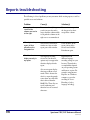
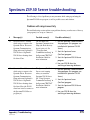
Reports troubleshooting
The following is a list of problems you may encounter while creating reports, as well as
possible causes and solutions.
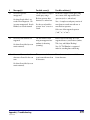
Problem
Cause(s)
Solution(s)
On my short form,
several of the
columns are too far
to the right.
If an extraordinarily long
word is in your data and is
longer than the column width,
it can push the columns to the
right over to accommodate it.
You can insert a space in
the long word so that it
wraps in the column.
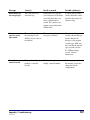
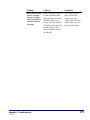
When I printed my
report, all that
printed was the
navigation bar.
The focus in your browser
window was not set in the
report pane of the window.
Click anywhere in the
report portion of the
browser and click the
Print button again.
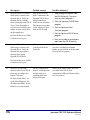
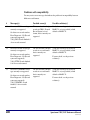
Diacritics do not
display correctly in
my report.
The language encoding
selected in your browser
options may not support the
diacritics displayed in the
report.
Experiment with
different language
encoding settings on your
browser. The method to
accomplish this depends
on your operating system
and browser version. For
example, using Internet
Explorer on a Windows
computer, you set the
encoding in View >
Encoding > [select
language encoding].
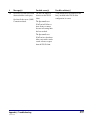
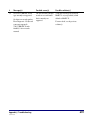
Also, most reports display
characters without accent
marks. This is because the
data for a report frequently
comes from one of the files
that is derived from the
MARC file. These files are
used for indexing and
therefore have no accented
characters.
590
Spectrum CIRC/CAT Reference Manual
SCC5rm1200kn