1
Setup troubleshooting
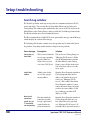
Search Log window
The Search Log window tracks any messages that are communicated between Z39.50
servers and clients. You can view this log in the Other Libraries tab in Catalog and
Catalog Setup. This window opens automatically after you test all Z39.50 servers in the
Other Libraries tab in Catalog Setup or when you click the View Messages button in the
Test Results window after you test an individual server.
The Host column indicates which Z39.50 server generated the message, and the Message
column displays the contents of the message.
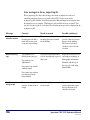
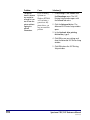
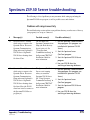
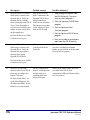
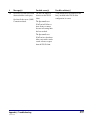
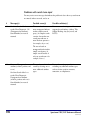
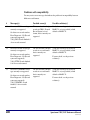
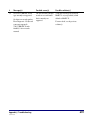
The following table describes common error messages that may be listed in the Search
Log window, along with possible solutions to help resolve the problems.
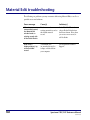
580
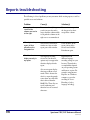
Error message
Description
Solution
Connection to
host failed
This is received when the
server is not responding
properly. Either it is
down, it does not exist,
or it is not a Z39.50 site.
Test the server in Catalog Setup (see
"Managing Z39.50 servers"). Make
sure the information that is listed in
the Other Libraries tab in Catalog
Setup is correct. If that doesn't work,
wait a few hours, and try to test the
server again.
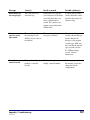
Invalid host
address
Address given for the
server is not a proper
internet address.
Open the Server Properties window in
Catalog Setup and make sure the
address you listed for the server is
correct (see "Managing Z39.50
servers"). If the address listed in the
Server Properties window is correct,
contact the remote library and verify
you have the correct address. Valid
server addresses are either an IP
address or a URL.
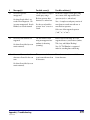
Host closed
connection
(could also say
"Z-association
not accepted by
Host has refused the
connection, possibly
because a password is
required and/or the
password entered is
Open the Server Properties window in
Catalog Setup and make sure you
have entered the correct password
(see "Managing Z39.50 servers"). If
you didn't enter a password and one is
Spectrum CIRC/CAT Reference Manual
SCC5rm1200kn