1
Cat.No. H112–E1–1
E5AN
Temperature Controller
USER’S MANUAL
E5AN
Preface
The temperature controller E5AN allows the user to carry out the following:
• Select from many types of temperature, nonĆcontact temperature sensor and analog
input
• Select heating and cooling control in addition to standard control
• Select AT (autoĆtuning) and ST (selfĆtuning) as tuning functions
• Use multiĆSP and the run/stop function according to event input (for units equipped
with the event input function)
• Use the HBA (heater burnout alarm) function (for units equipped with the heater
burnout alarm function)
• Use the communications function (for units equipped with the communications
function)
• Calibrate sensor input
• The E5AN features a watertight construction (NEMA4X : equivalent to IP66).
• The E5AN conforms to UL/CSA/IEC safety standards and EMC standards.
* This User's Manual describes how to use the E5AN.
Before using your E5AN, thoroughly read and understand this manual in order to
ensure correct use.
Also, store this manual in a safe place so that it can be retrieved whenever necessary.
* For an additional description of the communications function, also refer to the
E5AN/EN/CN/GN Temperature Controller, Communications Function User's
Manuals (Cat. No. H102).
E OMRON, 1999
All rights reserved. No part of this publication may be reproduced, stored in a retrieval system or transmitted,
in any form, or by any means, mechanical, electronic, photocopying, recording, or otherwise, without the prior
written permission of OMRON.
No patent liability is assumed with respect to the use of the information contained herein. Moreover, because
OMRON is constantly striving to improve its high-quality products, the information contained in this manual is
subject to change without notice. Every precaution has been taken in the preparation of this manual. Nevertheless, OMRON assumes no responsibility for errors or omissions. Neither is any liability assumed for damages
resulting from the use of the information contained in this publication.
I
E5AN
PRECAUTIONS
When the product is used under the circumstances or environment described in this
manual, always adhere to the limitations of the rating and functions. Also, for safety,
take countermeasures such as fitting fail safe installations.
DO NOT USE :
• In circumstances or environments that have not been described below in this manual.
• For control in nuclear power, railway, aircraft, vehicle, incinerator, medical, entertainment,
or safety applications.
• Where death or serious property damage may occur, or where extensive safety precautions
are required.
II
E5AN
SAFETY PRECAUTIONS
JSafety Signal Words
This manual uses the following signal words to mark safety precautions for the E5AN.
These precautions provide important information for the safe application of the product. You
must be sure to follow the instructions provided in all safety precautions.
WARNING
Indicates information that, if not heeded, could possibly result in loss of life or
serious injury.
CAUTION
Indicates information that, if not heeded, could result in relatively serious or
minor injury, damage to the product, or faulty operation.
JSafety Precautions
CAUTION
F Electric Shock Warning
Do not touch the terminals while the power is ON.
Doing so may cause an electric shock.
Do not allow metal fragments or lead wire scraps to fall inside this product.
These may cause electric shock, fire or malfunction.
Never disassemble, repair or modify the product.
Doing so may cause electric shock, fire or malfunction.
Do not operate this product in flammable and explosive gas atmospheres.
The life expectancy of the output relays varies greatly with the switching capacity and other switching
conditions. Always use the output relays within their rated load and electrical life expectancy. If an outĆ
put relay is used beyond its life expectancy, its contacts may become fused or burned.
Use this product within the rated load.
Not doing so may cause damage or fire.
Use this product within the rated supply voltage.
Not doing so may cause damage or fire.
Tighten the terminal screws to a torque of 0.74 to 0.90 Nm
Loose screws may cause malfunction.
Set all settings according to the control target of the product.
If the settings are not appropriate for the control target, the product may operate in an unexpected manĆ
ner, resulting in damage to the product or resulting in accidents.
To maintain safety in the event of a product malfunction, always take appropriate safety measures, such
as installing an alarm on a separate line to prevent excessive temperature rise.
If a malfunction prevents proper control, a major accident may result.
III
E5AN
NOTICE
Be sure to observe these precautions to ensure safe use.
(1) Do not wire unused terminals.
(2) Be sure to wire properly with correct polarity of terminals.
(3) To reduce induction noise, separate the highĆvoltage or largeĆcurrent power lines from other lines,
and avoid parallel or common wiring with the power lines when you are wiring to the terminals.
We recommend using separating pipes, ducts, or shielded lines.
(4) Do not use this product in the following places:
• Places subject to dust or corrosive gases (in particular, sulfide gas and ammonia gas)
• Places subject to high humidity, condensation or freezing
• Places subject to direct sunlight
• Places subject to vibration and large shocks
• Places subject to splashing liquid or oily atmosphere
• Places directly subject to heat radiated from heating equipment
• Places subject to intense temperature changes
(5) To allow heat to escape, do not block the area around the product. (Ensure that enough space is
left for the heat to escape.)
• Do not block the ventilation holes on the casing.
(6) When you draw out or draw in the internal mechanism or the terminal unit from the housing,
never touch electrical components inside or subject the internal mechanism to shock.
(7) Cleaning: Do not use paint thinner or the equivalent. Use standard grade alcohol to clean the product.
(8) Use specified size (M3.5, width 7.2 mm or less) crimped terminals for wiring.
(9) Allow as much space as possible between the E5AN and devices that generate powerful highĆfreĆ
quency noise (e.g. highĆfrequency welders, highĆfrequency sewing machines) or surges.
(10) When executing selfĆtuning, turn the load (e.g. heater) ON simultaneously or before you turn the
the main unit ON. If you turn the the main unit ON before turning the load ON, correct selfĆtuning
results and optimum control may no longer be obtained.
(11) Use a 100 to 240 VAC (50/60 Hz), 24 VAC (50/60 Hz) or 24 VDC power supply matched to the power
specifications of the E5AN. Also, make sure that rated voltage is attained within two seconds of
turning the power ON.
(12) Attach a surge suppressor or noise filter to peripheral devices that generate noise (in particular,
motors, transformers, solenoids, magnetic coils or other equipment that have an inductance comĆ
ponent).
(13) When mounting a noise filter on the power supply, be sure to first check the filter's voltage and
current capacity, and then mount the filter as close as possible to the E5AN.
(14) Use within the following temperature and humidity ranges:
• Temperature: Ć10 to 55_C, Humidity: 25 to 85% (with no icing or condensation)
If the E5AN is installed inside a control board, the ambient temperature must be kept to under
55_C, including the temperature around the E5AN.
If the E5AN is subjected to heat radiation, use a fan to cool the surface of the E5AN to under
55_C.
(15) Store within the following temperature and humidity ranges:
• Temperature: Ć25 to 65_C, Humidity: 25 to 85% (with no icing or condensation)
(16) Never place heavy objects on, or apply pressure to the E5AN as it may cause it to deform and deteriĆ
orate during use or storage.
(17) Avoid using the E5AN in places near a radio, television set, or wireless installation. These devices
can cause radio disturbances which adversely affect the performance of the E5AN.
(18) Allow at least 30 minutes for the E5AN to warm up.
(19) Locate a switch or circuit breaker and clearly indicate its position so that the operator can immediĆ
ately turn the E5AN OFF.
IV
E5AN
Conventions Used in This Manual
JMeanings of Abbreviations
The following abbreviations are used in parameter names, figures and in text explanations.
These abbreviations mean the following:
Symbol
Term
PV
Process value
SV
Set value
SP
Set point
AT
AutoĆtuning
ST
SelfĆtuning
EU
Engineering unit *1
*1 _C, m, g and other units are indicated for scaled data. However, EU" is used as the minimum
unit for the data. For example, for 50.02 (m)", 1 EU is taken as the minimum unit 0.01 (m).
JHow to Read Display Symbols
The following tables show the correspondence between the symbols displayed on the displays
and alphabet characters.
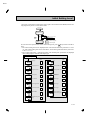
A B C D E F G H I J K L M
N O P Q R S T U VW X Y Z
V
E5AN
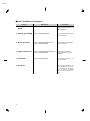
JHow This Manual is Organized
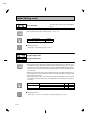
Purpose
D Learning about the
E5AN
Related title
Chapter 1 INTRODUCTION
Description
This chapter describes the
features, names of parts and
typical functions.
D Setting up the E5AN Chapter 2 PREPARATIONS
This chapter describes instalĆ
lation and wiring.
D Basic operations
Chapter 3 BASIC OPERATION and
Chapter 5 PARAMETERS
These chapters describe basic
control examples.
D Applied operations
Chapter 4 APPLIED OPERATION and
Chapter 5 PARAMETERS
These chapters describe
advanced functions to fully
use E5AN.
D Calibration
Chapter 6 CALIBRATION
This chapter describes calĆ
ibration method.
D Appendix
VI
This chapter describes the
unit specifications. There is
also a parameter operations
list to be used as a backup
guide to the parameter setĆ
tings.
Table of Contents
Preface . . . . . . . . . . . . . . . . . . . . . . . . . . . . . . . . . . . . . .
Precautions . . . . . . . . . . . . . . . . . . . . . . . . . . . . . . . . . .
Safety Precautions . . . . . . . . . . . . . . . . . . . . . . . . . . . .
Notice . . . . . . . . . . . . . . . . . . . . . . . . . . . . . . . . . . . . . . .
Conventions Used in This Manual . . . . . . . . . . . . . . .
CHAPTER 1 INTRODUCTION . . . . . . . . . . . . . . . . . . . . . . . . . . .
1–1
1.1 Names of Parts . . . . . . . . . . . . . . . . . . . . . . . . . . . . . . . . . . . . . . . . . .
1–2
Front panel . . . . . . . . . . . . . . . . . . . . . . . . . . . . . . . . . . . . . . . . . . . . . . . . . . . . . . . . .
Display . . . . . . . . . . . . . . . . . . . . . . . . . . . . . . . . . . . . . . . . . . . . . . . . . . . . . . . . . . . .
How to use keys . . . . . . . . . . . . . . . . . . . . . . . . . . . . . . . . . . . . . . . . . . . . . . . . . . . .
1–2
1–2
1–3
1.2 I/O Configuration and Main Functions . . . . . . . . . . . . . . . . . . . . . .
1–4
I/O configuration . . . . . . . . . . . . . . . . . . . . . . . . . . . . . . . . . . . . . . . . . . . . . . . . . . . .
Main functions . . . . . . . . . . . . . . . . . . . . . . . . . . . . . . . . . . . . . . . . . . . . . . . . . . . . . .
1–4
1–5
1.3 How Setup Levels Are Configured and Operating
the Keys on the Front Panel . . . . . . . . . . . . . . . . . . . . . . . . . . . . . . .
1–6
Selecting parameters . . . . . . . . . . . . . . . . . . . . . . . . . . . . . . . . . . . . . . . . . . . . . . . .
Fixing settings . . . . . . . . . . . . . . . . . . . . . . . . . . . . . . . . . . . . . . . . . . . . . . . . . . . . . .
1–8
1–8
1.4 Communications Function . . . . . . . . . . . . . . . . . . . . . . . . . . . . . . . .
1–9
CHAPTER 2 PREPARATIONS . . . . . . . . . . . . . . . . . . . . . . . . . . .
2–1
2.1 Installation . . . . . . . . . . . . . . . . . . . . . . . . . . . . . . . . . . . . . . . . . . . . . .
2–2
Dimensions . . . . . . . . . . . . . . . . . . . . . . . . . . . . . . . . . . . . . . . . . . . . . . . . . . . . . . . .
Panel cutout . . . . . . . . . . . . . . . . . . . . . . . . . . . . . . . . . . . . . . . . . . . . . . . . . . . . . . . .
Setting up the option units . . . . . . . . . . . . . . . . . . . . . . . . . . . . . . . . . . . . . . . . . . . .
Mounting . . . . . . . . . . . . . . . . . . . . . . . . . . . . . . . . . . . . . . . . . . . . . . . . . . . . . . . . . . .
Draw out . . . . . . . . . . . . . . . . . . . . . . . . . . . . . . . . . . . . . . . . . . . . . . . . . . . . . . . . . . .
2–2
2–2
2–3
2–4
2–5
2.2 Wiring Terminals . . . . . . . . . . . . . . . . . . . . . . . . . . . . . . . . . . . . . . . . .
2–6
Terminal arrangement . . . . . . . . . . . . . . . . . . . . . . . . . . . . . . . . . . . . . . . . . . . . . . .
Precautions when wiring . . . . . . . . . . . . . . . . . . . . . . . . . . . . . . . . . . . . . . . . . . . . .
Wiring . . . . . . . . . . . . . . . . . . . . . . . . . . . . . . . . . . . . . . . . . . . . . . . . . . . . . . . . . . . . .
2–6
2–6
2–6
2.3 Requests at Installation . . . . . . . . . . . . . . . . . . . . . . . . . . . . . . . . . . .
2–10
To ensure prolonged use . . . . . . . . . . . . . . . . . . . . . . . . . . . . . . . . . . . . . . . . . . . . .
To reduce the influence of noise . . . . . . . . . . . . . . . . . . . . . . . . . . . . . . . . . . . . . . .
To ensure high–precision measurement . . . . . . . . . . . . . . . . . . . . . . . . . . . . . . . .
About waterproofing . . . . . . . . . . . . . . . . . . . . . . . . . . . . . . . . . . . . . . . . . . . . . . . . .
2–10
2–10
2–10
2–11
CHAPTER 3 BASIC OPERATION . . . . . . . . . . . . . . . . . . . . . . . .
3–1
3.1 Initial Setup Examples . . . . . . . . . . . . . . . . . . . . . . . . . . . . . . . . . . . .
3.2 Setting the Input Type . . . . . . . . . . . . . . . . . . . . . . . . . . . . . . . . . . . .
3–2
3–4
Input type . . . . . . . . . . . . . . . . . . . . . . . . . . . . . . . . . . . . . . . . . . . . . . . . . . . . . . . . . .
3–4
3.3 Selecting _C/_F . . . . . . . . . . . . . . . . . . . . . . . . . . . . . . . . . . . . . . . . .
3–5
Temperature unit . . . . . . . . . . . . . . . . . . . . . . . . . . . . . . . . . . . . . . . . . . . . . . . . . . . .
3–5
3.4 Selecting PID Control or ON/OFF Control . . . . . . . . . . . . . . . . . . .
3.5 Setting Output Specifications . . . . . . . . . . . . . . . . . . . . . . . . . . . . . .
3–6
3–7
Control period . . . . . . . . . . . . . . . . . . . . . . . . . . . . . . . . . . . . . . . . . . . . . . . . . . . . . .
Direct/reverse operation . . . . . . . . . . . . . . . . . . . . . . . . . . . . . . . . . . . . . . . . . . . . . .
3–7
3–7
I
II
III
IV
V
3.6 Setting the SP . . . . . . . . . . . . . . . . . . . . . . . . . . . . . . . . . . . . . . . . . . .
3–9
Changing the SP . . . . . . . . . . . . . . . . . . . . . . . . . . . . . . . . . . . . . . . . . . . . . . . . . . . .
3–9
3.7 Executing ON/OFF Control . . . . . . . . . . . . . . . . . . . . . . . . . . . . . . . .
3–10
ON/OFF Control . . . . . . . . . . . . . . . . . . . . . . . . . . . . . . . . . . . . . . . . . . . . . . . . . . . .
Setup . . . . . . . . . . . . . . . . . . . . . . . . . . . . . . . . . . . . . . . . . . . . . . . . . . . . . . . . . . . . . .
3–10
3–11
3.8 Determining PID Constants (AT, ST, manual setup) . . . . . . . . . . .
3–12
AT.(auto-tuning) . . . . . . . . . . . . . . . . . . . . . . . . . . . . . . . . . . . . . . . . . . . . . . . . . . . . .
ST (self-tuning) . . . . . . . . . . . . . . . . . . . . . . . . . . . . . . . . . . . . . . . . . . . . . . . . . . . . .
ST start conditions . . . . . . . . . . . . . . . . . . . . . . . . . . . . . . . . . . . . . . . . . . . . . . . . . .
ST stable range . . . . . . . . . . . . . . . . . . . . . . . . . . . . . . . . . . . . . . . . . . . . . . . . . . . . .
Manual setup . . . . . . . . . . . . . . . . . . . . . . . . . . . . . . . . . . . . . . . . . . . . . . . . . . . . . . .
3–12
3–13
3–14
3–14
3–15
3.9 Alarm Outputs . . . . . . . . . . . . . . . . . . . . . . . . . . . . . . . . . . . . . . . . . . .
3–17
Alarm type . . . . . . . . . . . . . . . . . . . . . . . . . . . . . . . . . . . . . . . . . . . . . . . . . . . . . . . . .
Alarm value . . . . . . . . . . . . . . . . . . . . . . . . . . . . . . . . . . . . . . . . . . . . . . . . . . . . . . . .
3–17
3–18
3.10 Heater Burnout Alarm (HBA) . . . . . . . . . . . . . . . . . . . . . . . . . . . . . .
3–19
HBA detection . . . . . . . . . . . . . . . . . . . . . . . . . . . . . . . . . . . . . . . . . . . . . . . . . . . . . .
Operating conditions . . . . . . . . . . . . . . . . . . . . . . . . . . . . . . . . . . . . . . . . . . . . . . . . .
Setup . . . . . . . . . . . . . . . . . . . . . . . . . . . . . . . . . . . . . . . . . . . . . . . . . . . . . . . . . . . . . .
How to calculate detection current values . . . . . . . . . . . . . . . . . . . . . . . . . . . . . . .
Example . . . . . . . . . . . . . . . . . . . . . . . . . . . . . . . . . . . . . . . . . . . . . . . . . . . . . . . . . . .
3–19
3–19
3–20
3–21
3–21
3.11 Requests during Operation . . . . . . . . . . . . . . . . . . . . . . . . . . . . . . . .
3–23
CHAPTER 4 APPLIED OPERATION . . . . . . . . . . . . . . . . . . . . . .
4–1
4.1 Shifting Input Values . . . . . . . . . . . . . . . . . . . . . . . . . . . . . . . . . . . . .
4–2
Shifting input . . . . . . . . . . . . . . . . . . . . . . . . . . . . . . . . . . . . . . . . . . . . . . . . . . . . . . .
How to calculate input shift values (2-point shift) . . . . . . . . . . . . . . . . . . . . . . . . .
1-point shift method . . . . . . . . . . . . . . . . . . . . . . . . . . . . . . . . . . . . . . . . . . . . . . . . .
2-point shift method . . . . . . . . . . . . . . . . . . . . . . . . . . . . . . . . . . . . . . . . . . . . . . . . .
Example of 2-point temperature input shift . . . . . . . . . . . . . . . . . . . . . . . . . . . . . .
4–2
4–3
4–4
4–4
4–5
4.2 Alarm Hysteresis . . . . . . . . . . . . . . . . . . . . . . . . . . . . . . . . . . . . . . . .
4–6
Standby sequence . . . . . . . . . . . . . . . . . . . . . . . . . . . . . . . . . . . . . . . . . . . . . . . . . .
Close in alarm/open in alarm . . . . . . . . . . . . . . . . . . . . . . . . . . . . . . . . . . . . . . . . . .
4–6
4–7
4.3 Setting Scaling Upper and Lower Limits (analog input) . . . . . . . .
4–8
Analog input . . . . . . . . . . . . . . . . . . . . . . . . . . . . . . . . . . . . . . . . . . . . . . . . . . . . . . . .
4–8
4.4 Executing Heating and Cooling Control . . . . . . . . . . . . . . . . . . . . .
4–10
Heating and cooling control . . . . . . . . . . . . . . . . . . . . . . . . . . . . . . . . . . . . . . . . . . .
Setup . . . . . . . . . . . . . . . . . . . . . . . . . . . . . . . . . . . . . . . . . . . . . . . . . . . . . . . . . . . . . .
4–10
4–11
4.5 Externally Setting the SP . . . . . . . . . . . . . . . . . . . . . . . . . . . . . . . . .
4–12
Setting event input . . . . . . . . . . . . . . . . . . . . . . . . . . . . . . . . . . . . . . . . . . . . . . . . . .
How to use multi-SP . . . . . . . . . . . . . . . . . . . . . . . . . . . . . . . . . . . . . . . . . . . . . . . . .
Setting by key operation . . . . . . . . . . . . . . . . . . . . . . . . . . . . . . . . . . . . . . . . . . . . .
Setup . . . . . . . . . . . . . . . . . . . . . . . . . . . . . . . . . . . . . . . . . . . . . . . . . . . . . . . . . . . . . .
Executing run/stop control . . . . . . . . . . . . . . . . . . . . . . . . . . . . . . . . . . . . . . . . . . . .
4–12
4–12
4–13
4–13
4–14
4.6 Setting the SP Upper and Lower Limit Values . . . . . . . . . . . . . . .
4–15
Set point limitter . . . . . . . . . . . . . . . . . . . . . . . . . . . . . . . . . . . . . . . . . . . . . . . . . . . .
Setup . . . . . . . . . . . . . . . . . . . . . . . . . . . . . . . . . . . . . . . . . . . . . . . . . . . . . . . . . . . . . .
4–15
4–16
4.7 Executing the SP Ramp Function (limiting the SP change rate)
4–17
SP ramp . . . . . . . . . . . . . . . . . . . . . . . . . . . . . . . . . . . . . . . . . . . . . . . . . . . . . . . . . . .
4–17
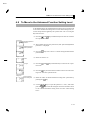
4.8 To Move to the Advanced Function Setting Level . . . . . . . . . . . .
4.9 Using the Key Protect Level . . . . . . . . . . . . . . . . . . . . . . . . . . . . . . .
4–19
4–20
Key protect . . . . . . . . . . . . . . . . . . . . . . . . . . . . . . . . . . . . . . . . . . . . . . . . . . . . . . . . .
4–20
CHAPTER 5 PARAMETERS . . . . . . . . . . . . . . . . . . . . . . . . . . . . .
5–1
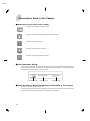
Conventions Used in this Chapter . . . . . . . . . . . . . . . . . . . . . . . . . . . . . .
Meanings of icons used in this chapter . . . . . . . . . . . . . . . . . . . . . . . . . .
About parameter display . . . . . . . . . . . . . . . . . . . . . . . . . . . . . . . . . . . . . .
About the Order in Which Parameters Are Described in This Chapter
Protect Level . . . . . . . . . . . . . . . . . . . . . . . . . . . . . . . . . . . . . . . . . . . . . . . . .
Operation Level . . . . . . . . . . . . . . . . . . . . . . . . . . . . . . . . . . . . . . . . . . . . . .
Adjustment Level . . . . . . . . . . . . . . . . . . . . . . . . . . . . . . . . . . . . . . . . . . . . .
Initial Setting Level . . . . . . . . . . . . . . . . . . . . . . . . . . . . . . . . . . . . . . . . . . .
Advanced Function Setting Level . . . . . . . . . . . . . . . . . . . . . . . . . . . . . . .
Communications Setting Level . . . . . . . . . . . . . . . . . . . . . . . . . . . . . . . . .
5–2
5–2
5–2
5–2
5–3
5–4
5–11
5–19
5–27
5–40
CHAPTER 6 CALIBRATION . . . . . . . . . . . . . . . . . . . . . . . . . . . . .
6–1
6.1
6.2
6.3
6.4
6.5
6.6
Parameter Structure . . . . . . . . . . . . . . . . . . . . . . . . . . . . . . . . . . . . .
User Calibration . . . . . . . . . . . . . . . . . . . . . . . . . . . . . . . . . . . . . . . . .
Calibrating Thermocouples . . . . . . . . . . . . . . . . . . . . . . . . . . . . . . . .
Calibrating Analog Input . . . . . . . . . . . . . . . . . . . . . . . . . . . . . . . . . .
Calibrating Platinum Resistance Thermometers . . . . . . . . . . . . .
Checking Indication Accuracy . . . . . . . . . . . . . . . . . . . . . . . . . . . . .
6–2
6–3
6–4
6–7
6–8
6–9
APPENDIX . . . . . . . . . . . . . . . . . . . . . . . . . . . . . . . . . . . . . . . . . . . . .
A–1
SPECIFICATIONS . . . . . . . . . . . . . . . . . . . . . . . . . . . . . . . . . . . . . . . . . . . .
A–2
Ratings . . . . . . . . . . . . . . . . . . . . . . . . . . . . . . . . . . . . . . . . . . . . . . . . . . . . . . . . . . . .
Characteristics . . . . . . . . . . . . . . . . . . . . . . . . . . . . . . . . . . . . . . . . . . . . . . . . . . . . . .
A–2
A–3
CURRENT TRANSFORMER (CT) . . . . . . . . . . . . . . . . . . . . . . . . . . . . . .
ERROR DISPLAY . . . . . . . . . . . . . . . . . . . . . . . . . . . . . . . . . . . . . . . . . . . .
PARAMETER OPERATIONS LIST . . . . . . . . . . . . . . . . . . . . . . . . . . . . . .
Operation level . . . . . . . . . . . . . . . . . . . . . . . . . . . . . . . . . . . . . . . . . . . . . . .
Adjustment level . . . . . . . . . . . . . . . . . . . . . . . . . . . . . . . . . . . . . . . . . . . . . .
Initial Setting Level . . . . . . . . . . . . . . . . . . . . . . . . . . . . . . . . . . . . . . . . . . .
Advanced function setting level . . . . . . . . . . . . . . . . . . . . . . . . . . . . . . . . .
Protect level . . . . . . . . . . . . . . . . . . . . . . . . . . . . . . . . . . . . . . . . . . . . . . . . .
Communications Setting Level . . . . . . . . . . . . . . . . . . . . . . . . . . . . . . . . .
SENSOR INPUT SETTING AND INDICATION RANGES . . . . . . . . . .
SETUP LEVELS DIAGRAM . . . . . . . . . . . . . . . . . . . . . . . . . . . . . . . . . . . .
PARAMETER FLOW . . . . . . . . . . . . . . . . . . . . . . . . . . . . . . . . . . . . . . . . . .
A–4
A–5
A–7
A–7
A–7
A–8
A–9
A–9
A–9
A–10
A–11
A–12
INDEX
E5AN
CHAPTER 1 INTRODUCTION
1
CHAPTER 1
INTRODUCTION
1.1 Names of Parts . . . . . . . . . . . . . . . . . . . . . . . .
1Ć2
Front panel . . . . . . . . . . . . . . . . . . . . . . . . . . .
1Ć2
Display . . . . . . . . . . . . . . . . . . . . . . . . . . . . . . .
1Ć2
How to use keys . . . . . . . . . . . . . . . . . . . . . . .
1Ć3
1.2 I/O Configuration and Main Functions . . .
1Ć4
I/O configuration . . . . . . . . . . . . . . . . . . . . . . .
1Ć4
Main functions . . . . . . . . . . . . . . . . . . . . . . . .
1Ć5
1.3 How Setup Levels Are Configured and
Operating the Keys on the Front Panel . . .
1Ć6
Selecting parameters . . . . . . . . . . . . . . . . . . .
1Ć8
Fixing settings . . . . . . . . . . . . . . . . . . . . . . . . .
1Ć8
1.4 Communications Function . . . . . . . . . . . . . .
1Ć9
1–1
E5AN
CHAPTER 1 INTRODUCTION
1.1 Names of Parts
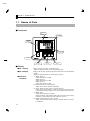
JFront panel
Temperature
unit
No.1 display
Operation
indicators
No.2 display
Level key
Mode key
Down key
Up key
JDisplay
F No.1 display
Displays the process value or parameter type.
ăLights for approximately one second during startup.
F No.2 display
Displays the set point, parameter operation read value or the manipulated
variable.
ăLights for approximately one second during startup.
F Operation
indicators
(1) ALM1 (alarm 1)
Lights when alarm 1 is ON.
ALM2 (alarm 2)
Lights when alarm 2 is ON.
ALM3 (alarm 3)
Lights when alarm 3 is ON.
(2) HB (heater burnout alarm display)
Lights when a heater burnout is detected.
(3) OUT1, OUT2 (control output 1, control output 2)
Lights when control output 1 and/or control output 2 are ON. HowĆ
ever, whenever control output 1 is the current output, OUT1 stays off.
(4) STOP (stop)
Lights when operation is stopped.
During operation, this indicator lights when an event or the run/stop
function is stopped. Otherwise, this indicator stays off.
(5) CMW (communications writing control)
Lights when communications writing is enabled" and is out when it
is disabled."
1–2
E5AN
Names
1.1
of Parts
F Temperature unit
The temperature unit is displayed when the display unit parameter is set
to a temperature. Indication is determined by the currently selected temĆ
perature unit" parameter set value. When this parameter is set to _C",
 " is displayed, and when set to _F",  " is displayed.
Flashes during ST operation.
JHow to use keys
F
(level) key
The following describes the basic functions of the front panel keys.
Press this key to select the setting levels. The setting level is selected in
order operation level" ←→ adjustment level", initial setting level" ←→
communications setting level".
F
(mode) key
Press this key to select parameters within each level.
F
(up) key
Each press of this key increases values displayed on the No.2 display. HoldĆ
ing down this key speeds up the incrementation.
F
(down) key
Each press of this key decreases values displayed on the No.2 display. HoldĆ
ing down this key speeds up the decrementation.
F
+
key
combination
This key combination sets the E5AN to the protect level." For details on
the protect level, see Chapter 5 Parameters.
1–3
E5AN
CHAPTER 1 INTRODUCTION
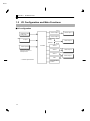
1.2 I/O Configuration and Main Functions
JI/O configuration
OUT1
Control output 1
Temperature input/
analog input
Control output 1
Control output 2
Heating and
cooling
HBA
CT input
OUT2
Alarm output 3
Standard
ALM3
Controller
*
Event input 2ch
Alarm 3
ALM2
SP input from external
digital switch function and
Run/Stop function
Alarm output 2
Alarm 2
Alarm 1
ALM1
Alarm output 1
HBA
HB
“*” indicates optional items
1–4
Communications
function
*
E5AN
I/O
1.2Configuration and Main Functions
JMain functions
The following introduces the main functions of the E5AN. For details on
each function and how to use the functions, see Chapter 3 onwards.
F Input sensor
types
Ă• The following input sensors can be connected for temperature input:
Thermocouple
: K, J, T, E, L, U, N, R, S, B
NonĆcontact temperature sensor type : ES1A
: KĂ(10 to 70_C), KĂ(60 to 120_C), KĂ(115 to 165_C),
ăK (160 to 260_C)
Platinum resistance thermometer
: Pt100, JPt100
Analog input
: 0 to 50 mV
F Control output
Ă• Control output is either relay, voltage or current output depending on
the model of E5AN.
Ă• If heating and cooling control is selected on the E5ANĆj3jjj, alarm
3 output is used as cooling side output. Therefore, use alarm 1, 2 if an
alarm is needed in heating and cooling control.
F Alarms
Ă• Set the alarm type and alarm value, or upperĆ and lowerĆlimit alarms.
Ă• If necessary, a more comprehensive alarm function can be achieved by
setting the standby sequence", alarm hysteresis" and close in alarm/
open in alarm" parameters.
F Control
adjustment
Ă• Optimum PID constants can be set easily by AT (autoĆtuning) and ST
(selfĆtuning).
F Event input
Ă• When equipped with the option event input unit E53ĆAKB, the following
functions can be achieved by event input:
Set point selection (multiĆSP max. 4 points) and run/stop
F HBA
Ă• The heater burnout alarm (HBA) function is supported when the option
unit (E53ĆAKB/E53ĆAK01, or E53ĆAK03) is mounted in the E5AN.
F Communications
function
Ă• Communications according to CompoWay/F* and Sysway are supported
when the option communications unit E53ĆAK01, or E53ĆAK03 is
mounted in the E5AN.
Communications are carried out over the RSĆ485 interface.
*1ăCompoWay/F is a generalĆpurpose serial communicationsĆbased uniĆ
fied communications procedure developed by OMRON. CompoWay/F uses
commands compliant with the wellĆestablished FINS, together with a uniĆ
fied frame format on OMRON programmable controllers to facilitate
communications between personal computers and components.
*2ăSysway communication does not support alarm 3 output.
1–5
E5AN
CHAPTER 1 INTRODUCTION
1.3 How Setup Levels Are Configured and Operating
the Keys on the Front Panel
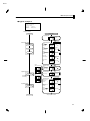
Parameters are divided into groups, each called a level". Each of the set
values (setup items) in these levels are called a parameter." The parameĆ
ters on the E5AN are divided into the following seven levels:
Power ON
Operation level
Adjustment level
key
Less than
1 second
key
+
key
The PV display flashes after
one second.
key
1 second min. 3 seconds
min.
Control stops.
Initial setting level
key
Less than
1 second
key
1 second min.
key
Communications setting
level
Protect level
Password input
set value “–169”
Advanced
function setting level
Password input
set value “1201”
Control in progress
Calibration level
Control stopped
*
Protect level
Operation level
Adjustment level
Initial setting level
Advanced function setting level
Calibration level
Communications setting level
Control in
Progress
Control Stopped
f
f
f
-
f
f
f
f
* : To activate the advanced function setting level, set the Protect level"
of the Initial/Communications protect" to 0".
f : Indicates items that can be set.
Of these levels, the initial setting level, communications setting level,
advanced function setting level and calibration level can be used only
when control has stopped. Note that controller outputs are stopped when
any of these four levels are selected.
1–6
E5AN
How
1.3 Setup Levels Are Configured and Operating the Keys on the Front Panel
F Protect level
Ă• To select this level, simultaneously press the
and
keys for at
least one second. This level is for preventing unwanted or accidental
modification of parameters. Protected levels will not be displayed, and
so the parameters in that level cannot be modified.
F Operation level
Ă• This level is displayed when turning the power ON. It can be moved to
the protect level, initial setting level and adjustment level from this
level.
Ă• Normally, select this level during operation. During operation, the proĆ
cess value and manipulated variable can be monitored, and the set point,
alarm value and upperĆ and lowerĆlimit alarms can be monitored and
modified.
F Adjustment level
Ă• To select this level, press the
key for less than one second.
Ă• This level is for entering set values and offset values for control. This
level contains parameters for setting the AT (autoĆtuning), communicaĆ
tions writing enable/disable, hysteresis, multiĆSP, input shift values,
heater burnout alarm (HBA) and PID constants. It can be moved to the
top parameter of the initial setting level, protect level and operation
level from here.
F Initial setting
level
Ă• To select this level, press the
key for at least three seconds in the
operation level. The PV display flashes after one second. This level is for
specifying the input type, selecting the control method, control period,
setting direct/reverse action and alarm type. It can be moved to the
advanced function setting level or communications setting level from
this level. To return to the operation level, press the
key for at least
one second. To move to the communications setup level, press the
key for less than one second.
F Advanced
function setting
level
Ă• To activate the advanced function setting level, after setting the ProĆ
tect level" of the Initial/Communications protect" to 0", input the
password (-169") in the initial setting level.
Ă• It can be moved to the calibration level or initial level from this level.
Ă• This level is for setting the automatic return of display mode, MV limitĆ
ter, event input assignment, standby sequence, alarm hysteresis, ST
(selfĆtuning) and for moving to the user calibration level.
F Communications
setting level
key for less than one second in the iniĆ
Ă• To select this level, press the
tial setting level. When the communications function is used, set the
communications conditions in this level. Communicating with a perĆ
sonal computer (host computer) allows set points to be read and written,
and manipulated variables to be monitored.
F Calibration level
Ă• To select this level, enter the password in the advanced function setting
level. This level is for offsetting deviation in the input circuit.
Ă• It can not be moved to other levels by operating the keys on the front
panel from the calibration level. To cancel this level, turn the power OFF
then back ON again.
1–7
E5AN
CHAPTER 1 INTRODUCTION
JSelecting
parameters
key. Each press of the
Ă• To select parameters in each level, press the
key advances to the next parameter. For details on each parameter,
see Chapter 5.
Parameter
1
Parameter
2
Parameter
3
Parameter
n
JFixing settings
Ă• If the
key is pressed at the final parameter, the display returns to the
top parameter for the current level.
Ă• To change parameter settings or setup, specify the setting using the
or
keys, and either leave the setting for at least two seconds or press
the
key. This fixes the setting.
Ă• When another level is selected, the parameter and setting on the display
are fixed.
Ă• When the power is turned OFF, fix first the settings or parameter setup
(by pressing the
key). The settings and parameter setup are someĆ
times not changed by merely pressing the
or
keys.
1–8
E5AN
Communications
1.4
Function
1.4 Communications Function
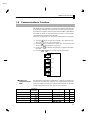
The E5AN can be provided with a communications function that allows you
to check and set controller parameters on a host computer. If the communicaĆ
tions function is required, mount the option unit E53ĆAK01 or E53ĆAK03 in
the E5AN. For details on the communications function, see the separate
Communications Functions User's Manual."
Follow the procedure below to move to the communications setting level.
(1) Press the
key for at least three seconds in the operation level".
The level moves to the initial setting level".
(2) Press the
key for less than one second. The initial setting level"
moves to the communications setting level".
key advances the parameters as shown in the followĆ
(3) Pressing the
ing figure.
(4) Press the
or
keys to change the parameter setups.
Communications
unit No.
Baud rate
Data bit
Stop bit
Parity
F Setting up
communications
data
Parameter
Set the E5AN communications specifications so that they match the comĆ
munications setup of the host computer. In a multidrop 1:N configuration,
match the setting data except the communications unit No. on all units.
Unique communications unit Nos. must be set to each unit.
Displayed
Characters
Set (monitor) Value
Settings
Default
Unit
1
None
9.6
kbps
Communications unit No.
0 to 99
Baud rate
1.2, 2.4, 4.8, 9.6, 19.2
Data bit
7, 8
7
bit
Stop bit
1, 2
2
bit
Parity
None, even, odd
Even
None
., . , . , ., .
,
,
1–9
E5AN
CHAPTER 1 INTRODUCTION
1–10
E5EN
CHAPTER 2 PREPARATIONS
2
CHAPTER 2
PREPARATIONS
2.1 Installation . . . . . . . . . . . . . . . . . . . . . . . . . . . .
2Ć2
Dimensions . . . . . . . . . . . . . . . . . . . . . . . . . . . .
2Ć2
Panel cutout . . . . . . . . . . . . . . . . . . . . . . . . . . .
2Ć2
Mounting . . . . . . . . . . . . . . . . . . . . . . . . . . . . .
2Ć3
Draw out . . . . . . . . . . . . . . . . . . . . . . . . . . . . . .
2Ć4
2.2 Wiring Terminals . . . . . . . . . . . . . . . . . . . . . .
2Ć5
Terminal arrangement . . . . . . . . . . . . . . . . .
2Ć5
Precautions when wiring . . . . . . . . . . . . . . .
2Ć5
Wiring . . . . . . . . . . . . . . . . . . . . . . . . . . . . . . . .
2Ć5
2.3 Requests at Installation . . . . . . . . . . . . . . . .
2Ć10
To ensure prolonged use . . . . . . . . . . . . . . . .
2Ć10
To reduce the influence of noise . . . . . . . . .
2Ć10
To ensure high-precision measurement . .
2Ć10
About waterproofing . . . . . . . . . . . . . . . . . . .
2Ć11
2–1
E5AN
CHAPTER 2 PREPARATIONS
2.1 Installation
JDimensions
(Unit: mm)
84.5
11.5
96
91
78
JPanel cutout
(Unit: mm)
+1.0
92 +0.8
–0
(96number of units -3.5) 0
92 +0.8
–0
120 min.
+0.8
92 – 0
–
Ă• Several units cannot be group mounted close together vertically.
(Observe the recommended mounting space limits.)
Ă• When group mounting several controllers, ensure that the surrounding
temperature does not exceed the allowable operating temperature listed
in the specifications.
Ă• The recommended panel thickness is 1 to 8 mm.
Ă• To ensure waterproofing, enclose the unit in the waterproof packing
prior to mounting. Waterproofing is not possible when group mounting
several units.
2–2
E5AN
Installation
2.1
JSetting up the option units
If communications, event input and heater burnout functions are
required, mount the communications unit (E53ĆAK01 or AK03) or the
event input unit (E53ĆAKB).
The heater burnout function is supported on either of these two option
units.
F Option units
Name
Communications unit
Event input unit
Model
Function
E53-AK01
Communications (RS-232C)
E53-AK03
Communications (RS-485)
E53-AKB
Event input
Ă• Terminal label:x 1
F Assembling the unit
(1)
Regular flat blade
screwdriver
(units: mm)
20 min.
(4)
(2)
(1)
(3)
(1) Insert the tools (see drawing above) into the slots (one on the top and
one on the bottom) and release the hooks.
(2) Insert the tool into the gap between the front and rear, and slightly
draw out the front panel. Then, draw out the front panel towards you
holding it by its top and bottom sides.
(3) Match the upper and lower claws with the connection points and
insert the option unit. Mount the option unit in the center.
(4) Before you push the unit back into the case, make sure that the waterĆ
tight packing is in place. Push the unit back into the rear case until
you hear a click. When you do this, hold down the hooks on the top and
bottom of the rear case so that they are firmly hooked in place.
2–3
E5AN
CHAPTER 2 PREPARATIONS
JMounting
Adaptor
Terminal cover
F How to attach the
E5AN on the
panel
(1) Insert the main unit through the mounting hole in the panel (1Ć8 mm
thickness). Pull the adapter along the body of the main unit from rear
case up to the panel and fasten temporarily.
(2) Tighten the upper and lower screws alternately with only one turn of
the screwdriver at a time to maintain an even torque balance.
F How to attach the
terminal cover
Fit terminal cover E53-COV11 onto the upper and lower hooks.
Attach the terminal cover so that the OMRON mark of terminal Nos.1 to
10 faces down and the OMRON mark of terminal Nos.11 to 20 faces up. If
the cover is attached the other way round, the fixture can no longer be atĆ
tached.
2–4
E5AN
Installation
2.1
JDraw out
The main unit can be drawn out to perform maintenance without removĆ
ing the terminal compartment.
(1)
(2)
(3)
Prepare a screwdriver that can be used on the lower front screw of the unit.
(1) Loosen the lower front screw with a screwdriver (turning left) while
pushing the hook on the upper surface of the front panel.
(2) Grasp both sides of the front panel and draw (pull) it out.
(3) Ensure that the waterproof packing is in place before drawing in the
unit. ReĆtighten the lower front screw with a screwdriver (turning
right) to a torque of 0.3 to 0.5 Nm while pushing the hook on the
upper surface of the front panel.
2–5
E5AN
CHAPTER 2 PREPARATIONS
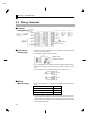
2.2 Wiring Terminals
JTerminal
to 240V
arrangement AC100V
AC/DC 24V
Voltage output/
Relay output
DC12V 40mA
AC250V 5A
(Resistive load) Current output
Input power
OUT1
ALM3/OUT2
Alarm output
AC250V 3A
(Resistive load)
ALM2
1
11
2
12
3
13
4
14
5
15
6
16
7
17
8
18
9
ALM1/Heater burnout
JPrecautions
when wiring
RS-232C
Event input
(No polarity)
EV2
EV1
RS-485
11
SD
11
B (+)
12
RD
12
A (–)
13
SG
13
Do not
use
CT
A
B
B
TC
Analog input
Pt
10
Ă• Separate input leads and power lines in order to protect the E5AN and
its lines from external noise.
Ă• Use AWG28 or larger twisted pair cable.
AWG28 or larger
Conductor cross-section
0.08042mm2 or larger
Ă• It's recommended to use solderless terminals when wiring the E5AN.
Ă• Tighten the terminal screws using a torque no greater than 0.74 to 0.90
Nm.
Ă• Use the following type of solderless terminals for M3.5 screws.
7.2 mm max.
7.2 mm max.
JWiring
F Power supply
Ă• Connect to terminal Nos. 1 to 2. The following table shows the specificaĆ
tions.
Input power supply
E5AN
100 to 240 VAC, 50/60 Hz
9VA
24 VAC, 50/60 Hz
5VA
24 VDC (no polarity)
4W
Ă• Standard insulation is applied to the power supply I/O sections. If reinĆ
forced insulation is required, connect the input and output terminals to
a device without any exposed currentĆcarrying parts or to a device with
standard insulation suitable for the maximum operating voltage of the
power supply I/O section.
2–6
E5AN
Wiring
2.2
Terminals
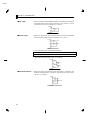
F Input
Ă• Connect to terminal Nos.16 to 18 as follows according to the input type.
16
17 -
16
17
16
17
18
18
18
+
v
+
Thermocouple Platinum resistance Analog
thermometer
input
F Control output 1
Ă• Terminal Nos. 3 to 4 are for control output. The following diagrams
show the available outputs and their internal equalizing circuits.
+V
+V
+
3
3
3
L
4
Relay
GND
+
L
GND
4
4
–
Voltage
–
Current
Ă• The following table shows the specifications for each output type.
Output type
Specifications
Relay
250 VAC, 5A (resistive load) electrical life : 100,000 operations
Voltage (PNP)
(with short-circuit
protection)
Current
DC12V "15%FS
21mA max.
+15%
– 20%FS
DC12V
DC4–20mA
40mA max.
load : 600Ω max. resolution : approx. 2600
Ă• The voltage output (control output) is not electrically insulated from the
internal circuits. When using a grounding thermocouple, do not connect
the control output terminals to the ground. If the control output termiĆ
nals are connected to the ground, errors will occur in the measured temĆ
perature values as a result of leakage current.
F Alarm
output/Control
output 2
Ă• On the E5ANĆV3VVVĂ,Ăalarm output 1 (ALM1) is between terminal
Nos. 9 and 10, alarm output 2 (ALM2) is between terminal Nos. 7 and
8 and alarm output 3 (ALM3) is between terminal Nos. 5 and 6. When
utilizing heating and cooling control, alarm output 2 becomes alarm
output 3 and alarm output 3 is not available.
Ă• When the option unit E5ANĆjjHjj is mounted on the E5AN, an OR
of alarm output 1 and the heater burnout alarm will be output. To disĆ
able alarm output 1 and output only the heater burnout alarm on termiĆ
nals 7 and 8, set the mode of the alarm output 1 to 0.
Ă• The interior equivalent circuits of alarm output 1, 2 and 3 are shown in
the following diagram.
5
ALM3/OUT2
6
7
ALM2
8
9
ALM1/Heater burnout alarm
10
Ă• Relay specifications are as follows:
SPSTĆNO : 3A 250VAC
2–7
E5AN
CHAPTER 2 PREPARATIONS
F CT input
Ă• When the option unit E53ĆAKB, E53ĆAK01, or E53ĆAK03 is mounted on
the E5AN and the heater burnout function is used, connect a current
transformer (CT) across terminal Nos. 14 and 15.
14
CT
15
F Event input
Ă• When the option event input unit E53ĆAKB is mounted on the E5AN
and event input is used, connect to terminal Nos. 11 to 13.
11
EV1
12
EV2
13
Ă• Use event inputs under the following conditions:
Contact input
ON: 1 kΩ max., OFF: 100 kΩ min.
No-contact input ON: residual voltage 1.5 V max., OFF: leakage current 0.1 mA max.
Polarities during noĆcontact input are as follows:
11
12
13
F Communications
EV1
+
EV2
–
Ă• When the option communications unit E53ĆAK01 is mounted in the
E5AN for communications, connect the communications cable to termiĆ
nal Nos. 11, 12 and 13.
11
12
13
2–8
+
SD
RD
SG
RS-232C
E5AN
Wiring
2.2
Terminals
Communications unit connection diagram
Host computer
E5AN
RS-232C : 25P
No.
RS-232C
1
FG
No.
2
SD
11
SD
3
RD
12
RD
4
RS
13
SG
5
CS
6
DR
20
ER
7
SG
Shielded cable
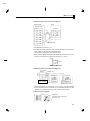
Ă• The RSĆ232C connection is 1:1
Ă• The maximum cable length is 15 m. Use the RSĆ232C optical interface
cable (Z3RN) as an extension cable if necessary.
Ă• Use shielded, twisted pair cable (AWG28 min.).
Ă• When the E53ĆAK03 is mounted in the E5AN for communications, conĆ
nect the communications cable to terminal Nos. 11 and 12.
11
B(+)
12
A(–)
RS-485
Communications unit connection diagram
Host computer
RS-485
Shielded cable
+
FG
A<B : “1” mark
A>B : “2” space
E5AN (No.1)
RS-485
No Abbr.
12 A (–)
11 B (+)
E5AN (No.31)
RS-485
No Abbr.
12 A (–)
11 B (+)
Terminator (120Ω, 1/2 W)
Ă• The RSĆ485 connection can either be 1:1 or 1:N. Up to 32 units including
the host computer can be connected 1:N. Use shielded, twisted pair cable
(AWG28 min.) and keep the total cable length to within 500m.
Cable reference diagram
AWG28 min.
Conductor area cross-section
0.081mm2 min.
2–9
E5AN
CHAPTER 2 PREPARATIONS
2.3 Requests at Installation
JTo ensure
prolonged use
Use the temperature in the following operating environment:
Temperature : -10 to +55°C (icing and condensation not allowed)
Humidity : 25 to 85%
When the temperature controller is incorporated in a control panel, make
sure that the controller's ambient temperature and not the panel's ambiĆ
ent temperature does not exceed 55°C.
The life of electronic equipment such as temperature controllers is inĆ
fluenced not only by the life determined by the relay switching count but
also by the life of the electronic components used internally. The service
life of components is dependent on the ambient temperature: the higher
the ambient temperature becomes, the shorter the service life becomes,
and vice versa. For this reason, the service life of the temperature controlĆ
ler can be extended by lowering its internal temperature.
Gang-mounting two or more temperature controllers, or mounting temperĆ
ature controllers above each other may cause heat to build up inside the temĆ
perature controllers, which will shorten their service life. When mounting
temperature controllers like this, forced cooling measures such as a cooling
fan for cooling the temperature controllers must be taken into consideration.
Prevent only the terminal block from being cooled. Otherwise, this may
result in a measurement error.
JTo reduce the
influence of noise
To reduce induction noise, the leads on the temperature controller's terĆ
minal block must be wired separately from large-voltage/large-current
power leads. Also, avoid wiring leads in parallel with power leads or in the
same wiring path. Other methods such as separating conduits and wiring
ducts, or using shield wire are also effective.
Attach a surge absorber or noise filter to peripheral equipment that generĆ
ates noise (in particular, motors, transformers, solenoids, or other equipĆ
ment that has a magnetic coil or other inductance component).
When a noise filter is used at the power supply, first check the voltage or
current, and attach the noise filter as close as possible to the temperature
controller.
Also, install the temperature controller as far away as possible from equipĆ
ment that generates strong, high frequency (e.g. high-frequency welders,
high-frequency sewing machines) or surges.
JTo ensure
high–precision
measurement
When the thermocouple leads are extended, be sure to use a compensating
lead wire matched to the type of thermocouple.
When the platinum resistance detector leads are extended, use the lead
having the smallest resistance to equalize the resistance of the three leads.
Install the temperature controller so that it is horizontal.
If there is a large error in the measurement values, make sure that input
compensation has been set correctly.
2–10
E5AN
Requests
2.3
at Installation
JAbout
waterproofing
The protective structure of this controller conforms to the following stanĆ
dards. Parts that are not indicated as being protected or that are indicated
as IPj0 are not waterproof.
Front panel: NEMA 4 for indoor use (equivalent to IP66)
Rear case: IP20
Terminals: IP00
2–11
E5AN
CHAPTER 2 PREPARATIONS
2–12
E5AN
CHAPTER 3 BASIC OPERATION
3
CHAPTER 3
BASIC OPERATION
3.1 Initial Setup Examples . . . . . . . . . . . . . . . . .
3.2 Setting the Input Type . . . . . . . . . . . . . . . . .
Input type . . . . . . . . . . . . . . . . . . . . . . . . . . . . .
3.3 Selecting _C/_F . . . . . . . . . . . . . . . . . . . . . . . .
Temperature unit . . . . . . . . . . . . . . . . . . . . . .
3.4 Selecting PID Control or ON/OFF Control
3.5 Setting Output Specifications . . . . . . . . . . .
Control period . . . . . . . . . . . . . . . . . . . . . . . . .
Direct/reverse operation . . . . . . . . . . . . . . . .
3.6 Setting the SP . . . . . . . . . . . . . . . . . . . . . . . . .
Changing the SP . . . . . . . . . . . . . . . . . . . . . . .
3.7 Executing ON/OFF Control . . . . . . . . . . . . .
ON/OFF Control . . . . . . . . . . . . . . . . . . . . . . .
Setup . . . . . . . . . . . . . . . . . . . . . . . . . . . . . . . . .
3.8 Determining PID Constants
(AT, ST, manual setup) . . . . . . . . . . . . . . . . .
AT.(autoĆtuning) . . . . . . . . . . . . . . . . . . . . . . .
ST (selfĆtuning) . . . . . . . . . . . . . . . . . . . . . . . .
ST start conditions . . . . . . . . . . . . . . . . . . . . .
ST stable range . . . . . . . . . . . . . . . . . . . . . . . .
Manual setup . . . . . . . . . . . . . . . . . . . . . . . . . .
3.9 Alarm Outputs . . . . . . . . . . . . . . . . . . . . . . . . .
Alarm type . . . . . . . . . . . . . . . . . . . . . . . . . . . .
Alarm value . . . . . . . . . . . . . . . . . . . . . . . . . . .
3.10 Heater Burnout Alarm (HBA) . . . . . . . . . . .
HBA detection . . . . . . . . . . . . . . . . . . . . . . . . .
Operating conditions . . . . . . . . . . . . . . . . . . .
Setup . . . . . . . . . . . . . . . . . . . . . . . . . . . . . . . . .
How to calculate detection
current values . . . . . . . . . . . . . . . . . . . . . . . . .
Example . . . . . . . . . . . . . . . . . . . . . . . . . . . . . .
3.11 Requests during Operation . . . . . . . . . . . . . .
3Ć2
3Ć4
3Ć4
3Ć5
3Ć5
3Ć6
3Ć7
3Ć7
3Ć7
3Ć9
3Ć9
3Ć10
3Ć10
3Ć11
3Ć12
3Ć12
3Ć13
3Ć14
3Ć14
3Ć15
3Ć17
3Ć17
3Ć18
3Ć19
3Ć19
3Ć19
3Ć20
3Ć21
3Ć21
3Ć22
3–1
E5AN
CHAPTER 3 BASIC OPERATION
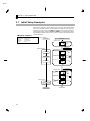
3.1 Initial Setup Examples
F Typical example 1
Input type
Control method
Alarm type
Alarm value 1
Set point
On previous controllers, sensor input type, alarm type and control period
were set by the DIP switches. These hardware settings are now set in paĆ
rameters in setup menus. The
and
keys are used to switch beĆ
tween setup menus, and the amount of time that you hold the keys down
for determines which setup menu you move to. This section describes two
typical examples.
: 0 K thermocouple -200 to 1300_C
: ON/OFF control
: 2 upper limit
: 20_C (deviation)
: 100_C
Setup procedure
Power ON
Power ON
Operation level
Process value/
set point
Press
key for at least three
seconds.
Initial setting level
Control stops.
Initial setting level
Check input type.
Input type
Set input specifications
Set control specifications
Check that control
is ON/OFF control.
In ON/OFF
control
In PID control
Check alarm type.
Alarm 1 type
Set alarm type
Press
key for at
least one second.
Operation level
Control starts.
Press
keys
to set set point to
“100_C”.
Make sure that
control is running.
Operation level
Press
keys
to set alarm value
to “20_C”.
Set alarm values
Start operation
3–2
Start operation
Process
value/set
point
During run
During stop
Alarm value 1
E5AN
Initial
3.1 Setup Examples
F Typical example 2
Input type
: 4 T thermocouple -200 to 400_C
Control method : PID control
Calculate PID constants by AT
(auto-tuning) execution.
Alarm type
: 2 upper limit
Alarm value 1
: 30_C (deviation)
Set point
: 150_C
Setup procedure
Power ON
Power ON
Operation level
Process value/
set point
Press
key for at least
three seconds.
Control stops.
Initial setting level
Initial setting level
Set input specifications
Set control specifications
Press
keys to select
input type.
Input type
Press
keys to select
PID control.
In ON/OFF
control
In PID control
Press
keys to set ST
to OFF.
Set alarm type
Check the
control period.
Check alarm
type.
PV/SP
After AT execution
To execute ST
To cancel ST
Control period
(heat) (unit: seconds)
Alarm 1 type
Operation level
Press
keys to set set
point to “150_C”.
Press
key for at least
one second.
Process value/
set point
During AT execution
Adjustment level
AT execution
(when PID control
is selected)
Adjustment level
While AT is being
executed, SP will
flash
After AT execution
Execute AT
(auto-tuning).
Press
key for less than
1 second.
To execute AT
To cancel AT
Press
key for less than
1 second.
Control starts.
During AT execution
Operation level
Make sure that
set point is
“150_C”.
Operation level
Set alarm values
Make sure that
control is
running.
Press
keys to set alarm
value to “30_C”.
Start operation
Process value/
set point
During run
During stop
Alarm value 1
Start program execution
3–3
E5AN
CHAPTER 3 BASIC OPERATION
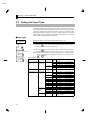
3.2 Setting the Input Type
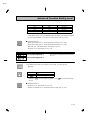
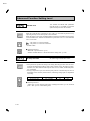
The E5AN supports four input types: platinum resistance thermometer,
thermocouple, nonĆcontact temperature sensor and analog inputs. Set the
input type matched to the sensor used in the input type" parameter. The
E5AN specifications support two types of inputs, platinum resistance
thermometer input types and thermocouple input type, whose set values
differ. Check the type of E5AN at purchase.
JInput type
Operation Procedure
Operation level
Initial setting level
Setting the input type thermocouple KĆ20.0 to 500.0_C".
(1) Press the
key for at least three seconds to move from the operaĆ
tion level" to the initial setting level".
key to enter the set value of the desired sensor. When
(2) Press the
using K thermocouple (Ć20.0 to 500.0_C), enter 1" as the set value.
Input type
Hint: The set value is fixed if you do not operate the keys on the front panel
for two seconds after changing the parameter, or by pressing the
or
keys.
List of Input Types
Platinum resistance
thermometer input
type
Input type
Name
Platinum
resistance
thermometer
Pt100
JPt100
Thermocouple input
type
Input type
Name
Thermocouple
K
J
Non-contact
temperature
sensor
ES1A
Analog input
T
E
L
U
N
R
S
B
K10 to 70_C
K60 to 120_C
K115 to 165_C
K160 to 260_C
0 to 50mV
Shaded ranges indicate default settings.
3–4
Set
Value
Input Temperature Setup Range
0
1
2
3
4
-200 to 850 (_C)
/ -300 to 1500 (_F)
-199.9 to 500.0 (_C) / -199.9 to 900.0 (_F)
0.0 to 100.0 (_C)
/ 0.0 to 210.0 (_F)
-199.9 to 500.0 (_C) / -199.9 to 900.0 (_F)
0.0 to 100.0 (_C)
/ 0.0 to 210.0 (_F)
Set
Value
Input Temperature Setup Range
0
1
2
3
4
5
6
7
8
9
10
11
12
13
14
15
16
-200 to 1300 (_C) / -300 to 2300 (_F)
-20.0 to 500.0 (_C) / 0.0 to 900.0 (_F)
-100 to 850 (_C)
/ -100 to 1500 (_F)
-20.0 to 400.0 (_C) / 0.0 to 750.0 (_F)
-200 to 400 (_C)
/ -300 to 700 (_F)
0 to 600 (_C)
/ 0 to 1100 (_F)
-100 to 850 (_C)
/ -100 to 1500 (_F)
-200 to 400 (_C)
/ -300 to 700 (_F)
-200 to 1300 (_C) / -300 to 2300 (_F)
0 to 1700 (_C)
/ 0 to 3000 (_F)
0 to 1700 (_C)
/ 0 to 3000 (_F)
100 to 1800 (_C)
/ 300 to 3200 (_F)
0 to 90 (_C)
/ 0 to 190 (_F)
0 to 120 (_C)
/ 0 to 240 (_F)
0 to 165 (_C)
/ 0 to 320 (_F)
0 to 260 (_C)
/ 0 to 500 (_F)
For scaling use ranges from -1999 to 9999
or -199.9 to 999.9.
E5AN
Selecting
3.3
_C/_F
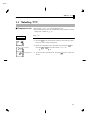
3.3 Selecting
C/_F
Selecting __C/_F
JTemperature unit
Operation Procedure
Operation level
Ă• Select either _C" or _F" as the temperature unit.
Ă• Set the temperature unit in the temperature unit" parameter of initial
setting level". Default is  : _C".
Select _C".
(1) Press the
key for at least three seconds to move from the operaĆ
tion level" to the initial setting level".
Initial setting level
Input type
Temperature unit
(2) Select the temperature unit" parameter by pressing the
Press the
or
keys to select either _C" or _F".
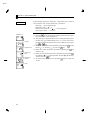
: _C
: _F
(3) To return to the operation level" press the
second.
key.
key for at least one
3–5
E5AN
CHAPTER 3 BASIC OPERATION
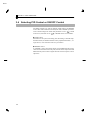
3.4 Selecting PID Control or ON/OFF Control
The E5AN supports two control methods, 2ĆPID control and ON/OFF
control. The control method is selected by the PID / ON/OFF" parameter
in the initial setting level". When this parameter is set to
control is set, and when set to
", 2ĆPID
", ON/OFF control is set (default).
F 2ĆPID control
PID control is set by AT (autoĆtuning), ST (selfĆtuning) or manual setup.
For PID control, set the PID constants in the proportional band (P)", inĆ
tegral time (I)" and derivative time (D)" parameters.
F ON/OFF control
In ON/OFF" control, the control output is turned ON when the process
value is lower than the current set point, and the control output is turned
OFF when the process value is higher than the current set point (reverse
operation).
3–6
E5AN
Setting
3.5
Output Specifications
3.5 Setting Output Specifications
JControl period
Control
period
(heat)
Control
period
(cool)
Ă• Set the output period (control period). Though a shorter period provides
better control performance, it is recommended to set the control period
to 20 seconds or more taking the life expectancy in the case of relay outĆ
put into consideration. If necessary, readjust the control period by trial
operation, for example, when the control period parameters are set to
their defaults.
Ă• Set the control period in the control period (heat)" and control period
(cool)" parameters (initial setting level). Default is 20 seconds".
Ă• Whenever control output 1 is the current output, control period (heat)"
cannot be used.
Ă• The control period (cool)" parameter can be used only in heating and
cooling control.
JDirect/reverse
operation
Ă• Direct operation" refers to control where the manipulated variable is
increased according to the increase in the process value. Alternatively,
Reverse operation" refers to control where the manipulated variable is
decreased according to the increase in the process value.
Manipulated variable
Manipulated variable
100%
100%
0%
0%
Low temperature Set value
Direct operation
High temperature
Low temperature Set value
High temperature
Reverse operation
For example, when the process value (PV) (temperature) is lower than
the set point (SP) (temperature) in a heating control system, the manipĆ
ulated variable increases by the difference between the PV and SP valĆ
ues.
Accordingly, this becomes reverse operation" in a heating control sysĆ
tem, or alternatively, direct operation" in a cooling control system.
Ă• Direct/reverse operation is set in the direct/reverse operation" parameĆ
ter (initial setting level). The direct/reverse operation" parameter deĆ
fault is reverse operation".
3–7
E5AN
CHAPTER 3 BASIC OPERATION
Operation Procedure
In this example, monitor the input type", temperature unit", direct/reĆ
verse operation" and control period (heat)" parameters.
input type" =  ": K thermocouple
temperature unit" =  ": _C
direct/reverse operation" =
": reverse operation
control period (heat)" = 20 (secs)"
(1) Press the
key for at least three seconds to move from the operaĆ
tion level" to the initial setting level".
Operation level
(2) The input type is displayed. When you are setting the input type for
the first time,  ": K thermocouple is set. (0" is set in the case of a
Initial setting level
Input type
Temperature unit
platinum resistance thermometer.) To select a different sensor, press
or
keys.
the
(3) Select the temperature unit" parameter by pressing the
fault is  ": _C. To select  ": _F, press the
key.
(4) Select the control period (heat) parameter by pressing the
Default is 20".
Control period
(heat)
Direct/reverse
operation
Operation level
PV/SP
3–8
key. DeĆ
key.
(5) Select the direct/reverse operation" parameter by pressing the
key. Default is
": reverse operation. To select
": direct opĆ
eration, press the
key.
(6) To return to the operation level" press the
second.
key for at least one
E5AN
Setting
3.6
the SP
3.6 Setting the SP
Operation level
The operation level" is displayed when the E5AN is turned ON. The upĆ
per display (No.1 display) displays the process value, and the lower display
(No.2 display) displays the set point.
JChanging the SP
Ă• The set point cannot be changed when the operation/adjustment
protection" parameter is set to 3". For details, see 4.9 Using the Key
Protect Levels."
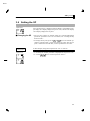
Ă• To change the set point, press the
or
keys in the PV/SP" paĆ
rameter (operation level), and set the desired set value. The new set
point is selected two seconds after you have specified the new value.
Operation Procedure
Operation level
In this example, change the set point from 0_C" to 200_C".
(1) Normally, the PV/SP" parameter is displayed. The set point is 0_C".
(2) Use the
keys to set the set point to 200_C".
3–9
E5AN
CHAPTER 3 BASIC OPERATION
3.7 Executing ON/OFF Control
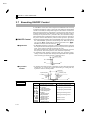
JON/OFF Control
F Hysteresis
In ON/OFF" control, the control output turns OFF when the currently
controlled temperature reaches a preset set point. When the manipulated
variable turns OFF, the temperature begins to fall and the control turns
ON again. This operation is repeated at a certain point. At this time, how
much the temperature must fall before control turns ON again is deterĆ
mined by the hysteresis (heat)" parameter. Also, how much the manipuĆ
lated variable must be adjusted in response in the increase or decrease in
the process value is determined by direct/reverse operation" parameter.
Ă• Switching between 2ĆPID control and ON/OFF control is carried out by
the PID / ON/OFF" parameter (initial setting level). When this paramĆ
eter is set to
", 2ĆPID control is selected, and when set to
",
ON/OFF control, is selected. Default is
".
Ă• In ON/OFF control the hysteresis is used as a differential for switching
the output ON when the temperature moves away from the required set
point, and is used give stability around the set point.
The control output (heat) and control output (cool) functions are set in
the hysteresis (heat) and hysteresis (cool) functions respectively.
Ă• In standard control (heating or cooling control), the hysteresis (heat)"
setting is used as the hysteresis setting in the adjustment level regardless
of the control type, heating control or cooling control.
Hysteresis (heat)
ON
OFF
PV
Set point
F 3-position
control
Ă• In heating and cooling control, a dead band (an area where both control
outputs are 0") can be set to either the heating or cooling side. So,
3Ćposition control is made possible.
Dead band
Hysteresis (cool)
Hysteresis (heat)
ON
Heating
side
Cooling
side
OFF
PV
Set point
Parameters
3–10
Symbol
Parameter Name: Level
Standard/heating and cooling:
Initial setting level
PID / ON/OFF:
Initial setting level
Direct/reverse operation:
Initial setting level
Dead band:
Adjustment level
Cooling coefficient:
Adjustment level
Hysteresis (heat):
Adjustment level
Hysteresis (cool):
Adjustment level
Description
For specifying control method
For specifying control method
For specifying control method
Heating and cooling control
Heating and cooling control
ON/OFF control
ON/OFF control
E5AN
Executing
3.7
ON/OFF Control
JSetup
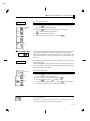
To execute ON/OFF control, set the set point," PID / ON/OFF" and
hysteresis" parameters.
• Setting the PID / ON/OFF parameter
Operation Procedure
Operation level
PV
In this example, check first that the PID / ON/OFF" parameter is set to

" in the initial setting level".
(1) Press the
key for at least three seconds to move from the operaĆ
tion level" to the initial setting level".
(2) Display the input type" parameter in the initial setting level.
Initial setting level
Input type
(3) Select the PID / ON/OFF" parameter by pressing the
(4) Check that the set value is
PID ⋅ ON/OFF
key.
" (default).
(5) To return to the operation level" press the
second.
key for at least one
Next, set the set point value.
• Setting the SP
Operation Procedure
Operation level
PV/SP
In this example, set the set point value (200). The lower display (No.2 disĆ
play) shows the set value (SP value).
(1) Select PV/SP" at the operation level.
(2) Use the
keys to set the SP value. (For example, 200) To set the
key or wait more than two seconds.
value either press the
3–11
E5AN
CHAPTER 3 BASIC OPERATION
3.8 Determining PID Constants (AT, ST, manual setup)
JAT.
(auto-tuning)
Ă• When you execute autoĆtuning, the optimum PID constants for the set
point during program execution are automatically set by forcibly changĆ
ing the manipulated variable to calculate the characteristics (called the
limit cycle method") of the control target.
Ă• To execute AT (autoĆtuning), specify  : AT execute", and to cancel AT
(autoĆtuning), specify
: AT cancel".
Ă• AT (autoĆtuning) cannot be executed during ON/OFF control.
Ă• The result of AT (autoĆtuning) is mirrored in the proportional band
(P)," integral time (I)" and derivative time (D)" parameters in the adĆ
justment level".
Adjustment level
Proportional band
Integrated time
Derivative time
F Description
AT (autoĆtuning) is started when the AT execute/cancel" parameter is set
to ON". During execution of AT, the No.1 display for the AT execute/canĆ
cel" parameter blinks. When AT ends, the AT execute/cancel" parameter
turns OFF, and the No.1 display stops blinking.
AT execute/cancel
No.1 display
During AT execution
If you move to the operation level" during AT execution, the No.2 display
blinks to indicate that AT is being executed.
PV/SP
No.2 display
During AT execution
Only the communications writing", run/stop" and AT execution/canĆ
cel" parameters can be changed during AT execution. Other parameters
cannot be changed.
3–12
E5AN
Determining
3.8
PID Constants (AT, ST, manual setup)
Operation Procedure
Adjustment Level
AT execute/
cancel
Execute autoĆtuning (AT).
(1) Press the
key for less than one second to move from the operaĆ
tion level" to the adjustment level".
(2) Press the

(3)
key to start execution of AT (autoĆtuning).
" is displayed during AT execution.
" is displayed when AT ends.
(4) To return to the operation level," press the
key.
Operation level
PV
JST (self-tuning)
Operation Procedure
Initial setting level
Input type
ST
The ST (selfĆtuning) function executes tuning from the start of program
execution to calculate PID constants matched to the control target.
Once the PID constants have been calculated, ST is not executed when the
next control operation is started as long as the set point remains unĆ
changed.
ST (selfĆtuning) is executed when the ST" parameter is set to ON" in the
initial setting level".
When the ST function is in operation, be sure to turn the power supply of
the load connected to the control output ON simultaneously with or before
starting operation of the E5AN.
Execute selfĆtuning (ST).
(1) Press the
key for at least three seconds to move from the operaĆ
tion level" to the initial setting level".
(2) Select the ST" parameter by pressing the
(3) Press the
ST
PID parameters
key to select
key.
" (default).
(4) To return to the operation level," press the
key. The temperaĆ
ture display blinks during selfĆtuning (ST) execution.
When control characteristics are already known, the PID parameters can be set diĆ
rectly to adjust control.
PID parameters are set in the proportional band" (P), integrated time" (I) and
derivative time" (D) parameters in the adjustment level".
3–13
E5AN
CHAPTER 3 BASIC OPERATION
JST start
conditions
Self-tuning by step response tuning (SRT) is started when the following
conditions are met after program execution is started and the set point is
changed.
At Start of Program Execution
1. The set point at the start of program execution differs from the set point (See Note 1)
when the previous SRT was executed.
2. The difference between the temperature at
start of program execution is larger than
(current proportional band 1.27+4_C) or
the (ST stable range) whichever is larger.
3. The temperature at the start of program
execution is smaller than the set point
during reverse operation, and is larger than
the set point during direct operation.
4. No reset from input error
When Set Point Is Changed
1. The new set point differs from the set point
(See Note 1) used when the previous SRT
was executed.
2. The set point change width is larger than (current proportional band 1.27+4_C) or the (ST
stable range) whichever is larger.
3. During reverse operation, the new set point
is larger than the set point before the
change; and during direct operation, the
new set point is smaller than the set point
before the change.
4. The temperature is in a stable state (See
Note 2). (An equilibrium state is acceptable
when the output is 0% when the power is
turned ON.)
Note:
(1) The previous SRT-implemented set point is called the set point obĆ
tained by calculating the PID constant by the previous SRT.
(2) In this state, the measurement point is within the ST stable range.
(3) In this state, the change width of the PV every 60 seconds is at the
ST stable range or less.
PID constants are not modified for the currently preset set point by selftuning (ST) in the following instances:
(1) When the PID constants have been changed manually with ST set
to ON.
(2) When auto-tuning (AT) has been executed.
JST stable range
The ST stable range is a condition for determining the conditions under
which ST (selfĆtuning) functions.
In this example, let's set the ST stable range to 20_C.
Operation Procedure
Advanced function setting level
ST stable range
3–14
(1) Select the ST stable range" parameter by pressing the
advanced function setting level".
(2) Set to 20_C (deviation) using the
keys.
key in the
E5AN
Determining
3.8
PID Constants (AT, ST, manual setup)
JManual setup
The individual PID constants can be manually set in the Proportional
band", integral time", and Derivative time" parameters in the adjustĆ
ment level".
In this example, set the proportional band" parameter to 10.0", the inĆ
tegrated time" parameter to 250" and the derivative time" parameter
to 45".
Operation Procedure
(1) Press the
ment level".
Adjustment level
AT execute/
cancel
key to move from the operation level" to the adjustĆ
(2) Select proportional band" by pressing the
(3) Use the
keys to set the parameter to 10.0".
(4) Select integrated time" by pressing the
Proportional
band
(5) Use the
key.
keys to set the parameter to 250".
(6) Select derivative time" by pressing the
(7) Use the
key.
key.
keys to set the parameter to 45".
(8) To return to the operation level," press the
key.
Integrated time
Derivative time
Proportional
eration
Op-
When PID constants I (integral time) and D (derivative time) are set to 0", control
is executed according to proportional operation. The default set point becomes the
center value of the proportional band.
Related parameter
manual reset value" (adjustment level)
3–15
E5AN
CHAPTER 3 BASIC OPERATION
• When P (proportional band) is adjusted
When P is
increased
When P is
decreased
Set
Value
Set
Value
The curve rises gradually, and a long
stable time is achieved, preventing
overshoot.
Overshoot and hunting occur, however the set point is quickly reached after
which the curve stabilizes.
• When I (integral time) is adjusted
When I is
increased
When I is
decreased
Set
Value
Set
Value
It takes a long time for the process value to reach the set point. It takes time
to achieve a stable state, however
there is little overshoot/undershoot
and hunting.
Overshoot/undershoot and hunting
occur, and the curve rises quickly.
• When D (derivative time) is adjusted
3–16
When D is
increased
Set
Value
When D is
decreased
Set
Value
Overshoot/undershoot and stable
time are reduced, however, fine hunting occurs on changes in the curve itself.
Overshoot/undershoot increase, and
it takes time for the process value to
reach the set point.
E5AN
Alarm
3.9 Outputs
3.9 Alarm Outputs
Ă• The following describes the alarm type", alarm value", upperĆlimit
alarm" and lowerĆlimit alarm" parameters.
JAlarm type
Set
Value
*1
*1
Alarm Output Operation
When alarm value
When alarm value
X is positive
X is negative
Output OFF
0
Alarm function OFF
1
Upper- and lower-limit
(deviation)
ON
OFF
Upper-limit (deviation)
ON
OFF
2
*1
Alarm Type
3
Lower-limit (deviation)
4
Upper- and lower-limit range
(deviation)
5
Upper-limit alarm with standby
sequence (deviation)
7
Lower-limit alarm with standby
sequence(deviation)
9
10
Absolute-value upper-limit
X
Absolute-value lower-limit
SP
Absolute-value upper-limit with
standby sequence
SP
Absolute-value lower-limit with
standby sequence
X
SP
X
SP
*3
SP
L H
*4
SP
X
ON
OFF
ON
OFF
SP
X
ON
OFF
ON
OFF
ON
OFF
L H
ON
OFF
ON
OFF
ON
OFF
X
ON
OFF
ON
OFF
*2
SP
Upper- and lower-limit alarm
ON
with standby sequence
(deviation)
*5 OFF
6
8
L H
ON
OFF
SP
X
ON
OFF
0
X
ON
OFF
0
X
ON
OFF
0
SP
X
SP
X
0
X
0
X
0
X
ON
OFF
0
0
*1 : The upperĆ and lowerĆlimit values, expressed as L" and H", can be set independently for each alarm
point with set values 1, 4 and 5.
*2 : Set value : 1 UpperĆ and lowerĆlimit alarm
Case 1
Case 2
Case 3 (Normally ON)
H < 0, L < 0
L SP H
L H SP
SP L H
11
H < 0, L > 0
|H| < |L|
H > 0, L < 0
|H| > |L|
ON
OFF
X
X
H L SP
SP H L
H < 0, L > 0
|H| > |L|
H > 0, L < 0
|H| < |L|
*3 : Set value : 4 UpperĆ and lowerĆlimit range
Case 1
Case 2
Case 3 (Normally OFF)
H < 0, L < 0
L SP H
L H SP
SP L H
H < 0, L > 0
H < 0, L > 0
H > 0, L < 0
|H| > |L|
H L SP
H > 0, L < 0
|H| < |L|
SP H L
*4 : Set value : 5 UpperĆ and lowerĆlimit alarm with standby sequence
*For the above upperĆ and lowerĆlimit alarm
Ć In cases 1 and 2, the alarm is normally OFF if upperĆ and lowerĆlimit values of hysteresis overlap.
Cases 1 and 2 example:
Ć In case 3, the alarm is normally OFF.
*5 : Set value : 5 UpperĆ and lowerĆlimit alarm with standby sequence
The alarm is normally OFF if upperĆ and lowerĆlimit values of hysteresis overlap.
Ă• Alarm types are set independently for each Alarm type 1 to 3" (initial
setting level). The default value is 2 : UpperĆlimit alarm".
3–17
E5AN
CHAPTER 3 BASIC OPERATION
JAlarm value
Ă• Alarm values are indicated by X" in the table on the previous page.
Lower-limit When the upper and lower limits are set independently, H" is displayed
alarm value for upper limit values, and L" is displayed for lower limit values.
Ă• To set the upperĆ and lowerĆlimit alarm values for deviation, set the upĆ
per and lower limits in each of the alarm upper limit 1 to 3", and alarm
lower limit 1 to 3" parameters (operation level).
Upper-limit
alarm value
Alarm value
Operation Procedure
Initial setting level
Input type
Alarm 1 type
Set alarm 1" to the upperĆlimit alarm. The following shows related paĆ
rameters and setups. In this example, the alarm output is active when the
set point is exceeded by 10_C". (The temperature unit in this example is
_C".)
Alarm 1 type"
= 2: upperĆlimit alarm (deviation)"
Alarm value 1" = 10"
(1) Press the
key for at least three seconds to move from the operaĆ
tion level" to the initial setting level".
(2) Select the alarm 1 type" parameter by pressing the
key. Check
that the alarm type" parameter is set to 2" (default, upperĆlimit
alarm).
(3) To return to the operation level" press the
second.
Operation level
PV/SP
(4) Select alarm value 1" by pressing
(5) Use the
Alarm value 1
3–18
key for at least one
.
keys to set the parameter to 10".
E5AN
Heater
3.10 Burnout Alarm (HBA)
3.10 Heater Burnout Alarm (HBA)
JHBA detection
To CT terminal
Heater lead
JOperating
conditions
Ă• Heater burnout detection works as follows.
(1) Connect the current transformer (CT) to terminal Nos. 14 and 15,
and insert the heater lead through the CT hole. For specifications,
models and external dimensions of current transformers that can
be used on this controller, see Appendix, About Current TransĆ
former (CT)."
(2) When current flows through this lead, the current transformer
generates AC current proportional to the current value. The E5AN
measures this AC current to calculate the current flowing to the
heater.
(3) If the heater is burned out, the current measured at the current
transformer decreases. This value is compared with the value set as
the heater burnout set value", and the output becomes active as
the heater burnout alarm.
Ă• Set the heater burnout set value in the heater burnout detection" paĆ
rameter (adjustment level). To monitor the current value of the current
transformer, use the heater current monitor" parameter.
Ă• When HBA function, is not used set the heater burnout" parameter
(advanced function setting level) to OFF".
Ă• The HBA function can be used when the option unit E53ĆAKB,
E53ĆAK01, or E53ĆAK03 is mounted on the E5AN. Be sure to connect the
CT to the E5AN, and pass the heater lead through the CT hole.
Ă• Turn the heater ON at the same time as or before turning the E5AN ON.
If the heater is turned ON after turning the E5AN ON, the heater burnĆ
out alarm will activate.
Ă• Control is continued even if the heater burnout alarm is active. (That is,
the E5AN attempts to control the heater on which the heater burnout
alarm has not occurred.)
Ă• The heater burnout alarm is detected when the control output is continĆ
uously ON for 190 ms or more.
Ă• The rated current value may sometimes differ slightly from the actual
current flowing to the heater. Check the current value in an actual operĆ
ating state in the heater current monitor" parameter.
Ă• If there is little difference between the current in a normal state and the
current in the burnout state, detection may become unstable. On a heatĆ
er of current 10.0 A or less, maintain a difference of 1.0 A or more. On
a heater of current 10.0 A or more, maintain a difference of 2.5 A or
more.
Ă• The HBA function cannot be used when the heater is controlled by a
phase control system or cycle control system. Also, 3Ćphase heaters canĆ
not be used.
When heater burnout is detected on a 3Ćphase heater, use the K2CUĆFjjAĆjGS
(with gate input terminal). See the respective data sheet for details.
3–19
E5AN
CHAPTER 3 BASIC OPERATION
JSetup
To activate the heater burnout alarm, set the HBA used" parameter (adĆ
vanced function setting level) to ON" and the heater burnout set value
in the heater burnout detection" parameter (adjustment level).
Operation Procedure
In this example, set the heater burnout detection" parameter to 2.5".
• Moving to the advanced function setting level
Operation level
PV/SP
Initial setting level
Input type
The default of the heater burnout" parameter is already ON", so set the
heater burnout detection" parameter.
(1) Move to the advanced function setting level.
Press the
key for at least three seconds to move from the operaĆ
tion level" to the initial setting level".
(2) Then move to advanced function setting level" by pressing the
key.
Move to advanced
function setting level
(3) Use the
the initial setting level" to the advanced function setting level".
The top parameter in the advanced function setting level" is disĆ
played.
Advanced function setting level
HBA used
keys to input the password (-169"), and move from
key.
(4) Select the HBA used" parameter by pressing the
Make sure that this parameter is set to ON" (default).
Next, set the heater current value monitor" parameter.
• Setting heater burnout detection
Operation level
PV/SP
Adjustment level
AT execute/cancel
(5) Press the
key for at least one second to move from the advanced
function setting level" to the initial setting level" and then to the
operation level".
key for less than one second to move from the operaĆ
(6) Press the
tion level" to the adjustment level".
(7) Select the heater current value monitor" parameter by pressing the
Heater current value
monitor
key. Check the current value. Next, set the heater burnout detecĆ
tion" parameter.
(8) Select the heater burnout detection" parameter by pressing the
key.
Heater burnout detection
Set the current value as a reference value. Set this set value so that
there is a large difference between the current flowing to the heater
lead when heater operation is normal and the current flowing when
a heater burnout occurs.
(9) For example, set 2.5". To return to the operation level", press the
key for less than one second.
3–20
E5AN
Heater
3.10 Burnout Alarm (HBA)
JHow to calculate
detection current
values
Ă• Calculate the set value by the following equation:
JExample
Example 1 When using a 200 VAC, 1 kW heater
Set value =
(current value at normal operation + current value at heater burnout)
2
Ă• To set the value of the heater burnout when two or more heaters are conĆ
nected through the CT, use the curent value of the smallest heater conĆ
nected. OR the current value when one of the heaters burns out if all the
heaters have the same current value.
Ă• Make sure that the following conditions are satisfied:
Heater of current 10.0 A or less:
Current value at normal operation Ć
current value at heater burnout y 1 A
(When the resultant current is less than 1 A, detection is unstable.)
Heater of current 10.0 A or more:
Current value at normal operation Ć
current value at heater burnout y 2.5 A
(When the resultant current is less than 2.5 A, detection is unstable.)
Ă• The setting range is 0.1 to 49.9 A. Heater burnout is not detected when
the set value is 0.0" or 50.0". When the set value is 0.0", the heater
burnout alarm is set to OFF", and if the set value is 50.0", the heater
burnout alarm is set to ON".
Ă• Set the total current value at normal heater operation to 50 A or less.
When set to 55.0 A",
" is displayed in the heater current moniĆ
tor" parameter.
Control output
Heater
Current during normal operation =
1KW
AC200V
CT
E5AN
14
1000 + 5AĂ(t 10A)
200
Current at heater burnout = 0A
5 ) 0 + 2.5A
Set value =
2
(current at normal operation Ć current at heater
burnout ) + 5ĂĆĂ0 + 5AĂ(y 1A))
15
Example 2 When using three 200 VAC, 1 kW heaters
Control output
Heater
1KWx3
AC200V
CT
E5AN 14
Parameters
1000 3 + 15AĂ(y 10A)
200
1000 2 + 10A
Current at burnout of one heater =
200
Set value = 15 ) 10 + 12.5A
2
(current at normal operation Ć current at heater
burnout ) + 15ĂĆĂ10 + 5AĂ(y 2.5A))
Current at normal operation =
15
Symbol
Parameter : Level
Heater current value monitor:
Adjustment level
Description
For heater current value monitor
Heater burnout detection:
Adjustment level
For HBA detection
Heater burnout hysteresis:
Advanced function setting level
For HBA detection
Heater burnout latch:
Advanced function setting level
For HBA detection
3–21
E5AN
CHAPTER 3 BASIC OPERATION
3.11 Requests during Operation
1)
About four seconds is required for outputs to turn ON when the power
is turned ON. Take this into consideration when the temperature conĆ
troller is incorporated into a sequence circuit.
2)
Allow at least 30 minutes for warming up.
3)
When self-tuning is used, turn the temperature controller and load
(e.g. heater) ON simultaneously or turn the load ON before the temĆ
perature controller. If the load is turned ON before the temperature
controller, correct self-tuning and optimum control are no longer
possible.
When operation is started after warm-up, turn the power OFF once
after warm-up is completed, and then turn the temperature controlĆ
ler and load ON simultaneously. (Instead of turning the temperature
controller power ON again, moving from the STOP to the RUN mode
also is possible.)
4)
3–22
The temperature controller may be subject to the influence of radio
interference if used near a radio, TV or wireless equipment.
E5AN
CHAPTER 4 APPLIED OPERATION
4
CHAPTER 4
APPLIED OPERATION
4.1 Shifting Input Values . . . . . . . . . . . . . . . . . . .
Shifting input . . . . . . . . . . . . . . . . . . . . . . . . .
How to calculate input shift values
(2Ćpoint shift) . . . . . . . . . . . . . . . . . . . . . . . . . .
1Ćpoint shift method . . . . . . . . . . . . . . . . . . . .
2Ćpoint shift method . . . . . . . . . . . . . . . . . . . .
Example of 2Ćpoint temperature
input shift . . . . . . . . . . . . . . . . . . . . . . . . . . . . .
4.2 Alarm Hysteresis . . . . . . . . . . . . . . . . . . . . . .
Standby sequence . . . . . . . . . . . . . . . . . . . . . .
Close in alarm/open in alarm . . . . . . . . . . . .
4.3 Setting Scaling Upper and Lower Limits
(analog input) . . . . . . . . . . . . . . . . . . . . . . . . .
Analog input . . . . . . . . . . . . . . . . . . . . . . . . . .
4.4 Executing Heating and Cooling Control . .
Heating and cooling control . . . . . . . . . . . . .
Setup . . . . . . . . . . . . . . . . . . . . . . . . . . . . . . . . .
4.5 Externally Setting the SP . . . . . . . . . . . . . . .
Setting event input . . . . . . . . . . . . . . . . . . . . .
How to use multiĆSP . . . . . . . . . . . . . . . . . . .
Setting by key operation . . . . . . . . . . . . . . . .
Setup . . . . . . . . . . . . . . . . . . . . . . . . . . . . . . . . .
Executing run/stop control . . . . . . . . . . . . . .
4.6 Setting the SP Upper and
Lower Limit Values . . . . . . . . . . . . . . . . . . . . .
Set point limitter . . . . . . . . . . . . . . . . . . . . . . .
Setup . . . . . . . . . . . . . . . . . . . . . . . . . . . . . . . . .
4.7 Executing the SP Ramp Function
(limiting the SP change rate) . . . . . . . . . . . .
SP ramp . . . . . . . . . . . . . . . . . . . . . . . . . . . . . .
4.8 To Move to the Advanced Function
Setting Level . . . . . . . . . . . . . . . . . . . . . . . . . .
4.9 Using the Key Protect Level . . . . . . . . . . . . .
Key protect . . . . . . . . . . . . . . . . . . . . . . . . . . . .
4Ć2
4Ć2
4Ć3
4Ć4
4Ć4
4Ć5
4Ć6
4Ć6
4Ć7
4Ć8
4Ć8
4Ć10
4Ć10
4Ć11
4Ć12
4Ć12
4Ć12
4Ć13
4Ć13
4Ć14
4Ć15
4Ć15
4Ć16
4Ć17
4Ć17
4Ć19
4Ć20
4Ć20
4–1
E5AN
CHAPTER 4 APPLIED OPERATION
4.1 Shifting Input Values
JShifting input
F 1-point shift
Ă• The input shift type matched to the sensor currently selected in the
input type" parameter is displayed.
Ă• 2Ćpoint shift is applied only for nonĆcontact temperature sensors.
Ă• With 1Ćpoint shift, only the value set to the Temperature input shift"
parameter (adjustment level) is applied to the entire temperature input
range. For example, if the input shift value is set to 1.2_C", the process
value is treated as 201.2_C" after input shift is applied when the proĆ
cess value is 200_C.
Temperature
Upper-limit
value
After shift
Lower-limit
value
Before
shift
Input shift value
Input
0
100
Operation Procedure
In this example, shift the input of the K sensor by 1_C" by 1Ćpoint input
shift.
Operation level
Operation level
(1) Press the
ment level".
Adjustment level
(2) Select the temperature input shift" parameter by pressing the
key.
(3) Use the
Temperature input
shift
Operation level
4–2
key to move from the operation level" to the adjustĆ
keys to set 1.0".
(4) To return to the operation level," press the
value is 1_C larger than before shift is applied.
key. The process
E5AN
Shifting
4.1
Input Values
F 2-point shift
Upper-limit
temperature
input shift
value
Lower-limit
temperature
input shift
value
Ă• The input temperature range of nonĆcontact temperature sensors can
be shifted by setting an individual value for the upper and lower points
of the sensor range. This means that the shift can be applied equally
across the range with separate values for each end of the range. For
example, if the upperĆlimit value is set to 2_C" and the lowerĆlimit
value is set to 1_C", the sensor range is shifted by an average of 1.5_C
at 50% input.
Ă• Set the upperĆlimit value in the upperĆlimit temperature input shift
value" parameter and the lowerĆlimit value in the lowerĆlimit temperaĆ
ture input shift value" parameter.
Temperature
Upper-limit
value
Upper-limit temperature input shift value
After shift
Before shift
Lower-limit value
0
Input
Lower-limit temperature
input shift value
100
JHow to calculate input shift values (2-point shift)
When the nonĆcontact temperature sensor model ES1A is connected to the
E5AN, an offset of several to several tens of a degree can occur.
For this reason, offset the readout value by 1Ćpoint or 2Ćpoint shift as
described in this item. This offset occurs as a bias current for detecting
controller sensor error flows to the output impedance of the nonĆcontact
temperature sensor. 2Ćpoint shift can be carried out only on nonĆcontact
temperature sensors, and cannot be set for other input types.
[Preparations]
(1) Set to the temperature range matching the input specifications of the
nonĆcontact temperature sensor. (ES1A is supported only in thermoĆ
couple input types on the E5AN.)
(2) Prepare a thermometer capable of measuring the temperature of the
control target as shown in Figure 1 so that 1Ćpoint shift or 2Ćpoint
shift can be carried out.
Non-contact
temperature
sensor
(C) Control target
(B) Thermometer
(A) E5AN Temperature controller
Figure 1 Configuration When Compensating a Non-contact
Temperature Sensor
4–3
E5AN
CHAPTER 4 APPLIED OPERATION
J1-point shift
method
Adjustment level
Upper-limit temperature input shift
value
Lower-limit temperature input shift
value
(1) In the configuration shown in Figure 1, bring the set point to near the
value at which the temperature of the control target is to be conĆ
trolled. Assume that the control target temperature (C) and the conĆ
trol target temperature (B) are matching.
(2) Check the control target temperature (B) and the controller readout
(A). Take the following value as the input shift value, and set the same
numerical values to
" and
".
control target temperature (B) Ć controller readout (A)
Figure 2 shows the effect of 1Ćpoint temperature input shift.
(3) After setting the input shift values, check controller readout (A) and
control target temperature (B). If they are almost the same, this comĆ
pletes temperature input shift.
Controller readout (A)
After shift
Temperature readout
after shift (e.g. 120_C)
Input shift value (e.g. 10_C)
Temperature readout
before shift (e.g. 110_C)
0
Before shift
Near set point
(e.g. 120_C)
Temperature readout of
control target (B)
Figure2 1-point Temperature Input Shift
J2-point shift
method
Use 2Ćpoint input shift if you want to increase the accuracy of the readout
values across the range of the sensor.
(1) Shift the controller readout by two points, near room temperature
and near the value at which the temperature of the control target is
to be controlled. For this reason, bring the control target temperature
to near room temperature and to near the set point, and check control
target temperature (B) and controller readout (A).
(2) Using equations (1) and (2) calculate the upperĆ and lowerĆlimit temĆ
perature input shift values from the readout and temperature to be
shifted that you obtained in step 1.
Figure 3 shows the effect of shift by 2Ćpoint temperature input shift.
Controller readout (A)
Set temperature
upper limit YH
(e.g. 260_C)
After shift
Upper-limit temperature
input shift value
Temperature readout
after input shift X2 (e.g. 110_C)
Before shift
Temperature readout
before input shift Y2 (e.g. 105_C)
Temperature readout
before input shift Y1 (e.g. 40_C)
Temperature readout
after input shift X1 (e.g. 25_C)
Lower-limit temperature
input shift value
Temperature readout of
control target (B)
0 X1 room temperature
(e.g. 25_C)
Near X2 set point (e.g. 110_C)
Set temperature
lower limit YL (e.g. 0_C)
Figure3 2-point Temperature Input Shift
4–4
E5AN
Shifting
4.1
Input Values
Ă• Use the following equation to calculate the lowerĆlimit temperaĆ
ture input shift value.
+ ĂYLĂĆĂY1Ă
ĂY2ĂĆĂY1Ă
{(X2ĂĆĂY2)ĂĆĂ(X1ĂĆĂY1)} ) (X1ĂĆĂY1)...equationĂ1
Ă• Use the following equation to calculate the upperĆlimit temperaĆ
ture input shift value.
+ ĂYHĂĆĂY1Ă
ĂY2ĂĆĂY1Ă
{(X2ĂĆĂY2)ĂĆĂ(X1ĂĆĂY1)} ) (X1ĂĆĂY1)...equationĂ2
(3) After setting the calculated values to
" and
", check conĆ
troller readout (A) and control target temperature (B).
(4) Although the input shift was carried out at two points, close to room
temperature (ambient temperature), and near to the set point, select
points close to each end of the sensor range to improve accuracy across
the full range of the sensor measurement range.
JExample of
2-point
temperature input
shift
In this example, we use the ES1A K 0 to 260_C specification.
YL an YH in equations 1 and 2 are set temperature lower limit YL is 0_C
and set temperature upper limit YH is 260_C. Check the temperature of
the control target.
When the room temperature X1 is 25_C, the readout on the controller Y1
is 40_C, and when the temperature near the set point X2 is 110_C, the
readout on the controller Y2 becomes105_C.
Adjustment level
Lower-limit temperature input shift value
Upper-limit temperature input shift value
LowerĆlimit temperature input shift value
+ Ă0ĂĆĂ40Ă
Ă105ĂĆĂ40Ă
{(110ĂĆĂ105)ĂĆĂ(25ĂĆĂ40)} ) (25ĂĆĂ40) +Ă Ć27.3(°C)
UpperĆlimit temperature input shift value
+ Ă260ĂĆĂ40Ă
Ă105ĂĆĂ40Ă
{(110ĂĆĂ105)ĂĆĂ(25ĂĆĂ40)} ) (25ĂĆĂ40) +Ă 52.7(°C)
4–5
E5AN
CHAPTER 4 APPLIED OPERATION
4.2 Alarm Hysteresis
Ă• The hysteresis of alarm outputs when alarms are switched ON/OFF can
be set as follows:
Upper-limit
alarm
Lower-limit
alarm
Alarm hysteresis
ON
ON
OFF
OFF
Alarm value
Alarm hysteresis
Alarm value
Ă• Alarm hysteresis is set independently for each alarm in the alarm hysĆ
teresis 1 to 3" parameters (advanced function setting level). Default is
0.2EU".
JStandby
sequence
Ă• Standby sequence" is a function which allows the alarm outputs to be
temporarily disabled while the first alarm condition occurs. From here
on, the alarm output is active for future alarm conditions.
Ă• For example, in a standard heating application, if you used the standard
low alarm", the alarm would be active from switching the controller
ON. However, with Standby Sequence", the alarm output is disabled
during the first warmup, and the temperature has to rise above the
alarm set point before the alarm can become active. Then, if the temperĆ
ature falls below the alarm set point, the output is active.
F Restart
4–6
Ă• The standby sequence is canceled when an alarm is output. It is, howĆ
ever, restarted later by the standby sequence" parameter (advanced
function setting level).
For details, see the standby sequence" parameter in Chapter 5,
Parameters."
E5AN
Alarm
4.2 Hysteresis
JClose in alarm/
open in alarm
Ă• When the E5AN is set to close in alarm," the status of the alarm output
is normally open. When set to open in alarm," the status of the alarm
output is output inverted or nomally closed.
Ă• Alarm type and close in alarm (normally open)/open in alarm (normally
closed) can be set independently for each alarm.
Ă• Close in alarm/open in alarm is set in the alarm 1 to 3 open in alarm"
parameters (advanced function setting level). Default is
: close in
alarm".
Alarm Output Function
Output
Alarm LCD
ON
ON
Lit
OFF
OFF
Out
ON
OFF
Lit
OFF
ON
Out
Close in
alarm
Open in
alarm
F Summary of
alarm operations
The figure below visually summarizes the above description of alarm
operations (when alarm type is set to lowerĆlimit alarm with standby
sequence" and E5AN is set to close in alarm").
Alarm type: lower-limit alarm with
standby sequence
PV
Alarm value
Alarm hysteresis
Time
Standby sequence
canceled
Alarm
output
ON
OFF
ON (closed)
OFF (open)
Parameters
Symbol
Parameter : Level
Alarm 1 to 3 hysteresis:
Alarm
V
Advanced function setting level
Standby sequence reset method:
Alarm
Advanced function setting level
Alarm 1 to 3 open in alarm:
Alarm
V
Advanced function setting level
Description
V : , , or
4–7
E5AN
CHAPTER 4 APPLIED OPERATION
4.3 Setting Scaling Upper and Lower Limits (analog
input)
JAnalog input
Ă• When an analog input (voltage input) is selected, scaling matched to the
control is possible.
Scaling
Ă• Scaling is set in the scaling upper limit", scaling lower limit" and decĆ
upper
limit
imal point" parameters (initial setting level). These parameters cannot
Scaling
be used when temperature input type is selected.
lower limit
Ă• The scaling upper limit" parameter sets the physical quantity to be
expressed by the upper limit value of input, and the scaling lower limit"
Decimal
point
parameter sets the physical quantity to be expressed by the lowerĆlimit
value of input. The decimal point" parameter specifies the number of
digits past the decimal point.
Ă• The following figure shows a scaling example of 0 to 5 mV input. After
scaling, the humidity can be directly read.
Readout
(humidity)
50 mV
Upper-limit value (95.0%)
Lower-limit value (10.0%)
0 mV
Input
(0 to 50 mV)
0
100%FS
4–8
E5AN
Setting
4.3
Scaling Upper and Lower Limits (analog input)
Operation Procedure
Initial setting level
Input type
In this example, the scaling upperĆ and lowerĆlimits is set so that inputs
0 to 50 mV become 10.0% to 95.0%.
(1) Press the
key for at least three seconds to move from the operaĆ
tion level" to the initial setting level".
(2) Select scaling upper limit" by pressing
Scaling upper limit
(3) Use the
keys to set the parameter to 950".
(4) Select scaling lower limit" by pressing
(5) Use the
.
.
keys to set the parameter to 100".
(6) Select the decimal point position by pressing
(7) Use the
Scaling lower limit
.
keys to set the parameter to 1".
(8) To return to the operation level" press the
second.
key for at least one
Decimal point
4–9
E5AN
CHAPTER 4 APPLIED OPERATION
4.4 Executing Heating and Cooling Control
JHeating and
cooling control
Heating and cooling control can be used on E5ANĆj3jjj controllers.
Heating and cooling control operates when
: heating and cooling" is
selected in the standard/heating and cooling" parameter. Select the stanĆ
dard heating control or cooling control according to the following table:
Control Output
Alarm 2 output
Direct/
reverse operation
Heating control
(standard)
Control output (heat)
-
Reverse operation
Cooling control
(standard)
Control output (cool)
-
Direct operation
Heating and cooling
control
Control output (heat)
Control output (cool)
Reverse operation
Control
Method
(The parameter default is heating control (standard).)
Ă• When heating and cooling control is selected, the dead band" and coolĆ
ing coefficient" parameters can be used.
F Dead band
The dead band is set with the set point as its center on the E5ANĆj3jj.
The dead band width is the set value of the dead band" parameter (adjustĆ
ment level). Setting a negative value produces an overlap band.
Default is 0.0 EU."
Dead band:
dead band width = positive
Output
Heating side
Cooling side
Heating side
PV
0
Overlap band:
dead band width = negative
Output
PV
0
Set point
Set point
F Cooling
coefficient
Cooling side
If the heating and cooling characteristics of the control target greatly difĆ
fer, preventing satisfactory control characteristics from being obtained by
the same PID constants, adjust the proportional band (P) at the cooling
side using the cooling coefficient to balance control between the heating
and cooling sides. In heating and cooling control, P at the heating or coolĆ
ing side is calculated by the following formula:
Heating side P = P
Cooling side P = Pcooling coefficient
The cooling coefficient is applied to heating side P to obtain control whose
characteristics (cooling side P) differ from those on the heating side.
Output
Output
Heating side P1.0
Heating side P1.0
Heating side P
0
4–10
Heating
side P
Cooling side P
PV
Set point
Heating side P0.8
0
Cooling side P
PV
Set point
Heating side P1.5
E5AN
Executing
4.4
Heating and Cooling Control
JSetup
To set heating and cooling control, set the standard/heating and cooling",
dead band" and cooling coefficient" parameters.
• Setting heating and cooling control
Operation Procedure
Initial setting level
Standard/heating
and cooling
standard/heating and cooling" = heating and cooling"
(1) Press the
key for at least three seconds to move from the operaĆ
tion level" to the initial setting level".
(2) Select standard heating and cooling control" in the initial setting
level".
: Standard control
: Heating and cooling control
• Setting dead band
Operation Procedure
Adjustment level
Cooling
coefficient
Dead band" = 5"
(1) Select dead band" in the adjustment level".
(2) Use the
keys to set the parameter to 5.0".
The setting range is Ć199.9 to 999.9.
• Setting cooling coefficient
Operation Procedure
Adjustment level
Dead band
Cooling coefficient = 10
(1) Select cooling coefficient" in the adjustment level".
In this example, set the parameter to 10".
(2) Use the
keys to set the parameter to 10.00".
The setting range is 0.01 to 99.99.
4–11
E5AN
CHAPTER 4 APPLIED OPERATION
4.5 Externally Setting the SP
JSetting event
input
Run/stop control is executed by event input assignments 1 and 2.
The following table shows the number of multiĆSP uses" displays which
functions are assigned to event inputs 1 and 2.
The number of multiĆSP uses" parameter is used when the number of
preset set points is 2 or 4. This parameter determines display or nonĆdisĆ
play of the event input assignment 1" and event input assignment 2"
parameters.
Number of
Multi-SP Uses
Event Input 1 Function
0
Set in “event input assignment 1”
Set in “event input assignment 2”
1
Multi-SP (SP 0/1 selectable)
Set in “event input assignment 2”
2
E5AN
11
EV1
12
EV2
13
Event Input 2 Function
Multi-SP (SP 0/1/2/3 selectable)
When you are setting two external input set points, set in the number of
multiĆSP uses" parameter.
Ă• To select set points (0/1)
Two set points can be selected when the number of multiĆSP uses" is
set to 1" (default). This setting need not be changed. Set point 0 or 1 is
specified by the ON/OFF state of event input 1.
JHow to use multi-SP
MultiĆSP" is a function for setting set points 0 to 3 in advance, and selectĆ
ing these set points by a combination of event inputs 1 and 2.
F When multi-SP is
used by event
input
MultiĆSP can be used when the option event input unit E53ĆAKB is
mounted on the E5AN and number of multiĆSP uses" is set to 1" or 2".
• When “number of multi-SP uses” is set to “1”
Event input 1
Selected Set Point
OFF
Set point 0
ON
Set point 1
• When “number of multi-SP uses” is set to “2”
Event input 1
Event input 2
Selected Set Point
OFF
OFF
Set point 0
ON
OFF
Set point 1
OFF
ON
Set point 2
ON
ON
Set point 3
* Event input can be used when the option event input unit E53ĆAKB is
mounted in the E5AN. Select event input ON/OFF while the E5AN is
turned ON. Judgment of event input ON/OFF is carried out on event
inputs of 50 ms or more.
4–12
E5AN
Externally
4.5
Setting the SP
JSetting by key
operation
Set points 0 to 3 can be selected by changing the set value of the multiĆSP"
parameter. The multiĆSP" display conditions are as follows:
Ă• When the option event input unit E53ĆAKB is not mounted in the E5AN,
and multiĆSP" is set to ON"
Ă• When the option event input unit E53ĆAKB is mounted in the E5AN, the
number of multiĆSP uses" is set to 0" and multiĆSP" is set to ON"
The following table shows the relationship between the multi SP"
parameter set value and the selected set point.
Multi-SP
Selected Set Point
0
Set point 0
1
Set point 1
2
Set point 2
3
Set point 3
JSetup
• To select set points (0/1/2/3)
Operation Procedure
Operation level
PV/SP
Before setting the number of multi SP uses," cancel protection and move
to the advanced function setting level". For details on how to cancel
protection, see 4.9ĂUsing the Key Protect Level".
(1) Press the
key for at least three seconds to move from the operaĆ
tion level" to the initial setting level".
(2) Select Move to advanced function setting level" by pressing the
Initial setting level
Input type
Move to advanced
function setting level
key.
key to enter Ć169" (password).
(3) Use the
It can be moved to the advanced function setting level" by pressing
the
key or leaving the setting for at least two seconds.
(4) Select Number of multiĆSP uses" by pressing the
(5) Use the
key to set the parameter to 2".
(6) To return to the initial setting level" press the
one second.
(7) To return to the operation level" press the
Advanced function setting level
Parameter initialize
Number of multi-SP uses setting
Number of multi-SP
uses
key.
key for at least
key for at least one
second.
Set points 0, 1, 2 and 3 are set according to the ON/OFF states of event
inputs 1 and 2.
E5AN
11
EV1
12
EV2
13
4–13
E5AN
CHAPTER 4 APPLIED OPERATION
JExecuting run/
stop control
When event input assignment 1" or event input assignment 2" is set to
run/stop", control is started when event input 1 or 2 becomes OFF".
Control is stopped when this becomes ON".
While control is stopped, STOP lights.
Setting
Input Contact
State
Event input 1 or 2
ON
STOP
Event input 1 or 2
OFF
RUN
Note: When number of multiĆSP uses" is set to 0" or 1" that is not the
set point setting, run/stop control is possible according to event
inputs.
Event input assignments 1 and 2 are as follows according to the number
of multiĆSP uses" setting.
Parameter Name
Setting
Number of
multi-SP uses
0
Event input assignment 1
None or Run/stop
Not displayed (none) Not displayed (none)
Event input assignment 2
None or Run/stop
None or Run/stop
1
2
Not displayed (none)
Ă• When the number of multiĆSP uses is set to either 1 or 2, and event input
assignment 1 or 2 is set to not displayed," the setting automatically
becomes none."
Ă• When the number of multiĆSP uses" is set to 0", and both input assignĆ
ments 1 and 2 can be set, RUN/STOP is assigned to only one event
assignment. The other event assignment is automatically set to OFF.
Parameters
Symbol
Parameters : Level
Description
Event input 1 assignment:
Advanced function setting level
Event input 2 assignment:
Advanced function setting level
Number of multi-SP uses:
Advanced function setting level
4–14
For event input function
E5AN
Setting
4.6
the SP Upper and Lower Limit Values
4.6 Setting the SP Upper and Lower Limit Values
JSet point limitter
The setting range of the set point is limited by the set point limitter. The
set point limitter is used to prevent the control target from reaching
abnormal temperatures. The upperĆ and lowerĆlimit values of this set
point limitter are set by the set point upper limit" and set point lower
limit" parameters in the initial setting level", respectively. However, note
that when the set point limitter is reset, the set point is forcibly changed
to the upperĆ or lowerĆlimit value of the set point limitter if the set point
is out of the limitter range. Also, when the input type and temperature
unit are changed, the set point limitter is forcibly reset to the sensor setĆ
ting range.
Sensor range
Set point limitter
Setting range
Set point
A
Ę
Changed to the
new upper limit
value
Changed to upper
limit value
B
Set point
C
Input type changed
Set point
Upper- and lower-limit values of the limitter
Sensor upper- and lower-limit values
Parameters
Symbol
Parameters : Level
Set point
B
Ę(setting possible)
(setting impossible)
Description
Set point upper limit : Initial setting level
For limiting SP setting
Set point lower limit : Initial setting level
For limiting SP setting
4–15
E5AN
CHAPTER 4 APPLIED OPERATION
JSetup
To set the set point upper and lower limits, set in the set point upper
limit" and set point lower limit" parameters in the initial setting level".
This example describes how to set the set point limitter Ć200 to 1300_C"
to input type K thermocouple.
-200
1300
Sensor range
Set point limitter
-100
1000
• Setting the set point upper limit
Operation Procedure
Initial setting level
Input type
Set the set point upper limit" parameter to 1000".
(1) Press the
key for at least three seconds to move from the operaĆ
tion level" to the initial setting level".
(2) Select set point upper limit".
Set point upper
limit
(3) Use the
keys to set the parameter to 1000".
• Setting the set point lower limit
Operation Procedure
Set point lower limit
Set the set point lower limit" parameter to Ć100".
(1) Select set point lower limit" in the initial setting level".
(2) Use the
4–16
keys to set the parameter to Ć100".
E5AN
Executing
4.7
the SP Ramp Function (limiting the SP change rate)
4.7 Executing the SP Ramp Function (limiting the SP
change rate)
JSP ramp
With the SP ramp function, the controller operates according to the value
(set point during SP ramp) limited by a change rate. The interval in which
the set point during SP ramp is limited is referred to as the SP ramp".
SP
SP ramp
SP after change
SP ramp set value
Time unit of ramp rate (min.)
SP before change
Time
Change point
The change rate during SP ramp is specified by the SP ramp set value"
parameter. The SP ramp set value" default is OFF", and the SP ramp
function is disabled.
Changing of the ramp set point can be monitored in the set point during
SP ramp" parameter (operation level). Use this parameter during moniĆ
toring of the SP ramp.
Parameters
Symbol
Parameters : Level
MV upper limit :
Advanced function setting level
MV lower limit :
Advanced function setting level
Set point upper limit:
Initial setting level
Set point lower limit:
Initial setting level
SP ramp set value:
Advanced function setting level
Description
For limiting manipulated variable
For limiting manipulated variable
For limiting SP setting
For limiting SP setting
For limiting SP change rate
4–17
E5AN
CHAPTER 4 APPLIED OPERATION
F Operation at start
If the SP ramp function is enabled when the E5AN is turned ON, and when
run" is switched to from stop," the process value may reach the set point
after SP ramp in the same way as when the set point is changed. In this
case, operation is carried out with the process value regarded as the set
point before the change was made.
The direction of the SP ramp changes according to the relationship
between the process value and the set point.
PV < SP
PV > SP
SP
SP
SP ramp
SP ramp
Set point
PV
Same
change rate
Set point
PV
Time
Power ON
F Restrictions
during SP ramp
operation
4–18
Time
Power ON
Ă• Execution of autoĆtuning starts after the end of SP ramp.
Ă• When control is stopped or an error occurs, the SP ramp function is disĆ
abled.
E5AN
To
4.8Move to the Advanced Function Setting Level
4.8 To Move to the Advanced Function Setting Level
In the default setting, the advanced function setting level is protected and
it can not be moved to this setting level. To move to this setting level, canĆ
cel first the protection applied by the protect level." See 4.9ĂUsing the
Key Protect Level".
(1) Press the
and
keys simultaneously for at least one second in
the operation level."
Protect level
“operation/adjustment
protection”
(2) The controller moves to the protect level, and operation/adjustment
protection" is displayed.
“initial setting/communications protection”
(3) Press the
protection."
Operation level
PV/SP
Initial setting level
Input type
key once to move to initial setting/communications
(4) Set the set value to 0"
(5) Press the
tion level."
and
keys simultaneously to return to the operaĆ
(6) Press the
key for at least three seconds to move to the initial setĆ
ting level" from the operation level."
Advanced function
setting level
Move to advanced
function setting level
(7) Select the Move to advanced function setting level" parameter by
pressing the
key.
(8) Use the
press the
keys to input the password (-169"), and either
key or leave the setting for at least two seconds to move
to the advanced function setting level" from the initial setting
level."
4–19
E5AN
CHAPTER 4 APPLIED OPERATION
4.9 Using the Key Protect Level
JKey protect
Ă• To move to the protect level, press the
and
keys simultaneously
for at least one second.
Ă• The protect level protects parameters that are not changed during conĆ
troller operation until operation is started to prevent them from being
modified unintentionally.
Ă• The protect level setting restricts the range of parameters that can be
used.
F Operation/adjustment protection
The following table shows the relationship between set values and the
range of protection.
Set value
Level
PV
Operation PV/SP
level
Other
Adjustment level
0
1
2
3
f
f
f
f
f
: Can be displayed and
changed
f : Can be displayed
: Cannot be displayed
and move to other levels
not possible
Ă• When this parameter is set to 0", parameters are not protected.
Ă• Default is 0".
F Initial setting/
communications
protection
This protect level restricts movement to the initial setting level, commuĆ
nications setting level and advanced function setting level.
Set value
Initial
Communications Advanced function
setting level
setting level
setting level
0
f
f
f
1
f
f
2
f : Move to other
levels possible
: Move to other
levels not possible
Ă• Default is 1".
F Setting change
protection
This protect level protects setup from being changed by operating the keys
on the front panel.
Set value
Description
OFF
Setup can be changed by key operation.
ON
Setup cannot be changed by key operation. (The protect level can be
changed.)
Ă• Default is OFF".
4–20
E5AN
CHAPTER 5 PARAMETERS
5
CHAPTER 5
PARAMETERS
Conventions Used in this Chapter . . . . . . . . . . . .
5Ć2
Protect Level . . . . . . . . . . . . . . . . . . . . . . . . . . . . . . .
5Ć3
Operation Level . . . . . . . . . . . . . . . . . . . . . . . . . . . .
5Ć4
Adjustment Level . . . . . . . . . . . . . . . . . . . . . . . . . . .
5Ć11
Initial Setting Level . . . . . . . . . . . . . . . . . . . . . . . . .
5Ć19
Advanced Function Setting Level . . . . . . . . . . . . .
5Ć27
Communications Setting Level . . . . . . . . . . . . . . .
5Ć40
5–1
E5AN
CHAPTER 5 PARAMETERS
Conventions Used in this Chapter
JMeanings of icons used in this chapter
Describes the functions of the parameter.
Function
Describes the setting range and defaults of the parameter.
Setting
Describes the monitor range.
Monitor
Describes the parameter operations.
Example
of use
Describes related parameters and items.
See
JAbout parameter display
Parameters are displayed only when the Conditions of Use" on the right of the parameter headĆ
ing are satisfied. However, note that the settings of protected parameters are still valid, and are
not displayed regardless of the conditions of use.
AT Execute/cancel
Displayed symbol
Parameter name
The control must be
2-PID control.
Conditions of use
JAbout the Order in Which Parameters Are Described in This Chapter
Parameters are described level by level.
The first page of each level lists the parameters available in that level. The parameter names in
this list are listed in the order that they are displayed on the E5AN.
5–2
E5AN
Protect Level
Three levels of protection are provided on the E5AN, operation/adjustment protection", initial
setting/communications protection" and setting change protection." These protect levels preĆ
vent unwanted operation of the keys on the front panel in varying degrees.
Power ON
Operation
level
Protect level
key
less than
1 second
Page
+
key
1 second min.
Adjustment
level
Operation/adjustment
protection
5-3
Initial setting/commuĆ
nications protection
5-3
Setting change
protection
5-3
Protect
level
Control in progress
To move from the operation Level to the protect level, press
the
and
keys for at least one second.
The settings of protected parameters are not displayed and
so cannot be modified.
Operation/adjustment protection
Initial setting/communications protection
Setting change protection
This parameter specifies the range of parameters to be protected.
indicates the default.
FĂOperation/adjustment protection
The following table shows the relationship between set values and the range of
protection.
Function
Set value
Level
Setting
PV
Operation PV/SP
level
Other
Adjustment level
0
1
2
3
f
f
f
f
f
: Can be displayed and changed
f : Can be displayed
: Cannot be displayed and move to
other levels not possible
Ă• Parameter items are not protected when the set value is set to 0".
FĂInitial setting/communications protection
Move to the initial setting level," communications setting level" and advanced
function setting level" is restricted.
Set value
Initial
setting level
Communications Advanced function
setting level
setting level
0
f
f
f
1
f
f
2
f : Move to other levels possible
: Move to other levels not
possible
FĂSetting change protection
Changes to setups by key operation are restricted.
Set value
Description
OFF
Setup can be changed by key operation.
ON
Setup cannot be changed by key operation. (The protect level can be changed.)
5–3
E5AN
CHAPTER 5 PARAMETERS
Operation Level
Display this level when you are to carry out control operations on the E5AN. You can set alarm
values or monitor the manipulated variable in this level.
Power ON
Operation
level
Adjustment
level
key
less than
1 sec.
key3 seconds min.
key No.1 display flashes.
key
1 second
min.
Control stop
Initial setting level
key
less than
1 sec.
Communications
setup level
Control in progress
Control stopped
This level is automatically displayed immediately after the E5AN is turned ON. To move to other
levels, press the
key or the
and
keys.
Operation level
Page
Pag
PV
PV/SP
5-5
UpperĆlimit alarm
value 2
5-8
5-5
LowerĆlimit alarm
value 2
5-8
Alarm value 3
5-6
5-7
Heater current value
5-6
monitor
UpperĆlimit alarm
value 3
5-9
Run/stop
LowerĆlimit alarm
value 3
5-9
5-7
Alarm value 1
MV monitor (heat)
5-9
5-7
5–4
5-7
5-5
MultiĆSP
Set point during SP
ramp
Alarm value 2
UpperĆlimit alarm
value 1
5-8
LowerĆlimit alarm
value 1
5-8
MV monitor (cool)
5-10
E5AN
Operation Level
The “additional PV display” parameter must
be set to “ON”.
PV
The process value is displayed on the No.1 display, and nothing is displayed (blank)
on the No.2 display.
Function
Monitor Range
Process
Value
Monitor
See
Input indication range (See page A-10.)
Unit
EU
The decimal point position is dependent on the selected sensor.
FĂRelated parameters
Input type" (initial setting level) (p. 5Ć20)
Set point upper limit" Set point lower limit" (initial setting level)
PV/SP
The process value is displayed on the No.1 display, and the set point is displayed on
the No.2 display.
Monitor Range
Function
Process
Value
Input indication range (See page A-10.)
Setting Range
Set Point
Set point lower limit to set point upper limit
Unit
EU
Unit
EU
The decimal point position is dependent on the selected sensor.
Refer to the PV parameter
See
Multi-SP (set point 0 to 3)
Function
See
The “multi-SP uses” parameter must be set to
“ON”.
MultiĆSP allows you to set up to four set points (SP0 to 3) in adjustment level. These
can be switched by operating the keys on the front panel or by external input signals
(event input assignments). In the parameter, enter set points 0 to 3.
Ă• When the option event input unit E53ĆAKB is not mounted in the E5AN, the set point
can be selected when number of multiĆSP uses" is set to 0" and multiĆSP function"
is set to ON".
Ă• MultiĆSP can also be selected by communications when the optional communications
unit E53ĆAK01, or E53ĆAK03 is mounted.
5–5
E5AN
CHAPTER 5 PARAMETERS
Operation Level
Set point during SP ramp
The “SP ramp set value” parameter must not
be set to “OFF”.
This parameter monitors the set point during SP ramp.
Function
Ramp" is a function for restricting the change width of the set point as a change rate.
The set value is displayed when SP ramp set value" parameter (advanced function
setting level) is set.
When the set point is out of the preset ramp, the set point is matched to the set point
set in the PV/SP" parameter.
Monitor Range
SP: Set point lower limit to set point upper limit
Unit
EU
Monitor
FĂRelated parameters
PV/SP" (operation level) (p. 5Ć5)
SP ramp set value" (advanced function setting level) (p. 5Ć30)
Set point upper limit" Set point lower limit" (initial setting level) (p. 5Ć22)
See
The “heater burnout” parameter must be set
to “ON”.
Heater current value
monitor
This parameter measures the heater current value from the CT input used for detecting heater
burnout.
Measures and displays the heater current value.
Function
Monitor Range
0.0 to 55.0
Monitor
Unit
A
Ă• When the current exceeds 55.0 A,
" is displayed.
FĂRelated parameter
Heater burnout detection" (adjustment level) (p. 5Ć13)
See
5–6
E5AN
Operation Level
The run/stop function must not be set to event
input assignments 1 and 2.
Run/Stop
This parameter specifies run and stop.
Function
: run" is selected, control is running. When
: stop" is selected, conĆ
When
trol is stopped. When control is stopped, the STOP display lights.
Default is
".
When the run/stop function is being controlled by event input, the run/stop function
cannot be set by operating the keys on the front panel.
See
The alarm type must be set to either no alarm
or a setting other than the upper- and lowerlimit alarm.
The control must be standard control.
(Ony alarm value 3)
Alarm value 1
Alarm value 2
Alarm value 3
This parameter sets the input value X" in the alarm type list.
Ă• This parameter is used for setting the alarm values of alarm outputs 1, 2 to 3.
Function
Ă• During temperature input, the decimal point position is dependent on the currently
selected sensor, and during analog input it is dependent on the decimal point"
parameter setting.
Setting Range
-1999 to 9999
Unit
EU
Default
0
Setting
The alarm type must be set to other than upper and lower limit alarm.
See
FĂRelated parameters
Input type" (p. 5Ć20) Scaling upper limit" Scaling lower limit" Decimal point"
(initial setting level) (p. 5Ć21)
Alarm 1 to 3 type" (initial setting level) (p. 5Ć25)
Alarm 1 to 3 open in alarm" Alarm 1 to 3 hysteresis" (p. 5Ć32 to 5Ć34) Standby
sequence reset method" (p. 5Ć31) (advanced function setting level)
5–7
E5AN
CHAPTER 5 PARAMETERS
Operation Level
Alarm 1 type must be set to upper and lower
limits, upper and lower limit range or upperand lower-limit alarm with standby sequence.
Upper-limit alarm value 1
Lower-limit alarm value 1
This parameter independently sets the upperĆ and lowerĆlimit alarm values when the mode for
setting the upper and lower limits is selected for alarm 1 type (initial setting level).
Ă• This parameter sets the upper and lower limit values of alarm 1.
Function
Ă• During temperature input, the decimal point position is dependent on the currently
selected sensor, and during analog input it is dependent on the decimal point"
parameter setting.
Setting Range
-1999 to 9999
Unit
EU
Default
0
Setting
FĂRelated parameters
Alarm 1 type" (initial setting level) (p. 5Ć25)
Standby sequence reset method" (p. 5Ć31) Alarm 1 open in alarm" (p. 5Ć32) Alarm
See
1 hysteresis" (p. 5Ć32) (advanced function setting level)
Alarm 2 type must be set to upper and lower
limits, upper and lower limit range or upperand lower-limit alarm with standby sequence.
Upper-limit alarm value 2
Lower-limit alarm value 2
This parameter independently sets the upperĆ and lowerĆlimit alarm values when the mode for
setting the upper and lower limits is selected for alarm 2 type (initial setting level).
Ă• This parameter sets the upper and lower limit values of alarm 2.
Ă• The decimal point position is dependent on the currently selected sensor.
Function
Setting Range
-1999 to 9999
Unit
EU
Default
0
Setting
See
5–8
FĂRelated parameters
Alarm 2 type" (initial setting level) (p. 5Ć25)
Standby sequence reset method" (p. 5Ć31) Alarm 2 open in alarm" Alarm 2 hysterĆ
esis" (p. 5Ć33) (advanced function setting level)
E5AN
Operation Level
The control must be standard control.
Alarm 3 type must be set to upper and lower
limits, upper and lower limit range or upperand lower-limit alarm with standby sequence.
Upper-limit alarm value 3
Lower-limit alarm value 3
This parameter independently sets the upperĆ and lowerĆlimit alarm values when the mode for
setting the upper and lower limits is selected for alarm 3 type (initial setting level).
Ă• This parameter sets the upper and lower limit values of alarm 3.
Ă• The decimal point position is dependent on the currently selected sensor.
Function
Setting Range
-1999 to 9999
Unit
EU
Default
0
Setting
FĂRelated Parameters
Alarm 3 type" (initial setting level) (p. 5Ć25)
Standby sequence reset method" (p. 5Ć31) Alarm 3 open in alarm" Alarm 3 hysterĆ
esis" (p. 5Ć34) (advanced function setting level)
See
MV monitor (heat)
Manipulated variable display must be set to
“ON”.
This parameter is for monitoring the manipulated variable on the heating side during operation.
Function
Monitor
Ă• During standard control, the manipulated variable is monitored, and during heating
and cooling control, the manipulated variable on the heating side is monitored.
Ă• Default is OFF" and the manipulated variable is not displayed.
Control
Standard
Heating and cooling
Monitor Range
-5.0 to 105.0
0.0 to 105.0
Unit
%
%
FĂRelated parameter
Manipulated variable display" (advanced function setting level) (p. 5Ć39)
See
5–9
E5AN
CHAPTER 5 PARAMETERS
Operation Level
MV monitor (cool)
The control must be heating and cooling control.
Manipulated variable display must be set to
“ON”.
This parameter is for monitoring the manipulated variable on the cooling side during operation.
Ă• During heating and cooling control, the manipulated variable on the cooling side
(OUT 2" terminal output) is monitored.
Function
Control
Monitor Range
Unit
Heating and cooling
0.0 to 105.0
%
Monitor
See
5–10
FĂRelated parameters
Standard/heating and cooling" (initial setting level) (p. 5Ć23)
Manipulated variable display" (advanced function setting level) (p. 5Ć39)
E5AN
Adjustment Level
This level is for executing AT (autoĆtuning) or setting up the control.
This level provides you with basic controller setup parameters for PID (proportional band, inteĆ
gral time, derivative time) and heating and cooling control.
Power ON
Operation
level
key
Adjustment
level
Less then
1 sec.
Control in progress
To move to the adjustment level from the operation level, press the
key for less than one second.
Ă• The set points 0 to 3 in the adjustment level are set values for switching the set point during
multiĆSP input.
Ă• Heater current value monitor and HBA detection are displayed when option unit
E5ANĆE53ĆAKB, E53ĆAK01, or E53ĆAK03 is mounted on the E5AN.
Ă• You can change adjustment level parameters by setting Operation/adjustment protection to
0". If the protect level is set to 1" to 3", adjustment level parameters cannot be displayed.
Adjustment level
Page
AT execute/cancel
5-12
Page
LowerĆlimit temperaĆ
ture input shift value 5-15
Proportional band
Communications
writing
5-12
Heater current value
monitor
5-13
Heater burnout
detection
5-13
5-16
Integral time
5-16
Derivative time
5-16
Cooling coefficient
Set point 0
5-17
5-14
Dead band
Set point 1
5-14
Set point 2
5-17
Manual reset value
5-14
Set point 3
5-18
Hysteresis (heat)
5-18
5-14
Hysteresis (cool)
Temperature input
shift value
5-15
UpperĆlimit temperaĆ
ture input shift value
5-15
5-18
5–11
E5AN
CHAPTER 5 PARAMETERS
Adjustment Level
AT execute/cancel
The E5AN must be in operation, and control
must be 2-PID control.
This parameter executes AT (autoĆtuning).
Function
Ă• When autoĆtuning is executed the optimum PID parameters proportional band,"
integral time" and derivative time" for the set point during program execution are
automatically set by forcibly changing the manipulated variable to calculate the
characteristics of the control target.
Ă• Normally, this parameter is set to
Example
of use
See
". If you press the
or
keys, the paramĆ
eter is turned ON and AT is executed.
AT cannot be executed when control has stopped or during ON/OFF control.
Ă• When AT execution ends, the parameter setting automatically returns to
".
FĂRelated parameters
Proportional band" Integral time" Derivative time" (adjustment level) (p. 5Ć16)
PID / ON/OFF" (initial setting level) (p. 5Ć23)
Communications writing
The communication unit must be mounted on
the E5AN.
This parameter enables/disables writing of parameters to the E5AN from the host
(personal computer) by communications.
Function
ON : Writing enabled
OFF : Writing disabled
Setting
See
5–12
FĂRelated parameters
Communication unit No." Baud rate" Data bit" Parity" Stop bit" (communicaĆ
tions setting level) (p. 5Ć40)
E5AN
Adjustment Level
The “HBA used” parameter must be set to
“ON”.
Heater current value
monitor
This parameter measures the current value of the heater from current transformer (CT) input
to detect heater burnout.
This parameter measures and displays the current value of the heater.
Function
Monitor Range
0.0 to 55.0
Monitor
Ă• "
Unit
A
" is displayed when 55.0A is exceeded.
FĂRelated parameters
Heater burnout detection" (adjustment level) (p. 5Ć13)
HBA used" (advanced function setting level) (p. 5Ć35)
See
The “HBA used” parameter must be set to
“ON”.
Heater burnout detection
This parameter sets the current value for the heater burnout alarm output to become active.
Ă• This parameter outputs the heater burnout alarm when the heater current value falls
below this parameter setting.
Function
Ă• When the set value is 0.0", the heater burnout alarm is OFF". When the set value
is 50.0", the heater burnout alarm is ON".
Setting Range
Unit
Default
0.0 to 50.0
A
0.0
Setting
FĂRelated parameters
See
HBA used" (advanced function setting level) (p. 5Ć35)
Heater current value monitor" (adjustment level) (p. 5Ć13)
Heater burnout latch" (advanced function setting level) (p. 5Ć35)
Heater burnout hysteresis" (advanced function setting level) (p. 5Ć35)
5–13
E5AN
CHAPTER 5 PARAMETERS
Adjustment Level
Set point 0
Set point 1
The “number of multi-SP uses” parameter
must be set to either “1” or “2”, and the “multi-SP uses” parameter must be set to “ON”.
Set point 2
Set point 3
These parameters set the set points when the multiĆSP function is used.
The values set in these parameters can be selected by operating the keys on the front
panel or by event input.
Function
Ă• When the set point has been changed, the set value of these parameters currently
set by multiĆSP is linked and changed.
Ă• During temperature input, the decimal point position is dependent on the selected
sensor.
During analog input, the decimal point position is dependent on the setting of the
decimal point position" parameter.
Setting Range
Set point lower limit to set point upper limit
Unit
EU
Default
0
Setting
FĂRelated parameters
Number of multiĆSP uses" (advanced function setting level) (p. 5Ć28)
See
Event input assignment 1" (advanced function setting level) (p. 5Ć29)
Event input assignment 2" (advanced function setting level) (p. 5Ć29)
MultiĆSP uses" (advanced function setting level) (p. 5Ć30)
PV/SP" (operation level) Input type" (operation level) (p. 5Ć5)
Input type" (initial setting level) (p. 5Ć20)
5–14
E5AN
Adjustment Level
The “input type” parameter must be set to
temperature input excluding a non-contact
temperature sensor.
Temperature input shift
Sometimes an error between the set point and the actual temperature occurs. To offset this, a
value obtained by adding an input shift value to the input is displayed as the measurement value
and used for control.
The entire input range is shifted by a fixed rate (1Ćpoint shift). If the input shift value
is set to -1.0_C", the set point is controlled to a value obtained by subtracting 1.0_C
Function
from the actual temperature.
Setting Range
-199.9 to 999.9
Unit
_C or _F
Default
0.0
Setting
FĂRelated parameter
Input type" (initial setting level) (p. 5Ć20)
See
The “input type” parameter must be set to
only the non-contact temperature sensor.
Upper-limit temperature
input shift value
Lower-limit temperature
input shift value
Whereas the entire input range is shifted by a fixed rate (1Ćpoint shift) in the temperature input
shift" parameter, the input range is shifted by two points (2Ćpoint shift) at the upper and lower
limits. 2Ćpoint shift enables more accurate offset of the input range compared with 1Ćpoint shift,
if the input shift values at the upper and lower limits differ.
This parameter sets input shift values for each of the upper and lower limits (2Ćpoint
shift) of the input range.
Function
Setting Range
-199.9 to 999.9
Unit
_C or _F
Default
0.0
Setting
FĂRelated parameter
Input type" (initial setting level) (p. 5Ć20)
See
5–15
E5AN
CHAPTER 5 PARAMETERS
Adjustment Level
The control must be 2-PID control.
Proportional band
Integral time
Derivative time
This parameter sets the PID parameters. Note that PID is automatically set when AT and ST are
executed.
Proportional action : P refers to control in which the MV is proportional to the deviĆ
ation (control error).
Function
Integral action :
I gives a control action that is proportional to the time integral
of the control error. With proportional control, there is norĆ
mally an offset (control error). So, proportional action is used
in combination with integral action. As time passes, this conĆ
trol error disappears, and the set point comes to agree with the
control temperature (process value).
Derivative action :
D gives a control action that is proportional to the time derivaĆ
tive of the control error. As proportional control and integral
control correct for errors in the control result, the control sysĆ
tem will be late in responding to sudden changes in temperaĆ
ture. Derivative action enables control that is proportional to
a predicted process output to correct for future error.
Setting
Parameter
Proportional band
Setting Range
0.1 to 999.9
Unit
EU
Default
8.0
Integral time
Derivative time
0 to 3999
0 to 3999
Second
Second
233
40
FĂRelated parameter
AT execute/cancel" (adjustment level) (p. 5Ć12)
See
5–16
E5AN
Adjustment Level
The control must be either heating and cooling control and 2-PID control.
Cooling coefficient
If the heating and cooling characteristics of the control target greatly differ, preventing satisfacĆ
tory control characteristics from being obtained by the same PID parameters, adjust the proporĆ
tional band (P) at the cooling side by adding the cooling coefficient to balance control between
the heating and cooling sides.
In heating and cooling control, cooling side P is calculated by the following formula
to set the cooling coefficient:
Function
Cooling side P = Cooling coefficient P (proportional operation)
Setting Range
Unit
Default
0.01 to 99.99
None
1.00
Setting
FĂRelated parameter
Proportional band" (adjustment level) (p. 5Ć16)
See
The control system must be heating and cooling control.
Dead band
This parameter sets the output dead band width in a heating and cooling control system. A negaĆ
tive setting sets an overlap band.
This parameter sets an area in which the control output is 0" centering around the
set point in a heating and cooling control system.
Function
Setting Range
-199.9 to 999.9
Unit
EU
Default
0.0
Setting
5–17
E5AN
CHAPTER 5 PARAMETERS
Adjustment Level
The control must be standard control and
2-PID control. The “integral time” parameter
must be set to “0”.
Manual reset value
Ă• This parameter sets the required manipulated variable to remove offset during stabiĆ
lization of P or PD control.
Function
Setting Range
0.0 to 100.0
Unit
%
Default
50.0
Setting
FĂRelated parameters
PID / ON/OFF" (initial setting level) (p. 5Ć23)
Integral time" (adjustment level) (p. 5Ć16)
See
The control must be ON/OFF control.
Hysteresis (heat)
Hysteresis (cool)
This parameter sets the hysteresis for ensuring stable operation at ON/OFF switching.
Ă• In a standard control, use the hysteresis (heat)" parameter. The hysteresis (cool)"
parameter cannot be used.
Function
Ă• In a heating and cooling control, the hysteresis can be set independently for heating
and cooling. Use the hysteresis (heat)" parameter to set the heating side hysteresis,
and use the hysteresis (cool)" parameter to set the cooling side hysteresis.
Setting Range
0.1 to 999.9
Unit
EU
Default
1.0
Setting
FĂRelated parameter
PID / ON/OFF" (initial setting level) (p. 5Ć23)
See
5–18
E5AN
Initial Setting Level
This level is for setting up the basic specifications of the E5AN. In this level, you can set the
input type" parameter for selecting the sensor input to be connected to the E5AN, limit the setĆ
ting range of set points or set the alarm mode.
Power ON
Operation level
key
1 second
min.
key
3 seconds
min.
Initial setting
level
key No.1 display flashes.
Control stop
Control in progress
Control stopped
To move from the operation level to the initial setting level, press
key for three seconds or
more.
Ă• The initial setting level is not displayed when initial/communications protection" is set to
2". This initial setting level can be used when initial setting/communications protection"
is set to 0" or 1".
Ă• The scaling upper limit", scaling lower limit" and decimal point" parameters are displayed
when analog input is selected as the input type.
Initial setting level
Page
Page
ST
Input type
5-20
Scaling upper limit
5-21
Scaling lower limit
5-24
Control period (heat)
Control period (cool)
5-21
Decimal point
5-21
_C/_F selection
5-24
5-24
Direct/reverse
operation
5-25
Alarm 1 type
5-22
Set point upper limit
5-25
Alarm 2 type
5-22
Set point lower limit
5-25
Alarm 3 type
5-22
5-25
5-23
Move to advanced
function setting level 5-26
PID / ON/OFF
Standard/heating and
cooling
5-23
5–19
E5AN
CHAPTER 5 PARAMETERS
Initial Setting Level
Input type
Ă• This parameter sets the sensor type by a corrensponding code.
Ă• When this parameter is changed, the set point upper limit is changed to the default.
Function
If the set point limits must be changed, set the set point upper limit" and set point
lower limit" parameters (initial setting level).
Ă• Set the code according to the following table. Shaded ranges indicate default settings.
Platinum resistance thermometer :  ": platinum resistance thermometer Pt100
Setting
Thermocouple :  ": K thermocouple
Platinum resistance
thermometer
Input type
Name
Set
Value
Platinum
resistance
thermometer
Pt100
0
-200 to 850 (_C)
1
-199.9 to 500.0 (_C) / -199.9 to 900.0 (_F)
2
0.0 to 100.0 (_C)
3
-199.9 to 500.0 (_C) / -199.9 to 900.0 (_F)
4
0.0 to 100.0 (_C)
JPt100
Thermocouple
input type
Input Temperature Range
/ -300 to 1500 (_F)
/ 0.0 to 210.0 (_F)
/ 0.0 to 210.0 (_F)
Input type
Name
Set
Value
Thermocouple
K
0
-200 to 1300 (_C)
1
-20.0 to 500.0 (_C) / 0.0 to 900.0 (_F)
2
-100 to 850 (_C)
/ -100 to 1500 (_F)
3
-20 to 400.0 (_C)
/ 0.0 to 750.0 (_F)
T
4
-200 to 400 (_C)
/ -300 to 700 (_F)
E
5
0 to 600 (_C)
/ 0 to 1100 (_F)
L
6
-100 to 850 (_C)
/ -100 to 1500 (_F)
U
7
-200 to 400 (_C)
/ -300 to 700 (_F)
N
8
-200 to 1300 (_C)
/ -300 to 2300 (_F)
R
9
0 to 1700 (_C)
/ 0 to 3000 (_F)
S
10
0 to 1700 (_C)
/ 0 to 3000 (_F)
B
11
100 to 1800 (_C)
/ 300 to 3200 (_F)
K10 to 70_C
12
0 to 90 (_C)
/ 0 to 190 (_F)
J
Non-contact
temperature
sensor
ES1A
Analog input
Input Temperature Range
/ -300 to 2300 (_F)
K60 to 120_C
13
0 to 120 (_C)
/ 0 to 240 (_F)
K115 to 165_C
14
0 to 165 (_C)
/ 0 to 320 (_F)
K160 to 260_C
15
0 to 260 (_C)
/ 0 to 500 (_F)
0 to 50mV
16
One of following ranges depending on the
results of scaling:
-1999 to 9999, -199.9 to 999.9,
FĂRelated parameters
See
5–20
_C/_F selection" Set point upper limit" Set point lower limit" (initial setting
level) (p. 5Ć22)
E5AN
Initial Setting Level
The input type must be set to analog input.
Scaling upper limit
Scaling lower limit
Decimal point
Ă• These parameters can be used when voltage input is selected as the input type.
Function
Ă• When voltage input is selected as the input type, scaling is carried out. Set the upper
limit in the scaling upper limit" parameter and the lower limit in the scaling lower
limit" parameter.
Ă• The decimal point" parameter specifies the decimal point position of parameters
(set point, etc.) whose unit is set to EU.
Ă• Scaling upper limit, Scaling lower limit
Setting
Parameter
Scaling upper limit
Scaling lower limit
Setting Range
Scaling lower limit +1 to 9999
-1999 to scaling upper limit -1
Unit
None
None
Default
100
0
Ă• Decimal point: Default is 0: 0 digits past decimal point"
Set value
Setting
Example
0
1
0 digits past decimal point
1 digit past decimal point
1234
123.4
FĂRelated parameter
Input type" (initial setting level) (p. 5Ć20)
See
5–21
E5AN
CHAPTER 5 PARAMETERS
Initial Setting Level
_C/_F selection
The input type must be set to temperature
input.
Ă• Set the temperature input unit to either of _C" or _F".
Function
Setting Range
Default
: _C / : _F
Setting
FĂRelated parameter
Input type" (initial setting level) (p. 5Ć20)
See
Set point upper limit
Set point lower limit
Function
Ă• This parameter limits the upper and lower limits when the SP is set. The SP can be
set within the range defined by the upper and lower limit set values in the set point
upper limit" and set point lower limit" parameters. The existing SP settings that are
out of the range are forcibly changed to one of the upper or lower limit values (whichĆ
ever is closest).
Ă• When the temperature input type and temperature unit have been changed, the set
point upper limit and set point lower limit are forcibly changed to the upper and
lower limits of the sensor.
Ă• During temperature input, the decimal point position is dependent on the currently
selected sensor. During analog input, it is dependent on the decimal point" parameĆ
ter setting.
Parameter
Set point upper limit
Setting
Set point lower limit
Setting Range
Set point lower limit +1 to sensor range upper limit
Platinum resistance thermometer
Sensor range lower limit to set point upper limit -1
Unit
EU
EU
EU
FĂRelated parameters
Input type" (p. 5Ć20) _C/_F selection" (initial setting level) (p. 5Ć22)
See
5–22
Default
1300
850
-200
E5AN
Initial Setting Level
PID / ON/OFF
Ă• This parameter selects 2ĆPID control or ON/OFF control.
Ă• The AT and ST tuning functions can be used in 2ĆPID control.
Function
Setting Range
: 2-PID /
Default
: ON/OFF
Setting
FĂRelated parameters
AT execute/cancel" (p. 5Ć12) Manual reset" Hysteresis (heat)" Hysteresis (cool)"
See
(adjustment level) (p. 5Ć18)
ST stable range" (advanced function setting level) (p. 5Ć36)
Standard/heating and
cooling
The E5AN must support alarm 3 output.
Ă• This parameter selects standard control or heating and cooling control.
Function
Ă• When heating and cooling control is selected, the alarm 3 output terminal ALM3"
is used for cooling side output. Therefore, alarm 3 cannot be used.
Setting Range
: Standard /
Default
: Heating and cooling
Setting
See
FĂRelated parameters
MV monitor (heat)" MV monitor (cool)" (operation level) (p. 5Ć9, 10)
Alarm value" (p. 5Ć7) UpperĆlimit alarm value 3" LowerĆlimit alarm value 3"
(operation level) (p. 5Ć9)
Hysteresis (cool)" (p.Ă5Ć18) Cooling coefficient" Dead band" (p.Ă5Ć17) (adjustment
level)
Control period (cool)" (initial setting level) (p. 5Ć24)
Alarm 3 type" (initial setting level) (p. 5Ć25)
Alarm 3 hysteresis" (p.Ă5Ć34) Alarm 3 open in alarm" (p.Ă5Ć34) (advanced function
setting level)
5–23
E5AN
CHAPTER 5 PARAMETERS
Initial Setting Level
The control must be set to temperature input,
standard control and 2-PID control.
ST self-tuning
Ă• The ST (selfĆtuning) function executes tuning from the start of program execution
to calculate PID constants matched to the control target. When the ST function is in
Function
operation, be sure to turn the power supply of the load connected to the control outĆ
put ON simultaneously with or before starting operation of the E5AN.
Parameter
ST
Setting Range
: ST function OFF /
: ST function ON
Unit
Default
None
Setting
See
FĂRelated parameters
ST stable range" (advanced function setting level) (p. 5Ć36)
Input type" (p. 5Ć20) PID / ON/OFF" (p. 5Ć23) (initial setting level)
Control period (heat)
The control must be set to 2-PID control.
Control period (cool)
Ă• This parameter sets the output period. Set the control period taking the control charĆ
acteristics and the electrical life expectancy of the relay into consideration.
Function
Ă• In a standard control system, use the control period (heat)" parameter. The control
period (cool)" parameter cannot be used.
Ă• Whenever control output 1 is the current output, control period (heat)" cannot be
used.
Ă• In a heating and cooling control system, the control period can be set independently
for heating and cooling. Use the control period (heat)" parameter to set the heating
side control period, and use the control period (cool)" parameter to set the cooling
side control period.
Setting
Parameter
Setting Range
Unit
Default
Control period (heat)
Control period (cool)
1 to 99
1 to 99
Second
Second
20
20
FĂRelated parameter
PID / ON/OFF" (initial setting level) (p. 5Ć23)
See
5–24
E5AN
Initial Setting Level
Direct/reverse operation
Function
Ă• Direct operation" refers to control where the manipulated variable is increased
according to the increase in the process value. Alternatively, reverse operation"
refers to control where the manipulated variable is increased according to the
decrease in the process value.
Setting Range
: Reverse operation/
Default
: Direct operation
Setting
Alarm 1 type
The alarm 1 type must be supported.
Ă• Select one of the following alarm 1 types:
Deviation/Deviation range/Absolute value
Function
Refer to the alarm 2, 3 type list on the following page.
Setting
See
FĂRelated parameters
Alarm value 1" (operation level) (p. 5Ć7)
UpperĆlimit alarm value 1" LowerĆlimit alarm value 1" (operation level) (p. 5Ć8)
Standby sequence reset method" (p.Ă5Ć31) Alarm 1 open in alarm" Alarm 1 hysterĆ
esis" (p. 5Ć32) (advanced function setting level)
Alarm 2 type
The alarm 2, 3 type must be supported.
The control must be set to standard control.
Alarm 3 type
Ă• Select one of the following alarm 2, 3 types:
Deviation/Deviation range/Absolute value
Function
5–25
E5AN
CHAPTER 5 PARAMETERS
Initial Setting Level
Set
Value
Setting
*1
Alarm function OFF
1
Upper- and lower-limit (deviation)
5
ON
OFF
Upper- and lower-limit with
standby sequence (deviation)
ON
OFF
*5
6
Upper-limit with standby
sequence (deviation)
ON
OFF
7
Lower-limit with standby
sequence (deviation)
ON
OFF
8
ON
OFF
Absolute-value lower-limit
10
11
ON
OFF
Absolute-value upper-limit
9
X
SP
X
ON
OFF
Upper- and lower-limit range
(deviation)
Absolute-value upper-limit with
standby sequence
ON
OFF
Absolute-value lower-limit with
standby sequence
ON
OFF
*2
SP
ON
OFF
Lower-limit (deviation)
4
L H
ON
OFF
Upper-limit (deviation)
3
*1
Output OFF
0
2
*1
Alarm Output Operation
When X is positive
When X is negative
Alarm Type
SP
L H
ON
OFF
ON
OFF
X
SP
X
SP
*3
SP
L H
*4
SP
X
SP
X
SP
X
0
X
0
X
0
X
0
ON
OFF
ON
OFF
ON
OFF
ON
OFF
ON
OFF
ON
OFF
X
SP
X
SP
X
0
X
0
X
0
X
0
*1 : The upperĆ and lowerĆlimit values, expressed as L" and H", can be set independently for each alarm point with
set values 1, 4 and 5.
*2 : Set value : 1 UpperĆ and lowerĆlimit alarm
Case 1
Case 2
Case 3 (Normally ON)
H < 0, L < 0
L SP H
L H SP
SP L H
H < 0, L > 0
|H| < |L|
H > 0, L < 0
|H| > |L|
H L SP
SP H L
H < 0, L > 0
|H| > |L|
H > 0, L < 0
|H| < |L|
*3 : Set value : 4 UpperĆ and lowerĆlimit range
Case 1
Case 2
Case 3 (Normally OFF)
H < 0, L < 0
L SP H
L H SP
SP L H
H < 0, L > 0
H < 0, L > 0
H > 0, L < 0
|H| > |L|
H L SP
H > 0, L < 0
|H| < |L|
SP H L
*4 : Set value : 5 UpperĆ and lowerĆlimit alarm with standby sequence
*For the above upperĆ and lowerĆlimit alarm
Ć In cases 1 and 2, the alarm is normally OFF if upperĆ and lowerĆlimit values of hysteresis overlap.
Ć In case 3, the alarm is normally OFF.
*5 : Set value : 5 UpperĆ and lowerĆlimit alarm with standby sequence
The alarm is normally OFF if upperĆ and lowerĆlimit values of hysteresis overlap.
See
5–26
Ă• Alarm types are set independently for each alarm in the alarm 1 to 3 type" parameĆ
ters (initial setting level). Default is 2: UpperĆlimit alarm".
FĂRelated parameters
Alarm value 2, 3" (operation level) (p. 5Ć7)
UpperĆlimit alarm value 2, 3" LowerĆlimit alarm value 2, 3" (operation level) (p.
5Ć8, 9)
Standby sequence reset method" (p.Ă5Ć31) Alarm 2, 3 open in alarm" Alarm 2, 3
hysteresis" (p. 5Ć33, 34) (advanced function setting level)
E5AN
Advanced Function Setting Level
This level is for using the E5AN to its maximum. To move to this level, input the password
(-169") in the initial setting level".
To enter the password, the setting value of "initial setting/communications protection" must be
set to "0".
Power ON
Operation
level
Adjustment
level
key
Less than
1 second
key 3 seconds min.
key
1 second
min.
key No.1 display flashes.
Control stops.
Initial setting level
key
Less than
1 second
key
1 second min.
Communications
setting
level
Password input
set value “–169”
Control in progress
Advanced
function setting
level
Control stopped
Ă• The parameters in this level can be used when
initial setting/communications protection" is
set to 0".
Ă• The move to calibration level" can be moved to
by entering the password (1201").
Ă• To switch between setting levels, press the
key.
Ă• To change setting values, press the
keys.
Advanced function setting level
Parameter
initialize
Page
5-28
Page
5-28
Event input
assignment 1
5-29
Event input
assignment 2
5-29
5-30
SP ramp set value
MV upper limit
5-33
Alarm 2 hysteresis
Number of
multiĆSP uses
MultiĆSP uses
Alarm 2 open in
alarm
5-37
MV lower limit
5-33
Alarm 3 open in
alarm
Alarm 3 hysteresis
HBA used
Page
5-37
Input digital filter
5-34
5-38
5-34
Additional PV
display
5-38
5-35
Manipulated
variable display
5-39
5-30
Heater burnout
latch
5-35
Automatic return
of display mode
5-39
Standby sequence
reset method
5-31
Heater burnout
hysteresis
5-35
Move to calibration
level
6-2
Alarm 1 open in
alarm
5-32
ST stable range
Alarm 1 hysteresis
5-32
5-36
α
5-36
5–27
E5AN
CHAPTER 5 PARAMETERS
Advanced Function Setting Level
Parameter initialize
This parameter returns parameter settings to their defaults.
Function
ON
: Initializes all parameters.
OFF : Turns the E5AN OFF after returning parameter settings to their defaults.
Setting
Number of Multi-SP
Uses
The option event input unit must be mounted
in the E5AN.
MultiĆSP" is a function for setting set points 0 to 3 in advance, and selecting these set
Function
points by a combination of event inputs 1 and 2.
The number of multiĆSP uses" parameter is used when the number of preset set points
is 2 or 4. This parameter determines display or nonĆdisplay of the event input assignĆ
ment 1" and event input assignment 2" parameters.
The number of multiĆSP uses" displays which functions are assigned to event inputs
1 and 2.
Setting
Number of
Multi-SP Uses
0
1
2
Event Input 1 Function
Event Input 2 Function
Set in “event input assignment 1”
Multi-SP (SP 0/1 selectable)
Set in “event input assignment 2”
Set in “event input assignment 2”
Multi-SP (SP 0/1/2/3 selectable)
Ă• Default : 1
MultiĆSP can be used when the option event input unit is mounted on the E5AN, and
the number of multiĆSP uses" is set to 1" or 2".
Ă• When the number of multiĆSP uses is set to 1"
5–28
Event input 1
OFF
Selected Set Point
Set point 0
ON
Set point 1
E5AN
Advanced Function Setting Level
Ă• When the number of multiĆSP uses is set to 2"
Event input 1
Event input 2
Selected Set Point
OFF
ON
OFF
ON
OFF
OFF
ON
ON
Set point 0
Set point 1
Set point 2
Set point 3
* Event input can be used when the option event input unit E53ĆAKB is mounted
in the E5AN. Select event input ON/OFF while the E5AN is turned ON. Judgment
of event input ON/OFF is carried out on event inputs of 50 ms or more.
FĂRelated parameters
Event input assignment 1" (advanced function setting level) (p. 5Ć29)
See
Event input assignment 2" (advanced function setting level) (p. 5Ć29)
MultiĆSP uses" (advanced function setting level) (p. 5Ć30)
Set point 0 to 3" (adjustment level) (p. 5Ć14)
Event input assignment 1
The number of multi-SP uses must be set to
“0” or “1”.
Event input assignment 2
Ă• The following functions are assigned as event input 1 or event input 2:
Run/stop"
Function
Settings
Function
None
RUN/STOP
Setting
Ă• Default is
" for event input assignment 1 and
" for event input assignĆ
ment 2.
FĂRelated parameters
Set point 0 to 3" (adjustment level) (p. 5Ć14)
See
Number of multiĆSP uses" (advanced function setting level) (p. 5Ć28)
5–29
E5AN
CHAPTER 5 PARAMETERS
Advanced Function Setting Level
Multi-SP uses
Function
Setting
See
When the multiĆSP uses" parameter is set to ON", you can select set points 0 to 3 by
operating the keys on the front panel of the controller.
When the option event input unit E53ĆCNHB is mounted on the E5AN, this parameter
can be used when the number of multiĆSP uses" parameter is set to 0" and multiĆSP
uses" is set to ON.
: Set points 0 to 3 can be selected.
: Set points 0 to 3 can not be selected.
Ă• Default : OFF
FĂRelated parameters
MultiĆSP" (operation level) (p. 5Ć5)
Number of MultiĆSP uses" (advanced function setting level) (p. 5Ć28)
SP ramp set value
Function
The “number of multi-SP uses” parameter
must be set to “0” on models on which the
option event input unit is not mounted.
ST (self-tuning) must be set to “OFF”.
Ă• This parameter specifies the change rate during SP ramp operation. Set the maxiĆ
mum permissible change width per unit of time (minute) as the SP ramp set value".
However, note, that when the SP ramp set value" is set to OFF", the SP ramp funcĆ
tion is disabled.
Ă• During temperature input, the decimal point position of the SP ramp set value is
dependent on the currently selected sensor, and during analog input it is dependent
on scaling.
Parameter
SP ramp set value
Setting Range
OFF, 1 to 9999
Unit
EU
Default
OFF
Setting
See
5–30
FĂRelated parameters
Input type" (p.Ă5Ć20) Scaling upper limit" Scaling lower limit" (p.Ă5Ć21) Decimal
point" ST" (p. 5Ć24) (initial setting level)
E5AN
Advanced Function Setting Level
Standby sequence reset
method
The alarm 1 to 3 type must be set to “with
standby sequence.”
Ă• This parameter selects the conditions for enabling reset after the standby sequence
of the alarm has been canceled.
Function
Ă• Condition A:
Control started (including power ON), and set point, alarm value (upper/lowerĆlimit
alarm value) or input shift value (upper/lowerĆlimit temperature input shift value)
changed
Ă• Condition B:
Power ON
Ă• The following example shows the reset action when the alarm type is lowerĆlimit
alarm with standby sequence.
SP change
Condition A only
Alarm point
(after change)
Alarm hysteresis
Condition A only f: Standby sequence canceled point
F: Standby sequence reset point
Alarm point
Alarm output: Condition A
Alarm output: Condition B
Setting Range
: Condition A /
Default
: Condition B
Setting
FĂRelated parameters
Alarm 1 to 3 type" (initial setting level) (p. 5Ć25)
See
5–31
E5AN
CHAPTER 5 PARAMETERS
Advanced Function Setting Level
Alarm 1 function must be supported.
Alarm 1 open in alarm
Function
Ă• This parameter sets the output states of alarm 1.
Ă• When the E5AN is set to close in alarm," the status of the alarm output function is
normally open. When set to open in alarm," the status of the alarm output is output
inverted normally, or closed. The following table shows the relationship between
alarm output functions, alarm output and output LCDs.
Alarm Output Function
ON
OFF
ON
OFF
Close in alarm
Setting
Open in alarm
Alarm Output
ON
OFF
OFF
ON
Setting Range
: Close in alarm /
See
Output LCDs
Lit
Out
Lit
Out
Default
: Open in alarm
FĂRelated parameters
Alarm value 1" (p.Ă5Ć7) UpperĆlimit alarm value 1" LowerĆlimit alarm value 1"
(p. 5Ć8)(operation level)
Alarm 1 type" (p.Ă5Ć25) Standard/heating and cooling" (p.Ă5Ć23) (initial setting level)
Alarm 1 hysteresis" (p.Ă5Ć32) Standby sequence reset method" (p.Ă5Ć31) (advanced
function setting level)
Alarm 1 function must be supported.
Alarm 1 hysteresis
Ă• This parameter sets the hysteresis of alarm output 1.
Function
Setting Range
Unit
Default
0.1 to 999.9
EU
0.2
Setting
FĂRelated parameters
See
Alarm value 1" (p.Ă5Ć7) UpperĆlimit alarm value 1" LowerĆlimit alarm value 1"
(p.Ă5Ć8) (operation level)
Alarm 1 type" (p.Ă5Ć25) Standard/heating and cooling" (p.Ă5Ć23) (initial setting level)
Alarm 1 open in alarm" (p.Ă5Ć32) Standby sequence reset method" (p.Ă5Ć31)
(advanced function setting level)
5–32
E5AN
Advanced Function Setting Level
Alarm 2 function must be supported.
Alarm 2 open in alarm
Function
Ă• This parameter sets the output states of alarm 2.
Ă• When the E5AN is set to close in alarm," the status of the alarm output function is
normally open. When set to open in alarm," the status of the alarm output function
is output inverted normally closed. The following table shows the relationship
between alarm output functions, alarm output and output LCDs.
Alarm Output Function
ON
OFF
ON
OFF
Close in alarm
Setting
Open in alarm
Alarm Output
ON
OFF
OFF
ON
Setting Range
: Close in alarm /
See
Output LCDs
Lit
Out
Lit
Out
Default
: Open in alarm
FĂRelated parameters
Alarm value 2" (p.Ă5Ć7) UpperĆlimit alarm value 2" LowerĆlimit alarm value 2"
(p.Ă5Ć8) (operation level)
Alarm 2 type" (initial setting level) (p. 5Ć25)
Alarm 2 hysteresis" (p.Ă5Ć33) Standby sequence reset method" (p.Ă5Ć31) (advanced
function setting level)
Alarm 2 function must be supported.
Alarm 2 hysteresis
Ă• This parameter sets the hysteresis of alarm output 2.
Function
Setting Range
Unit
Default
0.1 to 999.9
EU
0.2
Setting
See
FĂRelated parameters
Alarm value 2" (operation level) (p. 5Ć7)
UpperĆlimit alarm value 2" LowerĆlimit alarm value 2" (operation level) (p. 5Ć8)
Alarm 2 type" (p. 5Ć25) (initial setting level)
Alarm 2 open in alarm" (p.Ă5Ć33) Standby sequence reset method" (p.Ă5Ć31)
(advanced function setting level)
5–33
E5AN
CHAPTER 5 PARAMETERS
Advanced Function Setting Level
Alarm 3 function must be supported.
Control must be set to standard control.
Alarm 3 open in alarm
Ă• This parameter sets the output states of alarm 3.
Function
Ă• When the E5AN is set to close in alarm," the status of the alarm output function is
normally open. When set to open in alarm," the status of the alarm output is output
inverted normally, or closed. The following table shows the relationship between
alarm output functions, alarm output and output LCDs.
Close in alarm
Setting
Open in alarm
Alarm Output Function
ON
OFF
ON
OFF
Alarm Output
ON
OFF
OFF
ON
Setting Range
: Close in alarm /
See
Output LCDs
Lit
Out
Lit
Out
Default
: Open in alarm
FĂRelated parameters
Alarm value 3" (p.Ă5Ć7) UpperĆlimit alarm value 3" LowerĆlimit alarm value 3"
(p.Ă5Ć9)(operation level)
Alarm 3 type" (p.Ă5Ć25) Standard/heating and cooling" (p.Ă5Ć23) (initial setting level)
Alarm 3 hysteresis" (p.Ă5Ć34) Standby sequence reset method" (p.Ă5Ć31) (advanced
function setting level)
Alarm 3 function must be supported.
Control must be set to standard control.
Alarm 3 hysteresis
Ă• This parameter sets the hysteresis of alarm output 3.
Function
Setting Range
0.1 to 999.9
Unit
EU
Default
0.2
Setting
See
FĂRelated parameters
Alarm value 3" (operation level) (p. 5Ć7)
UpperĆlimit alarm value 3" LowerĆlimit alarm value 3" (p. 5Ć9) (operation level)
Alarm 3 type" (p. 5Ć25) Standard/heating and cooling" (p. 5Ć23)
(initial setting level) (p.5Ć23)
Alarm 3 open in alarm" (p.Ă5Ć34) Standby sequence reset method" (p.Ă5Ć31)
(advanced function setting level)
5–34
E5AN
Advanced Function Setting Level
The option input unit E5AN-VVHVV must be
mounted on the E5AN.
HBA used
Ă• This parameter sets use of the heater burnout alarm.
Function
Ă• This parameter can be used when option input unit E5ANĆVVHVV is mounted on
the E5AN.
Setting Range
: Enabled /
Default
: Disabled
Setting
The “HBA used” parameter must be set to
“ON”.
Heater burnout latch
Ă• When this parameter is set to ON, the heater burnout alarm is held until either of the
following conditions is satisfied:
Function
a Heater burnout detection is set to 0.0A".
b The power is turned OFF then back ON again (power is reset).
Setting Range
: Enabled /
Default
: Disabled
Setting
FĂRelated parameter
HBA used" (advanced function setting level) (p. 5Ć35)
See
The “heater burnout latch” parameter must be
set to OFF.
Heater burnout hysteresis
Ă• This parameter sets the hysteresis when HBA is detected.
Function
Setting Range
0.1 to 50.0
Unit
A
Default
0.1
Setting
FĂRelated parameter
HBA used" (advanced function setting level) (p. 5Ć35)
See
5–35
E5AN
CHAPTER 5 PARAMETERS
Advanced Function Setting Level
The control must be set to temperature input,
standard control, PID control, and ST set to
“ON”.
ST stable range
Ă• This parameter sets the set value for determining the conditions under which ST
(selfĆtuning) occurs. This parameter cannot be used when the ST" parameter is set
to OFF".
Function
Setting Range
0.1 to 999.9
Unit
_C or _F
Default
15.0
Setting
FĂRelated parameters
PID / ON/OFF" (initial setting level) (p. 5Ć23)
Input type" (initial setting level) (p. 5Ć20)
ST" (initial setting level) (p. 5Ć24)
See
α
The control must be 2-PID control, and the
“ST” parameter must be set to “OFF”.
Ă• Normally, use this parameter at its default.
Ă• This parameter sets 2ĆPIDĆconstant α.
Function
Setting Range
0.00 to 1.00
Unit
None
Default
0.65
Setting
FĂRelated parameters
See
5–36
PID / ON/OFF" (initial setting level) (p. 5Ć23)
ST" (initial setting level) (p. 5Ć24)
E5AN
Advanced Function Setting Level
MV upper limit
The control must be 2-PID control, and the
“ST” parameter must be set to “OFF”.
MV lower limit
Ă• The MV upper limit" and MV lower limit" parameters set the upper and lower limĆ
Function
Setting
its of the manipulated variable. When the manipulated variable calculated by the
E5AN exceeds the upper or lower limit value, the upper or lower limit set becomes
the output level.
Ă• MV upper limit
The setting ranges during standard control and heating and cooling control are difĆ
ferent.
The manipulated variable at the cooling side during heating and cooling control is
expressed as a negative value.
Control Method
Standard
Heating and cooling
Setting Range
MV lower limit +0.1 to 105.0
0.0 to 105.0
Unit
Default
%
%
105.0
105.0
Ă• MV lower limit
The setting ranges during standard control and heating and cooling control are difĆ
ferent.
The manipulated variable at the cooling side during heating and cooling control is
expressed as a negative value.
Control Method
Standard
Heating and cooling
See
Setting Range
-5.0 to MV upper limit -0.1
-105.0 to 0.0
Unit
Default
%
%
-5.0
-105.0
FĂRelated parameters
PID / ON/OFF" (initial setting level) (p. 5Ć23)
ST" (initial setting level) (p. 5Ć24)
5–37
E5AN
CHAPTER 5 PARAMETERS
Advanced Function Setting Level
Input digital filter
Ă• Sets the time constant of the input digital filter. The following figure shows the effect
on data after passing through the digital filter:
Function
PV before passing through filter
A
PV after passing through filter
0.63A
Time
constant
Time
Input digital filter
Setting Range
0.0 to 999.9
Unit
Second
Default
0.0
Setting
Additional PV display
Function
Ă• This parameter adds the facility of displaying only the PV. It is added to the top of the
operation level. It is used to give the option of displaying the PV and SP or just the
PV only.
Setting Range
: Displayed /
: Not displayed
Setting
5–38
Default
OFF
E5AN
Advanced Function Setting Level
Manipulated variable display
This parameter displays the manipulated variable.
Function
The manipulated variable is displayed when the manipulated variable monitor (heat)
and (cool)" parameters are set to ON", and not displayed when these parameters are
set to OFF".
Setting Range
: Displayed /
: Not displayed
Default
OFF
Setting
Automatic return of display mode
Ă• If any of the keys on the front panel for the time set by this parameter in the operaĆ
tion level" and adjustment level" are not operated, the display automatically
Function
returns to the PV/SP display.
Ă• This function is disabled (display does not change automatically) when this parameĆ
ter is set to OFF".
Setting Range
OFF, 1 to 99
Unit
Second
Default
OFF
Setting
5–39
E5AN
CHAPTER 5 PARAMETERS
Communications Setting Level
Communications function must be supported.
Communications unit
No.
Baud rate
Communications data
length
Communications stop
bit
Communications parity
Ă• Each parameter is enabled when the power is reset.
Function
Ă• Match the communications specifications of the E5AN and the host computer. If a 1
: N connection is being used, ensure that the communications specifications for all
devices in the system (except Communications unit No.") are the same.
Parameter
Setting
Displayed
Characters
Set Value
Setting Range
Communications
unit No.
0, 1 to 99
0 to 99
Baud rate
1.2 / 2.4 / 4.8 / 9.6 / 19.2 (kbps)
1.2 / 2.4 / 4.8 /
9.6 / 19.2 (kbps)
Communications
data length
7 / 8 (bit)
7 / 8 (bit)
Communications
stop bit
1/2
1/2
Communications
parity
/
None / even / odd
/
Highlighted characters indicate defaults.
FĂRelated parameters
Communications writing" (adjustment level) (p. 5Ć12)
See
5–40
E5AN
CHAPTER 6 CALIBRATION
6
CHAPTER 6
CALIBRATION
6.1 Parameter Structure . . . . . . . . . . . . . . . . . . .
6Ć2
6.2 User Calibration . . . . . . . . . . . . . . . . . . . . . . .
6Ć3
6.3 Calibrating Thermocouples . . . . . . . . . . . . .
6Ć4
6.4 Calibrating Analog Input . . . . . . . . . . . . . . .
6Ć7
6.5 Calibrating Platinum Resistance
Thermometers . . . . . . . . . . . . . . . . . . . . . . . . .
6Ć8
6.6 Checking Indication Accuracy . . . . . . . . . . .
6Ć9
6–1
E5AN
CHAPTER 6 CALIBRATION
6.1 Parameter Structure
Ă• To calibrate the E5AN, enter the password 1201" at the move to calĆ
ibration level" parameter in the advanced function setting level".

" is displayed.
Ă• However, note that the move to calibration level" parameter might not
be displayed when, for example, the user is calibrating the E5AN for the
first time. If this happens, set the initial/communications protection"
parameter in the protect level to 0" before moving to the advanced
function setting level".
Ă• The parameters in the calibration level are structured as follows:
Advanced function setting
level
These parameters are automatically moved to according to the event input.
Once the user has calibrated the E5AN, a dot will be displayed when
the calibration level is moved to, to indicate that the E5AN has
already been calibrated by the user.
Dot is displayed.
6–2
E5AN
User
6.2 Calibration
6.2 User Calibration
The E5AN is correctly calibrated before it is shipped from the factory, and
normally need not be calibrated by the user.
If, however, it must be calibrated by the user, use the parameters for caliĆ
brating temperature input and analog input.
However, note that OMRON cannot ensure the results of calibration by
the user.
Also, calibration data is overwritten with the latest settings. The default
calibration settings cannot be returned to after user calibration.
F Calibrating input
When the user calibrates the E5AN, the input type currently selected in
parameters is calibrated. The following 22 input types can be calibrated.
Ă• Thermocouple
ą: 12 types
Ă• NonĆcontact temperature sensor ą: 4 types
Ă• Analog input
ą: 1 type
Ă• Platinum resistance thermometer ą: 5 types
F Registering
calibration data
The new calibration data for each item is temporarily registered. It can be
officially registered as calibration data only when all items have been caliĆ
brated to new values. Therefore, be sure to temporarily register all items
when you calibrate the E5AN.
When calibration data is registered, it is registered regardless of whether
or not the E5AN has been calibrated by the user.
Prepare separate measuring devices and equipment for calibration. For
details on how to handle measuring devices and equipment, refer to the
respective instruction manuals.
6–3
E5AN
CHAPTER 6 CALIBRATION
6.3 Calibrating Thermocouples
Ă• Calibrate according to the type of thermocouple, thermocouple 1 group
(input types 0, 2, 5, 6, 8) and thermocouple 2 group (input types 1, 3, 4,
7, 9, 10, 11, 12, 13, 14, 15).
Ă• When calibrating, do not cover the bottom of the E5AN. Also, do not
touch the input terminals (Nos. 17 and 18) or compensating conductor
on the E5AN.
F Preparations
E5AN
1
STV
Input power supply
2
Cold junction
compensator
17
18
0_C/32_F
Compensating conductor
Ă• Set the cold junction compensator designed for compensation of interĆ
nal thermocouples to 0_C. However, make sure that internal thermocouĆ
ples are disabled (tips are open).
Ă• In the above figure, STV refers to a standard DC current/voltage source.
Ă• Use the compensating conductor designed for the selected thermocouĆ
ple. However, note that when thermocouples R, S, E, B or a nonĆcontact
temperature sensor is used, the cold junction compensator and the comĆ
pensating conductor can be substituted with the cold junction compenĆ
sator and the compensating conductor for thermocouple K.
Connecting the
Cold Junction
Compensator
Correct process values cannot be obtained if you touch the contact ends of the comĆ
pensating conductor during calibration of a thermocouple. Accordingly, shortĆcirĆ
cuit (enable) or open (disable) the tip of the thermocouple inside the cold junction
compensator as shown in the figure below to create a contact or nonĆcontact state
for the cold junction compensator.
Cold junction compensator
Cold junction compensator
Short
E5AN
0_C/32_F
Compensating conductor
6–4
E5AN
0_C/32_F
Compensating conductor
Open
E5AN
Calibrating
6.3
Thermocouples
This example describes how to calibrate the E5AN when thermocouple
input is currently selected on an E5AN supporting thermocouple input.
(1) Connect the power supply.
(2) Connect a standard DC current/voltage source (STV), precision digiĆ
tal multimeter (DMM) and contact junction compensator (e.g. zero
controller as in figure) to the thermocouple input terminals, as shown
in the figure below.
STV
DMM
Leave open.
17
+
18
–
Zero
controller
OUTPUT
INPUT
Compensating conductor of
currently selected thermocouple
Use K thermocouple
compensating conductor for E, R,
S and B thermocouples and
non-contact temperature sensor.
(3) Turn the power ON.
(4) Move to the calibration level.
This starts the 30Ćminute aging timer. This timer provides an approxĆ
imate timer for aging. After 30 minutes, the No.2 display changes to
Input type 0, 2, 5, 6, 8
0". You can advance to the next step in this procedure even if 0" is
not displayed.
(5) Press the
key to set the E5AN to the state on the left.
The No.2 display at this time displays the currently entered count
value entered in Hexadecimal. Set the STV as follows:
ăĂ• Input types 0, 2, 5, 6, 8 : Set to 54 mV".
Input type, 1, 3, 4, 7, 9,
10, 11, 12, 13, 14, 15
Ăă• Input types 1, 3, 4, 7, 9, 10, 11, 12, 13, 14, 15: Set to 24 mV".
Allow the count value on the No.2 display to fully stabilize, then press
the
key to temporarily register the calibration setup.
6–5
E5AN
CHAPTER 6 CALIBRATION
key to set the E5AN to the state on the left.
(6) Press the
Set STV to Ć9 mV".
Allow the count value on the No.2 display to fully stabilize, then press
the
key to temporarily register the calibration setup.
(7) Press the
key. The No.2 display changes to the state on the left
when the input type is 1, 3, 4, 7, 9, 10, 11, 12, 13, 14 or 15.
(8) Set STV to 54 mV".
Allow the count value on the No.2 display to fully stabilize, then press
the
key to temporarily register the calibration setup.
(9) Press the
key. The No.2 display changes to the state on the left
when the input type is 1, 3, 4, 7, 9, 10, 11, 12, 13, 14 or 15. Set STV to
Ć9 mV".
(10) Allow the count value on the No.2 display to fully stabilize, then press
key to temporarily register the calibration setup.
the
(11) Press the
key to set the E5AN to the state on the left.
(12) Change the wiring as follows:
Open in non-connected state
STV
17 –
DMM
18 +
Leave open.
Zero
controller
OUTPUT
INPUT
Compensating conductor of
currently selected thermocouple
Use K thermocouple
compensating conductor for E, R,
S and B thermocouples.
Disconnect the STV to enable the thermocouple of the cold junction
compensator. When doing this, be sure to disconnect the wiring on the
STV side.
(13) Allow the count value on the No.2 display to fully stabilize, then press
the
key to temporarily register the calibration setup.
(14) Press the
key. The No.2 display changes to the state on the left.
Note that the data to be temporarily registered is not displayed when
it is not entirely prepared.
key. The No.2 display changes to
". Release the key
Press the
and wait two seconds or press the
key. This stores the temporarily
registered calibration data to EEPROM. Data will not be stored to
memory if you press the
key with
" displayed on the No.2
display.
(15) The calibration mode is quit by turning the power OFF.
6–6
E5AN
Calibrating
6.4
Analog Input
6.4 Calibrating Analog Input
This example describes how to calibrate when 0 to 50 mV input (input type
16) is currently selected on an E5AN supporting thermocouple input.
1
E5AN
Input power supply
2
- 17
STV
+ 18
DMM
(1) Connect the power supply.
(2) Connect an STV and DMM to the analog input terminals, as shown
in the figure above.
(3) Turn the power ON.
(4) Move to the calibration level.
This starts the 30Ćminute aging timer. This timer provides an approxĆ
imate timer for aging. After 30 minutes, the No.2 display changes to
0". It can be advanced to the next step in this procedure even if 0"
is not displayed.
key to set the E5AN to the state on the left.
(5) Press the
The No.2 display at this time displays the currently entered count
value entered in Hexadecimal. Set the STV to 54mV".
(6) Allow the count value on the No.2 display to fully stabilize, then press
the
key to temporarily register the calibration setup.
(7) Press the
key to set the E5AN to the state on the left.
Set STV to Ć9mV".
(8) Allow the count value on the No.2 display to fully stabilize, then press
the
key to temporarily register the calibration setup.
key. The No.2 display changes to the state on the left.
(9) Press the
Note that the data to be temporarily registered is not displayed when
it is not entirely prepared.
Press the
key. The No.2 display changes to
". Release the key
and wait two seconds or press the
key. This stores the temporarily
registered calibration data to EEPROM. Data will not be stored to
memory if you press the
key with
" displayed on the No.2
display.
(10) The calibration mode is quit by turning the power OFF.
6–7
E5AN
CHAPTER 6 CALIBRATION
6.5 Calibrating Platinum Resistance Thermometers
This example describes how to calibrate the E5AN when it is connected to
a platinum resistance thermometer.
When calibrating a platinum resistance thermometer use wires of the
same thickness as those used to connect the E5AN.
Input power
supply
1
E5AN
2
A16
B17
B18
6-dials
(1) Connect the power supply.
(2) Connect a precision resistance box (called 6Ćdial" in this manual) to
the platinum resistance thermometer input terminals.
(3) Turn the power ON.
(4) Move to the calibration level. This starts the 30Ćminute aging timer.
Input type 0
Input types 1, 3
Input types 2, 4
This timer provides an approximate timer for aging. After 30 minĆ
utes, the No.2 display changes to 0". You can advance to the next step
in this procedure even if 0" is not displayed.
(5) Press the
key to display the count value for each input type.
The No.2 display at this time displays the currently entered count
value entered in Hexadecimal. Set the 6Ćdial as follows:
Ăă• Input type 0:
390 Ω
Ăă• Input type 1 or 3:
Ăă• Input type 2 or 4:
280 Ω
140 Ω
(6) Allow the count value on the No.2 display to fully stabilize, then press
the
Input type 0
Input types 1, 3
key to temporarily register the calibration setup.
(7) Press the
key to set the E5AN to the state on the left.
Set the 6Ćdial as follows:
Ăă• Input type 0:
10 Ω
Ăă• Input type 1 or 3:
Ăă• Input type 2 or 4:
10 Ω
100 Ω
(8) Allow the count value on the No.2 display to fully stabilize, then press
the
Input types 2, 4
key to temporarily register the calibration setup.
(9) Press the
key. The No.2 display changes to the state on the left.
Note that the data to be temporarily registered is not displayed when
it is not entirely prepared.
Press the
key. The No.2 display changes to
". Release the key
key. This stores the temporarily
and wait two seconds or press the
registered calibration data to EEPROM. Data will not be stored to
memory if you press the
key with
" displayed on the No.2
display.
(10) The calibration mode is quit by turning the power OFF.
6–8
E5AN
Checking
6.6
Indication Accuracy
6.6 Checking Indication Accuracy
Ă• After calibrating input, be sure to check indication accuracy to make
sure that the E5AN has been correctly calibrated.
Ă• Operate the E5AN in the PV/SP monitor mode.
Ă• Check the indication accuracy at the upper and lower limits and midĆ
point.
F Thermocouple or Ă• Preparation
The following figure shows the required device connection. Make sure
non-contact
that the E5AN and cold junction compensator are connected by a comĆ
temperature
pensating conductor for the thermocouple that is to be used during
sensor
actual operation. For the nonĆcontact temperature sensor, connect a K
thermocouple, and set the input type to the K thermocouple.
E5AN
1
Input power supply
Cold junction compensator
2
- 17
STV
+ 18
Compensation conductor
Ă• Operation
Make sure that the cold junction compensator is at 0_C, and set STV outĆ
put to the voltage equivalent to the starting power of the check value.
F Analog input
Ă• Preparation
The following figure shows the required device connection:
1
E5AN
Input power supply
2
- 17
STV
+ 18
Ă• Operation
Set the STV to the voltage equivalent to the check value.
F Platinum
resistance
thermometer
Ă• Preparation
The following figure shows the required device connection:
1
E5AN
Input power supply
2
A 16
B 17
6-dials
B 18
Ă• Operation
Set the 6Ćdial to the resistance equivalent to the check value.
6–9
E5AN
CHAPTER 6 CALIBRATION
6–10
E5AN
APPENDIX
APPENDIX
SPECIFICATIONS . . . . . . . . . . . . . . . . . . . . . . . . .
AĆ2
Ratings . . . . . . . . . . . . . . . . . . . . . . . . . . . . . . .
AĆ2
Characteristics . . . . . . . . . . . . . . . . . . . . . . . . .
AĆ3
CURRENT TRANSFORMER (CT) . . . . . . . . . . .
AĆ4
ERROR DISPLAY . . . . . . . . . . . . . . . . . . . . . . . . . .
AĆ5
PARAMETER OPERATIONS LIST . . . . . . . . . .
AĆ7
SENSOR INPUT SETTING AND
INDICATION RANGES . . . . . . . . . . . . . . . . . . . . . AĆ10
SETUP LEVELS DIAGRAM . . . . . . . . . . . . . . . . . AĆ11
PARAMETER FLOW . . . . . . . . . . . . . . . . . . . . . . . AĆ12
A–1
E5AN
APPENDIX
SPECIFICATIONS
JRatings
Supply voltage
100 to 240 VAC, 50/60 Hz
Operating voltage range
85 to 110% of rated supply voltage
Power
consumption
24 VAC, 50/60 Hz/24 VDC
9 VA
Sensor input
5 VA/4 W
Thermocouple
: K, J, T, E, L, U, N, R, S, B
Platinum resistance thermometer : Pt100, JPt100
Non-contact temperature sensor : K10 to 70_C, K60 to 120_C, K115 to 165_C,
K160 to 260_C
Voltage input: 0 to 50 mV
Control
output
Relay output
SPST-NO, 250 VAC 5 A (resistive load), electrical life : 100,000 operations
Voltage output DC 12V "15%FS, max. load current 21 mA
(PNP)
+15
DC 12V –20%FS, max. load current 40 mA
With short circuit protection circuit.
Current output DC 4-20 mA load 600 Ω max. resolution approx.2,600
Alarm output
SPST-NO, 250 VAC, 3 A (resistive load), electrical life: 100,000 operations
Control method
2-PID or ON/OFF control
Setting method
Digital setting using front panel keys
Indication method
7-segment digital display and single-lighting indicator
Other functions
According to controller model
Ambient temperature
-10 to 55_C (with no condensation or icing)
Ambient humidity
Relative humidity 25 to 85%
Storage temperature
-25 to 65_C (with no condensation or icing)
Altitude
2,000 m or less
Recommended fuse
T2A, 250 VAC, time lag, low shut–off capacity
Installation environment
Installation Category II, Pollution Class 2 (IEC 61010–1 compliant)
*
For the setting ranges for each sensor input, see page AĆ10.
F HBA
Max. heater current
Single-phase AC 50 A
Input current readout accuracy
±5%FS±1 digit max.
Heater burnout alarm setting range
0.1 to 49.9 A (0.1 A units)
Min. detection ON time
0.0 A
: Heater burnout alarm output turns OFF.
50.0 A
: Heater burnout alarm output turns ON.
190 ms
*1 When the control output ON time is less than 190 ms, heater burnout detection and heater current measurement are not
carried out.
A–2
E5AN
SPECIFICATIONS
JCharacteristics
Thermocouple:
(±0.5% of indication value or ±1_C, whichever is greater) ±1 digit max. (*1)
Indication accuracy
Platinum resistance thermometer:
(±0.5% of indication value or ±1_C, whichever is greater) ±1 digit max.
Analog input: ±5%FS±1 digit max.
CT input: ±5%FS±1 digit max.
Hysteresis
0.1 to 999.9EU (in units of 0.1EU)
Proportional band (P)
0.1 to 999.9EU (in units of 0.1EU)
Integral time (I)
0 to 3999 (in units of 1 second)
Derivative time (D)
0 to 3999 (in units of 1 second)
Control period
1 to 99 (in units of 1 second)
Manual reset value
0.0 to 100.0% (in units of 0.1%)
Alarm setting range
-1999 to 9999 (decimal point position dependent on input type)
Sampling period
500 ms
Insulation resistance
20 MΩ min. (by 500 VDC megger)
Dielectric strength
2000 VAC 50 or 60 Hz 1min
Vibration resistance
10 to 55 Hz, 10 m/s2 for 10 min. each in X, Y and Z directions
Shock resistance
300 m/s2 max. 3 times each in 3 axes, 6 directions (relay: 100 m/s2)
Weight
Approx. 310 g
Protective structure
Front panel: NEMA4 for indoor use (equivalent to IP66),
Rear case: IP20, terminals: IP00
Memory protection
EEPROM (non-volatile memory) (number of writes: 100,000)
Adapter: approx. 100g,
Terminal cover : approx. 20g
*1 The indication of K thermocouples in the Ć200 to 1300_C range, T and N thermocouples at a temperature of Ć100_C or less,
and U and L thermocouples at any temperature is ±2_C±1 digit maximum. The indication of B thermocouples at a temperaĆ
ture of 400_C or less is unrestricted.
The indication of R and S thermocouples at a temperature of 200_C or less is ±3_C±1 digit maximum.
A–3
E5AN
APPENDIX
CURRENT TRANSFORMER (CT)
F Specifications
Item
Model
Max. continuous current
Dielectric strength
Vibration resistance
Weight
Accessory
Specifications
E54-CT1
E54-CT3
50 A
120 A (*1)
1000 VAC (1 minute)
50 Hz 98 m/s2
Approx. 11.5 g
Approx. 50 g
None
Armature (2)
Plug (2)
*1 The maximum continuous current of the E5AN is 50 A.
F External dimensions
21
15
2.8
7.5
E54-CT1
3
10.5
25
φ
40
10
φ
30
E54-CT3
φ2.36
9
30
40
φ
15
j
30
A–4
E5AN
ERROR DISPLAY
ERROR DISPLAY
When an error has occurred, the No.1 display alternately indicates error
codes together with the current display item.
This section describes how to check error codes on the display, and the
actions you must take to remedy the problem.
Input error
F Meaning
The input value exceeds the input indication range (when the input
indication range is within -1999 (-199.9) to 9999 (999.9)).
F Action
Check the wiring of inputs for miswiring, disconnections, shortĆcircuits
and the input type.
If no abnormality is found in the wiring and input type, turn the power
OFF then back ON again. If the display remains the same, the E5AN must
be replaced. If the display is restored, then a probable cause may be electriĆ
cal noise affecting the control system. Check for electrical noise.
F Operation at error
After the error occurs, the error is displayed, and control output functions
turn OFF. (Current output is approx. 0 mA)
Alarm outputs function as if the upper limit value has been exceeded.
An error message is displayed when process value" or PV/SP" are disĆ
played.
Display range over
F Meaning
Though this is not an error, this is displayed when the process value
exceeds the display range when the control range is larger than the display
range (Ć1999 (Ć199.9) to 9999 (999.9)).
Ă• When less than Ć1999 (Ć199.9)"
Ă• When larger than 9999 (999.9)"
F Action
Control continues, allowing normal operation. An error message is disĆ
played when process value" or PV/SP" are displayed.
A–5
E5AN
APPENDIX
RTD input
(setting range: without -199.9 to 500.0(_C) type)
Themocuple input
RTD input
(setting range: -199.9 to 500.0(_C) type)
S.Err indication
cccc indication
Displayed by numerical value
S.Err indication
Displayed by numerical value
Input indication range
–1999
(–199.9)
S.Err indication
Input indication range
display range
9999
(999.9)
–1999
(–199.9)
display range
9999
(999.9)
Analog input
display range < Displayed by numerical value
S.Err indication
cccc indication
Displayed by numerical value
–1999
(–199.9)
display
range
cccc indication
S.Err indication
9999
(999.9)
Input indication range
Analog input
display range > Displayed by numerical value
S.Err indication
Displayed by numerical value
S.Err indication
Input indication range
–1999
(–199.9)
display range
9999
(999.9)
HB error
F Meaning
Internal circuits are in error.
F Action
First, turn the power OFF then back ON again. If the display remains the
same, the E5AN must be replaced. If the display is restored, then a probĆ
able cause can be electrical noise affecting the control system. Check for
electrical noise.
F Operation at error
Control output functions and alarm output turn OFF (Current output is
approx. 0 mA). An error message is displayed when process value" or
PV/SP" are displayed.
Memory error
F Meaning
Internal memory operation is in error.
F Action
First, turn the power OFF then back ON again. If the display remains the
same, the E5AN must be replaced. If the display is restored, then a probĆ
able cause can be electrical noise affecting the control system. Check for
electrical noise.
F Operation at error
Control output and alarm output turn OFF.
Current value exceeds
F Meaning
This error is displayed when the heater current value exceeds 55.0A".
F Action
Control continues, allowing normal operation. An error message is disĆ
played when heater current value monitor" is displayed.
A–6
E5AN
PARAMETER OPERATIONS LIST
PARAMETER OPERATIONS LIST
Operation level
Parameter Name
Symbol
Setting (monitor) Value
Display
Default
Unit
PV
Sensor input indication range
PV/SP
SP lower limit to SP upper limit
0
EU
Multi-SP
0 to 3
0
None
Set point during SP ramp
SP lower limit to SP upper limit
EU
Heater current value monitor
0.0 to 55.0
A
Run/stop
Run/stop
Alarm value 1
Upper-limit alarm value 1
EU
Run
None
-1999 to 9999
0
EU
-1999 to 9999
0
EU
Lower-limit alarm value 1
-1999 to 9999
0
EU
Alarm value 2
-1999 to 9999
0
EU
Upper-limit alarm value 2
-1999 to 9999
0
EU
Lower-limit alarm value 2
-1999 to 9999
0
EU
Alarm value 3
-1999 to 9999
0
EU
Upper-limit alarm value 3
-1999 to 9999
0
EU
Lower-limit alarm value 3
-1999 to 9999
0
EU
MV monitor (heat)
-5.0 to 105.0 (standard)
%
0.0 to 105.0 (heating and cooling)
%
0.0 to 105.0
%
MV monitor (cool)
Set
Value
,
Adjustment level
Parameter Name
Symbol
Setting (monitor) Value
Display
Default
Unit
AT execute/cancel
ON, OFF
,
None
Communications writing
ON, OFF
,
None
Heater current value monitor
0.0 to 55.0
Heater burnout detection
0.0 to 50.0
0
A
Set point 0
SP lower limit to upper limit
0
EU
Set point 1
SP lower limit to upper limit
0
EU
Set point 2
SP lower limit to upper limit
0
EU
Set point 3
SP lower limit to upper limit
0
EU
Temperature input shift
-199.9 to 999.9
0.0
_C or _F
Upper-limit temperature
input shift value
-199.9 to 999.9
0.0
_C or _F
Lower-limit temperature
input shift value
-199.9 to 999.9
0.0
_C or _F
Proportional band
0.1 to 999.9
8.0
EU
Integral time
0 to 3999
233
Second
Derivative time
0 to 3999
40
Second
Cooling coefficient
0.01 to 99.99
1.00
None
Dead band
-199.9 to 999.9
0.0
EU
Manual reset value
0.0 to 100.0
50.0
%
Hysteresis (heat)
0.1 to 999.9
1.0
EU
Hysteresis (cool)
0.1 to 999.9
1.0
EU
Set
Value
A
A–7
E5AN
APPENDIX
Initial Setting Level
Parameter Name
Input type *
Symbol
Setting (monitor) Value
Display
Default
Unit
Platinum
resistance
thermometer
0 : Pt100
1 : Pt100
2 : Pt100
3 : JPt100
4 : JPt100
0
None
Thermocouple
0:K
1:K
2:J
3:J
4:T
5:E
6:L
7:U
8:N
9:R
10 : S
11 : B
0
None
Non-contact 12 : K10 to 70_C
temperature 13 : K60 to 120_C
sensor
14 : K115 to 165_C
15 : K160 to 260_C
Analog input 16 : 0 to 50mA
Scaling upper limit
Scaling lower limit +1 to 9999
100
None
Scaling lower limit
-1999 to scaling upper limit -1
0
None
Decimal point
0,1
0
None
Temperature unit
_C, _F
_C
None
Set point upper limit
SP lower limit +1 to input range
lower value (temperature)
1300
EU
SP lower limit +1 to scaling upper
limit (analog)
1300
EU
Input range lower limit to SP upper
limit -1 (temperature)
-200
EU
Scaling lower limit to SP upper limit
-1 (analog)
-200
EU
ON/OFF
None
Standard
None
ON
None
Set point lower limit
PID / ON/OFF
2-PID, ON/OFF
Standard/heating and cooling
Standard, heating and cooling
ST
ON, OFF
Control period (heat)
,
,
,
,
1 to 99
20
Second
Control period (cool)
1 to 99
20
Second
Direct/reverse operation
Direct operation, reverse operation
Reverse
operation
None
Alarm 1 type
0:
1:
2:
3:
4:
5:
Alarm function OFF
Upper- and lower-limit alarm
Upper-limit alarm
Lower-limit alarm
Upper- and lower-limit range
Upper- and lower-limit alarm
with standby sequence
6: Upper-limit alarm with standby
sequence
7: Lower-limit alarm with standby
sequence
8: Absolute-value upper-limit
alarm
9: Absolute-value lower-limit alarm
10: Absolute-value upper-limit
alarm with standby sequence
11: Absolute-value lower-limit alarm
with standby sequence
2
None
Alarm 2 type
Same as alarm 1 type
2
None
Alarm 3 type
Same as alarm 1 type
2
None
Move to advanced function
setting level
-1999 to 9999
0
None
A–8
,
Set
Value
E5AN
PARAMETER OPERATIONS LIST
Advanced function setting level
Parameter Name
Symbol
Setting (monitor) Value
Parameter initialize
ON, OFF
Number of multi-SP uses
Event input assignment 1
Display
Default
Unit
OFF
None
0 to 2
1
None
None, run/stop
,
None
None
Event input assignment 2
None, run/stop
,
RUN/STOP
None
Multi-SP uses
ON, OFF
OFF
None
SP ramp set value
OFF, 1 to 9999
OFF
EU
Standby sequence reset
method
Condition A, Condition B
Condition A
None
Alarm 1 open in alarm
Open in alarm/Close in alarm
Open in
alarm
None
Alarm 1 hysteresis
0.1 to 999.9
0.2
EU
Alarm 2 open in alarm
Open in alarm/Close in alarm
Open in
alarm
None
Alarm 2 hysteresis
0.1 to 999.9
0.2
EU
Alarm 3 open in alarm
Open in alarm/Close in alarm
Open in
alarm
None
Alarm 3 hysteresis
0.1 to 999.9
0.2
EU
HBA used
ON, OFF
,
ON
None
Heater burnout latch
ON, OFF
,
OFF
None
Heater burnout hysteresis
0.1 to 50.0
0.1
A
ST stable range
0.1 to 999.9
15.0
_C or _F
α
0.00 to 1.00
0.65
None
MV upper limit
MV lower limit +0.1 to 105.0 (standard)
105.0
%
0.0 to 105.0 (heating and cooling)
105.0
%
-5.0 to MV upper limit -0.1 (standard)
-5.0
%
-105.0 to 0.0 (heating and cooling)
-105.0
%
Input digital filter
0.1 to 999.9
0.0
Second
Additional PV display
ON, OFF
,
OFF
None
Manipulated variable display
ON, OFF
,
OFF
None
Automatic return of display
mode
OFF, 1 to 9999
OFF
Second
Move to calibration level
-1999 to 9999
0
None
MV lower limit
,
,
, to
,
,
,
,
, to
Set
Value
Protect level
Parameter Name
Symbol
Setting (monitor) Value
Display
Default
Unit
Operation/adjustment
protection
0 to 3
0
None
Initial setting/
communications protection
0 to 2
1
None
Setup change protection
ON, OFF
OFF
None
,
Set
Value
Communications Setting Level
Parameter Name
Symbol
Setting (monitor) Value
Communication unit No.
0 to 99
Baud rate
1.2, 2.4, 4.8, 9.6, 19.2
Data bit
Stop bit
Parity
None, Even, Odd
Display
Default
Unit
1
None
9.6
kbps
7, 8
7
bit
1, 2
2
bit
Even
None
. , . , . , . ,
,
,
.
Set
Value
A–9
E5AN
APPENDIX
SENSOR INPUT SETTING AND INDICATION RANGES
Input type
Platinum
resistance
thermometer input
type
Platinum
resistance
thermometer
Pt100
JPt100
Input type
Thermocouple
input type
Specifica- Set
tions
Value
Thermocouple
Input Temperature Range
0
-200 to 850 (_C)
1
-199.9 to 500.0 (_C) / -199.9 to 900.0 (_F)
-199.9 to 520 (_C) / -199.9 to 940 (_F)
2
0.0 to 100.0 (_C)
-20 to 120 (_C)
3
-199.9 to 500.0 (_C) / -199.9 to 900.0 (_F)
-199.9 to 520 (_C) / -199.9 to 940 (_F)
4
0.0 to 100.0 (_C)
-20 to 120 (_C)
Specifica- Set
tions
Value
K
J
/ -300 to 1500 (_F)
Input Indication Range
/ 0.0 to 210.0 (_F)
/ 0.0 to 210.0 (_F)
Input Temperature Range
/ -300 to 2300 (_F)
-200 to 870 (_C)
/ -40 to 250 (_F)
/ -40 to 250 (_F)
Input Indication Range
0
-200 to 1300 (_C)
-220 to 1320 (_C)
/ -340 to 2340 (_F)
1
-20.0 to 500.0 (_C) / 0.0 to 900.0 (_F)
-40 to 520 (_C)
/ -40 to 940 (_F)
2
-100 to 850 (_C)
-120 to 870 (_C)
/ -140 to 1540 (_F)
/ -100 to 1500 (_F)
3
-20.0 to 400.0 (_C) / 0.0 to 750.0 (_F)
-40 to 420 (_C)
/ -40 to 790 (_F)
T
4
-200 to 400 (_C)
/ -300 to 700 (_F)
-220 to 420 (_C)
/ -340 to 740 (_F)
E
5
0 to 600 (_C)
/ 0 to 1100 (_F)
-20 to 620 (_C)
/ -40 to 1140 (_F)
L
6
-100 to 850 (_C)
/ -100 to 1500 (_F)
-120 to 870 (_C)
/ -140 to 1540 (_F)
U
7
-200 to 400 (_C)
/ -300 to 700 (_F)
-220 to 420 (_C)
/ -340 to 740 (_F)
N
8
-200 to 1300 (_C)
/ -300 to 2300 (_F)
-220 to 1320 (_C)
/ -340 to 2340 (_F)
R
9
0 to 1700 (_C)
/ 0 to 3000 (_F)
-20 to 1720 (_C)
/ -40 to 3040 (_F)
S
10
0 to 1700 (_C)
/ 0 to 3000 (_F)
-20 to 1720 (_C)
/ -40 to 3040 (_F)
B
11
100 to 1800 (_C)
/ 300 to 3200 (_F)
0 to 1820 (_C)
/ 0 to 3240 (_F)
Non-contact K10 to 70_C
temperature
K60 to 120_C
sensor
ES1A
K115 to 165_C
12
0 to 90 (_C)
/ 0 to 190 (_F)
-20 to 130 (_C)
/ -40 to 270 (_F)
13
0 to 120 (_C)
/ 0 to 240 (_F)
-20 to 160 (_C )
/ -40 to 320 (_F)
14
0 to 165 (_C)
/ 0 to 320 (_F)
-20 to 205 (_C)
/ -40 to 400 (_F)
K160 to 260_C
15
0 to 260 (_C)
/ 0 to 500 (_F)
-20 to 300 (_C)
/ -40 to 580 (_F)
0 to 50mV
16
One of following ranges depending on the -5 to 105% of the setting range
results of scaling: -1999 to 9999, -199.9 to (However, -1999 to 9999 or -199.9 to
999.9 is displayed)
999.9
Analog input
Ă• O" is the default for both input types.
Ă• The applicable standards for each of the above input ranges are as follows:
K, J, T, E, N, R, S, B : JIS C1602Ć1995, IEC 584Ć1
L
: FeĆCuNi, DIN 43710Ć1985
U
: CuĆCuNi, DIN 43710Ć1985
JPt100
: JIS C 1604Ć1989, JIS C 1606Ć1989
Pt100
: JIS C 1604Ć1997 IEC 751
A–10
/ -340 to 1540 (_F)
E5AN
SETUP LEVELS DIAGRAM
SETUP LEVELS DIAGRAM
The following diagram shows an overview of the setup levels on the E5AN.
To move to the advanced function setting level and calibration level, you
must enter passwords. Some parameters are not displayed depending on
the protect level setting and the conditions of use.
Control stops when you move from the operation level to the initial setting
level.
Power ON
Operation level
Adjustment level
key
Less than
1 second
+
key
1 second min.
key
The PV display flashes after
one second.
key
key
1 second min. 3 seconds
min.
Control stops.
Initial setting level
key
Less than
1 second
key
1 second min.
Communications
setting level
Protect level
Password input
set value “-169”
Advanced
function setting level
Password input
set value “1201”
Calibration level
Control in progress
Control stopped
A–11
E5AN
APPENDIX
PARAMETER FLOW
Ă• If you press the mode key at the last parameter in each level, you return
to the top parameter in that level.
Initial setting level
Advanced function setting level
Parameter initialize
Input type
Scaling upper limit
0 to 50 mV
Number of multiĆSP
uses
Select 2 or 4 SPs.
HBA used
Event input
assignment 1
Set multi-SP
and run/stop input.
Heater burnout latch
Event input
assignment 2
Heater burnout hysterĆ
esis
Decimal point
Number of digits displayed past decimal point
MultiĆSP uses
ST stable range
_C/_F selection
ON/OFF
Scaling lower limit
Latch after HBA detection
Set the deviation.
Limit the set point.
SP ramp set value
Change rate during SP ramp
α
Standby sequence reset method
Reset conditions after standby
sequence is canceled.
MV upper limit
Limited to MV calculation value
Set point lower limit
Alarm 1 open in alarm
Set the alarm output 1
ON/OFF states.
MV lower limit
PID / ON/OFF
Alarm 1 hysteresis
Input digital filter
Set the time constant in
seconds.
Standard/heating and cooling
Alarm 2 open in alarm
Set the alarm output 2
ON/OFF states.
Additional PV display
Displayed first in the
operation level.
ST
Alarm 2 hysteresis
Manipulated variable display
Control period (heat)
Set point upper limit
Advanced PID parameter
Select the control system.
Self-tuning
Set the pulse output cycle.
Alarm 3 open in alarm
Set the alarm output 3
ON/OFF states.
Alarm 3 hysteresis
Automatic return of display mode
Automatic return to operation
level when the keys on the
front panel are operated.
Move to calibration level
Control period (cool)
Direct/reverse operation
Control the manipulated variable according to
the increase/decrease in the PV.
Alarm 1 type
Select the alarm mode.
Alarm 2 type
Select the alarm mode.
Movement between levels
is made according to the
password setting.
A–12
Alarm 3 type
Select the alarm mode.
Move to advanced
function setting level
E5AN
PARAMETER FLOW
Power ON
Adjustment level
Operation level
PV
Add in the
“additional PV
display”
parameter.
AT execute/cancel
PV/SP
Alarm value 2
MultiĆSP Select SP.
UpperĆlimit
alarm value 2
Set either
of these
parameters.
Communications writing
Enable or disable writing by communications.
Heater current
value monitor
Set point during SP ramp
LowerĆlimit
alarm value 2
Heater burnout
detection
Heater current value monitor
Current value monitor of HBA
Alarm value 3
Set point 0
Set either
of these
parameters.
UpperĆlimit
alarm value 3
Alarm value 1
LowerĆlimit
alarm value 3
Set point 2
MV monitor (heat)
Set point 3
MV monitor (cool)
Temperature input
shift
Set either
of these
parameters.
LowerĆlimit
alarm value 1
HBA
function
Set points
used by
multi-SP
Set point 1
Run/stop
UpperĆlimit
alarm value 1
Auto-tuning
1-point shift
UpperĆlimit temperaĆ
ture input shift value 2-point shift
LowerĆlimit temperaĆ
ture input shift value
Proportional band P
Communications setting level
Communication unit No.
Baud rate
Data bit
Stop bit
Parity
Communications setup on other party
personal computer is different.
Protect level
Operation/adjustment protection
Restricts display and modification of
menus in the operation and adjustment levels.
Initial setting/communications protection
Restricts display and modification of
menus in the initial setup, operation
level and adjustment levels.
Setting change protection
Protects changes to setups by
operation of the front panel keys.
Integral time
I PID
settings
Derivative time
D
Cooling
coefficient
Dead band
Used in heating
and cooling
control
Manual reset value
Clear the offset during
stabilization of P or PD control.
Hysteresis (heat)
Set hysteresis.
Hysteresis (cool)
A–13
E5AN
APPENDIX
A–14
E5AN
INDEX
(down) key . . . . . . . . . . . . . . . . . . . . . . .
(level) key . . . . . . . . . . . . . . . . . . . . . . . .
+
key combination . . . . . . . . . . .
(mode) key . . . . . . . . . . . . . . . . . . . . . . .
(up) key . . . . . . . . . . . . . . . . . . . . . . . . . .
1Ć3
1Ć3
1Ć3
1Ć3
1Ć3
Characteristics . . . . . . . . . . . . . . . . . . . . . . AĆ3
Checking indication accuracy . . . . . . . . . . . 6Ć9
Close in alarm/open in alarm . . . . . . . . . . . 4Ć7
Communications . . . . . . . . . . . . . . . . . . . . . . 2Ć7
Communications data length . . . . . . . . . . 5Ć40
Communications function . . . . . . . . . . 1Ć5, 1Ć9
Communications parity . . . . . . . . . . . . . . . 5Ć40
Communications setting level
. . . . . . . . . . . . . . . . . . . . . . . . . . . . . 1Ć7, 5Ć40, AĆ9
Communications stop bit . . . . . . . . . . . . . 5Ć40
Communications unit No. . . . . . . . . . . . . . 5Ć40
Connecting the cold junction
compensator . . . . . . . . . . . . . . . . . . . . . . . . . . 6Ć4
Control adjustment . . . . . . . . . . . . . . . . . . . 1Ć5
Control output . . . . . . . . . . . . . . . . . . . . . . . . 1Ć5
Control output 1 . . . . . . . . . . . . . . . . . . . . . . 2Ć6
Control period . . . . . . . . . . . . . . . . . . . . . . . . 3Ć7
Control period (cool) . . . . . . . . . . . . . . . . . . 3Ć7
Control period (heat) . . . . . . . . . . . . . . . . . . 3Ć7
Cooling coefficient . . . . . . . . . 4Ć10, 4Ć11, 5Ć17
CT input . . . . . . . . . . . . . . . . . . . . . . . . . . . . . 2Ć7
Current transformer (CT) . . . . . . . . . . . . . AĆ4
Numbers
1Ćpoint shift . . . . . . . . . . . . . . . . . . . . . . . . . . 4Ć2
1Ćpoint shift method . . . . . . . . . . . . . . . . . . . 4Ć4
2ĆPID control . . . . . . . . . . . . . . . . . . . . 3Ć6, 3Ć10
2Ćpoint shift . . . . . . . . . . . . . . . . . . . . . . . . . . 4Ć3
2Ćpoint shift method . . . . . . . . . . . . . . . . . . . 4Ć4
3Ćposition control . . . . . . . . . . . . . . . . . . . . 3Ć10
A
α . . . . . . . . . . . . . . . . . . . . . . . . . . . . . . . . . . . 5Ć36
A.T. (AutoĆtuning) . . . . . . . . . . . . . . . . . . . 3Ć12
Additional PV display . . . . . . . . . . . . . . . . 5Ć38
Adjustment level . . . . . . . . . . . . . 1Ć7, 5Ć11, AĆ7
Advanced function setting level
. . . . . . . . . . . . . . . . . . . . . . . . . . . . . 1Ć7, 5Ć27, AĆ9
Alarm 1 hysteresis . . . . . . . . . . . . . . . . . . . 5Ć32
Alarm 1 open in alarm . . . . . . . . . . . . . . . . 5Ć32
Alarm 1 type . . . . . . . . . . . . . . . 5Ć8, 5Ć25, 5Ć31
Alarm 2 hysteresis . . . . . . . . . . . . . . . . . . . 5Ć33
Alarm 2 open in alarm . . . . . . . . . . . . . . . . 5Ć33
Alarm 2 type . . . . . . . . . . . . . . . . . . . . . . . . 5Ć25
Alarm 3 hysteresis . . . . . . . . . . . . . . . . . . . 5Ć34
Alarm 3 open in alarm . . . . . . . . . . . . . . . . 5Ć34
Alarm 3 type . . . . . . . . . . . . . . . . . . . . . . . . 5Ć25
Alarm hysteresis . . . . . . . . . . . . . . . . . . . . . . 4Ć6
Alarm output/Control output 2 . . . . . . . . . 2Ć6
Alarm outputs . . . . . . . . . . . . . . . . . . . . . . . 3Ć17
Alarm type . . . . . . . . . . . . . . . . . . . . . . . . . . 3Ć17
Alarm value . . . . . . . . . . . . . . . . . . . . . . . . . 3Ć18
Alarm value 1 . . . . . . . . . . . . . . . . . . . . . . . . 5Ć7
Alarm value 2 . . . . . . . . . . . . . . . . . . . . . . . . 5Ć7
Alarm value 3 . . . . . . . . . . . . . . . . . . . . . . . . 5Ć7
Analog input . . . . . . . . . . . . . . . . . 1Ć5, 4Ć8, 6Ć9
Analog input (voltage input) . . . . . . 4Ć8, 5Ć21
AT (AutoĆtuning) . . . . . . . . . . . . . . . . . . . . 5Ć11
AT execute/cancel . . . . . . . . . . . . . . . . . . . . 3Ć12
Automatic return of display mode . . . . . . 5Ć39
C
Calibrating analog input . . . . . . . . . . . . . . .
Calibrating input . . . . . . . . . . . . . . . . . . . . .
Calibrating platinum resistance
thermometer . . . . . . . . . . . . . . . . . . . . . . . . .
Calibrating thermocouples . . . . . . . . . . . . .
Calibration level . . . . . . . . . . . . . . . . . . . . . .
Changing the SP . . . . . . . . . . . . . . . . . . . . . .
6Ć7
6Ć3
6Ć8
6Ć4
1Ć7
3Ć9
D
E
F
H
Dead band . . . . . . . . . . . . . . . . . 4Ć10, 4Ć11, 5Ć17
Decimal point
. . . . . 5Ć5, 5Ć7, 5Ć8, 5Ć14, 5Ć19, 5Ć21, 5Ć22, 5Ć30
Derivative time . . 3Ć12, 3Ć15, 5Ć11, 5Ć12, 5Ć16
Description . . . . . . . . . . . . . . . . . . . . . . . . . . 3Ć12
Determining PID constants
(AT, ST, manual setup) . . . . . . . . . . . . . . . . 3Ć12
Dimensions . . . . . . . . . . . . . . . . . . . . . . . . . . 2Ć2
Direct/reverse operation . . . . . . . . . . 3Ć7, 5Ć25
Display . . . . . . . . . . . . . . . . . . . . . . . . . . . . . . 1Ć2
Draw out . . . . . . . . . . . . . . . . . . . . . . . . . . . . . 2Ć4
Error display . . . . . . . . . . . . . . . . . . . . . . . . AĆ5
Event input . . . . 1Ć5, 2Ć7, 4Ć12, 5Ć5, 5Ć7, 5Ć28
Example of 2Ćpoint temperature input shift
. . . . . . . . . . . . . . . . . . . . . . . . . . . . . . . . . . . . . . 4Ć5
Executing ON/OFF control . . . . . . . . . . . 3Ć10
Executing run/ stop control . . . . . . . . . . . 4Ć14
Executing the SP ramp function
(limiting the SP change rate) . . . . . . . . . . 4Ć17
External dimensions . . . . . . . . . . . . . . . . . AĆ4
Externally setting the SP . . . . . . . . . . . . . 4Ć12
Fixing settings . . . . . . . . . . . . . . . . . . . . . . . . 1Ć8
Front panel . . . . . . . . . . . . . . . . . . . . . . . . . . 1Ć2
HBA . . . . . . . . . . . . . . . . . . . . . . . . . . . . . 1Ć5, AĆ2
HBA detection . . . . . . . . . . . . . . . . . . . . . . . 3Ć19
Heater burnout alarm (HBA) . . . . . . . . . . 3Ć19
Heater burnout detection . . . . . . . . 3Ć20, 5Ć13
Heater burnout latch . . . . . . . . . . . . . . . . . 5Ć35
E5AN
INDEX
Heater current value monitor . . . . . . . . . 5Ć13
Heating and cooling control . . . . . . . . . . . 4Ć10
How setup levels are configured and
operating the keys on the front panel . . . . 1Ć6
How to calculate detection
current values . . . . . . . . . . . . . . . . . . . . . . . 3Ć21
How to calculate input shift values
(2Ćpoint shift) . . . . . . . . . . . . . . . . . . . . . . . . . 4Ć3
How to use keys . . . . . . . . . . . . . . . . . . . . . . . 1Ć3
Hysteresis . . . . . . . . . . . . . . . . . . . . . . . . . . . 3Ć10
Hysteresis (cool) . . . . . . . . . . . . . . . . . . . . . 5Ć18
Hysteresis (heat) . . . . . . . . . . . . . . . . . . . . . 5Ć18
Operation level
. . . . . . . . . . . 1Ć7, 3Ć9, 3Ć11, 5Ć4, 5Ć11, 5Ć19, AĆ7
Operation/adjustment protection . . . . . . 4Ć20
P
I
I/O configuration . . . . . . . . . . . . . . . . . . . . . 1Ć4
Initial setting level . . . . . . . . . . . 1Ć7, 5Ć19, AĆ8
Initial setting/ communications
protection . . . . . . . . . . . . . . . . . . . . . . . . . . . 4Ć20
Initial setup examples . . . . . . . . . . . . . . . . . 3Ć2
Initial/communications protection . . . . . 5Ć19
Input digital filter . . . . . . . . . . . . . . . . . . . . 5Ć38
Input error . . . . . . . . . . . . . . . . . . . . . . . . . . AĆ5
Input sensor types . . . . . . . . . . . . . . . . . . . . 1Ć5
Input type . . . . . . . 3Ć4, 5Ć19, 5Ć20, 5Ć21, AĆ10
Installation . . . . . . . . . . . . . . . . . . . . . . . . . . . 2Ć2
Integral time . . . . . . . . . . . . . . . . . . . . . . . . 3Ć12
K
Key protect . . . . . . . . . . . . . . . . . . . . . . . . . . 4Ć20
L
LowerĆlimit temperature input
shift value . . . . . . . . . . . . . . . . . . . . . . . . . . . 5Ć15
M
Manipulated variable display . . . . . . . . . . 5Ć39
Manual reset value . . . . . . . . . . . . . . . . . . . 5Ć18
Manual setup . . . . . . . . . . . . . . . . . . . . . . . . 3Ć15
Mounting . . . . . . . . . . . . . . . . . . . . . . . . . . . . 2Ć3
MultiĆSP . . . . . . . . . . . . . . . . . . . . . . . . . . . . 4Ć12
MultiĆSP (set point 0 to 3) . . . . . . . . . . . . . 5Ć5
MV lower limit . . . . . . . . . . . . . . . . . . . . . . 5Ć37
MV monitor (cool) . . . . . . . . . . . . . . . . . . . 5Ć10
MV monitor (heat) . . . . . . . . . . . . . . . . . . . . 5Ć9
MV upper limit . . . . . . . . . . . . . . . . . . . . . . 5Ć37
N
Names of parts . . . . . . . . . . . . . . . . . . . . . . . 1Ć2
No.1 display . . . . . . . . . . . . . . . . . . . . . . . . . . 1Ć2
No.2 display . . . . . . . . . . . . . . . . . . . . . . . . . . 1Ć2
Number of multiĆSP uses . . . 4Ć12, 4Ć13, 5Ć28
O
ON/OFF control . . . . . . . . . . . . 3Ć6, 3Ć10, 3Ć11
Operation indicators . . . . . . . . . . . . . . . . . . 1Ć2
R
Panel cutout . . . . . . . . . . . . . . . . . . . . . . . . . . 2Ć2
Parameter flow . . . . . . . . . . . . . . . . . . . . . AĆ12
Parameter initialize . . . . . . . . . . . . . . . . . . 5Ć28
Parameter operation list . . . . . . . . . . . . . . AĆ7
PID / ON/OFF . . . . . . . . . . . . . . . . . . . . . . . 5Ć23
PID constants . . . . . . . . . . . . . . . . . . . . . . . 3Ć12
Power supply . . . . . . . . . . . . . . . . . . . . . . . . . 2Ć5
Precautions when wiring . . . . . . . . . . . . . . 2Ć5
Proportional band . . . . 3Ć12, 5Ć11, 5Ć12, 5Ć16
Proportional operation . . . . . . . . . . . . . . . 3Ć15
Protect level . . . . . . . . . . . . . . . . . . 1Ć7, 5Ć3, AĆ9
PV/SP . . . . . . . . . . . . . . . . . . 3Ć9, 5Ć5, 5Ć6, 5Ć39
Ratings . . . . . . . . . . . . . . . . . . . . . . . . . . . . . AĆ2
Registering calibration data . . . . . . . . . . . . 6Ć3
Restrictions during SP ramp
operation . . . . . . . . . . . . . . . . . . . . . . . . . . . 4Ć18
RSĆ485 . . . . . . . . . . . . . . . . . . . . . . . . . . . . . . . 2Ć8
Run/Stop . . . . . . . . . . . . . . . . . . . . . . . . . . . . . 5Ć7
S
Scaling . . . . . . . . . . . . . . . . . . . . . . . . . . . . . . 5Ć21
Scaling lower limit . . . . . . . . . . . . . . 5Ć19, 5Ć21
Scaling upper limit . . . . . . . . . . . . . . 5Ć19, 5Ć21
Selecting _C/_F . . . . . . . . . . . . . . . . . . . . . . . 3Ć5
Selecting parameters . . . . . . . . . . . . . . . . . . 1Ć8
Selecting PID control or
ON/OFF control . . . . . . . . . . . . . . . . . . . . . . 3Ć6
Sensor input setting and
indication ranges . . . . . . . . . . . . . . . . . . . AĆ10
Set point . . . . . . . . . . . . . . . . . . . . . . . . . . . . . 3Ć9
Set point 0 . . . . . . . . . . . . . . . . . . . . . . . . . . 5Ć14
Set point 1 . . . . . . . . . . . . . . . . . . . . . . . . . . 5Ć14
Set point 2 . . . . . . . . . . . . . . . . . . . . . . . . . . 5Ć14
Set point 3 . . . . . . . . . . . . . . . . . . . . . . . . . . 5Ć14
Set point during SP ramp . . . . . . . . . 4Ć17, 5Ć6
Set point limitter . . . . . . . . . . . . . . . . . . . . 4Ć15
Setting change protection . . . . . . . . . . . . . 4Ć20
Setting heating and cooling control . . . . 4Ć11
Setting output specifications . . . . . . . . . . . 3Ć7
Setting scaling upper and lower limits
(analog input) . . . . . . . . . . . . . . . . . . . . . . . . 4Ć8
Setting the input type . . . . . . . . . . . . . . . . . 3Ć4
Setting the PID / ON/OFF parameter . . 3Ć11
Setting the set point lower limit . . . . . . . 4Ć16
Setting the set point upper limit . . . . . . . 4Ć16
Setting the SP . . . . . . . . . . . . . . . . . . . . . . . . 3Ć9
Setting the SP upper and
lower limit values . . . . . . . . . . . . . . . . . . . . 4Ć15
E5AN
INDEX
Setting the upper and lower limits . . . . . . 5Ć8
Setting up communications data . . . . . . . . 1Ć9
Setup levels diagram . . . . . . . . . . . . . . . . AĆ11
Shifting input values . . . . . . . . . . . . . . . . . . 4Ć2
SP ramp . . . . . . . . . . . . . . . . . . . . . . . . . . . . 4Ć17
SP ramp set value . . . . . . . . . . . . . . . . . . . . 5Ć30
Specifications . . . . . . . . . . . . . . . . . . . . AĆ2, AĆ4
ST (selfĆtuning) . . . . . . . . . . . . 3Ć13, 5Ć24, 5Ć36
ST stable range . . . . . . . . . . . . . . . . . 3Ć14, 5Ć36
ST start conditions . . . . . . . . . . . . . . . . . . . 3Ć14
Standby sequence . . . . . . . . . . . . . . . . 4Ć6, 5Ć31
Standby sequence reset method . . . . . . . . 5Ć31
Stop . . . . . . . . . . . . . . . . . . . . . . . . . . . . . . . . . 5Ć7
Summary of alarm operations . . . . . . . . . . 4Ć7
T
Temperature input . . . . . . . . . . . . . . . . . . . . 1Ć5
Temperature input shift . . . . . . . . . . 4Ć5, 5Ć15
Temperature unit . . . . . . . . . . . . . . . . . 1Ć3, 3Ć5
Terminal arrangement . . . . . . . . . . . . . . . . 2Ć5
To select set points (0/1/2/3) . . . . . . . . . . . 4Ć13
U
UpperĆlimit temperature
input shift value . . . . . . . . . . . . . . . . . . . . . 5Ć15
User calibration . . . . . . . . . . . . . . . . . . . . . . 6Ć3
W
Wiring . . . . . . . . . . . . . . . . . . . . . . . . . . . . . . . 2Ć5
E5AN
INDEX
E5AN
Revision History
A manual revision code appears as a suffix to the catalog number on the front cover of the manual.
Cat. No. H112ĆE1Ć1
Revision code
The following table outlines the changes made to the manual during each revision. Page numbers refer
to previous version.
Revision code
1
Data
September 1999
Revised content
Original production