1
5.
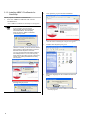
Follow the on-screen instructions to install the
software.
HINT
Refer to “ABBYY FineReader for ScanSnap
User’s Guide” to learn more about ABBYY
FineReader for ScanSnap.
Select [Start] [All Programs] [ABBYY
FineReader for ScanSnapTM 3.0] [User’s
Guide].
HINT
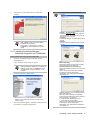
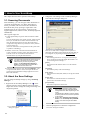
The following window appears during the
installation.
[Typical] <Recommended>
“ScanSnap Manager”, “ScanSnap Organizer”,
and “CardMinder” are installed along with the
manuals for these programs.
[Compact]
“ScanSnap Manager” is installed along with its
manual.
[Custom]
You can select the software and the manuals
to install.
2.1.3. Installing ScanSnap Manager,
ScanSnap Organizer and CardMinder
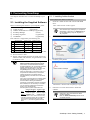
Please prepare the ScanSnap Setup CD-ROM.
1.
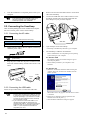
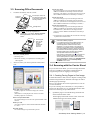
Insert the "ScanSnap Setup CD-ROM" into the
CD-ROM drive.
The "ScanSnap Setup" dialog box appears.
HINT
2.
This dialog box is not displayed automatically
when the "Auto play" setting of your computer is
disabled. In this case, run “Setup.exe” of this
CD-ROM directly using the “Explorer” or “My
computer”.
Click the [Install Products] button.
The installation of ScanSnap Manager, ScanSnap
Organizer and CardMinder starts up, and the wizard
window appears.
3.
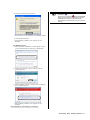
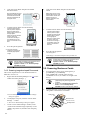
The setup window appears. Follow the instructions on
the window to install the application.
[Set the document face-down and scan
(Recommended)]
Select when loading the document face-down
and upside-down on the ScanSnap.
[Set the document face-up and scan]
Select when loading the document face-up and
upside up.
(Note: You can change this after installation.
This dialog box will not appear after
reinstallation. The setting before reinstallation
will be effective.)
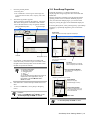
Specifies whether to carry out “Notify scanning
result” after scanning.
If the check box is selected, the notification
screen showing whether the following functions
were carried out or not appears.
● Allow automatic blank page removal
● Allow automatic image rotation
(Note: You can change this after installation.
This dialog box will not appear after
reinstallation. The setting before reinstallation
will be effective.)
ScanSnap S510 Getting Started | 9