1
5. Daily Care
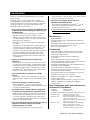
This chapter describes how to clean the ScanSnap.
CAUTION
WARNING
The glass surface inside the ADF becomes hot during
the scanner operation.
Before you start cleaning the inside of the scanner,
disconnect the AC adapter from the outlet, and wait at
least 15 minutes to let the scanner cool down.
Fire/Electric Shock
Before cleaning the scanner, disconnect the AC
adapter from the power outlet.
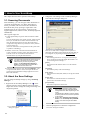
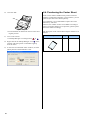
5.1. Cleaning Materials
Cleaning Materials
Cleaner F1
Parts No.
● Never use water or neutral detergent to
clean the inside of the scanner.
Remarks
PA03950-0352
● Do not use aerosol sprays to clean the
1 bottle (100ml)
(*1)(*2)
*1) To purchase the cleaning material, contact a FUJITSU scanner
dealer where you purchased the scanner.
*2) It may take long before the cleaner vaporizes if a large quantity
is used. When cleaning the scanner parts, dampen a cloth with
modest quantities of the cleaner. In addition, wipe off the
cleaner completely with a soft lint-free cloth to leave no residue
on the surface of the cleaned parts.
scanner. Aerosol sprays cause dirt and
dust to enter the scanner, resulting in the
scanner failure, malfunction and image
error.
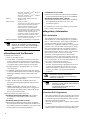
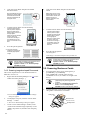
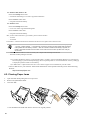
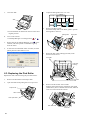
1.
Open the ADF while pulling the Cover open lever.
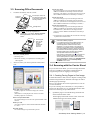
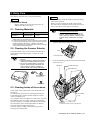
5.2. Cleaning the Scanner Exterior
ADF
Clean the scanner exterior with a cloth moistened with a
small amount of neutral detergent or Cleaner F1 (sold
separately).
Cover open lever
● Never use paint thinner or other organic
solvents.
● During the cleaning, take prevent water or
moisture from getting inside the scanner.
● Do not use aerosol sprays to clean the
scanner. Aerosol sprays cause dirt and
dust to enter the scanner, resulting in
scanner failure and scanner malfunction.
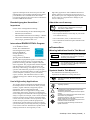
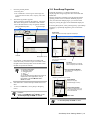
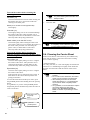
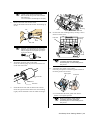
2.
Clean the following locations with a cloth moistened
with Cleaner F1.
Pad ASSY
Plastic rollers (x4)
Eject rollers (x2)
Pick roller
Cloth
Neutral detergent
or Cleaner F1
Paint thinner
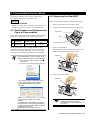
5.3. Cleaning Inside of the scanner
Clean inside of the scanner with a cloth moistened with
Cleaner F1.
In an alternating succession of scanning documents, the
accumulated paper-powder and dust inside the scanner
causes a scanning error.
As a guideline, clean the ADF every 1,000 scans. Note that
this guideline varies according to the type of documents
you are scanning. For example, the ADF must be cleaned
more frequently when scanning documents on that the
toner has not been sufficiently fixed on.
Clean the ADF according to the following procedure
referring to the illustrations.
Feed rollers
(x2)
Glass (x2)
(Located on the ADF cover and opposite side.)
ScanSnap S510 Getting Started | 21