1
Getting started
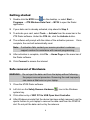
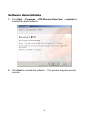
1. Double-click the MY39 icon
on the desktop, or select Start →
Programs → ZTE Wireless Data Card → MY39 to open the Dialer
application.
2. If your data card is already activated, skip ahead to Step 5.
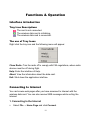
3. To activate your card, select Tools → Activate from the menu bar in the
ZTE Dialer software. Under the OTA tab, click the Activate button.
4. The software will prompt with the status of the activation process. Once
complete, the card will automatically reset.
Note: If activation fails, contact your service provider’s customer
support number for assistance with manual programming.
5. After activation is complete, click File → Home Page on the menu bar of
the Dialer software.
6. Click Connect to access the internet.
Safe removal of Hardware
WARNING: Do not eject the data card from the laptop without following
the proper removal procedure. Removing the card improperly
can cause a fatal error on your laptop.
1. Close the MY39 Dialer software.
2. Left click on the Safely Remove Hardware
system tray.
icon in the Windows
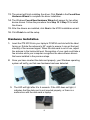
3. Click either entry of NEC PCI to USB Open Host Controller.
4. After Windows prompts that the device has been safely removed, use the
ejector button on your laptop to remove the data card from the PCMCIA
slot. Do not pull the data card out by the antenna.
9


![- [ [ [ ANSEL ] ] ]](http://vs1.manualzilla.com/store/data/005876018_1-a636cab6934c7a831e92a71c6eb2f063-150x150.png)