1
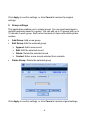
Click Apply to confirm settings, or click Cancel to restore the original settings. 2. Group settings This application enables you to create groups. You can send messages to multiple recipients saved in a group. You can edit up to 10 groups with up to 10 records in each group. Each record consists of name and mobile phone number. Add Group: Add a new group Edit Group: Edit the selected group. ¾ Append: Add a new record ¾ Edit: Edit the selected record ¾ Delete: Delete the selected record ¾ Contact: Enter a new record selected from contacts Delete Group: Delete the selected group Click Apply to confirm settings, or click Cancel to restore original settings. 16


![- [ [ [ ANSEL ] ] ]](http://vs1.manualzilla.com/store/data/005876018_1-a636cab6934c7a831e92a71c6eb2f063-150x150.png)