1
Getting Started
EXTENSION KEYS
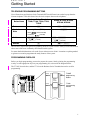
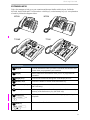
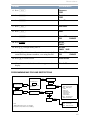
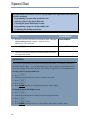
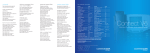
Take a few moments to look over your extension and become familiar with its layout. Unlike the
M7310N, the M7324N and T7316 do not have a shift key (5) or dual memory keys (6). An explanation
of each key follows the diagrams below.
M7324
8 7
9
3
2
8 7
6
2
6
M7310
33
1
1
4
5
4
5
4
4
T7316E
T7316
2
3
9
3
7
8
9
4
1
11
1
2
7
4
8
4
4
10
12
DESCRIPTION
1 Keypad
Used to dial numbers when you make a call and to enter numbers and
letters when you programme your extension.
2 Display
Shows instructions and numbers when you use or programme the
extension.
3 Display keys
Activates the instruction that appears on the display above it.
4 Memory keys
Activates a number or feature code stored in the key.
5 Dual memory keys
Allows you to store two numbers or feature codes
(M7310N only).
6 Shift key
Allows you to use the number or feature code stored in the secondary
memory of the dual memory key (M7310N only)
7 Feature key
(≤, ƒ or
ƒ)
Allows you to enter a feature code while using or programming the
telephone.
8 Hold key
(˙, ˙,
≥)
Puts an active call on hold.
3