1
X
X
7RHQWHUWKHPHQXSUHVVWKHYROXPHXSEXWWRQDQG
7RHQWHUWKHPHQXSUHVVWKHYROXPHXSEXWWRQDQG
HDV\3RFNHWEDVLF
WKHYROXPHGRZQEXWWRQVLPXOWDQHRXVO\
WKHYROXPHGRZQEXWWRQVLPXOWDQHRXVO\
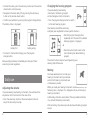
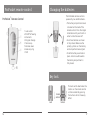
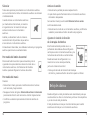
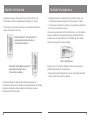
• To enter the menu, press the volume up button and the volume
Changing
the hearing program
X3UHVVWKHSURJUDPFKDQJHEXWWRQ
X
X
1DYLJDWHWRWKHPHQXHQWU\,QIRE\SUHVVLQJWKH
1DYLJDWHWRWKHPHQXHQWU\,QIRE\SUHVVLQJWKH
down
button
simultaneously.
WRVZLWFKWRWKHQH[W
If you are wearing two hearing
YROXPHXSEXWWRQRUWKHYROXPHGRZQEXWWRQ
YROXPHXSEXWWRQRUWKHYROXPHGRZQEXWWRQ
• Navigate to the menu entry Info by pressing the volume up
KHDULQJSURJUDP
instruments,
the hearing program
X
X
&RQÀUP\RXUVHOHFWLRQE\SUHVVLQJWKHSURJUDP
&RQÀUP\RXUVHOHFWLRQE\SUHVVLQJWKHSURJUDP
button
or the volume down button.
will be changed on both instruments.
FKDQJHEXWWRQ
FKDQJHEXWWRQ
HDV\3RFNHWDGYDQFHG
• Confirm your selection by pressing the
program change button.
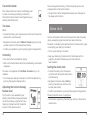
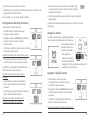
• Press the program change button to switch
7KHEDWWHU\VWDWXVLVGLVSOD\HG
7KHEDWWHU\VWDWXVLVGLVSOD\HG
to the next hearing program.
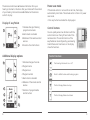
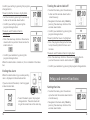
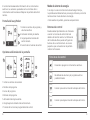
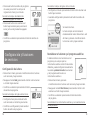
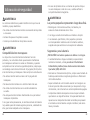
The battery status is displayed:
X3UHVVWKHSURJUDPFKDQJHEXWWRQUHSHDWHGO\XQWLOWKH
EDWWHU\IXOO
EDWWHU\IXOO
EDWWHU\HPSW\
EDWWHU\HPSW\
LFRQRIWKHGHVLUHGKHDULQJSURJUDPLVGLVSOD\HG
Your Hearing Care Professional may
configure your easyPocket to show specific situations.
RU
X3UHVVWKHFRQWUROEXWWRQQH[WWRWKH
LFRQLQGLFDWLQJWKHGHVLUHGKHDULQJ
SURJUDP
•Press the program change button
repeatedly until the icon of the desired
hearing program is displayed.
or
7KHFRQWUROEXWWRQVKDYHWREH
•Press the control button next to the
FRQÀJXUHGE\\RXU+HDULQJ&DUH
FKDQJHEXWWRQ
FKDQJHEXWWRQ
icon indicating the desired hearing
'DLO\XVH
3URIHVVLRQDO
• To return to the standard display, press the
program
program.
5HPRYHHPSW\EDWWHULHVLPPHGLDWHO\DQGGLVSRVHRIWKHP
5HPRYHHPSW\EDWWHULHVLPPHGLDWHO\DQGGLVSRVHRIWKHP
change
button.
7XUQLQJRQDQGRIIPXWH
DFFRUGLQJWRORFDOUHJXODWLRQV
DFFRUGLQJWRORFDOUHJXODWLRQV
The
control
buttons
have
to
be configured by your
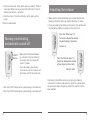
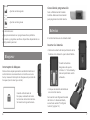
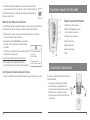
Remove empty batteries immediately and dispose of them
<RXKDYHVHYHUDORSWLRQVWRWXUQ\RXUKHDULQJLQVWUXPHQWV
Hearing Care
Professional.
according to local regulations.
RQDQGRIIZLWK\RXUUHPRWHFRQWURO
%DWWHULHV
%DWWHULHV %RWKKHDULQJLQVWUXPHQWVDUH
MutingVLPXOWDQHRXVO\WXUQHGRQRURII
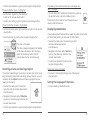
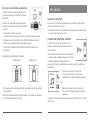
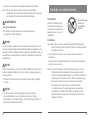
You have several options to mute your
:KHQ\RXWXUQ\RXUKHDULQJ
hearing instruments with your remote
LQVWUXPHQWVRIIYLDUHPRWHFRQWURO
control. Both hearing instruments are
WKHIROORZLQJLFRQLVGLVSOD\HG,WLV
simultaneously muted.
GLVSOD\HGXQWLO\RXWXUQ\RXUKHDULQJ
When you
mute your hearing instruments via remote control, the
LQVWUXPHQWVEDFNRQ
Adjusting the volume
following icon is displayed. It is displayed until you unmute your
$GGLWLRQDOO\DOOEXWWRQVDUHGLVDEOHG7KHRQO\DYDLODEOH
If you are wearing two hearing instruments, the volume will be
hearing instruments.
adjusted on both instruments at the same time.
IXQFWLRQLVWRWXUQWKHKHDULQJLQVWUXPHQWVEDFNRQ
Additionally, all buttons are disabled. The only available function
• Press the volume up button or the volume down button to
$IWHUWXUQLQJRQWKHSUHYLRXVO\XVHGYROXPHDQGKHDULQJ
is to unmute
the hearing instruments.
adjust the volume by one step.
SURJUDPDUHVHW
After unmuting, the previously used volume and hearing program
are set. 9LDFRQWUROEXWWRQ
X3UHVVWKHFRQWUROEXWWRQQH[WWRWKHIROORZLQJ
8
9
LFRQWRWXUQ\RXUKHDULQJLQVWUXPHQWVRQRURII
'DLO\XVH
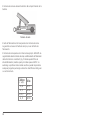
battery full battery empty
X
X
7RUHWXUQWRWKHVWDQGDUGGLVSOD\SUHVVWKHSURJUDP
7RUHWXUQWRWKHVWDQGDUGGLVSOD\SUHVVWKHSURJUDP
Daily use