1
Steps for Replaying a Database Workload
To estimate the number of replay clients and hosts that are required to replay a
particular workload, run the wrc executable in calibrate mode.
In calibration mode, the wrc executable accepts the following keywords:
■
■
■
replaydir specifies the directory that contains the preprocessed workload
capture you want to replay. If unspecified, it defaults to the current directory.
process_per_cpu specifies the maximum number of client processes that can
run per CPU. The default value is 4.
threads_per_process specifies the maximum number of thread that can run
within a client process. The default value is 50.
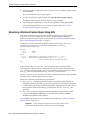
The following example shows how to run the wrc executable in calibrate mode:
%> wrc mode=calibrate replaydir=./replay
In this example, the wrc executable is executed to estimate the number of replay
clients and hosts that are required to replay the workload capture stored in a
subdirectory named replay under the current directory. In the following sample
output, the recommendation is to use at least 21 replay clients divided among 6 CPUs:
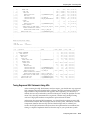
Workload Replay Client: Release 11.1.0.7.0 - Production on Thu March 27
14:06:33 2008
Copyright (c) 1982, 2008, Oracle.
All rights reserved.
Report for Workload in: /oracle/replay/
----------------------Recommendation:
Consider using at least 21 clients divided among 6 CPU(s).
Workload Characteristics:
- max concurrency: 1004 sessions
- total number of sessions: 1013
Assumptions:
- 1 client process per 50 concurrent sessions
- 4 client process per CPU
- think time scale = 100
- connect time scale = 100
- synchronization = TRUE
Starting Replay Clients
After determining the number of replay clients that are needed to replay the workload,
you need to start the replay clients by running the wrc executable in replay mode on
the hosts where they are installed. Once started, each replay client will initiate one or
more sessions with the database to drive the workload replay.
In replay mode, the wrc executable accepts the following keywords:
■
■
■
userid and password specify the user ID and password of a replay user for the
replay client. If unspecified, these values default to the system user.
server specifies the connection string that is used to connect to the replay
system. If unspecified, the value defaults to an empty string.
replaydir specifies the directory that contains the preprocessed workload
capture you want to replay. If unspecified, it defaults to the current directory.
Replaying a Database Workload
5-5