1
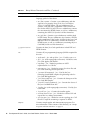
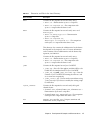
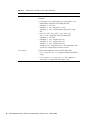
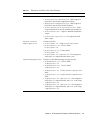
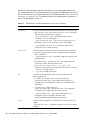
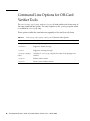
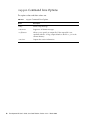
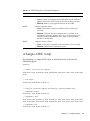
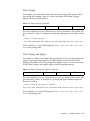
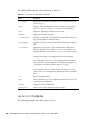
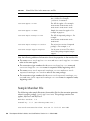
The option values and their actions are shown in TABLE 12-1.
TABLE 12-1
apdutool Command Line Options
Option
Description
-h hostname
Specifies the host name on which the TCP/IP socket port is found.
(See the flag -p.)
-help
Displays online documentation for this command. To get help for
apdutool, run bin/apdutool -help on the command line.
-noatr
Suppresses outputting an ATR (answer to reset).
-nobanner
Suppresses all banner messages.
-o <outputFile>
Specifies an output file. If an output file is not specified with the -o
flag, output defaults to standard output.
-p portNumber
Specifies a TCP/IP socket port other than the default port (which is
9025).
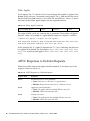
-s serialPort
Specifies the serial port to use for communication, rather than a
TCP/IP socket port. For example, serialPort can be COM1 on a
Microsoft Windows system and /dev/term/a on a Solaris system.
Currently, this option is not supported on the Linux platform.
To use this option, the javax.comm package must be installed on
your system. For more information on installing this package, see
“Prerequisites for Installing the Binary Release” on page 6.
If you enter the name of a serial port that does not exist on your
system, apdutool will respond by printing the names of available
ports.
-t0
Runs T=0 single interface.
-pcsc
Sends commands to a PC/SC-compatible card reader. Use of PC/SC
is optional and unsupported.
-version
Outputs the version information.
<inputFile>
Allows you to specify the input script (or scripts).
apdutool Examples
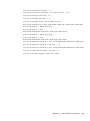
The following examples show how to use apdutool.
104
Development Kit User’s Guide, Java Card Platform, Version 2.2.2 • March 2006