1
Development Kit User’s Guide
For the Binary Release with Cryptography Extensions
Java Card™ Platform, Version 2.2.2
Sun Microsystems, Inc.
www.sun.com
3-21-06
Copyright © 2005 Sun Microsystems, Inc., 4150 Network Circle, Santa Clara, California 95054, U.S.A. All rights reserved.
Sun Microsystems, Inc. has intellectual property rights relating to technology embodied in the product that is described in this document. In
particular, and without limitation, these intellectual property rights may include one or more of the U.S. patents listed at
http://www.sun.com/patents and one or more additional patents or pending patent applications in the U.S. and in other countries.
U.S. Government Rights - Commercial software. Government users are subject to the Sun Microsystems, Inc. standard license agreement and
applicable provisions of the FAR and its supplements. Use is subject to license terms.
This distribution may include materials developed by third parties.
Parts of the product may be derived from Berkeley BSD systems, licensed from the University of California. UNIX is a registered trademark in
the U.S. and in other countries, exclusively licensed through X/Open Company, Ltd.
Sun, Sun Microsystems, the Sun logo, Java, Solaris, Sparc, Java Card, Java Developer Connection, Javadoc, JDK, JVM, J2ME, NetBeans and J2SE
are trademarks or registered trademarks of Sun Microsystems, Inc. in the U.S. and other countries.
Products covered by and information contained in this service manual are controlled by U.S. Export Control laws and may be subject to the
export or import laws in other countries. Nuclear, missile, chemical biological weapons or nuclear maritime end uses or end users, whether
direct or indirect, are strictly prohibited. Export or reexport to countries subject to U.S. embargo or to entities identified on U.S. export exclusion
lists, including, but not limited to, the denied persons and specially designated nationals lists is strictly prohibited.
DOCUMENTATION IS PROVIDED "AS IS" AND ALL EXPRESS OR IMPLIED CONDITIONS, REPRESENTATIONS AND WARRANTIES,
INCLUDING ANY IMPLIED WARRANTY OF MERCHANTABILITY, FITNESS FOR A PARTICULAR PURPOSE OR NON-INFRINGEMENT,
ARE DISCLAIMED, EXCEPT TO THE EXTENT THAT SUCH DISCLAIMERS ARE HELD TO BE LEGALLY INVALID.
Copyright © 2005 Sun Microsystems, Inc., 4150 Network Circle, Santa Clara, California 95054, Etats-Unis. Tous droits réservés.
Sun Microsystems, Inc. détient les droits de propriété intellectuels relatifs à la technologie incorporée dans le produit qui est décrit dans ce
document. En particulier, et ce sans limitation, ces droits de propriété intellectuelle peuvent inclure un ou plus des brevets américains listés à
l'adresse http://www.sun.com/patents et un ou les brevets supplémentaires ou les applications de brevet en attente aux Etats - Unis et dans les
autres pays. L'utilisation est soumise aux termes de la Licence.
Cette distribution peut comprendre des composants développés par des tierces parties.
Des parties de ce produit pourront être dérivées des systèmes Berkeley BSD licenciés par l'Université de Californie. UNIX est une marque
déposée aux Etats-Unis et dans d'autres pays et licenciée exclusivement par X/Open Company, Ltd.
Sun, Sun Microsystems, le logo Sun, Java, Solaris, Sparc, Java Card, Java Developer Connection, Javadoc, JDK, JVM, J2ME, NetBeans et J2SE
sont des marques de fabrique ou des marques déposées de Sun Microsystems, Inc. aux Etats-Unis et dans d'autres pays.
Les produits qui font l'objet de ce manuel d'entretien et les informations qu'il contient sont regis par la legislation americaine en matiere de
controle des exportations et peuvent etre soumis au droit d'autres pays dans le domaine des exportations et importations. Les utilisations
finales, ou utilisateurs finaux, pour des armes nucleaires, des missiles, des armes biologiques et chimiques ou du nucleaire maritime,
directement ou indirectement, sont strictement interdites. Les exportations ou reexportations vers des pays sous embargo des Etats-Unis, ou
vers des entites figurant sur les listes d'exclusion d'exportation americaines, y compris, mais de maniere non exclusive, la liste de personnes qui
font objet d'un ordre de ne pas participer, d'une facon directe ou indirecte, aux exportations des produits ou des services qui sont regi par la
legislation americaine en matiere de controle des exportations et la liste de ressortissants specifiquement designes, sont rigoureusement
interdites.
LA DOCUMENTATION EST FOURNIE "EN L'ETAT" ET TOUTES AUTRES CONDITIONS, DECLARATIONS ET GARANTIES EXPRESSES
OU TACITES SONT FORMELLEMENT EXCLUES, DANS LA MESURE AUTORISEE PAR LA LOI APPLICABLE, Y COMPRIS NOTAMMENT
TOUTE GARANTIE IMPLICITE RELATIVE A LA QUALITE MARCHANDE, A L'APTITUDE A UNE UTILISATION PARTICULIERE OU A
L'ABSENCE DE CONTREFACON.
Please
Recycle
Contents
Contents
iii
Figures
xi
Tables
xiii
Preface
xv
Who Should Use This Book
xvi
Before You Read This Book
xvi
How This Book Is Organized
Related Books
xvi
xvii
Typographic Conventions
xviii
Accessing Sun Documentation Online
Sun Welcomes Your Comments
1.
Introduction
xviii
1
Converting Java Language Classes
2.
Installation
xviii
2
5
Prerequisites for Installing the Binary Release
Installing the Development Kit Binaries
Files Installed for the Binary Release
6
6
11
iii
Sample Programs and Demonstrations
3.
13
Development Kit Samples and Demonstrations
The Demonstrations
15
Directories and Files in the demo Directory
Preliminaries for Rebuilding the Demos
Building Samples
15
16
21
21
Running the Build Script
21
Setting Environment Variables
Building the Sample Applets
21
22
Preparing to Compile the Sample Applets
Compiling the Sample Applets
Converting the Class Files
22
22
22
Running scriptgen to Generate Script Files
Running the Demonstrations
Demo 1
24
Demo 2
25
Running demo2
Demo 3
24
25
26
Java Card RMI Demo
27
Running the Java Card RMI Demo
Secure Java Card RMI Demo
27
29
Running the Secure Java Card RMI Demo
Object Deletion Demo 1
31
Object Deletion Demo 2
33
Logical Channels Demo
33
Demo 2 Cryptography Demo
Photo Card Demo
35
36
Transit System Demo
iv
23
37
Development Kit User’s Guide, Java Card Platform, Version 2.2.2 • March 2006
30
Utility APIs Demo Applet
PIN Protection
38
Storage of Portfolio
Stock Trading
38
38
38
Get Information On a Stock
39
Password Biometric Sample Application
How the Biometric Sample Works
40
41
SamplePasswdOwnerBioTemplate Class
SamplePasswdBioServer Class
42
SamplePasswdBioApplet Class
42
Off-card Tool
41
42
Sequence Diagram Of How The Sample Works
How The Biometric API Works
Implementation Notes
43
45
SignatureMessageRecovery Demo
45
Message Recovery Order of Operations
Sample Application
4.
42
45
46
Running Applets in an Emulated Card Environment
Preparing to Run Java Card WDE
Setting Environment Variables
49
50
50
Configuring the Applets in the Java Card WDE Mask
Running the Java Card WDE Tool
5.
Converting Java Class Files
Setting Java Compiler Options
51
53
54
Generating the CAP File’s Debug Component
Running the Converter
50
54
54
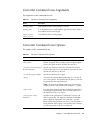
Converter Command Line Arguments
55
Contents
v
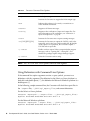
Converter Command Line Options
55
Using Delimiters with Command Line Options
Using a Command Configuration File
File and Directory Naming Conventions
Input File Naming Conventions
57
57
57
Output File Naming Conventions
58
Verification of Input and Output Files
Creating a debug.msk Output File
Loading Export Files
58
59
59
Specifying an Export Map
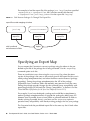
60
6.
Viewing an Export File
7.
Verifying CAP and Export Files
Verifying CAP Files
61
63
63
Running verifycap
64
verifycap Command Line Arguments
verifycap Command Line Options
Verifying Export Files
64
65
65
Running verifyexp
65
verifyexp Command Line Arguments
verifyexp Command Line Options
Verifying Binary Compatibility
Running verifyrev
66
66
66
67
verifyrev Command Line Arguments
verifyrev Command Line Options
67
67
Command Line Options for Off-Card Verifier Tools
8.
vi
68
Generating a CAP File From a Java Card Assembly File
Running capgen
56
69
Development Kit User’s Guide, Java Card Platform, Version 2.2.2 • March 2006
69
capgen Command Line Options
9.
Producing a Text Representation of a CAP File
Running capdump
10.
70
71
Using the Reference Implementation
73
Running the C-Language Java Card RE
Installer Mask
71
74
74
Runtime Environment Command Line
74
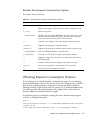
Runtime Environment Command-line Options
Obtaining Resource Consumption Statistics
Reference Implementation Limits
Input and Output
75
75
77
78
Working With EEPROM Image Files
Input EEPROM Image File
78
78
Output EEPROM Image File
79
Same Input and Output EEPROM Image File
79
Different Input and Output EEPROM Image Files
The Default ROM Mask
11.
Using the Installer
79
81
Installer Components and Data Flow
Running scriptgen
Installer Applet AID
81
83
84
Setting Default Applets
84
Downloading CAP Files and Creating Applets
Downloading the CAP File
84
85
Creating an Applet Instance
85
Installer APDU Protocol
86
APDU Types
79
86
Contents
vii
APDU Responses to Installation Requests
A Sample APDU Script
90
93
Deleting Packages and Applets
96
How to Send a Deletion Request
96
APDU Requests to Delete Packages and Applets
APDU Responses to Deletion Requests
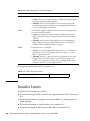
Installer Limits
12.
98
100
Sending and Receiving APDU Commands
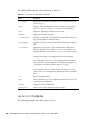
Running apdutool
103
103
apdutool Examples
104
Directing Output to the Console
Directing Output to a File
Using APDU Script Files
13.
96
105
105
Using Cryptography Extensions
107
Supported Cryptography Classes
108
Instantiating the Classes
105
110
DES Encryption and Signature Performance Enhancements
Temporary RAM Usage by Cryptography Algorithms
14.
Java Card RMI Client-Side Reference Implementation
The Java Card Remote Stub Object
Java Card RMI Client-Side API
Package rmiclientlib
Package clientlib
114
115
115
A.
Java Card Assembly Syntax Example
B.
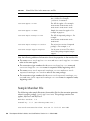
CAP File Manifest File Syntax
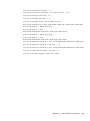
Sample Manifest File
viii
113
117
137
138
Development Kit User’s Guide, Java Card Platform, Version 2.2.2 • March 2006
111
113
111
C.
Using the Large Address Space
141
Programming Large Applications and Libraries
141
Handling a Package as a Separate Code Space
Storing Large Amounts of Data
142
Example: The photocard Demo Applet
Notes on the photocard Applet
Index
142
142
148
149
Contents
ix
x
Development Kit User’s Guide, Java Card Platform, Version 2.2.2 • March 2006
Figures
FIGURE 1-1
Java Card Platform Conversion 3
FIGURE 3-1
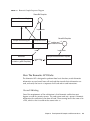
Biometric Sample Sequence Diagram
FIGURE 5-1
Calls Between Packages Go Through The Export Files
FIGURE 7-1
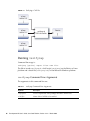
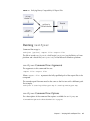
Verifying a CAP file 64
FIGURE 7-2
Verifying An Export File 65
FIGURE 7-3
Verifying Binary Compatibility Of Export Files 67
FIGURE 11-1
Installer Components
FIGURE 11-2
Installer APDU Transmission Sequence 86
43
60
82
xi
xii
Development Kit User’s Guide, Java Card Platform, Version 2.2.2 • March 2006
Tables
TABLE P-1
Typographic Convention Typefaces xviii
TABLE 2-1
Binary Release Directories and Files
TABLE 2-2
Directory Structure for Sample Programs and Demonstrations
TABLE 3-1
Directories and Files in the demo Directory 17
TABLE 3-2
Subdirectories and Demonstrations in the demo2 Directory 20
TABLE 3-3
build_samples Command Line Options
TABLE 3-4
Authenticate User Command
TABLE 4-1
Command Line Options for Java Card WDE 51
TABLE 5-1
Converter Command Line Arguments 55
TABLE 5-2
Converter Command Line Options 55
TABLE 6-1
exp2text Command Line Options
TABLE 7-1
verifycap Command Line Arguments
TABLE 7-2
verifyexp Command Line Argument
TABLE 7-3
verifycap, verifyexp, verifyrev Command Line Options
TABLE 8-1
capgen Command Line Options
TABLE 10-1
Name and Location of cref Executables 74
TABLE 10-2
Runtime Environment Command Line Options
TABLE 11-1
scriptgen Command Line Options
TABLE 11-2
Set Default Applets on Different Logical Channels 84
TABLE 11-3
Select APDU Command 87
11
13
21
29
61
64
66
68
70
75
83
xiii
TABLE 11-4
Response APDU Command 87
TABLE 11-5
CAP Begin APDU Command
TABLE 11-6
CAP End APDU Command
TABLE 11-7
Component ## Begin APDU Command 88
TABLE 11-8
Component ## End APDU Command
TABLE 11-9
Component ## Data APDU Command 89
TABLE 11-10
Create Applet APDU Command
TABLE 11-11
Abort APDU Command 89
TABLE 11-12
APDU Responses to Installation Requests 90
TABLE 11-13
Delete Package Command
TABLE 11-14
Delete Package and Applets Command
TABLE 11-15
Delete Applet Command 98
TABLE 11-16
APDU Responses to Deletion Requests
TABLE 11-17
APDU Response Format 100
TABLE 12-1
apdutool Command Line Options
TABLE 12-2
Supported APDU Script File Commands
TABLE 13-1
Algorithms Implemented by the Cryptography Classes 109
TABLE B-1
Name:Value Pairs in the MANIFEST.MF File 137
xiv
88
88
88
89
97
97
98
104
106
Development Kit User’s Guide, Java Card Platform, Version 2.2.2 • March 2006
Preface
Java Card™ technology combines a subset of the Java™ programming language
with a runtime environment optimized for smart cards and similar small-memory
embedded devices. The goal of Java Card technology is to bring many of the benefits
of Java programming language to the resource-constrained world of smart cards.
The Java Card API is compatible with international standards such as ISO 7816, and
industry-specific standards such as Europay, Master Card, and Visa (EMV).
The development kit for the Java Card Platform contains software and several books
delivered in several bundles. The release notes for the development kit explains the
various bundles and their contents in detail.
The binary development kit contains a software bundle that includes the binaries,
and a documentation bundle that includes two books for using the binaries:
■
Development Kit User’s Guide, Java Card Platform, Version 2.2.2, which contains
information on how to install and use the development kit tools.
■
Application Programming Notes for the Java Card Platform, Version 2.2.2, which
contains information on programming for Java Card technology.
The specifications bundle included with the binary development kit contains all the
Java Card specifications, Application Programming Interface for the Java Card Platform,
Version 2.2.2, Runtime Environment Specification for the Java Card Platform, Version 2.2.2,
and Virtual Machine Specification for the Java Card Platform, Version 2.2.2. You can also
download the identical Java Card specifications bundle separately from the Sun
Microsystems web site at
http://java.sun.com/products/javacard
The Ant tasks bundle in the binary development kit and is required to install and
run the development kit. However, the Ant tasks are unsupported for use outside
the development kit.
xv
Who Should Use This Book
The Development Kit User’s Guide is written for developers who are creating applets
using the Application Programming Interface for the Java Card Platform, Version 2.2.2,
and also for developers who are considering creating a vendor-specific framework
based on the Java Card specifications.
Before You Read This Book
Before reading this guide, become familiar with the Java programming language,
object-oriented design, the Java Card specifications, and smart card technology. A
good resource for becoming familiar with Java and Java Card technology is the Sun
Microsystems, Inc. web site located at
http://java.sun.com
How This Book Is Organized
Chapter 1 provides an overview of the development kit and its tools.
Chapter 2 describes the procedures for installing the tools included in this release.
Chapter 3 describes sample applets that illustrate the use of the Java Card API. It
also describes demonstration programs that illustrate very important scenarios of
applet masking and post-manufacture installation.
Chapter 4 provides an overview of the Java Card technology-based Workstation
Development Environment (Java Card WDE) and how to run it.
Chapter 5 provides an overview of the Converter and how to run it.
Chapter 6 describes how to use the exp2text tool to view any export file in ASCII
format.
Chapter 7 provides an overview of the off-card verifier tool and details of running it.
Chapter 8 describes how to use the capgen utility.
xvi
Development Kit User’s Guide, Java Card Platform, Version 2.2.2 • March 2006
Chapter 9 describes how to use the capdump utility.
Chapter 10 describes how to use the C-language runtime environment simulator for
the Java Card platform (Java Card runtime environment or Java Card RE).
Chapter 11 describes how to download and delete packages, and create and delete
applet instances using the installer.
Chapter 12 describes how to use apdutool to transfer APDUs to and from the
C-language Java Card Runtime Environment or Java Card Workstation Development
Environment (Java Card WDE).
Chapter 13 describes the cryptography APIs optionally provided with this release.
Chapter 14 describes the reference implementation of the client-side Java Card
Remote Method Invocation API (client-side Java Card RMI API).
Appendix A describes the Java Card platform assembly output of the Converter
using a commented example file.
Appendix B describes the syntax of the manifest file which the Converter includes in
the CAP file.
Appendix C describes how your applications can get the most out of a large address
space implementation.
Related Books
References to various documents or products are made in this manual. Have the
following documents available:
■
Application Programming Notes for the Java Card Platform, Version 2.2.2.
■
Application Programming Interface for the Java Card Platform, Version 2.2.2.
■
Virtual Machine Specification for the Java Card Platform, Version 2.2.2.
■
Runtime Environment Specification for the Java Card Platform, Version 2.2.2.
■
Off-Card Verifier for the Java Card Platform, Version 2.2.1, White Paper.
■
Java Card RMI Client Application Programming Interface, Version 2.2.2.
■
The Java Programming Language (Java Series), Second Edition by Ken Arnold and
James Gosling (Addison-Wesley, 1998).
■
The Java Virtual Machine Specification (Java Series), Second Edition by Tim Lindholm
and Frank Yellin (Addison-Wesley, 1999).
■
Java Card Technology for Smart Cards by Zhiqun Chen (Addison-Wesley, 2000).
■
The Java Class Libraries: An Annotated Reference, Second Edition (Java Series) by
Patrick Chan, Rosanna Lee and Doug Kramer (Addison-Wesley, 1999).
Preface
xvii
■
ISO 7816 Specification Parts 1-6.
Typographic Conventions
The following table lists the typographic conventions used in this book.
TABLE P-1
Typographic Convention Typefaces
Typeface
Meaning
Examples
AaBbCc123
The names of commands, files,
and directories; on-screen
computer output
Edit your .login file.
Use ls -a to list all files.
% You have mail.
AaBbCc123
What you type, when
contrasted with on-screen
computer output
% su
Password: root
AaBbCc123
Book titles, new words or terms,
words to be emphasized
Command-line variable to be
replaced with a real name or
value
Read Chapter 6 in the User’s Guide.
These are called class options.
You must be superuser to do this.
To delete a file, type rm filename.
Accessing Sun Documentation Online
Access Java platform technical documentation on the web at the Java Developer
Connection™ program web site at
http://java.sun.com/reference
Sun Welcomes Your Comments
We are interested in improving our documentation and welcome your comments
and suggestions. Email your comments to us at [email protected].
xviii
Development Kit User’s Guide, Java Card Platform, Version 2.2.2 • March 2006
CHAPTER
1
Introduction
The development kit for the Java Card Platform consists of a suite of tools for
designing Java Card technology-based implementations and developing applets
based on the Application Programming Interface for the Java Card Platform, Version 2.2.2.
A set of samplesis also provided.
Any implementation of a Java Card runtime environment (Java Card RE) contains a
virtual machine (VM) for the Java Card platform (Java Card virtual machine), the
Java Card Application Programming Interface (API) classes, and support services.
The binary development kit release ships with one Java Card RE, cref, the Clanguage Java Card RE binary, which is written in the C programming language and
simulates a Java Card platform reference implementation. The C-language Java Card
RE implements the ISO 7816-4:2005 specification, including support for up to twenty
logical channels, as well as the extended APDU extensions as defined in ISO 7816-3.
The C-language Java Card RE was designed to simulate a dual T=1 contacted and T=
CL contactless concurrent interface implementation of the Java Card environment,
with the capability to operate on both interfaces simultaneously.
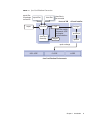
Using the development kit’s suite of tools is described in “Converting Java Language
Classes” on page 2.
■
apdutool - reads APDUs from a script file and sends them to the Java Card RE,
see Chapter 12.
■
capdump - creates an ASCII version of a CAP file, see Chapter 9.
■
capgen - generates a CAP file from a Java Card Assembly file, see Chapter 8.
■
Converter - converts Java classes into a CAP file, a Java Card Assembly file, or an
export file, see Chapter 5.
■
cref - runs the C-Language Java Card RE from the command line, see Chapter 10.
■
exp2text - allows you to view any export file in text format, see Chapter 6.
■
installer - the on-card installer, which downloads a Java Card technology package
to a smart card and can delete them, as well as applets, see Chapter 11.
1
■
off-card verifier - verifies the contents of a smart card using verifycap,
verifyexp, and verifyrev, see Chapter 7.
■
scriptgen - the off-card installer, which generates script files for apdutool’s use,
see Chapter 11.
■
verifycap - verifies CAP files, see Chapter 7.
■
verifyexp - verifies export files, see Chapter 7.
■
verifyrev - verifies binary compatibility, see Chapter 7.
■
Java Card WDE - the Java Card platform Workstation Development Environment
(Java Card WDE) emulates the card environment, see Chapter 4.
Converting Java Language Classes
Java programming language source can be converted into APDUs for use on a Java
Card technology-enabled smart card. The data flow starts with Java programming
language source being compiled and input to the Converter. The Converter tool can
convert classes that comprise a Java package to a converted applet (CAP) or to a Java
Card technology-based Assembly (Java Card Assembly) file.
A CAP file is a binary representation of converted Java technology package. A Java
Card Assembly file is a human-readable text representation of a converted package
that you can use to aid testing and debugging. A Java Card Assembly file can also be
used as input to the capgen tool to create a CAP file.
CAP files are processed by an off-card installer (scriptgen). This produces an
APDU script file as input to the apdutool, which then sends APDUs to a Java Card
RE implementation.
Not shown in the figure is the tool capdump, which produces a simple ASCII version
of the CAP file to aid in debugging. This figure shows other implementations that
might be available in other products, such as the J-language Java Card RE and 8051Java Card RE.
2
Development Kit User’s Guide, Java Card Platform, Version 2.2.2 • March 2006
Java Card Platform Conversion
FIGURE 1-1
export files
for package
conversion
export files
class files
class files to
be converted
front end VM
export
converter
Java Card
Assembly
off-card installer
CAP
scriptgen
CAP files contain
framework JCRE
and applet
implementations
apduscript
capgen
apdutool
apdu exchange
8051-JCRE
C-JCRE
J-JCRE
Java Card Runtime Environments
Chapter 1
Introduction
3
4
Development Kit User’s Guide, Java Card Platform, Version 2.2.2 • March 2006
CHAPTER
2
Installation
This release is provided for the Solaris™ Operating System (Solaris OS) release 10,
SuSE Linux, and Microsoft Windows XP as compressed zip archives. This release
was built using gcc version 3.2.3 on Windows, 3.2.2 on Linux, and Sun™ Studio 10:
C 5.7 Compiler on Solaris. The GNU Compiler Collection, gcc, can be obtained at
http://gcc.gnu.org.
Note – The Linux platform version was tested on the English language SuSE Linux,
kernel 2.6.5-7.139, and gcc version 3.2.2. The Linux platform version is unsupported;
Sun Microsystems may choose not to address problems or bug reports submitted
against the Linux platform version.
Note – Do not overlay this release onto a previous release. Instead, perform the
installation into a new directory.
5
Prerequisites for Installing the Binary
Release
Be sure to install the binary release before installing the source release, which you
must download separately.
1. Install the Java™ 2 Standard Edition (J2SE™) Software Developer’s Kit (SDK).
It is available from http://java.sun.com/j2se.
The supported SDK version is 1.5. If you are installing the SDK on the Solaris 10 or
Linux platform, make sure that all of the required patches are installed. More
information is available in the product documentation available at
http://www.sun.com/software/solaris.
2. (Optional) Install javax.comm.
If, however, you are planning to use the development kit to communicate with a
TLP224-compatible card reader, you must install javax.comm.
javax.comm can be found in the Java Communications API 2.0, available on Sun’s
web site at http://java.sun.com/products/javacomm.
Separate versions of the javax.comm API are available for the Solaris SPARC®
technology and Microsoft Windows platforms.
Note – If you are using the development kit on the Linux platform, download the
Solaris platform release of the javax.comm API and install only the Java Archive
(JAR) files.
Follow the instructions provided in the file Readme.html to install the package.
Make sure that the comm.jar file is added to the CLASSPATH.
Installing the Development Kit Binaries
There are three main steps for installing the development kit binaries. Separate
sections cover installation for the Solaris, Linux, and Microsoft Windows platforms.
1. Installing development kit binary release files. See “Installing on the Solaris or
Linux Platform” on page 7 or “Installing on the Microsoft Windows Platform” on
page 8.
6
Development Kit User’s Guide, Java Card Platform, Version 2.2.2 • March 2006
2. Setting environment variables. See “Setting Environment Variables for the Solaris
or Linux Platform” on page 8 or “Setting Environment Variables for Microsoft
Windows Platform” on page 9.
3. Installing Apache Ant and the Ant tasks bundle. See “Installing Ant” on page 10.
▼
Installing on the Solaris or Linux Platform
The Java Card development kit provides separate download files for the binary
release for the Solaris and Linux platforms.
1. Save the file in a convenient installation location of your choice.
For example, you might save the file in the directory /javacard. You must not
install this release into an existing directory structure from a previous release.
2. Navigate to the directory where you saved the file.
In our example, navigate to /javacard directory with the following command:
% cd /javacard
3. Unzip the file provided with the release with the unzip utility.
Use the following command:
% unzip DevelopmentKitBinaryDistribution.zip
where DevelopmentKitBinaryDistribution refers to the name of the bundle
containing the binary release installation files for the Solaris or Linux platform.
The release’s release documents, such as the release notes, are unzipped into the
directory /javacard as well. The installation creates the subdirectory
java_card_kit-2_2_2 under /javacard. The /javacard/java_card_kit2_2_2 directory is now the root of the development kit installation.
4. Unzip the files in the directory java_card_kit-2_2_2.
Within the directory java_card_kit-2_2_2, you will find other zip files to unzip.
Unzip all of these into the java_card_kit-2_2_2 directory. For a description of
the files and directories that are installed under java_card_kit-2_2_2, see “Files
Installed for the Binary Release” on page 11.
5. Follow the directions in the next section to set the environment variables required
by the development kit.
Chapter 2
Installation
7
▼ Setting Environment Variables for the Solaris or Linux
Platform
1. Set the environment variable JC_HOME to the installation directory.
For example (using csh), if you unzipped the release in the directory /javacard,
use the following command:
setenv JC_HOME /javacard/java_card_kit-2_2_2
If you unzipped the installation into a different directory, define the environment
variable JC_HOME accordingly.
2. Set the environment variable JAVA_HOME to the directory where you installed
your Java technology development tools.
For example, setenv JAVA_HOME /usr/j2sdk1.5
The following optional path setting enables you to run the development kit tools
from any directory.
setenv PATH .:$JC_HOME/bin:$PATH
To automate these environment settings, create a csh script file (named, for example,
javacard_env.cshrc) that includes the setenv statements:
setenv JC_HOME /javacard/java_card_kit-2_2_2
setenv JAVA_HOME /usr/j2sdk1.5
setenv PATH .:$JC_HOME/bin:$JAVA_HOME/bin:$PATH:
Run the script file from the command prompt before running the development kit
tools, samples, and demonstrations (refer to Chapter 3):
% source javacard_env.cshrc
▼
Installing on the Microsoft Windows Platform
The Java Card development kit provides a separate download file for the binary
release for the Microsoft Windows XP platform.
1. Save the zip file in a convenient installation location of your choice.
For example, the root of the C: drive.
2. Unzip the file provided with the release with the Winzip utility.
The utility is available from http://www.winzip.com. Use the following
command to unzip the file:
8
Development Kit User’s Guide, Java Card Platform, Version 2.2.2 • March 2006
C:\> winzip32 DevelopmentKitBinaryDistribution.zip
where DevelopmentKitBinaryDistribution refers to the name of the bundle
containing the installation files for the Microsoft Windows platform.
In the Winzip dialog, choose Select All and Extract from the Actions menu.
Enter C:\ into the Extract To field to unzip the contents of the zip file into that
directory. For more information on unzipping files, refer to the Winzip
documentation. The release’s release documents, such as the release notes, are
unzipped into that directory as well.
The java_card_kit-2_2_2 directory is the root of the development kit
installation.
3. Unzip the files in the directory java_card_kit-2_2_2.
Within the directory java_card_kit-2_2_2, you will find other zip files to unzip.
Unzip all of these into the java_card_kit-2_2_2 directory. For a description of
the files and directories that are unzipped into java_card_kit-2_2_2, see “Files
Installed for the Binary Release” on page 11.
4. Follow the directions in the next section to set the Microsoft Windows platform
environment variables required by the development kit.
▼ Setting Environment Variables for Microsoft Windows
Platform
1. Set the environment variable JC_HOME to the installation directory.
For example, if you unzipped the release in the root directory of the C: volume, enter
this command:
set JC_HOME=c:\java_card_kit-2_2_2
If you unzipped the installation into a different directory, define the environment
variable JC_HOME accordingly.
2. Set the environment variable JAVA_HOME to the directory where you installed
your Java software development tools.
For example, the command will use the following format:
set JAVA_HOME=c:\j2sdk1.5
The following optional path setting enables you to run the development kit tools
from any directory.
set PATH=%JC_HOME%\bin;%JAVA_HOME%\bin;%PATH%
To automate these environment settings, create a batch file (named, for example,
javacard_env.bat) that includes the set statements:
@echo off
set JC_HOME=C:\java_card_kit-2_2_2
Chapter 2
Installation
9
set JAVA_HOME=c:\j2sdk1.5
set PATH=.;%JC_HOME%\bin;%JAVA_HOME%\bin;%PATH%
Run the batch file from the command prompt before running the development kit
tools, samples, and demonstrations (refer to Chapter 3).
▼
Installing Ant
The development kit requires Ant to run the tools and the demos. Once Ant is
installed and the Ant tasks bundle unzipped, the use of the Ant tasks within the
development kit will not be apparent.
Note – The Ant tasks are supported for use with the development kit, but their use
outside the development kit is not supported, nor have they been thoroughly tested.
1. Download and unzip Apache Ant in a separate directory.
If you don't already have Apache Ant version 1.6.2 installed on your system, you
must download it from their web site at http://ant.apache.org. Unzip the
package in a directory that is separate from the development kit.
2. Add Ant to your system path.
Add Ant's bin directory to your system path.
3. Unzip the Ant tasks bundle.
If you haven’t already, unzip the Ant tasks bundle, which is included in the binary
release. When you unzip the Ant tasks bundle, the Ant tasks' JAR file is extracted
into the subdirectory java_card_kit-2_2_2/ant-tasks/lib. The
documentation for the unsupported use of the Ant tasks outside the development kit
is extracted into the subdirectory java_card_kit-2_2_2/ant-tasks/docs. For
more information, see TABLE 2-1.
▼
(Optional) Configuring PC/SC Functionality
If you are planning to use the development kit to communicate with a PC/SCcompatible card reader, which is optional and unsupported, you need to perform the
following steps.
1. Create the file jpcsclite.properties in any directory listed in the
CLASSPATH.
2. Edit jpcsclite.properties so that it contains the line:
10
Development Kit User’s Guide, Java Card Platform, Version 2.2.2 • March 2006
lib.path=<path_to_the_bin_directory_of_the_development_kit>
An example of such a line is:
lib.path=/home/user/jcdevkit222/bin
Files Installed for the Binary Release
TABLE 2-1 describes the files and directories that the binary installation procedure
installs under java_card_kit-2_2_2.
Note – If you are using the Microsoft Windows platform, substitute the \ character
for / in the paths.
TABLE 2-1
Binary Release Directories and Files
Directory/File
Description
ant-tasks
Contains release notes, the JAR file of Ant tasks that run the
development kit, and the Ant Tasks User’s Guide. The guide is
provided in both PDF and HTML format. The Ant tasks’
Javadoc tool files are in the anttasks/docs/html/javadocs subdirectory and a PDF
compilation of those Javadoc tool files are in the anttasks/pdf subdirectory.
The development kit will not operate properly unless Apache
Ant and the Ant tasks are fully installed. However, use of the
provided Ant tasks outside the development kit as described in
the Ant Tasks User’s Guide is not supported.
api_export_files
Contains the export files for version 2.2.2 of the Java Card API
packages.
bin
Contains all shell scripts or batch files for running the tools
(such as the apdutool, capdump, converter and so forth),
and the cref binary executable. Also contains a dynamic
library for PC/SC support.
Chapter 2
Installation
11
TABLE 2-1
12
Binary Release Directories and Files (Continued)
Directory/File
Description
doc
The devnotes and guides subdirectories contain the Englishlanguage guides for this release:
• en/dev-notes - Contains a pdf subdirectory with the
Application Programming Notes for the Java Card Platform,
Version 2.2.2 in PDF format. The pdf subdirectory also
contains a PDF file with a compilation of the Javadoc tool
files for the APDU I/O API. The html subdirectory contains
the same manual in HTML format, as well as a subdirectory
containing the APDU I/O Javadoc tool files themselves.
• en/guides - Contains a pdf subdirectory with this book
in PDF format. The pdf subdirectory also contains a PDF file
with a compilation of the Javadoc tool files for the Java Card
RMI API. The html subdirectory contains this manual in
HTML format, as well as a subdirectory containing the Java
Card RMI Javadoc tool files themselves.
jc_specification
Contains the three Java Card specifications in both PDF and
HTML formats.
lib
Contains all Java programming language JAR files required for
the tools:
• apdutool.jar and apduio.jar - Used by apdutool.
• api.jar (with cryptography extensions) - Needed to write
Java Card applets and libraries.
• capdump.jar - Needed to produce an ASCII
representation of a CAP file.
• converter.jar - Needed to process Java class files and
Java Card technology-based export files.
• javacardframework.jar - Used by the Java
technology-based RMIC compiler for generating stubs for
Java Card RMI applications.
• jcclientsamples.jar - Contains the client part of the
Java Card RMI samples.
• jcrmiclientframework.jar - Contains the classes of
the Java Card RMI Client API.
• jcwde.jar (with cryptography extensions) - Used by Java
Card WDE.
• installer.jar - Contains the installer applet.
• offcardverifier.jar - Needed to evaluate CAP and
export files in a desktop environment.
• scriptgen.jar - Needed to convert a package in a CAP
file into a script file containing a sequence of APDUs.
samples
Contains sample applets and demonstration programs. For
more information on the contents of this directory, see “Sample
Programs and Demonstrations” on page 13.
Development Kit User’s Guide, Java Card Platform, Version 2.2.2 • March 2006
Sample Programs and Demonstrations
All samples are contained in the samples directory under JC_HOME. TABLE 2-2
describes the contents of that directory.
TABLE 2-2
Directory Structure for Sample Programs and Demonstrations
Directory/File
Description
classes
Contains prebuilt sample classes.
build_demos.xml
Build script used to build demos. (Does not work
without source bundle installation.)
build.properties
A properties file used by Ant to build samples.
build_samples
or
build_samples.bat
A script or batch file to automate building samples.
build_samples.xml
Ant XML script to build samples.
build.xml
Ant build file.
src
Contains the sources for the sample applets that
belong to the packages
com.sun.javacard.samples.*.
src/demo
Contains all of the files needed to run the Java Card
platform demonstration programs. For more
information on the contents of the demo directory,
see “Directories and Files in the demo Directory” on
page 16.
src/com/sun/javacard/samples
Contains the source code for the sample applets.
src_client
Contains sample card acceptance device (CAD)
client programs for the Photo Card, Java Card RMI,
and secure Java Card RMI demos.
Also contains the file jcclient.properties.
usage.xml
Contains the Ant XML target that shows the user a
help message related to building samples and
demos.
Chapter 2
Installation
13
14
Development Kit User’s Guide, Java Card Platform, Version 2.2.2 • March 2006
CHAPTER
3
Development Kit Samples and
Demonstrations
This release includes several demonstration programs that illustrate the use of the
Java Card API, and a scenario of post-manufacture installation.
The Demonstrations
Version 2.2.2 of the development kit includes the following demonstration programs:
■
Demo 1 (demo1) - Illustrates the use of packages masked into card ROM:
JavaPurse, JavaLoyalty, Wallet and SampleLibrary.
■
Demo 2 (demo2) - Downloads these packages into the C-language Java Card RE
using the installer applet: JavaPurse, JavaLoyalty, Wallet, SampleLibrary,
RMIDemo, SecureRMIDemo, and photocard. demo2 also exercises the
JavaPurse, JavaLoyalty, and Wallet applets.
■
Demo 2 Cryptography Demo (demo2crypto) - Similar to demo2, except it uses a
version of JavaPurse that uses a DES MAC algorithm.
■
Demo 3 (demo3) - Illustrates the second time power-up of an already initialized
mask. It uses the card state file created by demo2.
■
Java Card RMI Demo (RMIDemo) - Demonstrates the use of the Java Card
platform Remote Method Invocation (Java Card RMI) API. The basic example
used is a program that manages a counter remotely, and is able to decrement,
increment, and return the value of an account. On cref, RMIDemo uses the card
state file created by demo2.
■
Logical Channels Demo (channelDemo) - Demonstrates the use of logical
channels which allows selecting multiple applets at the same time.
■
Object Deletion Demo 1 (odDemo1) - Demonstrates applet and package deletion,
as well as the object deletion mechanism which removes unreachable objects.
15
■
Object Deletion Demo 2 (odDemo2) - Demonstrates package deletion and checks
that persistent memory has been returned to the memory manager.
■
Photo Card Demo (photocard) - Demonstrates how to store images in the large
address space that is available in the 32-bit version of the Java Card platform
reference implementation, version 2.2.2.
■
Secure Java Card RMI Demo (SecureRMIDemo) - Similar to RMIDemo, but
demonstrates additional security at the transport level. It also uses the card state
file created on cref by demo2.
■
Transit System Demo (transit) - Demonstrates a contactless card-based transit
applet and its interaction with a turnstile transit terminal and with a point of sale
terminal.
■
Utility APIs Demo Applet (BrokerApplet) - Demonstrates the use of the utility
APIs in an applet to simulate stock trading and portfolio management.
■
Password Biometric Sample Application (biometryDemo) - Illustrates the use of
the biometric APIs of type PASSWORD.
■
SignatureMessageRecovery Demo (sigMsgFullRec and sigMsgPartRec) Demonstrates message recovery.
Directories and Files in the demo Directory
The demo directory is located at $JC_HOME/samples/src/demo on the Solaris or
Linux platform and at %JC_HOME%\samples\src\demo on the Microsoft Windows
platform. The demo directory contains the directories and files for the development
kit demonstrations, which are described in TABLE 3-1 and TABLE 3-2.
Note – Many of the directories listed in TABLE 3-1 and TABLE 3-2 contain a _tmp
subdirectory. This subdirectory contains intermediate temporary files needed to
construct the final *.scr source files.
16
Development Kit User’s Guide, Java Card Platform, Version 2.2.2 • March 2006
TABLE 3-1
Directories and Files in the demo Directory
Directories/Files
Description
demo1
Contains the files required to run and verify demo1:
• demo1.scr - Demonstration apdutool script file.
• demo1.scr.expected.out - For comparison with
apdutool output when the demo is run.
demo2
Contains the files required to run and verify demo2 and
demo2crypto:
• demo2.scr, demo2crypto.scr - Demonstration
apdutool script files.
• demo2.scr.expected.out,
demo2crypto.scr.expected.out - For comparison
with apdutool output when the demo is run.
This directory also contains the subdirectories for the demos
that depend on the output of demo2. For more information
on the contents of these subdirectories and the demos they
represent, see TABLE 3-2.
demo3
Contains the files required to run and verify demo3:
• demo3.scr - Demonstration apdutool script file.
• demo3.scr.expected.out - For comparison with
apdutool output when the demo is run.
jcwde
Contains the files required to run Java Card WDE:
• jcwde.app - Lists all of the applets (and their AIDs) to be
loaded into the simulated mask for Java Card WDE.
• jcwde_rmi.app and jcwde_securermi.app - Lists the
contents of Java Card WDE for running the RMIDemo and
SecureRMIDemo respectively.
• jcwde_transit.app - Used to run the transit demo using
jcwde, but only if you choose to modify the existing script
to enable that.
logical_channels
Contains the files required to run and verify the logical
channels demo:
• channel.scr, channelDemo.scr, ChnDemo.scr Demonstration apdutool script files.
• channelDemo.scr.expected.out - For comparison
with apdutool output when the demo is run.
misc
Footer.scr, Header.scr - Scripts to terminate and
initialize the session, respectively.
Chapter 3
Development Kit Samples and Demonstrations
17
TABLE 3-1
Directories and Files in the demo Directory
Directories/Files
Description
object_deletion
Contains the files required to run and verify odDemo1 and
odDemo2:
• packageA.scr, packageB.scr, packageC.scr Intermediate script files for building the final
odDemo1-*.scr files.
• odDemo1-1.scr, odDemo1-2.scr,
odDemo1-3.scr - Demonstration apdutool script
files.
• od1.scr, od2.scr, od2-2.scr, od3.scr,
od3-2.scr - Script files used for building the
odDemo1-*.scr files.
• odDemo1-1.scr.expected.out,
odDemo1-2.scr.expected.out,
odDemo1-3.scr.expected.out,
odDemo2.scr.expected.out - For comparison with
apdutool output when the demos are run.
utilitydemo
18
Contains files required to run the Utility APIs demo.
• UtilityDemoFooter.scr - Script to build the installation
script.
• utilitydemo.scr.expected.out - For comparison
with apdutool output when the demo is run.
Development Kit User’s Guide, Java Card Platform, Version 2.2.2 • March 2006
TABLE 3-1
Directories and Files in the demo Directory
Directories/Files
Description
transit
Contains the files to run the transit system demo:
• TransitDemo or TransitDemo.bat - Shell script and
batch file to run the pre-scripted transit demo.
• POSTerminal or POSTerminal.bat - Shell script and
batch file to run the Point Of Sale Terminal.
• TransitTerminal or TransitTerminal.bat - Shell
script and batch file to run the turnstile transit terminal.
• TransitDemoFooter* - Scripts to build the installation
scripts.
• TransitDemo.expected.out - For comparison with
demo output.
Password Biometric
Sample Application
Contains four files:
• biometryDemo.scr - script to run biometryDemo.
• biometryEnroll.scr - Used to build
biometryDemo.scr.
• biometryMatch.scr - Used to build
biometryDemo.scr.
• biometryDemo.scr.expected.out - For comparison
with apdutool output when the demo is run.
SignatureMessageRecovery
Contains six files demonstrating message recovery:
• SignAndFullRec.scr - Used to build
sigMsgFullRec.scr.
• SignAndPartRec.scr - Used to build
sigMsgPartRec.scr.
• sigMsgFullRec.scr - Used to run the sigMsgFullRec
demo.
• sigMsgPartRec.scr - Used to run the sigMsgPartRec
demo.
• sigMsgFullRec.scr.expected.out - For comparison
with apdutool output when the apdutool is run using
sigMsgFullRec.scr.
• sigMsgPartRec.scr.expected.out - For comparison
with apdutool output when the apdutool is run using
sigMsgPartRec.scr
Chapter 3
Development Kit Samples and Demonstrations
19
Several of the development kit demonstrations use the output generated by the
demo2 demonstration. These demonstrations are stored in subdirectories of demo2.
The demo2 directory also contains the files that the demos need to run JavaPurse,
JavaLoyalty, and Wallet. The demonstrations and subdirectories contained in
demo2 are described in TABLE 3-2.
TABLE 3-2
20
Subdirectories and Demonstrations in the demo2 Directory
Subdirectories
Description
javapurse
Contains the files required to run the demos that use JavaPurse:
• AppletTest.scr, AppletTestCrypto.scr - Downloads
and executes the demonstration applets.
• _tmp/JavaLoyalty.scr - Installation script for the
JavaLoyalty Java Card applet.
• _tmp/JavaPurse.scr, _tmp/JavaPurseCrypto.scr Installation scripts for the JavaPurse Java Card applet.
• _tmp/SampleLibrary.scr - Installation script for the
SampleLibrary library package.
photocard
Contains the files required to run and verify the photo card demo:
• photocard, photocard.bat - Script/batch file to run the
photo card demo.
• _tmp/photocard.scr - Installation script for the photo card
applet package.
• photocard.scr.expected.out - For comparison with
apdutool output when the demo is run.
• photocard.scr.expected.out.not_crypto - For
comparison with apdutool output when the demo is run using
cref in a non-crypto version.
• *.gif files - Sample photo files.
rmi
Contains the files required to run and verify RMIDemo and
SecureRMIDemo:
• rmidemo or rmidemo.bat, securermidemo or
securermidemo.bat - Shell scripts and batch files for
running the Java Card RMI and secure Java Card RMI demos,
respectively.
• rmidemo.scr.expected.out,
securermidemo.scr.expected.out - For comparison
with apdutool output when the demos are run.
• _tmp/RMIDemo.scr, _tmp/SecureRMIDemo.scr Installation scripts to install the RMIDemo and
SecureRMIDemo applet packages, respectively.
wallet
Contains the file required to run the demos that use the Wallet
applet:
_tmp/Wallet.scr - Installation script for the Wallet applet
package.
Development Kit User’s Guide, Java Card Platform, Version 2.2.2 • March 2006
Preliminaries for Rebuilding the Demos
Except for the transit and Utility APIs Demo Applet demos, all the demo
programs in the binary release are prebuilt. If you make any changes to the demos,
the following sections describe how you can rebuild them.
Building Samples
Ant script files are provided to build the samples. The Ant scripts are invoked by the
shell script $JC_HOME/samples/build_samples on Solaris or Linux platforms or
the batch file %JC_HOME%\samples\build_samples.bat on the Microsoft
Windows platform. To understand what is going on behind the scenes, it is very
instructive to look at these scripts.
Running the Build Script
By default, the build script in the binary release produces a 32-bit version of cref
that supports dual interfaces of T=CL and T=1 protocols.
Following is the command line syntax for the build script:
build_samples options
TABLE 3-3 shows the possible values for options.
TABLE 3-3
build_samples Command Line Options
Value of options
Description
-clean
Removes all files produced by the script.
-help
Prints a help message and exits.
Setting Environment Variables
The build_samples script uses the environment variable JAVA_HOME. To correctly
set this environment variable, refer to “Setting Environment Variables for the Solaris
or Linux Platform” on page 8 or “Setting Environment Variables for Microsoft
Windows Platform” on page 9.
Chapter 3
Development Kit Samples and Demonstrations
21
Building the Sample Applets
Run the script without parameters to build the samples
build_samples
Preparing to Compile the Sample Applets
This section details the steps taken by the Ant script and also provides manual
commands, if you choose to perform these steps manually.
1. A classes directory is created as a peer to src under the samples directory.
2. The Java Card API export files are copied to the classes directory.
Compiling the Sample Applets
The next step is to compile the Java programming language sources for the sample
applets. For example, from the samples directory, issue the following command:
Solaris or Linux platform:
javac -g -classpath ./classes:../lib/api.jar:../lib/installer.jar
src/com/sun/javacard/samples/HelloWorld/*.java
Microsoft Windows platform:
javac -g -classpath .\classes;..\lib\api.jar;..\lib\installer.jar
src\com\sun\javacard\samples\HelloWorld\*.java
where:
■
■
■
api.jar contains the Java Card API
installer.jar contains the installer applet
the classes directory is required for packages that import other sample
packages
Converting the Class Files
The next step is to convert the Java programming language class files.
Conversion parameters for each package are specified in a configuration file.
22
Development Kit User’s Guide, Java Card Platform, Version 2.2.2 • March 2006
For example, a configuration file contains the following items:
-out EXP JCA CAP
-exportpath .
-applet
0xa0:0x0:0x0:0x0:0x62:0x3:0x1:0xc:0x1:0x1
com.sun.javacard.samples.HelloWorld.HelloWorld
com.sun.javacard.samples.HelloWorld
0xa0:0x0:0x0:0x0:0x62:0x3:0x1:0xc:0x1 1.0
In this example, the converter outputs three kinds of files: export (*.exp), CAP
(*.cap) and Java Card Assembly (*.jca) files.
For more information about the converter tool, refer to Chapter 5.
Running scriptgen to Generate Script Files
Generate script files for apdutool using the scriptgen tool. This step must be
done for each package to be downloaded. For example:
scriptgen -o JavaLoyalty.scr
./classes/com/sun/javacard/samples/JavaLoyalty/javacard/JavaLoyalty
.cap
The new scripts are included into the demonstration scripts. For example,
demo2.scr file is composed of these scripts:
■
Header.scr - Script that initializes the session.
■
SampleLibrary.scr, JavaLoyalty.scr, JavaPurse.scr, Wallet.scr,
RMIDemo.scr, SecureRMIDemo.scr, photocard.scr - Package installation
scripts.
■
AppletTest.scr - Script that creates the JavaLoyalty, JavaPurse, Wallet,
JavaPurseCrypto, RMIDemo, and SecureRMIDemo applets so that you can see
each of them invoked when the simulation is run. AppletTest.scr also
exercises the JavaLoyalty.scr, JavaPurse.scr, and Wallet.scr applets.
■
Footer.scr - Script that terminates the session.
Note – The script files for the demonstrations use the output off; apdutool
directive to suppress the logging of CAP file download APDU commands to the
output log file, and the output on; directive to enable the logging of other
commands. To enable logging of package download commands, comment out the
output off; directive in the script file Header.scr and run the build_samples
script.
Chapter 3
Development Kit Samples and Demonstrations
23
Running the Demonstrations
The following sections describe the development kit demonstrations and how to run
them.
A demonstration can use a card EEPROM image created by another demonstration.
The cref command line option -o <filename> lets you save the EEPROM image
into a file after a simulated card session. The option -i <filename> restores the
image from the file for a new card session. For more information, see Chapter 10.
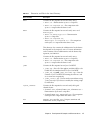
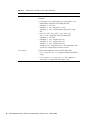
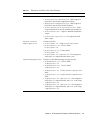
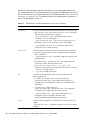
Demo 1
The Demo 1 demonstration, demo1, exercises the JavaPurse, JavaLoyalty, and
Wallet applets by simulating transactions where amounts are credited and debited
from the card. The demonstration begins by powering up the Java Card technologyenabled smart card and creating the applets JavaPurse, JavaLoyalty, and
Wallet.
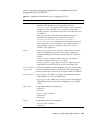
The JavaPurse applet demonstrates a simple electronic cash application. The
applet is selected and initialized with various parameters such as the Purse ID, the
expiration date of the card, the Master and User PINs, maximum balance, and
maximum transaction. Transaction operations perform the actual debits and credits
to the electronic purse. If a configured loyalty applet is assigned for the CAD
performing the transaction, JavaPurse communicates with it to grant loyalty
points. In this case, JavaLoyalty is the provided loyalty applet.
A number of transaction sessions are simulated where amounts are credited and
debited from the card. In an additional session, transactions with intentional errors
are attempted to demonstrate the security features of the card.
The JavaLoyalty applet is designed to interact with the JavaPurse applet, and to
demonstrate the use of shareable interfaces. The shareable
JavaLoyaltyInterface is defined in a separate library package,
com.sun.javacard.SampleLibrary.
JavaLoyalty is a minimalistic loyalty applet. It is registered with JavaPurse
when a Parameter Update APDU command with an appropriate parameter tag is
executed, and when the AID part of the parameter corresponds to the AID of the
JavaLoyalty applet. The applet contains a grantPoints method. This method
implements the main interaction with the client. When the first two bytes of the
CAD ID in a request by a JavaPurse transaction correspond to the two bytes of
CAD ID in the corresponding Parameter Update APDU command, the
grantPoints method implementing the JavaLoyaltyInterface is requested.
24
Development Kit User’s Guide, Java Card Platform, Version 2.2.2 • March 2006
JavaLoyalty maintains the balance of loyalty points. The applet contains methods
to credit and debit the account of points and to get and set the balance.
The Wallet applet demonstrates a simplified cash card application. It keeps a
balance, and exercises some of the Java Card API features such as the use of a PIN to
control access to the applet.
▼ Running demo1
1. demo1 runs in the Java Card WDE.Navigate to the jcwde directory.
This is $JC_HOME/samples/src/demo/jcwde on the Solaris or Linux platform or
%JC_HOME%\samples\src\demo\jcwde on the Microsoft Windows platform.
Enter the following command:
jcwde jcwde.app
2. Run apdutool in a separate window.
In a separate command window, navigate to the
$JC_HOME/samples/src/demo/demo1 directory on the Solaris or Linux platform
or %JC_HOME%\samples\src\demo\demo1 on the Microsoft Windows platform
and run apdutool using the following command:
apdutool -nobanner -noatr demo1.scr > demo1.scr.jcwde.out
If the run is successful, the apdutool log, demo1.scr.jcwde.out, is identical to
the file demo1.scr.expected.out.
Demo 2
The Demo 2 demonstration, demo2, illustrates downloading Java Card platform
packages onto the card. This demonstration contains the installer applet in the mask
image. After the card is powered up, the Photocard, SampleLibrary, JavaPurse,
JavaLoyalty, Wallet, RMIDemo, and SecureRMIDemo packages are downloaded.
The commands from demo1 are repeated. Finally, the card is powered down.
Running demo2
demo2 runs in cref because the Java Card WDE is not able to support the
downloading of CAP files.
1. Run cref.
Run cref using the following command:
cref -o demoee
Chapter 3
Development Kit Samples and Demonstrations
25
2. Run apdutool in a separate window.
In a separate command window, navigate to the
$JC_HOME/samples/src/demo/demo2 directory on the Solaris or Linux platform
or %JC_HOME%\samples\src\demo\demo2 on the Microsoft Windows platform
and run apdutool using the following command:
apdutool -nobanner -noatr demo2.scr > demo2.scr.cref.out
If the run is successful, the apdutool log, demo2.scr.cref.out, is identical to the
file demo2.scr.expected.out.
After cref completes executing, an EEPROM image is stored in the file demoee. For
more information, refer to Chapter 10.
Demo 3
The Demo 3 demonstration, demo3, illustrates the capabilities of a Java Card
technology-enabled smart card to save its state across sessions. After running
demo2, the state of the card can be saved. This card state must be used as the initial
state for running demo3.
▼ Running demo3
demo3 must be run after demo2. demo3 runs in the cref because the virtual
machine state must be restored after the initial run.
1. Run cref.
Run cref using the following command:
cref -i demoee
cref restores the EEPROM image from the file demoee. For more information, refer
to Chapter 10.
2. Run apdutool in a separate window.
In a separate command window, navigate to the
$JC_HOME/samples/src/demo/demo3 directory on the Solaris or Linux platform
or %JC_HOME%\samples\src\demo\demo3 on the Microsoft Windows platform
and run apdutool, using the following command:
apdutool -nobanner -noatr demo3.scr > demo3.scr.cref.out
If the run is successful, the apdutool log, demo3.scr.cref.out, is be identical to
the file demo3.scr.expected.out.
26
Development Kit User’s Guide, Java Card Platform, Version 2.2.2 • March 2006
Java Card RMI Demo
Every Java Card RMI application consists of two parts: a card applet and a client
program communicating with it. In this case, the RMIDemo applet is installed in
EEPROM image when you run demo2 on cref. On Java Card WDE, the applets are
included in the simulated mask.
The RMIDemo uses the card applet PurseApplet, the Purse interface and its
implementation PurseImpl. These classes reside in the package
com.sun.javacard.samples.RMIDemo. The client-side program PurseClient
resides in the package com.sun.javacard.clientsamples.purseclient.
The Purse interface describes the supported functionality: methods for obtaining the
account balance, debiting and crediting the account, and obtaining and setting an
account number. The interface also defines the constants used for error reporting.
The PurseImpl class implements Purse.
The card applet PurseApplet creates and registers instances of the dispatcher and
the Java Card RMI service.
The client-side program, PurseClient, represents a simple Java Card RMI client.
The program opens a connection with a card, creates the Java Card RMI Connect
instance, and selects the Java Card applet (in this case, the PurseApplet). The
program then gets the initial reference from PurseApplet (the reference to an
instance of PurseImpl) and casts it to the Purse interface type. This allows
PurseImpl to be treated as a local object. The program can then exercise the card by
debiting and crediting different amounts, and by setting and getting the account
number. The program demonstrates error handling by intentionally attempting to set
an account number of incorrect size. This causes a UserException to be thrown
with the appropriate error code.
The client part of the RMIDemo can be run without parameters or with the -i
parameter:
■
■
If the demo is run without parameters, remote references are identified using the
class name of the remote object.
If the demo is run with the -i parameter, remote references are identified using
the list of remote interfaces implemented by the remote object.
For more information on these formats, see Chapter 8 of the Runtime Environment
Specification for the Java Card Platform, Version 2.2.2.
Running the Java Card RMI Demo
RMIDemo can be run on either cref or Java Card WDE. Before running the demo,
add to your CLASSPATH the directory $JC_HOME/samples/src_client on the
Solaris or Linux platform or %JC_HOME%\samples\src_client on the Windows
platform. This directory includes the source files for the client portion of the demo.
Chapter 3
Development Kit Samples and Demonstrations
27
The script that runs this demo will modify the CLASSPATH to include this directory.
This demo uses the configuration file jcclient.properties. A sample
jcclient.properties file is available in the binary release bundles in
java_card_kit-2_2_2/samples/src_client for Solaris or Linux platforms and
in java_card_kit-2_2_2\samples\src_client on the Windows platform.
On cref, RMIDemo can be run only after demo2 has successfully completed.
To run the RMIDemo applet in Java Card WDE, list it on the first line of the applet
configuration file jcwde_rmi.app.
If the run is successful, the output in the file is the same as contained in file
rmidemo.scr.expected.out.
▼ Running RMIDemo on cref
1. Run cref.
Run cref using the following command:
cref -i demoee
2. Run the Java Card RMI client program in a separate window.
Run the Java Card RMI client program with either of these commands:
rmidemo > rmidemo.scr.cref.out
rmidemo -i > rmidemo.scr.cref.out
▼ Running RMIDemo on Java Card WDE:
1. Run Java Card WDE.
Run Java Card WDE using the following command:
On Solaris or Linux platform:
$JC_HOME/bin/jcwde jcwde_rmi.app
On Windows platform:
%JC_HOME%\bin\jcwde jcwde_rmi.app
2. Run the Java Card RMI client program in a separate window.
In a separate command window, navigate to the
$JC_HOME/samples/src/demo/demo2/rmi directory on the Solaris or Linux
platform or %JC_HOME%\samples\src\demo\demo2\rmi directory on the
Microsoft Windows platform. Run the Java Card RMI client program with either of
these commands:
rmidemo > rmidemo.scr.jcwde.out
rmidemo -i > rmidemo.scr.jcwde.out
28
Development Kit User’s Guide, Java Card Platform, Version 2.2.2 • March 2006
Secure Java Card RMI Demo
Think of the secure Java Card RMI demo, SecureRMIDemo, as a version of the
RMIDemo with an added security service. SecureRMIDemo uses the card applet
SecurePurseApplet, the Purse interface and its implementation
SecurePurseImpl, and a definition of the security service MySecurityService.
These classes reside in the package
com.sun.javacard.samples.SecureRMIDemo. The demo also uses the clientside program SecurePurseClient and the specialized card accessor
CustomCardAccessor. These classes reside in the package
com.sun.javacard.clientsamples.securepurseclient.
The Purse interface is similar to the interface used in the non-secure case, however,
there is an extra constant: REQUEST_DENIED. This constant is used to report
situations where the client tries to invoke a method that it is not allowed to access.
The MySecurityService class is a security service that is responsible for ensuring
data integrity by verifying checksums on incoming commands and attaching
checksums to outgoing commands. The program also requires the client to
authenticate itself as the principal application provider or principal cardholder by
sending a two-byte PIN.
The implementation of Purse, SecurePurseImpl, is similar to the non-secure case,
however, at the beginning of each method call, a call is made to the security service
that ensures that the business rules are satisfied and that the data is not corrupted.
The applet SecurePurseApplet is similar to the non-secure case, but it also creates
and registers an instance of MySecurityService.
The client-side program, SecurePurseClient, is similar to the non-secure case, but
instead of a generic card accessor, it uses its own implementation,
CustomCardAccessor, which performs additional preprocessing and
postprocessing of data and supports the additional command authenticateUser.
SecurePurseClient also requires verification of the user. After the applet is
inserted, a PIN must be given to the card-side applet by calling authenticateUser
on CustomCardAccessor.
When authenticateUser is called, CustomCardAccessor prepares and sends
the following command:
TABLE 3-4
Authenticate User Command
CLA_AUTH
INS_AUTH
P1 field
P2 field
LC field
PIN (two bytes)
0x80
0x39
0
0
2
xx
Chapter 3
xx
Development Kit Samples and Demonstrations
29
On the card side, MySecurityService processes the command. If the PIN is
correct, then the appropriate flags are set in the security service and a confirmation
response is returned to the client. Once authentication is passed, the client program
receives the balance, credits the account, and again receives the balance. The
program demonstrates error handling when the client attempts to debit a number of
units from the account. This causes the program to throw a UserException with
the code REQUEST_DENIED.
As with RMIDemo, the client part of the SecureRMIDemo can be run without
parameters or with the -i parameter:
■
■
If the demo is run without parameters, remote references are identified using the
class name of the remote object.
If the demo is run with the -i parameter, remote references are identified using
the list of remote interfaces implemented by the remote object.
For more information on these formats, see Chapter 8 of the Runtime Environment
Specification for the Java Card Platform, Version 2.2.2.
Running the Secure Java Card RMI Demo
SecureRMIDemo can be run on either cref or Java Card WDE. Before running the
demo, add to your CLASSPATH the directory $JC_HOME/samples/src_client
on the Solaris or Linux platform or %JC_HOME%\samples\src_client on the
Windows platform. This directory includes the source files for the client portion of
the demo. The script that runs this demo will modify the CLASSPATH to include
this directory. This demo uses the configuration file jcclient.properties. A
sample jcclient.properties file is available in the binary release bundles in
java_card_kit-2_2_2/samples/src_client for Solaris or Linux platforms and
in java_card_kit-2_2_2\samples\src_client on the Windows platform.
The SecureRMI demo applet is installed in the EEPROM image when you run
demo2.
To run SecureRMIDemo in Java Card WDE, list it on the first line of the applet
configuration file jcwde_securermi.app.
If the run is successful, the output in the file is the same as contained in file
securermidemo.scr.expected.out.
▼ Running SecureRMIDemo on cref
1. Run cref.
Run cref using the following command:
cref -i demoee
30
Development Kit User’s Guide, Java Card Platform, Version 2.2.2 • March 2006
2. Run the Secure Java Card RMI client program in a separate window.
Run the Secure Java Card RMI client program with either of these commands:
securermidemo > securermidemo.scr.cref.out
securermidemo -i > securermidemo.scr.cref.out
▼ Running SecureRMIDemo on Java Card WDE:
1. Run Java Card WDE.
Navigate to the jcwde directory. This is $JC_HOME/samples/src/demo/jcwde on
the Solaris or Linux platform or %JC_HOME%\samples\src\demo\jcwde on the
Microsoft Windows platform. Run Java Card WDE using the following command:
jcwde jcwde_securermi.app
2. Run the Secure Java Card RMI client program in a separate window.
In a separate command window, navigate to the rmi directory. This is the
$JC_HOME/samples/src/demo/demo2/rmi directory on the Solaris or Linux
platform or %JC_HOME%\samples\src\demo\demo2\rmi directory on the
Microsoft Windows platform. Run the Secure Java Card RMI client program with
either of these commands:
securermidemo > securermidemo.jcwde.out
securermidemo -i > securermidemo.jcwde.out
Object Deletion Demo 1
The Object Deletion Demo 1, odDemo1, demonstrates the object deletion mechanism,
applet deletion, and package deletion. The odDemo1 demonstration has the
following three parts:
■
odDemo1-1.scr demonstrates the object deletion mechanism and verifies that
memory for objects referenced from transient memory of type
CLEAR_ON_DESELECT is reclaimed after an applet is deselected.
odDemo1-1.scr does not depend on any other demo. The final state of cref
memory must be saved to a file for odDemo1-2.scr to use.
■
odDemo1-2.scr demonstrates the object deletion mechanism and verifies that
memory for objects referenced from transient memory of type CLEAR_ON_RESET
is reclaimed after card reset.
The odDemo1-2.scr demo must be run after odDemo1-1.scr because the initial
state of cref must be the same as its final state after running odDemo1-1.scr.
After running odDemo1-2.scr, the final state of cref must be saved to a file so
it can be used by odDemo1-3.scr.
Chapter 3
Development Kit Samples and Demonstrations
31
■
odDemo1-3.scr performs applet deletion, package deletion, and employs the
AppletEvent.uninstall method to uninstall an applet. The demo verifies that
all transient memory of type CLEAR_ON_RESET and CLEAR_ON_DESELECT is
returned to the memory manager. The demo also demonstrates the use of the
AppletEvent.uninstall() method.
The odDemo1-3.scr demo must be run after odDemo1-2.scr because the initial
state of cref must be the same as its final state after running odDemo1-2.scr.
▼ Running odDemo1
odDemo1 runs only in cref. This is because the Java Card WDE does not support
the object deletion mechanism, applet deletion, or package deletion.
1. In a command window, run cref.
Use this command:
cref -o crefState
2. Run apdutool in a separate window.
In a second command window, navigate to the
$JC_HOME/samples/src/demo/object_deletion directory on the Solaris or
Linux platform or the %JC_HOME%\samples\src\demo\object_deletion
directory on the Microsoft Windows platform and run apdutool, using the
following command:
apdutool -nobanner -noatr odDemo1-1.scr > odDemo1-1.scr.cref.out
If the run is successful, the apdutool log, odDemo1-1.scr.cref.out is identical
to the file odDemo1-1.scr.expected.out.
3. Run cref in the first command window.
Use this command:
cref -i crefState -o crefState
4. In the second command window, execute apdutool.
Use this command:
apdutool -nobanner -noatr odDemo1-2.scr > odDemo1-2.scr.cref.out
If the run is successful, the apdutool log, odDemo1-2.scr.cref.out, is identical
to the file odDemo1-2.scr.expected.out.
5. Run cref in the first command window.
Use this command:
cref -i crefState
6. In the second command window, execute apdutool.
Use this command:
32
Development Kit User’s Guide, Java Card Platform, Version 2.2.2 • March 2006
apdutool -nobanner -noatr odDemo1-3.scr > odDemo1-3.scr.cref.out
If the run is successful, the apdutool log, odDemo1-3.scr.cref.out, is identical
to the file odDemo1-3.scr.expected.out.
Object Deletion Demo 2
The Object Deletion Demo 2, odDemo2, demonstrates package deletion and checks
that persistent memory is returned to the memory manager. This demo has one
script, odDemo2.scr. You do not have to run odDemo1 to run odDemo2.
▼ Running odDemo2
odDemo2 runs only in cref. This is because the Java Card WDE does not support
the object deletion mechanism, applet deletion, or package deletion.
1. In a command window, run cref.
Use this command:
cref
2. Run apdutool in a second window.
In a second window, navigate to the
$JC_HOME/samples/src/demo/object_deletion directory on the Solaris or
Linux platform or the %JC_HOME%\samples\src\demo\object_deletion
directory on the Microsoft Windows platform and run apdutool with the following
command:
apdutool -nobanner -noatr odDemo2.scr > odDemo2.scr.cref.out
If the run is successful, the apdutool log, odDemo2.scr.cref.out, is identical to
the file odDemo2.scr.expected.out.
Logical Channels Demo
The Logical Channels Demo, lcdemo, demonstrates the behavior of Java Card
technology-based logical channels by showing how two applets that interact with
each other can each be selected for use at the same time.
The applets may use a contact based or contactless interface for communication with
the terminal. The Logical channel demo demonstrates the selection of an applet on
both the interfaces. The demo also demonstrates use of ExtendedLength APDU.
The logical channels demo mimics the behavior of a wireless device connected to a
network service. A connection manager tracks whether the device is connected to
the service and whether the connection is local or remote.
Chapter 3
Development Kit Samples and Demonstrations
33
While it is connected, the user’s account is debited on a unit of time basis. The debit
rate is based on whether the connection is local or remote, and uses either the
contacted or contactless interface.
The demo employs two applets to simulate this situation: The ConnectionManager
applet manages the connection, while the AccountAccessor applet manages the
account.
When the user turns on the device, the ConnectionManager applet is selected. The
ConnectionManager implements the ExtendedLength interface to handle APDUs
with larger data segments such as the ones used for key exchange in the demo.
Every unit of time the terminal sends a message containing the area code to the card.
When the user wants to use the service, the AccountAccessor applet is selected on
another logical channel so that the terminal can query the balance. The
AccountAccessor can return the balance only if the ConnectionManager is
active. The ConnectionManager applet sets the connection and tracks the
connection status. Based on the value of an area code variable, the
ConnectionManager determines whether the connection is local or remote. It also
determines whether the connection is contacted or contactless. AccountAccessor
uses this information to debit the account at the appropriate rate. The connection is
disabled when the user completes the call or when the account is depleted.
▼ Running the Logical Channels Demo
The logical channels demo runs only in cref. No sample scripts or demos are
provided to demonstrate this functionality on Java Card WDE.
1. In a command window, run cref.
Use this command:
cref
2. Run apdutool in a separate window.
In the second command window, navigate to the
$JC_HOME/samples/src/demo/logical_channels directory on the Solaris or
Linux platform or the %JC_HOME%\samples\src\demo\logical_channels
directory on the Microsoft Windows platform and execute apdutool using the
following command:
apdutool -nobanner -noatr channelDemo.scr > channelDemo.scr.cref.out
If the run is successful, the apdutool log, channelDemo.scr.cref.out, is
identical to the file channelDemo.scr.expected.out.
34
Development Kit User’s Guide, Java Card Platform, Version 2.2.2 • March 2006
Demo 2 Cryptography Demo
The Demo 2 Cryptography Demo, demo2crypto, is similar to demo2, except that it
employs a version of JavaPurse that uses a DES MAC algorithm. This version of
JavaPurse is called JavaPurseCrypto. All other applets are exactly the same as
were used in demo2.
Note – There are no cryptography versions of demo1 or demo3.
A DES MAC is a cryptographic signature that uses DES encryption on all or part of
a message (APDU). JavaPurseCrypto uses the DES MAC to verify several of the
APDUs. Instead of zeros in the signature currently in JavaPurse, it contains a real
signature that can be programmatically signed and verified. Other programs that
interact with JavaPurseCrypto (such as JavaLoyalty and Wallet) are not
affected because all signing and verifying of the signature occurs only within
JavaPurseCrypto.
For the Java Card 2.2.2 release, the demo 2 cryptography demo uses transient DES
keys. The use of transient DES keys by the demo is intended to highlight the fact
that the DES cryptography API has been enhanced to eliminate persisent memory
usage when transient DES keys are provided. The elimination of the use of persistent
memory when transient DES keys are used will, in turn, provide better performance
in a contactless applet.
▼ Running the demo2crypto Demo
demo2crypto runs in cref because the Java Card WDE is not able to support the
downloading of CAP files.
1. Run cref.
Run cref using the following command:
cref
2. Run apdutool in a separate window.
In a second command window, navigate to the
$JC_HOME/samples/src/demo/demo2 directory on the Solaris or Linux platform
or %JC_HOME%\samples\src\demo\demo2 on Windows and execute apdutool
using the following command:
apdutool -nobanner -noatr demo2crypto.scr > demo2crypto.scr.cref.out
If the run is successful, the apdutool log, demo2crypto.scr.cref.out, is
identical to the file demo2crypto.scr.expected.out.
Chapter 3
Development Kit Samples and Demonstrations
35
Photo Card Demo
The Photo Card Demo, photocard, illustrates how you can use the large address
space available in the 32-bit version of the Java Card platform reference
implementation, version 2.2.2. The demo uses the large address space of the smart
card’s EEPROM memory to store up to four GIF images. The images are included
with the demo.
▼ Running the Photo Card Demo
The Photo Card demo can be run only after demo2 successfully completes. This is
because the Photo Card applet is downloaded with demo2.scr.
Before running the demo, add to your CLASSPATH the directory
$JC_HOME/samples/src_client on the Solaris or Linux platform or %JC_HOME%\
samples\src_client on the Windows platform. This directory includes the source
files for the client portion of the demo. The script that runs this demo will modify
the CLASSPATH to include this directory. This demo uses the configuration file
jcclient.properties. A sample jcclient.properties file is available in the
binary release bundles in java_card_kit-2_2_2/samples/src_client for
Solaris or Linux platforms and in java_card_kit-2_2_2\samples\src_client
on the Windows platform.
1. Run cref with the -z option.
Run cref with the -z option to display the memory statistics for the card using the
following command:
cref -z -i demoee
2. Run the photocard client program specifying the supplied GIF images in a
separate window.
In a separate window, navigate to the photocard directory. This is the
$JC_HOME/samples/src/demo/demo2/photocard directory on the Solaris or
Linux platform or the %JC_HOME%\samples\src\demo\demo2\photocard
directory on the Microsoft Windows platform. Run the photocard client program
and specify the four supplied GIF images with the following command:
photocard duke_magnify.gif duke_pencil.gif duke_wave.gif
duke_thumbsup.gif > photocard.scr.cref.out
If the run is successful, the output in the file photocard.scr.cref.out is the
same as contained in file photocard.scr.expected.out.
For photo verification, the Photocard Demo also includes the verify method. Photo
verification requires availability of the MessageDigest class and the SHA256
algorithm. The photo verification is based on the SHA256 Message Digest algorithm.
If the algorithm is provided, the verify method compares a photo provided for
verification with the ones on the card. If the algorithm is not available, the verify
method indicates this.
36
Development Kit User’s Guide, Java Card Platform, Version 2.2.2 • March 2006
In this case, if the run is successful, the output in the file
photocard.scr.cref.out is the same as contained in the file
photocard.scr.expected.out.not_crypto.
3. Perform a diff on the individual images to ensure that their contents have not
changed.
Transit System Demo
The transit system demo, transit, illustrates a contactless card-based transit
applet. This demo consists of the transit applet and two client applications, the
Point Of Sale (POS) terminal client application and the Turnstile Transit
terminal client application.
A typical transit scenario is pre-scripted in the TransitDemo file, including
crediting and checking the balance (a $99 initial balance) on the transit card at the
POS terminal, entering and exiting the transit system through the Turnstile
Transit terminal (a $10 fee for the trip), and finally checking the new balance (an
$89 balance) on the transit card at the POS terminal.
▼ Running the Transit System Demo
The TransitDemo or TransitDemo.bat script automatically starts and stops cref
when needed to simulate interaction sessions with the POS terminal and the
turnstile transit terminal.
1. Navigate to the transit directory.
In a separate window, navigate to the transit directory. This will be the
$JC_HOME/samples/src/demo/transit directory (on the Solaris or Linux
platform) or %JC_HOME%\samples\src\demo\transit directory (on the
Microsoft Windows 2000 platform).
2. Run the TransitDemo program.
To run the TransitDemo program, use the following command:
TransitDemo > TransitDemo.out
By default, the demo uses transient session keys. If you specify the -n option, the
demo does not use transient session keys.
If the run is successful, the output in the file TransitDemo.out is identical to the
file TransitDemo.expected.out.
Chapter 3
Development Kit Samples and Demonstrations
37
Utility APIs Demo Applet
The utility APIs demo applet, BrokerApplet, demonstrates how the newly
introduced utility APIs can be used in an application. This applet is a simple version
of a hypothetical broker applet that is used to assist the user in buying and selling
stocks. The applet uses constructed TLVs and primitive TLVs to manage the
portfolio. The communication with the broker is also in the form of TLVs and uses
the math API to determine the value of a trade. It also uses the new integer API to
construct an integer from byte array and set integers in byte arrays for TLV objects.
This applet provides the following features:
■
PIN protected access to the application.
■
Storage of portfolio information on the card.
■
Retrieval of complete portfolio information from the card.
■
Retrieval of information on a particular stock in the portfolio.
■
Assistance for the user in creating a stock purchase request for the broker.
■
Assistance the user in creating a sell stock request for the broker.
■
On receiving a trade confirmation, update the portfolio accordingly.
■
Get information on current user account balance.
PIN Protection
Uses the standard PIN API in the Java Card platform to protect access to the applet.
Storage of Portfolio
The applet uses a portfolio constructed TLV to store the information regarding all
the stocks that the user currently holds. The information is stored in the form of
stockInfo constructed TLV. Each stockInfo TLV contains the following:
■ Stock symbol
■ Number of stocks
■ Last Trade Constructed TLV
■
Number of stocks
■
Stock Price
Stock Trading
The applet assists the user in buying and selling stocks by creating a “signed”
purchasing or selling request for the broker in the form of a stock purchase request
constructed TLV or sell stock request constructed TLV. Before the request is
38
Development Kit User’s Guide, Java Card Platform, Version 2.2.2 • March 2006
generated, the applet checks to see if the user has enough stocks in case the request
is to sell the stock and enough account balance if the request is to buy new stock.
The request is sent back to the terminal where the terminal application may retrieve
the TLV from the response APDU and send it to the broker.
If the trade is successful, the broker sends back a confirmation message in the form a
sell confirmation TLV or purchase confirmation TLV. The applet retrieves the
information from the confirmation TLV and updates the portfolio as follows:
■
If a new stock is bought, the applet creates a new constructed stockInfo TLV to
store the new stock information.
■
If the user already had a stock, the number of stocks the user currently holds, and
the last trade information is updated accordingly.
■
If as a result of the trade the user has 0 stocks of a certain company, the
stockInfo TLV for that stock is removed from the portfolio constructed TLV.
Get Information On a Stock
User may use this feature to get information regarding a specific stock rather than
retrieving the whole portfolio. If a stock is not found, the appropriate exception is
thrown. The information is returned in the form of a stockInfo TLV that contains
the following:
■
Stock symbol
■
Number of stocks
■
Last trade constructed TLV
■
Number of stocks
■
Stock price
▼ Running the BrokerApplet Demo
To run the BrokerApplet demo, you must have the Java Card platform binary
bundle in place.
1. If you are running Solaris or Linux, run the build_samples shell script.
Go to your JC_HOME directory and build samples by running the build_samples
shell script. If build_samples completes successfully, you should get a
utilitydemo.scr file in the $JC_HOME/samples/src/demo/utilitydemo
directory.
2. If you are running Windows, run build_samples.bat.
Go to your JC_HOME directory and build samples by running build_samples.bat.
If build_samples completes successfully, you should get a utilitydemo.scr file
in the %JC_HOME%\samples\src\demo\utilitydemo directory.
Chapter 3
Development Kit Samples and Demonstrations
39
3. Run cref.
In a separate window run cref from the $JC_HOME/bin directory on Solaris and
Linux and from %JC_HOME%\bin on Windows.
4. Run the BrokerApplet demo.
In the current window, use one of the following commands to run the
BrokerApplet demo.
On the Solaris and Linux platforms:
$JC_HOME/bin/apdutool utilitydemo.scr > utilitydemo.out
On the Windows platform:
%JC_HOME%\bin\apdutool utilitydemo.scr > utilitydemo.out
If the run is successful, the output in the file utilitydemo.out is the same as
contained in file utilitydemo.scr.expected.out.
Password Biometric Sample Application
The Password Biometric Sample Application, biometryDemo, illustrates the
biometric APIs of type PASSWORD. In this demo, a user's password is enrolled on
the card and then a candidate password is matched against the enrolled password.
▼ Running the Biometric Demo
Use the following commands to run the script.
1. Run cref.
Navigate to the directory where you created an EEPROM image using demo1 or
demo2 (this is $JC_HOME/samples/cref/demo1/32/tdual or
$JC_HOME/samples/cref/demo2/32/tdual on the Solaris or Linux platform or
%JC_HOME%\samples\cref\demo1\32\tdual or %JC_HOME%\samples\cref\
demo2\32\tdual on the Microsoft Windows platform). Run cref using the
following command:
cref
cref restores the EEPROM image from the file demoee. For more information, refer
to Chapter 10.
40
Development Kit User’s Guide, Java Card Platform, Version 2.2.2 • March 2006
2. Run apdutool in a separate window.
In a separate command window, navigate to the
$JC_HOME/samples/src/demo/biometry directory on the Solaris or Linux
platform or %JC_HOME%\samples\src\demo\biometry on the Microsoft
Windows platform and run apdutool, using the following command:
On the Solaris or Linux platform:
$JC_HOME/bin/apdutool biometryDemo.scr > biometryDemo.scr.cref.out
On the Windows platform:
%JC_HOME%\bin\apdutool biometryDemo.scr > biometryDemo.scr.cref.out
If the run is successful, the output in the file biometryDemo.scr.cref.out is the
same as contained in file biometryDemo.scr.expected.out.
How the Biometric Sample Works
The sequence of the resulting events is as follows:
1. The off-card tool (this demo) takes a hard coded password and sends it to the card
for enrollment. The applet selected on-card is the SampleBioServer applet.
2. The SampleBioServer applet stores the password as the reference template with a
hard coded number of tries allowed before block (5).
3. For matching, the APDUscript asks the on-card client (SamplePasswdBioApplet)
to ask the SharedBioTemplate for the public template. For the purpose of this
sample, the public template would just contain the version number of the
implementation and the length of stored password representing the requirement
for password capture
4. The script then sends for matching the same password used for enrollment. The
card has a matching algorithm and calculates the score based on the stored
password and received password.
5. The card then returns verification successful to the script.
SamplePasswdOwnerBioTemplate Class
This class implements the OwnerBioTemplate interface and is what the BioBuilder
constructs when asked for a OwnerBioTemplate interface for the
BioBuilder.PASSWORD bio-type. This class provides the enrollment and matching
capability to clients.
Chapter 3
Development Kit Samples and Demonstrations
41
SamplePasswdBioServer Class
This class represents the BioServer applet on the card. It is responsible for
communicating with off-card clients with APDUs and with on-card client applets
with an implementation of ShareableBioTemplate that it implements. This class
causes the enrolling of the password biometric while communicating with an offcard tool that sends the password down to the BioServer. This class is also the
interface to the on-card and off-card clients for the biometric functionality on the
card.
SamplePasswdBioApplet Class
This represents an on-card client applet for the password biometric sample. It
communicates with an off-card tool to get the password and calls the match method
on the ShareableBioTemplate reference it gets from the Java Card runtime
environment, which is given the SamplePasswdBioServer applet AID.
Off-card Tool
For the sake of the sample, the off-card tool is a simple apdutool script which is
used for both enrolling and matching.
Sequence Diagram Of How The Sample Works
This sequence diagram shows how the sample application uses the biometric API.
FIGURE 3-1 also includes the sequence for enrolling the PASSWORD bio-template
done by SampleBioServer.
Note that the sequence of steps depicted is the scenario used in the sample in which
everything works well. In other usages, there would be other sequences of steps
when things do not work well, such as when an error occurs during the enrollment
process, the matching process, the card-blocked state, or the non-initialized state.
42
Development Kit User’s Guide, Java Card Platform, Version 2.2.2 • March 2006
FIGURE 3-1
Biometric Sample Sequence Diagram
SharedBioTemplate
javacard.framework.Applet
implements
OwnerBioTemplate
SamplePasswdBioApplet
SampleBioServer
+1 contains and +1
initializes
implements
uses
BioBuilder
SamplePasswdOwnerBioTemplate
instantiates
<<static>> getBioTemplate()
How The Biometric API Works
The biometric API is designed to perform three basic functions, match biometric
information on-card, enroll users off-card and then transfer their information oncard, and verify the user in a sequence of off-card and on-card interactions.
On-card Matching
One of the requirements of the architecture is that biometric verification must
happen on-card for security reasons. The card cannot send out a person’s biometric
information for verification to be done off-card. The reasoning here is the same as for
a PIN, which is that it would not be secure to do so.
Chapter 3
Development Kit Samples and Demonstrations
43
Enrollment Process
During the enrollment process, a person’s biometric information is captured off-card
and then transferred on-card for storage and verification purpose. Since Java Card
technology-based cards are generally limited in their resources, the entire data
captured off-card is not sent to the card. What is sent is a digested version of the
biometric data and is very specific to a particular algorithm. For the purpose of this
sample, however, a password is small enough that the entire password is transferred
to the card.
The user-specific data transferred makes up a reference template that is used later
for verification. At the end of the enrollment process, there also exists an associated
public template. The public template consists of information for the off-card tool to
capture the relevant information from the user during verification.
For example, in the Precise Biometrics implementation of the fingerprint biometric
API, the public template contains the coordinates, relative to the reference point for
capturing fingerprint information. The off-card tool looks at these coordinates and
extracts that information from the user. In a way, the public template defines the
data requirements for verification. For the purpose of this sample, the public
template does not contain any such specification since the entire password is
compared. In the sample, the public template just contains version information.
Verification Process
During the verification process the user enters his/her biometric information into
some sensor or input device. The information gathered from the user input is
defined by the public template as described above. This information may be preprocessed off-card and is finally transferred to the card for verification purposes. The
on-card biometric application then performs the verification given the reference
template with pre-existing user information and the new information that came in.
The steps are:
1. The host issues a verification request to the card.
2. The card sends back the public template to the host.
3. The host captures the user information and extracts from it the data defined by
the public template. The host may perform data-processing specific to the
biometric algorithm.
4. The host sends to the card the extracted verification data.
5. The card matches the captured data with its own representation stored in the
reference template. This matching process results in a score of how well the user
information matches the reference template information.
44
Development Kit User’s Guide, Java Card Platform, Version 2.2.2 • March 2006
6. The card compares the score with the threshold for acceptable criteria and returns
the verification result to the host.
Implementation Notes
For the Sun Microsystems implementation of the password biometric, the following
restrictions apply:
■
■
The minimum password length to be enrolled must be 5 bytes.
The maximum password length to be enrolled must be 50 bytes.
The array containing password data during enrollment or matching must have the
password laid out as a byte array with each character represented by a byte starting
from index offset. There should be no other information in the byte array from
index offset to index offset+length-1. For example, password "tests" must be
represented by the byte array {116, 101, 115, 116, 115} starting at index 0
with length 5.
The public template for the stored password returned during a matching session is a
byte array (dest) with formatting as shown below. The version for this
implementation is 1.0.0, so the dest array would be as follows, where <passwd
length> is a place holder for the length of the password enrolled.
■
■
■
■
dest[0]=1
dest[1]=0
dest[2]=0
dest[3] = <passwd length>
SignatureMessageRecovery Demo
Message recovery refers to the mechanism whereby part of the message used to
create the message digest is also included as padding in the signature block. During
signature verification, the message data padding does not need to be explicitly sent
to the verifying entity, it can automatically be extracted from the signature block.
Message Recovery Order of Operations
This section describes the order of operations for signing and verifying.
Signing
1.The user invokes a combination of the update and sign methods to generate a
signature based on message data provided by the user.
Chapter 3
Development Kit Samples and Demonstrations
45
2.The sign method returns an indication to the user of the portion of the message
that was included as padding in the signature. This is required so that the user
knows what remaining data must still be sent along with the signature block.
Verifying
1.The user initializes the signature object with signature at the very beginning so it
can get the recoverable data at the earliest.
2.The user invokes a combination of the update and verify methods to verify the
signature based on the message data provided by the user.
3.The verify method verifies the signature by comparing the accumulated hash with
the hash in the message representative recovered during initialization.
Sample Application
This demo consists of two scripts representing two scenarios for Signature with
Message Recovery. The first script, sigMsgFullRec.scr, shows the scenario in
which the message to sign is small enough that the entire message itself becomes
part of the signature padding (hence the name “Full Recovery” since you can
recover the full message from the signature itself). The second script,
sigMsgPartRec.scr, demonstrates the scenario in which the message to sign is
large enough that only some part of it is included in the signature padding (hence
the name “Partial Recovery”). The scenarios are detailed below:
sigMsgFullRec.scr Script
The sequence of events resulting from running this script are:
1. The script sends to the sample application a small message to sign.
2. The application initializes the signature object with the algorithm
Signature.ALG_RSA_SHA_ISO9796_MR and signs the message. Because the
message is small enough, the application returns the signature data to the script.
3. The script then simulates the verification phase in which it sends the signature
data to the sample application asking it to verify the message.
The application recovers the original message from the signature data and also
verifies the signature, then returns the original data back to the script. (If the
signature verification fails, it returns an error code).
46
Development Kit User’s Guide, Java Card Platform, Version 2.2.2 • March 2006
sigMsgPartRec.scr Script
The sequence of events resulting from running this script are:
1. The script sends to the sample application a large message to be signed.
2. The application initializes the signature object with algorithm
Signature.ALG_RSA_SHA_ISO9796_MR and signs the message. Because the
message is too large to fit in the signature, the application returns back to the
script the number of bytes of original message that is embedded in the signature
data. The application also returns back to the script the signature data.
3. The script then simulates the verification phase in which it sends the signature
data to the sample application.
4. The application recovers the partial message and returns back to the script.
5. The script sends the remainder of the message to the application to verify the
signature.
6. The application verifies the signature against the entire message and returns
success.
▼ Running the Demo
Use the following commands to run the two scripts.
1. Run cref.
Navigate to the directory where you created an EEPROM image using demo1 or
demo2 (this is $JC_HOME/samples/cref/demo1/32/tdual or
$JC_HOME/samples/cref/demo2/32/tdual on the Solaris or Linux platform or
%JC_HOME%\samples\cref\demo1\32\tdual or %JC_HOME%\samples\cref\
demo2\32\tdual on the Microsoft Windows platform). Run cref using the
following command:
cref
cref restores the EEPROM image from the file demoee. For more information, refer
to Chapter 10.
2. To run sigMsgFullRec.scr or sigMsgPartRec.scr, run apdutool in separate
windows.
To run sigMsgFullRec.scr, in a separate command window, navigate to
$JC_HOME/samples/src/demo/demo-sigMsgFullRec on the Solaris or Linux
platform or %JC_HOME%\samples\src\demo\demo-sigMsgFullRec on the
Microsoft Windows platform and run apdutool using the following command:
On the Solaris or Linux platform:
$JC_HOME/bin/apdutool -nobanner -noatr sigMsgFullRec.scr >
sigMsgFullRec.scr.cref.out
Chapter 3
Development Kit Samples and Demonstrations
47
On the Windows platform:
%JC_HOME%\bin\apdutool -nobanner -noatr sigMsgFullRec.scr >
sigMsgFullRec.scr.cref.out
To run sigMsgPartRec.scr, follow step 1 to restart cref. In a separate command
window navigate to $JC_HOME/samples/src/demo/demo-sigMsgPartRec.scr
on the Solaris or Linux platform or %JC_HOME%\samples\src\demo\demosigMsgPartRec on the Microsoft Windows platform and run apdutool using the
following command:
On the Solaris or Linux platform:
$JC_HOME/bin/apdutool -nobanner -noatr sigMsgPartRec.scr >
sigMsgPartRec.scr.cref.out
On the Windows platform:
%JC_HOME%\bin\apdutool -nobanner -noatr sigMsgPartRec.scr >
sigMsgPartRec.scr.cref.out
If the run is successful, demo output in sigMsgFullRec.scr.cref.out and
sigMsgPartRec.scr.cref.out is the same as contained in the files
sigMsgFullRec.scr.expected.out and sigMsgPartRec.scr.expected.out,
respectively.
48
Development Kit User’s Guide, Java Card Platform, Version 2.2.2 • March 2006
CHAPTER
4
Running Applets in an Emulated
Card Environment
The Java Card platform Workstation Development Environment (“Java Card
Workstation Development Environment” or “Java Card WDE”) tool allows the
simulated running of a Java Card applet as if it were masked in ROM. It emulates
the card environment.
The Java Card WDE is not an implementation of the Java Card virtual machine. It
uses the Java virtual machine to emulate the Java Card RE. Class files that represent
masked packages must be available on the classpath for the Java Card WDE.
For the version 2.2.2 release of the Java Card platform reference implementation,
Java Card WDE adds support for Java Card Remote Method Invocation (Java Card
RMI).
Some of the Java Card RE features that are not supported by Java Card WDE are:
■
package installation
■
persistent card state
■
firewall
■
transactions
■
transient array clearing
■
object deletion
■
applet deletion
■
package deletion
The Java Card WDE tool uses the jcwde.jar, api.jar (with cryptography
extensions) and apduio.jar files. The main class for Java Card WDE is
com.sun.javacard.jcwde.Main. A sample batch and shell script are provided to
start Java Card WDE.
49
Preparing to Run Java Card WDE
Before you run the Java Card WDE tool, you must ensure that the environment
variables are set appropriately and the applets to be configured are listed in a
configuration file.
Setting Environment Variables
To set the environment variables correctly, refer to “Setting Environment Variables for the
Solaris or Linux Platform” on page 8 or “Setting Environment Variables for Microsoft Windows
Platform” on page 9.
Configuring the Applets in the Java Card WDE
Mask
The applets to be configured in the mask during Java Card WDE simulation need to
be listed in a configuration file that is passed to the Java Card WDE as a command
line argument. Also, the CLASSPATH environment variable needs to be set to reflect
the location of the class files for the applets to be simulated. In this release, the
sample applets are listed in a configuration file called jcwde.app. Each entry in this
file contains the name of the applet class, and its associated AID.
The configuration file contains one line per installed applet. Each line is a white
space(s) separated {CLASS_NAME AID} pair, where CLASS NAME is the fully qualified
Java name of the class defining the applet, and AID is an Application Identifier for
the applet class used to uniquely identify the applet. AID may be a string or
hexadecimal representation in form:
0xXX[:0xXX]
where the construct 0xXX is repeated as many times as necessary.
Note that AID should be 5 to 16 bytes in length.
For example:
com.sun.javacard.samples.wallet.Wallet
0xa0:0x0:0x0:0x0:0x62:0x3:0x1:0xc:0x6:0x1
Note – The installer applet must be listed first in the Java Card WDE configuration
file.
50
Development Kit User’s Guide, Java Card Platform, Version 2.2.2 • March 2006
If you write your own applets for public distribution, you should obtain an AID for
each of your packages and applets according to the directions in Section 4.2 of the
Virtual Machine Specification for the Java Card Platform, Version 2.2.2, and in the ISO
7816 Specification Parts 1-6.
Running the Java Card WDE Tool
The general format of the command to run the Java Card WDE and emulate the Java
Card RE is:
jcwde [-help] [-verbose] [-p port] [-t0] [-version] [-nobanner]
<config-file>
TABLE 4-1 describes the command line options for Java Card WDE.
TABLE 4-1
Command Line Options for Java Card WDE
Option
Description
<config-file>
The configuration file described above.
-help
Prints a help message.
-nobanner
Suppresses all banner messages.
-p port
Allows you to specify a TCP/IP port other than the default port.
-t0
Runs T=0 single interface only.
-verbose
Prints more verbose output.
-version
Prints the Java Card WDE version number.
Java Card WDE starts listening to APDUs in T=1 as the default format, unless
otherwise specified, on the TCP/IP port specified by the –p port parameter for
contacted and port+1 for contactless. The default port is 9025.
Chapter 4
Running Applets in an Emulated Card Environment
51
52
Development Kit User’s Guide, Java Card Platform, Version 2.2.2 • March 2006
CHAPTER
5
Converting Java Class Files
The Converter processes class files that make up a Java programming language
package. In addition to class files, the Converter can process either version 2.2.x, or
2.1.x export files. Depending on the command line options, the Converter outputs a
CAP file, a Java Card Assembly file, and an export file.
The CAP file is a JAR-format file which contains the executable binary
representation of the classes in a Java package. The CAP file also contains a manifest
file that provides human-readable information regarding the package that the CAP
file represents. For more information on the manifest file and its contents, see
Appendix B. For more information on the CAP file and its format, see Chapter 6 of
the Virtual Machine Specification for the Java Card Platform, Version 2.2.2.
Note – For more information on the Java Card Assembly file, see Appendix A.
The Converter verifies that class files comply to limitations described in Section 2.2,
“Java Card Platform Language Subset” in the Virtual Machine Specification for the Java
Card Platform, Version 2.2.2. It also checks the correctness of export files.
You are responsible for the consistency of your input data. This means that:
■
all input class files are compatible with each other.
■
export files of imported packages are consistent with class files that were used for
compiling the converting package.
If the package to be converted contains remote classes or interfaces, the Converter
generates a CAP file for version 2.2.x of the Java Card platform, a Java Card
Assembly file and an export file. If the package does not contain remote classes or
interfaces, the Converter generates files that can be used by version 2.1 of the Java
Card platform. To create a CAP file compatible with version 2.1 of the Java Card
platform, you must use export files for Java Card API packages from the Java Card
development kit 2.1.x.
53
Setting Java Compiler Options
For the most efficient conversion, compile your class files with the SDK Java
compiler’s -g command line option. The -g option causes the compiler to generate
the LocalVariableTable attribute in the class file. The Converter uses this
attribute to determine local variable types. If you do not use the -g option, the
Converter attempts to determine the variable types on its own. This is expensive in
terms of processing and might not produce the most efficient code.
Do not compile with the -O option. The -O option is not recommended on the Java
compiler command line, for these reasons:
■
■
this option is intended to optimize execution speed rather than minimize memory
usage. Minimizing memory usage is much more important in the Java Card
environment.
the LocalVariableTable attribute will not be generated.
Generating the CAP File’s Debug Component
If you want to use the Converter’s -debug option to generate a debug component in
the CAP file, you must first compile your class files with the -g option.
Running the Converter
Command line usage of the Converter is:
converter [options] <package_name> <package_aid>
<major_version>.<minor_version>
The file to invoke the Converter is a shell script (converter) on the Solaris or Linux
platform, and a batch file (converter.bat) on the Microsoft Windows platform.
54
Development Kit User’s Guide, Java Card Platform, Version 2.2.2 • March 2006
Converter Command Line Arguments
The arguments to this command line are:
TABLE 5-1
Converter Command Line Arguments
Option
Description
<package_name>
Fully-qualified name of the package to convert.
<package_aid>
5- to 16-decimal, hex or octal numbers separated by colons. Each of
the numbers must be byte-length.
<major_version>.
<minor_version>
User-defined version of the package.
Converter Command Line Options
The options in this command line are:
TABLE 5-2
Converter Command Line Options
Option
Description
-applet <AID>
<class_name>
Sets the default applet AID and the name of the class that
defines the applet. If the package contains multiple applet
classes, this option must be specified for each class.
-classdir <root directory of
the class hierarchy>
Sets the root directory where the Converter will look for
classes. If this option is not specified, the Converter uses the
current user directory as the root.
-d <root directory for output>
Sets the root directory for output.
-debug
Generates the optional debug component of a CAP file. If
the -mask option is also specified, the file debug.msk will
be generated in the output directory.
Note—To generate the debug component, you must first
compile your class files with the Java compiler’s -g option.
-exportmap
Uses the token mapping from the pre-defined export file of
the package being converted. The Converter will look for
the export file in the exportpath.
-exportpath <list of
directories>
Specifies the root directories in which the Converter will
look for export files. The separator character for multiple
paths is platform dependent. It is semicolon (;) for the
Microsoft Windows platform and colon (:) for the Solaris or
Linux platform. If this option is not specified, the Converter
sets the export path to the Java classpath.
Chapter 5
Converting Java Class Files
55
TABLE 5-2
Converter Command Line Options
Option
Description
-help
Prints help message.
-i
Instructs the Converter to support the 32-bit integer type.
-mask
Indicates this package is for a mask, so restrictions on
native methods are relaxed.
-nobanner
Suppresses all banner messages.
-noverify
Suppresses the verification of input and output files. For
more information on file verification, see “Verification of
Input and Output Files” on page 58.
-nowarn
Instructs the Converter not to report warning messages.
-out [CAP] [EXP] [JCA]
Instructs the Converter to output the CAP file, and/or the
export file, and/or the Java Card Assembly file. By default
(if this option is not specified), the Converter outputs a
CAP file and an export file.
-v, -verbose
Enables verbose output. Verbose output includes progress
messages, such as “opening file”, “closing file”, and
whether the package requires integer datatype support.
-V, -version
Prints the Converter version string.
Note – The -out CAP and -mask options cannot be used together.
Using Delimiters with Command Line Options
If the command line option argument contains a space symbol, you must use
delimiters with this argument. The delimiter for the Solaris or Linux platform is a
backslash and double quote (\”); the delimiter for Microsoft Windows platform is a
double quote (“).
In the following sample command line, the Converter will check for export files in
the .\export files, .\jc222\api_export_files, and current directories.
For the Solaris or Linux platform:
converter -exportpath \"./export files:.:./jc222/api_export_files\"
MyWallet 0xa0:0x00:0x00:0x00:0x62:0x12:0x34 1.0
For the Microsoft Windows platform:
converter -exportpath ".\export files;.;.\jc222\api_export_files"
MyWallet 0xa0:0x00:0x00:0x00:0x62:0x12:0x34 1.0
56
Development Kit User’s Guide, Java Card Platform, Version 2.2.2 • March 2006
Using a Command Configuration File
Instead of entering all of the command line arguments and options on the command
line, you can include them in a text-format configuration file. This is convenient if
you frequently use the same set of arguments and options.
The syntax to specify a configuration file is:
converter –config <configuration file name>
The <configuration file name> argument contains the file path and file name
of the configuration file.
For Solaris, Linux, and Microsoft Windows operating systems, you must use double
quote (“) delimiters for the command line options that require arguments in the
configuration file. For example, if the options from the command line example used
in “Using Delimiters with Command Line Options” on page 56 were placed in a
configuration file, the result would look like this:
Solaris or Linux platform
-exportpath "./export files:.:./jc222/api_export_files"
MyWallet 0xa0:0x00:0x00:0x00:0x62:0x12:0x34 1.0
Microsoft Windows platform
-exportpath ".\export files;.;.\jc222\api_export_files"
MyWallet 0xa0:0x00:0x00:0x00:0x62:0x12:0x34 1.0
File and Directory Naming Conventions
This section describes the names of input and output files for the Converter, and
gives the correct location for these files. With some exceptions, the Converter follows
the Java programming language naming conventions for default directories for input
and output files. These naming conventions are also in accordance with the
definitions in Section 4.1 of the Virtual Machine Specification for the Java Card Platform,
Version 2.2.2.
Input File Naming Conventions
The files input to the Converter are Java class files named with the .class suffix.
Generally, there are several class files making up a package. All the class files for a
package must be located in the same directory under the root directory, following
the Java programming language naming conventions. The root directory can be set
Chapter 5
Converting Java Class Files
57
from the command line using the -classdir option. If this option is not specified,
the root directory defaults to be the directory from which the user invoked the
Converter.
Suppose, for example, you wish to convert the package java.lang. If you use the
-classdir flag to specify the root directory as C:\mywork, the command line will
be:
converter -classdir C:\mywork java.lang <package_aid>
<package_version>
where <package_aid> is the application ID of the package, and
<package_version> is the user-defined version of the package.
The Converter will look for all class files in the java.lang package in the directory
C:\mywork\java\lang.
Output File Naming Conventions
The name of the CAP file, export file, and the Java Card Assembly file must be the
last portion of the package specification followed by the extensions .cap, .exp, and
.jca, respectively.
By default, the files output from the Converter are written to a directory called
javacard, a subdirectory of the input package's directory.
In the above example, the output files are written by default to the directory C:\
mywork\java\lang\javacard.
The -d flag allows you to specify a different root directory for output.
In the above example, if you use the -d flag to specify the root directory for output
to be C:\myoutput, the Converter will write the output files to the directory C:\
myoutput\java\lang\javacard.
When generating a CAP file, the Converter creates a Java Card Assembly file in the
output directory as an intermediate result. If you do not want a Java Card Assembly
file to be produced, omit the option -out JCA. The Converter deletes the Java Card
Assembly file at the end of the conversion.
Verification of Input and Output Files
By default, the converter invokes the Java Card technology-based off-card verifier
(“Java Card off-card verifier”) for every input EXP file and on the output CAP and
EXP files.
58
Development Kit User’s Guide, Java Card Platform, Version 2.2.2 • March 2006
■
■
If any of the input EXP files do not pass verification, then no output files are
created.
If the output CAP or EXP files does not pass verification, then the output EXP and
CAP files are deleted.
If you want to bypass verification of your input and output files, use the -noverify
command line option. Note that if the converter finds any errors, output files will
not be produced.
Creating a debug.msk Output File
If you select the -mask and -debug options, the file debug.msk is created in the
same directory as the other output files. (Refer to “Converter Command Line
Options” on page 55.)
Loading Export Files
A Java Card technology-based export file (“Java Card export file”) contains the
public API linking information of classes in an entire package. The Unicode string
names of classes, methods and fields are assigned unique numeric tokens.
Export files are not used directly on a device that implements a Java Card virtual
machine. However, the information in an export file is critical to the operation of the
virtual machine on a device. An export file is produced by the Converter when a
package is converted. This package's export file can be used later to convert another
package that imports classes from the first package. Information in the export file is
included in the CAP file of the second package, then is used on the device to link the
contents of the second package to items imported from the first package.
During the conversion, when the code in the currently-converted package references
a different package, the Converter loads the export file of the different package.
FIGURE 5-1 illustrates how an applet package is linked with the java.lang, the
javacard.framework and javacard.security packages via their export files.
You can use the -exportpath command option to specify the locations of export
files. The path consists of a list of root directories in which the Converter looks for
export files. Export files must be named as the last portion of the package name
followed by the extension .exp. Export files are located in a subdirectory called
javacard, following the Java Card platform’s directory naming convention.
Chapter 5
Converting Java Class Files
59
For example, to load the export file of the package java.lang, if you have specified
-exportpath as c:\myexportfiles, the Converter searches the directory
c:\myexportfiles\java\lang\javacard for the export file lang.exp.
FIGURE 5-1
Calls Between Packages Go Through The Export Files
export files contain mappings to tokens
java.lang
javacard.framework
javacard.security
export file
export file
export file
calls to methods
and references to fields
Applet
Specifying an Export Map
You can request the Converter to convert a package using the tokens in the predefined export file of the package that is being converted. Use the -exportmap
command option to do this.
There are two distinct cases when using the -exportmap flag: when the minor
version of the package is the same as the version given in the export file (this case is
called package reimplementation) and when the minor version increases (package
upgrading). During the package reimplementation the API of the package
(exportable classes, interfaces, fields and methods) must remain exactly the same.
During the package upgrade, changes that do not break binary compatibility with
preexisting packages are allowed (See “Binary Compatibility” in Section 4.4 of the
Virtual Machine Specification for the Java Card Platform, Version 2.2.2).
For example, if you have developed a package and would like to reimplement a
method (package reimplementation) or upgrade the package by adding new API
elements (new exportable classes or new public or protected methods or fields to
already existing exportable classes), you must use the -exportmap option to
preserve binary compatibility with already existing packages that use your package.
The Converter loads the pre-defined export file in the same way that it loads other
export files.
60
Development Kit User’s Guide, Java Card Platform, Version 2.2.2 • March 2006
CHAPTER
6
Viewing an Export File
The exp2text tool is provided to allow you to view any export file in text format.
exp2text
[options] <package_name>
Where options include:
TABLE 6-1
exp2text Command Line Options
Option
Description
-classdir <input root directory>
Specifies the root directory where the program
looks for the export file.
-d <output root directory>
Specifies the root directory for output.
-help
Prints help message.
61
62
Development Kit User’s Guide, Java Card Platform, Version 2.2.2 • March 2006
CHAPTER
7
Verifying CAP and Export Files
Off-card verification provides a means for evaluating CAP and export files in a
desktop environment. When applied to the set of CAP files that will reside on a Java
Card technology compliant smart card and the set of export files used to construct
those CAP files, the Java Card technology-enabled off-card verifier (“Java Card offcard verifier”) provides the means to assert that the content of the smart card has
been verified.
The off-card verifier is a combination of three tools, verifycap, verifyexp, and
verifyrev. The following sections describe how to use each tool.
■
verifycap - see “Verifying CAP Files” on page 63.
■
verifyexp - see “Verifying Export Files” on page 65.
■
verifyrev - see “Verifying Binary Compatibility” on page 66.
Verifying CAP Files
The verifycap tool is used to verify a CAP file within the context of package's
export file (if any) and the export files of imported packages. This verification
confirms whether a CAP file is internally consistent, as defined in Chapter 6 of the
Virtual Machine Specification for the Java Card Platform, Version 2.2.2, and consistent
with a context in which it can reside in a Java Card technology-enabled device.
Each individual export file is verified as a single unit. The scenario is shown in
FIGURE 7-1. In the figure, the package p2 CAP file is being verified. Package p2 has a
dependency on package p1, so the export file from package p1 is also input. The
p2.exp file is only required if p2.cap exports any of its elements.
63
FIGURE 7-1
Verifying a CAP file
p1.exp
version 1.0
p2.exp
version 1.1
verifycap in
Off-Card Verifier
Results
p2.cap
version 1.1
Running verifycap
Command line usage is:
verifycap [options] <export files> <CAP file>
The file to invoke verifycap is a shell script (verifycap) on the Solaris or Linux
platform and a batch file (verifycap.bat) on the Microsoft Windows platform.
verifycap Command Line Arguments
The arguments to this command line are:
TABLE 7-1
64
verifycap Command Line Arguments
Argument
Description
<export files>
A list of export files of the packages that this CAP file uses.
<CAP file>
Name of the CAP file to be verified.
Development Kit User’s Guide, Java Card Platform, Version 2.2.2 • March 2006
verifycap Command Line Options
For a description of the command line options available for verifycap, see
“Command Line Options for Off-Card Verifier Tools” on page 68.
Verifying Export Files
The verifyexp tool is used to verify an export file as a single unit. This verification
is “shallow,” examining only the content of a single export file, not including export
files of packages referenced by the package of the export file. The verification
determines whether an export file is internally consistent and viable as defined in
Chapter 5 of the Virtual Machine Specification for the Java Card Platform, Version 2.2.2.
This scenario is illustrated in FIGURE 7-2.
FIGURE 7-2
Verifying An Export File
p1.exp
version 1.0
p2.exp
version 1.1
verifyexp in
Off-Card Verifier
Results
p3.exp
version 1.1
Running verifyexp
Command line usage is:
verifyexp [options] <export file>
The file to invoke verifyexp is a shell script (verifyexp) on the Solaris or Linux
platform and a batch file (verifyexp.bat) on the Microsoft Windows platform.
Chapter 7
Verifying CAP and Export Files
65
verifyexp Command Line Arguments
The argument to this command line is:
TABLE 7-2
verifyexp Command Line Argument
Argument
Description
<export file>
Fully qualified path and name of the export file.
verifyexp Command Line Options
For a description of the command line options available for verifyexp, see
“Command Line Options for Off-Card Verifier Tools” on page 68.
Verifying Binary Compatibility
The verifyrev tool checks for binary compatibility between revisions of a package
by comparing the respective export files. This scenario is illustrated in FIGURE 7-3.
The export files from version 1.0 and 1.1 of package p1 are input to verifyrev. The
verification examines whether the Java Card platform version rules, including those
imposed for binary compatibility as defined in Section 4.4 of the Virtual Machine
Specification for the Java Card Platform, Version 2.2.2, have been followed.
66
Development Kit User’s Guide, Java Card Platform, Version 2.2.2 • March 2006
FIGURE 7-3
Verifying Binary Compatibility Of Export Files
p1.exp
version 1.0
Results
verifyrev in
Off-Card Verifier
p1.exp
version 1.1
Running verifyrev
Command line usage is:
verifyrev [options] <export file> <export file>
The file to invoke verifyrev is a shell script (verifyrev) on the Solaris or Linux
platform and a batch file (verifyrev.bat) on the Microsoft Windows platform.
verifyrev Command Line Arguments
The arguments to this command line are:
<export file> <export file>
Where <export file> represents the fully qualified path of the export files to be
compared.
The second export file name must be the same as the first one with a different path.
For example,
verifyrev d:\testing\old\crypto.exp d:\testing\new\crypto.exp
verifyrev Command Line Options
For a description of the command line options available for verifyrev, see
“Command Line Options for Off-Card Verifier Tools” on page 68.
Chapter 7
Verifying CAP and Export Files
67
Command Line Options for Off-Card
Verifier Tools
The verifycap, verifyexp, and verifyrev, off-card verifier tools share many of
the same command line options. The only exception is the -package option which
is available for verifycap only.
These options exhibit the same behavior regardless of the tool that calls them.
TABLE 7-3
68
verifycap, verifyexp, verifyrev Command Line Options
Option
Description
-help
Prints help message.
-nobanner
Suppresses banner message.
-nowarn
Suppresses warning messages.
-package <package
name>
(Available for verifycap only) Sets the name of the package to be
verified.
-verbose
Enables verbose mode.
-version
Prints version number and exit.
Development Kit User’s Guide, Java Card Platform, Version 2.2.2 • March 2006
CHAPTER
8
Generating a CAP File From a Java
Card Assembly File
Use the capgen tool to generate a CAP file from a given Java Card Assembly file.
The CAP file that is generated has the same contents as a CAP file produced by the
Converter. The capgen tool is a backend to the Converter.
Running capgen
The file to invoke capgen is a shell script (capgen) on the Solaris or Linux platform,
and a batch file (capgen.bat) on the Microsoft Windows platform.
Command line syntax for capgen is:
capgen [-options] <filename>
where <filename> is the Java Card Assembly file.
69
capgen Command Line Options
The option values and their actions are:
TABLE 8-1
70
capgen Command Line Options
Option
Description
-help
Prints a help message.
-nobanner
Suppresses all banner messages.
-o <filename>
Allows you to specify an output file. If the output file is not
specified with the -o flag, output defaults to the file a.jar in the
current directory.
-version
Outputs the version information.
Development Kit User’s Guide, Java Card Platform, Version 2.2.2 • March 2006
CHAPTER
9
Producing a Text Representation of a
CAP File
Use the capdump tool to produce an ASCII representation of a CAP file.
Running capdump
The file to invoke capdump is a shell script (capdump) on the Solaris or Linux
platform, and a batch file (capdump.bat) on the Microsoft Windows platform.
Command line usage of capdump is:
capdump <filename>
where <filename> is the CAP file.
Output from this command is always written to standard output.
There are no command line options to capdump.
71
72
Development Kit User’s Guide, Java Card Platform, Version 2.2.2 • March 2006
CHAPTER
10
Using the Reference
Implementation
The Java Card platform reference implementation is written in the C programming
language and is called the C-language Java Card Runtime Environment
(“C-language Java Card RE”) or cref. It is a simulator that can be built with a ROM
mask, much like a real Java Card technology-based implementation. It has the ability
to simulate persistent memory (EEPROM), and to save and restore the contents of
EEPROM to and from disk files. Applets can be installed in the C-language Java
Card RE. The C-language Java Card RE performs I/O via a socket interface,
simulating the interaction with a card reader implementing T=1, T=CL, or T=0
communications with the card reader (CAD).
The C-language Java Card RE supports the following:
■
use of up to three logical channels
■
integer data type
■
object deletion
■
card reset in case of object allocation during an aborted transaction
In version 2.2.2 of the development kit, the C-language Java Card RE is available as
a 32-bit implementation. The 32-bit implementation gives you the ability to go
beyond the 64KB memory access limitation that was present in previous releases.
The version 2.2.2 release does provide a 16-bit version of the C-language Java Card
RE for backward compatibility with older applications.
Also in version 2.2.2, the C-language Java Card RE can be built to support a variety
of protocols. It can be built to support T=0 and T=1 in single interface mode, or T=
1/T=CL in dual concurrent interface mode.
73
Running the C-Language Java Card RE
The 32-bit implementation of the C-language Java Card RE, cref, featuring the T=
1/T=CL dual concurrent interface is supplied as a prebuilt executable.
TABLE 10-1
Name and Location of cref Executables
File Name
Description
%JC_HOME%\bin\cref.exe
32-bit implementation of cref for the Microsoft Windows
platform.
$JC_HOME/bin/cref
32-bit implementation of cref for the Solaris or Linux
platform.
Installer Mask
The development kit installer, the Java Card virtual machine interpreter, and the Java
Card platform framework are built into the Installer mask. It can be used as-is to
load and run applets. Other than the installer, it does not contain any applets.
The C-language Java Card RE requires no other files to start proper interpretation
and execution of the mask image’s Java Card bytecode.
Runtime Environment Command Line
Command line usage of C-language Java Card RE is the same on the Solaris, Linux,
and Microsoft Windows platforms. The syntax is:
cref [options]
The output of the simulation is logged to standard output, which can be redirected
to any desired file. The output stream can range from nothing to very verbose,
depending on the command line options selected.
74
Development Kit User’s Guide, Java Card Platform, Version 2.2.2 • March 2006
Runtime Environment Command-line Options
The options are case-sensitive.
TABLE 10-2
Runtime Environment Command Line Options
Option
Description
-b
Dumps a bytecode histogram at the end of the execution.
-e
Displays the program counter and stack when an exception occurs.
-h, -help
Prints a help screen.
-i <input filename>
Specifies a file to initialize EEPROM. Under the Solaris, Linux, and
Microsoft Windows operating systems, file names must be single
part--that is, there can be no spaces in the file name.
-n
Performs a trace display of the native methods that are invoked.
-nobanner
Suppresses the printing of a program banner.
-nomeminfo
Suppresses the printing of memory statistics when execution starts.
-o <output filename>
Saves the EEPROM contents to the named file.
-p <portNumber>
Connects to a TCP/IP port using the specified port number.
-s
Suppresses output. Does not create any output unless followed by
other flag options.
-t
Performs a line-by-line trace display of the mask’s execution.
-version
Prints only the program’s version number. Do not execute.
-z
Prints the resource consumption statistics.
Obtaining Resource Consumption Statistics
The C-language Java Card RE provides a command line option (-z) for printing
resource consumption statistics. This option enables the C-language Java Card RE to
print statistics regarding memory usage once at startup and once at shutdown.
Although memory usage statistics will vary among Java Card RE implementations,
this option provides the applet developer with a general idea of the amount of
memory needed to install and execute an applet.
The following output is obtained by running the demo2 demonstration program
with the -z command line option.
cref -z
Java Card platform version 2.2.2 C Reference Implementation Simulator
(version 0.41)
32-bit Address Space implementation - no cryptography support
Chapter 10
Using the Reference Implementation
75
Copyright 2005 Sun Microsystems, Inc. All rights reserved.
T=1 / T=CL Dual interface APDU protocol (ISO 7816-3)
Memory configuration
Type
Base
Size
Max Addr
RAM
0x0
0x500
0x4ff
ROM
0x2000
0xa000
0xbfff
E2P
0x10020 0xffe0
0x1ffff
ROM Mask size =
0x566b =
22123 bytes
Highest ROM address in mask =
0x766a =
30314 bytes
Space available in ROM =
0x4995 =
18837 bytes
Mask has now been initialized for use
0 bytecodes executed.
Stack size: 00384 (0x0180) bytes,
maximum used
00000 (0x0000)
EEPROM use: 05935 (0x172f) bytes consumed, 59569 (0xe8b1)
available
Transaction buffer: 00000 (0x0000) bytes consumed, 02560 (0x0a00)
available
Clear-On-Reset RAM: 00000 (0x0000) bytes consumed, 00256 (0x0100)
available
Clear-On-Dsel. RAM: 00000 (0x0000) bytes consumed, 00128 (0x0080)
available
C-language Java Card RE was powered down.
891495 bytecodes executed.
Stack size: 00384 (0x0180) bytes,
maximum used
00244 (0x00f4)
EEPROM use: 14839 (0x39f7) bytes consumed, 50665 (0xc5e9)
available
Transaction buffer: 00000 (0x0000) bytes consumed, 02560 (0x0a00)
available
Clear-On-Reset RAM: 00168 (0x00a8) bytes consumed, 00088 (0x0058)
available
Clear-On-Dsel. RAM: 00026 (0x001a) bytes consumed, 00102 (0x0066)
available
76
Development Kit User’s Guide, Java Card Platform, Version 2.2.2 • March 2006
The demo2 demonstration program downloads and installs several applets and
performs several transactions using a subset of the installed applets. Statistics are
provided regarding the following resources: EEPROM, transaction buffer, stack
usage, clear-on-reset RAM, and clear-on-deselect RAM. The statistics are printed
twice, once at C-language Java Card RE start up and once when it shuts down.
This particular example shows the resources used to download and install a set of
applications and execute several transactions. More fine-grained statistics could be
obtained by limiting the actions during a single session. For example, using a single
session to download one application would provide information regarding the
resources needed to process the application download. The EEPROM contents at the
end of the session could be saved using the -o option, and subsequent sessions
could be used to measure resource usage for other actions, such as applet installation
and execution.
In addition to the command line option, the Java Card API provides programmatic
mechanisms for determining resource usage. For more information on these
mechanisms, see the javacard.framework.JCSystem.getAvailableMemory()
method in the Application Programming Interface for the Java Card Platform, Version
2.2.2.
Reference Implementation Limits
■
The maximum number of remote references that can be returned during one card
session is 8.
■
The maximum number of remote objects that can be exported simultaneously is
16.
■
The maximum number of parameters of type array that can be used in remote
methods is 8.
■
The maximum number of Java Card API packages that the C-language Java Card
RE can support is 32.
■
The maximum number of library packages that a Java Card system can support is
32.
The maximum number of applets that a Java Card system can support is 16.
■
Chapter 10
Using the Reference Implementation
77
Input and Output
The C-language Java Card RE performs I/O via a socket interface, simulating the
interaction with a card reader implementing T=1, T=CL, or T=0 communications
with the card reader.
Use apdutool to read script files and send APDUs via a socket to the C-language
Java Card RE. See “apdutool Examples” on page 104 for details. Note that you can
have the C-language Java Card RE running on one workstation and run apdutool
on another workstation.
Working With EEPROM Image Files
You can save the state of EEPROM contents, then load it in a later invocation of the
C-language Java Card RE. To do this, specify an EEPROM image or “store” file to
save the EEPROM contents.
Use the -i and -o flags to manipulate EEPROM image files at the cref command
line:
■
The -i flag, followed by a file name, specifies the initial EEPROM image file that
will initialize the EEPROM portion of the virtual machine before Java Card virtual
machine bytecode execution begins.
■
The -o flag, followed by a file name, saves the updated EEPROM portion of the
virtual machine to the named file, overwriting any existing file of the same name.
The -i and -o flags do not conflict with the performance of other option flags.
The commit of EEPROM memory changes during the execution of the C-language
Java Card RE is not affected by the -o flag. Neither standard nor error output is
written to the output file named with the -o option.
The following examples show how the -i and -o option flags can be used in a
variety of useful execution scenarios.
Input EEPROM Image File
cref -i e2save
The C-language Java Card RE attempts to initialize simulated EEPROM from the
EEPROM image file named e2save. No output file will be created.
78
Development Kit User’s Guide, Java Card Platform, Version 2.2.2 • March 2006
Output EEPROM Image File
cref -o e2save
The C-language Java Card RE writes EEPROM data to the file e2save. The file will
be created if it does not currently exist. Any existing EEPROM image file named
e2save is overwritten.
Same Input and Output EEPROM Image File
cref -i e2save -o e2save
The C-language Java Card RE attempts to initialize simulated EEPROM from the
EEPROM image file named e2save, and during processing, saves the contents of
EEPROM to e2save, overwriting the contents. This behavior is much like a real Java
Card technology-compliant smart card in that the contents of EEPROM are
persistent.
Different Input and Output EEPROM Image Files
cref -i e2save_in -o e2save_out
The C-language Java Card RE attempts to initialize simulated EEPROM from the
EEPROM image file named e2save_in, and during C-language Java Card RE
processing, writes EEPROM updates to a EEPROM image file named e2save_out.
The output file will be created if it does not exist. Using different names for input
and output EEPROM image files eliminates much potential confusion. This
command line can be executed multiple times with the same results.
Note – Be careful naming your EEPROM image files. The C-language Java Card RE
will overwrite an existing file specified as an output EEPROM image file. This can,
of course, cause a problem if there is already an identically named file with a
different purpose in the same directory.
The Default ROM Mask
Version 2.2.2 of the Java Card platform reference implementation provides a 32-bit
version of the C-language Java Card RE executable: cref.exe for the Microsoft
Windows platform, and cref for the Solaris or Linux platform. These executables
contain only the Java Card RE packages and an installer applet.
Chapter 10
Using the Reference Implementation
79
80
Development Kit User’s Guide, Java Card Platform, Version 2.2.2 • March 2006
CHAPTER
11
Using the Installer
The development kit installer can be used to:
■
Dynamically download a Java Card technology package to a Java Card
technology-compliant smart card. During development, the CAP file can be
installed in the C-language Java Card RE rather than on a Java Card technologycompliant smart card. The installer is capable of downloading version 2.1, 2.2,
2.2.1, and 2.2.2 Java Card technology based CAP files (“Java Card CAP files”).
■
Perform necessary on-card linking.
■
Delete applets and packages from a Java Card technology-compliant smart card.
Once the installer is selected, requests for deletion can be sent from the terminal
to the Java Card technology-compliant smart card in the form of APDU
commands. For more information, see “Deleting Packages and Applets” on
page 96.
■
Setting default applets on different logical channels.
The installer is not a multiselectable application. On startup, the installer is the
default applet on logical channel 0. The default applet on the other logical channels
is set to No applet selected.
Installer Components and Data Flow
FIGURE 11-1 illustrates the components of the installer and how they interact with
other parts of Java Card technology. The dotted line encloses the installer
components that are described in this chapter.
The off-card installer is called scriptgen. The on-card installer is simply called
“installer” in this document.
For more information about the installer, see the Runtime Environment Specification for
the Java Card Platform, Version 2.2.2.
81
FIGURE 11-1
Installer Components
.class
Converter
Installer Components
.cap
Java Card Runtime Environment
Off-Card Installer
(Scriptgen)
On-Card Installer
.scr
APDUtool
The data flow of the installation process is as follows:
1. An off-card installer takes a version 2.1, 2.2, 2.2.1, or 2.2.2 CAP file, produced by
the Java Card technology-based converter (“Java Card Converter”), as the input,
and produces a text file that contains a sequence of APDU commands.
2. This set of APDUs is then read by apdutool and sent to the on-card installer.
3. The on-card installer processes the CAP file contents contained in the APDU
commands as it receives them.
4. The response APDU from the on-card installer contains a status and optional
response data.
82
Development Kit User’s Guide, Java Card Platform, Version 2.2.2 • March 2006
Running scriptgen
The scriptgen tool converts a package contained in a CAP file into a script file.
The script file contains a sequence of APDUs in ASCII format suitable for another
tool, such as apdutool, to send to the CAD. The CAP file component order in the
APDU script is identical to the order recommended by the Virtual Machine
Specification for the Java Card Platform, Version 2.2.2.
Enter the scriptgen command on the command line in this format:
scriptgen [options] <capFilePath>
The scriptgen command line options are described in TABLE 11-1.
TABLE 11-1
scriptgen Command Line Options
Option
Description
-help
Prints a help message and exits.
-nobanner
Suppresses printing of the version number.
-nobeginend
Suppresses the output of the “CAP Begin” on page 88” and
“CAP End” on page 88” APDU commands.
-o <filename>
Specifies an output filename (default is stdout).
-package <package_name>
Specifies the name of the package contained in the CAP file.
According to the Virtual Machine Specification for the Java
Card Platform, Version 2.2.2, the CAP file can contain
components besides the ones required by the package. This
option helps to avoid any possible ambiguity in
determining which components should be included.
-version
Prints the version number and exits.
Note – If the CAP file contains components of multiple packages, you must use the
-package <package_name> option to specify which package to process.
Note – The apdutool commands: powerup; and powerdown; are not included in
the output from scriptgen.
Chapter 11
Using the Installer
83
Installer Applet AID
The on-card installer applet AID is:
0xa0,0x00,0x00,0x00,0x62,0x03,0x01,0x08,0x01.
Setting Default Applets
The C-language Java Card RE supports setting distinct default applets on distinct
logical channels and distinct interfaces. This request can be used to set the default
applet for a particular logical channel in the specified interface. The applet being set
as default must be properly registered with the C-language Java Card RE prior to
issuing this command.
TABLE 11-2
Set Default Applets on Different Logical Channels
0x8x 0xc6 0xXX 0xYY
Lc: AID length
Data: Default applet
AID
Le: ignored
NOTATION:
■
XX is the channel number where the specified applet is configured as default.
■
YY is the interface ID where the applet will be configured as default (0 is primary
contacted or only interface, 1 is secondary contactless on dual interface).
■
AID is the AID of the applet being set as the default.
Downloading CAP Files and Creating
Applets
The installer is invoked by using the apdutool. (See Chapter 12.)
Procedures for CAP file download and applet instance creation are described in the
following sections:
84
■
Downloading the CAP File
■
Creating an Applet Instance
Development Kit User’s Guide, Java Card Platform, Version 2.2.2 • March 2006
These scenarios are described in the following sections.
Downloading the CAP File
In this scenario, the CAP file is downloaded and applet creation (instantiation) is
postponed until a later time. (Refer to the Create Only scenario below.) Follow these
steps to perform this installation:
1. Use scriptgen to convert a CAP file to an APDU script file.
2. Prepend these commands to the APDU script file:
powerup;
// Select the installer applet
0x00 0xA4 0x04 0x00 0x09 0xa0 0x00 0x00 0x00 0x62 0x03 0x01 0x08 0x01
0x7F;
3. Append this command to the APDU script file:
powerdown;
4. Invoke apdutool with this APDU script file path as the argument.
Creating an Applet Instance
In this scenario, the applet from a previously downloaded CAP file or an applet
compiled in the mask is created. For example, follow these steps to create the
JavaPurse applet:
1. Determine the applet AID.
2. Create an APDU script similar to this:
powerup;
// Select the installer applet
0x00 0xA4 0x04 0x00 0x09 0xa0 0x00 0x00 0x00 0x62 0x03 0x01 0x08 0x01
0x7F;
// create JavaPurse
0x80 0xB8 0x00 0x00 0x0b 0x09 0xa0 0x00 0x00 0x00 0x62 0x03 0x01 0x04
0x01 0x00
0x7F;
powerdown;
3. Invoke apdutool with this APDU script file path as the argument.
Chapter 11
Using the Installer
85
Installer APDU Protocol
The installer APDU protocol follows a specific time sequence of events in the
transmission of Applet Protocol Data Units as shown in FIGURE 11-2.
FIGURE 11-2
Installer APDU Transmission Sequence
time
Terminal
Receiver (Card)
Select
Response
CAP Begin
Response
Repeat this
sequence of APDUs
once for each
component in the
CAP file. Each
component has its
own number
designated by ##.
Component ## Begin
Response
Component ## Data
Response
Component ## End
Response
CAP End
Response
Create Applet
Response
APDU Types
There are many different APDU types, which are distinguished by their fields and
field values. The following sections describe these APDU types in more detail,
including their bit frame formats, field names and field values.
86
■
Select
■
Response
■
CAP Begin
■
CAP End
Development Kit User’s Guide, Java Card Platform, Version 2.2.2 • March 2006
■
Component ## Begin
■
Component ## End
■
Component ## Data
■
Create Applet
■
Abort
Note – In the following APDU commands, the x in the second nibble of the class
byte indicates that the installer can be invoked on channels 0, 1, or 2. For example,
0x8x.
Select
TABLE 11-3 specifies the field sequence in the Select APDU, which is used to invoke
the on-card installer.
TABLE 11-3
Select APDU Command
0x0x, 0xa4, 0x04, 0x00
Lc field
Installer AID
Le field
Response
TABLE 11-4 specifies the field sequence in the Response APDU. A Response APDU is
sent as a response by the on-card installer after each APDU that it receives. The
Response APDU can be either an Acknowledgment (called an ACK), which indicates
that the most recent APDU was received successfully, or it can be a Negative
Acknowledgement (called a NAK), which indicates that the most recent APDU was
not received successfully and must be either resent or the entire installer
transmission must be restarted. The first ACK indicates that the on-card installer is
ready to receive. The value for an ACK frame SW1SW2 is 9000, and the value for a
NAK frame SW1SW2 is 6XXX.
TABLE 11-4
Response APDU Command
[optional response data]
SW1SW2
Chapter 11
Using the Installer
87
CAP Begin
TABLE 11-5 specifies the field sequence in the CAP Begin APDU. The CAP Begin
APDU is sent to the on-card installer, and indicates that the CAP file components are
going to be sent next, in sequentially numbered APDUs.
TABLE 11-5
CAP Begin APDU Command
0x8x, 0xb0, 0x00, 0x00
[Lc field]
[optional data]
Le field
CAP End
TABLE 11-6 specifies the field sequence in the CAP End APDU. The CAP End APDU
is sent to the on-card installer, and indicates that all of the CAP file components have
been sent.
TABLE 11-6
CAP End APDU Command
0x8x, 0xba, 0x00, 0x00
[Lc field]
[optional data]
Le field
Component ## Begin
TABLE 11-7 specifies the field sequence in the Component ## Begin APDU. The double
pound sign indicates the component token of the component being sent. The CAP
file is divided into many components, based on class, method, etc. The Component
## Begin APDU is sent to the on-card installer, and indicates that component ## of
the CAP file is going to be sent next.
TABLE 11-7
Component ## Begin APDU Command
0x8x, 0xb2, 0x##, 0x00
[Lc field]
[optional data]
Le field
Component ## End
TABLE 11-8 specifies the field sequence in the Component ## End APDU. The
Component ## End APDU is sent to the on-card installer, and indicates that
component ## of the CAP file has been sent.
TABLE 11-8
Component ## End APDU Command
0x8x, 0xbc, 0x##, 0x00
88
[Lc field]
[optional data]
Development Kit User’s Guide, Java Card Platform, Version 2.2.2 • March 2006
Le field
Component ## Data
TABLE 11-9 specifies the field sequence in the Component ## Data APDU. The
Component ## Data APDU is sent to the on-card installer, and contains the data for
component ## of the CAP file.
TABLE 11-9
Component ## Data APDU Command
0x8x, 0xb4, 0x##, 0x00
Lc field
Data field
Le field
Create Applet
TABLE 11-10 specifies the field sequence in the Create Applet APDU. The
Create Applet APDU is sent to the on-card installer, and tells the on-card installer to
create an applet instance from each of the already sequentially transmitted
components of the CAP file.
TABLE 11-10
Create Applet APDU Command
0x8x, 0xb8, 0x00, 0x00
Lc
field
AID
length
field
AID
field
parameter
length field
[parameters]
Le
field
Abort
TABLE 11-11 specifies the data sequence in the Abort APDU. The Abort APDU
indicates that the transmission of the CAP file is terminated, and that the
transmission is not complete and must be redone from the beginning in order to be
successful.
TABLE 11-11
Abort APDU Command
0x8x, 0xbe, 0x00, 0x00
Lc field
[optional data]
Chapter 11
Le field
Using the Installer
89
APDU Responses to Installation Requests
The installer sends a response code of 0x9000 to indicate that a command completed
successfully. Version 2.2.2 of the Java Card platform reference implementation
provides a number of codes that can be sent in response to unsuccessful installation
requests. TABLE 11-12 describes these codes.
TABLE 11-12
90
APDU Responses to Installation Requests
Response Code
Description
0x6402
Invalid CAP file magic number.
• Cause: An incorrect magic number was specified in the CAP file.
• Solution: Refer to the Java Virtual Machine Specification for the
correct magic number. Ensure that the CAP file is built correctly, run
it through scriptgen, and download the resulting script file to the
card.
0x6403
Invalid CAP file minor number.
• Cause: An invalid CAP file minor number was specified in the
CAP file.
• Solution: Refer to the Java Virtual Machine Specification for the
correct minor number. Ensure that the CAP file is built correctly, run
it through scriptgen, and download the resulting script file to the
card.
0x6404
Invalid CAP file major number.
• Cause: An invalid CAP file major number was specified in the CAP
file.
• Solution: Refer to the Java Virtual Machine Specification for the
correct major number. Ensure that the CAP file is built correctly, run
it through scriptgen, and download the resulting script file to the
card.
0x640b
Integer not supported.
• Cause: An attempt was made to download a CAP file that requires
integer support into a CREF that does not support integers.
• Solution: Either change the CAP file so that it does not require
integer support or build the version of CREF that supports integers.
0x640c
Duplicate package AID found.
• Cause: A duplicate package AID was detected in CREF.
• Solution: Choose a new AID for the package to be installed.
0x640d
Duplicate Applet AID found.
• Cause: A duplicate Applet AID was detected in CREF.
• Solution: Choose a new AID for the applet to be installed.
Development Kit User’s Guide, Java Card Platform, Version 2.2.2 • March 2006
TABLE 11-12
APDU Responses to Installation Requests
Response Code
Description
0x640f
Installation aborted.
• Cause: Installation was aborted by an outside command.
• Solution: Restart the CAP installation from the beginning and
check the INS bytes in the installation script for the offending
command.
0x6421
Installer in error state.
• Cause: A non-recoverable error previously occurred.
• Solution: Scan the apdutool output for previous APDU responses
indicating an error. Restart the CAP installation.
0x6422
CAP file component out of order.
• Cause: Installer unable to proceed because it did not receive a
component that is a prerequisite to process the current component.
• Solution: Check the script file contents for the correct component
ordering.
0x6424
Exception occurred.
• Cause: General purpose error in the installer or applet code.
• Solution: Check your applet code for errors.
0x6425
Install APDU command out of order.
• Cause: Installer APDU commands were received out of order.
• Solution: Check the script file for the order of APDU commands.
See “Installer APDU Transmission Sequence” on page 86 for more
information on the ordering of APDU commands.
0x6428
Invalid component tag number.
• Cause: An incorrect component tag number was detected during
download.
• Solution: Refer to Chapter 6 in the Java Virtual Machine Specification
for the correct tag number.
0x6436
Invalid install instruction.
• Cause: An invalid Installer APDU command was received.
• Solution: Check the script file for the offending command. See
“Installer APDU Transmission Sequence” on page 86” for more
information on APDU commands.
0x6437
On-card package max exceeded.
• Cause: Package installation failed because the number of packages
that can be stored on the card has been exceeded.
• Solution: Remove some packages from the CREF.
Chapter 11
Using the Installer
91
TABLE 11-12
Response Code
Description
0x6438
Imported package not found.
• Cause: A package that is required by the current package was not
found.
• Solution: Download the required package first.
0x643a
On-card applet package max exceeded.
• Cause: Installation of an applet package failed because the number
of applet packages that can be stored on the card has been exceeded.
• Solution: Remove some applet packages from the CREF.
0x6442
92
APDU Responses to Installation Requests
Maximum allowable package methods exceeded.
• Cause: The limit of 128 package methods on the card has been
exceeded.
• Solution: Modify the package to support fewer methods.
0x6443
Applet not found for installation.
• Cause: An attempt was made to create an applet instance, but the
applet code was not installed on the card.
• Solution: Verify that the applet package has been downloaded to
the card.
0x6444
Applet creation failed.
• Cause: A general purpose error to indicate that an unsuccessful
attempt was made to create the applet.
• Solution: Verify availability of resources on the card, check the
applet’s install method, and so on.
0x644f
Package name is too long.
• Cause: The package name exceeds the length specified in Section
2.2.4.1 of the Java Virtual Machine Specification.
• Solution: Replace the name and rebuild.
Development Kit User’s Guide, Java Card Platform, Version 2.2.2 • March 2006
TABLE 11-12
APDU Responses to Installation Requests
Response Code
Description
0x6445
Maximum allowable applet instances exceeded.
• Cause: Creation of the applet instance failed because the number of
applet instances that can be stored on the card has been exceeded.
• Solution: Remove some applet instances from the CREF.
0x6446
Memory allocation failed.
• Cause: The amount of memory available on the card has been
exceeded.
• Solution: Verify the amount of memory that is available on the
card. Remove packages, applets, and so on, to create enough space.
Check the memory requirements of the applet or package being
installed or downloaded.
0x6447
Imported class not found.
• Cause: A class that is required by the current class was not found.
• Solution: Download the required class first.
A Sample APDU Script
The following is a sample APDU script to download, create, and select the
HelloWorld applet.
powerup;
// Select the installer applet
0x00 0xA4 0x04 0x00 0x09 0xa0 0x00 0x00 0x00 0x62 0x03 0x01 0x08 0x01
0x7F;
// CAP Begin
0x80 0xB0 0x00 0x00 0x00 0x7F;
// com/sun/javacard/samples/HelloWorld/javacard/Header.cap
// component begin
0x80 0xB2 0x01 0x00 0x00 0x7F;
// component data
0x80 0xB4 0x01 0x00 0x16 0x01 0x00 0x13 0xDE 0xCA 0xFF 0xED 0x01 0x02
0x04 0x00 0x01 0x09 0xA0 0x00 0x00 0x00 0x62 0x03 0x01 0x0C 0x01 0x7F;
// component end
0x80 0xBC 0x01 0x00 0x00 0x7F;
Chapter 11
Using the Installer
93
// com/sun/javacard/samples/HelloWorld/javacard/Directory.cap
0x80 0xB2 0x02 0x00 0x00 0x7F;
0x80 0xB4 0x02 0x00 0x20 0x02 0x00 0x1F 0x00 0x13 0x00 0x1F 0x00 0x0E
0x00 0x0B 0x00 0x36 0x00 0x0C 0x00 0x65 0x00 0x0A 0x00 0x13 0x00 0x00
0x00 0x6C 0x00 0x00 0x00 0x00 0x00 0x00 0x01 0x7F;
0x80 0xB4 0x02 0x00 0x02 0x01 0x00 0x7F;
0x80 0xBC 0x02 0x00 0x00 0x7F;
// com/sun/javacard/samples/HelloWorld/javacard/Import.cap
0x80 0xB2 0x04 0x00 0x00 0x7F;
0x80 0xB4 0x04 0x00 0x0E 0x04 0x00 0x0B 0x01 0x00 0x01 0x07 0xA0 0x00
0x00 0x00 0x62 0x01 0x01 0x7F;
0x80 0xBC 0x04 0x00 0x00 0x7F;
// com/sun/javacard/samples/HelloWorld/javacard/Applet.cap
0x80 0xB2 0x03 0x00 0x00 0x7F;
0x80 0xB4 0x03 0x00 0x11 0x03 0x00 0x0E 0x01 0x0A 0xA0 0x00 0x00 0x00
0x62 0x03 0x01 0x0C 0x01 0x01 0x00 0x14 0x7F;
0x80 0xBC 0x03 0x00 0x00 0x7F;
// com/sun/javacard/samples/HelloWorld/javacard/Class.cap
0x80 0xB2 0x06 0x00 0x00 0x7F;
0x80 0xB4 0x06 0x00 0x0F 0x06 0x00 0x0C 0x00 0x80 0x03 0x01 0x00 0x01
0x07 0x01 0x00 0x00 0x00 0x1D 0x7F;
0x80 0xBC 0x06 0x00 0x00 0x7F;
// com/sun/javacard/samples/HelloWorld/javacard/Method.cap
0x80 0xB2 0x07 0x00 0x00 0x7F;
0x80 0xB4 0x07 0x00 0x20 0x07 0x00 0x65 0x00 0x02 0x10 0x18 0x8C 0x00
0x01 0x18 0x11 0x01 0x00 0x90 0x0B 0x87 0x00 0x18 0x8B 0x00 0x02 0x7A
0x01 0x30 0x8F 0x00 0x03 0x8C 0x00 0x04 0x7A 0x7F;
0x80 0xB4 0x07 0x00 0x20 0x05 0x23 0x19 0x8B 0x00 0x05 0x2D 0x19 0x8B
0x00 0x06 0x32 0x03 0x29 0x04 0x70 0x19 0x1A 0x08 0xAD 0x00 0x16 0x04
0x1F 0x8D 0x00 0x0B 0x3B 0x16 0x04 0x1F 0x41 0x7F;
0x80 0xB4 0x07 0x00 0x20 0x29 0x04 0x19 0x08 0x8B 0x00 0x0C 0x32 0x1F
0x64 0xE8 0x19 0x8B 0x00 0x07 0x3B 0x19 0x16 0x04 0x08 0x41 0x8B 0x00
0x08 0x19 0x03 0x08 0x8B 0x00 0x09 0x19 0xAD 0x7F;
0x80 0xB4 0x07 0x00 0x08 0x00 0x03 0x16 0x04 0x8B 0x00 0x0A 0x7A 0x7F;
94
Development Kit User’s Guide, Java Card Platform, Version 2.2.2 • March 2006
0x80 0xBC 0x07 0x00 0x00 0x7F;
// com/sun/javacard/samples/HelloWorld/javacard/StaticField.cap
0x80 0xB2 0x08 0x00 0x00 0x7F;
0x80 0xB4 0x08 0x00 0x0D 0x08 0x00 0x0A 0x00 0x00 0x00 0x00 0x00 0x00
0x00 0x00 0x00 0x00 0x7F;
0x80 0xBC 0x08 0x00 0x00 0x7F;
// com/sun/javacard/samples/HelloWorld/javacard/ConstantPool.cap
0x80 0xB2 0x05 0x00 0x00 0x7F;
0x80 0xB4 0x05 0x00 0x20 0x05 0x00 0x36 0x00 0x0D 0x02 0x00 0x00 0x00
0x06 0x80 0x03 0x00 0x03 0x80 0x03 0x01 0x01 0x00 0x00 0x00 0x06 0x00
0x00 0x01 0x03 0x80 0x0A 0x01 0x03 0x80 0x0A 0x7F;
0x80 0xB4 0x05 0x00 0x19 0x06 0x03 0x80 0x0A 0x07 0x03 0x80 0x0A 0x09
0x03 0x80 0x0A 0x04 0x03 0x80 0x0A 0x05 0x06 0x80 0x10 0x02 0x03 0x80
0x0A 0x03 0x7F;
0x80 0xBC 0x05 0x00 0x00 0x7F;
// com/sun/javacard/samples/HelloWorld/javacard/RefLocation.cap
0x80 0xB2 0x09 0x00 0x00 0x7F;
0x80 0xB4 0x09 0x00 0x16 0x09 0x00 0x13 0x00 0x03 0x0E 0x23 0x2C 0x00
0x0C 0x05 0x0C 0x06 0x03 0x07 0x05 0x10 0x0C 0x08 0x09 0x06 0x09 0x7F;
0x80 0xBC 0x09 0x00 0x00 0x7F;
// CAP End
0x80 0xBA 0x00 0x00 0x00 0x7F;
// create HelloWorld
0x80 0xB8 0x00 0x00 0x0b 0x09 0xa0 0x00 0x00 0x00 0x62 0x03 0x01 0x03;
0x01 0x00 0x7F;
// Select HelloWorld
0x00 0xA4 0x04 0x00 9 0xA0 0x00 0x00 0x00 0x62 0x03 0x01 0x03 0x01
0x7F;
powerdown;
Chapter 11
Using the Installer
95
Deleting Packages and Applets
The installer in version 2.2.2 of the Java Card platform reference implementation
provides the ability to delete package and applet instances from the card’s memory.
Once the installer is selected, it can receive deletion requests from the terminal in the
form of ADPU commands. Requests to delete an applet or package cannot be sent
from an applet on the card. For more information on package and applet deletion,
see the Runtime Environment Specification for the Java Card Platform, Version 2.2.2.
How to Send a Deletion Request
1. Select the installer applet on the card.
2. Send the ADPU for the appropriate deletion request to the installer. The requests
that you can send are described in the following sections:
■
Delete Package
■
Delete Package and Applets
■
Delete Applets
For information on the responses that the ADPU requests can return, see “APDU
Responses to Deletion Requests” on page 98.
APDU Requests to Delete Packages and Applets
You can send requests to delete a package, a package and its applets, and individual
applets.
Note – In the following APDU commands, the x in the second nibble of the class
byte indicates that the installer can be invoked on channels 0, 1, or 2. For example,
0x8x.
96
Development Kit User’s Guide, Java Card Platform, Version 2.2.2 • March 2006
Delete Package
In this request, the Data field contains the size of the package AID and the AID of
the package to be deleted. TABLE 11-13 shows the format of the Delete Package
request and the expected response.
TABLE 11-13
Delete Package Command
0x8x, 0xc0, 0xXX, 0xXX
Lc field
Data field
Le field
The value of 0xXX can be any value for the P1 and P2 parameters. The installer will
ignore the 0xXX values. An example of a delete package request on channel 1 would
be:
//Delete Package Request:
0x81 0xC0 0x00 0x00 0x08 0x07 0xa0 0x00 0x00 0x00 0x62 0x12 0x34 0x7F;
In this example, 0x07 is the AID length and 0xa0 0x00 0x00 0x00 0x62 0x12
0x34 is the package AID.
Delete Package and Applets
This request is similar to the Delete Package command. In this case the package and
applets are removed simultaneously. The data field will contain the size of the
package AID and the AID of the package to be deleted. TABLE 11-14 shows the format
of the Delete Packages and Applets request and the expected response.
TABLE 11-14
Delete Package and Applets Command
0x8x, 0xc2, 0xXX, 0xXX
Lc field
Data field
Le field
The value of 0xXX can be any value for the P1 and P2 parameters. The installer will
ignore the 0xXX values. An example of a package and applets deletion request on
channel 1 would be:
//Delete Package And Applets request
0x81 0xC2 0x00 0x00 0x08 0x07 0xa0 0x00 0x00 0x00 0x62 0x12 0x34 0x7F;
In this example, 0x07 is the AID length and 0xa0 0x00 0x00 0x00 0x62 0x12
0x34 is the package AID.
Chapter 11
Using the Installer
97
Delete Applets
In this request, the “#” symbol in the P1 byte indicates the number of applets to be
deleted, which can have a maximum value of eight. The Lc field contains the size of
the data field. Data field contains a list of AID size and AID pairs. TABLE 11-15 shows
the format of the Delete Applet request and the expected response.
TABLE 11-15
Delete Applet Command
0x8x, 0xc4, 0x0#, 0xXX
Lc field
Data field
Le field
The value of 0xXX can be any value for the P2 parameter. The installer will ignore
the 0xXX values. An example of a applet deletion request on channel 1 would be:
//Delete the applet’s request for two applets
0x81 0xC4 0x02 0x00 0x12 0x08 0xa0 0x00 0x00 0x00 0x62 0x12 0x34 0x12
0x08 0xa0 0x00 0x00 0x00 0x62 0x12 0x34 0x13 0x7F;
In this example, the “#” symbol is replaced with “2” (0x02) indicating that there are
two applets to be deleted. The first applet is 0xa0 0x00 0x00 0x00 0x62 0x12
0x34 0x12 and the second applet is 0xa0 0x00 0x00 0x00 0x62 0x12 0x34
0x13.
APDU Responses to Deletion Requests
When the installer receives the request from the terminal, it can return any of the
responses shown in TABLE 11-16.
TABLE 11-16
98
APDU Responses to Deletion Requests
Response Code
Description
0x6a86
Invalid value for P1 or P2 parameter.
• Cause: Value for P1 is less than 1 or greater than 8.
• Solution: Ensure that the value for P1 is between 1 and 8.
0x6443
Applet not found for deletion.
• Cause: The applet with the specified AID does not exist.
• Solution: Check and correct the AID.
0x644b
Package not found.
• Cause: The package with the specified AID does not exist.
• Solution: Check and correct the AID.
Development Kit User’s Guide, Java Card Platform, Version 2.2.2 • March 2006
TABLE 11-16
APDU Responses to Deletion Requests
Response Code
Description
0x644c
Dependencies on package.
• Cause: Package has other packages dependent on it, or there are
some object instances of classes belonging to this package residing in
memory.
• Solution: Determine which packages are dependent and remove
them. If there are object instances of classes belonging to this
package residing in memory, try the package and applet deletion
combination command to remove the package from card memory.
0x644d
One or more applet instances of this package are present.
• Cause: One or more applet instances of this package are present
• Solution: Remove the applets first and then try package deletion,
or try the package and applet deletion combination command.
0x644e
Package is ROM package.
• Cause: An attempt was made to delete a package in ROM.
• Solution: There is no solution to this problem since packages in
ROM cannot be deleted.
0x6448
Dependencies on applet.
• Cause: Other applets are using objects owned by this applet.
• Solution: Remove references from other applets to this applet’s
objects, or try to delete the dependent applets along with this applet.
Chapter 11
Using the Installer
99
TABLE 11-16
APDU Responses to Deletion Requests
Response Code
Description
0x6449
Internal memory constraints.
• Cause: There is not enough memory available for the intermediate
structures required by applet deletion.
• Solution: It may not be possible to recover from this error. One
possible thing that can be tried in case of multiple applet deletion is
to try to delete applets individually.
0x6452
Cannot delete applet; an applet in the same context is currently active
on one of the logical channels.
• Cause: An attempt was made to delete an applet while another
applet in the same context is currently active on one of the logical
channels.
• Solution: In the context of the applet that you are attempting to
delete, make sure that no applet is selected on any of the logical
channels. Then, re-attempt to delete the applet.
0x6700
Invalid value for Lc parameter.
• Cause: In case of package deletion, the value for Lc is less than 6 or
greater than 17. In case of applet deletion, the value for Lc is less
than 7 or greater than 136.
• Solution: Value of Lc in both of these cases depends on the AIDs
being passed in the APDU. Make sure the AIDs are correct and
value for Lc is between 6 and 16 in case of package deletion and
between 7 and 135 in case of applet deletion.
The response has the format shown in TABLE 11-17.
TABLE 11-17
APDU Response Format
[optional response data]
SW1SW2
Installer Limits
The limits for the installer are as follows.
100
■
The maximum length of the parameter in the applet creation APDU command is
110.
■
The maximum number of packages to be downloaded is 32, including up to 16
applet packages.
■
The maximum number of applet instances to be created is 16.
■
The maximum length of data in the installer APDU commands is 128.
Development Kit User’s Guide, Java Card Platform, Version 2.2.2 • March 2006
■
No on-card CAP file verification is supported.
■
All subsequent APDU commands enclosed in a CAP Begin, CAP End APDU pair
will continue to fail after an error occurs.
■
The maximum number of applets that can be deleted using one command is eight.
Chapter 11
Using the Installer
101
102
Development Kit User’s Guide, Java Card Platform, Version 2.2.2 • March 2006
CHAPTER
12
Sending and Receiving APDU
Commands
The apdutool reads a script file containing Application Protocol Data Unit
commands (APDUs) and sends them to the C-language Java Card RE (or other Java
Card RE) or the Java Card WDE. Each APDU is processed and returned to
apdutool, which displays both the command and response APDUs on the console.
Optionally, apdutool can write this information to a log file.
Running apdutool
The file to invoke apdutool is a shell script (apdutool) on the Solaris or Linux
platform, and a batch file (apdutool.bat) on the Microsoft Windows platform.
apdutool starts listening to APDUs in T=1 as the default format, unless otherwise
specified, on the TCP/IP port specified by the –p portNumber parameter for
contacted and portNumber+1 for contactless. The default port is 9025.
The command line usage for apdutool is:
apdutool [-h hostname] [-nobanner] [-noatr] [-o <outputFile>]
[-p portNumber] [-s serialPort] [-t0|-pcsc]
[-version] <inputFile> [<inputFile> ...]
103
The option values and their actions are shown in TABLE 12-1.
TABLE 12-1
apdutool Command Line Options
Option
Description
-h hostname
Specifies the host name on which the TCP/IP socket port is found.
(See the flag -p.)
-help
Displays online documentation for this command. To get help for
apdutool, run bin/apdutool -help on the command line.
-noatr
Suppresses outputting an ATR (answer to reset).
-nobanner
Suppresses all banner messages.
-o <outputFile>
Specifies an output file. If an output file is not specified with the -o
flag, output defaults to standard output.
-p portNumber
Specifies a TCP/IP socket port other than the default port (which is
9025).
-s serialPort
Specifies the serial port to use for communication, rather than a
TCP/IP socket port. For example, serialPort can be COM1 on a
Microsoft Windows system and /dev/term/a on a Solaris system.
Currently, this option is not supported on the Linux platform.
To use this option, the javax.comm package must be installed on
your system. For more information on installing this package, see
“Prerequisites for Installing the Binary Release” on page 6.
If you enter the name of a serial port that does not exist on your
system, apdutool will respond by printing the names of available
ports.
-t0
Runs T=0 single interface.
-pcsc
Sends commands to a PC/SC-compatible card reader. Use of PC/SC
is optional and unsupported.
-version
Outputs the version information.
<inputFile>
Allows you to specify the input script (or scripts).
apdutool Examples
The following examples show how to use apdutool.
104
Development Kit User’s Guide, Java Card Platform, Version 2.2.2 • March 2006
Directing Output to the Console
This command runs apdutool with the file example.scr as input. Output is sent to
the console. The default TCP port (9025) is used.
apdutool example.scr
Directing Output to a File
This command runs apdutool with the file example.scr as input. Output is written
to the file example.scr.out.
apdutool –o example.scr.out example.scr
Using APDU Script Files
An APDU script file is a protocol-independent APDU format containing comments,
script file commands, and C-APDUs. Script file commands and C-APDUs are
terminated with a semicolon (;). Comments can be of any of the three Java-language
style comment formats (//, /*, or /**).
APDUs are represented by decimal, hex or octal digits, UTF-8 quoted literals or UTF8 quoted strings. C-APDUs may extend across multiple lines.
C-APDU syntax for apdutool is as follows:
<CLA> <INS> <P1> <P2> <LC> [<byte 0> <byte 1> ... <byte LC-1>] <LE> ;
where:
<CLA> :: ISO 7816-4 class byte.
<INS> :: ISO 7816-4 instruction byte.
<P1> :: ISO 7816-4 P1 parameter byte.
<P2> :: ISO 7816-4 P2 parameter byte.
<LC> :: ISO 7816-4 input byte count. 1 byte in non-extended mode,
2 bytes in extended mode.
<byte 0> ... <byte LC-1> :: input data bytes.
<LE> :: ISO 7816- 4 expected output length. 1 byte in non-extended mode,
2 bytes in extended mode.
Chapter 12
Sending and Receiving APDU Commands
105
The script file commands shown in TABLE 12-2 are supported:
TABLE 12-2
Supported APDU Script File Commands
Command
Description
contacted;
Redirects APDU activity to the contacted or primary interface.
contactless;
Redirects output to the contactless or secondary interface.
delay <Integer>;
Pauses execution of the script for the number of milliseconds
specified by <Integer>.
echo "string";
Echoes the quoted string to the output file. The leading and trailing
quote characters are removed.
extended on;
Turns extended APDU input mode on.
extended off;
Turns extended APDU input mode off.
output off;
Suppresses printing of the output.
output on;
Restores printing of the output.
powerdown;
Sends a powerdown command to the reader in the active interface.
powerup;
Sends a powerup command to the reader in the active interface. A
powerup command must be sent to the reader prior to executing
any APDU on the selected interface.
These packages provide a convenient API for writing client-side applications that
communicate with Java Card technology enabled smart cards and are used by all
RMI demos included with this development kit.
106
Development Kit User’s Guide, Java Card Platform, Version 2.2.2 • March 2006
CHAPTER
13
Using Cryptography Extensions
This release provides an implementation of basic security and cryptography classes.
These implementations are supported by:
■
C-language Java Card RE (cref)
■
the Java Card platform Workstation Development Environment tool (Java Card
WDE)
The support for security and cryptography allows you to:
■
generate message digests using the SHA1 algorithm
■
generate cryptographic keys on Java Card technology-compliant smart cards for
use in the ECC and RSA algorithms
■
set cryptographic keys on Java Card technology-compliant smart cards for use in
the AES, DES, 3DES, ECC, and RSA algorithms
■
encrypt and decrypt data with the keys using the AES, DES, 3DES, and RSA
algorithms
■
generate signatures using the AES, DES, 3DES, ECC, or SHA and RSA algorithms
■
generate sequences of random bytes
■
generate checksums
■
use part of a message as padding in a signature block
Note – DES is also known as single-key DES. 3DES is also known as triple-DES.
For more information on the SHA1, DES, 3DES, and RSA encryption schemes, see:
■
for SHA1—”Secure Hash Standard”, FIPS Publication 180-1:
http://www.itl.nist.gov/
■
for DES—”Data Encryption Standard (DES)”, FIPS Publication 46-2 and “DES
Modes of Operation”, FIPS Publication 81:
http://www.itl.nist.gov/
107
■
for RSA—“RSAES-OAEP (Optional Asymmetric Encryption Padding) Encryption
Scheme”:
http://www.rsasecurity.com/
■
for AES—”Advanced Encryption Standard (AES)” FIPs Publication 197:
http://www.itl.nist.gov/
■
for ECC—”Public Key Cryptography for the Financial Industry: The Elliptic Curve
Digital Signature Algorithm” (ECDSA): X9.62-1998
http://www.x9.org/
■
for Checksum—”Information technology—Telecommunications and information
exchange between systems—High-level data link control (HDLC) procedures”
ISO/IEC-13239:2002 (replaces ISO-3309):
http://www.iso.org/
Supported Cryptography Classes
The implementation of security and cryptography in version 2.2.2 of the Java Card
platform reference implementation supports the use of the following classes:
108
■
javacardx.crypto.Cipher
■
javacard.security.Checksum
■
javacard.security.InitializedMessageDigest
■
javacard.security.KeyAgreement
■
javacard.security.KeyPair
■
javacard.security.KeyBuilder
■
javacard.security.MessageDigest
■
javacard.security.RandomData
■
javacard.security.Signature
■
javacard.security.SignatureMessageRecovery
Development Kit User’s Guide, Java Card Platform, Version 2.2.2 • March 2006
TABLE 13-1 lists the cryptography algorithms that are implemented for the C-
language RE and Java Card WDE.
TABLE 13-1
Algorithms Implemented by the Cryptography Classes
Class
Algorithm
Checksum
• ALG_ISO3309_CRC16—ISO/IEC 3309-compliant 16-bit CRC
algorithm. This algorithm uses the generator polynomial:
x^16+x^12+x^5+1. The default initial checksum value used by this
algorithm is 0. This algorithm is also compliant with the framechecking sequence as specified in section 4.2.5.2 of the ISO/IEC 13239
specification.
• ALG_ISO3309_CRC32—ISO/IEC 3309-compliant 32-bit CRC
algorithm. This algorithm uses the generator polynomial:
X^32+X^26+X^23+X^22+X^16+X^12+X^11+X^10+X^8
+X^7+X^5+X^4+X^2+X+1. The default initial checksum value used
by this algorithm is 0. This algorithm is also compliant with the
frame-checking sequence as specified in section 4.2.5.3 of the
ISO/IEC 13239 specification.
Cipher
• ALG_DES_CBC_ISO9797_M2—provides a cipher using DES in CBC
mode. This algorithm uses CBC for DES and 3DES. Input data is
padded according to the ISO 9797 method 2 (ISO 7816-4, EMV’96)
scheme.
• ALG_RSA_PKCS1—provides a cipher using RSA. Input data is
padded according to the PKCS#1 (v1.5) scheme.
• ALG_AES_BLOCK_128_CBC_NOPAD—provides a cipher using AES
with block size 128 in CBC mode and does not pad input data.
InitializedMe
ssageDigest
Provides the functionality of MessageDigest, with the additional abilty
to allow for initialization with a starting hash value corresponding to a
previously hashed part of the message. Provide for SHA1 and SHA256.
KeyAgreement
• ALG_EC_SVDP_DH—elliptic curve secret value derivation primitive,
Diffie-Hellman version, as per [IEEE P1363].
• ALG_EC_SVDP_DHC—elliptic curve secret value derivation primitive,
Diffie-Hellman version, with cofactor multiplication, as per [IEEE
P1363].
KeyBuilder
the algorithms define the key lengths for:
• 128-bit AES
• 64-bit DES
• 112-, 128-, 160-, 192-bit ECC
• 128-bit DES3
• 512-bit RSA
KeyPair
the algorithms define the key lengths for:
• 112-, 128-, 160-, 192-bit ECC
• 512-bit RSA
Chapter 13
Using Cryptography Extensions
109
TABLE 13-1
Algorithms Implemented by the Cryptography Classes
Class
Algorithm
MessageDigest
message digest algorithm SHA1 and SHA256
RandomData
pseudo-random number generator with a 48-bit seed, which is modified
using a linear congruential formula.
Signature
• ALG_DES_MAC8_ISO9797_M2—generates an 8-byte MAC (most
significant 8 bytes of encrypted block) using DES or 3DES in CBC
mode. This algorithm uses CBC for DES and 3DES. Input data is
padded according to the ISO 9797 method 2 (ISO 7816-4, EMV’96)
scheme.
• ALG_RSA_SHA_PKCS1—encrypts the 20 byte SHA1 digest using RSA.
The digest is padded according to the PKCS#1 (v1.5) scheme.
• ALG_AES_MAC_128_NOPAD—generates a 16-byte MAC using AES
with blocksize 128 in CBC mode and does not pad input data.
• ALG_ECDSA_SHA—signs/verifies the 20-byte SHA digest using
ECDSA.
SignatureMess
ageRecovery
• ALG_RSA_SHA_ISO9796_MR—This algorithm uses the first part of
the input message as padding bytes during signing. During
verification, these message bytes (recoverable message) can be
recovered to reconstruct the message.
Instantiating the Classes
Implementations of the cryptography classes extend the corresponding base class
with implementations of their abstract methods. All data allocation associated with
the implementation instance is performed when the instance is constructed. This is
done to ensure that any lack of required resources can be flagged when the applet is
installed.
Each cryptography class, except KeyPair, has a getInstance method which takes
the desired algorithm as one of its parameters. The method returns an instance of the
class in the context of the calling applet. Instead of using a getInstance method,
KeyPair takes the desired algorithm as a parameter in its constructor.
If you request an algorithm that is not listed in TABLE 13-1 or that is not implemented
in this release, getInstance will throw a CryptoException with reason code
NO_SUCH_ALGORITHM.
110
Development Kit User’s Guide, Java Card Platform, Version 2.2.2 • March 2006
DES Encryption and Signature
Performance Enhancements
For the Java Card platform, version 2.2.2, the DES encryption and signature APIs
have been enhanced so that when transient keys are used, the API avoids persistent
memory writes. The reduction in persistent memory writes was achieved by
eliminating use of instance variables in persistent memory when transient keys are
used.
This enhancement will significantly improve the performance of the DES API, since
persistent memory updates are relatively slow, when compared to RAM memory
updates. As an example, the demo2crypto demo was updated to utilize transient
DES keys. The number of persistent memory updates performed when running this
demo is significantly reduced.
Temporary RAM Usage by
Cryptography Algorithms
The implementation of the RSA and EC cryptography algorithms in cref optimizes
RAM usage. To do this, cref dynamically allocates temporary memory areas in RAM.
These temporary RAM areas are allocated for the duration of a native method call.
These memory areas are used as temporary RAM in the following order:
1. Inside of the Java platform stack.
2. The available DTR (clear-on-deselect) space of the current logical channel.
3. The available RTR (clear-on-reset) space.
4. The available DTR space of other logical channels.
Note that the amount of RAM available in the RTR and non-current DTR can be
influenced by applets other than the one currently selected. This means that the
current applet which uses the RTR and non-current DTR might fail if more applets
are installed on the card.
When execution completes, cref prints maximum memory usage in each of these
areas to help you track the memory requirements of the cryptography algorithms in
your own Java Card VM implementations.
Chapter 13
Using Cryptography Extensions
111
112
Development Kit User’s Guide, Java Card Platform, Version 2.2.2 • March 2006
CHAPTER
14
Java Card RMI Client-Side
Reference Implementation
A Java Card RMI client application runs on a Card Acceptance Device (CAD)
terminal which supports a J2SE or J2ME platform. The client application requires a
portable and platform independent mechanism to access the Java Card RMI server
applet executing on the smart card.
The basic client-side framework is implemented in the package
com.sun.javacard.javacard.rmiclientlib and
com.sun.javacard.javacard.clientlib. Refer to Java Card RMI Client
Application Programming Interface, Version 2.2.2.
The reference implementation of Java Card RMI client-side API is based on APDU
I/O for its card access mechanisms. For more information on APDU I/O, see
Application Programming Notes for the Java Card Platform, Version 2.2.2.
For an overview of the Java Card RMI client-side APIs, see “Java Card RMI ClientSide API” on page 114.
The Java Card Remote Stub Object
Java Card RMI supports two formats for passing remote references. The format for
remote references containing the class name requires stubs for remote objects
available to the client application.
The standard Java RMIC compiler tool can be used as the stub compilation tool to
produce stub classes required for the client application. To produce these stub
classes, the RMIC compiler tool must have access to all the non-abstract classes
defined in the applet package which directly or indirectly implement remote
interfaces. In addition, it needs to access the .class files of all the remote interfaces
implemented by them.
113
If you want the stub class to be Java Card RMI-specific when it is instantiated on the
client, it must be customized with a Java Card platform-specific implementation of
the CardObjectFactory interface.
The standard Java RMIC compiler is used to generate the remote stub objects.
JCRemoteRefImpl, a Java Card platform-specific implementation of the
java.rmi.server.RemoteRef interface, allows these stub objects to work with
Java Card RMI. The stub object delegates all method invocations to its configured
RemoteRef instance.
The com.sun.javacard.rmiclientlib.JCRemoteRefImpl class is an example
of a RemoteRef object customized for the Java Card platform.
For examples of how to use these interfaces and classes, see Application Programming
Notes for the Java Card Platform, Version 2.2.2.
Note – Since the remote object is configured as a Java Card platform-specific object
with a local connection to the smart card via the CardAccessor object, the object is
inherently not portable. A bridge class must be used if it is to be accessed from
outside of this client application.
Note – Some versions of the RMIC do not treat Throwable as a superclass of
RemoteException. The workaround is to declare remote methods to throw
Exception instead.
Java Card RMI Client-Side API
The two packages in the Java Card RMI client-side reference implementation
demonstrate remote stub customization using the RMIC compiler generated stubs
and card access for Java Card applets.
The package com.sun.javacard.javacard.rmiclientlib implements Java
Card RMI-specific functionality.
The package com.sun.javacard.javacard.clientlib implements basic
functionality to exchange APDUs with a smart card or a smart card simulator. This
implementation of clientlib requires that the ApduIO library is included in the
CLASSPATH.
114
Development Kit User’s Guide, Java Card Platform, Version 2.2.2 • March 2006
The Javadoc files for this API are in the binary release bundle in HTML format at
java_card_kit-2_2_2/doc/en/guides/html/rmijavadocs/index.html. A
compilation of the Javadoc files has been included in PDF format in the same
directory as the PDF file for this book. The location of the PDF version of the Javadoc
files is java_card_kit-2_2_2/doc/en/guides/pdf/rmijavadocs.pdf.
Package rmiclientlib
This package includes several classes.
■
class JCRMIConnect—The main class of the RMI framework that provides
methods to select a card applet and to get an initial reference.
■
class JCCardObjectFactory—An implementation of the CardObjectFactory that
processes the data returned from the card in the format defined in the Runtime
Environment Specification for the Java Card Platform, Version 2.2.2. Any object
references must contain class names.
■
class JCCardProxyFactory—The JCCardProxyFactory class is similar to
JCCardObjectFactory, but processes references containing lists of names.
JCCardProxyFactory uses the JDK 1.4.+ proxy mechanism to generate proxies
dynamically.
■
class JCRemoteRefImpl—An implementation of interface
java.rmi.server.RemoteRef. These remote references can work with stubs
generated by the RMIC compiler with the -v1.2 option.
The main method is:
public Object invoke(Remote remote, Method method, Object[]
params, long unused) throws IOException, RemoteException,
Exception
This method prepares the outgoing APDU, passes it to CardAccessor, and then
uses CardObjectFactory to parse the returned APDU and instantiate the
returned object or throw an exception.
Package clientlib
This package includes an interface and a class.
■
interface CardAccessor—An interface defining methods to exchange APDUs with
a card and to close connection to a card.
■
class ApduIOCardAccessor—A simple implementation of the CardAccessor
interface that passes the APDUs to a card or a card simulator using the ApduIO
library. This class takes parameters to start the ApduIO from the file
jcclient.properties, which must be included in CLASSPATH.
Chapter 14
Java Card RMI Client-Side Reference Implementation
115
116
Development Kit User’s Guide, Java Card Platform, Version 2.2.2 • March 2006
APPENDIX
A
Java Card Assembly Syntax
Example
This appendix contains an annotated Java Card platform assembly (“Java Card
Assembly”) file output from the Converter. The comments in this file are intended to
aid the developer in understanding the syntax of the Java Card Assembly language,
and as a guide for debugging Converter output.
/*
* Java Card Assembly annotated example. The code
* contained within this example is not an executable
* program. The intention of this program is to illustrate the
* syntax and use of the Java Card Assembly directives and commands.
*
* A Java Card Assembly file is textual representation of the
* contents of a CAP file.
* The contents of a Java Card Assembly file are hierarchically
* structured. The format of this structure is:
*
*
package
*
package directives
*
imports block
*
applet declarations
*
constant pool
*
class
*
field declarations
*
virtual method tables
*
interface table
*
[remote interface table] - only for remote classes
117
*
methods
*
method directives
*
method statements
*
* Java Card Assembly files support both the Java single line
* comments and Java block
* comments. Anything contained within a comment is ignored.
*
* Numbers may be specified using the standard Java notation.
* Numbers prefixed
* with a 0x are interpreted as
* base-16, numbers prefixed with a 0 are base-8, otherwise
* numbers are interpreted
* as base-10.
*
*/
/*
* A package is declared with the .package directive. Only one
* package is allowed
* inside a Java Card Assembly
* file. All directives (.package, .class, et.al) are case
* insensitive. Package,
* class, field and
* method names are case sensitive. For example, the .package
* directive may be written
* as .PACKAGE,
* however the package names example and ExAmPle are different.
*/
.package example {
/*
* There are only two package directives. The .aid and .version
* directives declare
* the aid and version that appear in the Header Component of
* the CAP file.
118
Development Kit User’s Guide, Java Card Platform, Version 2.2.2 • March 2006
* These directives are required.
.aid 0:1:2:3:4:5:6:7:8:9:0xa:0xb:0xc:0xd:0xe:0xf;
// the AIDs length must be
// between 5 and 16 bytes inclusive
.version 0.1;
// major version <DOT> minor version
/*
* The imports block declares all of packages that this
* package imports. The data
* that is declared
* in this section appears in the Import Component of the
* CAP file. The ordering
* of the entries
* within this block define the package tokens which must be
* used within this
* package. The imports
* block is optional, but all packages except for java/lang
* import at least
* java/lang. There should
* be only one imports block within a package.
*/
.imports {
0xa0:0x00:0x00:0x00:0x62:0x00:0x01 1.0;
// java/lang aid <SPACE>
// java/lang major version <DOT> java/lang minor version
0:1:2:3:4:5 0.1;
// package test2
1:1:2:3:4:5 0.1;
// package test3
2:1:2:3:4:5 0.1;
// package test4
}
/*
* The applet block declares all of the applets within
* this package. The data
* declared within this block appears
Appendix A
Java Card Assembly Syntax Example
119
* in the Applet Component of the CAP file. This section may
* be omitted if this
* package declares no applets. There
* should be only one applet block within a package.
*/
.applet {
6:4:3:2:1:0 test1;
// the class name of a class within this
// package which
7:4:3:2:1:0 test2;
// contains the method install([BSB)V
8:4:3:2:1:0 test3;
}
/*
* The constant pool block declares all of the constant
* pool’s entries in the
* Constant Pool Component. The positional
* ordering of the entries within the constant pool block
* define the constant pool
* indices used within this package.
* There should be only one constant pool block within a package.
*
* There are six types of constant pool entries. Each of these
* entries directly
* corresponds to the constant pool
* entries as defined in the Constant Pool Component.
*
* The commented numbers which follow each line are the constant
* pool indexes
* which will be used within this package.
*/
.constantPool {
/*
* The first six entries declare constant pool entries that
120
Development Kit User’s Guide, Java Card Platform, Version 2.2.2 • March 2006
* are contained in
* other packages.
* Note that superMethodRef are always declared internal
* entry.
*/
classRef
0.0;
// 0
package token 0, class token 0
instanceFieldRef 1.0.2;// 1
//
package token 1, class token 0,
instance field token 2
virtualMethodRef 2.0.2; // 2 package token 2, class token 0,
//
classRef
instance field token 2
0.3;
staticFieldRef
// 3 package token 0, class token 3
1.0.4;
//
staticMethodRef
// 4 package token 1, class token 0,
field token 4
2.0.5;
//
// 5 package token 2, class token 0,
method token 5
/*
* The next five entries declare constant pool entries
* relative to this class.
*
classRef
test0;
// 6
instanceFieldRef
test1/field1;
virtualMethodRef
test1/method1()V;
superMethodRef
// 7
// 8
test9/equals(Ljava/lang/Object;)Z;
staticFieldRef
staticMethodRef
test1/field0;
test1/method3()V;
// 9
// 10
// 11
}
/*
* The class directive declares a class within the Class Component
* of a CAP file.
* All classes except java/lang/Object should extend an internal
* or external
* class. There can be
* zero or more class entries defined within a package.
Appendix A
Java Card Assembly Syntax Example
121
*
* for classes which extend a external class, the grammar is:
* .class modifiers* class_name class_token extends
* packageToken.ClassToken
*
* for classes which extend a class within this package,
* the grammar is:
* .class modifiers* class_name class_token extends className
*
* The modifiers which are allowed are defined by the Java Card
* language subset.
* The class token is required for public and protected classes,
* and should not be
* present for other classes.
*/
.class final public test1 0 extends 0.0 {
/*
* The fields directive declares the fields within this class.
* There should
* be only one fields
* block per class.
*/
.fields {
public static int field0 0;
public int field1 0;
}
/*
* The public method table declares the virtual methods within
* this classes
* public virtual method
* table. The number following the directive is the method
* table base (See the
122
Development Kit User’s Guide, Java Card Platform, Version 2.2.2 • March 2006
* Class Component specification).
*
* Method names declared in this table are relative to
* this class. This
* directive is required even if there
* are not virtual methods in this class. This is necessary
* to establish the
* method table base.
*/
.publicmethodtable 1 {
equals(Ljava/lang/Object;)Z;
method1()V;
method2()V;
}
/*
* The package method table declares the virtual methods
* within this classes
* package virtual method
* table. The format of this table is identical to the public
* method table.
*/
.packagemethodtable 0 {}
.method public method1()V 1 { return; }
.method public method2()V 2 { return; }
.method protected static native method3()V 0 { }
.method public static install([BSB)V 1 { return; }
}
.class final public test9 9 extends test1 {
.publicmethodtable 0 {
equals(Ljava/lang/Object;)Z;
Appendix A
Java Card Assembly Syntax Example
123
method1()V;
method2()V;
}
.packagemethodtable 0 {}
.method public equals(Ljava/lang/Object;)Z 0 {
invokespecial 9;
return;
}
}
.class final public test0 1 extends 0.0 {
.Fields {
// access_flag, type, name [token [static Initializer]] ;
public static byte field0 4 = 10;
public static byte[] field1 0;
public static boolean field2 1;
public short field4 2;
public int field3 0;
}
.PublicMethodTable 1 {
equals(Ljava/lang/Object;)Z;
abc()V;
// method must be in this class
def()V;
labelTest()V;
instructions()V;
}
.PackageMethodTable 0 {
ghi()V;
// method must be in this class
jkl()V;
}
// if the class implements more than one interface, multiple
// interfaceInfoTables will be present.
.implementedInterfaceInfoTable
124
Development Kit User’s Guide, Java Card Platform, Version 2.2.2 • March 2006
.interface 1.0 {
// java/rmi/Remote
}
.interface RemoteAccount { // The table contains method tokens
10;
// getBalance()S
9;
// debit(S)V
8;
// credit(S)V
11;
// setAccountNumber([B)V
12;
// getAccountNumber()[B
}
}
.implementedRemoteInterfaceInfoTable { // The table contains
// method tokens
// excluding java.rmi.Remote
.interface RemoteAccount { // Contains method tokens
getBalance()S
10;
// getBalance()S
debit(S)V
9;
// debit(S)V
credit(S)V
8;
// credit(S)V
setAccountNumber([B)V
11;
// setAccountNumber([B)V
getAccountNumber()[B
12;
// getAccountNumber()[B
}
}
/*
* Declaration of 2 public visible virtual methods and two
* package visible
* virtual methods..
*/
.method public abc()V 1 {
return;
}
.method public def()V 2 {
return;
}
.method ghi()V 0x80 {
// per the CAP file
//specification, method tokens
Appendix A
Java Card Assembly Syntax Example
125
// for package visible methods
return; // must have the most significant bit set to 1.
}
.method jkl()V 0x81 {
return;
}
/*
* This method illustrates local labels and exception table
* entries. Labels
* are local to each
* method. No restrictions are placed on label names except
* that they must
* begin with an alphabetic
* character. Label names are case insensitive.
*
* Two method directives are supported, .stack and .locals.
* These
* directives are used to
* create the method header for each method. If a method
* directive is omitted,
* the value 0 will be used.
*
*/
.method public static install([BSB)V 0 {
.stack 0;
.locals 0;
l0:
l1:
l2:
l3:
l4:
l5:
return;
126
Development Kit User’s Guide, Java Card Platform, Version 2.2.2 • March 2006
/*
* Each method may optionally declare an
* exception table. The start offset,
* end offset and handler offset
* may be specified numerically, or with a
* label. The format of this table
* is different from the exception
* tables contained within a CAP file. In a
* CAP file, there is no end
* offset, instead the length from the
* starting offset is specified. In the Java Card Assembly
* file an end offset is specified
* to allow editing of the
* instruction stream without having to recalculate
* the exception table
* lengths manually.
*/
.exceptionTable {
// start_offset end_offset handler_offset
// catch_type_index;
l0 l4 l5 3;
l1 l3 l5 3;
}
}
/*
* Labels can be used to specify the target of a
* branch as well.
* Here, forward and backward branches are
* illustrated.
*/
.method public labelTest()V 3 {
Appendix A
Java Card Assembly Syntax Example
127
L1:
goto L2;
L2:
goto L1;
goto_w L1;
goto_w L3;
L3:
return;
}
/*
* This method illustrates the use of each Java Card platform
* instruction for version 2.2.2.
* Mnemonics are case insensitive.
*
* See the Java Card virtual machine specification for
* the specification of
* each instruction.
*/
.method public instructions()V 4 {
aaload;
aastore;
aconst_null;
aload 0;
aload_0;
aload_1;
aload_2;
aload_3;
128
Development Kit User’s Guide, Java Card Platform, Version 2.2.2 • March 2006
anewarray 0;
areturn;
arraylength;
astore 0;
astore_0;
astore_1;
astore_2;
astore_3;
athrow;
baload;
bastore;
bipush 0;
bspush 0;
checkcast 10 0;
checkcast 11 0;
checkcast 12 0;
checkcast 13 0;
checkcast 14 0;
dup2;
dup;
dup_x 0x11;
getfield_a 1;
getfield_a_this 1;
getfield_a_w 1;
getfield_b 1;
getfield_b_this 1;
getfield_b_w 1;
getfield_i 1;
getfield_i_this 1;
getfield_i_w 1;
getfield_s 1;
getfield_s_this 1;
getfield_s_w 1;
getstatic_a 4;
getstatic_b 4;
getstatic_i 4;
Appendix A
Java Card Assembly Syntax Example
129
getstatic_s 4;
goto 0;
goto_w 0;
i2b;
i2s;
iadd;
iaload;
iand;
iastore;
icmp;
iconst_0;
iconst_1;
iconst_2;
iconst_3;
iconst_4;
iconst_5;
iconst_m1;
idiv;
if_acmpeq 0;
if_acmpeq_w 0;
if_acmpne 0;
if_acmpne_w 0;
if_scmpeq 0;
if_scmpeq_w 0;
if_scmpge 0;
if_scmpge_w 0;
if_scmpgt 0;
if_scmpgt_w 0;
if_scmple 0;
if_scmple_w 0;
if_scmplt 0;
if_scmplt_w 0;
if_scmpne 0;
if_scmpne_w 0;
ifeq 0;
ifeq_w 0;
130
Development Kit User’s Guide, Java Card Platform, Version 2.2.2 • March 2006
ifge 0;
ifge_w 0;
ifgt 0;
ifgt_w 0;
ifle 0;
ifle_w 0;
iflt 0;
iflt_w 0;
ifne 0;
ifne_w 0;
ifnonnull 0;
ifnonnull_w 0;
ifnull 0;
ifnull_w 0;
iinc 0 0;
iinc_w 0 0;
iipush 0;
iload 0;
iload_0;
iload_1;
iload_2;
iload_3;
ilookupswitch 0 1 0 0;
impdep1;
impdep2;
imul;
ineg;
instanceof 10 0;
instanceof 11 0;
instanceof 12 0;
instanceof 13 0;
instanceof 14 0;
invokeinterface 0 0 0;
invokespecial 3;
// superMethodRef
invokespecial 5;
// staticMethodRef
invokestatic 5;
Appendix A
Java Card Assembly Syntax Example
131
invokevirtual 2;
ior;
irem;
ireturn;
ishl;
ishr;
istore 0;
istore_0;
istore_1;
istore_2;
istore_3;
isub;
itableswitch 0 0 1 0 0;
iushr;
ixor;
jsr 0;
new 0;
newarray 10;
newarray 11;
newarray 12;
newarray 13;
newarray boolean[];
numerically or
newarray byte[];
// array types may be declared
// symbolically.
newarray short[];
newarray int[];
nop;
pop2;
pop;
putfield_a 1;
putfield_a_this 1;
putfield_a_w 1;
putfield_b 1;
putfield_b_this 1;
putfield_b_w 1;
putfield_i 1;
132
Development Kit User’s Guide, Java Card Platform, Version 2.2.2 • March 2006
putfield_i_this 1;
putfield_i_w 1;
putfield_s 1;
putfield_s_this 1;
putfield_s_w 1;
putstatic_a 4;
putstatic_b 4;
putstatic_i 4;
putstatic_s 4;
ret 0;
return;
s2b;
s2i;
sadd;
saload;
sand;
sastore;
sconst_0;
sconst_1;
sconst_2;
sconst_3;
sconst_4;
sconst_5;
sconst_m1;
sdiv;
sinc 0 0;
sinc_w 0 0;
sipush 0;
sload 0;
sload_0;
sload_1;
sload_2;
sload_3;
slookupswitch 0 1 0 0;
smul;
sneg;
Appendix A
Java Card Assembly Syntax Example
133
sor;
srem;
sreturn;
sshl;
sshr;
sspush 0;
sstore 0;
sstore_0;
sstore_1;
sstore_2;
sstore_3;
ssub;
stableswitch 0 0 1 0 0;
sushr;
swap_x 0x11;
sxor;
}
}
.class public test2 2 extends 0.0 {
.publicMethodTable 0 {}
equals(Ljava/lang/Object;)Z;
.packageMethodTable 0 {}
.method public static install([BSB)V 0 {
.stack 0;
.locals 0;
}
return;
}
}
.class public test3 3 extends test2 {
/*
134
Development Kit User’s Guide, Java Card Platform, Version 2.2.2 • March 2006
* Declaration of static array initialization is done the same way
* as in Java
* Only one dimensional arrays are allowed in the
* Java Card platform
* Array of zero elements, 1 element, n elements
*/
.fields {
public static final int[] array0 0 = {}; //
[I
public static final byte[] array1 1 = {17}; //
[B
public static short[] arrayn 2 = {1,2,3,...,n}; //
[S
}
.publicMethodTable 0 {}
equals(Ljava/lang/Object;)Z;
.packageMethodTable 0 {}
.method public static install([BSB)V 0 {
.stack 0;
.locals 0;
return;
}
}
.interface public test4 4 extends 0.0 {
}
}
Appendix A
Java Card Assembly Syntax Example
135
136
Development Kit User’s Guide, Java Card Platform, Version 2.2.2 • March 2006
APPENDIX
B
CAP File Manifest File Syntax
One of the files generated by the Converter is the CAP file. The CAP file utilizes the
JAR file format, and contains a set of components which describe a Java language
package. In addition to the components, the CAP file also contains the manifest file
META-INF/MANIFEST.MF. The manifest file provides additional human-readable
information regarding the contents of the CAP file and the package that it
represents. This information can be used to facilitate the distribution and processing
of the CAP file.
The information in the manifest file is presented in name:value pairs. These
name:value pairs are described in TABLE B-1.
TABLE B-1
Name:Value Pairs in the MANIFEST.MF File
Name
Value
Java-Card-CAP-Creation-Time
Creation time of CAP file. For example:
Tue Jan 15 11:07:55 PST 2006
The format of the time stamp is
operating system-dependent.
Java-Card-Converter-Version
The version of the converter tool. For
example: 1.3.
Java-Card-Converter-Provider
Provider of the converter tool. For
example:
Sun Microsystems, Inc.
Java-Card-CAP-File-Version
CAP file major.minor version. For
example: 2.1.
Java-Card-Package-Version
The major.minor version of package. For
example: 1.0
Java-Card-Package-AID
AID for the package. For example:
0xa0:0x00:0x00:0x00:0x62:
0x03:0x01:0x0c:0x07
137
TABLE B-1
Name:Value Pairs in the MANIFEST.MF File
Name
Java-Card-Package-Name
Value
The fully-qualified package name in
dot (.) format. For example:
javacard.framework
Java-Card-Applet-<n>-AID
The AID for applet n. For example:
0xa0:0x00:0x00:0x00:0x62:
0x03:0x01:0x0c:0x07:0x05
Java-Card-Applet-<n>-Name
Simple class name for applet n. For
example: MyApplet
Java-Card-Import-Package-<n>-AID
The AID for imported package n. For
example:
0xa0:0x00:0x00:0x00:0x62:
0x00:0x01
Java-Card-Import-Package-<n>-Version
The major.minor version of imported
package n. For example: 1.0
Java-Card-Integer-Support-Required
Can be TRUE or FALSE. The value is
TRUE if the package requires integer
support.
Note the following additional information about the properties in the manifest file:
■
The names Java-Card-Applet-<n>-AID and Java-Card-Applet-<n>-Name
refer to the same applet.
■
The converter assigns numbers for the Java-Card-Applet-<n>-NAME and
Java-Card-Applet-<n>-AID names in sequential order, beginning with 1.
■
The names Java-Card-Imported-Package-<n>-AID and Java-CardImported-Package-<n>-Version refer to the same package.
■
The converter assigns numbers for the Java-Card-Imported-Package-<n>AID and Java-Card-Imported-Package-<n>-AID names in sequential order,
beginning with 1.
Sample Manifest File
The following code sample illustrates the manifest file that the converter generates
when it converts package jcard.applications. This package contains two
applets, MyClass1 and MyClass2.
Manifest-Version: 1.0
Created-By: 1.3.1 (Sun Microsystems Inc.)
Java-Card-CAP-Creation-Time: Tue Jan 15 11:07:55 PST 2006
138
Development Kit User’s Guide, Java Card Platform, Version 2.2.2 • March 2006
Java-Card-Converter-Version: 1.3
Java-Card-Converter-Provider: Sun Microsystems, Inc.
Java-Card-CAP-File-Version: 2.1
Java-Card-Package-Version: 1.0
Java-Card-Package-Name: jcard.applications
Java-Card-Package-AID: 0xa0:0x00:0x00:0x00:0x62:0x03:0x01:0x0c:0x07
Java-Card-Applet-1-Name: MyClass1
Java-Card-Applet-1-AID:
0xa0:0x00:0x00:0x00:0x62:0x03:0x01:0x0c:0x07:0x05
Java-Card-Applet-2-Name: MyClass2
Java-Card-Applet-2-AID:
0xa0:0x00:0x00:0x00:0x62:0x03:0x01:0x0c:0x07:0x06
Java-Card-Imported-Package-1-AID: 0xa0:0x00:0x00:0x00:0x62:0x00:0x01
Java-Card-Imported-Package-1-Version: 1.0
Java-Card-Imported-Package-2-AID: 0xa0:0x00:0x00:0x00:0x62:0x01:0x01
Java-Card-Imported-Package-2-Version: 1.1
Java-Card-Integer-Support-Required: TRUE
Appendix B
CAP File Manifest File Syntax
139
140
Development Kit User’s Guide, Java Card Platform, Version 2.2.2 • March 2006
APPENDIX
C
Using the Large Address Space
Allowing your applications to take advantage of the large address capabilities of the
Java Card platform reference implementation, version 2.2.2, requires careful
planning and programming. Some size limitations still exist within the reference
implementation. The way that you structure large applications, as well as
applications that manage large amounts of data, determines how the large address
space can be exploited.
The following sections describe two ways in which you can take advantage of large
memory storage in smart cards.
Programming Large Applications and Libraries
The key to writing large applications for the Java Card platform is to divide the code
into individual package units. The most important limitation on a package is the
64KB limitation on the maximum component size. This is especially true for the
Method component: if the size of an application’s Method component exceeds 64KB,
then the Java Card converter will not process the package and will return an error.
You can overcome the component size limitation by dividing the application into
separate application and library components. The Java Card platform has the ability
to support library packages. Library packages contain code which can be linked and
reused by several applications. By dividing the functionality of a given application
into application and library packages, you can increase the size of the components.
Keep in mind that there are important differences between library packages and
applet packages:
■
■
In a library package, all public fields are available to other packages for linking.
In an applet package, only interactions through a shareable interface are allowed
by the firewall.
Therefore, you should not place sensitive or exclusive-use code in a library package.
It should be placed in an applet package, instead.
141
Handling a Package as a Separate Code Space
Several applications and API functionality can be installed in the smart card
simultaneously by handling each package as a separate code space. This technique
will let you exceed the 64KB limit, and provide full Java Card API functionality and
support for complex applications requiring larger amounts of code.
Storing Large Amounts of Data
The most efficient way to take advantage of the large memory space is to use it to
store data. Today's applications are required to securely store ever-growing amounts
of information about the cardholder or network identity. This information includes
certificates, images, security keys, and biometric and biographic information.
This information sometimes requires large amounts of storage. Before version 2.2.2,
versions of the Java Card platform reference implementation had to save
downloaded applications or user data in valuable persistent memory space.
Sometimes, the amount of memory space required was insufficient for some
applications. However, the memory access schemes introduced with version 2.2.2
allow applications to store large amounts of information, while still conforming to
the Java Card specification.
The Java Card specification does not impose any requirements on object location or
total object heap space used on the card. It specifies only that each object must be
accessible by using a 16-bit reference. It also imposes some limitations on the
amount of information an individual object is capable of storing, by using the
number of fields or the count of array elements. Because of this loose association, it
is possible for any given implementation to control how an object’s information is
stored, and how much data these objects can collectively hold.
The Java Card platform reference implementation, version 2.2.2, allows you to use
all of the available persistent memory space to store object information. By allowing
you to separate data storage into distinct array and object types, this reference
implementation allows you to store the large amounts of data demanded by today’s
applications.
Example: The photocard Demo Applet
The photocard demo applet (included with the Java Card platform reference
implementation, version 2.2.2) is an example of an application that takes advantage
of the large address space capabilities.
142
Development Kit User’s Guide, Java Card Platform, Version 2.2.2 • March 2006
The photocard applet performs a very simple task: it stores pictures inside the
smart card and retrieves them by using a Java Card RMI interface. For more
information on the photocard demo applet and how to run it, see “Photo Card
Demo” on page 36.
/**
* PhotoCard interface
* Defines methods to be used as interface between photo client
* and storage smart card
*/
public interface PhotoCard extends Remote {
// User exception error codes
/**
* No space available for photo storage
*/
public static final short NO_SPACE_AVAILABLE = (short)0x6000;
/**
* No photo stored in selected location
*/
public static final short NO_PHOTO_STORED
= (short)0x6001;
/**
* Invalid photo ID
*/
public static final short INVALID_PHOTO_ID = (short)0x6002;
/**
* Invalid argument value
*/
public static final short INVALID_ARGUMENT
= (short)0x6003;
/**
* Maximum photo size
*/
public static final short MAX_SIZE
Appendix C
= (short)0x7FFF;
Using the Large Address Space
143
/**
* Maximum on-card photos
*/
public static final short MAX_PHOTO_COUNT
= (short)4;
/**
* Maximum bytes for transfer
*/
public static final short MAX_BUFFER_BYTES
= (short)96;
/*
* Offset into the Photo array is invalid
*/
public static final short INVALID_OFFSET = (short)0x7000;
/**
* SHA256 MessageDisgest implementation not provided
*/
public static final short DOES_NOT_SUPPORT_PHOTO_VERIFICTAION
=(short) 0x7110;
/*
*
the signature didn't verify
*/
public static final short FAIL1 = (short) 0x7111;
/*
* threw wrong reason code
*/
public static final short FAIL2 = 0x7222;
/**
*threw wrong exception
*/
public static final short FAIL3 = 0x7333;
144
Development Kit User’s Guide, Java Card Platform, Version 2.2.2 • March 2006
/*
*threw wrong exception
*/
public static final short FAIL4 = 0x7444;
/**
* This method requests the smart card to allocate space to store
* a photo image of the specified size.
* @param size - Image size to store in the smart card
* @return photoID - ID slot in card where photo will be stored
* @exception UserException - thrown if error condition occurs, or
*
invalid parameters passed.
*/
public short requestPhotoStorage(short size)
throws RemoteException, UserException;
/**
* This method loads a series of bytes belonging to the photo
* into the smart card at the position specified.
* @param photoID - photo slot where to store data
* @param data - byte array contaiing binary photo information
* @param size - number of bytes being passed into the smart card
* @param offset - position inside photo buffer where to store
data.
* @boolean more - <b>true</b> indicates more data coming;
<b>false</b>
*
inidicates this is the last data chunk.
* @exception UserException - thrown if error condition occurs, or
*
invalid parameters passed.
*/
public void loadPhoto(short photoID, byte[] data,
short size, short offset, boolean more)
throws RemoteException, UserException;
/**
* This method deletes the photo whose ID is specified in the card.
Appendix C
Using the Large Address Space
145
* @param photoID - ID slot of photo to delete
* @exception UserException - thrown if error condition occurs, or
*
invalid parameters passed.
*/
public void deletePhoto(short photoID)
throws RemoteException, UserException;
/**
* This method retrieves the photo size whose ID is specified.
* @param photoID - ID slot of photo to access
* @exception UserException - thrown if error condition occurs, or
*
invalid parameters passed.
*/
public short getPhotoSize(short photoID)
throws RemoteException, UserException;
/**
* This method retrueves a series of bytes belonging to the photo
* from the smart card at the position specified.
* @param photoID - photo slot where to store data
* @param size - number of bytes expected from the smart card
* @param offset - position inside photo buffer where to access
data.
* @return byte array with binary data from photo stored inside the
*
smart card
* @exception UserException - thrown if error condition occurs, or
*
invalid parameters passed.
*/
public byte[] getPhoto(short photoID, short offset, short size)
throws RemoteException, UserException;
/**
* This method verifies on card the photo
* presented by the user.
* @param photoID - photo slot where to store data
* @param size - number of bytes expected from the smart card
146
Development Kit User’s Guide, Java Card Platform, Version 2.2.2 • March 2006
* @param offset - position inside photo buffer where to access
* data.
* @param photoDigest - msg digest of photo sent by user
* @param photoOffset - position inside photoDigest where to
* access data
* @return void
* @exception UserException - thrown if error condition occurs, or
* invalid parameters passed.
*/
public short verifyPhoto(short photoID, byte[] photoDigest, short
photoOffset)
throws RemoteException, UserException ;
}
To store the images, an array of arrays has been defined:
// Array containing photo objects
private Object[] photos;
Each image is stored inside an array, and each array can grow up to 32,767 elements
in size.
for (short i = (short)0; i < (short)MAX_PHOTO_COUNT;i++) {
byte[] thePhoto = (byte[])photos[i];
if (photos[i] == null) {
photos[i] = new byte[size];
return (short)(i + 1);
}
}
UserException.throwIt(NO_SPACE_AVAILABLE);
The array can be randomly accessed, as needed. In this implementation, the arrays
are defined as byte arrays, however, they could also have been defined as integer
arrays.
byte[] selPhoto = (byte[])photos[(short)(photoID - (short)1)];
...
Util.arrayCopy(selPhoto, offset, buffer, (short)0, size);
return buffer;
Appendix C
Using the Large Address Space
147
The collection of arrays (more than two arrays would be required in this case) can
easily hold far more than 64KB of data. Storing this amount of information should
not be a problem, provided that enough mutable persistent memory is configured in
the C-language Java Card RE.
Notes on the photocard Applet
The photocard applet employs a collection of arrays to store large amounts of data.
The arrays allow the applet to take advantage of the platform’s capabilities by
transparently storing data.
The coding and design of applications that use the large address space to access
memory must adhere to the target platform’s requirements.
As smart cards have limited resources, code cannot be guaranteed to behave
identically on different cards. For example, if you run the photocard applet on a
card with less mutable persistent memory available for storage, it might run out of
memory space when it attempts to store the images. A given set of inputs might not
produce the same set of outputs in a C-language Java Card RE with different
characteristics. The applet code must account for any different implementationspecific behavior.
148
Development Kit User’s Guide, Java Card Platform, Version 2.2.2 • March 2006
Index
A
AID for installer applet, 84
APDU
responses to applet deletion requests, 98
responses to applet installation requests, 90
sample script, 93
APDU commands
sending and receiving, 103
APDU I/O, 113
APDU requests
to delete applets, 98
to delete packages, 97
to delete packages and applets, 97
APDU types, 86
Abort, 89
CAP Begin, 88
CAP End, 88
Component ## Begin, 88
Component ## Data, 89
Component ## End, 88
Create Applet, 89
Response, 87
Select, 87
ApduIOCardAccessor, 115
apdutool tool
APDU script files, 105
command line options, 104
command line syntax, 103
described, 103
supported script file commands, 106
applet instance
how to create, 85
applets
APDU responses to deletion requests, 98
APDU responses to installation requests, 90
creating, 84
deleting, 96
B
binary compatibility
verifying, 66
binary release
installation, 6
installation on Solaris or Linux platform, 7
installation, on Microsoft Windows platform, 8
binary release installation
Microsoft Windows platform environment
variables, 9
biometryDemo, 16
BrokerApplet demo, 16
C
CAP file
converting to text, 71
described, 53
generating from a Java Card Assembly file, 69
generating the debug component, 54
suppressing output, 58
verifycap tool, 63
verifying, 63
versions created, 53
CAP file production, data flow, 2
CAP files
how to download, 85
149
manifest file example, 138
manifest file syntax, 137
CAP files downloading, 84
capdump tool, 71
command line syntax, 71
capgen tool, 69
command line options, 70
command line syntax, 69
CardAccessor, 115
C-language Java Card RE
command line options, 75
described, 73
features supported, 73
installer mask, 74
limitations, 77
C-language Java Card RE tool
command line syntax, 74
EEPROM image files, 78
input and output, 78
running, 74
class files for samples
converting, 22
clientlib package, 113
com.sun.javacard.javacard.clientlib, 114
com.sun.javacard.javacard.rmiclientlib, 114
command configuration file, 57
contactless, 16
converter
described, 53
output, 53
Converter tool
command configuration file, 57
command line options, 55
command line syntax, 54
creating a debug.msk file, 59
input file naming conventions, 57
invoking the off-card verifier, 58
Java Card Assembly syntax example, 117
output file naming conventions, 58
running, 54
converter tool
and remote classes, 53
Java compiler options, 54
converting
Java class files, 53
cryptography
150
support for, 107
supported keys and algorithms, 107
cryptography classes
algorithms used by, 109
instantiating, 110
supported classes, 108
D
data flow
installer, 81
debug component
generating in the CAP file, 54
debug.msk file
creating, 59
deletion requests
how to send, 96
demonstrations
biometric demo, 40
cryptography demo, 35
demo1, 24
demo2, 25
demo3, 26
directory contents, 16
directory structure, 13
installation, 13
Java Card RMI demo, 27
Java Card RMI demo, running, 27
logical channels demo, 33, 34
object deletion demo1, 31, 32
object deletion demo2, 33
photocard demo, 36
Secure Java Card RMI demo, 29
Secure Java Card RMI demo, running, 30
setting environment variables, 21
summarized, 15
transit demo, 37
E
EEPROM, 73
EEPROM image files, 78
environment variables
for demonstrations, 21
for samples, 21
setting for Java Card WDE tool, 50
setting, on Microsoft Windows platform, 9
setting, on Solaris or Linux platform, 8
exp2text tool, 61
Development Kit User’s Guide, Java Card Platform, Version 2.2.2 • March 2006
export file
converting to text, 61
loading, 59
verifying, 63, 65
export map
specifying, 60
I
input file
naming conventions for the Converter tool, 57
input files
suppressing verification, 59
verifying, 58
input files for the C-language Java Card RE tool, 78
installation
binary release, 6
binary release environment variables, 8
binary release on Solaris or Linux platform, 7
binary release, on Microsoft Windows
platform, 8
Java Communications API, 6
sample programs and demonstrations, 13
installed files
binary release, 11
installer
components, 81
data flow, 81
described, 81
limitations, 100
installer applet AID, 84
installer mask
contents, 74
J
Java Card Assembly file
syntax example, 117
using to generate a CAP file, 69
Java Card RE
contents of an implementation, 1
Java Card RMI client
reference implementation, 113
remote stub object, 113
supported framework package, 113
supported reference implementation
package, 113
Java Card WDE
configuration file for applets, 50
described, 49
features not supported, 49
Java Card WDE mask
configuring applets, 50
Java Card WDE tool, 51
command line format, 51
command line options, 51
described, 49
prerequisites, 50
setting environment variables, 50
Java Communications API
installing, 6
Java compiler options
setting for the converter tool, 54
JCCardObjectFactory, 115
JCCardProxyFactory, 115
JCRemoteRefImpl, 115
JCRMIConnect, 115
O
off-card verifier, 63
invoking, 58
suppressing verification, 59
output file
naming conventions for the Converter tool, 58
output files
for the C-language Java Card RE tool, 78
suppressing verification, 59
verifying, 58
P
packages
deleting, 96
PC/SC
configuring, 10
R
reimplementing a package or method, 60
remote classes
and the converter, 53
remote stub object, 113
RMIC compiler, 114
rmiclientlib package, 113
ROM mask, 79
Index
151
S
sample programs
directory structure, 13
samples
building, 22
compiling, 22
converting class files, 22
generating script files, 23
preparing to compile, 22
script file for building, 21
setting environment variables, 21
scriptgen tool
command line options, 83
command line syntax, 83
described, 83
for generating sample script files, 23
sigMsgFullRec, 16
sigMsgPartRec, 16
store files, 78
stub object, remote, 113
T
TLV, 38
transit demo, 16
U
User’s Guide
organization, xvi
purpose, xvi
related books, xvii
V
verifycap tool, 63, 64
command line options, 68
command line syntax, 64
verifyexp tool, 65
command line options, 68
command line syntax, 65
verifyrev tool, 66, 67
command line options, 68
command line syntax, 67
152
Development Kit User’s Guide, Java Card Platform, Version 2.2.2 • March 2006