1
Chapter 3: Menus
Chapter 3: Menus
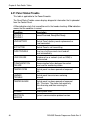
The Remote Programmer main screen displays six menus, which enable you to
access the different features of the application.
3.1 Sites Menu
The Sites menu provides you with the tools to manage new and existing Sites.
Menu Item
Function
List of Sites
Displays the Sites window (with Site information).
New Site
Displays a new Remote Programmer Site File that contains default
values.
Search
Displays the Sites window (without Site information).
Save
Saves an existing Site file.
Save As
Enables you to save a site file by a new name.
Close Site
Closes the currently opened site
Print
Prints a report.
Print Preview
Displays the report on the screen before you print it.
Print Setup
Enables you to determine the Print specifications.
User
Enables you to manage users.
Exit
Exits Remote Programmer.
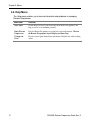
3.2 Edit Menu
The Edit menu contains commands that help you edit and fill in details in each
screen.
Menu Item
Function
Cut
Removes selected text to a temporary memory known as a clipboard.
Copy
Copies selected text to the clipboard.
Paste
Places the text being held in the clipboard at the point of insertion.
DE5450S Remote Programmer Guide Rev. 9
9