1
SRM9030plus ~ PMR Mobile Radio User Guide
5.5
SCAN FUNCTIONS
Scanning consists of sequentially searching up to 15 channels for a valid signal (RF, CTCSS
or DCS tone). When found the radio will stop on that channel until the signal disappears
again.
The Microphone may need to be in the cradle, (on hook) for the radio to scan.
While listening on the channel, the User may PTT on that channel. After the signal
disappears the radio will remain listening on the channel for a short time (typically 3 seconds)
before resuming scanning. PTT may be inhibited while the Mic is in cradle.
If a Priority/Emergency Channel is assigned, the radio will interleave a check of this channel
between each normal channel check. The radio may also check the Priority Channel every
few seconds while stopped on a channel. If a signal is found on the Priority Channel then the
radio will switch to that channel immediately.
If programmed, the Priority Channel is automatically selected when the Microphone is
removed from cradle.
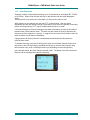
To activate Scanning, press the SCAN Function button from the Main Channel Screen and
then select a Scan Group using the Left/Right Arrow keys or select a Scan Channel using
direct channel entry (nn#) or Left/Right Arrow keys (depending on radio configuration).
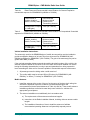
In the example below, the Scan Channel selected is 904. The Name of the Scan Channel is
Districts and the message line indicates “Scanning”.
© Comgroup Australia 2010
16
TNM-U-E-0092 Issue 1.1a