1
SRM9030plus ~ PMR Mobile Radio User Guide
2. FRONT PANEL CONTROLS
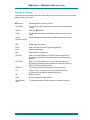
Function Buttons
On/Off/ Volume
Channel
Number
Tx/Rx LED
100
Keypad for DTMF,
Channel or Selcall Entry
Send Selcall
Label 1
Label 2
Chan Name
Label 3
Label 4
Button
Channel Name
Labels
Function
Signal
Button #5
Strength
Clear / Reset
Menu Scroll
Channel Scroll
Figure 1 – SRM9030plus Control Head
Button/ Control
Button
Function
On/Off/Volume
Push for 2 seconds to switch the radio On or Off. Rotate
to set volume to the desired level.
Rx/Tx/Power LED
Green LED when receiving, Red LED when transmitting.
Green Handset
Used to place a call to the displayed Selcall identity.
Red Handset
Used to end a call, backspace /Clear dialstrings entries
and return to the Main Menu Screen
Keypad
Used to dial numbers, select channels and edit text
Scroll Up/Down
Scroll between Menu Screens
Scroll Left/Right
Scroll through lists (within a Menu Screen)
Function Button F1
These buttons can be customised for different functions.
Displayed “soft” labels indicate the button function.
Function Button F2
Function Button F3
Function Button F4
Function Button F5
Function Button F6
This button is programmable for a special operation, e.g.
Emergency Call.
On Mic.
© Comgroup Australia 2010
This button is programmable for a special operation.
2
TNM-U-E-0092 Issue 1.1a