1
SIM TeleScope User Manual
page 3
Accessing Archived Assets through Telescope Asset Manager
Telescope Asset Manager is a web based asset management system that allows users to search for and retrieve archived
digital assets. Telescope is a service provided to SIM users by Quad Graphics. The web interface allows for quick and
easy access to assets, with multiple types of views and searches to facilitate quick file retrieval.
Connecting to the Telescope Asset Manager
a. Connect to Telescope by launching your web browser
and entering: http://assetmanager.qg.com/sim Bookmark this address for future use.
b. Enter your User Name/Password and click Login.
Main Screen
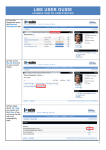
The default view upon login is the Tree Search / Magazine Contents which
is a hierarchical view of assets stored by Magazine / Issue. This is the most
common method for locating assets within the system (See screenshot).
More information about the Tree Search is available on page 5.