1
SIM TeleScope User Manual
page 7
Advanced Search
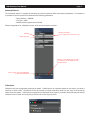
The “Advanced Search” is capable of executing very specific searches within user defined parameters. For example, it
is possible to perform a search for assets with the following parameters:
-- Issue Number = “080900”
-- File Type = INDD
-- Modified Date is greater than 01/01/08.
See the image below for a detailed overview of the advanced search interface.
Metadata
Boolean Commands
(is, is not, greater than, less than... etc.)
Search Keywords
Search in Current Results lets you target
your search to only the assets shown in
the asset window.
Click to add or remove metadata fields
for your Advanced Search
Collections
Collections are user configurable groupings of assets. Collections do not represent folders on the server, but rather a
collection of links to files. Therefore a file can be located in multiple collections while only one copy of the actual file
exists within the system. Collections are organized and displayed like a hierarchy of folders (much like the tree search).
Collections can be used as an easy way to collect and access a group of files.