1
Chapter 4. After installation
4.2
48
Execute a security update
As soon as new security bugs are detected in packages, Debian maintainers and upstream
authors generally patch them within days or even hours. After the bug is fixed, a new package
is provided on http://security.debian.org.
If you are installing a Debian release you must take into account that since the release was made
there might have been security updates after it has been determined that a given package is
vulnerable. Also, there might have been minor releases (there have been four for the Debian
3.0 sarge release) which include these package updates.
You need to note down the date the removable media (if you are using it) was made and
check the security site in order to see if there are security updates. If there are and you cannot
download the packages from the security site on another system (you are not connected to the
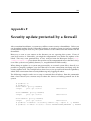
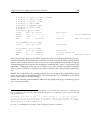
Internet yet? are you?) before connecting to the network you could consider (if not protected
by a firewall for example) adding firewall rules so that your system could only connect to
security.debian.org and then run the update. A sample configuration is shown in ‘Security
update protected by a firewall’ on page 229.
Note: Since Debian woody 3.0, after installation you are given the opportunity to add security
updates to the system. If you say ’yes’ to this, the installation system will take the appropriate
steps to add the source for security updates to your package sources and your system, if you
have an Internet connection, will download and install any security updates that might have
been produced after your media was created. If you are upgrading a previous version of
Debian, or you asked the installation system not to do this, you should take the steps described
here.
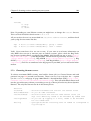
To manually update the system, put the following line in your sources.list and you will
get security updates automatically, whenever you update your system.
deb http://security.debian.org/ stable/updates main contrib non-free
Note: If you are using the testing branch use the security testing mirror sources as described in
‘Security support for the testing branch’ on page 174.
Once you’ve done this you can use multiple tools to upgrade your system. If you are running
a desktop system you will have1 an application called update-notifier that will make it
easy to check if new updates are available, by selecting it you can make a system upgrade
from the desktop (using update-manager). For more information see ‘Checking for updates
at the Desktop’ on page 171. In desktop environments you can also use synaptic (GNOME),
kpackage or adept (KDE) for more advanced interfaces. If you are running a text-only terminal you can use aptitude, apt or dselect (deprecated) to upgrade:
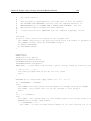
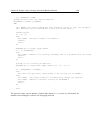
• If you want to use aptitude’s text interface you just have to press u (update) followed
by g (to upgrade). Or just do the following from the command line (as root):
1
In etch and later releases