1
Welcome to CODA©
Welcome to CODA©
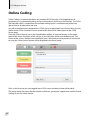
Quick, Live Event Coding
CODA © by Sportstec is the latest addition to the Sportstec family of products. CODA © is
designed to work in conjunction with any SportsCode™ / Studiocode™ video analysis system,
giving you activity and/or participant event coding capabilities previously only dreamed of. The
beauty of CODA © is the flexibility it gives coaching staff by being able to code a performance
either live at the venue, live from a remote location or at a later time from pre-recorded footage.
CODA Overview
CODA is a tool that the User customizes to create a Log of Events, (the Event Log,) that can be
linked to a video. CODA is also a very flexible tool in that the Event Log can be exported into
Excel which makes the data available to be manipulated to produce a variety of reports to
compliment video replay analysis.
We recommend that you read sections 1 & 2 thoroughly to gain an understanding of the basis of
the CODA Structure – then work through Sections 3 – 10 which are written in a “Tutorial” format.
Here’s a quick guide to how the CODA process works.
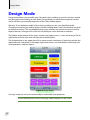
CODA works in only 2 modes, Design Mode and Coding Mode. In “Design Mode” you will design
the CODA Form that will determine what events you will code to the Event Log and what
descriptions you will make available to add to each of these events. In “Coding Mode” you will
use your designed CODA Form to build the event information on the Event Log.
In a new CODA Form you build, edit and categorize events or actions for future analysis. To do
this you create and name coded buttons for all actions. In sport for example you may wish to
code a particular player, a particular move, or each time a point(s) is scored.
Once you have built your CODA Form and customized it to provide you with the information
you need to enhance your existing instructional tools, when you click on or activate each Event
Button during coding it will mark the Event Log accordingly.
Gathering the data during the activity either live, (or later from video,) is easy. Now all that
is needed is for you to link the Event Log with a video timeline in one of the SportsCode™
/ Studiocode™ video analysis systems. You can now analyze performance according to the
information on the timeline.
The captured Event Log data may also be exported into an Excel spreadsheet for separate
analysis.
Note : If CODA Event Log data is exported into a GameBreaker video analysis system, only the
Event Button data will be shown, there will be no tagged information about each event written
to a GameBreaker timeline.
7