1
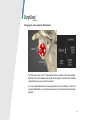
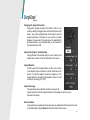
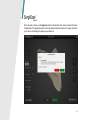
I don’t know which CT/MRI images I need to upload. CT/MRI images are usually DICOM images (.dcm) made available on a CD. You can select the top folder on the CD to upload. Uploading CT/MRI images is slow. The size of the images can add up to a high volume and this can take a while to upload depending on your internet connection. When the total size exceeds 1 GB, consider sending Materialise a hard copy (CD) by mail. I cannot open or save a case. Verify you are connected to the internet. SurgiCase Connect stores your cases online. I can’t see a 3D model. The 3D model may lie out of view. Click the central button of the move buttons (see page 16). This will centralize the model again. Check the Show/Hide panel (see page 17). Make sure at least one item has an active eye icon. If no items are listed, there’s no 3D model available. I received an email telling me the status of a case has changed, but I see no difference in SurgiCase Connect. Try logging out and in again. The case list should then refresh. Not all my cases are shown in the case list. Verify you haven’t entered any text in the search field. Remove the text to view all cases. 36