1
Cover Page
TRENDnet User’s Guide
Contents
Table of Contents
Wireless Setup ........................................................................................................ 34
Dynamic DNS........................................................................................................... 35
Product Overview ................................................................................. 2
Audio/Video............................................................................................................ 36
Package Contents ......................................................................................................2
Audio and Video ...................................................................................................... 36
Features ....................................................................................................................2
Image Setup ............................................................................................................ 38
Product Hardware Features ......................................................................................3
Wall mount installation.............................................................................................4
Using the Autorun Wizard ..................................................................... 4
Option A: Wired Connection by Using a Network Cable ............................................5
Option B: Connect Camera to Wireless Network by WPS Button ..............................9
Option C: Manually Connect Camera to Wireless Network ..................................... 13
Mobile Apps........................................................................................ 17
Action ..................................................................................................................... 39
Recording ................................................................................................................ 39
Video Clip ................................................................................................................ 43
Snapshot ................................................................................................................. 45
SD Management ..................................................................................................... 47
Motion Detection .................................................................................................... 48
Sound Detection ..................................................................................................... 48
Setup Wizard (Finding IP address of the cameras) ................................ 18
Tools ....................................................................................................................... 49
Web Browser Management ................................................................. 22
System ..................................................................................................................... 49
Main Web User Interface ........................................................................................ 24
Firmware Update .................................................................................................... 50
Setup....................................................................................................................... 26
Advanced ................................................................................................................ 50
Wizard .................................................................................................................... 26
Device Info .............................................................................................................. 50
Step 1: LAN Settings ................................................................................................ 27
Log ........................................................................................................................... 51
Step 2: Internet Settings ......................................................................................... 27
TRENDnetVIEW Pro Software .............................................................. 52
Step 3: DDNS Settings ............................................................................................. 27
How to setup/access the camera remotely .......................................... 53
Step 4: Camera Name Settings ................................................................................ 28
Step 5: Time Settings............................................................................................... 28
Troubleshooting ................................................................................. 56
Step 6: Setup Complete........................................................................................... 29
System .................................................................................................................... 30
Admin ...................................................................................................................... 30
Time and Date ......................................................................................................... 32
Network .................................................................................................................. 33
Network .................................................................................................................. 33
© Copyright 2014 TRENDnet. All Rights Reserved.
i
TV-IP562WI
TRENDnet User’s Guide
Features
Product Overview
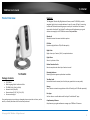
The Megapixel Wireless Day/Night Network Camera, model TV-IP562WI, provides
megapixel night vision in complete darkness for up to 5 meters (16 feet). A mounting
bracket and Wireless N networking support a variety of installations. Each camera
comes with a free Apple® and Android™ mobile app and Complimentary pro-grade
software to manage up to 32 TRENDnet cameras Easy Installation
Wireless N
Wireless N network increases installation options
HD Video
Experience high definition 720p HD video quality
Night Vision
Night vision up to 5 meters (16 ft.) in complete darkness
Digital Zoom
Zoom in by a factor of four
Motion Detection Emails
Receive snapshots and video clips of motion via email
TV-IP562WI
Package Contents
TV-IP562WI
Multi-Language Quick Installation Guide
CD-ROM (Utility & User’s Guide)
Network cable (1.8m/6ft)
Power adapter (5V DC, 1A) (1.5m / 5ft)
Camera mounting kit
If any package contents are missing or damaged, please contact the retail store, online
retailer, or reseller/distributor that the item was purchased.
Mounting Hardware
Mounting bracket supports upside down installation
Two-Way Audio
Hear sounds from the camera (install a third party speaker for two-way audio)
Storage
Store video to a network storage device or Micro SD card (up to 32 GB sold separately)
Free Apps
See live video on a mobile device with free Apple® and Android™ apps
Complimentary Software
Complimentary pro-grade software to manage up to TRENDnet 32 cameras
© Copyright 2014 TRENDnet. All Rights Reserved.
2
TV-IP562WI
TRENDnet User’s Guide
Product Hardware Features
Front Panel View
Rear Panel View
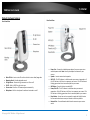
Micro SD Slot – Insert a micro SD card into this slot to store video/image data.
Mounting Stand – Portable adjustable stand.
IR Light Sensor – Detects the light source to turn IR on or off.
IR LED – Built-in IR LED for night vision use.
Camera Lens –Fixed lens. The camera adjusts automatically.
Microphone – Built-in microphone for audio can be turned on or off.
Power Port – Connect the included power adapter from your camera to an
available power outlet. Note: Use only the adapter that came with your
camera.
Speaker – Insert an external active speaker.
WPS LED – This LED indicator is solid blue when your camera is powered on. If
this LED indicator is off, there is no power to your camera. This LED indicator is
blinking green when there is connection/data to your camera.
WPS Button – Press this button to enable WPS.
Power/Link LED – This LED indicator is solid blue when your camera is
powered on. If this LED indicator is off, there is no power to your camera. This
LED indicator is blinking green when there is connection/data to your camera.
Reset Button – Use an item such as a paperclip to push and hold this button
for 6 seconds and release to reset your camera to its factory defaults.
Network Port – Connect Network cables from the camera to your route or
switch.
© Copyright 2014 TRENDnet. All Rights Reserved.
3
TV-IP562WI
TRENDnet User’s Guide
Wall mount installation
Using the Autorun Wizard
To wall mount the camera, please following the steps below.
The Autorun supports both Windows & Mac operating systems. Insert the Installation
CD-ROM into your computer’s CD-ROM drive to initiate the Autorun program. The
Autorun Wizard program will run automatically.
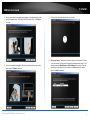
Use the pencil to mark the three holes of the plate on the wall.
Drill the holes
Attached the camera to the plate
Use the supplied screws to secure the camera stand to the wall.
For Windows users: If the autorun wizard does not run, go to the CD-ROM folder and
run Autorun.exe to start installation wizard.
For Mac users: Please click InstallWizard to start installation wizard.
1.
Select your desired language for Installation. There are five languages available
– English, French, German, Spanish, and Russian.
© Copyright 2014 TRENDnet. All Rights Reserved.
4
TV-IP562WI
TRENDnet User’s Guide
2.
3.
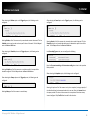
Click Install Camera and follow the on-screen steps to continue the
installation.
Write down the MAC address of your camera. This can be found on the device
label. Click Next to continue, Back to go to the previous screen or Home to
return to the main menu. The packaging also included a sticker with the same
information.
4.
The most important part of the setup process is the network connection type.
There are three options:
a. Connect the camera to your network using a network cable
b. Connect the camera to your wireless network using Wi-Fi Protected Setup
(WPS) button (Verify your router has a WPS button. If not, select the next
option).
c. Connect the camera to your wireless network manually.
Option A: Wired Connection by Using a Network Cable
1.
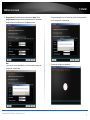
Click Connect camera to your network using a network cable. Cick Next to
continue.
© Copyright 2014 TRENDnet. All Rights Reserved.
5
TV-IP562WI
TRENDnet User’s Guide
2.
3.
Connect one end of the included power adapter to the camera and the other
end to the power outlet. The Power/Link LED will be blinking. Click Next to
continue.
Connect one end of the network cable to your camera and the other end to
your router. Click Next to continue.
5.
The wizard will search the network for your camera.
6.
Select your camera. The wizard will show all cameras in the network. If there
is only one camera in the network, the wizard will automatically select it. The
wizard provides the Model Name and MAC Address of the camera. If you do
not see any of your camera(s) in the wizard, click Retry to scan the camera
again. Click Next to continue.
© Copyright 2014 TRENDnet. All Rights Reserved.
6
TV-IP562WI
TRENDnet User’s Guide
7.
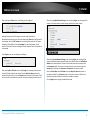
Change Password. The default username and password is admin. Tick the
Change Password checkbox to enter the new password details. The password
should be between 8 and 30 characters. Click Next to continue.
Note:
If you enter the incorrect admin details, you will be prompted to change the
configuration, as shown below.
If the password length is less than 8 characters, you will also be prompted to
alter the configuration, as shown below.
8.
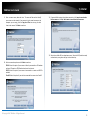
The wizard will configure your parameters.
© Copyright 2014 TRENDnet. All Rights Reserved.
7
TV-IP562WI
TRENDnet User’s Guide
9.
The initial setup is complete. Click the link to navigate to the camera’s Web
User Interface for further configuration or click product image to create a
shortcut. Click Next to continue.
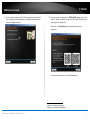
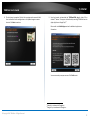
10. Scan the barcode to download the TRENDnetVIEW App for Apple iOS or
1
Android™ devices. The app can also be found by searching TRENDnet from the
2
Apple App Store or Google Play™ .
Please refer to the Mobile Apps section for additional app features
information.
You are now ready to use your camera. Click Finish to exit.
1
2
Android is a trademark of Google Inc.
Google Play is a trademark of Google Inc.
© Copyright 2014 TRENDnet. All Rights Reserved.
8
TV-IP562WI
TRENDnet User’s Guide
Option B: Connect Camera to Wireless Network by WPS
Button
1.
2.
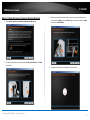
Follow the instructions on the screen to Power up the Camera. Click Next to
continue.
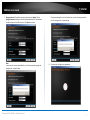
Click Connect camera to your wireless using Wi-Fi Protected Setup (WPS)
button radio button.
Please consider these points before using WPS.
Find the access point (AP) or wireless router you wish to connect to from
the Available AP drop down menu.
In most cases you should leave the Channel set to Auto as the AP will
determine the channel of operation.
Select the type of authentication and encryption required by the access
point and enter the Key required to connect.
Click Next to continue, Back to go to the previous screen or Home to return to
the Main Menu.
© Copyright 2014 TRENDnet. All Rights Reserved.
9
TV-IP562WI
TRENDnet User’s Guide
3.
Press the WPS button on your wireless router or access point for 5 seconds.
Within 2 minutes press and hold WPS button on the IP Camera for 5 seconds.
The WPS button will be start blinking. Wait until the WPS LED turns off and
Power/Link LED turn green. It can take up to 2 minutes for the camera to
connect to the wireless router or access point. Click Next to continue. If you
wish to go to the previous screen, click Back or click Home to return to the
main menu.
4.
The wizard will now search for your camera.
5.
Select your camera. The wizard will show all cameras in the network. If there
is only one camera in the network, the wizard will automatically select it. The
wizard provides the Model Name and MAC Address of the camera. If you do
not see any of your camera(s) in the wizard, click Retry to scan the camera
again. Click Next to continue.
© Copyright 2014 TRENDnet. All Rights Reserved.
10
TV-IP562WI
TRENDnet User’s Guide
6.
Change Password. The default username and password is admin. Tick the
Change Password checkbox to enter the new password details. The password
should be between 8 and 30 characters. Click Next to continue.
Note:
If you enter the incorrect admin details, you will be prompted to change the
configuration, as shown below.
If the password length is less than 8 characters, you will also be prompted to
alter the configuration, as shown below.
7.
The wizard will configure your parameters.
© Copyright 2014 TRENDnet. All Rights Reserved.
11
TV-IP562WI
TRENDnet User’s Guide
8.
The initial setup is complete. Click the link to navigate to the camera’s Web
User Interface for further configuration or click product image to create a
shortcut. Click Next to continue.
9.
Scan the barcode to download the TRENDnetVIEW App for Apple iOS or
3
Android™ devices. The app can also be found by searching TRENDnet from the
4
Apple App Store or Google Play™ .
Please refer to the Mobile Apps section for additional app features
information.
You are now ready to use your camera. Click Finish to exit.
3
4
Android is a trademark of Google Inc.
Google Play is a trademark of Google Inc.
© Copyright 2014 TRENDnet. All Rights Reserved.
12
TV-IP562WI
TRENDnet User’s Guide
Option C: Manually Connect Camera to Wireless Network
1.
Click Connect camera to your wireless network manually button
2.
Follow the instructions in the next screen to Power up the Camera. Click Next
to continue.
3.
Connect one end of the network cable to your camera and the other end to
your router. Click Next to continue, Back to go to the previous screen or Home
to return to the Main Menu.
4.
The wizard will now search the network for your camera.
© Copyright 2014 TRENDnet. All Rights Reserved.
13
TV-IP562WI
TRENDnet User’s Guide
5.
Select your camera. The wizard will show all cameras in the network. If there
is only one camera in the network, the wizard will automatically select it. The
wizard provides the Model Name and MAC Address of the camera. If you do
not see any of your camera(s) in the wizard, click Retry to scan the camera
again. Click Next to continue.
6.
Change Password. The default username and password is admin. Tick the
Change Password checkbox to enter the new password details. The password
should be between 8 and 30 characters. Click Next to continue.
Note:
If you enter the incorrect admin details, you will be prompted to change the
configuration, as shown below.
© Copyright 2014 TRENDnet. All Rights Reserved.
14
TV-IP562WI
TRENDnet User’s Guide
7.
If the password length is less than 8 characters, you will also be prompted to
alter the configuration, as shown below.
8.
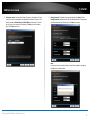
Once your wireless network has been discovered, the wizard will provide you
with an option to select the Available Wireless Network and also to provide a
Wireless Network Password. If you do not see your wireless network details,
click the Rescan link to scan the network again.
The wizard will now configure your parameters.
9.
The wizard will search for wireless Access Points. Click the Rescan button if you
do not find your AP.
© Copyright 2014 TRENDnet. All Rights Reserved.
15
TRENDnet User’s Guide
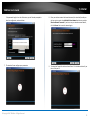
10. Disconnect your network cable from the camera/router. Click Next to
continue.
TV-IP562WI
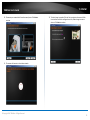
12. The initial setup is complete. Click the link to navigate to the camera’s Web
User Interface for further configuration or click product image to create a
shortcut. Click Next to continue.
11. The camera will connect to the wireless network.
© Copyright 2014 TRENDnet. All Rights Reserved.
16
TV-IP562WI
TRENDnet User’s Guide
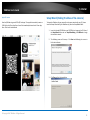
13. Scan the barcode to download the TRENDnetVIEW App for Apple iOS or
5
Android™ devices. The app can also be found by searching TRENDnet from the
6
Apple App Store or Google Play™ .
Please refer to the Mobile Apps section for additional app features
information.
Mobile Apps
Android Version
7
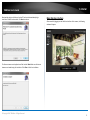
Using your mobile device, an Android phone in this example, open the Bar Code
scanning app on your phone. Hold it up to the QR Code on the wizard that reads,
Android, and scan the image. The Bar Code app will read the QR Code and record it.
You are now ready to use your camera. Click Finish to exit.
The app will copy the QR link and provides a HTML link to the TRENDnetVIEW app. You
will be directed to the Google Play™ Storefront to download the app. Download the
app, install it and use the app on your mobile device to view the TRENDnet camera.
5
6
Android is a trademark of Google Inc.
Google Play is a trademark of Google Inc.
7
Please use the Quick Installation Guide to install the mobile applications or learn how
to use mobile accessibility.
© Copyright 2014 TRENDnet. All Rights Reserved.
17
TV-IP562WI
TRENDnet User’s Guide
Apple iOS version
Setup Wizard (Finding IP address of the cameras)
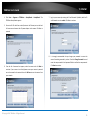
Scan the QR Code using one of IOS’s QR Code apps. The app will automatically create an
HTML link to the iTunes App Store. You will be immediately directed to the iTunes App
Store. Click the link to download.
To locate the IP address of your camera(s) on the same network with your PC, please
install the Setup Wizard utility (for Windows only) from the SetupWizard folder .
1.
Insert the included CD-ROM into your CD/DVD drive, browse to the CD drive of
the SetupWizard folder and run SetupWizardSetup_1.2.3.4804.msi to begin
the installation wizard.
2.
The following screen will show up. Click Next and following the screen to
finish the installation.
3.
Click Close to finish the installation.
© Copyright 2014 TRENDnet. All Rights Reserved.
18
TV-IP562WI
TRENDnet User’s Guide
4.
Click Start > Programs > TRENDnet > SetupWizard > SetupWizard. The
TRENDnet Setup Wizard appears.
5.
Connect an RJ-45 cable from a switch/router to the Ethernet port on the back
of the camera and connect the AC power adapter to the camera. Click Next to
proceed.
6.
From the list of cameras that appears, select the camera and click Next to
continue. If your camera is not listed, please ensure your camera is powered
on and connected to the network then click Re-Scan to scan the camera from
your network.
7.
Login to your camera by entering the ID and Password. By default, both the ID
and Password are set to admin. Click Next to continue.
8.
It is strongly recommended that you change your password to secure the
camera from being accessed by others. Check the Change Password box and
enter the new password in both password fields to confirm the new password.
Click Next to continue.
© Copyright 2014 TRENDnet. All Rights Reserved.
19
TRENDnet User’s Guide
9.
Enter a camera name, date and time. The name will be used to identify
your camera on the network. If your camera is in the same time zone as the
computer you are using, click the Copy Local Time icon to copy the local
time to the camera. Click Next to continue.
TV-IP562WI
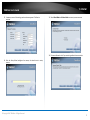
11. If you would like to setup the wireless connection, click I want to use wireless
for the camera or click No, I don’t want ot use wireless for the camera.
12. Select the available AP from drop down menu. Select the SSID, wireless mode,
authentication, encryption and type in the wireless key.
10. Select a connection option and click Next to continue.
PPPoE: Select this option if your camera is directly connected to a DSL modem
and your ISP requires a PPPoE authentication to the Internet.
DHCP: Select this option if your camera is connected to a router and DHCP is
enabled.
Fixed IP: Select this option if your wish to connected the camera via a fixed IP.
© Copyright 2014 TRENDnet. All Rights Reserved.
20
TRENDnet User’s Guide
13. A summary screen of the settings you have chosen appears. Click Next to
continue.
TV-IP562WI
15. Select Wired Mode or Wireless Mode to connect your camera now.
16. Disconnect Network cable if you continuing with wireless connection.
14. After the Setup Wizard configures the camera, the wizard starts to setup
process.
© Copyright 2014 TRENDnet. All Rights Reserved.
21
TV-IP562WI
TRENDnet User’s Guide
17. Wait a few minutes allow wireless connection be setting up.
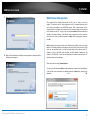
Web Browser Management
After completing the AutoRun Wizard from the CD, you are ready to use your
camera. The camera’s built-in Web configuration utility is designed to allow you to
easily access and configure your TV-IP562WI camera. Open a web browser such as
Internet Explorer® and enter the IP address of your camera (through the setup wizard
utility software on the CD). To log in, type the Username admin and the password you
created in the Autorun Wizard. If you did not create a password or you just press the
reset button for reset, the default password is admin. After entering your password,
click OK.
18. When the Setup Wizard has finished, the configuration is complete and the
following screen appears:
Note: By default, this camera obtains an IP address from a DHCP server on the local
network. To find the IP address of the camera, consult the DHCP client list on the DHCP
server on your wireless router or install the Setup Wizard utility software from CD.
However, if there is no DHCP server available, the static default IP address of this
camera is 192.168.10.30, in case you are connecting the camera directly with your PC
without another device in-between.
These initial steps are using Internet Explorer.
To log in, type the Username admin and the password you created in the Setup Wizard.
If you did not create a password, the default password is admin. After entering your
password,
click
OK.
© Copyright 2014 TRENDnet. All Rights Reserved.
22
TRENDnet User’s Guide
TV-IP562WI
These initial steps are for using a non-Internet Explorer web browser.
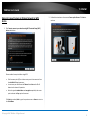
After you have logged in, Internet Explorer will prompt you to install the camera add-on
required. Click Allow to install the add-on.
After you have logged in, you will need to install the required plug-in. Click the link
below the camera viewing window to install the plug-in.
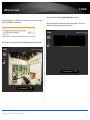
After the add-on was successfully installed, the Live View video feed will be displayed.
© Copyright 2014 TRENDnet. All Rights Reserved.
23
TV-IP562WI
TRENDnet User’s Guide
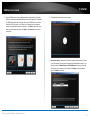
Download the plugin to a folder on the local PC and run the downloaded plugin
installation file after the download. Click Next to continue.
Main Web User Interface
After successfully logging into the Web User Interface of the camera, the following
window will appear.
The Camera stream control application will be installed. Note: Make sure all Internet
browsers are closed during this installation. Click Close to finish the installation.
© Copyright 2014 TRENDnet. All Rights Reserved.
24
TV-IP562WI
TRENDnet User’s Guide
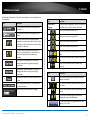
The following table describes all the icons and settings that can be configured on the
Live View page:
Icon
Description
Click this button to view the live video feedback of
this camera.
Icon
Description
Please select a
language
Select the display language here. Options to choose from
are English, German, Spanish, Russian, and French.
Click this icon to view the video profile 1.
Click this button to access the setup pages for this
camera.
Click this icon to view the video profile 2.
This icon is used to display the motion detection
status of the current live video feed. This icon will be
white when no motion is detected and will be yellow
when motion is detected.
Click this icon to view the video profile 3.
Click this icon to view the video profile 4.
This icon is used to display the recording status of
the current live video feed. This icon will be white
when not recording and will be yellow when
recording.
Click this icon to view the video feed in the full screen
mode.
Click this icon to manually take a snapshot of the video
feed.
Day Mode will be displayed when the camera is
supplying video feed in a daylight (normal light)
environment.
Night Mode will be displayed when the camera is
supplying video feed in a night time (low light)
environment.
Click this icon to manually enable or disable video
recording.
Icon
Description
When the Day Mode is active, the video feed will be
in color.
Click this icon to specify the video/snapshot storage
folder on the local PC.
When the Night Mode is active, the video feed will
be in black and white.
Click this icon to enable or disable the audio feed from
the camera.
From the drop-down menu, select a language.
Click this icon to enable or disable the audio feed to the
camera.
Click this icon to manually toggle the video feed
between the Day and the Night Modes.
Click one of these options to digitally zoom the video
feed by 1, 2 or 4 times.
© Copyright 2014 TRENDnet. All Rights Reserved.
25
TV-IP562WI
TRENDnet User’s Guide
Setup
Wizard
In the Setup section we can view and configure more advanced features available on
the IP camera. After clicking the Setup button, the following page will be displayed.
The first category option available is Wizard. The setup wizard will guide users through
a simplified step-by-step wizard to configure basic settings available on this camera.
In the left side of this page, there is a Category menu. Except for Wizard, Motion
Detection, and Sound Detection, within each category, there are multiple pages
available that are used to configure different types of features available on this camera.
This first page of the wizard will display a welcome message and layout the steps that
will be followed using this wizard. Click Next to continue.
© Copyright 2014 TRENDnet. All Rights Reserved.
26
TV-IP562WI
TRENDnet User’s Guide
Step 1: LAN Settings
Step 2: Internet Settings
On this page, users can configure the IPv4 and IPv6 connection settings for this camera.
Select DHCP Connection to allow the camera to automatically obtain the IPv4 or IPv6
settings from a DHCP server on the local network, or select Static IP Address to
manually enter the IPv4 and IPv6 connection settings. Click Next to continue.
Click the checkbox to enable the Internet connection via PPPoE. On this page users can
enter the PPPoE Username and Password. Click the checkbox to enable this feature.
This information can be acquired from your ISP. Click Next to continue.
Step 3: DDNS Settings
Click the checkbox to enable DDNS. In Server Address, select one of the domains from
the drop-down menu. The field to the left of the drop-down menu automatically
populates. Under Host Name enter the name the DDNS service provided. Enter a
Username and Password, repeat the password and finally enter the Timeout value.
Timeout states the time DDNS is updated. Click Next to continue.
© Copyright 2014 TRENDnet. All Rights Reserved.
27
TV-IP562WI
TRENDnet User’s Guide
Step 4: Camera Name Settings
After enabling the daylight savings feature, the following will appear. Select Auto
Daylight Saving allowing the camera to automatically detect the daylight saving time.
Enter a name for the camera. This feature is helpful when you have more than one
camera setup. Click Next to continue.
Step 5: Time Settings
From the drop-down menu, select a Time Zone. To enable daylight saving time, click the
checkbox next to Enable Daylight Saving. Or Select the Keep Current Date and Time or
Synchronize with Network Time Protocol server.
To manually setup Daylight saving, select Set DST manually option.
Select the Offset of the time within 1 to 2 hours. Then select a Start Time and an End
Time from the drop-down menus provided.
© Copyright 2014 TRENDnet. All Rights Reserved.
28
TV-IP562WI
TRENDnet User’s Guide
Step 6: Setup Complete
After selecting the Synchronize with Network Time Protocol server option, the
following will appear.
Select and enter the NTP Server address used here or alternatively select the Set NTP
Server from DHCP option to allow the camera to obtain the date and time settings from
the NTP Server that is configured to run in collaboration with the DHCP server on your
local network.
This is the final screen of the wizard. It shows the configuration options selected. Click
Apply to make the changes. After clicking the Apply button, a notice will appear to
mention that the camera will restart in 60 seconds and that it is saving the settings to
the camera. After the restart, the Web UI will direct back to the start of the wizard.
Select the Setup Date and Time Manually option to manual configure the date and
time settings for this camera.
© Copyright 2014 TRENDnet. All Rights Reserved.
29
TV-IP562WI
TRENDnet User’s Guide
System
The next category option available is System. In the System category we can configure
administrative settings and the date and time settings.
Admin
In the Admin Settings section, we can configure the following.
In this section we can configure the administrator account’s login credentials that will
be used to login to the camera’s Web UI. In the Admin User Name field, enter the login
username that will be used for this camera. In the Old Password field enter the
old/current login password of the camera. In the New Password and Confirm New
Password fields, enter the new login password that will be used for this camera. Click
the Save button to save the modifications made.
Note that the password can only contain: Alphanumeric: A-Z, a-z, 0-9, and Special
Characters: !, @, #, $, % and must be between 8 to 30 characters.
In the Add User Account section, we can configure the following.
In this section we can configure the user account’s login credentials that will be used to
login to the camera’s Web UI. In the User Name field, enter the login username that
will be used for this camera. In the New Password and Confirm New Password fields,
enter the new login password that will be used for this camera. Click the Add button to
add the new user account created.
© Copyright 2014 TRENDnet. All Rights Reserved.
30
TV-IP562WI
TRENDnet User’s Guide
In the User List section, we can configure the following.
In the Device Settings section, we can configure the following.
The User Name list will be populated with the names of the user accounts created in
the previous section. To delete a user, select the user from the drop-down list and click
the Delete button.
In the Authentication section, we can configure the following.
Enter the Camera Name in the space provided. Tick the On-Screen Display (OSD)
option to display the label, date and time on the video feed. Enter the Label name in
the space provided. Tick the Time Stamp option to display the date and time on the
video feed. Select the LED light option from the drop-down list. When selecting the
Power/Link option, the LED will light up when the camera has power and a network
link. When selecting the Off option, the LED will be turned off. When selecting the
Blinking option, the LED will rhythmically blink.
Tick the RSTP Authentication option to enable RSTP real-time authentication. Tick the
HTTP Authentication option to enable HTTP authentication. Tick the Snapshot URL
Authentication option to enable snapshot authentication of the current video stream
using the hyperlink. Click the Save button to save the modifications made.
© Copyright 2014 TRENDnet. All Rights Reserved.
31
TRENDnet User’s Guide
Time and Date
TV-IP562WI
In the Automatic Time Configuration section, we can configure the following.
In the Time Configuration section, we can configure the following.
Tick the Synchronize with Network Time Protocol server option to enable the
automatic time configuration option. Enter the NTP Server address of the time server
used here or select the Set NTP Server from DHCP option to allow the camera to obtain
the date and time settings from the NTP Server that is configured to run in
collaboration with the DHCP server on your local network.
Select the Time Zone option from the drop-down menu. Tick the Enable Daylight
Saving option to enable the daylight saving feature on this camera. Select the Auto
Daylight Saving option to automatically receive the daylight saving update from the
time server. Select the Set DST Manually option to manually configure the daylight
saving time options. After selecting to manually configure the daylight saving time,
select the Offset value used. Select the Start time and End time options.
In the Set Date and Time Manually section, we can configure the following.
Tick the Setup Date and Time Manually option to manually configure the date and time
settings for this camera. Select the Year, Month, Day, Hour, Minute, and Second
options from the drop-down menus provided to manually configure the date and time
settings used by the camera. Alternatively, click the Sync with Computer Time button
to automatically configure the camera’s date and time settings to be the same as the
current date and time settings on the local computer. Click the Apply button to apply
the modifications made.
© Copyright 2014 TRENDnet. All Rights Reserved.
32
TV-IP562WI
TRENDnet User’s Guide
Network
The next category option available is Network. In the Network category we can
configure the wired and wireless network settings. Also available for configuration in
this category is Dynamic DNS.
Network
In the LAN Settings section, we can configure the following.
In the IPv4 Settings part, we can configure the IPv4 network settings used by this
camera. Select the DHCP Connection option to automatically obtain the IPv4 network
settings, for this camera, from a DHCP server, located on the local network.
Select the Static IP Address option to manually configure the IPv4 network settings
used by this camera. Enter the IPv4 Address, Subnet Mask, Default Gateway, Primary
DNS, Optional Secondary DNS, and Optional Search Domain parameters in the spaces
provided.
This camera can connect to the Internet directly through the means of a PPPoE
connection. Tick the PPPoE option to enable this feature. Enter the PPPoE Internet
connection’s User Name and Password in the spaces provided. This information can be
acquired from your ISP.
© Copyright 2014 TRENDnet. All Rights Reserved.
33
TV-IP562WI
TRENDnet User’s Guide
In the Apple part, we can enable the Bonjour feature. Click the Apply button to apply
the modifications made.
In the IPv6 Settings part, we can configure the IPv6 network settings used by this
camera. Select the DHCP Connection option to automatically obtain the IPv6 network
settings, for this camera, from a DHCP server, located on the local network.
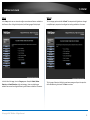
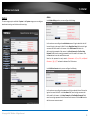
Wireless Setup
In the Wireless Configuration section, we can configure the following.
Select the Static IP Address option to manually configure the IPv6 network settings
used by this camera. Enter the IPv6 Address/Prefix Length, Default Gateway (Router),
Primary DNS, and Optional Secondary DNS parameters in the spaces provided.
Click the Enable Wireless button to enable the wireless feature for this camera. After
clicking the Enable Wireless button, the camera will restart (80 seconds) and the
following page will be available.
In the Port Settings part, enter the HTTP Port and RSTP Port numbers used.
In the UPnP part, tick the UPnP option to enable the UPnP feature on this camera. Tick
the UPnP Port Forward option to enable the UPnP port forwarding feature. Enter the
External HTTP and External RSTP port number in the respective spaces provided.
© Copyright 2014 TRENDnet. All Rights Reserved.
34
TV-IP562WI
TRENDnet User’s Guide
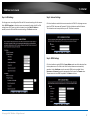
Un-tick the Wireless option to disable the wireless functionality of this camera. Enter
the wireless Network Name (SSID) in the space provide or select the wireless network
name from the Site Survey drop-down list. If the wireless network exists and is not
displayed in the Site Survey drop-down list, click the Rescan button to rescan for
available wireless networks.
Select the Wireless Mode for this camera. The two supported modes are Infrastructure
and Ad-Hoc. When connecting the camera to a wireless access point or router, use the
infrastructure mode. When connecting the camera to a wireless adapter directly, select
the ad-hoc mode. After selecting the ad-hoc mode, we will be able to manually select
the wireless Channel number used for the connection.
Select the Security Mode for this camera. The four supported security modes for this
camera are None, WEP, WPA-PSK, and WPA2-PSK. After selecting WPA-PSK or WPA2PSK as the security mode, select the Cipher Type used for this security mode. After
selecting WEP, WPA-PSK, or WPA2-PSK as the security mode, enter the wireless Key
used in the space provided.
Dynamic DNS
Dynamic DNS is a method of keeping a domain name linked to a changing public IP
address as not all public IP addresses are static. Typically, when a user connects to the
Internet, the user’s ISP assigns an unused IP address from a pool of IP addresses and
this address is used only for the duration of that specific connection. This method of
dynamically assigning addresses extends the usable pool of available IP addresses. A
dynamic DNS service provider uses a special program that runs on the user’s computer,
contacting the DNS service each time the IP address provided by the ISP changes and
subsequently updating the DNS database to reflect the change in IP address.
In the Dynamic DNS Settings section, we can configure the following.
Tick the Show Hidden Key option to display the key entered.
Click the Apply button to apply the modifications made.
Tick the Enable option to enable the Dynamic DNS feature. Select the DDNS service
provider from the drop-down list after which the service provider’s name will be moved
to the Server Address field. Enter the Host Name, User Name, Password, and Timeout
information in the spaces provided. Click the Apply button to apply the modifications
made.
© Copyright 2014 TRENDnet. All Rights Reserved.
35
TV-IP562WI
TRENDnet User’s Guide
Audio/Video
The next category option available is Audio/Video. In the Audio/Video category we can
configure audio and video profiles and settings as well as configure image settings.
Audio and Video
In the Video Profile sections, we can configure the following.
Select the Encode Type option from the drop-down list. Encoding types that can be
selected are MPEG4, H.264, and profile 3 will be on JPEG permanently.
Select the Resolution size option from the drop-down list. Resolutions that can be
selected are 1280x720, 640x352, 320x176, and 160x80. The resolution of 1280x720 is
only available on profiles 1 and 3.
Select the Frames Per Second (FPS) from the drop-down list. FPS speeds that can be
selected are 30, 15, 10, 6, 5, 3, 2, and 1.
Encode Method – Two options available: CBR/Quality. CBR and Quality can be defined
as such. When users choose the CBR encode method, the camera selects the bitrate as
the first priority. The TV-IP562WI will adjust the image quality to fit the bitrate. When
the user chooses the Quality encode method, the camera select the bitrate to fit the
quality
Select the Encode Mode option from the drop-down list. Encoding modes that can be
selected are Constant Bit Rate (CBR) and Quality and profile 3 will use the quality mode
permanently.
After selecting CBR as the Encode Mode, select the Bits Per Second (bps) value. Options
to choose from are between 64 Kbps and 4 Mbps. After selecting Quality as the Encode
© Copyright 2014 TRENDnet. All Rights Reserved.
36
TV-IP562WI
TRENDnet User’s Guide
Mode, select the Quality option. Options to choose from are Low, Fair, Standard,
Good, and Excellent.
Users can also enter a custom RSTP URL in the space provided.
In the Day/Night Mode section, we can configure the following.
The camera allows users to record data in day and night mode. The camera has IR LED’s
for night mode. When selecting the Day mode, the viewing image is in normal color.
However, when you use Night mode, the viewing image turns black and white. The
reason for this is to create a clearer and smoother image. When you select the Auto
mode, the Day/Night function is concealed.
Please Note: This allows you to set the camera to switch automatically from day to
night mode (default) or to permanently set the color and Black/White operations. Also
note, even when the camera is set to color mode, it will switch to Black/White night
vision if there is no longer enough ambient light to support the color saturation.
Select the Day/Night Mode option from the drop-down list. Options to choose from are
Auto, Manual, Always day mode, Always night mode, and Schedule. When selecting
Auto, the camera will automatically switch between day and night modes depending on
the light conditions. When selecting Manual, the user can manually toggle between day
and night modes by clicking the
Select the Sensitivity Level option from the drop-down list. There are three main
sensitivity point called Brightest, Median, and Darkest. In between these main
sensitivity points are numerical sensitivity values ranging from +1 to +7 between
Median and Brightest, and numerical sensitivity values ranging from -1 to -5 between
Median and Darkest. Selecting the sensitivity level closer to the Brightest option, will
switch the IR LEDs on earlier when the area becomes darker. Selecting the sensitivity
level closer to the Darkest option, will switch the IR LEDs on later when the area
becomes darker.
After selecting the Schedule option as the Day/Night Mode, we can configure the
following.
Enter the Day Time values in the spaces provided. First enter the starting hour and
minute values next to the From option and then enter the ending hour and minute
values next to the to option.
button on the Live View page. When selecting
Always day mode or Always night mode the camera will stay on the mode selected
even when the light conditions change. When selecting the Schedule option, the
camera will toggle between day and night modes depending on the time schedule
configured.
After selecting the Auto option as the Day/Night Mode, we can configure the following.
© Copyright 2014 TRENDnet. All Rights Reserved.
37
TV-IP562WI
TRENDnet User’s Guide
In the Audio Setup section, we can configure the following.
Image Setup
In the Live Video section, we can view the live video feed while we do image
modifications in the Image Settings section.
Tick the Speaker option to enable the audio feed from the camera to the PC. Tick the
Microphone option to enable the audio feed from the PC to the camera. Select the
Volume level for both selections. Click the Apply button to apply the modifications
made.
Select the Brightness, Saturation, Contrast, and Hue values from the respective dropdown menus. Tick the Black and White option to change the image color to black and
white. Tick the Mirror option to flip the video image horizontally. Tick the Flip option to
flip the video image vertically for upside-down mounting. Select the video Frequency
value from the drop-down list.
Select to enable or disable the auto White Balance feature. To enable the Slow Shutter
feature, select one of the time values (1/15 second, 1/10 second, 1/7.5 second or
1/3.75 second) from the drop-down list. Click the Reset to Default button to return the
image settings to their default values.
© Copyright 2014 TRENDnet. All Rights Reserved.
38
TV-IP562WI
TRENDnet User’s Guide
Action
The next category option available is Action. In the Action category we can configure
the action that will be taken when recording is done.
Recording
This camera allows users to record video, based on a trigger event, and then save the
video recording either on a micro SD card or on a Samba server shared folder. In the
Recording section, we can configure the following.
Tick the Enable option to enable the recording feature. Select the Trigger by option
from the drop-down list. Options to choose from are Motion, Schedule, Always, and
Sound. The parameters available for configuration will change depending on the
selections made.
© Copyright 2014 TRENDnet. All Rights Reserved.
39
TV-IP562WI
TRENDnet User’s Guide
After selecting the Motion option as the Trigger by event, the following can be
configured.
After selecting the Sound option as the Trigger by event, the following can be
configured.
Selecting Motion, will tell the camera only to record when motion is detected. Tick the
Schedule option to only record motion at specific times of the week. Tick the Day and
enter the Start and End times.
Selecting Sound, will tell the camera only to record when sound is detected. Tick the
Schedule option to only record video when sound is detected at specific times of the
week. Tick the Day and enter the Start and End times.
After selecting the Schedule option as the Trigger by event, the following can be
configured.
In the Recording Type section, we can configure the following.
Selecting Schedule, will tell the camera to record always within the scope of the
schedule configured. Tick the Day and enter the Start and End times.
Enter the Pre-event recording and Post-event recording time values in the respective
fields provided.
When selecting the Snapshot option, the following can be configured.
After selecting the Always option as the Trigger by event, the following can be
configured.
Selecting Always, will tell the camera to record always.
Selecting this option will tell the camera to only take a snapshot (an image capture) of
the video feed when the abovementioned criteria are met. Enter the Interval value in
the space provided. The interval value means that a snapshot will be taken at every
interval configured. Only Profile 3 can be used for this selection.
© Copyright 2014 TRENDnet. All Rights Reserved.
40
TV-IP562WI
TRENDnet User’s Guide
When selecting the Video option, the following can be configured.
After selecting Samba Network Storage as the recording Target, the recording will be
saved on the Samba network attached storage available on the local network.
Selecting this option will tell the camera to record a video clip when the
abovementioned criteria are met. Select the video profile (Source) that will be used for
the recording. Select the File Format that the recording will be saved as. File formats
available are AVI and MP4. Select the Recording clip time value between 1 and 6
minutes. This will split the total recording into smaller separate files for the duration of
the recording.
In the Target section, we can configure the following.
After selecting Samba Network Storage as the recording Target, the recording will be
saved on the Samba network storage available on the network. Enter the Samba Server
Address in the space provided. To connect to the Samba server as anonymous, select
the Anonymous option. To connect the Samba server with a user account, select the
Account option and enter the Username and Password in the spaces provided.
After selecting Micro SD Card as the recording Target, the recording will be saved on
the micro SD card installed in the camera. Enter the Keep Free Space value that is
needed on the micro SD card. Tick the Recycle option to record until the space is filled
on the micro SD card and then to record over the oldest recordings found on the card.
Enter the Share Folder name, Sub Folder name, and Keep Free Space information in
the spaces provided. Tick the Recycle option to record until the space is filled on the
Samba server account and then to record over the oldest recordings.
Click the Apply button to apply the modifications made.
© Copyright 2014 TRENDnet. All Rights Reserved.
41
TV-IP562WI
TRENDnet User’s Guide
FTP
N
Y
Y
SD
card
Y
N
N
Samba
Y
N
N
PreEvent
Y
Y
Y
* It's only
supported when
trigger by
Motion/Sound is
activated.
* Snapshot, it’s
activated using 6
snapshots only.
Post Event
Y
N
Y
* It's only
supported when
trigger by
Motion/Sound is
activated.
* Snapshot, it's
activated using 6
snapshots only.
Real
Time
Y
Y
Y
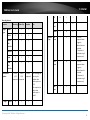
Recording features:
Function
Trigger
Type
Always
Motion
Video Clip
Y
Y
Y
Y
Snapshot
Y
Y
Y
Y
Schedule
Y
Y
Y
Sound
Y
Y
Y
Sound
with
Schedule
Y
Y
Y
Profile
1/2/4
supported
Profile
1/2/4
supported
Profile 3
supported
E-Mail
N
Y
Note
Y
Motion
with
Schedule
Video profile
Options
Target
Recording
Recordin
g Type
* For recording and
video clip, the
available video
profile options are
1/2/4.
* For snapshot, the
default video
profile option is
profile 3.
Y
© Copyright 2014 TRENDnet. All Rights Reserved.
42
TV-IP562WI
TRENDnet User’s Guide
Video Clip
This camera allows users to record video clips and then send it to an FTP server or email
the video to an email account. In the Video Clip section, we can configure the following.
Selecting Motion, will tell the camera only to record when motion is detected. Tick the
Schedule option to only record motion at specific times of the week. Tick the Day and
enter the Start and End times.
After selecting the Schedule option as the Trigger by event, the following can be
configured.
Selecting Schedule, will tell the camera to record always within the scope of the
schedule configured. Tick the Day and enter the Start and End times.
After selecting the Always option as the Trigger by event, the following can be
configured.
Tick the Enable option to enable the video clip feature. Select the Trigger by option
from the drop-down list. Options to choose from are Motion, Schedule, Always, and
Sound. The parameters available for configuration will change depending on the
selections made.
Selecting Always, will tell the camera to record always.
After selecting the Motion option as the Trigger by event, the following can be
configured.
After selecting the Sound option as the Trigger by event, the following can be
configured.
Selecting Sound, will tell the camera only to record when sound is detected. Tick the
Schedule option to only record video when sound is detected at specific times of the
week. Tick the Day and enter the Start and End times.
© Copyright 2014 TRENDnet. All Rights Reserved.
43
TV-IP562WI
TRENDnet User’s Guide
In the Video Clip Type section, we can configure the following.
After selecting E-mail as the Target, the following will be available.
Select the video profile in the Source drop-down list to use. Since profile 3 is only for
JPEG, it cannot be used here. Select the File Format that the video clip will be saved as.
Options to choose from are AVI and MP4. Enter the Pre-event recording time value and
the Maximum duration time value in the spaces provided.
In the Target section, we can configure the following.
Enter the Recipient E-mail Address, SMTP Mail Server address, Port number, User
Name, Password, Sender E-mail Address, and Interval information in the spaces
provided. Select the SSL-TLS option that will be used. Options to choose from are None,
SSL-TLS, and STARTTLS. Click the Test button to test the E-mail connection.
Click the Apply button to apply the modifications made.
In this section we can configure where the recorded video clip will be saved. Select FTP
or E-mail as the target. After selecting FTP as the Target, enter the FTP Server address,
Port number, User Name, Password, Path, Filename Prefix, and Interval information in
the spaces provided. Tick the Passive Mode option to enable the passive mode feature.
Click the Test button to test the FTP connection.
© Copyright 2014 TRENDnet. All Rights Reserved.
44
TV-IP562WI
TRENDnet User’s Guide
Snapshot
Snapshots can be taken by this camera based on the trigger by event. In the Snapshot
section, we can configure the following.
Selecting Motion, will tell the camera only to take snapshots when motion is detected.
Tick the Schedule option to only take snapshots for motion at specific times of the
week. Tick the Day and enter the Start and End times.
After selecting the Schedule option as the Trigger by event, the following can be
configured.
Selecting Schedule, will tell the camera to always take snapshots within the scope of
the schedule configured. Tick the Day and enter the Start and End times.
Tick the Enable option to enable the snapshot feature. Select the Trigger by option
from the drop-down list. Options to choose from are Motion, Schedule, Always, and
Sound. The parameters available for configuration will change depending on the
selections made.
After selecting the Motion option as the Trigger by event, the following can be
configured.
After selecting the Always option as the Trigger by event, the following can be
configured.
Selecting Always, will tell the camera to always take snapshots.
After selecting the Sound option as the Trigger by event, the following can be
configured.
Selecting Sound, will tell the camera only to take snapshots when sound is detected.
Tick the Schedule option to only take snapshots when sound is detected at specific
times of the week. Tick the Day and enter the Start and End times.
© Copyright 2014 TRENDnet. All Rights Reserved.
45
TV-IP562WI
TRENDnet User’s Guide
In the Snapshot Type section, we can configure the following.
After selecting FTP as the Target, the following will be available.
Only Profile 3 can be used to take snapshots.
In the Target section, we can configure the following.
In this section we can configure where the snapshot will be saved. Select FTP or E-mail
as the target.
Enter the FTP Server address, Port number, User Name, Password, Path, Filename
Prefix, and Interval information in the spaces provided. Tick the Passive Mode option
to enable the passive mode feature. Click the Test button to test the FTP connection.
© Copyright 2014 TRENDnet. All Rights Reserved.
46
TV-IP562WI
TRENDnet User’s Guide
After selecting E-mail as the Target, the following will be available.
SD Management
On this page the micro SD card can be managed. In the SD Management section, we
can configure the following.
Enter the Recipient E-mail Address, SMTP Mail Server address, Port number, User
Name, Password, Sender E-mail Address, and Interval information in the spaces
provided. Select the SSL-TLS option that will be used. Options to choose from are None,
SSL-TLS, and STARTTLS. Click the Test button to test the E-mail connection.
In this section the SD Status, Folder Name, Folder Size, Total Space, Total Space Used,
and Total Space Free information will be displayed. Select the Files per Page option
from the drop-down list to view a certain amount of files per page. Select the Pages
option from the drop-down list to view a certain page’s information, when multiple
pages exist. Select a folder’s or file’s checkbox and click the Delete button to manually
remove a folder or file from the micro SD card. Click the Format SD Card button to
completely reformat the micro SD card.
Note: When formatting the SD card, all files and folders will be removed from the micro
SD card and cannot be recovered.
Click the Apply button to apply the modifications made.
© Copyright 2014 TRENDnet. All Rights Reserved.
47
TV-IP562WI
TRENDnet User’s Guide
Motion Detection
Sound Detection
The next category option available is Motion Detection. In the Motion Detection
category we can configure the motion detection area and settings for this camera.
The next category option available is Sound Detection. In the Sound Detection category
we can configure the sound detection settings for this camera.
Tick the Enable Video Motion option to enable the motion detection feature for this
camera. When the Draw motion area option is selected, in the live video feed block,
use the left mouse button to draw an area that will be used for motion detection. The
area will be highlighted with Red Blocks. When the Erase motion area option is
selected, in the live video feed block, use the left mouse button to erase the area that
was used for motion detection. Enter the Sensitivity value in the space provided. Click
the Clear button to completely remove all the red blocks from the video feed.
Tick the Enable button to enable the sound detection feature of this camera. Select the
sound Detection Sensitivity Level value from the drop-down list provided. Configure
the sensitivity levels to higher settings in noisy environments. Click the Apply button to
apply the modifications made.
Click the Apply button to apply the modifications made.
© Copyright 2014 TRENDnet. All Rights Reserved.
48
TV-IP562WI
TRENDnet User’s Guide
Tools
The next category option available is Tools. In the Tools category we can backup and
restore configuration files, reset or reboot the camera, and perform a firmware update.
System
In the System section we can configure the following.
Click the Backup button to back up the camera configuration file that will be saved on
the local computer. When you backup the configure file, a dialog box will pop
up. Enter a key. This will password-protect the configuration file. You will need to
enter the same key when you restore the configure file to the camera.
Click the Choose File button to navigate to the backed up configuration file on the local
computer and then click the Restore button to restore the configuration file. You will
need to enter the same key that typed in when you backed up the configuration file.
Click the Reset button to restore the camera to its factory default settings. Note: All
configurations that were done on this camera will be lost and the camera will return to
its factory default configuration.
Click the Reboot button to simply reboot the camera.
© Copyright 2014 TRENDnet. All Rights Reserved.
49
TV-IP562WI
TRENDnet User’s Guide
Advanced
Firmware Update
In the Firmware section we can view and configure the following.
The next category option available is Advanced. In the Advanced category we can view
more detailed information about the camera as well as the system log.
In the Firmware Information section, information regarding the current running
firmware version will be displayed.
In the Firmware Upgrade section, click the Choose File button to navigate to the saved
firmware file, located on the local computer, and then click the Upload button to
upload that firmware to the camera. The camera will then use this firmware file to
upgrade the firmware of the camera.
Note: To find the latest firmware available for this camera, visit the TRENDnet website.
Device Info
In the Information section we can view more detailed information about the camera’s
configuration.
© Copyright 2014 TRENDnet. All Rights Reserved.
50
TV-IP562WI
TRENDnet User’s Guide
Log
In the Current Log section we can view a list of system log entries that was generated
based on events that occurred during the runtime of this camera.
Click the Clear button to remove all the log entries from the table.
Click the Download button export the log table to a text file and then save it to the local
computer.
© Copyright 2014 TRENDnet. All Rights Reserved.
51
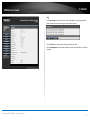
TRENDnet User’s Guide
TRENDnetVIEW Pro Software
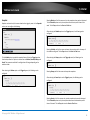
Click Autorun.
TV-IP562WI
Running the Software
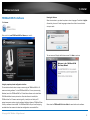
When the wizard starts, you have the option to select a language. The default is English.
Alternatively, there are 13 other languages to choose from. Select the one that best
suits your needs.
Click on the link, Install TRENDnetVIEW Pro Software, to install it.
The next screen will display the Welcome screen. Click Next to continue.
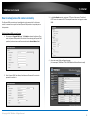
Using the proprietary-based configuration interface
This section describes the how to setup a camera using the TRENDnetVIEW Pro 2.0
camera monitoring software. To install TRENDnetVIEW Pro 2.0 on a system running
Windows, launch the TRENDnetVIEW Pro 2.0 installation software on the installation
CD-ROM and follow the setup instructions. Once the software is installed, the
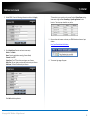
TRENDnet View Pro 2.0 camera monitoring utility is ready for use. Add up to 32
network cameras to monitor using the software. Additional software, TRENDnet IPView
Pro Player software is also installed. The TRENDnetVIEW Pro Player is used for playing
recorded video from cameras that have been configured to save recorded files.
Please view the TRENDnetVIEW Pro User Guide for more details on the software.
© Copyright 2014 TRENDnet. All Rights Reserved.
52
TV-IP562WI
TRENDnet User’s Guide
How to setup/access the camera remotely
3.
In the Port Number section, assign an HTTP port of the camera. The default
HTTP Port on the camera is 80. The example shows above is using port number
9000.
4.
Open the router’s Web configuration page.
(In the example, TRENDnet’s TEW-651BR Wireless N Home Router is used)
The Dynamic DNS connection can be configured on the camera itself or the home
router. An account from any of the listed Dynamic DNS providers is required prior to
this operation.
Configure Dynamic DNS on your Camera
1.
2.
Go to camera’s Dynamic DNS page. Tick Enable to activate the feature. Then
select a Dynamic DNS provider from the list. After selecting the Dynamic DNS
provider, the domain name will be entered into the Server Address field.
Enter Dynamic DNS’ Host Name, User Name and Password. Re-enter the
password to confirm it.
© Copyright 2014 TRENDnet. All Rights Reserved.
53
TV-IP562WI
TRENDnet User’s Guide
5.
Go to Access > Virtual Server* section and create a new entry.
Enable: Click Enable
Name: Enter the application name (eg. CameraName)
Protocol: Select TCP
Private Port: The HTTP port that you assign on your Camera.
Public Port: The port used on remote side to access to your Camera.
LAN Server: The local IP address of your Camera.
Then click Add to add the application.
* Please refer to your router’s user’s manual for detail Virtual Server setting.
Some router might use Port Forwarding or Special applications for this
function. The setup steps should be very similar.
6.
7.
Camera’s login page will appear.
Configure DDNS on your router
1.
Go to Camera’s NetWork Ports Settings section, assign a HTTP port for your
camera and click Apply.
2.
Login to your router’s web configuration page.
Find the Dynamic DNS configuration section.
Open another web browser and enter your DDNS domain and camera’s port
number. http://yourDomainName:PortNumber
© Copyright 2014 TRENDnet. All Rights Reserved.
54
TV-IP562WI
TRENDnet User’s Guide
3.
4.
Enable DDNS, fill out the following information and then click Apply.
Go to Virtual Server* section and create a new entry.
Enable: Click Enable
Name: Enter the application name (eg. Camera Name)
Protocol: Select TCP
Private Port: The HTTP port that you assign on your Camera.
Public Port: The port used on remote side to access to your Camera.
LAN Server: The local IP address of your Camera.
* Please refer to your router’s user’s manual for detail Virtual Server setting.
Some router might use Port Forwarding or Special applications for this
function. The setup steps should be very similar.
5.
Open another web browser and enter your DDNS domain and camera’s port
number.
http://yourDomainName:PortNumber
6.
The camera login page will appear.
Click Add to add the application.
© Copyright 2014 TRENDnet. All Rights Reserved.
55
TV-IP562WI
TRENDnet User’s Guide
Troubleshooting
1.
The Power LED and Ethernet Activity LED do not light up.
The power supply or camera might be faulty. Check that the connection to both
the power source and the terminal on the back of the camera are secure and
that you are using the provided power supply. If the camera is otherwise
functioning correctly, the LEDs might have been disabled in the configuration.
See the section of this guide on Configuration of System settings.
14. The camera can’t be accessed or access is slow.
There might be a problem with the network cable. To confirm that the cables
are working, ping the address of a known device on the network. If the cabling
is OK and your network is reachable, you should receive a reply similar to the
following (…bytes = 32 time = 2 ms).
Another possible problem may be that the network device such as a hub or
switch utilized by the Network Camera is not functioning properly. Please
confirm the power for the devices are well connected and functioning properly.
15. The camera can be accessed locally but not remotely.
This might be caused by a firewall. Check the Internet firewall with your system
administrator. The firewall may need to have some settings changed in order
for the Network Camera to be accessible outside your local LAN. For more
information, please refer to the section about installing your camera behind a
router.
17. The camera images are ‘noisy’.
Often if the camera is in a low-light environment, the images can contain a lot
of noise. Try enabling Night mode and see if that improves the image quality.
Otherwise, try to use the camera in a location where there is a bit more light.
18. The camera images are of poor quality.
Make sure that your computer’s display properties are set to at least 16-bit
color. Using 16 or 256 colors on your computer will produce dithering artifacts
in the image, making the image look as if it is of poor quality.
Try also adjusting the brightness, contrast, saturation, light frequency and antiflicker controls on the Video Settings under the Configuration menu. You may
also consider adjusting the resolution of the camera and the compression rate
to improve the image.
19. Video can’t be viewed through the web browser interface.
ActiveX might be disabled. If you are viewing the images from Internet Explorer
make sure ActiveX has been enabled in the Internet Options menu. You may also
need to change the security settings on your browser to allow the ActiveX plugin to be installed.
If you are using Internet Explorer with a version number lower than 6, then you
will need to upgrade your Web browser software in order to view the
streaming video transmitted by the Network Camera. Try also viewing the
video using Java. Ensure that you have the latest version of Java installed
before you do. Go to www.java.com for more information.
Make sure that the Network Camera isn’t conflicting with any Web server you
may have running on your network.
The default router setting might be a possible reason. Check that the
configuration of the router settings allow the Network Camera to be accessed
outside your local LAN.
16. White vertical lines appear on the image from the camera.
It could be that the CMOS sensor (a square panel situated behind the lens
that measures the light signals and changes it into a digital format so your
computer can present it into an image that you are familiar with) has become
overloaded when it has been exposed to bright lights such as direct exposure
to sunlight or halogen lights. Reposition the Network Camera into a more
shaded area immediately as prolonged exposure to bright lights will damage
the CMOS sensor.
© Copyright 2014 TRENDnet. All Rights Reserved.
56
TV-IP562WI
TRENDnet User’s Guide
Federal Communication Commission Interference Statement
EN 60950-1:2006+A11:2009+A1:2010+A12:2011
This equipment has been tested and found to comply with the limits for a Class B digital
device, pursuant to Part 15 of the FCC Rules. These limits are designed to provide
reasonable protection against harmful interference in a residential installation. This
equipment generates, uses and can radiate radio frequency energy and, if not installed
and used in accordance with the instructions, may cause harmful interference to radio
communications. However, there is no guarantee that interference will not occur in a
particular installation. If this equipment does cause harmful interference to radio or
television reception, which can be determined by turning the equipment off and on, the
user is encouraged to try to correct the interference by one of the following measures:
Safety of Information Technology Equipment
Reorient or relocate the receiving antenna.
Increase the separation between the equipment and receiver.
Connect the equipment into an outlet on a circuit different from that to which the
receiver is connected.
Consult the dealer or an experienced radio/TV technician for help.
This device complies with Part 15 of the FCC Rules. Operation is subject to the following
two conditions: (1) This device may not cause harmful interference, and (2) this device
must accept any interference received, including interference that may cause undesired
operation.
FCC Caution: Any changes or modifications not expressly approved by the party
responsible for compliance could void the user's authority to operate this equipment.
IEEE 802.11b or 802.11g operation of this product in the U.S.A. is firmware-limited to
channels 1 through 11.
IMPORTANT NOTE:
FCC Radiation Exposure Statement:
This equipment complies with FCC radiation exposure limits set forth for an
uncontrolled environment. This equipment should be installed and operated with
minimum distance 20cm between the radiator & your body.
This transmitter must not be co-located or operating in conjunction with any other
antenna or transmitter.
EN 62311: 2008
Assessment of electronic and electrical equipment related to human exposure
restrictions for electromagnetic fields (0 Hz-300 GHz)
(IEC 62311:2007 (Modified))
EN 300 328 V1.7.1: (2006-10)
Electromagnetic compatibility and Radio spectrum Matters (ERM); Wideband
Transmission systems; Data transmission equipment operating in the 2,4 GHz ISM band
and using spread spectrum modulation techniques; Harmonized EN covering essential
requirements under article 3.2 of the R&TTE Directive
EN 301 489-1 V1.9.2: 2011
Electromagnetic compatibility and Radio Spectrum Matters (ERM); ElectroMagnetic
Compatibility (EMC) standard for radio equipment and services; Part 1: Common
technical requirements
EN 301 489-17 V2.2.1 (2009-05)
Electromagnetic compatibility and Radio spectrum Matters (ERM); ElectroMagnetic
Compatibility (EMC) standard for radio equipment and services; Part 17: Specific
conditions for 2,4 GHz wideband transmission systems
This device is a 2.4 GHz wideband transmission system (transceiver), intended for use in
all EU member states and EFTA countries, except in France and Italy where restrictive
use applies.
In Italy the end-user should apply for a license at the national spectrum authorities in
order to obtain authorization to use the device for setting up outdoor radio links and/or
for supplying public access to telecommunications and/or network services.
This device may not be used for setting up outdoor radio links in France and in some
areas the RF output power may be limited to 10 mW EIRP in the frequency range of
2454 – 2483.5 MHz. For detailed information the end-user should contact the national
spectrum authority in France.
Europe – EU Declaration of Conformity
This device complies with the essential requirements of the R&TTE Directive 1999/5/EC.
The following test methods have been applied in order to prove presumption of
conformity with the essential requirements of the R&TTE Directive 1999/5/EC:
© Copyright 2014 TRENDnet. All Rights Reserved.
57
TRENDnet User’s Guide
TV-IP562WI
This device is designed to provide uninterrupted monitoring and/or recording. This
device does not off power management functionality such as Off mode or Standby
mode.
IMPORTANT NOTE:
NCC AND FCC Warning Statement
FOR COUNTRY CODE SELECTION USAGE (WLAN DEVICES)
Note: This country code selection is for non-US models only and is not available
to all US models. Per FCC regulation, all WiFi products marketed in the US must
be fixed to US operation channels only.
以下警語適用台灣地區
經型式認證合格之低功率射頻電機,非經許可,公司、商號或使用者均不得
擅自變更頻率、加大功率或變更原設計之特性及功能。
低功率射頻電機之使用不得影響飛航安全及干擾合法通信;經發現有干擾現象時,
應立即停用,並改善至無干擾時方得繼續使用。前項合法通信,指依電信法規定作
業之無線電通信。低功率射頻電機須忍受合法通信或工業、科學及醫療用電波輻射
性電機設備之干擾
© Copyright 2014 TRENDnet. All Rights Reserved.
58
TV-IP562WI
TRENDnet User’s Guide
Česky
[Czech]
TRENDnet tímto prohlašuje, že tento TV-IP562WI je ve shodě se
základními požadavky a dalšími příslušnými ustanoveními
směrnice 1999/5/ES.
Dansk
[Danish]
Undertegnede TRENDnet erklærer herved, at følgende udstyr TVTV-IP562WI overholder de væsentlige krav og øvrige relevante
krav i direktiv 1999/5/EF.
Deutsch
[German]
Hiermit erklärt TRENDnet, dass sich das Gerät TV-IP562WI in
Übereinstimmung mit den grundlegenden Anforderungen und
den übrigen einschlägigen Bestimmungen der Richtlinie
1999/5/EG befindet.
Eesti
[Estonian]
Käesolevaga kinnitab TRENDnet seadme TV-IP562WI vastavust
direktiivi 1999/5/EÜ põhinõuetele ja nimetatud direktiivist
tulenevatele teistele asjakohastele sätetele.
English
Español
[Spanish]
Hereby, TRENDnet, declares that this TV-IP562WI is in compliance
with the essential requirements and other relevant provisions of
Directive 1999/5/EC.
Por medio de la presente TRENDnet declara que el TV-IP562WI
cumple con los requisitos esenciales y cualesquiera otras
disposiciones aplicables o exigibles de la Directiva 1999/5/CE.
noteikumiem.
Lietuvių
[Lithuanian]
Šiuo TRENDnet deklaruoja, kad šis TV-IP562WI atitinka esminius
reikalavimus ir kitas 1999/5/EB Direktyvos nuostatas.
Nederlands
[Dutch]
Hierbij verklaart TRENDnet dat het toestel TV-IP562WI in
overeenstemming is met de essentiële eisen en de andere
relevante bepalingen van richtlijn 1999/5/EG.
Malti
[Maltese]
Hawnhekk, TRENDnet, jiddikjara li dan TV-IP562WI jikkonforma
mal-ħtiġijiet essenzjali u ma provvedimenti oħrajn relevanti li
hemm fid-Dirrettiva 1999/5/EC.
Magyar
[Hungarian]
Alulírott, TRENDnet nyilatkozom, hogy a TV-IP562WI megfelel a
vonatkozó alapvetõ követelményeknek és az 1999/5/EC irányelv
egyéb elõírásainak.
Polski
[Polish]
Niniejszym TRENDnet oświadcza, że TV-IP562WI jest zgodny z
zasadniczymi wymogami oraz pozostałymi stosownymi
postanowieniami Dyrektywy 1999/5/EC.
Português
[Portuguese]
TRENDnet declara que este TV-IP562WI está conforme com os
requisitos essenciais e outras disposições da Directiva 1999/5/CE.
Slovensko
[Slovenian]
TRENDnet izjavlja, da je ta TV-IP562WI v skladu z bistvenimi
zahtevami in ostalimi relevantnimi določili direktive 1999/5/ES.
Slovensky
[Slovak]
TRENDnet týmto vyhlasuje, že TV-IP562WI spĺňa základné
požiadavky a všetky príslušné ustanovenia Smernice 1999/5/ES.
Ελληνική
[Greek]
ΜΕ ΣΗΝ ΠΑΡΟΤΑ TRENDnet ΔΗΛΩΝΕΙ ΟΣΙ TV-IP562WI
ΤΜΜΟΡΦΩΝΕΣΑΙ ΠΡΟ ΣΙ ΟΤΙΩΔΕΙ ΑΠΑΙΣΗΕΙ ΚΑΙ ΣΙ
ΛΟΙΠΕ ΧΕΣΙΚΕ ΔΙΑΣΑΞΕΙ ΣΗ ΟΔΗΓΙΑ 1999/5/ΕΚ.
Français
[French]
Par la présente TRENDnet déclare que l'appareil TV-IP562WI est
conforme aux exigences essentielles et aux autres dispositions
pertinentes de la directive 1999/5/CE.
Suomi
[Finnish]
TRENDnet vakuuttaa täten että TV-IP562WI tyyppinen laite on
direktiivin 1999/5/EY oleellisten vaatimusten ja sitä koskevien
direktiivin muiden ehtojen mukainen.
Italiano
[Italian]
Con la presente TRENDnet dichiara che questo TV-IP562WI è
conforme ai requisiti essenziali ed alle altre disposizioni pertinenti
stabilite dalla direttiva 1999/5/CE.
Svenska
[Swedish]
Härmed intygar TRENDnet att denna TV-IP562WI står I
överensstämmelse med de väsentliga egenskapskrav och övriga
relevanta bestämmelser som framgår av direktiv 1999/5/EG.
Latviski
[Latvian]
Ar šo TRENDnet deklarē, ka TV-IP562WI atbilst Direktīvas
1999/5/EK būtiskajām prasībām un citiem ar to saistītajiem
© Copyright 2014 TRENDnet. All Rights Reserved.
59
TRENDnet User’s Guide
Limited Warranty
TRENDnet warrants its products against defects in material and workmanship, under
normal use and service, for the following lengths of time from the date of purchase.
TV-IP562WI – 3 Years Warranty
Limited Warranty
EITHER IN FACT OR BY OPERATION OF LAW, STATUTORY OR OTHERWISE, INCLUDING
WARRANTIES OF MERCHANTABILITY AND FITNESS FOR A PARTICULAR PURPOSE.
TRENDNET NEITHER ASSUMES NOR AUTHORIZES ANY OTHER PERSON TO ASSUME FOR
IT ANY OTHER LIABILITY IN CONNECTION WITH THE SALE, INSTALLATION MAINTENANCE
OR USE OF TRENDNET’S PRODUCTS.
AC/DC Power Adapter, Cooling Fan, and Power Supply carry 1 year warranty.
If a product does not operate as warranted during the applicable warranty period,
TRENDnet shall reserve the right, at its expense, to repair or replace the defective
product or part and deliver an equivalent product or part to the customer. The
repair/replacement unit’s warranty continues from the original date of purchase. All
products that are replaced become the property of TRENDnet. Replacement products
may be new or reconditioned. TRENDnet does not issue refunds or credit. Please
contact the point-of-purchase for their return policies.
TRENDNET SHALL NOT BE LIABLE UNDER THIS WARRANTY IF ITS TESTING AND
EXAMINATION DISCLOSE THAT THE ALLEGED DEFECT IN THE PRODUCT DOES NOT EXIST
OR WAS CAUSED BY CUSTOMER’S OR ANY THIRD PERSON’S MISUSE, NEGLECT,
IMPROPER INSTALLATION OR TESTING, UNAUTHORIZED ATTEMPTS TO REPAIR OR
MODIFY, OR ANY OTHER CAUSE BEYOND THE RANGE OF THE INTENDED USE, OR BY
ACCIDENT, FIRE, LIGHTNING, OR OTHER HAZARD.
TRENDnet shall not be responsible for any software, firmware, information, or memory
data of customer contained in, stored on, or integrated with any products returned to
TRENDnet pursuant to any warranty.
LIMITATION OF LIABILITY: TO THE FULL EXTENT ALLOWED BY LAW TRENDNET ALSO
EXCLUDES FOR ITSELF AND ITS SUPPLIERS ANY LIABILITY, WHETHER BASED IN
CONTRACT OR TORT (INCLUDING NEGLIGENCE), FOR INCIDENTAL, CONSEQUENTIAL,
INDIRECT, SPECIAL, OR PUNITIVE DAMAGES OF ANY KIND, OR FOR LOSS OF REVENUE OR
PROFITS, LOSS OF BUSINESS, LOSS OF INFORMATION OR DATE, OR OTHER FINANCIAL
LOSS ARISING OUT OF OR IN CONNECTION WITH THE SALE, INSTALLATION,
MAINTENANCE, USE, PERFORMANCE, FAILURE, OR INTERRUPTION OF THE POSSIBILITY
OF SUCH DAMAGES, AND LIMITS ITS LIABILITY TO REPAIR, REPLACEMENT, OR REFUND
OF THE PURCHASE PRICE PAID, AT TRENDNET’S OPTION. THIS DISCLAIMER OF LIABILITY
FOR DAMAGES WILL NOT BE AFFECTED IF ANY REMEDY PROVIDED HEREIN SHALL FAIL
OF ITS ESSENTIAL PURPOSE.
There are no user serviceable parts inside the product. Do not remove or attempt to
service the product by any unauthorized service center. This warranty is voided if (i) the
product has been modified or repaired by any unauthorized service center, (ii) the
product was subject to accident, abuse, or improper use (iii) the product was subject to
conditions more severe than those specified in the manual.
Warranty service may be obtained by contacting TRENDnet within the applicable
warranty period and providing a copy of the dated proof of the purchase. Upon proper
submission of required documentation a Return Material Authorization (RMA) number
will be issued. An RMA number is required in order to initiate warranty service support
for all TRENDnet products. Products that are sent to TRENDnet for RMA service must
have the RMA number marked on the outside of return packages and sent to TRENDnet
prepaid, insured and packaged appropriately for safe shipment. Customers shipping
from outside of the USA and Canada are responsible for return shipping fees. Customers
shipping from outside of the USA are responsible for custom charges, including but not
limited to, duty, tax, and other fees.
WARRANTIES EXCLUSIVE: IF THE TRENDNET PRODUCT DOES NOT OPERATE AS
WARRANTED ABOVE, THE CUSTOMER’S SOLE REMEDY SHALL BE, AT TRENDNET’S
OPTION, REPAIR OR REPLACE. THE FOREGOING WARRANTIES AND REMEDIES ARE
EXCLUSIVE AND ARE IN LIEU OF ALL OTHER WARRANTIES, EXPRESSED OR IMPLIED,
Governing Law: This Limited Warranty shall be governed by the laws of the state of
California.
Some TRENDnet products include software code written by third party developers.
These codes are subject to the GNU General Public License ("GPL") or GNU Lesser
General Public License ("LGPL").
Go to http://www.trendnet.com/gpl or http://www.trendnet.com Download section
and look for the desired TRENDnet product to access to the GPL Code or LGPL Code.
These codes are distributed WITHOUT WARRANTY and are subject to the copyrights of
the developers. TRENDnet does not provide technical support for these codes. Please go
to http://www.gnu.org/licenses/gpl.txt or http://www.gnu.org/licenses/lgpl.txt for
specific terms of each license.
V1.0R/ 01.17.2014
© Copyright 2014 TRENDnet. All Rights Reserved.
60