1
multiple hits in a document, use Ctrl-U ( the SEARCH NEXT icon-- U below)
to move forward; use Ctrl-Y (the SEARCH PREVIOUS icon--T below) to
move backward.
S--SEARCH RESULT - This operation (“pie on a page” icon) displays the
results of your global search across all documents.
T--SEARCH PREVIOUS- This operation (“left arrow on a page” icon)
displays the previous occurrence of a searched term.
U--SEARCH NEXT - This operation (“right arrow on a page” icon)
displays the next occurrence of a searched term.
V--inactive. Click the Web Browser button to start your Web
browser.
G. INDEXES
The Acrobat Reader with Search software performs searching by using one or
more indexes to speedily identify requested items in all documents to which
the index applies. These index have been created prior to the manufacture
of this CD-ROM and are not modifiable by the user.
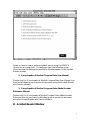
The appropriate indexes are pre-set on the CD-ROM, but a user might
change references to them. The figures below show the desired appearance of
each Index Selection box when accessing the respective information or
publication. To view these indexes, click the Search icon (R), which displays
the Adobe Acrobat Search dialog box. Clicking on the Indexes box displays
the Index Selection dialog box and shows the indexes available and selected
for searching on the CD-ROM.
The above information on Acrobat Reader indexes does not apply to the CD
Answer software, but it does apply to the CD Answer Reference Manual,
which is accessed using the Acrobat Reader with Search software by clicking
on its icon in the Encyclopedia of Medical Program Data Windows Group.
The following figures illustrate the appearance of the search indexes. They
may be accessed and changed if necessary by placing an x in the appropriate
square; however, most of the indexes listed have been disabled.
ENCYCLOPEDIA OF MEDICAL PROGRAM DATA CD-ROM INDEXES
21