1
VisualSMP Release Notes
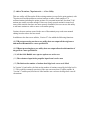
Release 3.3
Added Functionalities and Improvements
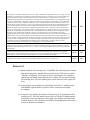
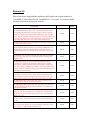
In STP, the maximum number of speeds is now 11, same as other
modules
In regular wave module, the number of user-specified speeds was
limited to 8. It is now 11.
In STH module, a new button allows the user to generate time histories
files (origin motion and point motion) for all existing *.csn files
Status
Author
Done
CBJ
Done
CBJ
Done
CBJ
Release 3.2
1. In version 3.1 and earlier, 0 deg and 360 deg heading cases were doubled counted in
Operational Index (OI) calculations. In version 3.2 and later, 360 deg heading cases
are excluded because they are the same as these 0 deg heading cases;
2. In version 3.1 and earlier, the user would lose all of his/her polar plots and Operational
Index (OI) specifications once VisualSMP exited from polar plots. If the user wanted
to reproduce the same polar and OI plots for a different sea state, she/he had to repeat
the same specifications all over again. This lack of 'memory' of VisualSMP was
sometime frustrating and annoying.
In version 3.2 and later versions, VisualSMP has a macro writing and reading
capability to fix that. VisualSMP allows the user to save his/her existing polar/OI
specifications to a text file. The user is able to open the text file to load the previously
saved polar/OI specifications. For example, for a certain operation that has limits on
ship roll angle, pitch angle, vertical acceleration, deck wetness and MII (Motion
Induced Interruption), the user make these specifications once (for one sea state) and
save them in text file. If the user wants to do the same polar plots and OI calculations
for a different sea state, she/he can simply reuse them by opening the text file. This file
may also be used for any other ships.
The mechanism to save, reload and modify polar plot conditions is accomplished
by the buttons and text window in the upper right coner of the Speed Polar Plot
Conditions window.
The user can type in the file name (including path) or click the “Browse” button
to pick a file. The “Write Sea States and Response to File” button will write all the
shown responses and related information to the specifed file. The “Add SS+Responses
From FIle” button will load/append all the sea state and responses from the file. The
“Add Response Only From File” button will load/append the response only and the
wave condition will use the one specified in the “Wave Height and Modal Period” pull
down combo box
3. From Version 3.2 and forward, VisualSMP GUI has a new feature to visually
highlight the current offset point in blue to distinguish it from other points. To try this
new feature, first go to View, set the view to Bodyplan. Then go to Edit -> Sections.
Double click any station and anthor dialog box will pop-up with all the offset points of
the chosen station listed. These offset points will be marked as red dots in the view.
Click any offset point from the list, this current offset point will be highlighted as a
blue in the body plan view
4. From Version 3.2 and forward, VisualSMP GUI has a new feature for creating (add) a
bilge keel. When a new bilge keel is added, VisualSMP will automatically add all the
stations that are inbetween the specified forward and aft bilge keel stations to the bilge
keel trace list. It will set the (halfwidth, waterline,angle) to (0,0,0). The user may use
the next two new features to modify these values visually and automatically.
From version 3.2 and forward, VisualSMP GUI will have a new feature which
helps the user to visually modify/define a bilge keel trace point and angle. The user
will be able to visually specify the bilge keel position (attachment point) for each
station. The GUI will automatically calculate the bilge keel angle, either along the
local surface’s normal direction or along the line connecting the attachment point and
the roll center if the position of the roll center is specified.
Bilge keel has to be created before its trace point can be modified (Edit -> Bilge
Keel, specify the fwd Station and aft station, set the width to 0 for the time being. It
will be reset once all the trace points are modified); Edit -> Sections, double click the
desired station number, the "Section Offsets" window will pop-up; Click on any offset
point from the list and the point will be highlighted on the view.
Once the bilge point is chosen, click the 'Modify' button and the 'Section Point'
window will pop-up; Choose "Bilge Keel Normal to the Local Surface" or "Bilge Keel
Through Roll Center". If the later is chosen, the user has to specify a roll center height.
Choose a bilge keel ID. The user may also choose to change the offset point. If you
presss the "OK" button, the bilge keel trace point at this station will be modified to this
particular point. The bilge keel angle at this station will be automatically calculated.
If the user wants the bilge keel to be in the middle of two points, highlight the upper
point, click the 'Add' button and the 'Section Point' window will pop-up; check the
'Interpolate' box and click 'OK'. A new point will be added to the offset table and it
will be the bilge keel trace point at this station.
If one does not want to modify the bilge keel position at this station, one needs to
make sure that the 'No bilge keel at this point' be checked.
The bilge keel options, the roll center height and the bilge keel ID will remain the
same until they are changed. Presently, VisualSMP offers these different ways to
automatically calculate the bilge keel angle. However, the user may go to the bilge
keel trace editing directly to specify another value
5. In Version 3.1 and earlier, the STH "RunOptions" numbering could be messed up in
certain circumstances. Once the numbering is messed up, the output file (*.csn, *.cos,
*.dat, *.ost) renaming could also be messed up. This problem has been fixed now.
6. In roll iteration which employed a spline interpolation was not robust enough in some
rare cases. It was in general good enough for quaquatic damping iteration. In the case
of GZ curve of a highly flares ship, the spline interpolation scheme may fail. A more
robust roll iteration scheme is now incorporated in Version 3.2 and forwar and fixes
the problem.
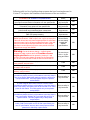
From V3.1 to V3.2
Added Functionalities and Improvements
Status
Author
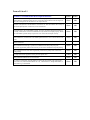
In polar plot, 0 deg and 360 deg heading cases were doubled counted in Operational Index (OI)
calculations in all previous versions. 360 deg heading cases are now excluded because they are the same as
these 0 deg heading cases.
Done
CBJ
In SEP GUI, in form "program options", the label for "Head Sea is at 0 deg" should be "Head Sea is at 180
deg"
Done
CBJ
Done
CBJ
Done
CBJ
Done
CBJ
Done
CBJ
In the earlier versions, the user would lose all of his/her polar plots and Operational Index (OI)
specifications once VisualSMP exited from polar plots.
If the user wanted to reproduce the same polar and OI plots for a different sea state, she/he had to repeat
the same specifications all over again.
This lack of 'memory' of VisualSMP was sometime frustrating and annoying. This new version of
VisualSMP has a macro writing and reading capability to fix that. VisualSMP allows the user to save
his/her existing polar/OI specifications to a text file. The user is able to open the text file to load the
previously saved polar/OI specifications. For example, for a certain operation that has limits on ship roll
angle, pitch angle, vertical acceleration, deck wetness and MII (Motion Induced Interruption), the user
make these specifications once (for one sea state) and save them in text file. If the user wants to do the
same polar plots and OI calculations for a different sea state, she/he can simply reuse them by opening the
text file. This file may also be used for any other ships .
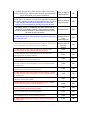
The Operation Index (OI) on the polar plot is calculated for all heading and speed combinations. Previous versions of
VisualSMP could not calculate the OI for a subset of speeds or heading. In the new version, there is a new button "Cal
OI for Specified Range". After click this button, a new dialog box will pop-up, the user can specify a speed range
and/or heading range and the OI will be calculated for these ranges only. However, this does not change the OI on the
polar plot, which is still for all speeds and headings.
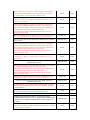
GUI has a new feature to visually highlight the current offset point in blue to distinguish it from other points. To try
this new feature, first go to View, set the view to Bodyplan. Then go to Edit -> Sections. Double click any station and
anthor dialog box will pop-up with all the offset points of the chosen station listed. These offset points will be marked
as red dots in the view. Click any offset point from the list, this current offset point will be highlighted as a blue in the
body plan view.
GUI has a new feature for creating (add) a bilge keel. When a new bilge keel is added, VisualSMP will
automatically add all the stations that are inbetween the specified forward and aft bilge keel stations to the
bilge keel trace list. It will set the (halfwidth, waterline,angle) to (0,0,0). The user may use the next two
new features to modify these values visually and automatically.
GUI will have a new feature which helps the user to visually modify/define a bilge keel trace point and angle. The user
will be able to visually specify the bilge keel position (attachment point) for each station. The GUI will automatically
calculate the bilge keel angle, either along the local surface’s normal direction or along the line connecting the
attachment point and the roll center if the position of the roll center is specified. Bilge has to be created before its trace
point can be modified (Edit -> Bilge Keel, specify the fwd Station and aft station, set the width to 0 for the time being.
It will be reset once all the trace points are modified); Edit -> Sections, double click the desired station number, the
"Section Offsets" window will pop-up; Click on any offset point from the list and the point will be highlighted on the
view. Once the bilge point is chosen, click the 'Modify' button and the 'Section Point' window will pop-up; Choose
"Bilge Keel Normal to the Local Surface" or "Bilge Keel Through Roll Center". If the later is chosen, the user has to
specify a roll center height. Choose a bilge keel ID. You may also choose to change the offset point. If you presss the
"OK" button, the bilge keel trace point at this station will be modified to this particular point. The bilge keel angle at
this station will be automatically calculated; If the user wants the bilge keel to be in the middle of two points,
highlight the upper point, click the 'Add' button and the 'Section Point' window will pop-up; check the 'Interpolate' box
and click 'OK'. A new point will be added to the offset table and it will be the bilge keel trace point at this station; If
one does not want to modify the bilge keel position at this station, one needs to make sure that the 'No bilge keel at this
point' be checked. The bilge keel options, the roll center height and the bilge keel ID will remain the same until they
are changed. Presently, VisualSMP offers these different ways to automatically calculate the bilge keel angle.
However, the user may go to the bilge keel trace editing directly to specify another value.
Done
CBJ
Done
CBJ
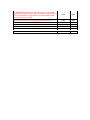
In roll iteration which employed a spline interpolation was not robust enough in some rare cases. It was in general
good enough for quaquatic damping iteration. In the case of GZ curve of a highly flares ship, the spline interpolation
scheme may fail. A more robust roll iteration scheme is now incorporated and fix the problem.
Done
CBJ
In Validation, the message "You have too many bilgekeel station points, limit is 15" is taken out
Done
CBJ
In STH, Version 3.1 and earlier, the "RunOptions" numbering could be messed up in certain circumstances. Once the
numbering is messed up, the output file (*.csn, *.cos, *.dat, *.ost) renaming could also be messed up. This problem has
been fixed now.
Release 3.1
(1) Quasi-nonlinear roll restoring force. VisualSMP, like other frequency-domain
ship motion programs, assumes linear restoring forces. This is the so-called
‘wall side’ assumption. To increase accuracy, especially for low freeboard,
tumble-home or highly flared ships, the new version will use quasi-nonlinear
roll restoring force. The roll restoring force will be based on a user-input GZ
curve.
(3) In the irregular wave module, the calculations for all the 11 members of the
Ochi-Hubble 6-param family of spectra will be carried out and output
accordingly.
(4) In regular wave module, the number of frequencies in 2D calculation will be
increased to 25. This will enhance the accuracy of 2D and 3D hydrodynamic
coefficients, forces and moments. The regular wave module will take longer
to finish. However, the calculation will still be fast enough that it will not be a
concern in normal circumstances.
(5) Maximum number of speeds is set to 11 instead of 8. This will be been
implemented in both regular wave module and irregular wave module
calculations as well as post-processing.
(6) In speed polar plots, the speed increments for the polar plot have been refined
to 2, 3 and 5 knots instead of 2, 5 and 10 knots. The default speed increment is
set to 5 knots instead of 10 knots.
(7) The polar plot contours are calculated and drawn at a much smaller intervals,
about half of what it was before. The combination of allowing 11 speeds to be
calculated and a finer polar plot speed increments significantly enhances the
accuracy of the contour calculation and polar plotting.
(8)
Other improvements to the GUI.
From v3.0 to v3.1
Added Functionalities and Improvements
Status
Author
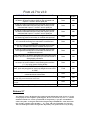
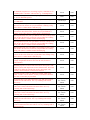
Quasi-nonlinear roll restoring force: To increase accuracy, especially for low freeboard,
tumble-home or highly flared ships, the new version uses quasi-nonlinear roll restoring force.
The roll restoring force will be based on a user-input GZ curve.
Done
CBJ
Number of frequencies in 2D calculation is increased to 25. This will enhance the accuracy of
2D and 3D hydrodynamic coefficients, forces and moments.
Done
CBJ
In Irregular Wave, the "Ochi-Hubble 6 param - all cases" calculation did only the Family #1
correctly. All the other 10 were not calculated correctly and were not output properly. All the
11 Ochi-Hubble 6-param family of spectra are now carried out and output correctly.
Done
CBJ
Done
CBJ
Done
CBJ
The combination of allowing 11 speeds to be calculated and a finer polar plot speed
increments significantly enhances the accuracy of the contour calculatiion and polar plotting.
Done
CBJ
The combination of all of the above significantly enhances the quality of the contour and
polar plotting.
Done
CBJ
Fin input form did not populate correctly in some special cases
Fixed
CBJ
Many additions/modifications to user's manual
Done
CBJ
In version 3.0 and before, when the load TF is turned off, the program is still writes input #
Record Set 6A (some of them should be set to 0), # Record Set 6f - Weight Distribution, #
Record Set 6g - Load Stations
Done
CBJ
The post-processing, the speed increments for the polar plot have been refined to 2, 3 and 5
knots instead of 2, 5 and 10 knots. The default speed increment is set to 5 knots instead of 10
knots
The polar plot contours are calculated and drawn at a much smaller intervals, about half of
what it was before.
Release 3.0
Major improvements for the Irregular Module have been done to this version of Visual
SMP. The new version is named Version 3.0. These improvements took advantages of
recent developments and improvements that NSWC Cardirock has done to its Ship
Motion Program (SMP). The improvements are:
(1) Motion Sickness Incidence (MSI) is calculated based on McCauley, et al, and S.
R. Olson;
(2) Motion Induced Interruption by sliding and tipping is calculated based ROSS
GRAHAM;
(3) Slamming pressure and sectional slamming force were re-exammed very
carefully, improved according to Ochi and Motter;
(4) "NO. SLAMS PER HOUR" was re-exammed very carefully, modified and
improved.
(5) Examination and Improvements on longitudinal and lateral force estimator
calculations;
(6) Output of MSI, sliding MII, tipping MII are all added to the polar plot file for
reports;
(7) Fine tuning of some of the *.oot output to avoid floating point overflow;
(8) Fine tuning of some of the *.oot output to avoid confusion;
(9) Fine tuning of some of polar plot output to avoid confusion;
(10)
Calculating wave elevation at an arbitrary point for both long-crested and
short crested seas in STH post-processing
(11)
Calculating the relative motions of a point relative to wave fluctuation, for
both long-crested and short crested seas in STH post-processing
(12)
Calculating the cargo latching forces at the specified deck point on in
STH post-processing
Following table is a list of improvements that have been implemented in Version 3.0 to
improve the friendliness and robustness of the user interface.
From v2.7 to v3.0
Added Functionalities and Improvements
Status
Author
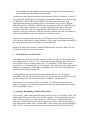
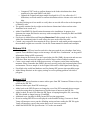
As part of a major improvement of the Irregular wave module,
the Motion Sickness Incidence (MSI) is now calculated and
output in *.oot and *.smr for polar plot
Done
CBJ
As part of a major improvement of the Irregular wave module,
the Motion Inducded Interruption (MII) due to sliding is now
calculated and output in *.oot and *.smr for polar plot
Done
CBJ
As part of a major improvement of the Irregular wave module,
the Motion Inducded Interruption (MII) due to tipping is now
calculated and output in *.oot and *.smr for polar plot
Done
CBJ
Done
CBJ
Done
CBJ
As part of a major improvement of the Irregular wave module,
the longitudinal and lateral force estimator calculations are
modified and improved
Done
CBJ
*.smr polar output, the Motion Inducded Interruption (MII) is now
output in terms of number of interruptions per minutes instead of
sliding/tipping estimators
Done
CBJ
In *.oot and *.smr output, the added resistance and hull loads
are output as small numbers to avoid floating point overflow
(*****) by using greater dividing factors
Done
CBJ
Regular wave module, Edit->Section->Weights->Station Weight
data, pitch and yaw gyradii of each lump weight were not active
in VSMP
Fixed
CBJ
Done
CBJ
Done
CBJ
Done
CBJ
Done
CBJ
As part of a major improvement of the Irregular wave module,
the slamming pressure calculation is modified and improved
As part of a major improvement of the Irregular wave module,
the sectional slamming force calculation is modified and
improved
As part of a major improvement of the Irregular wave module,
the "NO. SLAMS PER HOUR" modified and improved
Calculating wave elevation at an arbitrary point for both longcrested and short crested seas
Calculating the relative motions of a point relative to wave fluctuation,
for both long-crested and short crested seas
The above 2 items are basically the functions of the SMP’s old ACTH
module.
Calculating the cargo latching forces at the specified point
Release 2.7
For unknown reasons, the Regular Wave module and the SEP module of the Version 2.7 do not
work properly on some computers. If this happens, the user can run the “depends.exe”, which is
distributed with the new version of Visual SMP. In “Dependency”, open file “visualSMP.exe”
which is the folder “C:\Program Files\Proteus Engineering\VisualSMP\bin”. Click main menu
item “Profile”, and then “Start Profiling … F7”. Click “OK” and Visual SMP V2.7 will start.
The user should ignore all the messages that “Dependency” has produced. Do not try to debug
or trace anything. For other modules and all the post-processing functions, the user should use
Version 2.7 directly and not running it inside Dependency.
In addition to improving the friendliness and robustness of the user interface, Version 2.7
also features the following powerful geometry manipulation utilities. These utilities such
as "Read IDF", “Read Offsets From GHS GF file” and "Modify Sections" make
preparing offsets almost an automatic process. For example, the user may output the
offset table from FASTSHIP in an IDF format, or prepare the offsets in a GHS GF style
text file. Each section can have up to 70 points. The offset points may go above the
waterline. After IDF or GF file is imported into VSMP, the user can use ‘Modify
Sections’ to clip the sections to a particular waterline, and then use other new utilities to
make point distribution to the user desired level section by section.
The other area of major improvements is in STH preprocessing. STH post-processing
now has new utilities that can output all motion, velocity and accelerations information if
the origin and/or any point on the ship to user specified files.
Besides, the limit on the number of stations that bilge keels can cross is lifted. The user
can have the bilge keel cross all the stations.
(1)
Read Offsets From GHS GF file
VisualSMP can read in section offset data from a GHS style GF file. The file must have
an extension name of “.GF” or “.gf”. It can be edited from a GHS geometry file but it is
not exactly the same as a GHS geometry file. A VisualSMP *.GF file has two parts:
header (lines 1~7) and offset table (Line 8~beyond). The header lines have to be prepared
manually according to the offset table’s coordinate system. The offset table follows the
exact format of a GHS geometry file.
A GHS geometry file can be generated using GHS model converter. To create a
VisualSMP *.GF file, the user needs to delete the first few lines of the GHS file, use only
the offset table, add a few header lines that a VisualSMP *.GF file requires.
Alternatively, the user may also edit a VisualSMP *.GF file using other means. One
option is to export a *.csv file from a spread sheet file and add the header lines required
by the VisualSMP *.GF file.
(2) Automatic Distributing Sectional Offset Points
A New Utility “Make Point Spacing Roughly the Same As A User Specified Value” will
automatically delete points if they are too close together. It will automatically add extra
points wherever points are far apart. However, it will preserve all the points that are
marked as knuckle points even if a knuckle point is too close to other knuckle point(s).
This utility button resides in the ‘Section Offsets’ form, which can be invoked through in
Edit->Section. The user specifies his/her desired point spacing. The utility will delete
and/or add points based on a simple fuzzy logic algorithm. It will preserve the user’s
initial offset point as much as possible. By doing so, the resulted point spacings are not
exactly equal. They are as equal as possibly could with an aim to preserve as many user’s
given points as possible.
This utility can be used iteratively by starting with a smaller spacing and going up.
However, this utility does not make any spline interpolation or smoothening. The user
must give enough points in the initial offset points to effectively and fully describe the
section shape. The user should not rely on this utility to design or guess the section
shape.
In combination with other utilities such as "Read IDF" and "Modify Sections", this new
utility makes preparing offsets almost an automatic process. For example, the user may
output the offset table from FASTSHIP in an IDF format. Each section can have up to 70
points. These points may concentrate in small curvature areas. The offset points may go
above the waterline. After IDF file is imported into VSMP, the user can use ‘Modify
Sections’ to clip the sections to a particular waterline, and then use this new utility
section by section to make point distribution to the user desired level.
(3) Add Extra Points to Have A Total of 70 Points --- A New Utility
This new utility will not delete any existing points. It simply adds a mid-point for the
largest segment in the present section until the maximum number of points reaches 70. It
applies to the present station/section only. If you have high density of points in small
curvature area and you don’t want to delete any of them, you may want to use this utility
to add points in other low density area so that the section can have more evenly
distributed offset points. However, a normal section usually does not necessarily need 70
points in order to have good hydrodynamic results.
(4) Multiply All the Z’s (Except the WL Point) by A Specified Factor
This new utility simply multiply the z-value of each point (except the waterline point) by
a user specified factor. It applies to the present station/section only.
(5) Add A Point Station at A Specified Station Number
This new utility simply add a point station at a STA # specified by the user. A "point
station" has only three closely spaced offsets points and is effectively a point section.
(6) Delete all 'dry' stations --- A New Utility
This new utility will delete all the stations that have no offset point(s) on or below the
waterline.
(7) Add to 70 stations, 70 points each --- A New Utility
This new utility will first make all the existing stations (except for the point stations) with
70 points each and then add new sections/stations to make a total number of 70
sections/stations including the points sections. For a normal mono-hull, less than 23-40
stations are usually accurate enough. If there are closely spaced stations in some local
areas while stations elsewhere are more sparsely distributed, the user can use this utility
to add more stations to achieve more even station spacing.
Caution, the new stations created in the area of discontinuity may need some manual
editing in order to have the best result.
In addition to the above new utilities, Version 2.7 also added the following functions:
(8) STH post-processing now has a new utility that can output all the origin wave
and motion information to a user specified file
(9) STHpost-processing has a new utility that can output all motion information of
any point to a user specified file.
(10) All the Ochi-Hubble wave spectra options are active now
(11) The resistance input in the propeller input form is active now
(12) The limit on the number of stations that bilge keels can cross is lifted
In Version 2.6 and earlier, the limit on the number of stations crossed by the bilge keel is
15. This could be extremely restrictive if the user uses more than 25 offset stations. In
Version 2.7 and beyond, this limit is lifted and the user can have the bilge keel cross all
the stations.
Following table is a list of problems/improvements that have been implemented in
Version 2.7 to improve the friendliness and robustness of the user interface.
Problems or Added Functionalities
Status
STH post-processing now has a new utility that can output all
the origin wave and motion information to a user specified file
STHpost-processing has a new utility that can output all motion
information of any point to a user specified file
Work are underway for calculating wave elevation at an arbitrary
point for both long-crested and short crested seas
Work are underway to add all the ACTH functionalities to Visual
SMP STH post-processing
This new utility is
fully functional
This new utility is
fully functional
Future
improvement
Future
improvement
In VSMP Irregular Wave, Seaway input did not exact follow
SMP95 specifications. VSMP ouput to the *.irg file an empty line
if the user did not have any wave heights specifed. If would also
output an empty line for the wave modal period input. If the user
chose to have modal periods specified while no wave height
specified, it would output a line for the wave periods. All these
things do not comply with SMP95.
Record Set 4s
are not exactly
comply with
SMP95
specifications
CBJ
The user has to
fix the *.irg file
using text editor
CBJ
Fixed
CBJ
Fixed
CBJ
Fixed
CBJ
In VSMP Regualr Wave, Edit->Section->Section Offset
(invokable by double click any of the stations in the list), there is
now a new untility "Make point spacing roughly the sams as" a
user specified value. This utility applies only to the present
section/station.
This new utility is
fully functional
CBJ
In VSMP Regualr Wave, Edit->Section->Section Offset
(invokable by double click any of the stations in the list), there is
now a new untility "Add extra points to have a total of 70" offset
points for this station. This utility applies only to the present
section/station.
This new utility is
fully functional
CBJ
This new utility is
fully functional
CBJ
This new utility is
fully functional
CBJ
Author
CBJ
CBJ
CBJ
CBJ
Warning: Due to the above change, *.irg file that was
prepared by ealier versions and had 0 number of wave
height specified cannot be opened by Version 2.7 and
beyond. The user has to delete the empty line for Record Set
4c, the line for Record Set 4d and the line for Record Set 4e.
In VSMP Irregular Wave, Seaway input, "Ochi-Hubble 6 param most probable" was not active
In VSMP Irregular Wave, Seaway input, "Ochi-Hubble 6 param all cases" was not active
In VSMP Irregular Wave, Seaway input, "Ochi-Hubble 6 param Arbitrary" was not active
In VSMP Regualr Wave, Edit->Section->Section Offset
(invokable by double click any of the stations in the list), there is
now a new untility "Multiply all Z's (excepth WL point) by" a
specified factor. This utility applies only to the present
section/station.
In VSMP Regualr Wave, Edit->Section, there is now a new
untility "Add a point station at STA #" that is specified by the
user. A "point station" has only three closely spaced offsets
points that is effectively a point section.
In VSMP Regualr Wave, Edit->Section, there is now a new
untility "Delete all 'dry' stations" that deletes all the stations that
has no offset point on or below the waterline.
This new utility is
fully functional
CBJ
In VSMP Regualr Wave, Edit->Section, there is now a new
untility "Add to 70 stations, 70 points each" that will first make all
the existing stations (except for the point stations) with 70 points
each and then add new sections/stations to make a total
number of 70 sections/stations including the points sections.
This new utility is
fully functional
CBJ
The above utilities, in combination with other utilities such as
"Read IDF" and "Modify Sections", makes preparing offsets
almost an automatic process. If used effectively, these utilities
can save the user lots of time
Comments only
CBJ
In VSMP Regular Wave, Edit->Propeller->Resistance input form
was not active at all
Limit on the number of bilge keel stations is only 15. This could
be very restrictive when the user has more stations.
Fixed,
Resistance input
is fully
functioning now
Fixed. You now
can have upto 70
bilge keel
stations
CBJ
CBJ
In VSMP Regular Wave, Edit->Sections, the knuckle input
information was not passed back and forth correctly
Fixed
CBJ
In VSMP Regular Wave, Edit->Sections, the knuckle input
information was not written correctly
Fixed
CBJ
In VSMP Regular Wave, Edit->Sections->stem profile, always
crashed and could not be activated at all
Fixed
CBJ
In VSMP Regular Wave, Edit->Sections->stem profile, it could
not read more than 10 points inputs, not even a file that written
by VSMP itself.
Fixed
CBJ
In VSMP Regular Wave, Edit->Sections->stern profile, always
crashed and could not be activated at all
Fixed
CBJ
In VSMP Regular Wave, Edit->Sections->stern profile, it could
not read more than 10 points inputs, not even a file that written
by VSMP itself.
Fixed
CBJ
In VSMP Regular Wave, in certain unusual conditions, Edit>Sections would crash VSMP
Fixed
CBJ
In VSMP Regular Wave, in certain special situations, invoking
Edit->fin->lift curve would crash the program
Fixed
CBJ
Fixed
CBJ
Fixed
CBJ
Fixed
CBJ
Fixed
CBJ
In VSMP Regular Wave, in certain special situations, invoking
Edit->fin->Gains would crash the program
In VSMP Regular Wave, in certain special situations, invoking
Edit->fin->control would crash the program
In VSMP Regular Wave, in certain special situations, invoking
Edit->sinkage and trim would crash the program
In VSMP Irregular Wave, the number of wave modal periods is
15 instead of 8
In VSMP Regular Wave, if the user forgot to give a title, VSMP
would write a empty title in the input file. Empty title would,under
certain circumstances, upset VSMP if the user wanted to load
the input file back into VSMP
Fixed
CBJ
Above problem existed in VSMP Irregular Wave Model as well
Above problem existed in VSMP SEP Model as well
Above problem existed in VSMP STH Model as well
Above problem existed in SWATH Regular Wave Model as well
Fixed
Fixed
Fixed
Fixed
CBJ
CBJ
CBJ
CBJ
Above problem existed in SWATH Irregular Wave Model as well
Fixed
CBJ
In STH, there was an error in heading verification
Fixed
CBJ
Release 2.6
Most of the known bugs/problems with mono-hull regular and irregular modules of
VisualSMP v2.5 have been fixed in VisualSMP v2.6. As a result, v2.6 is more reliable
and more robust than the previous versions.
Problems
Status
Author
Fixed
CBJ
Fixed
CBJ
Fixed
CBJ
If "$UNITS" was not found in the IDF file, IDF reading would fall
into an endless loop and never came back and the user had to kill
VSMP by force
Fixed
CBJ
In mono-hull regular wave, the sink/trim mechanism in EDIT>Sections was confusing. It should have nothing to do with the
trim/sinkage in Edit->General information and Edit->sinkage and
trim. The existing sink/trim form in EDIT->Sections could be easily
confused with the variable geometry option and related inputs (speed
dependent trim and sinkage).
Fixed
CBJ
Fixed
CBJ
Fixed
CBJ
Fixed
CBJ
Fixed
CBJ
Fixed
CBJ
Fixed
CBJ
In VSMP Regular Wave Input, Edit->General Information, when
saving using the OK button, a message window always poped up
telling you “Please enter either FEET or METER in caps for units
type”. The units and the constants could never be changed. However,
it was not only annoying to show this message even if the user did
everything right, moreover, user could not use METER units.
In SMP Regular Wave Input, speed inputs should all be in knots but
it was not clear from the form
In SMP Regular Wave, Edit->Sections-> read IDF, it always
assumed that the IDF input units were SI and the VSMP units were
English. Most of the time, the information in the IDF file were
interpreted incorrectly even though the user provides a perfect IDF
file
In the above form, the definitions of the inputs were not clear and the
form did not function properly. ‘final’ should be final draft at lcf,
‘trim’ in degrees, positive bow up. The ‘final’ did work, but ‘trim’
input was never registered by the program when draft=old_draft.
In SMP Regular Wave Input, Edit->fin, when you ‘add’ a fin, it
would strangely tell you “please add a number”.
In SMP Regular Wave Input, Edit->fin, if the 'active fin' check box
was clicked before the fin geometry was defined, it would tell you
“please add a number”.
The fin form crashed most of the time if you want to specify an
active fin. The fin form behaved very strangely. It was impossible
for the user to give any input related to active fin, or fin control, or
fin lift curve, etc.
When you deleted all the fins, it did not let you go if you used
'modify' or 'OK'. You had to simply close the form after deleting all
the fins.
The Fin form, after you added a new fin, it always went back to
show the first one, not the one you just added. It is nothing wrong
with it but it is counter-intuitive and annoying
In the regular wave fin form, the “Enable Automatic Gain Control”
button does not automatically written to the data base if you don’t
use “Mod button”. ‘OK’ button will not make it stick.
Fixed
CBJ
In mono-hull regular wave, Edit->Sections, it did not read the
number of variable offset points of each station correction, '28' was
read as '8', for example
Fixed
CBJ
Fixed
CBJ
Fixed in all
CBJ
Comments only
CBJ
Fixed
CBJ
Fixed
CBJ
Comments only
CBJ
Fixed
CBJ
Fixed in all
CBJ
Comments only
CBJ
Fixed
CBJ
Fixed
CBJ
Not fixed yet
CBJ
VSMP does perform MII calculations using default LONTIP,
LATTIP,TRIML if instructed to do so. Fully functional MSI and MII
calculation will be implemented using Reilly Conrad's program in
the future
Comments only
CBJ
In monohull, irregular wave, in writing *.irg file, “# Record Set 7d Slam pressure, Slam Force Data” should be “# Record Set 7e - Slam
pressure, Slam Force Data”
Fixed
CBJ
When reading/importing a regular wave input file (*.inp) that was
not created by VSMP or modified by the user, if there were extra
spaces/characters/numbers at the end of an input line, VSMP could
not interpret the input values correctly. These extra
spaces/characters/numbers caused imcomplete inputs, incorrect
inputs or program crash.
The above problem affected regular wave input records sets 2, 4, 4b,
5, 6, 7, 8, 9, 9b, 9c, 9d, 9e, 9f, 9h, 10, 11, 12, 13, 14, 15 and 16.
However, if the user prepares input using VSMP, the above problem
does not exist.
When reading/importing a irregular wave input file (*.irg) that was
not created by VSMP or modified by the user, if there were extra
spaces/characters/numbers at the end of an input line, VSMP could
not interpret the input values correctly. These extra
spaces/characters/numbers caused imcomplete inputs, incorrect
inputs or program crash.
The above problem affected almost all of the irregular wave input
records sets, i.e., Sets 2, 3, 4, 4b, 4c, 4d, 4e, 5, 5b, 6, 6b, 7, 7b, 7c,
7d, 7e and 7f
However, if the user prepares input using VSMP. The above
problem does not exist.
When reading/importing a SEP input file (*.sep) that was not created
by VSMP or modified by the user, if there were extra
spaces/characters/numbers at the end of an input line, VSMP could
not interpret the input values correctly. These extra
spaces/characters/numbers caused imcomplete inputs, incorrect
inputs or program crash.
The above problem affected almost all of the irregular wave input
records sets, i.e., Sets 2, 3, 4, 5, 6, 7, 8, 9 10, 11, 14 and 15.
However, if the user prepares input using VSMP. The above
problem does not exist.
VSMP irregualar wave GUI, the absolute motion input form did not
take the following MSI and MII related inputs: MSITIM, LONTIP,
LATTIP,TRIML
In the above input form, 'Enable' and 'Enable Toe's' selections of the
MSI combo box failed to invoke the MSI/MII input form
VSMP can not do MSI calculations at this moment
In monohull, irregular wave, in writing *.irg file, “# Record Set 7e Load Responses” should be “# Record Set 7g - Load Responses”.
In monohull, irregular wave, in writing *.irg file, add “# Record Set
7f - Severe Motion Responses”
At the moment, Severe Motion Responses inputs were not supported
by VSMP GUI
Fixed
CBJ
Done
CBJ
Not fixed yet
CBJ
The Skeg form, after you added a new skeg, it always went back to
show the first one, not the one you just added. It is nothing wrong
with it but it is counter-intuitive and annoying
Fixed
CBJ
The Bilge keel form, after you added a new bilge keel, it always
went back to show the first one, not the one you just added. It is
nothing wrong with it but it is counter-intuitive and annoying
Fixed
CBJ
The Propeller shaft form, after you added a new shaft, it always went
back to show the first one, not the one you just added. It is nothing
wrong with it but it is counter-intuitive and annoying
Fixed
CBJ
The Propeller strut form, after you added a new strut, it always went
back to show the first one, not the one you just added. It is nothing
wrong with it but it is counter-intuitive and annoying
Fixed
CBJ
The Propeller form, after you added a new propeller, it always went
back to show the first one, not the one you just added. It is nothing
wrong with it but it is counter-intuitive and annoying
Fixed
CBJ
The Rudder form, after you added a new rudder, it always went back
to show the first one, not the one you just added. It is nothing wrong
with it but it is counter-intuitive and annoying
Fixed
CBJ
In Regular Wave input, Roll tank properties: window was not wide
enough. Longitudinal location’s unit was not clear, ft/meter or
station number
Fixed
CBJ
Roll tank properties: it allowed this form and its subsequent U-tube
and Free-surface tank input forms to have different units, these units
could also be different from the unit used by other inputs. This
certainly caused confusion, inconsistence and error
Fixed
CBJ
Roll tank properties, after you added one roll tank, either using
‘Add’, ‘U-tube’ or ‘Free-surface’, it always went back to show the
first tank, not the tank you just added
Fixed
CBJ
In Regular Wave input, Edit->Hull Offset, the “OK” and ”Cancel”
buttons have the same effects. It is very confusing both of them
showed up.
Fixed by deleting
the ”Cancel”
button
CBJ
In Regular Wave input, Edit->Hull Offset->Section Offsets, the
“OK” and ”Cancel” buttons have the same effects. It is very
confusing both of them showed up.
Fixed by deleting
the ”Cancel”
button
CBJ
In Regular Wave input, Edit->Hull Offset->Station Weights, the
“OK” and ”Cancel” buttons have the same effects. It is very
confusing both of them showed up.
Fixed by deleting
the ”Cancel”
button
CBJ
In Regular Wave input, Edit->Bilge Keels, the “OK” and ”Cancel”
buttons have the same effects. It is very confusing both of them
showed up.
Fixed by deleting
the ”Cancel”
button
CBJ
In Irregular Wave input, Edit->seaway description, the “OK” and
”Cancel” buttons have the same effects. It is very confusing both of
them showed up.
Fixed by deleting
the ”Cancel”
button
CBJ
In RAO plot, when the RAO type changed, the RAO plot did not
always automatically update.
In RAO plot, the RAO plot information window was too narrow and
did not show all the text.
Fixed
CBJ
Fixed
CBJ
In SMP Irregular Wave Input, Edit->Seaway description, user’s
initial input values were lost once any of the Ochi options was
clicked, even though none of Ochi options were active . To get them
back on the forms, the user had to reload the *.irg file.
Fixed but the Ochi
options are still
inactive
CBJ
Fixed
CBJ
Fixed
CBJ
The RAO
definition is now
spelled out in
many places
CBJ
Fixed
CBJ
Fixed
CBJ
Fixed
CBJ
Fixed
CBJ
Fixed
CBJ
Fixed
CBJ
Fixed
CBJ
Not fixed yet
CBJ
Not fixed yet
CBJ
Not fixed yet
CBJ
In SMP Irregular Wave Input, Edit->Seaway description, the peak
factor was not limited to 1.0 to 4.0. Besides, the peak factor should
be always initialized to be 1.0.
The above problem also exists for Responses for Relative Motion
Slam pressure and slam forces
SMP has an unconventional definition of RAO, i.e., RAO is the
square of its corresponding transfer function. All SMP plots and
outputs use this definition. However, this definition was not spelled
out explicitly in previous VSMP (not even in the User’s Manual) and
would cause misunderstandings
The setup “VisualSmpSetup_v25.exe” puts an Icon “VisualSmp
v2.2.2” on the desk top, it should be named “VisualSmp v2.5”
instead
On page 33 of manual, it refer to Section XXX, it should have a
section number
Page 34 of Manual, failed to state the bilge keels are always assumed
to be in pairs. Different sets of bilge keels are different pairs.DONE.
SEP sample file has incorrect information
In SEP GUI, edit->Criterion, “Small boat launch rmp availability
given in minutes” , ‘rmp’ should be ‘ramp’
In monohull irregular wave, Ship response->Response for absolute
motion, the descriptions for the motion options were not clear
In monohull, irregular wave, Ship response->Response for relative
motion, the descriptions for the motion options were not clear
VSMP GUI does not support Wave Profile input at all at this
moment.
VSMP GUI does not support sever motion table input at this
moment.
VSMP does not support Ochi-Hubble spectrum at this moment.
Release 2.5
•
Due to the large number of support calls relating to loads calculations in SMP95, version 2.5
has been created to integrate all known fixes/code updates relating to Horizontal and Vertical
forces and moments including Torsion.
o Integrate John Dalzell’s code package from 2001 containing horizontal and vertical
loads code changes to achieve closure in the calculations.
o Updated documentation with respect to the loads input variables that have changes in
their definition.
o Added Dalzell’s loads calculation theory to the users manual
•
•
•
•
•
o Computed CG47 loads to confirm changes in the loads calculations have been
transferred to the main SMP95 code base.
o Updated the FrigateLoads input model developed for v2.2.4 to reflect the v2.5
definitions, exercised model to confirm calculations achieve closure at the ends of the
ship.
Exercised existing set of test models to verify there are no side-effects due to the integration
of Dalzell’s code.
The gyradii contained in the weight section data are dimensional values and not ratios
formulated as in record set 5.
Added VisualSMP File Specifications document to the installation. Its purpose is to
document the output files that the user may wish to manipulate. Currently the RAO and SMR
files are documented.
Fixed error in Added Mass and Damping Dimensional Tables printed in the *.out file.
Added the dimensional units for each term to the notes at the end of the table.
Created a new output file that contains the Wave Spectra for each modal period computed in
the monohull irregular wave module. See the file format manual for details and examples.
Release 2.2.4
•
•
•
•
•
Fixed bug in the SEP user interface and solver that prevented the wave database from being
opened. Users should no longer see the message “Invalid Wave Combination” on the general
information dialog in SEP erroneously.
Slight change in the format of the new speed polar plot file (SMR), the rms min and rms max
fields have been increased in length to account for larger values of added resistance.
Create a new sample with the loads data necessary to compute vertical shear and bending
moments. Please remember that SMP95 does not correctly predict the horizontal plane forces
and moments. The new sample is in the Frigate folder and is called frigateLoads.(inp,irg).
Fixed link to the world land database used for plotting SEP percent time operability maps.
Added Hoops Heuristic to the registry settings to correct plotting problem with closed
polygons.
Release 2.2.3
•
•
•
•
•
•
•
Updated IDF convert function to remove white space from IDF Command Tokens as they are
read from the IDF file.
Removed white space from IDF section type.
Added code to the IDF file parser to change the case of the IDF command tokens to upper
case before using them in comparisons to find the items of interest in the IDF file.
Added a check for end of file when the IDF Parser is looping through the file, converting
IDF files should no longer hang up VisualSMP.
Additional error checking for badly formed IDF section components.
Errors in reading IDF file are now displayed on the ReadIDF dialog, if an error is found
Vsmp will attempt to move past the offending station and start reading the IDF file again.
Vsmp will attempt to convert the section data even if errors are present.
Added the IMSA IDF File Specification v3.03 to the user manual.
Release 2.2.2
•
•
•
•
Corrected the Polar plotting routine to correctly show the speed labels on the plot.
Added duplicate offset check for Monohull stations in the Validation Command.
Removed the old help topic button from the menus and replaced it with a button that opens
the user manual.
The polar plots have been updated to have the following behavior which was always
intended.
o If the lower limit of a response condition is zero the lower limit is ignored and you
end up with 2 color regions.
Green is less than the upper limit
Red exceeds the upper limit, only speeds and headings that exceed the upper
limit are counted in the Operability index.
The blue contour represents the upper limit
o If the lower limit is non-zero and less than the upper limit the polar plot showing the
limits will have 3 color regions
Green is less than the lower limit
Yellow is greater than the lower limit and less than the upper limit
Red exceeds the upper limit, only speeds and headings that exceed the upper
limit are counted in the Operability index.
The blue contours represent the upper and lower limits.
•
•
•
o If the lower limit is the same as the upper limit you get the same effect as if the lower
limit was set to zero.
o If the lower limit exceeds the upper limit the lower limit will be set to the upper limit.
For combined or overlaid limits only the conditions that have the “Include in Overlay”
checkbox selected will be included, this is a change from previous versions.
Added error checking for the correct types of units in Monohull General Information Dialog,
the FORTRAN code in the SMP solver only allows FEET or METER. Also updated the
message from the validation routine to better inform the user if the unit’s type is wrong.
Updated the user manual for polar plotting.
Release 2.2.1
• Modified new speed polar file format slightly to account for larger numbers in the added
resistance section.
• SuperPro Drivers must still be installed after VisualSMP has finished installing, there is now
an icon placed on the desktop to perform the installation..
• Updated Sentinel Security Drivers to 7.2.2.
• Replaced FastLockv2_smp with the standard FastLock program.
• Replaced InitLockv2_smp with the standard InitLock program.
• Modified the GenInp and SEP components to access the path to the sep96.wav data file from
the main VisualSMP application. If VisualSMP is not installed to the default location the
registry entry will have to be updated per the installation instruction in the manual.
• Swmp and Swrsp Modules required explicit closing of all FORTRAN files.
• Changed security code to find lock on repetitive calls to the same module.
• Added code to GenInput, SmpIregWave, and Sep Components to remove temporary files that
are not needed after the component has finished, also updated list of files to be renamed on
completion.
• Fixed bug in STH where output files were not being renamed for run number 2.
• Fixed bug in SmpIregWave where added resistance was printing output even when not
enabled. Also, removed debug statements being generated in the log file (*.lgg).
• Removed debug files fort.49, fort.95
• Cleaned up smpRegWave’s output files (*.out and *.log) removed debug statements and
added table headers where missing.
• VisualSMP now compiled with VisualStudio .Net 2003, and Intel Fortran 9.0 and works
correctly.
• The binary SPL file used to plot speed polar plots has been superseded by the SMR file. The
new plotting file combines the body motions and relative motions (SPL and SLM) files in the
monohull module and replaces the RMS file from the SWATH module.
• Fixed error in the lateral force estimator (tip subroutine) for the SWATH irregular wave
module. The wrong variable was being passed to the tip subroutine for the number of
frequencies to loop over.
• Added more error checking and exception handling to try and recover from more fatal errors
when invalid input is encountered in the FORTRAN sections of Vsmp.
• Added the command line version of ACTH to the distribution. ACTH builds on the STH time
histories of the ships motion at the CG and allows the user to compute motion time histories
are various points along the ship. To run the command line ACTH, the files from Vsmp’s
STH modules output will have to be renamed to conform to the old file name conventions of
STH/ACTH.
o STH output files:
M5415_01.dat changes to SR101.dat
M5415_01.osc changes to SR101.osc
• Corrected the x-axis label on the RAO plots to be Frequency vice Encounter Frequency.
• Minor Manual Updates to include the correct email address for technical support, updated the
copyright date, and the NAVSEA agreement expiration date. Added documentation for STH
and ACTH file formats.
• Fixed the behavior of the Evaluate Time History "WRITE" button after calculating, a
"OPEN" window appears which allows you to save the file by clicking "OPEN". It now
correctly prompts the user to save. Also, added the extension if the user left if off the file
name.
• Corrected setup file, the setup program now installs VisualSMP into the correct Proteus
Engineering Directory and create appropriate registry entries for a default installation.
Release 2.2.0
• VisualSMP now compiled under VisualStudio .Net 2003, and Intel Fortran 8.1.
• Updated Hoop Graphics Library to V11.
• Fixed bug in parsing of Wave Condition and Response Names.
• List of speeds from the spl binary header were incorrectly typed as double, causing a memory
overflow in the plotting of speed polar diagrams.
• Added Filled Contours as a new type of display for the speed polar diagrams.
• Fix bug in passive fin input routine that was causing a hard crash when reading the file back
into Vsmp.
• Fixed issue in smpregw file write routines dealing with the file opening function.
• Addressed issue where users can not run a solver module more than once, Vsmp no longer
crashes in this case.
Release 2.1.4
• Added new plot file for SWRSP all data is being written out in an alternative SPL file format
that is ASCII text. The new file extension is SMR.
• Modified the SPL class to read the new file format for SWRSP.
• Fixed bug in SWMP input file-reading routines to handle a combination of print options that
was left out.
• IHEDSEA must be set to 0, so that the head seas will be labeled 000.
• Finally, I have gotten around to implementing the “Export to Tecplot” capability. Choose the
File->Export to Tecplot menu item to export SPL, SMR, SLM, and SPT to Tecplot for
presentation level graphics development. Both the data file and the macro are generated;
open the macro in Tecplot to show the speed polar plots. All Sea Conditions and Responses
are output at once, allowing the user to further customize the plot to get the level of detail
desired. This is function is still under development, the generated macro will continue to
evolve.
Release 2.1.3
• Fixed error in the Sth Viz calculate button, case statement had yaw as conditional 7 vice 6.
Release 2.1.2
• Changed the parsing of the regular wave input file so that ill formatted smp95 files can be
read. This change is predicated on the fact that the field widths can not be violated in the
section offsets, however you can have as many places after the decimal as you want.
• Updated to the new Hoops 9.20 release
Release 2.1.1
• Added support for network locks.
• Fixed bug in STH General Info Dialog, the title no longer disappears when the browse button
is pressed.
Release 2.1.0
• Updated to Hoops 9.0
• Fixed import of IDF sections to account for the units in the IDF file and the desired units of
the SMP file.
• The import IDF section routines will now ignore any none station curves in the IDF file.
• Added a dependency beam to the read IDF dialog
• Fixed STH general info dialog so that it updates the main frame when changed.
• Fixed bug in the STH Run Options dialog, the user can now add, edit and delete run options
correctly.
• Fixed bugs in SPL polar plotting routines.
• Fixed bug in stem and stern profile dialogs, users can now add points using the dialog
controls if no points existed on profile.
• Fixed bug in ship speed dialog.
Release 2.0.0
• Incorporated Navy Changes for SmpRegWave and SmpIrgWave modules, these changes fix
the added resistance calculation. The major drawback here is that drift forces can not be
calculated with the new formulation.
• Fixed slm polar file reading to correctly interpret how many responses are in the file.
• Fixed bug where multiple skegs and/or shaft struts could not be defined, this bug manifested
in the roll being set to be zero in the irregular wave calculation.
• Fixed bug in bilge keel reading routine when multiple BK were defined the second one would
get the trace of the first one in addition to its own trace.
• Changed the requirement that both long and short crested seas had to be analyzed in order to
use the graphical SPL plotting routines. Now you can run long or short or both and the
program behaves as expected. The user is still required to have 3 or more speeds defined in
the run.
• Incorporated Navy changes to GENINP and SEP. These changes add the ability to set a new
criteria for stern boat ramps.
• Updated user interface to accommodate the new stern boat ramp criteria in SEP.
• Re-enabled severe motions table printout.
• Added Function to sink and trim the hull to the sections dialog, all of the appendages are
adjusted to the sinkage and trim.
• Execution of SWMP96 and SWRSP96 is now available from the user interface. The user still
has to create the input files by hand at this time. When the user selects a swmp (*.in) or
swrsp (*.irr) input file it will be parsed and displayed to the screen. (Note that the extension
for swrsp input files has changed from .irg to .irr)
• Created a function to “Validate” the input file for SMPREGW. This routine checks for the
most common errors encountered in the *.inp files.
• Users can now copy graphics to the clipboard and paste them into applications that support
Enhanced Meta File clipboard format, i.e. MS Office applications.
• Added new fortran formatted output file viewer. This viewer will read the output files from
SMP95 such as *.out, *.oot, *.ovt, *.log, *.lgg. It support printing and copy to clipboard
operations.
• Internal file type selection bug is now fixed. (this bug was specific to NT4.0).
• Fixed bug in SmpIrgW seaway dialog that prevented the user from entering the peak(gamma)
value.
• Security routines have been enhanced so that users do not have to re-install software to get
new licensed modules. I.E. upgrading from Vsmp base to Vsmp with SEP, will now require
that new passwords for FASTLOCKsp be issued.
• STH has been ported to vsmp. Input dialogs have been created as well as the file validation
routines.
• Added simple interface to the STH output file *.csn, this file will parse the cosine file and
allow the user to create sample time histories.
• Section editing dialogs for SMPREW have been modified to show graphically where knuckle
points have been defined. Knuckle points are now shown as blue markers on the window.
• The add point to section dialog has been modified to include the option for interpolating new
points on the section. If the user checks the interpolate buttons one or more points will be
added to the section as follows. If the user selects a knuckle point and the previous point is
also a knuckle, two none knuckle points will be interpolated linearly between the existing
knuckle points. Any other combination of knuckle and none knuckle points will generate one
point between the existing points.
• The splined section data file has been re-enabled from SMPREGW. A new file type is now
available *.hpl. The user can graphically review the splined data for quality control.
• Fixed bug in SMPREGW convert idf to smp offsets. User can now specify user units, the
following mapping of user defined units in FastShip will convert to Vsmp
FastShip
User defined
SI
VisualSMP
FEET
METER
• Fixed problem with merged FORTRAN source code in the SMPIRGW module.
• Added capability to edit the SWATH regular wave and irregular wave input files using
notepad.
Release 1.2.0
•
•
•
•
Fixed bug in the SEP general info dialog that would not allow it to accept ocean
selections.
Added capability to install Vsmp/SEP in any directory/drive.
Upgraded the SEP main frame to include selected overview information.
Upgraded Vsmp to use HOOPS 5.0
•
•
•
•
Fixed the SEP Map interface to zoom into the ocean that was run in SEP.
Hints are now displayed on the SEP main form to inform the user what modules have
to be executed.
Modified the Irregular wave main form to always wake up in the correct size.
Updated Fortran compiler to VF 6.5a.
Release 1.1.0
•
•
•
•
Fixed bug in the section dialog that caused it to fail to add stations to a new model.
Modified the regular wave module to allow added mass and damping to be printed
out.
Re-enabled the eigenvalue roll damping analysis.
.
Release 1.0.4
•
•
Added routines to read polar plot files from Fredyn Polar plotting program developed
at NSWCCD. You can now plot this data using the normal speed/polar plotting
window in VisualSmp.
Fixed bug in regular wave speed dialog. When creating a new smpregwave input file,
the dialog would display warnings indicating to many speeds had been defined.
Release 1.0.3
•
•
•
•
Fixed problem in user interface that caused a crash when attempting to calculate
Extreme Slam Pressure and Force.
Fixed bug in the irregular wave component that calculates Extreme Slam Pressure
and Extreme Slam Force. Updated documentation to describe the application of the
Extreme Slam Pressure calculations.
Modified the dialog for defining the Slam Pressure inputs. If the deadrise angle is 0 or
negative the program expects a set of offsets that describe the station from the keel to
the deck edge. If the deadrise angle is positive the calculations are performed for a
truncated wedge with the prescribed wedge angle. The slam pressure algorithms are
not valid for a deadrise angle of less than 5 degrees.
Updated user interface to fix problems in the regular wave dialog pertaining to ship
speed. The dialog will now correctly process the different modes of speed input. If
the design speed is negative the user can input an arbitrary list of speeds.
Release 1.0.2
• Fixed problems with the security device.
Release 1.0.1
• Initial commercial release of VisualSMP.