1
QUICKie iQ 1.9 Set Up Guide
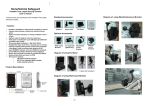
ASL head array without Mode Switch
~ common guidelines / parameters- not comprehensive of all choices available~
++ denote menu levels on HHP
→↓ denote arrows on HHP
Connect the 9 pin connector from ASL Interface box to QR-SCM box. Turn on interface box
Connect the HHP to any unused CAN-BUS port
Assign input device to a Drive Profile:
On the HHP Main Menu
→ select Program.+
→select Motor Controller++
→select Drive Profiles+++
→select desired drive profile # ++++
.→select Input Device
→select SCM1 ++++Program driving parameters as appropriate (listed below input device)
(See user’s manual for general guidelines)
GO BACK TO MAIN MENU (series of left commands)
Program SCM1:
On the HHP Main Menu
→select Program+
→select SCM1++
→Select Input Device ↓Scroll to
→Select 3 Switch++↓select Act L/R Ctrl →yes
↓select Switches +++
↓Select Assign DrvSw
++++
→ Follow on-screen instructions
Æ select Escape menu
Æselect Use time 5-10 sec (after selected time, will enter driver menu to
Choose aux functions)
For reverse driving choose one of the following options
time entry to reverse
Æ Dir toggle time 5-10 sec (after selected time forward driving will toggle to reverse
Quick tap activation to reverse
ÆToggle manual YES (quick tap of back pad will toggle back pad to reverse driving mode)
GO BACK TO MAIN MENU
Remove HHP, recycle power
Turn on wheelchair through Enhanced Display