1
embiScan| HOW TO CONFIGURE THE EMBISCAN ?
4 Others configuration
The embiScan default value is « Locked ». It’s means that some parameter can’t be modified. For that, you
need to unlocked the embiScan.
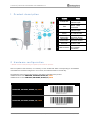
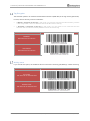
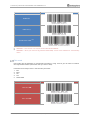
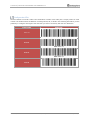
To easily locate this parameter, the locked functions are framed in red ; the unlocked functions are in blue :
RED BOXES
Locked functions = parameter which required to
unlock the embiScan for any modification.
BLUE BOXES
Unlocked functions = parameter which can be
scanned without unlocking the embiScan
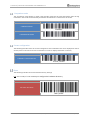
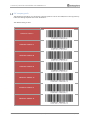
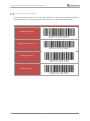
Locking / unlocking
Scan following Barcode to lock or unlock the embiScan.
FUNCTIONS
BARCODE
UNLOCKING
LOCKING
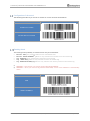
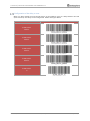
Configuration of the keyboard
Following barcodes allow to configure the PC keyboard in AZERTY, QWERTY or QWERTZ mode.
FUNCTIONS
BARCODE
KEYBOARD AZERTY
AZERTY
KEYBOARD QWERTY
QWERTY
KEYBOARD QWERTZ
QWERTZ
Embisphere
Confidential
&
Property
P a g e 6 | 16