1
2.
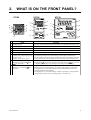
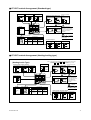
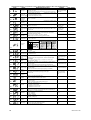
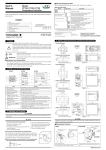
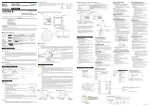
WHAT IS ON THE FRONT PANEL?
UT150
UT152
UT155
a.
e.
e.
d.
a.
b.
g.
c.
c.
a.
b.
f.
e.
c.
f.
d.
d.
b.
f.
h.
h.
g.
h.
g.
Name
Function
a.
PV display (red)
Indicates PV (measured value) and character information such as parameter codes and error codes.
b.
SP display (green)
Indicates SP (target setpoint) and parameter values.
c.
Alarm 1 (AL1) lamp (red)
Lit when alarm 1 is activated.
d.
Alarm 2 (AL2) lamp (red)
Lit when alarm 2 is activated.
e.
SP2 lamp (green)
Lit when SP2 is being used for control operation.
f.
Output (OUT) display lamps
UT150: (Left: orange; right: green)
UT152, UT155:
(Upper: orange; lower: green)
Lit while control output is being output.
• The left (upper) lamp is lit in orange during control output of standard type.
• In heating/cooling control, the left (upper) lamp lights up in orange when the heating-side output
is active; while the right (lower) lamp lights up in green when the cooling-side output is active.
g.
Data change keys
(Indicated as simply the
keys hereafter.)
• Changes SP and the parameter values.
• Pressing the
key decreases the data value and pressing the
key increases
it. Holding down the key will gradually increase the speed of the change.
h.
and
SET/ENT key (data registering key)
(Indicated as simply the
key
hereafter.)
IM 05C01E12-41E
• Registers the data value changed using the data change keys.
• Switches between operating displays or parameter setting displays sequentially.
• Pressing the key for 3 seconds or longer in the operating display retrieves the
operating parameter setting display.
• Pressing the key for 3 seconds or longer in either an operating or setup parameter
setting display transfers back to operating display 1. (See Page 13.)
3