1
Why is knowing your public IP address valuable? If your router is
configured to “port forward” port 80 to the camera’s local IP address, you
can browse to the camera directly from anywhere on the Internet. This is
useful for viewing the camera live and making configuration changes from a
remote location. For information on configuring port forwarding on a router,
visit http://www.portforward.com, click on routers, select your model and
click on “Default guide”.
To set up a TZO account, visit http://stardot.tzo.com. After you’ve
signed up, enter the appropriate information in either NetCam SC or your
router (if it supports DDNS).
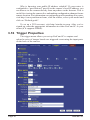
3.16 Trigger Properties
The trigger menu allows you set up NetCam SC to capture and
upload a series of images based on a triggered event using the input ports
on the back of the camera.
Page 32
NetCam SC