1
4110185B.qxp
9/25/2007
11:55 AM
Page 19
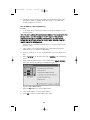
1.
Open Bio-Plex Manager software by clicking on the application icon on the
desktop.
2.
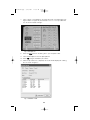
Select View from the main menu then select Validation Log from the pulldown
menu. The validation log will open.
3.
Choose the desired validation log by using the main menu or the toolbar icons
for optics, fluidics, reporter and classify validation.
4.
Click on the desired entry in the validation log. The selected row will be
highlighted in black.
5.
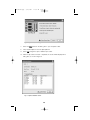
Select the create report icon. A report will automatically be generated in
Microsoft Excel.
6.
Print the report in Excel by selecting File then Print from the main menu.
Alternatively, you may use the Print button in Excel.
10.7 Validation Kit Report Form Example
The following is a sample validation report from Bio-Plex Manager software. Note
that the values included here are for demonstration purposes only. Consult your
product insert for values specific to your product control number.
19