1
Speed-Dialing and Automatic Hang-up
The Handsfree code may also be stored in a Direct Access memory key at the trailing end of a stored
number to make the telephone hang up immediately after dialing the number. The Pause character can
be used to extend the time before hang-up by entering it in the stored string after the digits and before
the last “H”.
Note: “H” represents the Handsfree code and “nnnnn” represents any subsequent digits to be dialed).
Example 1. If H is entered before the digits to be dialed: the phone will go on-line in Handsfree
mode and dial out the subsequent number. Phone will remain on-line in Handsfree
mode until the user manually hangs up.
Example 2. If H is entered at both ends of the digits to be dialed: the phone will go on-line in
Handsfree, dial out the number and go off-line again.
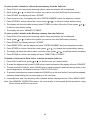
To view the contents of a Direct Access memory
Press the desired Direct Access memory key (press once to view a one-touch memory or twice to view
a two-touch memory); the display will show the number & name
Note: If the memory being viewed has been programmed with the “Handsfree” (“H”) prefix, the telephone
will commence dialing the number.
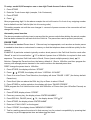
To store a Number and Name in a Direct Access memory
1. Press STORE; the display will show “STORE”
2. Press the memory key either once to store in a one-touch memory or twice for a two-touch memory;
the display will show “ENTER NUMBER”
3. If you wish to setup the chosen memory key as a speed-dial key, go to step 4. Otherwise go to
step 5
4. Press HANDSFREE/HEADSET; the display will show “H” in the number field. If this is not required,
go to step 5 without pressing HANDSFREE/HEADSET
5. Enter the telephone number and press STORE
6. Enter the name by using the keypad and press STORE to confirm; the display will show “MEMORY
STORED”.
To dial from a Direct Access memory
Speed-dial memory (i.e. the memory key has been programmed with an “H” preceding the number as
described above):
Press the desired memory key either once to dial from its one-touch memory or twice to dial from its twotouch memory.
Non Speed-dial memory (i.e. the memory key has NOT been programmed with an “H” preceding the
number as described above):
Press the desired memory key either once to dial from its one-touch memory or twice to dial from its twotouch memory.
17