1
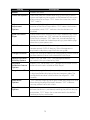
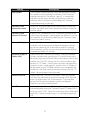
Setting
Description
Inactivity Time-out
The length of time (in seconds) it takes for a password
input field or forward event webpage to time-out. The
value specified must be at least 15 seconds. In the case of a
password input field, once the inactivity time is reached, the
field disappears and the content continues playing. In the
case of a URL forward event, this amount of time specifies
when a warning dialog pops up prompting the user to stay
on the page or return to the initially playing content.
Warning Dialog
Expire Time
The length of time (in seconds) from which the forward
event webpage inactivity time-out warning dialog appears
until Pulse Player returns to playing the initially configured
video or image content. The value specified must be at least
10 seconds.
Hardware
Acceleration
Options
Enable (“ON”) or disable (“OFF”) hardware acceleration for
better video playback performance, if needed.
Progress Box
Options
Display (“ON”) or hide (“OFF”) an animated loading progress
icon when loading a forward event URL.
Reboot Scheduler
Configure a daily reboot time to ensure Pulse Player and the
underlying Android operating system memory is regularly
cleared and refreshed so as to maintain good playback
performance for extended periods of time. OUTFORM
recommends scheduling a daily reboot time when no
customers are expected to use the device.
Reboot On Error
Turn this setting on to automatically reboot the device if
Pulse Player detects an error.
20