1
α2 Simple Application Controllers
Key, System Bit and Function Block Lists 14
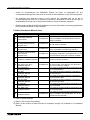
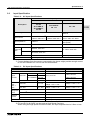
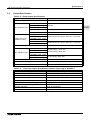
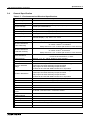
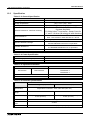
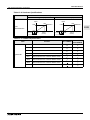
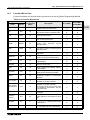
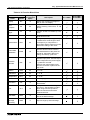
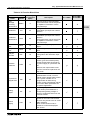
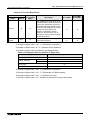
Table 14.4: Function Block Lists
Function Block
Name
Short
Message
Receiving
Maintenance
Call Detect
Memory
Consumption
Symbol
(Byte)
SMRm
CD
Description
*7
Output change by Short Message
The function block can be setup from
the TopMenu "Parameter" via the
front panel keys.
30
Calling Line Identification
Presentation (CLIP) Phone number
detection
Call Detect
Maintenance
CDm
30
Calling Line Identification
Presentation (CLIP) Phone number
detection
The function block can be setup from
the TopMenu "Parameter" via the
front panel keys.
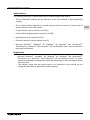
Random One
Shot
ROS
19
The random length single pulse is
output.
Delayed One
Shot
DOS
20
After a delay time, send a single
pulse
Delayed
Alternate
DAL
16
After a delay time, output alternates
turning ON or OFF with each input
pulse
14
Latch a relay in SET or RESET
position, give Set or Reset priority.
The last output status is kept when
the power supply is cycled OFF and
ON.
However, last output status is lost
when the α2 series is placed in the
Stop mode.
52
The PID Function Block is the α2
implementation of PID, a control
method used to obtain stable control
over a system variable. It is a
equipped with an Auto-tuning
function, which automatically adjusts
the Function Block parameters for
the specific application.
17
The Analog Output function takes a
digital value input and delivers a
corresponding analog voltage or
current to a selected channel on the
AL2-2DA module.
*6
Control which Display screen
appears on the LCD. This function
block can only be set in the AL-PCS/
WIN-E software.
When control bit N04 is ON, it
possible to control the displayed
User Screen.
Retentive
Set/Reset
Proportional
Integral Gain
Analog
Output
Control
Display
RSR
PID
AO
CDP
AL2-10MR-*
AL2-14MR-*
AL2-24MR-*
ENG
ENG-89