1
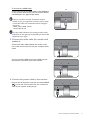
To Connect the HDMI Cable
Or
Connect the plug of the HDMI cable to the HDMI port
on the monitor. Connect the other end of the cable to
the HDMI port of a digital output device.
If there is more than one video transmission method
available to you, you might want to take the picture quality
of each video cable into consideration before making the
connection.
- Better quality: HDMI / DVI-D
- Good quality: D-Sub
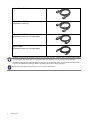
The video cables included in your package and the socket
illustrations on the right may vary depending on the product
supplied for your region.
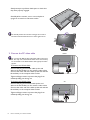
3. Connect the audio cable (for models with
speakers).
Connect the audio cable between the socket on the
rear of the monitor (Line In) and your computer audio
outlet.
You may connect headphones to the headphone jack
found next to the Line In jack of the monitor.
4. Connect the power cable to the monitor.
Plug one end of the power cord into the socket labelled
on the rear of the monitor. Do not connect the
other end to a power outlet just yet.
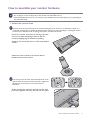
How to assemble your monitor hardware
11