1
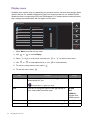
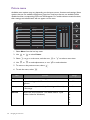
Item
Color
Format
Function
Range
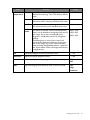
Determines the color space (RGB or YUV) based on the detected
video signal.
You might need to manually set the Color Format if colors shown on the
monitor screen do not display properly.
If the input source is HDMI, color format is not selectable. In other words,
Color Format is automatically set depending on the input video source.
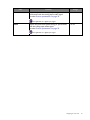
HDMI RGB
PC Range
(for models
with HDMI
inputs)
32
RGB
• For D-Sub (VGA) input source from PC.
• For DVI input source.
YUV
For D-Sub (Component converted from VGA) input
source from a video device.
Determines the range of color scales. Select an option that matches • RGB (0 ~
the RGB range setting on the connected HDMI device.
255)
• RGB (16 ~
235)
Navigating the main menu