1
TOO CLOSE
1.2 Display positioning
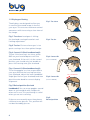
Fig 1. Too close
The displays are designed to allow you
to see the ultrasound image in front of
your eyes. This ensures maximum animal
awareness whilst ensuring a clear view of
the image.
TOO CLOSE
Fig 1. Too close: head gear is hitting
the forehead causing discomfort and
limiting adjustment.
TOO FAR
Fig 2. Too far
STRAP ADJUSTMENTS
1
Fig 2. Too far: Distance from eyes is too
great causing a less than optimal image.
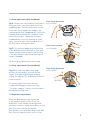
Fig 3. Correct fit (flexi headband only):
To test if the housing is too close, place
BUG on your head and press unit into
your forehead. If the unit is in the correct
position, you should only just be able to
press the housing onto your forehead.
TOO CLOSE
2
TOO FAR
Fig. 4 Correct fit (firm headband only):
To set the goggles as close as possible to
your eyes without the housing touching
your forehead, adjust the inner headband
angle (position on your forehead) and then
pivot the outer band for correct display
1
alignment.
STRAP ADJUSTMENTS
TOO CLOSE
Fig. 5 Raised position
2 (for both
headbands): You can move goggles up and
down as you would do with sunglasses
when not in use. This positioning is useful
when you are not scanning.
TOO FAR
If glasses are normally worn then please
continue to use glasses. This position will
not be affected by glasses.
6
STRAP ADJUSTMENTS
CORRECT FIT
Fig 3. Correct fit
STRAP ADJUSTMENTS
(flexi headband)
1
2
inner headband
Fig 4. Correct fit
(firm headband)
CORRECT FIT
Fig 5.
Raised position
version 1 raised
STRAP ADJUSTMENTS