1
6
MediaBand VX Quickstart G uide
3.1. Connecting to MediaBand VX
1. Start up the DbManager Application
2. Login as Su per U ser (no password required)
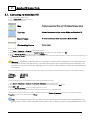
3. Four windows will be displayed:
Map
A n et work m ap sh owi n g Nodes an d L i n ks bet ween P at apsco dev i ces
Terminal
A v i ew of t h e com m u n i cat i on s bet ween D bMgr an d Medi aBan d VX
Event History
A l l ev en t s wh i ch occu r wh i l e con n ect ed t o Medi aBan d VX
Outstanding Events
C u rren t ev en t s
4. Select Vi ew
P ropert i es
Term i n al from the DbMgr toolbar.
5. Choose the COM port which is in use. Leave the Seri al P ort R at e at the default setting of 19200bps. Click O K.
6. Select the D ev i ces i n W orl d window and double click the D ev i ce node
7. The C on n ect ed t o D ev i ce window should appear, showing the front and rear panels of MediaBand VX. If it does not, check the COM port settings and
re-try
W arning: If management via the Terminal port is not possible, it could be that the management PC has another application
running which uses the COM ports of the PC. Even when some programs which use the COM ports are closed down, other
programs cannot access the COM ports. Rebooting the PC is required in order to release the COM ports so that DbManager
can use them.
If the PC and MediaBand VX are connected to the same LAN, management is possible using TCP/IP. All Patapsco products use the default IP settings:
I P A ddress
Su bn et Mask
Gat eway
192.168.0.1
255.255.0.0
0.0.0.0
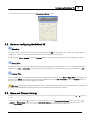
To configure DbManager to access MediaBand VX using TCP/IP, please follow these steps:
1. Select Vi ew
P ropert i es
Term i n al
D ev i ce I P A ddresses from the DbMgr toolbar
2. 192.168.0.1 should already be configured. If using another IP address, add it to the list using the A dd button
3. Click O K
OK
4. Select the D ev i ces i n W orl d window and double click the Device node
5. The Connected to Device window should appear, showing the front and rear panels of MediaBand VX
The Device node can be made to connect to other IP addresses configured in the D ev i ce I P A ddresses list by right-clicking the node, selecting
P ropert i es and choosing an IP address from the I P L i st .
Info: TCP/IP management requires TCP port 3001 (dec) to be open between the management PC and MediaBand VX. Any
switches, hubs or routers must be configured to allow communication on this port in order to manage MediaBand VX via TCP/
IP.
© 2012 Patapsco Designs Ltd