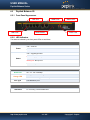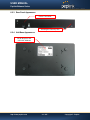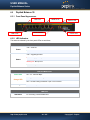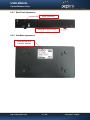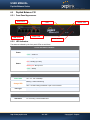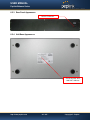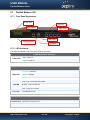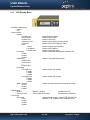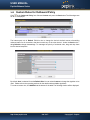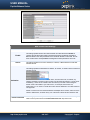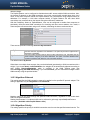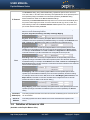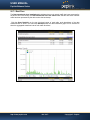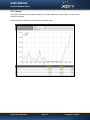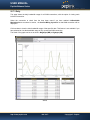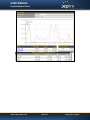
1
Bal anc eMul t i WAN Bondi ngRout er s Us erManual ForModel ONE/ 20/ 30/ 30L TE/ 21 0/ 31 0/ 305/ 380/ 580/ 71 0/ 1 350/ 2500 Peplink Balance Multi-WAN Bonding Routers User Manual For Model ONE/20/30/30 LTE/210/310/305/380/580/710/1350/2500 Peplink Balance Firmware 6.1 Copyright & TrademarksSpecifications are subject to change without prior notice. Copyright © Peplink International Ltd. All Rights Reserved. Peplink and the Peplink logo are trademarks of Peplink International Ltd. Other brands or products mentioned may be trademarks or registered trademarks of their respective owners. USER MANUAL Peplink Balance Series TABLE OF CONTENTS 1 INTRODUCTION AND SCOPE ······························································································6 2 GLOSSARY ··························································································································7 3 PRODUCT COMPARISON CHART ························································································8 4 PRODUCT FEATURES ········································································································12 4.1 4.2 5 Supported Network Features ·····················································································12 Other Supported Features ·························································································13 PACKAGE CONTENTS········································································································15 5.1 5.2 5.3 5.4 6 Peplink Balance One ·······························································································15 Peplink Balance 20 / 30 / 30 LTE ················································································15 Peplink Balance 210 / 310·························································································15 Peplink Balance305 / 380 / 580 / 710 / 1350 / 2500 ························································15 PEPLINK BALANCE OVERVIEW ·························································································16 6.1 6.2 6.3 6.4 6.5 6.6 6.7 6.8 6.9 6.10 6.11 6.12 7 Peplink Balance One ·······························································································16 Peplink Balance 20 ··································································································18 Peplink Balance 30 ··································································································20 Peplink Balance 30 LTE ···························································································22 Peplink Balance 210 ································································································24 Peplink Balance 310 ································································································26 Peplink Balance 305 ································································································28 Peplink Balance 380 ································································································31 Peplink Balance 580 ································································································34 Peplink Balance 710 ·····························································································37 Peplink Balance 1350 ···························································································40 Peplink Balance 2500 ···························································································43 INSTALLATION··················································································································47 7.1 7.2 7.3 8 Preparation ············································································································47 Constructing the Network ··························································································47 Configuring the Network Environment ··········································································49 BASIC CONFIGURATION ···································································································55 8.1 8.2 8.3 8.4 Connecting to the W eb Admin Interface ·······································································55 Configuration with the Setup W izard ············································································56 Advanced Setup ·····································································································59 Cellular WAN ·········································································································60 9 CONFIGURING THELAN INTERFACE ··················································································65 10 DROP-IN MODE················································································································70 11 CONFIGURING THE WAN INTERFACE(S) ···········································································73 11.1 11.2 Connection Method(s) ···························································································75 Physical Interface Settings ·····················································································82 http://www.peplink.com -2 / 227- Copyright © Peplink USER MANUAL Peplink Balance Series 11.3 11.4 11.5 11.6 12 BANDWIDTH BONDING SPEEDFUSIONTM ·········································································90 12.1 12.2 12.3 13 IPsec VPN Settings ······························································································98 IPsec Status······································································································101 OUTBOUND POLICY MANAGEMENT ··············································································102 14.1 14.2 15 TM SpeedFusion Settings ·························································································90 The Peplink Balance Behind a NAT Router ································································96 TM SpeedFusion Status ···························································································97 IPSEC VPN ························································································································98 13.1 13.2 14 WAN Health Check ·······························································································83 Bandwidth Allowance Monitor ·················································································86 Additional Public IP Settings ···················································································87 Dynamic DNS Settings ··························································································88 Outbound Policy ································································································103 Custom Rules for Outbound Policy·········································································104 INBOUND ACCESS ··········································································································110 15.1 15.2 15.3 15.4 15.5 Definition of Port Forwarding·················································································110 Definition of Servers on LAN ·················································································111 Inbound Access Services ·····················································································113 Reverse Lookup Zones ·······················································································127 DNS Record Import Wizard ··················································································130 16 NAT MAPPINGS··············································································································134 17 CAPTIVE PORTAL ············································································································136 18 QOS ································································································································139 19 FIREWALL ·······················································································································143 19.1 Outbound and Inbound Firewall Rules ····································································143 20 OSPF & RIPV2·················································································································150 21 MISCELLANEOUS SETTINGS····························································································152 21.1 21.2 21.3 21.4 21.5 22 High Availability ·································································································152 PPTP Server ·····································································································155 Certificate Manager ····························································································156 Service Forwarding ·····························································································156 Service Passthrough ···························································································158 AP ··································································································································160 22.1 22.2 22.3 22.4 22.5 22.6 22.7 AP Controller·····································································································160 Wireless SSID ···································································································161 Profiles ············································································································167 Info ·················································································································171 Usage ··············································································································172 AP Status ·········································································································174 Rogue AP ·········································································································176 http://www.peplink.com -3 / 227- Copyright © Peplink USER MANUAL Peplink Balance Series 22.8 23 SYSTEM SETTINGS ··········································································································177 23.1 23.2 23.3 23.4 23.5 23.6 23.7 23.8 23.9 23.10 24 Admin Security ··································································································177 Firmware ··········································································································181 Time················································································································182 Email Notification ·······························································································183 Event Log ·········································································································185 SNMP··············································································································186 InControl ··········································································································188 Configuration·····································································································189 Feature Add-ons ································································································190 Reboot ·············································································································190 TOOLS ····························································································································191 24.1 24.2 24.3 24.4 24.5 25 Toolbox ············································································································176 Ping ················································································································191 Traceroute Test ·································································································192 PepVPN Test ····································································································192 PepVPN Analyzer ······························································································192 CLI (Command Line Interface Support) ···································································193 STATUS ··························································································································194 25.1 25.2 25.3 25.4 25.5 25.6 25.7 Device ·············································································································194 Active Sessions ·································································································196 Client List ·········································································································198 WINS Client ······································································································198 SpeedFusionTMStatus ·························································································198 Event Log ·········································································································199 Bandwidth ········································································································200 APPENDIX A. RESTORATION OF FACTORY DEFAULTS ·····························································206 APPENDIX B. ROUTING UNDER DHCP, STATIC IP, AND PPPOE ···············································207 B.1 B.2 Routing via Network Address Translation (NAT)···························································207 Routing via IP Forwarding ·······················································································208 APPENDIX C. CASE STUDIES ····································································································209 C.1 C.2 C.3 C.4 C.5 Performance Optimization ·······················································································209 Maintaining the Same IP Address throughout a Session ················································211 Bypassing the Firewall to Access Hosts on LAN ··························································212 Inbound Access Restriction ·····················································································213 Outbound Access Restriction ···················································································214 APPENDIX D. TROUBLESHOOTING··························································································215 APPENDIX E. PRODUCT SPECIFICATIONS ················································································217 E.1 E.2 E.3 E.4 Peplink Balance 20, 30 and 30 LTE···········································································217 Peplink Balance 210 and 310 ··················································································218 Peplink Balance 380 ······························································································219 Peplink Balance 305 ······························································································220 http://www.peplink.com -4 / 227- Copyright © Peplink USER MANUAL Peplink Balance Series E.5 E.6 E.7 E.8 E.9 Peplink Balance 380 ······························································································221 Peplink Balance 580 ······························································································222 Peplink Balance 710 ······························································································223 Peplink Balance 1350 ····························································································224 Peplink Balance 2500 ····························································································225 APPENDIX F. DECLARATION ····································································································226 http://www.peplink.com -5 / 227- Copyright © Peplink USER MANUAL Peplink Balance Series 1 Introduction and Scope The Peplink Balance series provides link aggregation and load balancing across up to thirteen WAN connections. The Peplink Balance 20/30/30 LTE provides a cost-effective solution suitable for power users and home offices. The Peplink Balance 210/310 provides advanced features for small business. The Peplink Balance 380, 580, 710, 1350, and 2500 come with a suite of advanced enterprise-class features. They areideal single-box solutions for medium to large-sized business environments,andthey allow service providers to enable highly available multi-network services. This manual applies to the following Peplink Balance products: Peplink Balance 20/30 (firmware version v6.1.x) Peplink Balance 30 LTE (firmware version v6.1.x) Peplink Balance 210/310 (firmware version v6.1.x) Peplink Balance 380 (firmware version v6.1.x) Peplink Balance 580 (firmware version v6.1.x) Peplink Balance 710 (firmware version v6.1.x) Peplink Balance 1350 (firmware version v6.1.x) Peplink Balance 2500 (firmware version v6.1.x) The manual covers setting up your Peplink Balance and provides a collection of case studies detailing theadvanced features of the Peplink Balance. Important Note to Users Upgrading from Firmware 4.7 or below If your current firmware version is 4.7 or below, please upgrade to Firmware 4.8.2 before upgrading to Firmware 6.1. Important Note to Users of the Peplink Balance 30 (Classic Edition) Firmware 5.0 or above is NOT applicable to the Peplink Balance 30 (Classic Edition). For more information onidentifying the generation of your Peplink Balance 30, please visit our knowledge base at <http://www.peplink.com/index.php?view=faq&id=231&path=16>. http://www.peplink.com -6 / 227- Copyright © Peplink USER MANUAL Peplink Balance Series Glossary 2 The following terms, acronyms, and abbreviations are frequently used in this manual: Term Definition 3G 3rd generation standards for wireless communications (e.g., HSDPA) 4G 4th generation standards for wireless communications (e.g., WiMAX, LTE) DHCP DNS EVDO FQDN Dynamic Host Configuration Protocol Domain Name System Evolution-Data Optimized Fully Qualified Domain Name HSDPA High-Speed Downlink Packet Access HTTP Hyper-Text Transfer Protocol ICMP Internet Control Message Protocol IP LAN MAC Address Internet Protocol Local Area Network Media Access Control Address MTU Maximum Transmission Unit MSS Maximum Segment Size NAT Network Address Translation PPPoE QoS SNMP Point to Point Protocol over Ethernet Quality of Service Simple Network Management Protocol TCP Transmission Control Protocol UDP User Datagram Protocol VPN Virtual Private Network VRRP Virtual Router Redundancy Protocol WAN Wide Area Network WINS Windows Internet Name Service WLAN Wireless Local Area Network 210+ Refers to Peplink Balance 210/310/380/580/710/1350/2500 380+ Refers to Peplink Balance 380/580/710/1350/2500 http://www.peplink.com -7 / 227- Copyright © Peplink USER MANUAL Peplink Balance Series Product Comparison Chart 3 Features 20 30 30 LTE 210 310 380 580 710 1350 2500 WAN Ports (GbE) / Internet Links 2 3 2 2 3 3 5 7 13 12 USB WAN Modem Port 1 1 1 1 1 1 1 1 1 1 Embedded LTE Modem X X 1 X X X X X X X Recommended Users 1-25 1-25 1-25 1-50 1-50 50-500 300-1000 5002000+ 10005000+ 500020000+ Router Throughput 100M 100M 100M 100M 100M 200M 400M 800M 1500M 8Gbps Yes Yes Yes Yes Yes Yes Yes Yes Yes Yes Capacity Core Functionality Load Balancing & Failover Load Balancing Algorithms Weighted 5 5 5 7 7 7 7 7 7 7 Yes Yes Yes Yes Yes Yes Yes Yes Yes Yes Enforced Yes Yes Yes Yes Yes Yes Yes Yes Yes Yes Persistence Yes Yes Yes Yes Yes Yes Yes Yes Yes Yes Priority Yes Yes Yes Yes Yes Yes Yes Yes Yes Yes Overflow Yes Yes Yes Yes Yes Yes Yes Yes Yes Yes X X X Yes Yes Yes Yes Yes Yes Yes Least Used http://www.peplink.com -8 / 227 - Copyright © Peplink USER MANUAL Peplink Balance Series Lowest Latency X X X Yes Yes Yes Yes Yes Yes Yes Drop-In Mode X X X Yes Yes Yes Yes Yes Yes Yes Inbound Load Balancing X X X Yes Yes Yes Yes Yes Yes Yes 4G/3G Modem Support Yes Yes Yes Yes Yes Yes Yes Yes Yes Yes SpeedFusionTM X X X Yes Yes Yes Yes Yes Yes Yes Number of TM SpeedFusion Peer Bonded VPN Throughput Peers X X X 2 2 20 50 300 800 4000 X X X 30M 30M 60M 80M 150M 350M 2Gbps Yes Yes Yes Yes Yes Yes Yes Yes Yes Yes 3 3 3 15 15 50 100 200 500 1000 X X X Yes Yes Yes Yes Yes Yes Yes Yes Yes Yes Yes Yes Yes Yes Yes Yes Yes 2 2 2 2 2 20 50 150 400 800 X X X X X Yes Yes Yes Yes Yes X X X X X Yes Yes Yes Yes Yes X X X X X Yes Yes Yes Yes Yes Number of AP Support X X X X X 50* 100* 250* 500* Yes Advanced QoS Functionality Bandwidth Usage Monitor Yes Yes Yes Yes Yes Yes Yes Yes Yes Yes Yes Yes Yes Yes Yes Yes Yes Yes Yes Yes VPN Functionality PPTP VPN Server Recommended PPTP VPN Users RADIUS / LDAP Support for PPTP IPsec VPN (Network-to-Network) Number of IPsec Tunnel WLAN Control Functionality Manage Pepwave AP One Access Point Configuration AP Firmware Update QoS for VoIP and ECommerce http://www.peplink.com -9 / 227 - Copyright © Peplink USER MANUAL Peplink Balance Series Application Prioritization X X X Yes Yes Yes Yes Yes Yes Yes Application Prioritization by User Group User Group Bandwidth Reservation Individual Bandwidth Limit X X X X X Yes Yes Yes Yes Yes X X X X X Yes Yes Yes Yes Yes X X X X X Yes Yes Yes Yes Yes NAT and IP Forwarding Yes Yes Yes Yes Yes Yes Yes Yes Yes Yes Static Routes Yes Yes Yes Yes Yes Yes Yes Yes Yes Yes Port Forwarding Yes Yes Yes Yes Yes Yes Yes Yes Yes Yes Many to One, One to One NAT NAT Pool Yes Yes Yes Yes Yes Yes Yes Yes Yes Yes Yes Yes Yes Yes Yes Yes Yes Yes Yes Yes SIP ALG, H.323 ALG Yes Yes Yes Yes Yes Yes Yes Yes Yes Yes UPnP, NAT-PMP Yes Yes Yes Yes Yes Yes Yes Yes Yes Yes WINS Server Yes Yes Yes Yes Yes Yes Yes Yes Yes Yes Dynamic DNS Yes Yes Yes Yes Yes Yes Yes Yes Yes Yes Web Blocking X X X X X Yes Yes Yes Yes Yes Device Management Web Administrative Functionality Interface Email Notification Yes Yes Yes Yes Yes Yes Yes Yes Yes Yes Yes Yes Yes Yes Yes Yes Yes Yes Yes Yes Active Client List Yes Yes Yes Yes Yes Yes Yes Yes Yes Yes Active Session List Yes Yes Yes Yes Yes Yes Yes Yes Yes Yes Bandwidth Usage Statistics Yes Yes Yes Yes Yes Yes Yes Yes Yes Yes Networking Functionality http://www.peplink.com -10 / 227 - Copyright © Peplink USER MANUAL Peplink Balance Series Web Reporting Services Yes Yes Yes Yes Yes Yes Yes Yes Yes Yes Email Notification Yes Yes Yes Yes Yes Yes Yes Yes Yes Yes Syslog Yes Yes Yes Yes Yes Yes Yes Yes Yes Yes SNMP v1, v2c and v3 Yes Yes Yes Yes Yes Yes Yes Yes Yes Yes 4 4 4 4 4 1 1 1 1 8/ 2(10GbE SFP+) 9-16V DC 9-16V DC 9-16V DC 9-16V AC DC 9-16VDC 100V to 240V AC 100V to 240V AC 100V to 240V AC 100V to 240V AC 15W 15W 15W 15W 15W 100V to 240V AC 50W 50W 70W 70W 230W 1U Rackmount X X X Yes Yes Yes Yes Yes Yes Yes High Availability X X X Yes Yes Yes Yes Yes Yes Yes LAN Bypass X X X X X X Yes Yes Yes Yes Hardware Features LAN Ports (GbE) Power Input Power Consumption Dimension (H x W x D) Weight 3.5cm x 26cm x 13.3cm 1.0kg http://www.peplink.com 1.0kg 1.0kg 3.5cm x 26cm x 13.3cm 1.2kg 1.2kg -11 / 227 - 3.5kg 1U x 37.9cm 5.5kg 5.5kg 1U x 39.8cm 1U x 55cm 6.5kg 12kg Copyright © Peplink USER MANUAL Peplink Balance Series Product Features 4 Peplink Balance series products enableall LAN users to sharebroadband Internet connectionsand provide advanced features to enhanceInternet access. The following is alist of supported features: 4.1 Supported Network Features 4.1.1 WAN Multiple public IP support (DHCP, PPPoE, static IP address) Static IP support for PPPoE 10/100/1000Mbps Ethernet connection in full/half duplex Built-in HSPA and EVDO cellular modems (Available on Peplink Balance 30 LTE) USB mobile connection(only one USB modem can be connected at a time) Drop-in Modeon selectable WAN portwith MAC address passthrough(available on Peplink Balance 210+) Network address translation (NAT) / port address translation (PAT) Inbound and outbound NAT mapping Multiple static IP addresses per WAN connection MAC address clone Customizable MTU and MSS values WAN connection health check Dynamic DNS (supported service providers: changeip.com, dyndns.org, no-ip.org,tzo.com, and DNS-O-Matic) Ping, DNS lookup,and HTTP-based health check 4.1.2 LAN DHCP server on LAN Extended DHCP option support Static routing rules Local DNS proxy server VLAN on LAN support 4.1.3 VPN Secure SpeedFusionTM(available on Peplink Balance 210+) SpeedFusion performance analyzer X.509 certificate support (feature activation required on Peplink Balance 20/30/30 LTE; included on Peplink Balance 210+) Bandwidth bondingand failover among selected WAN connections Ability to route traffic to a remote VPN peer Optional pre-shared key setting Layer 2 bridging TM SpeedFusion throughput, ping, and traceroute tests Built-in PPTP VPN server Authenticate PPTP clients using RADIUS and LDAP servers (Available on Peplink Balance 210+) IPsec VPN for network-to-network connections (Works with Cisco and Juniper only) PPTP and IPsecpassthrough http://www.peplink.com -12 / 227 - Copyright © Peplink USER MANUAL Peplink Balance Series 4.1.4 Inbound Traffic Management TCP/UDP traffic redirection to dedicated LAN server(s) Inbound link load balancing by means of DNS(available on Peplink Balance 210+) 4.1.5 Outbound Policy Link load distribution per TCP/UDP service Persistent routing for specified source and/or destination IP addresses per TCP/UDP service Prioritize and route traffic to VPN tunnels with Priority and Enforced algorithms 4.1.6 AP Controller Configure and manage Pepwave AP devices Review the status of connected AP 4.1.7 QoS(Available on Peplink Balance 210+) Quality of Service for different applications and custom protocols User Group classification for different service levels (Available on Peplink Balance 380+) Bandwidth usage control and monitoring on group- and user- level (Available on Peplink Balance 380+) Application Prioritization for custom protocols and DSL optimization 4.1.8 Firewall Outbound (LAN to WAN) firewall rules Inbound (WAN to LAN) firewall rules per WAN connection Intrusion detection and prevention Specification of NAT mappings Web Blocking (Available on Peplink Balance 380+) Outbound firewall rules can be defined by destination domain name 4.1.9 Captive Portal 4.2 Splash screen of open networks, login page for secure networks Customizable built-in captive portal Supports linking to outside page for captive portal Other Supported Features Easy-to-use web administration interface HTTP and HTTPS support for Web Administration Interface Configurable web administration port and administrator password Read-only user for Web Admin Shared-IP drop-in mode (Available on the Peplink Balance 20, 30 and 30 LTE upon feature activation, available on Peplink Balance 210+) Authentication and Accounting by RADIUS server for Web Admin(Available on Peplink Balance 210+) Firmware upgrades, configuration backups, Ping, and Traceroute via W eb Administration Interface Remote web based configuration (via WAN and LAN interfaces) http://www.peplink.com -13 / 227 - Copyright © Peplink USER MANUAL Peplink Balance Series Remote reporting to Peplink Balance reporting server Hardware High Availability via VRRP, with automatic configuration synchronization(Available on Peplink Balance 210+) Real-Time, Hourly, Daily and Monthly Bandwidth Usage reports and charts Hardware backup via LAN bypass (Available on Peplink Balance 580, 710, 1350 and 2500) Built-in WINS server Time server synchronization SNMP Email notification Syslog SIP passthrough PPTP packet passthrough Active Sessions Active Client List WINS Client List UPnP / NAT-PMP Improved Active Sessions Page Event Log is persistent across reboots IPv6 support Support USB tethering on Android 2.2+ phones http://www.peplink.com -14 / 227 - Copyright © Peplink USER MANUAL Peplink Balance Series Package Contents 5 The contents of Peplink Balance product packages are as follows: 5.1 5.2 5.3 5.4 Peplink Balance One Peplink Balance 20 / 30 / 30 LTE Power adapter Information slip Peplink Balance 20 / 30 / 30 LTE Peplink Balance 20 / 30 / 30 LTE Power adapter Information slip Peplink Balance 210 / 310 Peplink Balance 210 / 310 Power adapter Information slip Rackmount kit Peplink Balance305 / 380 / 580 / 710 / 1350 / 2500 Peplink Balance 305/380/580/710/1350/2500 Power cord Information slip Rackmount kit http://www.peplink.com -15 / 227 - Copyright © Peplink USER MANUAL Peplink Balance Series 6 Peplink Balance Overview 6.1 Peplink Balance One 6.1.1 Front Panel Appearance LAN Ports WAN Ports Wi-Fi LED Reset Button USB Port . Status LED 6.1.2 LED Indicators The statuses indicated by the front panel LEDs are as follows: Power and Status Indicators OFF – Wi-Fi is off Wi-Fi Green – Ready OFF – Upgrading firmware Red – Booting up or busy Status Blinking red– Boot up error Green – Ready LAN and WAN Ports Green LED Orange LED ON – 10 / 100 / 1000 Mbps Blinking – Data is transferring OFF – No data is being transferred or port is not connected Port Type Auto MDI/MDI-X ports USB Port USB Ports For future functionalities. http://www.peplink.com -16 / 227 - Copyright © Peplink USER MANUAL Peplink Balance Series 6.1.3 Rear Panel Appearance Power Connector 6.1.4 Product Label http://www.peplink.com -17 / 227 - Copyright © Peplink USER MANUAL Peplink Balance Series 6.2 Peplink Balance 20 6.2.1 Front Panel Appearance USB Port WAN Ports Reset Button LAN Ports Status LED Power LED 6.2.2 LED Indicators The statuses indicated by the front panel LEDs are as follows: Power and Status Indicators OFF – Power off Power Green – Power on OFF – Upgrading firmware Red – Booting up or busy Status Blinking red– Boot up error Green – Ready LAN and WAN Ports Green LED Orange LED Port Type ON – 10 / 100 / 1000 Mbps Blinking – Data is transferring OFF – No data is being transferred or port is not connected Auto MDI/MDI-X ports USB Port USB Ports For connecting a 4G/3G USB modem http://www.peplink.com -18 / 227 - Copyright © Peplink USER MANUAL Peplink Balance Series 6.2.3 Rear Panel Appearance Power Connector Kensington Security Slot 6.2.4 Unit Base Appearance Serial Number and LAN MAC Address http://www.peplink.com -19 / 227 - Copyright © Peplink USER MANUAL Peplink Balance Series 6.3 Peplink Balance 30 6.3.1 Front Panel Appearance USB Port WAN Ports Reset Button LAN Ports Status LED Power LED 6.3.2 LED Indicators The statuses indicated by the front panel LEDs are as follows: Power and Status Indicators OFF – Power off Power Green – Power on OFF – Upgrading firmware Red – Booting up or busy Status Blinking red– Boot up error Green – Ready LAN and WAN Ports Green LED ON – 10 / 100 /1000 Mbps Blinking – Data is transferring Orange LED OFF – No data is being transferred or port is not connected Port Type Auto MDI/MDI-X ports USB Port USB Ports For connecting a 4G/3G USB modem http://www.peplink.com -20 / 227 - Copyright © Peplink USER MANUAL Peplink Balance Series 6.3.3 Rear Panel Appearance Power Connector Kensington Security Slot 6.3.4 Unit Base Appearance Serial Number and LAN MAC Address http://www.peplink.com -21 / 227 - Copyright © Peplink USER MANUAL Peplink Balance Series 6.4 Peplink Balance 30 LTE 6.4.1 Front Panel Appearance USB Port WAN Ports Reset Button LAN Ports Status LED Power LED 6.4.2 LED Indicators The statuses indicated by the front panel LEDs are as follows: Power and Status Indicators OFF – Power off Power Green – Power on OFF – Upgrading firmware Red – Booting up or busy Status Blinking red– Boot up error Green – Ready LAN and WAN Ports Green LED ON – 10 / 100 /1000 Mbps Blinking – Data is transferring Orange LED OFF – No data is being transferred or port is not connected Port Type Auto MDI/MDI-X ports USB Port USB Ports For connecting a 4G/3G USB modem http://www.peplink.com -22 / 227 - Copyright © Peplink USER MANUAL Peplink Balance Series 6.4.3 Rear Panel Appearance Power Connector Cellular SIM Slot 6.4.4 Unit Base Appearance Serial Number and LAN MAC Address http://www.peplink.com -23 / 227 - Copyright © Peplink USER MANUAL Peplink Balance Series 6.5 Peplink Balance 210 6.5.1 Front Panel Appearance WAN Ports USB Status LED Power LED LAN Ports Reset Button 6.5.2 LED Indicators The statuses indicated by the front panel LEDs are as follows: Power and Status Indicators OFF – Power off Power Green – Power on OFF – Upgrading firmware Red – Booting up or busy Status Blinking red– Boot up error Green – Ready LAN and WAN Ports Green LED ON – 10 / 100 / 1000 Mbps Blinking – Data is transferring Orange LED OFF – No data is being transferred or port is not connected Port Type Auto MDI/MDI-X ports USB Port USB Ports For connecting a 4G/3G USB modem http://www.peplink.com -24 / 227 - Copyright © Peplink USER MANUAL Peplink Balance Series 6.5.3 Rear Panel Appearance Power Connector 6.5.4 Unit Base Appearance Serial Number and LAN MAC Address http://www.peplink.com -25 / 227 - Copyright © Peplink USER MANUAL Peplink Balance Series 6.6 Peplink Balance 310 6.6.1 Front Panel Appearance USB WAN Ports LAN Ports Status LED Power LED Reset Button 6.6.2 LED Indicators The statuses indicated by the front panel LEDs are as follows: Power and Status Indicators OFF – Power off Power Green – Power on OFF – Upgrading firmware Red – Booting up or busy Status Blinking red– Boot up error Green – Ready LAN and WAN Ports Green LED ON – 10 / 100 / 1000 Mbps Blinking – Data is transferring Orange LED OFF – No data is being transferred or port is not connected Port Type Auto MDI/MDI-X ports USB Port USB Ports For connecting a 4G/3G USB modem http://www.peplink.com -26 / 227 - Copyright © Peplink USER MANUAL Peplink Balance Series 6.6.3 Rear Panel Appearance Power Connector 6.6.4 Unit Base Appearance Serial Number and LAN MAC Address http://www.peplink.com -27 / 227 - Copyright © Peplink USER MANUAL Peplink Balance Series 6.7 Peplink Balance 305 6.7.1 Front Panel Appearance Power LED LAN Port LCD Display WAN Ports RS-232 Port USB Ports LCD Controls Console RS-232 Port 6.7.2 LED Indicators The statuses indicated by the front panel LEDs are as follows: Power and Status Indicators Power LED OFF – Power off GREEN– Power on LAN Port, WAN 1 – 3 Ports ORANGE– 1000 Mbps Right LED GREEN– 100 Mbps OFF – 10 Mbps Solid – Port is connected without traffic Left LED Blinking – Data is transferring OFF – Port is not connected Port Type Auto MDI/MDI-X ports Console and USB Ports Console Port USB Ports Reserved for engineering use For connecting a 4G/3G USB modem http://www.peplink.com -28 / 227 - Copyright © Peplink USER MANUAL Peplink Balance Series 6.7.3 LCD Display Menu > HA State: Master/Slave > LAN IP > VIP > System Status > System > Firmware ver. (showsfirmware version) > Serial number (shows serial number) > System time (shows current time) > System up time (shows system uptime sincelast reboot) > CPU load (shows current CPU loading, 0-100%) > LAN > Status (shows LAN port physical status) > IP address (shows LAN IP address) > Subnet mask (shows LAN subnet mask) > Link status (shows Connected/Disconnected, IP address list) > WAN1 > WAN2 > WAN3 > VPN status (shows Connected/Disconnected) >VPN Profile 1 >VPN Profile 2 >… >VPN Profile n > Link usage > Throughput in (shows transfer rate in Kbps) > WAN1 > WAN2 > WAN3 > Throughput out (shows transfer rate in Kbps) > WAN1 > WAN2 > WAN3 > Data Transfer’d (shows volume transferred since last reboot in MB) > WAN1 > WAN2 > WAN3 > Maintenance > Reboot > Reboot? (Yes/No) (to reboot the unit) > Factory default > Factory default? (Yes/No) (to restore factory defaults) > LAN config > Port speed (shows port speed: Auto, 10baseT-FD, 10baseT-HD, > LAN 100baseTx-FD, 100baseTx-HD, 1000baseTx-FD) > WAN1 > WAN2 > WAN3 http://www.peplink.com -29 / 227 - Copyright © Peplink USER MANUAL Peplink Balance Series 6.7.4 Rear Panel Appearance Power Switch Power Connector Connector Ports Power Connector AC input 110/220V Switch Power Switch Pressing and holding the key for 4 seconds will power down the unit. When the unit is powered off, press it will power on the unit 6.7.5 Unit Label Appearance Serial Number and LAN MAC Address http://www.peplink.com -30 / 227 - Copyright © Peplink USER MANUAL Peplink Balance Series 6.8 Peplink Balance 380 6.8.1 Front Panel Appearance LAN Port Power LED LCD Display RS-232 WAN Ports Port USB Ports LCD Controls Console RS-232 Port 6.8.2 LED Indicators The statuses indicated by the front panel LEDs are as follows: Power and Status Indicators Power LED OFF – Power off GREEN– Power on LAN Port, WAN 1 – 3 Ports ORANGE– 1000 Mbps Right LED GREEN– 100 Mbps OFF – 10 Mbps Solid – Port is connected without traffic Left LED Blinking – Data is transferring OFF – Port is not connected Port Type Auto MDI/MDI-X ports Console and USB Ports Console Port USB Ports Reserved for engineering use For connecting a 4G/3G USB modem http://www.peplink.com -31 / 227 - Copyright © Peplink USER MANUAL Peplink Balance Series 6.8.3 LCD Display Menu > HA State: Master/Slave > LAN IP > VIP > System Status > System > Firmware ver. (showsfirmware version) > Serial number (shows serial number) > System time (shows current time) > System up time (shows system uptime sincelast reboot) > CPU load (shows current CPU loading, 0-100%) > LAN > Status (shows LAN port physical status) > IP address (shows LAN IP address) > Subnet mask (shows LAN subnet mask) > Link status (shows Connected/Disconnected, IP address list) > WAN1 > WAN2 > WAN3 > VPN status (shows Connected/Disconnected) >VPN Profile 1 >VPN Profile 2 >… >VPN Profile n > Link usage > Throughput in (shows transfer rate in Kbps) > WAN1 > WAN2 > WAN3 > Throughput out (shows transfer rate in Kbps) > WAN1 > WAN2 > WAN3 > Data Transfer’d (shows volume transferred since last reboot in MB) > WAN1 > WAN2 > WAN3 > Maintenance > Reboot > Reboot? (Yes/No) (to reboot the unit) > Factory default > Factory default? (Yes/No) (to restore factory defaults) > LAN config > Port speed (shows port speed: Auto, 10baseT-FD, 10baseT-HD, > LAN 100baseTx-FD, 100baseTx-HD, 1000baseTx-FD) > WAN1 > WAN2 > WAN3 http://www.peplink.com -32 / 227 - Copyright © Peplink USER MANUAL Peplink Balance Series 6.8.4 Rear Panel Appearance Power Switch Power Connector Connector Ports Power Connector AC input 110/220V Switch Power Switch To hold pressing the key for 4 seconds will power down the unit When the unit is powered off, press it will power on the unit 6.8.5 Unit Label Appearance Serial Number and LAN MAC Address http://www.peplink.com -33 / 227 - Copyright © Peplink USER MANUAL Peplink Balance Series 6.9 Peplink Balance 580 6.9.1 Front Panel Appearance WAN Ports Power LED LAN Port USB Ports RS-232 Port LCD Display RS-232 Port Console LCD Controls 6.9.2 LED Indicators The statuses indicated by the front panel LEDs are as follows: Power and Status Indicators OFF – Power off Power LED GREEN– Power on LAN Port, WAN 1 – 5 Ports ORANGE – 1000 Mbps Right LED GREEN– 100 Mbps OFF – 10 Mbps Solid – Port is connected without traffic Left LED Blinking – Data is transferring OFF – Port is not connected Port Type Auto MDI/MDI-X ports Console and USB Ports Console Port USB Ports Reserved for engineering use For connecting a 4G/3G USB modem http://www.peplink.com -34 / 227 - Copyright © Peplink USER MANUAL Peplink Balance Series 6.9.3 LCD Display Menu > HA State: Master/Slave > LAN IP > VIP > System Status > System > Firmware ver. (shows firmware version) > Serial number (shows serial number) > System time (shows current time) > System up time (shows system uptime since last reboot) > CPU load (shows current CPU loading, 0-100%) > LAN > Status (shows LAN port physical status) > IP address (shows LAN IP address) > Subnet mask (shows LAN subnet mask) > Link status (shows Connected/Disconnected, IP address list) > WAN1 > WAN2 >… >WAN5 > VPN status (shows Connected/Disconnected) >VPN Profile 1 >VPN Profile 2 >… >VPN Profile n > Link usage > Throughput in (shows transfer rate in Kbps) > WAN1 > WAN2 >… >WAN5 > Throughput out (shows transfer rate in Kbps) > WAN1 > WAN2 >… >WAN5 > Data Transfer’d (shows volume transferred since last reboot in MB) > WAN1 > WAN2 >… >WAN5 > Maintenance > Reboot > Reboot? (Yes/No) (to reboot the unit) > Factory default > Factory default? (Yes/No) (to restore factory defaults) > LAN config > Port speed (shows port speed: Auto, 10baseT-FD, 10baseT-HD, > LAN 100baseTx-FD, 100baseTx-HD, 1000baseTx-FD) > WAN1 > WAN2 >… >WAN5 http://www.peplink.com -35 / 227 - Copyright © Peplink USER MANUAL Peplink Balance Series 6.9.4 Rear Panel Appearance Power Switch Power Connector Connector Ports Power Connector AC input 110/220V Switch Power Switch To hold pressing the key for 4 seconds will power down the unit When the unit is powered off, press it will power on the unit 6.9.5 Unit Label Appearance Serial Number and LAN MAC Address http://www.peplink.com -36 / 227 - Copyright © Peplink USER MANUAL Peplink Balance Series 6.10 Peplink Balance 710 USB Ports 6.10.1 Front Panel Appearance LAN Ports LCD Display WAN Port RS-232 Port LCD Controls Console Port Power LED Status indicated in the front panel is as follows: RS-232 Port LED Indicator Power LED OFF – Power off GREEN – Power on LAN Port, WAN 1 – 7Ports Green LED ON – 1000 Mbps OFF – 100/10 Mbps Solid – Port is connected without traffic Orange LED Blinking – Data is transferring OFF – Port is not connected Port Type Auto MDI/MDI-X ports Console & USB Ports Console Port USB Ports Reserved for engineering use For connecting a 4G/3G USB modem http://www.peplink.com -37 / 227 - Copyright © Peplink USER MANUAL Peplink Balance Series 6.10.2 LCD Display Menu > HA State: Master/Slave >LAN IP > VIP > System Status > System > Firmware ver. (shows firmware version) > Serial number (shows serial number) > System time (shows current time) > System up time (shows system uptime since last reboot) > CPU load (shows current CPU loading, 0-100%) > LAN > Status (shows LAN port physical status) > IP address (shows LAN IP address) > Subnet mask (shows LAN subnet mask) > Link status (shows Connected/Disconnected, IP address list) > WAN1 > WAN2 >… > WAN7 > VPN status (shows Connected/Disconnected) >VPN Profile 1 >VPN Profile 2 >… >VPN Profile n > Link usage > Throughput in (shows transfer rate in Kbps) > WAN1 > WAN2 >… > WAN7 > Throughput out (shows transfer rate in Kbps) > WAN1 > WAN2 >… > WAN7 > Data Transfer’d (shows volume transferred since last reboot in MB) > WAN1 > WAN2 >… > WAN7 > Maintenance > Reboot > Reboot? (Yes/No) (to reboot the unit) > Factory default > Factory default? (Yes/No) (to restorefactory defaults) > LAN config > Port speed (shows port speed: Auto, 10baseT-FD, > LAN 10baseT-HD, 100baseTx-FD, 100baseTx-HD, > WAN1 1000baseTx-FD) > WAN2 >… > WAN7 http://www.peplink.com -38 / 227 - Copyright © Peplink USER MANUAL Peplink Balance Series 6.10.3 Rear Panel Appearance Reset Switch Power Switch Power Connector RS-232 Port Connector Ports RS-232 Port Power Connector Reserved for engineering use AC input 110/220V Switches Power Switch To hold pressing the key for 4 seconds will power down the unit When the unit is powered off, press it will power on the unit Reset Switch Press and release once to reset the system 6.10.4 Unit Label Appearance Serial Number and LAN MAC Address http://www.peplink.com -39 / 227 - Copyright © Peplink USER MANUAL Peplink Balance Series 6.11 Peplink Balance 1350 6.11.1 Front Panel Appearance Power LED WAN Ports LCD Display USB Ports LAN Port LCD Controls Console Port Status indicated in the front panel is as follows: LED Indicator Power LED RS-232 Port RS-232 Port OFF – Power off GREEN– Power on LAN Port, WAN 1 – 13 Ports ORANGE – 1000 Mbps Right LED GREEN– 100 Mbps OFF – 10 Mbps Solid – Port is connected without traffic Left LED Blinking – Data is transferring OFF – Port is not connected Port Type Auto MDI/MDI-X ports Console & USB Ports Console Port USB Ports Reserved for engineering use For connecting a 4G/3G USB modem http://www.peplink.com -40 / 227 - Copyright © Peplink USER MANUAL Peplink Balance Series 6.11.2 LCD Display Menu > HA State: Master/Slave >LAN IP > VIP > System Status > System > Firmware ver. (shows firmware version) > Serial number (shows serial number) > System time (shows current time) > System up time (shows system uptime since last reboot) > CPU load (shows current CPU loading, 0-100%) > LAN > Status (shows LAN port physical status) > IP address (shows LAN IP address) > Subnet mask (shows LAN subnet mask) > Link status (shows Connected/Disconnected, IP address list) > WAN1 > WAN2 >… > WAN13 > VPN status (shows Connected/Disconnected) >VPN Profile 1 >VPN Profile 2 >… >VPN Profile n > Link usage > Throughput in (shows transfer rate in Kbps) > WAN1 > WAN2 >… > WAN13 > Throughput out (shows transfer rate in Kbps) > WAN1 > WAN2 >… > WAN13 > Data Transfer’d (shows volume transferred since last reboot in MB) > WAN1 > WAN2 >… > WAN13 > Maintenance > Reboot > Reboot? (Yes/No) (to reboot the unit) > Factory default > Factory default? (Yes/No) (to restore factory defaults) > LAN config > Port speed (shows port speed: Auto, 10baseT-FD, 10baseT-HD, > LAN 100baseTx-FD, 100baseTx-HD,1000baseTx-FD) > WAN1 > WAN2 >… > WAN13 http://www.peplink.com -41 / 227 - Copyright © Peplink USER MANUAL Peplink Balance Series 6.11.3 Rear Panel Appearance Power Switch Power Connector Connector Ports Power Connector AC input 110/220V Switches Power Switch To hold pressing the key for 4 seconds will power down the unit When the unit is powered off, press it will power on the unit 6.11.4 Unit Label Appearance Serial Number and LAN MAC Address http://www.peplink.com -42 / 227 - Copyright © Peplink USER MANUAL Peplink Balance Series 6.12 Peplink Balance 2500 6.12.1 Front Panel Appearance Console Port BPL-2500 USB PortsPort RS-232 WAN Ports Power LED LCD Display LAN Port LCD Controls RS-232 Port Console Port BPL-2500-SFP RS-232 Port USB Ports WAN Ports Power LED LCD Display LAN Port LCD Controls http://www.peplink.com -43 / 227 - RS-232 Port Copyright © Peplink USER MANUAL Peplink Balance Series Status indicated in the front panel is as follows: LED Indicator Power LED OFF – Power off GREEN– Power on LAN andWAN Ports ORANGE – 1000 Mbps Right LED GREEN– 100 Mbps OFF – 10 Mbps Solid – Port is connected without traffic Left LED Blinking – Data is transferring OFF – Port is not connected Port Type Auto MDI/MDI-X ports Console & USB Ports Console Port USB Ports Reserved for engineering use For connecting a 4G/3G USB modem http://www.peplink.com -44 / 227 - Copyright © Peplink USER MANUAL Peplink Balance Series 6.12.2 LCD Display Menu > HA State: Master/Slave >LAN IP > VIP > System Status > System > Firmware ver. (shows firmware version) > Serial number (shows serial number) > System time (shows current time) > System up time (shows system uptime since last reboot) > CPU load (shows current CPU loading, 0-100%) > LAN > Status (shows LAN port physical status) > IP address (shows LAN IP address) > Subnet mask (shows LAN subnet mask) > Link status (shows Connected/Disconnected, IP address list) > WAN1 > WAN2 >… > WAN13 > VPN status (shows Connected/Disconnected) >VPN Profile 1 >VPN Profile 2 >… >VPN Profile n > Link usage > Throughput in (shows transfer rate in Kbps) > WAN1 > WAN2 >… > WAN13 > Throughput out (shows transfer rate in Kbps) > WAN1 > WAN2 >… > WAN13 > Data Transfer’d (shows volume transferred since last reboot in MB) > WAN1 > WAN2 >… > WAN13 > Maintenance > Reboot > Reboot? (Yes/No) (to reboot the unit) > Factory default > Factory default? (Yes/No) (to restore factory defaults) > LAN config > Port speed (shows port speed: Auto, 10baseT-FD, 10baseT-HD, > LAN 100baseTx-FD, 100baseTx-HD,1000baseTx-FD) > WAN1 > WAN2 >… > WAN13 http://www.peplink.com -45 / 227 - Copyright © Peplink USER MANUAL Peplink Balance Series 6.12.3 Rear Panel Appearance Power Switch Power Connector Connector Ports Power Connector AC input 100-240V Switches Power Switch To hold pressing the key for 4 seconds will power down the unit When the unit is powered off, press it will power on the unit 6.12.4 Unit Label Appearance BPL-2500 Serial Number and LAN MAC Address BPL-2500-SFP Serial Number and LAN MAC Address http://www.peplink.com -46 / 227 - Copyright © Peplink USER MANUAL Peplink Balance Series Installation 7 The following section details connecting the Peplink Balance to your network: 7.1 Preparation Before installingyour Peplink Balance, please prepare the following: At least one Internet/WAN access account For each network connection, one 10/100BaseT UTP cable with RJ45 connector, or one 1000BaseT Cat5E UTP cable for the Gigabit port on the Balance 580/710/1350/2500, or one USB modem for the USB WAN port on the Balance 305/380/580/710/1350/2500 A computer with the TCP/IP network protocol and a W eb browser installed.Supported browsers include Microsoft Internet Explorer 8.0 andabove, MozillaFirefox 10.0andabove, Apple Safari 5.1andabove, and Google Chrome 18andabove. 7.2 Constructing the Network At the high level, construct the network according to the following steps: 1. With anEthernetcable, connect a computer to one of the LAN ports on the Peplink Balance. For the Peplink Balance 20, 30, 30 LTE,210 and 310, repeat with different cables for up to 4computers to be connected. 2. With another Ethernetcable, connect the WAN/broadband modem to one of the WAN ports on the Peplink Balance. Repeat using different cables to connect up to 2, 3, 5, 7, 13 or 12WAN/broadband connections with the Peplink Balance 20, 30, 30 LTE, 210, 310, 305,380, 580,710, 1350 and 2500, respectively, or connect a USB modem to the USB WAN port on the Peplink Balance 20/30/30 LTE/380/580/710/1350/2500. 3. For the PeplinkBalance 20, 30, 30 LTE,210, and 310, connect the provided power adapter to the power connector on the Peplink Balance, and thenplug the power adapter into a power outlet. Forthe Peplink Balance 305,380, 580, 710, 1350 and 2500, connect the provided power cord to the AC power connector on the Peplink Balance, and then plug the power cord into a power outlet. The following figure schematically illustrates the resulting configuration: http://www.peplink.com -47 / 227 - Copyright © Peplink USER MANUAL Peplink Balance Series http://www.peplink.com -48 / 227 - Copyright © Peplink USER MANUAL Peplink Balance Series 7.3 Configuring the Network Environment To ensure that your Peplink Balance works properly in the LAN environment and can access the Internet via the WAN connections, please refer to the following setup procedures: LAN Configuration For basic configuration, refer to Section , Basic Configuration. For advanced configuration, refer to Section , Cellular WAN Network>WAN> Click on Detail (Available on the Peplink 30 LTE only) Cellular Status IMSI This is the International Mobile Subscriber Identity which uniquely identifies the SIM card. This is applicable to 3G modems only. The Pepwave MAX supports both HSPA and EV-DO. MEID For Sprint or Verizon Wireless EV-DO users, a unique MEID identifier code (in hexadecimal format) is used by the carrier to associate the EV-DO device with the user. This information is presented in hex and decimal format. ESN This serves the same purpose as MEID HEX but uses an older format. IMEI This is the unique ID for identifying the modem in GSM/HSPA mode. http://www.peplink.com -49 / 227 - Copyright © Peplink USER MANUAL Peplink Balance Series WAN Connection Settings WAN Connection Name This field is for defining a name to represent this WAN connection. Network Mode Users have to specify the Network they are on accordingly. Routing Mode This option allows you to select the routing method to be used in routing IP frames via the WAN connection. The mode can be either NAT (Network Address Translation) or IP Forwarding. Click the button to enable IP Forwarding. Cellular Settings 3G/2G Data Roaming Band selection to restrict cellular on particular band. Click on the selection of specific bands. button to enable the This checkbox enables data roaming on this particular SIM card. Please check your service provider’s data roaming policy before proceeding. This setting applies to 3G / EDGE / GPRS modem only. It does not apply to EVDO / EVDO Rev. A modem. Operator Settings http://www.peplink.com This allows you to configure the APN settings of your connection. If Auto is selected, the mobile operator should be detected automatically. The connected device will be configured and connection will be made automatically afterwards. If there is any difficulty in making connection, you may select Custom to enter your carrier’s APN, Login, Password, and Dial Number settings manually. The correct values can be obtained from -50 / 227 - Copyright © Peplink USER MANUAL Peplink Balance Series your carrier. The default and recommended Operator Settings is Auto. APN / Login / Password / SIM PIN When Auto is selected, the information in these fields will be filled automatically. Select the option Custom and you may customize these parameters. The parameters values are determined by and can be obtained from the ISP. General Settings Each ISP may provide a set of DNS servers for DNS lookups.This setting specifies the DNS (Domain Name System) Servers to be used when a DNS lookup is routed through this connection. DNS Servers Selecting Obtain DNS server address automatically results in the DNS Servers assigned by the PPPoE server to be used for outbound DNS lookups over the WAN connection. (The DNS Servers are obtained along with the WAN IP address assigned from the PPPoE server.) When Use the following DNS server address(es) is selected, you can put custom DNS server addresses for this WAN connection into the DNS Server 1 and DNS Server 2 fields. Standby State Idle Disconnect http://www.peplink.com This option allows you to choose whether to remain the connection connected or disconnected when this WAN connection is no longer in the highest priority and has entered the standby state. When Remain connected is chosen, upon bringing up this WAN connection to active, it will be immediately available for use. When Internet traffic is not detected within the user specified timeframe, the modem will automatically disconnect. Once the traffic is resumed by the LAN host, the connection will be re-activated, -51 / 227 - Copyright © Peplink USER MANUAL Peplink Balance Series Health Check Settings This setting allows you to specify the health check method for the Cellular connection. The as available options are Disabled, Ping, DNS Lookup, HTTP, and SmartCheck Heath Check Method The default method is DNS Lookup.See Section for configuration details. If a health check test cannot be completed within the specified amount of time, the test will be treated as failed. Timeout Health Check Interval This is the time interval between each health check test. Health Check Retries This is the number of consecutive check failures before treating a connection as down. This is the number of responses required after a health check failure before treating a connection as up again. Recovery Retries Dynamic DNS Settings This setting specifies the dynamic DNS service provider to be used for the WAN based on supported dynamic DNS service providers: Dynamic DNS Service Provider changeip.com dyndns.org no-ip.org tzo.com DNS-O-Matic Select Disabled to disable this feature.See Section for configuration details. Bandwidth Allowance Settings Bandwidth Allowance Monitor http://www.peplink.com This option allows you to enable bandwidth usage monitoring on this WAN connection for each billing cycle. When this is not enabled, bandwidth usage of each month is still being tracked but no action will be taken. -52 / 227 - Copyright © Peplink USER MANUAL Peplink Balance Series See Section for configuration details. This setting specifies the Maximum Transmission Unit. MTU http://www.peplink.com By default, MTU is set to Custom 1440. You may adjust the MTU value by editing the text field. Click Default to restore the default MTU value. Select Auto and the appropriate MTU value will be automatically detected. The auto-detection will run each time when the WAN connection establishes -53 / 227 - Copyright © Peplink USER MANUAL Peplink Balance Series Configuring theLAN Interface . WAN Configuration For basic configuration, refer to Section , Basic Configuration. For advanced configuration, refer to Section , Configuring the WAN Interface(s). http://www.peplink.com -54 / 227 - Copyright © Peplink USER MANUAL Peplink Balance Series 8 Basic Configuration 8.1 Connecting to the Web Admin Interface 1. Start a W eb browser on a computer that is connected with the Peplink Balance through the LAN. 2. To connect to the W eb Adminof thePeplink Balance, enter the following LAN IP address in the address field of the web browser: http://192.168.1.1 (This is the default LAN IP address of the Peplink Balance.) 3. Enter the following to access the W eb Admin Interface. User Name: admin Password: admin (This is the default Admin User login of the Peplink Balance. The Admin and Read-only User Password can be changed atSystem > Admin Security.) 4. After successful login, the Dashboard of the W eb Admin Interfacewill be displayed. It looks similar to the following: Important Note The Save button causes the changes to be saved. Configuration changes (e.g., WAN, LAN, admin settings, etc.) take effect after clicking the Apply Changes button on each page’s top right corner. http://www.peplink.com -55 / 227 - Copyright © Peplink USER MANUAL Peplink Balance Series 8.2 Configuration with the Setup Wizard The Setup Wizard simplifies the task of configuring WAN connection(s) by guiding the configuration process step-by-step. To begin, click Setup Wizard after connecting to theWeb Admin Interface. Click Next to begin. Select YES if you want to set up Drop-in Mode using the setup wizard (note: Drop-in Mode is available on the Peplink Balance 210+). Click on the appropriatecheckbox(es) to select the WAN connection(s) to be configured. If you have chosen to configure Drop-in Mode using thesetup wizard, the box of WAN portthat is to be configured in Drop-in Mode will be checked by default. http://www.peplink.com -56 / 227 - Copyright © Peplink USER MANUAL Peplink Balance Series IfDrop-in Modeis going to be configured, the setup wizard will move on to Drop-in Settings. Select the connection type for WAN connection(s) from the following screen: Depending on the selection of connection type, further configuration may be needed.For example,PPPoEand Static IP require additional settingsfor the selected WAN port. Please refer toSection , Configuring the WAN Interface(s) for details on setting up DHCP, static IP, andPPPoE. If Mobile Internet Connectionis checked, the setup wizard will move on to Operator Settings. If Custom Mobile Operator Settingsis selected, APN parameters are required to be entered. Some service providers may charge a fee for connecting to a different APN. Please consult yourservice provider for the correct settings. http://www.peplink.com -57 / 227 - Copyright © Peplink USER MANUAL Peplink Balance Series Click on the appropriate check box(es) to select the preferred WAN connection(s). Connection(s) not selected in this step will be used as backup only. Click Next>> to continue. Choose the time zone of your country/region. Check the box Show allto display all time zone options. Check in the following screen to make sure all settings have been configured correctly, and then click Save Settingsto confirm. After finishing the last step in the setup wizard, clickApply Changeson the page header to allowthe configuration changes to take effect. http://www.peplink.com -58 / 227 - Copyright © Peplink USER MANUAL Peplink Balance Series 8.3 Advanced Setup Advanced settings can be configured from the Network menu. WAN connections can be configured by entering the corresponding WAN connection informationat Network> Interfaces >WAN. Tip Please refer to Section ,Configuring the WAN Interface(s), for details on setting up DHCP, static IP, PPPoE, and mobile Internet connections. http://www.peplink.com -59 / 227 - Copyright © Peplink USER MANUAL Peplink Balance Series 8.4 Cellular WAN Network>WAN> Click on Detail (Available on the Peplink 30 LTE only) Cellular Status IMSI This is the International Mobile Subscriber Identity which uniquely identifies the SIM card. This is applicable to 3G modems only. The Pepwave MAX supports both HSPA and EV-DO. MEID For Sprint or Verizon Wireless EV-DO users, a unique MEID identifier code (in hexadecimal format) is used by the carrier to associate the EV-DO device with the user. This information is presented in hex and decimal format. ESN This serves the same purpose as MEID HEX but uses an older format. IMEI This is the unique ID for identifying the modem in GSM/HSPA mode. http://www.peplink.com -60 / 227 - Copyright © Peplink USER MANUAL Peplink Balance Series WAN Connection Settings WAN Connection Name This field is for defining a name to represent this WAN connection. Network Mode Users have to specify the Network they are on accordingly. Routing Mode This option allows you to select the routing method to be used in routing IP frames via the WAN connection. The mode can be either NAT (Network Address Translation) or IP Forwarding. Click the button to enable IP Forwarding. Cellular Settings 3G/2G Data Roaming Band selection to restrict cellular on particular band. Click on the selection of specific bands. button to enable the This checkbox enables data roaming on this particular SIM card. Please check your service provider’s data roaming policy before proceeding. This setting applies to 3G / EDGE / GPRS modem only. It does not apply to EVDO / EVDO Rev. A modem. Operator Settings This allows you to configure the APN settings of your connection. If Auto is selected, the mobile operator should be detected automatically. The connected device will be configured and connection will be made automatically afterwards. If there is any difficulty in making connection, you may select Custom to enter your carrier’s APN, Login, Password, and Dial Number settings manually. The correct values can be obtained from your carrier. The default and recommended Operator Settings is Auto. APN / Login / Password / SIM PIN http://www.peplink.com When Auto is selected, the information in these fields will be filled automatically. Select the option Custom and you may customize these parameters. The parameters values are determined by and can be obtained from the ISP. -61 / 227 - Copyright © Peplink USER MANUAL Peplink Balance Series General Settings Each ISP may provide a set of DNS servers for DNS lookups.This setting specifies the DNS (Domain Name System) Servers to be used when a DNS lookup is routed through this connection. DNS Servers Selecting Obtain DNS server address automatically results in the DNS Servers assigned by the PPPoE server to be used for outbound DNS lookups over the WAN connection. (The DNS Servers are obtained along with the WAN IP address assigned from the PPPoE server.) When Use the following DNS server address(es) is selected, you can put custom DNS server addresses for this WAN connection into the DNS Server 1 and DNS Server 2 fields. Standby State Idle Disconnect This option allows you to choose whether to remain the connection connected or disconnected when this WAN connection is no longer in the highest priority and has entered the standby state. When Remain connected is chosen, upon bringing up this WAN connection to active, it will be immediately available for use. When Internet traffic is not detected within the user specified timeframe, the modem will automatically disconnect. Once the traffic is resumed by the LAN host, the connection will be re-activated, Health Check Settings Heath Check Method http://www.peplink.com This setting allows you to specify the health check method for the Cellular connection. The as available options are Disabled, Ping, DNS Lookup, HTTP, and SmartCheck -62 / 227 - Copyright © Peplink USER MANUAL Peplink Balance Series The default method is DNS Lookup.See Section for configuration details. If a health check test cannot be completed within the specified amount of time, the test will be treated as failed. Timeout Health Check Interval This is the time interval between each health check test. Health Check Retries This is the number of consecutive check failures before treating a connection as down. This is the number of responses required after a health check failure before treating a connection as up again. Recovery Retries Dynamic DNS Settings This setting specifies the dynamic DNS service provider to be used for the WAN based on supported dynamic DNS service providers: Dynamic DNS Service Provider changeip.com dyndns.org no-ip.org tzo.com DNS-O-Matic Select Disabled to disable this feature.See Section for configuration details. Bandwidth Allowance Settings Bandwidth Allowance Monitor This option allows you to enable bandwidth usage monitoring on this WAN connection for each billing cycle. When this is not enabled, bandwidth usage of each month is still being tracked but no action will be taken. See Section for configuration details. This setting specifies the Maximum Transmission Unit. MTU By default, MTU is set to Custom 1440. You may adjust the MTU value by editing the text field. Click Default to restore the http://www.peplink.com -63 / 227 - Copyright © Peplink USER MANUAL Peplink Balance Series default MTU value. Select Auto and the appropriate MTU value will be automatically detected. The auto-detection will run each time when the WAN connection establishes http://www.peplink.com -64 / 227 - Copyright © Peplink USER MANUAL Peplink Balance Series 9 Configuring theLAN Interface LAN Interface settings are located atNetwork> Interfaces > LAN. IPSettings IP Address & Subnet Mask Enter Peplink Balance’s IP address and subnet mask values to be used on the LAN. This setting specifies the speed of the LAN Ethernet port. Speed By default, Auto is selected and the appropriate data speed is automatically detected by Peplink Balance. In the event of negotiation issues, the port speed can be manually specified to circumvent the issues. You can also choose whether or not to advertise the speed to the peer by selecting the Advertise Speed checkbox. To enable VLAN configuration, press the screen will appear: button under IP Settings. After clicking the link, the following Click theNew LANbutton to reach the following screen: VLAN-enabled IP Settings Name IP Address VLAN ID This field specified the name of this particular VLAN Enter Peplink Balance’s IP address and subnet mask values to be used on the VLAN. Please enter a numerical value to identify this VLAN. Captive Portal This options switches on captive portal for users connected to this VLAN. Users on open networks will receive a splash screen, while users on closed networks will receive a login screen. DHCP Server Check the Enable box to enable the built-in DHCP server which serves DHCP requests on http://www.peplink.com -65 / 227 - Copyright © Peplink USER MANUAL Peplink Balance Series the LAN. Port Settings Ports To choose a physical Ethernet port to act as a LAN interface (in addition to the dedicated LAN port or ports), check the appropriate box and choose a speed setting from the dropdown menu immediately to the right of the listing. The default setting is Auto, which allows the Balance to detect and apply an appropriate data speed setting. Drop-in Mode Settings (Available on Peplink Balance 210+) Enable Drop-in Mode eases the installation of the Peplink Balance on a live network between the existing firewall and router, such that no configuration changes are required on existing equipment. Check the box to enable the Drop-in Mode feature. Please refer to Section, Drop-in Modefor details. WAN for Drop-In Mode Shared Drop-In ModeA Select the WAN port to be used for Drop-in Mode. If WAN 1 with LAN Bypass is selected, the High Availability feature will be disabled automatically. When this option is enabled, the passthrough IP address will be used to connect to WAN hosts (email notification, remote syslog, etc.). The Balance will listen for this IP address when WAN hosts access services provided by the Balance (Web Admin access from the WAN, DNS server requests, etc.). To connect to hosts on the LAN (email notification, remote syslog, etc.), the default gateway http://www.peplink.com -66 / 227 - Copyright © Peplink USER MANUAL Peplink Balance Series address will be used. The Balance will listen for this IP address when LAN hosts access services provided by the Balance (Web Admin access from the WAN, DNS proxy, etc.). Shared IP A Address WAN Default Gateway Access to this IP address will be passed through to the LAN port if this device is not serving the service being accessed. The shared IP Address will be used in connecting to hosts on the WAN (e.g. email notification, remote syslog, etc.) The device will also listen on the IP address when hosts on the WAN access services served on this device (e.g. web admin accesses from WAN, DNS server, etc.) Enter the WAN router's IP address in this field. If there are more hosts in addition tothe router on the WAN segment, check the I have other host(s) on WAN segment box and enter the IP address of the hosts that need to access LAN devices or be accessed by others. WAN DNS Servers Enter the selected WAN's corresponding DNS server IP addresses. A - Advanced feature, please click the button on the top right hand corner to activate. Note: Drop-in Mode and VLAN functionality are mutually exclusive. DHCP Server Settings DHCP Server When this setting is enabled, the Peplink Balance’s DHCP server automatically assigns an IP address to each computer that is connected via LAN and is configured to obtain an IP address via DHCP. The Peplink Balance’s DHCP server can prevent IP address collisions on the LAN. IP Range & Subnet Mask These settings allocate a range of IP address that will be assigned to LAN computers by the Peplink Balance’s DHCP server. Lease Time This setting specifies the length of time throughout which an IP address of a DHCP client remains valid. Upon expiration of Lease Time, the assigned IP address will no longer be valid and the IP address assignment must be renewed. DNS Servers This option allows you to input the DNS server addresses to be offered to DHCP clients. If Assign DNS server automatically is selected, the Peplink Balance’s built-in DNS server address (i.e., LAN IP address) will be offered. WINS Server This option allows you to specify the Windows Internet Name Service (WINS) server. You may choose to use the built-in WINS server or external WINS servers. TM When this unit is connected using SpeedFusion , other VPN peers can share this unit's http://www.peplink.com -67 / 227 - Copyright © Peplink USER MANUAL Peplink Balance Series built-in WINS server by entering this unit's LAN IP address in their DHCP WINS Servers setting. Therefore, all PC clients in the VPN can resolve the NetBIOS names of other clients in remote peers.If you have enabled this option, a list of WINS clients will be displayed at Status > WINS Clients. Extended DHCP Option In addition to standard DHCP options (e.g. DNS server address, gateway address, subnet mask), you can specify the value of additional extended DHCP options, asdefined in RFC 2132. With these extended options enabled, you can pass additional configuration information to LAN hosts. To define an extended DHCP option, click the Add button, choose the option to define, and then enter its value. For values that are in IP address list format, you can enter one IP address per line in the provided text area input control. Each option can be defined once only. This setting reserves the assignment of fixed IP addresses for a list of computers on the LAN. The computers to be assigned fixed IP addresses on the LAN are identified by their MAC addresses. DHCP Reservation The fixed IP address assignment is displayed as a cross-reference list between the computers’ names, MAC addresses, and fixed IP addresses. Name (an optional field) allows you to specifya name to represent the device. MAC addresses should be in the format of 00:AA:BB:CC:DD:EE. Press to create a new record. Press to remove a record.Reserved clients information can be imported from the Client List, located at Status > Client List. For more details, please refer to section . Static Route Settings This table is for defining static routing rules for the LAN segment. A static route consists of the network address, subnet mask, and gateway address. The address and subnet mask values are in w.x.y.zformat. Static Route The local LAN subnet and subnets behind the LAN will be advertised to the VPN. Remote routes sent over the VPN will also be accepted. Any VPN member will be able to route to the local subnets.Press to create a new route. Press to remove a route. WINS Server Settings Enable Check the box to enable the WINS Server. A list of WINS clients will be displayed at Status > WINS Clients. http://www.peplink.com -68 / 227 - Copyright © Peplink USER MANUAL Peplink Balance Series DNS Proxy Settings To enable the DNS Proxy feature, check this box, and then set up the feature atNetwork > LAN > DNS Proxy Settings table. Enable DNS Caching Include Google Public DNS Servers Local DNS Records A DNS proxy server can be enabled to serve DNS requests originating from LAN/PPTP/SpeedFusionTM peers. Requests are forwarded to the DNS servers/resolvers defined foreach WAN connection. This field is to enable DNS caching on the built-in DNS proxy server. When the option is enabled, queried DNS replies will be cached until the records’ TTL has been reached. This feature can improve DNS responsetime by storing all received DNS results for faster DNS lookup. However, it cannot return the most updated result for frequently updated DNS records.By default, DNS Cachingisdisabled. When this option is enabled, the DNS proxy server will forward DNSrequests to Google's Public DNS Servers, in addition to the DNS servers defined in each WAN. This could increase the DNS service's availability.This setting isdisabled by default. This table is for defining custom local DNS records. A static local DNS record consists of a host name and IP Address. When looking up the host name from the LAN to LAN IP of the Peplink Balance, the corresponding IP address will be returned.Press new record. Press to create a to remove a record. Check the box to enable the WINS Server. A list of WINS clients will be displayed at Network > LAN > DNS Proxy Settings > DNS Resolvers. This field specifies which DNS resolvers will receive forwarded DNS requests. If no WAN/VPN/LAN DNS resolver is selected, all of the WAN’s DNS resolvers will be selected. DNS Resolvers A TM If a SpeedFusion peer is selected, you may enter the VPN peer’s DNS resolver IP address(es). Queries will be forwarded to the selected connections’ resolvers. If all of the selected connections are down, queries will be forwarded to all resolvers on healthy WAN connections. A - Advanced feature, please click the http://www.peplink.com button on the top right hand corner to activate. -69 / 227 - Copyright © Peplink USER MANUAL Peplink Balance Series 10 Drop-in Mode Drop-in Mode (or transparent bridging mode) eases the installation of the Peplink Balance on a live network between the firewall and router, such that changes to the settings of existing equipment are not required. Note that Drop-in Mode is NOT applicable to the Balance 20, 30or 30 LTE. The following diagram illustratesDrop-in Mode setup: Check the checkbox to Enable Drop-in Mode. After enabling this feature and selecting the WAN for Drop-in mode, various settings, including the WAN's connection method and IP address, will be automatically updated. When Drop-in Mode is enabled, the LAN and the WAN for Drop-in Mode ports will be bridged.Traffic between the LAN hosts and WAN router will be forwarded between the devices. In this case, the hosts on both sides will not notice any IP or MAC address changes. After successfully setting up the Peplink Balance as part of the network usingDrop-in Mode, a Peplink Balance 210 will accommodate one additional WAN connection;a 310, 305 or380will accommodate two, a 580 will accommodate four, a 710will accommodate six, a 1350 will accommodate twelve,and a 2500 will accommodate eleven additional WAN connections. IMPORTANT NOTE for customers using Drop-in Mode and planning to upgrade from firmware 4.8.2 or below to 5.0+ MAC address passthrough for Drop-in Mode is implemented in firmware 5.0 and above. If Drop-in Mode is enabled when upgrading from a previous firmware version, the ARP tables on hosts on LAN and WAN segments must be flushed once. Alternately, thehosts may be be rebooted. Otherwise, hosts on one side may not be able to reach hosts on the other side of the Peplink Balance until old ARP records expire. Units not using Drop-in Mode are not affected. NOTE The PPTP server will be disabled inDrop-in Mode. http://www.peplink.com -70 / 227 - Copyright © Peplink USER MANUAL Peplink Balance Series To enable Drop-in Mode, perform the following steps: 1. 2. 3. Check the Enable box under Drop-in Mode located at: Network > Interfaces > LAN. (After checking the Enable box, most network settings for WAN1 will be hidden in theW eb Admin Interface.) Enterthe IP address of the WAN1 router in the WAN Default Gateway field. Ensure that the Peplink Balance IP subnet is the same as the firewall’s WAN port and the router’s LAN port. If there are hosts other than the router on the WAN segment of Peplink Balance, check theIhave other host(s) on WAN segmentbox, enter the IP address(es) of the host(s), and then click the down-arrow to add the hosts. The following diagram illustrates: http://www.peplink.com -71 / 227 - Copyright © Peplink USER MANUAL Peplink Balance Series Important Note Starting from Firmware version 5.0, Drop-in mode canbe configuredon any WAN port. Pleasenote that only one WAN port can be configured in Drop-in mode.If you have selected the LAN bypass port (which is currently available on WAN1 ofthe Balance 1350 and WAN5 of the Balance 580) as the WAN for Drop-in Mode, the High Availability feature will be DISABLED automatically. Tip Want to know more about Drop-in mode? Visit our YouTube Channel for video tutorials! http://youtu.be/lZG2-VPml5w http://www.peplink.com -72 / 227 - Copyright © Peplink USER MANUAL Peplink Balance Series 11 Configuring the WAN Interface(s) WAN interface settings are located at: Network> Interfaces > WAN By clicking a connection name,connection settings of that WAN can be modified.The connection method and details can be obtained from yourISP. Connection Settings WAN Connection Name This field is for defining a name to represent this WAN connection. Enable This field is for choosing whether to enable this WAN connection. This option allows you to select the connection method for this WAN connection. Available options are: Connection Method 1. DHCP 2. Static IP 3. PPPoE 4. Mobile Internet Connection See sections , , , and for configuration details pertaining to each connection method. Routing Mode Connection Type This field shows that NAT (Network Address Translation) will be applied to the traffic routing over this WAN connection. IP Forwarding is also available when you click the link in the help text. For further details, please refer to , Routing under DHCP, Static IP, and PPPoE. This setting specifies the utilization of the WAN connection. http://www.peplink.com -73 / 227 - Copyright © Peplink USER MANUAL Peplink Balance Series Always-on results in the WAN connection being used whenever it is available. If Backup Priority and a priority group are selected, the WAN connection is treated as a backup connection and is used only in the absence of available always-on WAN connection(s) and higher priority backup connection(s). The default and recommended connection type is Always-on. Reply to ICMP Ping Upload Bandwidth Download Bandwidth If this field is disabled, the WAN connection will not respond to ICMP ping requests. By default, this setting isenabled. This setting specifies the data bandwidth in the outbound direction from the LAN through the WAN interface. This value is provided by yourISP and should reflect the actual speed of the WAN. This value is referenced when default weight is chosen for outbound traffic and traffic prioritization. Setting thecorrect value here can result in effective traffic prioritization and efficient use of upload bandwidth. This setting specifies the data bandwidth in the inbound direction from the WAN interface to the LAN. This value is provided by yourISP and should reflect the actual speed of theWAN. This value is referenced as the default weight value when using the Least Usedor Persistence (Auto)algorithms in Outbound Policy with Managed by Custom Rules chosen (see Section ). IPv6 IPv6 support can be enabled on one of the available Ethernet WAN ports. On this screen, you can choose which WAN will support IPv6. IPv6 To enable IPv6 support on a WAN, the WAN router must respond to stateless address auto configuration advertisements and DHCPv6 requests. IPv6 clients on the LAN will acquire their IPv6, gateway, and DNS server addresses from it. The device will also acquire an IPv6 address for performing ping/traceroute checks and accepting Web Admin accesses. http://www.peplink.com -74 / 227 - Copyright © Peplink USER MANUAL Peplink Balance Series 11.1 Connection Method(s) There are four possible connection methods: 1. DHCP 2. Static IP 3. PPPoE 4. Mobile Internet Connection (for USB WAN) 11.1.1 DHCP Connection The DHCP connection method is suitable if yourISP provides an IP address automatically usingDHCP (e.g.,cable, metro Ethernet, etc.). DHCP Settings Each ISP may provide a set of DNS servers for DNS lookups. This setting specifies the DNS (Domain Name System) servers to be used when a DNS lookup is routed through this connection. DNS Servers Selecting Obtain DNS server address automatically results in the DNS servers assigned by the WAN DHCP Server being used for outbound DNS lookups over the connection. (The DNS servers are obtained along with the WAN IP address assigned by the DHCP server.) When Use the following DNS server address(es) is selected, you may enter custom DNS server addresses for this WAN connection into the DNS server 1 and DNS server 2 fields. Hostname (Optional) If your service provider's DHCP server requires you to supply a hostname value upon acquiring an IP address, you may enter the value here. If your service provider does not provide you witha hostmane, you can safely bypass this option. Please refer to sections , , , and for details aboutWAN Health Check,Bandwidth Allowance Monitor, Additional Public IP Settings, and Dynamic DNS Settings. http://www.peplink.com -75 / 227 - Copyright © Peplink USER MANUAL Peplink Balance Series 11.1.2 Static IP Connection The static IP connection method is suitable if yourISP provides a static IP address to connect directly. Static IP Settings IP Address / Subnet Mask / Default Gateway These settings specify the information required in order to communicate on the Internet via a fixed Internet IP address. The information is typically determined by and can be obtained from yourISP. Each ISP may provide a set of DNS servers for DNS lookups. This field specifies the DNS (Domain Name System) servers to be used when a DNS lookup is routed through this connection. DNS Servers You can input the ISP-provided DNS server addresses into the DNSserver 1 and DNSserver 2 fields. If no address is entered here, this link will not be used for DNS lookups. Please refer to Section , , , and for details about WAN Health Check, Bandwidth Allowance Monitor, Additional Public IP Settings, and Dynamic DNS Settings respectively. http://www.peplink.com -76 / 227 - Copyright © Peplink USER MANUAL Peplink Balance Series 11.1.3 PPPoE Connection This connection method is suitable if your ISP provides a login ID/password to connect via PPPoE. PPPoE Settings PPPoE User Name Enter the required information in these fields in order to connect via PPPoE to your ISP. / Password The parameter values are determined by and can be obtained from your ISP. Confirm PPPoE Password Service Name (Optional) Verify your password by entering it again in this field. Service Name is a PPPoE parameter which is provided by your ISP. Note: Leave this field blank unless it is provided by your ISP. Each ISP may provide a set of DNS servers for DNS lookups. This setting specifies the DNS (Domain Name System) servers to be used when a DNS lookup is routed through this connection. DNS Servers Selecting Obtain DNS server address automatically results in the DNS servers assigned by the PPPoE server to be used for outbound DNS lookups over the WAN connection. (The DNS servers are obtained along with the WAN IP address assigned from the PPPoE server.) When Use the following DNS server address(es) is selected, you can put custom DNS server addresses for this WAN connection into the DNS server 1 and DNS server 2 fields. Please refer to section , , , and for details about WAN Health Check, Bandwidth Allowance Monitor, Additional Public IP Settings, and Dynamic DNS Settings. Note A PPPoE connection made from a firewall does not work with Drop-in Mode. http://www.peplink.com -77 / 227 - Copyright © Peplink USER MANUAL Peplink Balance Series 11.1.4 Mobile Internet Connection The Mobile InternetConnection method is suitable for USB modem mobile connections,such as 3G, WiMAX, LTE, EVDO, EDGE, and GPRS. Currently, it only applies to connections made via the Balance’s USB mobile WAN port, except in the case of the Balance 30 LTE, which includes a built-in 4G LTE modem. For alist of supported modems, please refer to Peplink Modem Support page at http://www.peplink.com/modem. Mobile Internet Connection Settings Enable Connection Type SelectYes to enable the connection. This setting specifies the utilization of the WAN connection.Always-on results in the WAN connection beinge used whenever it is available. If Backup is selected, the WAN connection is treated as a backup connection and is used only in the absence of an available always-on WAN.The default and recommended connection type is Always-on. This option allows you to choose whether to remain connected or disconnect when this WAN connection is no longer in the highest priority and has entered the standby state. When Remain Standby State connected is chosen and this WAN connection is madeactive, the WAN connectionwill be immediately available for use. Idle Disconnect With this option enabled, an idle connection will be disconnected after a specified periodof time. This time value specified is global and will affect all WAN profiles. The mobile connection will reestablish on demand. Reply to ICMP If this field is disabled, the WAN connection will not respond to ICMP ping requests. By default, Ping this setting is enabled. http://www.peplink.com -78 / 227 - Copyright © Peplink USER MANUAL Peplink Balance Series This setting applies to 3G/LTE/EDGE/GPRS modems only. It does not apply to EVDO/EVDO Rev. A modems. Operator Settings SIM PIN (Optional) DNS Servers Operator Settingsallows you to configure the APN settings of your connection. If Auto is selected, the Peplink Balance will automatically detect the APN, configure the modem, and make a connection. You may change the APN settings by selecting Custom Mobile Operator Settings.The default and recommended Operator Settingsvalue is Auto.The correct values can be obtained from your mobile Internet service provider. This is an optional field which is only needed when there is SIM lock for your SIM card service. Each ISP may provide a set of DNS servers for DNS lookups. This field specifies the DNS servers to be used when a DNS lookup is routed through this connection. You can input the ISPprovided DNS server addresses into the DNS server 1 and DNS server 2 fields. If no address is entered here, this link will not be used for DNS lookups. Please refer to sections, , , and for details about WAN Health Check, Bandwidth Allowance Monitor, Additional Public IP Settings, and Dynamic DNS Settings. http://www.peplink.com -79 / 227 - Copyright © Peplink USER MANUAL Peplink Balance Series 11.1.4.1 Modem Specific Custom Settings The following settings may be available, depending on the modem model. The example below is for a 3G modem. Modem Specific Custom Settings Modem Model IMSI Network Type GSM Frequency Band http://www.peplink.com This field displays the manufacturer name of the connected mobile modem. This field shows the IMSI number associated with the SIM inside the mobile modem. This setting allows you to define your preference forusing 3G and/or 2G networks. 3G networks include HSPA/UMTS. 2G networks include EDGE/GPRS. If 3G only or 2G only is chosen, only the HSPA/UMTS or EDGE/GPRS network will be used, respectively. If the chosen network is not available, no other network will be used, regardless of its availability. The modem connection will remain offline. If 3G preferred or 2G preferred is chosen, the chosen network will be used when it is available. If the chosen network is not available, the other network will be used whenever available. The default network type is 3G preferred. This setting allows you to specify which GSM frequency band willbe used. GSM1900 is used in the United States, Canada, and many other countries in the Americas. GSM900 / GSM1800 / GSM2100 are used in Europe, the Middle East, Africa, Asia, Oceania, and Brazil. If All Bands is chosen, the appropriate frequency band will be used automatically. The default GSM frequency band is All Bands. -80 / 227 - Copyright © Peplink USER MANUAL Peplink Balance Series 11.1.4.2 WiMAX Settings If a WiMAX modem is present in the system, its settings user interface can be accessed atNetwork > Interfaces > WAN > Mobile Internet. The example shown here relates to Sprint’s 250U or 600U WiMAX modems. Modem Specific Custom Settings Modem Model ESN Network Type The brand of the modem is automatically detected and appears here. The modem's electronic serial number (ESN) is also auto-detected and appears here. This is to specify the network type (e.g., 3G or 4G) to be used with the modem. http://www.peplink.com -81 / 227 - Copyright © Peplink USER MANUAL Peplink Balance Series 11.2 Physical Interface Settings Physical Interface Settings Speed This setting specifies port speed and duplex configurations of the WAN port.By default, Auto is selected and the appropriate data speed is automatically detected by the Peplink Balance.In the event of negotiation issues, the port speed can be manually specified to circumvent the issues. You can also choose whether or not to advertise the speed to the peer by selecting the Advertise Speed checkbox. MTU This setting specifies the maximum transmission unit.By default, MTU is set to Custom 1440.You may adjust the MTU value by editing the text field. Click Default to restore the default MTU value. Select Auto and the appropriate MTU value will be automatically detected.The auto-detection will run each time the WAN connection establishes. MSS This setting should be configured based on the maximum payload size that the local system can handle. The MSS (maximum segment size) is computed by takingthe MTU and subtracting40 bytes for TCP over IPv4.If MTU is set to Auto, MSS will also be set automatically.By default, MSS is set to Auto. MAC Address Clone This setting allows you to configure the MAC address.Some service providers (e.g., cable providers) identify the client’s MAC address and require the client to always use the same MAC address to connect to the network. In such cases, change the WAN interface’s MAC address to the original client PC’s MAC addressvia this field. The default MAC address is a unique value assigned at the factory. In most cases, the default value is sufficient. Clicking the Default button restores the MAC address to the default value. VLAN Some service providers require the router to enable VLAN tagging for Internet traffic. If it is required by your service provider, you can enable this field and enter the VLAN ID that the provider requires. Note: leave this field disabled if you are not sure. http://www.peplink.com -82 / 227 - Copyright © Peplink USER MANUAL Peplink Balance Series 11.3 WAN Health Check To ensure traffic is routed to healthy WAN connections only, the Peplink Balance canperiodically check the health of each WAN connection. Health Check settings for each WAN connection can be independently configured via Network > Interfaces > WAN>Health Check Settings. Enable Health Check by selecting PING, DNS Lookup, or HTTPfrom the Health Check Method dropdown menu. Health Check Settings Method This setting specifies the health check method for the WAN connection. Thisvalue can be configured as Disabled, PING,or DNS Lookup. The default method is DNS Lookup.For mobile Internet connections, the value of Method can be configured as Disabled or SmartCheck. Health Check Disabled When Disabled is chosen in the Method field, the WAN connection will always be considered as up.The connection will NOTbe treated as down in the event of IP routing errors. Health Check Method: PING ICMP pingpackets will be issued to test the connectivity with a configurable target IP address or hostname. A WAN connection is considered as up if pingresponses are received from either one or both of the pinghosts. PING Hosts This setting specifies IP addresses or hostnames with which connectivity is to be tested via ICMP ping.If Use first two DNS servers as Ping Hosts is checked, the target pinghost will be the first DNS server for the corresponding WAN connection.Reliable pinghosts with a high uptime should be considered.By default, the first two DNS servers of the WAN connection are used as the pinghosts. Health Check Method: DNS Lookup http://www.peplink.com -83 / 227 - Copyright © Peplink USER MANUAL Peplink Balance Series DNS lookups will be issued to test connectivity with target DNS servers. The connection will be treated as up if DNS responses are received from one or both of the servers, regardless of whether the result was positive or negative. This field allows you to specify two DNS hosts’ IP addresses with which connectivity is to be tested via DNS Lookup. If Use first two DNS servers as Health Check DNS Servers is checked,the first two DNS servers will be the DNS lookup targets for checking a connection's health. If the box is not checked, Host 1 must be filled, whilea value for Host 2 is optional. Health Check DNS If Include public DNS servers is selected and no response is received from all specified Servers DNS servers, DNS lookups will also be issued to some public DNS servers. A WAN connection will be treated as down only if there is also no response received from the public DNS servers. Connections will be considered as up if DNS responses are received from any one of the health check DNS servers, regardless of a positive or negative result.By default, the first two DNS servers of the WAN connection are used as the health check DNS servers. Health Check Method: HTTP HTTP connections will be issued to test the connectivity with configurable URLs and strings to match. URL1 WAN Settings > WAN Edit > Health Check Settings >URL1 The URL will be retrieved when performing an HTTP health check. When String to Match is left blank, a health check will pass if the HTTP return code is between 200 and 299 (Note: HTTP redirection codes 301 or 302 are treated as failures). When String to Match is filled, a health check will pass if the HTTP return code is between 200 and 299 and if the HTTP response content contains the string. URL 2 WAN Settings > WAN Edit > Health Check Settings >URL2 If URL2 is also provided, a health check will pass if either one of the tests passed. http://www.peplink.com -84 / 227 - Copyright © Peplink USER MANUAL Peplink Balance Series Other Health Check Settings This setting specifies the timeoutin secondsfor ping/DNS lookup requests.The default timeout is set to 5 seconds. Timeout Health Check Interval This setting specifies the time interval in seconds between ping or DNS lookup requests. Default health check interval is 5 seconds. Health Check Retries This setting specifies the number of consecutive ping/DNS lookup timeouts after which the Peplink Balance is to treat the corresponding WAN connection as down. Default health retries is set to 3.Using the default Health Retries setting of 3, the corresponding WAN connection will be treated as down after three consecutive timeouts. Recovery Retries This setting specifies the number of consecutive successful ping/DNS lookup responses that must be received before the Peplink Balance treats a previously down WAN connection as up again. By default, Recover Retriesis set to 3.Using the default setting, a WAN connection that is treated as down will be considered as up again upon receiving threeconsecutive successful ping/DNS lookup responses. Note If a WAN connection goes down, all of the WAN connections not set with a Connection Type of Always-onwill also be brought up until any one of higher priority WAN connections is up and found to be healthy. This design could increase overall network availability. For example, if WAN1, WAN2, and WAN3 have the connection types of Always-on, Backup Priority Group 1, and Backup Priority Group 2, respectively, when WAN1 goes down, WAN2 and WAN3 will try to connect. If WAN3 is connected first, WAN2 will still be kept connecting. If WAN2 is connected, WAN3 will disconnect or abort making connection. Automatic Public DNS Server Check on DNS Test Failure When the health check method is set to DNS Lookup and checks fail, the Balance will automatically perform DNS lookups on some public DNS servers. If the testsare successful, the WAN may not be down but rather the target DNS server malfunctioned. You will see the following warning message on the main page: http://www.peplink.com -85 / 227 - Copyright © Peplink USER MANUAL Peplink Balance Series 11.4 Bandwidth Allowance Monitor The Bandwidth Allowance Monitor helps track your network usage.Please refer to section to view usage statistics. Bandwidth Allowance Monitor If Email Notification is enabled, you will be notified byemail when usage hits 75% and 95% of the monthly allowance. Action Start Day Monthly Allowance If Disconnect when usage hits 100% of monthly allowance is checked, this WAN connection will be disconnected automatically when the usage hits the monthly allowance. It will not resume connection unless this option has been turned off or the usage has been reset when a new billing cycle starts. This option allows you to define which day ofthe month each billing cycle begins. This field is for defining the maximum bandwidth usage allowed for the WAN connection each month. Disclaimer Due to different network protocol overheads and conversions, the amount of data as reported by this Peplink device is not representative of actual billable data usage as metered by your network provider. Peplink disclaims any obligation or responsibility for any events arising from the use of the numbers shown here. http://www.peplink.com -86 / 227 - Copyright © Peplink USER MANUAL Peplink Balance Series 11.5 Additional Public IP Settings Additional Public IP Settings IP Address List IP Address List represents the list of fixed Internet IP addresses assigned by the ISP in the event that more than one Internet IP addressis assigned to this WAN connection.Enter the fixed Internet IP addresses and the corresponding subnet mask, and then click the Down Arrow button to populate IP address entries to the IP Address List. http://www.peplink.com -87 / 227 - Copyright © Peplink USER MANUAL Peplink Balance Series 11.6 Dynamic DNS Settings The Peplink Balance allows registeringdomain name relationships to dynamic DNS service providers. Through registration with dynamic DNS service provider(s), the default public Internet IP address of each WAN connection can be associated with a hostname. With dynamic DNS service enabled for a WAN connection, you can connect to your WAN's IP address externally even if its IP address is dynamic. You must register for an account from the listed dynamic DNS service providers before enabling this option. If the WAN connection's IP address is a reserved private IP address (i.e., behind a NAT router), the public IP of each WAN will be automatically reported to the DNS service provider. Either upon a change in IP addresses or every 23 days without link reconnection, the Peplink Balance will connect to the dynamic DNS service provider to update the provider’sIP address records. The settings for dynamic DNS service provider(s) and the association of hostname(s) are configured via Network > Interfaces > WAN > Dynamic DNS Settings. If your desired provider is not listed, you may check with DNS-O-Matic. This service supports updating 30 other dynamic DNS service providers. (Note: Peplink is not affiliated with DNS-O-Matic.) http://www.peplink.com -88 / 227 - Copyright © Peplink USER MANUAL Peplink Balance Series Dynamic DNS Settings This setting specifies the dynamic DNS service provider to be used for the WAN. Supported providers are: Service Provider changeip.com dyndns.org no-ip.org tzo.com DNS-O-Matic Select Disabled to disable this feature. User ID / User / Email This setting specifies the registered user name for the dynamic DNS service. Password / Pass / TZO This setting specifies the password for the dynamic DNS service. Key Hosts / Domain This setting specifies a list of hostnames or domains to be associated with the public Internet IP address of the WAN connection. Important Note In order to use dynamic DNS services, appropriate hostname registration(s), as well as a valid account with a supported dynamic DNS service provider, are required. A dynamic DNS update is performed whenever a WAN’s IP address is changed,such as when an IP is changed after a DHCP IP refresh orreconnection. Due to dynamic DNS service providers’ policies, a dynamic DNS host expires automatically whenthe host record has not beennot updated for a long time. Therefore, thePeplink Balance performs an update every 23 days,even if a WAN’s IP address did not change. http://www.peplink.com -89 / 227 - Copyright © Peplink USER MANUAL Peplink Balance Series 12 Bandwidth Bonding SpeedFusionTM (Available onthe Peplink Balance 210+) Peplink BalanceBandwidth Bonding SpeedFusionTMfunctionality securely connectsone or more branch offices to your company's main headquarters or to other branches. The data, voice, andvideo communications between these locations are kept confidential across the public Internet. TM The Bandwidth Bonding SpeedFusion of the Peplink Balance is specifically designed for multi-WAN TM environments. The Peplink Balance canbond all WAN connections’ bandwidth for routingSpeedFusion traffic. Unless all the WAN connections of one site are down, the Peplink Balance cankeep the VPN up and running.Bandwidth Bonding is enabled by default. 12.1 SpeedFusionTMSettings TM Peplink Balance 380, 580,710, 1350 and 2500 supportmaking multiple SpeedFusion connections with a remote Peplink Balance 210, 310, 380, 580, 710, 1350, 2500, or a Pepwave MAXmobile router.The Peplink Balance 210 and 310 support making two SpeedFusionTMconnections with a remote Peplink Balance 210, 310, 380, 580, 710, 1350, 2500, or a Pepwave MAX mobile router. A Peplink Balance that supports multiple VPN connections can act as a central hub which connects branch offices. For example, if branch office A and branch office B make VPN connections to headquarters C, both branch office LAN subnetsand the subnets behind them(i.e., static routes) will also be advertised to the headquarters C and the other branches.So branch office A will be able to access branch office B via headquarters C in this case. The local LAN subnet and subnets behind the LAN (defined under Static Route on the LAN settings page) will be advertised to the VPN. All VPN members (branch offices and headquarters) will be able to route to local subnets. Note that all LAN subnets and the subnets behind themmust be unique. Otherwise, VPN members will not be able to access each other. All data can be routed over the VPN with 256-bit AES encryption standard.To configure this, navigate to Network >SpeedFusionTM. http://www.peplink.com -90 / 227 - Copyright © Peplink USER MANUAL Peplink Balance Series To configure a new SpeedFusionTM profile, navigate to Network >SpeedFusionTM>New Profile This will open a page similar to the one as shown below: http://www.peplink.com -91 / 227 - Copyright © Peplink USER MANUAL Peplink Balance Series A list of definedSpeedFusionTMconnection profiles and aLink Failure Detection Time option will be shown.Click the New Profile button to create a new VPN connection profile for making a VPN connection to a remote Peplink Balance via the available WAN connections.Each profile is for making a VPN connection with one remote Peplink Balance. PepVPN Profile Settings Name This field is for specifying a name to represent this profile. The name can be any combination of alphanumeric characters (0-9, A-Z, a-z), underscores (_), dashes (-), and/or non-leading/trailing spaces ( ). Active When this box is checked, this VPN connection profilewill be enabled. Otherwise, it will be disabled. SpeedFusion TM This field indicates weather this device supports SpeedFusion or not. Encryption By default, VPN traffic is encrypted with 256-bit AES. If Off is selected on both sides of a VPN connection, no encryption will be applied. Remote ID To allow the Peplink Balance to establisha VPN connection with a specific remote peer using a unique identifying number, enter the peer’sID or serial number here. Authentication Select from By Remote ID Only, Preshared Key, or X.509 to specify the method the Peplink Balance will use to authenticate peers. When selecting By Remote ID Only, be sure to enter a unique peer ID number in the Remote ID field. http://www.peplink.com -92 / 227 - Copyright © Peplink USER MANUAL Peplink Balance Series Pre-shared Key This optional field becomes available when Pre-shared Key is selected as the Peplink Balance’s VPN Authentication method, as explained above. Pre-shared Key defines the pre-shared key used for this particular VPN connection. The VPN connection's session key will be further protected by the pre-shared key. The connection will be up only if the preshared keys on each side match.When the peer is running firmware 5.0+, this setting will be ignored. If you would like to prevent the display of the pre-shared key, check Hide Characters. X.509 This optional field becomes available when X.509 is selected as the Peplink Balance’s VPN authentication method, as explained above. To authenticate VPN connections using X.509 certificates, copy and paste certificate details into this field. To get more information on a listed X.509 certificate, click the Show Details link below the field. NAT Mode Check this box to allow the local DHCP server to assign an IP address to the remote peer. When NAT Mode is enabled, all remote traffic over the VPN will be tagged with the assigned IP address using network address translation. If NAT Mode is not enabled, you can enter a remote peer’s WAN IP address or hostname(s) here. If the remote uses more than one address, enter only one of them here. Multiple hostnames are allowed and can be separated by a space character or carriage Remote IP Address return. Dynamic-DNS host names are also accepted. / Host Names This field is optional. With this field filled, the Peplink Balance will initiate connection to (Optional) each of the remote IP addressesuntil it succeeds in making a connection. If the field is empty, the Peplink Balance will wait for connection from the remote peer. Therefore, at least one of the two VPN peers must specify this value. Otherwise, VPN connections cannot be established. This field is used to specify a UDP port number for transporting outgoing VPN data. If Default is selected, UDP port 4500 will be used. Port 32015 will be used if the remote unit uses Firmware prior to version 5.4 or if port 4500 is unavailable. If Custom is selected, enter an outgoing port number from 1 to 65535. Data Port To make this option visible, click the question mark icon appearing at the top right of the PepVPN Profile settings section, and then click the displayed link. Layer 2 BridgingA Bridge Port When Layer 2 bridging is enabled, this field specifies the port to be bridged to the remote site.If you choose WAN, the selected WAN will be dedicated to bridging with the remote site and will be disabled for WAN purposes. The LAN port will remain unchanged. A VLAN Tagging When this check box is unchecked, traffic between local and remote networks will be IP forwarded.To bridge the Ethernet network of an Ethernet port on a local and remote network, select Layer 2 Bridging. When this check box is selected, the two networks will become a single LAN, and any broadcast (e.g., ARP requests) or multicast traffic (e.g., Bonjour) will be sent over the VPN. A STPA Preserve LAN This field specifies the VLAN ID with which the VPN's traffic should be tagged before sending the traffic to the bridge port. If no VLAN tagging is needed, select No VLAN. To define a new VLAN ID, click More... and input the VLAN ID. VLAN IDs that are not referenced by any VPN profiles will be removed from the list automatically. The default value for this field isNo VLAN. Checking this box enables spanning tree protocol, used to prevent loops in bridged Ethernet LANs. The LAN port is chosen as the bridge port. Selecting this option preserves LAN settings http://www.peplink.com -93 / 227 - Copyright © Peplink USER MANUAL Peplink Balance Series Settings Upon ConnectedA ConfigureA A (e.g., LAN port IP address, DHCP server, etc.) when the Layer 2 VPN is connected. Uncheck this option if the LAN IP address and gateway will use remote LAN settings. Check this option if the LAN IP address and local DHCP server should remain unchanged after the VPN is up.If you choose not to preserve LAN settings when the VPN is connected, the device will not act as a router and most Layer 3 routing functions will cease to work. This setting specifies how a management IP address is acquired for the bridge port in the specified VLAN (if defined) when the Layer 2 bridge is connected. Choosing As None will result in no IP address being assigned to the bridge port for the Layer 2 connection. - Advanced feature, please click the button on the top right hand corner to activate. WAN Connection Priority WAN Connection Priority These settings specify the priority of the WAN connections to be used in making VPN bonding connections. A WAN connection will never be used when OFF is selected. Only available WAN connections with the highest priority will be utilized. To allow connection mapping to remote WANs. click the question mark icon found at the top right of this section, and then click the displayed link to reveal the Connect to Remote drop-down menu. Send All Traffic To This feature allows you to redirect all traffic to a specified PepVPN connection. Click the connection and the following menu will appear: button to select your You could also specify a DNS server to resolve incoming DNS requests http://www.peplink.com -94 / 227 - Copyright © Peplink USER MANUAL Peplink Balance Series Link Failure Detection Link Failure Detection Time The bonded VPN can detect routing failures on the path between two sites over each WAN connection. Failed WAN connections will not be used to route VPN traffic. Health check packets are sent to the remote unit to detect any failure. The more frequently checks are sendt, the shorter the detection time, althoughmore bandwidth will be consumed. When Recommended (default) is selected, a health check packet is sent every five seconds, and the expected detection time is 15 seconds. When Fast is selected, a health check packet is sent every three seconds, and the expected detection time is six seconds. When Faster is selected, a health check packet is sent every second, and the expected detection time is two seconds. When Extreme is selected, a health check packet is sent every 0.1 second, and the expected detection time is less than one second. Important Note TM Peplink proprietary SpeedFusion usesTCP port 32015 and UDP port 4500 for establishing VPN connections. If you have a firewall in front of your Peplink Balance devices, you will need to add firewall rules for these ports and protocols to allow inbound and outbound traffic to pass through the firewall. Tip Watch a video walkthrough of setting up a SpeedFusionTMVPN on our YouTube Channel! http://youtu.be/xNaq13FWu_g http://www.peplink.com -95 / 227 - Copyright © Peplink USER MANUAL Peplink Balance Series 12.2 The Peplink Balance Behind a NAT Router TM The Peplink Balance supports establishing SpeedFusion over WAN connections which are behind a NAT (network address translation) router. To enable a WAN connection behind a NAT router to accept VPN connections, you can configure the NAT router in front of the WAN connection to inbound port-forward TCP port 32015 to the Peplink Balance. If one or more WAN connections onUnit A can accept VPN connections (by means of port forwarding or not) while none of the WAN connections on the peer Unit B can do so, you should enterall of Unit A’s public IP addresses or hostnames into Unit B’sRemoteIP Addresses / Host Namesfield. Leave the field TM in Unit A blank. With thissetting, a SpeedFusion connection can be set up and all WAN connections on both sides will be utilized. See the following diagram for an example of this setup in use: One of the WANs connected toBalance A is non-NAT’d (212.1.1.1). The rest of the WANs connected toBalance A and all WANs connected toBalance B are NAT’d. In thiscase, the Peer IP Addresses / Host Names field forBalance B should be filled with all of Balance A’s hostnames or public IP addresses (i.e., 212.1.1.1, 212.2.2.2, and 212.3.3.3), and the field in Balance A can be left blank. The two NAT routers on WAN1 and WAN3 connected to Balance A should inbound port-forward TCP port 32015 to Balance A so that all WANs will be utilizedin establishing the VPN. http://www.peplink.com -96 / 227 - Copyright © Peplink USER MANUAL Peplink Balance Series 12.3 SpeedFusionTM Status SpeedFusionTM Status is shown in the Dashboard. The connection status of each connection profile is shownas below. SpeedFusionTM connection status is also shown on the LCD panel of the Peplink Balance 380, 580, 710, 1350, and 2500. After clicking the Details button at the topright corner of the SpeedFusionTM table, you will be forwarded TM to Status >SpeedFusion , where you can view subnet and WAN connection information for each VPN peer.Please refer to section for details. IP Subnets Must Be Unique Among VPN Peers TM The entire interconnected SpeedFusion network is asingle non-NAT IP network. Avoid duplicating subnets in your sites to prevent connectivity problems when accessing those subnets. http://www.peplink.com -97 / 227 - Copyright © Peplink USER MANUAL Peplink Balance Series 13 IPsec VPN Peplink Balance IPsec VPN functionality securely connects one or more branch offices to your company's main headquarters or to other branches. Data, voice, andvideo communications between these locations are kept safe and confidential across the public Internet. IPsecVPN onthe Peplink Balance is specially designed for multi-WAN environments. For instance, if a user sets up multiple IPsec profiles for his multi-WAN environment and WAN1 is connected and healthy, IPsec traffic will go through this link. However, should unforeseen problems (e.g.,unplugged cables or ISP problems) cause WAN1 to go down, our IPsec implementation will make use of WAN2 and WAN3 for failover. 13.1 IPsec VPN Settings All Peplink products can makemultiple IPsec VPN connections with Peplink routers, as well as Cisco andJuniper routers. Note that all LAN subnets and the subnets behind themmust be unique. Otherwise, VPN members will not be able to access each other. All data can be routed over the VPN with a selection of encryption standards, such as 3DES, AES-128, and AES-256. To configure, navigate to Network >IPsec VPN. A NAT-Traversal option and list of definedIPsecVPNprofiles will be shown. NAT-Traversalshould be enabled if your system is behind a NAT router. Click the NewConnection button to create new IPsec VPN profiles that make VPN connections to remote Peplink Balance, Cisco, or Juniper Routers via available WAN connections. To edit any of the profiles, click on its associated connection name in the leftmost column. http://www.peplink.com -98 / 227 - Copyright © Peplink USER MANUAL Peplink Balance Series IPsec VPN Settings Name This field is for specifying a local name to represent this connection profile. Active When this box is checked, this IPsec VPN connection profile will be enabled. Otherwise, it will be disabled. Remote Gateway IP Enter the remote peer’s public IP address.For Aggressive Mode, this is optional. Address Local Networks Remote Networks Authentication http://www.peplink.com Enter the local LAN subnets here. If you have defined static routes, they will be shown here. Enter the LAN and subnets that are located at the remote site here. To access your VPN, clients will need to authenticate by your choice of methods. -99 / 227 - Copyright © Peplink USER MANUAL Peplink Balance Series Choose between the Preshared Key and X.509 methods of authentication. Mode Choose Main Mode if both IPsec peers use static IP addresses. Choose Aggressive Mode if one of the IPsec peers uses dynamic IP addresses. Force UDP Encapsulation For forced UDP encapsulation regardless of NAT-traversal, tick this checkbox. Pre-shared Key This defines the peer authentication pre-shared key used to authenticate this VPN connection. The connection will be up only if the pre-shared keys on each side match. InMain Mode, this field can be left blank. Local ID InAggressive Mode, if Remote Gateway IP Addressis filled on this end and the peer end, this field can be left blank. Otherwise, this field is typically a U-FQDN. InMain Mode, this field can be left blank. Remote ID Phase 1 (IKE) Proposal Phase 1 DH Group InAggressive Mode, if Remote Gateway IP Addressis filled on this end and the peer end, this field can be left blank. Otherwise, this field is typically a U-FQDN. InMain Mode, this allows setting up to sixencryption standards, in descending order of priority, to be used in initial connection key negotiations. InAggressive Mode, only one selection is permitted. This is the Diffie-Hellman group used within IKE. This allows two parties to establish a shared secret over an insecure communications channel. The larger the group number, the higher the security. Group 2 - 1024-bit is the default value. Group 5 - 1536-bit is the alternative option. Phase 1 SA Lifetime Phase 2 (ESP) Proposal This setting specifies the lifetime limit of this Phase 1 Security Association. By default, it is set at 3600 seconds. InMain Mode, this allows setting up to sixencryption standards, in descending order of priority, to be used for the IP data that is being transferred. InAggressive Mode, only one selection is permitted. Perfect forward secrecy (PFS) ensures that if a key was compromised, the attacker will be able to access only the data protected by that key. None - Do not request for PFS when initiating connection. However, since there is no valid reason to refuse PFS, the system will allow the connection to use PFS if Phase 2 PFS Group requested by the remote peer. This is the default value. Group 2 - 1024-bit Diffie-Hellman group. The larger the group number, the higher the security. Group 5 - 1536-bit is the third option. Phase 2 SA Lifetime http://www.peplink.com This setting specifies the lifetime limit of this Phase 2 Security Association. By default, it is set at 28800 seconds. -100 / 227 - Copyright © Peplink USER MANUAL Peplink Balance Series Send All Traffic To This featureenables you to prioritize the WAN connections used by this VPN profile. 13.2 IPsec Status IPsec Status shows the current connection status ofeach connection profile and is displayed atStatus > IPsec VPN. http://www.peplink.com -101 / 227 - Copyright © Peplink USER MANUAL Peplink Balance Series 14 Outbound Policy Management The Peplink Balance canflexibly manage and load balance outbound traffic among WAN connections. Important Note Outbound policy is applied only when more than one WAN connection is active. The settings for managing and load balancing outbound traffic are located at Network> Outbound Policy. Outbound policies for managing and load balancing outbound traffic are located at Network > Outbound Policy>click on http://www.peplink.com -102 / 227 - Copyright © Peplink USER MANUAL Peplink Balance Series 14.1 Outbound Policy There are three main selections for the outbound traffic policy: High Application Compatibility Normal Application Compatibility Custom Outbound Policy Settings High Application Compatibility Normal Application Compatibility Custom Outbound traffic from a source LAN device is routed through the same WAN connection regardless of the destination Internet IP address and protocol. This option provides the highest application compatibility. Outbound traffic from a source LAN device to the same destination Internet IP address will be routed through the same WAN connection persistently,regardless of protocol. This option provides high compatibility to most applications, and users still benefit from WAN link load balancing when multiple Internet servers are accessed. Outbound traffic behavior can be managed by defining rules in a custom rule table. A default rule can be defined for connections that cannot be matched with any of the rules. The default policy is Normal Application Compatibility. Tip Want to know more about creating outbound rules? Visit our YouTube Channel for a video tutorial! http://youtu.be/rKH4AS_bQnE http://www.peplink.com -103 / 227 - Copyright © Peplink USER MANUAL Peplink Balance Series 14.2 Custom Rules for Outbound Policy Click in the Outbound Policy form.Choose Custom and press the Savebutton.The followingscreen will then be displayed: The bottom-most rule is Default. Edit this rule to change the device’s default manner ofcontrolling outbound traffic for all connections that donot match any of the rules above it. Under the Service he–– ading,Defaultto change thesesettings. To rearrange the priority of outbound rules, drag and drop them into the desired sequence. By default, Auto is selected for as theDefault Rule.You can select Custom to change the algorithm to be used. Please refer to the upcoming sections for the details onthe available algorithms. To create a custom rule, click Add Rule at the bottom of the table.The following window will be displayed: http://www.peplink.com -104 / 227 - Copyright © Peplink USER MANUAL Peplink Balance Series New Custom Rule Settings Service Name This setting specifies the name of the outbound traffic rule. Enable This setting specifies whether the outbound traffic rule takes effect.When Enable is checked, the rule takes effect: traffic is matched and actions are takenby the Peplink Balance based on the other parameters of the rule.When Enable is unchecked, the rule does not take effect: the PeplinkBalance disregards the other parameters of the rule. Source This setting specifies the source IP address, IP network, or MAC address for traffic that matches the rule. This setting specifies the destination IP address, IP network, or domain name for traffic that matches the rule. Destination If Domain Name is chosen and a domain name, such as foobar.com, is entered, any outgoing accesses to foobar.com and *.foobar.com will match this criterion. You may enter a wildcard (.*) at the end of a domain name to match any host with a name having the domain name in the middle. If you enter foobar.*, for example, www.foobar.com, www.foobar.co.jp, or foobar.co.uk will also match. Placing wildcards in any other position is not supported. NOTE: if a server has one Internet IP address and multiple server names, and if one of the names is defined here, accesses to any one of the server names will also match this rule. Protocol and Port This setting specifies the IP protocol and port of traffic that matches this rule. You may select common protocols from the Protocol Selection Tool drop-down menu. http://www.peplink.com -105 / 227 - Copyright © Peplink USER MANUAL Peplink Balance Series This setting specifies the behavior of the Peplink Balance for the custom rule. One of the following values can be selected: Algorithm Weighted Balance Persistence Enforced Priority Overflow Least Used (not applicable to Balance 20/30/30 LTE) Lowest Latency (not applicable to Balance 20/30/30 LTE) The upcoming sections detail the listed algorithms. This setting specifies whether to terminate existing IP sessions on a less preferred WAN connection in the event that a more preferred WAN connection is recovered. This setting is applicable to theWeighted,Persistence, and Priority algorithms. Terminate Sessions on Link Recovery By default, this setting is disabled. In this case, existing IP sessions will not be terminated or affected when any other WAN connection is recovered.When this setting is enabled, existing IP sessions may be terminated when another WAN connection is recovered, such that only the preferred healthy WAN connection(s) isused at any point in time. 14.2.1 Algorithm: Weighted Balance This setting specifies the ratio of WAN connection usage to be applied on the specified IP protocol andport. This setting is applicable only when Algorithm is set to Weighted Balance. The amount of matching traffic that is distributed to a WAN connection is proportional to the weight of theWAN connection relative to the total weight.Use the sliders to change each WAN’s weight. For example, with the following weight settings on a Peplink Balance 310: WAN1: 10 WAN2: 10 WAN3: 5 Total weight is 25 = (10 + 10 + 5) Matching traffic distributed to WAN1 is 40% = (10 / 25) x 100% Matching traffic distributed to WAN2 is 40% = (10 / 25) x 100% Matching traffic distributed to WAN3 is 20% = (5 / 25) x 100% 14.2.2 Algorithm: Persistence The configuration of persistent services is the solution to the few situations where link load distribution for Internet services is undesirable. For example, for security reasons, many e-banking and other secure websitesterminate the session when the client computer’s Internet IP address changes mid-session. In general, different Internet IP addresses represent different computers. The security concern is that an IP address change during a session may be the result of an unauthorized intrusion attempt. Therefore, to prevent damages from the potential intrusion, the session is terminated upon the detection of an IP http://www.peplink.com -106 / 227 - Copyright © Peplink USER MANUAL Peplink Balance Series address change. The Peplink Balance can be configured to distribute data traffic across multiple WAN connections. Also, the Internet IP depends on the WAN connections over which communication actually takes place. As a result, a LAN client computer behind the Peplink Balance may communicate using multiple Internet IP addresses. For example, a LAN client computer behind a Peplink Balance 310 with three WAN connections may communicate on the Internet using three different IP addresses. With the Persistency feature of PeplinkBalance, rules can be configured to enable client computers to persistently utilize the same WAN connections for e-banking and other secure websites. As a result, a client computer will communicate using one IP address, eliminating the issues mentioned above. There are two persistent modes:By SourceandBy Destination. By Source: By Destination: The same WAN connection will be used for traffic matching the rule and originating from the same machine, regardless of its destination. This option will provide the highest level of application compatibility. The same WAN connection will be used for traffic matching the rule, originating from the same machine, and going to the same destination. This option can better distribute loads to WAN connections when there are only a few client machines. The default mode is By Source. When there are multiple client requests, they can be distributed (persistently) to WAN connections with a weight. If you choose Autoin Load Distribution, the weights will be automatically adjusted according to each WAN’s DownloadBandwidth, which is specified in the WAN Settings page (see sectionConfiguring the WAN Interface(s)). If you chooseCustom, you can customize the weight of each WAN manually using the provided sliders. 14.2.3 Algorithm: Enforced This setting specifies the WAN connection usage to be applied on the specified IP protocol andport. This setting is applicable only whenAlgorithm is set toEnforced. Matching traffic will be routed through the specified WAN connection, regardless of the health check status of the WAN connection. TM Starting fromFirmware 5.2, outbound traffic can be enforced to go through a specifiedSpeedFusion connection. (Available onthe Peplink Balance 210+) 14.2.4 Algorithm: Priority This setting specifies the priority of the WAN connections used to route the specified network service. The http://www.peplink.com -107 / 227 - Copyright © Peplink USER MANUAL Peplink Balance Series highest priority WAN connection available will always be used for routing the specified type of traffic. A lower priority WAN connection will be used only when all higher priority connections have become unavailable. Starting from Firmware 5.2, outbound traffic can be prioritized to go through SpeedFusionTMconnection(s). By default, VPN connections are not included in the priority list. (Available on the Peplink Balance 210+) Tip Configure multiple distribution rules to accommodate different kinds of services. 14.2.5 Algorithm: Overflow The traffic matching this rule will be routed through the healthy WAN connection that has the highest priority and is not in full load. When this connection gets saturated, new sessions will be routed to the next healthy WAN connection that is not in full load. Drag and drop to specify the order of WAN connections to be used for routing traffic. Only the highest priority healthy connection that is not in full load will be used. 14.2.6 Algorithm: Least Used (Available onthe Peplink Balance 210+) The traffic matching this rule will be routed through the healthy WAN connection that is selected in Connectionand has the most available download bandwidth. The available download bandwidth of a WAN connection is calculated from the total download bandwidth specified on the WAN Settings page and the current download usage. The available bandwidth and WAN selection is determined every time an IP session is made. 14.2.7 Algorithm: Lowest Latency (Available onthe Peplink Balance 210+) http://www.peplink.com -108 / 227 - Copyright © Peplink USER MANUAL Peplink Balance Series The traffic matching this rule will be routed through the healthy WAN connection that is selected in Connection and has the lowest latency. Latency checking packets are issued periodically to a nearby router of each WAN connection to determine its latency value. The latency of a WAN is the packet round trip time of the WAN connection. Additional network usage may be incurred as a result. Tip The round trip time of a 6M down /640k uplinkcan be higher than that of a 2M down /2M up linkbecause the overall round trip time is lengthened by its slowerupload bandwidth, despite its higher downlink speed.Therefore, this algorithm isgood for two scenarios: All WAN connections are symmetric; or A latency sensitive application must be routed through the lowestlatency WAN,regardless the WAN’s available bandwidth. 14.2.8 Expert Mode Expert Mode is available for advanced users.To enable the feature, click on the help icon and click turn on Expert Mode. InExpert Mode, a new special rule,SpeedFusionTM Routes, is displayed inthe Custom Rules table.This rule represents all SpeedFusionTM routes learned from remote VPN peers. By default, this bar is on the top of all custom rules. This position means that traffic for remote VPN subnets will be routed to thecorresponding VPN peer. You can create custom Priority or Enforced rules and move them above the bar to override the SpeedFusionTMroutes. Upon disabling Expert Mode, all rules above the bar will be removed. http://www.peplink.com -109 / 227 - Copyright © Peplink USER MANUAL Peplink Balance Series 15 Inbound Access Inbound access is also known as inbound port address translation. On NAT WAN connection, all inbound traffic to the server behind the Peplink unit requires inbound access rules. By the custom definition of servers and services for inbound access,Internet users can access the servers behind PeplinkBalance. Advanced configurations allow inbound access to be distributed among multiple servers on the LAN. Important Note Inbound access applies only to WAN connections that operate inNAT mode. For WAN connections that operate inDrop-in mode or IP forwarding, inbound traffic is forwarded to the LAN by default. 15.1 Definition of Port Forwarding (Available onthe Peplink Balance 20/30/30 LTE) Inbound port forwarding rules are defined atNetwork > Inbound Access >Port Forwarding. To define a new service, click the Add Service button .The followingscreen is displayed: Port Forwarding Settings Enable Service Name This setting specifies whether the inbound service takes effect.When Enable is checked, the inbound service takes effect: traffic is matched and actions are taken by the Peplink Balance based on the other parameters of the rule.When this setting is disabled, the inbound service does not take effect: the Peplink Balance disregards the other parameters of the rule. This setting identifies the service to the system administrator.Valid values for this setting consist of only alphanumeric and underscore “_” characters. http://www.peplink.com -110 / 227 - Copyright © Peplink USER MANUAL Peplink Balance Series The IP Protocol setting, along with the Port setting, specifies the protocol of the service as TCP, UDP, ICMP, or IP.Traffic that is received by the Peplink Balance via the specified protocol at the specified port(s) is forwarded to the LAN hosts specified by the Servers setting. IP Protocol Please seebelow for details on the Port and Servers settings. Alternatively, the Protocol Selection Tool drop-down menu can be used to automatically fill in the protocol and a single port number of common Internet services (e.g. HTTP, HTTPS, etc.) After selecting an item from the Protocol Selection Tool drop-down menu, the protocol and port number remain manually modifiable. The Port setting specifies the port(s) that correspond to the service, and can be configured to behave in one of the following manners: Any Port, Single Port, Port Range, Port Map, and Range Mapping Any Port: all traffic that is received by the Peplink Balance via the specified protocol is forwarded to the servers specified by the Servers setting. For example, with IP Protocol set to TCP, and Port set to Any Port, all TCP traffic is forwarded to the configured servers. Single Port: traffic that is received by the Peplink Balance via the specified protocol at the specified port is forwarded via the same port to the servers specified by the Servers setting. For example, with IP Protocol set to TCP, and Port set to Single Port and Service Port 80, TCP traffic received on port 80 is forwarded to the configured servers via port 80. Port Port Range: traffic that is received by the Peplink Balance via the specified protocol at the specified port range is forwarded via the same respective ports to the LAN hosts specified by the Servers setting. For example, with IP Protocol set to TCP, and Port set to Port Range and Service Ports 80-88, TCP traffic received on ports 80 through 88 is forwarded to the configured servers via the respective ports. Port Mapping: traffic that is received by Peplink Balance via the specified protocol at the specified port is forwarded via a different port to the servers specified by the Servers setting. For example, with IP Protocol set to TCP, and Port set to Port Mapping, Service Port 80, and Map to Port 88, TCP traffic on Port 80 is forwarded to the configured servers via Port 88. (Please see below for details on the Servers setting.) Range Mapping: traffic that is received by the Peplink Balance via the specified protocol at the specified port range is forwarded via a different port to the servers specified by the Servers setting. Inbound IP Address(es) Server IP Address This setting specifies the WAN connections and Internet IP address(es) from which the service can be accessed. This setting specifies the LAN IP address of the server that handles the requests for the service. 15.2 Definition of Servers on LAN (Available onthe Peplink Balance 210+) http://www.peplink.com -111 / 227 - Copyright © Peplink USER MANUAL Peplink Balance Series The settings to configure servers on the LAN are located at Network> Inbound Access > Servers. Inbound connections from the Internet will be forwarded to the specified Inbound IP address(es) based on the protocol and port number.When more than one server is defined, requests will be distributed to the servers in the weight ratio specified for each server. To define a new server, click Add Server, which displays the following screen: Enter a valid server name and its corresponding LAN IP address.Upon clickingSaveafter entering required information, the following screen appears. To define additional servers, click Add Serverand repeat the above steps. http://www.peplink.com -112 / 227 - Copyright © Peplink USER MANUAL Peplink Balance Series 15.3 Inbound Access Services 15.3.1 Definition of Services Services are defined at:Network> Inbound Access > Services Tip At least one server must be definedbefore services can be added. To define a new service, click the Add Servicebutton, upon which the following menu appears: Services Settings This setting specifies whether the inbound service rule takes effect. Enable When Yes is selected, the inbound service rule takes effect. If the inbound traffic matches the specified IP Protocol and Port, action will be taken by the Peplink Balance based on the other parameters of the rule. When No is selected, the inbound service rule does not take effect. The Peplink Balance will disregard the other parameters of the rule. Service Name IP Protocol This setting identifies the service to the System Administrator.Only alphanumeric and the underscore “_” characters are valid. The IP Protocol setting, along with the Port setting, specifies the protocol of the service as TCP, UDP, ICMP or IP.Inbound traffic that matches the specified IP protocol and Port(s) will be forwarded to the LAN hosts specified by the Servers setting. http://www.peplink.com -113 / 227 - Copyright © Peplink USER MANUAL Peplink Balance Series Upon choosing a protocol, the Protocol Selection Tool drop-down menu can be used to automatically the Port information of common Internet services (e.g. HTTP, HTTPS, etc.). After selecting an item from the Protocol Selection Tool drop-down menu, the Protocol and the Port number will remain manually modifiable. The Port setting specifies the port(s) that correspond to the service, and can be configured to behave in one of the following manners: Any Port, Single Port, Port Range, Port Map and Range Mapping Any Port: all traffic that is received by the Peplink Balance via the specified protocol is forwarded to the servers specified by the Servers setting. For example, ifIP Protocol is set to TCP, and Port is set to Any Port, then all TCP traffic will be forwarded to the configured servers. Single Port: traffic that is received by the Peplink Balance via the specified protocol at the specified port is forwarded via the same port to the servers specified by the Servers setting. For example, if IP Protocol is set to TCP, Port is set to Single Port, andService Portis set to 80, then TCP traffic received on Port 80 will be forwarded to the configured servers via Port 80. Port Port Range: traffic that is received by the Peplink Balance via the specified protocol at the specified port range is forwarded via the same respective ports to the LAN hosts specified by the Servers setting. For example, ifIP Protocol is set to TCP, Port is set to Port Range, and Service Portset to 80-88, then TCP traffic received on ports 80 through 88 will be forwarded to the configured servers via the respective ports. Port Mapping: traffic that is received by the Peplink Balance via the specified protocol at the specified port is forwarded via a different port to the servers specified by the Servers setting. For example, ifIP Protocol is set to TCP, Port is set to Port Mapping, Service Portis set to 80, and Map to Portis set to 88, then TCP traffic on Port 80 is forwarded to the configured servers via Port 88. (Please see below for details on the Servers setting.) Range Mapping: traffic that is received by Peplink Balance via the specified protocol at the specified port range is forwarded via a different port to the servers specified by the Servers setting. Inbound IP Address(es) Included Server(s) This setting specifies the WAN connections and Internet IP address(es) from which the service can be accessed. This setting specifies the LAN servers that handle requests for the service, and the relative weight values.The amount of traffic that is distributed to a server is proportional to the weight value assigned to the server relative to the total weight. Example: With the following weight settings on a Peplink Balance: http://www.peplink.com -114 / 227 - Copyright © Peplink USER MANUAL Peplink Balance Series demo_server_1: 10 demo_server_2: 5 The total weight is 15 = (10 + 5) Matching traffic distributed to demo_server_1:67% = (10 / 15) x 100% Matching traffic distributed to demo_server_2:33% = (5 / 15) x 100% 15.3.2 UPNP / NAT-PMP SETTINGS UPnP and NAT-PMP are network protocols which allow a computer connected tothe LAN port to automatically configure the router to allow parties on the WAN port to connect to itself. That way, the process of inbound port forwarding becomes automated. When a computer creates a rule using these protocols, the specified TCP/UDP port of all WAN connections' default IP address will be forwarded. Check the corresponding box(es) to enable UPnP and/or NAT-PMP. Enable these features only if you trust the computers connected tothe LAN ports. When the options are enabled, a table listing all the forwarded ports under these two protocols can be found at Status > UPnP / NAT-PMP. 15.3.3 Definition of DNS Records (Available on Peplink Balance 210+) The built-in DNS Server functionality of the Peplink Balance facilitates inbound load balancing. With this functionality, NS/SOA DNS records for a domain name can be delegated to the Internet IP address(es) of the Peplink Balance. Upon receiving a DNS query, the Peplink Balance can return(as an “A” record) the IP address for the domain name on the most appropriate healthy WAN connection.It can also actas a generic DNS server for hosting “A”, “CNAME”, “MX”, “TXT” and “NS” records. For example: (This example is for illustration only; the actual resolution that takes place in implementation will likely be different.) The DNS resolution of the domain namewww.mycompany.comis delegated to the WAN2 Internet IP addresses of the Peplink Balance. Upon receiving the DNS query, the Peplink Balance returns (as an “A” record) theIP address for www.mycompany.com on WAN1 because WAN1 is the most appropriatehealthy link. The settings for definingthe DNS records to be hosted by the Peplink Balance are located at:Network> Inbound Access > DNS Settings http://www.peplink.com -115 / 227 - Copyright © Peplink USER MANUAL Peplink Balance Series DNS Settings This setting specifies the WAN IP addresses on which the DNS server of the Peplink Balance should listen. If no addressesare selected, the Inbound Link Load Balancing feature will be disabled andthe Peplink Balance will not respond to DNS requests. To specify and/or modify the IP addresses on which the DNS Server should listen, click the button that corresponds to DNS Server, and the following screen is displayed: DNS Server To specify the Internet IP addresses on which the DNS Server should listen, select the desiredWAN connectionthen select the desired associated IP addresses. (Multiple items in http://www.peplink.com -116 / 227 - Copyright © Peplink USER MANUAL Peplink Balance Series the list can be selected by holding CTRL and clicking on the items.) Click Save to save the settings when configuration is complete. This setting specifies the IP address(es) of the secondary DNS server(s)authorized to retrieve zone records from the DNS server of the Peplink Balance. The zone transfer server of the Peplink Balance listens on TCP Port 53. Zone Transfer The Peplink Balance serves both the clients that are accessing from the specified IP addresses, and the clients that are accessing itsLAN Interface. Click the button to define a default SOA / NS record for all Domain Names.For Configuration details please refer to section. Default SOA / NS Whendefining a default SOA record, the field Name Server IP Address is optional. If left blank, the Address (A) record for the same server should be defined manually in each domain. For defining default NS records, the host [domain] indicates that this record is for the domain name itself without a sub-domain prefix. To add a secondary NS server, just create a second NS record with the Host field left empty. When the entered Name Server is a fully qualified domain name (FQDN), the IP Address field will be disabled. Default Connection Priority defines the default priority group of each WAN connection in resolving A records. It applies to Address (A) records which have the Connection Priority set to Default. Please refer to Section for details. The WAN connection(s) with the highest priority (smallest number) will be chosen. Those with lower priorities will not be chosen in resolving A records unless the higher priority ones become unavailable. To specify the Primary and Backup connections, click the button that corresponds to Default Connection Priority.The following screen will appear: Default Connection Priority Each WAN connection is associated with a priority number. Click Save to save the settings when configuration is complete. Domain name This section shows a list of domain names to be hosted by the Peplink Balance. Each domain can have its “NS”, “MX” and “TXT” records, andits sub-domains’ “A” and http://www.peplink.com -117 / 227 - Copyright © Peplink USER MANUAL Peplink Balance Series “CNAME”records.Add a new record by clicking the New Domain Name button. Click on a domain name to edit. Press to remove a domain name. 15.3.4 Creating DNS Records To create new DNS records for a domain, perform the following steps: From Network> Inbound Access > DNS Settings, click New Domain Namein the Domain Name field. Then click on the newly created domain name and the following screen will be displayed: This page is for defining the domain’s SOA, NS, MX, CNAME, A, TXT and SRV records. Seven tables are presented in this page for defining the five types of records. http://www.peplink.com -118 / 227 - Copyright © Peplink USER MANUAL Peplink Balance Series 15.3.5 SOARecords Click on the icon to choose whether to use the pre-defined Default SOA Record and NS Records. If the option Use Default SOA and NS Records is selected, any changes made in the Default SOA/NS Records will be applied to this domain automatically. Otherwise, select the option Customize SOA Record for this domain to customize this domain's SOA and NS records. This table displays the current SOA record. When the option Customize SOA Record for this domain is selected, you can click the link Click here to define SOA record to create or click on the Name Server field to edit the SOA record. In the SOA record, you have to fill out the fields Name Server, Name Server IP Address (optional), Email, Refresh, Retry, Expire, Min Time, and TTL. Default values are set for SOA and NS records, Name Server IP Address (optional):This is the IP address of the authoritative name server. If the Balance is the authoritative name server of the domain, this field's value should be the WAN connection's name server IP address that is registered in the DNS registrar. If this field is entered, a corresponding A record for the name server will be created automatically. If it is left blank, the A record for the name server must be created manually. E-mail: Defines the E-mail address of the person responsible for this zone. Note: Format should be mailbox-name.domain.com, e.g. hostmaster.example.com. Refresh: Indicates the length of time (in seconds) when the slave will try to refresh the zone from the master. http://www.peplink.com -119 / 227 - Copyright © Peplink USER MANUAL Peplink Balance Series Retry: Defines the duration (in seconds)between retries if the slave (secondary) fails to contact the master and the Refresh (above) has expired. Expire: Indicates the time (in seconds) when the zone data is no longer authoritative. This option applies to Slave DNS servers only. Min Time: Is the negative caching time which defines the time (in seconds) after an error record is cached. TTL (Time-to-Live): Defines the duration (in seconds) that the record may be cached. 15.3.6 NS Records The NS Record table shows the NS servers and TTL that correspond to the domain. The NS record of the name server defined in the SOA record is automatically added here. To add a new NS record, click the New NS Recordsbutton in the NS Records box.Then the table will expand to look like the following: When creating an NS record for the domain itself (not a sub-domain), the Host field should be left blank. Enter a name server host name and its IP address into the corresponding boxes. The host name can be a non-FQDN (fully qualified domain name) (please be sure that a corresponding A record is created). Click the button on the right to finish and to add other Name Servers. Click the Save button to save your changes. 15.3.7 MX Records The MX Record table shows the domain’s MX records.To add a newMX record, click theNew MX Recordsbutton in the MX Records box. Then the table will expand to look like the following: When creating an MX record for the domain itself (not a sub-domain), the Host field should be left blank. http://www.peplink.com -120 / 227 - Copyright © Peplink USER MANUAL Peplink Balance Series For each record, PriorityandMail Server name must be entered.Priority typically ranges from 10 to 100. Smaller numbers have a higher a priority. After finishing adding MX records, click the Save button. 15.3.8 CNAME Records The CNAME Record table shows the domain’s CNAME records. To add a newCNAME record, click theNew CNAME Recordsbutton in the CNAME Record box. Then the table will expand to look like the following: When creating a CNAME record for the domain itself (not a sub-domain), the Hostfield should be left blank. The wildcard character “*”is supported in the Host field. The Reference of ".domain.name" will be returned for every name ending with ".domain.name" except names that have their own records. The TTL field tells the time to live of the record in external DNS caches. 15.3.9 A Records This table shows the A records of the domain name. To add an A record, click the NewA Record button. The following screen will appear: http://www.peplink.com -121 / 227 - Copyright © Peplink USER MANUAL Peplink Balance Series A record may be automatically added for the SOA records with a Name Server IP Address provided. A Record Host Name This field specifies the A record of this sub-domain to be served by the Peplink Balance. The wildcard character “*” is supported. The IP addresses of “*.domain.name" will be returned for every name ending with ".domain.name" except names that have their own records. This setting specifies the time to live of this record in external DNS caches. TTL In order to reflect any dynamic changes on the IP addresses in case of link failure and recovery, this value should be set to a smaller value. E.g. 5 secs, 60 secs, etc. This option specifies the priority of different connections. Priority Included IP Address (es) Select the Default option to apply the Default Connection Priority (refer to the table shown on the main DNS Settings page) to an A record. To customize priorities, choose the Custom option and a priority selection table will be shown at the bottom. This setting specifies lists of WAN-specific Internet IP addresses that are candidates to be returned when the Peplink Balance responds to DNS queries for the domain name http://www.peplink.com -122 / 227 - Copyright © Peplink USER MANUAL Peplink Balance Series specified by Host Name. The IP addresses listed in each box asdefault are the Internet IP addresses associated with each of the WAN connections. Static IP addresses that are not associated with any WAN can be entered into the Custom IP list. A PTR record is also created for each Custom IP. For WAN connections that operate under Drop-in mode, there may be other routable IP addresses in addition to the default IP address.Therefore, the Peplink Balance allows custom Internet IP addresses to be added manually via filling the text box on the right-hand side and clicking the button. Only the checked IP addresses in the listsare candidates to be returned when responding to a DNS query. If a WAN connection is down, the corresponding set of IP addresses will not be returned. However, the IP addresses in the Custom IP field will always be returned. If the Connection Priority field is set to Custom, you can also specify the usage priority of each WAN connection. Only selected IP address(es) of available connection(s) with the highest priority, and Custom IP addresses will be returned. By default, the Connection Priority is set to Default. 15.3.10 PTR Records PTR records are created along with A records pointing to Custom IPs. Please refer to Section for details. For example, if you created an A record www.mydomain.com pointing to 11.22.33.44, then a PTR record 44.33.22.11.in-addr.arpa pointing to www.mydomain.com will also be created. When there are multiple host names pointing to the same IP address, only one PTR record for the IP address will be created. In order for PTR records to function, youalso need to create NS records. For example, if the IP address range 11.22.33.0 to 11.22.33.255is delegated to the DNS server on the Peplink Balance, you will also have to create a domain 33.22.11.in-addr.arpa and have its NS records pointing to your DNS server’s (the Peplink Balance) public IP addresses. With the above records created, the PTR record creation is complete. http://www.peplink.com -123 / 227 - Copyright © Peplink USER MANUAL Peplink Balance Series 15.3.11 TXT Records This table shows the TXT record of the domain name. To add a newTXT record, click theNew TXT Recordbutton in the TXT Records box.Click the Editbutton to edit the record. The time-to-live value and the TXT record’s value can be entered. Click the Save button to finish. When creating a TXT record for the domain itself (not a sub-domain), the Host field should be left blank. The maximum size of the TXT Value is 255 bytes. After completed editing the five types of record, you can simply leave the page by going to another section of the W eb Admin Interface. 15.3.12 SRV Records To add a newSRV record, click theNew SRV Recordbutton in the SRV Records box. Service: The symbolic name of the desired service. Priority: Indicates the priority of the Target; the smaller the value, the higher the priority. Weight: A relative weight for records with the same priority. Target: The canonical hostname of the machine providing the service. Port: Enter the TCP or UDP port number on which the service is to be found. http://www.peplink.com -124 / 227 - Copyright © Peplink USER MANUAL Peplink Balance Series Domain Delegation These are the steps to follow when you host your domain at anISP or domain registrar, and want to delegate a subdomain to be resolved and managed by the Peplink Balance. Click New Domain Name button to add a domain name.e.g.www.mycompany.com. Click the corresponding domain name to view and edit record details. Create SOA/NS records named ns1, ns2, etc. The IP addresses are the Balance’s DNS server addresses. Then create an A record with an empty host name http://www.peplink.com -125 / 227 - Copyright © Peplink USER MANUAL Peplink Balance Series If ISC BIND 8 or 9 is being utilized in the zone file mycompany.com, then add the following lines: www IN NS balancewan1 www IN NS balancewan2 balancewan1 IN A 202.153.122.108 balancewan2 IN A 67.38.212.18 202.153.122.108 and 67.38.212.18 represent the WAN1 and WAN2 Internet IP addresses of the Peplink Balance, respectively. The values of the IP addresses are fictitious and for illustration only. Hosting the complete domain at Peplink Balance To host your own DNS server, contact the DNS registrar to have the NS records of the domain (e.g. mycompany.com) point to your Balance’s WAN IP addresses. Then follow these instructions: 1. Under Network> Inbound Access > DNS Settings, create a new domain, for example mycompany.com. 2. Create NS records named ns1, ns2, etc. The IP addresses are the Balance’s DNS server addresses (same as above). 3. Create the corresponding A, CNAME, MX and TXT records as you wish. The A record resembles the one below: Testing the DNS Configuration The following steps can be used to test the DNS configuration: From a host on the Internet, use an IP address of Peplink Balance and nslookupto lookup the corresponding hostname.Check the information that is returned for the expected results. An nslookupin Windows will appear as follows: C:\Documents and Settings\User Name>nslookup Default Server: ns1.myisp.com Address: 147.22.11.2 >server 202.153.122.108 (This is PeplinkBalance’s WAN IP address.) Default Server: balance.mycompany.com Address: 202.153.122.108 >www.mycompany.com (This is the hostname to be looked up.) Default Server: balance.mycompany.com Address: 202.153.122.108 Name: www.mycompany.com Address: 202.153.122.109, 67.38.212.19 Please note that the values of the IP addresses are fictitious and for illustration only. http://www.peplink.com -126 / 227 - Copyright © Peplink USER MANUAL Peplink Balance Series 15.4 Reverse Lookup Zones Reverse lookup Zones can be configured in Network > Inbound Access > DNS Settings. Reverse lookup refers to performing a DNS query to find one or more DNS names associated with a given IP address. The DNS stores IP addresses in the form of specially formatted names as pointer (PTR) records using special domains/zones. The zone is in-addr.arpa. To enable DNS clients to perform a reverse lookup for a host, perform two steps: Create a Reverse Lookup Zone that corresponds to the subnet network address of the host. In the Reverse Lookup Zone, add a pointer (PTR) resource record that maps the host IP address to the host name. Click the New Reverse Lookup Zone button and enter a Reverse Lookup Zone Name. If you are delegated the subnet 11.22.33.0/24, the Zone Name should be 33.22.11.in-arpa.addr.PTR records for 11.22.33.1, 11.22.33.2, ... 11.22.33.254 should be defined in this zone where the Host IP Numbers are 1, 2, ... 254 respectively. http://www.peplink.com -127 / 227 - Copyright © Peplink USER MANUAL Peplink Balance Series 15.4.1 SOA Record You can click the link Click here to define SOA record to create or click on the Name Server field to edit the SOA record. To define a SOA record, fill out the fields:Name Server, Name Server IP Address (optional), Email, Refresh, Retry, Expire, Min Time, and TTL. Name Server: Enter the NS record's FQDN server name here. For example: "ns1.mydomain.com" (equivalent to "www.1stdomain.com.") "ns2.mydomain.com." Email, Refresh, Retry, Expire, Min Time, and TTLareentered in the same way as in the forward zone. Please refer to section for details. 15.4.2 NS Records The NS record of the name server defined in the SOA record is automatically added here.To create a new NS record, click the New NS Records button. When creating an NS record for the Reverse Lookup Zone itself (not a sub-domain or dedicated zone), the Host field should be left blank. Name Server field must be an FQDN. http://www.peplink.com -128 / 227 - Copyright © Peplink USER MANUAL Peplink Balance Series 15.4.3 CNAME Records To create a new CNAME record, click the New CNAME Record button. CNAME records are typically used for defining classless reverse lookup zones. Subnetted reverse lookup zones are further described in RFC 2317, "Classless IN-ADDR.ARPA delegation." 15.4.4 PTR Records To create a new PTR record, click the New PTR Record button. For Host IP Number field, enter the last integer in the IP address of a PTR record. E.g. for the IP address 11.22.33.44, where the Reverse Lookup Zone is 33.22.11.in-arpa.addr, the Host IP Number should be 44. The Points To field defines the host name which the PTR record should be pointed to. It must be an FQDN. http://www.peplink.com -129 / 227 - Copyright © Peplink USER MANUAL Peplink Balance Series 15.5 DNS Record Import Wizard At the bottom of the DNS Settings page, the link Import records via zone transfer…is used to import DNS record using an Import Wizard. Select Next>> to continue. In the Target DNS Server IP Addressfield, enter the IP address of the DNS server. In the Transfer via…field, choose the connection which you would like to transfer through. Select Next>>to continue. http://www.peplink.com -130 / 227 - Copyright © Peplink USER MANUAL Peplink Balance Series In the blank space, enter the Domain Names (Zones) which you would like to assign the IP address entered in the previous step. Enter one domain name per line. Select Next>>to continue. Important Note If you have entered domain(s) which already exist in your settings, a warning message will appear. Select Next>>to overwrite the existing record, or <<Backto go back to the previous step. http://www.peplink.com -131 / 227 - Copyright © Peplink USER MANUAL Peplink Balance Series After the zone records process have been fetched, the fetch results would be shown as above. You can view import details by clicking the corresponding hyperlink on the right hand side. http://www.peplink.com -132 / 227 - Copyright © Peplink USER MANUAL Peplink Balance Series http://www.peplink.com -133 / 227 - Copyright © Peplink USER MANUAL Peplink Balance Series 16 NAT Mappings The Peplink Balance allows the IP address mapping of all inbound and outbound NAT’edtraffic to and from an internal client IP address. NAT Mappings can be configured at:Network>NAT Mappings To add a rule for NAT Mappings, clickAdd NAT Ruleand the following screen will be displayed: NAT Mapping Settings LAN Client(s) NAT Mapping rules can be defined for a single LAN IP Address, an IP Range, or an IP Network. Address This refers to the LAN host’s private IP address.The system maps this address to a number of public IP addresses (specified below) in order to facilitate inbound and outbound traffic. This option is only available when IP Address is selected. Range The IP range is a contiguous group of private IP addresses used by the LAN host. The system maps these addresses to a number of public IP addresses(specified below) to facilitate outbound traffic. This option is only available when IP Range is selected. http://www.peplink.com -134 / 227 - Copyright © Peplink USER MANUAL Peplink Balance Series Network The IP network refers to all private IP addresses and ranges managed by the LAN host. The system maps these addresses to a number of public IP addresses(specified below) to facilitate outbound traffic. This option is only available when IP Network is selected. Inbound Mappings This setting specifies the WAN connections and corresponding WAN-specific Internet IP addresses on which the system should bind. Any access to the specified WAN connection(s) and IP address(es) will be forwarded to the LAN Host. This option is only available when IP Address is selected in LAN Client(s) field. Note 1: Inbound Mapping is not needed for WAN connections in drop-in or IP forwarding mode. Note 2: Each WAN IP address can be associated to one NAT Mapping only. Outbound Mappings This setting specifies the WAN IP addresses should be used whenanIP connection is made from a LAN host to the Internet. Each LAN host in an IP range or IP network will be evenly mapped to one of each selected WAN's IP addresses (for better IP address utilization) in a persistent manner (for better application compatibility). Note 1: If you do not want to use a specific WAN for outgoing accesses, you should still choose default here, then customize the outbound access rule in the Outbound Policy section. Note 2: WAN connections in drop-in or IP forwarding mode are not shown here. Click Save to save the settings when configuration has been completed. Important Note Inbound firewall rules override Inbound Mapping settings. http://www.peplink.com -135 / 227 - Copyright © Peplink USER MANUAL Peplink Balance Series 17 Captive Portal The Captive Portal serves as gateway that clients have to pass if they wish to access the internet using your router. To configure, navigate to Network >Captive Portal to see the following screen: Captive Portal Settings Clicking the edit button trigger a dialogue where you can choose which LAN / VLAN to apply your captive portal. Apply On Click all LAN / VLAN that you wish to apply the captive portal to. Access Mode Click Open Access to allow clients to freely access your router. Click User Authentication to force your clients to authenticate before accessing your router. This authenticates your clients through a Radius Server. Upon selecting this option, you will see the following fields: Radius Server Fill in the necessary information to complete your connection to the server and enable authentication. http://www.peplink.com -136 / 227 - Copyright © Peplink USER MANUAL Peplink Balance Series This authenticates your clients through a LDAP Server. Upon selecting this option, you will see the following fields: LDAP Server Fill in the necessary information to complete your connection to the server and enable authentication. Access Quota Set a time and data cap to each user’s Internet usage. Quota Reset Time This menu determines how your usage quota resets. Setting it to daily will reset it at a specified time every day. Setting a number of minutes after quota reached establish a timer for each user that begins after the quota has been reached. Splash Page Here, you can choose between using the Balance’s built-in captive portal and redirecting clients to a URL you define. The Portal Customization menu has two options: previewing the captive portal that your clients will see. Clicking following menu: http://www.peplink.com -137 / 227 - and . Clicking will result in a pop-up will result in the appearance of Copyright © Peplink USER MANUAL Peplink Balance Series Portal Customization Logo Image Message Terms & Conditions Custom Landing Page Click the Choose File button to select an logo to use for the built-in portal If you have any additional messages for your users, place it on this field. If you would like to use your own set of terms and conditions, please place it here. If left empty, the built-in portal will display the default terms and conditions. Fill in this field to redirect clients to an external URL. http://www.peplink.com -138 / 227 - Copyright © Peplink USER MANUAL Peplink Balance Series QoS 18.1.1 User Groups (Available on Peplink Balance 305 and 380+) LAN and PPTP clients can be categorized into three user groups - Manager, Staff, and Guest.This menu allows you to define rules and assign client IP addresses or subnets to a user group. You can apply different bandwidth and traffic prioritization policies on each user group in the BandwidthControl and Application sections. The table is automatically sorted, and the table order signifies the rules' precedence. The smaller and more specific subnets are put towards the top of the table and have higher precedence; larger and less specific subnets are placed towards the bottom. Click the Add button to define clients and their user group. Click the rule. button to remove the defined Two default rules are pre-defined and put at the bottommost.They are All DHCP reservation clients and Everyone, and they cannot be removed. The All DHCP reservation client representsthe LAN clients defined in the DHCP Reservation table in the LAN settings page. Everyone represents all clients that are not defined in any rule above. Click on a rule to change its group. Add / Edit User Group Subnet / IP Address Group From the drop-down menu, choose whether you are going to define the client(s) by an IP Address or a Subnet. If IP Address is selected, enter a name defined in DHCP Reservation table or a LAN client's IP address. If Subnet is selected, enter a subnet address and specify its subnet mask. This field is to define which User Group the specified Subnet / IP Address belongs to. Once users have been assigned to a user group, their internet traffic will be restricted by rules defined for that particular group. Please refer to the following two sections for details. http://www.peplink.com -139 / 227 - Copyright © Peplink USER MANUAL Peplink Balance Series 18.1.2 Bandwidth Control (Group Bandwidth Reservation Available on Peplink Balance 305 and 380+) This section is to define how much minimum bandwidth will be reserved to each user group when a WAN connection is in full load.When this feature is enabled, a slider with two indicators will be shown. You can move the indicators to adjust each group's weighting. The lower part of the table shows the corresponding reserved download and uploads bandwidth value of each connection. By default, 50% of bandwidth has been reserved for Manager, 30% for Staff, and 20% for Guest. (Individual Bandwidth Limit Available on Peplink Balance One, 305 and 380+) You can define a maximum download speed (over all WAN connections) and upload speed (for each WAN connection) that each individual Staff and Guest member can consume. No limit can be imposed on individual Managers. By default, Download and Upload Bandwidth Limits are set to unlimited (set as 0). http://www.peplink.com -140 / 227 - Copyright © Peplink USER MANUAL Peplink Balance Series 18.1.3 Application 18.1.3.1 Application Prioritization You can choose whether to apply the same Prioritization settings to all user groups or customize the settings for each group. Three priority levels can be set for application prioritization: ↑High,━ Normal, and↓Low. The Peplink Balance can detectvarious application traffics by inspecting the packets' content. Select an application by choosing a supported application, or by defining a custom application manually. The priority preference of supported applications is placed at the top of the table. Custom applications are at the bottom. 18.1.3.2 Prioritization for Custom Application Click the Add button to define a custom application. Click the button in the Action column to delete the custom application in the corresponding row. When Supported Applications is selected, the Peplink Balance will inspect network traffic and prioritize the selected applications. Alternatively, you can select Custom Applicationsand define the application by providing the protocol, scope, port number, and DSCP value. http://www.peplink.com -141 / 227 - Copyright © Peplink USER MANUAL Peplink Balance Series Categoryand Applicationavailability will be different across different models of Peplink Balance. 18.1.3.3 DSL/Cable Optimization DSL/cable-based WAN connectionshave lower upload bandwidth and higher download bandwidth. When a DSL/cable circuit's uplink is congested, the download bandwidth will be affected. Users will not be able to download data at full speed until the uplink becomes less congested.DSL/Cable Optimization can relieve such an issue. When it is enabled, the download speed will become less affected by the upload traffic. By default, this feature is enabled. http://www.peplink.com -142 / 227 - Copyright © Peplink USER MANUAL Peplink Balance Series 19 Firewall A firewall is a mechanism that selectively filters data traffic between the WAN side (the Internet) and the LAN side of the network.It can protect the local network from potential hacker attacks,access to offensive Web sites, and/or other inappropriate uses. The firewall functionality of Peplink Balance supports the selective filtering of data traffic in both directions: Outbound (LAN to WAN) Inbound (WAN to LAN) The firewall also supports the following functionality: Intrusion Detection and DoS Prevention Web Blocking With SpeedFusion TM enabled, the firewall rules also apply to VPN tunneled traffic. 19.1 Outbound and Inbound Firewall Rules 19.1.1 Access Rules The outbound firewall settings are located at:Network > Firewall>Access Rules Upon clickingAdd Rule http://www.peplink.com , the following screen appears: -143 / 227 - Copyright © Peplink USER MANUAL Peplink Balance Series The Inbound firewall settings are located at:Network > Firewall> Access Rules Once you click on Add Rule http://www.peplink.com the following window will appear. -144 / 227 - Copyright © Peplink USER MANUAL Peplink Balance Series Inbound / Outbound Firewall Settings Rule Name This setting specifies a name for the firewall rule. This setting specifies whether the firewall rule should take effect. Enable If the box is checked, the firewall rule takes effect. If the traffic matches the specified Protocol/IP/Port, actions will be taken by Peplink Balance based on the other parameters of the rule. If the box is not checked, the firewall rule does not take effect. Peplink Balance will disregard the other parameters of the rule. This setting specifies the protocol to be matched. Via a drop-down menu, the following protocols can be specified: Protocol TCP UDP ICMP IP Alternatively, the Protocol Selection Tool drop-down menu can be used to automatically fill in the Protocol and Port number of common Internet services (e.g. HTTP, HTTPS, etc.) After selecting an item from the Protocol Selection Tool drop-down menu, the Protocol and Port number remains manually modifiable. This specifies the source IP address(es) and port number(s) to be matched for the firewall rule. A single address, or a network, can be specified as the Source IP & Port setting, as indicated with the following screenshots: Source IP & Port In addition, a single port, or a range of ports, can be specified for the Source IP & Portsettings. This specifies the destination IP address(es) and port number(s) to be matched for the firewall rule. A single address, or a network, can be specified as the Source IP & Port setting, as indicated with the following screenshots: Destination IP & Port In addition, a single port, or a range of ports, can be specified for the Source IP & Portsettings. Action This setting specifies the action to be taken by the router upon encountering traffic that matches the both of the following: http://www.peplink.com -145 / 227 - Copyright © Peplink USER MANUAL Peplink Balance Series Source IP & Port Destination IP & Port With the value of Allow for the Action setting, the matching traffic passes through the router (to be routed to the destination). If the value of the Action setting is set to Deny, the matching traffic does not pass through the router (and is discarded). This setting specifies whether or not to log matched firewall events. The logged messages are shown on the page Status > Event Log. A sample message is as follows: Aug 13 23:47:44 Denied CONN=Ethernet WAN SRC=20.3.2.1 DST=192.168.1.20 LEN=48 PROTO=TCP SPT=2260 DPT=80 Event Logging CONN: The connection where the log entry refers to SRC: Source IP address DST: Destination IP address LEN: Packet length PROTO: Protocol SPT: Source port DPT: Destination port Upon clicking Saveafter entering required information, the following screen appears. To create an additional firewall rule, click Add Rule http://www.peplink.com -146 / 227 - and repeat the above steps. Copyright © Peplink USER MANUAL Peplink Balance Series To changea rule’s priority, simply drag and drop the rule: Holdthe left mouse button on the rule. Move it to the desired position. Drop it by releasing the mouse button. To remove a rule, click the button. Rules are matched from top to the bottom.If a connection matches any one of the upper rules, the matching process will stop. If none of the rules match the connection, the Default rule will be applied. The Default rule is Allow for both outbound and inbound access. Tip If the default inbound rule is set toAllow for NAT enabled WANs, no inbound Allow firewall rules will be required for inbound Port Forwarding and inbound NAT Mapping rules. However, if the default inbound rule is set as Deny, a corresponding Allow firewall rule will be required. http://www.peplink.com -147 / 227 - Copyright © Peplink USER MANUAL Peplink Balance Series 19.1.1.1 Intrusion Detection and DoS Prevention The Balance can detect and prevent intrusions and Denial-of-Service (DoS) attacks from the Internet. To turn on this feature, click , check the Enablecheck box for the Intrusion Detection and DoS Preventionand press the Savebutton. When this feature is enabled, the Balance will detect and prevent the following kinds of intrusions and denial-of-service attacks. Port Scan: NMAP FIN/URG/PSH Xmas Tree Another Xmas Tree Null Scan SYN/RST SYN/FIN SYN Flood Prevention Ping Flood Attack Prevention http://www.peplink.com -148 / 227 - Copyright © Peplink USER MANUAL Peplink Balance Series 19.1.2 Web Blocking (Available on Peplink Balance 305 and 380+) 19.1.2.1 Web Blocking Enter an appropriate website address and Peplink Balance will block and disallow TM LAN/PPTP/SpeedFusion peer clients to access these websites. Exception can be added in the following sections - and . You may enter the wild card ".*" at the end of a domain name to block any web site with a host name having the domain name in the middle. For example, If you enter "foobar.*," then "www.foobar.com," "www.foobar.co.jp," or "foobar.co.uk" will be blocked. Placing the wild card in any other position is not supported. The Peplink Balance will inspect and look for blocked domain names on all HTTP traffic. Secure web (HTTPS) traffic is not supported. 19.1.2.2 Exempted User Groups Check and select pre-defined user group(s) who can be exempted from the access blocking rules. User groups can be defined at QoS> User Groups section. Please refer to section for details. 19.1.2.3 Exempted Subnets With the subnet defined in the field, clients on the particular subnet(s) can be exempted from the access blocking rules. http://www.peplink.com -149 / 227 - Copyright © Peplink USER MANUAL Peplink Balance Series 20 OSPF & RIPv2 The Balance Router supports OSPF and RIPv2 dynamic routing protocols. Click the Network tab from the top bar, and click the OSPF & RIPv2 item on the side bar to reach the following menu: OSPF Router ID This field determines the ID of the router. By default, this is specified as the LAN IP address. If you want to specify your own ID, enter it on the Custom field. This is an overview of the OSPF areas you have defined. Click on the area name to Area configure it. To set a new area, click the button existing area, click the . To delete an button OSPF / RIPv2 Settings http://www.peplink.com -150 / 227 - Copyright © Peplink USER MANUAL Peplink Balance Series Area ID Determine the name of your Area ID to apply to this group. Machines linked to this group will send and receive related OSPF packets, while unlinked machines will ignore it. Link Type Choose the network type that this area will use. Interfaces Determine which interfaces this area to use to listen to and deliver OSPF packets RIPv2 Settings Interfaces Determine which interfaces this group to use to listen to and deliver RIPv2 packets. http://www.peplink.com -151 / 227 - Copyright © Peplink USER MANUAL Peplink Balance Series 21 Miscellaneous Settings The miscellaneous settings include configuration for High Availability, PPTP Server, Service Forwarding, and Service Passthrough. 21.1 High Availability (Available on Peplink Balance 210+) Peplink Balance supports High Availability (HA) configurations via an open standard Virtual Router Redundancy Protocol (VRRP, RFC 3768). In an HA configuration, two same-model Peplink Balance units (e.g. a pair of Peplink Balance 210 units, or a pair of Peplink Balance 710 units) provide redundancy and failover in a master-slave arrangement. In the event that the Master Unit is down, the Slave Unit becomes active. High Availability will be disabled automatically where there is a Drop-in connection configured on a LAN Bypass port. The following diagram illustrates an HA configuration with twoPeplink Balance 210 units, and two Internet connections: In the diagram, the WAN ports ofeach Peplink Balance unit connect to the router andto the modem.Both Peplink Balance unitsconnect to the same LAN switch via a LAN port. An elaboration on the technical details of the implementation, by Peplink Balance, of Virtual Router Redundancy Protocol (VRRP, RFC 3768) is as follows: In an HA configuration, the two Peplink Balance units communicate with each other using VRRP over the LAN. The two Peplink Balance units broadcast heartbeat signals to the LAN at a frequency of one heartbeat signal per second. In the event that no heartbeat signal from the Master Peplink Balance unit is received in 3 seconds (or longer) since the last heartbeat signal, the Slave Peplink Balance unit becomes active. The Slave Peplink Balance unit initiates the WAN connections, and binds to a previously configured LAN IP address. At a subsequent point when the Master Peplink Balance unit recovers, it will once again become active. You can configure High Availability at the following location:Network>Misc. Settings > High Availability: http://www.peplink.com -152 / 227 - Copyright © Peplink USER MANUAL Peplink Balance Series Interface for Master Router Interface for Slave Router High Availability Enable Group Number Checking this box specifies that the Peplink Balance unit is part of a High Availability configuration. This number identifies a pair of Peplink Balance units operating in a High Availability configuration.The two Peplink Balance units in the pair must have the same Group Number value. This setting specifies whether the Peplink Balance unit operates in Master or Slave mode. Preferred Role Resume Master Role Upon Recovery Click the corresponding radio button to set the role of the unit. One of the units in the pair must be configured as the Master and the other unit must be configured as the Slave This option is displayed when Master mode is selected in Preferred Role. If this option is enabled, once the device hasrecovered from an outage, it will take over and resume its Master role from the slave unit. This option is displayed when Slave mode is selected in Preferred Role. Configuration Sync. If this option is enabled and the Master Serial Number entered matches with the actual master unit's, the master unit will automatically transfer the configuration to this unit. Please make sure the LAN IP Address and the Subnet Mask fields are set correctly in the LAN Settings page. You can refer to the Event Log for the configuration synchronization status. Master Serial Number If the box Configuration Sync. is checked, the serial number of the Master unit is required here for the feature to work properly. Virtual IP The HA pair must share the same Virtual IP. This Virtual IP and the LAN Administration IP must be under the same network. This setting specifies a LAN IP address to be used for accessing administration functionality. LAN Administration IP This address should be unique within the LAN. Subnet Mask This setting specifies the subnet mask of the LAN. http://www.peplink.com -153 / 227 - Copyright © Peplink USER MANUAL Peplink Balance Series Important Note For Balance Routers in NAT mode, the Virtual IP (VIP) should be set as the default gateway for all hosts sitting on the LAN segment. For example, a firewall sitting behind the Balance should set its default gateway as the Virtual IP instead of the IP of Master Balance. In Drop-in mode, no other configuration needs to be set. Please note that the Drop-in WAN cannot be configured as a LAN Bypass port while it is configured for High Availability. http://www.peplink.com -154 / 227 - Copyright © Peplink USER MANUAL Peplink Balance Series 21.2 PPTP Server Peplink Balance has a built-in PPTP Server, which enables remote computers to conveniently and securely access the local network. PPTP server settingsare located at: Network> Misc. Settings > PPTP Server Simply check the box to enable the PPTP server function. All connected PPTP sessions are displayed on the Client List at Status > Client List.Please refer to section for details. PPTP Server Setting Listen On This setting is for specifying the WAN connection(s) and IP address(es) that the PPTP server should listen on. (This option is only applicable on Peplink Balance 305 and 380+.) This setting is for specifying the user database source for PPTP authentication. Three sources can be selected: Local User Accounts, LDAP Server, RADIUS Server. Authentication User Accounts Local User Accounts - User accounts are stored in the Peplink Balance locally. You can add/modify/delete accounts in the User Accounts table below. LDAP Server - Authenticate with an external LDAP server. Tested with OpenLDAP server where passwords are NTLM hashed. Active Directory is not supported. (You can choose to use RADIUS to authenticate with a Windows Server.) RADIUS Server - Authenticate with an external RADIUS server. Tested with Microsoft Windows Internet Authentication Service, and FreeRADIUS servers where passwords are NTLM hashed or in plain text. This setting allows you to define the PPTP User Accounts for authentication via Local User Accounts. Click Add to input username and password to create an account. After adding the user accounts, you can click on a username to edit the account password. Click the button http://www.peplink.com to delete the account in its corresponding row. -155 / 227 - Copyright © Peplink USER MANUAL Peplink Balance Series Important Note PPTP server will be disabled automatically if the Balance is deployed in Drop-in mode. 21.3 Certificate Manager This section allows you to assign certificates for Local VPN and W eb Admin SSL. The local keys will not be transferred to another device by any means. 21.4 Service Forwarding Service Forwarding settings are located at:Network>Misc. Settings >Service Forwarding Service Forwarding SMTP Forwarding Web Proxy Forwarding When this option is enabled, all outgoing SMTP connections destined for any host at TCP port 25 will be intercepted. These connections will be redirected to a specified SMTP server and port number. SMTP server settings for each WAN can be specified after selecting Enable. When this option is enabled, all outgoing connections destined for the proxy server specified in Web Proxy Interception Settings will be intercepted. These connections will be redirected to a specified web proxy server and port number. Web Proxy Interception Settings and proxy server settings for each WAN can be specified after selecting Enable. When this option is enabled, all outgoing DNS lookups will be intercepted and redirected to the built-in DNS name server. DNS Forwarding If any LAN device is using DNS name servers of a WAN connection, you may want to enable this option to enhance the DNS availability without modifying the DNS server setting of the clients. The built-in DNS name server will distribute DNS lookups to corresponding DNS servers of all available WAN connections. In this case, DNS service will not be interrupted even if any WAN connection is down. 21.4.1 SMTP Forwarding http://www.peplink.com -156 / 227 - Copyright © Peplink USER MANUAL Peplink Balance Series Some ISPs require their users to send e-mails via the ISP’s SMTP server.All outgoing SMTP connections are blocked except those connecting to the ISP’s. The Peplink Balance supports theinterception and redirection of all outgoing SMTP connections (destined for TCP port 25) via a WAN connection to the WAN’s corresponding SMTP server. To enable the feature, select the Enable check box under SMTP Forwarding Setup. Check the box Enable Forwarding for the WAN connection(s) that needs such forwarding. Under SMTP Server, enter the ISP’s e-mail server host name or IP address and under SMTP Port, enter the TCP port number for each WAN. The Peplink Balance will intercept SMTP connections, choose a WAN port according to the Outbound Policy, and then forward the connection to the SMTP server if the chosen WAN has enabled forwarding. If the forwarding is disabled for a WAN connection, SMTP connections for the WAN will be simply be forwarded to the connection’s original destination. Note If you want to route all SMTP connections only to particular WAN connection(s), you should create a custom rule in Outbound Policy (see Section ). 21.4.2 Web Proxy Forwarding When this feature is enabled, the Peplink Balance will intercept all outgoing connections destined for the proxy server specified in "Web Proxy Server Interception Settings". Then it will choose a WAN connection accordingto theOutbound Policy and forward the connectionto the specified web proxy server and port number. Redirected server settings for each WAN can be set here. If forwarding is disabled for a WAN, then web proxy connections for thatWAN will simply be forwarded to the connection’s original destination. http://www.peplink.com -157 / 227 - Copyright © Peplink USER MANUAL Peplink Balance Series 21.4.3 DNS Forwarding When DNS Forwarding is enabled, all clients’ outgoing DNS requests will also be intercepted and forwarded to the built-in DNS proxy server. Service Passthrough Service Passthrough settings can be found at:Network >Misc. Settings> Service Passthrough Some Internet services need to be specially handled in a multi-WAN environment.The Peplink Balance can handlethese services such that Internet applications do not notice it is behind a multi-WAN router. Settings for Service Passthrough Support are available here. Service Passthrough Support SIP Session Initiation Protocol, aka SIP, is a voice-over-IP protocol. The Peplink Balance can act as a SIP Application Layer Gateway (ALG) which binds connections for the same SIP session to the same WAN connection and translate IP address in the SIP packets correctly in NAT mode. Such passthrough support is always enabled and there are two modes for selection: Standard Mode and Compatibility Mode If your SIP server’s signal port number is non-standard, you can check the box Define custom signal ports and input the port numbers to the text boxes. H.323 FTP With this option enabled, protocols that provide audio-visual communication sessions will be defined on any packet network and passthrough the Balance. FTP sessions consist of two TCP connections; one for control and one for data. In multiWAN situation, they have to be routedto the same WAN connection. Otherwise, problems will arise in transferring files. By default, the Peplink Balance monitors TCP control connections on port 21 for any FTP connections and binds TCP connections of the same FTP session to the same WAN. If you have an FTP server listening on a port number other than 21, you can check the box Define custom control ports and enter the port numbers to the text boxes. http://www.peplink.com -158 / 227 - Copyright © Peplink USER MANUAL Peplink Balance Series TFTP The Peplink Balance monitors outgoing TFTP connections and routes any incoming TFTP data packets back to the client. Select Enable if you want to enable the TFTP Passthrough support. This field is for enabling the support of IPsec NAT-T Passthrough. UDP ports 500, 4500 and 10000 are monitored by default. IPsec NAT-T You may add more custom data ports that your IPsec system usesby checking the box Define custom ports. If the VPN contains IPsec Site-to-Site VPN traffic, you have to check the box Route IPsecSite-to-Site VPN and choose the WAN connection to route the traffic to. http://www.peplink.com -159 / 227 - Copyright © Peplink USER MANUAL Peplink Balance Series 22 AP The AP Controller acts as a centralized controller of Pepwave AP devices. With this feature, users will be able to customize and manage multiple AP one a single Peplink Balance Interface. To configure, navigate to the AP tab and the following options will be shown. Special Note Each Balance router can control a limited number of routers without cost. To manage more, a Full Edition license is required. Please contact our Authorized Reseller or Peplink Sales Team to obtain more information and price details. 22.1 AP Controller Clicking on the AP tab will default to this menu. Here, you can view basic AP management options. Access Point Controller AP Management The AP Controller for managing Pepwave APs can be enabled by checking this box. When this option is enabled, the AP Controller will wait for management connections originating from APs over the LAN on TCP and UDP port 11753. It will also wait for captive portal connections on TCP port 443. An extended DHCP option, CAPWAP Access Controller addresses (field 138), will be added to the DHCP server. A local DNS record, AP Controller, will add to the local DNS proxy. The AP Controller supports remote management of Pepwave APs. When this option is enabled, the AP Controller will wait for management connections originating from remote APs over the WAN on TCP and UDP port 11753. It will also wait for captive portal connections on TCP port 443. Support Remote AP The DHCP server and/or local DNS server of the remote AP’s network should be configured in the DNS Proxy Settings menu under Network > LAN. The procedure is as follows: 1. Define an extended DHCP option, CAPWAP Access Controller addresses (field 138), in the DHCP server, where the values are the AP Controller's public IP addresses; and/or http://www.peplink.com -160 / 227 - Copyright © Peplink USER MANUAL Peplink Balance Series 2. Create a local DNS record for AP Controller with a value corresponding to the AP Controller's public IP address. Permitted AP Access points to manage can be specifiedhere. If Any is selected, the AP Controller will manage any AP that reports to it. If Access points listed below: is selected, only APs with a serial number listed in the provided text box will be managed. 22.2 Wireless SSID Wireless network settings, including the name of the network (SSID) and security policy, can be defined and managed in this section. After defining a wireless network, users can choose the network in AP Profiles. Click the button New Network to create a new Network profile, or click the existing network profile to modify its settings. http://www.peplink.com -161 / 227 - Copyright © Peplink USER MANUAL Peplink Balance Series SSID Settings SSID This setting specifies the SSID of the virtual AP to be scanned by Wi-Fi clients. This setting specifies the VLAN ID to be tagged on all outgoing packets generated from this wireless network (i.e., packets that travel from the Wi-Fi segment through the Pepwave AP One unit to the Ethernet segment via the LAN port). The default value of this setting is 0, which means VLAN tagging is disabled (instead of tagged with zero). VLAN ID This setting specifies whether or not Wi-Fi clients can scan the SSID of this wireless network. Broadcast SSID is enabled by default. Broadcast SSID Select Auto to allow the Peplink Balance to set the data rate automatically or select Fixed and choose a rate from the displayed drop-down menu. Data Rate A Multicast FilterA This setting enables the filtering of multicast network traffic to the wireless SSID. Multicast RateA This setting specifies the transmit rate to be used for sending multicast network traffic. The selected Protocol and Channel Bonding settings will affect the rate options and values available here. IGMP Snooping To allow the Peplink Balance to listen to Internet Group Management Protocol (IGMP) network traffic, select this option. A If you use a distributed DHCP server/relay environment, you can enable this option to provide additional information on the manner in which clients are physically connected to the network. DHCP Option 82 A Network Priority (QoS) A Select from Gold, Silver, and Bronze to control the QoS priority of this wireless network’s traffic. Layer 2 Isolation A Layer 2 refers to the second layer in the ISO Open System Interconnect model. When this option is enabled, clients on the same VLAN, SSID, or subnet are isolated to that VLAN, SSID, or subnet, which can enhance security. Traffic is passed to upper communication layer(s). By default, the setting is disabled. Band Steering A Band steering allows the Peplink Balance to steer AP clients from the 2.4 GHz band to the 5GHz band for better usage of bandwidth. To make steering mandatory, select Enforce. To cause the Peplink Balance to preferentially choose steering, select Prefer. The default for this setting is Disable. A - Advanced feature, please click the button on the top right hand corner to activate. Security Settings Security Policy This setting configures the wireless authentication and encryption methods. Available options areOpen (No Encryption), WPA/WPA2 - Personal, WPA/WPA2 Enterpriseand Static WEP. http://www.peplink.com -162 / 227 - Copyright © Peplink USER MANUAL Peplink Balance Series Access Control The settings allow administrator to control access using Mac address filtering. Available options areNone, Deny all except listed, Accept all except listed, and RADIUS MAC Authentication. When WPA/WPA2 - Enterprise is configured, RADIUS-based 802.1 x authentication is enabled. Under this configuration, the Shared Key option should be disabled. When using this method, select the appropriate version using the V1/V2 controls. The security level of this method is known to be very high. Restricted Mode When WPA/WPA2- Personal is configured, a Shared Key is used for data encryption and authentication. When using this configuration, the Shared Key option should be enabled. Key length must be between eight and 63 characters (inclusive). The security level of this method is known to be high. The configuration of static WEP parameters enables pre-shared WEP key encryption. Authentication is not supported by this method. The security level of this method is known to be weak. MAC Address List Connection coming from the MAC Addresses in this list will be either denied or accepted based the option selected in the previous field. RADIUS Server Settings Host Enter the IP address of the primary RADIUS server and, if applicable, the secondary RADIUS server. Secret Enter the RADIUS shared secret for the primary server and, if applicable, the secondary RADIUS server. Authentication Port In field, enter the UDP authentication port(s) used by your RADIUS server(s) or click the Default button to enter 1812. Accounting Port In field, enter the UDP accounting port(s) used by your RADIUS server(s) or click the Default button to enter 1813. http://www.peplink.com -163 / 227 - Copyright © Peplink USER MANUAL Peplink Balance Series Guest Protect Block All Private Check this box to deny all connection attempts by private IP addresses. IP To create a custom subnet for guest access, enter the IP address and choose a subnet mask Custom Subnet from the drop-down menu. To add the new subnet, click the subnet, click the button. To delete a custom button. To block access from a particular subnet, enter the IP address and choose a subnet mask Block Exception from the drop-down menu. To add the new subnet, click the blocked subnet, click the Block PepVPN button. To delete a button. To block PepVPN access, check this box. http://www.peplink.com -164 / 227 - Copyright © Peplink USER MANUAL Peplink Balance Series Bandwidth Management Upstream Limit Downstream Limit Enter a value in kpbs to limit the wireless network’s upstream bandwidth. Enter 0 to allow unlimited upstream bandwidth. Enter a value in kpbs to limit the wireless network’s downstream bandwidth. Enter 0 to allow unlimited downstream bandwidth. Client Upstream Enter a value in kpbs to limit connected clients’ upstream bandwidth. Enter 0 to allow Limit unlimited upstream bandwidth. Client Downstream Limit Max Number of Clients Enter a value in kpbs to limit connected clients’ downstream bandwidth. Enter 0 to allow unlimited downstream bandwidth. Enter the maximum number of clients that can simultaneously connect to the wireless network or enter 0 to allow an unlimited number of connections. http://www.peplink.com -165 / 227 - Copyright © Peplink USER MANUAL Peplink Balance Series Firewall Settings Choose Flexible – Allow all except… or Lockdown – Block all except… to turn on the Firewall Mode firewall, then create rules for the firewall exceptions by click the button. See the discussion below for details on creating a firewall rule. To delete a rule, click the associated button. To turn off the firewall, select Disable. Firewall Rule Name Enter a descriptive name for the firewall rule in this field. Type Choose Port, Domain, IP Address, or MAC Address to allow or deny traffic from any of those identifiers. Depending on the option chosen, the following fields will vary. Protocol / Port Choose TCP or UDP from the Protocol drop-down menu to allow or deny traffic using either of those protocols. From the Port drop-down menu, choose Any Port to allow or deny TCP or UDP traffic on any port. Choose Single Port and then enter a port number in the provided field to allow or block TCP or UDP traffic from that port only. You can also choose Port Range and enter a range of ports in the provided fields to allow or deny TCP or UDP traffic from the specified port range. IP Address / Subnet Mask If you have chosen IP Address as your firewall rule type, enter the IP address and subnet mask identifying the subnet to allow or deny. MAC Address If you have chosen MAC Address as your firewall rule type, enter the MAC address identifying the machine to allow or deny. http://www.peplink.com -166 / 227 - Copyright © Peplink USER MANUAL Peplink Balance Series 22.3 Profiles AP profiles assigned to each Pepwave AP device can be configured at AP > Profiles Each AP is associated with one AP Profile. By default, all devices are associated with the first (Default) profile. The Default profile cannot be removed. You can define an AP profile by clicking the New AP Profile button. Click the Clone button of an existing profile to create a new profile based on it. To change the settings of an existing profile, click the profile name and the following screen will be shown. AP Settings AP Profile Name This field specifies the name of this AP Profile. http://www.peplink.com -167 / 227 - Copyright © Peplink USER MANUAL Peplink Balance Series These buttons specify which wireless networks will use this AP Profile. You can also select the frequencies at which each network will transmit. Please note that the Peplink Balance does not detect weather the AP is capable of transmitting at both frequencies. Instructions to transmit at unsupported frequencies will be ignored by the AP. SSID This drop-down menu specifies the national / regional regulations which the AP should follow. If a North American region is selected, RF channels 1 to 11 will be available and the maximum transmission power will be 26 dBm (400 mW). Operating Country If European region is selected, RF channels 1 to 13 will be available. The maximum transmission power will be 20 dBm (100 mW). NOTE: Users are required to choose an option suitable to local laws and regulations. These buttons determine the frequency at which access points will attempt to broadcast. Preferred Frequency This feature will only work for AP that can transmit at both 5.4GHz and 5GHz frequencies, Protocol (5GHz, 2.4 GHz) This section displays the wireless protocols which your AP are using. This drop-down menu is only available for 802.11bgn or 802.11n protocols only. Channel Bonding (5GHz, 2.4 GHz) Channel (5GHz, 2.4 GHz) There are three options: 20 MHz, 20/40 MHz and 40 MHz With this feature enabled, it allows the Wi-Fi system to use two channels at once. Using two channels improves the performance of the Wi-Fi connection This drop-down menu selects the 802.11 channel to be utilized. Available options are from 1 to 11, and from 1 to 13 for the country setting of North America region and Europe region, respectively. (Channel 14 is only available when the country is selected as Japan with protocol 802.11b.) If Auto is set, the system would perform channel scanning based on the scheduled time set and choose the most suitable channel automatically. Management VLAN ID Power Boost A This field specifies the VLAN ID to tag to management traffic, such as AP to APcontroller communication traffic. The value is zero by default, meaning that no VLAN tagging will be applied. NOTE: Change this value with caution as alterations may result in loss of connection to the AP controller. With this option enabled, the AP under this profile will transmit using additional power. Please note that using this option with several AP in close proximity will lead to increased interference. This drop-down menu determines the power at which the AP under this profile will broadcast. When fixed settings are selected, the AP will broadcast at the specified power level regardless of context. When Dynamic settings are selected, the AP will adjust its power level based on its surrounding AP in order to maximize performance. Output Power A The Dynamic: Auto setting will set the AP to do this automatically. Otherwise, the Dynamic: Manual setting will set the AP to dynamically adjust only of instructed to do so. If you have set Dynamic:Manual, you can go to AP > Toolbox > Auto Power Adj. to give your AP further instructions. Operating ScheduleA These buttons determine the time period at which the AP under this profile will be activated. Clicking the Custom Schedule option will open the following diagram: http://www.peplink.com -168 / 227 - Copyright © Peplink USER MANUAL Peplink Balance Series Click the desired time periods to toggle the activation state of AP under this profile. Max number of A Clients This field determines the maximum clients that can be connected to AP under this profile. Client Signal This field determines that maximum signal strength each individual client will receive. Strength ThresholdA The measuring unit is Megawatts. Beacon RateA This drop-down menu provides the option to send beacon in different transmit bit rate and the bit rates are: 1Mbps, 2Mbps, 5.5Mbps, 6Mbps, 11Mbps. Beacon IntervalA This drop-down menu provides the option to set the time between each beacon send. Available options are: 100ms, 250ms and 500ms. DTIMA This field provides the option to set the frequency for beacon to include Delivery Traffic Indication Message, DTIM. The interval unit is measured in milliseconds. RTS ThresholdA This field provides the option to set the minimum packet size for the unit to send an RTS using the RTS/CTS handshake. Setting zero would disable this feature. Slot TimeA This field provides the option to modify the unit wait time before it transmits. The default value is 9μs. This field provides the option to set the wait time to receive acknowledgement packet before doing retransmission. The default value is 48μs. ACK TimeoutA Frame Aggregation Frame Length A A With this feature enabled, throughput will be increased by sending two or more data frames in a single transmission. This field is only available when Frame Aggregation is enabled. It specifies the frame length for frame aggregation. By default, it is set as 50000. - Advanced feature, please click the http://www.peplink.com button on the top right hand corner to activate. -169 / 227 - Copyright © Peplink USER MANUAL Peplink Balance Series Web Administration Settings Enable Check the box to allow Peplink Balance to manage the web admin access information of the AP. Thesebuttonsspecify the web access protocol used for accessing the web admin of AP. Web Access Protocol The two available options are HTTP and HTTPS. Management Port This field specifies the management port used for accessing the device. HTTP to HTTPS Redirection This option will be available if you have chosen HTTPS as the Web Access Protocol. With this enabled, any HTTP access to the web admin will be redirect to HTTPS automatically. Admin User Name This field specifies the administrator username of the web admin. It is set as admin by default. Admin Password This field allows you to specify a new administrator password. You may also click the Generate button and let the system generate a random password automatically. AP Time Settings Time Zone Check the box to allow Peplink Balance to manage the web admin access information of the AP. Time Server Thesebuttonsspecify the web access protocol used for accessing the web admin of AP. The two available options are HTTP and HTTPS. http://www.peplink.com -170 / 227 - Copyright © Peplink USER MANUAL Peplink Balance Series 22.4 Info A comprehensive overview of your AP can be accessed by navigating to AP > Info. AP Controller License Limit This field displays the maximum number of AP your Balance router can control. You can purchase licenses to increase the number of AP you could manage. Frequency Underneath, there are two check boxes labeled 2.4 Ghz and 5 Ghz. Clicking either box will toggle the display of information for that frequency.By default, the graphs display the number of clients and data usage for both 2.4GHz and 5 GHz frequencies. SSID The colored boxes indicate the SSID to display information for. Clicking any colored box will toggle the display of information for that SSID. By default, all the graphs show information for all SSID. No. of APs This pie chart and table indicates how many AP are online and how many are offline. No.of Clients This graph displays the number of clients connected to each network at any given time. Mouse over any line on the graph to see how many clients connected to a specific SSID for that point in time. Data Usage This graph enables you to see the data usage of any SSID for any given time period. Mouse over any line on the graph to see the data usage by each SSID for that point in time. Use the buttons next to Zoom to select the time scale you wish to view. In addition, you could use the sliders at the bottom to further refine your timescale. http://www.peplink.com -171 / 227 - Copyright © Peplink USER MANUAL Peplink Balance Series Events This event log displays all activity on your AP network, down to the client level. Click View Alerts to see only alerts, and click the More… link for additional records. 22.5 Usage A detailed breakdown of data usage for each AP is available onAP >Status. The information is organized by device groups as defined in section 22.3 http://www.peplink.com -172 / 227 - Copyright © Peplink USER MANUAL Peplink Balance Series Usage Device Name/Serial Number Online Status This field enables you to quickly find your device if you know its name or serial number. Fill in the field to begin searching. Partial names and serial numbers are supported. This button toggles weather your search will include offline devices. This table shows the detailed information on each AP, including: channel, number of clients, upload traffic, and download traffic.Click the blue arrows on the left of the table to expand and collapse information on each device group. You could also expand and collapse all groups by using the buttons. On the right of the table, you will see the following icons: Clicking the Managed Wireless Devices Click the icon, and a usage table of each client will appear: icon, and a graph displaying usage will appear: Click any point in the graphs to display detailed usage and client information for that device, using that SSID, at that point in time.On the Data Usage by menu, you could choose to display the information by SSID or by AP Send/Receiverate. http://www.peplink.com -173 / 227 - Copyright © Peplink USER MANUAL Peplink Balance Series Click the icon to view a detailed event log for that particular device: 22.6 AP Status A detailed breakdown of the status of each device is available on AP >Status. The information is organized by device groups as defined in section 22.3 http://www.peplink.com -174 / 227 - Copyright © Peplink USER MANUAL Peplink Balance Series AP Status Device Name/Serial Number Online Status This field enables you to quickly find your device if you know its name or serial number. Fill in the field to begin searching. Partial names and serial numbers are supported. This button toggles weather your search will include offline devices. This table displays the MAC address, IP Address, firmware version, and specific configurations of each device. Clicking the the following menu: button of each device will result in Here, you can edit the name and location of your AP. You can also choose the channel to will transmit from. You can also batch configure devices on this table by selecting the items you wish to configure, then clicking Managed Wireless Devices . After selecting your devices you wish to configure, click reach the following menu: to Select the pull-down menu to choose a firmware pack for the devices that you have selected. After selecting your devices you wish to configure, click reach the following menu: to Select the pull-down menu to choose an AP profile for the devices that you have selected. http://www.peplink.com -175 / 227 - Copyright © Peplink USER MANUAL Peplink Balance Series 22.7 Rogue AP A listing of suspected Rogue devicescan be accessed by navigating to AP >Rogue AP. Suspected Rogue Devices Hovering over the device MAC address will result in a popup with information on how this device was detected. Click the icons and the device will be moved to the bottom table of identified devices. 22.8 Toolbox Additional tools for managing firmware packs, power adjustment, and channel assignment can be found under AP >Toolbox. Firmware Packs This is the first menu that will appear. Here, you can manage the firmware of your AP. Clicking on in information regarding each firmware pack. To receive new firmware packs, you can either press to download new packs or you can press Press will result to manually upload a firmware pack. to define which firmware pack is default. http://www.peplink.com -176 / 227 - Copyright © Peplink USER MANUAL Peplink Balance Series 23 System Settings 23.1 Admin Security There are two types of user accounts available for accessing the W eb Admin:admin and user.They represent two user levels: the admin level has full administration access, the user level is read-only. The user level can only access the device's status information;itcannot make any changes on the device. Admin Account UI User Account UI A web login session will be logged out automatically when it has been idle longer than the Web Session Timeout.Before the session expires, you may click the Logout button in the W eb Admin to exit the session 0 hours 0 minutes signifies an unlimited session time. This setting should be used only in specialsituations, as it will lower the system security level if users do not logout before closing the browser. Default: 4 hours 0 minutes. For security reason, after logging in to the W eb Admin Interface for the first time, it is recommended to change the administrator password. Configuring the administration interface to be accessible only from the LAN can further improve system security. Administrative Settings configuration is located at:System>Admin Security http://www.peplink.com -177 / 227 - Copyright © Peplink USER MANUAL Peplink Balance Series Admin Settings This field allows you to define a name for this Peplink Balance unit. Router Name By default, the Router Name is set as Balance_XXXX, where XXXX refers to the last 4 digits of the serial number of that balance unit. Admin User Name It is set as admin by default and is not customizable. Admin Password This field allows you to specify a new administrator password. Confirm Admin Password This field allows you to verify and confirm the new administrator password. Read-only User Name It is set as user by default and is not customizable. User Password This field allows you to specify a new user password. Once the user password is set, the feature of read-only user will be enabled. Confirm User Password This field allows you to verify and confirm the new user password. http://www.peplink.com -178 / 227 - Copyright © Peplink USER MANUAL Peplink Balance Series Web Session Timeout This field specifies the number of hours and minutes that a web session can remain idle before the Balance terminatesits access to the Web Admin Interface. By default, it is set to4 hours. With this box is checked,the Web Admin will authenticate using an external RADIUS server. Authenticated users are treated as either "admin" with full read-write permission or “user” Authentication by with read-only access.Local "admin" and "user" accounts will be disabled. When the device is not able to communicate with the external RADIUS server, local accounts will be enabled RADIUS again for emergency access. Additional authentication options will be available once this box is checked. Auth Protocol This specifies the authentication protocol used. Available options are MS-CHAP v2 and PAP. Auth Server This specifies the access address of the external RADIUS server. Auth Server Secret This field is meant for the secret key for accessing the RADIUS server. Auth Timeout This option specifies the time value for authentication timeout. Accounting Server This specifies the access address of the external Accounting server. Accounting Server This field is meant for the secret key for accessing the Accounting server. Secret Network Connection This option is for specifying the network connection to be used for authentication. Users can choose from LAN, WAN and VPN connections. CLI SSH & Console The CLI (Command Line Interface) can be accessed via SSH. It can also be accessed from the serial console port for Peplink Balance 305, 380, 580, 710, 1350 and 2500. This field enables CLI support. For additional information regarding CLI, please refer to section 22.5 of this manual CLI SSH Port CLI SSH Access This field determines the port on which clients can access CLI SSH This menu allows you to choose between granting access to LAN and WAN clients, or to LAN clients only. This option is for specifying the protocol(s) through which the Web Admin Interface can be accessible: Security HTTP HTTPS HTTP/HTTPS Web Admin Port Web Admin Access These fields are for specifying the port number at which the Web Admin Interface can be accessible. This option is for specifying the network interfaces through which the Web Admin Interface can be accessible: http://www.peplink.com LAN only LAN/WAN -179 / 227 - Copyright © Peplink USER MANUAL Peplink Balance Series If LAN/WAN is chosen, the WAN Connection Access Settings form will be displayed. WAN Connection Access Settings This field allows you to restrict the ability to access web admin toonly defined IP subnets. Any - Allow web admin accesses from anywhere, without IP address restrictions. Allow access from the following IP subnets only - Restrictsthe ability to access web admin to only defined IP subnets. When this is chosen, a text input area will appear beneath: Allowed Source IP Subnets Enter your allowed IP subnet addresses into this text area. Each IP subnet must be in the form of w.x.y.z/m. w.x.y.z representsan IP address (e.g. 192.168.0.0), andm represents the subnet mask in CIDR format, which is between 0 and 32 inclusively. For example: 192.168.0.0/24 To define multiple subnets, separate each IP subnet one in a line. For example: 192.168.0.0/24 10.8.0.0/16 This is to choose which WAN IP address(es) the web server should listen on. Allowed WAN IP Address(es) http://www.peplink.com -180 / 227 - Copyright © Peplink USER MANUAL Peplink Balance Series Firmware The firmware of Peplink Balance is upgradeable through the W eb Admin Interface. Firmware upgrade functionality is located at:System>Firmware There are two ways to upgrade the unit.The first method is through an online download,the system canDownload and Upgradeover the Internet.The second method is to upload a firmware file manually. To perform an online download, click on the Check for Firmware button.The Peplink Balance will check online for new firmware. If new firmware is available, the Peplink Balance will automatically download the firmware.The rest of the upgrade process will be automatically initiated. You may also download a firmware image from the Peplink website and update the unit manually.To update using a firmware image, click Browse…to select the firmware file from the local computer, and thenclick Manual Upgradeto send the firmware to the Peplink Balance. It will then automatically initiate the firmware upgrade process. Please note that all Peplink devices are can store two different firmware versions in two different partitions. A firmware upgrade will always replace the inactive partition. If you want to keep the inactive firmware, you can simply reboot your device with the inactive firmware and then perform the firmware upgrade. Firmware Upgrade Status for Peplink Balance 20, 30, 30 LTE, 210 and 310 Status LED Information during firmware upgrade: OFF – Firmware upgrade in progress (DO NOT disconnect power.) Red –Unit is rebooting Green –Firmware upgrade successfully completed Important Note The firmware upgrade process may not necessarily preserve the previous configuration, and the behavior varies on a case-by-case basis. Consult the Release Notes for the particular firmware version before installing. Do not disconnect the power during firmware upgrade process. Do not attempt to upload a non-firmware file, or a firmware file that is not supported, by Peplink. Upgrading Peplink Balance with an invalid firmware file will damage the unit, and may void the warranty. http://www.peplink.com -181 / 227 - Copyright © Peplink USER MANUAL Peplink Balance Series 23.3 Time The Time Server functionality enables the system clock of Peplink Balance to be synchronized with a specified Time Server. The settings for Time Server configuration are located at:System > Time Time Server Settings This specifies the time zone (along with the corresponding Daylight Savings Time scheme) in which Peplink Balance operates. Time Zone The Time Zone value affects the time stamps in the Event Log of Peplink Balance and Email notifications. Checked the box Show all to show all time zone options. Time Server This setting specifies the NTP network time server to be utilized by Peplink Balance. http://www.peplink.com -182 / 227 - Copyright © Peplink USER MANUAL Peplink Balance Series 23.4 Email Notification The Email Notification functionality of Peplink Balance provides a System Administrator with up to date information on network status. The settings for configuring Email Notification are found at: System> Email Notification Email Notification Settings This setting specifies whether or not to enable Email Notification. If the box Enable is checked, then the Peplink Balance will sendemail messages to theSystem Administrators when the WAN status changes, or when new firmware is Email Notification available. If the box Enable is not checked, Email Notification is disabled and the Peplink Balance will not send email messages. SMTP Server This setting specifies the SMTP server to be used for sending email. If the Server requires authentication, check the box Require authentication. SSL Encryption Check the box to enable SMTPS. When the box is checked, the next field SMTP Port will be changed to 465 automatically. This field is for specifying the SMTP Port number. SMTP Port By default, this is set to 25; when the SSL Encryption box is checked, the default port number will be set to 465. You may customize the port number by editing this field. Click the button Default to restore the number to its default setting. This setting specifies the SMTP username and password while sending email. These SMTP User Name / options are shown only if the Require authentication check box is checked in the SMTP Password Server setting. http://www.peplink.com -183 / 227 - Copyright © Peplink USER MANUAL Peplink Balance Series Confirm SMTP Password This field allows you to verify and confirm the new administrator password. Sender’s Email Address This setting specifies the email address which the Peplink Balance will use to send its reports. Recipient’s Email This setting specifies the email address(es) to which the Peplink Balance will send email Address notifications. For multiple recipients, separate each email using the enter key. After you have completed the settings, you can click the Test Email Notificationbutton to test the settings before saving it. After it is clicked, you will see this screen to confirm the settings: ClickYes to confirm. In a few seconds, you will see a message with detailed test results. http://www.peplink.com -184 / 227 - Copyright © Peplink USER MANUAL Peplink Balance Series 23.5 Event Log The Event Log functionality enables event logging at a specified remote Syslog server.The settings for configuring Remote System Log are found at: System>Event Log Remote Syslog Settings Remote Syslog This setting specifies whether or not to log events at the specified remote Syslog server. Remote Syslog Host This setting specifies the IP address or hostname of the remote Syslog server. The Peplink Balance can also send push notifications to mobile devices that have our Mobile Router Utility installed. Click the square to activate this feature. Push Events For more information regarding the Router Utility, please go to: www.peplink.com/products/router-utility http://www.peplink.com -185 / 227 - Copyright © Peplink USER MANUAL Peplink Balance Series 23.6 SNMP SNMPor Simple Network Management Protocolis an open standard that can be used to collect information about the Peplink Balance unit. SNMP configuration is located at:System> SNMP SNMP Settings SNMP Device Name SNMP Port This field shows the router name defined in System > Admin Security. This option specifies the port which SNMP used. The default port is set as 161. SNMPv1 This option allows you to enable SNMP version 1. SNMPv2 This option allows you to enable SNMP version 2. SNMPv3 This option allows you to enable SNMP version 3. http://www.peplink.com -186 / 227 - Copyright © Peplink USER MANUAL Peplink Balance Series To add a community for either SNMPv1 or SNMPv2, click theAdd SNMP Communitybutton in the Community Nametable, upon which the following screen is displayed: SNMP Community Settings Community Name This setting specifies the SNMP Community Name. Allowed Source Subnet Address This setting specifies a subnet from which access to the SNMP server is allowed. Enter subnet address here (e.g. 192.168.1.0) and select the appropriate subnet mask. To define a user name for SNMPv3, click Add SNMP Userin the SNMPv3 User Nametable, upon which the following screen is displayed: SNMPv3 User Settings User Name This setting specifies a user name to be used in SNMPv3. This setting specifies via a drop-down menu the one of the following valid authentication protocols: Authentication Protocol NONE MD5 SHA When MD5 or SHA is selected, an entry field will appear for the password. This setting specifies via a drop-down menu the one of the following valid privacy protocols: Privacy Protocol NONE DES When MD5 or SHA is selected, an entry field will appear for the password. http://www.peplink.com -187 / 227 - Copyright © Peplink USER MANUAL Peplink Balance Series 23.7 InControl InControl is a cloud based service which allows you to manage all of your Peplink and Pepwave devices with one unified system. With it, you can generate reports, gather statistics, and configure your devices automatically. All of this is now possible with InControl. When this check box is checked, the device's status information will be sent to the Peplink InControl system. This device's usage data and configuration will be sent to the system if you enable the features in the system. You can sign up for an InControl account at https://incontrol2.peplink.com/. You can register your devices under the account, monitor their status, see their usage reports and receive offline notifications. http://www.peplink.com -188 / 227 - Copyright © Peplink USER MANUAL Peplink Balance Series 23.8 Configuration Backing up the Peplink Balance settings immediately after the successful completion of the initial setup is strongly recommended. The functionality to download and upload Peplink Balance settings is found at: System> Configuration Configuration Restore Configuration to Factory Settings Downloading Active Configurations The Restore Factory Settings button is to reset the configuration to the factory default settings. After clicking the button, you will need to click the Apply Changes button on the top right corner to make the settings effective. The purpose of the Download button is to backup the current active settings. Click Download and save the configuration file. To restore or change settings based on a configuration file, click Choose File to locate the configuration file on the local computer, and then click Upload. Uploading Configurations The new settings can then be applied by clicking the Apply Changes button on the page header, or you can cancel the procedure by pressing discard on the Main page of Web Admin Interface. Uploading Configuration from High Availability Pair (Available on Peplink Balance 210+) In a High Availability (HA) configuration, the Balance unit can quickly load the configuration of its HA counterpart. To do so, click the Upload button. After loading the settings, configure the LAN IP address of the Peplink Balance unit to be different from the HA counterpart. http://www.peplink.com -189 / 227 - Copyright © Peplink USER MANUAL Peplink Balance Series 23.9 Feature Add-ons Some balance models have features that could be activated upon purchase. Once the purchase is complete, you will receive an Activation Key. Enter the key on the Activation Key field, click Activate, and then click Apply Changes. 23.10 Reboot This page provides a Reboot button for restarting the system. For maximum reliability, the Peplink Balance series can equip with two copies of firmware; each copy a different version. You can select the firmware version you would like to reboot the device with. The firmware marked with (Running) is the current system boot up firmware. Please note that a firmware upgrade will always replace the inactive firmware partition. http://www.peplink.com -190 / 227 - Copyright © Peplink USER MANUAL Peplink Balance Series 24 Tools 24.1 Ping The Ping Test tool in the Peplink Balance performs Pings through a specified Ethernet interface or a SpeedFusionTM VPN connection. You can specify the number of pings in the fieldNumber of timesto a maximum number of 10 times, and Packet Size can be specified in the fieldPacket Size to a maximum of 1472 bytes. The Ping utility is located at System> Tools > Ping, illustrated as follows: Tip A System Administrator can use the Ping utility to manually check the connectivity of a particular LAN/WAN connection. http://www.peplink.com -191 / 227 - Copyright © Peplink USER MANUAL Peplink Balance Series 24.2 Traceroute Test The Traceroute Test tool traces the routing path to the destination through a particular Ethernet interface TM or a SpeedFusion connection. The Traceroute Test utility is located at System> Tools >Traceroute. Tip A System Administrator can use the Traceroute utility to analyze the connection path of a LAN/WAN connection. 24.3 PepVPN Test (Available on Peplink Balance 210+) The PepVPN Test tool can help to test the throughput between different VPN peers. You can define the Test Type,Direction, and Duration of the test, and press Go!to perform the throughput test.The VPN Test utility is located at System > Tools >PepVPN Testillustrated as follows: 24.4 PepVPN Analyzer The bandwidthbonding feature of PepVPN occurs when multiple WAN lines from one end merge with multiple WAN lines from the other end. For this to happen, each WAN line needs to form a connection with all the WAN lines on the opposite end. The function of the PepVPN Analyzer is to report the throughput, packet loss, and latency of all possible combinations of connections. http://www.peplink.com -192 / 227 - Copyright © Peplink USER MANUAL Peplink Balance Series This feature is located in System > PepVPN Analyzer.To utilize this feature, simply choose your profile from the drop-down menu and clickGo! 24.5 CLI (Command Line Interface Support) The serial console connector with the Peplink Balance 305, 380 HW rev 5, Peplink Balance 580, Peplink Balance 710 HW rev 2, Peplink Balance 1350 and Peplink Balance 2500 is RJ-45.To access the serial console port, prepare a RJ-45 to DB-9 console cable. Connect the RJ-45 end to the unit's console port and the DB-9 end to a terminal's serial port. The port setting will be 115200,8N1. The serial console connector with the Peplink Balance 305, 380 HW rev 1 to 4, Peplink Balance 710 HW rev 1 is DB-9 male connector. To access the serial console port, connect a null modem cable with a DB-9 connector on both ends to a terminal with the port setting of 115200,8N1. http://www.peplink.com -193 / 227 - Copyright © Peplink USER MANUAL Peplink Balance Series 25 Status 25.1 Device System information is located at Status>Device: http://www.peplink.com -194 / 227 - Copyright © Peplink USER MANUAL Peplink Balance Series System Information Router Name Model This is the name specified in the field Router Name located in System > Admin Security. This shows the model name and number of this device. Hardware Revision This shows the hardware version of this device. Serial Number Firmware Uptime System Time Diagnostic Report This shows the serial number of this device. This shows the firmware version this device is currently running. This shows the length of time since the device has been rebooted. This shows the current system time. The Download button is for exporting a diagnostic report file required for system investigation. The second table shows the MAC address of each LAN/WAN interface connected. Important Note If you encounter issues and would like to contact Peplink Support Team (http://www.peplink.com/contact/), please download the diagnostic report file and attach it along with a description of your encountered issue. In firmware 5.1 or before, Diagnostic Report file can be obtain at System > Reboot http://www.peplink.com -195 / 227 - Copyright © Peplink USER MANUAL Peplink Balance Series 25.2 Active Sessions Information on Active Sessions is at: Status > Active Sessions> Overview This screen displays the number of sessions initiated by each application. Click on each Service to obtain additional information. This screen also indicates the number of sessions initiated by each WAN port. Finally, you can see which clients are initiating the most sessions. http://www.peplink.com -196 / 227 - Copyright © Peplink USER MANUAL Peplink Balance Series In addition, you can also perform a filtered search for specific sessions. You can filter by subnet, port, protocol, and interface. To perform a search, navigate to: Status > Active Sessions> Search This Active Sessions section displays the active inbound / outbound sessions of each WAN connection on Peplink Balance. A filter is available to help sort out the active session information.Enter a keyword in the field or check one of the WAN connection boxes for filtering. http://www.peplink.com -197 / 227 - Copyright © Peplink USER MANUAL Peplink Balance Series 25.3 Client List The client list table is located at Status > Client List.It lists DHCP and online client IP addresses: their Name (retrieved from DHCP reservation table or defined by users), their current Download and Upload rate and the MAC address. Clients can be imported into the DHCP Reservation table by clicking the column. Further update the record after the import by going to Network > LAN. button on the right-most If PPTP Server in section ,SpeedFusionTM in section12.1, or AP Controller in section is enabled, you may see the corresponding connection name listed in the Namefield. 25.4 WINS Client The WINS client list table is located at Status >WINS Client. It lists the IP addresses and Names of WINS clients. This option will only be available when you have enabled the WINS Server in section .Name of clients retrieved will be automatically matched into Client List in the previous section.Click the button Flush All to flush all WINS client records. 25.5 SpeedFusionTMStatus This is a page showing the current status of SpeedFusionTM, located at: Status >SpeedFusionTM TM Details about SpeedFusion connection peers would be shown as below. You can simply click on the corresponding peer name to explore the WAN connection(s) status and subnet information of each VPN peer. http://www.peplink.com -198 / 227 - Copyright © Peplink USER MANUAL Peplink Balance Series 25.6 Event Log Event Loginformation is located at: Status>Event Log 25.6.1 Device Event Log The log section displays a list of events that has taken place on the Peplink Balance unit.Click the Refresh button to retrieve log entries again. Click the Clear Log button to clear the log. Select 50, 100, or allto show the corresponding number of events in the log. http://www.peplink.com -199 / 227 - Copyright © Peplink USER MANUAL Peplink Balance Series 25.6.2 IPsec Event Log This section displays a list of events that has taken place within an IPsec VPN connection. Check the box next to Auto Refresh and the log will be refreshed automatically. For an AP event Log, navigate to: AP > Info 25.7 Bandwidth This section shows the bandwidth usage statistics, located at: Status >Bandwidth. Bandwidth usage at the LAN while the device is switched off (e.g. LAN Bypass) are neither recorded nor shown. http://www.peplink.com -200 / 227 - Copyright © Peplink USER MANUAL Peplink Balance Series 25.7.1 Real-Time The Data transferred since installationtable indicates how much network traffic has been processed by the device since first bootup.The Data transferred since last reboot table indicates how much network traffic has been processed by the device since the last bootup. Click the Show Detailslink on the top right hand corner of each table, anda breakdown of the data transferred will be shown.The check box Stacked below the data transferred graph can be checked to show the aggregated transferred rate of both traffic directions. http://www.peplink.com -201 / 227 - Copyright © Peplink USER MANUAL Peplink Balance Series 25.7.2 Hourly This page shows the hourly bandwidth usage for all WAN connections, with the option of viewing each individual connection. Select the desired connection to check from the drop down menu. http://www.peplink.com -202 / 227 - Copyright © Peplink USER MANUAL Peplink Balance Series 25.7.3 Daily This page shows the daily bandwidth usage for all WAN connections, with the option of viewing each individual connection. Select the connection to check from the drop down menu.If you have enabled theBandwidth Monitoringfeature as shown in section , the Current Billing Cycletable for that WAN connection will be displayed. Click ona date to view the client bandwidth usage of that specific date. This feature is not available if you have selected to view the bandwidth usage of only a particular WAN connection. The Scale of the graph can be set to show in Megabyte (MB) or Gigabyte (GB). Status http://www.peplink.com -203 / 227 - Copyright © Peplink USER MANUAL Peplink Balance Series Click on a specific date to receivea breakdown of all client usage for that date. http://www.peplink.com -204 / 227 - Copyright © Peplink USER MANUAL Peplink Balance Series 25.7.4 Monthly This page shows the monthly bandwidth usage for each WAN connection. If you have enabled Bandwidth Monitoringfeature as shown in section, you can check the usage of each particular connection and view the information byBilling Cycle or byCalendar Month. Click the first two rows to view the client bandwidth usage on the last two months.This feature is not available if you have chosen to view the bandwidth of an individual WAN connection. The Scale of the graph can be set to show in Megabyte (MB) or Gigabyte(GB). Click on a specific month to receive a breakdown of all client usage for that month. http://www.peplink.com -205 / 227 - Copyright © Peplink USER MANUAL Peplink Balance Series Appendix A. Restoration of Factory Defaults To restore the factory default settings on a Peplink Balance unit, perform the following: For Balance 20/30/30 LTE/210/310: 1. Locate the reset button on the Peplink Balance unit. 2. With a paper clip, press and keep the reset button pressed for at least 10 seconds, until the unit reboots itself. For Balance 305/380/580/710/1350/2500: Use the buttons on front panel to control the LCD menu to go to Maintenance>Factory Defaults, and then choose Yes to confirm. Afterwards, the factory default settings will be restored. Important Note All user settings will be lost after restoring the factory default settings. Regular backup of configuration parameters is strongly recommended. http://www.peplink.com -206 / 227 - Copyright © Peplink USER MANUAL Peplink Balance Series Appendix B. Routing under DHCP, Static IP, and PPPoE The information in this appendix applies only to situations where the Peplink Balance operates a WAN connection under DHCP, Static IP, and PPPoE. B.1 Routing via Network Address Translation (NAT) When the Peplink Balance is operating under NAT mode, the source IP addresses of outgoing IP packets are translated to the WAN IP address of Peplink Balance. W ith NAT, all LAN devices share the same WAN IP address to access the Internet (i.e. the WAN IP address of Peplink Balance). Operating the Peplink Balance in NAT mode requires only one WAN (Internet) IP address.In addition, operating in NAT mode also has security advantages because LAN devices are hidden behind the Peplink Balance.They are not directly accessible from the Internet, and, hence, less vulnerable to attacks. The following figure shows the packet flow in NAT mode: http://www.peplink.com -207 / 227 - Copyright © Peplink USER MANUAL Peplink Balance Series B.2 Routing via IP Forwarding When Peplink Balance is operating under IP Forwarding mode, the IP addresses of IP packets are unchanged; Peplink Balance forwards both inbound and outbound IP packets without changing their IP addresses. The following figure shows the packet flow in IP Forwarding mode: http://www.peplink.com -208 / 227 - Copyright © Peplink USER MANUAL Peplink Balance Series Appendix C. Case Studies C.1 Performance Optimization C.1.1 Scenario In this scenario, email and web browsing are the two main Internet services used by the LAN users. The mail server is external to the network. The connections are ADSL (WAN1, with slow uplink and fast downlink) and Metro Ethernet (WAN2, symmetric). C.1.2 Solution For optimal performance with this configuration, individually set the WAN load balance according to the characteristics of each service. Web browsing mainly downloads data; sending e-mails mainly consumes upload bandwidth. Both connectionsoffer good download speeds; WAN2 offers good upload speeds. Define WAN1 and WAN2's inbound and outbound bandwidths to be 3M/512k and 4M/4M respectively. This will ensure that outbound traffic is more likely to be routed through WAN2. For HTTP, set the weight to 3:4. For SMTP, set the weight to 1:8, such that users will have a greater chance to be routed via WAN2 when sending e-mail. C.1.3 Settings 1. 2. Add a new outbound traffic rule for HTTP. Add a new outbound traffic rule for SMTP. In general, to add a new outbound traffic rule, navigate toNetwork> Outbound Policy: Click here and Select Managed by Custom Rules Click Add Rule to add a new load distribution rule. http://www.peplink.com -209 / 227 - Copyright © Peplink USER MANUAL Peplink Balance Series Settings for HTTP: Set the weight of WAN1 and WAN2 for HTTP to 3 and 4, respectively Settings for SMTP: Set the weight of WAN1 and WAN2 for SMTP to 1 and 8, respectively http://www.peplink.com -210 / 227 - Copyright © Peplink USER MANUAL Peplink Balance Series C.2 Maintaining the Same IP Address throughout a Session C.2.1 Scenario Some IP address sensitive web sites (for example, Internet banking) use both client IP address and cookie matching for session identification.Since load balancing uses different IP addresses, the session is dropped when a mismatching IP is detected resulting in frequent interruptions while visiting such sites. C.2.2 Solution Make use of the Persistency functionality of Peplink Balance. With Persistence configuredand the ByDestinationoption selected, the Peplink Balance will usea consistent WAN connection for sourcedestination pairs of IP addresses,preventing sessions from being dropped. With Persistence is configured and the option By Sourceis selected, Peplink Balance uses a consistent WAN connection for same source IP addresses. This option offers higher application compatibility,but may inhibit the load balancing function unless there are many clients using the internet. C.2.3 Settings Set persistence in: Network> Outbound Policy Click Add Rule, select HTTP(TCP port 80) for web service, and select Persistence. Click Save and then Click Apply Changes on the top right corner to complete the process. Tip A network administrator can use the Traceroute utility to manually analyze the connection path of a particular WAN connection. http://www.peplink.com -211 / 227 - Copyright © Peplink USER MANUAL Peplink Balance Series C.3 Bypassing the Firewall to Access Hosts on LAN C.3.1 Scenario There are times when remote access to computers on the LAN is desirable; for example, when hosting web sites, online businesses and FTP download and upload areas, etc. In such cases, it may be appropriate to create an inbound NAT mapping for the network to allow some hosts on the LAN to be accessible from outside of the firewall. C.3.2 Solution The Web Admin Interface can be used to add an inbound NAT mapping to a host and to bind the host to the WAN connection(s) of your choice. To begin, navigate to Network>NAT Mappings> AddNAT Rule In this example, the host with an IP address of 192.168.1.102 is bound to 211.123.123.100 of WAN1: Click Apply Changes on the top right corner to complete the process. http://www.peplink.com -212 / 227 - Copyright © Peplink USER MANUAL Peplink Balance Series C.4 Inbound Access Restriction C.4.1 Scenario A firewall is required in order to protect the network from potential hacker attacks and other Internet security threats. C.4.2 Solution Firewall functionality is builtinto the Peplink Balance. By default, inbound access is unrestricted. Enabling a basic level of protection involves setting up firewall rules. For example, in order to protect your private network from external access, you can set up a firewall rule between the Internet and yourprivate network.To do so,navigate to Network > Access Rules. Then click the Add Rulebutton in theInbound Firewall Rulestableand change the settings according to the following screenshot: After the fields have been entered as in the screenshot, click Save to add the rule. Afterwards, change the default inbound rule toDeny by clicking thedefaultrule in the Inbound Firewall Rulestable.Click Apply Changes on the top right corner to complete the process. http://www.peplink.com -213 / 227 - Copyright © Peplink USER MANUAL Peplink Balance Series C.5 Outbound Access Restriction C.5.1 Scenario For security reasons, it may be appropriate to restrict outbound access. For example, you may want to prevent LAN usersfrom usingftp to transfer files to and from the Internet. This can easily be achieved by setting up an outbound firewall rule with Peplink Balance. C.5.2 Solution To setup a firewall between Internet and private network for outbound access, navigate to Network > Access Rules. Afterwards, click the Add Rulebutton in the Outbound Firewall Rulestable, and then follow the settings according the screenshot: After the fields have been entered as in the screenshot, click Save to add the rule. Click Apply Changes on the top right corner to complete the process. http://www.peplink.com -214 / 227 - Copyright © Peplink USER MANUAL Peplink Balance Series Appendix D. Troubleshooting Problem 1 Outbound load is only distributed over one WAN connection. Solution Outbound load balancing can only be distributetraffic evenly between available WAN connections if many outbound connections are made. If there is only one user on the LAN and only one download session is made from his/her browser, the WAN connections cannot be fully utilized. For a single user, download management applications are recommended.The applications can split a file into pieces and download the pieces simultaneously. Examples include:DownThemAll(Firefox Extension), iGetter (Mac), etc. If the outbound traffic is going across the SpeedFusionTM tunnel, (i.e. transferring a file to a VPN peer)the bandwidth of all WAN connections will be bonded. In this case, all bandwidth will be utilized and a file will be transferred across all available WAN connections. For additional details, please refer to this FAQ: http://www.peplink.com/knowledgebase/maximizing-your-wan-connections-without-speedfusion/ Problem 2 I am using a download manager program (e.g. Download Accelerator Plus,DownThemAll etc.) now. Why is the download speed still only that of a single link? Solution First, check whether allWAN connections are up. Second, ensure your download manager application has split the file into 3 parts or more. It is also possible that all of 2 or even 3 download sessions were being distributed to the same link by chance. Problem 3 I am using some websites to lookup my public IP address, e.g. www.whatismyip.com.WhenIkeep pressing the browser's Refresh button, the server almost always returns the same address.The IP address supposed to be changing for every refresh Solution The web server has enabled the Keep Alive function, which ensures that you use the same TCP session to query the server. Try to test with a web site that does not enable Keep Alive. For example, tryhttp://private.dnsstuff.com/tools/aboutyou.ch(This third-party web site is provided only for reference.Peplink has no association with the site and does not guarantee the site's validity or availability.) Problem 4 What can I do if I suspect a problem on my LAN connection? Solution You can test the LAN connection using Ping. For example, if you are using DOS/Windows, at the Command Prompt, type: ping 192.168.1.1 This pingsthe Peplink Balance device (provided that Peplink Balance device’s IP is 192.168.1.1) to test whether the connection to Peplink Balance is OK. http://www.peplink.com -215 / 227 - Copyright © Peplink USER MANUAL Peplink Balance Series Problem 5 What can I do if I suspect a problem on my Internet/WAN connection? Solution You can test the WAN connection by Ping, which is similar to problem 4. As we want to isolate the problems from the LAN, Ping will be performed from Peplink Balance. By using the Ping/Tracerouteunder the tab Status of the Peplink Balance, you may able to find out the source of problem. Problem 6 When I upload files to a server via ftp, the transfer stalls after a few kilobytes of data are sent.What should I do? Solution The Maximum Transmission Unit (MTU) or MSS setting may need to be adjusted. By default, the MTU is set at 1440. Choose Auto for all of your WAN connections. If that does not solve the problem, you can try the MTU 1492 if a connection is a DSL. If problem still persists, change the size to progressive smaller values until your problem is resolved (e.g. 1462, 1440, 1420, 1400, etc). http://www.peplink.com -216 / 227 - Copyright © Peplink USER MANUAL Peplink Balance Series Appendix E. Product Specifications E.1 Peplink Balance 20, 30 and 30 LTE Routing Flexible Custom Outbound Routing Policy WAN Support DHCP, PPPoE and Static IP Outbound Link Load Balance Device Management Wizard & Menu Driven W eb Management Interface over HTTP / HTTPS Remote Reporting and Management Configurations Upload and Download Internet Access Sharing SUA (Single User Account) / Multi-to-Multi NAT NAT supports PAT (Port Address Translation) Security IPsec (Network-to-Network) Compatible with IPsec and PPTP VPNPassthrough Rules-based Stateful Firewall, with IP, Protocol, and Port filtering Intrusion Detection System Physical Interface Two (Balance 20) / Three (Balance 30, 30 LTE) RJ-45 for an IEEE 802.3u 10/100/1000M WAN Four RJ-45 for an IEEE 802.3ab 10/100/1000M LAN Power Specification DC Input 9-16V Operating Environment Kensington Lock Interface Temperature: 0°C - 55°C Humidity: 10% - 90% (non-condensing) http://www.peplink.com -217 / 227 - Copyright © Peplink USER MANUAL Peplink Balance Series E.2 Peplink Balance 210 and 310 Routing Drop-in Mode and NAT Flexible Custom Outbound Routing Policy WAN Support DHCP, PPPoE and Static IP Inbound and Outbound Link Load Balance Device Management Wizard & Menu Driven W eb Management Interface over HTTP / HTTPS Remote Reporting and Management Bandwidth Usage Monitor Configurations Upload and Download Internet Access Sharing SUA (Single User Account) / Multi-to-Multi NAT NAT supports PAT (Port Address Translation) Security PPTP VPN Server IPsec (Network-to-Network) Rules-based Stateful Firewall, with IP, Protocol, and Port filtering Bandwidth Bonding SpeedFusionTM VPN Encryption: 256-bit AES Intrusion Detection System Physical Interface (Balance 210 Hardware Revision 2) Two RJ-45 for an IEEE 802.3u 10/100/1000M WAN Four RJ-45 for an IEEE 802.3ab 10/100/1000M LAN Physical Interface (Balance 310 Hardware Revision 2) Three RJ-45 for an IEEE 802.3u 10/100/1000M WAN Four RJ-45 for an IEEE 802.3ab 10/100/1000M LAN Power Specification DC Input 9-16V Operating Environment Temperature: 0°C - 65°C Humidity: 10% - 90% (non-condensing) http://www.peplink.com -218 / 227 - Copyright © Peplink USER MANUAL Peplink Balance Series E.3 Peplink Balance 380 Routing Drop-in Mode and NAT Flexible Custom Outbound Routing Policy WAN Support DHCP, PPPoE and Static IP Inbound and Outbound Link Load Balance DeviceManagement Wizard & Menu Driven W eb Management Interface over HTTP / HTTPS Remote Reporting and Management Bandwidth Usage Monitor Configurations Upload and Download Internet Access Sharing SUA (Single User Account) / Multi-to-Multi NAT NAT supports PAT (Port Address Translation) Security PPTP VPN Server IPsec (Network-to-Network) Rules-based Stateful Firewall, with IP, Protocol, and Port filtering Bandwidth Bonding SpeedFusionTM VPN Encryption: 256-bit AES Intrusion Detection System Physical Interface (Balance 380 Hardware Revision 5) Three RJ-45 for an IEEE 802.3ab 10/100M/1000M WAN One RJ-45 for an IEEE 802.3ab 10/100M/1000M LAN One RJ-45 Console / Serial Port Power Specification AC input 100-240V Operating Environment Temperature: 0°C - 40°C Humidity: 10% - 90% (non-condensing) http://www.peplink.com -219 / 227 - Copyright © Peplink USER MANUAL Peplink Balance Series E.4 Peplink Balance 305 Routing Drop-in Mode and NAT Flexible Custom Outbound Routing Policy WAN Support DHCP, PPPoE and Static IP Inbound and Outbound Link Load Balance DeviceManagement Wizard & Menu Driven W eb Management Interface over HTTP / HTTPS Remote Reporting and Management Bandwidth Usage Monitor Configurations Upload and Download Internet Access Sharing SUA (Single User Account) / Multi-to-Multi NAT NAT supports PAT (Port Address Translation) Security PPTP VPN Server IPsec (Network-to-Network) Rules-based Stateful Firewall, with IP, Protocol, and Port filtering VPN Encryption: 256-bit AES Intrusion Detection System Physical Interface Three RJ-45 for an IEEE 802.3ab 10/100M/1000M WAN One RJ-45 for an IEEE 802.3ab 10/100M/1000M LAN One RJ-45 Console / Serial Port Power Specification AC input 100-240V Operating Environment Temperature: 0°C - 40°C Humidity: 10% - 90% (non-condensing) http://www.peplink.com -220 / 227 - Copyright © Peplink USER MANUAL Peplink Balance Series E.5 Peplink Balance 380 Routing Drop-in Mode and NAT Flexible Custom Outbound Routing Policy WAN Support DHCP, PPPoE and Static IP Inbound and Outbound Link Load Balance DeviceManagement Wizard & Menu Driven W eb Management Interface over HTTP / HTTPS Remote Reporting and Management Bandwidth Usage Monitor Configurations Upload and Download Internet Access Sharing SUA (Single User Account) / Multi-to-Multi NAT NAT supports PAT (Port Address Translation) Security PPTP VPN Server IPsec (Network-to-Network) Rules-based Stateful Firewall, with IP, Protocol, and Port filtering Bandwidth Bonding SpeedFusionTM VPN Encryption: 256-bit AES Intrusion Detection System Physical Interface (Balance 380 Hardware Revision 5) Three RJ-45 for an IEEE 802.3ab 10/100M/1000M WAN One RJ-45 for an IEEE 802.3ab 10/100M/1000M LAN One RJ-45 Console / Serial Port Power Specification AC input 100-240V Operating Environment Temperature: 0°C - 40°C Humidity: 10% - 90% (non-condensing) http://www.peplink.com -221 / 227 - Copyright © Peplink USER MANUAL Peplink Balance Series E.6 Peplink Balance 580 Routing Drop-in Mode and NAT Flexible Custom Outbound Routing Policy WAN Support DHCP, PPPoE and Static IP Inbound and Outbound Link Load Balance DeviceManagement Wizard & Menu Driven W eb Management Interface over HTTP / HTTPS Remote Reporting and Management Bandwidth Usage Monitor Configurations Upload and Download Internet Access Sharing SUA (Single User Account) / Multi-to-Multi NAT NAT supports PAT (Port Address Translation) Security PPTP VPN Server IPsec (Network-to-Network) Rules-based Stateful Firewall, with IP, Protocol, and Port filtering Bandwidth Bonding SpeedFusionTM VPN Encryption: 256-bit AES Intrusion Detection System Physical Interface FiveRJ-45 for an IEEE 802.3ab 10/100M/1000M WAN One RJ-45 for an IEEE 802.3ab 10/100M/1000M LAN One RJ-45 Console / Serial (modem / TA) Port LAN Bypass from WAN5 to LAN Power Specification AC input 100-240V Operating Environment Temperature: 0°C - 40°C Humidity: 10% - 90% (non-condensing) http://www.peplink.com -222 / 227 - Copyright © Peplink USER MANUAL Peplink Balance Series E.7 Peplink Balance 710 Routing Drop-in Mode and NAT Flexible Custom Outbound Routing Policy WAN Support DHCP, PPPoE and Static IP Inbound and Outbound Link Load Balance DeviceManagement Wizard & Menu Driven W eb Management Interface over HTTP / HTTPS Remote Reporting and Management Bandwidth Usage Monitor Configurations Upload and Download Internet Access Sharing SUA (Single User Account) / Multi-to-Multi NAT NAT supports PAT (Port Address Translation) Security PPTP VPN Server IPsec (Network-to-Network) Rules-based Stateful Firewall, with IP, Protocol, and Port filtering Bandwidth Bonding SpeedFusionTM VPN Encryption: 256-bit AES Intrusion Detection System Physical Interface Seven RJ-45 for an IEEE 802.3ab 10/100/1000M WAN One RJ-45 for an IEEE 802.3ab 10/100/1000M LAN One RJ-45 Console / Serial Port Power Specification AC input 100-240V Operating Environment Temperature: 0°C - 40°C Humidity: 10% - 90% (non-condensing) http://www.peplink.com -223 / 227 - Copyright © Peplink USER MANUAL Peplink Balance Series E.8 Peplink Balance 1350 Routing Drop-in Mode and NAT Flexible Custom Outbound Routing Policy WAN Support DHCP, PPPoE and Static IP Inbound and Outbound Link Load Balance DeviceManagement Wizard & Menu Driven W eb Management Interface over HTTP / HTTPS Remote Reporting and Management Bandwidth Usage Monitor Configurations Upload and Download Internet Access Sharing SUA (Single User Account) / Multi-to-Multi NAT NAT supports PAT (Port Address Translation) Security PPTP VPN Server IPsec (Network-to-Network) Rules-based Stateful Firewall, with IP, Protocol, and Port filtering Bandwidth Bonding SpeedFusionTM VPN Encryption: 256-bit AES Intrusion Detection System Physical Interface ThirteenRJ-45 for an IEEE 802.3ab 10/100/1000M WAN One RJ-45 for an IEEE 802.3ab 10/100/1000M LAN One RJ-45 Console / Serial (modem / TA) Port LAN Bypass from WAN1 to LAN Power Specification AC input 100-240V Operating Environment Temperature: 0°C - 40°C Humidity: 10% - 90% (non-condensing) http://www.peplink.com -224 / 227 - Copyright © Peplink USER MANUAL Peplink Balance Series E.9 Peplink Balance 2500 Routing Drop-in Mode and NAT Flexible Custom Outbound Routing Policy WAN Support DHCP, PPPoE and Static IP Inbound and Outbound Link Load Balance DeviceManagement Wizard & Menu Driven W eb Management Interface over HTTP / HTTPS Remote Reporting and Management Bandwidth Usage Monitor Configurations Upload and Download Internet Access Sharing SUA (Single User Account) / Multi-to-Multi NAT NAT supports PAT (Port Address Translation) Security PPTP VPN Server IPsec (Network-to-Network) Rules-based Stateful Firewall, with IP, Protocol, and Port filtering Bandwidth Bonding SpeedFusionTM VPN Encryption: 256-bit AES Intrusion Detection System Physical Interface Twelve RJ-45 for an IEEE 802.3ab 10/100/1000M WAN Eight RJ-45 for an IEEE 802.3ab 10/100/1000M LAN /Two SFP+ for an IEEE 802.3ae 10G LAN One RJ-45 Console / Serial Port Power Specification AC input 100-240V Operating Environment Temperature: 0°C - 40°C Humidity: 10% - 90% (non-condensing) http://www.peplink.com -225 / 227 - Copyright © Peplink USER MANUAL Peplink Balance Series Appendix F. Declaration 1. CAUTION: RISK OF EXPLOSION IF BATTERY IS REPLACED BY AN INCORRECT TYPE. DISPOSE OF USED BATTERIES ACCORDING TO THE INSTRUCTIONS 2. Federal Communication Commission Interference Statement This device complies with Part 15 of the FCC Rules. Operation is subject to the following two conditions: (1) This device may not cause harmful interference, and (2) this device must accept any interference received, including interference that may cause undesired operation. This equipment has been tested and found to comply with the limits for a Class B digital device, pursuant to Part 15 of the FCC Rules. These limits are designed to provide reasonable protection against harmful interference in a residential installation. This equipment generates, uses and can radiate radio frequency energy and, if not installed and used in accordance with the instructions, may cause harmful interference to radio communications. However, there is no guarantee that interference will not occur in a particular installation. If this equipment does cause harmful interference to radio or television reception, which can be determined by turning the equipment off and on, the user is encouraged to try to correct the interference by one of the following measures: - Reorient or relocate the receiving antenna. - Increase the separation between the equipment and receiver. - Connect the equipment into an outlet on a circuit different from that to which the receiver is connected. - Consult the dealer or an experienced radio/TV technician for help. FCC Caution: Any changes or modifications not expressly approved by the party responsible for compliance could void the user's authority to operate this equipment. This transmitter must not be co-located or operating in conjunction with any other antenna or transmitter. http://www.peplink.com -226 / 227 - Copyright © Peplink What are we doing at the moment? Follow us on Twitter! http://twitter.com/Peplink Want to know more about us? Add us on Facebook! http://www.facebook.com/peplink Difficulties when configuring the device? Visit our YouTube Channel! http://www.youtube.com/PeplinkChannel Anything want to share with everyone? Discuss on Peplink Forum! http://forum.peplink.com Contact Us: Contact Address: Sales United States Office 800 W est El Camino Real, Mountain View CA 94040 United States Tel: +1 (650) 450 9668 Fax: +1 (866) 625 4664 Hong Kong Office A5, 5/F, HK Spinners Industrial Building, Phase 6, 481 Castle Peak Road, Cheung Sha W an, Hong Kong Tel: +852 2990 7600 Fax: +852 3007 0588 Italy Office Via Sismondi 50/3 20133 Milan Italy Tel: +39 02 8986 6852 Saudi Arabia Office 3/F, Saudi Business Center, Jeddah, Saudi Arabia Tel: +39 02 8986 6852 http://www.peplink.com/contact/sales/ Support http://www.peplink.com/contact/ Certified Peplink Partner http://www.peplink.com/partners/chann el-partner-program/ South Africa Office Unit 24, Cambridge Office Park,5 Bauhinia Street, Highveld, Centurion, South Africa Tel: +27 12 665 5829