1
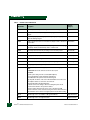
3UHYLRXV5HOHDVHV
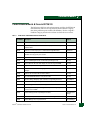
PR
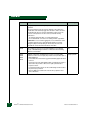
Number
Description
Problem Category
60776
EFCM 8.7 Fabric Log falsely reports ISLs added and removed.
Fabric Persistence
60640
Attempting to upgrade firmware from 8.0 to 8.1 via Group Configuration
Manager results in a erroneous message “Firmware Not Applicable” error
message.
GCM
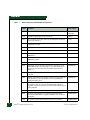
58027
Defining a community name in SNMP dialog with no trap recipient results in the
community name not being displayed in EFCM.
I10K Element
Manager
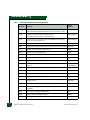
58646
Hardware View is not consistent when showing port failures - partition 0 doesn't
display failures, partition 1 does display failures. Partition 1 shows partition 0's
port failures while partition 0 doesn't display partition 1's failures.
I10K Element
Manager
59302
Firmware load failure to director due to intermittent timeout.
Install/Uninstall
64519
Incorrect firmware version displayed in fabric tree after downgrade to E/OSc
7.1.3.
Install/Uninstall
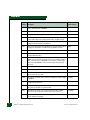
58089
Connectrix manager application logs are not being updated until logs are
opened first.
Logs
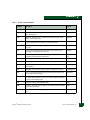
40079
McDATA ES1000 appears as migrated but is not actually migrated.
Migration
42250
Upgrade from EFCM 8.0 to EFCM 8.6 does not migrate user created views.
Migration
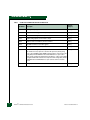
57909
EFCM 8.6 to 8.7: Performance graph information not migrated from EFCM 8.6
(Solaris).
Migration
39635
FL Ports do not show a destination icon and port in performance graphs.
Performance
39830
High / Low critical indicators are not set correctly when open Port Performance
graph from McDATA principal switch.
Performance
40035
Persist fabric does not work properly if connection is lost to a non-McDATA
principal switch. Persist fabric always keys off the principal switch.
Non-McDATA switches do not display in EFCM. When a non-McDATA switch is
the principal switch and the fabric is persisted, incorrect persist fabric updates
will occur if connection is lost to the principal switch.
Persisted Fabric
54223
Fenced port reports as disabled after clearing problem and port placed back
online.
Port Fencing
57403
The user must unblock, block then unblock again to recover a port after a
fencing policy has been invoked.
Port Fencing
56918
Cannot perform port zoning of N_ports attached to the McDATA Qlogic blade
switch module in the server from EFCM.
Ports
63132
Not able to enable a show route between the end devices attached to a switch
blades.
Show Route/Hide
Route
EFCM® Software Release Notes
Version 09.00.00 Rev A
29