1
3201N/3290N USER’S MANUAL
No. 3 [Level]
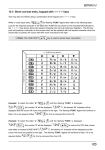
Push the No. 3
key to input the value of 3.
In order to input the value of numeral 3 in the Start/Stop/Scan/Center
frequencies, push the No. 3
Key.
Display Level Adjustment Function by pushing Shift
Key.
On pushing the Shift
Key and then push the No. 3
Key,
Basic Level of vertical axis and Level Step on display could be adjusted.
[Please refer to the Display Level Adjustment section for a detailed
description of basic operation if need.]
No. 4 [SINGLE]
Push the No. 4
key to input the value of 4.
In order to input the value of numeral 4 in the Start/Stop/Scan/Center
frequencies, push the No. 4
Key.
Single Power Meter Adjustment Function by pushing Shift
Key
After pushing the Shift
key on, if No. 4
key is pushed,
Single Power Meter function will be selected.
[Please refer to the section for Single Power Meter using the Power
Meter for detailed description of basic operation if needed.]
76